Where to buy
Check the latest price, availability and delivery on Amazon. Orders are placed on Amazon. We may earn a commission from qualifying purchases.
- Best fanless mini PC for beginners: MeLE Quieter4C Fanless Mini PC, Intel N100, 8GB RAM, 128GB, Windows 11 Pro — Check on Amazon
- MeLE Quieter4C Fanless Mini PC, Intel N150, 8GB RAM, 256GB SSD, Windows 11 Pro — Check on Amazon
- HUNSN RJ42 Micro Firewall Mini PC, Intel N150, 8GB RAM, 128GB SSD, 4 x 2.5GbE LAN — Check on Amazon
- MeLE PCG02 Pro Fanless PC Stick, Intel N100, 8GB RAM, 256GB, Windows 11 Pro — Check on Amazon
- MeLE Quieter3Q Fanless Mini PC, Celeron N5100, 8GB RAM, 256GB, Windows 11 Pro — Check on Amazon
- ZOTAC ZBOX CI337 Nano Fanless Mini PC Barebone, Intel N100 (no RAM, storage or OS) — Check on Amazon
Read the full guide ↓
Disclosure: As an Amazon Associate, reviewstook.com earns from qualifying purchases. Links to Amazon on this page are affiliate links; they cost you nothing extra. Listing details such as price and availability change often, so check the current Amazon listing before you buy.
If this is your first computer purchase in a while — or your first ever — a fanless mini PC is a genuinely kind place to start, provided somebody tells you the truth about it first — so here it is. A fanless mini PC has no fan. Not a quiet fan, not a fan that only spins up sometimes: no fan at all, and no other moving parts either. It makes no noise — a real, literal zero decibels — it cannot clog with dust, and there is no bearing inside to wear out. It is also small enough to hide behind a monitor, cheap to run (they sip a few watts), and simple: most of the picks below arrive with Windows installed, so your first evening is plugging in cables, not building anything.
Now the part the listings will not say out loud. Silence is bought with power, or rather with the lack of it. A computer with no fan can only push a few watts of heat through its own case, so every fanless mini PC is built around a low-power chip — here, Intel’s N100, N150 and an older Celeron. Those chips are good at everyday things: web browsing, documents, streaming video in 4K, video calls and a home media library. They also play games — a specific, honest list: older titles, indie games, retro classics through emulation, and esports games at modest settings. What they cannot do is the thing most “gaming PC” advertising shows: run a big modern release at high settings. There is no graphics card in any machine in this guide, and no fanless box at any price we could verify changes that, because the graphics hardware modern games want produces far more heat than a silent case can shed. If your heart is set on those games played locally, you want a small tower with a fan instead.
There is one cheerful exception: cloud gaming. Services such as GeForce NOW and Xbox Cloud Gaming run the game on a big computer in a data center and send you a video stream of it. Playing that stream is a video job — the one thing these little Intel chips do superbly, with dedicated decoding hardware built in. A silent fanless box can therefore put a modern game on your TV without rendering a single polygon itself — it simply needs a decent internet connection.
One more beginner-specific warning, because this corner of Amazon is full of traps. The word “fanless” is abused. Plenty of popular mini PCs are advertised with words like “silent” and “quiet operation” while a small fan spins away inside them. Every pick below was checked against the maker’s own specifications or an independent teardown review to confirm there is no fan — and a few famous names failed that check or could not be tied to a verifiable listing, so they are not here. If you have never compared an SSD to something called eMMC or wondered whether memory is “soldered,” good — a plain-English glossary below explains every term before it is used against you, alongside a step-by-step walkthrough for your first evening and an honest list of what else you will need to buy.
In this guide
Quick Picks
Short on time, or comparing several options at once? Each row below names a buyer type and the product that suits it.
| Buyer type | Pick | Why it stands out | Link |
|---|---|---|---|
| Best for most beginners | MeLE Quieter4C, Intel N100, 8GB/128GB | The reference silent mini PC: Windows ready, mount in the box, room to add a fast drive later | Check on Amazon |
| Best “nothing to install” | MeLE Quieter4C, Intel N150, 8GB/256GB SSD | The newer chip and a proper SSD already fitted — the upgrades done for you | Check on Amazon |
| Best for a home network project | HUNSN RJ42, Intel N150, 4 x 2.5GbE | Four fast Ethernet ports in a silent case — a firewall and server, not a first desktop | Check on Amazon |
| Best for hiding behind a TV | MeLE PCG02 Pro PC Stick, Intel N100, 8GB/256GB | A whole silent PC in a stick that plugs into the screen and vanishes | Check on Amazon |
| Best on a tight budget | MeLE Quieter3Q, Celeron N5100, 8GB/256GB | Older, slower chip — and a budget-tier route to real silence | Check on Amazon |
| Best for a beginner with a helper | ZOTAC ZBOX CI337 Nano, Intel N100 barebone | A kit you finish yourself: cheapest start, but you add memory, storage and Windows | Check on Amazon |
How These Picks Were Chosen
The first test was the category’s whole reason to exist: proof of no fan. A machine only qualified if its maker documents it as passively cooled — a metal or finned case doing the cooling, with no fan in the parts list — or an independent reviewer who opened one up confirmed the same. That bar is higher than it sounds: several of the best-known mini PCs in this price range use words like “silent” in their listings while a fan spins inside, and at least one popular model’s own listing text admits to a cooling fan. Those are not bad computers; they are simply not fanless, and a beginner who buys one expecting guaranteed silence has been misled. Two further genuinely fanless models — a business mini PC from ASUS and a fanless box from MINIX — were left out because we could not pin down a verifiable Amazon US listing and price for them. A guide should never link you to a guess.
The second test was the budget: each pick is a real Amazon US listing that fits this guide’s budget frame, and because this category’s prices move weekly, always check the live price on Amazon rather than treating any guide figure as a promise. Three picks carry asterisks a beginner must understand before ordering, and each review repeats them. The ZOTAC is a barebone kit: its price buys no memory, no storage and no operating system, so its review adds up the finished machine. The HUNSN is a networking appliance sold in several lookalike versions, so its review tells you exactly which configuration line to check. And the two MeLE Quieter4C builds differ in a way the names hide — one boots from slow storage, the other from a fast SSD — so both reviews spell that out.
We did not use these products ourselves. We read maker specification pages, independent reviews and teardowns, and price-tracking records, and compared the things that decide whether a first silent PC is a pleasure or a puzzle: whether it arrives finished or as a kit, whether its storage is the fast kind or the slow kind, whether its memory can ever be changed, how many screens it can drive, and how it behaves when a job runs long — because a fanless machine’s answer to a long, heavy job is to slow down. One fact shaped the final list and is worth stating openly: on Amazon US, the verified fanless category under $400 is dominated by one specialist maker, MeLE, whose Quieter line was designed for exactly this job. Four of the six picks wear that badge because verification, not laziness, left them standing; the HUNSN and the ZOTAC kit cover the two buyers MeLE does not.
The Words in This Guide, in Plain English
Listings are written for people who already know the vocabulary. You do not need to — you need these thirteen terms, after which every listing in this guide becomes readable.
- Fanless (passive cooling). A fanless computer has no fan; its case is the cooling system. Heat from the chip spreads into the metal shell and drifts away. That is why a fanless case feels warm — sometimes hot — to the touch: the warmth is the cooling working, not failing. It is also why placement matters (see the walkthrough below): a heatsink sealed in a closed cabinet cannot do its job.
- CPU (the processor). The chip that does the computer’s general thinking — opening programs, running Windows, juggling your tabs. Every pick here uses a small, frugal Intel processor: the N100 and N150 (four cores, the current budget standard) or the older Celeron N5100. “Cores” are parallel workers: four is plenty for everyday jobs and light games, not for heavy creative work.
- Integrated graphics (the “GPU” you don’t buy separately). Gaming towers use a separate graphics card to draw the picture; these mini PCs use graphics built into the processor itself, called integrated graphics. It handles video, desktops and light games well and modern blockbusters badly. One critical detail: integrated graphics have no memory of their own, so they borrow some of the computer’s main memory — that borrowing is called shared memory, and it is why memory size matters more on a mini PC than on a tower.
- RAM (memory). The computer’s short-term workspace, measured in gigabytes (GB). More RAM means more programs and tabs open at once before things slow down; the 8GB every pick here has is the honest minimum for Windows 11 with a browser. The trap is how it is fitted. Socketed memory sits in a slot and can be swapped or upgraded later — the HUNSN (pick 3) has a slot, and the ZOTAC kit (pick 6) has an empty slot waiting for a stick you buy. Soldered memory is fixed to the board forever — the PC stick (pick 4) is soldered, and on the N150 MeLE (pick 2) memory is likewise the part you do not upgrade later, so buy the size you need on day one. Where the maker’s documents do not say which kind a build uses, this guide does not guess.
- Storage: SSD versus eMMC. Storage is where Windows, programs and files live — also measured in GB. Two kinds appear in this guide and they feel completely different. An SSD (the fast kind; “NVMe” is its quickest common form) makes a computer feel snappy. eMMC is slower, cheaper storage from the budget-tablet world; a machine booting from eMMC starts and loads noticeably slower. Picks 1 and 4 run on eMMC; pick 2 has a proper SSD fitted; pick 1 also has an empty internal slot (an “M.2 slot”) where a fast SSD can be added later.
- Resolution. How many dots make up the picture, written as width × height. 1920 × 1080 (“1080p” or Full HD) is the standard sharp picture; 3840 × 2160 (“4K”) is four times as many dots. More dots look crisper and take more graphics power to produce — which is why these machines display a 4K desktop and 4K video happily (easy work) but render games at 1080p or below (hard work).
- Refresh rate. How many times per second the screen redraws, measured in hertz (Hz). A basic monitor redraws 60 times a second (60Hz); gaming monitors go faster. Your monitor can only show the rate it is set to, and Windows often starts at a lower setting than the screen supports — the walkthrough below includes the one-minute fix.
- Upscaling. A trick for making games run faster: the computer renders the picture at a lower resolution, then stretches it intelligently to fill the screen. The famous version, NVIDIA’s DLSS, does not exist here — it belongs to NVIDIA graphics cards, and no pick in this guide has one. What these Intel machines honestly offer instead is simpler: turn the game’s own resolution or render-scale setting down, accept modest settings, or let a cloud service do the heavy rendering. Anyone promising more than that from a 6-watt chip is selling something.
- Power brick. The small box on the power cable — like a laptop charger — that converts wall power for the machine. Every pick here uses one (the stick takes USB-C power). It needs a home: not buried behind books where its warmth cannot escape, and close enough that the cable is not stretched tight.
- Prebuilt versus barebones. A prebuilt (or “configured”) machine arrives finished: memory, storage and Windows inside, ready to plug in. A barebone is a kit — the case, chip and board, with memory, storage and the operating system left for you to buy and fit. Barebones look cheaper because they are not yet computers. Pick 6 is a barebone; picks 1, 2, 4 and 5 are finished machines; pick 3 is sold both ways under lookalike names, which its review flags.
- New versus renewed. “Renewed” or “refurbished” means a used machine that has been checked and resold, usually cheaper, usually an older business model. It is a legitimate way to buy, but it is not what is in this guide: all six picks are sold new. The ZOTAC is not renewed either — it is an unfinished new kit, a different thing entirely.
- Operating system (Windows). The software the whole computer runs on. Picks 1, 2, 4 and 5 arrive with Windows 11 Pro installed and licensed. The ZOTAC kit includes no operating system at all — Windows costs extra, the free alternative is Linux — and the HUNSN appliance expects you to install your own system. “No OS included” is the most expensive sentence a beginner can skim past.
- Platform. Shorthand for the generation of the chip and the design around it. Here it matters practically: the N100 and N150 are the current generation and the Celeron N5100 is the previous one — a real step slower at everything. Note too that the N150 is not a leap over the N100, the same design with the clocks turned up slightly. Buy on the configuration and the price, never on the chip name alone.
The 6 Best Fanless Mini PCs Under $400 for Beginners
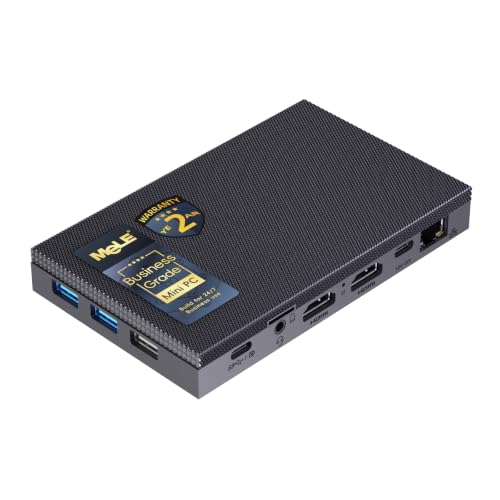
MeLE Quieter4C Fanless Mini PC — Intel N100, 8GB RAM, 128GB (Business Grade)
Who it suits: A first-time buyer who wants the standard, sensible silent PC — finished, Windows installed, silent at a desk or behind a TV, with one well-signposted upgrade available later.
This is the machine the whole category is compared against, and for a beginner that is exactly the point. The computer is a flat slab about 5.2 by 3.2 inches and 0.7 inches thick, with no fan anywhere inside it. Heat from its Intel N100 processor — four cores, up to 3.4 GHz, sipping about 6 watts — spreads into the case and leaves silently into the room. MeLE rates it at 0 dB, and reviewers who have opened and stress-tested it confirm nothing inside spins. In daily life that means a desktop you cannot hear from a foot away, drawing roughly 10 watts in ordinary use and about 15 watts at the wall with a 4K transcode and a benchmark running together, in one reviewer’s measurements — and safe to leave running around the clock.
The beginner-friendly details are the ports. Two full-size HDMI sockets plus a USB-C port with display output can run three 4K screens at once, there is a wired gigabit Ethernet socket alongside Wi-Fi 5 and Bluetooth 5.1, a microSD card reader, and a mounting plate in the box, so the slab can screw onto the back of a monitor and disappear. Windows 11 Pro is installed. This build pairs 8GB of memory with 128GB of storage, and because this category’s prices move often, check the price on Amazon before you buy.
Two honest limitations, both fixable or foreseeable. First, that 128GB of built-in storage is eMMC — the slow kind from the glossary — and reviewers of this machine advise putting Windows on a proper SSD for a computer that feels quick rather than merely adequate. The fix is designed in: the slab keeps an M.2 slot free, ready for an NVMe or SATA SSD up to 4TB, and the spending section below prices it honestly as machine-plus-drive. Second, the case gets warm, then genuinely hot, under long heavy loads — owners say so — and in one reviewer’s combined test the processor peaked around 82°C while the storage reached the low 70s, with speeds stepping down on marathon jobs. Browsing, streaming, documents and light games never meet that ceiling; a two-hour video export lives there.
- Genuinely fanless and verified: 0 dB, no moving parts, happy running 24/7.
- Three 4K screens at once (dual HDMI plus USB-C), wired Ethernet, and a monitor mount included.
- A free M.2 slot for a fast SSD up to 4TB — the one upgrade that fixes its one slow part.
Honest limitation: The included 128GB is slow eMMC rather than an SSD, and the case runs hot with speeds stepping down under sustained heavy loads.
Choose it if you want the default silent desktop and are content to add a fast drive later (or never, if your use is light). Skip it if you want fast storage fitted from the factory with nothing to open — that is the N150 build directly below.

MeLE Quieter4C Fanless Mini PC — Intel N150, 8GB RAM, 256GB SSD (Business Grade)
Who it suits: The beginner who would rather pay a little more once than open a case later — the newer chip and the fast storage, fitted at the factory.
In 2025 MeLE refreshed its Quieter4C around Intel’s N150, and this Business Grade build is the version of that refresh that makes sense. The chip’s name oversells it: the N150 is the N100 with the clocks turned up — the same four cores, boosting to 3.6 GHz instead of 3.4, with a slightly quicker graphics block. Nothing about the machine’s character changes. It is the same fanless slab and the same 0 dB silence, the same three-4K-screen output over dual HDMI and USB-C, the same gigabit Ethernet and monitor mount in the box. What actually changes is the storage line, and for a beginner it is the change that matters: where the N100 build above boots from 128GB of slow eMMC, this one carries a 256GB NVMe SSD — the fast kind — already installed. The upgrade the other review tells you to plan for has simply been done.
Pricing in this category moves often, so check the price on Amazon before you buy. The N150’s built-in video hardware handles 4K streams the way the N100’s does — transcoding a film from a home library to a phone is precisely the short, hardware-accelerated burst this silicon is good at — and the always-on draw stays in the same few-watts class.
Two honest notes before you buy. First, buy this machine for its configuration, not its chip name: in the same passively cooled chassis, the N150’s advantage over the N100 is a clock bump, not a new class of speed, and if the N100 build is sitting at one of its frequent deep discounts the experience is near-identical for much less money. Second, 8GB of memory is the working minimum for Windows 11 with a healthy pile of browser tabs, and on this build memory is not the part you upgrade later — storage is, through the same M.2 path, when 256GB eventually fills. If your plans involve lots of virtual machines, containers or heavy multitasking, the honest answer is a bigger machine, not this one stretched. Gaming expectations stay exactly where this guide sets them for every pick: light, older, emulated or streamed.
- The refreshed chip and a factory-fitted 256GB NVMe SSD — the two upgrades N100 buyers make, already done.
- The same verified fanless design: 0 dB, three 4K outputs, monitor mount in the box.
- A factory-fitted SSD build in the mid-range of this guide — check the price on Amazon.
Honest limitation: 8GB of memory is a ceiling you live with rather than upgrade past, and the newer chip is a refresh, not a revelation.
Choose it if you want the silent MeLE experience with nothing to install and no slow-storage compromise. Skip it if the N100 build above is discounted hard when you look — save the difference with a clear conscience.
HUNSN RJ42 Micro Firewall Mini PC — Intel N150, 8GB RAM, 128GB SSD, 4 x 2.5GbE LAN
Who it suits: Honestly? Not a first-desktop beginner. This is the pick for the reader whose real project is a home network — replacing a consumer router with firewall software, or running a silent server — and who is comfortable setting things up themselves.
Every other pick in this guide is a desktop computer that happens to be silent. The RJ42 is a network appliance that can double as one. Its aluminum case is the heatsink — the maker’s manual specifies a fanless design at 0.00 dB — and the back panel explains its existence: four Ethernet ports, each running at 2.5 gigabits, on Intel I226-V controllers, the chipset the open-source firewall world asks for by name. Inside the configured listing identified for this guide, an Intel N150 is paired with 8GB of DDR5 memory in a single slot you can later raise to 32GB, a 128GB SSD, and room to grow — two M.2 slots for NVMe drives plus a bay for a 2.5-inch drive. Display outputs (two HDMI, a DisplayPort and a USB-C, per the family manual) let it run as an ordinary small desktop when it is not routing the house. Check the price on Amazon for the exact configuration you are ordering, because this family sells in many configurations at different tiers.
For its intended buyer, this is the most capable silent box in the guide: router, firewall, home-server host and light desktop in one fanless brick that idles on single-digit watts and makes no sound at all. Its desktop side is the standard N150 story — comfortable for browsing, office work, 4K playback and light games, under the same passive-cooling ceiling as everything else here.
The limitations are about fit, and beginners should weigh them at full size. There is no Wi-Fi in this listing at all — it is a wired machine, so if it replaces your router you will need a separate wireless access point, as the independent research on this model warns. It also arrives speaking network, not living room: expect to install your own operating system and do your own configuration, which is the hobby itself for its intended buyer and a chore for everyone else. And the buying trap is real — HUNSN sells the RJ42 in barebone (empty) and configured forms under near-identical names, and the wider family includes an earlier N100 generation. Before ordering, read the listing’s configuration line — processor, memory, storage — and confirm it describes the configured N150 machine this guide means, not an empty kit wearing the same name.
- Four Intel 2.5GbE ports — the proper firewall specification — in a fanless aluminum case.
- Unusual room to grow: memory slot up to 32GB, two M.2 slots and a 2.5-inch drive bay.
- Doubles as a desktop, with N150 performance and three kinds of display output.
Honest limitation: No Wi-Fi, a set-it-up-yourself appliance personality, and lookalike barebone and older-generation listings that punish a careless click.
Choose it if the silent PC you actually want is a silent network — firewall, router or home server first, desktop duties second. Skip it if you want a friendly finished desktop; the two MeLE picks above are that machine.

MeLE PCG02 Pro Fanless PC Stick — Intel N100, 8GB RAM, 256GB
Who it suits: The beginner whose ideal computer is invisible — plug a stick into the back of the TV, and the TV becomes a silent Windows PC.
The PCG02 Pro takes the fanless idea to its limit: the whole computer is a stick. Inside is the same Intel N100 as the top pick — four cores, up to 3.4 GHz — with 8GB of memory and 256GB of storage, cooled entirely by its own small shell; MeLE’s manual for the line describes a fanless design for silent operation. It drives two 4K displays over its dual HDMI connections, carries gigabit Ethernet alongside Wi-Fi 5 and Bluetooth 5.1, takes power over USB-C, accepts a microSD card up to 2TB for extra files, and even supports auto power-on, so it can wake with the screen. Like everything in this category, its price moves, so check the price on Amazon.
For a beginner, the appeal is how little there is to get wrong. No case to place, no mount to fit, no box on the shelf at all: it hides behind a living-room TV as a streaming and light-gaming station — cloud gaming services, retro emulation, indie titles — adding no noise and no clutter. Behind a bedroom monitor it is a silent second PC; in a dorm, a computer that leaves in a jacket pocket. If the thought of setting up a computer has been putting you off, this pick removes it.
The compromises are structural. Storage is eMMC — 256GB of the slow kind, fixed — and there is no M.2 slot inside a stick, so internal expansion ends at the microSD slot and USB drives. The 8GB of memory is soldered, permanent by construction. And a stick has the least metal of any pick here to spread heat into, so this category’s sustained-load rule applies with emphasis: bursty work — browsing, video, light games, streamed games — is its home territory, while long heavy sessions will see it warm and slower. One practical check before ordering: a stick lives or dies by the space behind your screen — it needs an HDMI socket with room around it and power within cable reach, so look before you fall in love.
- A complete fanless Windows PC in stick form — nothing on the desk, nothing in the cabinet, no noise.
- Dual 4K HDMI output, wired Ethernet, USB-C power and microSD expansion up to 2TB.
- A premium-tier disappearing act for a stick PC — check the price on Amazon.
Honest limitation: Fixed eMMC storage and soldered memory with no internal upgrade path, and the least material to shed heat in the guide — long heavy sessions are not its job.
Choose it if the computer has to disappear behind a screen and the work is media, browsing and light or streamed games. Skip it if you might ever want to open the machine and improve it — the Quieter4C slab at the top of this guide is the same silence with a future.

MeLE Quieter3Q Fanless Mini PC — Celeron N5100, 8GB RAM, 256GB
Who it suits: The budget-first beginner — a media corner, a kitchen screen, a spare-room desk, a music system endpoint — who wants true fanless silence in the budget tier of this guide.
The Quieter3Q is the previous generation of the idea the Quieter4C perfected, and its age is exactly what makes it cheap. The case is the thinnest here at about 18mm — a grooved plastic top over a metal base, the plastic letting the wireless antennas inside work — and there is no fan in the design; the case sheds heat into the room, idling at a few watts and drawing roughly a dozen under load in independent testing. Its Celeron N5100 is a four-core chip from Intel’s Jasper Lake generation, boosting to 2.8 GHz: a clear step below the N100 in speed, paired here with 8GB of memory and 256GB of storage, two full-size HDMI outputs for a pair of 4K screens, gigabit Ethernet, and — the detail owners actually use — an M.2 slot you can fill, so storage can grow even though the platform is old. It sits in the budget tier depending on build and seller, undercutting every other pick in this guide — check the price on Amazon.
Judge it by its chip’s age and it rewards you. As a media endpoint it is in its element: 4K streaming, music-server duty beside a hi-fi (the job its silence was practically designed for), browsing, documents and retro emulation all run without a whisper, because none asks the processor to sprint for long. Reviewers who measured it found a modest machine that does home-theater work properly, 4K HDR playback included.
The limitations are the discount viewed from the other side. Jasper Lake is 2021 silicon: everything is a beat slower than the N100 picks, the graphics are a generation behind, and game ambitions should stop at old, light or streamed. MeLE’s own materials disagree with each other about this model’s wireless — the store title for current builds lists Wi-Fi 5 and Bluetooth 5.1 while a specification table elsewhere shows Wi-Fi 6 and Bluetooth 5.2, matching the earlier review units — so treat the exact listing in front of you as the authority on the build you are buying, and check the wireless line when the box arrives. And like every fanless box here, sustained heavy loads warm the case and trim the speed — this smaller, older design arrives at that ceiling sooner.
- The budget-tier pick for true fanless computing — check the price on Amazon.
- The thinnest case in the guide at ~18mm, with dual 4K HDMI and an M.2 slot you can fill later.
- Idles at a few watts; proven at media endpoints and quiet corners.
Honest limitation: Previous-generation performance and graphics, plus maker documents that contradict each other about the wireless specification — verify the exact build on the listing.
Choose it if the job is media, browsing or a light desk and silence outranks speed. Skip it if the gap to the N100 Quieter4C has closed when you look — when the newer machine is within easy reach, take the newer machine.

ZOTAC ZBOX CI337 Nano Fanless Mini PC Barebone — Intel N100 (No RAM, Storage or OS)
Who it suits: A beginner with a helper — a friend, partner or family member who has built before — or a beginner who actively wants to learn by finishing a machine. On your own, first time, with no help available, read the limitation line twice.
Zotac’s C-series nano line has been the fanless specialist’s other badge for years, and the CI337 is its current entry built around the Intel N100. The listing’s own title says “Fanless Silent”: the chip sits in a passively cooled nano chassis with HDMI and DisplayPort outputs, and what arrives is a barebone — the computer minus memory, minus storage, minus operating system, stated plainly in the listing itself. It carries the lowest sticker in this guide. That sticker is real. It is just not the price of a working computer, and this review will not pretend otherwise.
Here is the honest arithmetic, in glossary terms. To the barebone sticker you must add a DDR5 memory stick of the laptop-style SO-DIMM kind, an M.2 SSD, and an operating system — Windows costs money, Linux costs none — and only then does the CI337 become a computer. A modest parts basket keeps the finished machine inside this guide’s budget, and if compatible parts are already sitting in a drawer, the finished cost is the sticker price and nothing more, which is the barebone bargain at its best. In exchange for the assembly you get choices the sealed picks deny you: your memory size, your drive, your operating system. For a beginner with a helper at their elbow it is also genuinely educational — you will have held most of the glossary’s terms by the end of the evening.
The limitations mirror the freedoms. There is no Windows license in the box and no software support story; if anything in the build misbehaves, the troubleshooting is yours. The cost advantage evaporates if you fill it with premium parts bought new at full price, so price the whole basket before ordering, not after. And the ceiling is the one this whole guide lives under: an N100 behind passive cooling does light work, media and light gaming, and no SSD choice lifts it. Buy the CI337 because you want to build, not because a benchmark told you to.
- Zotac’s C-series is its long-running fanless line, and this N100 kit is the budget-tier way into this guide — check the price on Amazon.
- You choose the memory, storage and operating system; ideal if parts are already on the shelf.
- HDMI and DisplayPort outputs, in a passively cooled nano case with no fan to wear out.
Honest limitation: The sticker is not a computer — memory, storage and an operating system are all extra, and the savings shrink or vanish if every part is bought new at full price.
Choose it if you have compatible parts waiting, or a helper and a free evening. Skip it if you want to unbox a finished computer — every other pick here is one.

Comparison Table
| Product | Chip | Best use | Link |
|---|---|---|---|
| MeLE Quieter4C (N100, 8GB/128GB) | Intel N100 | The default silent desktop for beginners, with an M.2 upgrade path | Check on Amazon |
| MeLE Quieter4C (N150, 8GB/256GB SSD) | Intel N150 | Newer chip and fast SSD storage, nothing to install | Check on Amazon |
| HUNSN RJ42 (N150, 4 x 2.5GbE) | Intel N150 | Silent firewall, router and home server for tinkerers | Check on Amazon |
| MeLE PCG02 Pro Stick (N100, 8GB/256GB) | Intel N100 | A PC that disappears behind the TV | Check on Amazon |
| MeLE Quieter3Q (N5100, 8GB/256GB) | Celeron N5100 | Cheapest verified silence, for media corners | Check on Amazon |
| ZOTAC ZBOX CI337 Nano (barebone) | Intel N100 | A fanless kit for beginners with parts or a helper | Check on Amazon |
Your First Evening: Setup, Step by Step
Two picks need a word before step 1. The ZOTAC kit (pick 6) must first be built — memory stick and SSD fitted, then Windows or Linux installed from a USB stick; an evening in itself, ideally with your helper. The HUNSN (pick 3) may likewise need its operating system installed. Every other pick starts at step 1.
- Place the machine in open air. A fanless case is its own heatsink, so it needs room air on all sides: on the desk, on a shelf, or — for the two Quieter4C builds — screwed to the back of the monitor with the mount in the box. Never bury it in a drawer, a sealed TV cabinet or a pile of books, and keep it out of direct sun. The stick (pick 4) simply plugs into the TV and lives there.
- Give the power brick a home. The little box on the power cable gets warm too. Rest it on a hard surface with air around it, not under a rug or behind cushions, cable running loose rather than stretched tight. The stick takes its power over USB-C — same rule.
- Connect the screen to the machine’s picture outputs. Use an HDMI socket on the mini PC (picks 1, 2, 4 and 5), HDMI or DisplayPort on the ZOTAC, or HDMI, DisplayPort or USB-C on the HUNSN. One cable is all a single screen needs.
- Add keyboard, mouse and — if you can — a network cable. Wireless peripherals are fine, but plug in a wired Ethernet cable if the machine sits anywhere near your router: wired is faster, steadier, and it is what makes cloud gaming feel local.
- Switch on and let Windows finish its homework. A first boot can be slow; Windows will want updates and drivers. Connect to your Wi-Fi if you are not wired, run Windows Update until it stops finding things, and restart when asked. Judge nothing about its speed until this is done.
- Set your monitor’s real refresh rate. Windows often starts at a low setting. Go to Settings, then System, then Display, then Advanced display, and choose the highest refresh rate your screen offers. Thirty seconds, and a screen you paid for is finally running at full speed.
- Check that the machine you received is the machine you ordered. Open Settings, then System, then About, and compare the processor, memory and storage against the listing. This step matters most for the HUNSN, whose family includes barebone and older-generation lookalikes, and for the Quieter3Q, whose maker documents disagree about the wireless specification — confirm the Wi-Fi line here too.
- Install a game store and try something light. Install Steam (free) and start with an older or indie title, or open a cloud gaming service in the browser if your connection allows. That is the honest shape of gaming on these machines — and on a silent box behind a TV, a pleasant one.
What Else You Will Spend
No pick here includes a screen, keyboard or mouse, and no price pretends to. Budget for a monitor first if you do not own one — it is the one essential extra, it will outlive this computer, and it is never part of any pick’s price. Peripherals from an old laptop or desktop will almost certainly work; no prices are quoted for them, because the research verified none.
Three picks also carry a “machine + fix” catch, priced honestly up front. The N100 Quieter4C (pick 1) is machine plus a modest M.2 SSD, for the day its slow eMMC storage starts to annoy you — the slot is there, the drive is the fix, and no component price is claimed for it. The ZOTAC (pick 6) is machine plus memory, plus storage, plus an operating system: the whole basket is the price, and a modest basket keeps the finished total within this guide’s budget. The HUNSN (pick 3) is machine plus a wireless access point, if it replaces your router and your home still needs Wi-Fi. The stick (pick 4) may eventually ask for a microSD card when its 256GB fills. None is a hidden flaw; all four are flagged in the reviews above.
Upgrades, in Plain Terms
Here is everything “upgrading” can honestly mean here. Storage can grow where a slot exists: pick 1 has a free M.2 slot, pick 5 has an accessible one, pick 2 can take a larger drive later, and pick 3 swallows extra drives readily. Memory can grow only where it is socketed — pick 3’s slot goes to 32GB, and pick 6 takes whatever stick you fit; on the soldered picks, the memory you buy is the memory you keep. And the sentence beginners most need to hear plainly: there is no graphics-card upgrade for any fanless mini PC. The graphics are part of the processor, there is no slot for a card, and no purchase changes that. If you outgrow the gaming here, the next step is a cloud subscription or a different computer — not a part.
How to Choose
- Start with the room. Bedroom, studio, listening room or always-on duty: fanless. Noisy office where a small fan would never be heard: a fanned mini PC gives more speed per dollar, and that is a fair trade.
- Buy finished unless building is the hobby. Picks 1, 2, 4 and 5 are computers out of the box. Pick 6 is a project; pick 3 is a specialist tool.
- Prefer the SSD configuration. Fast storage is the difference between “snappy” and “sluggish” at this level: pick 2 has it fitted, pick 1 has the slot for it.
- Buy memory on day one. Where memory is soldered or fixed, 8GB is what you will have in year three. If your plans are bigger than browsing and media, say so with the configuration, not with hope.
- Match the chip to the job, then check the live price. N100 and N150 are near-twins; the N5100 is a real step down and priced like it. Configuration should decide between the twins — and this category’s prices breathe weekly, so check the live price on Amazon, since patience is often rewarded.
Common Buying Mistakes
- Paying for a “quiet” mini PC that turns out to have a fan inside. If the maker’s own specifications do not say fanless, it has a fan.
- Expecting gaming-tower performance from a 6-watt chip. Decide whether you want silence or speed first.
- Sealing the heatsink in a cabinet. A fanless PC shut inside a closed TV unit cooks in its own heat.
- Comparing the ZOTAC’s barebone sticker with finished PCs. Total the whole basket — memory, storage, operating system — before concluding anything is cheaper.
- Skimming past “no OS included.” It is the most expensive sentence in this category.
- Ordering the wrong HUNSN. Barebone and configured versions share a name; read the configuration line of the exact listing.
- Burying the power brick. It cools itself the same way the PC does — with room air.
Final Recommendation
- Most beginners: MeLE Quieter4C, Intel N100, 8GB/128GB.
- Nothing-to-install buyers: MeLE Quieter4C, Intel N150, 8GB/256GB SSD.
- Living rooms: MeLE PCG02 Pro PC Stick.
- Tightest budgets: MeLE Quieter3Q.
- Home-network projects: HUNSN RJ42.
- Learners with a helper: ZOTAC ZBOX CI337 Nano barebone.
For a first silent computer, the choice is really between the two Quieter4C builds. Take the N150 build if the budget stretches: the newer chip and the fast SSD are fitted, and there is nothing to open or add. Take the N100 build if it is sitting at one of its frequent deep discounts — the silence and the screens are identical, and its one slow part has a designed-in fix. The stick is the pick when the computer must disappear, the Quieter3Q when money is tightest, and the HUNSN and ZOTAC are for readers who know exactly why they want them. For the wider fanless picture without the beginner framing, see Best Fanless Mini PC Under $400; if silence turns out not to be the priority, Best Mini PC For Beginners Under $400 covers the fanned alternatives, and for tight spots, see Best Fanless Mini PC For Small Spaces Under $400.
Frequently Asked Questions
Is a fanless mini PC really completely silent?
Yes. There is no fan and no other moving part, so there is no mechanical noise at all — 0 dB, not “quiet for a PC.” That guarantee is what the category charges its small premium for.
Can a beginner actually game on one of these?
Yes, within the honest list: retro emulation, indie and older titles, esports games at modest settings, and cloud gaming, where the game is rendered in a data center and these chips simply decode the video — the job they are best at. Modern blockbusters rendered locally are beyond every pick here.
What about 1440p gaming on a fanless mini PC?
Rendered locally, no: 1440p needs graphics power far beyond a low-power integrated chip. Streamed, yes: a cloud service can send a high-resolution picture and these boxes will display it in silence. That distinction is the whole story, and Best Fanless Mini PC For 1440p Gaming Under $400 explores it in full.
Which pick should a complete beginner buy?
The N150 Quieter4C if the budget allows, the N100 Quieter4C if it does not. Both arrive finished and silent, drive up to three screens, and ask nothing of you beyond the walkthrough above. Leave the HUNSN and the ZOTAC kit to the readers who want a project.
- Best Fanless Mini PC Under $400
- Best Fanless Mini PC For Small Spaces Under $400
- Best Fanless Mini PC For Streaming Under $400
- Best Fanless Mini PC For 1440p Gaming Under $400
- Best Fanless Mini PC Under $500
- Best Fanless Mini PC Under $700
- Best Mini PC For Beginners Under $400
- Best Budget Gaming PC Under $400


