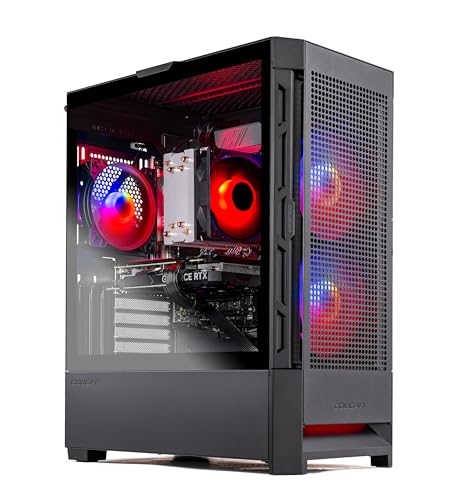
Where to buy
Check the latest price, availability and delivery on Amazon. Orders are placed on Amazon. We may earn a commission from qualifying purchases.
- Best 1440p value: Skytech Blaze4 Mini, Ryzen 7 5700, RTX 4060 Ti — Check on Amazon
- CyberPowerPC Gamer Xtreme VR GXiVR8040A14, Core i7-13700F, RTX 4060 Ti 16GB — Check on Amazon
- Thermaltake LCGS Quartz i1460, Core i5-14400F, RTX 5060 — Check on Amazon
- Skytech Nebula, Ryzen 5 5600X, RTX 4060 Ti — Check on Amazon
See 2 more Amazon options
- CyberPowerPC Gamer Xtreme VR GXiVR8060A24, Core i5-13400F, RTX 4060 — Check on Amazon
- Skytech Archangel, Core i5-14400F, RTX 4060, 32GB RAM, 2TB SSD — Check on Amazon
Read the full guide ↓
Disclosure: As an Amazon Associate, reviewstook.com earns from qualifying purchases. Links to Amazon on this page are affiliate links; they cost you nothing extra. Listing details such as price and availability change often, so check the current Amazon listing before you buy.
Two honest statements frame everything below, and a 1440p shopper deserves both before any product names. The first is about the words in this guide’s title: $1,200 is not entry-level money — entry level is the $400–$800 world of first towers and 1080p at sensible settings — and twelve hundred dollars is mid-range money spent by console graduates and first-serious-PC buyers. The second is about what “for 1440p gaming” actually promises at this ceiling, because the phrase hides a distinction that decides whether you are delighted or disappointed: the difference between a game rendered at 2560×1440 and a game merely displayed on a 2560×1440 screen. A PC can output a 1440p signal while rendering internally at a much lower resolution and upscaling the result, and at lower budgets that quiet substitution is the whole product. At $1,200 it mostly stops being necessary. The graphics cards in this guide — RTX 4060 Ti class and the current-generation RTX 5060 — genuinely render the majority of current games natively at 1440p at high settings, and reserve upscaling for the heaviest releases rather than using it as a permanent crutch. That is the real thing this budget buys, and this guide grades every pick on it: how much of your 1440p gaming is native, how much is upscaled, and how gracefully each machine handles the titles where native is out of reach.
One more framing point before the picks, because it changes the arithmetic: none of these prices includes a monitor. A 1440p panel is a separate purchase that lives outside every figure in this guide, and the monitor pairing section below treats it that way — as its own decision with its own budget. What the $1,200 buys here is the tower that makes a 1440p screen worth owning. The six machines below were chosen for exactly that job: a compact 4060 Ti build positioned in the more accessible part of this budget, a 16GB version of the same card whose extra graphics memory is the single most 1440p-relevant specification in the guide, a current-generation RTX 5060 build, a second 4060 Ti option whose value depends on its current positioning, and two RTX 4060 machines that approach 1440p through upscaling — one positioned in the lower part of the budget, one that trades graphics class for memory and storage. Check the current price on Amazon for each pick before you buy, as listings change often.
In this guide
Quick Picks
Short on time, or comparing several options at once? Each row below names a buyer type and the product that suits it, with a link to the listing.
| Buyer type | Pick | Why it stands out | Link |
|---|---|---|---|
| Best 1440p value | Skytech Blaze4 Mini, Ryzen 7 5700, RTX 4060 Ti | Native 1440p class in a compact case — check price on Amazon | Check on Amazon |
| Best 1440p longevity | CyberPowerPC GXiVR8040A14, RTX 4060 Ti 16GB | Double the graphics memory — texture headroom at 1440p for years | Check on Amazon |
| Best current-generation pick | Thermaltake LCGS Quartz i1460, RTX 5060 | Newest GPU generation, DLSS 4 — check the current price on Amazon | Check on Amazon |
| Best second 4060 Ti option | Skytech Nebula, Ryzen 5 5600X, RTX 4060 Ti | Same GPU class as the top pick — check price on Amazon | Check on Amazon |
| Best reason to spend less | CyberPowerPC GXiVR8060A24, RTX 4060, DDR5 | 1440p through upscaling, positioned in the lower part of this budget — check price on Amazon | Check on Amazon |
| Best nothing-to-add build | Skytech Archangel, 32GB RAM, 2TB SSD | The memory and storage upgrades are already done | Check on Amazon |
How These Picks Were Chosen
The budget was applied as a ceiling, not a target, and the grading was done at 1440p rather than at the resolution that flatters a listing. Every product below is a real Amazon listing positioned at or below the $1,200 ceiling — check the current price on Amazon before you buy, as listings change often. Anything whose graphics card belonged to a lower tier at this budget was excluded unless something else genuinely compensated, because the entire point of this budget for a 1440p buyer is the step up in GPU class: RTX 4060 Ti or RTX 5060 territory, where native 1440p rendering is the norm rather than the exception.
Three 1440p-specific filters sat on top of the raw specifications. The first is the native-first filter: a pick earns its place by rendering at 2560×1440 without assistance in most of the current catalogue, with upscaling as the reserve tool for demanding releases — not the other way round. The two RTX 4060 machines fail that test and are included anyway, deliberately, because they are honest about it and their prices or configurations argue for them; their reviews say plainly that their 1440p is upscaled 1440p. The second filter is graphics memory. At 1440p, textures are larger and frame buffers fuller than at 1080p, so the 8GB-versus-16GB question — a future-proofing nicety at 1080p — becomes a present-tense texture-settings question here, and it is why the 16GB machine ranks second in this guide. The third filter is the nothing-to-fix rule carried over from the base guide: 16GB of system memory and 1TB of storage as floors, so a first PC does not need a part installed in its first month.
We did not use these products ourselves. Our comparisons work from the makers’ listings and specification pages — graphics cards, processors, memory type and capacity, storage, power supplies and case formats — with preference given to listings that publish their numbers in full. A note on method for the upscaling claims: DLSS figures in this guide use NVIDIA’s published scaling factors, stated in the next section, and apply only to the NVIDIA cards here — every pick in this guide is an NVIDIA build, and no AMD machine appears, so no DLSS claim is made for hardware that lacks it. Frame generation is treated throughout as what it is — interpolation that smooths motion in supported titles without reducing input latency — never as native performance.
Rendered at 1440p vs Displayed at 1440p: The Distinction This Guide Runs On
Every graphics card in this guide can drive a 1440p monitor. That sentence is true of a far cheaper entry-level machine too, which is why it means so little. A display’s resolution is simply the grid of pixels the screen shows; the render resolution is the grid the graphics card actually computes before anything reaches the screen. When the two match, you are gaming natively, and every texture, shadow and edge is calculated at full 1440p detail. When the render resolution is lower, an upscaler stretches the smaller image to fill the panel — intelligently, often impressively, but the information that was never rendered cannot be recovered, and the result is softer than native in ways that show most in fine detail, foliage, fences, hair and text. Sellers blur this line constantly, because “runs games at 1440p” is technically true of both. This guide does not blur it: each review states which kind of 1440p its pick delivers, title class by title class.
DLSS Super Resolution is the upscaler on every card here, and its quality presets follow NVIDIA’s published scaling. At a 1440p output, DLSS Quality renders internally at roughly 1707×960 — about two-thirds of the output in each dimension — and Performance renders at roughly 1280×720, half in each dimension. Quality is the setting this guide treats as the demanding-title route: the internal image is close enough to native that most players, in motion, will not reliably tell the difference, and it buys substantial performance headroom. Performance is the fallback of last resort at this tier, a visible step down in fine detail, appropriate for the single heaviest release rather than a library-wide default. For completeness, the same factors explain the numbers quoted in 4K guides: at a 4K output, Quality renders around 2560×1440 internally and Performance around 1920×1080 — which is also a useful way to understand this tier’s place in the world, since a machine rendering 1440p natively is doing the work that a 4K machine’s Quality mode asks of much more expensive hardware.
Frame generation needs its own paragraph because it is the most misread feature at this tier. DLSS frame generation — and the multi frame generation on the RTX 5060 pick — inserts generated frames between rendered ones, so the displayed frame rate climbs while the rendered workload does not. Motion looks smoother, and in supported titles it can make a heavy game feel fluid on a high-refresh panel. It does not reduce input latency, because your inputs are still sampled at the rendered rate, and it exists only in titles that implement it. The honest way to buy at this tier is the way this guide grades: native performance first, DLSS Quality as the planned route for demanding games, frame generation as a bonus where it appears. A card bought on its generated-frame numbers alone is a card bought on a number that vanishes in the first unsupported game you launch.
Finally, graphics memory — the specification 1440p shoppers most often underrate. Rendering at 2560×1440 fills the frame buffer with larger textures and heavier effects than 1080p, and when a card’s memory runs out, the symptoms are not graceful: texture settings the game quietly lowers, stutter as assets stream, or settings menus that simply refuse the top tier. Eight gigabytes, which every pick here except one carries, is workable at 1440p today with sensible texture choices in most titles, and DLSS Quality relieves it further by rendering internally below native. Sixteen gigabytes removes the negotiation for years. Neither figure makes a card faster; memory decides how long the card you bought stays the card you meant to buy, and at this resolution that decision arrives sooner than it does at 1080p.
The 6 Best Entry Level Gaming PCs for 1440p Gaming Under $1200
Skytech Blaze4 Mini — Ryzen 7 5700, RTX 4060 Ti 8GB, 16GB DDR4, 1TB SSD
Who it suits: The 1440p buyer who wants the strongest native-rendering graphics card this budget’s sale prices can reach, in a case sized for a desk or TV stand rather than a tower’s footprint.
Start with why this machine tops a 1440p guide. The RTX 4060 Ti is the card that changes the resolution conversation: where the plain 4060 treats 1440p as an upscaling exercise, the Ti renders the large majority of current games natively at 2560×1440 at high settings, and reaches for DLSS Quality — an internal render around 1707×960, visually near-native in motion — only when a demanding release asks more than the card holds. That is precisely the profile this guide exists to find, and Skytech packages it with a Ryzen 7 5700, 16GB of DDR4 memory, a 1TB SSD and a 650W Gold-rated power supply in a compact mini case. Then there is its positioning, which is the real headline: it places this tier’s graphics card in the more accessible part of this budget — check price on Amazon — and nothing else in the guide matches that combination of GPU class and compact form as directly.
The qualifications are the platform and the frame buffer. The Ryzen 7 5700 sits on AMD’s AM4 platform with DDR4 memory — proven and fast enough that the graphics card is the limit in nearly every game, but finished: there is no meaningful processor upgrade path in this case, and the eventual fix for age is a graphics card first and a platform replacement later. The 8GB of graphics memory is the second ceiling, and at 1440p it is a nearer one than at 1080p: today’s catalogue is largely comfortable with sensible texture settings, DLSS Quality’s lower internal render relieves it further, but the heaviest releases already reward more, which is exactly the problem the next pick exists to solve. Skytech listings also note that the graphics card brand may vary between units — the model and memory are the contracted specification, the badge on the cooler is not. Hold the discipline the base guide insists on: check the current price on Amazon before you buy, and if the current-generation build further down is positioned more favourably on the day you shop, that build becomes the smarter purchase.
- RTX 4060 Ti — native 1440p in most current titles, DLSS Quality in reserve.
- Positioned accessibly for this GPU class — check price on Amazon.
- A 650W Gold supply and a 1TB SSD mean the supporting hardware keeps pace with the card.
Honest limitation: The AM4/DDR4 platform is a dead end for CPU upgrades, 8GB of graphics memory is the spec that will set texture choices first at 1440p, and its value case depends on its current pricing on Amazon.
Choose it if you want maximum native 1440p performance for a first serious PC — check the current price on Amazon first. Skip it if the RTX 5060 build below is positioned more favourably on the day you buy — read that review first.

CyberPowerPC Gamer Xtreme VR GXiVR8040A14 — Core i7-13700F, RTX 4060 Ti 16GB, 16GB DDR5, 1TB NVMe SSD
Who it suits: The 1440p buyer who intends to keep the machine for years without opening it, and wants the specification that ages first at this resolution — graphics memory — pushed as far away as this budget allows.
In a 1080p guide this machine ranks on longevity insurance. In a 1440p guide it ranks second outright, because at 2560×1440 the thing it doubles is the thing that matters most after the GPU itself. Its RTX 4060 Ti carries 16GB of graphics memory where every other pick carries 8GB. The card is not meaningfully faster than the Blaze4 Mini’s today — same GPU, same native-1440p profile in most titles, same DLSS Quality route in the demanding ones. What the memory buys is the texture ceiling: at 1440p, ultra texture settings in the heaviest current releases are exactly where 8GB cards begin trimming, stuttering or quietly downscaling assets, and a 16GB buffer simply does not have that conversation. Year by year, as releases grow heavier, that gap widens in this machine’s favor. Around the card sit the strongest processor in this guide, a Core i7-13700F, 16GB of DDR5 system memory on the modern Intel platform, a 1TB NVMe drive, and documented rear outputs — one HDMI and two DisplayPort — that suit a 1440p high-refresh panel without adapters.
The catch is its positioning, and this review will not soften it. Its value depends on its current pricing — check price on Amazon before you buy. When it sits comfortably within this budget, it is arguably the smartest 1440p purchase in the guide for a keep-it-forever buyer. When it sits at the top of or beyond this budget, it is a machine trading on one specification while a newer-generation build below may be positioned more favourably. The fair counter-argument also deserves its sentence: a library of multiplayer staples, back-catalogue titles and indies will not trouble 8GB at 1440p for a long time, so part of the 16GB premium insures against games a given buyer may never play. But the buyer this guide is written for — someone purchasing a tower specifically to game at 1440p — is the buyer most likely to cash that insurance in. Buy it when its current pricing sits within this budget, for the headroom, with open eyes.
- RTX 4060 Ti with 16GB of graphics memory — double every other pick, and the most 1440p-relevant spec here.
- Core i7-13700F is the strongest processor in the guide, on a DDR5 platform.
- Positioned within this budget when its current pricing cooperates — check price on Amazon.
Honest limitation: Pricing-dependent: when its current price leaves this budget, the case weakens, and on ordinary days the extra memory is headroom rather than visible speed.
Choose it if it sits within the $1,200 budget when you check the current price on Amazon and you plan to game at 1440p for years without upgrades. Skip it if it is above that ceiling on the day you buy, or take the current-generation pick below.

Thermaltake LCGS Quartz i1460 — Core i5-14400F, RTX 5060 8GB, 16GB DDR4, 1TB NVMe SSD
Who it suits: The 1440p buyer purchasing on an ordinary day at full price, who would rather own the current graphics generation than chase last generation’s sale events.
Every other pick in this guide runs a 40-series card. This one runs the RTX 5060, the current generation’s entry point, and at 1440p its profile is a close cousin of the 4060 Ti’s: native rendering at high settings across most of the current catalogue, DLSS Quality — the same roughly 1707×960 internal render at 1440p output — for the demanding releases, and then one feature the 40-series cannot offer, DLSS 4 multi frame generation in supported titles. Thermaltake builds around an Intel Core i5-14400F with 16GB of DDR4 3600 memory, a 1TB NVMe drive and a 600W Gold-rated supply, — check the current price on Amazon. That dependability is itself a feature: this is the recommendation for the buyer who is shopping today and wants the transaction finished.
The qualifications mirror the card’s marketing, so read them in the same order the advertisements hope you won’t. Multi frame generation multiplies displayed frames in supported games; it does not reduce input latency, because inputs are still sampled at the rendered rate, and it applies to a subset of any real library — buy this card for its native performance and treat generated frames as upside. The platform is a halfway house: LGA1700 with DDR4 is mature and stable with some processor headroom, but it is not the DDR5 future, and 16GB of system memory is this guide’s accepted floor rather than a luxury. And the 8GB graphics-memory ceiling applies here in full — the new generation did not raise it at this price, so the texture negotiation at 1440p arrives on the same schedule as the 4060 Ti picks. What the generation genuinely buys is time: the longest driver-support runway in the guide, the newest feature set, and a card whose 1440p story will be actively maintained for years after the finished platforms around it have settled into their final form.
- RTX 5060: the only current-generation graphics card in this guide, with DLSS 4.
- Current-generation positioning without depending on a sale window — check price on Amazon.
- Native 1440p in most titles today, with the longest driver runway of the six.
Honest limitation: Generated frames are not rendered performance and leave input latency where it was; the DDR4 platform and 8GB of graphics memory match the cheaper picks’ ceilings exactly.
Choose it if you prize the longest support runway over sale-hunting — check the current price on Amazon first. Skip it if the Blaze4 Mini is positioned more favourably on the day you buy — in that case last generation’s card is the better 1440p choice.

Skytech Nebula — Ryzen 5 5600X, RTX 4060 Ti 8GB, 16GB DDR4, 1TB NVMe SSD
Who it suits: The patient 1440p buyer — willing to check pricing over time rather than buy on a fixed date — who wants the 4060 Ti’s native-1440p class.
On specification this is the top pick’s closest relative: the same RTX 4060 Ti 8GB, the same native-1440p-in-most-titles profile with DLSS Quality in reserve, 16GB of memory, a 1TB NVMe drive and a 600W Gold power supply, built around AMD’s Ryzen 5 5600X. That processor is a six-core part a step below the Blaze4 Mini’s eight-core 5700 — a difference streamers and heavy multitaskers feel more than gamers do, since at 1440p the graphics card is even more firmly the limit than it is at 1080p; the resolution itself moves the bottleneck onto the GPU, which quietly flatters this machine. As hardware, then, the Nebula is entirely respectable: the same tier of 1440p performance as the guide’s leader, in a full-size case with ordinary room to work in later. It sits fourth for one reason only, and the reason is not in the specification table.
It is its positioning, which varies more than any other listing here. That variability converts this review into the lesson every 1440p shopper should learn before spending at this ceiling: in the prebuilt market, when you buy matters. When it is positioned in the lower part of this budget, the Nebula rivals the top pick outright. When it sits near the top of the budget it is a defensible but unexciting purchase. When it sits beyond this budget, it is simply the wrong machine at that positioning, and no line in its spec sheet rescues it. The AM4 caveat applies exactly as it does to the Blaze4 Mini — DDR4 memory, no processor upgrade path worth the name — and the 8GB graphics-memory ceiling at 1440p is the same one, texture discipline and all. So the instruction is unusually blunt: check the current price on Amazon before opening the rest of the listing. If it is positioned in the lower part of this budget, buy without regret. Near the top of the budget, buy only if the Blaze4 Mini is out of stock or positioned less favourably. Above the $1,200 ceiling, close the tab.
- The same 4060 Ti performance class as the leader — check price on Amazon.
- Full-size case and a 600W Gold supply: an ordinary, workable tower.
- Proof, in a single listing, that the calendar is part of the specification.
Honest limitation: Its value swings more with current pricing than any other pick here, and it shares the top pick’s finished AM4/DDR4 platform and six-core step down from the 5700.
Choose it if when you check the current price on Amazon, it is positioned in the lower part of this budget. Skip it if it is hovering near or above the $1,200 ceiling — the Thermaltake and the 16GB CyberPowerPC make better use of that budget.

CyberPowerPC Gamer Xtreme VR GXiVR8060A24 — Core i5-13400F, RTX 4060 8GB, 16GB DDR5, 1TB SSD
Who it suits: The 1440p-curious buyer on a discipline budget: someone who owns or plans a 1440p screen, accepts upscaled rendering in demanding games as the trade, and would rather leave more of the total budget for the monitor itself.
Every 1440p guide needs its honesty anchor, and this is it — the machine that tells you what the resolution costs when you refuse to pay this guide’s full ceiling. Its RTX 4060 is one class below the Ti picks, and the review will state its 1440p profile without varnish: in lighter and older titles it renders natively at high settings; in the current demanding catalogue its honest route is DLSS Quality, rendering internally around 1707×960 and upscaling to the panel, with DLSS Performance — roughly 1280×720 internal — as the last resort for the single heaviest release. In motion, on a good panel, Quality-mode 1440p is a genuinely pleasant way to play, and pretending otherwise would be its own kind of dishonesty. It is simply not native, and a buyer graduating from this machine to a Ti later will see the difference in fine detail. The rest of the specification argues hard for it: a Core i5-13400F, 16GB of DDR5 memory and a 1TB PCIe Gen4 SSD on Intel’s LGA1700 platform — newer bones than either Skytech above — positioned in the lower part of this budget — check price on Amazon.
Read that positioning against the guide’s framing section and the pick’s logic completes itself: the room it leaves in a total budget can go toward a good 1440p high-refresh monitor, which is the purchase that makes any of these towers meaningful. A buyer with no screen yet is often better served by this machine plus the panel than by a Ti tower displayed on a 1080p leftover. The limitations are the mirror of the virtues. The 4060’s 8GB of graphics memory meets 1440p’s texture demands sooner than the Ti cards do, and upscaling is a management strategy, not an escape from that arithmetic. There is also a discipline point about the listing itself: its value lives in its lower-budget positioning, and if its current price climbs close to the Thermaltake’s, it has become a less compelling version of that pick — check both prices on Amazon and buy the better-positioned one instead. For the buyer who knows their library is multiplayer staples, strategy and back catalogue, this is not the compromise pick. It is the correctly sized one, wearing its upscaling honestly.
- Positioned in the lower part of the budget — leaves room in a $1,200 total budget for the 1440p monitor itself.
- DDR5 system memory on Intel’s LGA1700 socket: newer bones than any other value pick here.
- DLSS Quality delivers convincing 1440p output in demanding games; lighter titles run native.
Honest limitation: One GPU class below the Ti picks; demanding games at 1440p mean upscaling rather than native rendering, and 8GB of graphics memory sets texture limits sooner.
Choose it if your total budget must cover tower and screen, or your library leans light. Skip it if native 1440p in this year’s biggest releases is the point of the purchase — that is what the picks above are for.
Skytech Archangel — Core i5-14400F, RTX 4060 8GB, 32GB DDR5, 2TB SSD
Who it suits: The buyer whose real fear is friction rather than frame rates — a drive full by spring, a memory upgrade due within the year — and who games at 1440p in titles where an RTX 4060 with upscaling is genuinely sufficient.
This machine spends the step-up money differently from every other pick, and a 1440p guide should say so in its first paragraph rather than its last: where the Ti machines buy graphics class, the Archangel buys capacity. Its RTX 4060 is the same card as the CyberPowerPC above, with the same honest 1440p profile — native in lighter titles, DLSS Quality in the demanding catalogue — but everything around the card is doubled: 32GB of DDR5 memory where this guide’s floor is 16GB, and a 2TB SSD where the floor is 1TB. For a certain owner those are not decorative numbers. Modern installs are enormous, a 1TB drive shared with Windows and a growing 1440p library fills faster than any first-time buyer expects, and system memory is the upgrade new owners are talked into first. The Archangel removes both errands for years. It runs a Core i5-14400F on a 650W Gold supply, and it sits at this budget’s ceiling end — check the current price on Amazon — positioned as a capacity-focused build rather than a graphics-focused one.
The trade, stated plainly: against the Blaze4 Mini at a similar position in this budget, this machine runs a demanding game a settings notch lower and leans on upscaling where the Ti renders natively, and no quantity of system memory changes that — the graphics card is the ceiling of a gaming PC, and 32GB of RAM does not lift it. The 8GB graphics-memory limit at 1440p applies in full. So the choice is about the owner’s library and temperament. If that library is multiplayer staples, older titles, strategy and indies — played on a 1440p screen for the desktop space and the sharpness as much as for raw rendering — the 4060 is already sufficient, DLSS covers the exceptions, and the doubled memory and storage will improve daily life with the machine measurably. If the ambition is this year’s flagship releases rendered natively at 1440p, buy the graphics card instead and accept the future drive purchase. Neither answer is wrong; buying this machine while expecting the Ti’s rendering would be.
- 32GB of DDR5 and a 2TB SSD — the upgrades new owners usually schedule first, already fitted.
- Its capacity-first positioning sets it apart from the graphics-first picks — check price on Amazon.
- A 650W Gold supply keeps a sensible margin for a future graphics card swap.
Honest limitation: The step-up money buys capacity, not graphics class — the RTX 4060 and its 8GB of memory are lower-tier hardware, and demanding games at 1440p mean upscaling.
Choose it if your library is big, your patience for upgrades is zero, and your 1440p gaming leans on lighter titles. Skip it if headline games rendered natively at 1440p are the point — buy the 4060 Ti picks instead.

Comparison Table
| Product | Graphics card | Its kind of 1440p | Link |
|---|---|---|---|
| Skytech Blaze4 Mini | RTX 4060 Ti 8GB | Native in most titles; DLSS Quality for the heaviest | Check on Amazon |
| CyberPowerPC GXiVR8040A14 | RTX 4060 Ti 16GB | Native with years of texture headroom — check price on Amazon | Check on Amazon |
| Thermaltake LCGS Quartz i1460 | RTX 5060 8GB | Native in most titles, current generation — check price on Amazon | Check on Amazon |
| Skytech Nebula | RTX 4060 Ti 8GB | Native class — value depends on current pricing; check price on Amazon | Check on Amazon |
| CyberPowerPC GXiVR8060A24 | RTX 4060 8GB | Upscaled in demanding games; native in lighter ones | Check on Amazon |
| Skytech Archangel | RTX 4060 8GB | Upscaled in demanding games; 32GB RAM and 2TB storage | Check on Amazon |
Pairing One of These PCs With a 1440p Monitor
The monitor is not included in this guide’s tower budget, and treating it as an afterthought is the most common way a 1440p build goes wrong — so it gets its own section and its own honest budget. A tower from this guide displayed on an old 1080p screen is a 1080p gaming PC with unused headroom; the panel is what converts the graphics card’s rendering into the experience you paid for. If your $1,200 is a total-desk budget rather than a tower budget, that is a legitimate and common position, and it is precisely the situation the CyberPowerPC GXiVR8060A24 exists for: a tower positioned in the lower part of the budget, the remainder toward the screen, upscaling covering the gap. If the tower budget is genuinely $1,200 on top of a panel you own or will fund separately, the Ti-class picks are the ones that feed it natively.
What to look for in the panel itself, in the order it matters to these machines. Refresh rate first: 144Hz or above is the natural partner for this tier, because the 4060 Ti and 5060 class can push high frame rates at 1440p in multiplayer and lighter titles, and a 60Hz panel would strand that performance exactly as a 1080p panel strands resolution. Buy the refresh rate before buying size — a 27-inch 1440p panel is the standard recommendation at desk distance, sharp without demanding the rendering a larger 4K screen would. Adaptive sync matters next: a panel that syncs its refresh to the card’s output smooths the frame-rate variation that 1440p gaming on mid-range hardware inevitably produces, and both major sync families are widely available at this size. Panel type and HDR badges matter least at sensible budgets; treat headline HDR claims on budget panels as decoration. One firm warning in the other direction: do not pair these towers with a 4K monitor for gaming. At a 4K output, even DLSS Quality is rendering 2560×1440 internally — the workload these cards do natively at this guide’s resolution — and native 4K is simply beyond this tier’s honest reach. A 1440p high-refresh panel is not the compromise choice for a $1,200 PC. It is the correct one, and the guides to Best Entry Level Gaming PC For 1440p Gaming Under $1500 show what the next step up buys if the panel ever outgrows the tower.
How to Choose an Entry Level Gaming PC for 1440p Gaming Under $1200
- Grade the card on native rendering first. At this budget, RTX 4060 Ti or RTX 5060 class is the line: native 1440p in most titles, upscaling in reserve. An RTX 4060 machine is an upscaling machine at this resolution — fine when priced and described that way, wrong when it is not.
- Know the upscaling numbers before a listing quotes them at you. DLSS Quality at 1440p output renders around 1707×960 internally; Performance renders around 1280×720. Quality is the planned route for demanding games. Performance, at this tier, should be the exception.
- Count graphics memory as a 1440p specification, not a footnote. Eight gigabytes works today with texture discipline; 16GB removes the negotiation for years. If you keep machines a long time, it is the second most important number on the page after the GPU model.
- Treat frame generation as a bonus with a guest list. It smooths supported titles and does not reduce input latency. Judge every card here on what it renders, and let generated frames be upside in the games that implement them.
- Budget the monitor as its own purchase. No price in this guide includes a panel. A 1440p 144Hz-class screen is the partner these towers were chosen for; a 4K screen is beyond this tier, and a 1080p screen wastes it.
- Check the platform’s future, not just its speed. A DDR5 machine can still grow into faster, larger memory kits; a DDR4/AM4 machine is a finished platform sold at an honest discount. Either can be right at 1440p — but expect a finished platform to be positioned as a finished platform.
- Check the current price on Amazon for each listing before you shop. Two picks in this guide are only good purchases when they are positioned well within this budget, and their value can change as listings change. Hold to the $1,200 ceiling of this guide before the sale banners start negotiating with you.
- Apply the nothing-to-fix test. At this budget a first PC should arrive with at least 16GB of system memory and 1TB of storage. A stronger card paired with a half-finished configuration is a project, and projects are not what this money is for.
Common Buying Mistakes
- Believing “runs at 1440p” means “renders at 1440p.” Any card can drive the panel; the question is the internal render resolution, and at lower tiers the honest answer is an upscaled 1080p-class image.
- Buying the tower at the full ceiling and pairing it with a leftover 1080p monitor, then concluding 1440p was oversold. The screen was the missing half of the purchase.
- Pairing this tier with a 4K monitor for gaming, where even upscaled output asks these cards for their maximum in every title.
- Taking frame-generation advertising at face value as rendered performance, then finding unsupported games and input feel refuse to match it.
- Leaving graphics memory unexamined until a new release trims your texture settings for you. At 1440p that day arrives sooner than at 1080p, and it is the 16GB pick’s entire argument.
- Assuming a listing’s most favourable positioning is its usual one. The Nebula and the 16GB CyberPowerPC make their strongest case when their current pricing sits well within this budget — check the current price on Amazon.
- Choosing a finished DDR4 platform as if it were a current DDR5 platform. Its positioning is the compensation for the dead end; without it, there is no advantage.
- Fixating on the processor. At 1440p the graphics card is the limit even more firmly than at 1080p; an i7 badge beside a weaker card is money spent where it does not show.
Final Recommendation
- Most 1440p buyers at this ceiling: Skytech Blaze4 Mini, when you check the current price on Amazon and it is positioned well within this budget.
- Keep-it-for-years 1440p buyers: CyberPowerPC GXiVR8040A14 when its current price on Amazon sits within this budget.
- Shopping today without waiting for a sale window: Thermaltake LCGS Quartz i1460.
- Patient shoppers willing to check pricing over time: Skytech Nebula when it is positioned in the lower part of this budget.
- Total budgets that must include the monitor: CyberPowerPC GXiVR8060A24 — and keep the change for the panel.
- Big libraries, zero patience for upgrades: Skytech Archangel.
Our top two for 1440p gaming at this ceiling are the Blaze4 Mini, for the most native-1440p graphics card this budget reaches when its current pricing is favourable, and the 16GB CyberPowerPC, for the buyer whose priority is that the machine still be rendering this resolution comfortably years from now — when it sits within this budget, it is the guide’s longevity argument in a single listing. The Thermaltake stands behind them as the answer on any ordinary day: current generation, no sale window required. Whichever route you take, hold the guide’s discipline: decide that the panel is 1440p and high-refresh, grade the card on what it renders natively, and check the current price on Amazon before you order. Readers still weighing whether the resolution itself is worth it can compare the tier below in Best Entry Level Gaming PC Under $1200 and the 1080p-first view in Best 1080p Gaming PC Under $1200.
Frequently Asked Questions
Can a $1,200 PC really game natively at 1440p?
Yes — that is the honest headline of this tier, with the boundary stated plainly. The RTX 4060 Ti and RTX 5060 picks render the majority of current games natively at 2560×1440 at high settings. The heaviest releases ask for DLSS Quality, which renders around 1707×960 internally and upscales — visually close to native in motion, and the planned route rather than a failure mode. The two RTX 4060 picks invert that profile: native in lighter titles, upscaled in the demanding catalogue. What no pick here does is native 4K, and any listing at this price implying otherwise is describing an upscaled image.
What internal resolution does DLSS Quality actually use at 1440p?
Per NVIDIA’s published scaling, DLSS Quality renders at about two-thirds of the output in each dimension — roughly 1707×960 for a 1440p output — while Performance renders at half, roughly 1280×720. The same factors at a 4K output give roughly 2560×1440 for Quality and 1920×1080 for Performance, which is a tidy way to remember this tier’s place: a $1,200 machine renders natively what a 4K machine’s Quality mode renders internally. All of these figures apply to the NVIDIA cards in this guide; DLSS is NVIDIA technology, and no AMD machine appears among the picks.
Is 8GB of graphics memory enough for 1440p?
Enough, with an asterisk that grows over time. Today, 8GB runs the current catalogue at 1440p with sensible texture settings in most titles, and DLSS Quality relieves the pressure by rendering internally below native. The asterisk is the heaviest releases, where top texture tiers are the first thing trimmed, and the direction of travel is one-way: memory demands do not shrink. A buyer replacing machines every few years can treat 8GB as fine. A buyer keeping one for five years is exactly who the 16GB pick in this guide exists for.
Does the $1,200 include a 1440p monitor?
No. The $1,200 in this guide is the tower alone, and the monitor pairing section above treats the panel as the separate purchase it is. If your total budget is $1,200 for tower and screen together, the honest build is the CyberPowerPC GXiVR8060A24, positioned in the lower part of the budget, plus a 1440p high-refresh panel with the remainder — accepting upscaled rendering in demanding games as the trade — rather than a Ti tower with nothing left to display it on. Buyers with compact desk setups can also see Best Entry Level Gaming PC For Small Spaces Under $1200, and first-time buyers the dedicated guide at Best Entry Level Gaming PC For Beginners Under $1200.
Should I buy a 4K monitor now and grow into it?
Not for gaming on this tier. At a 4K output, even DLSS Quality asks these cards to render 2560×1440 internally in every title — their comfortable native workload at this guide’s resolution — and demanding games would push several picks down to Performance scaling or reduced settings. A 1440p high-refresh panel matches this hardware exactly: native rendering where it matters, high frame rates where the games allow, and a sharper desktop than 1080p. If 4K is the ambition, the tower budget has to climb with it; Best 1440p Gaming PC Under $1200 covers the wider 1440p field, and Best Entry Level Gaming PC For Streaming Under $1200 covers buyers whose second job for the machine is a broadcast.
Is $1,200 really “entry level” for a gaming PC?
No — and this guide would rather tell you that than play along with the label. Entry level is roughly $400–$800. At $1,200 you are buying mid-range hardware: a graphics-card class above the entry tier, native 1440p rather than upscaled, and configurations with the memory and storage upgrades already done. The keyword survives because many buyers graduating from consoles set their first-PC ceiling here, and they deserve a guide that treats the money honestly. If your screen and library say otherwise, Best Entry Level Gaming PC Under $800 is the tier to read first, and Best Budget Gaming PC Under $1200 approaches the same ceiling from the value side.
- Best Entry Level Gaming PC Under $1200
- Best Entry Level Gaming PC Under $800
- Best Entry Level Gaming PC Under $1500
- Best Entry Level Gaming PC For Beginners Under $1200
- Best Entry Level Gaming PC For Streaming Under $1200
- Best Entry Level Gaming PC For Small Spaces Under $1200
- Best Entry Level Gaming PC For 1440p Gaming Under $800
- Best 1440p Gaming PC Under $1200
- Best Budget Gaming PC Under $1200
- Best Prebuilt Gaming PC Under $1200


