Where to buy
Check the latest price, availability and delivery on Amazon. Orders are placed on Amazon. We may earn a commission from qualifying purchases.
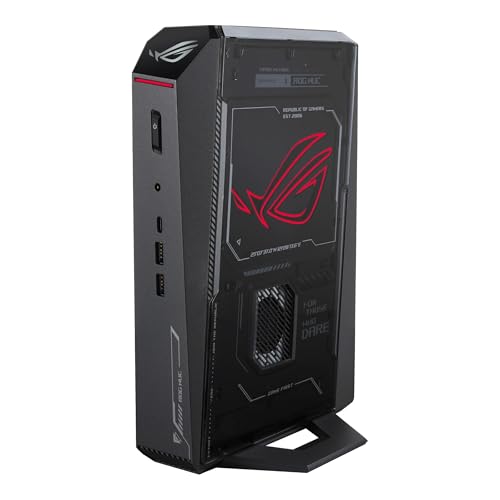
- Smallest footprint with a warranty: ASUS ROG NUC (2025), Core Ultra 9 275HX, RTX 5070 Laptop GPU, 32GB RAM, 1TB SSD — Check on Amazon
- Cooler Master NR2 Pro Mini ITX, Ryzen 7 9800X3D, RTX 5070 Ti 16GB, 32GB DDR5, 2TB SSD — Check on Amazon
- Alienware Aurora ACT1250, Core Ultra 9 285, RTX 5080, 32GB RAM, 1TB SSD — Check on Amazon
- MINISFORUM AtomMan G7 Pro, Core i9-14900HX, RTX 5070 Laptop GPU — Check on Amazon
- MINISFORUM AtomMan G7 Ti, Core i9-14900HX, RTX 4070 Laptop GPU, 32GB RAM, 1TB SSD — Check on Amazon
See 1 more Amazon option
- HP OMEN 16L TG03, Core i7-14700F, RTX 5060 Ti 16GB, 32GB RAM, 2TB SSD — Check on Amazon
Read the full guide ↓
Disclosure: As an Amazon Associate, reviewstook.com earns from qualifying purchases. Links to Amazon on this page are affiliate links; they cost you nothing extra. Listing details such as price and availability change often, so check the current Amazon listing before you buy.
A small room does not grade a gaming PC the way a spec sheet does. The number on the listing is the box; what your room actually hosts is the box plus its power brick, plus the bend of cables leaving its back panel, plus the column of hot air it pushes out for three hours at a time, plus the clearance every vent needs so that air can move at all. A three-liter mini that stands behind your monitor is a genuinely different object from a 16-liter tower that consumes a shelf, and both are different again from a 38-liter tower that happens to wear the word “compact” in its marketing. This guide grades all six verified picks under $3,000 as installations, not as photographs: what footprint each one really takes, where its heat goes, where its brick lives, and which of them a small desk, a dorm room, a media console or a shared living room can actually absorb.
The honesty ceiling comes first, because it shapes everything below. There is no RTX 5090 system anywhere near $3,000 — the cheapest complete 5090 systems we have verified on Amazon sit well above this budget, and a true small-form-factor 5090 does not exist at retail at any price, because a 575W card and its cooling do not fit in a small box. A genuine SFF desktop RTX 5080 — Zotac’s 11.46-liter Magnus One Ultra — sits well above this budget tier as well. Even ASUS’s three-liter ROG NUC in its RTX 5080 Laptop configuration sits above this budget. So at this budget, smallness is bought with a ladder of trades: laptop GPUs in slabs of two-and-a-half to three liters, one real desktop build at 18.25 liters, a big-brand tower at 16 liters whose card tops out lower, and one roughly 38-liter tower that is only here because it is the sole verified desktop-5080 route under the cap — graded, in this guide, as what it is in a small room: the pick that fails the space test on purpose, for buyers whose room can take it and whose priority is the card. For every pick, check price on Amazon for the current figure, and several picks only make sense when the current price fits comfortably inside this budget.
In this guide
Quick Picks
Short on time, or comparing several options at once? Each row below names the space situation and the machine that suits it, with a link to the listing.
| Space situation | Pick | Why it stands out | Link |
|---|---|---|---|
| Behind the monitor, near-zero footprint | ASUS ROG NUC (2025), RTX 5070 Laptop GPU | About three liters, roughly 11.1 × 7.4 × 2.2 in — the smallest complete, warrantied package here | Check on Amazon |
| One shelf, desktop parts, no compromises | Cooler Master NR2 Pro, 9800X3D / RTX 5070 Ti | A desktop 5070 Ti and the best gaming CPU made, in 18.25 liters with an internal PSU | Check on Amazon |
| A room that can take a tower, a buyer who needs a desktop 5080 | Alienware Aurora ACT1250, RTX 5080 | Roughly 38 liters — the only verified desktop-5080 route under $3,000 when the current price fits the budget; check price on Amazon | Check on Amazon |
| Slim vertical mini, current-gen GPU | MINISFORUM AtomMan G7 Pro, RTX 5070 Laptop GPU | A slim upright slab with socketed memory and storage, well under budget when bought configured; check price on Amazon | Check on Amazon |
| Smallest slab, most performance for its tier position | MINISFORUM AtomMan G7 Ti, RTX 4070 Laptop GPU | The 4070 Laptop chip at its full 140W in about 2.55 liters, positioned in the lower part of this budget tier | Check on Amazon |
| Dorm desk or media-console shelf, big brand | HP OMEN 16L TG03, RTX 5060 Ti 16GB | 16 liters from a household-name brand, with a replaceable desktop card | Check on Amazon |
How These Picks Were Chosen
The budget was applied as a ceiling on the complete, usable machine: every pick is a real Amazon listing positioned at or under $3,000, and where a pick’s fit depends on its current price the review says so and describes the position in the tier in which the pick makes sense — check the current price on Amazon before you buy. A machine that only reaches the budget as an empty shell — RAM, SSD and operating system all still to buy — was either excluded or has its completion consideration described in its review. That rule matters doubly in a small-spaces guide, because the mini-PC market loves presenting the empty-box version as if it were the complete machine.
Placement grading then ran on five tests. First, documented size: a volume in liters wherever the maker publishes one, and physical dimensions where the base research recorded them — roughly three liters and about 11.1 × 7.4 × 2.2 inches for the ROG NUC, about 2.55 liters for the G7 Ti, 18.25 liters for the NR2 Pro, 16 liters for the OMEN 16L, and 18.05 × 7.76 × 16.46 inches (roughly 38 liters) for the Aurora. Where no figure is documented — the G7 Pro’s exact volume, most weights, all VESA patterns — none is claimed; the pick is graded by its form-factor class and the live listing is named as the source to confirm. Second, the brick: minis run on external adapters that need a ventilated home of their own, while the three towers carry internal power supplies and ask for no extra object. Third, the cable drop: what leaves the back panel, how much bend room it needs, and whether front or rear ports are documented — where a port layout is not documented, this guide says so rather than inventing one. Fourth, heat: sustained clocks and fan behaviour over a long session, because a small case in a small room heats the room, not just itself. Fifth, permanence: what can be upgraded inside the same footprint, since in a small space an upgrade that stays inside the box costs no new room, and one that cannot happen at all is a fact to buy with open eyes.
Two honesty rules from the base guide carry over unchanged. Laptop and desktop GPUs with the same name are different parts at different wattages, and every review names the class explicitly. And for every pick, check price on Amazon — a pick’s position in this tier is part of its grade, not fine print.
The 6 Best Compact Gaming PCs for Small Spaces Under $3,000
ASUS ROG NUC (2025) — Core Ultra 9 275HX, RTX 5070 Laptop GPU, 32GB RAM, 1TB SSD
Who it suits: Buyers whose space problem is the desk itself — a monitor on a small surface, a TV stand with no shelf to spare — and who want the smallest complete gaming PC a major brand sells, with a warranty behind it.
As an installation, this is the easiest machine in the guide to place. The chassis is roughly three liters, about 11.1 × 7.4 × 2.2 inches: a slim vertical slab that stands behind a monitor or beside a TV and takes less surface than the monitor’s own stand. Inside are Intel’s Core Ultra 9 275HX, a 24-core Arrow Lake-HX processor, an NVIDIA GeForce RTX 5070 Laptop GPU, 32GB of DDR5-6400 and a 1TB NVMe SSD. The port selection is the best documented in this guide — dual Thunderbolt 4, six USB-A, dual HDMI plus DisplayPort outputs and Ethernet — which matters spatially: everything a desk needs can be reached without a hub adding a second object to the surface. This configuration (model RNUC15JNK9X489AU) is sold through ASUS’s own Amazon storefront — check price on Amazon — and the buy rule is strict: bought from ASUS’s storefront when the current price fits this budget, it is the best small-space package here; third-party offers on this model can carry a heavy markup, and at that positioning it is markup, not value.
The space costs are the ones the photograph hides. The 330W external power adapter documented for this machine is a real object — roughly the size of a small paperback with its own heat to shed — and it needs a ventilated spot on the floor or a shelf, not a burial under cables; budget its footprint alongside the slab’s. The cooling is a triple-fan design working in three liters, and the base research is plain about the physics: under sustained load the fans are audible and the GPU holds mobile clocks, not desktop ones. In a bedroom or a shared room, place it where its exhaust is not aimed at the seating and never inside a closed cabinet. The GPU itself is the laptop part — 8GB of GDDR7, soldered, the graphics the box retires with — and the RTX 5080 Laptop configuration of this same chassis sits above this budget, which is why the 5070 version is the pick. One more placement-relevant fact from the base research: owner sentiment for the line is divided, with reports of dead-on-arrival and failing units alongside praise, so stress-test hard inside the return window while swapping it costs nothing. No VESA mount is documented for this pick in the verified sources, so treat behind-the-monitor as standing on the desk behind the screen — and confirm any bracket on the live listing before planning a mount.
- About three liters and under 2.5 inches thick — the smallest complete footprint in the guide.
- Best documented connectivity here: dual Thunderbolt 4, six USB-A, three display outputs plus Ethernet.
- A three-year warranty from a major brand, on a listing sold by ASUS’s own Amazon storefront.
Honest limitation: The RTX 5070 Laptop GPU is a mobile part with 8GB of VRAM, soldered in place; the 330W brick needs its own ventilated home, and owner reports for the line are divided — test your unit thoroughly in the return window.
Choose it if the desk surface is the scarcest thing you own and you want a warranty with the minimum footprint. Skip it if a desktop-class graphics card, or any graphics upgrade path at all, is on your list — the Cooler Master below is built for you.

Cooler Master NR2 Pro — Ryzen 7 9800X3D, RTX 5070 Ti 16GB, 32GB DDR5, 2TB SSD
Who it suits: The buyer with exactly one shelf or one desk corner to give, who refuses the laptop-GPU compromise: a real desktop build, with a real desktop graphics card, that happens to be 18.25 liters.
Eighteen and a quarter liters is not tiny — it is six times the ROG NUC’s volume — but it is a single, self-contained object, and that is its spatial virtue. Inside the NR200P Max chassis sit an AMD Ryzen 7 9800X3D, the fastest gaming CPU in this guide, a desktop Gigabyte GeForce RTX 5070 Ti with 16GB of GDDR7, 32GB of DDR5-6000, a 2TB Gen4 SSD, a Gigabyte B850I AORUS PRO Mini-ITX board and an 850W SFX Gold power supply. The PSU is internal, so there is no brick to house: the machine’s whole installation is the box, one power lead, and the air around it. It is also the only pick built entirely from standard, replaceable parts — when a future GPU generation tempts you, the upgrade happens inside the footprint you already gave it, which in a small room is worth as much as the performance. Its positioning in this tier can vary widely, and that variation is the buying advice: check the current price on Amazon, buy it when the current price sits in the more favourable part of this budget tier, and do not buy it when the current price sits at the high end of its range.
Placement conditions are the ITX conditions. A custom 280mm liquid radiator and a full-power desktop card in 18 liters move real heat, so the case needs open air on its vented faces — a shelf with a back panel hard against the exhaust is a throttle with furniture around it. Fan noise under load is described in independent coverage as reasonable rather than silent: fine for a desk, worth thinking about for a bedroom you also sleep in. The GPU arrives on a riser cable, and the known ownership quirks in coverage are a front USB-C port dead on one unit and a riser connection that needed reseating after shipping on another — check both in your first week, while returns are painless. No dimensions beyond the documented 18.25-liter volume are claimed here, and no VESA option exists to claim: this is a shelf-or-desk machine, full stop, and graded as the best one in the guide.
- Desktop RTX 5070 Ti 16GB and a 9800X3D — the strongest gaming pairing here, in 18.25 liters.
- Internal 850W SFX Gold PSU: no external brick to place, vent or trip over.
- Standard ITX parts throughout — upgrades happen inside the same footprint.
Honest limitation: At 18.25 liters it needs a real shelf or desk corner, it runs audible under load, and its position in this tier can vary widely — check price on Amazon, because timing is part of the purchase.
Choose it if one defined spot is available and you want desktop performance with an upgrade path inside it. Skip it if the current price on Amazon sits at the high end of its range, or your space demands a machine that stands behind a monitor.
Alienware Aurora ACT1250 — Core Ultra 9 285, RTX 5080, 32GB RAM, 1TB SSD
Who it suits: Buyers whose real priority is a desktop RTX 5080 under $3,000 and whose room — unlike most readers of this guide — can genuinely take a tower. It is graded here as the exception that proves the guide’s rule.
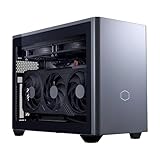
Precision first. The Aurora ACT1250 measures 18.05 × 7.76 × 16.46 inches, roughly 38 liters by outside dimensions: about 40% smaller by volume than the previous Aurora design and far smaller than the 45–55 liter mid-towers in the general $3,000 guides, but twelve times the ROG NUC and not small-form-factor by any honest definition. In a small room it is a floor-standing or deep-desk commitment, with a tower’s cable drop behind it and a tower’s exhaust. What that volume buys is the thing nothing smaller on Amazon offers at this budget: a full desktop GeForce RTX 5080 with 16GB of GDDR7, an Intel Core Ultra 9 285, 32GB of DDR5, a 1TB SSD, liquid cooling and a 1000W Platinum internal power supply — no brick — from Dell, with Dell’s warranty and support. For this configuration (model DACT1250-9575BLK-PUS), check price on Amazon. The rule follows: it fits this budget only when the current price is within the ceiling, and it sits outside this budget when the current price is above that ceiling — and it is the only desktop-5080 route under the cap either way. Its size is also its thermal alibi — 38 liters is why its 5080 can hold desktop clocks through long sessions where a hypothetical sub-15-liter 5080 would be throttling.
Two listing warnings come from the base verification of this ASIN and both survive into this guide. Amazon’s product information contradicts itself — describing the Ultra 9 285 as 20-core in one section while Intel specifies 24 cores, and describing the liquid cooling as both fitted and optional — so confirm the exact configuration with the seller before ordering and trust the chipmaker’s spec over the listing copy. And the question this budget always raises is closed: the RTX 5090 was never offered in this chassis at any price, so no configuration of this machine is a back door to one. If your measurements say a tower does not fit, treat this review as the cost of desktop-5080 performance expressed in liters, and take the NR2 Pro or the ROG NUC instead.
- The fastest graphics in this guide — a desktop RTX 5080 16GB; check price on Amazon, as it only fits this budget when the current price is within the ceiling.
- Liquid cooling and a 1000W Platinum internal PSU: tower thermal headroom, no brick to house.
- A flagship configuration backed by Dell’s warranty, support network and retail presence.
Honest limitation: Roughly 38 liters is a compact tower, not SFF — and it only fits this guide’s budget when the current price on Amazon is within the ceiling; it is a pick to buy only on that condition, and most small rooms should skip it on size alone.
Choose it if desktop-5080 performance matters more than footprint, the current price on Amazon fits the budget, and the tower genuinely fits. Skip it if you actually need small — five machines in this guide are a third of its size or less.

MINISFORUM AtomMan G7 Pro — Core i9-14900HX, RTX 5070 Laptop GPU
Who it suits: Value hunters who want the current-generation laptop GPU and a flagship HX processor in a slim vertical mini that stands on a desk edge or a narrow shelf — and who will read a listing carefully, because this one demands it.
Spatially, the G7 Pro is a slim upright slab in the same placement class as the ROG NUC: it stands rather than sprawls, asks for desk depth measured in inches rather than feet, and wants unobstructed clearance above and behind its vents for exhaust. The base research documents no published volume for this chassis, so none is claimed — grade it by class, and take exact dimensions from the live listing’s product-information table before you commit a shelf to it. Inside are Intel’s Core i9-14900HX — 24 cores, boosting to 5.8GHz — an NVIDIA GeForce RTX 5070 Laptop GPU, six heat pipes and dual fans, HDMI 2.1 and USB4 among its outputs, and WiFi 7. Two DDR5 SO-DIMM slots up to 96GB and two M.2 slots mean memory and storage upgrades happen inside the same small footprint, even though the GPU never changes. At Minisforum’s own store, the configured 32GB/1TB version is positioned well under this guide’s budget for the ROG NUC’s essential proposition with a larger upgrade allowance — check price on Amazon for the current figure for this listing.
The caveat is the listing itself, stated the way the base verification found it: the Amazon page for this ASIN is titled as the barebone version — without storage or operating system — while some marketplace mirrors of the same ASIN describe a configured 32GB/1TB unit. Minisforum sells both versions through shared listings with a style selector, so confirm on the live page, before ordering, that the style in your cart is the configured one, with RAM, SSD and Windows included. If only the barebone style is live, weigh the completion honestly before assuming the small box is also the better-value one: the barebone style is positioned lower in the tier, but at current memory pricing a 32GB DDR5 SO-DIMM kit is a substantial addition, so a from-scratch completion can erase the value gap against the configured ROG NUC. Like every mini here it runs on an external adapter that needs its own ventilated spot — plan the brick’s address when you plan the slab’s. Bought configured, it is the value pick of this guide; bought carelessly, it is a very fast, very small box that cannot boot.
- Check price on Amazon for the configured style — it pairs the RTX 5070 Laptop GPU with a 24-core i9-14900HX and is positioned well under the budget ceiling.
- Two SO-DIMM and two M.2 slots — real memory and storage headroom inside a mini footprint.
- Six heat pipes and dual fans cool the HX chip inside the slim vertical chassis.
Honest limitation: The Amazon listing is titled as the barebone version and mixes styles — you must confirm the configured style, with RAM, SSD and OS, before ordering; its exact volume is not documented in the verified sources.
Choose it if you are willing to check the style selector carefully in exchange for current-generation mini performance well under the budget ceiling. Skip it if you want one unambiguous listing backed by a big-brand warranty — the ROG NUC is that purchase.

MINISFORUM AtomMan G7 Ti — Core i9-14900HX, RTX 4070 Laptop GPU, 32GB RAM, 1TB SSD
Who it suits: Buyers who want the smallest documented footprint in this guide with a discrete GPU that is actually run at full power — the proven version of the mini formula, in about 2.55 liters, positioned in the lower part of this budget tier.
At roughly 2.55 liters, the G7 Ti is the smallest pick here by published volume, a slim slab that stands behind a monitor or at the back of a shallow desk and leaves the surface in front of it free. Its party trick is a number most mini makers hide: its GeForce RTX 4070 Laptop GPU runs at the full 140W TGP, the highest power configuration NVIDIA allows for that chip, which closes much of the gap to desktop-class territory that detuned laptop implementations leave open. Around it sit the same 24-core Core i9-14900HX as the G7 Pro, 32GB of DDR5-5600 across two SO-DIMM slots up to 96GB, two PCIe 4.0 M.2 slots and WiFi 7. For the configured 32GB/1TB version, check price on Amazon — it is positioned below every other discrete-GPU mini in this guide while giving up surprisingly little at 1440p with DLSS, and it leaves headroom in the budget for the monitor this class of machine deserves. In a small room, that headroom is not abstract: it is the difference between a panel the slab can drive well and one it cannot.
The placement discipline is the mini discipline, plus one listing discipline. A 140W GPU and an HX processor in 2.55 liters means dual fans working under sustained load and an external adapter to house — keep the vents clear on every face, give the brick air, and do not seal it in a TV cabinet. The listing discipline is its sibling’s: barebone and configured styles share one listing family, and this ASIN is that family’s — select the configured 32GB/1TB style and confirm it on the page before checkout, because a barebone plus today’s memory pricing can be a worse value than the configured box. No VESA pattern is documented for this pick in the verified sources, so plan on it standing, not mounting, until the live listing says otherwise. The GPU is a generation old and soldered, with 8GB of GDDR6 that will age faster than the 16GB cards in this guide; this is a machine bought for what it does now, at a tier position that acknowledges it. Within those terms, it is the easiest small-space recommendation in the guide to defend.
- The RTX 4070 Laptop GPU running at its full 140W — the undetuned version of the chip, honestly stated.
- Configured 32GB/1TB — check price on Amazon; about 2.55 liters — the smallest documented volume here.
- Dual M.2 slots and socketed SO-DIMM memory take some of the sting out of the soldered GPU.
Honest limitation: The GPU is last generation’s, soldered in place with 8GB of VRAM, and it is sold through a shared listing where telling the barebone and configured styles apart is the buyer’s job.
Choose it if you want maximum mini performance for its tier position and per liter today. Skip it if 16GB of VRAM or a current-generation GPU matters more than the saving this pick offers within the tier.

HP OMEN 16L TG03 — Core i7-14700F, RTX 5060 Ti 16GB, 32GB RAM, 2TB SSD
Who it suits: Buyers who want compact from a household-name brand with a real service network, for a dorm desk or a media-console shelf — and who accept that HP’s 16-liter chassis tops out at an RTX 5060 Ti, two GPU tiers below this guide’s ceiling.
Sixteen liters is the guide’s middle shape: too big to hide behind a monitor, small enough to sit on a dorm desk or a console shelf without owning the furniture. The OMEN 16L holds desktop parts, including a replaceable desktop graphics card, which already separates it from every soldered mini here — and its power supply is internal, so the installation is the tower, its cables, and breathing room. This listing’s configuration pairs an Intel Core i7-14700F with a GeForce RTX 5060 Ti carrying the full 16GB of GDDR7 — the version worth buying; an 8GB variant of the same card exists in this chassis and is the trap — plus 32GB of DDR5 and a 2TB SSD. For this ASIN, check price on Amazon: independent roundups of this chassis position OMEN 16L builds with the 16GB card in the lower part of this budget tier depending on configuration, and this 32GB/2TB listing sits in that family. Verify the current price on Amazon against that tier position, not against this guide’s $3,000 ceiling alone, because the honest frame is that this machine leaves substantial headroom in the budget unspent.
That framing is also its limitation, stated plainly: at 1440p the 5060 Ti is a good card, but a buyer with $3,000 who chooses this is paying for brand, warranty logistics and a quiet retail-grade acoustic profile, not performance — the NR2 Pro is dramatically faster and positioned higher in this tier, in two extra liters. The second warning concerns Amazon’s OMEN 16L stock in general: a large share of listings for this chassis are reseller bundles, opened and upgraded before sale, where the upgraded RAM and SSD carry the seller’s warranty rather than HP’s. Check who is selling this listing and which warranty covers which parts before you buy; a factory-sealed HP configuration and a reseller-upgraded one are different purchases wearing the same name — and on a shelf in a small room, the one you can get serviced locally is worth more than the spec difference suggests.
- A replaceable desktop GPU inside 16 liters — the big-brand compact done properly.
- This configuration pairs the 16GB RTX 5060 Ti with 32GB of RAM and a 2TB SSD.
- Positioned in the lower part of this guide’s budget tier, with HP’s service network and retail presence behind it.
Honest limitation: The honest cost is the GPU ceiling: in a $3,000 guide, a 5060 Ti is a purchase of brand and warranty rather than performance, and Amazon’s stock of this chassis includes reseller-upgraded bundles with split warranties.
Choose it if brand support matters, your gaming is 1080p/1440p, and 16 liters is the shape your shelf wants. Skip it if performance for its tier position is your metric — on that measure the NR2 Pro and both minis all outrun it.

Comparison Table
| Product | Size (as documented) | GPU class | Space verdict | Link |
|---|---|---|---|---|
| ASUS ROG NUC (2025) | ~3 liters, ~11.1 × 7.4 × 2.2 in | RTX 5070 Laptop, 8GB | Stands behind the monitor; 330W brick needs a home | Check on Amazon |
| Cooler Master NR2 Pro | 18.25 liters | Desktop RTX 5070 Ti, 16GB | One shelf, internal PSU, needs open air on vented faces | Check on Amazon |
| Alienware Aurora ACT1250 | ~38 liters, 18.05 × 7.76 × 16.46 in | Desktop RTX 5080, 16GB | A tower commitment — floor or deep desk; check price on Amazon, as it fits only when the current price is within budget | Check on Amazon |
| MINISFORUM AtomMan G7 Pro | Mini PC, vertical slab (volume not documented) | RTX 5070 Laptop | Desk-edge slab; confirm configured style before ordering | Check on Amazon |
| MINISFORUM AtomMan G7 Ti | ~2.55 liters | RTX 4070 Laptop, 140W | Smallest documented volume; vents and brick need air | Check on Amazon |
| HP OMEN 16L TG03 | 16 liters | Desktop RTX 5060 Ti, 16GB | Dorm desk or console shelf; internal PSU, serviceable brand | Check on Amazon |
The Space You Cannot See on the Spec Sheet
Every machine in this guide occupies more room than its chassis, and the difference decides whether a small space works. Start with the brick. The minis run on external adapters — the ROG NUC’s is documented at 330W — and an adapter is furniture: it needs a surface, it sheds heat, and it cannot be smothered under a rug or a pile of cables without becoming the warmest object in the room. The three towers in this guide carry internal power supplies (850W SFX Gold in the NR2 Pro, 1000W Platinum in the Aurora, the OMEN’s internal unit), which is a genuine spatial advantage nobody puts in a headline: one object, one power lead, nothing on the floor. Then the cable drop. A slab standing behind a monitor has inches of cable to manage; a tower across the room has a wired run for display, network and peripherals that crosses the floor or the wall, and in a rented room that run may simply not be available — which is why the minis’ documented Ethernet and WiFi 7, and the ROG NUC’s dual Thunderbolt 4, are placement features, not spec garnish.
Heat is the third invisible tenant. A gaming PC under load is a small space heater with a frame rate, and in a small room the exhaust has nowhere to dilute: the minis hold mobile clocks with audible fans, the NR2 Pro sustains desktop clocks through a 280mm radiator at moderate noise, and the Aurora’s 38 liters barely work up a sweat — the base research’s summary is that if your room is hot and your sessions are long, liters are a performance feature. Enclosing any of them in an unventilated cabinet converts that trade into a throttle. Finally, the DIY edge the base guide documented deserves its spatial note: Intel’s NUC 13 Extreme kit, a roughly 14-liter chassis with a socketed desktop processor and a slot for a dual-slot desktop card, is available on Amazon, and completing it can land under the $3,000 ceiling — the one route to a desktop GPU in a sub-15-liter box the prebuilt market currently skips. It is a kit, not a computer, so it is not a pick here; but if your shelf is exactly that size and you build, it exists.
How to Choose a Compact Gaming PC for a Small Space
Work through these five steps in order, before any money moves. The sequence is the point: each step can veto a pick the previous step loved.
- Step 1 — Measure the spot, in liters and inches. Measure the actual shelf, desk corner or console bay: width, depth and height, with the tape, not by eye. Then match against documented figures only — about 2.55 liters for the G7 Ti, roughly three liters and 11.1 × 7.4 × 2.2 inches for the ROG NUC, 16 liters for the OMEN 16L, 18.25 liters for the NR2 Pro, 18.05 × 7.76 × 16.46 inches for the Aurora. Where a pick documents no volume — the G7 Pro — read the live listing’s product-information table and measure against that, not against a product photo.
- Step 2 — Reserve ventilation clearance. Whatever spot survives step 1, subtract the air. Vented faces need open room around them; vertical slabs need clearance above and behind; a radiator case like the NR2 Pro needs its exhaust path unobstructed; and a sealed cabinet vetoes every pick in this guide, minis included. If the only available spot is enclosed, the correct purchase is a different spot, not a different PC.
- Step 3 — Give the power brick an address. For the three minis, decide now where the external adapter lives: a ventilated surface, off carpet, reachable, with its cable run to the slab planned. The ROG NUC’s documented 330W adapter is the largest of them. If no honest address exists, the towers earn their liters back — an internal PSU is the one space feature that deletes an object instead of adding one.
- Step 4 — Walk the cable drop. Stand where the PC will sit and trace every run: display cable to the monitor or TV, Ethernet if you will use it (the wired rule matters most for streaming and competitive play), power to the wall, peripherals to your hands. Rear-panel cables need bend room behind the case, which adds depth to the installed footprint — a shelf measured to the case’s exact depth is a shelf too shallow. Where a pick’s port layout is not documented in the verified sources, confirm it on the live listing at this step, not after delivery.
- Step 5 — Then order, and verify on arrival. Only now does price enter: check the current price on Amazon for each pick and confirm it fits this budget (the ROG NUC from ASUS’s storefront without a third-party markup, the NR2 Pro when its current price sits in the more favourable part of the tier, the Aurora only when its current price is within the budget ceiling, the Minisforum picks in their configured styles). When the box arrives, verify the delivered configuration and the chosen style, then stress-test inside the return window — owner reports in this category include dead-on-arrival units, and in a small space the swap is the only repair you have room for.
Common Buying Mistakes
- Judging “compact” by a product photo. Demand the liters: a tower photographed alone can be 38 liters wearing a small-looking design, and one pick in this guide is exactly that.
- Forgetting the brick. A 330W external adapter needs a ventilated home too; minis that “disappear” still put an object on your floor or shelf.
- Measuring the case and not the installation. Rear cables bend, exhaust needs a path, radiators need intake air — the installed footprint is always bigger than the box.
- Sealing a mini in a TV cabinet. Small cases throttle quietly; the performance you paid for leaves through the same door the heat cannot.
- Assuming small means quiet. Dense cases run small fans fast; the quietest machines in this guide are the biggest ones.
- Believing a compact RTX 5090 exists at this budget. It does not: nowhere near $3,000, and in true small-form-factor at retail, not at any price. A listing that implies one is selling a laptop GPU, a barebone, or a mistake.
- Buying the barebone style by accident on a shared listing — and discovering the smallest box in the room has no RAM, no SSD and no Windows when it arrives.
- Paying a marketplace markup on a brand-name mini. Marketplace sellers on the same platform have listed the ROG NUC well above its own storefront positioning — check price on Amazon and buy from the brand’s storefront where possible.
- Planning a monitor mount nobody documented. No pick in this guide has a verified VESA pattern in the base research — confirm bracket options on the live listing before designing around one.
Final Recommendation
- Smallest real footprint: MINISFORUM AtomMan G7 Ti — about 2.55 liters; check price on Amazon for the configured style.
- Smallest with a big-brand warranty: ASUS ROG NUC (2025) — check the current price on Amazon, from ASUS’s storefront.
- One shelf, desktop parts: Cooler Master NR2 Pro — check price on Amazon, and buy only when the current price fits comfortably inside this budget tier.
- Current-gen mini value: MINISFORUM AtomMan G7 Pro — configured style confirmed; check price on Amazon.
- Brand and support on a dorm desk: HP OMEN 16L TG03 with the 16GB 5060 Ti.
- Desktop 5080, room permitting: Alienware Aurora ACT1250 — only when the current price on Amazon fits this budget, and only if the tower truly fits.
For most small rooms, the honest top two are the ROG NUC and the G7 Ti: the NUC for the complete three-liter package with a real warranty, bought from ASUS’s storefront without a third-party markup, and the G7 Ti for the smallest documented volume in the guide with its GPU run at full power, positioned in the lower part of this budget tier. The NR2 Pro is the answer when one shelf exists and “laptop GPU” is a dealbreaker — desktop parts, a 16GB card and upgrades that stay inside the footprint. Readers whose budget is the tighter constraint should compare Best Compact Gaming PC For Small Spaces Under $2500 and Best Compact Gaming PC For Small Spaces Under $1500; readers whose room is fine but whose wallet is not should see Best Compact Gaming PC Under $2500. Measure the space in liters, give the brick an address, walk the cable drop, name your GPU class out loud — and only then check the current price on Amazon and order.
Frequently Asked Questions
What is the smallest gaming PC in this guide?
By documented volume, the MINISFORUM AtomMan G7 Ti at about 2.55 liters, followed by the ASUS ROG NUC at roughly three liters (about 11.1 × 7.4 × 2.2 inches). The G7 Pro is a slim vertical slab in the same placement class, but its exact volume is not documented in the verified sources, so this guide grades it by class and sends you to the live listing for its dimensions.
Can I mount one of these behind my monitor?
Not on the evidence in this guide. No pick has a VESA mounting pattern documented in the verified base research, so treat mounting as unconfirmed for all six: the two small slabs are designed to stand behind a monitor on the desk, which achieves most of the effect with none of the hardware risk. If a bracket matters to you, confirm its inclusion and pattern on the live listing before ordering.
Can I get an RTX 5090 in a compact gaming PC under $3,000?
No. Verified complete RTX 5090 systems on Amazon sit well above this budget, the card by itself sits in a high tier of its own, and a true small-form-factor 5090 effectively does not exist at retail — a 575W desktop card and the cooling it needs do not fit inside a small case. A listing that suggests otherwise is describing something else: a laptop GPU, a barebone kit, or an outright error.
Where does the power brick go in a small setup?
On a ventilated surface with air around it — a shelf edge, the floor beside the desk, never under carpet or inside a closed cabinet. The minis’ adapters are real objects (the ROG NUC’s is documented at 330W) and they shed heat continuously. If no honest spot exists for one, choose a pick with an internal power supply: the NR2 Pro, the OMEN 16L and the Aurora all keep their PSU inside the case.
Will a small gaming PC throttle or get loud in a small room?
Both are managed, not eliminated, at this size. The minis hold mobile clocks with audible fans under sustained load; the 18.25-liter NR2 Pro sustains desktop clocks through a 280mm radiator at noise coverage calls reasonable rather than silent; the 38-liter Aurora has the most thermal headroom of all. Placement decides how much of that you notice: open air on every vented face, exhaust not aimed at your chair, and never a sealed cabinet.
What does “barebone” mean on these listings, and why does it matter?
Barebone means the box arrives with no RAM, no storage and no operating system installed. Minisforum sells barebone and configured versions of the G7 Pro and G7 Ti through shared listings with a style selector, and at current memory pricing, completing a barebone can cost more in total than the configured version of the same small box. Read the style name on the listing carefully before you check out, and check the current price on Amazon for the configured style.
Is the 38-liter Alienware really a small-spaces pick?
Only as an honest exception. It is included because it is the sole verified route to a desktop RTX 5080 under $3,000, and it is graded as a tower: floor or deep desk, and only when the current price on Amazon fits this budget. If your room cannot take it — and most readers of this guide are here because theirs cannot — the NR2 Pro at 18.25 liters is the strongest pick that genuinely fits a small space.
- Best Compact Gaming PC Under $3000
- Best Compact Gaming PC For Small Spaces Under $2500
- Best Compact Gaming PC For Small Spaces Under $1500
- Best Compact Gaming PC For Beginners Under $3000
- Best Compact Gaming PC For Streaming Under $3000
- Best Compact Gaming PC For 1440p Gaming Under $3000
- Best Small Form Factor Gaming PC Under $3000
- Best Mini Gaming PC Under $3000


