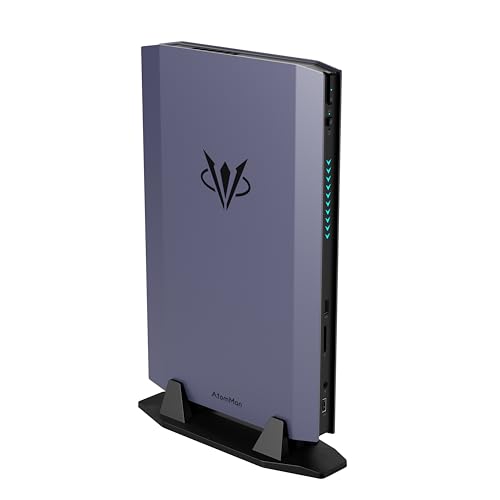
Where to buy
Check the latest price, availability and delivery on Amazon. Orders are placed on Amazon. We may earn a commission from qualifying purchases.
- Best overall compact gaming PC for a small space: AtomMan G7 Ti Mini PC, Core i9-14900HX, RTX 4070 Laptop, 32GB DDR5, 1TB SSD — Check on Amazon
- AtomMan G7 Pt Mini PC, Ryzen 9 7945HX, RX 7600M XT, 32GB DDR5, 1TB SSD — Check on Amazon
- MINISFORUM AtomMan G1 Pro, Ryzen 9 8945HX, Desktop RTX 5060, 32GB DDR5, 1TB SSD — Check on Amazon
- ASUS NUC 14 Performance Barebone (ROG NUC), Core Ultra 7 155H, RTX 4060 Laptop, Kit — Check on Amazon
See 2 more Amazon options
- Skytech Blaze4 Mini Gaming PC, Ryzen 7 5700, RTX 4060 Ti, 16GB DDR4, 1TB SSD — Check on Amazon
- HP OMEN 16L Gaming Desktop, Ryzen 7 8700F, RTX 5060, 1TB SSD (seller-upgraded listing) — Check on Amazon
Read the full guide ↓
Disclosure: As an Amazon Associate, reviewstook.com earns from qualifying purchases. Links to Amazon on this page are affiliate links; they cost you nothing extra. Listing details such as price and availability change often, so check the current Amazon listing before you buy.
“Compact” is the most elastic word in PC gaming, and at $1,500 it stretches further than anywhere else. The six verified machines in this guide run from roughly two and a half liters to sixteen. The largest of them holds more than six of the smallest. Both wear the same label, both are honestly described as compact by the standards of their own class, and they ask completely different things of your room: one disappears onto a shelf or behind a television, the other needs a genuine home in the furniture and will not pretend otherwise. If your space is the real budget — a studio flat, a shared room, a desk that is also a dining table — then the question is not which of these PCs is smallest. It is which installation you can actually live with, because a gaming PC in a small space is not a box. It is a box, plus a power brick that needs its own ventilated surface, plus a cable drop that sets the real depth of the shelf it sits on, plus a stream of hot air that has to go somewhere that is not back into the machine.
So this guide grades installations, not spec sheets. Every pick is judged on the things that actually differ in a small room: the documented size of the case, where its power supply lives, how its cables leave it, how much heat it pushes into the air around your chair, and whether the upgrades it allows happen inside the footprint you already gave it. Two honesty rules govern everything below. The first is about silicon: an RTX 4070 Laptop GPU is not a desktop RTX 4070 — it carries 4,608 cores and 8GB of memory against the desktop card’s 5,888 cores and 12GB, runs at up to 140W against 200W, and performs around desktop RTX 4060 Ti level at full power. Four of these six machines use laptop silicon and every review names it in its first paragraph. The second rule is about size itself: only measurements documented in our research are printed here. Five of the six picks have a verified case volume; the sixth, a mini tower whose maker publishes none, is graded by its class and its behaviour, and you are sent to its live listing for the tape-measure numbers. No dimensions, weights, mounting patterns or noise figures have been invented to fill the gaps.
What $1,500 verifiably buys for a small room is this: the fastest mini PC in the class at around two and a half liters; an AMD sibling the same size with the biggest power brick in the guide; a 3.8-liter mini with a genuine desktop graphics card and no brick at all; a big-brand barebone kit the same small size whose price is only the beginning of its receipt; the smallest true tower in the guide, which spends its extra volume on airflow and a future graphics-card swap; and a 16-liter brand tower that is compact only by tower standards and honest about it. Below: the quick picks, a section on the space no spec sheet shows, detailed reviews of all six, a comparison table, a five-step measure-before-you-buy routine, the mistakes that waste money and room, and the questions small-space buyers ask most. If the budget rather than the room is your binding constraint, start from Best Compact Gaming PC Under $1500 instead.
In this guide
Quick Picks
Short on time, or comparing several options at once? Each row below names a buyer type and the product that suits it, with a link to the listing.
| Buyer type | Pick | Why it stands out | Link |
|---|---|---|---|
| Best overall for small spaces | AtomMan G7 Ti Mini PC (RTX 4070 Laptop) | The fastest verified gaming mini here, in roughly 2.5 liters | Check on Amazon |
| Best value mini PC | AtomMan G7 Pt Mini PC (RX 7600M XT) | Desktop-class CPU power positioned at the value end of this tier — check price on Amazon, and only if its 300W brick has a home | Check on Amazon |
| Best true desktop GPU in a mini | MINISFORUM AtomMan G1 Pro (Desktop RTX 5060) | A real desktop card in 3.8 liters with an internal PSU — only at or under $1,500 | Check on Amazon |
| Best kit from a big brand | ASUS NUC 14 Performance Barebone (ROG NUC) | ASUS engineering at about 2.5 liters — before the parts it still needs | Check on Amazon |
| Best upgrade path | Skytech Blaze4 Mini (RTX 4060 Ti) | The smallest true tower: standard parts and a named 650W Gold PSU | Check on Amazon |
| Best big-brand compact tower | HP OMEN 16L (RTX 5060) | HP’s 16-liter case — compact for a tower, a wardrobe beside the minis | Check on Amazon |
How These Picks Were Chosen
The budget was applied as a ceiling on the complete, working machine. Every product below is a real Amazon listing positioned at or under the $1,500 budget for this guide — check the current price on Amazon before you buy, because listing prices change often. Two picks lean on that rule hardest and are flagged in their reviews, not quietly included: the G1 Pro sits above this budget in its usual positioning and qualifies only when it is offered within this tier, and the ASUS NUC is a barebone whose listing covers only the kit and excludes the memory, storage and operating system it needs to switch on, so its review weighs the cost of completing it in qualitative terms. A kit that finishes over budget is not under $1,500 in any sense that matters, however small the box.
On top of that sat the silicon filter and the space filter. The silicon filter: the GPU’s true identity — laptop or desktop chip, and at what wattage — had to be establishable from the listing or the maker’s specification, because a mobile GPU’s performance swings widely with its power limit, and a low-wattage variant is effectively a slower product wearing the same name. The space filter is this variant’s own. Each pick was graded as an installation: its documented case volume where one exists; whether its power supply is an internal unit or an external brick, and if a brick, how large; what its documented outputs imply for the cable drop behind it; how its cooling design behaves in a small room over a long session; and whether its future is more boxes on the shelf or changes inside the box you already placed. Where our research documents no measurement — and it documents no weight, no mounting pattern and no noise figure for any of these six — the guide says so and grades by class instead of inventing a number.
Two tempting machines were excluded on the evidence. Minisforum’s AtomMan G7 Pro, with the newer RTX 5070 Laptop GPU, is the obvious flagship of this class, but its configured version is positioned above the whole budget, so it appears only as the ceiling it is. And AMD’s Ryzen AI Max+ 395 mini PCs, previous holders of the fastest-integrated-graphics title, have been repriced by the current memory shortage into a tier well above this budget on Amazon; whatever they were at launch, they are not sub-$1,500 gaming PCs today, and no pick below pretends otherwise.
The Space You Cannot See on the Spec Sheet
A spec sheet lists a case volume. An installation has four more dimensions, and in a small room they decide more than the box does. The first is the power brick. Four of these six machines are mini PCs, and the mini class runs from external adapters: a brick roughly the size of a paperback that needs its own ventilated surface, and adds its own footprint wherever the PC lives. The G7 Pt’s 300W brick is the largest in this guide — the hidden second box of the joint-smallest machine here. The two towers and the G1 Pro carry internal power supplies, which is why the G1 Pro’s 3.8 liters is, in installation terms, closer to the 2.5-liter minis than the numbers suggest: its whole footprint is the box.
The second hidden dimension is the cable drop. A PC’s installed depth is its case depth plus the bend radius of everything plugged into its back — display cable, power lead, Ethernet if you run it — plus the exhaust gap behind it. On a shallow shelf that stack, not the case, is what overhangs. Wireless is therefore a placement feature, graded from documented specifications only: the G7 Ti’s Wi-Fi 7 and the G1 Pro’s Wi-Fi 7 and 5-gigabit Ethernet let a machine live where the router is not, while a wired-only corner placement costs you a cable run across the room. The third dimension is heat. A gaming mini pushes its whole power budget into the room’s air through a small set of vents; in a small room that is a heater you sit beside, and the placement rule is absolute — open air on the vented sides, nothing stacked on top, and never a sealed cabinet, which turns any of these machines into a slow one. The fourth is noise, graded here by class because our research documents no measured figures for these picks: small fans in small boxes are quiet at idle and audible under sustained load, and in a small room there is no far side of the room to put them on. The towers’ extra volume is, in large part, an answer to dimensions three and four — air is cooling, and cooling is quiet.
The 6 Best Compact Gaming PCs for Small Spaces Under $1,500
AtomMan G7 Ti Mini PC — Core i9-14900HX, RTX 4070 Laptop, 32GB DDR5, 1TB SSD
Who it suits: Buyers whose space is measured in shelf gaps, not floor area — a living-room or small-desk machine that plays at 1440p today from the smallest full-performance box in this guide.
The correction this category demands comes first, applied to the top pick: the G7 Ti’s graphics are an RTX 4070 Laptop GPU — 4,608 cores and 8GB of GDDR6, not the desktop card’s 5,888 cores and 12GB. Minisforum runs that chip at its full 140W limit, the highest NVIDIA allows, where independent reviews place it around desktop RTX 4060 Ti territory: strong 1080p at high settings and genuinely playable 1440p with DLSS sharing the work. Around it: a 24-core Core i9-14900HX, 32GB of DDR5 in two SO-DIMM slots accepting up to 96GB, a 1TB SSD with a second M.2 slot free, Wi-Fi 7, HDMI 2.1 and USB4 outputs. For the configured 32GB/1TB version, check price on Amazon — it is positioned near the top of this budget tier. As an installation, its case is roughly two and a half liters — the joint-smallest here — small enough to vanish onto a media shelf or stand beside a monitor, and its Wi-Fi 7 means it can live wherever the shelf is rather than wherever the router is.
The placement terms are the mini class’s terms, strict precisely because the box is small. A 140W GPU and a 24-core HX processor in two and a half liters is the densest heat load in this guide: the dual fans are audible under sustained load in performance mode, silent mode buys quiet with performance, and the machine needs open air — a shelf with clearance, never a sealed cabinet. Like every mini here it runs from an external power adapter, so budget the brick a ventilated surface of its own beside the PC. The ownership terms are permanent in the usual mini-PC way: CPU and GPU are soldered, so the graphics it arrives with are the graphics it retires with, and memory and storage are the only doors left open — both real doors, with the free second SSD slot meaning its one likely expansion happens inside the same footprint. Judged as a three-to-four-year 1440p appliance that takes almost no room at all, it is the strongest verified compact gaming PC under $1,500 for a small space.
- The full-power 140W RTX 4070 Laptop — the strongest mobile graphics verified at this budget — in the joint-smallest case here.
- Wi-Fi 7, HDMI 2.1 and USB4: it can live on the shelf you have, not the corner the router owns.
- 32GB of DDR5 fitted, headroom to 96GB and a spare SSD slot — every upgrade happens inside the same footprint.
Honest limitation: The “RTX 4070” in the name is the laptop chip — around desktop 4060 Ti class, with 8GB of VRAM — soldered in place for the machine’s whole life, and its dense little case is the most placement-sensitive here: open air or nothing.
Choose it if your space is a shelf or a screen-side gap and a fixed lifespan is acceptable. Skip it if the only home on offer is an enclosed cabinet, or if a graphics-card upgrade in two years is part of the plan — that buyer needs the Blaze4 Mini below.

AtomMan G7 Pt Mini PC — Ryzen 9 7945HX, RX 7600M XT, 32GB DDR5, 1TB SSD
Who it suits: Value hunters who game mainly at 1080p and want desktop-class CPU power — rendering, compiling, heavy multitasking — from the same small footprint, provided the room can also house the guide’s largest power brick.
The G7 Pt is the G7 Ti’s AMD sibling and this guide’s value pick: the configured 32GB/1TB version is positioned at the lower end of this budget tier, noticeably below the Ti — check the current price on Amazon. Its CPU is arguably the better one for mixed work, a Ryzen 9 7945HX with 16 full desktop-class Zen 4 cores, and its graphics are a Radeon RX 7600M XT — a laptop GPU, named as such: 8GB of GDDR6 at a healthy 120W. That pairing is a strong 1080p machine outright and a selective 1440p one, using FSR upscaling in demanding titles and native resolution in lighter ones. The installation matches its sibling’s: the same roughly two-and-a-half-liter class of chassis, DDR5 SO-DIMM slots to 96GB, PCIe 5.0 NVMe support and dual-fan cooling. It was the first mini PC certified under AMD’s Advantage program, which shows in its power modes — 65W and 85W CPU settings that trade a little speed for a quieter, cooler room, a lever that matters more the smaller the room is.
The trade against the Ti should be chosen knowingly, and part of it is spatial. The 7600M XT sits a class below the 140W 4070 Laptop in raw speed, its ray tracing is weaker still, and FSR, while good, is supported in fewer games than DLSS — in a title built around NVIDIA’s features the gap widens beyond the hardware difference. Then there is the brick: at 300W, the G7 Pt’s external power supply is the largest in this guide, a second object that needs its own ventilated surface and quietly taxes the space saving the little case just won. The mini-PC permanence applies in full — soldered GPU, memory and storage the only upgrades. What you get for accepting all of that is the value-positioned end of this guide for a genuinely capable gaming mini — check price on Amazon — a machine that, at a 1080p monitor, most players would struggle to tell apart from the top pick in the games they play.
- The configured version is positioned at the value end of this tier for a discrete-GPU gaming mini — check price on Amazon.
- Ryzen 9 7945HX: 16 full Zen 4 cores — with the G7 Ti, the strongest work CPU in this guide.
- 65W and 85W modes let you tune the machine to the room — less heat, less fan, on demand.
Honest limitation: A 1080p-first GPU with weaker ray tracing than the NVIDIA picks — and a 300W power brick that needs a home of its own, undercutting the space saving.
Choose it if your monitor is 1080p and the brick has a ventilated corner waiting for it. Skip it if 1440p high-refresh is the goal, or your shelf has room for exactly one object — that is the G7 Ti’s job, in the G7 Ti’s higher tier position.

MINISFORUM AtomMan G1 Pro — Ryzen 9 8945HX, Desktop RTX 5060, 32GB DDR5, 1TB SSD
Who it suits: Buyers who refuse laptop silicon on principle and count every object on the desk — who want a genuine desktop graphics card in a mini PC, no power brick anywhere, and who are patient enough to buy only when it is offered within this budget.
The G1 Pro is the exception that proves this guide’s rule, because its graphics are the real thing: a desktop GeForce RTX 5060 — a low-profile Gigabyte card running at a full 145W, seated in an actual PCIe x16 slot — inside a 3.8-liter chassis. There is no translation layer with this pick: 8GB of GDDR7, DLSS 4 support, performance reviewers found good at 1080p and solid at 1440p with upscaling. Around it sit a 16-core Ryzen 9 8945HX, 32GB of DDR5, a 1TB PCIe 4.0 SSD, Wi-Fi 7 and 5-gigabit Ethernet. But its most small-space-relevant specification is the one other minis cannot match: a 350W internal power supply. There is no brick. The installation is one box, one mains lead, one footprint — which makes its 3.8 liters, on a real shelf, worth more than the 2.5-liter minis’ headline numbers, because their bricks are second objects competing for the same surface.
Now its position in the tier, which carries the loudest condition in this guide. The G1 Pro is usually positioned well above this budget, in a higher tier altogether, and only occasional promotional positioning brings it within the $1,500 ceiling. At its usual positioning it does not belong in an under-$1,500 guide at all — check the current price on Amazon before treating it as a candidate here. It is included for one reason: it is the only true-desktop-GPU mini that has verifiably been offered within this budget, and when it is, it is arguably the best buy here. Two ownership notes complete the picture. The machine ships in an 80W gaming mode that leaves about a fifth of its performance behind a manual toggle — switch it on day one, because in a small case that setting is also a heat setting. And while the GPU is technically a card in a slot, it is a low-profile card in a 3.8-liter case: treat replacement as theoretically possible and practically unlikely, since almost nothing faster is made in that shape.
- An actual desktop RTX 5060 running its full 145W — no laptop-GPU translation needed.
- Internal 350W power supply: no brick, one footprint, the cleanest installation in the guide.
- 32GB of DDR5, a 16-core HX processor, Wi-Fi 7 and 5GbE in 3.8 liters.
Honest limitation: It is usually positioned above this budget — a buy-only-at-$1,500-or-less pick, so check price on Amazon — and the low-profile GPU is not a realistic future upgrade despite sitting in a slot.
Choose it if you catch it at or under $1,500 and want desktop silicon with the tidiest possible installation. Skip it if the listing is sitting in its usual higher-tier positioning when you shop; in that case the G7 Ti offers stronger performance within this budget and the towers below are positioned lower in the tier.

ASUS NUC 14 Performance Barebone (ROG NUC) — Core Ultra 7 155H, RTX 4060 Laptop, Kit
Who it suits: Buyers who trust ASUS engineering over the mini-PC brands, who already own DDR5 SO-DIMMs and an SSD — or who are happy to finish a kit themselves and want the receipt to prove it was worth it.
This is the ROG NUC in barebone form, sold on Amazon as the NUC 14 Performance: a roughly 2.5-liter ASUS chassis with a Core Ultra 7 155H and an RTX 4060 Laptop GPU at up to the full 140W in ASUS’s specification — which matters, because a full-power mobile 4060 is a credible 1080p card and a cut-down one is not. Spatially it matches the AtomMan boxes almost exactly: the same shelf class, the same behind-the-screen class, in the smallest case ASUS sells with a discrete GPU. What the box does not contain is the rest of a computer — no memory, no storage, no operating system. Its positioning as a barebone kit is the interesting part: as a kit alone it sits at the lower end of this budget tier, below every complete mini in this guide — check price on Amazon — which is why it earns its place here. As a kit on its own it undercuts the complete machines by enough to matter — if the cost of completing it cooperates.
So weigh the cost of completing it, because that judgement is the review. A 32GB DDR5 SO-DIMM kit — the sensible fit for this machine — is a substantial extra purchase in the middle of the current memory shortage; add a 1TB NVMe SSD and a Windows licence and a kit bought cold can complete above this budget altogether — positioned above the G7 Pt complete, for a slower GPU. When the kit itself is offered at the low end of its range, the same build can land within this tier: competitive, but not a rout. The conclusion writes itself. This pick wins when the memory and drive are already in a drawer at home — the upgrade-cycle buyer ASUS designed it for — or when the kit is positioned at its low end; bought cold with parts at shortage-era pricing, it is the most expensive route in this guide to a mobile RTX 4060 — check the current price on Amazon for the kit and for the parts before deciding. The small-space footnote is in its favour, at least: the parts it needs add receipts, not room — everything it will ever contain fits inside the same 2.5 liters, and ASUS’s toolless chassis access makes the ten-minute build and any later storage swap a desk-friendly job rather than a workbench project. The build quality and brand support are real; they are just not a substitute for weighing the whole receipt.
- As a barebone kit it is positioned at the lower end of this tier — check price on Amazon — though completing it changes the picture.
- A full-power mobile RTX 4060 inside a 2.5-liter ASUS chassis you can open without tools.
- The memory and storage are your choice — the one pick here that lets you spec your own.
Honest limitation: It is a barebone: at current memory pricing the finished machine can pass this budget while still trailing the G7 Pt, and once built, its mobile GPU is soldered like the rest.
Choose it if DDR5 SO-DIMMs and an SSD are already on your shelf, or the kit is positioned at its low end. Skip it if every part would be bought new today — buy the G7 Pt complete instead.

Skytech Blaze4 Mini Gaming PC — Ryzen 7 5700, RTX 4060 Ti, 16GB DDR4, 1TB SSD
Who it suits: Buyers whose space can offer a desk corner or a floor spot rather than a shelf gap — who want desktop parts and a future, in the smallest true tower in this guide.
Everything the mini PCs ask you to give up, the Blaze4 Mini gives back, and its positioning in this tier is the surprise of this guide: a desktop RTX 4060 Ti machine positioned at the lower end of this budget — check the current price on Amazon — leaving headroom in the budget for a monitor or a second drive. The GPU is a real desktop RTX 4060 Ti with 8GB: faster than any laptop chip here at the same name game, happy at 1080p ultra and credible at 1440p with DLSS. The supporting cast is named where rivals leave blanks — a 650W Gold power supply with headroom for the next card up the range — and the whole machine is built from standard parts: the GPU unplugs, the memory swaps, the storage expands. On size, honesty cuts the other way than with the minis: Skytech publishes no case volume in the sources we used, so none is claimed here. It is a mini tower — several times the minis’ volume, far too big for a shelf gap or a spot behind a screen — and that volume is exactly what it spends on airflow and options. Readers aiming it at a 1440p monitor should also see Best Compact Gaming PC For 1440p Gaming Under $1500.
What the volume buys, in a small room, is the two things the minis ration: air and quiet. A tower’s interior is mostly air, and air is cooling — the desktop card holds its clocks indefinitely at noise levels a 2.5-liter box cannot match, with no power modes to manage and no placement anxiety beyond ordinary ventilation. Its internal PSU also means no brick competes for the surface it stands on. The honest cost is the platform’s age. The Ryzen 7 5700 is an eight-core chip on the AM4 platform with DDR4 memory — adequate behind a 4060 Ti today, but a dead end: no meaningful CPU upgrade path exists that does not also mean a new motherboard and memory, and the 16GB of DDR4 fitted is the minimum this guide is comfortable recommending rather than a luxury. The upgrade this machine promises is real but specific — graphics card, storage, memory capacity. Buy it as a 4060 Ti tower with a GPU swap in its future and it is the best-value machine here by a wide margin; buy it expecting to grow the whole platform and you will be disappointed in year three.
- A desktop RTX 4060 Ti backed by a named 650W Gold PSU — the firmest upgrade foundation in this guide.
- Positioned at the lower end of this budget tier — check price on Amazon — below the mini PCs here.
- Tower airflow: sustained clocks and lower noise, with no power-mode homework.
Honest limitation: It needs a real home — a mini tower fits no shelf gap — and the AM4/DDR4 platform is a dead end for CPU upgrades, with 16GB of memory a floor, not a target.
Choose it if a mini tower has a home in your room and a GPU swap matters more than liters saved. Skip it if the machine has to live on a shelf or behind a TV — that is what the AtomMan boxes are for.

HP OMEN 16L Gaming Desktop — Ryzen 7 8700F, RTX 5060 (Seller-Upgraded Listing)
Who it suits: Buyers who want a big brand’s case, cooling and support behind a current-generation desktop GPU, in the smallest tower HP makes — and who will read a marketplace listing the way it deserves to be read.
The OMEN 16L is HP’s answer to the compact question from the tower side: a 16-liter chassis, model TG03 — small beside a mid-tower, a wardrobe beside the minis — holding standard desktop parts, including a desktop GeForce RTX 5060 with 8GB of GDDR7. In a small space it is the boundary case of this guide: it will not shelf-mount, gap-fit or disappear, and it asks for the same kind of home as the Blaze4 Mini, a desk end or a floor spot with air around it. What it returns for those liters is tower behaviour — an internal power supply, room to breathe, and cooling built for sustained loads rather than managed ones. The configuration that makes it a sub-$1,500 pick is the one we verified: a seller-upgraded version of the Ryzen 7 8700F / RTX 5060 model, offered on Amazon with 64GB of memory fitted — far more RAM than gaming needs, fitted because the seller’s business is fitting it — with a bundled keyboard in the box; check the current price on Amazon for that exact configuration. HP’s own factory configurations of the same case exist on Amazon under separate listings, including a Core Ultra 5 225F build with the same RTX 5060. Consider this pick a recommendation of the 16L formula at or under $1,500, with the linked listing the verified example of it, not the only door in.
Because the linked listing is seller-upgraded, this review carries the marketplace warnings at full size. A reseller has opened the machine to fit that memory: the upgraded parts carry the seller’s one-year warranty while the rest keeps HP’s, which splits any future support conversation in two. Before ordering, confirm the exact style, specification and seller on the live page — this listing family spans several configurations, and the configuration described above is the specific seller-upgraded style to look for — check price on Amazon for that exact style. Two hardware notes in brief: the Ryzen 7 8700F is a capable eight-core chip but a laptop-derived design carrying half the cache of HP’s desktop-class alternatives, and a 16-liter brand tower’s cooling and power supply are built for the GPU class it ships with — a future jump to a much hotter card is not what the case is for. Within those lines, this is the lowest-risk way to buy current-generation desktop graphics in a compact-branded case from a company with a service network.
- A desktop RTX 5060 with GDDR7 and DLSS 4 in a documented 16-liter brand-name case.
- The verified seller-upgraded configuration is fitted with 64GB of memory — check price on Amazon for that exact style.
- HP’s fit and finish, and its support network, stand behind the parts the seller never touched.
Honest limitation: The linked listing is a reseller-upgraded unit — split warranty, and the exact style must be verified live — while 16 liters is compact only by tower standards.
Choose it if you want HP’s small tower and current-generation desktop graphics under $1,500, from whichever verified listing is live. Skip it if a split warranty bothers you — the Blaze4 Mini is a single-seller machine with a bigger PSU.

Comparison Table
| Product | Size class | Graphics | Best use | Link |
|---|---|---|---|---|
| AtomMan G7 Ti Mini PC | Mini PC, ~2.5L | RTX 4070 Laptop, 140W, 8GB | Fastest compact gaming, 1440p with DLSS | Check on Amazon |
| AtomMan G7 Pt Mini PC | Mini PC, ~2.5L | RX 7600M XT, 120W, 8GB | 1080p value and heavy CPU work | Check on Amazon |
| MINISFORUM AtomMan G1 Pro | Mini PC, 3.8L, internal PSU | Desktop RTX 5060, 145W, 8GB | True desktop GPU in mini form, on promo | Check on Amazon |
| ASUS NUC 14 Performance Barebone | Mini PC kit, ~2.5L | RTX 4060 Laptop, up to 140W, 8GB | Kit builders and parts owners | Check on Amazon |
| Skytech Blaze4 Mini | Mini tower, volume not published | Desktop RTX 4060 Ti, 8GB | Desktop GPU performance and future GPU swaps | Check on Amazon |
| HP OMEN 16L | Compact tower, 16L | Desktop RTX 5060, 8GB | Big-brand compact tower, current-gen GPU | Check on Amazon |
How to Choose a Compact Gaming PC for a Small Space
Work through these five steps in order, tape measure before credit card. They are written for this guide’s six machines, but they will save you from most bad compact purchases anywhere.
- Step 1 — Measure the spot, not the PC. Write down the shelf or desk area’s width, depth and height, and be honest about what class of home it is. A gap in a media unit fits the 2.5-liter minis (G7 Ti, G7 Pt, ASUS NUC) or the 3.8-liter G1 Pro. A desk end or floor spot is tower territory (Blaze4 Mini, OMEN 16L). If the spot is an enclosed cabinet with a door, stop here: no pick in this guide belongs in one under load, whatever its size.
- Step 2 — Reserve the ventilation clearance. Whatever spot you measured needs open air beyond the case: a hand’s width on the vented sides, nothing stacked on top, and room behind for hot air to leave and not return. Subtract that clearance from your measured space before comparing it with any case. A mini that fits exactly, fits too tightly.
- Step 3 — Give the power supply an address. The towers and the G1 Pro carry internal PSUs — one object, one footprint. The minis run from external bricks that need their own ventilated surface: the G7 Pt’s is a 300W unit, the largest here. Decide where the brick will live before ordering, and never plan on a drawer, a sealed cable basket or the space behind a radiator.
- Step 4 — Walk the cable drop. From the spot, trace every cable to where it ends: display, power, peripherals, network. The installed depth is case plus cable bend plus exhaust gap, and on a shallow shelf that sum is what overhangs. Documented wireless can delete the longest run — the G7 Ti and G1 Pro carry Wi-Fi 7 — while a wired connection to a distant router is a cable across the room you will trip over for years.
- Step 5 — Then order, and verify the style. Mini-PC listings mix barebone and configured variants, and tower listings mix factory and seller-upgraded configurations, under single pages. The listing you saw belongs to a specific style; confirm the style, the specification and the seller on the live listing and check the current price on Amazon before checkout — and for the two towers and the Blaze4 Mini’s maker page, read the listing’s own product-information table for the exact case measurements our research does not publish.
Three further checks separate a good small-space buy from a merely small one. Match the machine to the monitor you own: a 1080p screen makes the G7 Pt the smart buy and the G7 Ti a luxury; a 1440p high-refresh screen reverses that, and makes the desktop cards’ honest wattage worth their liters. Count the whole receipt: the ASUS NUC’s kit price, a memory upgrade for the 16GB Blaze4 Mini, and any pick’s second SSD all belong in the comparison before you rank by price. And plan the exit before the entrance: if you expect to upgrade the GPU in three years, only the Blaze4 Mini offers the straightforward swap, within its PSU’s limits; if you expect to replace the machine whole, the minis’ soldered silicon costs you nothing and their liters pay you back every day.
Common Buying Mistakes
- Pricing a mini PC listing’s “RTX 4070” against desktop 4070 towers. The name hides the laptop chip — around a desktop 4060 Ti — and once that is clear, both the comparison and the price you should pay change completely.
- Measuring the case and forgetting the installation. Brick, cable bend and exhaust gap are part of the machine’s size; the shelf that fits the box exactly will cook it slowly.
- Putting a performance-mode mini PC in a sealed cabinet or stacked under other hardware. Small boxes move little air; enclosed, they throttle, and the performance you paid for exists only in the first minutes.
- Comparing a barebone kit against complete machines as if the kit were the whole cost. The ASUS NUC looks like a lower-tier option until memory at current pricing joins the receipt; weigh the completed machine first, every time.
- Assuming that a GPU in a slot is a GPU you can upgrade. Almost nothing faster is made in the G1 Pro’s low-profile shape, and the OMEN’s case and PSU cap its class — only the Blaze4 Mini offers the swap buyers usually imagine.
- Ignoring the power mode your machine ships in. The G1 Pro leaves a fifth of its performance behind an 80W default, and the minis’ silent modes do similar work. Ten minutes in its settings is the cheapest upgrade in this guide.
- Buying the smallest box for a room that had tower space all along. If the PC will sit in one tower-sized spot for five years, the Blaze4 Mini’s standard parts deliver more performance and more future for less money; liters you never use are not a feature.
- Trusting the headline price on a shared listing. Barebone and configured styles, factory and seller-upgraded configurations, all sit under single pages throughout this category — the price belongs to a style, and the style must be confirmed at checkout.
Final Recommendation
- Most small-space buyers: AtomMan G7 Ti Mini PC.
- 1080p value, brick permitting: AtomMan G7 Pt Mini PC.
- Desktop GPU and no brick, on promo only: MINISFORUM AtomMan G1 Pro.
- Kit builders with parts already on hand: ASUS NUC 14 Performance Barebone.
- Upgrade path and desktop GPU value in its class: Skytech Blaze4 Mini.
- Big-brand compact tower: HP OMEN 16L.
Our top two for small rooms at this budget are the AtomMan G7 Ti, for the most performance per liter in this tier, and the MINISFORUM AtomMan G1 Pro, for the cleanest installation in the guide — a desktop graphics card and an internal power supply in 3.8 liters — whenever it is offered at $1,500 or below; check the current price on Amazon. Between them they frame the small-space choice honestly: the smallest machine that plays at 1440p now, or the smallest machine that asks nothing else of the room. The G7 Pt is the pick we would hand a 1080p gamer whose shelf can also house its brick; the ASUS NUC rewards the parts drawer and punishes the parts shopper; the Blaze4 Mini is the answer when the room turns out to have a corner after all; and the OMEN 16L is the cautious buyer’s current-generation tower, provided its listing is read as carefully as its review insists. Buyers a tier down should start from Best Compact Gaming PC Under $1200, and those whose budget is firm but whose space is flexible should compare against Best Gaming PC Under $1500 before deciding the liters are worth it. Check the live price and the exact style before you order — in a small space, that homework is the whole difference between a compact PC and a small disappointment.
Frequently Asked Questions
How small is “compact” at this budget, really?
It spans more than a sixfold range. The mini PCs here are verified at roughly two and a half liters (the AtomMan G7 Ti and G7 Pt, the ASUS NUC kit) and 3.8 liters (the G1 Pro); the HP OMEN 16L is a documented 16 liters; and the Skytech Blaze4 Mini is a mini tower whose maker publishes no volume in our sources, graded here by class. All six are honestly compact against a mid-tower. They are not interchangeable: the minis fit shelves and screen-side gaps, the towers need a desk end or a floor spot.
Can I mount one of these mini PCs behind my monitor?
Our research documents case volumes for these picks but no mounting pattern for any of them, so treat monitor-mounting as unconfirmed for every machine here: check the live listing’s contents line and specification table for a bracket or VESA pattern before planning an installation around one. What the volumes do confirm is the class — at two and a half liters, these are the size of machines that typically live behind screens or on media shelves — but “typically” is not a bracket in the box.
Is an RTX 4070 Laptop GPU the same as a desktop RTX 4070?
No — the name is shared, the chip is not. The laptop GPU carries 4,608 cores and 8GB of memory against the desktop card’s 5,888 cores and 12GB, and runs at up to 140W against the desktop’s 200W. Fully powered, it lands around desktop RTX 4060 Ti level: very capable at 1440p with DLSS, a full class below the desktop card. Every mini PC in this guide uses the laptop chip, and the reviews say so in their first paragraphs.
Where does the power brick go?
On a ventilated surface of its own, next to the machine — never in a drawer, a sealed cable basket or under a stack of other hardware, because a brick under load is a warm object that needs air like any other component. The G7 Pt’s 300W brick is the largest in this guide and the one to plan around. If your space has no surface to spare for a brick at all, that is a genuine argument for the G1 Pro or either tower: their power supplies are internal, and their whole footprint is the box.
Is the ASUS NUC barebone actually cheaper than the complete mini PCs?
Only sometimes. Positioned as a barebone kit at the lower end of this tier — check price on Amazon — the kit still needs memory, storage and an operating system: at current memory pricing, a kit bought cold can complete above this budget, positioned above the complete G7 Pt. It wins when the parts are already yours, or when you catch the kit positioned at its low end. The kit alone is the start of a barebone’s cost, never the whole of it.
Mini PC or small tower for a living-room TV?
For a TV, the mini PC is the natural fit: two and a half liters shelves invisibly, and the G7 Ti and G7 Pt both drive a 4K television’s 1080p and 1440p gaming happily — with fan noise the one consideration at close seating distances, since a small room offers nowhere for sound to go. Pick the small tower instead if the TV setup is permanent and the upgrade path matters, accepting that a mini tower needs a real home in the furniture rather than a gap in it.
- Best Compact Gaming PC Under $1500
- Best Compact Gaming PC Under $1200
- Best Compact Gaming PC Under $2500
- Best Compact Gaming PC For 1440p Gaming Under $1500
- Best Compact Gaming PC For Streaming Under $1500
- Best Compact Gaming PC For Beginners Under $1500
- Best Small Form Factor Gaming PC Under $1500
- Best Mini Gaming PC Under $1500
- Best Gaming PC Under $1500
- Best Prebuilt Gaming PC Under $1500
- Best Barebones Mini PC Under $1500


