
Where to buy
Check the latest price, availability and delivery on Amazon. Orders are placed on Amazon. We may earn a commission from qualifying purchases.
- Best overall compact gaming PC: GMKtec NucBox K8 Plus, Ryzen 7 8845HS, 32GB, 1TB — Check on Amazon
- HP Victus 15L Gaming Desktop (TG02-1020h), Core i5-13400F, RTX 3050, 8GB, 512GB — Check on Amazon
- Beelink SER8 Mini PC, Ryzen 7 8745HS, 32GB, 1TB — Check on Amazon
- GMKtec NucBox K11, Ryzen 9 8945HS, 32GB, 1TB — Check on Amazon
See 2 more Amazon options
- Minisforum UM890 Pro Barebone, Ryzen 9 8945HS, No RAM/SSD/OS — Check on Amazon
- Minisforum UM880 Plus Barebone, Ryzen 7 8845HS, Without RAM/SSD/OS — Check on Amazon
Read the full guide ↓
Disclosure: As an Amazon Associate, reviewstook.com earns from qualifying purchases. Links to Amazon on this page are affiliate links; they cost you nothing extra. Listing details such as price and availability change often, so check the current Amazon listing before you buy.
“Compact” is the most abused word in gaming PCs, so this guide starts by defining it with a tape measure. Every machine below is either a mini PC of roughly one liter or less — small enough to VESA-mount behind a monitor or disappear into a TV stand — or, in one case, a slim tower of about 15.5 liters that is less than half the volume of a typical mid-tower. Anything that turned out to be a standard 35-to-40-liter tower wearing compact marketing was excluded, however good its price was; at least one well-known “compact” gaming line measures over 17 inches tall and is a full micro-ATX tower, and it is not here. What $800 buys in this shape, in late 2026, also needs saying plainly at the start: it does not buy a small RTX 4060 tower at shelf price. RTX 4060 prebuilts under $800 exist only on sale, and the genuinely compact ones — console-sized machines from the big brands — sit far above this budget even on sale. The honest shape of the category is this: one slim big-brand tower with a real but entry-level graphics card, a set of one-liter mini PCs built on AMD’s Radeon 780M — the strongest integrated graphics in the class — and two barebone kits whose low sticker prices are only the first installment.
Two of those mini PCs carry the feature that changes what a compact PC can become: an OCuLink port, a PCIe 4.0 x4 connector that lets you attach a desktop graphics card in an external dock. That path is real, and this guide treats that path honestly — a dock such as Minisforum’s DEG1 is only the first piece of it, and it still needs a power supply and the graphics card itself, so a mini PC plus a docked GPU is a much bigger project than the compact machine alone, well beyond this budget. The compact machine is what fits this budget; the dock is a later upgrade the right port makes possible. Below are the quick picks, detailed reviews of all six machines with dimensions in inches and liters, a comparison table, a buying checklist, the mistakes that waste money in this category, and the questions compact-PC buyers ask most.
In this guide
Quick Picks
Short on time, or comparing several options at once? Each row below names a buyer type and the machine that suits it, with a link to the listing.
| Buyer type | Pick | Why it stands out | Link |
|---|---|---|---|
| Best overall compact gaming PC | GMKtec NucBox K8 Plus (32GB/1TB) | One-liter 780M mini with native OCuLink, dual USB4 and dual 2.5GbE | Check on Amazon |
| Best compact tower with a real GPU | HP Victus 15L (TG02-1020h) | An actual RTX 3050 in a 15.5-liter big-brand chassis | Check on Amazon |
| Best for a quiet room | Beelink SER8 (8745HS, 32GB/1TB) | Vapor-chamber cooling measured around 32 dBA — the quietest here | Check on Amazon |
| Fastest CPU, when it is on sale | GMKtec NucBox K11 (32GB/1TB) | Ryzen 9 8945HS and front OCuLink; only worth it at its sale price | Check on Amazon |
| Best OCuLink project hub | Minisforum UM890 Pro Barebone | Strongest kit platform, native OCuLink — for buyers who own parts | Check on Amazon |
| Cheapest OCuLink entry | Minisforum UM880 Plus Barebone | The lowest-priced kit here; the worked example of what completion really costs | Check on Amazon |
How These Picks Were Chosen
Size was the first filter and it was applied with published dimensions, not marketing. Mini PCs had to come in at roughly a liter or less by their makers’ stated measurements; the one tower admitted, the HP Victus 15L, measures 6.1 × 11.71 × 13.27 inches — about 15.5 liters — which is genuinely compact next to the 35-plus-liter mid-towers that dominate prebuilt gaming. Machines whose “compact” billing dissolved on inspection were cut: the current ZOTAC MEK tower line, for example, stands over 17 inches tall in a micro-ATX case, and MSI’s console-style Trident machines could not be verified on Amazon at or under $800. Every product below is a real Amazon listing whose ASIN and specifications were verified against the listing itself — and where a price moves, the review says so rather than printing a number you should hold us to — check the live listing instead.
We did not use these PCs ourselves. We read the maker listings, specification pages and independent reviews, and compared processors, graphics, memory, storage, ports, dimensions and noise measurements. Two category rules shaped the list. The first is the graphics rule: in a case this small, graphics are either integrated or low-profile and low-wattage — there is no room and no power budget for anything else — so every pick is judged on whether its graphics story is honest. The Radeon 780M machines are presented as what they are: excellent 1080p integrated graphics for esports and medium settings in demanding titles, not discrete-GPU replacements. The second is the whole-price rule: a barebone kit’s price is not a computer’s price, so both kits below carry their completion arithmetic in the open, using a November 2026 survey of Amazon mini PC pricing that found memory and SSD prices inflated enough to flip the usual build-it-cheaper logic. Where a pick only qualifies at a sale price — two of the six — the review says so in its first lines and tells you the ceiling to walk away above.
Upgrade ceilings were treated as a specification, not a footnote. In this category the ceiling takes three forms: the proprietary power supply in the HP tower, which caps any future graphics card at short, low-power models; the half-height, low-profile card limit that governs all small-form-factor cases; and the soldered-versus-socketed divide in mini PCs, where every pick here at least keeps its RAM and storage on replaceable modules. Noise was weighted heavily because compact PCs live on desks and in living rooms, within earshot: where reviewers have published decibel measurements, they are quoted; where only a maker’s claim exists, it is labeled as one.
The 6 Best Compact Gaming PCs Under $800
GMKtec NucBox K8 Plus — Ryzen 7 8845HS, 32GB DDR5, 1TB SSD (Complete)
Who it suits: Buyers who want the complete compact package — a finished, one-liter gaming PC that needs nothing added — with a genuine upgrade path kept open for later.
The K8 Plus is the reference machine for this category: a Ryzen 7 8845HS with Radeon 780M graphics, 32GB of DDR5 in two SO-DIMM slots and a 1TB PCIe 4.0 SSD, in a chassis measuring about 5.2 × 5.0 × 2.3 inches (132 × 127 × 58 mm) — just under one liter. That is the strongest integrated-graphics platform AMD sells in a mini PC, and it plays the way the class plays: esports titles at high frame rates, demanding games at 1080p on medium settings with upscaling. What separates the K8 Plus from the crowd of identical-spec rivals is its port selection. There is a native OCuLink port — a direct PCIe 4.0 x4 link, not an adapter — alongside dual USB4, dual 2.5-gigabit Ethernet, HDMI 2.1 and DisplayPort 2.1. The OCuLink port is the machine’s second life: when the 780M stops being enough, a dock and a desktop card turn this one-liter box into the host of a genuinely fast graphics setup, without replacing the computer.
The price needs care, because this listing moves. Price tracking of the Amazon listing shows the 32GB/1TB configuration spending most of its history comfortably inside this budget — but the same tracking has also caught it spiking well above the budget line during the current memory shortage. So the rule is simple: check the price on Amazon before you decide. When the listing sits inside this budget, this is the best compact gaming PC in the guide; when it sits above the line, it is a good machine at the wrong price, and the correct move is to wait or take the sale-priced K11 below. Cooling is a dual-fan design that reviewers have found competent rather than silent — it is not the quiet pick — and the RAM ceiling of 96GB and second M.2 slot mean the parts you might upgrade are the parts that are actually replaceable.
- Radeon 780M integrated graphics — the strongest iGPU class in a one-liter box.
- Native OCuLink port for a future eGPU dock, plus dual USB4 and dual 2.5GbE.
- A listing history that sits under this budget in normal times — check the current price on Amazon.
Honest limitation: The listing price is volatile and has spiked well above this budget during the memory shortage; buy it only when the live price sits inside the budget, not at whatever it happens to say today.
Choose it if you want a finished compact PC now and a real graphics upgrade path later. Skip it if the listing is sitting above the budget line when you shop, or if silence is your top priority — the SER8 below is the quiet machine.

HP Victus 15L Gaming Desktop (TG02-1020h) — Core i5-13400F, RTX 3050, 8GB, 512GB
Who it suits: Buyers who want a discrete graphics card and a big brand’s warranty and support, in the smallest tower that combination comes in.
The Victus 15L is the only machine in this guide with a real graphics card, and that fact alone earns its place: an RTX 3050 is a discrete GPU with its own memory, DLSS support and NVENC encoding, a clear step above every integrated solution here for gaming and streaming alike. The chassis earns the compact label honestly — 6.1 × 11.71 × 13.27 inches, about 15.5 liters and 13.9 pounds, roughly half the volume of a standard gaming tower, narrow enough for a desk corner or a media shelf. Inside is a Core i5-13400F, a genuinely capable 10-core desktop processor that will not bottleneck the card it is paired with. Check the price on Amazon before you buy — which is the first caveat: this is a 2023 model, Amazon’s own stock comes and goes, and much of what you will find is third-party sellers. Buy it from a seller you trust, and only when the live price sits inside this budget.
The limitations are the classic big-brand SFF ones, and they are structural. The fitted memory is 8GB — a single stick, running single-channel, in a gaming PC in 2026. Budget for a second stick from day one; it is the cheapest performance you will ever buy, but it is an extra cost this guide will not hide inside the headline price. The power supply is an HP unit in a proprietary form factor with modest wattage: it runs the fitted RTX 3050 happily and leaves essentially no headroom for a hungrier card, and the cramped interior limits any swap to short, low-power cards in any case. Treat this machine’s graphics as final. What you are buying is a small, supported, ready-to-play tower whose ceiling is known on day one — for many buyers, especially gift buyers and first-PC households, that trade is exactly right.
- A real RTX 3050 discrete GPU — the only one in this guide — with DLSS and NVENC.
- About 15.5 liters and under 14 pounds: a true compact tower from a major brand.
- Core i5-13400F desktop CPU with headroom to spare for the fitted card.
Honest limitation: It ships with 8GB of single-channel RAM that you should budget to upgrade immediately, and the proprietary, low-wattage PSU caps all future GPU upgrades at short, low-power cards.
Choose it if a discrete GPU and big-brand support matter more than upgradability. Skip it if you plan to upgrade the graphics card later — in this chassis, you effectively cannot.

Beelink SER8 Mini PC — Ryzen 7 8745HS, 32GB DDR5, 1TB SSD
Who it suits: Buyers putting the PC in a bedroom, a quiet study or a living room — anyone for whom fan noise is a first-order concern, not a spec-sheet afterthought.
The SER8’s party trick is silence, and it is engineered rather than accidental: a vapor-chamber cooler inside an aluminum chassis measuring 5.31 × 5.31 × 1.76 inches (about 0.8 liters) lets the Ryzen 7 8745HS and its Radeon 780M run at full tilt without the rising whine that gives most mini PCs away. Independent reviewers have measured it at around 32 dBA from close range under load — near-silent by the standards of this performance class, and repeatedly singled out as the quietest fan noise testers had heard from a mini PC. The rest of the specification is the class standard done properly: 32GB of DDR5 (expandable to 64GB), a 1TB PCIe 4.0 SSD with a second M.2 slot free, USB4, HDMI 2.1 and DisplayPort 1.4 for up to three displays, and Windows 11 Pro. As a gaming machine it is the equal of the K8 Plus on the integrated graphics it shares; as a desk companion it is in a class of one.
Two honest limitations define the pick. The first is expansion: there is no OCuLink port. An external GPU would have to run over USB4, which tunnels the connection through a narrower, higher-overhead link than OCuLink’s direct PCIe — possible, but the weaker version of the trick, on the one machine in this guide you might most want to keep for years. There is also no VESA mount in the box, a small but real annoyance in a category where hiding the PC behind the monitor is half the point, and reviewers found the Wi-Fi — an Intel card inside a metal case — prone to dropouts, with Beelink offering updated antennas for affected units. The second limitation is price discipline: the DRAM shortage has pushed this listing around, and the 32GB/1TB configuration has spent time sitting above this budget. When a configuration shows inside the budget — as its 24GB sibling configuration has — it is the quiet pick and an easy recommendation. Above that, you are paying a shortage premium for silence.
- Measured around 32 dBA under load — the quietest compact PC in this guide.
- Aluminum chassis with vapor-chamber cooling; sustained performance without throttling drama.
- 32GB DDR5, 1TB SSD plus a free second M.2 slot, USB4 and triple-display output.
Honest limitation: No OCuLink port, so the eGPU route is the weaker USB4 version; no VESA mount included; and recent pricing above this budget means it only belongs in this guide when a configuration shows inside the budget — check the price on Amazon.
Choose it if quiet is worth more to you than the cleanest upgrade path. Skip it if you are already planning an OCuLink dock — buy the K8 Plus — or if the only listings you can find are priced above this budget.

GMKtec NucBox K11 — Ryzen 9 8945HS, 32GB DDR5, 1TB SSD
Who it suits: Performance-first buyers who are willing to shop patiently — this is the fastest compact PC here, but only at its sale price.
Start with the warning, because it is the review: the K11’s Amazon price swings widely — it has been seen on sale well under this budget in November 2026 reporting, and it has also been seen far above it. This is a sale-watch pick. On sale, inside this budget, it is arguably the best value in the guide; at its high prices it is a different conversation entirely, and nothing below should talk you into paying that. Check the price on Amazon, and buy only the sale. What the money buys is the strongest CPU in this guide — a Ryzen 9 8945HS, eight Zen 4 cores boosting to 5.2GHz — in the same roughly one-liter chassis as the K8 Plus (5.2 × 5.0 × 2.3 inches), with 32GB of dual-channel DDR5, a 1TB PCIe 4.0 SSD, a second M.2 slot, dual USB4, dual 2.5GbE and a front-mounted OCuLink port. GMKtec gives the chip a generous power budget, and reviewers measuring this machine found its Radeon 780M running up to 15% faster than the same GPU in rival boxes — the integrated graphics ceiling of the class, pushed to its limit.
The costs of that power budget are noise and heat. Reviewers measured fan noise around 36 to 39 dB(A) under load — clearly audible, the opposite end of the scale from the SER8 — and owner reports describe high temperatures on the factory thermal paste in the 65W performance mode, plus a top RGB light that cannot be switched off, which matters if the PC sleeps in a bedroom. There is no VESA mount. None of this disqualifies the K11; it defines it. It is the compact PC for a desk in a room of its own, bought by someone who checks the price twice. Set your ceiling at this budget, buy it when a sale brings the listing back under the line — as it verifiably does — and you have the most performance per liter in this guide. Pay the high price and you have simply overpaid.
- Ryzen 9 8945HS — the fastest CPU here — with a 780M that reviewers found up to 15% quicker than rivals’.
- Front OCuLink port, dual USB4, dual 2.5GbE, second M.2 slot, RAM to 96GB.
- Verified sale pricing well under this budget — a genuine sale-watch pick.
Honest limitation: It has also been seen far above this budget — never buy it there. Fans are plainly audible under load (36–39 dB(A) measured), the top RGB cannot be turned off, and there is no VESA mount.
Choose it if you want maximum performance per liter and will wait for the sale. Skip it if you need the PC this week at whatever price it is showing, or if it will live in a bedroom.
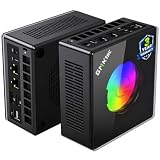
Minisforum UM890 Pro Barebone — Ryzen 9 8945HS, No RAM/SSD/OS
Who it suits: Tinkerers and upgraders who already own DDR5 memory and an SSD — or who are deliberately building a compact PC in stages, ending with an eGPU dock.
Read the listing title the way this guide does: barebone means the kit’s low sticker price — check the price on Amazon — buys a chassis, a motherboard and a Ryzen 9 8945HS — no RAM, no SSD, no Windows. The platform itself is the strongest kit in the class: 8945HS with Radeon 780M, two DDR5 SO-DIMM slots to 96GB, two M.2 slots, dual 2.5GbE, dual USB4 and a native OCuLink port, in a metal chassis of about 5.12 × 5.0 × 2.62 inches (130 × 127 × 67 mm, roughly 1.1 liters) and about 1.6 kg. That taller, heavier metal box is the UM890 Pro’s character: it is the least mini of the minis here, built more like a tiny workstation than an appliance, with a larger fan and the cooling headroom to sustain the chip’s 70W mode. As the hub of a staged build — kit now, parts you already own inside it tonight, a dock and desktop card when funds allow — nothing else in this guide is as capable.
The arithmetic, stated as plainly as the barebones guides state it: at November 2026 parts prices, completing this kit with new memory and storage costs more than buying the finished machine. The complete 32GB/1TB version of this same PC has tracked above this budget — which means the barebone kit plus a new 32GB memory kit and a 1TB SSD lands you in the same territory or beyond, having done the assembly yourself. The kit wins in exactly two situations: you already own the DDR5 and SSD (a laptop upgrade’s leftovers are the classic case), or you want a configuration the factory does not sell, such as 64GB and 4TB. And the eGPU endgame must be priced whole: a DEG1-class dock, a power supply if you do not own one, and the graphics card itself. Kit, parts, dock, card — the full project is a much larger build spread over time, well past this budget. Bought with open eyes, it is the best compact platform here. Bought because the kit’s sticker looked cheap, it is the most expensive mistake in the guide.
- Strongest kit platform: 8945HS, native OCuLink, dual 2.5GbE, dual USB4, RAM to 96GB.
- Metal chassis with real cooling headroom — sustains performance the slim boxes cannot.
- The lower-priced way into this platform — check the current kit price on Amazon.
Honest limitation: The kit price is not a computer price — with new parts at current prices, completion meets or beats the tracked pricing of the finished version, and the full eGPU project runs well past this budget.
Choose it if you own DDR5 and an SSD already, or want a staged build ending in a docked desktop GPU. Skip it if you are buying every part new — the complete K8 Plus is the cheaper finished machine.
Minisforum UM880 Plus Barebone — Ryzen 7 8845HS, Without RAM/SSD/OS
Who it suits: The same parts-owning buyer as the UM890 Pro, spending less — and anyone who wants to see this category’s pricing trap demonstrated on one machine before they buy anything.
The UM880 Plus is the cheapest route to an OCuLink port in this guide: the barebone kit is the lowest-priced entry in this guide — check the price on Amazon — for a Ryzen 7 8845HS with Radeon 780M, two DDR5 slots, two M.2 slots and 2.5GbE in the slim 130 × 126.5 × 50.4 mm chassis — about 0.83 liters and 0.67 kg, the joint-smallest footprint here. One specification needs translating rather than repeating: its OCuLink arrives through an internal adapter board, where the K8 Plus and UM890 Pro offer a native port. The practical consequence is a trade-off inside the box — the adapter occupies internal expansion room — and it is the kind of detail listing headlines blur. For a buyer whose endgame is a dock, the distinction matters less than the clear saving against the UM890 Pro kit; for a buyer who wants every internal slot free, it matters more.
This machine is also the documented example of why this guide insists on whole-price arithmetic. A November 2026 survey of Amazon’s mini PC listings priced this exact exercise: a UM880 Plus barebone, completed with a new 32GB DDR5 kit and a 1TB SSD at the day’s Amazon prices, totaled more than the complete version of the same machine, same memory and storage, bought finished. Building it yourself with new parts cost meaningfully more than buying it finished. That is the memory shortage talking — even a single 16GB DDR5 stick was recorded at a strikingly high price in the same survey — and it will not always be true. But it is true now, and it is why this pick is recommended only to buyers completing it from parts already on the shelf, where the kit’s low price is real money saved rather than the first line of a longer bill. In that situation the UM880 Plus is the smartest spend in the guide: the same 780M, the same dock future, the least cash down.
- Cheapest OCuLink entry in the guide — the lowest-priced kit here; check the price on Amazon.
- 8845HS and Radeon 780M in a 0.83-liter chassis — the full class performance, kit-priced.
- The documented case study: kit plus new parts cost more than the complete machine.
Honest limitation: OCuLink comes via an adapter board rather than a native port, and with new parts the finished build costs more than the complete version — this kit only makes sense with parts you already own.
Choose it if you have DDR5 and an SSD waiting and want the dock path at the lowest entry price. Skip it if you are buying parts new, or if you need both M.2 slots and a native OCuLink port — that is the UM890 Pro.

Comparison Table
| Product | Size | Graphics | Best use | Link |
|---|---|---|---|---|
| GMKtec NucBox K8 Plus (32GB/1TB) | 5.2 × 5.0 × 2.3 in — ~1.0 L | Radeon 780M + native OCuLink | The complete compact PC, with a dock in its future | Check on Amazon |
| HP Victus 15L (TG02-1020h) | 6.1 × 11.7 × 13.3 in — ~15.5 L | RTX 3050 discrete | Big-brand tower gaming with a real GPU | Check on Amazon |
| Beelink SER8 (32GB/1TB) | 5.3 × 5.3 × 1.8 in — ~0.8 L | Radeon 780M, USB4 only | Quiet rooms, living rooms, light gaming | Check on Amazon |
| GMKtec NucBox K11 (32GB/1TB) | 5.2 × 5.0 × 2.3 in — ~1.0 L | Radeon 780M + front OCuLink | Maximum performance per liter, bought on sale | Check on Amazon |
| Minisforum UM890 Pro Barebone | 5.1 × 5.0 × 2.6 in — ~1.1 L | Radeon 780M + native OCuLink | Staged builds and the eGPU endgame | Check on Amazon |
| Minisforum UM880 Plus Barebone | 5.1 × 5.0 × 2.0 in — ~0.8 L | Radeon 780M + OCuLink (adapter) | Cheapest dock-ready start for parts owners | Check on Amazon |
How to Choose a Compact Gaming PC Under $800
- Measure the space, then shop. Compact means a number: a one-liter mini is about 5 × 5 × 2 inches and can VESA-mount behind many monitors; the Victus 15L needs a shelf 6.1 inches wide and 13.3 inches tall. If a listing will not state dimensions, it is not a compact PC — it is a tower with good public relations.
- Decide your graphics religion first. Integrated 780M graphics play esports and 1080p medium today and never improve. A discrete card (the Victus) plays better today and is effectively permanent. An OCuLink mini plays at 780M level today and can host a desktop card tomorrow. Pick which of those three sentences describes you before you pick a machine.
- Price the whole machine, never the sticker. For barebones, add memory, storage and an OS at today’s prices before comparing against complete machines — in the current market the kit route with new parts can cost more than the finished PC. For the Victus, add the second RAM stick it needs. For everything, add the monitor, because compact PCs rarely bundle one.
- Treat the eGPU as a second purchase, because it is one. A board-style OCuLink dock is a real purchase in its own right, plus a power supply if you lack one, plus the graphics card. The port is worth having — it is the only real graphics upgrade a mini PC can get — but budget it as a future project, not a feature you already own.
- Check the PSU ceiling in any small tower. Brand-name SFF machines use proprietary power supplies with modest wattage, and their interiors accept only short, low-profile cards. Whatever GPU a compact tower ships with is, for practical purposes, the GPU it retires with.
- Weight noise by where the PC will live. The spread in this guide runs from about 32 dBA measured (SER8) to 36–39 dB(A) under load (K11). On a desk in a shared room that difference is the whole purchase; in a dedicated gaming room it is nothing. Maker dB claims are marketing; prefer machines with independent measurements.
- Prefer socketed memory and storage. Every pick here keeps RAM and SSDs on replaceable modules — the only upgrades a mini PC genuinely offers. A compact machine with soldered memory is a sealed appliance: buy its configuration as final, or do not buy it.
- Apply the $800 rule with a walk-away number. Several listings in this category oscillate across the budget line with the memory market. Decide your ceiling before you shop, buy the machine when its listing is under it, and let an over-line price be a reason to wait rather than a reason to stretch.
- Check what is missing from the box. VESA brackets (absent on the SER8 and K11), a second RAM stick (the Victus), an OS (both barebones) — the compact category hides its extras well. The listing’s box-contents line is worth thirty seconds.
- Match the CPU to the dock plan. If an eGPU is the endgame, CPU cores feed the card: the 8945HS machines (K11, UM890 Pro) are the better long-term hosts. If the iGPU is the endgame, the cheaper 8845HS boxes lose almost nothing in games.
What “Compact” Costs You: The Honest Trade-Offs
Every machine in this guide is small because something was given up, and the shape of the sacrifice differs by family. The mini PCs give up the graphics card entirely: the Radeon 780M is a superb integrated GPU, roughly the equal of an entry-level discrete card of a few years ago, but it shares memory with the CPU, it does not ray-trace its way out of trouble, and in demanding 2026 titles it is a 1080p medium-settings device with upscaling doing real work. The slim tower gives up the future instead: the Victus 15L’s RTX 3050 is the better gamer today, but its proprietary power supply and cramped interior mean the card it ships with is the card it keeps, while the one-liter boxes beside it can be transformed by a dock. And the barebones give up the present: their prices are real only for buyers who already own the parts that complete them.
Heat is the tax collector for all of it. A liter of chassis has a liter’s worth of airflow, which is why the performance-mode mini PCs here are measurably louder than the quiet one, and why sustained loads are where compact machines are honestly judged. The SER8’s vapor chamber and the UM890 Pro’s larger fan are two answers to the same physics. None of this makes compact a bad buy; it makes it a deliberate one. You are purchasing desk space, silence or portability with performance headroom as the currency — at $800 the exchange rate is fair, as long as you read it before you pay it.
Common Buying Mistakes
- Believing the word “compact” on a listing. A 17-inch-tall micro-ATX tower is not compact whatever the headline says — check dimensions in inches or liters before anything else.
- Expecting an RTX 4060 compact tower at $800 shelf price. That machine does not exist at this budget; 4060 prebuilts under $800 are full-size towers on sale, and the console-sized brand machines cost far more.
- Comparing a barebone kit’s price against complete PCs. The kit needs RAM, an SSD and an OS; at current memory prices the finished build can exceed the complete machine’s price — the UM880 Plus example in this guide is documented costing more built from new parts than bought complete.
- Counting an eGPU dock as a minor accessory. Dock, power supply and graphics card together exceed the price of the mini PC itself. The port is a plan, not a perk.
- Ignoring the RAM configuration in the tower. The Victus ships with 8GB in a single stick; gaming on it unupgraded leaves performance on the table from the first day.
- Assuming a small tower can take a standard GPU upgrade later. Proprietary PSUs, low wattage and short card clearance say otherwise — in SFF towers, the fitted card is the final card.
- Buying the loud machine for the quiet room. A 39 dB(A) performance mode is fine in a gaming room and a misery in a bedroom; check measured noise, not maker claims.
- Paying the shortage price. Listings in this category swing by hundreds of dollars with the memory market; the K11 has been seen both well under this budget on sale and far above it. The patient buyer gets the same PC for less.
Final Recommendation
- Most buyers: GMKtec NucBox K8 Plus (32GB/1TB), bought when its listing is at $800 or under.
- Want a real graphics card and a big brand: HP Victus 15L (TG02-1020h) — plus a second RAM stick.
- Quiet rooms and living rooms: Beelink SER8.
- Maximum performance, patient shoppers: GMKtec NucBox K11, on sale only.
- Building in stages toward an eGPU: Minisforum UM890 Pro Barebone.
- Parts on the shelf, least cash down: Minisforum UM880 Plus Barebone.
Our top two for compact buyers at this budget are the K8 Plus, the complete one-liter machine whose tracked history sits under the line and whose OCuLink port keeps its future open, and the Victus 15L, for buyers who would rather have a discrete GPU and a big brand’s support than any upgrade path at all. Between them they frame the category’s real choice: integrated graphics with a future, or a fixed card with a warranty. If silence outranks both, the SER8 is the connoisseur’s pick; if performance does, the K11 on sale is the most speed per liter here; and if your parts drawer is already full, the two Minisforum kits turn leftovers into the cheapest compact gaming PCs in the guide. Buyers working to a smaller budget should also see Best Compact Gaming PC Under $500, and those with more room to spend can compare Best Compact Gaming PC Under $1200. Measure your shelf, price the whole machine including the parts the sticker omits, set your walk-away number — and check the live price before you order.
Frequently Asked Questions
What actually counts as a compact gaming PC?
In this guide, a machine of roughly one liter or less (the mini PCs, at about 5 × 5 × 2 inches) or a slim tower around 15 liters (the Victus 15L). A standard gaming mid-tower is 35 to 45 liters. If a listing calls itself compact but stands 17 inches tall, it is a normal tower — check the dimensions, not the adjective.
Can a mini PC with integrated graphics really game?
Yes, within honest limits. The Radeon 780M in most of these machines is the strongest integrated graphics in the class: esports titles run at high frame rates, and demanding games are playable at 1080p on medium settings, often with upscaling. It is not a substitute for a discrete GPU in the heaviest titles, and no pick here is presented as one.
What is OCuLink, and is an eGPU worth it on a compact PC?
OCuLink is a connector that carries a direct PCIe 4.0 x4 link — more bandwidth and less overhead than USB4 or Thunderbolt — to an external dock holding a desktop graphics card. It is the only way a mini PC’s graphics can ever be upgraded. Worth it as a staged plan: the dock alone is a real purchase in its own right, and with a power supply and a card the project adds a substantial amount beyond the PC. Buy the port now if you like; buy the dock when you mean it.
Why is there no RTX 4060 machine in this guide?
Because at $800 there isn’t a compact one to recommend honestly. RTX 4060 prebuilts appear under $800 as sale prices on full-size towers, and genuinely small 4060 machines from the major brands cost well over this budget. The discrete-GPU pick here is an RTX 3050 tower, labeled as the entry-level card it is.
Are barebone mini PCs a good deal?
Only if you already own the parts. A barebone price excludes RAM, storage and an operating system, and at November 2026 memory prices a documented build of the UM880 Plus with new parts totaled more than the complete machine. With DDR5 and an SSD already on your shelf, the same kit is the cheapest strong compact PC in this guide.
How loud are compact gaming PCs?
It varies more than any other specification here. The SER8 has been measured around 32 dBA under load — near-silent. The performance-tuned K11 measured 36 to 39 dB(A) under load, plainly audible. Small fans work harder than big ones; if the PC shares your room, buy the measured numbers, not the marketing.
Can I upgrade a compact gaming PC later?
RAM and storage, yes — every pick here uses replaceable modules, and several have a second M.2 slot. Graphics, almost never internally: mini PCs have no slot, and small towers are capped by proprietary power supplies and low-profile card clearance. The exception is the OCuLink route on the K8 Plus, K11 and the two Minisforum kits, which upgrades graphics externally.
- Best Compact Gaming PC Under $800
- Best Compact Gaming PC Under $500
- Best Compact Gaming PC Under $1200
- Best Compact Gaming PC For Small Spaces Under $800
- Best Compact Gaming PC For Beginners Under $800
- Best Compact Gaming PC For Streaming Under $800
- Best Compact Gaming PC For 1440p Gaming Under $800
- Best Mini Gaming PC Under $800
- Best Small Form Factor Gaming PC Under $800


