Where to buy
Check the latest price, availability and delivery on Amazon. Orders are placed on Amazon. We may earn a commission from qualifying purchases.
- Best overall for a small space: Beelink SER5 MAX Mini PC, Ryzen 7 7735HS, Radeon 680M, 24GB RAM, 500GB SSD — Check on Amazon
- ACEMAGIC Mini Gaming PC, Ryzen 7 7735HS, Radeon 680M, 24GB RAM, 512GB SSD — Check on Amazon
- GMKtec NucBox M6 Mini PC, Ryzen 5 6600H, Radeon 660M, 16GB DDR5, 512GB SSD — Check on Amazon
- abytespark Gaming PC, Core i7, GTX 1660 Super 6GB, 16GB RAM, 1TB SSD — Check on Amazon
See 2 more Amazon options
- STGAubron Gaming PC, Ryzen 5 5500, Radeon RX 580 8GB, 16GB RAM, 512GB SSD — Check on Amazon
- KAMRUI E3B Mini Gaming PC, Ryzen 5 7430U, Radeon Vega 7, 32GB RAM, 512GB SSD — Check on Amazon
Read the full guide ↓
Disclosure: As an Amazon Associate, reviewstook.com earns from qualifying purchases. Links to Amazon on this page are affiliate links; they cost you nothing extra. Listing details such as price and availability change often, so check the current Amazon listing before you buy.
A small space changes what a good gaming PC is. In a spare room or a gaming corner, a tower’s size is a line on a spec sheet; in a dorm room, a studio apartment, a shared bedroom or a desk that is also a dining table, size is the whole purchase. The machine has to share a surface with your books, your monitor, your coffee and your life — or better, it has to leave the surface entirely. So this guide grades the six verified compact options under $500 the way a small room grades them: not by the box alone, but by everything the box drags with it. The power brick needs a home. The cables need somewhere to fall. The vents need air on every side that breathes. And the fan, unremarkable across a large room, sits two feet from your ears at a small desk.
Four of the six picks are true mini PCs — documented at under a litre each — and two of them can bolt to the back of a monitor and take their desk footprint to zero. The other two picks are small-brand gaming towers, included with their size problem stated plainly rather than disguised: they are the only route to a discrete graphics card under $500, and in a small space that trade has to be made deliberately, with a tape measure, or not made at all. There is no current-generation discrete GPU in a compact PC under $500 anywhere in the verified market — stronger compact machines with newer integrated graphics start above this budget — so the honest menu at $500 is AMD’s Radeon 680M and 660M integrated graphics in mini PCs, previous-generation discrete cards in towers, and one very cheap Vega 7 mini PC for light libraries. Expect honest 1080p gaming: esports and older titles comfortably, current releases at low-to-medium settings with upscaling where the game offers it.
What follows is a placement-first guide. The quick picks grade each machine’s space profile alongside its gaming class. The reviews cover where each box can actually live — behind a monitor, on a TV stand shelf, in the corner of a desk that has no corner to spare — and what it costs in brick space, cable runs and breathing room. Then come the measuring routine to run before you order, the heat and noise realities of small boxes in small rooms, the common mistakes, and the questions small-space buyers ask most.
In this guide
Quick Picks
Short on time, or comparing several options at once? Each row below names a small-space situation and the product that suits it, with the documented size that defines it and a link to the listing.
| Small-space situation | Pick | Space profile | Link |
|---|---|---|---|
| Best overall for a small space | Beelink SER5 MAX Mini PC, Ryzen 7 7735HS, 24GB, 500GB | About 0.6 litres, VESA mount in the box — the desk footprint can be zero | Check on Amazon |
| Best for a small living room | ACEMAGIC Mini Gaming PC, Ryzen 7 7735HS, 24GB, 512GB | Flat 5-inch square, about 0.67 litres — sits in a TV stand like a streaming box | Check on Amazon |
| Best value in a small box | GMKtec NucBox M6 Mini PC, Ryzen 5 6600H, 16GB, 512GB | About 0.8 litres — check price on Amazon — and the only pick with socketed RAM | Check on Amazon |
| Best graphics, worst fit | abytespark Gaming PC, GTX 1660 Super 6GB, 16GB, 1TB | A tower — only for small rooms that can surrender a tower-sized corner | Check on Amazon |
| Best if the room will grow later | STGAubron Gaming PC, Ryzen 5 5500, RX 580 8GB, 16GB, 512GB | A tower on a modern platform — buy only when its current price falls within this guide’s budget | Check on Amazon |
| Best for the tightest budget | KAMRUI E3B Mini Gaming PC, Ryzen 5 7430U, 32GB, 512GB | Mini PC with a VESA plate included — vanishes behind a spare-room monitor | Check on Amazon |
How These Picks Were Chosen
The first filter was the same one a small room applies: documented size. A pick counted as genuinely compact only if its maker or listing publishes dimensions that put it under roughly one litre — the class of machine that mounts behind a monitor, shelves beside a TV or shares a student desk with the studying. Every dimension, weight and mounting claim in this guide comes from a maker specification, a listing’s product details or a manual, never from a product photo’s sense of scale — and where a pick’s sources document no dimensions at all, this guide says so and grades it by form-factor class instead of inventing numbers. Four picks pass the sub-litre test. The two towers fail it openly and are included as the discrete-graphics exception, because a small-spaces guide that hid the only discrete-GPU route under $500 would be hiding the real decision.
Within that filter, the grading ran on placement, not just footprint. We weighed where the power supply lives — every mini PC here runs from an external brick, and a brick is a second object your small space must absorb — and what the documented connections imply for cable runs: the mini PCs’ display outputs and wired LAN ports decide whether cables fall neatly behind furniture or drape across the little desk you were trying to save. Where a listing’s exact front-versus-rear port split is not documented in our sources, we do not guess it; we grade the documented outputs and tell you to confirm the layout on the live listing, because port position decides tidy versus annoying in a tight setup. Heat and airflow were graded as placement rules: small fans move small amounts of air, so a pick’s venting and its tolerance for shelves, monitor backs and open desk corners mattered as much as its processor.
We have not used these machines ourselves. Our evidence is the maker listings and specification pages and independent model documentation, compared across graphics class, memory type, storage and published dimensions. Every product below is a real Amazon listing whose ASIN and configuration we verified; in this category prices move weekly, with coupons and Prime-only deals, so check the current price on Amazon before you judge any pick. One price rule attaches to the STGAubron tower: it only makes sense when its current price falls within this guide’s budget, and the GMKtec’s case rests on its position in the lower part of this budget tier. One memory rule ran through everything: most mini PCs solder their RAM, and integrated graphics borrow system memory, so the configuration you order is the configuration your room lives with — we favoured 24GB and 32GB configurations where the budget allowed, and flagged the one socketed exception.
The 6 Best Compact Gaming PCs for Small Spaces Under $500
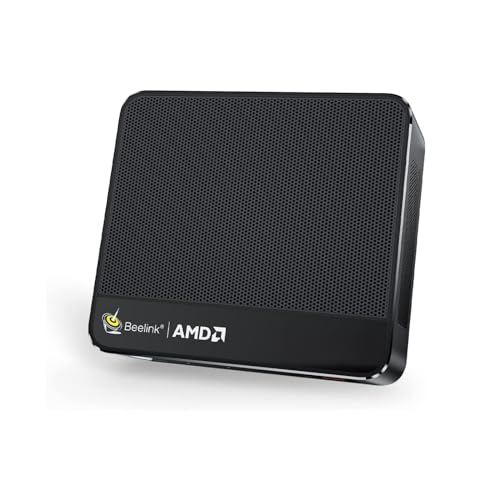
Beelink SER5 MAX Mini PC — Ryzen 7 7735HS, Radeon 680M, 24GB RAM, 500GB SSD
Who it suits: Small-space buyers who want the strongest graphics this budget allows and a desk that ends the day with nothing on it — dorm rooms, studio desks, shared bedrooms where the PC must disappear when the room turns back into a bedroom.
The placement story starts with the only numbers that matter here: 4.96 by 4.45 inches across, 1.65 inches tall, roughly 0.6 litres, under two pounds. That is a box smaller than the paperback it gets compared to, and Beelink includes a VESA bracket in the box, which is the single most valuable accessory in this guide for a small room: bolted to the back of a monitor, the SER5 MAX takes its desk footprint to exactly zero. No shelf negotiation, no corner surrendered. On a surface instead, it occupies less room than the keyboard in front of it. Either way, it is the only pick here that combines the guide’s strongest integrated graphics with a documented, in-the-box route off the desk entirely.
The graphics earn the placement. The Ryzen 7 7735HS’s Radeon 680M is the class leader among integrated GPUs at this price — roughly GTX 1050 Ti-class — which in a small room translates to esports titles running fast at 1080p, older AAA games at medium settings, and current releases at low-to-medium with upscaling. The 24GB of LPDDR5 memory is partly a graphics specification, because the 680M borrows system RAM for video memory; the extra capacity over a 16GB machine is headroom the games actually use. Check the current price on Amazon for this configuration. It drives up to three 4K displays — more than any small desk will hold, but useful the day the room grows — and carries a 2.5Gbps LAN port alongside Wi-Fi 6, so a wired run is possible where the furniture allows one.
Small-space ownership has two honest costs. The first is the power brick: the box is 0.6 litres, but it runs from an external adapter that needs a surface, a socket and air of its own — behind the monitor is the tidy answer, on the floor by the power strip is the common one, and either way it must be planned rather than discovered. The second is sound at close range. One small cooling system handles the whole machine; at desktop distances in a quiet room you will hear it work under a gaming load, while VESA-mounted behind a monitor — with the display itself between the fan and your ears — it mostly fades. Storage is a 500GB PCIe 4.0 SSD, adequate rather than generous, and this configuration’s pressure point once a few large games land on it.
- About 0.6 litres and under 2 lb, with the VESA bracket included — the zero-footprint option.
- Radeon 680M: the strongest integrated graphics verified under $500.
- 24GB of memory, part of which works as graphics memory — real headroom for the 680M.
Honest limitation: The RAM is soldered LPDDR5 and the graphics are part of the processor — neither can ever be upgraded, so the machine you mount is the machine you retire. Modern game installs will fill the 500GB SSD faster than you expect.
Choose it if your space is genuinely scarce and you want the most gaming a sub-litre box can do at this budget. Skip it if a graphics upgrade is anywhere in your future plans — no mini PC offers one — or a terabyte of game storage has to be there from day one.

ACEMAGIC Mini Gaming PC — Ryzen 7 7735HS, Radeon 680M, 24GB RAM, 512GB SSD
Who it suits: Small living rooms and shared spaces — the PC that lives in the TV stand, feeds the couch library, and should read as a streaming box rather than a computer to everyone else in the room.
Shape is this machine’s whole argument. The listing’s product details put it at 5.04 by 5.04 by 1.61 inches — a flat silver square of about 0.67 litres and 2.65 pounds. A tower announces itself; a mini PC cube perches; a flat square slides. It fits the shelf of a TV stand, sits under a television without stacking the room’s electronics into a tower of their own, and turns the household’s main screen into a gaming screen for indie games, party titles, older AAA and couch co-op at 1080p. Inside is the same silicon as the top pick — Ryzen 7 7735HS, Radeon 680M graphics, 24GB of LPDDR5, a 512GB SSD — so the 680M’s honest limits apply exactly: low-to-medium settings on current releases, upscaling as needed, esports and back-catalog games running happily. Check the current price on Amazon before you judge it, as this listing family’s pricing moves often.
The placement details suit the room it is aimed at. A 2.5Gbps LAN port means that if your TV stand already has a cable run — many do, for the TV itself — the PC can share that wired habit, which is the kindest thing you can do for downloads and game streaming in a room where Wi-Fi fights every other device the household owns. Triple 4K display output is wasted on a single television, but it is the machine’s retirement plan: the day a desk enters its life, it can drive a multi-monitor setup without adapters. At couch distance, its small fan is the easiest in this guide to forget — fan noise that would register at a desk simply does not carry across a living room under game audio. One gap to plan around: unlike the Beelink and the KAMRUI below, no monitor mount is documented for this pick in our sources, so its home is a shelf or a stand surface, not the back of a display.
Two cautions travel with the brand. ACEMAGIC listings carry several configurations under similar names, so confirm the live listing says 7735HS and 24GB before ordering — a 16GB variant is a materially weaker gaming machine, because the graphics share that memory. And support from a value brand runs thinner than the big names’ — buy it as the capable appliance it is — check price on Amazon to confirm it sits comfortably within this budget tier.
- A flat square, 5.04 × 5.04 × 1.61 inches — shaped for a TV stand shelf.
- The top pick’s 680M graphics and 24GB of RAM — check price on Amazon to compare the two.
- 2.5Gbps wired LAN for the entertainment centre, triple 4K output for later desk duty.
Honest limitation: The RAM is soldered — 24GB is the machine’s lifetime memory — and no VESA mount is documented for it, so it needs a shelf or surface rather than a monitor back. The listing family’s multiple configurations make it easy to order the wrong variant if you shop by the headline alone.
Choose it if the PC’s home is a small living room and couch-distance quiet matters more than the last word in brand support. Skip it if you cannot confirm the 7735HS/24GB configuration on the live listing, or you need the PC off every surface — that is the Beelink above.

GMKtec NucBox M6 Mini PC — Ryzen 5 6600H, Radeon 660M, 16GB DDR5, 512GB SSD
Who it suits: Renters, students and tinkerers in tight quarters — buyers who want a genuine mini PC for well under the budget, in a box that can move rooms, move house, or ride home in a backpack without a logistics plan.
GMKtec’s own documentation puts the M6 at about 12.8 by 12.7 by 4.8 centimetres — call it 5 by 5 by 2 inches, roughly 0.8 litres, and just over half a kilogram. In a small space, that is the size class that stops being furniture and starts being an object: it perches on a monitor shelf, tucks beside a TV, shares a narrow desk with a laptop without either machine crowding the other, and packs into a bag with its brick when the semester ends. Its position in the tier is part of the appeal, too: the 16GB/512GB configuration sits in the lower part of this budget — check price on Amazon — making it one of the lower-cost routes in this guide to a modern mini PC, and a small-space buyer can redirect the headroom in the budget at the monitor or the desk.
Be clear-eyed about the graphics, because the saving has a source. The Ryzen 5 6600H’s Radeon 660M is a clear step below the 680M pair above it: the class for esports at 1080p, indie games, and older AAA titles at low-to-medium settings. This is a light-gaming machine, recommended as one. What it offers in exchange is the feature the expensive picks cannot: socketed DDR5 in two standard SO-DIMM slots, so the 16GB it ships with can become 32GB or more later — and in a category where the standard advice is “buy your final configuration today,” that makes the M6 the one pick a budget buyer can start cheap and improve. Dual M.2 SSD slots, USB4 and dual 2.5Gbps LAN ports round out a connectivity set that is generous for the size, and the wired ports matter in dorms and rentals where the router’s location is not yours to choose.
The small-space compromises are specific. GMKtec’s documentation notes a secondary fan that aids cooling at the cost of noise under heavy loads, so this is the mini PC most likely to be audible on a quiet desk mid-game — across a room it fades, but at arm’s length in a studio it is part of the soundscape. The power brick is external, as with every mini PC here. And the listing family also sells this model as a barebones kit with no RAM or SSD at all, so the exact configuration deserves the usual thirty-second check before ordering: a barebones box is a project, not a PC.
- Positioned in the lower part of this budget tier — check price on Amazon — the guide’s value outlier.
- Two SO-DIMM slots with socketed DDR5 — no other pick here lets you upgrade memory.
- Dual SSD slots, USB4 and dual LAN in a roughly 0.8-litre box.
Honest limitation: The Radeon 660M is a class below the 680M picks — esports and older games, not current AAA at comfortable settings — and its cooling is the most audible in this guide under load, which matters at a small desk.
Choose it if your games are esports and back-catalog titles and you value a low entry price plus a real memory upgrade path. Skip it if you want to play current releases at 1080p medium in a quiet room — that is what the 680M machines above are for.

abytespark Gaming PC — Core i7, GTX 1660 Super 6GB, 16GB RAM, 1TB SSD
Who it suits: Buyers in small spaces whose real priority is graphics power and who have measured — actually measured — a tower-sized corner they are willing to surrender permanently: under a desk, beside it, but somewhere with air on the vented sides.
Every guide in this series carries an exception, and in a small-spaces guide the exception has to be introduced by its cost: this is a tower. Our sources document no dimensions for it, and this guide will not invent any — what can be said honestly is that it is a small-brand desktop case with four RGB fans, dozens of times the volume of the mini PCs above, and it will not hide behind a monitor, inside a TV stand shelf, or anywhere else a small room hides things. It also keeps its power supply inside the case, the tower’s one genuine space virtue: no external brick to house, one power cable, a single object to place. If your room can absorb that object, what it buys is the thing no sub-litre box under $500 offers — a discrete GTX 1660 Super with its own 6GB of GDDR6 memory, still plainly the strongest gaming graphics in this guide: comfortable 1080p at medium-to-high settings across a wide back catalog, fast esports, and current titles at medium where the 680M machines are dropping to low. Around it sit 16GB of RAM and a full 1TB NVMe SSD — double the mini PCs’ storage — check the current price on Amazon.
The honesty this pick demands is about the platform, not the card. Read the listing’s own processor field and its “Core i7” resolves to an i7-7700, a quad-core chip from 2017. It feeds the 1660 Super adequately in most games, but it sits on a dead-end platform with no meaningful CPU upgrade path, and in CPU-heavy modern titles it, not the graphics card, will be the ceiling. Configurations under this listing family have been known to shift, so check the CPU, card and storage on the live listing before ordering, and put the machine through hard stress tests inside its return window, as you should with any small-brand tower. In a small room there is one more consideration the big-room guides can skip: a tower’s fans and RGB are a presence. Placed under a desk it is a hum at your feet; placed on a small desk it is a light show at eye level. Chosen knowingly, it is a rational trade — yesterday’s real gaming hardware in exchange for the corner it occupies. Chosen by a shopper who searched “small spaces” and stopped reading, it would be the wrong purchase, which is why its size problem is stated in every table in this guide.
- The GTX 1660 Super’s 6GB are dedicated — the strongest gaming graphics in this guide.
- A full 1TB of storage and 16GB of RAM: the roomiest configuration here.
- Internal power supply: one object to place, no brick to house.
Honest limitation: By any measurement this guide respects, it is not a compact machine at all, and the i7-7700 platform underneath it dates from 2017 with no upgrade future — what you are buying is the graphics card and the storage, and accepting the rest.
Choose it if frame rates beat footprint and your measured space can genuinely take a tower. Skip it if small size is the actual requirement — the Beelink and ACEMAGIC above deliver the promise this machine abandons.
STGAubron Gaming PC — Ryzen 5 5500, Radeon RX 580 8GB, 16GB RAM, 512GB SSD
Who it suits: Planners in temporary small spaces — buyers whose current room is tight but whose next one may not be, who want a discrete graphics card now and a platform that can grow when the floor plan does, and who are patient enough to buy on a price dip.
The second tower in the guide earns its place on a different logic from the first. Its RX 580 8GB is older than the abytespark’s 1660 Super and a step slower, but its Ryzen 5 5500 is a modern six-core on AMD’s AM4 platform, and that changes the ownership story completely. Where the abytespark is a finished appliance, this is a starting point: the CPU can be upgraded within a deep, cheap AM4 catalog, the RAM and storage are standard parts, and the graphics card can be replaced when budget allows. For a small-space buyer, that reframes the tower’s size cost — you are not surrendering a corner to a dead end, you are surrendering it to the one machine in this guide that can become a stronger machine without being replaced. The listing rounds itself out properly: 16GB DDR4, a 512GB SSD, Wi-Fi 6, four RGB fans, Windows 11 Home, and an RGB keyboard and mouse in the box — peripherals a small desk will also have to absorb — and its 8GB of video memory, generous for its generation, helps in texture-heavy games at 1080p. As with the abytespark, no dimensions are documented in our sources and none are claimed: it is a tower, and in a small room it needs a tower’s worth of floor or desk, plus open air at its vents.
What follows on price matters more than anything else in this review. This listing’s price moves considerably, and it often sits above this guide’s budget — so the rule is absolute: only consider it when its current price on Amazon falls within this guide’s budget, and walk away when it sits above that budget, because above this tier this machine competes with better hardware and loses. Two more honesty notes. The RX 500 series now runs on AMD’s legacy driver cadence, which means new-game optimizations arrive slowly or not at all; the card’s 1080p competence today is real, but its support future winds down rather than opening up. One more check belongs to this pick alone: the listing never publishes its power supply wattage, so read the label when the machine arrives — that figure decides which future graphics cards the upgrade path can actually feed. And place the tower somewhere you can slide it out and work on it; an upgradeable machine wedged into the one gap it barely fits will not get upgraded.
- A modern six-core Ryzen on AM4 — the one genuine upgrade path in the guide.
- 8GB of VRAM on the RX 580 — still a credible 1080p card at low-to-medium settings.
- Keyboard and mouse in the box — complete on arrival, when its current price falls within this guide’s budget.
Honest limitation: For much of the year this listing sits above this guide’s budget, and the RX 580’s legacy driver status caps its future. When its current price sits above this budget, the recommendation is simply no.
Choose it if your small space is a phase rather than a destiny, you will genuinely upgrade parts over time, and you can wait until its current price falls within this guide’s budget. Skip it if you need to buy today at whatever it costs, or if the room cannot spare a tower’s footprint at all.

KAMRUI E3B Mini Gaming PC — Ryzen 5 7430U, Radeon Vega 7, 32GB RAM, 512GB SSD
Who it suits: The smallest rooms and the lightest libraries — a kids’-room or spare-room machine, a first gaming PC for a desk the size of a tray table, an indie and emulation box that should cost and occupy as little as possible.
The E3B closes the guide at the opposite end from the towers: a mini PC positioned at the low end of this budget tier — check price on Amazon. Our sources do not document its exact dimensions, so this guide claims none — what is documented is the accessory that defines its small-space life: a VESA mounting plate in the package, per coverage of this listing. That plate puts the E3B in the zero-footprint club with the Beelink: bolted behind a spare-room monitor or a child’s desk display, it leaves the little surface it serves completely clear, at a notably lower position in this budget tier than the Beelink. The specification sheet reads above its tier position in the ways that suit that job — 32GB of dual-channel RAM, the most in this guide, and dual-channel matters because integrated graphics feed from system memory; a 512GB SSD; Windows 11 Pro — with memory upgradeable to 64GB and storage to 2TB per coverage of the listing, a longer runway than most soldered rivals offer.
Set the graphics expectation in writing, because it is the trade the price is built on. The Ryzen 5 7430U’s Radeon Vega 7 is the weakest graphics in this guide: esports and indie titles at 1080p, older games at low-to-medium, emulation of classic consoles, and modern AAA releases only in the “technically launches, with everything turned down” sense, if at all. For the rooms it suits, that is frequently the right trade. Behind a monitor in a small bedroom, the E3B is a complete, quiet, warranty-covered PC that plays the games younger and lighter libraries actually consist of — Minecraft-class titles, Roblox, indie catalogs, retro collections — without a tower heating the corner and without a fan soundtrack at close range, since a light chip under light loads is the gentlest acoustic proposition in this guide. The cautions are proportionate: KAMRUI is a value brand with value-brand support; the Vega 7 ceiling is hard; and the listing family sells a 16GB sibling configuration under a separate listing, so confirm the 32GB version is the one in your cart, because at this level the memory configuration is a real part of what little performance there is.
- The lowest-cost complete pick in this guide — check price on Amazon.
- A VESA plate in the package — it hides behind a monitor like higher-tier machines.
- 32GB of dual-channel memory, the most in this guide — and the integrated graphics drink from it.
Honest limitation: Vega 7 is the floor of this guide’s graphics ladder — esports, indie and older games are its whole world — and support from the brand is as budget as the price.
Choose it if the library is light, the room is the smallest in the house and the budget is the hardest constraint of all. Skip it if current AAA games are the point of the purchase; the 680M machines above are the step to take instead.
Comparison Table
| Product | Documented size | Mounting and power | Best small-space use | Link |
|---|---|---|---|---|
| Beelink SER5 MAX Mini PC, 7735HS | 4.96 × 4.45 × 1.65 in (~0.6 L) | VESA mount in the box; external brick | Zero-footprint desk gaming with the strongest iGPU | Check on Amazon |
| ACEMAGIC Mini Gaming PC, 7735HS | 5.04 × 5.04 × 1.61 in (~0.67 L) | No mount documented; external brick | TV-stand and small-living-room gaming | Check on Amazon |
| GMKtec NucBox M6 Mini PC, 6600H | ~5 × 5 × 2 in (~0.8 L) | No mount documented; external brick | Portable value buy with upgradeable RAM | Check on Amazon |
| abytespark Gaming PC, GTX 1660 Super | Tower — no dimensions documented | No mount; internal power supply | Best graphics under $500 if a corner can be spared | Check on Amazon |
| STGAubron Gaming PC, Ryzen 5 5500 | Tower — no dimensions documented | No mount; internal power supply | Upgradeable platform, bought on a dip | Check on Amazon |
| KAMRUI E3B Mini Gaming PC, 7430U | Mini PC — dimensions not documented | VESA plate included; external brick | Light gaming behind a monitor, for the tightest budgets | Check on Amazon |
How to Choose a Compact Gaming PC for a Small Space
Run this routine in order, with a tape measure, before any money moves. Each step eliminates a different way a small room rejects a PC.
- Step 1 — Measure the spot, not the room. Pick the machine’s actual home first: the monitor’s back (measure the VESA pattern and the clearance behind the display), the TV stand shelf (height matters — a flat 1.61-inch square fits shelves a cube cannot), the desk corner, the floor beside the desk. Write down depth, width and height in inches. A sub-litre mini PC needs roughly a 5 × 5 inch patch plus height for its cables; a tower needs its full footprint plus working room, and if you cannot name the tower’s patch, you do not have one.
- Step 2 — Reserve ventilation clearance. Every pick in this guide breathes through its sides or top, and small fans move small amounts of air. Keep a few inches of open air on every vented side, and treat a closed cabinet, a sealed TV-stand cupboard or a box wedged between books as a rejection, not a placement: the machine will throttle, the fan will climb, and in a small room you will hear all of it. If the only available spot is enclosed, the answer is a different spot — behind the monitor is the usual escape.
- Step 3 — Give the brick an address. Every mini PC here runs from an external power adapter. The box may be 0.6 litres; the brick still needs a surface, a socket and ventilation, and it generates its own warmth. Plan its home now: on the floor beside the power strip, on the shelf behind the TV, in a cable box with air. A setup that hides the PC but leaves the brick dangling off the desk edge has solved the photogenic half of the problem. The two towers skip this step — their supplies are internal — which is their one honest space advantage.
- Step 4 — Walk the cable drop. Trace each run before ordering: display cable from PC to screen (short and trivial on a VESA mount; across the stand for a shelf machine), power from brick to strip, Ethernet if you are wiring it — and wired is worth it where the run is possible, because small rooms concentrate Wi-Fi contention. Check the bend: cables leave the back of a mini PC and need a couple of inches before they can turn, so a box measured flush against a wall is a box measured wrong. Where a pick’s front-versus-rear port layout matters to your run, confirm it on the live listing — our sources document the outputs, not every port’s position.
- Step 5 — Then order, and confirm the configuration. A mini PC listing is a family, not a single product: one page may sell 16GB and 24GB versions, barebones and complete machines, last year’s chip under this year’s headline. Half a minute spent confirming chip, RAM and storage on the live listing is the cheapest performance upgrade in this guide. Then check the current price on Amazon — coupons and Prime deals move these machines weekly.
Beyond the routine, three judgements decide most small-space purchases. First, buy the graphics class, because in a mini PC you are keeping it: the GPU is part of the processor and can never be changed, so the honest ladder under $500 — Vega 7 for light libraries, Radeon 660M for esports, Radeon 680M as the class pick — should be matched to your library, not your hopes. Second, treat RAM as a graphics spec: integrated graphics borrow system memory, most mini PCs solder theirs, and the configuration on the order is the configuration forever; the GMKtec M6’s socketed DDR5 is the exception that proves how final the others are. Third, match the mount to the room: a VESA bracket behind the monitor is the cleanest desk setup that exists, a TV stand wants the flat-square shape and a wired connection if you can run one, and a room that will change — a dorm, a rental, a first apartment — wants the machine that packs into a bag, brick and all. Storage can usually grow on these machines; memory rarely can; graphics cannot, ever — which is why all three judgements are really one: buy the finished machine, not the project.
Heat and Noise in a Small Room
Distance is the variable every noise judgement in this category secretly depends on, and small rooms have none to spare. A mini PC cools a laptop-class chip through a small heatsink and one or two small fans, and small fans move air by spinning fast — which is why the form factor’s noise signature is pitch rather than volume: a high, light whir instead of a tower’s low rush. Two feet from your ears at a desk, that whir is present in quiet game scenes. Behind a monitor, with the display absorbing it, it recedes. Across a living room, under game audio, it effectively disappears. The same machine can therefore be honestly described as noticeable in a study and silent in a lounge, and the reviews above grade accordingly: the Beelink is quietest in its VESA home, the GMKtec M6 — whose documentation notes a secondary fan that trades noise for cooling — is the pick most likely to be heard at a small desk under load, and the KAMRUI’s light chip under light loads is the gentlest of all.
Heat is the same physics with a longer fuse. A chip in a small chassis may boost eagerly for the first minutes of a session and settle lower as the box warms, which is why the settings advice in this guide targets what each machine can hold all evening rather than what it can touch on a cold start. In a small room the exhaust has somewhere to go or it does not: a mini PC on an open shelf sheds its warm air into the room and is done with it, while the same machine in a closed cabinet breathes its own exhaust and climbs. Placement is the whole remedy — open air on the vented sides, dust kept out of the intakes, never an enclosure without ventilation. Do that, and heat and noise become a known, managed characteristic of the form factor rather than a surprise discovered after the return window.
Common Buying Mistakes
- Measuring the box and forgetting the setup. The real footprint is the PC plus its brick, its cable bends and its breathing room — a machine that “fits” on paper and suffocates in place was never going to fit.
- Believing “compact” in a product title without reading dimensions. A maker who will not publish a size is telling you the size is the story — treat the machine as a tower until the measurements prove it a mini.
- Sealing a mini PC inside a closed entertainment cabinet and blaming the machine for the throttling and fan noise the placement caused.
- Buying a 16GB mini PC to save a little money, then discovering the RAM is soldered and the graphics share it. In this category, memory is a lifetime decision.
- Ordering the wrong configuration from a multi-variant listing — a barebones kit with no RAM, SSD or OS, a 16GB sibling of a 32GB pick, or last year’s chip under a similar name. Before checkout, verify the chip, the memory and the storage on the live listing itself.
- Expecting a small box under $500 to contain a current-generation graphics card. No verified machine like that exists: at this money you choose between 680M-class integrated graphics and previous-generation discrete cards.
- Paying above this budget for the STGAubron. When its current price sits above this guide’s budget it is simply the wrong purchase; everything in its case depends on it falling within this budget.
- Assuming a mini PC can be upgraded like a tower when the hobby grows. Storage, usually; RAM, in one pick here; graphics, in none of them. Buy the final graphics class now.
- Putting a tower on a small desk because the floor felt like giving up. A tower under or beside the desk keeps the surface usable; a tower on it consumes the room’s scarcest resource — the workspace itself.
Final Recommendation
- Most small-space buyers: Beelink SER5 MAX Mini PC — the strongest graphics here, in a box that can leave the desk entirely.
- Small living rooms and TV setups: ACEMAGIC Mini Gaming PC.
- Value hunters, students and movers: GMKtec NucBox M6 Mini PC.
- Graphics first, with a measured corner to spare: abytespark Gaming PC with GTX 1660 Super.
- Temporary rooms and long-term builders: STGAubron Gaming PC — only when its current price falls within this guide’s budget.
- Smallest rooms, lightest libraries: KAMRUI E3B Mini Gaming PC.
Our top two for small spaces at this budget are the Beelink SER5 MAX, because it pairs the best integrated graphics verified under $500 with the guide’s only documented in-the-box route to a zero desk footprint, and the GMKtec NucBox M6, because it is positioned as a lower-cost honest route into mini PC gaming — check price on Amazon — the easiest machine here to move, and the only pick that lets you upgrade its memory later. The ACEMAGIC is the living-room expression of the same idea; the KAMRUI its budget expression; the two towers are the deliberate exceptions for buyers whose room can spare a corner and whose priorities put frames first. For the wider compact market at this price, see Best Compact Gaming PC Under $500; if the room is small but the budget can stretch, Best Compact Gaming PC Under $700 is the step up, and if it cannot, Best Compact Gaming PC Under $400 keeps the same placement logic at less money. Measure the spot, reserve the air, house the brick, walk the cables — then order.
Frequently Asked Questions
How much space does the whole setup really take, including cables and power?
More than the headline box. Budget the machine’s footprint plus its external power brick, a display cable’s bend radius behind the unit, and a few inches of open air at the vents. Mounting a mini PC on the back of a monitor is the one arrangement whose desk cost genuinely rounds to zero — which is why the mounts bundled with the Beelink and KAMRUI picks are worth more than they look. The wider mini market around this guide is covered in Best Mini Gaming PC Under $500 and Best Mini PC Under $500.
Can I put a mini PC inside my TV stand cabinet?
Only if the cabinet breathes. A mini PC sealed in a closed cupboard recirculates its own exhaust, throttles and gets louder — the placement causes the problem, not the machine. An open-backed shelf, a stand with ventilation, or the back of the television itself are all better homes. The flat ACEMAGIC square in this guide is shaped for an open TV-stand shelf precisely because that is where living-room PCs actually live.
What actually counts as compact enough for a small room?
The standard applied throughout this guide: a true compact is a mini PC of roughly a litre or less — around 5 × 5 × 2 inches — small enough to mount behind a monitor or disappear onto a TV stand. Compact towers of around 15 litres are a legitimate middle class, but they are several times larger and still need a dedicated patch of floor or desk; anything calling itself compact without published dimensions should be treated as a tower until you verify otherwise. The middle ground is covered in Best Small Form Factor Gaming PC Under $500.
Are mini PCs loud in a small room?
Audible rather than loud — and distance decides which word you would use. At a quiet desk the small fan’s high, light whir is present; across a living room, behind a monitor, or under game audio it effectively vanishes. Keep the vents in open air — a sealed cabinet makes any compact PC louder and slower — and expect the GMKtec M6 to be the most noticeable of this guide’s picks under sustained load, and the light-duty KAMRUI the least.
Can a compact PC under $500 really play games?
Yes, at honest 1080p settings. The Radeon 680M machines in this guide run esports titles fast, older AAA games at medium settings, and current releases at low-to-medium with upscaling — roughly GTX 1050 Ti-class performance. What they cannot do is high-settings modern AAA or serious 1440p; Best Compact Gaming PC For 1440p Gaming Under $500 covers what this budget can and cannot reach at that resolution, and the honest answer involves stepping up a tier.
Can I upgrade a mini PC later?
Storage can, on most of them. Memory can only occasionally — the majority of mini PCs solder it, and the GMKtec M6’s socketed DDR5 is this guide’s exception. Graphics cannot, on any of them, because the GPU is built into the processor. That single fact is the size-for-upgradeability trade, and it is why this guide keeps insisting you buy the graphics class you can live with for the machine’s whole life. Buyers who know they will upgrade should look at the tower picks here, starting with the STGAubron.
Is a compact PC a good first gaming PC for a small room?
For a light or mixed library, yes: simple to set up, quiet, warranty-covered and occupying almost nothing, with the starter angle walked through in full in Best Compact Gaming PC For Beginners Under $500. The growth warning stands, though — a beginner who falls for the hobby properly will outgrow integrated graphics, and a mini PC has no way to grow with them. If streaming from the small room is part of the plan from day one, Best Compact Gaming PC For Streaming Under $500 covers the capture-and-encode side of the same budget.


