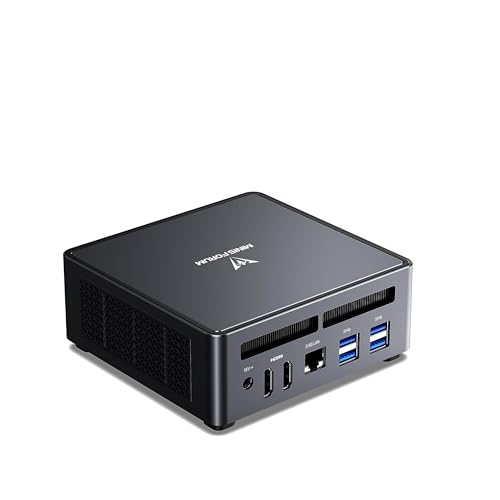
Where to buy
Check the latest price, availability and delivery on Amazon. Orders are placed on Amazon. We may earn a commission from qualifying purchases. Every product below is a barebones kit: the price buys the case, board, processor and cooler only — no RAM, no SSD and no operating system unless a review says otherwise, so budget for those parts before comparing any price here with a complete mini PC.
- Best overall for streaming: MINISFORUM UM790 Pro Barebone (Ryzen 9 7940HS, Radeon 780M, no RAM/SSD) — Check on Amazon
- ASRock DeskMini X600 (USB4) AM5 Barebone Kit — Check on Amazon
- AOOSTAR GEM12+ PRO Barebone (Ryzen 7 PRO 8845HS, OCuLink) — Check on Amazon
- MINISFORUM MS-01 Barebone (Core i5-12600H, dual 10GbE, PCIe slot) — Check on Amazon
See 2 more Amazon options
- ASRock DeskSlim X600 AM5 Barebone (PCIe 5.0 x16 slot for a low-profile GPU) — Check on Amazon
- MINISFORUM MS-A1 Barebone with Ryzen 9 9950X (no RAM/SSD) — Check on Amazon
Read the full guide ↓
Disclosure: As an Amazon Associate, reviewstook.com earns from qualifying purchases. Links to Amazon on this page are affiliate links; they cost you nothing extra. Listing details such as price and availability change often, so check the current Amazon listing before you buy.
A streaming PC is two computers wearing one case. One of them plays the game, draws the desktop or ingests the capture card; the other takes every finished frame, compresses it into a live broadcast and pushes it up your internet connection, sixty times a second, for hours, without dropping any. Most guides grade only the first computer; this one grades the second, because in a barebones mini PC the chip that compresses your stream is not a graphics card you can swap later. It is a small hardware block inside the same processor that renders your game — chosen the moment you chose the kit. So this guide is organised around a single question: what, exactly, encodes your stream on each of these six machines?
Two pieces of honesty belong at the top. The first is the barebones rule, and it is absolute: the sticker price is not a PC price. Every kit here ships without RAM, without an SSD and without an operating system; two of them ship without a CPU as well. So every pick is considered the way the base research considered it — kit plus the parts it still needs, using one standard basket (a 32GB DDR5 memory kit and a 1TB NVMe SSD — check price on Amazon, as component pricing moves often) — and every completed build lands under the $1,200 budget. No operating system is inside any completed build: Linux and SteamOS are free, and Windows buyers add a licence they do not already own. The second honesty note: a finished PC is still not a streaming setup. No mini PC in this guide includes a microphone, a light, a camera or a capture card, and a section near the end budgets that kit separately, never folded into a pick’s price. Anyone who shows you a single number for “a streaming PC” is hiding at least one of those two bills.
Here is what streaming on this hardware honestly looks like. There is no NVIDIA graphics card anywhere in this guide, so there is no NVENC — the encoder most streaming advice is written about — unless you later add one through the expansion routes two of these kits provide. What you get instead is the other three encoder families: AMD’s VCN inside the Radeon 780M machines, Intel Quick Sync inside the one Intel kit, and — on the 16-core ceiling pick — CPU software encoding that is genuinely good because the processor is enormous. The realistic workload for all of it: talk and desktop streams, console play fed through a capture card, and light-to-moderate games played on the machine itself, broadcast at 720p60 or 1080p30 against Twitch’s roughly 6,000 kbps ceiling. That is what the large majority of actual streams consist of, and these small boxes handle it well — provided OBS is set up as the setup section below describes and a cable, not Wi-Fi, connects the PC to the router.
The Encoder Is the Streaming Spec
Every streaming guide eventually says “use the hardware encoder”, as if all hardware encoders were the same block with different badges. They are not. They differ in codecs, in picture quality at a fixed bitrate, and in how much of your game they steal while doing it. Since the encoder is fixed by the processor you buy, this section is the real buying decision in the guide.
AMD VCN (the four Radeon 780M routes). The UM790 Pro, the GEM12+ PRO and — once you fit the Ryzen 7 8700G this guide costs them with — both ASRock kits all encode through the video block built into the Radeon 780M. That block belongs to AMD’s RDNA 3 generation, and the generation matters for one specific reason: it can encode AV1, the newer codec YouTube accepts for live streams and Twitch is rolling out through Enhanced Broadcasting. The previous AMD generation could not encode AV1 at all. At Twitch’s bitrates, be clear-eyed about the trade: AMD’s hardware H.264 picture is visibly softer than NVIDIA’s NVENC at the same roughly 6,000 kbps — fast motion in grass, rain or confetti breaks up sooner — and that is a property of the encoder, not a fault of these particular boxes. The mitigations are the output settings this guide returns to throughout: 720p60 for fast games, 1080p30 for slower ones.
Intel Quick Sync (the MS-01). The one Intel kit here encodes through Quick Sync, the video block inside its Core i5-12600H’s Iris Xe graphics. Quick Sync’s reputation is earned: clean H.264 at Twitch bitrates, HEVC besides, and it sips resources while a game runs on the same chip. Its ceiling on this generation of Intel silicon is the codec list — this Quick Sync writes H.264 and HEVC, and it does not encode AV1; AV1 encoding arrived on later Intel graphics, not on the Iris Xe in this processor. If your platform is Twitch today, that absence costs you nothing. If you stream to YouTube and want AV1’s cleaner picture at higher bitrates, this encoder cannot grow with you — unless you use its PCIe slot, which is a large part of why that slot matters.
CPU software encoding (the MS-A1, and only the MS-A1). OBS can always fall back to x264, encoding on the processor itself. On most mini PCs that is a desperation move: the game and the encoder fight for the same handful of cores and both lose. The MS-A1 is the exception that proves the rule, because its Ryzen 9 9950X brings sixteen cores and thirty-two threads — enough to play a light game or run a desktop stream on some cores while x264 works on others at quality presets that would flatten a lesser chip. Its own tiny built-in Radeon graphics are a display adapter with a previous-generation hardware encoder and no AV1 encode — not a streaming plan; the plan for that machine is its CPU, or a docked graphics card through its OCuLink port. Treat x264 as closed on the other five picks for anything beyond a static talk scene.
The load nobody lists on the spec sheet. However it is encoded, a live stream on one of these machines is three workloads sharing one memory pool: the game, OBS compositing your scenes, and the browser carrying chat, alerts and dashboard. On integrated graphics that memory is also the graphics memory — the 780M has no VRAM of its own — which is why this guide treats a matched pair of memory sticks as streaming equipment, not an upgrade: a single stick halves the bandwidth feeding the GPU that renders your game and composites your stream at once. The second unlisted load is storage — a high-quality local recording eats roughly 20GB per hour, so the standard basket’s 1TB drive holds a couple of dozen long streams, and a second drive for recordings is the cheapest reliability upgrade in this guide. The third is heat, and with it noise: a fan working hard a metre from a microphone is a production problem, not a hardware footnote.
In this guide
Quick Picks
Short on time, or comparing several options at once? Each row below names a streaming job and the barebone that suits it, with a link to the listing. For pricing, check price on Amazon via each row’s link — completed builds are discussed in each review and the comparison table, and the encoder is named in the row.
| Streaming job | Pick | Encoder it streams with | Link |
|---|---|---|---|
| Best overall for streaming | MINISFORUM UM790 Pro Barebone | AMD VCN in the Radeon 780M — H.264 and AV1 encode | Check on Amazon |
| Cheapest finished streaming PC | ASRock DeskMini X600 (USB4) | AMD VCN in the 8700G’s Radeon 780M, once you fit the APU | Check on Amazon |
| Best for an eGPU later | AOOSTAR GEM12+ PRO Barebone | AMD VCN today; an OCuLink dock is the door to NVENC later | Check on Amazon |
| Best dedicated stream box | MINISFORUM MS-01 Barebone (i5-12600H) | Intel Quick Sync — H.264/HEVC, no AV1 encode | Check on Amazon |
| Best upgrade path to a real GPU | ASRock DeskSlim X600 | Starts on the 8700G’s VCN; its PCIe slot is the internal NVENC route | Check on Amazon |
| Most CPU for a CPU-encoded stream | MINISFORUM MS-A1 (Ryzen 9 9950X) | x264 on sixteen cores — the one honest software-encoding pick | Check on Amazon |
How These Picks Were Chosen
The six picks and their ASINs are inherited in full from the base research behind this site’s barebones guide at this budget, and this variant reuses them exactly — the same six kits, costed with the same parts basket. What changes here is the grading. Each machine has been re-examined as a streaming computer: which hardware encoder its documented silicon actually contains, what happens when a game, OBS and a browser compete for one shared memory pool, how much recording storage its drive layout buys, how its networking serves a broadcast (every pick has wired 2.5-gigabit Ethernet), and how its cooling behaves across a three-hour session. Encoder capabilities are stated only where the fitted hardware documents them: the Radeon 780M’s VCN block and its AV1 encode, the 12600H’s Quick Sync and its codec ceiling, and the 9950X’s core count as an x264 argument. No encoder has been invented for any pick, and no frame-rate figures are quoted anywhere, because no systems were benchmarked for this article — capability is described by encoder and graphics tier.
The discrete-GPU barebones — Minisforum’s HX99G and HX100G, AtomMan’s G7 line — are the machines that would put a true NVENC encoder in a box this size, and none of them could be pinned to a verified Amazon US barebone listing that completes under $1,200: the HX100G launched as a barebone through the maker’s own store, the AtomMan G7 Pt was reported as a higher-priced option before parts, and the RTX 5070 G7 Pro sits above this whole budget as a barebone. So this guide grades the encoders that verifiably are available, and marks the two honest doors to NVENC later — an OCuLink dock and an internal PCIe slot — wherever a pick has one.
The 6 Best Barebones Mini PCs for Streaming Under $1,200
MINISFORUM UM790 Pro Barebone — Ryzen 9 7940HS, Radeon 780M
Who it suits: The streamer who wants one small box that plays the game and broadcasts it, with the least possible building: the strongest integrated graphics here and its RDNA 3 encoder are already in the case.
For a one-PC streaming setup, the UM790 Pro’s argument is that everything happens on silicon designed to share. The Ryzen 9 7940HS brings eight Zen 4 cores and sixteen threads for the game and the desktop; its Radeon 780M renders the picture while its VCN block — separate silicon, not borrowed graphics cores — compresses the stream in H.264 for Twitch or AV1 for YouTube, never queuing behind the game. Run the realistic workload — a light-to-moderate game at 1080p, OBS outputting 720p60 for fast titles or 1080p30 for slower ones, a browser alongside for chat — and the shared-memory discipline in the setup section is what makes it comfortable: fit two matched DDR5 SO-DIMMs, because the 780M eats from the same pool it renders and encodes beside, and a single stick starves all three workloads at once. Two M.2 slots, wired 2.5-gigabit Ethernet, dual HDMI and two USB4 ports complete the picture. Check the current price on Amazon — pricing moves with deals, so patience pays — and with the standard basket the finished machine lands well under the $1,200 budget, and well below the complete 32GB/1TB version; check price on Amazon for that version too if comparing the two routes.
Two warnings from owner experience matter more to a streamer than to anyone. The machine runs warm under sustained load, with temperatures in the high 80s Celsius reported. Warm means fan noise, and fan noise near a microphone means your audience hears the PC under your voice. Give it open air (never a sealed cabinet), put distance and a noise gate between it and the mic, and it behaves. And when you open it to fit your parts, open it slowly: the bottom plate is wired to the motherboard with short, thin cables that punish a hurried hand.
- Radeon 780M plus its RDNA 3 VCN encoder: H.264 and AV1 hardware encoding beside the strongest iGPU here.
- Two M.2 slots — the second one is your dedicated recording drive from day one.
- Wired 2.5GbE, dual HDMI and USB4: the full streaming desk connects without adapters.
Honest limitation: AMD’s H.264 picture at Twitch’s roughly 6,000 kbps is softer than NVENC’s, and no setting changes that — the 720p60 discipline for fast games is the workaround, not a cure. It also runs hot and audible under the sustained load a stream imposes.
Choose it if you want the best one-box play-and-stream machine this budget builds. Skip it if your stream is fast-motion competitive play where encoder sharpness is the product — that audience is paying for NVENC, and this guide cannot sell it to you under $1,200.

ASRock DeskMini X600 (USB4) — Socketed AM5 Barebone Kit
Who it suits: The building streamer on a budget: fit the APU this guide costs it with and you get exactly the same encoder and graphics as the flagship pick above, in the cheapest finished streaming PC in this guide.
The DeskMini is a platform, not a nearly-finished computer: a 1.92-litre case, a Mini-STX motherboard, a 120W adapter and a basic cooler, waiting for a socketed AM5 processor. Everything about its streaming grade depends on the chip you choose, so this guide grades the build it costs: the Ryzen 7 8700G, a mainstream APU on Amazon — check price on Amazon. That APU carries the same Radeon 780M as the UM790 Pro — same RDNA 3 VCN encoder, same H.264 and AV1 hardware encoding, same honest softness at Twitch bitrates. Around the socket the board is generous where streaming cares: two DDR5 SO-DIMM slots (fit the matched pair; the dual-channel rule applies with full force here), one Gen5 and one Gen4 M.2 slot so recordings can live on their own drive, and a wired 2.5-gigabit Ethernet port for the broadcast. For the kit itself, check price on Amazon; add the APU and the standard basket and the finished 780M streaming PC lands well under the $1,200 budget — the cheapest completion in this guide.
The caveats are structural. There is no PCIe slot, so this machine’s graphics ceiling is integrated graphics forever, relieved only by an external dock. The 65W processor ceiling rules out AMD’s hotter desktop chips, cooler space is 47mm (the included basic cooler fits; plan around it), and on this non-W version Wi-Fi is a card you supply yourself — a footnote for a machine that should be wired anyway. One trap from the base research deserves repeating: USB4 works only when an 8000G-series APU is fitted, because the port runs through the processor — the 8700G qualifies, but check before promising USB4 to a different build.
- The flagship’s encoder and graphics for the least money: 780M VCN with AV1 encode, via the 8700G.
- Socketed AM5 — the only pick here whose processor, encoder and all, can be replaced later.
- Two M.2 slots plus two SATA bays: recording storage is a solved problem in this box.
Honest limitation: You are the factory: CPU, cooler seating, memory and storage are all your install, and the 65W ceiling plus no PCIe slot cap where the build can grow. Its encoder story is also only as good as your APU choice — fit a lesser chip and you have bought a lesser stream.
Choose it if you enjoy the build and want the cheapest finished AV1-capable streaming PC here. Skip it if you want the processor already installed, or an internal graphics card one day — that is the DeskSlim below.

AOOSTAR GEM12+ PRO Barebone — Ryzen 7 PRO 8845HS, OCuLink
Who it suits: The streamer planning in two acts: broadcast on integrated graphics now, and keep the one clean door to a desktop graphics card — and with it a true NVENC encoder — open for the day the channel earns it.
Today’s act is the familiar, capable one. The Ryzen 7 PRO 8845HS pairs eight Zen 4 cores with the Radeon 780M, so the streaming grade mirrors the flagship’s: VCN hardware encoding in H.264 and AV1, a game rendered at 1080p while OBS outputs 720p60 or 1080p30, and the same shared-memory rule — two DDR5-5600 SO-DIMMs, matched, or the whole stack breathes through a straw. The platform around the chip is unusually streamer-aware. Dual 2.5-gigabit Ethernet lets the broadcast ride one cable while a NAS or a networked recording drive uses the other. The 2.68-inch status screen on top, showing temperatures and load, is the rare gadget that earns its place mid-stream: one glance shows whether the box is cruising or cooking. A fingerprint reader speeds sign-in, and dual M.2 slots keep recordings off the game drive. Completed with the standard basket, it lands well under the $1,200 budget — the cheapest finished 780M machine in this guide. Tomorrow’s act is the OCuLink port: a cabled PCIe connection that docks a full desktop graphics card with far less loss than a Thunderbolt dock, turning this into the streaming PC whose encoder can become NVENC without replacing the computer. The ritual is old-school — OCuLink does not hot-plug, so it is power down, connect, power up — and the dock and card are purchases beyond every total in this guide.
The debits are the company and the pricing. AOOSTAR is the smallest brand here, with a support bench thinner than Minisforum’s or ASRock’s if a fan fails in year two. And the barebone has sold on Amazon above its own list price at times, so check the current price on Amazon before anything else. The configured 24GB/1TB version sits in a higher tier, which keeps the barebone maths defensible.
- 780M VCN encoding today, an OCuLink door to a desktop GPU — and NVENC — tomorrow.
- Dual 2.5GbE and a live status screen: small features that serve a broadcast directly.
- Cheapest route to a finished 780M streaming machine in this guide.
Honest limitation: The barebone has sold above its own list price at times, the brand’s support network is the thinnest here, and the eGPU future costs dock-plus-card money that no completed build in this guide includes.
Choose it if your channel plan includes a graphics card within the machine’s lifetime. Skip it if you will never dock a GPU — the UM790 Pro is the same graphics and encoder with a longer track record.

MINISFORUM MS-01 Barebone — Core i5-12600H, Dual 10GbE, PCIe Slot
Who it suits: The streamer whose PC is infrastructure: a dedicated broadcast box in a two-machine setup, a console-capture station — bought for its encoder’s reliability and its ports, not its game rendering.
Read this pick backwards from the rest. Its graphics are Intel Iris Xe, the weakest game-rendering silicon in this guide: it runs esports and older titles at modest settings, but it is not the box to play a modern AAA game on while broadcasting it. What it has instead is the encoder traditionalists trust and the connectivity nothing else here approaches. Quick Sync, the video block inside the Core i5-12600H, encodes H.264 and HEVC cleanly at Twitch bitrates while asking almost nothing of the machine — precisely the profile of a dedicated streaming PC: feed it a console through a capture card, or a gaming PC from the next desk, and it composites, encodes and uploads for hours without drama. Its codec ceiling, from the encoder section above: no AV1 encode. Around that encoder sits a small server: two 10-gigabit SFP+ ports on an Intel X710 controller plus two more 2.5-gigabit ports, three M.2 slots (system, games and a recording archive that swallows those roughly-20GB hours without blinking), Intel vPro remote management, and a low-profile PCIe 4.0 x16 slot — the feature that can rewrite this box’s streaming future, since the listing itself cites support for compact desktop graphics cards of the RTX 3050 class, and a card of that class brings a genuine NVENC encoder inside the case. Check the current price on Amazon; with the standard basket the finished machine lands well under the $1,200 budget, and well below the complete 32GB/1TB version — check price on Amazon for that too — and any PCIe graphics card is an extra purchase on top.
Buy the MS-01 if your real workload is the broadcast infrastructure — the second-PC encode box, the capture station — or if the PCIe slot is a genuine plan rather than a decoration. As a single machine that must both play modern games and stream them, the two 780M picks above it are simply better value.
- Quick Sync encoding: the cleanest H.264 at Twitch bitrates in this guide, at almost no system cost.
- Dual 10GbE plus dual 2.5GbE and three M.2 slots — a broadcast station and its archive in 1.78 litres.
- A real PCIe slot: the capture-card home today, the internal NVENC route tomorrow.
Honest limitation: Iris Xe is the weakest gaming graphics here, and this generation of Quick Sync has no AV1 encode — as a one-box play-and-stream machine for modern titles, it is the wrong pick.
Choose it if streaming is a job this box does for other machines, or the PCIe slot is a dated plan. Skip it if one box must render your games and your broadcast — start at the top of this guide instead.
ASRock DeskSlim X600 — The PCIe-Slot AM5 Kit
Who it suits: The streamer who refuses the integrated-graphics ceiling on principle: start broadcasting on an APU today, and keep the only internal slot in this guide that can grow a real desktop graphics card — and a real NVENC encoder — inside the case.
The DeskSlim trades litres for a future. The box grows to 5 litres and in exchange offers a PCIe 5.0 x16 slot that takes a low-profile, dual-slot graphics card up to 200mm long, powered by the included 240W adapter (a 330W option exists; the base research’s advice stands — confirm which adapter a bundle ships and what card it supports before ordering, because in a chassis this size the power budget is the real compatibility list). As costed here it starts on the same Ryzen 7 8700G, so day-one streaming is the familiar 780M story: VCN hardware encoding with AV1, 1080p rendering, 720p60 or 1080p30 output, dual-channel memory treated as law. The platform around it is the most desktop-like in the guide — a socketed AM5 board taking processors up to 120W, four full-size DDR5 DIMM slots (note the form factor: desktop DIMMs here, not the SO-DIMMs everything else in this guide takes), one Gen5 and one Gen4 M.2 slot for the system-plus-recordings layout, and wired 2.5-gigabit Ethernet. Check price on Amazon for the kit; with the APU and the basket the build runs well under the $1,200 budget before a CPU cooler, because this kit includes none — a low-profile cooler up to 71mm tall is a fourth line item, and forgetting it is this pick’s signature beginner error.
What the extra money and building buy is the slot. When a low-profile desktop card fits the budget, the DeskSlim becomes the only machine in this guide whose broadcast runs on a genuine internal discrete GPU — no dock, no cable ritual, no second box on the desk — and if that card is an NVIDIA one, the stream gains the NVENC encoder this entire category otherwise lacks. The costs are honest ones: the biggest footprint here, a low-profile-only card envelope, and the most involved build in the guide. Judge it as a two-stage purchase; judged as a finished product on day one, the DeskMini does the same stream for less.
- PCIe 5.0 x16 slot inside the case — the only internal route here to a desktop GPU and NVENC.
- Starts on the 8700G’s VCN with AV1 encode; the stream is fully capable before any card arrives.
- Socketed AM5 to 120W and four desktop DIMM slots: the most upgradeable platform in the guide.
Honest limitation: At 5 litres it is the biggest box here, the graphics card must be low-profile, and no CPU cooler is included — the finished build is a four-part sum, not three.
Choose it if an internal graphics card is a real plan and you enjoy a proper build. Skip it if you want the smallest box or the fewest parts — integrated graphics forever is a legitimate answer, and it is cheaper above.

MINISFORUM MS-A1 Barebone with Ryzen 9 9950X — The Ceiling of the Budget
Who it suits: The creator whose stream rides on a heavy desktop — compiling, rendering, a wall of browser sources and scene collections — and who wants the one machine here that can encode in software like a workstation.
Every streaming guide has an encoder hierarchy, and this pick breaks it. The MS-A1 listing here arrives with AMD’s Ryzen 9 9950X already fitted — sixteen Zen 5 cores, thirty-two threads, boosting to 5.7GHz, a flagship desktop processor sitting in a socketed AM5 board inside a box the size of a hardback book. Its little built-in Radeon graphics are a display adapter: a previous-generation hardware encoder with no AV1 encode is not what you buy this machine to stream with. With thirty-two threads, x264 stops being a fallback and becomes a legitimate broadcast plan: run the desktop, the scenes and a light game across some cores, and let the encoder take the rest at quality settings that would bring any other pick here to its knees. Around that processor, the platform serves a production: four M.2 PCIe 4.0 slots, so broadcast archives at roughly 20GB an hour stop being a storage anxiety; two DDR5 SO-DIMM slots to 96GB for the browser-and-apps sprawl of a real streaming desktop; dual 2.5-gigabit Ethernet; triple display outputs; and an OCuLink port, which leaves the external-GPU door — and with it, one day, an NVENC dock — open. Its dual-fan, quad-heatpipe cooling is maker-rated as low as 37dB — treat that as a best case, and remember a quiet box matters when the microphone is near. Check the current price on Amazon; with the standard basket the finished machine lands near the ceiling of this budget, and still inside it.
The honest debits mirror the base guide’s. A 16-core desktop chip in a mini chassis will not hold tower-class boost clocks through an all-day render. And the cheaper door into this platform — the CPU-less MS-A1 kit, launched as a lower-cost option through the maker’s own store — could not be pinned to a verified Amazon listing, so it remains a hunt-for item for readers who already own an AM5 processor, not a pick.
- Sixteen Zen 5 cores: the only honest x264 software-encoding plan in this guide.
- Four M.2 slots and 96GB memory ceiling — a production desktop and its archive in one small box.
- OCuLink leaves the eGPU door open; the CPU sits in a socket and can be replaced, not landfilled.
Honest limitation: Its integrated graphics are for displays, not games or broadcast encoding — the streaming case rests entirely on its CPU and its expansion port, and it is the most expensive completion here.
Choose it if your stream is a heavy desktop production and CPU is the workload. Skip it if gaming is the point — the UM790 Pro gives you the graphics and the hardware encoder at a far lower tier of this budget.

Comparison Table
For every pick, check the current price on Amazon via its link. A completed build means kit + the standard basket (32GB DDR5 kit + 1TB NVMe SSD) + a CPU where the kit needs one. No operating system — and no streaming kit — is included in any completed build.
| Product | Streaming encoder | Kit price | Completed build | Link |
|---|---|---|---|---|
| MINISFORUM UM790 Pro Barebone | AMD VCN (780M) — H.264 + AV1 encode | Check price on Amazon | Well under the $1,200 budget | Check on Amazon |
| ASRock DeskMini X600 (USB4) | AMD VCN (8700G’s 780M) — H.264 + AV1 encode | Check price on Amazon (plus an 8700G — check price on Amazon) | Well under the $1,200 budget — cheapest completion here | Check on Amazon |
| AOOSTAR GEM12+ PRO Barebone | AMD VCN (780M) — H.264 + AV1 encode; OCuLink for eGPU | Check price on Amazon | Well under the $1,200 budget — cheapest finished 780M build here | Check on Amazon |
| MINISFORUM MS-01 Barebone (i5-12600H) | Intel Quick Sync — H.264/HEVC, no AV1 encode; PCIe slot | Check price on Amazon | Well under the $1,200 budget | Check on Amazon |
| ASRock DeskSlim X600 | AMD VCN to start; PCIe 5.0 x16 slot for a low-profile GPU | Check price on Amazon (plus an 8700G and a cooler) | Well under the $1,200 budget before cooler | Check on Amazon |
| MINISFORUM MS-A1 (Ryzen 9 9950X) | x264 on 16 cores; OCuLink for eGPU | Check price on Amazon | Near the ceiling of the $1,200 budget | Check on Amazon |
Set Up OBS Once, Correctly
Every pick here can hold a stream together, and every one can be made to drop frames by a careless settings page. Ten minutes configures OBS properly on this hardware; these are the settings that matter, in order.
- Pick the encoder your silicon actually has. On the four Radeon 780M routes — UM790 Pro, GEM12+ PRO, and both ASRock kits as costed with the 8700G — select OBS’s AMD hardware encoder: H.264 for Twitch, AV1 if you stream to YouTube and want its cleaner high-bitrate picture. On the MS-01, select Quick Sync H.264. On the MS-A1, x264 is a legitimate choice — start at a medium preset and back off one step if the game complains. What never to select on the other five: x264 beyond a very fast preset for a static talk scene. The software encoder and the game share cores, and the game loses.
- Set the output for the platform, not the panel. Twitch’s working ceiling is roughly 6,000 kbps with constant bitrate (CBR) and a 2-second keyframe interval — set both explicitly; OBS does not default to them. For fast-motion games on the AMD picks, output 720p60: at 6,000 kbps it is visibly cleaner than a starved 1080p60. For talk, desktop and slower games, 1080p30 spends the same bitrate on sharpness instead of frames.
- Read the three counters before you blame the PC. OBS’s Stats window separates the failures. Rendering lag means the graphics are saturated compositing your scenes: lower the game’s settings, cap its frame rate, or drop the output to 720p. Encoding lag means the encoder is overloaded: confirm you are on the hardware encoder, and if you are software-encoding on the MS-A1, soften the preset one step. Dropped frames are almost never the computer — they are the network: lower the bitrate a notch and get a cable between the PC and the router. Three counters, three different fixes.
- The wired rule is not negotiable. Every pick here has wired Ethernet of 2.5 gigabits or better. Use it. Wi-Fi’s problem for broadcasting is not average speed but variance, and a stream feels variance as dropped frames in bursts. The cable costs a few dollars and deletes an entire category of bad nights.
- Fit memory in pairs, then check it. Two matched sticks, in both slots, before your first stream — on the integrated-graphics picks, dual-channel bandwidth feeds the game, the compositor and the encoder’s shared pool at once. Then watch memory during a full test stream: if a long session creeps upward, a browser source or alert overlay is leaking, and that is cheaper to find in a test than at hour three of a broadcast.
- Place the box for the microphone, not the photo. These are warm, fan-cooled machines under sustained load. Open air around the vents, the greatest distance from the mic the desk allows, and a noise gate in OBS tuned on your own voice — that trio separates a produced sound from a small computer working hard, because it is.
What $1,200 Does Not Include: The Streaming Kit
The completed totals in this guide buy a finished PC. They do not buy a broadcast, because no mini PC at any price ships with the things a stream is actually made of. Budget for them separately, in this order, because the order is the priority:
- A microphone first. Audio is the half of the stream the audience never forgives. A competent USB microphone, close to your mouth and far from the PC’s fans, transforms a broadcast more than any encoder setting in this guide.
- Lighting. One soft light aimed at your face does more for picture quality than the difference between any two encoders above.
- A webcam — if you appear on camera. No barebone here includes a camera, so a face-cam stream needs one — a required line for that format, not an accessory. Talk-over-gameplay and desktop streams skip it entirely.
- A capture card — console streams only. If the game runs on a console and the PC only broadcasts it, this is the bridge, and it is the MS-01’s home turf. If the game runs on the PC itself, a capture card does nothing for you; do not let a bundle talk you into one.
- The small print. The Ethernet cable the wired rule demands, a second drive for recordings when the first fills, a USB stick for the OS installer. Trivial money, stream-ending absences.
Total the honest version: a separate layer of kit on top of the completed PC, depending on format — never inside any pick’s price in this guide, and the first purchase is always the microphone.
How to Choose a Barebones Mini PC for Streaming Under $1,200
- Choose the encoder before the computer. In this class the encoder is soldered to the decision: AMD VCN with AV1 on the 780M picks, Quick Sync without AV1 encode on the MS-01, x264-by-brute-force on the MS-A1. Platform first (Twitch today, YouTube’s AV1 tomorrow), encoder second, box third.
- Budget the finished PC, never the box. Kit plus memory, storage, a CPU and cooler where the kit lacks them — the completed build is the only honest comparison.
- Decide whether one box or two does the streaming. One box playing and broadcasting points to the 780M picks. A dedicated encode box — fed by a console or a gaming PC — is the MS-01’s entire design brief.
- Pick your NVENC door now, not later. There is no NVIDIA encoder in this guide at this budget. The doors to one are the DeskSlim’s internal slot, the MS-01’s PCIe slot, and the OCuLink ports on the GEM12+ PRO and MS-A1. If NVENC is in your channel’s future, buy a door; if it is not, stop paying for one.
- Buy memory in pairs, and buy it first. Integrated graphics, the compositor and the encoder share one pool. A single stick is not a saving; on a streaming machine it is a fault you install yourself.
- Plan the recording drive. At roughly 20GB an hour, local records outgrow a shared system drive within a season of regular streams. Picks with a second M.2 slot — most of this guide — make the fix a drive, not a replacement.
- Wire it, then wire it. Every pick has 2.5-gigabit Ethernet or better. The stream goes on the cable; Wi-Fi is for everything else in the house.
- Price the complete version before ordering. Check price on Amazon for the complete UM790 Pro and the complete MS-01 as well as for the barebones. When a promotion narrows the gap between a barebone build and its complete version, the finished box with its whole-machine warranty is often the smarter buy — the barebone wins when the gap is wide or your parts drawer is stocked.
Common Buying Mistakes
- Comparing a barebone’s sticker with a complete streaming PC’s price and calling the kit cheaper. The completed build is the price; the kit is a down payment on a computer.
- Assuming “hardware encoder” is one thing. VCN, Quick Sync and NVENC differ in codecs and in sharpness at Twitch bitrates, and in a mini PC you cannot swap the one you bought.
- Buying an AMD pick for AV1 without checking the generation. The RDNA 3 block in the 780M encodes AV1; the previous AMD generation does not encode it at all. Generation is the spec.
- Selecting x264 in OBS on a small integrated-graphics machine because a forum said software encoding looks better. It does — on a processor with cores to spare. Here, that describes exactly one pick.
- Streaming at 1080p60 to Twitch on an AMD encoder because the panel is 1080p. At roughly 6,000 kbps, 720p60 is the cleaner broadcast for anything that moves fast.
- Fitting one memory stick to save money, then troubleshooting “OBS lag” for a month. The encoder, the game and the compositor were sharing half the bandwidth they were promised.
- Broadcasting over Wi-Fi because the speed test looked fast. Streams die on variance, not averages — and every pick here ships with a proper Ethernet port.
- Forgetting the kit. The microphone, the light, the camera and — for console streams — the capture card are a second budget that no PC price in this guide includes.
- Treating a scarce-looking listing as a reason to overpay. One pick here has sold above its own list price at times; this category rewards a week of patience like nothing else in PC hardware.
Final Recommendation
- Most streamers: MINISFORUM UM790 Pro Barebone — the strongest integrated graphics and its AV1-capable encoder, already in the box.
- Builders on a budget: ASRock DeskMini X600 — the same encoder via the 8700G, the cheapest finished stream here, and a socket for later.
- A graphics card in the future: AOOSTAR GEM12+ PRO — OCuLink today, a desktop GPU and NVENC when the channel earns them.
- Dedicated stream box: MINISFORUM MS-01 — Quick Sync, dual 10GbE and a PCIe slot: infrastructure, not a games machine.
- A real GPU inside, eventually: ASRock DeskSlim X600 — the only internal-slot route to a discrete encoder in a small box.
- CPU-encoded productions: MINISFORUM MS-A1 with Ryzen 9 9950X — sixteen cores make x264 a plan instead of a compromise.
Our top two are the UM790 Pro, because it is the barebone that behaves like a streaming product rather than a project — the right graphics and the right encoder already fitted, completed for well less than its own complete version — and the DeskMini X600, because the build it enables delivers the identical encoder and graphics for the least finished money in this guide, with a socket left over. Between them they answer the only real question in this category: do you want the building done for you, or do you want the choosing? If your budget is tighter, the same families continue in Best Barebones Mini PC Under $800; if the PC itself is the whole purchase and the streaming is secondary, compare Best Streaming PC Under $1200; first-time builders should read Best Barebones Mini PC For Beginners Under $1200 before ordering parts; and for a machine that must disappear beside the TV, see Best Barebones Mini PC For Small Spaces Under $1200. Whatever you choose: pick the encoder first, budget the finished PC, fit memory in pairs, run the cable — and check the live listing before you order.
Frequently Asked Questions
Can a mini PC with integrated graphics really run a stream?
Yes — that is the workload this guide is built around. The Radeon 780M picks render a light-to-moderate game or a desktop while their VCN block encodes the broadcast on separate silicon; the MS-01’s Quick Sync encodes a captured console or second-PC feed almost for free; and the MS-A1’s sixteen cores can software-encode outright. The honest shape of it is 720p60 or 1080p30 output against Twitch’s roughly 6,000 kbps — talk, desktop, console and lighter games — not high-frame-rate competitive play at maximum settings.
Which encoder do these PCs actually use, if there is no NVENC?
Three, depending on the pick. The four Radeon 780M routes use AMD’s VCN block, which encodes H.264 and — because it is the RDNA 3 generation — AV1. The MS-01 uses Intel Quick Sync, excellent H.264 and HEVC with no AV1 encode on that silicon. The MS-A1’s streaming plan is x264 on its sixteen CPU cores. NVENC requires an NVIDIA card, and the routes to one here are a PCIe slot (DeskSlim, MS-01) or an OCuLink dock (GEM12+ PRO, MS-A1).
Is AMD’s encoder good enough for Twitch?
Good enough is the accurate phrase. At Twitch’s roughly 6,000 kbps, AMD’s hardware H.264 is visibly softer than NVENC in fast motion — the guide says so in every relevant review rather than once — and the working answers are 720p60 output for fast games, 1080p30 for slower ones, and AV1 on YouTube where the platform accepts it and the bitrate ceiling is kinder.
What does it really cost to finish one of these for streaming?
Two budgets. The PC: kit plus the standard basket (32GB DDR5 and a 1TB NVMe — check price on Amazon for the kit and for the parts), plus a CPU and sometimes a cooler where the kit lacks them — completed builds across the six picks all land under the $1,200 budget, from the lowest-tier DeskMini X600 and GEM12+ PRO builds up to the MS-A1 near the ceiling. The broadcast: a separate kit budget on top — microphone first, then lighting, a webcam if you appear on camera, a capture card only for console streams. No operating system is in any PC build; Linux is free, Windows is a licence you may already own.
One PC or two for streaming?
One, for most people, at this budget: a 780M pick plays and encodes without the two machines fighting, and a second PC doubles the kit, the cables and the failure modes. Two earns its complexity when the second box is dedicated infrastructure — the MS-01 pattern, encoding a console or a gaming PC’s feed with Quick Sync — or when the games themselves outgrow integrated graphics.
Why does every section insist on an Ethernet cable?
Because dropped frames are the one streaming failure the audience sees instantly, and they are overwhelmingly a network-variance problem rather than a computer problem. Every pick in this guide includes at least a 2.5-gigabit wired port. The cable is the cheapest reliability upgrade in streaming.
What about pushing these machines to a 1440p setup?
The encoders do not care what your monitor costs — they care what you ask them to output, and a 1440p broadcast is a heavier encode than anything this guide recommends for them. If the higher-resolution display is the goal for the games themselves, Best Barebones Mini PC For 1440p Gaming Under $1200 grades these same platforms from that angle, and finished machines are compared in Best Mini Gaming PC Under $1200.


