Where to buy
Check the latest price, availability and delivery on Amazon. Orders are placed on Amazon. We may earn a commission from qualifying purchases. Every kit below is a true barebone — case, board, processor and cooler only, with no RAM, no SSD and no operating system — so check price on Amazon for the kit, and remember the completed build adds memory and storage on top.
- Best overall for streaming: AOOSTAR GEM12 MAX Barebone Mini PC, Ryzen 7 8745HS, No RAM / No SSD — Check on Amazon
- MINISFORUM UM870 Slim Barebone Mini PC, Ryzen 7 8745H, No RAM / No SSD / No OS — Check on Amazon
- AOOSTAR MACO Barebone Mini PC, Ryzen 7 H 255, No RAM / No SSD / No OS — Check on Amazon
- AOOSTAR GEM12+ PRO Barebone Mini PC, Ryzen 7 PRO 8845HS, No RAM / No SSD — Check on Amazon
See 2 more Amazon options
- GMKtec NucBox K8 Plus Barebone Mini PC, Ryzen 7 8845HS, Without RAM / SSD / OS — Check on Amazon
- MINISFORUM UM890 Pro Barebone Mini PC, Ryzen 9 8945HS, Without RAM / SSD / OS — Check on Amazon
Read the full guide ↓
Disclosure: As an Amazon Associate, reviewstook.com earns from qualifying purchases. Links to Amazon on this page are affiliate links; they cost you nothing extra. Listing details such as price and availability change often, so check the current Amazon listing before you buy.
A barebones mini PC built for streaming asks you to hold two honest thoughts at once. The first is about money: the price on the listing buys an empty box with a processor soldered inside — no memory, no drive, no Windows — so the machine cannot boot, let alone broadcast, until you add memory and storage yourself. Every pick below is therefore graded on its completed build, and the streaming kit a broadcast still needs on top of that (a microphone before anything else) is costed separately, never folded into a machine’s price to make it look complete. The second thought is about what actually makes a PC a streaming PC. It is not the core count in the headline. It is the video encoder — the fixed piece of silicon that turns your gameplay and your camera into the compressed stream your viewers receive — and in this guide every one of the six kits carries the same one: the encoder built into AMD’s Radeon 780M integrated graphics. There is no NVIDIA card and no NVENC anywhere in this set, and no Intel chip offering Quick Sync either. What differs between the picks is everything around that shared encoder: the cooling that decides whether it holds up in hour three, the memory headroom a game, OBS and a browser fight over, the wired networking that keeps frames off a congested Wi-Fi channel, and the ports that decide whether a capture card, a second recording drive or a future graphics dock can join the setup.
A completed machine from this guide is a good streaming PC for the realistic small-streamer workload: talk and desktop content, a console fed through a capture card, and light games played on the machine itself at 1080p or below, sent out at 720p60 or 1080p30. Twitch’s practical ceiling of roughly 6,000 kbps with constant-bitrate encoding is well inside what these encoders produce. What it is not is a high-refresh competitive gaming rig that also broadcasts — the same integrated graphics are rendering your game and feeding your encoder, and demanding modern titles at high settings will crowd out one job or the other. Four of the six kits keep an OCuLink port open, which is the honest escape hatch: a desktop graphics card in a dock, added later, transforms the broadcast side of the machine without replacing it. Below: the encoder explained, quick picks, reviews graded on simultaneous load, a comparison table, an OBS setup walkthrough, the kit this budget excludes, common mistakes and a streamer FAQ.
In this guide
Quick Picks
Short on time? Each row names a streaming buyer type and its kit. Each kit is an empty box — check price on Amazon — and the completed build, with memory and storage added, is the figure to compare.
| Buyer type | Pick | Why it stands out | Link |
|---|---|---|---|
| Best overall for streaming | AOOSTAR GEM12 MAX Barebone | Lowest completed cost here, a dedicated OCuLink port for a future dock, and dual 2.5G wired networking | Check on Amazon |
| Best for a small streaming desk | MINISFORUM UM870 Slim Barebone | The slimmest box in the guide, USB4 power and display on one cable, WiFi 6E if the cable run is impossible | Check on Amazon |
| Best compact all-rounder | AOOSTAR MACO Barebone (Ryzen 7 H 255) | Dedicated side OCuLink that leaves both SSD slots free for recordings, dual Intel 2.5G LAN | Check on Amazon |
| Best feature set | AOOSTAR GEM12+ PRO Barebone | A status screen you can glance at mid-stream, slot-free OCuLink, and a 128GB memory ceiling | Check on Amazon |
| Best for recording archives | GMKtec NucBox K8 Plus Barebone | Room for 8TB across two SSD slots and dual Intel 2.5G ports — stream out one, archive on the other | Check on Amazon |
| Best for long sessions | MINISFORUM UM890 Pro Barebone | The strongest chip and cooling here, built to hold full load for a whole evening’s broadcast | Check on Amazon |
How These Picks Were Chosen
The starting filter was the same one this category always demands: a true barebone, verified against the maker’s manual or configuration chart, whose kit plus a standard completion kit — 32GB (2×16GB) of DDR5-5600 memory and a 1TB PCIe 4.0 NVMe drive — finishes at or under $800. That completion cost varies: a widely reported DRAM and NAND shortage keeps memory and SSD prices moving in steps, so check live prices the week you order. An operating system license is on top of every total unless you install Linux, which costs nothing. Check price on Amazon for each kit before you buy.
On top of that, this guide applied streaming filters the general barebones guide did not. The first was the encoder: every pick had to offer a modern hardware encoder, which in practice means the AMD encoder integrated with the Radeon 780M — the graphics all six of these kits share. Older integrated graphics with weaker or H.264-only-era encoding were excluded, as were office-class kits whose graphics cannot run a game and an encode at the same time. The second filter was simultaneous load: streaming is never one program, it is a game plus OBS plus a browser full of chat and dashboards on one memory pool, so every pick needed two memory slots for a dual-channel 32GB kit and a processor with cores to spare after the game takes its share. The third was networking: every pick here has at least one 2.5-gigabit wired Ethernet port, because a stable wired upload is worth more to a stream than any wireless specification. The fourth was recording and expansion room — a second SSD slot for local recordings, and an honest accounting of the external-GPU path, port by port, because a dock is how this machine grows into a bigger broadcast.
One truth about the tier deserves stating before the reviews: we searched specifically for a barebones kit with a discrete graphics card completable under $800 — a desktop-class NVIDIA card would change the encoder conversation entirely — and on Amazon there is no such verified kit; discrete-GPU mini PCs sell configured above this tier. No pick here was used by us on a live broadcast; grading rests on maker listings, the manuals published for each listing, independent model databases and reviews, and the documented capabilities of the silicon — encoder claims are made only where the hardware is documented.
The Encoder Is the Streaming Spec
Every frame you broadcast is compressed on its way out: the graphics chip renders it, and an encoder squeezes it into the few megabits per second a viewer’s connection can carry. That encoder is dedicated silicon sitting beside the graphics cores, and it matters more to your stream’s quality than any other single specification — more than core count, more than memory speed, more than the number in the product name. Software encoding on the processor (the x264 route) can look excellent, but it spends the same CPU cores your game needs, and on an eight-core mobile chip running a game, OBS and a browser at once, those cores are already spoken for. Hardware encoding is not a luxury on a mini PC; it is the only arrangement that leaves the machine balanced.
All six picks here encode the same way, because all six pair their Ryzen processor with AMD’s Radeon 780M integrated graphics, and the 780M’s media engine — AMD’s VCN encoder — is part of that documented hardware. It encodes H.264, which is what Twitch ingests today, and because the 780M is RDNA3-based, its encoder also supports AV1 — the newer codec YouTube already accepts for live streams, which also produces visibly cleaner local recordings at the same bitrate. That AV1 support is a real advantage for recording and YouTube-first streamers. The honest counterweight: at Twitch’s roughly 6,000 kbps ceiling for H.264, AMD’s encoder output is generally a little softer than NVIDIA’s NVENC — faces and fine detail in fast motion hold up slightly less well. NVENC is simply not available at this budget in a barebone; the route to it is the OCuLink dock discussed below, later, as a second purchase. What you should not do is buy any pick in this guide believing a different encoder is hiding inside it. There is one encoder story here, told six ways, and the picks separate on cooling, memory, storage and ports — the things that decide how well that encoder is fed.
Two clarifications, because both are marketed aggressively. An NPU — present in the 8845HS and 8945HS picks, absent from the 8745-based ones — does not encode your stream: OBS never sends video to it, and no pick below earns streaming points for having one. And the platform shapes the output more than the hardware does at this level: Twitch’s ceiling is around 6,000 kbps at 1080p60 for most streamers, with two-second keyframes expected, while YouTube accepts far higher bitrates and AV1 — which is why the same machine can look merely good on one platform and excellent on the other.
The 6 Best Barebones Mini PCs for Streaming Under $800
AOOSTAR GEM12 MAX Barebone Mini PC (Ryzen 7 8745HS)
Who it suits: The streamer building a first dedicated broadcast machine on a strict total — someone who wants the cheapest finished route to a modern hardware encoder today, with the dock upgrade left open for the day the channel outgrows integrated graphics.
The GEM12 MAX wins this guide the way it wins on arithmetic everywhere: it is the lowest-cost kit here in the budget tier — check price on Amazon — and with memory and storage added, the finished machine stays comfortably under the budget — a complete streaming PC for the kind of money many complete mini PCs with weaker graphics ask. The Ryzen 7 8745HS brings eight Zen 4 cores boosting to 5.1GHz and the full Radeon 780M, whose VCN encoder handles the broadcast in hardware, AV1 included, while the cores divide what’s left between a light game, OBS’s scene compositing and your chat browser. For the console route it is equally well arranged: dual 2.5-gigabit Ethernet means the stream leaves on a wire with a second port spare, and the port set — two USB4, HDMI 2.1, DisplayPort — takes a capture card and multiple monitors without dongle Tetris. Two M.2 slots mean the drive you record to does not have to be the drive the game loads from.
The forward path is the other half of its case. Its OCuLink port is a dedicated connector, wired for an external graphics dock, so the most meaningful streaming upgrade this class of machine can get — a desktop NVIDIA card, and with it NVENC — bolts on later without replacing the computer or surrendering an SSD slot to an adapter. Against that, two honest notes. The 8745HS has no NPU, which matters not at all for streaming (the encoder lives in the graphics, not the NPU) but rules the chip out for buyers whose other plans involve local AI features. And the chassis is documented as harder to open than most — an annoyance on any barebone, and slightly more of one for a streamer, because the build is not a one-time event: streamers add a recording drive, swap memory, and clean fans. AOOSTAR also sells a configured 24GB/1TB version, which frames the deal: finish it yourself and you can choose a full 32GB kit instead.
- Lowest completed cost in this guide — the most budget-friendly finished streaming machine here; check price on Amazon.
- Dedicated OCuLink port: the clean route to a docked desktop GPU and NVENC later.
- Dual 2.5G Ethernet and two M.2 slots — wired upload plus a separate recording drive.
Honest limitation: The chassis is harder to open than rivals’, which you will feel at build time and again at every upgrade, and the 8745HS carries no NPU for buyers whose non-streaming plans wanted one.
Choose it if you want the strongest streaming foundation per dollar and a real upgrade path. Skip it if you want the easiest possible first build, or a box you will never open again — the UM870 Slim and GEM12+ PRO are friendlier chassis.
MINISFORUM UM870 Slim Barebone Mini PC (Ryzen 7 8745H)
Who it suits: The streamer whose broadcast corner is a small desk in a shared room — someone who needs the machine to disappear behind a monitor, plans to stream talk, desktop or console content and light games, and values a one-cable setup over an expansion roadmap.
At roughly 130 × 127 × 50mm, the UM870 Slim is the slightest box in this guide, and it mounts to the back of a monitor with the bracket in the box — for a streaming corner, that invisibility is a feature, not a compromise: the machine, its fan and its cables leave the desk entirely. The barebone sits in the budget tier — check price on Amazon — completing comfortably under the budget with 32GB and 1TB fitted. Inside, the Ryzen 7 8745H is a near-twin of the top pick’s chip — eight Zen 4 cores to 4.9GHz, the same Radeon 780M and therefore the identical VCN encoder, AV1 encode included — so stream quality from this box is the stream quality of the whole guide. Its single USB4 port carries display, data and 65–100W power delivery, which makes a genuinely one-cable desk possible, and its wireless is the best here: WiFi 6E and Bluetooth 5.3. The wired rule still applies — plug the 2.5G Ethernet port in for broadcasts — but if a cable run is truly impossible, this is the pick whose fallback hurts least.
The limits are about growth, and a streamer should weigh them as growth limits. There is no OCuLink port: a graphics dock can only arrive over USB4, whose tunnelled bandwidth costs a docked card more performance than OCuLink’s direct PCIe link — acceptable for a casual dock, wrong as the foundation of a serious eGPU plan. There is one Ethernet port rather than two, which is enough for the stream itself but removes the spare-network tricks the dual-port picks allow. And Linux streamers should know the machine’s MediaTek wireless module has documented driver problems under Linux; owners commonly swap in an Intel wireless card, a cheap fix that is still a fix to plan. It still does its actual job — encoding a 720p60 or 1080p30 broadcast from a box you cannot see — as well as anything here.
- The thinnest box here at roughly 50mm tall, and the one that ships with a wall mount for behind-monitor duty.
- Same 780M encoder as the top pick — stream quality is not the compromise here.
- WiFi 6E and USB4 with power delivery, for the cleanest possible small-desk setup.
Honest limitation: No OCuLink port — an external GPU means a bandwidth-limited USB4 dock — and the MediaTek wireless card is a documented pain point for Linux installs.
Choose it if the desk is tiny, the content is talk, console or light games, and the box must vanish. Skip it if a serious OCuLink dock is the centre of your upgrade plan — that is the GEM12 MAX or MACO.

AOOSTAR MACO Barebone Mini PC (Ryzen 7 H 255)
Who it suits: The builder-streamer who wants the GEM12 MAX’s formula in a better-made box — aluminum shell, the easiest chassis here to work in — and who records locally enough that keeping both SSD slots free genuinely matters.
The MACO sits in the budget tier — check price on Amazon — and completes well under the budget, and its chip name needs the same translation as always: the Ryzen 7 H 255 is a China-market rebadge of 8745HS-class silicon — eight Zen 4 cores to 4.9GHz, the Radeon 780M with its VCN encoder and AV1 support, and no NPU. What the MACO adds is arrangement. Its dedicated OCuLink port sits on the side of the case under a rubber flap, wired so it does not consume either of the two M.2 PCIe 4.0 slots — for a streamer that is the correct layout twice over, because the second slot is where the recording drive lives, and a dock added later should not evict it. Dual 2.5G Ethernet runs on Intel controllers, there are two USB4 ports, memory headroom is the joint-best here at up to 128GB across two DDR5 slots, and the power button doubles as a fingerprint reader. The recycled-aluminum shell comes apart with four screws, making this the friendliest first build in the guide — relevant, because a streaming PC gets opened again.
The caveats are specific and two of them touch streaming directly. There is no VESA mount, so the behind-the-monitor trick is out unless you improvise a bracket — this box sits on the desk. Reviewers measured both rear USB-A ports running at USB 2.0 speeds, which matters more to a streamer than to anyone: a capture card or an audio interface belongs on the front ports or USB4, not the convenient rear ones. And one reviewer found the MACO missing from AOOSTAR’s driver page when they went looking — support caught up in their account, but expect to hunt for files rather than be handed them. Weighed whole, it is the best-built streaming foundation here; it asks for a buyer who reads the fine print before the first broadcast.
- Dedicated side OCuLink that leaves both M.2 slots free — dock later, record now.
- Aluminum chassis with a four-screw base: the easiest case here to open and work in.
- Dual Intel 2.5G LAN, dual USB4 and a 128GB memory ceiling.
Honest limitation: No VESA mount, rear USB-A ports measured at USB 2.0 speeds in testing — plug capture gear into the front — and the H 255 name obscures a rebadged 8745-class chip with no NPU.
Choose it if build quality, slot-free OCuLink and local recording all matter at once. Skip it if behind-monitor mounting is the plan, or you need the NPU the 8845HS picks include.
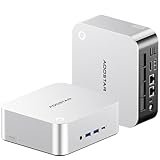
AOOSTAR GEM12+ PRO Barebone Mini PC (Ryzen 7 PRO 8845HS)
Who it suits: The streamer who runs long, busy broadcasts — multiple scenes, a browser of dashboards, recordings rolling — and wants the machine itself to report how hard it is working, without alt-tabbing out of the game to check.
The GEM12+ PRO sits in the mid-range tier of this guide — check price on Amazon — completing under the budget with 32GB and 1TB. Its Ryzen 7 PRO 8845HS is the full Hawk Point chip — eight cores to 5.1GHz, the Radeon 780M encoder, and a 16 TOPS NPU that, to be clear once more, does nothing for your stream. The feature that does is on the top panel: a 2.68-inch status screen showing live temperatures and load, which turns out to be a genuinely streaming-shaped convenience — a mid-broadcast glance at whether the machine is cruising or cooking, without a monitoring overlay. Underneath, the engineering suits sustained work: the OCuLink port runs on its own PCIe 4.0 x4 link, so a docked GPU never costs an SSD slot; memory headroom is the best in the guide at up to 128GB; networking is dual Intel 2.5G; and the BIOS offers power modes up to 70W, letting the chip hold higher clocks through a long session. AOOSTAR also offers a configured 24GB/1TB version — completing the barebone yourself gets you 32GB you chose instead.
Owner feedback gathered for this model carries three warnings, all worth repeating. The status screen’s control software drew complaints — it works, but it is the least polished software in the package, on the one feature you will look at daily. The drivers arrive as a single disorganized download rather than an installer, so budget setup time. And at least one Amazon buyer reported receiving a unit that had plainly been opened and returned before, sold as new: inspect seals and feet on arrival and use the return window if they tell a story. Wireless is WiFi 6 rather than 6E — a step down that matters little to a machine that should be streaming on a wire anyway.
- Status screen for temperatures and load — a mid-stream health check at a glance.
- Dedicated OCuLink on its own PCIe link: both SSD slots stay free with a dock attached.
- 128GB memory ceiling and BIOS power modes to 70W for sustained broadcasts.
Honest limitation: Its headline feature is also its rough edge — the status screen’s software is unpolished, the driver download is a jumble rather than an installer, and one documented buyer received a previously opened unit sold as new, so inspect yours the day it arrives.
Choose it if you stream long sessions and want the machine’s vitals visible without leaving the game. Skip it if you would never look at a status screen — the GEM12 MAX delivers the same encoder at a lower completed cost.

GMKtec NucBox K8 Plus Barebone Mini PC (Ryzen 7 8845HS)
Who it suits: The streamer who keeps everything — a local recording of every broadcast, a clips archive, a media library — and wants one small box that streams tonight and files it all away afterwards, possibly moonlighting as a home server between shows.
The K8 Plus is the storage-and-networking pick. Its barebone kit is a mid-range option — check price on Amazon, and also check GMKtec’s own store, where it is also sold — and a completed 32GB/1TB build stays under the budget. The Ryzen 7 8845HS brings the same 780M encoder as every pick here, with its graphics clocked at 2700MHz, and the 16 TOPS NPU that streaming does not use. Around it sits the infrastructure a recording streamer actually consumes: two M.2 PCIe 4.0 slots taking up to 8TB between them, so recordings archive internally instead of sprawling across USB drives; memory up to 96GB; and dual Intel i226V 2.5-gigabit ports, the controllers homelab buyers specifically seek, which let the box stream out on one network and serve files on another. An OCuLink port covers the future dock. The comparison against buying it finished is the strongest in this guide: the same machine configured with 32GB and 1TB sits in a notably higher premium tier on Amazon, so the barebone route can offer a meaningful saving — check price on Amazon for both versions.
One listing flaw deserves the spotlight it gets in every guide that includes this machine. The Amazon listing contradicts itself: the title and the style name (“K8 Plus 0+0-Black”) say the kit ships without RAM, SSD or OS, while a spec field in the same listing names an operating system as if one were installed. Believe the title — it arrives empty, there is no Windows waiting, and GMKtec’s configured versions are separate listings. The general lesson is worth the space: in this whole category, read the style name and title, never the auto-filled spec table. Beyond that, its compromises are mild for this job — a plain black box, compact rather than tiny at 5.2 × 5 × 2.3 inches, with no screen or fingerprint reader to glance at.
- Up to 8TB across two M.2 slots — a real internal archive for local recordings.
- Dual Intel i226V 2.5G ports: stream on one network, serve files on the other.
- Finishing it yourself undercuts the same machine sold configured — one of the widest gaps in this guide; check price on Amazon.
Honest limitation: Its own listing argues with itself — the spec fields claim an installed operating system that the title and style name correctly deny — so verify the barebone style is what sits in your cart before you pay.
Choose it if recording storage and networking are your bottlenecks and the configured price of the same machine offends you. Skip it if a status screen and fingerprint sign-in matter more to you than storage (that is the GEM12+ PRO), or the box has to disappear entirely (the UM870 Slim).

MINISFORUM UM890 Pro Barebone Mini PC (Ryzen 9 8945HS)
Who it suits: The streamer whose broadcasts run long and heavy — hours at full load, a demanding game on the same machine that encodes it — and who is spending to the top of this budget specifically so the hardware never becomes the reason a stream degrades.
The UM890 Pro is the premium pick in this guide — check price on Amazon — so the finished machine lands inside the budget, but close enough to its edge that the kit-costing section below matters. What the money buys is sustained performance: the Ryzen 9 8945HS pushes the same eight Zen 4 cores to a 5.2GHz boost with the Radeon 780M at its fastest 2800MHz clock in this guide, and Minisforum’s Cold Wave cooling — including an active heatsink fan for the memory and SSD bays — is built to hold those clocks for hours, at around 43dB in performance mode under sustained load. For a streamer that cooling is the product: simultaneous load is a marathon, and a machine that throttles in hour three drops frames in hour three. Around the chip: two DDR5 slots to 96GB, two M.2 PCIe 4.0 slots, dual 2.5G Ethernet, two USB4 ports that can also power the machine over USB-C PD, and four-display output for the classic streamer desk of game, chat, dashboard and preview. Compared with its configured sibling, which sits in a higher premium tier, the barebone route offers a large absolute saving — check price on Amazon.
Two streaming-specific trades need weighing. The fan figure cuts both ways: around 43dB under load is honest, effective cooling, but it is also a noise source in the room with your microphone, so placement — off the desk, behind the monitor, away from the mic’s pickup pattern — is part of this pick’s setup in a way it is not for the quieter boxes. And the OCuLink arrangement is the guide’s known compromise: it arrives as an included M.2-to-OCuLink adapter plate, so docking a graphics card consumes one of the two SSD slots. A streamer who records locally then faces a real choice — second internal drive or dock — that the dedicated-port picks never pose. If your plan is one fast drive and maximum sustained performance now, that trade may never bite; if your plan is an archive drive plus a dock, it bites immediately.
- The strongest silicon here: a 5.2GHz-boost 8945HS driving its 780M at the guide’s fastest 2800MHz clock.
- Cold Wave cooling with an active fan over the memory and SSD bays — built for hour three, not minute three.
- Buying it empty offers a substantial saving against the configured version, the biggest absolute saving in this guide; check price on Amazon.
Honest limitation: OCuLink works through the included M.2 adapter, so docking a GPU costs one of the two SSD slots — and its performance-mode fan is a noise source to place carefully near a microphone.
Choose it if your streams are long, your game is demanding, and one internal drive is enough while docked. Skip it if your plan needs two internal drives and a dock at the same time — the GEM12+ PRO is built for exactly that combination.
Comparison Table
| Product | Chip & graphics | Price | Completed build | Encoder | OCuLink | Link |
|---|---|---|---|---|---|---|
| AOOSTAR GEM12 MAX Barebone | Ryzen 7 8745HS / Radeon 780M | Check price on Amazon | Budget tier, under $800 | AMD VCN (H.264 + AV1) | Yes, dedicated | Check on Amazon |
| MINISFORUM UM870 Slim Barebone | Ryzen 7 8745H / Radeon 780M | Check price on Amazon | Budget tier, under $800 | AMD VCN (H.264 + AV1) | No — USB4 only | Check on Amazon |
| AOOSTAR MACO Barebone | Ryzen 7 H 255 / Radeon 780M | Check price on Amazon | Budget tier, under $800 | AMD VCN (H.264 + AV1) | Yes, dedicated | Check on Amazon |
| AOOSTAR GEM12+ PRO Barebone | Ryzen 7 PRO 8845HS / Radeon 780M | Check price on Amazon | Mid-range tier, under $800 | AMD VCN (H.264 + AV1) | Yes, dedicated | Check on Amazon |
| GMKtec NucBox K8 Plus Barebone | Ryzen 7 8845HS / Radeon 780M | Check price on Amazon | Mid-range tier, under $800 | AMD VCN (H.264 + AV1) | Yes | Check on Amazon |
| MINISFORUM UM890 Pro Barebone | Ryzen 9 8945HS / Radeon 780M | Check price on Amazon | Premium tier, under $800 | AMD VCN (H.264 + AV1) | Via M.2 adapter | Check on Amazon |
*Completed build = kit plus a 32GB (2×16GB) DDR5-5600 SODIMM kit and a 1TB PCIe 4.0 NVMe drive; check price on Amazon and with parts retailers on the day you order. It excludes an operating system license — no listing here includes one — and every item in the streaming-kit section below. Memory and SSD prices are volatile in 2026; check both on the day you order. The encoder column is identical on every row deliberately: the six machines share one encoder, and any guide that grades them as if they differed would be inventing a distinction.
How to Choose a Barebones Mini PC for Streaming Under $800
- Budget the finished, streaming machine — never the kit. Kit + memory + storage + operating system + microphone is the real number. A budget-tier kit is still only part of a finished computer and broadcast corner once those parts are added; shop the completed total, not the listing’s headline.
- Grade the encoder first, and know this set has one. Every pick encodes on the Radeon 780M’s VCN hardware — H.264 for Twitch, AV1 available for YouTube and recordings. It is a good encoder with a known, slightly softer picture than NVENC at Twitch bitrates. If NVENC is non-negotiable, your answer is not a different pick here; it is a pick with a dedicated OCuLink port plus a dock later, or a different class of machine entirely — see Best Streaming PC Under $800.
- Fit two matched memory sticks, always. The integrated graphics, the game, OBS and your browser all drink from the same memory pool, and dual-channel DDR5-5600 is what feeds the graphics at full speed. A single stick can cost a fifth or more of your frame rates and starve everything at once. 32GB (2×16GB) is this budget’s sweet spot.
- Match the pick to the workload shape. Talk, desktop and console-via-capture-card streaming barely touches the graphics — any pick here cruises, so buy desk fit and quiet. Playing a demanding game on the same machine that encodes it is the hard case: that argues for the strongest sustained cooling (UM890 Pro) or the 70W power modes (GEM12+ PRO), and for capping the game’s frame rate so the encoder keeps its share.
- Settle the dock question now, not later. On the GEM12 MAX, MACO, GEM12+ PRO and K8 Plus the OCuLink port is dedicated, so a docked card leaves both SSD slots yours. The UM890 Pro’s version borrows an M.2 slot — which, for a recording streamer, may be the slot that hurts most to lose. The UM870 Slim omits the port entirely. None of this can be retrofitted.
- Wire it, whatever you buy. Every pick has 2.5G Ethernet; use it. A stream is a sustained upload, and sustained uploads over Wi-Fi in a busy household are how dropped frames happen. Wireless specifications are a fallback, not a plan.
- Plan the recording drive. Local recordings at stream-quality bitrates grow by the hour and by the archive. Two M.2 slots let you record to a drive that is not also loading your game — and on the K8 Plus, up to 8TB of internal room means the archive never has to move.
- Read the style name, not the spec table. Barebone listings inherit auto-filled fields from configured siblings — operating systems that are not included, memory that is not fitted. One pick in this guide contradicts its own title on exactly that point. The title and selected style (“0+0”, “Without RAM/SSD/OS”) are the truth.
Set Up OBS Once, Correctly
Hardware this balanced rewards ten minutes of correct setup and punishes defaults for months. Work through this once, before your first scheduled stream. In OBS’s output settings, select the AMD hardware encoder — it appears as the H.264 hardware/AMF option — and never the software x264 encoder on these machines: x264 spends the same eight cores your game is using, and the hardware encoder exists precisely so it does not have to. For YouTube streams and local recordings, the AV1 hardware encoder is the better tool where your workflow supports it; for Twitch, H.264 is the ingest format, full stop. Set rate control to CBR — constant bitrate — at around 6,000 kbps for Twitch, with a keyframe interval of two seconds, which the platform expects. Choose your output resolution by workload, not ambition: 720p60 keeps fast-moving games visibly smoother at that bitrate, 1080p30 suits talk, desktop and slower content, and 1080p60 at 6,000 kbps asks the encoder to spread too few bits over too many pixels in fast scenes.
Then learn the three counters in OBS’s Stats window, because each one accuses a different part of the machine. Frames missed due to rendering lag mean the graphics chip could not composite your scene in time — the fix is to lower the game’s settings or frame-rate cap, reduce the output resolution, or trim heavy browser sources, because the GPU is oversubscribed. Frames skipped due to encoding lag mean the encoder itself fell behind — rarer on hardware encoding, and the fix is a lighter encoder load: lower output resolution or frame rate, and check nothing has silently switched you to software encoding. Dropped frames are the network’s confession, not the PC’s: the fix is the wired Ethernet connection, a lower bitrate, or a different ingest server — never a faster computer. Finally: run the Ethernet cable before you blame the hardware, cap your game’s frame rate, record locally as a backup if the content matters, and do a full-length private test stream before anything public.
What $800 Does Not Include
A completed total in this guide buys a finished computer. It does not buy a broadcast, and pretending otherwise is how budgets quietly double. The streaming kit is a separate purchase, with cost depending on what you already own, and it is spent in a strict order. The microphone comes first — a decent USB microphone in the budget to mid-range tier improves a stream more than any other single purchase, because viewers forgive soft video long before they forgive bad audio; none of these mini PCs includes one, and a headset mic is a starting point, not a destination. Lighting comes next, a simple panel or ring light in the budget tier, which does more for a cheap camera’s picture than a better camera does in the dark. A USB webcam in the budget to mid-range tier follows if you appear on camera and do not already own one. A capture card, a mid-range add-on, is needed only for the console workflow — if your games run on the PC itself, skip it entirely and spend the money on the second SSD for recordings instead. Add the Ethernet cable that makes the wired rule real, and extra storage once the archive outgrows its home. None of this is inside any pick’s completed total — the kit costs the same whichever box you choose.
Common Buying Mistakes
- Comparing a barebone’s kit price with a complete streaming PC’s price. A barebone kit is only part of a finished computer before the microphone is added; a configured machine may be the cheaper finished broadcast once parts and kit are priced honestly.
- Expecting NVENC, or a discrete GPU, at this tier. No verified barebones kit under an $800 completed total has one — the encoder here is AMD’s VCN on every pick, and OCuLink is the upgrade path, not a hidden feature.
- Buying a pick for its NPU. The 8845HS and 8945HS carry one; OBS does not use it to encode. It earns its keep in other workloads, never in this one.
- Leaving OBS on software encoding. x264 on the same eight cores the game needs is the classic cause of a stream that stutters while the game feels fine. Select the AMD hardware encoder.
- Fitting a single memory stick. Integrated graphics feed from system RAM; single-channel memory can cut frame rates by a fifth or more and starves the game, the encoder and the browser simultaneously.
- Streaming over Wi-Fi because the box advertises WiFi 6E. The specification is not the connection. Plug in the Ethernet cable the port exists for.
- Plugging a capture card into the MACO’s rear USB-A ports, which reviewers measured at USB 2.0 speeds. Capture gear and audio interfaces belong on the front ports or USB4.
- Buying the UM890 Pro for a dock-and-archive build without noticing its OCuLink adapter occupies an M.2 slot — then discovering the recording drive has nowhere to go.
- Reading an operating system into a spec field. Those fields are auto-filled from configured siblings — one listing in this guide names an OS its own title denies. If the title and style say no OS, plan on no OS.
- Spending the microphone money on a more expensive kit. Every pick here encodes identically; the audience hears your microphone, not your motherboard.
Final Recommendation
- Most streamers: AOOSTAR GEM12 MAX Barebone.
- Small desks and shared rooms: MINISFORUM UM870 Slim Barebone.
- Build quality and slot-free docking: AOOSTAR MACO Barebone (Ryzen 7 H 255).
- Long sessions with visible vitals: AOOSTAR GEM12+ PRO Barebone.
- Recording archives and home-server double duty: GMKtec NucBox K8 Plus Barebone.
- Maximum sustained performance: MINISFORUM UM890 Pro Barebone.
Our top two for streaming are the AOOSTAR GEM12 MAX, for the lowest honest route to a finished machine whose dedicated OCuLink port keeps the dock upgrade — and with it, a future NVENC card — open without spending an SSD slot, and the MINISFORUM UM890 Pro, for streamers whose long, demanding broadcasts justify finishing near the budget’s edge in exchange for the strongest sustained performance here. Between them they bracket the real decision in this guide: because all six picks encode identically, you are not shopping for a better picture — you are shopping for headroom, cooling, storage and ports, in the proportions your particular broadcast consumes them. If the desk is the constraint, the UM870 Slim disappears behind the monitor; if recordings are the archive of the channel, the K8 Plus swallows them internally; and if you want to watch the machine work while it works, the GEM12+ PRO’s screen earns its premium. Builders whose content is talk and console only should also see Best Barebones Mini PC Under $700 before spending to this tier — the encoder is the same there — and first-time builders should read Best Barebones Mini PC For Beginners Under $800 before their first build night. Check live prices for parts the same week you order, wire the Ethernet before the first broadcast, and check price on Amazon before you buy.
Frequently Asked Questions
Can a barebones mini PC under $800 really stream?
Yes — for the workload most small streamers actually have. Completed with 32GB of dual-channel memory and a 1TB drive, every pick in this guide hardware-encodes a 720p60 or 1080p30 broadcast while running talk and desktop content, a console fed through a capture card, or light games played on the machine itself. The limit is simultaneity: a demanding modern game rendered and encoded on the same integrated graphics will force compromises in settings, resolution or both. That is a physics limit of the tier, not a defect of a particular pick — and it is why four of the six keep an OCuLink port open for a future graphics dock.
Which encoder do these mini PCs use, and is it good enough?
All six use the AMD VCN hardware encoder integrated with the Radeon 780M graphics. It encodes H.264 — Twitch’s ingest format — and, because the 780M is RDNA3-based, AV1 as well, which YouTube accepts for live streaming and which makes cleaner local recordings. At Twitch’s roughly 6,000 kbps ceiling its H.264 output is generally a little softer than NVIDIA’s NVENC at the same bitrate; that gap is real but modest, it is the honest trade of this budget, and no barebones kit completable under $800 offers NVENC instead. OBS exposes it as the AMD hardware (AMF) encoder — select that, not x264.
What is the real total cost of a streaming barebones setup?
Three layers. The kit itself, ranging from budget to premium tier in this guide — check price on Amazon for each pick. The completion parts — 32GB of DDR5-5600 and a 1TB NVMe drive; check live prices before you order — plus a Windows license if you need one and do not hold an eligible one already; Linux is free. And the streaming kit the computer prices never include: a USB microphone first, basic lighting, a webcam if you appear on camera, and a capture card only if you stream a console. Finished broadcasts therefore cost more than the machine alone once a full kit is added — which is exactly why the layers are printed separately.
Should I stream at 720p or 1080p on one of these machines?
By content. Fast-moving games read better at 720p60: at Twitch’s roughly 6,000 kbps ceiling, sixty smoother frames with enough bits each look cleaner than thirty starved ones. Talk, desktop, creative and slower content suits 1080p30, where the detail is static enough for the bitrate to describe it. On YouTube, higher accepted bitrates and AV1 ingest widen the options — 1080p60 becomes reasonable for the same hardware. Whichever you choose, set it deliberately in OBS rather than accepting a default, and test at full length before a public stream.
Is Wi-Fi good enough for streaming from a mini PC?
It can work, and it should still not be the plan. A stream is a sustained upload held for hours, and household Wi-Fi is a shared, variable medium — another device’s backup or download becomes your dropped frames. Every pick in this guide has a 2.5-gigabit wired Ethernet port; run the cable. Treat the wireless specifications — WiFi 6E on the UM870 Slim, WiFi 6 on the GEM12+ PRO — as the fallback for rooms where a cable genuinely cannot go, and lower your bitrate if you must use it.
Do I need a capture card with one of these mini PCs?
Only if the gameplay happens somewhere else. If you stream a console, the capture card is how its picture reaches the PC — budget for a mid-range capture card, and plug it into a full-speed port (on the MACO, that means the front ports or USB4, not the rear USB-A ports measured at USB 2.0 speeds). If your games run on the mini PC itself, you need no capture card at all; OBS captures the game directly, and the money is better spent on the microphone or a second SSD for recordings.
- Best Barebones Mini PC Under $800
- Best Barebones Mini PC Under $700
- Best Barebones Mini PC Under $1200
- Best Barebones Mini PC For Beginners Under $800
- Best Barebones Mini PC For Small Spaces Under $800
- Best Barebones Mini PC For 1440p Gaming Under $800
- Best Streaming PC Under $800
- Best Mini PC Under $800
- Best Mini Gaming PC Under $800


