Where to buy
Check the latest price, availability and delivery on Amazon. Orders are placed on Amazon. We may earn a commission from qualifying purchases.
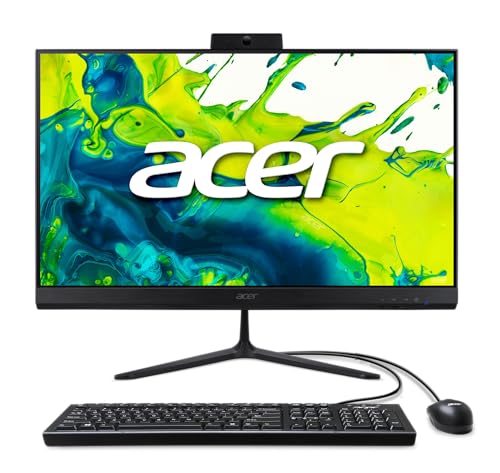
- Closest to the 1440p brief: Acer Aspire C27 All-in-One (Ryzen 5 7430U, 27″ 120Hz) — Check on Amazon
- Lenovo IdeaCentre AIO 3 24 (Ryzen 5 5500U, 16GB) — Check on Amazon
- Dell Inspiron 5400 24 Touch All-in-One (Core i5-1135G7, Iris Xe) — Check on Amazon
- Acer Aspire C24-1700-UA91 (Core i3-1215U, 23.8″) — Check on Amazon
See 2 more Amazon options
- Acer Aspire C27-962-UA91 (27″, GeForce MX130) — Check on Amazon
- Lenovo IdeaCentre 24 A100 (Core i3-N305, 16GB) — Check on Amazon
Read the full guide ↓
Disclosure: As an Amazon Associate, reviewstook.com earns from qualifying purchases. Links to Amazon on this page are affiliate links; they cost you nothing extra. Listing details such as price and availability change often, so check the current Amazon listing before you buy.
Start with the sentence this keyword does not want to hear: there is no all-in-one PC under $800 that plays games at 1440p — and that is not a matter of shopping harder. Not one of the six machines here has a 1440p screen — every panel below is 1920×1080 — and not one has graphics hardware capable of rendering modern games at 2560×1440. An all-in-one is a laptop’s internals mounted behind a desktop screen, and at this budget those internals are integrated graphics: fine silicon for office work, video and light games, not built to push four million pixels through a demanding game. Any listing or headline that suggests otherwise is selling you the words “1440p gaming” rather than the thing itself.
So this guide does the honest version of the job. It takes the six best all-in-one PCs under $800 and grades each one against the 1440p question specifically: what resolution its games actually render at, what upscaling tools its graphics chip can use, what happens if you plug it into a 1440p monitor, and whether it works as the screen for cloud gaming, where a server does the rendering. For some readers the answer will be “close enough” — light and older games, rendered at 720p to 1080p and upscaled, look perfectly respectable, and the clean one-cable desk is worth real money. For readers who want genuine 1440p gaming, this guide points to where the same $800 actually buys it: our Best 1440p Gaming PC Under $800 and Best Mini Gaming PC Under $800 guides cover machines with discrete graphics cards, which is what the resolution demands. Buying an all-in-one while believing it is a 1440p gaming PC is the only wrong outcome, and everything below is written to prevent it.
What an all-in-one under $800 offers has not changed: a 24- or 27-inch IPS screen, a webcam, speakers, keyboard and mouse in the box, one power cable, and a desk with nothing else on it. The trade is permanence — screen, processor and graphics are one sealed purchase, and the graphics can never be upgraded. Read the picks with the 1440p grading in front of you, and you will know exactly which side of that trade you are on.
In this guide
Quick Picks
Short on time, or comparing several options at once? Each row below names a buyer type and the product that suits it, with a link to the listing. The middle column tells you what each machine honestly does toward the 1440p question.
| Buyer type | Pick | Its honest 1440p story | Link |
|---|---|---|---|
| Best overall | Acer Aspire C27 (Ryzen 5 7430U) | Strong integrated rendering plus the only 120Hz panel here — upscaled light games look smoothest on it | Check on Amazon |
| Strongest integrated graphics | Dell Inspiron 5400 24 Touch | Iris Xe is the best local game renderer in this set — but games load from a mechanical hard drive; check the current price on Amazon and buy only if it stays within this budget | Check on Amazon |
| Best value when priced right | Lenovo IdeaCentre AIO 3 24 (Ryzen 5 5500U) | A capable Radeon integrated GPU and 16GB of RAM for upscaled play — valid only while its current price stays within the $800 budget | Check on Amazon |
| Best compact 24-inch pick | Acer Aspire C24-1700-UA91 | The weakest graphics here; buy it for a sharp desktop and cloud duty, not for locally rendered games | Check on Amazon |
| Best big screen on a deal | Acer Aspire C27-962-UA91 | The guide’s only discrete GPU — a pre-RTX MX130, which means no DLSS; FSR upscaling is its only route upward | Check on Amazon |
| Best for light-duty desks | Lenovo IdeaCentre 24 A100 (i3-N305) | A low-power chip for desktop work and cloud-gaming display duty; local gaming is minimal | Check on Amazon |
How These Picks Were Chosen
The budget was applied as a ceiling, not a target: every product below is a real Amazon listing selected for this $800 guide in the United States. All-in-one prices move — several of these are previous-generation machines sold through a mix of Amazon itself and marketplace sellers — so check the current price on Amazon before you buy. Two of the six only earn their place when their current price stays within this budget, and each of those reviews says so instead of assuming the live price will suit.
Because this guide answers a 1440p question, grading went beyond the usual checklist. Each machine was scored first on the class of its graphics hardware and the render resolutions that hardware can honestly sustain, then on its upscaling support — which matters more here than in any other all-in-one guide we publish, because upscaling is the only mechanism that lets any of these chips approach a 1440p image. Memory was graded as graphics memory as well as system memory, since integrated GPUs borrow from installed RAM. Then came the standard filters: panel size, type and refresh rate; storage type above all; processor generation; Wi-Fi standard; and what peripherals are in the box. We did not use these products ourselves; we read the manufacturer listings, specification sheets and Amazon product pages. Where a listing’s marketing stretches the truth — an “8-core i3” that is really a low-power chip, a “lifetime Office” bundle that is really the free web apps, a graphics badge that implies more than the chip delivers — the review translates it.
Two further filters were applied across the whole set. The screen filter comes first: because an all-in-one’s display can never be swapped, every pick below carries at least a Full HD IPS-class panel of 23.8 inches or more, and the dim TN-panel machines at the bottom of this category were turned away at any price. The second is the exit filter: because the computer and its display are bought as one, and the graphics are fixed forever, each review states outright where a machine is sealed — what arrives is what you keep.
What “1440p Gaming” Can Honestly Mean on an All-in-One
Two different numbers get called “resolution,” and separating them is the whole key to this guide. Display resolution is the pixel count of the screen in front of you: every built-in panel here displays 1920×1080 — Full HD — and no setting can make it show more detail than its physical pixels hold. Render resolution is the pixel count the graphics chip actually draws each frame at, and on integrated graphics it is usually lower: a game might render at 1280×720 internally and be stretched to fill the screen. A game “running at 1440p” means the chip is rendering 2560×1440 — about 78% more pixels than 1080p — a workload none of these machines can carry in a modern title.
Upscaling is the bridge, and it is a real one, within limits. Modern upscalers render the game at a lower internal resolution and reconstruct the output frame: at a 1440p output, a Quality-mode upscaler renders roughly 1707×960 internally, and a Performance-mode one roughly 1280×720. Read those numbers again, because they define this entire category: even the flattering Quality figure is fewer rendered pixels than native 1080p. That is why the honest claim for these machines is “light, older and esports games, rendered low and upscaled,” and not one word more. The upscaler available here is AMD’s FSR — vendor-neutral, working on every graphics chip in this guide in the games that implement it — with Intel’s XeSS additionally available on the Dell in games that offer it. NVIDIA’s DLSS, the most famous upscaler, requires an RTX card with tensor cores, and the one NVIDIA chip in this guide predates RTX entirely, so DLSS exists nowhere in this set.
That leaves three honest routes toward a 1440p experience, and the reviews grade each pick against all three. Route one: an external 1440p monitor. Plug one of these machines into a 2560×1440 display and the desktop, text, photos and streamed video render natively at 1440p and look genuinely sharp. Games still render at the resolutions described above and are upscaled to fill the panel; the monitor adds pixels to the screen, not power to the chip. One discipline note: our research did not document display-output specifications model by model, so before buying any pick for this route, confirm the output ports on the live Amazon listing. Route two: cloud gaming. With a subscription cloud service, a server renders the game and streams the picture to you; the all-in-one becomes display, decoder and speakers. This is the one route where the image on screen can genuinely be rendered at 1440p-class detail from a machine in this guide — subject to the service, your tier and a fast, stable connection — and it asks nothing of the local graphics chip beyond video playback. Route three: do not buy an all-in-one. If locally rendered 1440p gaming is the actual goal, the same money buys it in a different shape: the machines in our Best 1440p Gaming PC Under $800 guide carry discrete graphics cards chosen for exactly this resolution, and our Best Mini Gaming PC Under $800 guide covers the compact version. Neither is a one-cable desk ornament. That is the trade, stated in both directions.
The 6 Best All-in-One PCs for the 1440p Question Under $800
Acer Aspire C27 All-in-One — Ryzen 5 7430U, 27″ 120Hz (C27-2G)
Who it suits: The reader who wants the most convincing version of this compromise — the strongest all-round specification in the guide, the best screen for upscaled play, and an excellent everyday computer long after the 1440p question is settled.
The C27 starts from the strongest position an integrated machine can on the rendering question. Its Ryzen 5 7430U is a six-core, twelve-thread processor whose Radeon integrated graphics sit in the capable half of this class: esports titles, older games and indie games render natively at 1080p or a step below, and FSR upscaling in supported games stretches that further. Just as important is the memory behind the graphics — 16GB of DDR4 in standard SO-DIMM slots. Integrated graphics borrow system RAM, so this machine’s graphics have twice the pool the 8GB picks offer, and the socketed layout means the pool can grow later — the only meaningful upgrade any all-in-one here allows. Storage is done right too: a 512GB PCIe NVMe SSD, so games and levels load at modern speeds.
The screen is where this pick wins the angle. The 27-inch Full HD IPS panel runs at 120Hz — double the refresh rate of every other pick — and while a high-refresh panel cannot add rendered pixels, it transforms how upscaled, lower-rendered games feel: motion stays smooth at the frame rates these graphics can actually sustain, instead of juddering against a 60Hz ceiling. The panel fills over 90% of the front face, Wi-Fi 6E and Bluetooth 5.3 are the newest wireless standards here, the 2MP webcam has a privacy shutter, and Windows 11 Home is installed. On value, check the current price on Amazon for this model (C27-2G-UR18): for what it bundles — the 120Hz panel, 16GB of memory, an SSD and current wireless — it is the strongest specification package here when its current price stays within this budget. The cautions are form-factor ones: the bundled keyboard and mouse are wired on Acer’s standard configuration, slightly denting the one-cable dream, and if the panel or motherboard fails out of warranty, the whole machine is the repair. Buy it as the best screen-and-specification package under $800 that also handles light gaming gracefully — not as a 1440p gaming PC, because it is not one.
- Ryzen 5 7430U (6 cores, 12 threads) with 16GB DDR4 in SO-DIMM slots — the most graphics-friendly memory setup in this guide.
- 27-inch Full HD IPS display at 120Hz: upscaled and lower-rendered games feel noticeably smoother here than on any 60Hz rival.
- 512GB NVMe SSD, Wi-Fi 6E, Bluetooth 5.3, a webcam with privacy shutter, and Windows 11 Home.
Honest limitation: Integrated graphics only — games render at 1080p or below and lean on FSR; there is no path, now or later, to native 1440p rendering on this machine.
Choose it if you want the best all-in-one under $800 first and the most graceful light-gaming story second. Skip it if gaming at genuinely higher resolutions is the point of the purchase — that money belongs in a discrete-GPU machine — or if you need a touchscreen.

Dell Inspiron 5400 24 Touch All-in-One — Core i5-1135G7, Iris Xe
Who it suits: The buyer who wants the strongest local game rendering this guide can offer and a touchscreen besides — provided its current price on Amazon stays within this budget and they accept its one serious flaw.
Graded purely as a rendering engine, the Dell leads this set. Its Core i5-1135G7 carries Intel Iris Xe graphics, among the stronger integrated graphics of its generation: light and older games render at the top of the range these machines manage, and the Dell has two upscaling paths where most picks have one — FSR in games that implement it, and Intel’s own XeSS in games that offer it. If any machine here makes upscaled play on an external 1440p monitor look respectable for undemanding titles, it is this one. Around the graphics sits the charmer of the guide: the only touchscreen in the set, a 23.8-inch Full HD panel you can tap and swipe, and a pop-up webcam that physically hides inside the body — the neatest privacy solution here. It is a clear model (i5400-5876SLV-PUS) from a maker with a real service network, with Windows 11 Home installed.
Then the flaw, and it is not a small one for a gaming-adjacent purchase: this configuration’s 512GB of storage is a mechanical hard drive, not an SSD. Games are the worst possible workload for a spinning disk — long level loads, stuttering texture streaming, endless updates — and it is the main reason a machine with this processor can feel older than it is. The 8GB of RAM pinches twice over on an integrated-graphics machine, because the graphics borrow from the same pool the game needs. So the Dell’s place here is strictly conditional on its current price: check the price on Amazon, and buy only if it sits comfortably within this budget. At the lower end of this tier it becomes a defensible specialist — the best renderer and the only touchscreen, with its storage weakness understood in advance. Above this budget it is a hard drive with nice graphics attached, and you should walk away. The current price on the listing in front of you is the only honest basis for the decision.
- Iris Xe graphics — the strongest local game rendering in this guide, with both FSR and XeSS upscaling paths in supported games.
- The only touchscreen here, plus a pop-up webcam that hides in the body, and a capable Core i5-1135G7.
- Check the current price on Amazon — it earns its place only when that price stays well within this budget.
Honest limitation: The 512GB storage is a mechanical hard drive — the slowest storage here by a wide margin, and a genuine handicap for game loading and texture streaming — and RAM is 8GB, not 16GB.
Choose it if you want the best rendering and touch, and you find it well within this budget with the storage compromise understood. Skip it if it is priced above this budget, or if slow loads will annoy you daily — on this machine, they are a personality trait, not a bad day.

Lenovo IdeaCentre AIO 3 24 — Ryzen 5 5500U, 16GB (F0G1008MUS)
Who it suits: Value hunters who will check the seller before clicking — buyers who want a capable integrated GPU and a full 16GB of RAM positioned at the lower end of this budget tier.
On specification, this Lenovo is the Acer C27’s closest rival, and its rendering story is nearly as good. The Ryzen 5 5500U is a proven six-core, twelve-thread laptop processor with Radeon integrated graphics in the same capable class: esports and older titles at 1080p or a step below, FSR upscaling in supported games, and — critically — a full 16GB of RAM behind the graphics, so the shared-memory pool is not the bottleneck it becomes on the 8GB machines. Storage is a proper 512GB SSD. The 23.8-inch Full HD display is smaller than the Acer’s and runs at the standard refresh rate, so upscaled play looks a touch less smooth, but the core specification — chip, memory, storage — is right where budget all-in-ones so often get it wrong. There is even a DVD-RW drive built in, a real feature for households with shelves of discs. Windows 11 is installed, and it was positioned inside this budget tier with room to spare.
None of that is the problem. The problem is what has happened to this listing’s market: the model is from the previous generation, and while Amazon’s own offers for it have sat comfortably inside this budget, the offers have since passed mostly to third-party sellers, whose new-condition asks can sit well beyond it. The buying rule is not negotiable. When a seller with a track record offers it comfortably inside this budget, this may be the best value in the guide. When the current price pushes above this budget it becomes yesterday’s hardware wearing a current-model price tag, and the Acer above it wins on panel, wireless generation and warranty freshness. Before ordering, verify three things: who is selling it, what the return terms are, and whether the listing title’s configuration really says 16GB and 512GB, because lesser versions circulate within the same model family. Purchased carefully, it rewards exactly the buyers who check the live listing carefully before they pay.
- Ryzen 5 5500U (6 cores, 12 threads) with Radeon integrated graphics, 16GB RAM and a 512GB SSD — the right core specification for upscaled light gaming.
- An optical DVD-RW drive built in — a feature modern all-in-ones have almost entirely abandoned.
- Its position in this tier moves with seller and stock, so checking the current price on Amazon before you buy is regularly rewarded.
Honest limitation: Marketplace asks can sit beyond this budget, so the pick stands only while the current price on Amazon stays at or below the $800 budget ceiling — and only after you have verified both the seller and the precise configuration on offer.
Choose it if a reputable seller offers it comfortably inside this budget and specification for the budget is your metric. Skip it if every live offer is a marketplace listing priced above the $800 budget — spend that money on the Acer C27 instead.
Acer Aspire C24-1700-UA91 — Core i3-1215U, 23.8″
Who it suits: Buyers with a smaller desk who want the newest platform in this guide and whose “1440p” interest is really about a sharp screen for work, video and cloud gaming — not about locally rendered games.
Let us place this machine’s graphics honestly before anything else: the Intel UHD integrated graphics in the C24 are the weakest in this guide. The Core i3-1215U behind them is a genuinely good everyday processor — six cores (two performance, four efficiency) from a newer generation than the i5s in the Dell and the big Acer below — but its graphics are built for displaying a desktop, not rendering games. Locally, expect the lightest titles at 720p-class rendering, with FSR as a helping hand where games offer it; anything more ambitious belongs on a cloud service, where its role is simply to be a good screen with a computer attached. Judged on that role, it is well equipped: a 23.8-inch Full HD IPS display in Acer’s slim design, a 512GB NVMe SSD, Wi-Fi 6 and Windows 11 Home — and it takes up meaningfully less desk than the 27-inch picks, which matters in a bedroom or a shared apartment.
Its compromises mirror the Lenovo’s in reverse: the platform is modern but modest. The 8GB of DDR4 memory is the floor of comfortable in 2026 and, on an integrated-graphics machine, it is shared with the GPU — fine for one user’s office workload and cloud play, tight for heavy multitasking — and there is no touchscreen. Its price needs the same discipline as the other price-sensitive picks: check the current price on Amazon, and judge it against its 27-inch sibling when both sit inside this budget. If desk space is your constraint and your gaming is cloud-shaped or very light, this is the pick, and a current price comfortably inside this budget is a fair position for it. If local game rendering matters at all, the picks above it are stronger for similar money.
- The freshest processor platform in the set: a six-core Core i3-1215U that keeps everyday work feeling brisk.
- 512GB NVMe SSD and Wi-Fi 6: the modern basics, done properly, in a compact 23.8-inch IPS design.
- A clean fit for cloud gaming, where the local chip only has to decode a video stream.
Honest limitation: The weakest graphics in this guide — local gaming is 720p-class and light titles only — and 8GB of RAM caps its multitasking; check the current price on Amazon, especially on third-party offers.
Choose it if your desk is small, your workload is one person’s office and media routine, and your games arrive over the internet rather than rendering locally. Skip it if you want the strongest local rendering — that is the Dell or the Ryzen Acer — or if you have room for the 27-inch C27 at a similar price.

Acer Aspire C27-962-UA91 — 27″, Core i5-1035G1, GeForce MX130
Who it suits: Buyers who want the biggest screen at the lower end of this budget and understand they are buying a previous-generation machine positioned low in this tier — and who will not be fooled by its graphics badge.
This review carries the guide’s most important badge translation, so it comes first. The C27-962 is the only pick with a discrete GPU, a GeForce MX130 — and if the word “GeForce” makes you think of DLSS and modern upscaling, stop there. The MX130 is an entry-level laptop chip from before NVIDIA’s RTX line existed; it has no tensor cores, so it does not support DLSS, and its raw performance is roughly comparable to good integrated graphics rather than a step above them. Its upscaling path is the same FSR available to every other pick here, and what the chip itself buys is a little extra happiness in older and lighter games — nothing else. Buy this machine for its screen and its position in this tier, never for its graphics badge, and you will judge it correctly.
The screen and its position in this tier are genuinely compelling: a 27-inch Full HD display — the large format that makes split-screen documents, spreadsheets and streamed video comfortable — positioned at the lower end of this budget tier. Behind it, a Core i5-1035G1, 12GB of DDR4 memory and a 512GB SSD remain perfectly serviceable for office and family computing. Everything else is 2020, and you should buy it with that date in mind: an older processor, Wi-Fi 5 rather than 6, no touchscreen, and Windows 10 Home in the box. The operating system needs a direct word. Free support for Windows 10 ended in October 2025; the saving grace is that Microsoft’s Windows 11 supported-CPU list includes the i5-1035G1, so the upgrade should cost nothing — confirm that on the listing, expect to run it yourself, and do not leave the machine on an unsupported system, because that converts a bargain into a security liability. Judged as what it is — a big, pleasant, big-brand screen with an honest older computer behind it, positioned well under this budget ceiling — it earns its place.
- A 27-inch Full HD panel at the lower end of this tier — more screen for the budget than anything else here.
- Everyday performance stays respectable thanks to 12GB of RAM and a 512GB SSD.
- The guide’s only discrete GPU (GeForce MX130) — honestly labeled: entry-level, roughly integrated-class, no DLSS support.
Honest limitation: The platform dates to 2020 — an older processor, Wi-Fi 5, no touchscreen and Windows 10 Home in the box — so budget the free Windows 11 upgrade (its CPU qualifies) into your first day rather than running an unsupported system.
Choose it if panel size for the budget outranks everything else for you and running a Windows upgrade holds no fear. Skip it if the GeForce badge was the attraction — it does not mean what it appears to mean — or if you want the newest platform and longest support runway, which is the Ryzen C27 at the top of this guide.

Lenovo IdeaCentre 24 (A100) — Core i3-N305, 16GB
Who it suits: Light-duty desks — a reception counter, a kitchen family PC, a check-in station, a grandparent’s email-and-photos machine — where the workload is genuinely light and 16GB of RAM at the lower end of this budget is the attraction.
Before this one can be recommended at all, its listing needs translating — so here is the translation. The listing’s headline leads with “Intel 8-Core i3-N305,” and the core count is technically true — eight cores — but they are the small efficiency cores of Intel’s low-power N-series, topping out at a 3.8GHz turbo and drawing a fraction of the power of an ordinary desktop chip. Its Intel UHD graphics are the second-weakest rendering story here: local gaming means the lightest titles at low render resolutions, and its realistic gaming role is as the display for a cloud service, where the server renders and the A100 only decodes — a job it handles perfectly well. For web browsing, email, documents, video calls and streaming video, the machine feels perfectly fine. What the configuration gets right is everything around the chip: 16GB of DDR4 RAM, a 512GB PCIe NVMe SSD, a 23.8-inch Full HD IPS display, Wi-Fi 6 and Bluetooth 5.2, Windows 11, and a wireless keyboard and mouse in upgraded bundles. In this upgraded A100 configuration it sits at the lowest end of this budget tier.
Two more translations belong here. This is a reseller-configured listing — marketplace sellers fit the A100’s memory and storage themselves — so the seller, the exact bundle contents and who honors the warranty all vary between offers; buy from a seller with strong feedback and read what is in the box. As for the “Lifetime Office 365 for Web” in the title: that phrase describes the free browser editions of the Office apps, available to anyone with a Microsoft account. It is not a Microsoft 365 subscription, and it should add nothing to your valuation of the machine. Seen clearly, though, the value survives the translations: no cheaper route in this guide reaches a tidy 24-inch machine with 16GB of RAM and an SSD, and on a genuinely light workload it will feel responsive for years. Just do not buy it as a gaming machine of any resolution class, or as a main family computer expected to grow into heavier work — its ceiling is fixed, and it is low.
- Positioned at the lowest end of this tier in upgraded A100 form — still includes 16GB of RAM and a 512GB NVMe SSD.
- 23.8-inch Full HD IPS screen, Wi-Fi 6, Bluetooth 5.2 and Windows 11 — a capable cloud-gaming and streaming display.
- Quiet, low-power design that suits always-on light-duty desks.
Honest limitation: The i3-N305 is a low-power chip despite the “8-core” headline — the slowest processor here, with minimal local gaming ability — and the listing is reseller-configured, so seller and warranty terms vary; the bundled “Office 365 for Web” is the free web version.
Choose it if the workload is honestly light — web, mail, documents, calls, streamed video and cloud games — and you want 16GB of RAM at the lowest end of this budget. Skip it if local game rendering matters at all; every Ryzen and Intel Core pick above has far more headroom.
Comparison Table
| Pick | Display | Processor | RAM / Storage | Graphics | 1440p reality | Price | Link |
|---|---|---|---|---|---|---|---|
| Acer Aspire C27 (Ryzen 5 7430U) | 27″ FHD IPS, 120Hz | Ryzen 5 7430U (6C/12T) | 16GB / 512GB NVMe SSD | Integrated Radeon | Light games at 1080p or below with FSR; smoothest motion here on the 120Hz panel | Check price on Amazon | Check on Amazon |
| Dell Inspiron 5400 24 Touch | 23.8″ FHD touchscreen | Core i5-1135G7 (4C/8T) | 8GB / 512GB hard drive | Intel Iris Xe | Strongest local rendering (FSR and XeSS) — once games finish loading from a hard drive | Check price on Amazon | Check on Amazon |
| Lenovo IdeaCentre AIO 3 24 | 23.8″ FHD | Ryzen 5 5500U (6C/12T) | 16GB / 512GB SSD | Integrated Radeon | Upscaled light games at 1080p class; valid only while its current price stays within the $800 budget | Check price on Amazon | Check on Amazon |
| Acer Aspire C24-1700-UA91 | 23.8″ FHD IPS | Core i3-1215U (6C/8T) | 8GB / 512GB NVMe SSD | Intel UHD | Sharp desktop and cloud display; local games at 720p class only | Check price on Amazon | Check on Amazon |
| Acer Aspire C27-962-UA91 | 27″ FHD | Core i5-1035G1 (4C/8T) | 12GB / 512GB SSD | GeForce MX130 | FSR upscaling only — no DLSS despite the NVIDIA badge; older titles happiest | Check price on Amazon | Check on Amazon |
| Lenovo IdeaCentre 24 (A100) | 23.8″ FHD IPS | Core i3-N305 (8C/8T, low-power) | 16GB / 512GB NVMe SSD | Intel UHD | Cloud and desktop duty; local gaming minimal | Check price on Amazon | Check on Amazon |
How to Choose an All-in-One With 1440p in Mind
Answer the routing question first: do you want 1440p gaming, or do you want the desk? If locally rendered 1440p gaming is the actual goal — modern games, drawn at 2560×1440 by hardware you own — no all-in-one at any sane price is the tool, and at this budget the honest destinations are a tower from our Best 1440p Gaming PC Under $800 guide or a compact discrete-GPU machine from our Best Mini Gaming PC Under $800 guide. You give up the one-cable desk and the built-in webcam; you gain the resolution you asked for and a graphics card you can replace in three years. If the clean desk is the goal and gaming means light titles, older games and cloud services, stay here with open eyes — the picks above are good machines.
Start with the screen, because it is the one part you will never replace. On a tower, a disappointing monitor is a $150 error corrected next month; inside an all-in-one, the same error is permanent. Insist on IPS (or an equivalent wide-viewing-angle panel), Full HD at minimum, and 23.8 inches or larger. At 27 inches, Full HD text is slightly softer than at 24 — most people never notice — but refresh rate matters more to how games feel than raw size: the top pick’s 120Hz panel makes the modest frame rates of integrated graphics look fluid, where a 60Hz panel shows every wobble. If you plan the external-1440p-monitor route, budget the monitor on top of the $800, and verify the machine’s output ports on the live listing before ordering either device.
Treat RAM as graphics memory, because on these machines it is. An integrated GPU has no memory of its own; it borrows from system RAM, and the game needs RAM at the same time. That is why the 16GB picks here are meaningfully better gaming machines than their chips alone suggest, and why the 8GB picks feel their ceiling sooner. Where memory sits in SO-DIMM slots rather than being soldered, you keep the option of fixing that later — worth real money in a machine whose graphics can never be upgraded.
Non-negotiable: an SSD. A mechanical hard drive — one pick in this guide has exactly that, priced and flagged accordingly — punishes gaming worst of all: slow level loads, stuttering texture streaming, endless patching. Specify an SSD — NVMe if possible — at 512GB. The single exception here earns its place only when its current price sits well within this budget, with the compromise stated in its review.
Learn the upscaling vocabulary before a listing uses it on you. FSR works on every graphics chip in this guide, in games that implement it — it is the upscaler this category actually has. XeSS additionally serves Intel’s graphics in games that offer it. DLSS requires an NVIDIA RTX card, and no machine here has one — including the machine with an NVIDIA badge, whose chip predates RTX. When a listing waves “NVIDIA graphics” at you in this price class, ask which chip; the answer decides whether the badge means anything. And remember the arithmetic from earlier: Quality-mode upscaling to 1440p renders about 1707×960 internally — a useful, honest picture, and not native 1440p.
Check the unglamorous details before you buy. Verify the precise configuration named in the listing title, because marketplace offers within one model family differ in memory, storage and even operating system. Establish who is selling the machine and who stands behind the warranty, above all on reseller-configured listings. Note the Wi-Fi standard (Wi-Fi 6 or better is what you want in 2026 — doubly important if cloud gaming is part of your plan), whether a keyboard and mouse are included and wired or wireless, and whether the webcam has a shutter if the machine will live in a bedroom. If the machine ships with Windows 10, confirm the processor is Windows 11-supported and plan the upgrade for day one.
Common Mistakes When Buying an All-in-One for 1440p Gaming
- Believing the keyword. “1440p gaming” in a search term or listing title does not put a 1440p panel or a 1440p-capable GPU in the box; in this category, it never does. Check the panel’s native resolution and the exact graphics chip, every time.
- Buying a 1440p monitor to “upgrade” an all-in-one’s gaming. The monitor adds display pixels; the games still render at 720p–1080p and upscale. The desktop will look sharper — the games will not become 1440p games.
- Assuming an NVIDIA badge means DLSS. The only NVIDIA chip in this guide is a pre-RTX MX130 with no tensor cores and no DLSS. Badge literacy beats brand recognition in this price class.
- Setting the render resolution to 1440p on a 1080p screen. The panel cannot show the extra pixels; the image is downscaled, and integrated graphics pay full price for detail nobody sees. Render at or below the panel, and let a good upscaler do its work.
- Missing a mechanical hard drive in the specification. It is the single easiest way to make an $800 machine feel like a $300 one — and for games, with their loading and texture streaming, it hurts most.
- Trusting headline core counts and “lifetime Office” bundles. Eight efficiency cores do not stop being efficiency cores, and “Office 365 for Web” is simply the free browser edition open to everyone.
- Paying over-budget third-party asks for a previous-generation model. Several picks here are only good purchases when their current price on Amazon stays within this budget; at the wrong price, a current model beats them.
- Leaving a Windows 10 machine on Windows 10. With free support over, a supported chip (every pick here has one) should be upgraded promptly — and the chore priced into any clearance deal.
Final Recommendation
- For most buyers: Acer Aspire C27 (Ryzen 5 7430U).
- Strongest local rendering, while its price stays in budget: Dell Inspiron 5400 24 Touch.
- Best value, if you verify the seller: Lenovo IdeaCentre AIO 3 24.
- Small desks and cloud gaming: Acer Aspire C24-1700-UA91.
- Biggest screen for the budget: Acer Aspire C27-962-UA91.
- Light-duty desks, tightest spend: Lenovo IdeaCentre 24 (A100).
Two machines lead this guide. The Acer Aspire C27 (Ryzen 5 7430U) pairs the best display here with a correct 16GB-and-SSD specification and current-generation wireless — check its current price on Amazon. The Lenovo IdeaCentre AIO 3 24 matches that core specification in the same tier whenever Amazon itself or a trustworthy seller holds it inside this budget. Together they represent the two rational ways to make this purchase: the current model bought once, or the previous-generation bargain bought with care. The Dell is the specialist: the strongest renderer and the only touchscreen, bought only while its current price stays within this budget and with its hard drive understood. The C24 shrinks the Acer idea for desks where gaming arrives over the internet. The C27-962 is screen size for the budget and nothing else — buy it for the panel, never the badge. The Lenovo A100 serves light-duty desks honestly as long as nobody asks it to render games it cannot. If genuine 1440p gaming is what you actually want, say so with your wallet: start with Best 1440p Gaming PC Under $800, consider stretching to Best 1440p Gaming PC Under $1200, and treat these all-in-ones as what they are — very good 1080p-class desk machines. The base guide is Best All In One PC Under $800, with companions for Best All In One PC For Beginners Under $800, Best All In One PC For Small Spaces Under $800 and Best All In One PC For Streaming Under $800. Verify the live price and the seller’s identity before ordering; in this category those two checks protect you better than any benchmark could.
Frequently Asked Questions
Can any all-in-one PC under $800 actually play games at 1440p?
No, and for two separate reasons. First, the display: every panel in this guide is 1920×1080, so none of these machines can show a 1440p image on its built-in screen. Second, the rendering: modern games drawn at 2560×1440 need a discrete graphics card, and every pick here uses integrated graphics or an entry-level chip of similar class. What these machines do well is render light, older and esports games at 720p–1080p and upscale them — a good experience, honestly labeled, and a different thing from 1440p gaming.
What happens if I plug one of these into a 1440p monitor?
The desktop, text, photos and streamed video will render natively at 2560×1440 and look genuinely sharp. Games will not speed up or render higher: they still draw at the resolutions the integrated graphics can manage and are upscaled to fill the panel. Before buying for this route, confirm the output ports on the live Amazon listing — our research did not document display outputs model by model — and remember the monitor’s cost sits on top of the $800.
Does the Acer with the NVIDIA chip support DLSS?
No. The C27-962’s GeForce MX130 is an entry-level chip from before NVIDIA’s RTX line; DLSS requires RTX tensor cores, which it does not have. Its upscaling option is AMD’s FSR — vendor-neutral, and the same option every other pick in this guide has. This is the most common badge misunderstanding in the category, and it is why our reviews name the exact chip rather than the brand.
Is cloud gaming a real way to see 1440p from one of these machines?
Yes — it is the one route where the picture on screen can genuinely be rendered at 1440p-class detail, because a server does the rendering and the all-in-one decodes the stream and drives its display. The conditions are a subscription service and tier that offer it, plus a fast, stable internet connection; input latency is part of the bargain, suiting some game types better than others. For a household that wants the clean desk and occasional big-game sessions it is a legitimate strategy — and every pick here, including the low-power Lenovo A100, can do the decoding job.
What should I buy instead for real 1440p gaming under $800?
A machine with a discrete graphics card. Our Best 1440p Gaming PC Under $800 guide covers towers chosen for this resolution at this budget, and our Best Mini Gaming PC Under $800 guide covers the compact route. What you give up is the one-cable desk and built-in everything; what you gain is the resolution itself, plus a graphics card that can be replaced when it ages. If your games are really 1080p games, our Best 1080p Gaming PC Under $800 guide is the honest middle shelf.
Can I upgrade an all-in-one later to reach 1440p?
No. The graphics hardware is part of the main board on every pick here and can never be replaced; the processor and display are equally permanent. What can sometimes change is RAM in SO-DIMM slots — the top pick uses socketed memory — and the SSD. Buy the specification you need on day one — and if it includes a real graphics card, buy a different kind of computer.


