Where to buy
Check the latest price, availability and delivery on Amazon. Orders are placed on Amazon. We may earn a commission from qualifying purchases.
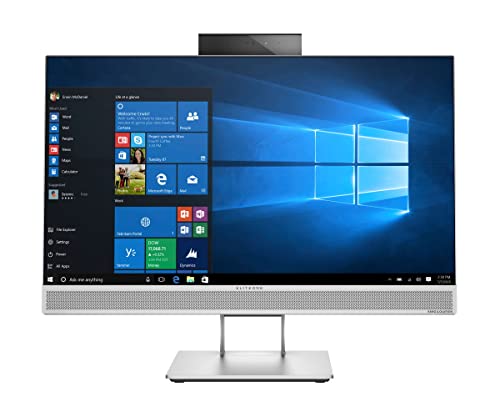
- Best overall for a small space: HP EliteOne 800 G4 All-in-One, 23.8″ FHD IPS, Core i5-8500, 16GB RAM, 512GB SSD (Renewed) — Check on Amazon
- HP ProOne 600 G4 All-in-One, 21.5″, Core i5-8500T, 8GB RAM, 256GB SSD (Renewed) — Check on Amazon
- Dell OptiPlex 5260 All-in-One, 21.5″ FHD, Core i5-8400, 8GB RAM, 256GB SSD (Renewed) — Check on Amazon
- STGSivir All-in-One PC, 24″ FHD, 16GB RAM, 1TB SSD — Check on Amazon
See 2 more Amazon options
- MECHAZER All-in-One, 23.8″ Curved FHD, Core i7-7700HQ, 16GB RAM, 512GB SSD — Check on Amazon
- PINGDY All-in-One, 23.8″ FHD IPS, Ryzen 5 3500U, 8GB RAM, 512GB SSD — Check on Amazon
Read the full guide ↓
Disclosure: As an Amazon Associate, reviewstook.com earns from qualifying purchases. Links to Amazon on this page are affiliate links; they cost you nothing extra. Listing details such as price and availability change often, so check the current Amazon listing before you buy.
An all-in-one is the small-space computer by definition — screen and system in a single housing, no tower on the floor, one power cable to the wall. So when every candidate is already “compact,” what separates a good small-room buy from a bad one? The desk knows. These six machines fall into two physical classes: 21.5-inch models shaped for shallow desks, kitchen counters and bedroom corners, and 23.8- to 24-inch models that ask for a deeper desk and more distance between you and the glass. They also part company on what lives inside the housing versus what shows up as an extra box — one has no camera whatsoever, one borrows its Wi-Fi from a USB dongle that sits in a port permanently, one ships a wired keyboard and mouse whose cables cross the desk daily. Add the stand, the cable drop and those extras together and you get each machine’s true size, which is the only size a small room cares about.
Two limits frame the whole guide. The first is the $400 ceiling itself: brand-name all-in-ones do not exist new at this money, so the strongest candidates are renewed ex-corporate machines with short warranties, alongside new budget-brand models whose headlines occasionally conceal processors far older than the styling suggests — each review names its pick’s version of that bargain. The second is gaming. No pick here carries a graphics card, and no pick can take one later; integrated graphics run daily work, video and light or older games, and that is the ceiling. If genuine gaming power in a small footprint is the actual goal, a mini or small-form-factor tower does it properly, and this guide points there rather than dressing these machines up as something they are not. What $400 does buy is a complete, tidy desk that handles ordinary computing well — as long as the space gets measured before the money gets spent.
In this guide
Quick Picks
Short on time, or comparing several options at once? Each row below names a space or buyer type and the all-in-one that suits it, with a link to the listing.
| Space / buyer type | Pick | Why it stands out | Link |
|---|---|---|---|
| Best overall for a small space | HP EliteOne 800 G4 All-in-One (Renewed) | 23.8″ IPS screen with everything built in — camera, Wi-Fi, 16GB RAM, 512GB SSD | Check on Amazon |
| Smallest complete desk | HP ProOne 600 G4 All-in-One (Renewed) | 21.5″ class with camera, Wi-Fi and Bluetooth included — check price on Amazon | Check on Amazon |
| Counters and tight corners | Dell OptiPlex 5260 All-in-One (Renewed) | 21.5″ Dell with a full-power six-core CPU and an SD reader — but no camera | Check on Amazon |
| Biggest screen, bought new | STGSivir All-in-One PC 24 | 24″ screen, 1TB SSD and 16GB RAM in a new machine — with one big CPU caveat | Check on Amazon |
| Small media corner | MECHAZER All-in-One 23.8″ Curved | The only curved display here — buy only at or under $400, OS verified | Check on Amazon |
| Newest platform, shared rooms | PINGDY All-in-One 23.8″ Ryzen 5 | 23.8″ IPS panel and the strongest integrated graphics in this guide | Check on Amazon |
How These Picks Were Chosen
The $400 budget was treated as a ceiling on the complete machine, not a target to round up to. Each product below is a genuine Amazon listing in this guide’s budget tier in the United States — check the price on Amazon for each one, because renewed prices move constantly, as every seller grades and prices its own stock. A pick that only fits the cap sometimes is described that way, in the open. Anything that was not truly an all-in-one — mini PCs, tower-and-monitor bundles in all-in-one clothing — was cut, however small or cheap.
Since this guide exists for small spaces, the standard research pass — the Amazon listings and their spec tables, manufacturer datasheets where they exist, independent price tracking and refurbisher data — ran alongside a footprint pass. For every pick we recorded the documented screen size, which fixes the machine’s width class and the desk depth it wants; what the housing already contains (camera, speakers, internal Wi-Fi) versus what arrives separately (a USB Wi-Fi dongle, a webcam you supply); whether the bundled keyboard and mouse are documented as wired; and where the ports sit. Anything physical that the sources do not document — a stand’s exact footprint, a weight, a wall-mount pattern — is not guessed at anywhere in this guide. Those figures sit in the live listing’s product-information section, and the checklist further down converts them into a five-minute measuring job before you order.
Performance got the same scrutiny, because a machine that cannot grow has to be right on arrival. Two habits of cheap listings were watched closely. One is the headline that buries the processor: in this guide a single “Core i5” label stretches from a 2018 six-core to a 2012 dual-core, and where a spec table reveals a far older chip than the title implies, the review opens with it. The other is the spec table that is flatly wrong — memory types the model never shipped with, core counts at war with the processor’s own name — and there we followed the manufacturer’s datasheet and flagged the error for you to check live. Over everything sat one test: does the box hold a complete small desk on day one? Where something is missing, the review prices the gap instead of hiding it.
What “Small” Actually Means for an All-in-One
The screen is the footprint. An all-in-one is exactly as wide as its display, so the diagonal is the first space decision you make. The 21.5-inch class — the ProOne and the Dell below — is the counter class: shallow desks, kitchen worktops, reception ledges, the far end of a shared table, all at the short viewing distances those spots impose. The 23.8- to 24-inch class — the other four — is the proper-desk class: wide enough for two documents side by side and for a second viewer, and it wants depth in front of it. Neither wins in the abstract. The classic small-space error is forcing the larger class onto a shallow desk, where the panel ends up nearer than your eyes want it, all day, every day.
Depth runs out before width does. Most desks can spare the inches across; the inches front-to-back are what small rooms lack. Before ordering, sit where you will sit and confirm the screen can live about an arm’s length away, keyboard in front of it, wrists resting naturally. Shallow furniture forgives the 21.5-inch picks and punishes the 24-inch class. If your “desk” is a shelf, a counter or a fold-down flap, its depth is the first number in this purchase — the checklist below starts there — and it should pick the size class before price gets a vote.
Built in beats plugged in. A tower setup scatters hardware across a desk: monitor, speakers, webcam, the tower itself. An all-in-one deletes most of that scattering, but only where the parts genuinely live in the housing. A camera and speakers inside the bezel mean no extra boxes and no extra leads; internal Wi-Fi means no cable run to the router. The exceptions are named per pick in the reviews: the Dell carries no camera, so a USB webcam moves in; its Wi-Fi rides a dongle that rents a USB port forever; the MECHAZER’s keyboard and mouse are wired, so two runs of cable cross the desk permanently. None of these ends a candidacy. All of them belong in the machine’s real dimensions.
The stand is the only furniture you get. Every pick here stands on the desk. Nothing in the research behind this guide documents a wall-mount pattern for any of the six, so mounting is a question to settle on the live listing, never an assumption to buy on. What you can do today is measure: listings publish overall dimensions in their product-information sections, and painter’s tape on the desktop — step three of the checklist — shows you precisely how much surface the stand will claim and what remains for a notebook, a mug and your hands. In a small room, that leftover surface is the specification you actually live with.
The 6 Best All-in-One PCs for Small Spaces Under $400
HP EliteOne 800 G4 All-in-One — Core i5-8500, 16GB RAM, 512GB SSD (Renewed)
Who it suits: Small-desk buyers who want the bigger 23.8-inch screen class with nothing left to plug in — the most complete single-box desk in this guide, for rooms whose desk is deep enough to hold it.
Begin with what never reaches your desk. HP’s business-class EliteOne 800 G4 folds the whole setup into one housing: a 23.8-inch Full HD (1920×1080) IPS display, a webcam in the bezel, Wi-Fi inside the case, and a keyboard, mouse and Ethernet cable in the carton. No webcam perched on top, no speaker bar, no dongle — the finished desk is a screen, a keyboard and a mouse. The IPS panel matters in shared small rooms, too: its picture holds up from an angle, so someone on the bed or sofa sees real colors rather than the washed-out view a basic panel gives off-center.
The computer behind the glass is the strongest here. Intel’s Core i5-8500 — a desktop chip from the 8th generation, six physical cores at 3.0GHz — works alongside 16GB of RAM and a 512GB SSD, twice the storage of the cheaper picks. Six genuine cores keep Windows 11 Pro composed with a browser, office apps, a call and a dozen tabs in flight; 16GB of memory keeps task-switching off the disk; the integrated Intel UHD Graphics 630 handles playback, light photo work and older games, and it is not gaming hardware whatever the desk size. Ports are generous for the class — HDMI and DisplayPort outputs for a future second screen, seven USB ports — so daily dongles and drives never start a queue.
Two research notes belong in the open. Amazon’s spec table calls the memory DDR5; HP’s datasheet for this model says DDR4-2666 in two SO-DIMM slots, expandable to 32GB. Trust the datasheet — the error actually conceals good news, since used DDR4 is a cheap future upgrade — and confirm on the live listing. Check the live price on Amazon before you order, and if the 512GB listing sits over this guide’s cap on your shopping day, the same model carrying a 256GB SSD from refurbishers is the honest fallback. The listing also states a one-year manufacturer warranty — a rarity among renewed picks, where 90 days is typical — and the model holds an EPEAT Silver rating from its corporate first life.
- The joint-biggest screen here, and an IPS panel that stays honest from the sofa.
- Nothing to add: camera, Wi-Fi, keyboard, mouse and Ethernet cable all included.
- The guide’s most balanced spec — six cores, 16GB of RAM, a 512GB SSD.
- Memory can reach 32GB per HP’s datasheet, unusual headroom at this money.
Honest limitation: A renewed ex-corporate machine from 2018, so light cosmetic wear is possible, check the live price on Amazon, as it belongs at the top of this budget tier, and the 23.8-inch class needs desk depth the 21.5-inch picks do not.
Choose it if your desk has the depth for the larger class and you want one box that does everything. Skip it if your surface is a shallow counter or shelf — a 21.5-inch pick fits that life better — or if renewed stock puts you off.

HP ProOne 600 G4 All-in-One — Core i5-8500T, 8GB RAM, 256GB SSD (Renewed)
Who it suits: Anyone furnishing the smallest complete desk going — a bedroom corner, a student flap-down table, a hallway nook — who wants the business formula at strong value in this guide’s budget tier.
The ProOne 600 G4 is the EliteOne’s smaller corporate sibling, and its 21.5-inch screen belongs to the class that fits where 23.8 inches cannot: shallow desks, kitchen counters, the end of a communal table. What elevates it from merely cheap to genuinely small-space-smart is completeness. Keyboard and mouse are in the box; Wi-Fi and Bluetooth are part of the machine, not dongles; a camera waits in the bezel for calls. Nothing further has to be bought, plugged in or housed — the entire computer is screen, keyboard, mouse and one power lead. This renewed listing comes through an Amazon-fulfilled seller in Refurbished–Excellent condition — check the live price on Amazon: it is a strong-value door into a capable all-in-one in this guide.
Inside is Intel’s Core i5-8500T, the 35-watt low-power member of the same 8th-generation family — six cores on a 2.1GHz base clock, boosting when the work demands it. The T trades peak speed in long, heavy jobs for a cooler, quieter machine that sips electricity, a swap that suits a small room where the computer shares air with the bed; for browsing, documents, calls and streaming, the gap to the full-power chip rarely announces itself. Beside it sit 8GB of DDR4 and a 256GB SSD, a workable floor for Windows 11 Pro and the pick’s honest limits: a 256GB drive fills faster than owners expect once Windows, apps and a few years of files move in, and 8GB is the minimum at which multitasking stays comfortable rather than the amount that makes it generous.
The screen compromises in both directions. Smaller is the point — yet the listing promises no IPS panel, so viewing angles run narrower than its sibling’s; check the live display details if two of you will watch together from the side. The trade is well judged, and the compact footprint is itself a small-space instrument: it leaves room for the lamp, the external drive or the shelf that turns a tiny workstation from improvised to finished.
- Budget-tier renewed value — check the live price on Amazon.
- The 21.5-inch class: sized for counters, corners and shallow desks.
- Camera, Wi-Fi and Bluetooth built in; keyboard and mouse in the box.
- A six-core 8th-gen chip in its cool, quiet, low-power T form.
Honest limitation: 8GB of RAM and 256GB of storage are the floor, not a comfort zone, and with no IPS promised, off-angle viewing is ordinary — heavy multitaskers and large photo libraries will meet both limits within a year or two.
Choose it if the desk is truly small and value counts alongside size. Skip it if you already know 16GB of RAM and 512GB of storage are day-one needs — that machine is the EliteOne above, at the top of this budget tier.

Dell OptiPlex 5260 All-in-One — Core i5-8400, 8GB RAM, 256GB SSD (Renewed)
Who it suits: Buyers with the tightest placement of all — a kitchen counter, a reception ledge, a front desk — who want Dell’s business build and a full-power desktop processor, and who seldom make video calls.
Dell’s 21.5-inch OptiPlex 5260 shares the ProOne’s counter-friendly class, and this renewed listing — sold by BLUE DIMOND COMPUTER, graded Refurbished–Excellent — hides the guide’s joint-strongest processor inside it: Intel’s Core i5-8400, a full desktop part with six cores boosting to 4.0GHz, from the same 8th generation as the HPs. Disregard the “Quad-Core” in the Amazon title; the listing’s own description confirms six cores, and no quad-core i5-8400 has ever existed — a small, perfect lesson in reading tables instead of headlines. The supporting cast matches the sensible minimum: 8GB of DDR4, a 256GB SSD, Windows 11 Pro. Renewed pricing varies by seller and configuration, so check the live price on Amazon.
For a machine living in a shared or public corner, the connectivity is the most practical here: DisplayPort out for a second screen, three USB 3.1 and two USB 2.0 ports, wired Ethernet, and an SD card reader that photographers and dashcam owners will use weekly. Keyboard and mouse are included. Two gaps, though, are space gaps as much as spec gaps. Wi-Fi arrives on a USB dongle rather than an internal card, permanently renting one of those ports and adding a plastic tenant to the machine’s rear — where the router sits far away, plan the Ethernet run or accept the tenant. And the listing states plainly that there is no camera: calls require a USB webcam, an extra purchase that perches on the bezel trailing its own cable. Counted honestly, the desk simply stops being the one-box ideal.
The warranty is the renewed standard 90 days rather than the EliteOne’s stated year, and that shorter net is the true cost of the lower price: in week one, while returns are painless, test every port, the dongle and the panel for dead pixels. The appeal survives all of it — a compact business Dell with a six-core desktop heart, built for precisely the counters and corners this guide is about.
- A full-power six-core i5-8400 in the 21.5-inch counter class.
- Renewed pricing varies by seller and configuration — check the live price on Amazon.
- The best ports here: SD reader, DisplayPort out, five USB sockets.
- Keyboard and mouse included, graded Refurbished–Excellent.
Honest limitation: No webcam exists on this machine, Wi-Fi costs a USB port to a dongle, and cover runs 90 days — if you call daily, add a camera and its cable to the real footprint.
Choose it if the spot is a counter or corner, ports and processor matter, and calls are rare. Skip it if video calls are daily and an external camera annoys you, or 90 days of warranty feels thin for renewed hardware.

STGSivir All-in-One PC 24 — 16GB RAM, 1TB SSD
Who it suits: Buyers who will not touch refurbished stock and want this guide’s biggest screen in a new machine — provided they read the warning that follows before ordering, because it outweighs the screen.
The warning, plainly: the headline advertises a “Core i5” flanked by 16GB of RAM and a 1TB SSD, but the listing’s own specification table names the chip — 3470T, Intel’s Core i5-3470T, a dual-core laptop-class part from the 3rd generation, with a 2011 model year printed in the same table. Ten years separate it from the 8th-generation processors in the renewed picks, and it carries a third of their cores; no quantity of memory or storage rewrites that arithmetic. Daily life still works — the big SSD keeps Windows responsive, 16GB holds a crowd of browser tabs, and browsing, mail, documents, streaming and homework all run acceptably — but this is the least headroom in the guide, and the machine that will feel old first. It earns its place for two reasons: it is among the only new (not renewed) all-in-ones in this guide’s budget tier — check its price on Amazon — and some households simply value new over stronger-but-refurbished. Buy it with the processor understood rather than discovered.
As furniture, it is the most generous desk here: a 24-inch Full HD display, the largest in the guide, a webcam in the frame, Wi-Fi and Bluetooth 5.0, and an RGB keyboard and mouse set that gives a small room’s desk some intent. That size is a commitment, though — 24 inches is the deep-desk class, and on shallow furniture this panel will sit closer than all-day comfort allows. One more check: the current listing title specifies Windows 11 Home while an older version of the listing said Windows 10 Home, so confirm the OS line on the live page; with this little processor reserve there is no upgrade path worth naming, and what arrives is the computer you keep. For a household wanting a new, tidy, big-screen machine for browsing, streaming, homework and calls at or under $400 — no refurbished lottery — it fits. Just register that the renewed HP above it is, chip for chip, about three generations younger in the same budget tier.
- Brand new, with a full retail returns path and no ex-corporate wear.
- The largest display in the guide at 24 inches, Full HD.
- A 1TB SSD and 16GB of RAM lead the guide on paper.
- Webcam, Wi-Fi, Bluetooth 5.0 and an RGB keyboard and mouse included.
Honest limitation: The processor is a 3rd-generation dual-core — the oldest and weakest chip in this guide by a wide margin — sitting behind a headline that never mentions it, with minimal headroom and no real upgrade path behind it.
Choose it if new beats powerful for you, the workload is light, and the desk is deep enough for 24 inches. Skip it if you keep computers for years or want any reserve — the renewed 8th-gen picks are stronger in every way that ages.

MECHAZER All-in-One 23.8″ Curved — Core i7-7700HQ, 16GB RAM, 512GB SSD
Who it suits: Buyers building a small media corner — films, long reads, everyday work — who are drawn to the only curved screen here, and who accept two minutes of homework on the live listing, because this pick carries the guide’s largest verify-before-you-buy warning.
The pitch is genuinely unlike anything else at this price. The NX5-23C bends a 23.8-inch curved Full HD (1920×1080) LED panel around Intel’s Core i7-7700HQ, and the curve is the small-space argument: at the close range a small desk imposes, the panel’s edges turn toward you, which makes films and long documents feel more enveloping than a flat screen of equal size. The chip is a 7th-generation mobile part — four cores, eight threads, boosting to 3.8GHz — a laptop processor rather than the desktop units in the HP and Dell picks, but a capable one for its era, matched with 16GB of memory and a 512GB SSD. The supporting details suit a corner setup: speakers built in (one less box), dual-band Wi-Fi, Bluetooth 5.0, six USB ports, an HDMI output, a fingerprint reader for one-touch sign-in that no business pick offers, and a stated one-year warranty. Against that, the keyboard and mouse are wired — two cable runs crossing a small desk every day is a modest but permanent tax on tidiness.
The warnings outrank the cables. Amazon’s structured data for this listing records the operating system as “DOS” — no Windows whatsoever — while MECHAZER’s marketing elsewhere promises Windows 11 Pro preinstalled. Both cannot be true, and which one is decides whether the machine works from the box or lands as a project needing an OS you supply. Before ordering, read the live listing’s OS line and recent buyer reviews, and walk away unless Windows is confirmed in plain terms; a machine that boots to a DOS prompt is homework, not a purchase. An independent roundup of this model also reports no built-in webcam, so callers should confirm the camera live as well — if it is missing, an external webcam joins the desk and the one-box sums change. The DDR3 memory is one more tell of the older platform under the modern styling.
Price demands equal care. The bigger 27-inch curved sibling sits in a higher tier, so this 23.8-inch version earns a place in this guide only conditionally — check the live price on Amazon for this exact listing, including the white curved variant of the same spec. Treat it as a dip-buy — at or under the cap it qualifies; above it, the EliteOne is the better spend. The hardware is not the problem here; the listing is.
- The guide’s only curved screen, 23.8 inches of Full HD, plus fingerprint sign-in.
- An i7-7700HQ with four cores and eight threads, 16GB of RAM, a 512GB SSD.
- Speakers built in, dual-band Wi-Fi, Bluetooth 5.0, six USB ports, HDMI out.
- A stated one-year warranty; keyboard and mouse included, on wires.
Honest limitation: Amazon’s data says DOS where the brand’s marketing says Windows 11 Pro — confirm an installed OS before paying — and the pick counts only on days the live listing price dips to this guide’s cap — check the price on Amazon.
Choose it if the curve appeals, the listing confirms Windows in writing, and the price sits at or under $400 that day. Skip it if either check fails; an unclear OS and an over-cap price each settle the question alone.
PINGDY All-in-One 23.8″ — Ryzen 5 3500U, 8GB RAM, 512GB SSD
Who it suits: Buyers in a shared small space — the family desk, the living-room corner — who want the newest platform in this guide and a screen that stays pleasant for whoever sits down in front of it.
Every rival here runs an Intel chip from 2018 or earlier; the PINGDY runs AMD’s Ryzen 5 3500U, a 2019 mobile processor with four cores and eight threads boosting to 3.7GHz. The headline, though, is graphics. The 3500U’s integrated Radeon Vega 8 is a clear step beyond the Intel UHD 630 in the business picks — smoother video, easier light photo editing, and older or esports-style games at low settings that the Intel machines would barely attempt. Hold the framing steady: Vega 8 is the finest integrated graphics in this guide, not gaming hardware, and the listing’s own “for Gaming Office Study” banner overpromises — demanding modern titles are beyond it, as they are beyond everything here. In a shared room the display may matter more than the silicon: the 23.8-inch Full HD IPS panel keeps its colors from an angle, so the person on the sofa sees the same picture as the person at the keys. Wi-Fi and Bluetooth are built in, a speaker is built in, and keyboard and mouse ride in the box — the complete one-cable desk, in the larger class.
The listing’s paperwork needs the same skepticism applied elsewhere in this guide. Its spec table garbles the processor into a “3450U” in one field and labels the memory DDR3 in another; the 3500U is a DDR4 platform, and the title and headline spec agree on the correct chip — treat the table as a prompt to confirm the configuration on the live listing and again on arrival, using Amazon’s returns if what lands differs. The research also never clearly documented a webcam for this model, so calling households should verify the camera line live before relying on one. Finally, check the price on Amazon for this listing: the pick qualifies when the live price sits within this guide’s budget cap, the tier this model sells in. Set upgrade hopes to zero as well — nothing in the listing promises user-serviceable memory or storage, so the 8GB and 512GB you order are the specification you keep.
- The newest processor here: a Ryzen 5 3500U, four cores, eight threads.
- Vega 8 graphics, the strongest integrated set in this guide.
- A 23.8-inch IPS Full HD screen a whole room can share, plus a 512GB SSD.
- Wi-Fi, Bluetooth, a built-in speaker, keyboard and mouse — all included.
Honest limitation: The spec table errs twice (a garbled chip name, a DDR3 label on a DDR4 platform), the live listing price must be checked against the cap on Amazon — and 8GB with no promised upgrades is the ceiling you live with.
Choose it if you want new, the best light-play headroom here and a screen a room can share, with the live price inside budget. Skip it if you need 16GB of RAM, a camera confirmed in writing, or a long warranty — the renewed business picks cover all three better.

Comparison Table
All six picks side by side. Check the live price on Amazon for each pick before you buy — renewed stock is repriced by each seller.
| Model | Screen | Processor | RAM / Storage | Price | Link |
|---|---|---|---|---|---|
| HP EliteOne 800 G4 (Renewed) | 23.8″ FHD IPS | Core i5-8500 (8th gen, 6-core) | 16GB / 512GB SSD | Check price on Amazon | Check on Amazon |
| HP ProOne 600 G4 (Renewed) | 21.5″ | Core i5-8500T (8th gen, 6-core) | 8GB / 256GB SSD | Check price on Amazon | Check on Amazon |
| Dell OptiPlex 5260 (Renewed) | 21.5″ FHD | Core i5-8400 (8th gen, 6-core) | 8GB / 256GB SSD | Check price on Amazon | Check on Amazon |
| STGSivir All-in-One 24 | 24″ FHD | Core i5-3470T (3rd gen, 2-core) | 16GB / 1TB SSD | Check price on Amazon | Check on Amazon |
| MECHAZER 23.8″ Curved | 23.8″ FHD curved | Core i7-7700HQ (7th gen, 4-core) | 16GB / 512GB SSD | Check live price | Check on Amazon |
| PINGDY All-in-One 23.8″ | 23.8″ FHD IPS | Ryzen 5 3500U (2019, 4-core) | 8GB / 512GB SSD | Check live price | Check on Amazon |
How to Choose an All-in-One PC for a Small Space
Measure before you buy — five steps, in order. Small-space purchases fail at the tape measure, not the checkout. Step one: measure the desk’s depth, front edge to wall, and be honest about everything else that lives on it. Step two: let depth pick the size class and the viewing distance — shallow desks and counters belong to the 21.5-inch picks, which stay comfortable at short range; deeper desks earn the 23.8- to 24-inch class, which wants about an arm’s length between eyes and glass. Step three: tape the footprint. Take the machine’s published width and depth from the live listing’s product-information section, mark that rectangle on the desk with painter’s tape, and live with the tape for a day; whatever surface remains inside reach is your true workspace. Step four: walk the cables. Locate the outlet and trace the power lead’s drop, then count the rest — wired keyboard and mouse runs (the MECHAZER), a webcam cable (the Dell, and possibly the MECHAZER and PINGDY), a dongle in a rear port (the Dell) — and check whether the listing shows an external power brick that will claim floor or desk room of its own. Step five: order, and leave the tape down until the machine arrives, so day one is placement rather than rearrangement.
Decode the processor by its number, never its badge. One “Core i5” label spans a decade of hardware. The digit after the hyphen carries the generation: an i5-8500 is an 8th-generation six-core from 2018, an i5-3470T a 3rd-generation dual-core from the early 2010s, and the distance between those two chips exceeds the distance between any two screens in this guide. At this budget the sweet spot is an 8th-generation Intel part or a Ryzen 3000-series AMD part; anything older must be priced far cheaper to make sense, and a listing that hides the full model number is telling you why it hides it.
Decide the renewed question with your eyes open. Renewed business stock is the only route at $400 to a six-core processor, a corporate-grade chassis and Windows 11 Pro — and it costs a previous working life, a short warranty (90 days typical, a stated year exceptional) and the chance of light cosmetic wear that grades like “Refurbished – Excellent” exist to bound. Buy graded stock from sellers with clear returns, and in the first week, while returning is painless, test everything. If used genuinely bothers you, this guide’s new picks are the alternative — with the understanding that their processors usually trail for the same money.
Total the built-ins before comparing prices. In a small room a missing webcam is not merely an extra accessory to buy; it is one more box and one more cable competing for the same few inches. The Dell omits the camera entirely and borrows Wi-Fi from a dongle; the MECHAZER’s camera is unconfirmed and its keyboard and mouse are wired; the PINGDY’s camera line wants a live check. Compare finished desks, not sticker prices: the machine plus every accessory your desk requires, with the space those accessories occupy counted as part of their cost.
Hold the floor at 8GB of RAM and a 256GB SSD — and prefer more. Windows 11 with a browser and office apps breathes at 8GB and relaxes at 16GB; below 8GB it does neither. Storage demands an SSD outright — an all-in-one still spinning a mechanical drive at this price is a skip, full stop — and 256GB is a working minimum that fills sooner than buyers predict, which is why the 512GB and 1TB configurations stand out above. In a small space the preference compounds: gigabytes inside the machine are gigabytes that never need an external drive squatting on the desk.
Accept the ceiling before you pay. No all-in-one here has a graphics slot, so gaming ability is whatever arrives on day one, forever. The business family is the partial exception on smaller things — HP’s datasheet lets the EliteOne’s memory climb to 32GB, and corporate SSDs are usually replaceable — while slim consumer models should be treated as sealed. Buy the configuration year three needs, not the one today’s budget can excuse.
When an All-in-One Is the Wrong Kind of Small
One buyer cannot be served by this guide, and honesty beats a sale: the player. An all-in-one is small precisely because it surrenders the thing gaming needs — a discrete graphics card and the room to cool it. If a small space must play modern games, the same $400 stretches further in a mini or small-form-factor tower behind a monitor: our guides to the Best Mini Gaming PC Under $400, the Best Small Form Factor Gaming PC Under $400 and the Best Compact Gaming PC Under $400 cover that trade directly, and the Best Mini PC Under $400 guide covers the tiniest non-gaming boxes. Weigh the exchange in both directions before choosing. The tower route delivers real gaming power on or under the desk, and the monitor can be upgraded or replaced alone — but it restores the separate screen, the cable bundle and the larger total footprint the all-in-one deletes. The all-in-one route delivers the tidiest desk in computing, complete on arrival — and locks gaming at integrated graphics for life. Pick by which of those two sentences sounds like your room.
Common Buying Mistakes
Fitting the big screen to the shallow desk. The 24-inch class reads as the bargain — more panel per dollar — until it is parked at close range on shelf-depth furniture, all day, every day. Screen size is a distance decision before it is a value decision: measure depth first (step one of the checklist) and let it choose the class. A 21.5-inch screen at the right distance beats a 24-inch screen at the wrong one on every working day of the year.
Buying an all-in-one to game on. The costliest error at this budget, so it sits near the top. Integrated graphics from 2018–2019 run daily software beautifully and modern games badly; light and older titles at low settings mark the realistic ceiling, stretched furthest by the PINGDY’s Vega 8, and anything heavier belongs to the tower route described above. When games are the point of the purchase, the same $400 should go there from the start.
Believing the headline over the table. One badge covered both the strongest and weakest processors in this guide; one title called a six-core chip “Quad-Core”; tables stamped DDR4 machines as DDR5 and DDR3. Titles are written to be clicked. The truth — full processor model, memory type, resolution, operating system — lives in the specification table and the maker’s datasheet, and two minutes there separates the machine you researched from the machine that arrives.
Assuming Windows is installed. Most picks here include Windows 11 — Pro on the business machines, Home on the consumer ones — but at least one listing’s own data reads DOS against marketing that promises Windows. A computer with no operating system is not a discount; it is an installation project, possibly plus a license fee. Read the OS line on the live listing every time, on budget brands above all.
Skipping the accessory and warranty sums. The sticker price stops being the price the moment a camera, a Wi-Fi adapter or longer cover must be added — and in a small space, each accessory’s footprint is part of its cost as well. Compare complete, working, covered setups, and count the warranty’s length as a specification, because it is one.
Overpaying for last month’s listing. Renewed and budget prices churn constantly; a model’s live price can wander well above where it sat last month with not one component changed. Every pick here earned its place in this guide’s budget tier — check the price on Amazon. If the live price has wandered over the cap, wait it out, take the pick that is in budget today, or step up deliberately — our Best All In One PC Under $500 guide covers that tier — instead of quietly overpaying for identical hardware.
Final Recommendation
For most small spaces, the HP EliteOne 800 G4 (Renewed) is the all-in-one to buy under $400: alone among the six it combines a 23.8-inch IPS screen, a six-core 8th-generation processor, 16GB of RAM, a 512GB SSD, a webcam and a stated one-year warranty in a single machine with nothing left to plug in, at the top of the budget rather than beyond it. Where the desk is too shallow for that class, the HP ProOne 600 G4 (Renewed) is the small-desk answer — 21.5 inches, everything built in, so check its price on Amazon — and the Dell OptiPlex 5260 is the counter-and-corner alternative with the finest ports, once its missing camera and dongle Wi-Fi are accepted. Buy new only with open eyes: the STGSivir trades a far older processor for a new purchase and the biggest screen here, the MECHAZER’s curve earns its place only when the price dips to the cap and Windows is confirmed, and the PINGDY brings the newest platform and the most shareable screen to buyers who check its live price first. First family computer? Our Best All In One PC For Beginners Under $400 guide walks through setup in more depth. The base Best All In One PC Under $400 guide gives the same six machines their full performance treatment; the Best All In One PC For Streaming Under $400 guide covers what these integrated graphics can and cannot stream; and if the room can stretch, Best All In One PC For Small Spaces Under $500 opens the next tier of the same idea.
Frequently Asked Questions
What is the smallest all-in-one worth buying under $400? The 21.5-inch class is the smallest worth owning, and two picks sit in it: the HP ProOne 600 G4, complete from the box, and the Dell OptiPlex 5260, which adds ports and a full-power processor but no camera. Smaller all-in-ones exist on the market, but at this budget they pair tiny panels with processors too old to recommend; 21.5 inches at Full HD is the floor where small stays good.
Can an all-in-one PC under $400 play games? Light ones only. All six machines run integrated graphics — Intel UHD 630 or AMD Radeon Vega 8 — with no graphics card and no way to add one. Older titles, indies and esports games at low settings and modest resolutions are playable, with the PINGDY’s Vega 8 coping best; demanding modern games are out of reach. Anyone hoping for high settings or higher resolutions should read our honest account in the Best All In One PC For 1440p Gaming Under $400 guide before spending — the short version is that a mini or small-form-factor tower is the right $400 gaming buy, however small the room.
How much desk depth does an all-in-one need? Enough for the panel to rest about an arm’s length from your eyes, keyboard ahead of it, wrists resting naturally — which is why this guide’s checklist opens with a tape measure instead of a product. By class: the 21.5-inch picks forgive shallow desks, counters and shelves; the 23.8- to 24-inch picks want a deeper, proper desk. Tape the listing’s published footprint to the desktop before ordering and live with the tape a day; it is the cheapest returns process ever devised.
Can I wall-mount an all-in-one to save desk space? Not on the evidence of these listings. The research behind this guide documents no wall-mount pattern for any of the six, so settle the question on the live listing’s product-information section — and, for the business models, the manufacturer’s datasheet — rather than buying on an assumption. If mounting is a hard requirement, get it confirmed in writing before ordering, and consider that a mini PC behind a separate monitor may serve the plan better.
Is a renewed all-in-one a safe buy? It is the normal way to buy at this budget, provided you purchase the grading and the warranty rather than the price alone. Look for Refurbished–Excellent or similar graded stock from established sellers, get the warranty in writing (90 days is common; the EliteOne here states a year), and during the first week — while returns are painless — test the panel, every port, the Wi-Fi and the camera. The hardware itself is ex-corporate stock built to a standard most consumer PCs at this price never meet.
How much RAM and storage do I actually need? For Windows 11, 8GB of RAM and a 256GB SSD form the comfortable minimum across browsing, documents, mail and calls; 16GB and 512GB are the pairing to prefer when the budget stretches, since both are felt daily and storage in particular fills sooner than expected. In a small space the preference doubles: files held inside the machine never need an external drive occupying the desk.
Can I upgrade an all-in-one later? Partly, by family. Business models open up the most: HP’s datasheet allows the EliteOne 800 G4’s memory to rise to 32GB, and corporate SSDs are typically replaceable. Slim consumer models should be treated as sealed, with no promised path. And no all-in-one here can accept a graphics card, so gaming performance is fixed at whatever the integrated graphics deliver on day one.


