Where to buy
Check the latest price, availability and delivery on Amazon. Orders are placed on Amazon. We may earn a commission from qualifying purchases.
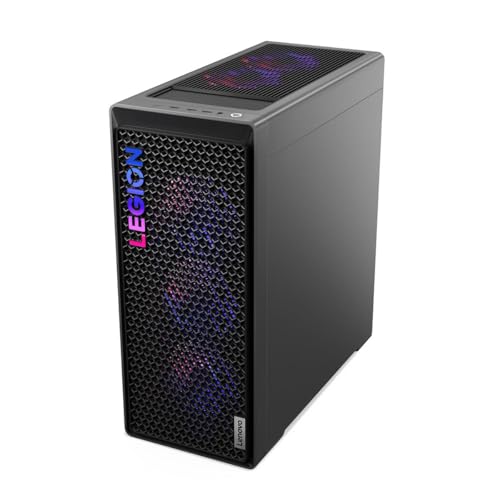
- Best overall for streaming when the deal is live: Lenovo Legion T7 34IAS10, Core Ultra 7 265KF, RTX 5080 — Check on Amazon
- Skytech King 95, Ryzen 7 9800X3D, RTX 5070 Ti — Check on Amazon
- CyberPowerPC Gamer Supreme, Ryzen 7 9800X3D, RTX 5070 Ti (SLC8480A9) — Check on Amazon
- iBUYPOWER Y40 PRO, Ryzen 9 7900X, RTX 5070 Ti — Check on Amazon
See 2 more Amazon options
- ZOTAC MEK Hero A7748S, Ryzen 7 7700X, RTX 4080 Super — Check on Amazon
- CyberPowerPC Gamer Supreme Liquid Cool, Ryzen 7 7800X3D, RTX 4070 Ti Super (SLC8480A3) — Check on Amazon
Read the full guide ↓
Disclosure: As an Amazon Associate, reviewstook.com earns from qualifying purchases. Links to Amazon on this page are affiliate links; they cost you nothing extra. Listing details such as price and availability change often, so check the current Amazon listing before you buy.
A streaming PC has two jobs running at the same time, and only one of them is the game. While you play, the machine is also compositing your scenes in OBS, encoding the broadcast, running chat and alerts and a browser full of dashboards, and — if you work the way most growing channels do — recording a clean local copy of the session. At most budgets, those two jobs fight over the same hardware and the stream is what loses. At $2,500, for the first time in this series, they stop fighting. Every machine here carries a graphics card with two hardware video encoders and AV1 support, 16GB of video memory, and enough processor behind it that the game, the broadcast and the recording each get their own silicon to live on. That is what this budget actually buys a streamer, and it is why this guide grades encoder-first.
Fix the workflow in your head before the picks, because it decides what matters. You play locally at 1440p, or on a 4K panel, at whatever settings the game deserves. OBS takes that picture and outputs a 1080p60 broadcast. On Twitch, the standard ceiling is around 6,000 kbps with constant bitrate — that is the pipe your stream has to fit through, whatever your PC cost. YouTube is more generous: it accepts higher bitrates, 1440p streams, and AV1 live ingest for channels that have it enabled, which is where the AV1 encoders in every pick below stop being a spec-sheet decoration. And 4K streaming itself? It is limited by the platforms, not by your hardware. No mainstream platform takes a native 4K live broadcast as its standard product today, so in this guide “4K” is the resolution of your monitor and the render target of your game — not the resolution of the stream your viewers receive. Any guide that sells you a “4K streaming PC” without saying that is selling you a phrase.
The machines are the same six as the base tier — and because prices move constantly, this guide prints no fixed price for any of them: check the current price on Amazon before you buy. The standing ceiling pick is the Skytech King 95, at the top of this budget band. Complete RTX 5080 systems normally sit in the tier above; the Legion T7 belongs here only while a live Amazon deal keeps it inside this budget, flagged deal-dependent every time it appears — at its usual positioning it belongs to the under-$3,000 guide. For every pick, the live listing decides: check the price on Amazon and confirm it sits at or under $2,500. Everything is graded on the simultaneous load — game plus encode plus the app stack, all at once — because a machine that benchmarks beautifully with nothing else running has told you nothing about streaming.
In this guide
Quick Picks
Short on time, or comparing several options at once? Each row below names a streamer type and the machine that suits it, with a link to the listing.
| Streamer type | Pick | Why it stands out | Link |
|---|---|---|---|
| Best overall — deal-dependent | Lenovo Legion T7 34IAS10, RTX 5080 | Dual 9th-gen NVENC, 20-core CPU, the strongest card here — only while its deal runs | Check on Amazon |
| Best standing streaming pick | Skytech King 95, 9800X3D, RTX 5070 Ti | Dual 9th-gen NVENC behind the fastest gaming CPU, published 850W Gold PSU | Check on Amazon |
| Best for recording everything | CyberPowerPC Gamer Supreme SLC8480A9, RTX 5070 Ti | 9800X3D and dual encoders with a 2TB SSD for local records | Check on Amazon |
| Best for a heavy app stack | iBUYPOWER Y40 PRO, Ryzen 9 7900X, RTX 5070 Ti | 12 cores for game + OBS + everything else, 2TB SSD, repeatedly discounted | Check on Amazon |
| Best encoder value | ZOTAC MEK Hero A7748S, RTX 4080 Super | Dual 8th-gen NVENC + AV1 at the value end of this tier — but only 16GB of system RAM | Check on Amazon |
| Best budget dual-encoder rig | CyberPowerPC Gamer Supreme SLC8480A3, RTX 4070 Ti Super | Dual NVENC + AV1, X3D CPU, 2TB SSD, at the bottom of this tier in clearance | Check on Amazon |
How These Picks Were Chosen
The budget was applied as a hard ceiling of $2,500 on Amazon in the United States, with one declared exception handled in the open: a machine that usually sits above the ceiling qualifies only while a live Amazon deal brings it below, and it is then labelled deal-dependent wherever it appears. That is the Legion T7’s situation, and this guide never lets you forget it. Prices change too often to print, so check the current price on Amazon for every machine and confirm it sits inside the budget before you buy.
The streaming filter was drawn at the encoder block, and it is stricter than it looks. A serious one-PC stream-and-record setup wants two hardware encoders: one compresses the broadcast your viewers watch, the other compresses the high-quality local recording you edit later, and neither steals work from the other or from the game’s rendering. Every graphics card in this guide — RTX 5080, RTX 5070 Ti, RTX 4080 Super, RTX 4070 Ti Super — carries exactly that: dual NVENC encoders with AV1 encode support, on top of 16GB of VRAM. The 16GB matters to a streamer in a way it doesn’t to a pure player: the game’s textures, OBS’s scene compositing and your browser sources all draw from the same video-memory pool, and a pool adequate for the game alone runs dry when the broadcast joins it. Cheaper guides in this series contain single-encoder cards that share one unit between broadcast and record; this tier is where that compromise ends, and it is the main reason to spend this much.
Behind the encoders, we graded the simultaneous load. The processor feeds the game, OBS’s scene rendering, chat software, browser dashboards and any local effects — so core count is a streaming specification, not a bragging right, and the reviews below say which machines are built for a heavy stack and which are gaming-first chips that lean on NVENC to carry the broadcast. System memory got the same treatment: 32GB is this tier’s standard because a game, OBS, a browser and a recording pipeline together will find the bottom of 16GB — and the one pick that ships 16GB is flagged for exactly that reason, with the upgrade priced into its honest cost. Storage was graded as a recording spec: a high-quality local record at 40–50 Mbps consumes roughly 20GB per hour, so a 1TB drive is a few dozen long sessions, not an archive. We did not use these machines ourselves; we read the maker listings and specification pages and compared GPU and encoder generation, CPU core count, RAM capacity and speed, SSD capacity, and power-supply wattage where published — flagging any unpublished PSU for confirmation before ordering.
The Encoder Is the Streaming Spec
Every other guide in this series talks about frame rates. This one talks about a small, fixed-function block of silicon on the graphics card called NVENC, because for a streamer it decides more than the GPU’s headline speed does. NVENC is NVIDIA’s hardware video encoder: it compresses your gameplay into the stream your viewers watch without asking the graphics cores or the CPU to do the work. And the single most useful fact about it at this budget is a count. The RTX 5080 and RTX 5070 Ti carry two 9th-generation NVENC encoders; the RTX 4080 Super and RTX 4070 Ti Super carry two 8th-generation encoders. All six machines in this guide are dual-encoder machines. None of the picks below asks one encoder to do two jobs.
Here is why the count matters more than the generation. A streamer who only broadcasts uses one encoder. A streamer who also records — and you should record, because the broadcast bitrate ceiling throws away most of your picture quality, and your edited videos deserve better — uses two: the broadcast goes out at Twitch’s ~6,000 kbps while the recording is written locally at 40–50 Mbps, roughly twenty gigabytes an hour of near-source-quality footage. On a dual-encoder card, those are separate hardware units working in parallel; the record does not touch the broadcast and neither touches the game’s frame rate beyond the small cost of reading the frame. On a single-encoder card, broadcast and record queue on the same unit, and the compromises begin. The generation gap between the picks is real but smaller: the 9th-generation block in the Blackwell cards encodes a given bitrate a little more cleanly and efficiently than the 8th-generation Ada block, and both generations encode AV1 — the codec YouTube’s live ingest rewards with better results at the same bitrate, and the reason these cards will age well as platforms shift. At Twitch’s 6,000 kbps ceiling, an 8th-generation dual-encoder card is not a streaming compromise in any way a viewer can see. Buy the generation for the gaming side; buy the count for the streaming side.
Two honest boundaries complete the picture. First, NVENC does not make the CPU irrelevant: OBS still composites your scenes, your browser still renders chat and alerts, and your game still needs feeding — which is why the reviews grade core counts as streaming specs. What NVENC does is take the single heaviest, most latency-sensitive job — the encode itself — off everyone’s plate. Second, no encoder fixes the platform ceiling. Twitch’s ~6,000 kbps is the binding constraint on what your viewers receive from any machine at any price; the dual encoders and AV1 in this guide buy you a cleaner picture inside that pipe, a proper recording beside it, and a YouTube path that uses more of what you paid for. They do not buy a 4K broadcast, because that product does not exist yet.
The 6 Best 4K Gaming PCs for Streaming Under $2,500
Lenovo Legion T7 34IAS10, Core Ultra 7 265KF, RTX 5080 (Model 90Y6003KUS) — Deal-Dependent
Who it suits: The streamer who can move the week the deal is live, and who wants the strongest combined game-and-broadcast machine that ever appears under this ceiling.
The condition comes first, because this pick is nothing without it. The Legion T7 usually sits above this guide’s budget — it belongs here only while a live Amazon deal brings it under the $2,500 ceiling, so check the current price on Amazon before anything else in this review matters. While that deal is live, the streaming case is the strongest in this guide. The RTX 5080 brings two 9th-generation NVENC encoders with AV1: one carries your broadcast, the other writes a 40–50 Mbps local record of the same session, and the card’s 16GB of GDDR7 holds the game’s textures, OBS’s compositing and your browser sources in one pool with room to spare. Behind it, Intel’s Core Ultra 7 265KF is a 20-core processor — the most cores in this guide — so the app stack that streamers run (OBS scenes, chat bots, dashboards, a DAW or voice chain, forty tabs) never has to queue behind the game. The rest of the specification is Lenovo-grade completeness: 32GB of DDR5 at 5600MHz, Windows 11 Pro, Wi-Fi 6 and Bluetooth, and a model’s published specification that includes an 850W power supply.
Grade it on the simultaneous load and it holds up everywhere except one drawer. The 265KF is not the fastest pure gaming CPU here — the X3D chips below hold that title — but at 1440p and 4K render targets the graphics card leads anyway, and for streaming the Intel chip’s core count is the more useful virtue: this is the machine for a heavy, plug-in-laden OBS setup that would make an eight-core chip negotiate. The honest weaknesses are the 1TB SSD and the deal itself. A streamer recording at roughly 20GB an hour fills 1TB with fifty hours of footage minus the games — this machine wants a second drive or a ruthless archiving habit sooner than any other pick here. And deals end: if the listing has climbed back above the $2,500 ceiling when you open it, this machine has left this guide’s budget, and the correct move is the King 95 below or the under-$3,000 guide with your eyes open.
- RTX 5080 16GB GDDR7 — dual 9th-gen NVENC + AV1, the strongest encoder block in this guide.
- Core Ultra 7 265KF, 20 cores — the deepest app-stack headroom here — with 32GB DDR5-5600.
- Lenovo OEM build and warranty organisation, with an 850W power supply in the model’s published specification.
Honest limitation: It is under $2,500 only while a limited-time deal runs — its usual positioning is the tier above — and the 1TB SSD is tight for a machine meant to record everything.
Choose it if the deal is live, the current price on Amazon sits under the ceiling, and your stream runs a heavy stack beside demanding games. Skip it if the listing has returned to its usual above-budget positioning — at that point it belongs to a different guide entirely.

Skytech King 95, Ryzen 7 9800X3D, RTX 5070 Ti (Model ST-KING95-1671-W-AM)
Who it suits: The gaming-first streamer — someone whose channel is built on play quality, who broadcasts and records everything, and who wants the standing recommendation rather than a deal hunt.
When the Legion’s deal is not live, this is the recommendation, and streaming changes nothing about that. The King 95 pairs the RTX 5070 Ti — 16GB of GDDR7 and the same dual 9th-generation NVENC block as the 5080, one encoder for the broadcast and one for the local record — with the Ryzen 7 9800X3D, the fastest gaming processor AMD makes, its 3D V-Cache showing its worth in the 1% lows that viewers perceive as smoothness. The streaming division of labour here is deliberate: the encode lives entirely on NVENC hardware, so the eight Zen 5 cores are left to the game and OBS’s scene work, which is a load they handle without negotiation. Around the pairing, Skytech publishes the specification sheet the rest of this tier should copy: 32GB of DDR5-5600, a 360mm ARGB liquid cooler, and an 850W Gold ATX 3.0 power supply stated in the listing — the detail that separates serious assemblers from the rest, at a 300W graphics card.
Its pricing asks for a milder version of the Legion’s honesty. The King 95 sits at the top of this budget band, but its positioning can straddle the ceiling, and sibling configurations under the same King 95 name — a 2TB, DDR5-6000 variant among them — sit higher still. Hold the listing to the model number ST-KING95-1671-W-AM, and check the current price on Amazon to confirm it sits at or under $2,500 before you buy. Two further caveats from the listing itself: Skytech notes the graphics card brand may vary — normal for an assembler, but the exact cooler design is a lottery — and the 1TB SSD is the same recording-tier tightness as the Legion’s, at roughly twenty gigabytes per recorded hour. For a streamer whose stack is lean — OBS, chat, a browser — this is the best-balanced standing machine here; for a stack that sprawls, the twelve cores of the Y40 PRO below argue their case.
- An RTX 5070 Ti 16GB paired with the Ryzen 7 9800X3D, the fastest gaming processor in this guide.
- Dual 9th-gen NVENC + AV1: broadcast and high-bitrate local record on separate encoder units.
- The tier’s most complete published spec sheet: 850W Gold ATX 3.0 PSU, 360mm AIO, nothing left unstated.
Honest limitation: Its positioning can straddle the budget ceiling — check the current price on Amazon and confirm it sits at or under $2,500 — the GPU brand may vary, and the 1TB SSD fills at recording speed.
Choose it if you want the default buy: the reference card, the reference gaming CPU, and an encoder pair that never asks the game for anything. Skip it if the current price on Amazon has climbed past $2,500 with no deal live, or your OBS setup is heavy enough to want more cores — both cases are covered below.

CyberPowerPC Gamer Supreme, Ryzen 7 9800X3D, RTX 5070 Ti (Model SLC8480A9)
Who it suits: The streamer who records every session and edits from local footage — anyone who has priced a second SSD into every 1TB machine above and would rather not need one.
On paper this is the King 95’s pairing bought differently: the same Ryzen 7 9800X3D, the same RTX 5070 Ti with dual 9th-generation NVENC encoders and 16GB of GDDR7, the same 32GB of DDR5 — and then one decisive upgrade for this angle, a 2TB PCIe 4.0 SSD where both machines above ship 1TB. Do the recording arithmetic and the upgrade stops looking like a luxury. A local record at 40–50 Mbps consumes roughly 20GB an hour; a five-hour session is a hundred gigabytes; a month of daily streams is a library that a 1TB drive — already sharing space with 100GB-plus game installs — cannot hold without constant offloading. The SLC8480A9 simply removes the problem for the life of the machine, while keeping the fastest gaming CPU in the guide and an encoder pair that splits broadcast and record without compromise. It ships Wi-Fi ready with Windows 11 Home, from CyberPowerPC’s long-running Gamer Supreme high-end line.
The trade is disclosure. Where Skytech publishes its 850W Gold supply, the verified material for this model does not state the power supply wattage or the RAM speed — independent spec tables list a B850 chipset, but the PSU behind a 300W graphics card is not published in what we could verify. That does not make it a bad machine; it makes it a machine to buy with one extra step: confirm the PSU wattage and the memory speed on the live listing or with the seller before ordering, and treat anything under 750W Gold as a reason to choose the King 95 instead. Judge it on the live listing — check the current price on Amazon — against a simple rule: at or under the King 95’s money, the double-size SSD wins the comparison for a recording streamer; above it, it does not.
- 9800X3D + RTX 5070 Ti 16GB — dual 9th-gen NVENC + AV1 — with a 2TB PCIe 4.0 SSD.
- 32GB DDR5 and Windows 11 Home, Wi-Fi ready.
- The recording-storage problem that dogs the two picks above is simply absent.
Honest limitation: Neither the PSU wattage nor the RAM speed appears in the verified listing material — both need confirming before you buy — and the live listing is the only verdict on its value, so check the current price on Amazon before judging it.
Choose it if recording storage is your deciding factor and the live price is at or below the King 95’s. Skip it if the power supply cannot be confirmed as adequate, or its live price climbs past the Skytech’s for the same silicon.

iBUYPOWER Y40 PRO, Ryzen 9 7900X, RTX 5070 Ti (Model Y40BA9N57T01)
Who it suits: The streamer-creator — someone whose broadcast runs a genuinely heavy stack, whose machine also edits the VODs it records, and who shops the deal cycle patiently.
The Y40 PRO makes the CPU bet that streaming rewards. Its Ryzen 9 7900X is a 12-core, 24-thread processor: in games alone it trails the 9800X3D, because no conventional chip matches the X3D’s cache at play — but a stream is never a game alone. Timeline renders for the VOD, a browser full of dashboards, chat and moderation tools, voice processing, and the game itself, all at once: that is a twelve-core workload, and it is the workload this machine is for. The encoder side matches the two picks above it — an RTX 5070 Ti with dual 9th-generation NVENC and AV1, broadcast on one unit and a 40–50 Mbps local record on the other — and the supporting spec is this tier done properly: 32GB of DDR5 RGB at 5200MHz, a 2TB NVMe SSD that treats recording as a first-class citizen, Windows 11 Home, and a keyboard and mouse in the box, all in the HYTE Y40 case whose panoramic glass makes it the best-looking machine in this guide — which, for a streamer whose PC appears on camera, is a working feature rather than vanity.
It is also the standing pick this guide can most rely on being discounted: a discount regular, repeatedly dropping well below its usual positioning across deal cycles, so a machine with this specification caught in one of those windows is the best value here that does not depend on a single flagship deal. Check the current price on Amazon to see where it sits today. The honest notes: the 5200MHz memory is a step slower than the King 95’s 5600 kit, the Y40 case prioritises the view over raw intake airflow, and iBUYPOWER does not headline the PSU in the material we verified, so apply the same pre-purchase confirmation as with the CyberPowerPC above. None of that overturns the arithmetic. For the streamer whose PC broadcasts, records and edits, this is the smartest standing spend in the guide.
- Ryzen 9 7900X 12-core — the best multitasking CPU here — with an RTX 5070 Ti 16GB.
- Dual 9th-gen NVENC + AV1, 2TB NVMe SSD and 32GB DDR5, in the panoramic-glass HYTE Y40 case.
- A discount regular: repeatedly drops in deal cycles — check the current price on Amazon.
Honest limitation: Pure gaming belongs to the X3D chips, not the 7900X; the memory runs 5200MHz where the King 95 runs 5600; and the PSU goes unheadlined in the verified material, so confirm it before ordering.
Choose it if your stream’s stack is heavy or the same machine edits what it records — or you catch it in one of its regular discount windows. Skip it if your setup is lean and every last gaming frame matters — the X3D machines exist for you.

ZOTAC MEK Hero A7748S, Ryzen 7 7700X, RTX 4080 Super
Who it suits: The value-hunting streamer who wants a flagship-class dual-encoder card for the least money in this guide, and who is willing to fix one obvious shortcoming themselves.
The MEK Hero is the previous generation’s flagship formula, sold by the company that made its graphics card — and for streaming, the previous generation’s flagship is barely a compromise at all. ZOTAC’s own Trinity Black Edition RTX 4080 Super carries two 8th-generation NVENC encoders with AV1 encode: broadcast on one, high-bitrate local record on the other, exactly the arrangement this guide is built around, a generation older and a step less efficient than the Blackwell block but invisible to a viewer at Twitch’s bitrate ceiling. The 16GB of GDDR6X gives the game-plus-OBS pool the same headroom as every other pick here. Around the card, ZOTAC builds a tidy machine: a Ryzen 7 7700X eight-core under a 240mm AIO, an 800W 80+ Gold power supply published in the launch specification, Wi-Fi 6E, Bluetooth 5.2, Windows 11 Home with no bloatware, hand-assembly in the United States, a 3-year warranty on the graphics card itself — and 2.5-gigabit Ethernet, a small spec that streamers should value more than most buyers, because the wired connection this guide keeps insisting on is only as good as the port it plugs into. It sits at the value end of this tier — check the current price on Amazon before you buy.
Now the shortcoming, and for this angle it is not subtle: the A7748S ships with 16GB of DDR5-4800 system memory. In a guide where every other machine carries 32GB, that is half the RAM this tier expects — and streaming is precisely the workload that finds the bottom of 16GB, because the game is sharing it with OBS, a browser’s worth of dashboards, chat tooling and the recording pipeline. A lean setup will run; a sprawling one will swap, and swapping mid-broadcast is how frames die. The saving grace is that this is the most fixable flaw in the guide: RAM is the cheapest, easiest upgrade in any desktop, the AM5 platform takes standard DDR5, and a buyer who treats the MEK Hero as a dual-encoder purchase plus a 32GB memory kit still comes out ahead of most of this tier. Buy it with the upgrade already in the plan — not discovered in the first week. Also note honestly: the 7700X is a fine CPU the X3D chips outclass for gaming, and the 4080 Super has no Multi Frame Generation — a gaming-side gap, not a streaming one.
- RTX 4080 Super 16GB GDDR6X — dual 8th-gen NVENC + AV1, at the value end of this tier.
- Published 800W 80+ Gold PSU, 240mm AIO, Wi-Fi 6E and 2.5GbE wired networking.
- 3-year warranty on the ZOTAC graphics card component.
Honest limitation: Only 16GB of DDR5-4800 system RAM — the one spec in this guide a streamer will genuinely feel — so budget a memory upgrade into the real cost.
Choose it if the current price on Amazon keeps it at the value end of this tier and you are comfortable adding a 32GB memory kit on day one. Skip it if you want the finished article out of the box, or your OBS stack is heavy from the start — the Y40 PRO above is your machine.

CyberPowerPC Gamer Supreme Liquid Cool, Ryzen 7 7800X3D, RTX 4070 Ti Super (Model SLC8480A3)
Who it suits: The value hunter who wants the full dual-encoder, AV1-capable streaming arrangement and is happy to buy the previous generation at its clearance price to get it.
Each guide in this series keeps one pick that owes its place to a generational turnover; at this tier, this is that pick. The SLC8480A3 pairs the Ryzen 7 7800X3D — the X3D chip that defined gaming CPUs before the 9800X3D succeeded it, and still within a few percent of it in most titles — with the RTX 4070 Ti Super, whose streaming credentials are this guide’s whole checklist: two 8th-generation NVENC encoders, AV1 encode, and 16GB of GDDR6X for the shared game-plus-broadcast pool. Around them: 32GB of DDR5, a 2TB PCIe Gen4 SSD that gives the recording habit room to live, liquid cooling as the model name states, Wi-Fi and Windows 11 Home. Nothing in that specification asks a streamer to compromise: the broadcast and the record run on separate encoder units, the CPU is an X3D, the memory is the tier’s full standard. It does all of it with the previous generation’s feature set, which for encoding purposes is a smaller sacrifice than the gaming headlines suggest.
This previous-generation configuration sits in clearance at the bottom of this tier, and the live listing decides what it costs now — check the current price on Amazon. It sits low enough that a buyer can hold money back from this budget — enough for the microphone, webcam and second monitor the next section covers — and still own a dual-encoder streaming PC with the right CPU class and the right VRAM count. The honest costs are generational and practical. There is no DLSS Multi Frame Generation on the gaming side. Remaining stock is clearance stock: availability will end rather than refresh, and the listing’s supporting details deserve the same PSU-confirmation step as its CyberPowerPC sibling above. Buy it as what it is — last generation’s proper streaming machine at this generation’s value price — and it is the easiest recommendation in the guide to defend.
- 7800X3D + RTX 4070 Ti Super 16GB — dual 8th-gen NVENC + AV1, a genuine streaming pairing.
- Liquid cooling, the tier-standard 32GB of DDR5 and a 2TB Gen4 SSD.
- Positioned at the bottom of this tier in clearance — the full arrangement for the least money here.
Honest limitation: Previous-generation hardware in clearance: finite remaining stock, no Multi Frame Generation, and the same unpublished-PSU confirmation step as its sibling.
Choose it if value matters more than the newest feature set and you would rather fund the broadcast kit too. Skip it if you keep a PC for five-plus years and want the current platform’s full runway, or the live price has drifted up toward the standing picks.

Comparison Table
| Product | GPU / Encoders | CPU | RAM / Storage | Best streaming use | Link |
|---|---|---|---|---|---|
| Lenovo Legion T7 34IAS10 | RTX 5080 / dual 9th-gen NVENC + AV1 | Core Ultra 7 265KF (20-core) | 32GB DDR5 / 1TB | Heaviest stacks, maximum headroom — deal-dependent | Check on Amazon |
| Skytech King 95 | RTX 5070 Ti / dual 9th-gen NVENC + AV1 | Ryzen 7 9800X3D | 32GB DDR5 / 1TB | Best standing all-round streaming pick | Check on Amazon |
| CyberPowerPC Gamer Supreme SLC8480A9 | RTX 5070 Ti / dual 9th-gen NVENC + AV1 | Ryzen 7 9800X3D | 32GB DDR5 / 2TB | Recording every session, big local archive | Check on Amazon |
| iBUYPOWER Y40 PRO | RTX 5070 Ti / dual 9th-gen NVENC + AV1 | Ryzen 9 7900X (12-core) | 32GB DDR5 / 2TB | Broadcasting, recording and editing on one machine | Check on Amazon |
| ZOTAC MEK Hero A7748S | RTX 4080 Super / dual 8th-gen NVENC + AV1 | Ryzen 7 7700X | 16GB DDR5 / 1TB | Encoder value, plus a RAM upgrade | Check on Amazon |
| CyberPowerPC Gamer Supreme SLC8480A3 | RTX 4070 Ti Super / dual 8th-gen NVENC + AV1 | Ryzen 7 7800X3D | 32GB DDR5 / 2TB | Full dual-encoder setup for the least money | Check on Amazon |
How to Choose a Streaming PC Under $2,500
- Count encoders before you count frames. Two hardware encoders is the streaming line at this tier: one for the broadcast, one for the local record. Every pick here clears it. A cheaper machine with a single encoder can stream or record well — it cannot do both without negotiation, and no CPU upgrade fixes that afterwards.
- Decide your deal posture before you shop. The best machine at this tier hangs on a deal and the runner-up straddles the ceiling, so timing is a strategy, not an afterthought. Patient buyers watch the Legion T7 and the Y40 PRO for their regular discount windows and check the current price on Amazon before moving; buyers purchasing today should take the King 95 or the SLC8480A9 and be done deliberating.
- Match the CPU to your stack, not just your game. A lean OBS setup — game capture, a webcam, alerts — runs happily on the eight-core X3D machines because NVENC carries the encode. A heavy stack with voice chains, VST plug-ins, browser dashboards and same-machine editing wants the 7900X’s twelve cores or the Ultra 7’s twenty. Be honest about which streamer you are.
- Treat recording storage as a subscription you pay once. At roughly 20GB per recorded hour, a daily streamer consumes a terabyte in a season. Either choose a 2TB pick (SLC8480A9, Y40 PRO, SLC8480A3) or price a second NVMe drive into the 1TB machines from the start and call it part of the cost.
- Do not let system RAM be the quiet bottleneck. 32GB is this tier’s standard because the broadcast stack shares memory with the game. The MEK Hero’s 16GB is this guide’s standing warning: two machines with similar cards are not similar streaming machines if one carries half the memory.
- Demand a published power supply. A 300W-class GPU wants a quality 750–850W supply. The King 95 (850W Gold ATX 3.0), MEK Hero (800W Gold) and Legion T7 (850W per its published specification) state theirs; where a listing does not, confirm wattage and rating with the seller before money moves.
- Shop the model number, never the family name. King 95, Gamer Supreme and Y40 each cover several different computers, with GPUs, storage and memory varying under a single name. The products reviewed here are ST-KING95-1671-W-AM, SLC8480A9, Y40BA9N57T01, SLC8480A3 and 90Y6003KUS — match those strings exactly on the live listing before paying.
- Plan the room, not just the PC. Every machine here deserves a wired Ethernet run, a second screen for chat, and a display worth its render target. If the room budget does not exist yet, the SLC8480A3’s lower positioning in this tier is the honest way to fund it — see the next section for what the kit actually involves.
Set Up OBS Once, Correctly
Every machine in this guide will run the same OBS configuration, and it is worth setting once, properly, instead of tuning by folklore. In Settings → Output, choose the NVIDIA NVENC encoder — on the 50-series picks you will see the 9th-generation block doing the work, on the 40-series picks the 8th — and set rate control to CBR. Twitch’s standard ceiling is around 6,000 kbps for a 1080p60 broadcast; set the bitrate to fit the platform you are on, not the one you wish you were on, and set the keyframe interval to 2 seconds, which the platforms expect and which makes your stream seekable and stable. Set your output (scaled) resolution to 1920×1080 even when your base canvas is a 1440p or 4K desktop: you play at the panel’s resolution, you broadcast at the platform’s.
Then set the recording separately — this is where the second encoder earns its price. In the Recording tab, use NVENC again but at a quality-based or high-bitrate setting, 40–50 Mbps as the working range, and let it write to the SSD with the most free space. On a dual-encoder card the record runs on the second unit; the broadcast never knows it exists. Budget the space honestly: that setting consumes roughly 20GB an hour, which is why the 2TB picks exist and why the 1TB picks want an archiving routine.
When something goes wrong mid-stream, OBS tells you which of three counters is unhappy, and each has a different fix. Rendering lag means the GPU is saturated — OBS composites its scenes on the same graphics card that renders your game, so a game running uncapped at maximum settings can starve the compositor even on a 5080; cap the game’s frame rate or drop one settings tier and the counter clears. Encoding lag means the encoder unit itself is overloaded — rare on NVENC at these settings, and usually a sign that a software (x264) encoder was selected by accident or that a second program is encoding something; check the encoder field first. Dropped frames are the network: no setting in OBS fixes a connection that cannot sustain the bitrate, which is why this guide’s rule is absolute — stream on wired Ethernet, never Wi-Fi, and if the wired connection still cannot hold 6,000 kbps, lower the bitrate before you lower anything else. Diagnose by counter, not by vibes, and a machine from this guide will hold a stream for years without further attention.
What $2,500 Does Not Include
The budget in this guide buys the computer. It does not buy the broadcast, and a streamer budgeting honestly should budget for the kit separately — never let it hide inside the PC’s budget, and never let a seller’s bundle blur the comparison. In the order streamers should actually buy them: a microphone first, because audio quality is the difference viewers feel before they can name it — a competent USB or XLR setup is among the most affordable upgrades in streaming and improves a channel more than any other single purchase. A webcam comes next — a competent model that holds up under OBS’s scaling is a small purchase next to the PC. A second monitor — the screen your chat, alerts and OBS preview live on, so the game never shares its display with the dashboard — costs whatever a modest panel costs in your market and is the quality-of-life purchase streamers wish they had made earlier. A capture card is console-only money: if you stream PC games from the machine in this guide, you do not need one at all, and buying one anyway is the most common wasted line in a first streaming budget. Budget for that kit separately, on top of the PC — and notice the arithmetic: choosing a lower-positioned pick here, such as the SLC8480A3 in clearance or a Y40 PRO in one of its regular discount windows, leaves room in the overall budget to fund the kit as well.
Common Buying Mistakes
- Paying this much for a single-encoder or 12GB graphics card because the listing says “stream ready.” At $2,500, dual NVENC and 16GB of VRAM are the entry ticket; anything less is a cheaper guide’s machine at this guide’s price.
- Ordering the Legion T7 out of an under-$2,500 guide after its deal has expired, and paying its usual above-budget price without noticing. The recommendation depends on the deal — check the current price on Amazon and verify it is still inside the budget before anything else.
- Recording everything to a 1TB drive and discovering the archive problem in month two. At roughly 20GB an hour, recording is a storage plan, not a checkbox — buy the 2TB pick or budget the second drive.
- Streaming over Wi-Fi because the router is in another room. Dropped frames are a network diagnosis, and no encoder in this guide can encode its way around a wireless connection’s bad evening. Run the cable.
- Letting the game run uncapped and blaming the PC for rendering lag. OBS composites on the same GPU; a frame-rate cap is a streaming setting, not a surrender.
- Overlooking system RAM while comparing GPUs. The MEK Hero’s 16GB is fine for a lean setup and a wall for a heavy one — know which you run before you buy.
- Buying a capture card for a one-PC PC-game stream. You need one for a console or a second PC. For everything in this guide, it is money that belonged in the microphone.
- Shopping by family name. One “King 95” or “Gamer Supreme” badge covers multiple machines, and skipping the model-number check is how a buyer ends up with another GPU, half the storage or slower memory than the review they read.
Final Recommendation
- Deal live? Buy the flagship: Lenovo Legion T7, RTX 5080.
- The standing recommendation: Skytech King 95, 9800X3D, RTX 5070 Ti.
- Records everything: CyberPowerPC Gamer Supreme SLC8480A9.
- Heavy stacks and same-machine editing: iBUYPOWER Y40 PRO, Ryzen 9 7900X.
- Encoder value, hands-on buyer: ZOTAC MEK Hero A7748S, RTX 4080 Super.
- Least money for the full arrangement: CyberPowerPC Gamer Supreme SLC8480A3, RTX 4070 Ti Super.
Our top two at this budget are the Legion T7 when its deal is live — a dual-9th-generation-encoder RTX 5080 with twenty cores behind it, under $2,500, is the strongest streaming value event this tier produces — and the Skytech King 95 as the standing recommendation, the machine with the fastest gaming CPU, a published power supply and the same dual-encoder arrangement on the tier’s reference card. Together they map the tier’s two honest strategies — wait and be rewarded, or buy excellence today. If you record everything, take the same pairing with 2TB in the SLC8480A9; if your stack is heavy or the same machine edits the VODs, the Y40 PRO’s twelve cores and deal cycle make it the smart spend; and if the broadcast kit still needs funding, the SLC8480A3’s clearance pricing buys the full dual-encoder setup and leaves the money where it is needed. Readers building a streaming-first setup from scratch should also compare Best Streaming PC Under $2500, and those speccing above this tier should see Best 4K Gaming PC Under $3000 before deciding the extra money buys anything a stream can use. Check the model number, check the power supply, check the live price — and then run the Ethernet cable.
Frequently Asked Questions
Can these PCs stream in 4K?
Not as a broadcast, and no PC at any price honestly can today: the platforms are the ceiling. Twitch’s standard product is a 1080p60 stream at around 6,000 kbps; YouTube accepts higher bitrates, 1440p streams and AV1 live ingest. What these machines do is play at 1440p or on a 4K panel locally while broadcasting at the platform’s resolution — and record locally at full quality at the same time, which is where your 4K footage for edited videos comes from.
Why do two encoders matter if I only stream to one platform?
Because the second encoder is not for a second platform — it is for your recording. The broadcast leaves at the platform’s bitrate ceiling, which discards most of your picture quality. A simultaneous local record at 40–50 Mbps keeps the session at near-source quality for edits, highlights and VOD uploads. On every card in this guide that record runs on its own hardware unit; on a single-encoder card it queues behind the broadcast and the compromises start.
Is the 8th-generation NVENC in the 4080 Super and 4070 Ti Super a real downgrade?
For streaming, barely. The 9th-generation block in the 5080 and 5070 Ti encodes a little more cleanly and efficiently, and both generations support AV1 encode. At Twitch’s ~6,000 kbps ceiling, no viewer can tell the two generations apart; the differences show up in gaming features and efficiency, not in the broadcast. Encoder count — two versus one — is the streaming specification that matters, and all six picks have two.
Why is the Legion T7 in this guide if it usually sits above the budget?
Because a limited-time Amazon deal on this exact model can bring it inside this budget, and while that deal is live it is the best streaming machine here by a distance. Everywhere it appears — buy box, quick picks, review, final recommendation — it is labelled deal-dependent, with the plain statement that its usual positioning moves it into under-$3,000 territory. Check the current price on Amazon before you rely on it: should the deal not be showing when you check, shop as though it were absent from the guide — the King 95 stands as the recommendation.
How much storage does recording actually use?
At the 40–50 Mbps local-record settings this guide recommends, roughly 20GB per hour of footage. A five-hour session is about 100GB; a month of daily streams approaches a terabyte once games are counted. That is why three picks here ship 2TB drives, and why the 1TB picks — the Legion, the King 95 and the MEK Hero — should be bought with a second drive or an archiving habit already planned.
Is 16GB of system RAM enough for streaming, as in the MEK Hero?
For a lean setup — the game, OBS, chat — it runs. For the stack most growing channels accumulate — browser dashboards, voice processing, moderation tools, a recording pipeline, editing afterwards — 32GB is the comfortable standard, which is why every other pick here carries it. The MEK Hero remains good value precisely because its flaw is the cheapest one in computing to fix: treat a 32GB memory kit as part of its real cost.
Do I need a capture card with any of these PCs?
Only if a console is part of your stream. For PC games played on the machine itself, OBS captures the game directly and a capture card adds nothing but cost. Budget one only when a PlayStation, Xbox or Switch feed has to enter the PC, and put the money into a microphone first either way.
- Best 4K Gaming PC Under $3000
- Best 4K Gaming PC Under $1500
- Best Streaming PC Under $2500
- Best Gaming PC For Streaming Under $2500
- Best 1440p Gaming PC For Streaming Under $2500
- Best 4K Gaming PC For Beginners Under $2500
- Best 1440p Gaming PC Under $2500
- Best Prebuilt Gaming PC Under $2500
- Best Gaming PC Under $2500
- Best 4K Gaming PC For Small Spaces Under $2500


