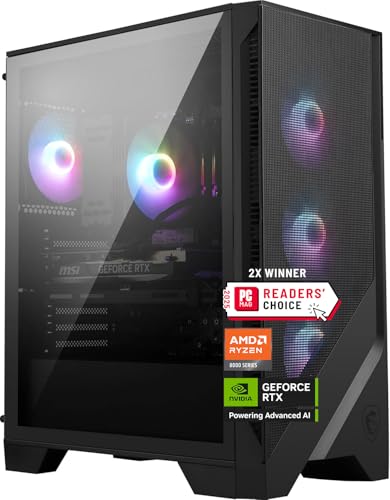
Where to buy
Check the latest price, availability and delivery on Amazon. Orders are placed on Amazon. We may earn a commission from qualifying purchases.
- Best overall for 1440p gaming under $1,500: MSI Codex Z2 Gaming Desktop, Ryzen 7 8700F, RTX 5070, 32GB DDR5, 2TB SSD — Check on Amazon
- Skytech Omega Gaming PC, Ryzen 7 7800X3D, RTX 4070 Super, 32GB DDR5, 1TB NVMe — Check on Amazon
- iBUYPOWER Slate 8 MESH Gaming PC, Intel Core i7-14700F, RTX 4070 Super, 2TB NVMe — Check on Amazon
- Thermaltake LCGS View i4770 Gaming Desktop, Intel Core i7-14700KF, RTX 4070, 32GB DDR5 — Check on Amazon
See 2 more Amazon options
- Skytech Omega Gaming PC, Ryzen 7 7700X, RTX 4070 Super, 32GB DDR5, White — Check on Amazon
- ASUS ROG Strix G15DS Gaming Desktop, Ryzen 7 7700X, RTX 4070 Dual, 1TB PCIe SSD — Check on Amazon
Read the full guide ↓
Disclosure: As an Amazon Associate, reviewstook.com earns from qualifying purchases. Links to Amazon on this page are affiliate links; they cost you nothing extra. Listing details such as price and availability change often, so check the current Amazon listing before you buy.
Before a single product name appears, this keyword needs an honest unpacking, because two quite different shoppers type it into a search box. One already owns a 4K television or monitor and wants to know what a $1,500 PC will genuinely do with that screen. The other plays at a desk, has picked 1440p as their resolution, and keeps being shown “4K” machines because that is the label this price tier wears. Both shoppers are in the right place, and the central fact of this guide is a pleasant one: at $1,500, 1440p carries none of the fine print that 4K does. All six systems below — built around the RTX 5070, the RTX 4070 Super and the RTX 4070 — render modern games at 2560 × 1440 natively. Not upscaled toward the resolution, not reconstructed in its direction: drawn there, pixel for pixel, at high settings across the great majority of current releases. A $1,500 “4K” PC is, in truth, an upscaling machine with a 4K output socket. A $1,500 1440p PC is simply a 1440p machine.
Because the resolution itself is no longer in doubt, the interesting questions move elsewhere. When does DLSS deserve switching on at all, on cards that already draw the panel’s resolution unaided? (When ray tracing enters the settings menu, and when a very-high-refresh monitor needs feeding — DLSS Quality at 1440p output renders internally at roughly 1707 × 960 and rebuilds the rest, exchanging a little fine detail for otherwise surplus speed.) How much does the processor matter once the graphics card stops being the whole story? (Noticeably more than at 4K, and this guide grades CPUs accordingly.) And what if the screen on your desk says 4K on its box? That gets a full section below; the short version is that these PCs drive a 4K panel happily for desktop work, video and lighter games, while demanding games reach 4K output through DLSS Quality — whose internal render is about 2560 × 1440, the very resolution this guide revolves around. Anyone whose actual goal is heavy games rendered natively at 4K is shopping in the wrong tier, and this guide will say where that tier lives rather than blur the distinction.
One rule for this price band applies to every pick and admits no exceptions: pricing here is restless. Several of these systems usually sit above this tier and only fit the $1,500 budget during sales, clearances and event weeks, so check the current price on Amazon for every pick before you decide. A recommendation counts as a $1,500 recommendation only for as long as the live listing fits this budget. Should a price have floated back toward its usual higher level by the time you read this, the sensible responses are patience or a step down a tier — never paying premium money for mid-range hardware because a guide once caught it in budget. As for where to begin: most 1440p buyers should start with the MSI Codex Z2, the sole current-generation RTX 5070 here, carrying 32GB of memory and a 2TB drive. Players chasing high-refresh smoothness should study the Skytech Omega built on the Ryzen 7 7800X3D, a processor whose advantage widens at this resolution. Value hunters should find the white Skytech Omega, which carries the strongest value positioning of the six in this tier. What follows: quick picks, full reviews of all six, a comparison table, a buying checklist written for 1440p specifically, an explainer separating native rendering from upscaled, the mistakes this tier invites, and the questions 1440p buyers ask before committing.
In this guide
Quick Picks
Short on time, or comparing several options at once? Each row below names a buyer type and the product that suits it, with a link to the listing.
| Buyer type | Pick | Why it stands out | Link |
|---|---|---|---|
| Best overall for 1440p | MSI Codex Z2, Ryzen 7 8700F, RTX 5070 | Newest GPU generation, native 1440p with headroom, 32GB RAM and 2TB storage | Check on Amazon |
| Best for high-refresh 1440p | Skytech Omega, Ryzen 7 7800X3D, RTX 4070 Super | 3D V-Cache flagship gaming chip — its edge grows at 1440p frame rates | Check on Amazon |
| Best storage capacity | iBUYPOWER Slate 8 MESH, i7-14700F, RTX 4070 Super | 2TB NVMe for a big game library — but only 16GB of RAM | Check on Amazon |
| Best for gaming plus work | Thermaltake LCGS View i4770, i7-14700KF, RTX 4070 | 20-core unlocked Intel chip, liquid cooling, 32GB DDR5-5600 | Check on Amazon |
| Best value | Skytech Omega, Ryzen 7 7700X, RTX 4070 Super, White | Strong value positioning in this tier, full 32GB configuration | Check on Amazon |
| Best big-brand build | ASUS ROG Strix G15DS, Ryzen 7 7700X, RTX 4070 | ROG engineering and airflow in a compact tower — 16GB RAM | Check on Amazon |
How These Picks Were Chosen
The $1,500 ceiling was enforced against the complete system, through the sale-price discipline this tier makes unavoidable: every pick belongs in this tier when its live price fits the budget, so check price on Amazon before you buy. Where a machine spends most of its year positioned above this tier, the review flags that deal-dependent positioning plainly, because a recommendation that works only during sale periods should announce itself as such. Hardware built around anything weaker than the RTX 4070 class was cut on capability: beneath that line, native 1440p at high settings stops being a promise a guide can honour across a modern library.
None of these products passed through our hands. The evidence base is maker listings, specification pages and price-tracker records, weighed in the order the parts shape a 1440p experience — an ordering that differs subtly from a 4K guide’s. Graphics silicon still leads: the RTX 5070 and RTX 4070 Super occupy the top step, near enough in pace that price and configuration should settle arguments between them, while the plain RTX 4070 stands one step down, a genuine native-1440p card whose compromises surface in ray-traced and ultra-texture scenarios rather than ordinary play. But the processor carries more weight here than at 4K. A 1440p frame holds roughly 3.7 million pixels to 4K’s 8.3 million, so these cards complete frames sooner and return to the CPU for more work more often; minimum frame rates and frame-time evenness — the qualities deciding whether high-refresh play feels fluid or merely quick — are increasingly the processor’s department at this resolution. That is why the 7800X3D system is graded as a co-headliner instead of a curiosity, and why the 20-core Intel machines earn their slots for buyers whose PCs also earn a living.
Performance alone did not settle the list; two further screens were applied. Completeness came first: spending $1,500 should not mean opening the case on the first evening, so 32GB of memory alongside at least 1TB of storage formed the expected standard, and the pair of 16GB systems included below wear that shortfall openly as their headline limitation. Transparency came second: listings publishing their power supply, memory layout and storage type outright were preferred, and where a maker withholds a figure — a few of these listings never state a PSU wattage anywhere — the review marks the omission rather than papering over it with an estimate. Upscaling and frame generation were scored for their actual 1440p roles, as ray-tracing and high-refresh instruments rather than life support, with the 5070’s DLSS 4 multi frame generation counting as a real generational edge and DLSS 3 frame generation on the 40-series cards as a worthwhile but lesser one.
The 6 Best Gaming PCs for 1440p Under $1,500
MSI Codex Z2 Gaming Desktop, Ryzen 7 8700F, RTX 5070, 32GB DDR5, 2TB SSD
Who it suits: The mainstream 1440p buyer who wants the newest graphics generation, the fullest specification in a single box, and a machine for which 1440p is home turf rather than an aspiration — provided they check the current price on Amazon and it fits this budget.
Consider first what the RTX 5070 does at 2560 × 1440, because it reframes the purchase entirely. NVIDIA’s current Blackwell card, carrying 12GB of GDDR7, is no upscaling appliance at this resolution: it draws 1440p natively, at high settings, through the overwhelming majority of today’s catalogue, with raster pace roughly level with the RTX 4070 Super. DLSS therefore changes jobs. At 4K it is the admission fee; at 1440p on this hardware it becomes a specialist instrument, deployed for ray-traced titles — where Quality mode’s internal render near 1707 × 960 repays the frames ray tracing spends — or for pushing the fastest 1440p panels toward their refresh ceilings in supported games. The generational headline is DLSS 4 with multi frame generation, able to insert as many as three generated frames between rendered ones where the 40-series systems below manage one. The riders still apply: generated frames cost a little latency, can smear fast edges and HUD elements, and multiply a sound base rate instead of rescuing a poor one — though poor base rates are seldom this card’s problem at 1440p.
No other pick wraps its card in as complete a system. The Ryzen 7 8700F — eight cores, sixteen threads, boosting to 5.0 GHz — is a thoroughly capable modern gaming processor, a rung below the 7800X3D in cache-sensitive titles yet never a meaningful brake on a 12GB card at this resolution. Memory runs to 32GB of DDR5 and storage to a 2TB NVMe SSD, a combination only one rival matches, and its practical value is easy to picture: with current releases routinely passing 100GB apiece, a 1TB drive is full after a handful of installs. USB Type-C and Windows 11 Home appear in the listing, and MSI supports the machine with a one-year warranty. Price behaviour is the catch, and the sharpest one in this guide: this listing is notably volatile and often sits well above this tier, fitting the budget mainly during sale periods. Check the current price on Amazon before deciding — when it fits this budget it tops this guide; when it sits well above it, it has quietly left the budget behind.
- RTX 5070 renders 1440p natively with room to spare, and DLSS 4 multi frame generation feeds high-refresh panels.
- Nothing needs adding on day one: 32GB of DDR5 beside a 2TB SSD.
- A current-generation, warrantied platform from a major manufacturer, model number published.
Honest limitation: No listing in this guide swings in price more violently — long stretches run well beyond the budget — and the sources we examined never publish the power supply’s wattage, so confirm it on the live page before ordering.
Choose it if the listing currently fits the $1,500 budget and the newest GPU generation with the fullest spec sheet is the goal. Skip it if the price has drifted back to its customary heights — hold out for the next dip, or take a 4070 Super system genuinely sitting in budget today.

Skytech Omega Gaming PC, Ryzen 7 7800X3D, RTX 4070 Super, 32GB DDR5, 1TB NVMe
Who it suits: High-refresh 1440p players — simulation, strategy, sprawling multiplayer and heavily modded games included — who grasp that at this resolution the processor stops being a supporting actor.
The Ryzen 7 7800X3D and its stacked 3D V-Cache have defined gaming-processor benchmarks for their generation, and 1440p is where this guide lets the chip show why. At 4K the graphics card labours so heavily that CPU differences squeeze together; at 1440p the card discharges each frame sooner, frame rates rise, and the constraint migrates toward the processor — exactly the ground where the X3D is strongest. Its gift is minimum frame rates and frame-time evenness, the measurements separating motion that feels fluid from motion that is merely fast on average, and the ones a high-refresh panel exists to display. Beside it sits the RTX 4070 Super, 12GB of GDDR6X, roughly fifteen percent ahead of the plain 4070 further down in raster pace, and a native-1440p card in every meaningful sense: high settings drawn at the panel’s own resolution across current libraries, with DLSS 3 upscaling and frame generation kept back for ray-traced titles and the quickest monitors. For a buyer whose games genuinely live at 1440p, this pairing is arguably the most balanced in the guide.
The specification around that pairing is complete and, rarer still, fully disclosed. Memory is 32GB of DDR5 RGB; storage, a 1TB Gen4 NVMe drive; and the power supply is named outright as a 750W Gold unit. Documented configurations of this Omega line carry a 360mm liquid cooler, keeping the X3D’s temperatures and acoustics civilised. Pricing tells the tier’s familiar story: it often sits above this tier and fits the budget mainly during sale periods, balanced at the edge of the tier rather than tucked comfortably beneath it. The counsel echoes the MSI’s: check the current price on Amazon — when it fits this budget, the processor by itself justifies the machine, while at its usual higher positioning the same money belongs a tier higher.
- The 7800X3D is the finest gaming processor in this guide, and 1440p flatters it most.
- RTX 4070 Super draws 1440p natively at high settings, DLSS 3 held in reserve for ray tracing.
- A disclosed 750W Gold PSU and 32GB of DDR5 complete a specification with no hidden corners.
Honest limitation: The 1TB drive is tight against modern install sizes, it fits this budget only at the edge of the tier instead of clearing it comfortably, and for heavy multi-threaded workloads the Intel systems below outrun the X3D comfortably.
Choose it if CPU-hungry or high-refresh titles dominate your library and frame delivery matters more than anything. Skip it if slower single-player fare is your staple and a 4070 Super system below is showing a better fit for this budget — there the X3D premium purchases very little.

iBUYPOWER Slate 8 MESH Gaming PC, Intel Core i7-14700F, RTX 4070 Super, 2TB NVMe
Who it suits: The library-first buyer — a dozen hefty games installed simultaneously, creation or streaming work alongside — prepared to exchange memory capacity for storage and the most versatile processor in the guide.
Two elements of this specification outrank everything else here. Storage is a 2TB NVMe SSD, twice what three rivals offer, and that is no vanity metric: texture-heavy releases are gaming’s largest files, and the uninstall-and-redownload rotation is the standing tax levied on a 1TB machine. The processor is Intel’s Core i7-14700F, a hybrid design of 20 cores and 28 threads — eight performance cores, twelve efficiency cores — boosting to 5.4 GHz. At 1440p, where the graphics card no longer monopolises the workload, that core count buys the system a second career as a workstation: editing, streaming and weighty background loads proceed without disturbing the game in front of them. The graphics card equals the guide’s best, an RTX 4070 Super with 12GB drawing 1440p natively at high settings and carrying DLSS 3 for ray-traced titles. The Slate 8 MESH case pursues airflow through a mesh front and RGB fans, a tower air cooler handles the processor, and a keyboard and mouse ride along in the box. Check the current price on Amazon for the live offer and availability.
Now the trade-off, which this guide declines to minimise: memory is 16GB of DDR5-5200, arranged as two 8GB sticks. Measured against a tier where four of six systems ship double that, it falls short of the standard this budget should set. Gaming alone still runs everything today — system memory is not where 1440p bottlenecks — yet the contemporary session of game plus Discord plus browser plus capture software leans on 16GB in a way it never leans on 32GB, and the two-stick layout means any later upgrade discards both modules instead of supplementing them. The charitable reading is that iBUYPOWER directed the money toward the drive and the processor, and for the library-first buyer that allocation may be precisely correct. Enter it knowingly, and if your multitasking is heavy, budget for a 32GB DDR5 kit in your calculations; memory remains the cheapest meaningful upgrade in PC gaming.
- A 2TB NVMe drive ends the install-shuffle that 1TB owners live with.
- The 20-core i7-14700F is the guide’s most versatile processor, as happy editing as gaming.
- An RTX 4070 Super with DLSS 3, an airflow-led mesh case, and peripherals in the box.
Honest limitation: Sixteen gigabytes of memory in two 8GB sticks is the single clearest compromise in this guide, and the offer data we reviewed publishes no power-supply figure.
Choose it if storage headroom and processor versatility outrank everything else and your gaming sessions stay fairly focused. Skip it if streaming, capture and a crowd of background apps accompany your play — pick a 32GB system instead and expand storage afterwards, since drives are simpler to add than memory is to replace.

Thermaltake LCGS View i4770 Gaming Desktop, Intel Core i7-14700KF, RTX 4070, 32GB DDR5
Who it suits: The gamer-creator hunting an unlocked, liquid-cooled Intel flagship-class platform inside a big-brand build — and patient enough to strike on one of its deep discount days.
Everything about this system begins with its processor. Intel’s Core i7-14700KF takes the hybrid layout of the chip above — twenty cores, twenty-eight threads — and unlocks it, adding overclocking headroom while dropping integrated graphics, to produce the strongest multi-threaded performance in this guide. Thermaltake’s LCGS line surrounds it the way enthusiasts would: closed-loop liquid cooling, 32GB of DDR5 running at a published 5600MT/s, a 1TB NVMe drive, WiFi and Windows 11, all housed in the panoramic View case. The graphics card is the plain RTX 4070 with 12GB, one step behind the Supers and the 5070 in raw pace — and the 1440p lens softens that deficit considerably. At 4K a step down costs visible settings; at 1440p the 4070 stays a native-resolution card at high settings across current libraries, its gap to the Super surfacing mainly under ray tracing and the most punishing ultra configurations, where DLSS 3 frame generation keeps motion smooth. The ceiling sits lower than the Super systems’; the floor — ordinary 1440p play, which is most play — does not.
Its pricing history is the most instructive in the guide. It usually sits well above this tier and only from time to time takes a room at this budget during deep discount periods, and the recommendation lives or dies on landing one of those occasions. Check the current price on Amazon: when it fits this budget you are acquiring the guide’s finest processor platform and its most polished cooling for this tier, and the modest GPU step-down is a reasonable exchange — a smaller one at 1440p than at 4K. Anywhere near its usual higher positioning, the same budget buys a 4070 Super system that fits the tier, and that becomes the wiser purchase. Wait for a sale or walk away; either response is defensible.
- An unlocked i7-14700KF under liquid cooling — the most capable all-round processor platform here.
- DDR5-5600 with its speed actually published, inside Thermaltake’s polished LCGS build.
- When it drops into this budget during a sale, it becomes a genuine bargain for the platform it offers.
Honest limitation: The plain RTX 4070 is the weakest graphics card among the leading picks — a deficit felt under ray tracing rather than in everyday 1440p — its usual positioning sits far beyond this budget, making this strictly a wait-for-the-sale recommendation, and the KF processor offers no integrated graphics as a diagnostic fallback.
Choose it if you land it at its low and your machine works as hard as it plays. Skip it if you are purchasing today, at full price, purely for games — at budget, a 4070 Super system defeats an over-budget 4070 system without exception.

Skytech Omega Gaming PC, Ryzen 7 7700X, RTX 4070 Super, 32GB DDR5, White
Who it suits: The value hunter determined to secure the complete 4070 Super specification — no corner trimmed anywhere — at the lowest verified price in the guide, finished in white.
The formula mirrors the 7800X3D Omega above with a single substitution, and at this resolution the substitution deserves candid discussion. In place of the 3D V-Cache flagship sits the Ryzen 7 7700X, an eight-core chip boosting to 5.4 GHz. Where play is GPU-bound, the two processors finish within a whisker of each other, because the RTX 4070 Super is making the decisions. Yet more titles drift toward the CPU at 1440p than at 4K, and in CPU-sensitive territory — simulation, strategy, crowded multiplayer lobbies — the X3D’s minimum-frame-rate edge is genuine, and wider here than a 4K guide would report. That is the exchange, stated without varnish: this system surrenders the guide’s finest frame consistency in return for its finest price. And its value positioning really is the strongest in these pages: when it fits this budget during sale periods, it does so with room to spare rather than grazing the underside of the tier. Check the current price on Amazon. All else matches the flagship Omega — the identical RTX 4070 Super 12GB with DLSS 3 frame generation, 32GB of DDR5 RGB memory, a 1TB Gen4 NVMe drive, the disclosed 750W Gold power supply, Wi-Fi and Windows 11 Home, inside the white Omega case, with 360mm liquid cooling documented across this model line.
The case for buying it is difficult to dispute. When it fits this budget, it leaves headroom in the tier for the one expansion its 1TB specification invites — a second NVMe drive. The cautions are the family’s usual ones: its usual positioning towers over its sale positioning, making this a price to be caught rather than presumed, and the 7700X runs hot enough to make its liquid cooler a necessity rather than an ornament. Still, should the live listing fit this budget as you read, this guide’s decision procedure shrinks to a sentence: no configuration in this guide delivers more 1440p hardware for its tier positioning, and the white finish flatters the many light-themed desk setups being built today.
- The strongest value positioning anywhere in this guide, when its live price fits this budget.
- No specification trimmed to reach it: 4070 Super, 32GB of DDR5, a 750W Gold PSU.
- The 7700X shadows the X3D wherever the GPU leads; only CPU-sensitive titles separate them.
Honest limitation: Storage matches its sibling at 1TB, the processor runs hot and leans on its cooler, and its usual price looms far above its sale positioning — the value materialises only at sale pricing.
Choose it if the live price fits this budget; on value grounds nothing else here competes. Skip it if CPU-sensitive simulation or strategy titles rule your library — that is the single scenario where the 7800X3D Omega’s premium earns its keep, and at 1440p the argument is stronger than at 4K.
ASUS ROG Strix G15DS Gaming Desktop, Ryzen 7 7700X, RTX 4070 Dual, 1TB PCIe SSD
Who it suits: The brand-and-build buyer who prizes ROG engineering, a compact tower and a household-name warranty route — and accepts a memory compromise as the admission price.
ASUS approaches this tier unlike the boutique assemblers above, and the contrasts constitute the appeal. The ROG Strix G15DS is a compact mid-tower organised around multi-zone airflow, with separate chambers isolating the hot components, and it carries the practical fittings ASUS equips this line with: a carry handle rated for 20kg and a headphone hook, modest details that make a desk PC easier to live with and to relocate between rooms. Its processor is the Ryzen 7 7700X, the same capable eight-core chip powering the white Omega, and its graphics card is an ASUS Dual-fan RTX 4070 holding 12GB of GDDR6X, with three DisplayPort outputs plus HDMI — connectivity equally suited to a multi-monitor desk or a desk-and-television arrangement. At 1440p that card performs natively at high settings, DLSS 3 frame generation available when ray tracing calls, conceding pace to the Super systems but not capability. A 1TB PCIe SSD handles storage and Windows 11 Home the operating system. Its pricing tends to reside near this budget and dip into it during sale periods, instead of descending from far above — check the current price on Amazon before you decide.
The compromise echoes the iBUYPOWER’s: 16GB of memory, here running at DDR5-4800, the slowest published memory speed in the guide. Gaming today tolerates it — at 1440p the constraints that bind are the GPU and, in sensitive titles, the CPU, rather than system RAM — but at $1,500 it reads as the specification of a cheaper tier, and committed multitaskers will notice it long before pure gamers do. A seller caution also belongs in plain view, because it shapes real purchases: its in-budget availability has at times arrived through a marketplace seller rather than Amazon itself, so on the live listing, establish who is selling and shipping the unit and verify the warranty route before paying; the identical model via Amazon or an authorised seller at a comparable price is the tidier transaction.
- ROG construction: zoned airflow, a carry handle, and a footprint compact enough for tight desks.
- A 7700X paired with an RTX 4070 Dual offering triple DisplayPort connectivity.
- Pricing that hovers near this budget and dips into it during sales, not rare plunges.
Honest limitation: Sixteen gigabytes of DDR5-4800 falls below the tier’s 32GB standard and is the slowest memory in this guide, and its in-budget offers have at times come through a marketplace seller — scrutinise the seller and warranty on the live listing.
Choose it if construction quality, compact dimensions and brand backing matter most and your usage is gaming-led. Skip it if you require 32GB in the box, or Amazon itself as your seller in this tier — the Omegas answer both requirements.

Comparison Table
| Product | GPU | CPU | RAM / Storage | Best use | Link |
|---|---|---|---|---|---|
| MSI Codex Z2 | RTX 5070 12GB | Ryzen 7 8700F | 32GB / 2TB | Newest tech, DLSS 4 frame generation | Check on Amazon |
| Skytech Omega (7800X3D) | RTX 4070 Super 12GB | Ryzen 7 7800X3D | 32GB / 1TB | High-refresh 1440p, smoothest minimums | Check on Amazon |
| iBUYPOWER Slate 8 MESH | RTX 4070 Super 12GB | Intel i7-14700F | 16GB / 2TB | Big libraries, gaming plus creation | Check on Amazon |
| Thermaltake LCGS View i4770 | RTX 4070 12GB | Intel i7-14700KF | 32GB / 1TB | Workstation-grade CPU at a sale price | Check on Amazon |
| Skytech Omega (7700X, White) | RTX 4070 Super 12GB | Ryzen 7 7700X | 32GB / 1TB | Best value in this tier | Check on Amazon |
| ASUS ROG Strix G15DS | RTX 4070 12GB | Ryzen 7 7700X | 16GB / 1TB | Compact big-brand build | Check on Amazon |
How to Choose a 1440p Gaming PC Under $1,500
- Graphics class leads — with the processor unusually close behind. Every card here draws 1440p natively, so GPU class governs headroom, ray-tracing comfort and lifespan: RTX 5070 ≈ RTX 4070 Super, then RTX 4070. But once the GPU stops saturating, the CPU decides frame consistency in more titles than it ever does at 4K. Buy the card first; then take the processor more seriously than 4K shoppers need to.
- The live price belongs in the spec sheet. Each system in this guide belongs in this tier when its live price fits the $1,500 budget, and each also has a customary positioning above it. Check the current price on Amazon, and decline to pay well above this budget for hardware a guide filed under this tier. Patience, at this tier, is often rewarded during sale periods.
- File DLSS under “tools”, not “requirements”. Nothing in this guide needs upscaling to reach 1440p. DLSS Quality at this output renders internally near 1707 × 960; engage it when ray tracing or an extreme-refresh panel demands more than native rendering supplies, and leave it off when native is already ample. Any verdict on these cards built purely from upscaled figures undersells them.
- The 12GB VRAM conversation changes at this resolution. All six cards carry 12GB. At 4K that figure is a ceiling to plan your settings around; at 1440p, texture pools shrink dramatically and 12GB amounts to comfortable headroom for high and ultra textures across the overwhelming majority of titles. It will still age first among these specifications — just on a longer fuse.
- Let your library, not a benchmark chart, pick the processor. Simulation, strategy, MMO and high-refresh players extract real smoothness from the 7800X3D — more of it at 1440p than at 4K. GPU-bound single-player devotees extract very little beyond the 7700X. Creators extract the most from Intel’s 20-core pair. Which CPU is “best” in this guide is a question about your shelf of games.
- Hold the line at 32GB of system memory. Four of the six picks ship it as standard. The two 16GB machines earn their places on other merits, with the shortfall labelled — but if streaming, capture, heavy modding or a small browser army accompanies your sessions, regard 32GB as mandatory rather than aspirational.
- Provision storage for the size games have become. Contemporary releases occupy 80–150GB apiece. A 1TB drive juggles perhaps six to eight of them; 2TB doubles the room. Buying a 1TB pick? Confirm a spare M.2 slot exists — most have one — as your cheapest future expansion.
- Pair the hardware with a panel that can show it. This tier’s natural partner is a 1440p monitor refreshing at 165Hz or beyond. Bolt it to a 1440p 60Hz screen and much of the purchase goes unwitnessed; bolt it to a 4K screen and read the 4K section below before presuming the experience is identical.
- Interrogate the power supply. When a builder prints 750W Gold, as Skytech does, it signals expected upgrades and confidence in the electricals. Silence on wattage proves nothing bad — but at $1,500 it justifies ten seconds of verification on the live listing before you commit.
- Establish who is actually selling the machine. Sale pricing sometimes arrives via marketplace sellers rather than Amazon or the brand. Identify the seller, the shipper and the warranty that applies. A small saving is a poor bargain against an ambiguous warranty on a computer in this tier.
Native 1440p, Upscaled 1440p and the 4K Panel Question
Three facts, arithmetic attached, organise everything a buyer at this tier needs to grasp about resolution. Fact one: the pixel counts. A 1440p frame measures 2560 × 1440 — some 3.7 million pixels. A 4K frame measures 3840 × 2160 — some 8.3 million, roughly two and a quarter times the labour. The cards in this guide were specced by their makers with the heavier workload in mind, which is precisely why the lighter one feels effortless: native 1440p at high settings is their default mode of operation, not their party trick. Fact two: what DLSS does when invoked. At 1440p output, its Quality mode renders internally near 1707 × 960 and reconstructs the remainder — a profitable swap when ray tracing joins the settings or a 240Hz panel needs feeding, and a pointless one when native rendering is already swift, since reconstruction never quite equals the native image at desk distance. At this tier DLSS is an instrument you deploy deliberately; verdicts grading these cards chiefly by upscaled output have the narrative inverted.
Fact three quietly dissolves this guide’s keyword: DLSS Quality at 4K output renders internally at approximately 2560 × 1440. Sit with that for a moment. The internal workload behind mid-range “4K gaming” and the native workload of 1440p gaming are one and the same. Consequently, if a 4K television or monitor anchors your setup, these PCs will serve it handsomely: desktop, video and lighter games run at native 4K, while demanding games reach 4K output with DLSS performing internally exactly what these cards perform natively for a 1440p panel — which explains why the result convinces. Frame generation overlays both narratives: DLSS 3 on the 40-series systems inserts a single generated frame between rendered ones, DLSS 4 on the MSI’s RTX 5070 as many as three, and at 1440p — where base rates begin healthy — the technology aims squarely at the fastest panels. The customary riders stand: a modest latency cost, occasional artefacts near fast edges and HUD elements, and nothing worth having for competitive play, where it belongs switched off.
If You Actually Want Native 4K, Read This Before Buying
A portion of this keyword’s traffic arrives because a seller printed “4K” and a buyer believed the box. So, without decoration: should your ambition be demanding modern games rendered natively at 3840 × 2160 — upscaling declined, textures at ultra, ray tracing engaged — not one of these six systems is that machine, and neither is anything else priced at $1,500. That experience resides a tier or two higher, on graphics hardware with greater raster muscle and, decisively, more than 12GB of video memory; the honest aisles for it are Best 4K Gaming PC Under $2500 and Best 4K Gaming PC Under $3000. Conversely, if your daily reality is a 1440p monitor — or a 4K screen on which upscaled output honestly satisfies you, as it satisfies most players at ordinary viewing distances — then this is the correct guide. Readers wanting the complete upscaled-4K treatment of these identical systems should consult the sibling guide this one is angled from: Best 4K Gaming PC Under $1500. And buyers with lighter libraries — esports, back-catalogue titles, indies — may discover the tier beneath is all the 1440p machine they require: Best 1440p Gaming PC Under $1200 argues exactly that.
Common Buying Mistakes
- Trusting the “4K” printed on a carton to describe what the PC renders. At $1,500, heavy games at 4K output are upscaled from roughly 1440p internally — a fine product, purchased under its true description. Native 1440p, this guide’s subject, carries no such footnote.
- Handing over the customary price for a recommendation built on sale pricing. Several picks here usually sit well beyond this budget; their value in this tier depends on a live price that fits the budget, not on their usual positioning.
- Appraising these cards solely through upscaled benchmarks. Native 1440p is their home mode, and any review that never separates native figures from DLSS figures conceals the datum you most need.
- Presuming the processor retires once the GPU is muscular. At 1440p the bottleneck migrates, and in CPU-sensitive games the distance between the 7800X3D and an ordinary gaming chip is the distance between smooth and merely rapid.
- Reading frame-generated rates as rendered ones. A displayed figure assembled from generated frames feels like neither number; examine the native base rate beneath it, and keep generation off when competing.
- Letting 16GB of system memory slip past unnoticed at $1,500. It is this tier’s favourite quiet compromise; two picks here carry it, labelled, and it should be an informed exchange rather than a discovery.
- Starving storage, then inhabiting the 1TB uninstall-and-redownload treadmill without first confirming whether a spare M.2 slot exists.
- Neglecting the seller-and-warranty examination on a marketplace deal unit. At this outlay, the party standing behind the box is part of the purchase.
- Mismatching the display in either direction: a 1440p 60Hz panel that hides the smoothness you bought, or a 4K panel mistaken for a guarantee of native-4K rendering. Display resolution and render resolution are separate decisions — take both on purpose.
Final Recommendation
- The typical 1440p buyer: MSI Codex Z2, RTX 5070 — when its sale price is live.
- High-refresh and CPU-sensitive players: Skytech Omega, Ryzen 7 7800X3D, RTX 4070 Super.
- Vast libraries and creator-gamers: iBUYPOWER Slate 8 MESH — 2TB and 20 cores, its 16GB noted.
- Gamer-creators prepared to wait: Thermaltake LCGS View i4770 — solely when its live price fits this budget.
- Pure value: Skytech Omega, Ryzen 7 7700X, White — the strongest value positioning in this tier.
- Compact, big-brand construction: ASUS ROG Strix G15DS.
Two machines head our advice for 1440p buyers at this budget. The MSI Codex Z2 brings the newest GPU generation, DLSS 4 multi frame generation and the guide’s only complete 32GB-and-2TB specification; the white Skytech Omega, when its live price fits this budget, delivers more 1440p hardware for its tier positioning than anything else we found. Between them they answer the two forms this search generally takes: the latest technology, or the keenest price on the previous generation’s best-balanced card. Should your games lean processor-ward — and at 1440p more of them do than buyers anticipate — the 7800X3D Omega displaces either as the opening recommendation; should the PC also earn its keep in creative work, the Intel systems press their claims at their sale prices. Readers concluding their library needs less should weigh Best 1440p Gaming PC Under $1500 for the broader field and Best Gaming PC Under $1500 for the generalist picture, while anyone who arrived genuinely seeking a television-class 4K experience should consider Best 4K Gaming PC For Streaming Under $1500 if broadcasting forms part of the plan. Check the current price on Amazon, establish the seller and the power supply, configure your games to native 1440p first, and reach for DLSS only when ray tracing or your refresh rate requests it.
Frequently Asked Questions
Is $1,500 overkill for 1440p gaming?
No — it is the tier at which 1440p stops demanding compromises. Lesser PCs reach 1440p through settings discipline and upscaling assistance; these six render it natively at high settings, with ray-tracing headroom, high-refresh capability and processors that keep frame delivery even. A library of esports and older titles genuinely needs less, but for current AAA releases played as their makers intended, this is the appropriate spend rather than an indulgent one.
Do I even need DLSS at 1440p with these PCs?
Across most games, no. Every card here renders the resolution natively, and native is the superior default at desk distance. DLSS justifies itself in two circumstances: ray-traced titles, where Quality mode — rendering internally near 1707 × 960 at 1440p output — recovers the frames the lighting consumes, and very-high-refresh panels, where upscaling allied with frame generation reaches rates native rendering cannot supply unaided. Regard it as a tool in the drawer, not the house’s foundation.
Can these PCs run my 4K monitor or TV?
Yes, and creditably — subject to one candid qualification. Desktop work, video and lighter games operate at native 4K. Demanding games attain 4K output via DLSS Quality, rendering internally near 2560 × 1440, the identical internal workload to native 1440p play, which is why the image persuades. What they will not perform is the heaviest games rendered natively at 4K with ultra settings and ray tracing; that belongs to the higher tiers linked within this guide.
Is 12GB of VRAM enough for 1440p?
Comfortably so, across the foreseeable run of current releases. The 12GB ceiling that 4K buyers must plan their settings around presses far less at 1440p, where texture pools shrink substantially; high and ultra textures fit in the overwhelming majority of games. It remains the specification likeliest to age first — on a longer fuse here than at 4K — and since it is identical across every card at this budget, it should not arbitrate among these six.
Does the CPU really matter more at 1440p than at 4K?
It does, and the explanation is arithmetic: a 1440p frame holds roughly 3.7 million pixels against 4K’s 8.3 million, so the graphics card finishes sooner and petitions the processor for the next frame more frequently. In CPU-sensitive games — simulation, strategy, populous multiplayer titles — minimum frame rates and frame-time evenness become a processor narrative, which is why the 7800X3D system is graded as a co-headliner rather than a specialist entry. In GPU-bound single-player games the gap narrows, as the white Omega’s review sets out.
Why does this guide tell me to check the price on Amazon rather than quoting an exact price?
Because prebuilt pricing at this tier refuses to sit still, and displayed prices need to stay current. Several systems here usually sit above this budget and fit it only during sales, so this guide describes each pick’s positioning in its tier qualitatively and points you to the live listing instead. Check the current price on Amazon before you buy — a pick remains a pick in this tier only while that listing fits the budget.
Should I buy this tier or save money with a $1,200 PC for 1440p?
Buy this tier if current AAA games are your staple and you want native 1440p at high settings without leaning on upscaling, ray tracing in play rather than in screenshots, and 32GB of memory inside the box. Economise if your library runs lighter or older — a $1,200 machine handles those games at 1440p perfectly well, and the saving is better directed at the high-refresh monitor this tier deserves, if one is not already on your desk.


