Where to buy
Check the latest price, availability and delivery on Amazon. Orders are placed on Amazon. We may earn a commission from qualifying purchases.
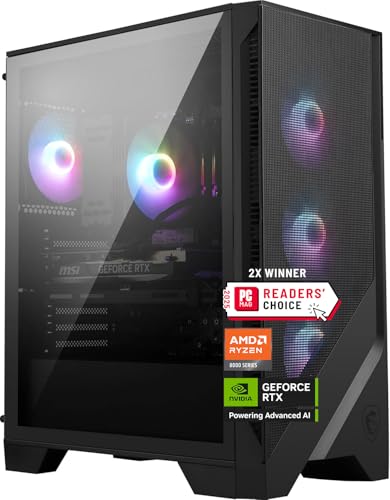
- Best overall for 4K under $1,500: MSI Codex Z2 Gaming Desktop, Ryzen 7 8700F, RTX 5070, 32GB DDR5, 2TB SSD — Check on Amazon
- Skytech Omega Gaming PC, Ryzen 7 7800X3D, RTX 4070 Super, 32GB DDR5, 1TB NVMe — Check on Amazon
- iBUYPOWER Slate 8 MESH Gaming PC, Intel Core i7-14700F, RTX 4070 Super, 2TB NVMe — Check on Amazon
- Thermaltake LCGS View i4770 Gaming Desktop, Intel Core i7-14700KF, RTX 4070, 32GB DDR5 — Check on Amazon
See 2 more Amazon options
- Skytech Omega Gaming PC, Ryzen 7 7700X, RTX 4070 Super, 32GB DDR5, White — Check on Amazon
- ASUS ROG Strix G15DS Gaming Desktop, Ryzen 7 7700X, RTX 4070 Dual, 1TB PCIe SSD — Check on Amazon
Read the full guide ↓
Disclosure: As an Amazon Associate, reviewstook.com earns from qualifying purchases. Links to Amazon on this page are affiliate links; they cost you nothing extra. Listing details such as price and availability change often, so check the current Amazon listing before you buy.
Fifteen hundred dollars is the first budget where 4K gaming stops being a marketing label and starts being a real experience — provided you understand exactly which kind of 4K you are buying. No PC at this price renders every modern game natively at 3840 × 2160, ultra settings, ray tracing on, at a locked 60 frames per second. That machine costs considerably more, and any listing that promises it for $1,500 is selling you a resolution, not a result. What $1,500 genuinely buys, in the six systems below, is the RTX 4070, RTX 4070 Super and RTX 5070 class: graphics cards with the raster power to run lighter and well-optimised titles natively at 4K, and — more importantly — the DLSS upscaling and frame generation technology that makes demanding titles look convincingly like native 4K while rendering internally at a lower resolution. For most players, on a TV across the room or a 27- to 32-inch monitor at a normal viewing distance, DLSS Quality at 4K is very difficult to distinguish from native. That is the honest product here: upscaled 4K done properly, native 4K where the game allows it, and high settings rather than ultra in the heaviest releases.
The second honesty note is about price, and it matters more at this tier than at any cheaper one. Prebuilt pricing in this tier is volatile, and several systems in this guide sit above this budget for much of the time and only come within it during sales, clearances and event weeks. The rule is simple: check the current price on Amazon before you buy, because a pick in this guide only fits the under-$1,500 brief while its live listing sits within that budget. If a listing has drifted back above budget when you read this, the correct move is to wait for it to come back within budget or step down to the $1,200 tier — not to pay flagship money for a mid-range card. The third note is the ceiling all six machines share: 12GB of video memory. At 4K that is a real, structural limit, and this guide will return to it repeatedly, because it decides texture settings today and it will decide how gracefully these PCs age.
For most buyers we would start with the MSI Codex Z2, the only RTX 5070 system here, with 32GB of memory and a 2TB drive in the same box. Gamers who play CPU-heavy titles should look hard at the Skytech Omega with the Ryzen 7 7800X3D, the strongest gaming processor in this guide at any price. And the value hunters should find the white Skytech Omega with the 7700X, which offers strong value positioning within this tier. Below are the quick picks, detailed reviews of all six products, a comparison table, a buying checklist written specifically for 4K, an explanation of what DLSS and frame generation actually do to the picture, the mistakes that waste money at this tier, and the questions 4K buyers ask before they commit.
In this guide
Quick Picks
Short on time, or comparing several options at once? Each row below names a buyer type and the product that suits it, with a link to the listing.
| Buyer type | Pick | Why it stands out | Link |
|---|---|---|---|
| Best overall for 4K | MSI Codex Z2, Ryzen 7 8700F, RTX 5070 | Newest GPU generation, DLSS 4, 32GB RAM and 2TB storage together | Check on Amazon |
| Best CPU for gaming | Skytech Omega, Ryzen 7 7800X3D, RTX 4070 Super | 3D V-Cache flagship gaming chip with a 750W Gold power supply | Check on Amazon |
| Best storage capacity | iBUYPOWER Slate 8 MESH, i7-14700F, RTX 4070 Super | 2TB NVMe for a big 4K game library — but only 16GB of RAM | Check on Amazon |
| Best for gaming plus work | Thermaltake LCGS View i4770, i7-14700KF, RTX 4070 | 20-core unlocked Intel chip, liquid cooling, 32GB DDR5-5600 | Check on Amazon |
| Best value in the tier | Skytech Omega, Ryzen 7 7700X, RTX 4070 Super, White | Strong value positioning in this tier, full 32GB configuration — check price on Amazon | Check on Amazon |
| Best big-brand build | ASUS ROG Strix G15DS, Ryzen 7 7700X, RTX 4070 | ROG engineering and airflow in a compact tower — 16GB RAM | Check on Amazon |
How These Picks Were Chosen
The budget was applied as a ceiling on the whole system: every product below is a real Amazon listing that belongs in the under-$1,500 tier when its live listing sits within budget — check the current price on Amazon, because pricing in this tier moves often. Where a system spends much of the time above budget, the review says so, because a recommendation you can only use during a promotion should be labelled as such. Anything built around a graphics card below the RTX 4070 class was excluded on capability grounds: at 4K, cards under that line run out of both raster power and VRAM headroom too quickly to recommend with a straight face.
We did not use these products ourselves. We read the maker listings, specification pages and price-tracker records, and compared the parts that decide 4K performance in the order they decide it: graphics card first, video memory second, processor third, then system memory, storage, power supply and cooling. The GPU hierarchy at this budget is clear and the guide respects it: the RTX 5070 and RTX 4070 Super sit at the top, close enough that configuration and current pricing — check price on Amazon — should decide between them, and the plain RTX 4070 sits a step below — still a legitimate 4K-with-DLSS card, but the first place where heavier games ask for settings compromises. Frame generation support was treated as a genuine buying factor rather than a logo: the 40-series cards offer DLSS 3 frame generation, the 5070 offers DLSS 4 with multi frame generation, and at 4K — where base frame rates are lowest — that difference is genuinely worth weighing, as the dedicated section below explains.
Two filters sat on top of the performance sort. The first is the completeness filter: at $1,500 a buyer should not have to open the case on day one, so 32GB of memory and at least 1TB of storage were treated as the tier standard, and the two 16GB systems in this guide carry that shortfall as their named honest limitation rather than having it buried. The second is the transparency filter: listings that publish their power supply, memory configuration and storage type in full were favoured, and where a maker does not publish a figure — one pick below never states its PSU wattage — the review flags the gap instead of filling it with a guess. A $1,500 purchase deserves published numbers.
The 6 Best 4K Gaming PCs Under $1,500
MSI Codex Z2 Gaming Desktop, Ryzen 7 8700F, RTX 5070, 32GB DDR5, 2TB SSD
Who it suits: The mainstream 4K buyer who wants the newest technology generation and the most complete specification in one box — and who can move quickly when the price dips.
The graphics card is the headline. The RTX 5070 is NVIDIA’s current-generation Blackwell part with 12GB of GDDR7 memory, and for a 4K buyer its decisive advantage over the 40-series cards below is DLSS 4 with multi frame generation: where a 4070-class card generates one inserted frame, the 5070 can generate up to three, which at 4K is the difference between a demanding game sitting in the fifties and the same game feeling fluid on a high-refresh display. Multi frame generation is not free performance — it needs a healthy base frame rate to work from, and it adds a small amount of latency — but as a way to make a $1,500 PC drive a 4K 120Hz-plus panel in supported titles, nothing else in this guide matches it. In raw raster terms the 5070 sits around the 4070 Super’s level, so the honest summary is: equal today in most games, meaningfully better in frame-generation titles, and a generation newer for driver support and resale.
The system around the card is the most complete here. The Ryzen 7 8700F is an 8-core, 16-thread chip boosting to 5.0 GHz — a capable, modern gaming processor, a step below the 7800X3D in cache-sensitive titles but never a bottleneck for a 12GB card at 4K, where the GPU does the heavy lifting. Memory is 32GB of DDR5 and storage is a 2TB NVMe SSD, the only pick besides the iBUYPOWER to pair the full memory allowance with the larger drive, which matters at 4K: modern releases routinely exceed 100GB each, and a 1TB drive fills with half a dozen of them. The listing also notes USB Type-C, VR readiness and Windows 11 Home, and MSI’s one-year warranty. Pricing is the catch, and it is a real one: this listing is volatile and often sits above this budget, so check the current price on Amazon before treating it as an under-$1,500 pick. When it sits within budget, it is the best overall pick in this guide; when it sits well above budget, it no longer fits this tier at all.
- RTX 5070 with DLSS 4 multi frame generation — the strongest 4K-smoothing tech here.
- Complete configuration: 32GB DDR5 and a 2TB SSD, nothing to upgrade on day one.
- Current-generation platform from a major brand, with a published model number and warranty.
Honest limitation: Pricing is the most volatile in this guide — the listing spends long stretches above budget, the 12GB VRAM ceiling still applies, and the listing does not publish its power supply wattage in the sources we checked, so verify it on the live page and check price on Amazon.
Choose it if you check the current price on Amazon and it sits within the under-$1,500 budget, and you want the newest GPU generation with the fullest spec sheet. Skip it if the listing is sitting above budget — wait, or take a 4070 Super system that is actually within budget today.

Skytech Omega Gaming PC, Ryzen 7 7800X3D, RTX 4070 Super, 32GB DDR5, 1TB NVMe
Who it suits: Players of CPU-demanding games — simulation, strategy, large multiplayer titles, heavily modded games — who want the best gaming processor in this guide paired with its joint-best graphics card.
Start with the processor, because here it genuinely comes first. The Ryzen 7 7800X3D, with its stacked 3D V-Cache, has been the benchmark gaming CPU of its generation: in cache-sensitive games it outruns far more expensive chips, and its advantage shows exactly where a 4K buyer with a high-refresh panel needs it — minimum frame rates and frame-time consistency, the numbers that decide whether a game feels smooth rather than merely fast on average. At native 4K the GPU limits most titles and the X3D’s edge narrows, but the moment DLSS lowers the internal render resolution — which, per this guide’s whole premise, is most of the time — the CPU’s workload rises and the 7800X3D earns its place again. Paired with it is the RTX 4070 Super, 12GB of GDDR6X, roughly fifteen percent stronger than the plain 4070 below and fully equipped with DLSS 3 upscaling and frame generation. As a 4K pairing for actual games, this is arguably the best-balanced system in the guide.
The supporting specification is complete and, unusually, published. Memory is 32GB of DDR5 RGB, storage a 1TB Gen4 NVMe drive, and the power supply is a stated 750W Gold unit — the kind of detail that should be standard and is not, and which matters for a machine you may later upgrade. The Omega case runs a 360mm liquid cooler in documented configurations of this model line, keeping the X3D’s temperatures and noise in check. Pricing tells the tier’s usual story: this system tends to sit toward the top of the tier and often above it, so check the current price on Amazon. The review’s advice mirrors the MSI’s: when it sits within the under-$1,500 budget, this is a superb buy for its processor alone; when it sits well above budget, that money should be shopping a tier up.
- Ryzen 7 7800X3D — the strongest gaming CPU here, best minimum frame rates.
- RTX 4070 Super with DLSS 3 frame generation for upscaled 4K.
- Published 750W Gold PSU and 32GB DDR5 — a complete, transparent spec.
Honest limitation: Storage is 1TB in a tier where games are enormous, pricing tends to sit near the top of this tier rather than comfortably in its lower half, and the 7800X3D’s gaming brilliance does not extend to heavy multi-threaded work, where the Intel picks below are faster.
Choose it if you play CPU-heavy or simulation titles and want the smoothest frame delivery in the guide. Skip it if your library is purely GPU-bound AAA games and another 4070 Super pick below offers better value when you check the current price on Amazon — the X3D premium buys little there.

iBUYPOWER Slate 8 MESH Gaming PC, Intel Core i7-14700F, RTX 4070 Super, 2TB NVMe
Who it suits: The library-first buyer — someone with a dozen big games installed at once — who is willing to trade memory capacity for storage and a strong Intel processor.
Two parts of this specification lead the guide. The storage is a 2TB NVMe SSD, double the three 1TB picks, and at 4K that is not a luxury line item: texture-rich releases are the largest files in gaming, and the delete-and-redownload shuffle is the daily tax on a 1TB machine. The processor is Intel’s Core i7-14700F, a 20-core, 28-thread hybrid chip (8 performance cores plus 12 efficiency cores) boosting to 5.4 GHz, which makes this the most versatile system here for anyone who also edits video, streams, or runs heavy background work alongside games. The graphics card matches the best AMD picks: an RTX 4070 Super with 12GB, DLSS 3 upscaling and frame generation, the joint-strongest raster GPU in the guide alongside the other Super system and a small step behind the 5070’s newer feature set. The Slate 8 MESH case itself is an airflow-first design with a mesh front, RGB fans and a tower air cooler, and the bundle includes a keyboard and mouse — small things, but at this budget a complete out-of-box setup has real value.
Then there is the compromise, and this guide will not soften it: the memory is 16GB of DDR5-5200, in a 2 × 8GB configuration. At $1,500, in a guide where four systems ship 32GB, that is below the tier standard. For pure gaming today 16GB still runs everything — system RAM is not the 4K bottleneck, the GPU’s 12GB is — but it leaves less headroom for the modern reality of a game plus Discord plus a browser plus capture software, and the 2 × 8GB layout means upgrading later means replacing both sticks rather than adding to them. The fair framing is that iBUYPOWER spent the money on the drive and the processor instead, and for the library-first buyer that trade may be exactly right. Just make it with open eyes, and factor a 32GB DDR5 kit into your thinking if you multitask heavily; it remains one of the more straightforward upgrades in PC gaming.
- 2TB NVMe storage — the big-library pick, half the deleting of the 1TB systems.
- 20-core i7-14700F: the most versatile CPU here for gaming plus creation work.
- RTX 4070 Super with DLSS 3, airflow mesh case, keyboard and mouse included.
Honest limitation: Only 16GB of RAM (2 × 8GB DDR5-5200) in a 32GB tier — the clearest spec compromise in this guide — and no published PSU figure in the offer data we reviewed.
Choose it if storage and CPU versatility top your list and your gaming is not buried under background apps. Skip it if you stream, capture and multitask while you play — take a 32GB pick and add storage later; drives are easier to add than memory is to replace.

Thermaltake LCGS View i4770 Gaming Desktop, Intel Core i7-14700KF, RTX 4070, 32GB DDR5
Who it suits: The gamer-creator who wants an unlocked, liquid-cooled Intel flagship-class processor and a big-brand liquid-cooled build — and who catches it on one of its deep sale days.
The processor is this system’s reason to exist. The Core i7-14700KF is the unlocked sibling of the chip above: the same 20-core, 28-thread hybrid layout, with overclocking headroom, no integrated graphics, and the strongest multi-threaded performance in this guide. For gaming alone at 4K it is more CPU than the RTX 4070 can use; for gaming plus rendering, compiling, virtual machines or serious streaming, it is the pick that will not be the bottleneck in four years. Around it, Thermaltake’s LCGS line builds the kind of system enthusiasts approve of: closed-loop liquid cooling, 32GB of DDR5 at a published 5600MT/s, a 1TB NVMe drive, WiFi and Windows 11, in the panoramic View case. The graphics card is the plain RTX 4070, 12GB — a step below the Supers and the 5070 in raw pace, which at 4K means leaning on DLSS Quality rather than Balanced in the heaviest titles and accepting high rather than ultra textures sooner. With DLSS 3 frame generation on board, the lived experience remains properly smooth; it is the ceiling, not the floor, that sits lower here.
Pricing is the most instructive point in this review. This system usually sits above this budget and only comes within it during promotions, and the entire recommendation is conditional on catching one of those occasions — check the current price on Amazon before you buy. When it sits within the under-$1,500 budget, you are buying the guide’s best processor platform and its most polished cooling, and the weaker GPU is a fair trade. When it sits above budget, a 4070 Super system that is actually within budget is the better 4K purchase. Be patient and wait for it to come within budget, or move on — both are correct answers.
- i7-14700KF unlocked and liquid-cooled — the strongest all-round CPU platform here.
- 32GB of published DDR5-5600 and Thermaltake’s LCGS build quality.
- Strong value when it comes within this budget during a promotion — check price on Amazon.
Honest limitation: The plain RTX 4070 is the weakest GPU among the top picks, pricing usually sits above budget so this is a wait-for-a-promotion pick, and the KF chip has no integrated graphics as a troubleshooting fallback.
Choose it if you catch it at its low and your PC works as hard as it plays. Skip it if you are buying today while it sits above budget for gaming alone — a 4070 Super system within budget beats a 4070 system over it, every time.

Skytech Omega Gaming PC, Ryzen 7 7700X, RTX 4070 Super, 32GB DDR5, White
Who it suits: The value hunter who wants the full 4070 Super specification — no cut corners anywhere — with strong value positioning in this tier, in a white build.
This is the same Omega formula as the 7800X3D system above with one change, and the change is the story: the processor is the Ryzen 7 7700X, an 8-core chip boosting to 5.4 GHz, instead of the 3D V-Cache flagship. In GPU-bound 4K gaming — which, once DLSS is set sensibly, describes the majority of play on these machines — the practical difference between the two chips is small, because the RTX 4070 Super is doing the deciding. Where the X3D pulls ahead is minimum frame rates in CPU-sensitive games; everywhere else, this system is its sibling with stronger value positioning in this tier, sitting in the more accessible part of the tier rather than balanced on its edge — check the current price on Amazon. Everything else matches the flagship Omega: the same RTX 4070 Super 12GB with DLSS 3 frame generation, 32GB of DDR5 RGB memory, a 1TB Gen4 NVMe drive, the published 750W Gold power supply, Wi-Fi and Windows 11 Home, in the white Omega case with its 360mm liquid cooling configuration documented for this model line.
For a 4K buyer, the shopping logic is hard to argue with. Its positioning within the tier leaves more room in an overall setup budget for the one upgrade its 1TB spec invites — a second NVMe drive — or for games to play on it. The honest cautions are the family ones: pricing can move above the accessible part of this tier, so this too is a price you check rather than a price you assume — check price on Amazon — and the 7700X is a hot-running chip that justifies its liquid cooler rather than making it a luxury. If the live listing sits in the lower part of this tier while you read, the decision procedure in this guide is short: this is strong 4K hardware for its position in the tier, and the white finish is a bonus for the many buyers building a light-themed setup around a 4K TV or monitor.
- Strongest value positioning in the guide — check price on Amazon.
- Full specification with no cuts: 4070 Super, 32GB DDR5, 750W Gold PSU.
- 7700X is within a small margin of the X3D in GPU-bound 4K play.
Honest limitation: 1TB of storage like its sibling, a hot-running CPU that needs its cooler kept healthy, and pricing that can move above this tier — the value depends on checking the current price on Amazon.
Choose it if you check the current price on Amazon and it sits in the accessible part of this tier — it is the value pick of the guide. Skip it if CPU-sensitive simulation or strategy games dominate your library; that is the one case where the 7800X3D Omega’s premium is money well spent.
ASUS ROG Strix G15DS Gaming Desktop, Ryzen 7 7700X, RTX 4070 Dual, 1TB PCIe SSD
Who it suits: The brand-and-build buyer who wants ROG engineering, a compact tower and a big-name warranty path — and accepts a memory compromise to get them.
ASUS builds this one differently from the boutique systems above, and the differences are the appeal. The ROG Strix G15DS is a compact mid-tower with a multi-zone airflow design — separate chambers for the hot components — plus the practical touches ASUS fits to this line: a carry handle rated to 20kg and a headphone hook, small things that make a living-room 4K PC genuinely easier to live with. The processor is the Ryzen 7 7700X, the same strong 8-core chip as the white Omega, and the graphics card is an ASUS Dual-fan RTX 4070 with 12GB of GDDR6X, three DisplayPort outputs and HDMI — the full multi-display connectivity a desk-plus-TV 4K setup wants. Storage is a 1TB PCIe SSD and the operating system Windows 11 Home. This is a system that tends to live near this budget and dip into it during promotions, rather than visiting only from far above — check the current price on Amazon.
The compromise mirrors the iBUYPOWER’s: 16GB of memory, here at DDR5-4800, the slowest published memory speed in the guide. For gaming today it suffices — again, the GPU’s 12GB is the binding constraint at 4K, not system RAM — but at $1,500 it is the specification of a cheaper tier, and heavy multitaskers will feel it before pure gamers do. There is also a seller note that this guide states plainly because it affects real purchases: this model is sometimes offered via a marketplace seller rather than Amazon itself, so on the live listing, check who is selling and shipping the unit and confirm the warranty path before you buy; the same model through Amazon or an authorised seller on comparable terms is the cleaner purchase. None of that erases the build quality on offer — but at this budget, who stands behind the box is part of the specification.
- ROG build quality: multi-zone airflow, carry handle, compact footprint for TV setups.
- 7700X plus RTX 4070 Dual with full 3× DisplayPort connectivity.
- Lives near the budget: tends to sit close to this tier rather than only appearing in rare deep promotions.
Honest limitation: 16GB of DDR5-4800 is below the tier’s 32GB standard and the slowest memory here, and some offers come via a marketplace seller — verify the seller and warranty on the live listing.
Choose it if build quality, compact size and brand support matter most and your use is gaming-first. Skip it if you want 32GB in the box or Amazon itself as the seller on comparable terms — the Omegas cover both.

Comparison Table
| Product | GPU | CPU | RAM / Storage | Best use | Link |
|---|---|---|---|---|---|
| MSI Codex Z2 | RTX 5070 12GB | Ryzen 7 8700F | 32GB / 2TB | Newest tech, DLSS 4 frame generation | Check on Amazon |
| Skytech Omega (7800X3D) | RTX 4070 Super 12GB | Ryzen 7 7800X3D | 32GB / 1TB | CPU-heavy games, smoothest minimums | Check on Amazon |
| iBUYPOWER Slate 8 MESH | RTX 4070 Super 12GB | Intel i7-14700F | 16GB / 2TB | Big libraries, gaming plus creation | Check on Amazon |
| Thermaltake LCGS View i4770 | RTX 4070 12GB | Intel i7-14700KF | 32GB / 1TB | Workstation-grade CPU when within budget | Check on Amazon |
| Skytech Omega (7700X, White) | RTX 4070 Super 12GB | Ryzen 7 7700X | 32GB / 1TB | Strong value within this tier | Check on Amazon |
| ASUS ROG Strix G15DS | RTX 4070 12GB | Ryzen 7 7700X | 16GB / 1TB | Compact big-brand build | Check on Amazon |
How to Choose a 4K Gaming PC Under $1,500
- Buy the graphics card class first, everything else second. At 4K the GPU decides your experience. In this budget the order is RTX 5070 ≈ RTX 4070 Super, then RTX 4070. A weaker card with a stronger CPU is the wrong way round for 4K — the Thermaltake in this guide is the exception that proves the rule, and only when it sits within budget.
- Treat the live price as part of the specification. Several systems here often sit above this budget. Check the current price on Amazon, and do not pay above-budget money for a “budget” recommendation. At this tier, patience can make a real difference.
- Accept the 12GB VRAM ceiling knowingly. All six cards carry 12GB. That is enough for 4K with DLSS and sensibly chosen texture settings today, and it is the first thing that will age. If your plan is ultra textures in every release for five years, no $1,500 PC is your machine — save for a 16GB card tier instead of pretending otherwise.
- Set your DLSS expectations before you buy. Your 4K will mostly be upscaled 4K: internal rendering around 1440p (DLSS Quality) reconstructed to 2160p. On a TV at distance it is effectively indistinguishable from native; on a large monitor at desk distance, pixel-peepers can find the difference in fine detail. Know which viewer you are.
- Count frame generation as a feature, not a framerate. DLSS 3 frame generation (40-series) and DLSS 4 multi frame generation (5070) smooth motion and raise displayed frame rates, but they work from your real base frame rate and add slight latency. They shine at a 50–70fps base; they cannot rescue a 25fps one. Competitive players should leave it off; cinematic players will love it.
- Demand 32GB of system memory at this price. Four of the six picks ship it. The two 16GB systems are included for their other strengths, with the shortfall named — if you stream, capture, mod heavily or keep a browser army open while gaming, treat 32GB as non-negotiable.
- Size storage for 4K game files. Modern releases run 80–150GB. A 1TB drive holds perhaps six to eight installed at once; 2TB doubles your breathing room. If you buy a 1TB pick, check it has a free M.2 slot — most do — because that is your cheapest future upgrade.
- Match the CPU to your games, not to benchmarks in general. Simulation, strategy and MMO players gain real smoothness from the 7800X3D. GPU-bound AAA players gain almost nothing over the 7700X at 4K. Creators gain from the Intel 20-core chips. The “best” CPU in this guide depends entirely on your library.
- Check the published power supply. A stated 750W Gold unit, as in the Skytech systems, tells you the builder expects upgrades and stands behind the electricals. An unpublished PSU is not proof of a bad one — but at $1,500, verify it on the live listing before you order.
- Confirm the seller and the warranty. During promotions, some units are sold by marketplace sellers rather than Amazon or the brand. Check who sells, who ships, and what warranty applies. A small saving is not worth an unclear warranty on a $1,500 machine.
What “4K” Actually Means at This Budget: Upscaling, Frame Generation and the 12GB Ceiling
Three technologies decide whether a $1,500 PC feels like a 4K machine or like a 1440p machine wearing a costume, and a buyer at this tier deserves them explained plainly. The first is DLSS upscaling. Rendering a game natively at 3840 × 2160 means shading 8.3 million pixels per frame — four times a 1080p workload. DLSS lets the card render at a lower internal resolution — Quality mode at 4K output renders around 1440p — and reconstructs the 4K image using temporal data and machine learning. The performance gain is transformative, typically turning an unplayable native frame rate into a smooth one, and the image cost at Quality is small: slightly softer fine detail, occasional shimmer on thin objects. Every card in this guide supports it, and the honest name for this entire product category is “4K via DLSS” — which, experienced from a couch or a normal desk distance, is simply 4K gaming for the overwhelming majority of players.
The second technology is frame generation. DLSS 3, on the RTX 4070 and 4070 Super systems here, inserts one AI-generated frame between each pair of rendered frames, roughly doubling displayed smoothness in supported games. DLSS 4 on the MSI’s RTX 5070 goes further with multi frame generation, inserting up to three. At 4K this matters more than at any other resolution, because base frame rates are at their lowest and the gap between 55fps and a 120Hz panel is exactly what these systems are bought to close. The caveats are real and this guide repeats them deliberately: generated frames add a small amount of input latency, they can show artefacts around fast-moving edges and HUD elements, and they amplify a good base rate rather than fixing a bad one. Used on a 55–70fps base in a cinematic game, the effect is close to magic. Used to disguise a 28fps base in a shooter, it is lipstick. The third factor is not a technology but a wall: 12GB of VRAM, shared by every card here. At 4K, texture pools grow fast, and a handful of recent releases will push past 12GB at ultra texture settings, forcing a step down to high. High textures at 4K still look superb — but the buyer should know the wall exists, that no setting or driver removes it, and that it, more than raw speed, is what separates this tier from the 16GB cards above it.
The $1,200 Question: What the Step Up to $1,500 Actually Buys
Shoppers comparing this guide with the tier below deserve a straight answer about diminishing returns, because at $1,500 they have begun. A good $1,200 4K-intended PC typically ships an RTX 4060 Ti or, on a good sale, a plain RTX 4070 with 16GB of system memory and a mid-range processor. Stepping to the systems here buys three concrete things. First, GPU class: the 4070 Super and 5070 are roughly a third faster than a 4060 Ti in raster terms, which at 4K is the difference between DLSS Balanced and DLSS Quality for the same frame rate — a visible image-quality step, not a spreadsheet one. Second, completeness: 32GB of memory and, in two cases, 2TB of storage arrive in the box instead of on an upgrade list. Third, processors: nothing at $1,200 touches the 7800X3D or the 20-core Intel chips for the games and workloads that use them.
What the step up does not buy is just as important. It does not buy native 4K ultra — that wall stands until the budget roughly doubles. It does not buy more VRAM: the $1,200 tier’s 4070 and this tier’s 5070 both carry 12GB, so the texture ceiling is identical. And it does not buy a different kind of experience in lighter games: esports titles and older releases run beautifully at 4K on the cheaper tier too. The honest verdict is that $1,500 is the right budget if you play current AAA releases at 4K and want them to look their best for several years, and it is overspend if your library is lighter, older, or mostly competitive titles — in which case the $1,200 machine plus a better monitor is the smarter allocation. Spend for the games you actually play, not the ones in the advertisements.
Common Buying Mistakes
- Believing a listing that promises native 4K ultra with ray tracing at this price. That performance does not exist for $1,500; what exists is excellent upscaled 4K, which is worth buying under its real name.
- Paying above-budget money for a promotion-based recommendation. Several picks here often sit above this budget — check the current price on Amazon and only buy when a pick sits within the tier.
- Choosing CPU over GPU for 4K. A flagship processor behind a mid-range card produces mid-range 4K. GPU class first — the one workstation-shaped exception in this guide only works when it sits within budget.
- Ignoring the 12GB VRAM ceiling until a favourite game hits it. Ultra textures at 4K are where it bites; buy knowing high textures are your realistic setting in the heaviest titles.
- Treating frame-generated frame rates as real ones. A displayed 110fps built on a 40fps base feels like neither 110 nor 40 — check the base rate, and keep frame generation off for competitive play.
- Accepting 16GB of system memory at $1,500 without noticing. It is the most common quiet compromise at this tier; two picks here carry it, named, and it should be a conscious trade, not a surprise.
- Under-sizing storage for 4K game files, then living on a 1TB drive’s delete-and-redownload treadmill without checking for a free M.2 slot first.
- Skipping the seller and warranty check on a marketplace deal unit. On a $1,500 purchase, who stands behind the box is part of what you are buying.
- Pairing the PC with the wrong display. These systems shine on a 4K 120Hz-plus TV or monitor with HDMI 2.1 or DisplayPort; on an old 4K 60Hz office panel, half of what you paid for goes unseen.
Final Recommendation
- Most 4K buyers: MSI Codex Z2, RTX 5070 — when it sits within budget; check price on Amazon.
- CPU-heavy and simulation gamers: Skytech Omega, Ryzen 7 7800X3D, RTX 4070 Super.
- Big libraries and creator-gamers: iBUYPOWER Slate 8 MESH — 2TB and 20 cores, 16GB noted.
- Gamer-creators with patience: Thermaltake LCGS View i4770 — only when it sits within budget.
- Best value: Skytech Omega, Ryzen 7 7700X, White — strong value positioning in this tier.
- Compact, big-brand build: ASUS ROG Strix G15DS.
Our top two for 4K buyers at this budget are the MSI Codex Z2, for the newest GPU generation, DLSS 4 multi frame generation and the only complete 32GB-plus-2TB specification in the guide, and the white Skytech Omega, which offers strong 4K hardware for its position in this tier. Between them they cover the two shapes this search usually takes: the newest technology, or strong value on last generation’s best-balanced card. If your games lean on the processor, the 7800X3D Omega replaces either as the first recommendation; if your PC also earns its keep in creative work, the Intel systems argue their case when they sit within budget. Buyers who conclude their library does not need this tier should also see Best 4K Gaming PC Under $1200, and those whose games are really played at a desk monitor may find Best 1440p Gaming PC Under $1500 the more honest guide. Check the current price on Amazon, confirm the seller and the power supply, set DLSS to Quality, and enjoy the first budget where 4K stops being a promise and starts being a setting.
Frequently Asked Questions
Can a $1,500 PC really game at 4K?
Yes — with the honest definition. Lighter and well-optimised games run natively at 4K on the RTX 4070-class cards in this guide, and demanding games run at 4K output via DLSS upscaling from around 1440p internally, which at normal viewing distances is very hard to distinguish from native. What it cannot do is native 4K at ultra settings with full ray tracing in the heaviest releases; that requires a substantially larger budget.
Is 12GB of VRAM enough for 4K gaming?
For now, with sensible settings, yes — and it is the ceiling of this entire tier, since every card here carries 12GB. Most games at 4K with DLSS and high textures sit within it. A minority of recent releases exceed it at ultra textures, and over a four- to five-year ownership the limit will show more often. If ultra textures for years are the priority, the correct move is saving for a 16GB-card tier, not choosing differently within this one.
What does DLSS frame generation actually do, and should I use it?
It inserts AI-generated frames between rendered ones, raising the displayed frame rate and smoothness. The RTX 4070 and 4070 Super (DLSS 3) insert one frame; the RTX 5070 (DLSS 4) can insert up to three. Use it in cinematic, single-player games where your base rate is already around 50–70fps. Leave it off for competitive multiplayer, where its small added latency matters and base rates are usually high anyway.
Why does this guide not list exact prices for each system?
Because prebuilt pricing at this tier moves constantly, and several systems here reach this budget only during promotions. Check the current price on Amazon — the live listing is the only price that counts, and a pick is only an under-$1,500 pick while that listing sits within budget.
Should I buy the $1,500 tier or save money with a $1,200 PC?
Buy this tier if you play current AAA games at 4K and want DLSS Quality rather than Balanced, 32GB of memory in the box, and stronger processors. Save the money if your library is esports, older or lighter titles — they run beautifully at 4K on the cheaper tier, and the VRAM ceiling is the same 12GB either way, so the cheaper PC is not ageing faster where it matters most.
Is 16GB of RAM a deal-breaker on two of these systems?
Not for gaming alone — system memory is not the 4K bottleneck; the GPU’s VRAM is. It becomes a real limitation when gaming is combined with streaming, capture, heavy modding or many background apps, and both 16GB picks use a 2 × 8GB layout, so upgrading means replacing the kit. Treat it as a built-in compromise: fine for focused gamers, the wrong trade for multitaskers.
What monitor or TV should I pair with a $1,500 4K PC?
A 4K display with a 120Hz or higher refresh rate and HDMI 2.1 or DisplayPort input, so frame generation and high-refresh output can actually be seen. On a 60Hz 4K panel these systems still look excellent, but a meaningful part of what you paid for — high-refresh smoothness — goes unused.


