Where to buy
Check the latest price, availability and delivery on Amazon. Orders are placed on Amazon. We may earn a commission from qualifying purchases.
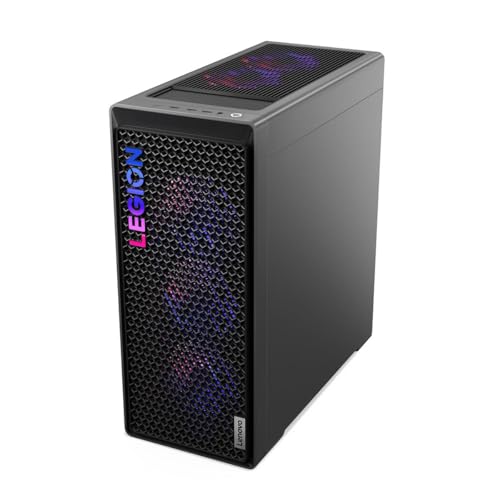
- Best overall for native 1440p: Lenovo Legion T7 34IAS10, Core Ultra 7 265KF, RTX 5080 — Check on Amazon
- CLX Set Gaming PC, Ryzen 7 9800X3D, RTX 5080, 2TB SSD — Check on Amazon
- Lenovo Legion Tower 7i Gen 10, Core Ultra 9 285K, RTX 5080, 2TB SSD — Check on Amazon
- CyberPowerPC Gamer Supreme SLC8480A9, Ryzen 7 9800X3D, RTX 5070 Ti, 2TB SSD — Check on Amazon
See 2 more Amazon options
- Skytech King 95, Ryzen 7 9800X3D, RTX 5070 Ti, 850W Gold PSU — Check on Amazon
- Acer Nitro 60 N60-181-UR26, Ryzen 9 7900, RTX 5070 Ti, 2TB SSD — Check on Amazon
Read the full guide ↓
Disclosure: As an Amazon Associate, reviewstook.com earns from qualifying purchases. Links to Amazon on this page are affiliate links; they cost you nothing extra. Listing details such as price and availability change often, so check the current Amazon listing before you buy.
This guide grades six flagship machines through one lens only: what they actually do at 1440p. That means separating two ideas that product pages deliberately blur. Your monitor’s resolution is fixed — a 1440p panel shows 2560×1440 pixels, about 3.69 million of them, roughly 78% more than a 1080p screen. Your game’s render resolution is a choice the hardware makes every frame, and it does not have to match the panel. A PC can render all 3.69 million pixels itself — that is native 1440p — or render fewer and let an upscaler such as DLSS reconstruct the rest. DLSS Quality at 1440p output renders at roughly 1707×960 internally, well under half the native pixel count, and rebuilds the difference with AI. Both approaches end at the same 2560×1440 image on your screen. They do not cost the same, and they do not look identical under motion; at lower budgets the gap between them is the whole story. At this budget, it is not — which is precisely what makes the $3,000 tier interesting to grade honestly.
Here is the headline finding: every machine in this guide renders 1440p natively as its default mode. Three carry the RTX 5080, the fastest graphics card verified in a complete Amazon prebuilt under $3,000, and three carry the RTX 5070 Ti — and all six carry 16GB of video memory, the specification that decides how long a card keeps rendering natively before texture budgets force compromises. Upscaling still appears, but its job has changed: at $3,000, DLSS is a refresh-rate tool for pushing a 240Hz panel and a ray-tracing tool for the heaviest scenes, not a survival mechanism. The other headline deserves equal plainness: no RTX 5090 system exists anywhere near $3,000 in any form factor — complete 5090 machines sit far above this budget. What follows: the quick picks, the definitions this guide grades by, six detailed reviews, a comparison table, a 4K-upgrade-headroom ranking, a buying checklist, the mistakes that waste money at this tier, and a flagship FAQ.
In this guide
Quick Picks
Short on time, or comparing several options at once? Each row below names a buyer type and the machine that suits it, with a link to the listing.
| Buyer type | Pick | Why it stands out | Link |
|---|---|---|---|
| Best overall for native 1440p | Lenovo Legion T7 34IAS10, Core Ultra 7 265KF, RTX 5080 | Native 1440p ultra from an RTX 5080 — check price on Amazon for the latest deal pricing | Check on Amazon |
| Best for high-refresh 1440p | CLX Set Gaming PC, Ryzen 7 9800X3D, RTX 5080 | The fastest gaming CPU paired with an RTX 5080 — built to feed a 240Hz 1440p panel | Check on Amazon |
| Best for streaming at 1440p | Lenovo Legion Tower 7i Gen 10, Core Ultra 9 285K, RTX 5080 | 24-core flagship CPU, 2TB storage and the same RTX 5080, from a major OEM | Check on Amazon |
| Best X3D alternative | CyberPowerPC Gamer Supreme SLC8480A9, Ryzen 7 9800X3D, RTX 5070 Ti | 9800X3D frame rates, native 1440p high settings and 2TB of storage | Check on Amazon |
| Best high-refresh value | Skytech King 95, Ryzen 7 9800X3D, RTX 5070 Ti | Named 850W Gold PSU and 360mm AIO — one of the lower-priced picks in this tier; check price on Amazon | Check on Amazon |
| Best when discounted | Acer Nitro 60 N60-181-UR26, Ryzen 9 7900, RTX 5070 Ti | 12-core Ryzen 9 and 2TB storage; superb in its discount band, poor value at list | Check on Amazon |
How These Picks Were Chosen
The budget was applied as a ceiling, not a target: every machine below is a real Amazon listing within this guide’s $3,000 budget in the United States, and because flagship prices swing widely between deal events, readers should check the current price on Amazon for each pick before ordering. Two picks, the CLX Set and the Acer Nitro 60, are especially price-sensitive; both reviews state their walk-away rules plainly, and those rules are part of the recommendation, not fine print.
We did not use these machines ourselves. We read the maker listings and specification pages and compared graphics cards, video memory, CPUs, system memory, storage, power supply wattage and certification, and cooling, favoring listings that publish their numbers in full. Where a listing leaves a figure unpublished — the CyberPowerPC pick below states neither its power supply wattage nor its motherboard model — the review flags the silence rather than filling it in, because unpublished corners are where upgrade headroom hides at this tier. No star ratings or review counts from any listing were used as selection evidence; the grading rests on hardware verifiable from the listings themselves.
The 1440p lens then imposed its own filter, in three parts. First, native rendering is the default grade: a pick earns its place by rendering all 3.69 million pixels at high or ultra settings, with upscaling treated as an additional tool rather than the main event. Second, every pick had to carry 16GB of video memory — at 1440p, current texture and ray-tracing budgets already press against 12GB, and a flagship in this price band should be the five-year answer, not the three-year one. Third, each pick was graded on what happens after 1440p — whether its graphics card, power supply and storage leave a credible path to a 4K monitor later, scored pick by pick in the ranking below.
Native vs Upscaled 1440p: The Definitions This Guide Grades By
Native 1440p means the GPU renders every one of the panel’s 3.69 million pixels, every frame, at the settings you selected — the sharpest, most stable image the panel can show, and the most expensive way to produce a frame. Upscaled 1440p means the GPU renders a smaller internal image and an algorithm expands it to fill the panel. DLSS Quality at 1440p output renders at roughly 1707×960 — about 44% of the native pixel count — and rebuilds the rest from motion data and AI reconstruction; Balanced and Performance modes render less still. The result is genuinely good in modern implementations, visibly softer than native in fine detail and fast motion, and dramatically cheaper per frame. Frame generation is a third, separate thing: it interpolates additional frames between rendered ones to raise the displayed frame rate. It consumes video memory, adds no rendering power and does not reduce input latency — a game rendered slowly with frames generated on top still responds like the slower rate underneath. All six GPUs here support DLSS 4, including multi frame generation in supported titles, and this guide treats that as a smoothness feature layered on top of native rendering, never a substitute for it.
Why does the distinction deserve a section of its own in a $3,000 guide? Because it inverts as budgets rise. At $400 or $500, upscaling is the product — the machines in our lower-tier guides reach 1440p output only because FSR rebuilds most of the picture. At $3,000, native is the product. If a machine at this price needs DLSS Quality to hold high settings in an ordinary title, something has gone wrong with the purchase; upscaling’s correct uses here are narrower — pushing frame rates toward a 240Hz panel’s ceiling in competitive play, or holding ultra settings with ray tracing fully enabled in the handful of games built to punish exactly that combination. One related trap: never feed a 1440p monitor a plain 1080p signal and let the panel stretch it — 1080p does not divide evenly into 1440p, so panel-side scaling smears the image. If a game needs a lower render resolution, use its own DLSS or FSR upscaling, which reconstructs to full panel resolution properly.
The 6 Best 1440p Gaming PCs for 1440p Gaming Under $3,000
Lenovo Legion T7 34IAS10, Core Ultra 7 265KF, RTX 5080 (90Y6003KUS)
Who it suits: The flagship buyer who wants the strongest native 1440p rendering available under this budget, from a major manufacturer, and who is willing to time the purchase to a deal event.
Start with the number that defines this machine’s 1440p grade: all 3.69 million pixels, rendered natively, at ultra settings, in the heaviest current titles — including the ray-traced ones that force lesser cards to reach for an upscaler. The RTX 5080 with 16GB of GDDR7 memory is the fastest graphics card verified in a complete Amazon prebuilt under $3,000, and at this resolution it does not merely clear the native bar; it clears it with room left over, which is what high-refresh play is made of. On a 240Hz 1440p panel, competitive titles run natively at frame rates that use the display, and in demanding single-player games DLSS Quality becomes a choice rather than a necessity. Multi frame generation in supported titles widens that further, with the caveat this guide applies everywhere: generated frames smooth motion, they do not render the game faster — and the honest foundation underneath them here is a card that was already fast without them.
The supporting specification is complete flagship material: an Intel Core Ultra 7 265KF, a 20-core processor that keeps frame times steady while streaming software, voice chat and launchers compete for the machine; 32GB of system memory; a 1TB SSD; and Windows 11 Pro, in Lenovo’s Legion T7 tower with a single manufacturer warranty behind the whole system. The price is where discipline enters. This listing sits just under this guide’s ceiling at its full price, and it is at its strongest when discounted — on a deal day it can be the strongest value event in the flagship market: an RTX 5080 OEM tower priced below many 5070 Ti machines. At full list it is a fair flagship and nothing more. The buying rule is therefore simple: check the price on Amazon first, buy it on its discounted days, and let its live price be the benchmark every other pick is compared against on the day you order.
- RTX 5080 with 16GB GDDR7 — native 1440p ultra, including heavy ray tracing, with DLSS held in reserve.
- Frequently discounted in Amazon deal events — check price on Amazon before ordering.
- 20-core Core Ultra 7 and major-OEM build, warranty and support, with Windows 11 Pro.
Honest limitation: Storage is 1TB where three rivals below offer 2TB, and the value case is deal-dependent — at full list price the argument for it over the CLX Set or the second Legion is much weaker.
Choose it if you want the best native 1440p rendering in this guide and can wait for a deal cycle. Skip it if the listing is at full price while a rival RTX 5080 machine is discounted, or your library needs 2TB from day one.

CLX Set Gaming PC, Ryzen 7 9800X3D, RTX 5080, 2TB SSD
Who it suits: The pure gamer chasing high-refresh 1440p — competitive titles at a 240Hz panel’s ceiling and AAA games at native ultra — who wants the best gaming CPU and GPU pairing this budget can verify.
At 1440p, the difference between a fast PC and a smooth one is usually the CPU, because the processor decides whether frame delivery stays even when the scene gets crowded. AMD’s Ryzen 7 9800X3D is the gaming processor of this generation precisely on that evidence: its 3D V-Cache design keeps frame rates high and, more importantly for how play feels, keeps the low percentiles — the worst moments in big multiplayer fights, simulation titles and modded open worlds — from sagging. Pair it with the same RTX 5080 found in the Legion above and the native 1440p grade is the strongest in this guide: ultra settings rendered at full resolution as the baseline, high-refresh headroom in competitive games, and DLSS Quality available as a refresh-rate tool for buyers who would rather spend the surplus on frames than on pixels. CLX surrounds the pairing with 32GB of DDR5 memory, a 2TB NVMe SSD, a 360mm all-in-one liquid cooler sized to hold the X3D chip’s clocks through long sessions, WiFi and Windows 11 Home. Nothing in the specification is diverted to a second job; it is a gaming machine in every line.
Its price, however, is the most volatile in this guide, and the walk-away rule is absolute. When this CLX Set is discounted inside this budget, it is a fair price for the pairing. At other times the same configuration has been listed far higher, well above this guide’s ceiling, as component prices climbed. The machine did not change between those moments; the market did. So: when it sits within the $3,000 budget, this is the purest expression of what this tier buys for 1440p gaming. Above $3,000 it has left this guide’s budget and its value case simultaneously — walk away, and take the Legion above, which delivers the same GPU with an OEM warranty, or the King 95 below, which delivers the same CPU with a 5070 Ti, for less. CLX is also a smaller integrator than Lenovo or Acer, so support runs through CLX rather than a global OEM network; the standard-parts build means any competent shop can service it, which softens but does not erase that difference.
- Ryzen 7 9800X3D plus RTX 5080 — the benchmark-topping gaming pairing of this generation, graded native-first.
- A 2TB NVMe SSD and 360mm liquid cooling come fitted, not upsold.
- Best bought on its discounted days — check price on Amazon and only buy inside this guide’s budget.
Honest limitation: Price volatility is extreme — the same configuration has been listed well above this guide’s budget — so the recommendation exists only when it is discounted inside the budget; support comes from a smaller integrator rather than a global OEM.
Choose it if gaming performance is the entire brief and the live listing sits inside this guide’s $3,000 budget. Skip it if the price has climbed past $3,000, or your desk also does heavy creation work the 8-core gaming chip is not built for.

Lenovo Legion Tower 7i Gen 10, Core Ultra 9 285K, RTX 5080, 2TB SSD
Who it suits: The streamer-creator whose 1440p sessions run alongside a broadcast, a recording and an editing queue — and who wants native rendering to survive all of it untouched.
The 1440p question this machine answers is the simultaneous-load one. Gaming alone, its RTX 5080 grades as the two picks above: native 1440p ultra, high refresh on tap, DLSS as an option rather than a crutch. The difference appears when the game stops being the only workload. The Core Ultra 9 285K is a 24-core flagship processor, and the RTX 5080 carries dual hardware encoders, so a broadcast encode and a high-quality local recording run on dedicated silicon while the game keeps rendering natively and the core count absorbs OBS scenes, browser sources and an export queue. In weaker machines, turning on the stream is when render resolution quietly drops; in this one, nothing about the picture has to give. Around that pairing Lenovo fits 32GB of RAM, the 2TB SSD the cheaper Legion skips, a 360mm liquid cooler, an 850W power supply named in the listing — a detail that matters again in the 4K headroom ranking below — and Windows 11, inside the Gen 10 Legion Tower with the manufacturer’s full support structure behind it.
Check the price on Amazon for this configuration — it has often compared favourably for a flagship-CPU OEM tower, while Lenovo’s own store prices comparable 285K and RTX 5080 configurations noticeably higher. That channel gap comes with one instruction: Legion Tower 7i listings exist in several CPU, memory and storage combinations that look alike at a glance, so verify the exact specification on the page before ordering. Judged on what is verified, this is the most complete machine in the guide — the only pick with no weak corner and no first-upgrade IOU. Pure gamers should note the honest trade: for gaming alone, the 285K’s extra cores buy little over the 9800X3D machines, and the CLX above spends the same money more directly on the game itself.
- Core Ultra 9 285K — 24 cores, so streaming and creation loads never tax the game’s render.
- RTX 5080 with dual hardware encoders: broadcast and record while gaming natively at 1440p.
- 2TB SSD, 360mm liquid cooling and an 850W PSU stated in the Amazon listing.
Honest limitation: For gaming alone the flagship CPU’s headroom is mostly unused, and Legion listings come in lookalike configurations — the exact spec must be confirmed at checkout.
Choose it if your PC streams, edits or renders alongside native 1440p gaming and you want OEM support behind a flagship spec. Skip it if the machine will only ever game — the CLX Set or the Legion T7 spends the same money more directly.

CyberPowerPC Gamer Supreme SLC8480A9, Ryzen 7 9800X3D, RTX 5070 Ti, 2TB SSD
Who it suits: The upgrade-minded gamer who wants 9800X3D frame delivery and native 1440p high settings now, in a standard-parts tower they can open and extend for years.
CyberPowerPC’s Gamer Supreme line is the traditional integrator proposition: named, retail-grade components in a conventional case, with none of an OEM’s proprietary lock-in. This configuration pairs the Ryzen 7 9800X3D — the same benchmark-leading gaming CPU as the CLX above — with an RTX 5070 Ti carrying 16GB of GDDR7, 32GB of DDR5 memory and a 2TB PCIe 4.0 SSD, with Windows 11 Home and WiFi ready out of the box. Graded through the 1440p lens, the honest size of the step down from the 5080 picks matters: the 5070 Ti renders 1440p natively at high and ultra settings across the great majority of titles, feeds high-refresh panels in competitive play, and reserves DLSS Quality for the heaviest ray-traced scenes — exactly the tool-not-crutch pattern this tier is supposed to show. Its 16GB of video memory matches the 5080 picks’ capacity, which is why its native-1440p grade ages on the flagship schedule: texture budgets that will squeeze 12GB cards are not this machine’s problem.
Check its price on Amazon, which frames its real negotiation with the reader: its pricing sits close to the Legion T7’s best RTX 5080 days, so this pick wins on balance — the better gaming CPU, double the T7’s storage, an open tower — rather than on raw graphics. Two gaps in the listing deserve to be named outright, because they sit in exactly the corners this guide promised to inspect. The listing does not state the power supply’s wattage, which at this price should be a published number, and it matters beyond tidiness: an unstated PSU is upgrade headroom you cannot verify, and it is the reason this machine ranks where it does in the 4K section below. The motherboard model is likewise unstated, which matters for future CPU upgrades on the AM5 platform. Neither gap is unusual for the brand, and the standard-parts design means both components can be identified on arrival and replaced later — but a flagship buyer should know they are buying two small unknowns alongside an otherwise fully verified core pairing.
- The 9800X3D’s frame delivery, backed by a 2TB PCIe 4.0 SSD as standard.
- RTX 5070 Ti 16GB — native 1440p high settings with the full DLSS 4 feature set in reserve.
- A conventional tower of standard parts — the simplest upgrade path in this guide.
Honest limitation: CyberPowerPC publishes neither the PSU wattage nor the motherboard model, and its price crowds discounted RTX 5080 machines — check the Legion T7’s live price on Amazon before you order this one.
Choose it if the X3D chip, 2TB of storage and an open tower matter more to you than the final step of GPU power. Skip it if one of this guide’s RTX 5080 picks is priced close to it on buying day — check price on Amazon for both before deciding.

Skytech King 95, Ryzen 7 9800X3D, RTX 5070 Ti, 850W Gold PSU
Who it suits: The value flagship buyer — the player who wants this tier’s defining components, the 9800X3D and a 16GB GPU, with the spec sheet’s fine print filled in, at one of the most accessible price points in this guide.
The King 95 answers the question every honest $3,000 guide should force: how much of the flagship 1440p experience survives at a noticeably lower price point in this tier? Most of it. The Ryzen 7 9800X3D is here in full — the same gaming CPU as the CLX and the CyberPowerPC — and the RTX 5070 Ti brings the same 16GB of GDDR7 and the complete DLSS 4 toolkit, so the native 1440p grade matches the CyberPowerPC’s: high and ultra settings rendered at full resolution, high-refresh competitive play, upscaling kept for the heaviest ray tracing rather than spent on ordinary titles. What elevates this listing above most integrator fare is that it publishes the parts other listings hide: an 850W 80 Plus Gold power supply, a 360mm all-in-one liquid cooler, 32GB of DDR5 5600 memory and a 1TB Gen4 NVMe SSD, with Windows 11 Home installed. The named PSU is not a cosmetic virtue — it is verified upgrade headroom, the component that decides whether a future graphics card is a ten-minute swap or a rewiring project, and why this machine outranks the CyberPowerPC in the 4K section despite the smaller drive.
The pricing is the friendliest in the guide: it is one of the lower-priced picks here, and Amazon deal events have repeatedly discounted it further — check price on Amazon for the current figure. At a good discount the King 95 does the most valuable thing any pick in a $3,000 guide can do: it hands the flagship shopper a defensible place to stop spending. What it leaves in your pocket can help cover a premium 240Hz 1440p monitor — a purchase that will do more for what your games look like than the 5070 Ti-to-5080 step ever could. Two cautions complete the picture, both about buying the exact machine reviewed. Skytech sells near-identical King 95 variants — different storage, memory speeds and even newer X3D chips under similar titles — so match the model number ST-KING95-1671-W-AM on the listing page before ordering; and the GPU brand may vary, as the listing states — normal for integrators, but the specific card is a lottery within the contracted model and memory capacity.
- The 9800X3D and RTX 5070 Ti pairing, with an 850W 80 Plus Gold PSU named in the listing.
- A 360mm AIO and 32GB of DDR5 come standard.
- Amazon deal events regularly discount it below its list price — check price on Amazon.
Honest limitation: The drive is 1TB in a guide where the CyberPowerPC and CLX ship 2TB, and the listings are crowded with near-identical King 95 variants — check the exact model number before ordering.
Choose it if you want flagship native-1440p gaming with money left for the 240Hz monitor it deserves. Skip it if RTX 5080 ray-tracing headroom is the point of the purchase, or you refuse to add storage later.

Acer Nitro 60 N60-181-UR26, Ryzen 9 7900, RTX 5070 Ti, 2TB SSD
Who it suits: The patient deal-hunter and the hybrid gamer-creator — a buyer who wants a 12-core processor and 2TB of storage from a global OEM, and who understands that this listing is only a good idea on its discounted days.
The Nitro 60’s 1440p grade splits cleanly along the resolution’s two workloads. In GPU-bound play — the majority of AAA titles at 2560×1440 — its RTX 5070 Ti renders natively at high and ultra settings with the same 16GB GDDR7 foundation as the two 5070 Ti picks above, DLSS 4 in reserve for ray-traced scenes. In CPU-bound play — competitive titles chasing a 240Hz panel’s ceiling — its Ryzen 9 7900, a 12-core processor without the X3D cache design, trails the 9800X3D machines in frame delivery; at 1440p the gap is narrower than at 1080p, because the GPU carries more of the load, but esports-first buyers should weight it honestly. Where the 7900 pulls its weight back is everywhere else on the desk: rendering, encoding, compiling and heavy multitasking. Acer rounds the machine out with 32GB of DDR5, a 2TB PCIe 4.0 SSD, WiFi 6 and gigabit ethernet in an airflow-focused Nitro chassis, behind a global OEM’s warranty and support.
Everything else in this review is secondary to its price history, the widest in this guide. At its list price, bluntly, nobody should buy it, because RTX 5080 machines in this guide can sell for less — check price on Amazon and compare before ordering. Its pricing has also swung to deep discounts at times, which changes the verdict completely. In other words, this is a poor flagship at its ceiling and one of the best buys in the guide near its floor — no rival here matches a 12-core, 2TB, 5070 Ti OEM tower at its discounted tier. The rule is a never-buy-at-list rule, stated without softening: set a price alert, buy it discounted, and walk away at list. Acer’s support stands behind the machine either way, but this pick’s value lives entirely in its sale days.
- A 12-core Ryzen 9 7900 — more cores than any other 5070 Ti pick here, for desks that create as well as play.
- 2TB of PCIe 4.0 storage and 32GB of DDR5, backed by a global OEM’s warranty.
- Its price has swung widely between deep discounts and list — check price on Amazon and buy only on a discount day.
Honest limitation: At its list price it is outclassed by the RTX 5080 picks in this guide, and its non-X3D processor trails the 9800X3D machines in CPU-bound high-refresh play.
Choose it if you can land it at a deep discount well inside this guide’s budget — doubly so if the desk also does creation work. Skip it if the live price drifts anywhere near list, where the Legion T7 above is simply the better flagship.

Comparison Table
| Product | CPU / GPU | Native 1440p verdict | Link |
|---|---|---|---|
| Lenovo Legion T7 34IAS10 (90Y6003KUS) | Core Ultra 7 265KF / RTX 5080 | Ultra settings native, ray tracing included; best bought on deal days | Check on Amazon |
| CLX Set Gaming PC | Ryzen 7 9800X3D / RTX 5080 | Ultra native with the smoothest high-refresh frame delivery | Check on Amazon |
| Lenovo Legion Tower 7i Gen 10 | Core Ultra 9 285K / RTX 5080 | Ultra native that holds while streaming and recording | Check on Amazon |
| CyberPowerPC Gamer Supreme SLC8480A9 | Ryzen 7 9800X3D / RTX 5070 Ti | High-to-ultra native; DLSS reserved for heavy ray tracing | Check on Amazon |
| Skytech King 95 | Ryzen 7 9800X3D / RTX 5070 Ti | High-to-ultra native with verified PSU headroom for upgrades | Check on Amazon |
| Acer Nitro 60 N60-181-UR26 | Ryzen 9 7900 / RTX 5070 Ti | High-to-ultra native in GPU-bound play; a discount-band buy only | Check on Amazon |
Ranked by 4K-Upgrade Headroom
Many buyers at this tier are really asking a two-stage question: native 1440p today, a 4K monitor in a year or two — will the machine follow? The honest answer starts with what “4K gaming” means for hardware in this class. A 4K panel holds about 8.3 million pixels, roughly 2.25 times a 1440p panel’s load, and none of the six machines here is a native-4K ultra machine — rendering every 4K pixel at ultra settings is RTX 5090 territory, and 5090 systems sit far above $3,000. What these machines offer instead is upscaled 4K, better than the phrase sounds: DLSS Quality at 4K output renders at 2560×1440 internally, so the resolution these PCs render natively today becomes the render resolution of their 4K mode tomorrow. Judged that way, headroom is about three things — the GPU’s tier, whether the power supply is verified to have room for the machine’s future, and whether storage leaves the upgrade cheap. Buyers whose destination is 4K first rather than 1440p first should also read Best 4K Gaming PC Under $3000 and Best 4K Gaming PC Under $2500 before deciding.
- 1. Lenovo Legion Tower 7i Gen 10. The most complete 4K-upgrade platform: RTX 5080, a named 850W PSU, 2TB of storage already fitted, and a 24-core CPU that will never be the bottleneck at 4K’s GPU-bound loads.
- 2. CLX Set. The same RTX 5080 and 2TB storage, with the 9800X3D’s frame delivery; at upscaled 4K the GPU does the heavy lifting and this pairing has the most of it. The ranking assumes it was bought at its deal price — the headroom is not worth paying well above this guide’s budget.
- 3. Lenovo Legion T7. Identical graphics headroom to the two above; ranked third only because its 1TB drive is the first thing a growing library will pinch, making storage its earliest upgrade.
- 4. Skytech King 95. The strongest 5070 Ti platform for the future: the named 850W Gold PSU is verified headroom the CyberPowerPC cannot document, and upscaled 4K at high settings is squarely within the 5070 Ti’s 16GB envelope.
- 5. CyberPowerPC Gamer Supreme. The same GPU and memory as the King 95, plus 2TB of storage — but its unpublished PSU wattage means its upgrade headroom cannot be verified from the listing, and unverifiable headroom ranks below verified headroom at flagship prices.
- 6. Acer Nitro 60. Capable of the same upscaled-4K mode as the other 5070 Ti picks, its 12-core CPU no handicap at GPU-bound 4K loads; it ranks last because its non-X3D processor gives back the most at today’s 1440p high-refresh play, and because the pick only makes sense in its discount band anyway.
Read the ranking with its limits attached: it orders the credibility of a future monitor upgrade, not today’s performance, and it changes no buying rule stated in the reviews. A King 95 bought at a good discount with a 4K panel planned beats a Tower 7i bought carelessly at a bad price — headroom is the last thing to pay a premium for, after native 1440p performance, verified components and price discipline.
How to Choose a 1440p Gaming PC for 1440p Gaming Under $3,000
- Start with the monitor, not the machine. This tier exists to feed a 1440p panel at 240Hz, or at minimum 165Hz. A $3,000 PC on a 60Hz display is the most expensive waste in this guide — if you do not own the panel yet, the King 95 plus a great monitor beats any 5080 machine plus a mediocre one.
- Grade native first. At this budget, native 1440p at high or ultra settings is the product being sold. Treat DLSS as a tool for refresh rates and ray tracing, and be suspicious of any flagship listing whose pitch leads with upscaled resolutions — that is a lower tier’s argument wearing this tier’s price.
- Make 16GB of video memory the floor. All six picks carry it, deliberately. At 1440p, texture and ray-tracing budgets are already pressing 12GB cards; 16GB is the five-year answer, 12GB the three-year one, and a flagship should be bought on the five-year schedule.
- Know the real GPU ceiling at this budget. Nothing verified under $3,000 on Amazon outruns the RTX 5080. No 5090 exists at this money — complete systems sit far above the budget — so treat any listing that implies one as a mislabel until it proves otherwise.
- Pick your CPU by your second job. Pure gaming points to the Ryzen 7 9800X3D and its frame-time consistency. Streaming, editing and rendering reward core count instead — the 24-core Ultra 9 285K or the 12-core Ryzen 9 7900. Matching the chip to the wrong specialty is the easiest flagship mistake.
- Interrogate the power supply before admiring the lighting. Look for a named wattage and certification — 850W Gold is the right class for these GPUs. An unstated PSU at this price, as on the CyberPowerPC pick, deserves a question to the seller before you order.
- Treat 2TB as the flagship storage standard. Modern AAA installs regularly exceed 100GB. The 1TB picks (Legion T7, King 95) are fine if a second drive is in your near future; otherwise favor the 2TB machines.
- Apply the deal rules as part of the spec. Flagship prices swing widely between events. The CLX belongs in a cart only when it sits inside this guide’s $3,000 budget, and nowhere near a price well above it; the Acer belongs in its discount band and never at list. Timing is a specification at this tier.
- Verify the exact configuration at checkout. Flagship families ship in lookalike variants. Before ordering, line up the listing’s model number, CPU, GPU, memory and storage against the review you read — Legion towers and King 95 variants make this step non-optional.
- Decide what 4K means in your plan. If a 4K monitor arrives within this machine’s life, you are buying upscaled 4K — genuinely good on these GPUs, and ranked pick by pick above. If native 4K ultra is the actual goal, no machine here is the right purchase, and the honest move is a larger budget, not a hopeful one.
Common Buying Mistakes
- Hunting an RTX 5090 with a $3,000 budget. No verified Amazon prebuilt offers one at this price in any form factor; listings that suggest otherwise are mislabeled, barebones or scams until they prove they are not.
- Paying list price in a deal drought. The machines here swing widely between events — one has been listed both inside this budget and well above it — so the calendar is part of the purchase.
- Buying the Acer Nitro 60 at its list price, when it is regularly discounted and RTX 5080 machines in this guide can be found for less than its list.
- Feeding a 1440p monitor a plain 1080p signal and blaming the panel for the softness. 1080p does not scale evenly into 1440p; use the game’s DLSS or FSR upscaling instead.
- Counting frame generation as rendering power. Generated frames smooth motion but cost video memory and add no responsiveness; a flagship’s worth is measured by what it renders — and at this tier that should be native.
- Bolting a $3,000 PC to a 60Hz monitor and deciding the upgrade feels underwhelming. At this resolution the display is half the experience you paid for.
- Believing “4K ready” marketing means native 4K ultra. In this class, 4K gaming means DLSS-upscaled 4K — good, but a different product from the one the phrase implies.
- Ordering a lookalike variant. Legion towers and King 95s ship in several configurations under near-identical titles — the model number, not the headline, is the product.
- Filling a 1TB drive by spring and calling it a flaw. Do the arithmetic first: size up your current library before deciding 1TB will hold it.
- Skipping surge protection for a $3,000 machine plugged into the same strip as a space heater.
Final Recommendation
- Most flagship buyers: Lenovo Legion T7 34IAS10 — RTX 5080 native-1440p power, OEM support, and strong value on its discounted days — check price on Amazon.
- Pure gamers: CLX Set — 9800X3D plus RTX 5080, and only at its deal prices inside this guide’s budget.
- Streamers and creators: Lenovo Legion Tower 7i Gen 10 — 24 cores, 2TB and native 1440p that holds under a full broadcast load.
- Upgraders who want 2TB from day one: CyberPowerPC Gamer Supreme SLC8480A9.
- Best value in the tier: Skytech King 95 — flagship native-1440p gaming with money left for a 240Hz monitor.
- Deal hunters: Acer Nitro 60 — a standout when deeply discounted, and not a consideration at list.
Our top two at this budget are the Legion T7, because an RTX 5080 from a major OEM at a good discount is the strongest value event in the flagship market, and the CLX Set, because the 9800X3D and RTX 5080 together are the fastest native-1440p combination this budget can verify. Between them they cover the tier’s two honest shapes: the manufacturer machine bought on sale, and the gaming specialist bought at its deal price. Buyers speccing a tier lower should see Best 1440p Gaming PC Under $2500 and Best 1440p Gaming PC Under $1500; buyers bound for a 4K panel should read Best 4K Gaming PC Under $3000; streamers at this budget should also read Best 1440p Gaming PC For Streaming Under $3000; and the broader flagship picture is covered in Best 1440p Gaming PC Under $3000. Whichever machine you choose, spend five minutes confirming the model number and the live price on its listing page before you order — at $3,000, that check protects more value than any single component in this guide.
Frequently Asked Questions
What is the difference between native and upscaled 1440p in practice?
Native 1440p renders all 3.69 million of the panel’s pixels every frame; upscaled 1440p renders fewer — DLSS Quality renders roughly 1707×960 — and reconstructs the rest. In still scenes the two are close; in fine detail and fast motion, native stays cleaner and more stable. At this budget you are paying for native as the default, with upscaling kept for higher refresh rates and heavy ray tracing. At lower budgets the relationship reverses, and upscaling is what makes 1440p output possible at all.
Is a $3,000 PC overkill for 1440p gaming?
Judged on resolution alone, mostly yes — this guide would rather say so than bury it. The $1,500 tier already plays 1440p well, and the $2,500 tier already plays it at flagship level. What the last step buys is margin: the fastest gaming CPU, 2TB of storage, stronger power and cooling, and headroom against the next three years of games. Buy the margin knowingly, or stop a tier down and put the difference into a 240Hz monitor.
Where is the RTX 5090?
It is absent because it is absent from the market at this price: no verified Amazon prebuilt pairs an RTX 5090 with a figure anywhere near $3,000, whatever the form factor, and complete 5090 systems price far above this tier. Rather than invent a halo pick, this guide crowns the tier that actually exists under the budget: the RTX 5080, with the 5070 Ti as its 16GB running mate.
Can these PCs handle a 4K monitor later?
Yes — as upscaled 4K, and the distinction matters. DLSS Quality at 4K output renders at 2560×1440 internally, so these machines’ native resolution today becomes their render resolution tomorrow, and the resulting image is genuinely good. None renders native 4K at ultra settings; that is 5090-class territory at far higher prices. The ranking above orders all six by how credible that upgrade path is.
9800X3D or Core Ultra 9 285K for 1440p?
For gaming, the 9800X3D — its 3D V-Cache makes it the frame-delivery leader and the smoothest choice for high-refresh 1440p. Add serious streaming, video editing or rendering to the desk and the 285K’s 24 cores take over the moment a second workload joins the game. The two chips split this guide between them because each is the right answer for a different buyer.
Is 16GB of VRAM really the five-year answer at 1440p?
It is the best-supported answer available in this class. Current titles at 1440p with high textures and ray tracing already press against 12GB, and the trend runs one direction; 16GB — carried by every pick here, on both the RTX 5080 and the 5070 Ti — is the capacity that keeps native rendering and full texture settings viable across a flagship’s expected life. It is also why this guide treats 12GB machines at flagship prices as a category error at $3,000.
Should I use DLSS Quality or play native?
Native first — that is what this tier’s hardware is for. Reach for DLSS Quality in two situations: competitive play, where pushing frame rates toward a 240Hz panel’s ceiling matters more than the last increment of fine detail, and the heaviest ray-traced titles, where upscaling holds ultra settings native rendering cannot. Frame generation can layer on top of either — remembering that it smooths motion rather than rendering the game faster.
Prebuilt or self-build at $3,000?
A self-build can still come in cheaper, and it guarantees every component is named — no unstated PSU, no variant lottery. The prebuilts here trade that control for a single warranty, real support, and deal pricing that occasionally undercuts the parts market outright, as the Legion T7’s discounted days prove. Compare both routes on the same day and let that day’s live prices arbitrate.
- Best 1440p Gaming PC Under $3000
- Best 1440p Gaming PC Under $2500
- Best 1440p Gaming PC Under $1500
- Best 1440p Gaming PC For Streaming Under $3000
- Best 1440p Gaming PC For Beginners Under $3000
- Best 1440p Gaming PC For Small Spaces Under $3000
- Best 4K Gaming PC Under $3000
- Best Gaming PC Under $3000
- Best Prebuilt Gaming PC Under $3000
- Best High End Gaming PC Under $3000


