Where to buy
Check the latest price, availability and delivery on Amazon. Orders are placed on Amazon. We may earn a commission from qualifying purchases.
- Best overall for 1440p: Lenovo Legion T7 34IAS10, Core Ultra 7 265KF, RTX 5080 — Check on Amazon
- Skytech King 95, Ryzen 7 9800X3D, RTX 5070 Ti — Check on Amazon
- CyberPowerPC Gamer Supreme SLC8480A9, Ryzen 7 9800X3D, RTX 5070 Ti — Check on Amazon
- iBUYPOWER Y40 PRO, Ryzen 9 7900X, RTX 5070 Ti — Check on Amazon
See 2 more Amazon options
- CyberPowerPC Gamer Supreme SLC8480A3, Ryzen 7 7800X3D, RTX 4070 Ti Super — Check on Amazon
- CyberPowerPC Gamer Xtreme GXiVR8760A4, Core i7-14700KF, RTX 4070 Super — Check on Amazon
Read the full guide ↓
Disclosure: As an Amazon Associate, reviewstook.com earns from qualifying purchases. Links to Amazon on this page are affiliate links; they cost you nothing extra. Listing details such as price and availability change often, so check the current Amazon listing before you buy.
Twenty-five hundred dollars is a strange budget for a 1440p gaming PC, and it is worth saying plainly why: it is flagship money. A good 1440p machine — the kind that runs modern games at high settings on a 1440p monitor without drama — can be built or bought for hundreds less, and several guides on this site exist to prove it. What $2,500 buys at this resolution is not adequacy. It buys excess, deliberately spent: frame rates that chase a 240Hz or even 360Hz 1440p monitor instead of merely feeding a 144Hz one, ray tracing turned on at native resolution rather than negotiated with, and enough CPU, memory and cooling headroom that streaming, recording and a browser full of tabs stop being things the game has to compete with. If your monitor is a 1440p 144Hz panel and your games are esports titles, most of this guide is more PC than you need, and the honest advice is to buy lower down the ladder and keep the change. If your target is 1440p at the highest refresh your panel can show, with settings maxed and a second life in 4K or content creation ahead of it, this is exactly the right tier — and it is the tier where prebuilt pricing gets slippery enough to need a guide.
The honesty note for this budget concerns the graphics card at the top of it. The RTX 5080 is the halo card that fits this conversation — a 16GB card built for 4K that treats 1440p as a warm-up — and complete RTX 5080 systems on Amazon normally list well above this guide’s ceiling in regular listings. An RTX 5080 PC genuinely under $2,500 exists, but it exists the way sale prices exist: as a limited-time deal, not a shelf price. The one verified example in this guide, Lenovo’s Legion T7, qualifies only when a limited-time Amazon deal brings it under the ceiling — check price on Amazon, because that deal availability can vanish. Everything else here is built on the RTX 5070 Ti, the RTX 4070 Ti Super and the RTX 4070 Super: cards that live under this ceiling every day, pair with the fastest gaming CPUs AMD sells, and at 1440p give up surprisingly little to the halo card once your monitor’s refresh rate becomes the limit. Below are the quick picks, detailed reviews of all six machines, a comparison table, a buying checklist for this tier, a section on where the flagship money actually goes at 1440p, the mistakes that waste it, and the questions buyers at this budget ask most.
In this guide
Quick Picks
Short on time, or comparing several options at once? Each row below names a buyer type and the machine that suits it, with a link to the listing.
| Buyer type | Pick | Why it stands out | Link |
|---|---|---|---|
| Best overall for 1440p | Lenovo Legion T7 34IAS10 (90Y6003KUS) | RTX 5080 16GB — the only verified sub-$2,500 5080 option, on deal | Check on Amazon |
| Best for max-refresh esports | Skytech King 95, Ryzen 7 9800X3D, RTX 5070 Ti | The fastest gaming CPU AMD sells, 360mm AIO, 850W Gold ATX 3.0 | Check on Amazon |
| Best 5070 Ti with storage | CyberPowerPC Gamer Supreme SLC8480A9 | 9800X3D plus a 2TB PCIe 4.0 SSD instead of the usual 1TB | Check on Amazon |
| Best for streaming and creation | iBUYPOWER Y40 PRO, Ryzen 9 7900X, RTX 5070 Ti | 12-core CPU for encode and editing alongside the same 16GB GPU | Check on Amazon |
| Best value with an X3D chip | CyberPowerPC Gamer Supreme SLC8480A3 | 7800X3D and RTX 4070 Ti Super 16GB — check price on Amazon for current sale pricing | Check on Amazon |
| Best spend-less option | CyberPowerPC Gamer Xtreme GXiVR8760A4 | RTX 4070 Super, 20-core i7, 2TB — leaves budget for the 240Hz monitor | Check on Amazon |
How These Picks Were Chosen
The budget was applied as a ceiling for the whole machine: every system below is a real Amazon listing positioned at $2,500 or under in the United States — check price on Amazon for the current figure. Where a price moves — and at this tier prices move constantly — check the live listing rather than relying on any fixed figure quoted elsewhere. One pick, the Legion T7, qualifies only through a limited-time Amazon deal against a regular price above the ceiling; the review says so in plain terms rather than pretending a deal figure is its everyday price. Machines that list above $2,500 with no verified availability under it were excluded, however good they looked — that rule removed several RTX 5080 towers and 64GB configurations that headline searches for this keyword, because a guide for a $2,500 budget that recommends PCs above the ceiling has failed at its only job.
We did not use these PCs ourselves. We read the maker listings and specification pages and compared graphics cards, processors, memory capacity and speed, storage, power supply ratings and cooling, favoring listings that publish their numbers in full. At this budget the spec sheet deserves a harder read than at lower tiers, because the gap between a well-spent budget and a badly spent one is invisible in the headline: two machines can both say “RTX 5070 Ti” while one pairs it with the fastest gaming CPU available and a named 850W Gold ATX 3.0 power supply, and the other with a last-generation processor, a single 1TB drive and a power supply the listing declines to describe. We weighted the published details — X3D processors for gaming-first builds, 16GB of VRAM as the floor for a card expected to hold this tier for years, 32GB of DDR5 as standard, 2TB of storage as the honest expectation, and a named, rated power supply — and where a listing hides a detail, the review names the omission instead of filling it in.
One filter sat on top of all of that, specific to this keyword: the monitor test. A $2,500 PC is a rational purchase only alongside a display that can show what it renders. Every pick below was judged as a partner for a 1440p 240Hz panel at minimum — the frame rates these GPUs produce at 1440p are wasted on a 60Hz or even 144Hz screen in all but the heaviest ray-traced titles. If you are buying the PC and the monitor together out of one $2,500 envelope, the last pick in this guide plus a good 240Hz panel is the better allocation, and the how-to-choose section does that arithmetic openly.
The 6 Best 1440p Gaming PCs Under $2,500
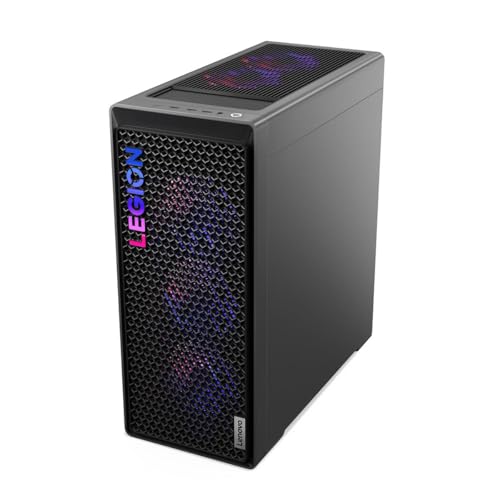
Lenovo Legion T7 34IAS10, Core Ultra 7 265KF, RTX 5080 (90Y6003KUS)
Who it suits: The buyer this whole keyword is really for — someone spending flagship money on 1440p because they want the ceiling gone: max-refresh panels, full ray tracing, and a machine that is secretly a 4K PC waiting for a monitor upgrade.
The graphics card is the headline and it is not close. The RTX 5080 carries 16GB of GDDR7 and sits a full tier above everything else in this guide; at 1440p it is, frankly, more card than the resolution requires, which is precisely the point of buying it here. Heavy ray tracing and path tracing that make lesser cards reach for upscaling become native-resolution settings, DLSS and multi-frame generation turn a 240Hz panel into a realistic target even in demanding single-player titles, and the same card steps up to 4K without apology if the next monitor is a 4K one. Around it, Lenovo builds the restrained version of a flagship: an Intel Core Ultra 7 265KF running up to 5.5GHz, 32GB of DDR5 at 5600MHz, a 1TB SSD, Windows 11 Pro, Wi-Fi 6 (802.11ax) and Bluetooth, in the Storm Gray Legion T7 tower at about 39.7 pounds. The model’s published specification includes an 850W power supply — the right class for this card. It is an OEM flagship rather than a boutique build, and that cuts both ways, as the limitation below explains.
The price requires the guide’s full honesty treatment. This configuration’s regular price sits above this guide’s ceiling, and it earns its place only when a limited-time Amazon deal brings it under the ceiling — check price on Amazon before assuming it qualifies. That deal-dependent status is the least reliable kind: limited deals end and stock at a deal price is finite, so if you open the listing and find it above the ceiling, the listing is not wrong — the deal has simply closed. Treat this pick as a watch target: if check price on Amazon shows it at or under $2,500 when you check, it is the best overall buy in this guide by a wide margin; if it is back at its regular price, the Skytech and CyberPowerPC 5070 Ti machines below are the standing recommendations, and they give up less at 1440p than the price gap suggests. One more OEM note: the storage is 1TB where boutique rivals at this money give 2TB, and Legion towers use some proprietary internal layouts that make motherboard-level upgrades less straightforward than a standard ATX build — the GPU, memory and storage upgrade paths that matter most remain open.
- RTX 5080 16GB GDDR7 — a 4K-class card that removes the ceiling at 1440p entirely.
- Deal-dependent availability under the ceiling — check price on Amazon; the only sub-$2,500 RTX 5080 in this guide.
- Core Ultra 7 265KF to 5.5GHz, 32GB DDR5-5600, Windows 11 Pro and an 850W-class power supply per the model specification.
Honest limitation: It is under $2,500 only on deal; at its regular price it belongs in the under-$3,000 guide. Storage is 1TB, and the OEM chassis is less upgrade-friendly at the motherboard level than the boutique builds below.
Choose it if the listing shows it at or under $2,500 when you check, and you want ray tracing and 240Hz headroom with a 4K future. Skip it if it is back at list price — buy a 5070 Ti machine below and put the difference toward the monitor.

Skytech King 95, Ryzen 7 9800X3D, RTX 5070 Ti
Who it suits: Competitive and high-refresh players whose bottleneck is the CPU, not the card — the 1440p 240Hz and 360Hz crowd playing titles where frame time consistency decides rounds.
Start with the processor, because at 1440p high-refresh it is the component that matters most once the GPU is this fast. The Ryzen 7 9800X3D is the gaming CPU benchmark-setter of its generation — eight cores with AMD’s stacked 3D V-Cache, running 4.7GHz with boost to 5.2GHz — and its talent is exactly the one this keyword needs: holding minimum frame rates up in the CPU-bound, high-refresh scenarios where a lesser processor lets a fast card idle. Paired with it, the RTX 5070 Ti brings 16GB of GDDR7, DLSS 4 with multi-frame generation and ray tracing performance that makes maxed 1440p a default rather than a negotiation. The rest of the King 95 specification is published in the way this guide likes: 32GB of DDR5 RGB (the listing for this configuration states 5600 speed), a 360mm ARGB liquid cooler, an 850W Gold ATX 3.0 power supply — named wattage, named rating, current standard — Wi-Fi and Windows 11, in Skytech’s King 95 case. This configuration, model ST-KING95-1671-W-AM, sits near the top of this guide’s range — check price on Amazon, and check it before the others, because its regular price can sit above the ceiling when no deal is running.
Two cautions belong to Skytech’s whole catalogue, and they apply here in full. The first is configuration drift: “King 95” is a case family, not a single PC, and near-identical listings exist with different RAM speeds, different drive sizes and even different processors — a 2TB, DDR5-6000 variant of this same pairing circulates alongside this 1TB, 5600 one. The listing title and the model number are the product; check both, letter by letter, before ordering. The second is the standard Skytech note that the graphics card brand may vary, which is normal for system integrators and worth knowing: you are guaranteed an RTX 5070 Ti, not a specific partner model. The 1TB SSD is the one specification that reads a tier low at this money — modern game installs will fill it faster than you expect, and a second NVMe drive is the first upgrade to budget for. None of that displaces it as this guide’s max-refresh pick: for a 240Hz or 360Hz 1440p panel, the 9800X3D and 5070 Ti pairing is the combination the rest of the industry is chasing.
- Ryzen 7 9800X3D — the benchmark gaming CPU, chosen for minimum frame rates at high refresh.
- RTX 5070 Ti 16GB GDDR7 with DLSS 4 multi-frame generation for 240Hz-class 1440p.
- Named supporting cast: 360mm AIO, 850W Gold ATX 3.0 PSU, 32GB DDR5 — check price on Amazon.
Honest limitation: The 1TB SSD is small for this tier, its regular price sits above the ceiling when no deal is running, and Skytech’s many near-identical King 95 variants demand a careful read of the exact model number.
Choose it if you play competitive or high-refresh titles on a 240Hz+ 1440p monitor and want the strongest CPU-GPU pairing that lives under this budget. Skip it if your library is mostly single-player and cinematic — the Legion’s 5080 or the cheaper X3D value pick below serves that better.

CyberPowerPC Gamer Supreme, Ryzen 7 9800X3D, RTX 5070 Ti (SLC8480A9)
Who it suits: Buyers who want the same flagship pairing as the Skytech — 9800X3D and RTX 5070 Ti — but refuse to accept a 1TB drive at this money, and prefer CyberPowerPC’s B850-platform build.
The specification reads like the corrected version of the pick above. The Ryzen 7 9800X3D and RTX 5070 Ti 16GB pairing is identical in the ways that decide frame rates, and around it CyberPowerPC fits 32GB of DDR5 and — the point of this machine — a 2TB PCIe 4.0 SSD, double the storage of the King 95 configuration above, on an AMD B850 chipset platform per the model’s published details. At this tier the 2TB drive is not a luxury line item: a modern library of a dozen large titles, a capture folder and a couple of creative projects will consume a terabyte without any single file seeming unreasonable, and starting at 2TB defers the second-drive purchase by a year or more. The Gamer Supreme line is CyberPowerPC’s liquid-cooled flagship series, the listing confirms Wi-Fi readiness and Windows 11 Home, and the model number to verify at checkout is SLC8480A9.
The honest gaps in this listing are about what CyberPowerPC does not publish rather than what it does. The listing does not state the power supply’s wattage in the material we could verify — a meaningful omission at this tier, since an unnamed PSU is the classic prebuilt corner to cut, and the first question to ask of the live listing or the maker’s configurator page before ordering. Memory speed is likewise not stated in the verified material, only capacity. On price, we are deliberately making no hard claim: this configuration’s Amazon price moves often, and enough near-identical Gamer Supreme variants circulate (including a Ryzen 7 9850X3D sibling and Intel-based namesakes), that the only honest instruction is to check price on Amazon for SLC8480A9 itself and hold it against the Skytech above — same pairing, and the better buy is whichever of the two is cheaper on the day, with this machine’s 2TB drive as the tiebreaker in its favor. That is a less tidy recommendation than a fixed price, and it is the truthful one for this listing.
- The flagship pairing — 9800X3D and RTX 5070 Ti 16GB — with the 2TB PCIe 4.0 SSD this tier should include.
- AMD B850 platform and 32GB DDR5, in CyberPowerPC’s liquid-cooled Gamer Supreme series.
- Wi-Fi ready, Windows 11 Home, and a single clear model number (SLC8480A9) to verify at checkout.
Honest limitation: The listing does not publish the power supply wattage or memory speed in the material we verified — confirm both on the live listing before buying, and check the live price rather than trusting any figure for this fast-moving configuration.
Choose it if you want the 9800X3D/5070 Ti pairing with storage done properly and the live price lands at or under the Skytech’s. Skip it if the unnamed power supply cannot be confirmed as a quality 750W+ unit — that detail matters more than the badge on the case.

iBUYPOWER Y40 PRO, Ryzen 9 7900X, RTX 5070 Ti (Y40BA9N57T01)
Who it suits: The hybrid buyer — gaming at 1440p in the evening, streaming it to an audience, or editing the footage afterward — who needs CPU cores the gaming-first X3D machines spend elsewhere.
Every other machine in this guide optimizes for one job. This one is built for two. The Ryzen 9 7900X is a 12-core processor, and those extra cores over the eight in the X3D picks are not gaming equipment — at 1440p with a 5070 Ti, the 7900X gives up a little to the 9800X3D in pure frame-rate benchmarks, particularly in minimums. What the cores buy instead is everything that happens around the game: OBS encoding and scene compositing while you stream, timeline scrubbing and export speed in video editors, compile jobs, virtual machines, a dozen productivity applications that treat core count as the specification. The graphics side makes no compromise at all — the same RTX 5070 Ti 16GB as the two picks above, with NVENC encoding that streamers will use daily — and the supporting specification is complete: 32GB of DDR5 RGB at 5200MHz, a 2TB NVMe SSD, Wi-Fi readiness, Windows 11 Home, and a keyboard and mouse in the box, in iBUYPOWER’s Y40 case. Check price on Amazon for this configuration, model Y40BA9N57T01 — it has a wide deal range, so timing matters. At a deal price it is the most workstation you can buy in this guide without leaving the 5070 Ti tier.
The trade should be chosen with open eyes. If the machine will only ever game, the X3D picks above convert the same money into measurably better minimum frame rates, and the 7900X’s extra cores will spend their lives idle. The DDR5-5200 memory is also a step slower than the 5600 and 6000 kits elsewhere in this guide — a small, real difference that matters most to the productivity workloads this machine targets, and worth knowing rather than discovering. And the Y40’s panoramic glass case prioritizes the view over raw airflow compared with mesh-front designs, though the configuration’s cooling handles its components as shipped. None of that dims the actual recommendation: for the streamer, the creator and the professional whose PC earns money between gaming sessions, this is the correct allocation of the same budget — the guide’s gaming-first picks are specialists, and this is the all-rounder that happens to game at the same GPU tier.
- 12-core Ryzen 9 7900X — the creation, streaming and multitasking pick of this guide.
- RTX 5070 Ti 16GB with NVENC, 32GB DDR5, 2TB NVMe, keyboard and mouse included.
- Wide deal range on Amazon — check price on Amazon; worth timing your purchase.
Honest limitation: It gives up some gaming minimum frame rates to the 9800X3D machines, and its DDR5-5200 kit is the slowest memory in this guide; pure gamers should buy above it in this list.
Choose it if the PC streams, edits, renders or works for a living alongside gaming. Skip it if it will only ever run games — the X3D picks spend the same money on the thing you actually do.

CyberPowerPC Gamer Supreme, Ryzen 7 7800X3D, RTX 4070 Ti Super (SLC8480A3)
Who it suits: Value hunters who understand generations: buyers happy to take last generation’s flagship pairing — which at 1440p is barely a compromise — and keep several hundred dollars of the budget unspent.
Read the specification before the generation labels. The Ryzen 7 7800X3D was the fastest gaming CPU in the world until its own successor arrived, and it remains within a few percent of the 9800X3D in most gaming workloads; the RTX 4070 Ti Super carries 16GB of GDDR6X — the VRAM figure that matters for longevity — with DLSS 3 frame generation and ray tracing that maxes 1440p in all but the most extreme path-traced cases. Around them: 32GB of DDR5, a 2TB PCIe Gen4 SSD, liquid cooling in the Gamer Supreme case, Wi-Fi readiness and Windows 11 Home. This configuration, model SLC8480A3, has the best-documented deal history in this guide, tracked across multiple deal posts — check price on Amazon for the current sale figure. On sale it undercuts the 5070 Ti machines substantially while delivering, at 1440p, the large majority of their experience — the same monitor-refresh territory in rasterized titles, the same 16GB of VRAM, a CPU from the same X3D family. The money it saves is a 240Hz 1440p monitor, outright.
The compromises are generational and specific. The 4070 Ti Super lacks the 50-series’ multi-frame generation, so in the titles that support DLSS 4’s headline feature the newer cards pull ahead in generated frame rates; its ray tracing is a step behind the 5070 Ti’s; and as a previous-generation configuration it is the most likely machine in this guide to be clearing out — stock and pricing at this level often mean a listing in its final months, which is exactly why the deals exist. None of those are 1440p problems today. They are reasons this machine belongs in the guide at its deal price rather than its regular price: at the regular price it is a fair buy, on sale it is the value pick of the entire tier, and the gap between it and the 5070 Ti machines is the honest measure of what the newest generation’s premium actually purchases at this resolution — less than the marketing suggests.
- 7800X3D plus RTX 4070 Ti Super 16GB — last generation’s flagship pairing, within reach of the new one at 1440p.
- 32GB DDR5, 2TB Gen4 SSD and liquid cooling; no specification reads cut down.
- Documented Amazon sale history — check price on Amazon; the value benchmark for this tier.
Honest limitation: No DLSS 4 multi-frame generation, ray tracing a step behind the 50-series, and as a clearing previous-generation model its stock and deal pricing are the least permanent in this guide.
Choose it if it is showing its sale price and you would rather own the monitor upgrade than the newest GPU generation. Skip it if multi-frame generation and maximum ray tracing are the point of the purchase — that is what the 5070 Ti and 5080 picks above are for.

CyberPowerPC Gamer Xtreme, Core i7-14700KF, RTX 4070 Super (GXiVR8760A4)
Who it suits: The buyer doing the whole setup at once — PC, 240Hz 1440p monitor, desk and peripherals — who needs the tower to leave real money behind without leaving the high-refresh tier.
This is the guide’s allocation pick. The RTX 4070 Super is a 12GB card that was the 1440p sweet spot of its generation: high-settings rasterized gaming at frame rates that feed a 240Hz panel in competitive titles and a 144Hz panel in demanding ones, DLSS 3 frame generation, and ray tracing that stays playable at 1440p with sensible settings. The processor is the interesting half of the value: Intel’s Core i7-14700KF brings 20 cores (8 performance, 12 efficiency), which makes this — like the Y40 PRO — a genuinely capable hybrid machine for streaming and productivity, at a much lower price than the Y40. The rest is complete rather than trimmed: 32GB of DDR5, a 2TB PCIe Gen4 SSD, liquid cooling, Wi-Fi readiness and Windows 11 Home. Check price on Amazon — it typically sits well below the 5070 Ti machines in this guide, which is to say, roughly the price of the 1440p 240Hz monitor this tier requires, or a monitor plus the second-year game budget.
The limits are the ones its price admits. Twelve gigabytes of VRAM is the figure to watch: adequate for 1440p today, but the tightest headroom in this guide for the heaviest texture loads and the least future-proof number on any of these spec sheets — every other pick carries 16GB. The 14700KF also trails the X3D chips in gaming efficiency and minimum frame rates, and Intel’s platform here is a socket at the end of its road, so a future CPU upgrade means a motherboard as well. Judged as a pure gaming tower against the SLC8480A3 above it — which is often cheaper on sale with a stronger gaming CPU and a 16GB card — this machine’s case rests on its 20-core productivity muscle and on whatever the two listings cost on the day you buy. Check both. If the Ti Super machine is at its sale price, it is the better gaming buy; if it is at its regular price and this one is on deal, the Xtreme’s cores and the money it leaves for the monitor make it the smarter allocation for most real setups.
- RTX 4070 Super 1440p performance plus a 20-core i7 — the hybrid-work pick at the guide’s lower price.
- 32GB DDR5, 2TB Gen4 SSD and liquid cooling — check price on Amazon.
- Leaves roughly a monitor’s worth of the $2,500 budget unspent — the right trade for a whole-setup purchase.
Honest limitation: The 12GB of VRAM is the least headroom in this guide, the CPU trails the X3D chips for pure gaming, and the Intel platform has no CPU upgrade path without a new motherboard.
Choose it if the budget also has to buy the 240Hz monitor, or the machine splits its life between gaming and core-hungry work. Skip it if the tower is the whole purchase and longevity is the priority — the 16GB cards above it age better.
Comparison Table
| Product | GPU | CPU | Best use | Link |
|---|---|---|---|---|
| Lenovo Legion T7 34IAS10 | RTX 5080 16GB | Core Ultra 7 265KF | Flagship 1440p, ray tracing, 4K future (on deal) | Check on Amazon |
| Skytech King 95 | RTX 5070 Ti 16GB | Ryzen 7 9800X3D | Max-refresh competitive 1440p | Check on Amazon |
| CyberPowerPC Gamer Supreme SLC8480A9 | RTX 5070 Ti 16GB | Ryzen 7 9800X3D | Flagship pairing with 2TB storage | Check on Amazon |
| iBUYPOWER Y40 PRO | RTX 5070 Ti 16GB | Ryzen 9 7900X, 12-core | Streaming and content creation | Check on Amazon |
| CyberPowerPC Gamer Supreme SLC8480A3 | RTX 4070 Ti Super 16GB | Ryzen 7 7800X3D | Best value X3D machine on sale | Check on Amazon |
| CyberPowerPC Gamer Xtreme GXiVR8760A4 | RTX 4070 Super 12GB | Core i7-14700KF, 20-core | Spend-less hybrid, monitor money left over | Check on Amazon |
How to Choose a 1440p Gaming PC Under $2,500
- Start with the monitor, not the tower. This budget only makes sense paired with a 1440p 240Hz panel or better. On a 144Hz screen, a machine several hundred dollars cheaper produces the same visible experience in most titles; on a 60Hz screen, this entire guide is waste. If the monitor is part of the same $2,500, buy the spend-less picks and the panel together.
- Make 16GB of VRAM your floor. Five of the six picks carry it, and it is the specification that decides how this tier ages. A 12GB card is a deliberate, disclosed trade for a lower price — take it knowingly, as the Xtreme pick frames it, not by accident from a headline GPU name.
- Match the CPU to the job, not the benchmark chart. For pure gaming at high refresh, AMD’s X3D chips (9800X3D, 7800X3D) earn their premium in minimum frame rates. For streaming, editing and core-hungry work, the 12-core Ryzen 9 and 20-core i7 in this guide are the better spend. Buying the gaming chart-topper for a workstation, or the workstation chip for an esports rig, wastes the same money in opposite directions.
- Read the power supply line before the RGB line. At this tier, expect a named 750W to 850W unit with an 80 Plus Gold rating and, for 50-series cards, ATX 3.0. A listing that hides the PSU — as one pick here does — is asking you to verify it, and that verification is not optional homework.
- Verify the exact model number, not the family name. King 95, Gamer Supreme and Legion T7 are families spanning hundreds of dollars and several hardware generations. The model number — ST-KING95-1671-W-AM, SLC8480A9, 90Y6003KUS — is the product. Compare it character by character between the guide, the listing title and the spec table.
- Treat deal prices as perishable. The best pick in this guide exists under the ceiling only as a limited-time deal, and the value pick exists at its best price only on sale. Check the live price at the moment of purchase, and judge any machine by the price on your screen — not by any fixed figure quoted elsewhere.
- Demand 2TB, or budget the second drive. At $2,500, 1TB is a tier-low specification. Either choose a 2TB configuration, or price a second NVMe drive into the purchase and confirm the motherboard has a free M.2 slot to receive it.
- Check memory speed as well as capacity. 32GB is standard here; the speed separates the kits — 5200, 5600 and 6000 kits all appear in this guide. It is a small difference, but at this budget small differences are what the money is for.
- Plan the upgrade you are actually likely to make. AM5-based machines (the X3D and Ryzen 9 picks) sit on a platform with a CPU future; the Intel picks trade that path for core counts. GPU and storage upgrades are open on all six; motherboard-level upgrades are most constrained on the OEM Legion.
- Keep the packaging and photograph the internals on arrival. Flagship prebuilts travel with GPU support and internal packing that must be removed before first boot, and high-value shipments deserve an unboxing record. Run the machine through its first heavy session inside the return window, not after it.
Where the Flagship Money Actually Goes at 1440p
Shoppers reasonably ask what the step from a $1,500 1440p PC to a $2,500 one actually purchases, since both carry the same resolution in their descriptions. The honest answer has four parts, and only the first is raw frame rate. In rasterized titles at high settings, the cards in this guide do push frame rates into territory a mid-tier card cannot reach — the territory a 240Hz or 360Hz monitor exists to display. If your panel tops out at 144Hz, most of that first part evaporates, which is why this guide keeps returning to the monitor. The second part is ray tracing at native resolution: full lighting effects at 1440p without the upscaling compromises mid-tier cards negotiate, and on the RTX 5080, path tracing as a playable setting rather than a screenshot mode. The third part is frame generation headroom — DLSS 4’s multi-frame generation on the 50-series picks multiplies frame rates in supported titles, and it is a generational feature the 40-series picks simply do not have, at any price.
The fourth part is the one buyers feel longest: everything around the frame rate. An X3D processor holds minimums steady in the crowded, CPU-bound scenes where lesser chips stutter. Thirty-two gigabytes of memory and a 2TB drive end the background management — the closing of tabs, the deleting of last month’s game — that mid-tier ownership quietly demands. Liquid cooling and a properly rated power supply keep the machine quiet and stable at sustained loads, which at this tier means streaming, rendering and marathon sessions, not just benchmarks. And the platform choices decide the machine’s second act: an AM5 board and a 16GB card have years of upgrade and relevance ahead; that longevity, divided across the machine’s life, is where most of the extra money honestly goes. What the step up does not buy is worth equal clarity: it does not buy a visible difference on a 144Hz monitor in most games, it does not buy immunity from next year’s GPU launch, and it does not buy a 4K experience — for that, the monitor budget has to grow too, though the Legion in this guide is the one machine here whose card is already waiting for it.
Common Buying Mistakes
- Buying a $2,500 tower for a 144Hz — or worse, 60Hz — 1440p monitor, then wondering where the money went. The panel is half the experience; budget for both or step the PC down.
- Paying the regular price for a deal-dependent machine. The Legion T7 at its regular price and the same machine on deal are different purchases; timing is a specification at this tier.
- Ordering the wrong variant of a familiar name. King 95 and Gamer Supreme listings differ in RAM speed, storage and even CPU under near-identical titles — the model number is the product.
- Choosing a 12GB graphics card at near-flagship money. At this budget, 16GB of VRAM is the floor; a 12GB card should come with a visibly lower price and a reason, like the monitor allocation in this guide.
- Ignoring the power supply because the GPU headline looked right. An unnamed PSU in a machine at this tier is a question to resolve before checkout, not after the first shutdown.
- Buying a workstation CPU for an esports rig, or an X3D chip for a render box, because a benchmark chart said it was “fastest” without saying at what.
- Accepting 1TB of storage at this tier without a plan. Modern libraries fill it within the year; the second drive is cheaper bought deliberately than in a panic.
- Assuming a prebuilt’s price is its cost. At this tier, add the monitor arm, the second drive, the extended warranty decision and the games themselves — the honest setup budget is the tower plus several hundred dollars.
- Skipping the first-week stress test. Run the heaviest title you own, monitor temperatures, and confirm every fan, port and RGB zone while the return window is wide open.
Final Recommendation
- Most 1440p buyers at this budget: Skytech King 95 (9800X3D, RTX 5070 Ti) — the standing flagship pairing.
- If the deal is live: Lenovo Legion T7 34IAS10 (RTX 5080) — at or under $2,500 it outranks everything here.
- Same pairing, storage done right: CyberPowerPC Gamer Supreme SLC8480A9.
- Streamers and creators: iBUYPOWER Y40 PRO (Ryzen 9 7900X, RTX 5070 Ti).
- Best value: CyberPowerPC Gamer Supreme SLC8480A3 (7800X3D, RTX 4070 Ti Super) at its sale price.
- Whole-setup buyers: CyberPowerPC Gamer Xtreme GXiVR8760A4, with the savings spent on a 240Hz monitor.
Our top two for this budget are the Skytech King 95, because the 9800X3D and RTX 5070 Ti pairing is the strongest combination that lives under this ceiling as a matter of routine, and the Lenovo Legion T7, because on the days its deal is live it is not a close contest — an RTX 5080 under $2,500 is the best purchase in this guide and one of the best in any of our PC guides. Between them they cover the two shapes this search takes: the buyer who wants the purchase done today, and the buyer willing to watch a listing for the flagship at a mid-tier price. If your life includes streaming or editing, the Y40 PRO is the correct detour; if value is the point, the 7800X3D machine at its sale price makes the newest generation justify itself, which at 1440p it only partly does. Buyers who can stretch should compare Best 1440p Gaming PC Under $3000, where the RTX 5080 becomes a regular shelf option rather than a deal-only one, and buyers whose real ceiling is lower will find the same X3D logic at Best 1440p Gaming PC Under $1500. Verify the model number, confirm the power supply, check the live price — at $2,500, that homework is the difference between a flagship and a regret.
Frequently Asked Questions
Is $2,500 overkill for 1440p gaming?
For a 1440p 144Hz monitor and mainstream titles, yes — a machine several hundred dollars cheaper delivers the same visible experience, and this guide’s spend-less picks exist partly to make that point. The budget becomes rational with a 240Hz or 360Hz 1440p panel, with ray tracing at native resolution, with streaming or creation alongside gaming, or as a deliberate longevity purchase: the 16GB cards and X3D processors here are bought to still feel fast in four years, not to win this year’s benchmarks.
Can you really buy an RTX 5080 PC for under $2,500?
Yes, but only as a deal, not as a shelf price. Complete RTX 5080 systems on Amazon list well above this ceiling in regular listings. The verified exception in this guide — Lenovo’s Legion T7 34IAS10 — qualifies only in a limited-time Amazon deal that brings it under the ceiling; check price on Amazon to see whether that deal is live. If the listing shows its regular price when you check, the honest options are to wait and watch, or to buy a 5070 Ti machine, which at 1440p gives up less than the price gap implies.
RTX 5070 Ti or RTX 4070 Ti Super at this budget?
At similar prices, the 5070 Ti: it adds DLSS 4 multi-frame generation, stronger ray tracing and GDDR7, and it is the current generation with the longer driver future. The 4070 Ti Super earns its place in this guide at its sale price — check price on Amazon for the current figure — where the comparison flips: the money saved buys the 240Hz monitor, and at 1440p the in-game difference is smaller than the generational gap suggests. Judge the pair by the actual gap on the day, not by the badges.
9800X3D, 7900X or i7-14700KF — which CPU for 1440p?
For pure gaming, the 9800X3D: its 3D V-Cache holds minimum frame rates up in the high-refresh, CPU-bound scenarios this tier is bought for, and its predecessor the 7800X3D is close behind. For a machine that also streams, edits or runs core-hungry applications, the 12-core Ryzen 9 7900X and 20-core i7-14700KF convert their extra cores into real time saved, at a small cost in gaming minimums. The wrong choice is buying either by a single “fastest CPU” headline without naming the job.
Is 32GB of RAM and 1TB of storage enough at $2,500?
Thirty-two gigabytes of RAM, yes — it is the correct capacity for this tier’s gaming and creation workloads, with the speed (5200 to 6000 in this guide) a secondary consideration. One terabyte of storage, not really: it is the tier-low specification in two of these six machines, and a modern library fills it within a year. Prefer the 2TB configurations, or confirm a free M.2 slot and budget the second drive from the start.
Should I buy a prebuilt at this price or build my own?
Building buys component choice — a named power supply, a specific motherboard, no “brand may vary” GPU — and usually a small saving or a better-balanced spec at this tier, at the cost of your time and a parts-by-parts warranty. These prebuilts buy a single warranty, a tested system and, in the deal cases documented here, prices that DIY cannot always match when a maker discounts a whole configuration. At $2,500 the honest answer is to price your exact DIY equivalent on the day: if a prebuilt in this guide is on deal, it often wins; at list price, the comparison tightens.
What monitor should pair with a $2,500 1440p PC?
A 1440p panel at 240Hz is the floor this tier is built for, with 360Hz panels a legitimate target for the X3D machines in competitive titles, and a 4K 240Hz panel a sensible future step for the RTX 5080 pick specifically. Panel type matters after refresh: OLED’s response times suit these frame rates best where budget allows. What not to pair is a 60Hz or 144Hz screen — it caps every machine in this guide at a fraction of what you paid for.


