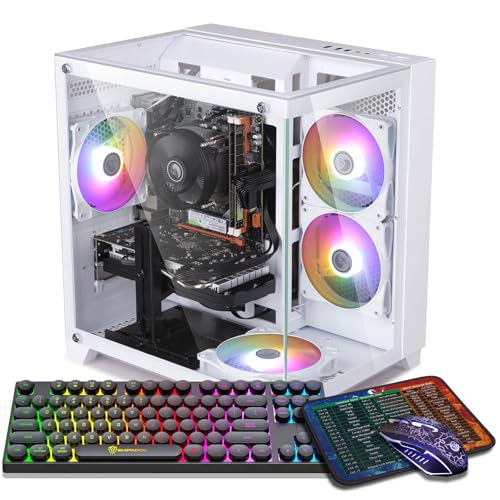
Where to buy
Check the latest price, availability and delivery on Amazon. Orders are placed on Amazon. We may earn a commission from qualifying purchases.
- Best overall for a first 1440p PC: ZER-LON Gaming PC, Ryzen 5 5500, RTX 4060 8GB — Check on Amazon
- STGAubron Gaming PC, Ryzen 5 5500, RTX 3060 12GB — Check on Amazon
- LXZ Gaming PC, Ryzen 5 5500, RTX 3050 8GB, 32GB RAM — Check on Amazon
- ZOTAC MEK Gaming PC, Ryzen 5 5500, RTX 3050 — Check on Amazon
See 2 more Amazon options
- STGAubron Gaming PC, Ryzen 5 5500, RTX 3050 6GB, 1TB SSD, White — Check on Amazon
- WIWB Gaming PC, Ryzen 5 5500, RTX 3050 8GB, 512GB SSD — Check on Amazon
Read the full guide ↓
Disclosure: As an Amazon Associate, reviewstook.com earns from qualifying purchases. Links to Amazon on this page are affiliate links; they cost you nothing extra. Listing details such as price and availability change often, so check the current Amazon listing before you buy.
If this is your first gaming PC, welcome — this guide is written for you. Every technical word below is explained in plain language the first time it appears. The short version: you have $700, you want to play games on a sharp 1440p monitor (1440p is a screen resolution — the number of dots, called pixels, that make up the picture — and it is noticeably crisper than the more common 1080p), and you want a ready-made computer (a prebuilt) that works out of the box. All six machines here are prebuilt towers with Windows 11 already installed.
Now the honest part, before you spend anything. At $700, “1440p gaming” comes in two flavours. The first is the games millions play most — competitive titles like Fortnite, Valorant, League of Legends and Rocket League, plus older and lighter games — which run directly at full 1440p on these machines, fast and smooth. The second is the big, cinematic story games with realistic forests, cities and weather. Those are too heavy to draw at full 1440p on their highest settings, so the PC uses a trick explained below called upscaling: it draws the game lower, then intelligently rebuilds the picture to fill your 1440p screen. It looks close to the real thing and runs smoothly. What $700 does not buy — from anyone, whatever their listing claims — is the heaviest new games at full native 1440p on ultra settings. This guide covers the real version: the most genuine 1440p $700 can honestly deliver, in a machine you can upgrade later instead of replacing.
One more thing: prices for ready-made gaming PCs jump around a lot, and the same tower’s live price can swing noticeably from one month to another. Every machine below is a real Amazon listing in this budget class, though several also spend time above that line — treat this as a “buy it when it is at or under $700” list. If the machine you want is priced well above the line on the day you shop, do not pay it — wait for the drop, pick the machine under the line that day, or look at the next tier up in Best 1440p Gaming PC Under $800.
1440p in Plain English: The Five Ideas That Matter
Resolution and pixels. Your screen’s picture is a grid of tiny dots called pixels. A 1080p screen is 1920 by 1080 — about 2.07 million dots. A 1440p screen is 2560 by 1440 — about 3.69 million, roughly 78 percent more. More dots means a sharper picture. The catch: your PC must work out the colour of every dot, dozens of times per second — which is why 1440p is where budget PCs start to feel the strain.
The graphics card (GPU) and VRAM. Two parts share the work. The processor (CPU) runs the game’s logic; the graphics card, or GPU, draws the picture. For gaming the card matters most; every pick here has a proper separate card (a discrete GPU). The card has its own memory, called VRAM, which holds textures — surface details on walls, clothing, ground and sky. At 1440p textures are bigger, so VRAM runs out sooner; when it does, games stutter and scenery pops in late. Remember this ladder: 12GB of VRAM is comfortable at 1440p, 8GB is workable with occasional texture compromises, and 6GB means turning textures down as a routine.
Render resolution versus display resolution. The resolution your screen shows (display resolution) and the resolution your PC draws the game at (render resolution) do not have to match: your monitor can show a 1440p picture the PC drew lower and enlarged cleverly — like a photo taken slightly soft, then sharpened by very good software. That gap is where budget 1440p lives.
Upscaling (DLSS and FSR). The clever enlargement has brand names — NVIDIA’s DLSS and AMD’s FSR — and both do the same job: the game renders lower (DLSS on its “Quality” setting at 1440p output renders at 1707×960, a little below a 1080p frame in pixel count) and software rebuilds the full 1440p image from previous frames. In motion it looks remarkably close to true 1440p and can return a third or more extra performance. One pick below also has DLSS Frame Generation, which inserts extra software-created frames between real ones to make motion smoother still, at a whisker of added delay that competitive players dislike and story-game players rarely notice.
Frame rate and settings. Games are measured in frames per second (fps) — how many new pictures the PC draws each second. Thirty fps is playable but choppy; sixty is the smooth standard most people aim for; competitive players chase 100-plus. Separately, every game has settings — low, medium, high, ultra — controlling how fancy the graphics look. The beginner secret nobody puts on the box: medium to high is a visible jump; high to ultra is mostly visible in screenshots. These machines are built for 1440p at medium-to-high settings with upscaling helping in heavy games. Chasing “ultra” is what pushes you into a much higher budget tier.
In this guide
Quick Picks
Short on time? Each row names a type of first-time buyer and the machine that suits them.
| Buyer type | Pick | Why it stands out | Link |
|---|---|---|---|
| Best first 1440p PC overall | ZER-LON Gaming PC, Ryzen 5 5500, RTX 4060 8GB | The newest, fastest graphics card here, with frame smoothing | Check on Amazon |
| Best for big, detailed game worlds | STGAubron Gaming PC, Ryzen 5 5500, RTX 3060 12GB | 12GB of VRAM — half again as much graphics memory as the 8GB cards | Check on Amazon |
| Best if you do lots of things at once | LXZ Gaming PC, Ryzen 5 5500, RTX 3050 8GB, 32GB RAM | 32GB of system memory — double every other pick | Check on Amazon |
| Best for nervous first-time buyers | ZOTAC MEK Gaming PC, Ryzen 5 5500, RTX 3050 | A known brand, with a quality power supply named in the listing | Check on Amazon |
| Best if your game library is huge | STGAubron Gaming PC, Ryzen 5 5500, RTX 3050 6GB, White | A big 1TB drive and keyboard and mouse in the box | Check on Amazon |
| Best if money is really tight | WIWB Gaming PC, Ryzen 5 5500, RTX 3050 8GB | The better 8GB entry card in the cheapest complete tower | Check on Amazon |
How These Picks Were Chosen
We applied the $700 budget as a ceiling each machine has to be able to meet, not a price it shows every day. Every product below is a real Amazon.com listing we verified directly — brand, processor, graphics card, memory, storage and model details all come from the listing itself. Check price on Amazon for the current figure for each pick: prices in this class swing noticeably, so the live listing is the only price that counts, and a pick belongs in this guide only when that live price is at or below $700.
We did not use these machines ourselves. We compared the parts in the order they decide your gaming experience: graphics card first, its VRAM second, processor third, then system memory (RAM — the PC’s short-term workspace, separate from the card’s VRAM), storage, and finally the power supply (PSU — the box that feeds electricity to everything, and the part that decides whether a future upgrade is easy). That ordering produced a clear league table. The RTX 4060 sits on top: a generation newer than the rest, and the only card here with Frame Generation. The RTX 3060 follows because its 12GB of VRAM matters more at 1440p than headline speed suggests. The RTX 3050 machines (8GB and 6GB) are included with their role stated plainly: 1080p-class cards that drive a 1440p monitor well in lighter games and respectably in heavier ones through upscaling, earning their places on price, memory, storage or build quality — not 1440p power.
Three beginner-friendly filters sat on top of the specs. First, every pick has a real, separate graphics card; machines relying on processor-built graphics are fine office PCs but not 1440p gaming PCs, and confusing listings are exactly how beginners get burned. Second, every pick uses the same processor, AMD’s Ryzen 5 5500 — six cores (a core is one worker inside the processor; six is plenty for gaming) at up to 4.2GHz. That sameness helps you: at 1440p the card does the heavy lifting, the 5500 is enough for every card here, and the differences between picks are exactly what your money should choose between — card, memory, storage, builder. Third, completeness: Windows 11 installed, Wi-Fi built in (no cable needed to get online), and a standard tower case you can open later — the realistic story of owning a $700 PC is a better graphics card in two or three years.
The 6 Best 1440p Gaming PCs Under $700 for Beginners
ZER-LON Gaming PC, Ryzen 5 5500, RTX 4060 8GB, 16GB RAM, 1TB SSD
Who it suits: The beginner who means it about 1440p — buying (or already owning) a 1440p monitor mainly for modern story games, and wanting the strongest graphics card this budget can reach.
Start with the graphics card, because it is the entire argument. The GeForce RTX 4060 is one generation newer than every other card here, and its decisive advantage is precisely what a beginner at 1440p needs. Like the other NVIDIA cards here it has DLSS upscaling, but only this card has DLSS 3 Frame Generation, which inserts extra software-created frames between real ones in supported games — so a demanding game that would feel slightly choppy at 1440p on the other picks can feel properly smooth on this one. It is not magic (it adds a tiny delay, and only works in supported games), but it is the most valuable feature a card in this tier can carry. Around the card, the machine (model AOV4060) is the shared recipe done completely: 16GB of RAM, a roomy 1TB SSD, Wi-Fi, Windows 11 Home, and four light-up RGB fans in a white tower.
The cautions are memory and price. The RTX 4060’s 8GB of VRAM is a real working limit at 1440p: most games are happy with textures on high, but the heaviest releases will ask for medium textures or a lean on upscaling — the deal this budget makes. The price is the wilder ride: this model often sits above the budget line, with appearances at or under $700 arriving during sales — check price on Amazon before you decide. This is the reach pick: at or under $700, buy it ahead of everything else here; above that, do not stretch — the next pick down, or the $800 tier, is the sensible move.
- RTX 4060 8GB — the newest and fastest card in this guide, and the only one with Frame Generation.
- 1TB SSD and 16GB of RAM.
- An efficient, low-power card that keeps the tower cool and quiet.
Honest limitation: 8GB of VRAM means turning textures down in the heaviest 1440p games, and this model’s price spends real time above $700 — it is a buy-it-on-sale pick, not an everyday-$700 pick.
Choose it if your price check shows it at or under $700 and story games at 1440p are your priority. Skip it if it is sitting well above the budget line today and you need a PC this week — that money belongs to the next tier up.

STGAubron Gaming PC, Ryzen 5 5500, RTX 3060 12GB, 16GB RAM, 1TB SSD
Who it suits: The beginner whose favourite games are the big explorable ones — open worlds, driving and flying simulators, games with add-on modifications (“mods”) — where the scenery is the point.
This machine’s case rests on one number: 12. The RTX 3060 inside carries 12GB of VRAM, half again as much as the 8GB cards around it. Remember the ladder from the explainer: when a game outruns its VRAM, it stutters and textures arrive late. Twelve gigabytes pushes that moment far away at 1440p, which is why this older card finishes second in a guide for new players who will keep it for years. The honest trade: the RTX 3060 is a 2021 design, a step slower than the RTX 4060 in raw speed, and its upscaling tops out at the older DLSS 2 — still very good, but no Frame Generation. Its ray tracing (a fancy lighting technique that makes reflections and shadows more realistic) is best left off in heavy games at 1440p. The rest of the build is generous: Ryzen 5 5500, 16GB of RAM, a 1TB SSD, the best wireless here (Wi-Fi 6 and Bluetooth 5.2), four RGB fans, a light-up keyboard and mouse in the box, Windows 11 Home, and a stated one-year warranty (model ABR1722).
Two pieces of beginner homework come with this one. STGAubron is a value brand rather than a famous name, so when the box arrives, do the checks this guide walks through later: confirm the card really is the 12GB model, and play your most demanding game for an evening while still inside Amazon’s return window. And check price on Amazon before you buy: this listing moves around the budget line, so only buy it when the live price fits the budget.
- RTX 3060 with 12GB of VRAM — by far the most graphics memory in this guide.
- Wi-Fi 6, Bluetooth 5.2, 1TB SSD, keyboard and mouse included.
- DLSS 2 upscaling, with texture headroom the 8GB cards cannot match at 1440p.
Honest limitation: An older card with no Frame Generation and modest ray tracing, from a value brand — checking the parts on arrival is part of the deal, and the guide shows you how below.
Choose it if you play open-world, modded or simulator games and detailed textures matter more than the newest features. Skip it if your library is mostly fast competitive shooters, where the RTX 4060’s speed and Frame Generation count for more than memory.

LXZ Gaming PC, Ryzen 5 5500, RTX 3050 8GB, 32GB RAM, 1TB NVMe SSD
Who it suits: The beginner who does everything at once — game on one screen, voice chat with friends, a browser with twenty tabs, music, maybe a stream or a recording running.
Every other machine here ships with 16GB of system RAM; this LXZ build ships with 32GB, and it changes what the machine is for. Think of RAM as desk space: 16GB fits the game; 32GB also fits the chat app, the browser, the recording software and the launchers arguing in the corner — without the PC shuffling things into slow storage mid-game, one cause of the stutters beginners blame on the graphics card. The rest is the familiar recipe: Ryzen 5 5500, a 1TB NVMe SSD (NVMe is simply the fastest common type of SSD), Windows 11, in a white tower.
Now the graphics card, honestly. The RTX 3050 is a 1080p card — here, the affordable route onto a 1440p monitor. Competitive and lighter games run genuinely well at full 1440p on it. Heavier games run with the screen at 1440p but the game rendered lower and upscaled with DLSS, at medium settings — enjoyable and honest, as long as nobody promised you native 1440p on high. This is the 8GB version, the better of the two 3050s, with texture breathing room the 6GB version below lacks. One caution is specific to this seller: LXZ sells several similar-looking machines under similar titles, a click apart, and this listing’s details page mixes information from its variants. Before you pay, confirm the checkout page says Ryzen 5 5500, RTX 3050 8GB, 32GB RAM, 1TB. On price, check price on Amazon for this exact configuration — the wider LXZ line also includes smaller configurations in lower tiers, so make sure the live price you see is for the 32GB version described here.
- 32GB of RAM — double every other pick, and the headroom heavy multitaskers actually feel.
- The RTX 3050 in its stronger 8GB form, with DLSS upscaling for 1440p output.
- 1TB NVMe SSD, in a white tower.
Honest limitation: The RTX 3050 is a 1080p-class card — at 1440p it lives on upscaling and medium settings — and this seller’s listings mix configurations, so verify the exact spec in your cart before checkout.
Choose it if you stream, record or multitask heavily and your games are competitive and mainstream titles. Skip it if demanding story games at 1440p are the main event — that is the RTX 4060’s job, at the top of this guide.

ZOTAC MEK Gaming PC, Ryzen 5 5500, RTX 3050, 16GB RAM, 500GB NVMe SSD
Who it suits: The cautious beginner — buying a first PC for yourself, a teenager, or a shared household, and dreading an argument with an obscure marketplace seller if something goes wrong. You would rather pay for confidence than for frames.
ZOTAC is the one name here you will also find on graphics cards sold worldwide, and this MEK tower (model MEK3050A5500BG0A) is a real manufacturer’s version of the budget recipe. Two specification lines separate it from the marketplace builds. The first is the power supply: a 650W 80+ Gold unit, named in the listing, where most rivals in this class say nothing about theirs. A power supply converts wall electricity into the voltages your parts drink; a Gold rating means it wastes less of it as heat. Six hundred and fifty watts is also comfortably more than this machine needs today — the point that matters in year three, when a stronger graphics card arrives. The second is Wi-Fi 6E, the best wireless standard in this guide. Note one deliberate silence, kept from the maker’s own materials: the listing does not headline a VRAM figure for this RTX 3050, so neither do we — the card carries the same class-level expectations as the other 3050s here, and you can confirm the exact figure on the live listing.
The trade you make is storage. The SSD is 500GB — half the 1TB drives elsewhere here. Modern big titles commonly eat 80–150GB each, so 500GB means four or five large games at a time, or an inexpensive second drive later. On price, check price on Amazon and apply the standing rule: it is a pick when the live price is at or under $700. That is the product here: not extra speed, but fewer unknowns.
- A 650W 80+ Gold power supply, specified in the listing — rare and valuable in this tier.
- Wi-Fi 6E, and a global brand’s warranty and support behind the tower.
- The standard, proven formula: Ryzen 5 5500, RTX 3050, 16GB RAM, Windows 11.
Honest limitation: The 500GB SSD is the joint-smallest in this guide, and the RTX 3050 is a 1080p-class card — you are paying for build quality and backing, not extra gaming power.
Choose it if reliability, a named power supply and brand support matter more than storage space. Skip it if you install everything you own and never delete — start with a 1TB pick instead.

STGAubron Gaming PC, Ryzen 5 5500, RTX 3050 6GB, 16GB RAM, 1TB SSD, White
Who it suits: The beginner with a huge game library, a 1440p monitor already on the desk, and a firm budget — you would rather have room for every game you own, and a keyboard and mouse in the box, than the last word in graphics settings.
Read this build as a spending decision: less on the graphics card — the RTX 3050 in its 6GB form — and more on everything around it: 16GB of RAM, a full 1TB SSD, six RGB fans, Wi-Fi 6, Bluetooth 5.0, and a light-up keyboard and mouse included, in a white tower. For a first-time buyer starting from an empty desk, it is the closest thing here to a one-purchase setup. A 1TB drive holds a working library without the uninstall shuffle, and this is one of the picks often found under the line without a major sale — check price on Amazon to confirm it fits the budget on the day you buy.
And then the graphics card, with the full honesty treatment, because a beginner deserves to hear it before checkout rather than after. The 6GB RTX 3050 is the weakest card in this guide, and 6GB of VRAM is the tightest limit here: at 1440p, demanding games will need textures on medium or low, upscaling is not an optional extra but the load-bearing structure, and a few of the heaviest recent releases are, truthfully, 1080p games on this machine whatever your monitor says. What it does well is the lighter half of gaming — competitive titles, older big games, indie and strategy games at 1440p are all genuinely enjoyable — in a complete, roomy tower. The closing argument is the upgrade path: choosing this lower tier now leaves more of your budget for a future stronger card.
- A 1TB SSD plus a keyboard and mouse in the box — the most complete starter package here.
- Regularly found near the budget line — check price on Amazon.
- Six RGB fans, Wi-Fi 6 and Bluetooth 5.0 in a white tower.
Honest limitation: The 6GB RTX 3050 is this guide’s graphics floor — 1440p here means upscaled images and medium settings, and the heaviest new games belong at 1080p.
Choose it if library size, completeness and price lead your list, with a graphics upgrade planned down the road. Skip it if you want to buy once and never upgrade — the RTX 4060 pick is that machine.

WIWB Gaming PC, Ryzen 5 5500, RTX 3050 8GB, 16GB RAM, 512GB SSD
Who it suits: The beginner at the very floor of the budget — stepping up from a console or an ageing laptop, money genuinely tight, wanting a real graphics card and a 1440p monitor now, with room to grow.
This WIWB build (model wwr5go) makes one decision very well, and it is the decision beginners most often get wrong: given a limited graphics budget, it buys the right version of the card. The RTX 3050 came in two forms that share one name, and the 8GB one here is meaningfully the better buy at 1440p than the 6GB version above — more VRAM for textures, the same DLSS upscaling, and a longer useful life. When two products share a name, the number after it is the product. Around the card: the shared Ryzen 5 5500, 16GB of DDR4 RAM at 3200MHz as the listing specifies, a 512GB SSD, and Windows 11. It is sold by WIWB Direct and shipped from Amazon, and the listing notes a Prime-member price — so check price on Amazon carefully for the exact live figure for this configuration.
The compromises are visible. The 512GB drive is the joint-smallest here, so plan on a focused library — a handful of big games at a time — or a second drive later, which the upgrade section below covers. WIWB is a small Amazon brand, so do the arrival homework from the walkthrough below: confirm the card and memory match the listing, and keep the box until the second week. And the RTX 3050’s standing caveat applies in full: at 1440p this is an upscaling machine for medium settings and a strong competitive-gaming machine, not a native-1440p ultra machine. What you get is the lowest-cost route here to a proper discrete-graphics tower on an upgradeable platform.
- The 8GB RTX 3050 — the better of the two same-named cards for 1440p textures.
- 16GB of DDR4 3200 RAM, ready to upgrade.
- Shipped from Amazon — check price on Amazon, with a Prime-member price noted on the listing.
Honest limitation: A 512GB SSD and a small-seller badge: storage discipline and arrival checks are part of the purchase, and 1440p performance is upscaling-based.
Choose it if the budget is firm, the monitor is already 1440p, and you are happy to grow the machine later. Skip it if you can stretch to the ZER-LON when it is on sale — the RTX 4060 is a different class of 1440p experience.

Comparison Table
| Product | Graphics card | RAM / Storage | Best use | Link |
|---|---|---|---|---|
| ZER-LON Gaming PC, RTX 4060 | RTX 4060 8GB, DLSS 3 Frame Generation | 16GB / 1TB SSD | The most real 1440p under $700 | Check on Amazon |
| STGAubron Gaming PC, RTX 3060 | RTX 3060 12GB, DLSS 2 | 16GB / 1TB SSD | Big, detailed, texture-heavy game worlds | Check on Amazon |
| LXZ Gaming PC, RTX 3050 8GB | RTX 3050 8GB, DLSS 2 | 32GB / 1TB NVMe SSD | Streaming, recording and heavy multitasking | Check on Amazon |
| ZOTAC MEK Gaming PC, RTX 3050 | RTX 3050, DLSS 2 | 16GB / 500GB NVMe SSD | Build quality, brand backing, low worry | Check on Amazon |
| STGAubron Gaming PC, RTX 3050 6GB | RTX 3050 6GB, DLSS 2 | 16GB / 1TB SSD | Big library, complete box, low price | Check on Amazon |
| WIWB Gaming PC, RTX 3050 8GB | RTX 3050 8GB, DLSS 2 | 16GB / 512GB SSD | The budget floor, with the better 3050 | Check on Amazon |
Your First Evening: A Beginner’s Setup Walkthrough
Every pick here arrives with Windows 11 installed. Here is the whole first-evening job, in order, including the two traps that catch almost every first-time owner.
- Unbox and check inside. Many prebuilt PCs ship with a foam block or air pillows packed inside the case to protect the parts in transit. Look through the side panel; if yours has packing inside, open the panel (usually two thumb-screws at the back) and remove it before switching on.
- Plug the monitor into the graphics card — not the motherboard. The single most common beginner error in PC gaming. On the back of the tower are two clusters of sockets: the upright cluster belongs to the motherboard; the horizontal row lower down, on the graphics card itself, is where your monitor cable must go. Plug into the motherboard and the PC uses the processor’s weak built-in graphics instead.
- Power, keyboard, mouse, internet. Connect the power cable, flip the small rocker switch on the back if there is one, then press the power button. Plug in keyboard and mouse (or their USB wireless receivers). All six picks have Wi-Fi built in, so when Windows asks, join your home network — no cable needed.
- Let Windows finish, then update the graphics driver. The first start takes a few minutes; create your account and let it restart if it asks. Then install NVIDIA’s free app and let it download the latest graphics driver — the software that lets Windows talk to your card. Let Windows Update run too, then restart once more.
- Tell Windows your monitor is fast. If you bought a high-refresh 1440p monitor (refresh rate, measured in Hz, is how many times per second the screen redraws — 144Hz is far smoother than 60Hz), Windows often leaves it idling at 60Hz. Go to Settings, System, Display, Advanced display, and choose the highest refresh rate listed.
- Install a game store and your first game. Most PC games live on Steam, a free app and storefront. In your first game’s graphics settings: display resolution 2560×1440, DLSS (or FSR) on Quality where offered, textures as high as your VRAM ladder allows, and ray tracing off unless you bought the RTX 4060 pick and the game is a lighter one.
- Do the arrival check while returns are easy. In Settings, System, About, confirm your RAM amount; in the NVIDIA app, confirm your card’s name; in File Explorer, check your drive size. Play your most demanding game for an evening. Anything that disagrees with the listing is a return-window conversation. Keep the box until week two.
What Else You Need: The Starter Kit, Costed Separately
The $700 buys the tower, not the things that plug into it. Here is the rest of a first setup, described in qualitative tiers. None of it is included in the tower budget above.
- A 1440p monitor: a decent 27-inch 1440p screen sits in the budget-to-mid-range tier for monitors, with high-refresh (144Hz) models in the same neighbourhood during sales. This is the one item that is not optional for this guide’s keyword — without the screen, there is no 1440p.
- Keyboard and mouse: a perfectly good basic set is an inexpensive, budget-tier add-on. The two STGAubron picks in this guide include an RGB keyboard and mouse in the box, so their buyers can skip this line on day one.
- Sound: a starter gaming headset with a microphone for voice chat is a budget-tier add-on, or use speakers and headphones you already own.
- A cable and a power strip: monitors usually include one display cable; DisplayPort is preferred for high refresh rates. A surge-protected power strip is cheap insurance.
Added up, a from-scratch beginner should budget beyond the tower itself for the full desk — tower, monitor and peripherals — even when the tower itself is bought at or under $700. If that extra cost breaks the budget, the honest fix is to look at Best 1440p Gaming PC For Beginners Under $500 for the tower and keep the monitor money intact, not to buy a $700 tower and plug it into an old 1080p television. And if your room is small, the same machines are graded purely on size and placement in Best 1440p Gaming PC For Small Spaces Under $700.
How to Choose: A Beginner’s Checklist
- Choose by graphics card first, always. At 1440p the card does the overwhelming share of the work; what separates these machines is the card, its VRAM and its upscaling features, in that order.
- Match the card to your actual games. Competitive and lighter games: any pick here will please you at 1440p. Modern story games: the RTX 4060, or the RTX 3060 if your worlds are texture-heavy. Buy for the library you own, not the one you imagine.
- Use the VRAM ladder. 12GB holds high textures comfortably at 1440p; 8GB works with occasional texture compromises in the heaviest games; 6GB means medium textures as a routine. A cheaper machine with less VRAM is not the same machine for less money.
- Apply the live-price rule. A pick in this guide is a $700 pick when its listing is at or under $700 on the day you buy. If your first choice is sitting high, wait, buy the pick under the line, or re-budget to the $800 tier.
- Count storage in games, not gigabytes. A 1TB drive holds a working library; 500–512GB holds four or five big modern titles plus Windows.
- Ask what the power supply is. It decides whether your future graphics card upgrade is a ten-minute job or a rebuild. The ZOTAC’s specified 650W 80+ Gold unit is the standard to compare against; where a listing says nothing, assume the ceiling is lower until you read the label inside.
- Confirm the exact configuration in the cart. Several sellers in this class list families of similar machines under near-identical titles, a click apart. The title on the checkout page — not the search result, not a photo — is the machine you are buying.
Your First Upgrade, In Plain Terms
Sooner or later you will want more, and every machine here was chosen to allow it. Upgrading a standard tower is closer to changing a light bulb than to surgery: PC off and unplugged, open the side panel, release the old part, seat the new one until it clicks, close up.
First upgrade for most people: the graphics card. It defines your gaming performance, and it is the upgrade that makes a three-year-old machine feel new. Check two things first: that your power supply has enough watts for the new card, and that the card physically fits the case.
First upgrade for the small-drive picks: a second SSD. If you bought the 500GB ZOTAC or the 512GB WIWB and your library keeps overflowing, adding storage is the cheapest, easiest upgrade in computing — no reinstalling Windows, just a second drive for games.
Later, and only if your habits grow: RAM. If you bought a 16GB machine and drift into streaming or heavy multitasking, adding memory to reach 32GB is inexpensive and beginner-doable. A much faster processor is rarely the best value, because at 1440p the graphics card is where your money works.
Common Beginner Mistakes
- Plugging the monitor into the wrong sockets. The motherboard’s display outputs bypass your graphics card. Use the horizontal row of sockets on the card itself. Half of all “my new PC is slow” stories end here.
- Believing “1440p gaming PC” on a listing means the heaviest games at full 1440p on ultra. At $700 it means 1440p on screen, upscaling helping in heavy games, settings at medium-to-high — a genuinely good experience, not the fantasy version.
- Paying above the line. A $700-class tower bought well above its budget line during a price spike is the worst purchase in this category.
- Comparing processors and ignoring graphics cards. At 1440p, a faster processor behind a weaker card loses every time. Card first, VRAM second, processor third.
- Buying a PC with no graphics card by accident. If a listing names a processor but no separate card, the “graphics” are the weak built-in kind, whatever the gaming artwork suggests.
- Confusing the two RTX 3050s. The 8GB and 6GB versions share a name and differ precisely where 1440p cares most. Check the memory figure in the listing, not just the card’s name.
- Forgetting the rest of the desk. The tower is not the whole purchase. If the peripherals would break the budget, step the tower down a tier (see Best 1440p Gaming PC For Beginners Under $500) rather than stranding a good PC.
- Throwing the box away on day one. Wrong variants and early faults happen in this class — free to fix inside the return window, annoying outside it. Verify on arrival, then recycle the packaging after week one.
- Turning ray tracing on first and judging the PC by it. At this budget, fancy lighting is a garnish for the RTX 4060 in lighter games, not a baseline. Judge these machines on normal graphics with upscaling on.
Final Recommendation
- Most beginners, when the price is right: ZER-LON Gaming PC, RTX 4060.
- Big open worlds, mods and simulators: STGAubron Gaming PC, RTX 3060 12GB.
- Streamers and relentless multitaskers: LXZ Gaming PC, 32GB RAM.
- Gifts, first PCs and the worry-averse: ZOTAC MEK Gaming PC.
- Huge libraries on a firm budget: STGAubron Gaming PC, RTX 3050 6GB, 1TB.
- The lowest-cost start in PC gaming: WIWB Gaming PC, RTX 3050 8GB.
If you only remember two names, remember these. The ZER-LON is the pick for the most genuine 1440p this money buys: the newest card, the frame-smoothing feature nobody else here has, and a full-size drive — bought when its price dips to the line. The STGAubron RTX 3060 machine is the pick for the beginner who will keep their PC for years: its 12GB of graphics memory will still be holding detailed textures when the 8GB cards start negotiating. Between them they cover the two honest shapes of this search — the newest features, or the most memory. The other four map to the list above: memory for multitaskers, backing for gifts, completeness and price for the budget pair. If today’s live prices refuse to cooperate, compare Best 1440p Gaming PC Under $500 below and Best 1440p Gaming PC Under $800 above before forcing this tier, and if your plans include broadcasting your games, the same budget is graded purely on streaming in Best 1440p Gaming PC For Streaming Under $700. Check the live price, confirm the configuration in the cart, plug the monitor into the graphics card — at $700, those three habits are worth as much as any component in the box.
Frequently Asked Questions
I have never owned a gaming PC. Can I actually set one of these up myself?
Yes — that is the point of a prebuilt. The walkthrough earlier in this guide covers the whole first evening: unbox, plug the monitor into the graphics card (not the motherboard), connect power, let Windows finish, update the graphics driver, set your monitor’s refresh rate, install Steam and play. Nothing needs building, and every step is reversible.
Can a PC under $700 really game at 1440p, honestly?
Yes — with the definition this guide has used throughout. Competitive and lighter games run at full native 1440p at high frame rates on the stronger picks. Demanding modern games run with the screen at 1440p, the game rendered lower and upscaled with DLSS, settings at medium-to-high and textures matched to your VRAM — smooth and good-looking at around sixty frames per second on the RTX 4060 and RTX 3060 machines. What $700 does not buy is the heaviest new games drawn natively at 1440p on ultra — that requires a higher budget tier.
What is upscaling, and will I notice it?
Upscaling means the PC draws the game at a lower internal resolution — DLSS on Quality at 1440p output draws at 1707×960 — and software rebuilds the full 1440p picture from that, frame by frame. In still screenshots a careful eye can spot slight softness; in motion, most players cannot tell it apart from native rendering, and the performance it returns — roughly a third more — is the difference between choppy and smooth at this budget. On a $700 machine it is the intended way these PCs are used. Turn it on.
RTX 4060 with 8GB or RTX 3060 with 12GB — which should a beginner pick?
For most beginners, the RTX 4060: faster, newer, lower power, and Frame Generation makes demanding games feel smooth in a way that is hard to give up once seen. The RTX 3060 is the pick if your library is specifically texture-heavy — open worlds, modded games, simulators — where its 12GB of VRAM keeps detail settings high at 1440p long after 8GB cards start asking you to turn textures down. If your games are a bit of everything, decide for the 4060.
Is the RTX 3050 a 1440p card?
Not natively, and this guide will not pretend otherwise. The RTX 3050 — in both 8GB and 6GB forms — is a 1080p card that drives a 1440p monitor well in competitive, strategy, indie and older games, and acceptably in heavier games with upscaling and medium settings. If native 1440p in modern big-budget games is your firm requirement, the honest answer is the RTX 4060 pick on sale, or a higher budget — see Best 1440p Gaming PC For Beginners Under $800.
Why does every pick use the same Ryzen 5 5500 processor?
Because at 1440p the graphics card is the bottleneck — the part that runs out first — and the six-core Ryzen 5 5500 is enough processor for every card here. Spending more on the processor would mean spending less on the card, the wrong trade at this resolution. The shared processor also keeps your comparison honest: the differences are the card, the memory, the storage and the builder. A rival listing offering a fancier processor behind a weaker card is optimised for its headline, not your games.
How much VRAM do I need for 1440p?
Use the ladder from the explainer. Twelve gigabytes removes the texture question in almost everything. Eight gigabytes is the working standard: most of today’s library at 1440p with sensible texture settings, and an occasional step down in the heaviest releases. Six gigabytes plays at 1440p with textures lowered and upscaling on, and will age fastest. One habit: if a game stutters at 1440p, lower texture quality first — that is what VRAM is spent on.
What is the first upgrade I should plan for?
For most owners, the graphics card — it defines 1440p performance, and these standard towers accept a future card as designed. Check your power supply’s wattage and that the card fits the case first. Exceptions: owners of the 500GB ZOTAC or 512GB WIWB may feel a second SSD sooner; a 16GB machine that grows into streaming will want more RAM third. Buy upgrades in sales, with the same patience as the PC itself.


