Where to buy
Check the latest price, availability and delivery on Amazon. Orders are placed on Amazon. We may earn a commission from qualifying purchases.
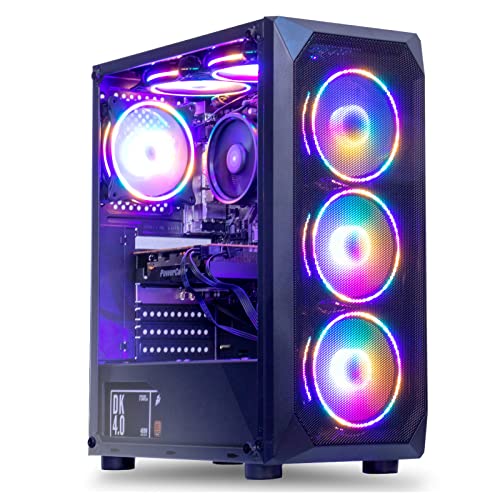
- Best overall (buy on sale): MXZ Gaming Desktop, Ryzen 5 5500, GTX 1660 Super 6GB, 16GB DDR4, 500GB NVMe SSD — Check on Amazon
- STGAubron Gaming PC, Ryzen 5 5500, Radeon RX 580 8GB, 16GB DDR4, 512GB SSD — Check on Amazon
- Beelink SER5 MAX Mini PC, Ryzen 7 7735U, Radeon 680M, 24GB LPDDR5, 500GB SSD — Check on Amazon
- GMKtec NucBox M6 Ultra, Ryzen 5 7640HS, Radeon 760M, 16GB DDR5, 512GB SSD — Check on Amazon
See 2 more Amazon options
- LXZ Gaming PC, Ryzen 5 5600GT, Integrated Radeon Graphics, 16GB DDR4, 1TB NVMe SSD — Check on Amazon
- ACEMAGICIAN AM06 Pro Mini PC, Ryzen 7 5800U, Radeon Vega 8, 16GB DDR4, 512GB NVMe SSD — Check on Amazon
Read the full guide ↓
Disclosure: As an Amazon Associate, reviewstook.com earns from qualifying purchases. Links to Amazon on this page are affiliate links; they cost you nothing extra. Listing details such as price and availability change often, so check the current Amazon listing before you buy.
If this is your first gaming PC, welcome — and take a breath, because this guide starts with the sentence most pages like this one bury: a $500 computer cannot play brand-new games at full 1440p with the settings turned up. Not any prebuilt at this price, whatever the listing title promises. Here is what $500 genuinely can do, in plain language. It can run competitive games — the online shooters and sports titles most people actually play — directly at 1440p on modest settings. It can run big new releases by doing the heavy lifting at a lower internal resolution and stretching the picture up to fill your 1440p screen, a trick called upscaling that looks far better than it sounds. And it can run everything that is not a game — web, video, documents — at full, pin-sharp 1440p all day. If that honest version of “1440p gaming PC” sounds like the machine you want, this guide will get you there without wasting your money.
One more beginner warning, because it causes more regret than any other in this price range: the prices move. Two of the six machines below — the full-size towers with proper graphics cards — spend much of the year above the $500 budget for this guide and only drop within it during sales. The other four picks fit this budget more consistently. So treat this page as a shopping list: check the current price on Amazon for each pick, and if the live price sits well above this budget, you are looking at a PC from a higher tier, not this one — wait for a sale, or pick a different row.
New to This? Six Ideas That Explain Everything Below
Gaming PC listings are written in a dialect designed to impress people who already know it. These six ideas are all you need.
- The GPU (graphics processing unit). The part that draws the game. In some PCs it is a separate card you could hold in your hand — a “graphics card” or “discrete GPU.” In others it is a small graphics section built into the main processor, called “integrated graphics” or an iGPU. A separate card is almost always much faster. When a listing shouts about the processor and whispers about the graphics, the graphics are the weak part.
- The CPU (the processor). The part that runs the game itself — the world, the physics, the other players. Every CPU in this guide is honestly good enough for 1440p gaming. Beginners routinely overpay for a famous CPU name while the graphics — the part that decides how a game looks and runs — get whatever money is left. Do not.
- Resolution, and the two kinds that matter. A monitor’s resolution is how many dots — pixels — it can show. 1440p means 2560×1440, about 3.69 million pixels, roughly 78% more than a 1080p screen. “Display resolution” is what the monitor shows; “render resolution” is the size the PC actually draws the game at first. They can differ.
- Upscaling. The PC draws the game smaller — say at 1080p, about 2 million pixels of work instead of 3.69 million — then stretches and sharpens it to fill the 1440p screen. Games offer this under names like FSR (AMD’s version, works on almost anything) and DLSS (NVIDIA’s version, only on its RTX cards — none of the cards here has it, and any listing implying otherwise is misleading you). Upscaling is not a failure; at this budget it is the intended way to play new games.
- VRAM (video memory). The graphics card’s own private storage for the images it is working with, measured in gigabytes (GB). At 1440p a card needs more of it than at 1080p; running out causes stutter and blurry textures. Here: the GTX 1660 Super has 6GB, the RX 580 has 8GB, and the integrated machines have none of their own — they borrow from the PC’s main memory, which is why that memory’s amount and speed matter so much for them.
- Frames per second (fps) and settings. Games are flip-books; more frames per second means smoother motion. 60fps is the comfortable target, 30fps is playable-but-chunky, competitive players chase far more. “Settings” are a game’s quality dials — textures, shadows, effects; lowering them trades beauty for smoothness. Every “can it run it?” answer below is really “at what settings, at what frame rate, rendered at what resolution?” — and we answer all three.
Two smaller terms appear in the reviews. RAM is the PC’s short-term memory — 16GB is the sensible gaming minimum now. The SSD is the drive games live on; bigger means more games installed at once, and the fast “NVMe” kind all six picks use means short loading screens. A PSU is simply the power supply; it matters later, when you upgrade.
In this guide
Quick Picks
Short on time, or comparing several options at once? Each row below names a buyer type and the product that suits it, with a link to the listing.
| Buyer type | Pick | Why it stands out | Link |
|---|---|---|---|
| Best overall (buy on sale) | MXZ Gaming Desktop, Ryzen 5 5500 / GTX 1660 Super | The strongest graphics card here — real 1440p in esports and older games; check price on Amazon — fits this budget mainly on sale | Check on Amazon |
| Best for older-game libraries | STGAubron Gaming PC, Ryzen 5 5500 / RX 580 8GB | 8GB of video memory — the most here — plus a keyboard and mouse in the box; check price on Amazon — fits this budget mainly on sale | Check on Amazon |
| Best to buy today | Beelink SER5 MAX, Ryzen 7 7735U / Radeon 680M | Modern integrated graphics and 24GB memory in a tiny, quiet box; check the current price on Amazon | Check on Amazon |
| Best newest technology | GMKtec NucBox M6 Ultra, Ryzen 5 7640HS / Radeon 760M | The newest parts here — DDR5 memory, USB4 — in a mini PC; check price on Amazon and buy when it falls within this budget | Check on Amazon |
| Best starter tower to grow | LXZ Gaming PC, Ryzen 5 5600GT / 1TB NVMe | A full-size tower with double the storage — check price on Amazon — add a graphics card later to complete it | Check on Amazon |
| Cheapest sensible start | ACEMAGICIAN AM06 Pro, Ryzen 7 5800U / Vega 8 | An eight-core mini PC positioned at the lower end of this budget — check price on Amazon — that leaves more room in the overall setup budget for a monitor | Check on Amazon |
How These Picks Were Chosen
We did not use these PCs ourselves. What we did is the homework a careful friend would do: we read the manufacturers’ listings and specification pages, checked each machine against independent sources, and compared the parts that decide how games run — graphics first, video memory second, then processor, memory and storage.
The budget rule was applied the way you will experience it at checkout: every pick is a real Amazon listing chosen to fit the under-$500 budget framing for this guide. Machines that sit clearly above this budget even on sale were excluded even when tempting, because a guide titled “under $500” that recommends computers from a much higher tier has not helped a beginner; it has upsold one. Where a machine only visits this budget during sales, the review says so plainly and advises you to check the current price on Amazon instead of assuming the sale positioning is the everyday positioning. We also distrust listing titles: in this corner of Amazon they bury the graphics and occasionally contradict the same page’s own specification table. Where that happens we tell you, and we tell you how to protect yourself: confirm the exact configuration on the live listing, screenshot your order, and test everything inside Amazon’s return window.
Two questions decided each pick’s place. First, the 1440p question: can it do something genuine at 2560×1440 Second, the next-year question: what happens when you outgrow it? The towers can accept a better graphics card and grow into true 1440p machines; the mini PCs cannot be upgraded in graphics at all — what you buy is what you retire.
The 6 Best 1440p Gaming PCs Under $500 for Beginners
MXZ Gaming Desktop — Ryzen 5 5500, GTX 1660 Super 6GB, 16GB DDR4, 500GB NVMe SSD
Who it suits: A beginner who wants the most actual gaming power this budget can reach, plays esports and a few years’ worth of big releases, and can wait for a sale before buying.
Start with the part that matters: the graphics card. The GeForce GTX 1660 Super is a proper separate graphics card — not integrated graphics borrowing the main memory, but its own chip with its own 6GB of fast GDDR6 video memory. That one fact makes this the strongest game player in the guide. On a 1440p monitor it plays competitive titles — Counter-Strike 2, Valorant, Rocket League, Apex Legends with some settings lowered — at the screen’s real resolution with smooth frame rates, and the enormous library of big games from before about 2022 at 1440p on medium settings comfortably. Brand-new heavy releases are where the budget shows: expect to render those at 1080p and upscale to the screen, which still looks good and plays smoothly. Two absences listing pages never volunteer: this card has no DLSS (NVIDIA reserves that for its RTX cards) and no ray tracing worth switching on — ray tracing pretties shadows and reflections while cutting frame rates hard, and at this budget you leave it off everywhere. The upscaling available is FSR in games that support it, plus each game’s own resolution scale. Around the card sits a sensible supporting cast: a six-core Ryzen 5 5500 that will not hold it back at 1440p, 16GB of memory, a 500GB fast SSD, a listed 450-watt power supply, six RGB fans, and Windows 11 Pro installed. Because it is a standard-parts tower, it also passes the next-year test better than any mini here: a future graphics card drops in with a screwdriver.
Now the buying rule, and it is strict: buy this PC only when it fits the under-$500 budget for this guide — check price on Amazon before you buy. When it sits within this budget, it is the best value in this guide by a wide margin. When it sits well above this budget, it has left this guide’s tier, and the right move is our Best 1440p Gaming PC Under $700 guide, where that higher tier buys more. One more piece of beginner protection: MXZ’s own listing is untidy — one bullet mentions a 1TB drive while the title and specification table say 500GB, and a stray line in the description names a completely different graphics card. That sloppiness is common with marketplace brands and is not a reason to fear the hardware — but do confirm the configuration at checkout, screenshot what you ordered, and verify the card inside during the return window.
- A real graphics card with its own 6GB of video memory — the strongest gaming hardware here.
- Standard tower parts leave room for a future graphics card upgrade.
- When it falls within this budget, nothing else here is close for gaming.
Honest limitation: It is only under $500 on sale, and when it is positioned above this budget it simply is not this guide’s product; the card’s 6GB of video memory also caps texture quality at 1440p in recent games.
Choose it if your purchase can wait until it fits this budget and you want maximum gaming value when that happens. Skip it if you must buy this week regardless of where it sits against this budget, or you specifically want ray tracing and DLSS — neither exists at this budget in a prebuilt.

STGAubron Gaming PC — Ryzen 5 5500, Radeon RX 580 8GB, 16GB DDR4, 512GB SSD
Who it suits: A beginner whose library is esports, online games and the huge back catalogue of older titles rather than this year’s releases — and who would like a keyboard and mouse in the box.
This tower’s graphics card, the Radeon RX 580, carries the one specification that still earns it a place in 2026: 8GB of video memory, the most in this guide. Video memory is where budget cards struggle first at 1440p — when it runs out, textures turn blurry and the game stutters — and this card has more headroom than the GTX 1660 Super above or any integrated chip here. In the games of its era and the many later ones built on similar technology, that means honest play at the monitor’s real 1440p on medium settings, and strong 1080p performance in everything else. The rest of the machine will sound familiar: the same six-core Ryzen 5 5500 (up to 4.2GHz), 16GB of memory, a 512GB SSD, WiFi 6 and Bluetooth 5.2, four RGB fans, and Windows 11 Home. The beginner-friendly detail is the bundle: an RGB keyboard and mouse are included. Calibrate your expectations — bundled sets like this are starter gear you will likely replace within a year or two — but they mean that with a monitor, you can genuinely play the day the box arrives, and for a first PC that matters.
The caveats are about age, and they are real. The RX 580 launched in 2017. AMD now supports its Polaris generation with legacy drivers — in plain terms, the software updates that teach a graphics card new games have stopped; games will still run, but nobody is optimising for this card anymore. It also uses a lot of electricity, which means more heat and fan noise than the MXZ, and marketplace builds around this card have a long reputation for variable quality — so the returns window is part of the deal: test it hard in week one. Pricing follows the same sale pattern as the MXZ: check the current price on Amazon, and apply this rule: when it falls within this budget on a deal day, it is a defensible, memory-rich way to start. When it sits well above this budget, it is a 2017 graphics card positioned as a much newer, higher-tier PC, and this guide does not recommend it at that positioning.
- 8GB of video memory — the most here, and it shows in texture quality at 1440p.
- Keyboard and mouse included: with a monitor, you play on day one.
- When it falls within this budget on sale, it is an affordable route to a separate graphics card.
Honest limitation: A 2017 graphics design on legacy drivers, thirsty for power and variable in build quality — and, like the MXZ, only under $500 during sales.
Choose it if you find it within this budget, your games are esports and pre-2023 titles, and you will test it thoroughly inside the return window. Skip it if you play brand-new releases expecting them to be optimised for your card, or the live price sits well above this budget.

Beelink SER5 MAX Mini PC — Ryzen 7 7735U, Radeon 680M, 24GB LPDDR5, 500GB SSD
Who it suits: A beginner who needs to buy today, within this budget, without watching sales — especially anyone with a small desk, a shared room, or a living-room TV setup.
This is the first pick whose positioning in this budget does not need an asterisk. It lives within this budget tier rather than only visiting it on sale — check the current price on Amazon to confirm before you buy. There is no separate graphics card inside; instead, the processor carries a built-in graphics section called the Radeon 680M, the strongest integrated graphics in this guide — independent testing places it roughly alongside a GTX 1050 Ti, an entry-level card. In plain terms on your 1440p screen: esports and indie games at real 1440p on low-to-medium settings; heavier games rendered at 1080p, or even 720p with FSR upscaling in the toughest scenes; and a flawless 1440p desktop for everything else. The 24GB of memory deserves its own sentence, because beginners skip past it: integrated graphics borrow the main memory, and 24GB means the graphics never have to fight your game, browser and chat app for space — the squeeze that makes 16GB integrated machines stumble.
The trade-off is permanent, and you should choose it with open eyes: there is no slot for a graphics card, and there never will be. The 680M is the best graphics this box will ever have, and the memory is soldered in place, so 24GB is also the final memory figure (the SSD, at least, is a standard part you can swap for a bigger one). What you get in exchange is a book-sized, quiet, low-power box that can sit behind the very monitor it drives, from a maker with a comparatively established name in a category full of anonymous ones. For a dorm room, a small desk or a first PC you do not want to hear, it is the pick we would buy on an ordinary Tuesday.
- Radeon 680M integrated graphics — the strongest graphics without a separate card in this tier.
- 24GB of fast memory feeds those graphics properly; positioned in the upper part of this budget tier — check price on Amazon.
- Tiny, quiet and triple-display: the only pick that can hide behind your monitor.
Honest limitation: No upgrade path for graphics or memory, ever — when the 680M stops being enough, the whole PC is replaced, and heavy modern games mean rendering well below 1440p.
Choose it if you are buying now within this budget and value small, quiet and modern. Skip it if adding a graphics card later matters to you — that is what the towers in this guide are for.

GMKtec NucBox M6 Ultra — Ryzen 5 7640HS, Radeon 760M, 16GB DDR5, 512GB SSD
Who it suits: A beginner who likes the mini PC idea but wants the newest technology inside it — and who can wait for one of this model’s frequent discounts.
By its specification sheet, this is the newest machine in the guide. Its Ryzen 5 7640HS is a Zen 4 processor — six cores boosting to 5.0GHz — and its built-in graphics, the Radeon 760M, use AMD’s newest RDNA 3 design with 8 graphics cores running up to 2,600MHz and proper AV1 video support (AV1 is the newest streaming video format, handled in hardware here). Honesty requires a small surprise: for games, the 760M is actually a step behind the Beelink’s older 680M, because it has fewer graphics cores despite the newer design. Expect esports at real 1440p on low settings, mainstream games rendered at 1080p and upscaled, and excellent video playback. Where this box wins back ground is everything around the graphics: DDR5 memory in real upgradeable slots rather than solder, two SSD slots instead of one, a full-function USB4 port, two fast 2.5-gigabit network ports, triple 4K display output, and WiFi 6 with Bluetooth 5.2.
It is also a sale-watch pick, and it does not always sit within this budget: it spends real time within this budget when its regular sales run, and real time above it in between, while a larger-memory, larger-storage sibling in the same family has also been positioned within this budget during promotions. Check the current price on Amazon before you buy. The buying rule writes itself: when it falls within this budget, this is a strong, modern alternative to the Beelink, trading a little graphics muscle for slots, ports and newer parts. When it sits above this budget, it has left this guide’s tier entirely and belongs in comparisons like our Best Mini Gaming PC Under $700 guide. One warning every beginner should learn once: brands sell several nearly identically named variants under one listing, and the headline configuration is not always the one selected in the buy box. Check the exact memory and SSD size in your cart before paying — every time, for every PC on Amazon.
- The newest platform here: Zen 4 processor, DDR5 in upgradeable slots, USB4, dual fast network ports.
- Radeon 760M graphics with AV1 support — modern video handling and light 1440p gaming.
- Regularly falls within this budget whenever its frequent sales run — check price on Amazon.
Honest limitation: Its graphics are a step behind the Beelink’s for games, and it often sits above this budget until the next discount — check the current price on Amazon.
Choose it if you catch it within this budget and want modern ports, memory and networking in a mini PC. Skip it if the live price sits above this budget and gaming is the priority — the Beelink games harder and fits this budget more consistently, today.

LXZ Gaming PC — Ryzen 5 5600GT, Integrated Radeon Graphics, 16GB DDR4, 1TB NVMe SSD
Who it suits: A beginner playing the long game — someone whose real plan is to add a proper graphics card within the year, and who wants the tower, the strong processor and the big storage already sorted when that day comes.
Judge this machine only by its first day and you will misunderstand it, so let us be blunt about day one first. There is no graphics card in this tower. The listing says so openly: games are drawn by the integrated graphics inside its Ryzen 5 5600GT processor, and those are the weakest gaming graphics in this guide. On a 1440p monitor that means esports titles rendered at 1080p or 720p on low settings and upscaled to the screen, older games at reduced internal resolution, and no believable full-1440p play in big modern games at all. If this box were the finished product, it would not be in a 1440p guide. It earns its place for what surrounds the chip: a full-size tower (in a white “sea-view” case, if the look matters) with a listed 400-watt power supply, RGB fans, WiFi and Windows 11 — and a 1TB SSD, double the storage of everything else here, positioned at the top end of this budget tier — check price on Amazon. The 5600GT is a strong six-core processor that will feed a mid-range card happily, so the upgrade is one purchase and ten minutes with a screwdriver.
That framing also names the risk: you are spending at the top of this budget for a PC that does not yet do the thing in the headline. Beginners who never get around to the graphics card will own an office-and-esports tower that upscales to their screen, and would have been happier with the Beelink. Beginners who do upgrade — an entry-level graphics card, new on sale or second-hand — end up with the only machine here with nothing left to apologise for at 1440p, because their budget went into exactly the parts that are annoying to replace later. One piece of homework: LXZ sells sibling configurations under similar titles, so confirm “5600GT, 16GB, 1TB” on the live listing before checkout.
- 1TB of fast storage — double every other pick — check price on Amazon.
- A full-size standard tower: one graphics card away from genuine 1440p gaming.
- A strong six-core processor that will not hold back a future mid-range card.
Honest limitation: As delivered, its integrated graphics are the weakest here — 1440p gaming means upscaled esports and older games only, until you add a card.
Choose it if a graphics card upgrade within the year is genuinely in your plan and your budget. Skip it if you need a finished gaming PC on delivery day — the Beelink, or an on-sale MXZ, is the complete product.

ACEMAGICIAN AM06 Pro Mini PC — Ryzen 7 5800U, Radeon Vega 8, 16GB DDR4, 512GB NVMe SSD
Who it suits: The tightest budgets and the second-screen problem: a spare 1440p monitor that needs a computer, a child’s first PC, a living-room box for indie and retro games — anywhere “under $500” really means “as far under as possible.”
Every guide needs a floor, and this is a well-built one. Inside the little box sit an eight-core, sixteen-thread Ryzen 7 5800U processor (up to 4.4GHz), Vega 8 integrated graphics, 16GB of memory running in the faster dual-channel arrangement, and a 512GB SSD. It is positioned at the lower end of this budget tier — check the current price on Amazon — with a roomier configuration in the same family also positioned within this budget tier. The processor side is honestly strong for this tier: eight cores make it a better everyday computer — homework, browsing, media — than several higher-positioned picks here. The graphics side needs the guide’s most careful honesty. Vega 8 graphics are a generation behind the Beelink’s 680M and two behind the GMKtec’s 760M. At 1440p this is an esports-and-indies device: League of Legends, Rocket League, older and lighter games at or near the screen’s real resolution; everything heavier rendered at 720p–1080p and upscaled, using FSR where the game offers it. Meanwhile its triple-display 4K output and dual network ports make it a genuinely good 1440p desktop for work and video, which for many second-room buyers is most of the job anyway.
Why does the weakest game player earn the sixth slot? Because positioned well within this budget, it is the only machine here that leaves substantial room in a $500 overall setup budget — room that can go toward the monitor itself or toward saving for a future tower — while still playing a large, real library acceptably on a 1440p screen. It is also the lowest-risk experiment in the guide: if the household falls in love with PC gaming, nothing was wasted, because this box retires gracefully to desk or TV duty. The listing’s marketing name-checks heavy shooters; treat that as aspiration, set expectations at esports and back catalogue, and this little machine will meet them.
- Positioned at the lower end of this budget tier — check price on Amazon.
- An eight-core processor: the strongest everyday-computing value in this group.
- Dual network ports and triple-display output make it a superb 1440p work and media box.
Honest limitation: Vega 8 graphics are the floor of this guide — modern big games at 1440p are out of reach even upscaled in many titles.
Choose it if your true budget sits well below the top of this tier, or your games are esports, indie and retro. Skip it if current big releases are the whole point — save toward a higher budget tier instead.

Comparison Table
| Product | Graphics | Best use | Link |
|---|---|---|---|
| MXZ Gaming Desktop (Ryzen 5 5500) | GTX 1660 Super 6GB separate card | Most real gaming performance — buy when it falls within this budget on sale; check price on Amazon | Check on Amazon |
| STGAubron Gaming PC (Ryzen 5 5500) | RX 580 8GB separate card | Memory-rich older-game and esports play — check price on Amazon; fits this budget mainly on sale | Check on Amazon |
| Beelink SER5 MAX (Ryzen 7 7735U) | Radeon 680M integrated | Best buy-today mini in this budget — check the current price on Amazon | Check on Amazon |
| GMKtec NucBox M6 Ultra (Ryzen 5 7640HS) | Radeon 760M integrated | Modern DDR5/USB4 mini — buy on its regular sales when it falls within this budget | Check on Amazon |
| LXZ Gaming PC (Ryzen 5 5600GT) | Integrated Radeon graphics | 1TB tower — check price on Amazon, built to accept a graphics card later | Check on Amazon |
| ACEMAGICIAN AM06 Pro (Ryzen 7 5800U) | Radeon Vega 8 integrated | Option positioned lowest in this tier — check price on Amazon | Check on Amazon |
How to Choose Your First 1440p Gaming PC Under $500
- Decide which “1440p” you actually want. Real 1440p in esports and older games, upscaled 1440p in newer games, and a 1440p desktop for work are three different products wearing one search term. All six picks do at least one honestly; none does the first in brand-new big releases. If native high-settings 1440p in new games is non-negotiable, the honest budget is the one in Best 1440p Gaming PC Under $700 — knowing that now is cheaper than learning it after checkout.
- Shop the graphics line, not the processor name. Every tower here uses a six-core Ryzen 5 and every processor here is good enough. Your entire experience is decided by one line of the spec sheet: GTX 1660 Super, then RX 580, then 680M, then 760M, then the Vega graphics.
- Count the video memory. Six gigabytes is the minimum that behaves at 1440p; eight is where texture settings stop being a negotiation. The RX 580’s 8GB is its whole argument; the 1660 Super’s faster 6GB is its ceiling; the integrated machines borrow from main memory, which is why the Beelink’s 24GB matters.
- Buy when a pick falls within this budget, not when it sits above it. Prices in this category swing widely within a few months. Check the current price on Amazon for each pick, aim to buy when your chosen pick fits this budget, and let the sale come to you rather than stretching into a higher tier by accident.
- Choose tower or mini by next year, not by desk space. A tower is a platform: graphics, memory and storage all upgrade, and today’s compromise becomes next year’s genuine 1440p PC. A mini is a finished appliance: smaller, quieter, thriftier with electricity, and exactly as fast forever as the day it arrived. Neither is wrong; buying one while expecting the other’s behaviour is how beginners end up buying twice. If small size is your top priority either way, compare Best 1440p Gaming PC For Small Spaces Under $500 before deciding.
- Verify the exact configuration at checkout. Marketplace listings run multiple variants under one title, and this guide’s research found contradictions inside single listings. Confirm processor, graphics, memory, storage and power supply on the live page, screenshot the order, and test everything inside the return window.
Your First Hour: Setting Up a Sub-$500 PC on a 1440p Monitor
Setup is where beginners lose the most performance for free, because games and monitors both guess optimistically. Work through this once, in order.
Step 1: plug the screen into the right socket. The single most common first-PC mistake. On a tower with a separate graphics card — the MXZ and the STGAubron — the monitor cable (HDMI or DisplayPort) must plug into the graphics card’s sockets, low on the back of the case, not the matching socket up on the motherboard panel. On those two towers the motherboard socket gives no picture at all, because their Ryzen 5 5500 processors have no built-in graphics; on other machines it would give a picture drawn by the weak integrated graphics while your card sits idle.
Step 2: let Windows finish, then update the graphics driver. A new PC spends its first half hour installing updates; let it. Then update the graphics driver — the software that tells the graphics hardware how to run games. NVIDIA card owners use NVIDIA’s app or website; AMD graphics (the RX 580 and all the integrated machines) use AMD’s Adrenalin software. One honest exception: the RX 580 is on legacy support, so its updates are rare and old — expected, not a fault. Restart when asked.
Step 3: set the desktop to full 1440p, once. In Windows display settings, set the resolution to 2560×1440 and leave it there forever. Desktop, browsing, documents and video should always run at the screen’s real resolution — every pick here does that effortlessly. If your monitor supports a faster refresh rate (144Hz and similar), select that in the same screen; many monitors quietly default to 60Hz out of the box.
Step 4: in each game, separate the two resolutions. Leave the game’s display resolution at 1440p. Then find its render scale or upscaling setting and choose by machine: native (100%) for esports and older titles on the two graphics-card towers; about 67–75% render scale — effectively drawing at 1080p — or FSR set to Quality for heavier games; and 720p–1080p rendering with FSR on the integrated minis. Turn textures as high as your video memory allows, and turn shadows, volumetric effects and ray tracing down or off first — they cost the most frames and are missed the least.
Step 5: switch on variable refresh if your monitor has it. FreeSync (or “Adaptive Sync”) lets the monitor match its refresh to the game’s frame rate, making the 40–60fps range these machines live in at 1440p feel smooth instead of juddery. It works with every graphics solution here. Enable it in the monitor’s menu and in the graphics driver, once, and forget it exists. One mini-PC check for the keen: in the BIOS settings (the pre-Windows menu reached by tapping Delete or F2 at startup), confirm the memory runs at rated speed in dual channel — a misconfigured box can leave a fifth of its gaming speed on the table.
The Starter Kit: What Else You Need to Budget For
The PC itself is not the whole purchase, and pretending otherwise is how a tight budget becomes a surprise at checkout. None of the six picks includes a monitor. Only the STGAubron includes a keyboard and mouse. The items below are separate purchases, outside every pick’s positioning in this guide, and are described by tier rather than by fixed cost.
- A 1440p monitor: an entry-level model is the sensible starting tier. The big one, and the reason this guide exists — the PC picks above assume the screen is a separate purchase. If the monitor is not in the budget yet, be honest with yourself: the same PCs on a cheaper 1080p screen run games noticeably faster, and our Best 1080p Gaming PC Under $500 guide covers that pairing.
- Keyboard and mouse: a starter set at entry level (included, in starter form, with the STGAubron). A basic set is genuinely fine for a first year.
- Headset or speakers: an entry-level option to start. Do not assume any of these PCs includes speakers worth using, and a headset with a microphone is effectively required for team games.
- The small stuff: basic accessories to round out the setup. A surge protector, an Ethernet cable if you can possibly run one (wired internet beats WiFi for online games, every time).
Total honesty: a complete from-scratch setup costs noticeably more than the PC alone once the screen and basics are included. That is a reason the ACEMAGICIAN, positioned well within this budget, exists here — and a reason to consider buying the monitor first and the PC at the next sale.
Your First Upgrade, in Plain Terms
Sooner or later you will ask what to improve first. For gaming at 1440p the answer is almost always the same: the graphics. On the LXZ, a graphics card is the missing piece outright — the tower was bought as a promise, and an entry-level card, new on sale or second-hand, is the moment it becomes a genuine 1440p PC. On the MXZ and STGAubron, a future mid-range card transforms them the same way. Two beginner cautions before you buy any card: check the power supply first (450 watts listed on the MXZ, 400 on the LXZ — fine for modest upgrades, not a future flagship; the STGAubron’s wattage is unpublished, so check before planning around it), and check the card physically fits the case. Everything else is a distant second: memory to 32GB helps heavy multitasking, not most games; a bigger SSD is a comfort buy when your library outgrows the drive.
And the minis? The Beelink and ACEMAGICIAN cannot take a graphics card or more memory at all — their upgrade is a bigger SSD, and then replacement. The GMKtec is the partial exception: its memory sits in real slots and it has a second SSD slot, so it can grow in ways that do not involve graphics. If a fixed ceiling bothers you now, it will bother you more in two years — buy a tower.
Common Beginner Mistakes
- Believing “1440p gaming PC” on a listing means new games, full 1440p, high settings. At $500 it means esports and older games at real 1440p, newer games upscaled, and a perfect 1440p desktop. Buy with that definition in hand, or save toward a higher tier.
- Paying a higher-tier positioning for a sale-only tower. When the MXZ and the STGAubron sit well above this budget, they are not bargains having a bad day; they belong in a higher-tier comparison — or should be waited out until they fall within this budget.
- Choosing by processor and glowing fans. Six-core Ryzen 5 processors are everywhere here and are never the limit at 1440p. The graphics line and video-memory count decide your experience; the fan count decides nothing.
- Trusting the title over the specification table — or either over the box that arrives. Variants hide under one listing title, and listings contradict themselves. Confirm the configuration in the cart, screenshot the order, and use the return window as your inspection period.
- Expecting ray tracing or DLSS. The graphics cards here predate useful versions of both, and the integrated chips never had them. FSR and honest render scaling are the tools on this table.
- Buying an integrated-graphics machine and planning to “add a card later.” Mini PCs have no slot. If a later card is part of the plan, the plan requires a tower — that is the entire LXZ proposition.
Final Recommendation
- Most gaming power in this budget: MXZ Gaming Desktop (GTX 1660 Super) — only when it falls within this budget on sale; check price on Amazon.
- Older-game value with peripherals included: STGAubron Gaming PC (RX 580 8GB) — only when it falls within this budget on sale, tested hard inside the return window.
- Buy today, under $500, no sale-watching: Beelink SER5 MAX (Radeon 680M, 24GB).
- Newest technology in the smallest box: GMKtec NucBox M6 Ultra — when it falls within this budget; check the current price on Amazon.
- The grow-into-it starter tower: LXZ Gaming PC (5600GT, 1TB) — for beginners committed to adding a card within the year.
- Tightest budgets and second rooms: ACEMAGICIAN AM06 Pro — positioned at the lower end of this budget tier; check price on Amazon.
For a first-time buyer, the shortlist honestly narrows to two, and the deciding question is your calendar. If you can wait for a sale, the MXZ with its GTX 1660 Super is the strongest gaming machine this budget can reach — the only pick here that plays a broad range of games at real 1440p without apology, and a tower that grows with you afterwards: Check on Amazon. If you are buying this week, the Beelink SER5 MAX is the recommendation — pricing that more consistently fits this budget, the strongest integrated graphics here, memory sized the way integrated graphics need, and nothing to set up beyond plugging it in: Check on Amazon. The STGAubron is the wildcard for older-game players who catch it within this budget on sale; the GMKtec the modern-technology alternative when it falls within this budget; the LXZ a down payment on a future PC rather than a finished one; and the ACEMAGICIAN the honest floor that leaves more room in the overall budget for the monitor. Beginners whose budget stretches further should read Best 1440p Gaming PC For Beginners Under $700 before ordering — that tier is where true 1440p stops being a negotiation — and anyone tempted to assemble instead can compare Best Gaming PC Build Under $500. Whichever row you choose, check the current price on Amazon first: at this budget, when you buy is half of what you buy.
Frequently Asked Questions
I am completely new. Can a PC under $500 really play games on a 1440p monitor?
Yes — with the definitions this guide has used throughout. Esports and older games run at the screen’s real 1440p on low-to-medium settings. Newer, heavier games are drawn at 1080p or below inside the PC and upscaled to fill the 1440p screen, which looks far better than it sounds. Everything outside games — browsing, video, documents — runs at full, sharp 1440p. What no $500 prebuilt can do is new games at full 1440p with high settings, whatever a listing implies.
What do “integrated graphics” actually mean, and why do beginners get warned about them?
It means the graphics live inside the main processor instead of on their own card, sharing the PC’s memory instead of having dedicated video memory. Modern integrated graphics — the Radeon 680M especially — are genuinely capable for esports, indie and older games, which is why three picks here use them. The warnings exist because integrated graphics cannot be upgraded later, and because their performance depends heavily on memory amount and speed.
Which should a beginner buy: the MXZ tower or the Beelink mini PC?
If you can wait for the MXZ to appear within this budget and gaming power is the priority, the tower — it is faster, and it can be upgraded for years. If you are buying now, your desk is small, or you want the fewest possible decisions, the Beelink: a positioning that more consistently fits this budget, quiet, tiny, and strong for the games most people actually play. The mistake is picking the mini while planning to upgrade it, or paying a higher-tier positioning for the tower and calling it a PC in this budget tier.
Why do the prices in this guide not match what Amazon shows me today?
Because pricing in this category swings widely and changes often. This guide describes each pick by its position in this budget tier — whether it fits this budget consistently, only on sale, or often sits above it — so you can judge today’s listing for yourself: check the current price on Amazon, and if it fits this budget, buy with confidence; if it sits far above this budget, wait, or choose a pick whose positioning in this tier is more consistent, like the Beelink or the LXZ.
Should a beginner build their own PC instead for $500?
If you enjoy projects and are comfortable buying a second-hand graphics card, a self-build can beat every machine here on raw performance — our Best Gaming PC Build Under $500 guide covers that route. What the prebuilts here sell is a Windows licence, a warranty, one box and a return window. For a genuine first-timer, that package is often worth more than the performance difference. It comes down to which you have more of: cash, or time and confidence.
What should I upgrade first when I have more money?
The graphics, almost always. On the LXZ it is the missing piece itself. On the MXZ and STGAubron a mid-range card transforms the machine — just check the power supply’s wattage against the new card’s needs first. Memory to 32GB and a bigger SSD are comfort upgrades after that. On the mini PCs, accept the contract: a bigger SSD is the only internal upgrade (and only the GMKtec also takes more memory); the graphics ceiling is permanent.


