Where to buy
Check the latest price, availability and delivery on Amazon. Orders are placed on Amazon. We may earn a commission from qualifying purchases.
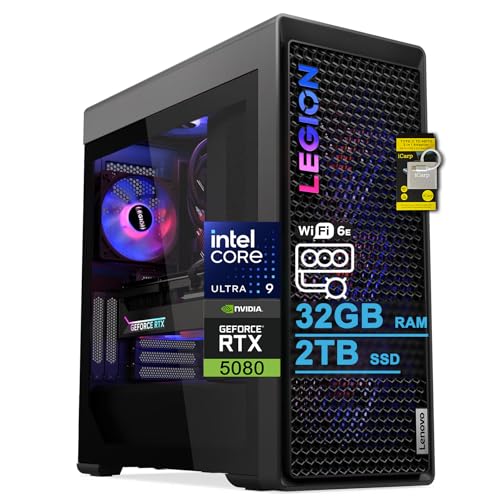
- Best first flagship for most beginners: Lenovo Legion Tower 7i Gen 10, Core Ultra 9 285K, RTX 5080 — Check on Amazon
- CLX Set Gaming PC, Ryzen 7 9800X3D, RTX 5080 — Check on Amazon
- Skytech King 95, Ryzen 7 9800X3D, RTX 5070 Ti — Check on Amazon
- Acer Nitro 60 N60-181-UR26, Ryzen 9 7900, RTX 5070 Ti — Check on Amazon
See 2 more Amazon options
- iBUYPOWER Y40 PRO, Ryzen 9 7900X, RTX 5070 Ti — Check on Amazon
- ZOTAC MEK Gaming PC, Ryzen 7 9700X, RTX 5070 Ti — Check on Amazon
Read the full guide ↓
Disclosure: As an Amazon Associate, reviewstook.com earns from qualifying purchases. Links to Amazon on this page are affiliate links; they cost you nothing extra. Listing details such as price and availability change often, so check the current Amazon listing before you buy.
If this is your first gaming PC, welcome — and before anything else, an honest warning from people who would happily sell you the most expensive machine on this page: a budget of $3,000 is far more than a beginner needs, and for most first-time buyers it is not where we would point you first. A quick vocabulary pass explains why. “1080p” simply describes the size of the picture your monitor shows, roughly two million pixels, and it is the easiest common resolution for a PC to draw. A perfectly good first tower costing $700 to $1,500 plays modern games at 1080p beautifully. So what does the rest of the money in this guide buy? Speed beyond what the eye strictly needs — feeding very fast 240 Hz and 360 Hz monitors, the screens competitive players use — plus the ability to record and stream while you play, plus years of future games handled without an upgrade. That is a real purchase, but it is a luxury purchase, and this guide treats it that way throughout.
So here is the steering, up front, that most buying guides bury. If you are new to PC gaming and your total setup budget is around $3,000, the smartest split for most people is a strong mid-range tower from Best 1080p Gaming PC For Beginners Under $1500, a fast 240 Hz monitor, a decent headset, and money left in the bank. You will have a better first year than someone who spends everything on the tower and plays it through an old office screen. The six machines below are for a narrower reader: the beginner whose budget is genuinely available, who hates the idea of upgrading in eighteen months, and who wants to buy once, set the thing up in an afternoon, and not think about hardware again for years. For that reader, these are the right machines — every one is a prebuilt that arrives assembled, with Windows installed, needing nothing but cables, an account or two, and an hour of setup. And one boundary is worth drawing before the reviews: no RTX 5090 system exists anywhere near $3,000. That card lives in machines costing far more, so if a listing at this price seems to promise one, you are looking at a different configuration in the dropdown menu, not a bargain.
New to This? Four Things to Know Before the Picks
You do not build anything. Every system in this guide is a prebuilt: the parts are assembled, Windows is installed, and the box that arrives contains a finished computer. Your job is unboxing, plugging in, and clicking through setup — closer to setting up a games console than to building furniture. Some towers ship with protective foam inside the case; the maker’s quick-start sheet will tell you if yours does, and removing it before first power-on is the one physical step that matters.
The monitor cable goes into the graphics card, not the motherboard. This is the most common first-PC mistake in existence. The back of the tower has two clusters of ports; the ones lower down, on the graphics card itself, are the ones that use the expensive hardware you paid for. Plug into the motherboard’s ports by accident and games will run on weak backup graphics while the real card sits idle. Every review below assumes the cable is in the right place.
Set your monitor’s refresh rate in Windows. Fast monitors usually arrive set to 60 Hz — sixty pictures a second — no matter how fast they can go. One settings change (Settings, Display, Advanced display) unlocks the 240 or 360 pictures a second you actually bought. Machines in this guide exist to feed fast screens; that one menu is where the money becomes visible.
Keep the box and the receipt. Prebuilts carry manufacturer warranties — one year is stated on at least one listing below — and Amazon’s return window is your safety net if anything arrives wrong. Photograph the spec page of the exact listing you ordered on the day you order it. Boutique builders sell near-identical towers with different parts inside, and that screenshot is your proof of what you paid for.
In this guide
Quick Picks
In a hurry? Each row matches a type of first-time buyer to the system that fits, with a link to the listing.
| Buyer type | Pick | Why it stands out | Link |
|---|---|---|---|
| Best for most beginners with the budget | Lenovo Legion Tower 7i Gen 10, Ultra 9 285K, RTX 5080 | Flagship graphics from the biggest brand here, with keyboard and mouse included and support you can phone | Check on Amazon |
| Best for beginners who play ranked shooters | CLX Set, Ryzen 7 9800X3D, RTX 5080 | The best gaming processor in the guide paired with an RTX 5080, in budget only at deal pricing — check price on Amazon | Check on Amazon |
| Best buy-once value | Skytech King 95, Ryzen 7 9800X3D, RTX 5070 Ti | The same star processor for notably less, leaving real money for a fast monitor | Check on Amazon |
| Best for games plus school or work | Acer Nitro 60 N60-181-UR26, Ryzen 9 7900, RTX 5070 Ti | Twelve processor cores and 2TB of storage from a mainstream brand | Check on Amazon |
| Best for beginners who may upgrade later | iBUYPOWER Y40 PRO, Ryzen 9 7900X, RTX 5070 Ti | A standard-layout case on a long-lived platform, with keyboard and mouse in the box | Check on Amazon |
| Best for spending less and stopping there | ZOTAC MEK, Ryzen 7 9700X, RTX 5070 Ti | The same graphics class for notably less, with Windows 11 Pro — check price on Amazon | Check on Amazon |
How These Picks Were Chosen
Every system below is a real Amazon listing whose price has been seen at or under $3,000 in the United States, checked against the maker’s listing and specification details. Where a machine only reaches this guide on a discount — two of the six do — the review says so plainly. Prices at this level move weekly, so check the live price on Amazon before you decide anything.
Because this version of the guide is written for first-time buyers, three beginner-specific filters were applied on top of the usual spec comparison. The first is ownership friction: we favored systems that arrive complete (keyboard and mouse included where the listing says so), come from sellers with a warranty you can actually use, and are built from standard parts that any local repair shop can open and understand. The second is freedom from homework: a beginner should not need to know what a BIOS is, so listings that publish their key numbers — memory size, storage size, power supply wattage — scored ahead of ones that leave a new buyer guessing. The third is honesty about the resolution in the title. All six machines are, in truth, 1440p and even 4K-capable computers being bought for a 1080p screen. That is not a trick; it is what “buy once” means at this budget. But it is also why each review names who should skip the machine, and why the first skip reason is usually your monitor: no tower can show you more frames than your screen can display.
One piece of jargon is worth decoding before the reviews, because it decides several of them. You will see two processor philosophies below. AMD’s “X3D” chips carry extra cache memory stacked on the processor, which sounds abstract but does something concrete: in fast-paced games it keeps the action smoother, with fewer of the tiny hitches beginners often blame on their internet connection. The alternative philosophy is simply more cores — twelve or twenty-four workers instead of eight — which helps when the PC is doing several jobs at once: streaming, recording, editing video, running coursework. Neither is “better” in the abstract. Shooters reward the first; busy desks reward the second. Pick by the week you actually live.
The 6 Best 1080p Gaming PCs for Beginners Under $3,000
Lenovo Legion Tower 7i Gen 10 — Core Ultra 9 285K, RTX 5080, 32GB DDR5, 2TB SSD
Who it suits: The beginner who wants the strongest machine in the guide and the comfort of a household-name brand behind it — one phone number, one warranty, no research project.
Start with what arrives: a large tower (about 17.6 × 8.3 × 19.3 inches, just under 40 pounds) with a keyboard and mouse in the box, Windows 11 Home installed, and the most powerful graphics card verified under this budget — an RTX 5080 with 16GB of memory — alongside Intel’s 24-core Core Ultra 9 285K processor, 32GB of memory and a roomy 2TB drive. It has been seen on Amazon within this budget, which matters because most towers with this graphics card sit in a higher price tier; check the live price on Amazon, because its place under the ceiling depends on a deal being live, not on a permanent price. For a first-time owner, the Lenovo’s quiet virtue is how much of the ownership experience is already solved. Cooling is a 360mm liquid unit fitted at the factory. The power supply is a named 850W unit rather than a mystery. The connection panel is the most complete in this guide — Wi-Fi 6E for wireless, faster 2.5-gigabit Ethernet for a wired connection, Thunderbolt 4, and plenty of USB ports for a headset, controller, webcam and the other things that accumulate on a gaming desk.
What will it feel like? At 1080p, effectively unlimited. Competitive games will run as fast as your monitor can display, story games can be set to their highest quality with ray tracing — the lighting technology that makes reflections and shadows look real — switched on, and the 24-core processor means recording your gameplay or editing the clips afterwards does not slow the game down. The trade-offs are gentle but real. That Intel processor is a brilliant all-rounder, yet in purely competitive shooters the two AMD X3D systems below are generally a touch smoother, because their design is specialized for games rather than for everything. And the listing states a memory ceiling of 32GB, so buy this as a finished machine, not as a project you will expand later. For most beginners, “finished” is exactly the point.
- RTX 5080 graphics verified within this budget — the longest-lasting card in this guide; check price on Amazon.
- Keyboard, mouse, liquid cooling and an 850W power supply all included and named in the listing.
- The best connectivity here: Wi-Fi 6E, 2.5-gigabit Ethernet and Thunderbolt 4.
Honest limitation: It reaches this budget at a deal price that may not hold, its processor favors all-round work over pure esports smoothness, and memory is capped at the fitted 32GB.
Choose it if you want one purchase, from a big brand, that you will not think about again for years. Skip it if the live price has climbed well past $3,000, or your play is almost entirely ranked shooters — the CLX below is specialized for that.

CLX Set Gaming PC — Ryzen 7 9800X3D, RTX 5080, 32GB DDR5, 2TB NVMe SSD
Who it suits: The beginner whose games are competitive — Valorant, Counter-Strike, Apex, Fortnite — and who is buying a fast monitor to match, or already owns one.
If one machine in this guide is aimed like a dart at high-refresh 1080p play, it is this one. CLX, a US boutique builder, combines the Ryzen 7 9800X3D — the processor serious competitive players ask for by name, because its stacked cache keeps frame rates high and even — with the same RTX 5080 graphics card as the Lenovo, 32GB of memory, a 2TB drive and a 360mm liquid cooler, running Windows 11 Home in a panoramic case with colored lighting you can admire or switch off. It has been seen on Amazon within this budget only at a deal price, well below its usual list price. Read that sentence twice, because it contains the whole review: the machine is superb, and its place in a guide with a $3,000 ceiling depends entirely on the deal being live when you shop. This model often sits far higher elsewhere, so the live Amazon price is the only one that counts.
For a first-time owner, the boutique nature cuts both ways. In your favor: the CLX is assembled from ordinary, standard desktop parts, which means that in three years a local shop — or a confident friend — can open it, clean it, and swap a part without proprietary surprises. Against it: support comes from a smaller company than Lenovo or Acer, so keep your order records and expect email-and-phone support rather than a global service network. Setup is the same friendly prebuilt routine as everything here — unbox, check for internal packing material as the quick-start sheet directs, plug the monitor into the graphics card, set the refresh rate in Windows — and then the machine simply does the thing it was bought for, at frame rates a beginner will grow into rather than out of.
- Ryzen 7 9800X3D plus RTX 5080: the strongest pure-gaming pairing in this guide.
- 2TB of storage and a 360mm liquid cooler fitted as standard.
- Standard-parts build that any repair shop can service later; in budget only at deal pricing, well below its list price — check price on Amazon.
Honest limitation: Its under-$3,000 status is entirely deal-dependent, and support runs through a boutique builder rather than a big-brand network.
Choose it if ranked play is your main hobby and a deal price within this budget is showing. Skip it if the listing is back at list price — at that point the Skytech below gives you the same processor philosophy for much less.

Skytech King 95 — Ryzen 7 9800X3D, RTX 5070 Ti, 32GB DDR5, 1TB Gen4 SSD
Who it suits: The beginner who wants the buy-once experience but would rather keep several hundred dollars for the monitor and headset that complete the setup.
The King 95 is the machine our reviewers would steer a friend toward, and the reasoning is simple enough for a first-time buyer to follow. It uses the same Ryzen 7 9800X3D processor as the CLX — the smoothness specialist — and pairs it with an RTX 5070 Ti, a graphics card one step below the 5080 that is still vastly more power than a 1080p screen can challenge today. Around that pairing sit 32GB of memory running at 5600 speed, a named 850W Gold power supply, a 360mm liquid cooler with lighting, Wi-Fi and Windows 11. It sits comfortably below this guide’s ceiling, which leaves real money from a $3,000 envelope unspent — and that is not a rounding error: it is a genuinely excellent 240 Hz monitor, or a 360 Hz one on a good week. A beginner with this tower and a fast screen will have a better setup than a beginner with a 5080 tower and a basic display, and that is the honest comparison this guide exists to make.
Two compromises are printed in Skytech’s own listing, and a beginner should hear them from us rather than discover them. Storage is 1TB — half the space of the machines above — and a modern game library is hungry: a handful of big titles plus recorded clips will fill it. The fix is genuinely easy (a second internal drive is the classic first upgrade, and this standard case accepts one), but budget for it rather than being surprised in month two. Second, the listing notes the graphics card brand may vary: you are guaranteed an RTX 5070 Ti, not a specific manufacturer’s version of it. The performance is the same either way; only buyers with a favorite card design should care. Neither point dents the central case — this is the smoothness of the guide’s best gaming processor, at a price that leaves the rest of the desk properly funded.
- The 9800X3D processor: esports smoothness without the 5080 price tag.
- Named 850W Gold power supply and 360mm liquid cooling, both stated in the listing.
- Priced well below the ceiling — the only pick that leaves serious money for a fast monitor; check price on Amazon.
Honest limitation: 1TB of storage is the joint-smallest here and fills quickly, and the exact graphics card brand varies from build to build.
Choose it if you want the smart version of buy-once: flagship smoothness, sensible total spend. Skip it if you want 2TB fitted from day one and a named graphics card — look at the Lenovo or the Acer.

Acer Nitro 60 N60-181-UR26 — Ryzen 9 7900, RTX 5070 Ti, 32GB DDR5, 2TB SSD
Who it suits: The beginner whose PC will also be the school, work or family computer — coursework, photo and video projects, a home office — and who wants a familiar brand on the box.
Acer’s Nitro 60 is the grown-up of the guide. Its Ryzen 9 7900 processor has twelve cores, which in plain terms means twelve workers: games use some, and the rest handle the video export, the browser full of research tabs, the video call and the cloud backup without queuing up behind each other. The graphics card is the same RTX 5070 Ti found in three other picks here, memory is 32GB, and storage is a generous 2TB — the combination a beginner who does a bit of everything will appreciate most on an ordinary Tuesday, not just on game night. Its pricing is the most volatile in this guide, swinging between genuine bargain territory and nearly the ceiling. Translation for a first-time buyer: this machine is frequently a bargain and occasionally nearly at the ceiling, so the day you buy it matters more than with any other pick here. Check the live price on Amazon; when it sits in the lower part of its range it is arguably the best all-round value in the guide.
Set expectations in two places. The Nitro range is Acer’s value line, so the case is a straightforward tool rather than a light show — no bad thing on a shared desk. And the listing is thinner than the boutique systems about its power supply and cooling details, so if you already know you will want a bigger graphics card years from now, confirm the power supply specification on the live listing before ordering; its wired Ethernet is also the older gigabit standard rather than the Lenovo’s faster 2.5-gigabit, which only matters if your home network and internet plan can feed more. None of that changes the proposition for its intended buyer: a balanced, big-brand machine that games at full speed and still feels quick when the whole family’s work is on it.
- Twelve-core Ryzen 9: the multitasking pick for desks that work as well as play.
- 2TB of storage and 32GB of memory fitted as standard — nothing to add on day one.
- The widest price swings here, from bargain territory to near the ceiling — timing your purchase pays; check price on Amazon.
Honest limitation: It can sit within a few dollars of the ceiling, the listing leaves power supply detail unpublished, and its processor favors everyday workloads over esports smoothness.
Choose it if the PC is for everything, not just games, and you can buy when its price dips. Skip it if ranked shooters are the whole point, or the live price is at the top of its range — the iBUYPOWER below covers similar ground for less.

iBUYPOWER Y40 PRO — Ryzen 9 7900X, RTX 5070 Ti, 32GB DDR5, 2TB NVMe SSD
Who it suits: The beginner who suspects — correctly — that in a few years they may want to tinker, and who likes the idea of a machine designed to be opened, understood and improved.
Think of the Y40 PRO as the beginner’s machine with a future hobby built in. It pairs a 12-core Ryzen 9 7900X with the RTX 5070 Ti, 32GB of memory and 2TB of storage, inside a glass-sided showcase case from case-maker HYTE, with a keyboard and mouse included and a one-year manufacturer warranty stated on the listing. It sits in the upper part of this guide’s range on Amazon, and its pricing often runs considerably lower than that — check the live price on Amazon. Two beginner-friendly qualities stand out. The first is what those twelve cores do on a streaming evening: the game, the broadcast software, the chat window and the music all run at once without the machine breaking a sweat, and the graphics card has dedicated hardware for sending your gameplay out to Twitch or YouTube. The second is the layout inside. This is a standard ATX build on AMD’s AM5 platform — a foundation AMD has committed to support with new processors for years — so the upgrades a growing enthusiast eventually wants, a newer processor or a bigger graphics card, are weekend jobs rather than a whole new PC.
The homework notes are minor but worth a beginner’s attention. The memory runs at 5200 speed, a little slower than the kits in some rivals; in the most processor-stretched games that can cost a whisper of smoothness, and swapping memory is the classic first performance upgrade if you ever care. The listing also does not headline its power supply wattage, so if a flagship graphics card is in your long-term plan, confirm that figure on the live page. And be clear-eyed about its specialty: this is a breadth machine, brilliant at doing everything simultaneously, a step behind the X3D pair at the single narrow job of feeding a 360 Hz monitor in a shooter. Buy it for the desk you will have in three years, not only the one you have now.
- Standard layout on the long-lived AM5 platform: the clearest upgrade path in this guide.
- Twelve cores for gaming plus streaming, 2TB storage, keyboard and mouse in the box.
- Upper-range pricing that frequently dips lower; check price on Amazon.
Honest limitation: Its 5200-speed memory is the slowest kit here, the power supply is not headlined in the listing, and esports purists will prefer an X3D processor.
Choose it if you stream, multitask, or want a machine that can grow with you. Skip it if competitive smoothness is the entire brief — that is the King 95 above.

ZOTAC MEK Gaming PC — Ryzen 7 9700X, RTX 5070 Ti, 32GB DDR5, 1TB NVMe SSD
Who it suits: The beginner who has read this far, agrees the tier is about headroom rather than need, and would like the headroom with real money still in their pocket.
ZOTAC is a graphics card manufacturer that also builds whole PCs, and the MEK reads like it: a tidy, fully specified machine with nothing left vague. Inside are the RTX 5070 Ti graphics card used across this guide, a Ryzen 7 9700X processor that boosts to 5.5 GHz, 32GB of the joint-fastest memory here (6000 speed), a 1TB drive, and a power supply whose details are actually printed — 750 watts, 80+ Gold certified — plus Wi-Fi 6E, Bluetooth 5.3, enough display outputs for up to four screens, and Windows 11 Pro, the slightly more capable edition that the other five picks do not include. It is the lowest entry point in this guide by a wide margin — check price on Amazon. For a beginner, that gap is the argument: the same graphics class as machines costing notably more, with the difference available for the monitor, the desk and the games themselves.
What the savings cost is cache and capacity. The 9700X is an excellent ordinary processor, but it lacks the X3D stacked cache of the CLX and King 95, so in the most processor-bound competitive games its lowest frame rates sit a step behind theirs — a difference competitive players chase and casual players will never notice. Storage is 1TB, matching the King 95 as the joint-smallest here, so the same advice applies: plan the second drive. One documentation quirk deserves a beginner’s note: some of ZOTAC’s own secondary materials have described details like the Windows edition inconsistently, so trust the Amazon listing’s specification — the one we cite — and check it matches at checkout. Judged fairly, this is the guide’s value conscience: most of the tier, honestly specified, for notably less money.
- Lowest verified entry in the guide — the budget end of this tier; check price on Amazon.
- Nothing vague: 6000-speed memory, a named 750W Gold power supply, Wi-Fi 6E and Windows 11 Pro.
- Made by a graphics card manufacturer, with a named ZOTAC GAMING card inside.
Honest limitation: 1TB of storage, no X3D cache for processor-bound esports titles, and some inconsistency in the maker’s own secondary documents — trust the Amazon listing.
Choose it if you want this tier’s graphics class and a healthier bank balance. Skip it if you intend to spend the full budget regardless — the X3D systems turn it into smoothness you can feel in shooters.

Comparison Table
| Product | CPU | GPU | Memory / Storage | Price | Link |
|---|---|---|---|---|---|
| Lenovo Legion Tower 7i Gen 10 | Core Ultra 9 285K, 24-core | RTX 5080 16GB | 32GB DDR5 / 2TB SSD | Check price on Amazon | Check on Amazon |
| CLX Set | Ryzen 7 9800X3D | RTX 5080 16GB | 32GB DDR5 / 2TB NVMe | Check price on Amazon | Check on Amazon |
| Skytech King 95 | Ryzen 7 9800X3D | RTX 5070 Ti 16GB | 32GB DDR5-5600 / 1TB Gen4 | Check price on Amazon | Check on Amazon |
| Acer Nitro 60 N60-181-UR26 | Ryzen 9 7900, 12-core | RTX 5070 Ti 16GB | 32GB DDR5 / 2TB PCIe 4.0 | Check price on Amazon | Check on Amazon |
| iBUYPOWER Y40 PRO | Ryzen 9 7900X, 12-core | RTX 5070 Ti 16GB | 32GB DDR5-5200 / 2TB NVMe | Check price on Amazon | Check on Amazon |
| ZOTAC MEK | Ryzen 7 9700X | RTX 5070 Ti 16GB | 32GB DDR5-6000 / 1TB NVMe | Check price on Amazon | Check on Amazon |
How to Choose Your First PC at This Budget
- Decide the monitor first, honestly. These towers only earn their price in front of a 240 Hz or 360 Hz screen. If your monitor is a standard 60 Hz or 144 Hz model and a new one is not in the plan, stop here and buy from Best 1080p Gaming PC For Beginners Under $700 or the under-$1,500 guide instead — you will not see the difference you paid for.
- Match the processor to your games. Mostly ranked shooters? The X3D machines (CLX, King 95) specialize in smoothness there. A mix of games, streaming, editing and everyday work? The 12- and 24-core machines (Acer, iBUYPOWER, Lenovo) are built for your week.
- Treat deal prices as weather, not climate. Two picks here are under $3,000 because of deals. If the live price has drifted above the ceiling, waiting, or choosing the ZOTAC or King 95, beats stretching — the performance difference at 1080p is smaller than the price difference.
- Do not pay extra for a 5090 that is not there. No RTX 5090 system exists near $3,000. If a listing title at this price hints at flagship-everything, open the configuration dropdown and read what is actually selected.
- Prefer listings that print the boring numbers. Memory size, drive size and power supply wattage stated up front — as the Lenovo and ZOTAC do — are what let a beginner compare fairly and upgrade later. Silence on the power supply is a question to ask before buying, not after.
- Storage: 2TB is comfort, 1TB is a plan. Both 1TB picks here are good value because adding a second drive later is the easiest upgrade in PC ownership. Just know it is coming, and keep the receipts and the case screws.
- Think about who helps when something breaks. Lenovo and Acer bring big-brand service networks. CLX, Skytech and iBUYPOWER build from standard parts any local shop can fix. As a beginner, decide which of those failure experiences you would rather have — before you need it.
- Budget the whole desk, not just the tower. Monitor, headset, a chair you can sit in, maybe the second drive: the setup is the product. The King 95 and ZOTAC MEK sit in this guide partly so a first-time buyer can afford all of it at once.
Your First Evening: Setup, Settings and What to Ignore
Setup day frightens beginners more than it should; with any machine in this guide it is an hour of gentle tasks. Unbox on a table, not the floor, and keep the packaging until the return window closes. Check the quick-start sheet for internal packing material and remove it if your model ships with it. Connect the power cable, then the monitor cable — into the graphics card’s ports, low on the back of the case, never the motherboard’s. Add keyboard, mouse and an internet cable or your Wi-Fi password, press power, and follow Windows’ own setup screens; create the account, let it finish its first round of updates, and restart when it asks. Then do the three things that turn a fast PC into a fast-feeling PC: set the monitor’s refresh rate to its maximum in Windows display settings, install your game store of choice and one game, and in that game’s settings choose your monitor’s resolution and an uncapped or high frame-rate limit. That is the whole ceremony.
Equally useful is knowing what to ignore in week one. You do not need to open the case, update anything with the word “BIOS” in it, install the three different lighting-control programs the internet will suggest, or chase the driver-update utilities that pop up offering scans. Windows and the graphics software already installed will offer the updates that matter, on their own schedule. If a game stutters, the beginner’s checklist is short and almost always sufficient: monitor cable in the graphics card, refresh rate set correctly, game using the high-performance graphics option in its settings, and nothing heavy downloading in the background. Beyond that, your warranty exists precisely so that diagnosing hardware is someone else’s job — use it without embarrassment. That, in the end, is what the premium in this guide buys a beginner: not just frames, but the right to not worry.
Common Buying Mistakes
- Spending the entire $3,000 on the tower and playing it through a basic 60 Hz monitor — the single most expensive mistake a beginner can make at this budget.
- Believing a listing that implies RTX 5090 performance near $3,000. No such system exists; you are reading a configuration dropdown, not a deal.
- Paying full list price for a deal-dependent machine. The two 5080 picks here are in budget only at deal prices; check the live price on Amazon before deciding anything.
- Plugging the monitor into the motherboard and concluding the PC is slow. The graphics card’s ports, lower on the case, are the ones you paid for.
- Leaving the monitor at its 60 Hz default setting and never opening the Windows display menu that unlocks the speed you bought.
- Buying cores for a shooters-only desk, or an esports-specialist chip for a desk that mostly edits video. Match the processor philosophy to your actual week.
- Filling a 1TB drive in the first month and paying rush prices for storage that was cheap when planned.
- Throwing away the box, the receipt and the listing screenshot — your warranty and return options travel with that paperwork.
- Assuming a bigger number in the title means a better first PC. For most beginners, the under-$1,500 tier plus a great monitor is the better purchase, and this guide’s introduction says so on purpose.
Final Recommendation
- Most beginners with this budget: Lenovo Legion Tower 7i Gen 10.
- Beginners who live in ranked shooters, when the deal is live: CLX Set, Ryzen 7 9800X3D, RTX 5080.
- The smart buy-once: Skytech King 95 — flagship smoothness, money left for the monitor.
- Games plus school or work: Acer Nitro 60 N60-181-UR26.
- Future streamers and tinkerers: iBUYPOWER Y40 PRO.
- The same tier for notably less: ZOTAC MEK.
Our advice splits by the reader we described at the start. If you are a beginner in the ordinary sense — first tower, mixed games, a monitor that may or may not be fast — the honest recommendation of this entire guide is to step down: a system from Best 1080p Gaming PC For Beginners Under $1500 or Best 1080p Gaming PC For Beginners Under $2500, plus the best 240 Hz monitor your remaining budget allows, will make you happier than anything on this page played through the wrong screen. If you are the narrower reader — budget genuinely in hand, fast monitor present or planned, no appetite for upgrading in two years — then buy once from the six above. The Lenovo Legion Tower 7i is the easiest flagship to own: RTX 5080 power verified within this budget, everything included, a big brand behind it. The Skytech King 95 is the connoisseur’s version of the same decision, swapping the last graphics tier for the esports processor and a monitor’s worth of savings. And the ZOTAC MEK remains the standing proof that most of this tier can be had for notably less than its ceiling. Whichever route you take, verify the live price and the exact configuration on the listing before you order — at this money, that two-minute habit is the highest-value skill a beginner can learn.
Frequently Asked Questions
I am a total beginner. Should I really spend $3,000 on my first gaming PC?
Probably not, and this guide would rather tell you that than sell you a tower. Most first-time buyers are best served by the $700 to $1,500 tier plus a fast monitor. The machines here make sense only if the budget is genuinely comfortable, you play competitive games on a high-refresh screen or stream, and you specifically want to avoid upgrading for years. That is a legitimate choice — it is just a narrower one than the price tag suggests.
Do I have to build or assemble anything with these PCs?
No. All six are prebuilts: assembled, with Windows installed. Your tasks are unboxing, removing any internal packing material the quick-start sheet points to, plugging in cables — the monitor goes into the graphics card, low on the back of the case — and following the Windows setup screens. Allow about an hour, most of it updates and game downloads.
What does 1080p mean, and why are these PCs described as overpowered for it?
1080p is the picture size of a standard Full HD monitor — the easiest common resolution for a PC to draw. These systems carry graphics cards built for larger, harder resolutions, so at 1080p they are limited not by the games but by how fast your monitor can display frames. That is why the guide keeps returning to refresh rate: the extra power becomes visible only on 240 Hz and 360 Hz screens, and it also means every pick here will handle a future 1440p monitor without complaint.
Can I get an RTX 5090 PC for under $3,000 if I shop around?
No. We verified the market for this guide: no RTX 5090 system exists anywhere near $3,000, and most RTX 5080 systems sit above it too, reaching this guide only at deal prices. A listing at this price that seems to offer a 5090 is showing you a cheaper configuration in its dropdown while the title talks about the flagship. Read the selected configuration, not the headline.
What else do I need to buy besides the tower?
A monitor is the essential one — ideally 240 Hz at 1080p to justify this tier — plus a headset or speakers. Two picks (the Lenovo and the iBUYPOWER) include a keyboard and mouse; with the others, budget for a basic set if you do not own one. If you choose a 1TB system, plan on a second storage drive within the first year. Nothing else is required to start playing on day one.
What happens if something goes wrong in the first year?
You use the warranty, which is what it is for. Keep the box, the receipt and a screenshot of the exact listing you ordered. Amazon’s return window covers early problems; after that, the manufacturer’s warranty applies — one year is stated on the iBUYPOWER listing, for example. Big brands like Lenovo and Acer run service networks, while the boutique builders here use standard parts that a local repair shop can also service. As a beginner, do not open the case to diagnose a fault yourself during the warranty period; make the phone call instead.
Will one of these PCs still feel fast in four or five years?
That is the entire argument for the tier. A 16GB graphics card of the 5070 Ti or 5080 class, 32GB of memory and a strong processor is a combination bought today for the games of several years from now, at this resolution and beyond it. The iBUYPOWER adds the easiest upgrade path if you ever want more, but the honest expectation for all six is that your next purchase is a monitor, not another tower.


