Where to buy
Check the latest price, availability and delivery on Amazon. Orders are placed on Amazon. We may earn a commission from qualifying purchases.
- Best first PC for most beginners: IPASON Gaming PC Desktop, Ryzen 5 5600, RTX 3060 12GB — Check on Amazon
- Skytech Blaze 3.0 Gaming PC Desktop, Intel Core i5-10400F, RTX 3060 — Check on Amazon
- ZOTAC MEK AI-Enhanced Gaming PC, Ryzen 5 5500, RTX 3050, 650W Gold PSU — Check on Amazon
- STGAubron Gaming PC Desktop, Ryzen 5 5500, RTX 3050 6GB, 1TB SSD — Check on Amazon
See 2 more Amazon options
- HP Victus 15L Gaming Desktop TG02-1020h, Intel Core i5-13400F, RTX 3050 — Check on Amazon
- Skytech Shadow Gaming PC Desktop, Ryzen 5 3600, GTX 1660 Super — Check on Amazon
Read the full guide ↓
Disclosure: As an Amazon Associate, reviewstook.com earns from qualifying purchases. Links to Amazon on this page are affiliate links; they cost you nothing extra. Listing details such as price and availability change often, so check the current Amazon listing before you buy.
Buying your first gaming PC is mostly an exercise in not knowing what the words mean. Listings throw around core counts, boost clocks, VRAM and wattage ratings as if everyone comparison-shops power supplies for fun, and underneath the jargon sits a quiet fear: what if I spend $700 on the wrong box? This guide is written for that buyer. Every machine below is a prebuilt — it arrives assembled, with Windows already installed, and your only jobs are to plug it in, connect a screen, and play. There is no building and no parts compatibility to figure out. What you do need is a plain-English map of what matters: six verified machines under $700, what each is like to own as a first PC, the handful of terms worth learning, a step-by-step for your first evening, and the settings to choose in your first games.
Three honest things before the picks. First, $700 at 1080p — the resolution of a standard HD monitor, 1920×1080 pixels — is a genuinely good place to start. The machines below carry real graphics cards, and they play modern titles at high settings and competitive games at very high frame rates. Second, this is a starting tier, not an endgame one: 1440p and 4K monitors and the heaviest ray tracing effects belong to more expensive hardware. Third, the beginner traps in this market are not usually bad machines — they are vague listings. Old processors hide behind impressive-sounding names, some listings never state the power supply at all, and one famous trick is a page hosting five different configurations where only one matches the review you read. Every pick below names its parts in full, and where a listing leaves something blank, the review tells you.
A quick vocabulary note before we start, since the reviews use these words throughout. The GPU (graphics card) renders your games and matters most. The CPU (processor) is the general-purpose brain. RAM is short-term memory — 16GB is the comfortable standard. The SSD is storage, where Windows and your games live; NVMe is the fast kind. VRAM is the graphics card’s own memory, and it decides how high your texture settings can go. FPS means frames per second — how smooth the motion looks — and your monitor’s refresh rate (Hz) caps how much of that smoothness you can see. That is most of the vocabulary you need.
In this guide
Quick Picks
Each row below names a beginner situation and the machine that suits it, with a link to the listing.
| Your situation | Pick | Why it suits a first PC | Link |
|---|---|---|---|
| Best first PC for most beginners | IPASON Gaming PC Desktop, Ryzen 5 5600, RTX 3060 12GB | The strongest graphics card and most storage in this guide — nothing to upgrade soon | Check on Amazon |
| You want a known brand and a fully specified parts list | Skytech Blaze 3.0, Intel Core i5-10400F, RTX 3060 | Same strong graphics card, every part named — including a 600W Gold power supply | Check on Amazon |
| You like the idea of upgrading later, easily | ZOTAC MEK AI-Enhanced, Ryzen 5 5500, RTX 3050 | The strongest power supply here leaves the most room to grow into | Check on Amazon |
| You shop sales and want lots of storage | STGAubron Gaming PC Desktop, Ryzen 5 5500, RTX 3050 6GB | A full 1TB drive — check price on Amazon for the current offer | Check on Amazon |
| You want a household name and a small case | HP Victus 15L TG02-1020h, Intel Core i5-13400F, RTX 3050 | HP’s support network and the newest processor — but budget one small upgrade | Check on Amazon |
| Your budget must also cover the monitor | Skytech Shadow, Ryzen 5 3600, GTX 1660 Super | The budget-tier pick here, leaving room in the budget for a good screen | Check on Amazon |
How These Picks Were Chosen
The rules were written with first-time buyers in mind. Every machine below is a complete, assembled PC sold on Amazon in the United States within this guide’s $700 budget — no parts lists, no assembly required, no separate Windows purchase, because all six include Windows installed. Anything relying on integrated graphics (the weak graphics built into a processor — fine for office work, not for a gaming PC) was excluded, as was any listing that would not name its graphics card model. If a seller will not tell you what is inside the box, a beginner has no way to judge the box — so those listings did not make the cut, however colorful their fans looked.
Nobody was sent one of these PCs to test. We worked from the manufacturer listings and specification pages, comparing the parts in the order a beginner should care about them: graphics card first, because it sets your frame rate in almost every game; processor second; memory third, with 16GB as the standard and anything less flagged in large print; storage fourth, because modern games are enormous; and the power supply last but not least, because a named wattage and efficiency rating is the difference between a machine that can grow and one that cannot. Prices in this market move weekly, so the reviews do not print a fixed number — check price on Amazon for the current listing price on each machine. Where a listing stays silent about a component, the review says so and explains what to check when the box arrives, because Amazon’s return window is a beginner’s best friend: every verification step in this guide is free if you do it in the first week.
Two extra filters were applied for this audience specifically. The first is the setup filter: every pick connects to the internet by Wi-Fi or cable without extra purchases, works with any standard monitor, keyboard and mouse, and needs nothing installed inside the case before its first game. The second is the support filter: a first PC should come with either an established brand’s service network or a specification transparent enough that any local repair shop — or a knowledgeable friend — can help you later.
The 6 Best 1080p Gaming PCs for Beginners Under $700
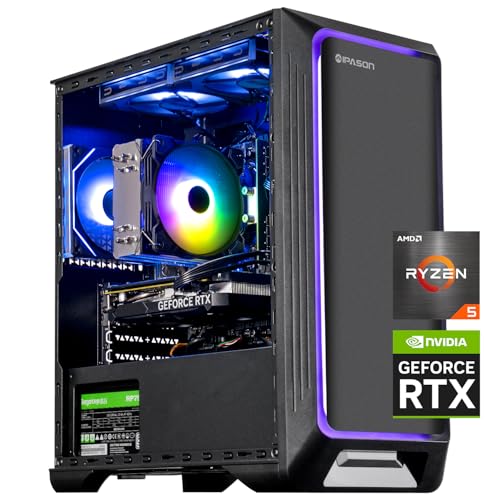
IPASON Gaming PC Desktop — Ryzen 5 5600, RTX 3060 12GB, 1TB NVMe SSD
Who it suits: The beginner who wants to buy once and not think about upgrades for years — the strongest machine in this guide, and the one least likely to make you learn anything the hard way.
Two parts decide how a gaming PC feels, and this machine has the best version of both that $700 allows. The graphics card is the GeForce RTX 3060 with 12GB of video memory. In plain terms: it plays modern games at 1080p on high settings, pushes competitive games like Valorant, Counter-Strike 2, Apex Legends and Fortnite fast enough to feed a high-refresh monitor, and its generous 12GB of VRAM means texture settings — the setting that most visibly makes a game look rich rather than muddy — can stay high in current releases where smaller cards are already being forced to turn them down. It also supports DLSS, the smart performance boost explained in the settings section below. Behind it sits the Ryzen 5 5600 processor — six cores, running at 3.5GHz and boosting to 4.4GHz — a chip that was a mainstream favorite in its own right and is more than fast enough that it will never be the reason a game slows down at this level. The supporting list is equally grown-up: 16GB of DDR4 memory at 3200MHz, a 1TB NVMe SSD (double the storage of most rivals here), a power supply whose 550W wattage is at least stated in the open, and Windows 11 Home already installed. Check price on Amazon — it pairs the strongest parts list in this guide with a competitive position in this tier.
What should a beginner know about the catch? There are two, and both are about the seller rather than the machine. IPASON is a smaller system builder than names like HP or Skytech, and the listing notes the exact brand of graphics card inside may vary — normal for prebuilts, and it changes nothing about performance, but it means two buyers can receive slightly different-looking cards. More importantly, this listing page has hosted different configurations over time, so do the one piece of homework this guide asks of everyone: before ordering, confirm the configuration name on the page says Ryzen 5 5600 and RTX 3060, and when the PC arrives, spend two minutes confirming the same in Windows (the setup section below shows how). Do that, and this is the machine the rest of the guide is measured against — the one a beginner can simply enjoy.
- RTX 3060 12GB graphics card — the strongest in this guide, with VRAM headroom that keeps textures high.
- 1TB NVMe SSD and 16GB of RAM: no storage or memory upgrade needed on the horizon.
- Windows 11 installed and the power supply wattage published — no first-week surprises to budget for.
Honest limitation: A smaller builder with a “graphics card brand may vary” note, and a listing whose configurations have changed over time — verify the configuration name when you order and again when it arrives.
Choose it if you want the most performance and the fewest near-term decisions. Skip it if having a big household name behind the warranty matters more to you than parts — that is the HP further down.

Skytech Blaze 3.0 Gaming PC Desktop — Intel Core i5-10400F, RTX 3060, 1TB SSD
Who it suits: The beginner who feels safer with an established brand and a parts list with no blanks in it — and is happy to trade a little future-proofing for that peace of mind.
Skytech is one of the established US builders of prebuilt gaming PCs, and the Blaze 3.0 (model ST-BLAZE3-0339-B-AM) shows what that buys you: a specification with everything written down. The graphics card is the same RTX 3060 as the IPASON above, so the gaming story matches it — modern games at 1080p high settings, competitive titles at high frame rates, DLSS available when a game gets heavy. The processor is an Intel Core i5-10400F, six cores at 2.9GHz; it is an older generation than most chips in this guide, but at 1080p the graphics card does the deciding in almost every game, and this processor feeds the RTX 3060 without holding it back. Around them: a 1TB SSD, 16GB of DDR4 memory at 3200MHz, Wi-Fi built in, and — the detail experienced buyers look for first — a 600W power supply with an 80+ Gold efficiency rating, printed in the listing like a component instead of hidden like a secret. That rating means the supply is efficient and honestly sized, with room to spare for the card it ships with. Check price on Amazon — this configuration sits at the top end of this guide’s budget tier.
The trade-offs are about the calendar, not the games. That processor belongs to an older Intel platform with no meaningful upgrade path — when you eventually outgrow this machine in some years, you will replace it rather than grow it, whereas the AMD-based machines in this guide can accept a faster processor on the same motherboard. The listing also ships Windows 10 Home rather than Windows 11; the upgrade to Windows 11 is free for eligible machines, but confirm that path in your first week rather than discovering it later. Neither point stops this PC gaming hard from the day it arrives. If your instinct is “I would like the strong graphics card, but from a company I have heard of, with every part accounted for,” this is your pick — just buy it for the machine it is today.
- RTX 3060 performance from an established US builder with its own support channel.
- 600W Gold-rated power supply, named in the listing — rare transparency at this price.
- 1TB SSD and 16GB of memory fitted; nothing to add on day one.
Honest limitation: The Core i5-10400F is an older-generation processor on a finished platform, and the listing ships Windows 10 Home — you are buying today’s performance and support, not an upgrade runway.
Choose it if brand reassurance and a fully documented parts list rank just behind raw performance. Skip it if you already know you will want to upgrade the processor in a few years — the AMD machines here keep that door open.

ZOTAC MEK AI-Enhanced Gaming PC — Ryzen 5 5500, RTX 3050, 650W Gold PSU
Who it suits: The beginner who suspects — correctly — that they will catch the upgrade bug later, and wants a first PC that welcomes a stronger graphics card instead of resisting one.
ZOTAC is first and foremost a graphics card manufacturer, and the MEK (model MEK3050A5500BG0V1) is built like it: the supporting parts are specified as if the company expects to be judged on them. The processor is a Ryzen 5 5500 — six cores, up to 4.2GHz — paired with a GeForce RTX 3050 graphics card, 16GB of DDR4 memory at 3200MHz and a 500GB NVMe SSD. What lifts this listing, though, is printed in the product name itself: a 650W power supply with an 80+ Gold rating, the strongest and most efficient in this guide, and Wi-Fi 6E, the newest wireless standard here. Why should a beginner care about a power supply? Because it is the ceiling on your future. When you eventually want a faster graphics card — the most common first big upgrade — a supply like this one accepts it as a simple swap, where a weak or unknown supply turns the same upgrade into a rebuild. The RTX 3050 sets today’s ceiling honestly: 1080p at medium-to-high settings in modern games, excellent frame rates in competitive titles, DLSS helping in the demanding scenes. It is a clear step behind the RTX 3060 pair above in raw speed. Check price on Amazon for the current listing.
Beginners should note the one number that will pinch first: storage. Five hundred gigabytes sounds like a lot until Windows, one huge modern game and a couple of favorites are installed — then it is most of a drive. Adding storage later is the easiest upgrade in PC ownership (and this machine makes it simple), but expect to do it sooner here than with the 1TB picks. Balance that against what you get: the best power delivery and wireless in the guide, one manufacturer standing behind both the PC and the graphics card inside it, If your personality is “buy sensible now, tinker later,” the MEK is the beginner PC designed for exactly that arc.
- 650W 80+ Gold power supply — the most upgrade room of any machine here.
- Wi-Fi 6E and a single manufacturer behind both the system and its graphics card.
- Standard platform with 16GB of memory; a future graphics card swap is genuinely easy.
Honest limitation: The 500GB SSD fills quickly by modern game sizes, and the RTX 3050 is a medium-to-high settings card — a step behind the RTX 3060 machines for performance today.
Choose it if you like the idea of upgrading the graphics card in a couple of years. Skip it if you never plan to open the case and want maximum frame rates from day one — take an RTX 3060 machine.

STGAubron Gaming PC Desktop — Ryzen 5 5500, RTX 3050 6GB, 1TB SSD
Who it suits: The beginner on a flexible schedule — someone happy to check price on Amazon over a week or two, because this machine sits in the budget end of this tier and can leave room in the budget for games.
The documented parts here are the modern checklist, complete. This STGAubron tower (model ABR1722) pairs a Ryzen 5 5500 processor — the same six-core chip as the ZOTAC above, up to 4.2GHz — with a GeForce RTX 3050 graphics card in its 6GB form, 16GB of DDR4 memory, a full 1TB solid-state drive, Wi-Fi 6, Bluetooth 5.2 for wireless controllers and headsets, four RGB fans, and Windows 11 Home installed. For a first PC that list has a quiet virtue: nothing is missing. The storage is double the ZOTAC’s, the wireless is current, and the gaming experience follows the RTX 3050 script — competitive games at high frame rates, modern titles at 1080p medium-to-high settings, with DLSS smoothing the heavy scenes. The 6GB version of the card needs its texture settings watched in the newest games, as the settings section explains. The reason this machine makes a beginner’s list at all is its value positioning in this tier: check price on Amazon for the current offer — it is an appealing route here to this processor with a terabyte of storage.
Here is the beginner-relevant catch. The listing does not publish three things: the power supply’s wattage or brand, the memory’s speed, or whether the SSD is the fast NVMe type or the older SATA type. The machines above print those numbers; the blanks here are effectively the trade-off for its budget positioning. An unnamed power supply matters later (it caps your graphics card upgrades) more than today, and the brand’s support reputation trails the big names in this guide. None of that makes it a bad first PC — it makes it a first PC with one extra chore. When it arrives, use the first-week checklist in the setup section: confirm the memory and drive in Windows, photograph the power supply label through the side panel, and play your heaviest game for an evening inside the return window. A beginner willing to do that homework gets a genuinely complete machine, often as one of the guide’s strongest value picks.
- Ryzen 5 5500 and RTX 3050 6GB with a full 1TB SSD — nothing on the checklist is missing.
- Wi-Fi 6 and Bluetooth 5.2 for controllers and headsets, no adapters to buy.
- Budget-tier positioning in this guide — check price on Amazon for the current offer.
Honest limitation: The listing leaves the power supply, memory speed and SSD type unpublished, and the brand’s support trails the bigger names — buy it planning a first-week inspection.
Choose it if its current Amazon price fits your budget and you will run the arrival checks. Skip it if unpublished specifications make you uneasy — the ZOTAC answers every one of these questions in its product name.

HP Victus 15L Gaming Desktop TG02-1020h — Intel Core i5-13400F, RTX 3050
Who it suits: The beginner — or the parent buying for one — who wants a household name, a real service network, and a compact box that fits a small desk, and who accepts one small, cheap homework assignment.
The Victus 15L’s beginner appeal starts with the badge and ends with the processor. HP is the kind of manufacturer with published specifications, a real model number (TG02-1020h), and a warranty and service network that exists beyond an Amazon message inbox — for many first-time buyers, that safety net is worth more than a few frames per second. Inside the compact 15-litre case (roughly half the size of the standard towers here, and much easier to place on or under a desk) sits the newest processor in this guide: an Intel Core i5-13400F with ten cores — six performance cores plus four efficiency cores, sixteen threads in total. In beginner terms, that means this machine is the best multitasker here: gaming while a stream, a recording, homework or a video call runs alongside is exactly what that core layout is good at. The graphics card is a GeForce RTX 3050, delivering the familiar 1080p story of high-refresh competitive play and medium-to-high settings in modern games with DLSS, and Windows 11 Home is installed. Check price on Amazon for the current listing — pricing for this configuration moves between HP’s own sale periods, so confirm the live price before you compare.
Now the homework assignment, because this machine has the guide’s clearest one. It ships with 8GB of RAM, and in 2026 that is simply not enough for comfortable gaming: Windows, a game launcher, a browser and a modern game will fight over it, and the result is stutter that beginners often mistake for a broken PC. The fix is genuinely beginner-grade — one matching memory stick, among the cheapest upgrades in all of PC gaming, and any local shop can fit it in minutes if you would rather not — but it is a fix this machine needs and the 16GB picks do not, so budget for that second stick from the start before comparing. The compact case and HP’s proprietary power supply also cap future graphics card upgrades far below what the standard towers accept: this is a PC to enjoy as it is, with its memory topped up, not a platform to grow. Buy it for the support, the size and the processor, budget the memory stick from day one, and it is a sensible, well-backed first machine.
- Core i5-13400F — the newest processor here, and the best at gaming-plus-multitasking.
- HP’s warranty and service network behind a real model number, in a desk-friendly 15L case.
- RTX 3050 1080p performance — check price on Amazon, especially during HP sale periods.
Honest limitation: Only 8GB of RAM as shipped — budget a second stick immediately — and the compact proprietary case and power supply sharply limit future graphics card upgrades.
Choose it if brand support, small footprint and multitasking power lead your list. Skip it if you want the full 16GB already installed and a big tower with years of upgrade room.

Skytech Shadow Gaming PC Desktop — Ryzen 5 3600, GTX 1660 Super, 1TB SSD
Who it suits: The beginner whose $700 has to buy the whole setup — PC, monitor, keyboard and mouse — and who would rather have a good screen than the newest graphics features.
Every other machine in this guide spends nearly the whole budget on the tower. The Shadow (model ST-SHADOW-0238-AM) asks a smarter beginner question: what if the tower sits in the budget tier of this guide — check price on Amazon for the current listing — leaving room in the budget for the monitor you will actually be looking at? What you get is an honest, older specification: a Ryzen 5 3600 processor (six cores at 3.6GHz), a GeForce GTX 1660 Super graphics card with 6GB of memory, 16GB of DDR4 at 3000MHz, a full 1TB SSD, RGB fans, Wi-Fi and Windows 10 Home. The GTX 1660 Super needs a plain defense for new buyers: it is an older card with no DLSS (the smart performance boost the RTX cards have) and no usable ray tracing, but for the way most games at this level are actually played — standard rendering at 1080p — it remains genuinely capable: high settings in a wide range of titles, very high frame rates in competitive games, and memory that behaves at this resolution. The processor is a generation older than the Ryzen chips above it and will show its age first in strategy and simulation games — but it sits in AMD’s AM4 socket, which accepts the faster Ryzen 5 5500 and 5600 as a drop-in upgrade later, so this cheap tower has a growth story its price does not suggest.
What the savings cost is the future’s features, and a beginner should hear that clearly. More games each year are designed expecting DLSS or similar upscaling to hit their performance targets; this card can use AMD’s FSR upscaling, which helps, but not NVIDIA’s DLSS, and ray-traced lighting showcases are effectively off the menu. The listing’s Windows 10 Home also means an upgrade conversation the Windows 11 machines skip. If your games are competitive titles and the back catalog — the diet of most new PC gamers — none of that bites this year, and the Shadow-plus-good-monitor combination will honestly look and feel better than a stronger tower plugged into an ancient 60Hz office screen. If you play brand-new releases on launch day and want every graphics feature on, the RTX 3060 pair at the top of this guide is where your money belongs instead.
- The budget-tier pick here — the only one that leaves serious room in the budget for a monitor and peripherals.
- GTX 1660 Super still delivers honest 1080p high-settings performance in most games.
- 16GB of RAM and a 1TB SSD fitted, with an AM4 socket that accepts a faster processor later.
Honest limitation: No DLSS and no usable ray tracing, an older Ryzen 5 3600 processor, and Windows 10 in the listing — today’s value, bought with tomorrow’s features.
Choose it if the budget must cover the whole desk, or your games are competitive and slightly older titles. Skip it if you play the newest releases on day one — step up to the RTX 3060 machines.
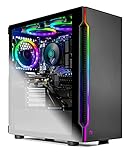
Comparison Table
| Product | CPU / GPU | RAM / Storage | Best for a beginner who… | Link |
|---|---|---|---|---|
| IPASON Gaming PC Desktop | Ryzen 5 5600 / RTX 3060 12GB | 16GB DDR4-3200 / 1TB NVMe | Wants the strongest PC and no upgrades to think about | Check on Amazon |
| Skytech Blaze 3.0 | Core i5-10400F / RTX 3060 | 16GB DDR4-3200 / 1TB SSD | Wants a known brand with every part documented | Check on Amazon |
| ZOTAC MEK AI-Enhanced | Ryzen 5 5500 / RTX 3050 | 16GB DDR4-3200 / 500GB NVMe | Plans to upgrade the graphics card one day | Check on Amazon |
| STGAubron Gaming PC Desktop | Ryzen 5 5500 / RTX 3050 6GB | 16GB DDR4 / 1TB SSD | Shops sales and wants maximum storage | Check on Amazon |
| HP Victus 15L TG02-1020h | Core i5-13400F / RTX 3050 | 8GB / 512GB SSD | Wants big-brand support in a small case | Check on Amazon |
| Skytech Shadow | Ryzen 5 3600 / GTX 1660 Super | 16GB DDR4-3000 / 1TB SSD | Needs the budget to cover a monitor too | Check on Amazon |
How to Choose Your First 1080p Gaming PC
- Start with the graphics card, always. It decides your frame rate in almost every game, and it is the part sellers most like to distract you from with processor badges. Ranked strongest to weakest in this guide: the RTX 3060 12GB, the RTX 3050, and the GTX 1660 Super. A listing shouting “Core i7” or “Ryzen 7” without naming the graphics card model is hiding the only number that matters — walk away.
- Learn one memory distinction: VRAM is not RAM. RAM (16GB is the standard to demand) is the computer’s general memory. VRAM is the graphics card’s own memory, and it controls texture quality in games. The RTX 3060’s 12GB is a real longevity advantage; a 6GB card like the STGAubron’s RTX 3050 simply needs its texture setting watched in the newest titles.
- Sixteen gigabytes of RAM, in two sticks. Two matching sticks run in “dual channel” mode, which is measurably faster than one stick of the same total size. Any machine shipping 8GB total — the HP in this guide is the honest example — needs a second stick budgeted before you compare it fairly.
- A named power supply is a good sign; a silent one is homework. Wattage and an 80+ efficiency rating should be printed in the listing, as Skytech and ZOTAC print them. The power supply decides whether a future graphics card upgrade is a ten-minute swap or an expensive rebuild, and it is the part you cannot judge from a photo of glowing fans.
- Storage fills faster than you think. Modern games routinely exceed 100GB each. A 500GB drive holds Windows and three or four large games; 1TB doubles your breathing room. Running out of storage is the most common first-year annoyance in PC gaming — and the cheapest one to avoid at purchase time.
- Read the configuration name like a contract. One Amazon page often hosts several different PCs. The configuration or “style” name at checkout — processor, graphics card, memory, storage — is the actual product. Screenshot it. It is your evidence if anything different arrives.
- Know whether you are buying a platform or an appliance. The AMD AM4 machines here (Ryzen 5 3600, 5500, 5600) share a socket with years of faster drop-in processors. The Blaze’s older Intel platform is finished, and the HP’s compact case limits graphics upgrades by design. Neither answer is wrong — but know which one you picked.
- Budget the whole desk, not just the tower. None of these PCs includes a monitor, keyboard or mouse. A 1080p monitor with a 144Hz or 165Hz refresh rate is the natural partner for this tier. If the tower eats the entire budget, the Shadow plus a good screen will feel better than an RTX 3060 driving an old 60Hz office panel.
Your First Evening: From Box to First Game
Here is the part most guides skip, and the part beginners actually worry about. When the box arrives, expect the tower (remove any packing material inside the case before powering on, following the quick-start sheet), a power cable, and usually a basic keyboard and mouse or a Wi-Fi antenna to screw onto the back. What is almost never in the box is a monitor and its cable, so have a 1080p display and an HDMI or DisplayPort cable ready. Place the tower where air can move around it — not sealed in a cabinet. Screw on the Wi-Fi antenna if one is included. Connect the monitor cable to the graphics card’s ports, which sit lower on the back panel in a horizontal row — this is the single most common beginner mistake, because the motherboard also has a look-alike port higher up, and plugging the screen in there bypasses your graphics card entirely and makes games run terribly. Connect power, keyboard and mouse, and switch on.
Windows will walk you through its first-run setup — language, Wi-Fi, an account — in about fifteen minutes; there is nothing to install from discs and nothing to assemble. Once you reach the desktop, do three things before your first game. First, let Windows Update run and restart as many times as it asks; a new PC often has months of updates queued. Second, open the NVIDIA app (or let Windows fetch the graphics driver) and install the latest graphics driver — this one update is worth real frame rate in new games. Third, run the two-minute verification: open Settings, then System, then About, and Task Manager’s Performance tab, and confirm the processor name, graphics card name, memory size and storage match the configuration you ordered. Photograph the power supply label through the side panel while you are at it. Then install a game launcher — Steam is the usual first stop — download a game, and play. That whole sequence is also your quality inspection: do it inside the first week, while Amazon’s return window makes any wrong configuration, loud fan or dead port a free fix instead of an argument.
Your First Games: The Settings That Matter
New players often open a game’s graphics menu, see thirty sliders, and either max everything or change nothing. Neither is necessary. Start with the game’s own High preset on the RTX 3060 machines, or Medium-to-High on the RTX 3050 and GTX 1660 Super machines, and adjust only three things. Textures are governed by your card’s VRAM: keep them High on the 12GB RTX 3060; on a 6GB card, drop textures one notch if a game stutters in busy areas — that single change fixes most beginner “my PC is slow” complaints. DLSS, on the RTX cards, is a feature that renders the game slightly below full resolution and intelligently reconstructs it, buying a large frame-rate increase for a barely visible cost; set it to Quality in any game that offers it and leave it there. The GTX 1660 Super cannot use DLSS, but many games offer AMD’s FSR, which does a similar job — use that instead. Ray tracing, the realistic-lighting showcase, is the expensive luxury at this tier: leave it off, or try it on its lowest setting in lighter games with DLSS on. Everything else — shadows, reflections, effects — can stay where the preset puts them; the difference between High and Ultra is usually invisible at 1080p and always expensive.
One last setting lives outside the game. If you bought a 144Hz or 165Hz monitor, Windows may still be driving it at 60Hz until you change it in Display settings — a classic first-week discovery that makes a new PC feel half as smooth as it should. Set the refresh rate to the monitor’s maximum, and the hardware in this guide will do the rest.
Common Beginner Mistakes
- Plugging the monitor into the motherboard instead of the graphics card. The PC works, games crawl, and the owner concludes the PC is broken. The graphics card’s ports are the horizontal row lower on the back — use those.
- Judging a PC by its processor badge. “Ryzen 7” and “Core i7” span a decade of chips, some far slower than the Ryzen 5 and Core i5 models in this guide. The graphics card model is the gaming specification; insist on seeing it named.
- Ordering the wrong configuration from a shared listing page. Five PCs, one page, four of them weaker than the one you researched. Confirm the configuration name at checkout and the parts in Windows on arrival.
- Accepting 8GB of RAM as finished. It is the one specification in this guide flagged in every section it touches: games plus Windows plus a browser will exceed it, and the stutter gets blamed on everything except the actual cause.
- Letting the return window close untested. Wrong configuration, single-stick memory, a rattling fan — all free to fix in week one, all your problem in week six. Run the checks while they are free.
- Blowing the monitor budget on the tower. At 1080p the screen is half the experience. A slightly weaker PC on a good 144Hz display beats a stronger PC on a dim old panel in every game you will actually feel.
- Expecting 1440p, 4K or heavy ray tracing because the card says RTX. These are 1080p machines; buyers whose ambitions live at higher resolutions should read Best 1080p Gaming PC For 1440p Gaming Under $700 with clear eyes — or step up a budget tier.
Final Recommendation
- Most beginners: IPASON Gaming PC Desktop, Ryzen 5 5600, RTX 3060 12GB.
- Known brand, everything documented: Skytech Blaze 3.0.
- Future upgraders: ZOTAC MEK AI-Enhanced.
- Value route to 1TB storage: STGAubron Gaming PC Desktop.
- A household name in a small case: HP Victus 15L TG02-1020h — plus a second RAM stick.
- Budgets that include the monitor: Skytech Shadow.
For a first gaming PC, the shortlist honestly narrows to two. The IPASON is the buy for most beginners: the strongest graphics card and the joint-most storage in this guide, Windows 11 installed, nothing to upgrade soon — just verify the configuration name when you order and again when it arrives. The Skytech Blaze 3.0 is the same class of RTX 3060 performance from a bigger, established builder with every part — including a Gold-rated power supply — written down; choose it if a known name helps you sleep, accepting its older processor and the Windows 10 it starts with. The other four answer specific shapes of beginner, as the shortlist above summarizes. If your ceiling is genuinely lower, see Best 1080p Gaming PC Under $500; if your room is the constraint, Best 1080p Gaming PC For Small Spaces Under $700 is the companion read; and if you want the full performance-first ranking without the beginner framing, the main guide is Best 1080p Gaming PC Under $700. Whichever you choose: plug the screen into the graphics card, run the two-minute Windows check in week one, set DLSS to Quality — and check the live price before you order, because prices at this budget move often.
Frequently Asked Questions
Do I have to build or assemble anything?
No. Every machine in this guide is a prebuilt: it arrives assembled with Windows installed, and setup means unboxing, removing any internal packing material as the quick-start sheet directs, connecting a monitor, keyboard, mouse and power cable, and following Windows’ on-screen first-run steps. The one physical detail that matters is plugging the monitor into the graphics card’s ports on the back — the lower, horizontal row — not the similar-looking motherboard port above them.
What else do I need to buy besides the PC?
A monitor, unless you already own one — a 24-inch 1080p model with a 144Hz or 165Hz refresh rate is the right partner for this tier — plus a display cable if the monitor does not include one. Most of these towers include a basic keyboard and mouse or are commonly bundled with them, but check the listing’s “what’s in the box” before assuming; a comfortable mouse is the first peripheral worth upgrading. Games themselves are bought digitally through launchers like Steam.
Is $700 a sensible budget for a first gaming PC?
Yes — it is the first budget where a beginner stops having to apologize for the machine. At $700 a prebuilt can hold a six-core processor, 16GB of memory, a fast SSD and an RTX 3050 or RTX 3060 graphics card, and that plays competitive games at high frame rates and modern titles at 1080p high settings in most cases. Cheaper tiers buy real compromises; this one buys a PC. It does not buy 1440p headroom or heavy ray tracing — second-PC ambitions for most people.
What do I do if something is wrong when it arrives?
Act in the first week, while Amazon’s return window is open. Run the checks from the setup section — confirm the parts in Windows match the configuration you ordered, play your most demanding game, listen for anything alarming. A wrong configuration, a dead port or a rattling fan is a return or replacement conversation at that point, at no cost to you. After the return window, the manufacturer’s warranty takes over: HP and Skytech have established service channels, ZOTAC warrants both the system and its graphics card, and smaller builders like IPASON and STGAubron handle support through their seller channels — one more reason to keep the box and your order screenshots until the machine has proven itself.
Which settings should I use in my first games?
Start from the game’s High preset on an RTX 3060 machine, or Medium-to-High on an RTX 3050 or GTX 1660 Super. Turn DLSS (or FSR on the 1660 Super) to Quality where offered — it is close to free performance. Keep textures within your graphics card’s memory: High is fine on the 12GB RTX 3060; on a 6GB card, lower textures a notch if busy scenes stutter. Leave ray tracing off at this tier. And set your monitor to its full refresh rate in Windows display settings, or you will only ever see 60Hz of what you bought.
What is the first upgrade I should plan, and when?
It depends which machine you bought, and none of them needs anything immediately except one: the HP Victus should get its second memory stick right away, because 8GB is below the comfortable minimum now. Beyond that, the usual order is storage (the ZOTAC’s 500GB drive fills first), then — a year or two in, if new games start asking more — the graphics card, which is exactly why the ZOTAC’s 650W power supply and the standard towers’ roomy cases matter. Processors come last; the AM4 machines can accept a faster Ryzen chip on the same motherboard when the day comes.
Should I build my own PC instead, as a beginner?
You can, and building teaches you the machine — but it is a project, not a shortcut. At $700, prebuilt sale pricing is genuinely competitive with buying the same parts separately once Windows is included, and a prebuilt gives you one warranty for the whole box and gaming this weekend instead of an evening of assembly and troubleshooting. Build later, if curiosity strikes, with the confidence of someone who already owns a working PC. For a first machine, buying from this guide and learning the vocabulary at your own pace is the lower-risk path — and if your budget grows later, Best 1080p Gaming PC Under $800 shows what the next tier adds.