Where to buy
Check the latest price, availability and delivery on Amazon. Orders are placed on Amazon. We may earn a commission from qualifying purchases.
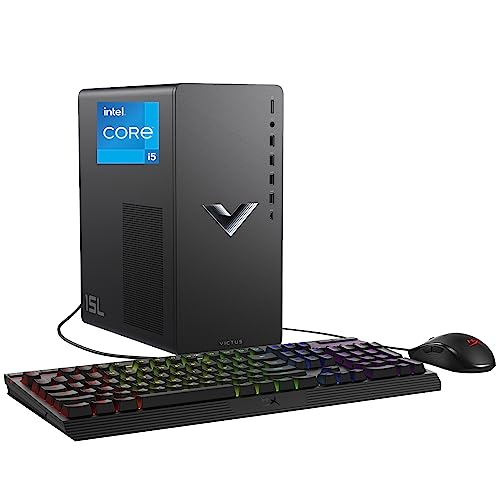
- Smallest verified footprint: HP Victus 15L Gaming Desktop TG02-1020h, Intel Core i5-13400F, RTX 3050 — Check on Amazon
- Best gaming power if the floor can take a tower: IPASON Gaming PC Desktop, Ryzen 5 5600, RTX 3060 12GB — Check on Amazon
- Skytech Blaze 3.0 Gaming PC Desktop, Intel Core i5-10400F, RTX 3060 — Check on Amazon
- ZOTAC MEK AI-Enhanced Gaming PC, Ryzen 5 5500, RTX 3050, 650W Gold PSU — Check on Amazon
See 2 more Amazon options
- STGAubron Gaming PC Desktop, Ryzen 5 5500, RTX 3050 6GB, 1TB SSD — Check on Amazon
- Skytech Shadow Gaming PC Desktop, Ryzen 5 3600, GTX 1660 Super — Check on Amazon
Read the full guide ↓
Disclosure: As an Amazon Associate, reviewstook.com earns from qualifying purchases. Links to Amazon on this page are affiliate links; they cost you nothing extra. Listing details such as price and availability change often, so check the current Amazon listing before you buy.
Small-space gaming has a measurement problem, and it starts before the budget does. At $700, the prebuilt gaming market sells performance in exactly one shape: the standard ATX tower. That shape is wonderful for airflow and upgrades, and it is roughly the size of a carry-on suitcase stood on end. If your gaming space is a dorm desk, a studio corner, or a bedroom you also sleep and study in, the tower is not a detail of the purchase — it is the purchase. This guide takes the six machines that define honest 1080p gaming under $700 and re-grades each on the questions a small room actually asks: how much floor or desk it consumes, where it can sit, how much breathing room its fans need, how it will sound a metre from your pillow or microphone, and how far its cables travel.
Here is the plain truth up front: a tower bought for a small space is a compromise. Five of the six machines below are full-size towers, and no arrangement of words makes a full-size tower small. Exactly one pick — HP’s Victus 15L — is documented at roughly half the volume of a standard tower, the only machine here designed small rather than merely sold to people with small rooms. If your space is genuinely tight — a desk under a metre wide, a shelf unit, a monitor arm and nothing else — the honest answer may not be a tower at all: mini gaming PCs and small-form-factor machines exist precisely for that problem, and the sections below point to them by name. But if your room can absorb one tower, placed well, $700 buys real 1080p gaming — RTX 3050 and RTX 3060 graphics, six-core processors, 16GB of memory — and this guide’s job is to tell you which tower earns its footprint and where each one should sit.
One measurement rule runs through everything that follows. Where a machine’s size is documented in verified listing data, we print it: the Victus’s 15-litre case is the one firm number in this guide. Where dimensions were not part of the verified record, we do not guess them — the only measurement that matters is the live listing’s, checked against the tape measure in your hand. Each review tells you plainly which situation you are in.
In this guide
Quick Picks
Short on time, or comparing several options at once? Each row below names a small-space situation and the machine that suits it, with a link to the listing.
| Your space | Pick | Why it stands out | Link |
|---|---|---|---|
| Tightest footprint, desk or shelf | HP Victus 15L TG02-1020h, Intel Core i5-13400F, RTX 3050 | Documented 15L case — about half a standard tower’s volume — and the newest CPU in the guide | Check on Amazon |
| Floor space beside the desk, maximum gaming power | IPASON Gaming PC Desktop, Ryzen 5 5600, RTX 3060 12GB | The strongest CPU-and-GPU pairing under $700, with 1TB NVMe storage | Check on Amazon |
| Floor placement with an upgrade planned | Skytech Blaze 3.0, Intel Core i5-10400F, RTX 3060 | RTX 3060 power with a published 600W Gold power supply for a later GPU swap | Check on Amazon |
| Quiet corner, fine-print build | ZOTAC MEK AI-Enhanced, Ryzen 5 5500, RTX 3050 | 650W 80+ Gold PSU and Wi-Fi 6E, every supporting part named in the listing | Check on Amazon |
| Budget-tier value, floor tower | STGAubron Gaming PC Desktop, Ryzen 5 5500, RTX 3050 6GB | 1TB of storage and modern wireless at a budget-tier position | Check on Amazon |
| Budget tower, money left for the room | Skytech Shadow, Ryzen 5 3600, GTX 1660 Super | Budget-tier tower — check price on Amazon; honest 1080p performance with budget left for desk and monitor | Check on Amazon |
How These Picks Were Chosen
The six machines are the verified under-$700 1080p field: real Amazon listings in this budget tier in the United States, each with a named discrete graphics card — anything running on integrated graphics was excluded, however modern its processor. Prices move weekly in this market, so check price on Amazon for the current figure on each machine rather than relying on any number printed elsewhere. The gaming grading follows the order that matters at 1080p: graphics card first, then processor, then memory configuration, then storage.
On top of the gaming grade, each machine was graded on five placement questions. First, documented size: a volume figure only counts if it appears in the verified listing record we worked from, which is why the Victus 15L’s 15-litre case is stated as fact and the towers’ exact dimensions are not stated at all — for those, read the dimensions field on the live listing and measure your space against it before ordering. Second, placement options: whether the machine makes sense on a desk, under it, or beside it. Third, ventilation — every tower here breathes through case vents needing open air, and a machine wedged into a closed cabinet or against a wall runs hotter and louder than one given clearance. Fourth, noise at desk distance: no listing in our verified record publishes a noise rating, so this guide makes no decibel claims — it grades what honestly predicts bedroom noise: how hard the hardware works at 1080p, and how far the machine sits from your ears and microphone. Fifth, cable reality: a floor tower’s cables must reach the desk, and that distance belongs in the buying decision, not in a frustrated evening after delivery.
Two honesty filters from the main guide carry over untouched. A specification the listing leaves blank was treated as a cost, not a neutral: the STGAubron below does not publish its power supply wattage, memory speed or SSD interface, and the review flags that silence exactly as the performance guide does. And the upgrade filter still applies, with a small-space twist — a floor tower keeps its upgrade path, while the one genuinely compact machine here, the Victus, trades that path away for its size. In a small room that trade is sometimes exactly right; this guide’s job is to make sure you choose it on purpose.
The 6 Best 1080p Gaming PCs for Small Spaces Under $700
HP Victus 15L Gaming Desktop TG02-1020h — Intel Core i5-13400F, RTX 3050
Who it suits: The buyer whose space problem is real — a dorm desk, a shared bedroom, a TV stand — and who wants the smallest documented machine in this guide from a manufacturer with a service network behind it.
Start with the number that makes this machine the headline of a small-spaces guide: 15 litres. HP’s Victus 15L case is documented at roughly half the volume of the standard towers ranked below it, and that difference is not cosmetic. Half the volume is the difference between a PC that needs its own floor territory and one that can share a desk with a monitor or sit on a sturdy shelf without rearranging the room. It is the only pick here whose size is a verified figure rather than an impression. Placement follows: this is the one machine we would put on the desk itself, provided the desk is solid — and even there, leave clearance rather than bookending it between a monitor and a wall, because compact cases have less internal air to forgive blocked vents with.
The hardware inside earns the placement. The Intel Core i5-13400F is a 13th-generation chip with ten cores — six performance and four efficiency — and sixteen threads, the newest and strongest multitasking processor in this guide, which matters in a small room: the desk that holds this PC usually holds the whole life around it — schoolwork, streaming, video calls — and the hybrid core layout is built for gaming with that workload beside it. The GeForce RTX 3050 delivers the established 1080p story for its class — high-refresh esports, medium-to-high settings in modern AAA games with DLSS helping — and HP’s warranty and service network, independent of an Amazon seller inbox, is the quiet second product. Check price on Amazon for the current figure; third-party pricing can drift upward between HP’s own sales.
Now the limitation, printed at full size because it is the first thing a small-space buyer must budget around: this configuration ships with only 8GB of RAM. In 2026 that is below the working minimum for comfortable gaming — modern titles plus Windows, a launcher and a browser will push past it, and if the 8GB arrives as a single stick, the machine is also running single-channel memory, which costs real frame rate on top of the capacity squeeze. The fix is cheap and easy — a matching DDR4 stick is one of the least expensive upgrades in PC gaming, and the compact case does not prevent it — but it is an upgrade this machine needs in a way the 16GB picks do not. The second trade is the size itself: the 15L case and proprietary power supply cap future graphics card upgrades well below what the standard towers accept, so you are buying an appliance for its working life, not a platform to grow. For a small room, that is frequently the right bargain — just make it with both eyes open, and with the second memory stick already in the cart.
- Documented 15L case — about half a standard tower’s volume; the only verified small footprint here.
- Core i5-13400F — the newest, most cores, best multitasking CPU in this guide.
- Desk, shelf or TV-stand placement is realistic, backed by HP’s warranty and service network.
Honest limitation: Only 8GB of RAM as shipped — plan a second stick immediately — and the compact proprietary case and power supply sharply limit future GPU upgrades.
Choose it if space is the first constraint and you want a machine that fits the room you actually have. Skip it if you want 16GB fitted from the factory and a tower you can upgrade for years — that buyer needs floor space and one of the standard towers below.

IPASON Gaming PC Desktop — Ryzen 5 5600, RTX 3060 12GB, 1TB NVMe SSD
Who it suits: The small-room buyer who can give a tower one honest patch of floor — beside the desk, not on it — and wants the most gaming performance this budget holds in exchange.
On gaming hardware alone this is the strongest machine in the guide; the small-spaces grading changes only where it lives. The Ryzen 5 5600 is a six-core, twelve-thread Zen 3 processor at 3.5GHz with boost to 4.4GHz, matched with the GeForce RTX 3060 in its 12GB form, and that memory figure matters more than it looks: at 1080p the 12GB of GDDR6 is what holds high texture settings in current releases where 6GB and 8GB cards are already turning textures down. Around them the documented specification stays strong: 16GB of DDR4 at 3200MHz with heat spreaders, a 1TB NVMe M.2 SSD where most rivals settle for half that, a 550W power supply whose wattage is at least published, and Windows 11 Home. This configuration plays demanding modern games at 1080p high settings at 60 frames per second or better in most titles, pushes well past 100 in many, and treats esports titles as high-refresh territory for a 144Hz monitor, with DLSS Quality mode as extra headroom where supported.
The placement grading is where a small-space buyer must be honest with themselves. This is a standard tower whose exact dimensions were not part of the verified record we worked from — so before ordering, read the dimensions field on the live listing and measure the spot you intend: its realistic homes are the floor beside or under the desk, or a desk deep enough to hold a tower behind the monitor without crowding the keyboard forward. Floor placement has real virtues — it frees the entire desk surface and puts the fans further from your ears and microphone — and two real costs: cables must reach from the floor to the desk, so check lengths before delivery day; and a tower directly on carpet can have its bottom intake breathing through pile, so a hard surface or low stand under it is the correct arrangement. Keep open air around the case rather than pushing it flush into the corner where two walls meet; a tower exhausting into a dead corner is recycling its own heat. Judged as a floor machine with its vents respected, its footprint is simply the standard tower one, asked with the best hardware inside.
The caveats are about the seller, not the silicon. IPASON is a smaller integrator than Skytech or HP; the listing notes the graphics card brand may vary — normal for prebuilts, but the exact RTX 3060 board is a lottery — and the same listing family has carried different style configurations over time, so confirm the style name says Ryzen 5 5600 with RTX 3060 before ordering, and again in Windows on arrival. Check price on Amazon for the current figure; this configuration is positioned as a budget-tier value among the RTX 3060 rivals in this guide while matching or beating their storage. If its current price pushes it out of this budget tier when you shop, the Skytech Blaze below is the same graphics card class from a bigger name — but at a competitive price, this is the machine the rest of the guide is measured against.
- Ryzen 5 5600 plus RTX 3060 12GB — the strongest documented pairing under this budget.
- 1TB NVMe SSD, double the storage of most $700 rivals, and 16GB DDR4-3200.
- Floor placement frees the whole desk and moves fan noise furthest from the microphone.
Honest limitation: A full-size tower whose exact dimensions you must confirm on the live listing, from a smaller integrator with a “GPU brand may vary” lottery and style variants that have changed over time.
Choose it if you have one honest patch of floor and performance per dollar leads your list. Skip it if the machine has to live on the desk or a shelf — that is the Victus above, or the mini-PC route described later in this guide.

Skytech Blaze 3.0 Gaming PC Desktop — Intel Core i5-10400F, RTX 3060, 1TB SSD
Who it suits: The small-room buyer planning ahead — someone who will place a tower on the floor today and wants the documented power supply headroom to swap in a stronger graphics card tomorrow without moving anything.
Skytech publishes the specification the way this guide wishes everyone did. The Blaze 3.0 (model ST-BLAZE3-0339-B-AM) pairs an Intel Core i5-10400F — six cores, twelve threads, 2.9GHz base — with the GeForce RTX 3060, 1TB of SSD storage, 16GB of DDR4 at 3200MHz, AC Wi-Fi, and a 600W Gold-rated power supply. That last line is the differentiator: a named wattage with an 80+ Gold rating means real headroom for the shipped card and a plausible path to a stronger one later — precisely what no-name listings withhold. The RTX 3060 delivers the same 1080p story as in the IPASON — high settings in modern games, high-refresh esports, DLSS when a title gets heavy — and Skytech’s US-based assembly and support are why many buyers pay this brand’s small premium willingly. Check price on Amazon — this configuration sits at the top of this budget tier.
For a small room, the Blaze is the same placement proposition as the IPASON. It is a standard tower — its exact dimensions were not in the verified record we worked from, so measure your spot against the dimensions field on the live listing before ordering — and a standard tower belongs on the floor or on a desk deep enough to forget it is there. What the Blaze adds is a reason to keep it there for years: the 600W Gold supply means a future graphics card swap happens in the same case, in the same corner, with no new footprint negotiation. Think about access, too: place it at the end of the desk run, not wedged between furniture where the side panel cannot come off. Leave the vents open air, keep it off deep carpet or on a hard board, and run the display cable up to the desk with length to spare.
The trade is the processor’s age. The i5-10400F is a 10th-generation Intel chip: perfectly capable of feeding an RTX 3060 at 1080p today — the graphics card, not the CPU, is the limit in most games at this tier — but it sits on an older platform with no meaningful CPU upgrade path short of a motherboard swap, and the listing ships Windows 10 Home rather than Windows 11, so confirm the free upgrade path or plan the update in the first week. None of that stops it gaming hard right now; it means you are buying this machine for what it is on delivery day and for the graphics card swaps its power supply allows, not for a processor runway. Judged that way — an RTX 3060, a terabyte of storage and a Gold power supply from a known integrator, positioned at the top of this budget tier, asking only for a standard tower’s worth of floor — it earns its place.
- RTX 3060 with 1TB SSD and 16GB DDR4-3200, the full documented specification.
- 600W Gold PSU named in the listing — the upgrade headroom that keeps one footprint for years.
- Established US integrator with its own support channel behind the machine.
Honest limitation: The Core i5-10400F is an older-generation processor on a dead-end platform, and the listing ships Windows 10 Home — you are buying today’s performance and GPU-swap headroom, not a CPU upgrade path.
Choose it if a floor tower is acceptable and you want the specified power supply for a later graphics card. Skip it if the machine must live on the desk — no standard tower earns that spot in a genuinely small room.

ZOTAC MEK AI-Enhanced Gaming PC — Ryzen 5 5500, RTX 3050, 650W Gold PSU
Who it suits: The fine-print reader in a quiet room — a bedroom or studio where the PC shares air with a bed or a recording setup, and where a fully documented machine matters more than the last frame per second.
ZOTAC is a graphics card manufacturer first, and the MEK (model MEK3050A5500BG0V1) is built like it. The headline parts are a Ryzen 5 5500 — six cores, twelve threads, up to 4.2GHz — and a GeForce RTX 3050, with 16GB of DDR4 at 3200MHz and a 500GB NVMe M.2 SSD. What lifts it above the other RTX 3050 towers is everything around those parts: a 650W 80+ Gold power supply stated in the product name itself — more wattage and better efficiency than anything else here — plus Wi-Fi 6E and a single manufacturer standing behind both system and card. The RTX 3050 sets the gaming ceiling honestly: a 1080p medium-to-high settings card, excellent for esports, happy in modern AAA games at medium-to-high with DLSS doing quiet work, and the wrong choice for anyone expecting to max every slider. Check price on Amazon — the MEK sits inside this budget tier with room to spare.
The small-spaces grading adds two points, one in its favour and one to plan around. In its favour: the RTX 3050’s modest demands mean this machine works less hard — and moves less air — than the RTX 3060 towers do for their performance, and in a bedroom or a room where someone records voice, a tower on the floor at the far side of the desk, vents unobstructed, is the least intrusive full-size PC this guide can offer. No listing in our verified record publishes a noise figure for any machine here, so treat that as reasoning about workload and distance, not a measured promise. To plan around: like the other standard towers, the MEK’s exact dimensions were not in our verified record, so confirm them on the live listing before ordering; and its 500GB SSD is the smallest drive in this guide — the second drive it will want is at least an internal fit, but the day-one library must be curated until then.
What you get for those compromises is the best power delivery and wireless in the guide, in a machine one graphics card swap away from a second life — the 650W Gold supply and standard platform will accept a much stronger GPU without complaint. For a buyer placing the tower once, carefully, in the corner it will live in, that arithmetic can beat a faster card in a sealed box.
- 650W 80+ Gold PSU and Wi-Fi 6E — the best supporting specification in this guide.
- Ryzen 5 5500 and RTX 3050 from the company that manufactures the graphics card.
- 16GB DDR4-3200, and a standard platform with genuine GPU upgrade headroom.
Honest limitation: The 500GB SSD fills quickly, and the RTX 3050 is a medium-to-high settings card at 1080p — a clear step behind the RTX 3060 machines for raw performance today.
Choose it if power supply quality, wireless and a planned GPU upgrade matter, and the tower gets a floor corner with open air. Skip it if you want maximum frame rates on delivery day and never plan to open the case — buy the RTX 3060 machines.

STGAubron Gaming PC Desktop — Ryzen 5 5500, RTX 3050 6GB, 1TB SSD
Who it suits: Value hunters — buyers willing to accept a vaguer specification sheet in exchange for a terabyte of storage and budget-tier pricing, with a floor spot ready for the tower.
The documented core is sound. This STGAubron tower (model ABR1722) runs a Ryzen 5 5500 at up to 4.2GHz — the same six-core Zen 3 processor as the ZOTAC above — with a GeForce RTX 3050 6GB graphics card, 16GB of DDR4 memory, a 1TB solid-state drive, Wi-Fi 6, Bluetooth 5.2, four RGB fans and Windows 11 Home. That is the full modern checklist: enough CPU for any game in this class, enough memory for gaming with a browser and chat open beside it, double the storage of the MEK, and current wireless. Performance follows the RTX 3050 6GB script — esports at high frame rates, modern AAA games at 1080p medium-to-high settings with DLSS smoothing the demanding scenes — and the 6GB of video memory is the version of the 3050 to watch most carefully with texture settings in the newest releases. Value is the argument: check price on Amazon — this is a budget-tier route in this guide to a Ryzen 5 5500 with a terabyte of storage.
Placement earns this machine one genuine small-space credit and one warning. The credit is the lighting question, which in a small room is not a joke: four RGB fans in a tower sharing a bedroom are part of the room’s lighting whether you planned them or not — on the floor that glow sits at ankle height and reads as ambience; on the desk it sits in your peripheral vision all evening. If you game where someone else sleeps, floor placement and the fans’ lighting controls are a household negotiation to have before the box arrives. The warning is the familiar one, sharpened by proximity: the listing does not publish the power supply wattage or brand, the memory speed, or whether the SSD is NVMe or SATA — three specifications the picks above state openly — and an unnamed power supply decides both upgrade headroom and long-term electrical behaviour. None of that makes this a bad purchase; it makes it a purchase with homework. Its exact dimensions were likewise not in our verified record — measure the listing’s stated size against your floor spot — and on arrival, photograph the power supply label, confirm the memory and SSD in Windows, and stress-test it inside the return window.
- Ryzen 5 5500, RTX 3050 6GB and a full 1TB SSD — the modern checklist, complete.
- Wi-Fi 6 and Bluetooth 5.2, matching the newest wireless in most of this guide.
- Budget-tier positioning — check price on Amazon; a genuine value pick.
Honest limitation: The listing leaves the power supply, memory speed and SSD interface unpublished, and the brand’s support track record trails the big integrators — buy it with a first-week inspection planned.
Choose it if the current Amazon price looks competitive, you have a floor spot for it, and you will verify the unlisted parts on arrival. Skip it if unpublished specifications bother you — the ZOTAC above answers every one of these questions in its product name.

Skytech Shadow Gaming PC Desktop — Ryzen 5 3600, GTX 1660 Super, 1TB SSD
Who it suits: The under-budget buyer outfitting a whole small setup — someone whose $700 has to cover not just the tower but the desk, the chair or the monitor that makes a small room work at all.
The Shadow (model ST-SHADOW-0238-AM) is the elder statesman of this guide, and its specification explains its staying power: a Ryzen 5 3600 — six cores, twelve threads at 3.6GHz — a GeForce GTX 1660 Super with 6GB of GDDR6, 16GB of DDR4 at 3000MHz, a full 1TB SSD, RGB fans, AC Wi-Fi and Windows 10 Home. The GTX 1660 Super deserves an honest defense. It has no ray tracing hardware worth using and no DLSS, which is why it sits last in a 2026 guide — but in plain rasterized 1080p gaming, still how most games are played at this tier, it remains genuinely capable: high settings in a wide range of modern titles, very high frame rates in esports games, and 6GB of memory that behaves itself at 1080p. The Ryzen 5 3600 behind it is a generation older than the 5500 and 5600 above and will show it first in CPU-heavy strategy and simulation games — but its AM4 socket accepts those very processors as a drop-in upgrade later. Check price on Amazon — it is the budget-tier pick in this guide, positioned well below the top of the tier.
In a small room, that saving is the review. The Shadow is a standard tower with the same placement rules as the machines above it — floor beside the desk, vents given open air, dimensions confirmed from the live listing against your measured space, because its exact size was not part of our verified record — and it asks for exactly as much room as higher-tier towers. What it returns is the budget to solve the room itself: a compact desk that actually fits, a 1080p 144Hz monitor instead of a borrowed office panel, a longer display cable bought on purpose. Small-space setups fail on furniture and peripherals more often than on frame rates; this buyer is better served by a complete setup around an honest tower than by a faster tower surrounded by compromises. The RGB fans carry the same bedroom caveat as the STGAubron’s: on the floor they are ambience, on the desk they are a light show.
What the lower tier costs is the future’s graphics features. More games every year lean on DLSS or FSR upscaling to hit their performance targets, and while FSR works on this card, NVIDIA’s DLSS does not; ray-traced lighting is effectively off the menu. Windows 10 Home in the listing also means an upgrade conversation the Windows 11 machines skip. None of this matters to this machine’s buyer: for them, money saved toward the room is the correct allocation, and the Shadow is the honest way to make it.
- Budget-tier pricing — check price on Amazon; the pick that leaves the most room in the budget for the desk and monitor.
- GTX 1660 Super still delivers honest 1080p high-settings raster performance.
- 1TB SSD and 16GB of RAM fitted, and an AM4 socket with a real CPU upgrade path.
Honest limitation: No DLSS and no usable ray tracing, an older Ryzen 5 3600, and Windows 10 in the listing — this is today’s value, bought with tomorrow’s features.
Choose it if your total budget must furnish the corner as well as fill it. Skip it if you play the newest releases on day one and expect upscaling to carry them — step up to the RTX 3060 pair.

Comparison Table
| Product | CPU / GPU | RAM / Storage | Space verdict | Link |
|---|---|---|---|---|
| HP Victus 15L TG02-1020h | Core i5-13400F / RTX 3050 | 8GB / 512GB SSD | Documented 15L — desk, shelf or TV stand; the only true compact here | Check on Amazon |
| IPASON Gaming PC Desktop | Ryzen 5 5600 / RTX 3060 12GB | 16GB DDR4-3200 / 1TB NVMe | Standard tower — floor beside the desk; best hardware per footprint | Check on Amazon |
| Skytech Blaze 3.0 | Core i5-10400F / RTX 3060 | 16GB DDR4-3200 / 1TB SSD | Standard tower — floor placement, Gold PSU keeps the spot upgradeable | Check on Amazon |
| ZOTAC MEK AI-Enhanced | Ryzen 5 5500 / RTX 3050 | 16GB DDR4-3200 / 500GB NVMe | Standard tower — quiet-corner floor pick, best PSU and Wi-Fi | Check on Amazon |
| STGAubron Gaming PC Desktop | Ryzen 5 5500 / RTX 3050 6GB | 16GB DDR4 / 1TB SSD | Standard tower — floor placement keeps the RGB glow at ankle height | Check on Amazon |
| Skytech Shadow | Ryzen 5 3600 / GTX 1660 Super | 16GB DDR4-3000 / 1TB SSD | Standard tower — same footprint, savings back for the room itself | Check on Amazon |
How to Choose a 1080p Gaming PC for a Small Space
- Measure the space before you shop the PC. Width, depth and height of the exact spot — desk surface, floor patch, shelf — in centimetres, compared against the dimensions field on the live listing, with room to spare. Of the machines in this guide, only the HP Victus 15L has a verified volume in our record (15 litres, about half a standard tower); for every standard tower, the listing’s stated dimensions are the measurement to trust, not a review’s impression — including ours.
- Decide the placement first: desk, floor or shelf. Desk placement suits only genuinely compact machines like the Victus; a standard tower on a small desk eats the surface your keyboard and monitor needed. Floor placement beside or under the desk is the standard tower’s natural small-room home — it frees the whole desk and maximises distance from your ears. Shelf placement demands a shelf rated for a tower’s weight and depth, with open air behind it; a shelf inside a closed unit is an oven.
- Budget clearance, not just footprint. A tower’s stated size is the box; the machine needs more than the box. Leave open space around the vented sides and rear — a hand’s width at minimum — and never push the exhaust side flush against a wall or furniture back. The centimetres around the PC are the ones that keep it quiet, because fans that can breathe do not have to spin as hard.
- Keep the tower off carpet, or lift it. Many towers draw air from the bottom; on a carpeted bedroom floor that intake breathes through pile and dust. A low stand, a board, or any hard flat surface under the machine fixes it for almost no money.
- Plan the cable runs on paper. A floor tower needs its display cable, power lead and wired peripherals to reach the desk with slack, not tension. Measure the route — down, across, up — before ordering, and treat longer cables as a planned purchase, not a delivery-day crisis.
- Treat distance as your noise control. No machine in this guide publishes a noise rating in the record we verified, and we will not invent one. What you control is geometry: a tower on the floor at the far side of the desk is further from your ears and microphone than the same tower beside the monitor, and in a bedroom that distance beats any fan curve. Lighter hardware helps too — a machine under less load is a machine moving less air.
- Think about light, honestly. RGB fans are room lighting. In a gaming room that is a feature; in a bedroom where someone else sleeps, a glowing tower on the desk is a nightlight nobody ordered. Floor placement lowers the glow to ambience, fan lighting can usually be dimmed in software, and the Victus’s plain styling is the discreet option here. Have the conversation before the purchase, not at midnight after it.
- Leave the side panel reachable. Every tower here will be opened one day — a RAM stick, a GPU swap, a PSU check. Place it so a panel can come off without moving furniture.
- Demand 16GB of RAM, in two sticks. Space does not change the memory rule: sixteen gigabytes is the working standard, and two sticks run in dual channel, measurably faster than one. The one machine here shipping 8GB — the Victus — needs its second stick budgeted before you call the price final.
- Shop the graphics card first, then fit it to the room. At 1080p the GPU sets your frame rate — RTX 3060 12GB, then RTX 3050, then GTX 1660 Super in this guide’s order of strength — and no placement trick recovers performance a weaker card never had. Choose the performance tier first, then use the placement grading to pick which machine delivers it in your room.
When a Tower Is the Wrong Answer: The Mini PC Route
Everything above assumes your room can take one tower, placed well. Some rooms cannot, and this guide would rather lose the sale honestly than win it badly. If your gaming space is a desk under a metre wide with no floor patch beside it, a shelf unit with shallow shelves, or a workspace that must clear completely for work or study — then the correct $700 purchase is not the smallest tower in this guide. It is a different shape of computer entirely.
That shape exists, with its own guides in this series. Mini gaming PCs pack laptop-class and efficient desktop hardware into boxes a fraction of a tower’s size — machines that sit behind a monitor, on a shelf, or in a TV stand’s open bay — and the trade is the mirror of the Victus’s: you give up the upgrade path and some performance per dollar, and gain a footprint that stops being a problem. Readers whose space is the whole question should compare Best Mini Gaming PC Under $700 for gaming-focused minis at this budget, Best Small Form Factor Gaming PC Under $700 for compact cases that keep real graphics cards in a much smaller box, and Best Compact Gaming PC Under $700 for the middle ground. What those machines cannot do is match the RTX 3060 towers above for raw 1080p performance at this price — that is the genuine exchange at $700: performance lives in towers, convenience lives in minis, and the Victus 15L sits between them. A tower bought for a room that cannot hold it is not a bargain at any frame rate.
Common Buying Mistakes
- Buying the tower first and measuring the room second. The most common small-space failure is a standard tower arriving at a desk it was never measured against. The dimensions are printed on the listing — use them before checkout, not after.
- Wedging the PC into a closed cabinet or TV unit. A tower in an enclosed box with the door shut is a tower cooking in its own exhaust. If the machine must live in furniture, the furniture needs open backs and genuine airflow — otherwise put it beside the unit and accept the visible PC.
- Pushing the case flush into a corner. Two walls and a tower’s exhaust side make a heat trap. The clearance around the machine is part of its cooling system; spending it to gain four centimetres of floor is the worst trade in a small room.
- Setting a tower directly on deep carpet. Bottom intakes breathe through the pile, dust load climbs, and temperatures follow. A board or low stand costs almost nothing and is not optional on carpet.
- Assuming “compact” in a product name means measured. Marketing words are not dimensions. In this guide only one machine’s size is a verified figure — the Victus’s 15 litres — and every other claim should be checked against the listing’s stated measurements and your own.
- Forgetting the cables in the floor plan. A floor tower with a display cable two centimetres too short gets dragged to a worse position, vents against the wall. Measure the cable route when you measure the space.
- Buying the 8GB configuration and calling it finished. The Victus needs its second stick from day one; any listing shipping 8GB in 2026 is selling you an unfinished PC, and the small case does not excuse it.
- Letting the return window close untested. The first week is when you learn whether the fans are bearable at desk distance, whether the glow keeps the room awake, and whether the parts match the listing — all free to fix inside the window, expensive after it.
Final Recommendation
- Genuinely tight spaces: HP Victus 15L TG02-1020h — plus a second RAM stick.
- Most small-room buyers with a floor patch: IPASON Gaming PC Desktop, Ryzen 5 5600, RTX 3060 12GB.
- Floor tower with an upgrade planned: Skytech Blaze 3.0.
- Quiet corners and fine-print builds: ZOTAC MEK AI-Enhanced.
- Budget-tier value on the floor: STGAubron Gaming PC Desktop.
- Budgets that must furnish the room too: Skytech Shadow.
Our top two for a small space split exactly the way the rooms do. If space is the hard constraint — the desk is small, the room is shared, the machine must sit on furniture rather than claim floor — the HP Victus 15L is the only pick designed for that life: a documented 15-litre case, the newest processor in the guide, a real service network, and one clearly flagged homework item in its 8GB of memory. If your room can give a standard tower one honest patch of floor, the IPASON is the better computer by a clear margin — the strongest processor-and-graphics pairing under $700, a terabyte of storage — check price on Amazon for the current figure. Between those poles: the Blaze for buyers who will one day swap its graphics card in the same corner, the MEK for the quiet room, the STGAubron for budget-tier value, and the Shadow when the budget has furniture to buy as well. Buyers whose measurements say no tower fits should not force one — start from Best 1080p Gaming PC Under $700 for the full-performance field, compare Best 1080p Gaming PC For Small Spaces Under $500 below this budget and Best 1080p Gaming PC For Small Spaces Under $800 above it, and let Best 1080p Gaming PC For Beginners Under $700 walk first-time buyers through setup. Measure the space, read the listing’s dimensions, verify the parts in Windows in the first week — and check the live price before you order.
Frequently Asked Questions
Will a standard gaming tower fit under my desk?
Usually, yes — under-desk floor space is the standard tower’s natural small-room home, and it is where five of the six machines in this guide belong. Read the tower’s dimensions on the live listing (only the Victus’s 15-litre volume is verified in our record), confirm the height clears any desk crossbar or drawer unit, leave open air around the vented sides, and lift it off carpet on a board or stand. Then confirm your display and power cables reach the desk with slack. Pass those checks and under-desk placement is not a compromise at all — it frees your entire work surface.
How much smaller is the HP Victus 15L, really?
Its case is documented at 15 litres — roughly half the volume of the standard towers in this guide. That is the only verified size figure among the six picks, and it is what makes desk, shelf and TV-stand placement sensible for the Victus while the towers are floor machines. What the smaller case costs is also documented: HP’s proprietary power supply and the compact interior cap future GPU upgrades hard, and this configuration ships with 8GB of RAM that needs a second stick. Small is a genuine feature here — just not a free one.
How much clearance does a gaming PC actually need?
More than its footprint, less than a room of its own: leave at least a hand’s width of open space around any vented side, keep the exhaust side away from walls and furniture backs, and never run a tower inside a closed cabinet. The reason is noise as much as temperature: a machine suffocating in a corner spins its fans harder to do the same work, and in a bedroom that is the difference you will hear every night.
Is a tower on the floor bad for the PC?
No — floor placement is legitimate, often ideal, with two conditions: keep the machine off deep carpet or on a hard surface so bottom intakes can breathe, and keep it out of the path of feet, chair castors and vacuum cleaners. Meet those, and the floor is arguably the best small-room placement of all: the desk stays clear, and the fans sit as far from your ears and microphone as the room allows.
Should I buy a mini gaming PC instead of a tower?
If your measurements say a tower does not fit, yes — that is what the mini category is for, and forcing a tower into a room that cannot hold it is the most expensive outcome of all. Mini and small-form-factor machines give up some performance per dollar and most of the upgrade path in exchange for a footprint that can sit behind a monitor or on a shelf. If your room can take one tower on the floor, the tower remains the better $700 gaming purchase — the RTX 3060 machines in this guide have no mini equivalent at this price.
What should I check when the PC arrives?
Five things, in the first week, while returns are free. Measure the delivered machine against your space first. Confirm in Windows that the processor, graphics card, memory size and speed, and storage match the style name you ordered. Check whether the memory is one stick or two. Photograph the power supply label through the side panel, so you know your upgrade ceiling. And run your most demanding game for half an hour in the machine’s final position — not on the kitchen table — listening honestly to whether the fans are bearable at the distance you will actually live with.


