Where to buy
Check the latest price, availability and delivery on Amazon. Orders are placed on Amazon. We may earn a commission from qualifying purchases.
- Best overall: MSI Codex Z2 Gaming Desktop, Ryzen 7 8700F, RTX 5070, 32GB DDR5, 2TB SSD — Check on Amazon
- Skytech Omega Gaming PC, Ryzen 7 7800X3D, RTX 4070 Super, 32GB DDR5, 1TB NVMe — Check on Amazon
- iBUYPOWER Slate 8 MESH Gaming PC, Intel Core i7-14700F, RTX 4070 Super, 2TB NVMe — Check on Amazon
- Thermaltake LCGS View i4770 Gaming Desktop, Intel Core i7-14700KF, RTX 4070, 32GB DDR5 — Check on Amazon
See 2 more Amazon options
- Skytech Omega Gaming PC, Ryzen 7 7700X, RTX 4070 Super, 32GB DDR5, 1TB NVMe, White — Check on Amazon
- ASUS ROG Strix G15DS Gaming Desktop, Ryzen 7 7700X, RTX 4070, 16GB DDR5, 1TB SSD — Check on Amazon
Read the full guide ↓
Disclosure: As an Amazon Associate, reviewstook.com earns from qualifying purchases. Links to Amazon on this page are affiliate links; they cost you nothing extra. Listing details such as price and availability change often, so check the current Amazon listing before you buy.
Honesty first, because this title needs it: not one machine in this guide is small, and no shopping will make one compact. The graphics hardware that justifies the words “high end” at this budget — RTX 4070 Super and RTX 5070 class cards, with the plain RTX 4070 accepted a rung below — is sold inside full-size towers with full-size cooling, and no verified mini or small-form-factor machine carries such a card at or under $1,500. So instead of dressing towers up as something they are not, this guide grades the six qualifying towers the way a small room will live with them: where each can stand, how much open air its cooling needs, where its cables fall, how much heat it pushes into the room, and what to measure before a very large box arrives at a very small address.
Two rules shape every grade below. Rule one concerns measurements: the verified listing material for these six machines publishes no case dimensions, volumes or weights, so this guide prints none either. Rather than inventing tidy litre figures, the five-step checklist further down sends you to the one document that settles the question — the live listing for the exact machine you are buying — before money moves. Rule two concerns placement: a tower of this class under gaming load behaves like a modest space heater, and each pick is graded for open placement only, on a desk with air around it or standing on the floor beside one. Closed cabinets, doored TV units and enclosed hutches are refused for all six machines, all the way through this guide. If furniture with a door is the only home you can offer, the right purchase is a smaller class of computer, and Best Small Form Factor Gaming PC For Small Spaces Under $1500 is the guide written for that constraint. If your room can give a tower open air, these are the six worth giving it to.
In this guide
Quick Picks
Short on time, or comparing several options at once? Each row below names a buyer type and the machine that suits it, with a link to the listing.
| Buyer type | Pick | Why it stands out | Link |
|---|---|---|---|
| Best overall | MSI Codex Z2, Ryzen 7 8700F, RTX 5070, 32GB, 2TB | Newest-generation card, full 32GB of memory and double the storage of most rivals | Check on Amazon |
| Best gaming CPU | Skytech Omega, Ryzen 7 7800X3D, RTX 4070 Super, 32GB, 1TB | The cache-stacked chip esports builds are specified around, on a published 750W Gold PSU | Check on Amazon |
| Best for gaming plus work | iBUYPOWER Slate 8 MESH, i7-14700F, RTX 4070 Super, 2TB | Twenty Intel cores for the second job, 2TB of storage — and a 16GB catch, named in its review | Check on Amazon |
| Best showpiece build | Thermaltake LCGS View i4770, i7-14700KF, RTX 4070, 32GB | A liquid-cooled glass display case with the quickest published memory in the guide | Check on Amazon |
| Best value when it dips | Skytech Omega, Ryzen 7 7700X, RTX 4070 Super, 32GB, 1TB, White | A full 4070 Super specification in a white chassis — check price on Amazon | Check on Amazon |
| Best brand-name alternative | ASUS ROG Strix G15DS, Ryzen 7 7700X, RTX 4070, 16GB, 1TB | A global maker’s engineered case and warranty network — with a memory catch of its own | Check on Amazon |
How These Picks Were Chosen
The first filter was the graphics card, and it admitted no exceptions. To be reviewed here, a machine needed an RTX 4070 Super or RTX 5070 — silicon with the throughput and the 12GB of VRAM to render demanding games at native 2560×1440 — or, in the two slots reserved for value and brand-name alternatives, the plain RTX 4070 directly beneath them. Towers built on RTX 4060-class cards were set aside no matter how attractive the rest of the specification, because upscaling-dependent 1440p is a different promise from the one this title makes. That filter explains the shape of the list: six full towers, zero compact machines, because at this budget the high-end line is a graphics line and the graphics live in towers.
The second filter was fit for the budget. Each pick belongs to this Under $1,500 tier, but prices at this level move constantly, so no static figure is printed here — check price on Amazon for the live figure on the exact listing before you judge any pick. Each recommendation holds only while the live listing sits at or under the budget. One pick is commonly offered through a marketplace seller rather than Amazon itself; that pick (the ASUS) keeps the caveat attached, with the seller and warranty checks its review spells out.
The third filter is the one this version of the guide adds: an installation audit, run with the same evidence discipline as the price checks. Each machine was graded on its form-factor class, the cooling hardware its maker documents, its power arrangement, and the clearance and cable demands that follow. All six picks run internal power supplies, so none trails an external brick around the floor — a small mercy in a small room. Where a fact is not documented, it is not claimed: no dimensions, volumes or weights appear anywhere here, no pick is credited with a VESA mount because none documents one, and supply wattages are stated only for the two Skytech Omegas, whose maker publishes a 750W Gold unit. The other four makers publish no wattage in the material we could verify; their reviews say so and point you to the listing.
Our method, stated plainly: we did not use these machines ourselves. We read maker listings, model pages and specification records, and compared only what is published — graphics model and VRAM, processor configuration, memory capacity and (where printed) speed, storage, cooling hardware, and supply wattage where a maker prints one. Memory was held to the tier’s 32GB standard; four picks meet it, and the two shipping 16GB carry that gap as the named limitation of their reviews. Both grade sets trace to that record and to nothing else.
What “Installed” Actually Means at This Tier
A case’s footprint is the least of its footprint. The space a machine here truly occupies is a sum of four things: the box itself; the open air its intakes and exhaust need around it; the cable drop — the power, display and peripheral leads leaving the rear panel, each wanting slack and a bend that is not a kink; and the heat shed into the room hour after hour. A spot that swallows the box and nothing else accommodates one item on that list, which is why “it fits” and “it will run well there” part company at this tier.
Heat is the item small rooms feel first. Under a demanding game, a tower of this class turns most of the electricity it draws into warm air and keeps doing it for the length of a session. A large room absorbs that without comment; a small bedroom or a box-room study becomes the machine’s exhaust duct. Every installation grade below therefore weighs the cooling hardware the maker documents — fan counts, cooler types, case airflow designs — and assumes the exhaust escapes into open room air: not into a cabinet, not into a corner walled on two sides. If your gaming room has a door that stays shut, expect the session to warm it, and site the tower so its exhaust is not aimed at your chair.
The brick question, which dominates most small-spaces buying, happily does not arise here: all six machines power themselves internally, so the checklist’s third step becomes a question about the single power cord — which outlet it reaches, whether it arrives with slack, and whether its route crosses a walkway or disappears under the case’s own feet. What replaces the brick problem is the cable drop. Display, network and peripheral cables all leave from the back of the tower, and shoving the case flush to a wall to reclaim two inches crushes exactly the clearance those cables and the rear exhaust share. The two inches are never worth it. As for placement classes, this guide approves two: the floor beside the desk, open to the room, costing no work surface and suiting every pick; and the desk itself, reserved for machines whose appearance is part of the purchase. A third class — inside furniture — is approved for none, because no cooler here can export heat from a sealed box, and a throttling tower in a cupboard is mid-range performance bought at a high-end price. Readers limited to that third option should begin again at Best Mini PC For Small Spaces Under $1500, where the hardware is designed around the constraint.
The 6 Best High End Gaming PCs Under $1,500, Graded as Installations
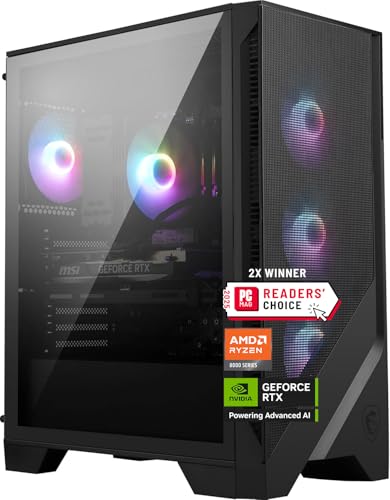
MSI Codex Z2 Gaming Desktop — Ryzen 7 8700F, RTX 5070, 32GB DDR5, 2TB SSD
Who it suits: The buyer who wants the current generation — newest graphics architecture, a complete memory and storage specification — and can time the purchase to a price drop instead of a calendar date.
What separates the Codex Z2 from the five machines below it is the calendar. Its RTX 5070 belongs to NVIDIA’s Blackwell generation: GDDR7 memory, the latest DLSS including multi-frame generation, and the newest media hardware the company ships. On native-1440p muscle it stands roughly level with the 4070 Super machines here, so the case for the 5070 is not a dramatic frame-rate lead — it is that a buyer keeping a PC for four or five years ends that run on the architecture still receiving new features. The supporting specification is the guide’s most complete: a Ryzen 7 8700F with eight cores and boost clocks to 5.0 GHz, 32GB of DDR5, and a 2TB SSD, double what most rivals fit. Cooling is an ARGB air cooler backed by four system fans, and Windows 11 Home is installed.
Installation grade: Plan for a full tower, because that is what arrives. The documented cooling scheme — one air cooler plus four case fans — is straightforward and effective, but it cools by circulating room air, so the case wants open space around it rather than a pocket between furniture. Standing on the floor alongside the desk is its natural station; a desk end also works, provided the rear panel keeps its clearance for exhaust and cables. The internal power supply means no brick seeks a home, just a single cord to the wall. One unknown follows it into a small room: MSI publishes no wattage for the supply in the material we verified, and wattage is what a future graphics upgrade stands on. Read the figure off the live listing before ordering, so you know the foundation you own.
Price is the other condition, and it moves too much to print here. Check price on Amazon before you judge this pick: at or under $1,500 it heads this guide; well above budget, the same hardware is an easy refusal.
- RTX 5070 (Blackwell) with DLSS 4 and GDDR7 — the newest architecture on this list.
- 32GB of DDR5 beside a 2TB SSD: nothing in the core spec needs an early upgrade.
- Ryzen 7 8700F, eight cores on the current AM5 platform.
- Air cooler and four system fans, documented — airflow you can plan a room around.
Honest limitation: The most volatile pricing in the guide — this listing swings from within budget to well above it — paired with an unpublished PSU wattage that leaves upgrade headroom unconfirmed until the listing is checked.
Choose it if you can wait for the drop, can offer a tower open floor space, and want nothing to upgrade on day one. Skip it if you must buy this week at the live price whatever it is, or if your only placement is behind a furniture door — no pick in this guide is graded for that.

Skytech Omega Gaming PC — Ryzen 7 7800X3D, RTX 4070 Super, 32GB DDR5, 1TB NVMe
Who it suits: High-refresh and competitive players who want the processor esports builds are specified around, driving a card that can keep up with it at 1440p.
The 7800X3D’s reputation rests on engineering, not branding: its cache is stacked onto the processor die, and the payoff shows up as higher frame rates and — the part competitive players actually feel — steadier frame delivery in the CPU-bound, simulation-heavy titles where conventional chips hesitate. Matched with an RTX 4070 Super carrying 12GB of GDDR6X, enough for native 1440p at high settings in demanding games, the result is the most single-minded gaming machine in this guide; every line of its specification is aimed at the screen. The remainder of the spec is published without gaps, a courtesy rarer than it should be at this price: 32GB of DDR5, a 1TB NVMe Gen4 drive, and a 750W Gold power supply whose rating Skytech prints openly — and a printed wattage is the whole foundation of any upgrade plan.
Installation grade: A full tower of the standard class, with the tidiest electrical story here: the supply is internal and its 750W Gold rating is public knowledge before the box is opened, so the install is one cord, no brick, and no guesswork later. Site it on the floor in open air with the rear panel clear of the wall, as with every pick, and keep it out of enclosures entirely. One small-room corollary rides on the 1TB drive: a library that outgrows it will invite an external drive, and that drive will want a few inches of desk or shelf — count them now, while the plan is still pencil.
Pricing is this tier in miniature: this listing moves in and out of the budget, so check price on Amazon rather than trusting any printed figure. At or below $1,500 it is arguably the purest gaming purchase in the guide; well above budget, it becomes a last-generation platform priced against a higher tier, which is where the comparison then belongs. A candid fit note: eight X3D cores cover play, streaming and daily work happily, but a week heavy with rendering or compiles is better served by the twenty-core iBUYPOWER next in line — that exchange is the genuine decision between picks two and three.
- Ryzen 7 7800X3D — its generation’s defining gaming processor, bought for frame consistency.
- RTX 4070 Super 12GB: native-1440p power without leaning on upscaling.
- 750W Gold PSU wattage published, beside 32GB of DDR5 — a spec with no blanks.
Honest limitation: It fits this guide only when its live price sits within budget — check price on Amazon — and its 1TB SSD is the smaller storage fit among the front-runners.
Choose it if gaming value is the entire question, the live price sits within budget, and a tower can stand in your room’s open air. Skip it if half your week is production work, or the listing has wandered well above budget.

iBUYPOWER Slate 8 MESH Gaming PC — Intel Core i7-14700F, RTX 4070 Super, 2TB NVMe
Who it suits: The player whose machine moonlights — streams, edits, compiles, juggles background work — and refuses to give up high-end gaming to get workstation manners.
The Slate 8 MESH (SMI7N47S01) weds the same RTX 4070 Super as the Omega above to Intel’s Core i7-14700F, a twenty-core hybrid — eight performance cores, twelve efficiency cores — that shrugs at simultaneous jobs. Streaming while playing, exporting video behind the game, chewing through a compile: this is the guide’s pick for the second shift as much as the first. Storage is generous at 2TB of NVMe; the case fronts mesh, breathes through RGB fans, and cools the processor with a tower air cooler; a keyboard and mouse ride in the box. Check price on Amazon for the live figure and current availability before judging it against the budget.
Installation grade: The mesh face is the story. A case that inhales through its front panel is the one design here that tolerates a nearer wall ahead of it — but its exhaust still departs through the rear and roof, so clearance behind the case is every bit as compulsory as for the glass machines, and a doored cabinet remains refused. Installation must also absorb the bundled peripherals: keyboard and mouse in the box means desk surface and cable runs for both from the first evening. The supply is internal, sparing you a brick, but its wattage appears nowhere in the verified material — settle it on the live listing before upgrade plans lean on it. Floor-standing beside the desk is the right station; a machine with this one’s second-job habits tends to attract a second monitor, and the desk is better saved for that.
Then the flaw, at full size as it deserves: the machine ships with 16GB of DDR5-5200, arranged two-by-eight. Where 32GB is this tier’s standard and four rivals meet it, 16GB is a genuine deficit — a modern AAA title alongside a browser, a voice client and capture software will press on it, and high-refresh 1440p is precisely where memory pressure surfaces as stutter. Its mercy is being the cheapest flaw in this guide to cure: memory swaps take minutes and no bravery. Plan a second kit alongside the machine and judge it against the 32GB picks with that upgrade counted — so equipped, this is the most versatile computer here; as shipped, it is a 4070 Super wearing a budget memory spec, and this review declines to let the graphics card argue otherwise.
- Twenty-core i7-14700F: the strongest multitasking and production processor in the guide.
- RTX 4070 Super 12GB with 2TB of NVMe — high-end where it is visible.
- Mesh-front case breathing through its face; keyboard and mouse in the box.
Honest limitation: 16GB of DDR5-5200 in a 2×8 layout falls below the tier standard — plan the memory upgrade into the purchase — and the PSU wattage is unpublished in the verified material.
Choose it if the PC works as hard as it plays, adding memory holds no fear, and it can stand in open air. Skip it if you want 32GB fitted at the factory — that is the MSI or either Omega.

Thermaltake LCGS View i4770 Gaming Desktop — Intel Core i7-14700KF, RTX 4070, 32GB DDR5
Who it suits: The buyer who counts the computer as part of the room’s furniture — a liquid-cooled glass exhibit — provided a serious 1440p specification lives underneath the display.
Thermaltake’s LCGS View line is designed around being looked at: a panoramic glass tower presenting the build, liquid cooling fitted as standard equipment. Behind the glass the hardware is substantial — a Core i7-14700KF, the unlocked twenty-core sibling of the 14700F; 32GB of DDR5 at 5600 MT/s, the fastest memory speed any maker publishes here; a 1TB NVMe SSD; and an RTX 4070. That card is this pick’s conscious compromise: a true native-1440p GPU, plainly a class above any 4060 Ti, yet a rung below the 4070 Super and 5070 machines ranked ahead of it, with less headroom for the heaviest ray-traced titles. The exchange buys presentation and platform: tuning headroom in the KF chip, a liquid cooler’s composed acoustics under load, and a case resembling a showroom’s top shelf.
Installation grade: Uniquely in this guide, vanity and ventilation argue for the same address. A panoramic showcase hidden beside a desk leg shows nothing, so this tower belongs on the desk or on a stand, in open view — which is also where its cooling breathes easiest. Liquid cooling relocates heat to a radiator; the radiator still exhausts into the room, so the standing orders apply unchanged: open air on all sides that vent, rear panel clear, and no sealed cabinet — glass inside a cupboard is invisible and overheating at once. Add the upkeep to the room plan: glass advertises dust, and keeping the exhibit presentable means cleaning access around the case — one more argument against wedging it into an alcove. Power is internal, no brick; the wattage is unpublished, so the listing holds the answer if upgrades matter to you.
This model’s pricing is occasional rather than steady: it visits this budget on dips rather than living here, so check price on Amazon and judge only the live figure. Well above budget, it belongs to a different comparison entirely. The rule is the guide’s rule, sharpened: buy the dip, or do not buy.
- Liquid-cooled panoramic glass build — the presentation pick, and one that wants an open, visible station.
- i7-14700KF twenty-core processor with tuning headroom; 32GB of DDR5-5600.
- RTX 4070 12GB: honest native-1440p power, one rung under the Super.
Honest limitation: The graphics card is the plain 4070 rather than the Super, and admission to this guide rests on a dip — its live price needs to fall within budget, so check price on Amazon.
Choose it if appearance is a legitimate part of the purchase, your room offers an open and visible spot, and you can wait for the price to visit. Skip it if you are buying to a deadline, or frames per dollar outrank everything else under your roof.

Skytech Omega Gaming PC — Ryzen 7 7700X, RTX 4070 Super, 32GB DDR5, 1TB NVMe, White
Who it suits: The patient value hunter — the buyer content to set an alert, wait out the market, and collect the best-documented bargain in the guide when it surfaces.
Set the two Omegas side by side and this tier’s pricing mechanics explain themselves. The specification nearly mirrors its X3D sibling: the identical RTX 4070 Super with 12GB of GDDR6X, the same 32GB of DDR5, the same published 750W Gold power supply, the same 1TB Gen4 NVMe storage. Two lines differ. The processor is the Ryzen 7 7700X, a capable eight-core gaming chip without the X3D’s stacked cache, surrendering some frame consistency in CPU-bound games while quietly edging ahead in clock-driven work. And the case is the Omega’s white edition — for shoppers building a white setup, not a footnote but the entire point.
Installation grade: The same class and the same electrical tidiness as pick two — full tower, internal supply, 750W Gold rating published, one cord and no brick. The white finish writes its own placement note: it is purchased to be looked at, and in a small room that usually promotes it to the desk, where fans and exhaust sit nearer ear and elbow. Given open air, that is no problem; what it rules out is banishment to a cabinet, which would conceal the finish while stewing the hardware. The 1TB drive carries the same corollary as its sibling’s — an external overflow drive may follow, so reserve its inches in the plan.
What earns this machine its own slot, rather than a paragraph inside its sibling’s review, is value: when its live price dips, this is the same complete 4070 Super specification as its sibling for noticeably less — check price on Amazon to see where it sits today. The honesty that must travel with it: the dip is a sale event, pricing well above budget is just as common, and a buyer who needs a machine this month may never be offered the low point. Even so, a guide to a volatile tier should name its best value opportunity, and this is it. When the live listing sits comfortably within budget, the question inverts — not whether this machine belongs in this guide, but whether anything else here justifies paying more. For most buyers the X3D’s cache is the only respectable answer, which leaves this Omega as the default for everyone else.
- The guide’s value pick: the complete 4070 Super specification — check price on Amazon for the live figure.
- The same published 750W Gold PSU and 32GB of DDR5 as the X3D model.
- White Omega chassis — the white-build route at this tier, without a colour premium.
Honest limitation: The 7700X gives back the 7800X3D’s cache advantage in CPU-bound titles, and its best pricing is a sale event, not the machine’s resting price.
Choose it if you can buy on the dip, want the most specification per dollar, and have an open station where white can be seen. Skip it if competitive frame consistency is the priority — that is exactly the quality the X3D model above charges for.
ASUS ROG Strix G15DS Gaming Desktop — Ryzen 7 7700X, RTX 4070, 16GB DDR5, 1TB SSD
Who it suits: The buyer who prizes a major manufacturer’s engineering, case design and support network over boutique spec-sheet arithmetic — and who accepts the same memory homework the iBUYPOWER asks.
ASUS builds the ROG Strix G15DS (G15DS-DH774) the way large manufacturers build: an engineered chassis whose multi-zone airflow keeps hot and cool components in separate thermal neighbourhoods, a carry handle rated to 20 kg, a headphone hook, and Aura Sync lighting that speaks to the wider ROG ecosystem. The hardware pairs a Ryzen 7 7700X with an RTX 4070 Dual — ASUS’s own two-fan card — a 1TB PCIe SSD and Windows 11 Home, with a wired keyboard and mouse included. For buyers previously burned by boutique support, the attraction is institutional: a global maker’s warranty machinery, documentation that stays published, and parts that remain findable years out. At this tier that is a real feature, and the principal reason this machine is here.
Installation grade: The chassis engineering helps inside the case and changes nothing outside it. Zoned airflow separates thermal neighbourhoods within the tower; the tower as a whole still exhales into the room and still demands open placement with its rear unobstructed. The carry handle turns out to be the guide’s quiet installation feature: a tower one person can move without a bear hug is a tower that can be pulled out for dusting, cable changes and the memory upgrade this one invites — valuable in rooms where the machine’s station doubles as its only service bay. The headphone hook removes one more object from the desk. Power is internal, no brick, and no wattage is published in the verified material, so the listing is the place to settle it. Note, finally, that the bundled keyboard and mouse are wired: two further cables join the drop the checklist below asks you to count.
Two cautions fly at full size. Memory first: the G15DS ships 16GB of DDR5-4800, beneath the tier’s 32GB standard and the slowest published memory speed in the guide — so the iBUYPOWER advice applies with interest, and a 32GB kit belongs in the purchase plan before comparisons are drawn. The seller second: this model is commonly listed by a marketplace seller, Jztech LLC, rather than by Amazon or ASUS, and it trades around this budget without that dissolving the caveat — check price on Amazon and confirm who is selling it. On the live listing, verify the seller, that the warranty is the manufacturer’s rather than a marketplace substitute, and the exact configuration, since variants in this line differ. Homework done, this is a defensible route into the tier; homework skipped, the boutique picks above are the safer money.
- Maker-grade engineering: zoned-airflow chassis, carry handle, Aura Sync ecosystem.
- Ryzen 7 7700X alongside ASUS’s own RTX 4070 Dual card.
- Institutional warranty and documentation — the support-network pick.
Honest limitation: 16GB of DDR5-4800 is the guide’s weakest memory specification, and it is commonly offered via a marketplace seller — seller and warranty must be verified on the live listing, and check price on Amazon before judging it against the budget.
Choose it if manufacturer support and chassis engineering outrank spec-sheet maximums for you, and the tower can stand in open air. Skip it if you want 32GB from the factory, or the live listing’s seller is one you would not trust with a warranty.

Comparison Table
| Product | GPU | CPU / Memory / Storage | Installation notes | Link |
|---|---|---|---|---|
| MSI Codex Z2 | RTX 5070 12GB | Ryzen 7 8700F / 32GB / 2TB | Air cooler plus four fans, documented; PSU wattage unpublished — read it on the listing | Check on Amazon |
| Skytech Omega (7800X3D) | RTX 4070 Super 12GB | Ryzen 7 7800X3D / 32GB / 1TB | 750W Gold rating published — the electrical side of the install is known upfront | Check on Amazon |
| iBUYPOWER Slate 8 MESH | RTX 4070 Super 12GB | i7-14700F 20-core / 16GB / 2TB | Inhales through its mesh face; rear clearance still compulsory; peripherals bundled | Check on Amazon |
| Thermaltake LCGS View i4770 | RTX 4070 12GB | i7-14700KF 20-core / 32GB / 1TB | Glass exhibit — station it in open view; its radiator still exhausts into the room | Check on Amazon |
| Skytech Omega (7700X, White) | RTX 4070 Super 12GB | Ryzen 7 7700X / 32GB / 1TB | 750W Gold published; a white finish is bought to be visible, not cupboarded | Check on Amazon |
| ASUS ROG Strix G15DS | RTX 4070 12GB | Ryzen 7 7700X / 16GB / 1TB | Zoned-airflow case; the carry handle keeps its station serviceable; wired peripherals add cables | Check on Amazon |
Measure Before You Buy: The Five-Step Checklist
Because none of the six makers publishes case dimensions in the listing material we verified, measuring is a procedure rather than a glance — five steps, in this order, all of them before an order exists. Jumping straight to step five is how towers get returned, or worse, installed wherever they fit and left to cook there.
- Step 1 — Measure the spot. Choose the tower’s station — floor beside the desk, or the desk’s end — and measure it without optimism: width, depth, height, with skirting boards, desk legs and radiators counted rather than averaged away. Then open the live Amazon listing for the machine you intend to buy and take its published dimensions from there; the listing is the authority this guide defers to. Where its figures and your tape disagree with the plan, the plan loses.
- Step 2 — Ventilation clearance. Now add the air back. Beyond the case’s own measurements, the installation needs open room behind the rear panel for exhaust and cable bend, and breathing space at the intakes — the front, on the mesh iBUYPOWER; the documented intake paths on the others. A spot that only works with the tower flush to the wall on two sides does not work. And if the spot sits inside furniture with a door, the checklist ends here: that placement is refused for every pick in this guide.
- Step 3 — Brick address. Every machine here powers itself internally, so no external brick needs housing — this step audits the cord instead. Find the wall outlet or surge protector the tower will use, confirm the lead reaches it carrying slack rather than tension, and check the route crosses no walkway where it will be kicked, rolled over by a chair castor, or pinned beneath the case. An outlet already full makes a decent surge protector part of the installation, not an accessory.
- Step 4 — Cable drop. Inventory everything that leaves the machine: display cable, Ethernet if you network by wire, keyboard and mouse (bundled and wired on the iBUYPOWER and ASUS), a headset, and any external drive you already know is coming. Each exits the rear or top panel and falls behind the desk; the drop wants a clear path, unpinched between case and wall, with length enough that nothing sits under tension in the final position. A tower whose cables reach only at full stretch does not fit, whatever the tape said in step one.
- Step 5 — Then order. Only now — spot measured, clearance confirmed, power reached, cables counted — apply the pick’s price rule from its review: check price on Amazon, confirm the live figure sits at or under $1,500, and wait for the dip on the Thermaltake and the white Omega. Verify the seller on the ASUS, settle any unpublished PSU wattage you care about, and buy. Ten seconds of price-checking and ten minutes of measuring are the same habit.
How to Choose a High End Gaming PC Under $1,500 for a Small Room
- Settle the graphics card first and let nothing move it. The high-end claim at this budget rests on a single spec line: RTX 4070 Super or RTX 5070 for the full promise, plain RTX 4070 as the accepted rung beneath. A 4060 Ti tower in handsome lighting is a mid-range computer in costume, whatever its title claims — and a smaller case does not promote it.
- Fix the placement before the pick. Open floor beside the desk is the default every grade in this guide assumes. The desk itself suits the Thermaltake showcase and the white Omega, whose finishes are part of what is being bought. Enclosed furniture suits nothing here; if that is your only option, change the class of machine rather than the laws of thermodynamics.
- Read the live price as part of the specification. Listings at this tier swing widely. Every recommendation above is conditional on a live figure at or under $1,500; if a machine is sitting well above budget today, the correct response is a price alert, not a compromise purchase of a weaker card.
- Insist on 32GB of memory — fitted, or added to the total. Four picks ship it. The two shipping 16GB remain worth considering, but only with a memory kit planned into the purchase before any comparison. Judging a 16GB headline against a 32GB one without that adjustment is this tier’s most common accounting error.
- Match the processor to your second job. Pure gaming points at the 7800X3D’s cache or the 7700X’s value; gaming blended with streaming, editing or compiling points at the twenty-core Intel machines. The graphics card sets your frame-rate ceiling; the processor decides how much else happens underneath it.
- Interrogate the power supply before dreaming of upgrades. A published wattage — 750W Gold, on both Omegas — is a foundation you can plan on. An unpublished one is a question for the live listing, because your next graphics card will stand on it.
- Count storage in games, not gigabytes. Modern AAA installations routinely pass 100GB apiece. A 1TB drive is workable with discipline; the 2TB machines delete the chore. And every external drive added later consumes desk or shelf inches the room plan must already own.
- Be truthful about your monitor. These machines are built to feed 1440p high-refresh panels. On a 1080p 60Hz screen, most of what the budget buys never becomes visible — either plan the display upgrade into the same cycle, or shop a tier down at Best High End Gaming PC Under $1000 and redirect the difference.
- Plan the room’s heat alongside the machine’s. A tower at full load warms a small room measurably over a long evening. Aim the exhaust into open air rather than at your chair, keep the room’s own ventilation in the plan, and treat a shut door plus a sealed cabinet as the combination to avoid.
Common Buying Mistakes
- Ordering before measuring. Dimensions are not volunteered in the material most shoppers read, and a tower that arrives before its station is measured tends to land wherever it can — which is how high-end hardware ends up in cupboards.
- Sealing a tower inside a cabinet or TV unit. Air, liquid or zoned, no cooling design here can exhaust into a closed box; the machine throttles, the fans labour louder, and the performance the price bought leaves under the door.
- Shoving the case flush against the wall to “save” inches. The rear panel is where exhaust and every cable live; the inches saved are taken from the machine’s breathing and the cables’ bend radius, and both present their bill later.
- Trusting the listing title. “High end” in a product name is unregulated; the graphics model is the truth. Read the card before anything else on the page.
- Paying a dip-tier machine’s resting price. Several picks sit well above budget for much of the year; buying one at that level and calling it a $1,500 PC is how this tier manufactures regret.
- Comparing a 16GB machine against a 32GB machine without counting the memory kit the first one still needs.
- Assuming a power supply you have not seen. Unpublished wattage means unconfirmed upgrade headroom; verify it in the listing or the maker’s documentation before planning around it.
- Buying for a monitor you neither own nor plan to buy. A 1440p high-refresh tower on a 1080p 60Hz panel is a sports car in a school zone — and the eventual monitor will demand desk space this guide has been asking you to budget.
- Skipping the seller check on marketplace offers. A brand-name machine from an unknown seller is a different purchase from the same machine sold by its maker or by Amazon — warranty first, checkout second.
Final Recommendation
- Most buyers: MSI Codex Z2 (RTX 5070) — when its live price sits within budget, standing on the floor beside the desk.
- Competitive and high-refresh players: Skytech Omega with the 7800X3D.
- Gaming blended with streaming or production: iBUYPOWER Slate 8 MESH, memory kit budgeted.
- The build as furniture: Thermaltake LCGS View i4770, bought on the dip and stationed where it can be seen.
- Maximum value, patiently: Skytech Omega 7700X in white, bought on the dip — check price on Amazon.
- Support network first: ASUS ROG Strix G15DS, seller and warranty verified.
The two leaders at this budget answer the two honest versions of the search: the MSI Codex Z2 for the buyer who wants the current generation with a finished specification, and the 7800X3D Omega for the buyer whose question is gaming and only gaming. The white Omega shadows both, and whenever its price dips within budget it is simply the most high-end hardware this budget can buy. Whichever of the six you choose, the installation counsel does not vary and is not decorative: measure the station against the live listing, keep the tower in open air with its rear panel clear, refuse the cabinet, and count the cables before the box arrives. Readers stretching up from a smaller budget should compare against Best High End Gaming PC Under $1200 first; readers whose rooms honestly cannot host a tower should read Best Gaming PC Under $1500 beside the compact guides instead of forcing one of these into furniture. Set the alert, run the checklist, verify the listing — card, memory, seller — and buy the dip when it comes: at this tier, timing and placement are not details of the purchase. They are half of it.
Frequently Asked Questions
Is any machine in this guide actually small?
No, and the guide would rather confess it here than let the title imply it. Every pick is a full-size tower, because the RTX 4070 Super and RTX 5070 class of card that defines high end at $1,500 is sold in towers. What this guide grades is how each tower installs in a small room — station, airflow, cable drop, heat. If the machine itself must be small, the honest route is a different class of hardware: begin at Best Compact Gaming PC For Small Spaces Under $1500 and accept the graphics step down that purchases the size.
Can one of these towers live inside a TV unit or a closed cabinet?
No. This is the single placement refused for all six picks, with no exception carved out for the liquid-cooled Thermaltake or the zoned-airflow ASUS. Under gaming load a tower exhausts a room-heater’s worth of warm air; sealed inside furniture it has nowhere to go, temperatures climb, fans work harder and louder, and the hardware throttles away the performance the price bought. Open desk and open floor are the stations these machines are graded for. If the cabinet cannot be negotiated, the machine class must change — not the cabinet rule.
How much room does each tower actually need?
The makers publish no case dimensions in the listing material we verified, so this guide prints none rather than inventing figures — and the five-step checklist above exists to close exactly that gap: measure your station, then read the dimensions on the live listing of the machine you are buying and set the two against each other before ordering. Beyond the case itself, budget open clearance behind the rear panel for exhaust and cable bend, plus breathing room at the intakes. A station that fits the box exactly does not fit the installation.
Can I hang one of these behind my monitor on a VESA mount?
No VESA mount is documented for any of the six picks, so none is credited with one — and a full-size tower is the wrong object to hang from a monitor arm regardless. VESA mounting belongs to the mini PC class, whose machines are designed and documented for it. The towers here stand on floors and desks; if rear-of-monitor mounting is the installation you need, that requirement by itself selects the smaller class.
Does $1,500 genuinely buy a high end gaming PC?
Yes, with the term kept honest. At this budget a prebuilt can carry an RTX 4070 Super or RTX 5070 — cards that run demanding games at native 1440p, high settings, high refresh rates — and that is a real high-end experience on the monitor most high-end players actually own. What the budget does not reach is the tier above it: Ti-class cards with 16GB of VRAM, comfortable native 4K, maximum ray tracing everywhere. Those live in the tier above, and this guide states the difference instead of blurring it.
Why does no RTX 4070 Ti Super or 5070 Ti machine appear here?
Because no verified prebuilt carrying either card reaches $1,500 — across this batch’s research, Ti-class systems begin well above the budget even when discounted. Rather than pad the list with a listing that merely appears to qualify, the guide states the ceiling plainly and covers the Ti tier where it actually resides, in the $2,500 guide.
Why does this guide not print prices?
This guide prints no product prices on purpose, because listings at this tier swing widely and any printed figure goes stale. Check price on Amazon for the figure that matters — the live one on the exact listing. Every recommendation holds only while that live listing sits at or under $1,500 when you check it. If it does not, set an alert and wait for the dip.
What if my situation differs from this guide’s angle?
The sibling versions of this guide cover the same tier from other directions: Best High End Gaming PC For Beginners Under $1500 adds setup and first-week guidance, Best High End Gaming PC For Streaming Under $1500 grades the machines as broadcast tools, and Best High End Gaming PC For 1440p Gaming Under $1500 grades them on rendering alone. The hardware conclusions and price rules carry across; only the counsel changes. The base guide for the tier, with the full grading method, is at Best High End Gaming PC Under $1500.


