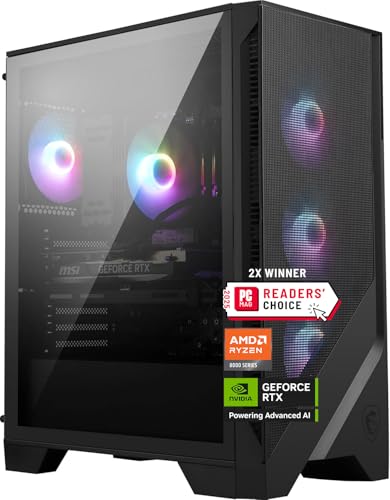
Where to buy
Check the latest price, availability and delivery on Amazon. Orders are placed on Amazon. We may earn a commission from qualifying purchases.
- Best overall: MSI Codex Z2 Gaming Desktop, Ryzen 7 8700F, RTX 5070, 32GB DDR5, 2TB SSD — Check on Amazon
- Skytech Omega Gaming PC, Ryzen 7 7800X3D, RTX 4070 Super, 32GB DDR5, 1TB NVMe — Check on Amazon
- iBUYPOWER Slate 8 MESH Gaming PC, Intel Core i7-14700F, RTX 4070 Super, 2TB NVMe — Check on Amazon
- Thermaltake LCGS View i4770 Gaming Desktop, Intel Core i7-14700KF, RTX 4070, 32GB DDR5 — Check on Amazon
See 2 more Amazon options
- Skytech Omega Gaming PC, Ryzen 7 7700X, RTX 4070 Super, 32GB DDR5, 1TB NVMe, White — Check on Amazon
- ASUS ROG Strix G15DS Gaming Desktop, Ryzen 7 7700X, RTX 4070, 16GB DDR5, 1TB SSD — Check on Amazon
Read the full guide ↓
Disclosure: As an Amazon Associate, reviewstook.com earns from qualifying purchases. Links to Amazon on this page are affiliate links; they cost you nothing extra. Listing details such as price and availability change often, so check the current Amazon listing before you buy.
Buying your first gaming PC is confusing for a simple reason: the listings are written in a dialect nobody speaks at home. Model numbers stacked on model numbers, prices that change between breakfast and dinner, and the words “high end” pasted onto machines that range from genuinely excellent to deeply ordinary. This guide is the beginner version of our high-end roundup, and it does three things the listing pages will not. It translates the jargon into plain language before asking you to judge anything, walks you through your first evening with the machine cable by cable — including the one plug that trips up almost every first-time owner — and tells you the truth about the money: what else you will need alongside the tower, from the monitor to the small fixes, and why every recommendation here comes with a live-price check attached.
Here is the short version of that truth. “High end” only means something if the graphics card — the part that draws your games — is strong enough to run demanding titles at 1440p, the sharper resolution these machines are built for, without leaning on software tricks. At $1,500, for the first time in the price ladder, that card actually shows up: every machine below carries an RTX 4070 Super, an RTX 5070, or the plain RTX 4070 one rung beneath them. The catch is that pricing at this tier is restless. Most of these computers spend much of the year listed well above the budget and only drop into it during sales. So each recommendation reads the same way: check price on Amazon first — this is a good buy when its live price sits within the Under $1,500 budget, and a different conversation above it. Checking the live price takes ten seconds and is the single most valuable habit in this entire guide.
In this guide
Quick Picks
In a hurry? Each row below matches a kind of buyer to the machine that fits them, with a link to the listing.
| Buyer type | Pick | Why it stands out | Link |
|---|---|---|---|
| Best overall | MSI Codex Z2, Ryzen 7 8700F, RTX 5070, 32GB, 2TB | The newest graphics card in the guide, a full memory spec and the roomiest storage — nothing to fix on day one | Check on Amazon |
| Best for serious players | Skytech Omega, Ryzen 7 7800X3D, RTX 4070 Super, 32GB, 1TB | The processor competitive players ask for by name, and a power supply whose rating is actually published | Check on Amazon |
| Best if the PC also works | iBUYPOWER Slate 8 MESH, i7-14700F, RTX 4070 Super, 2TB | A twenty-core processor for editing, streaming and multitasking — with one memory catch, spelled out in its review | Check on Amazon |
| Best to look at | Thermaltake LCGS View i4770, i7-14700KF, RTX 4070, 32GB | A liquid-cooled glass showcase tower that happens to be a real gaming machine underneath | Check on Amazon |
| Best value if you can wait | Skytech Omega, Ryzen 7 7700X, RTX 4070 Super, 32GB, 1TB, White | A full-strength specification in a white chassis — check price on Amazon and buy when it sits within budget | Check on Amazon |
| Best big-brand safety net | ASUS ROG Strix G15DS, Ryzen 7 7700X, RTX 4070, 16GB, 1TB | A global maker’s engineering and support network — with a memory catch of its own | Check on Amazon |
How These Picks Were Chosen
The first filter was the graphics card, because that single part decides what “high end” means. To earn a place here, a machine needed an RTX 4070 Super or RTX 5070 — cards that render demanding games at full 1440p on their own power — or, for the two slots where looks and brand support are the point, the plain RTX 4070 directly below them. Machines built around RTX 4060-class cards were left out entirely, because at this resolution they reach the target only by upscaling, which is a legitimate technique and a different promise. If you remember one shopping rule from this guide, make it that: read the graphics card line first, and let everything else on the page wait its turn.
The second filter was fit for this budget. Every pick is a model that belongs in this tier when its live price sits within the Under $1,500 budget — check price on Amazon to confirm where it sits today. Where a machine’s everyday pricing tends to sit above the budget, the review flags that volatility so you can judge the opportunity with your eyes open. One pick is commonly offered through a marketplace seller rather than Amazon itself; it is flagged at full size in its review, along with the seller and warranty checks to run before ordering. The recommendations are written to stay honest at whatever the live listing says that day.
Three condition questions matter to beginners, so here are the plain answers for the whole list. None of these six machines is renewed or refurbished — all are sold new. None is a barebone kit — every one arrives complete, with Windows installed and ready for the setup walkthrough later in this guide; you will not need to buy memory, storage or an operating system to make any of them work. And nothing important inside them is soldered down: these are full-size towers whose memory, storage and graphics card are separate parts in slots, which is why upgrades are possible later. That last point comes with an asterisk the product sections repeat where it applies — a future graphics card upgrade also depends on the power supply, and only two picks here publish that unit’s rating.
We did not use these machines ourselves. We read maker listings and specification records, and compared only what is actually published: the graphics card and its memory, the processor, the memory amount, the storage size, and — where the maker prints it — the power supply rating and memory speed. Where a maker stays silent, this guide stays silent too and tells you what to check on the live listing instead. Memory got the same treatment: 32GB is the sensible standard at this price, four picks ship it, and the two that ship 16GB carry that shortfall openly as their main limitation rather than having it buried in a spec table.
The Listing Words, Translated
Thirteen terms explain nearly every gaming PC listing on Amazon. Learn these and the spec sheets stop being intimidating.
- Graphics card (GPU): The part that draws your games. It matters more than anything else in the box for gaming, and its model name — RTX 4070 Super, RTX 5070 — is the first thing to read on any listing.
- VRAM: The graphics card’s own private memory, measured in gigabytes. More VRAM means the card can hold sharper textures without stuttering. Every card in this guide carries 12GB, which is right for 1440p today.
- Processor (CPU): The machine’s general brain — it runs Windows, your apps and the non-graphics parts of games. Core counts tell you how much it can juggle at once.
- Memory (RAM): The computer’s short-term workspace, separate from storage. Too little and games stutter while other apps are open. At this budget, 32GB is the comfortable amount; 16GB works but is the first thing worth upgrading.
- Storage (SSD): Where games and files live permanently. All six picks use fast SSD storage; the difference is size — 1TB holds a handful of large modern games, 2TB holds a library.
- Resolution: How many pixels the picture has. 1440p (2560×1440) is the sharp sweet spot these machines target; 1080p is the older, easier standard; 4K is sharper still and much harder to run.
- Refresh rate (Hz): How many times per second your monitor redraws. A 144Hz or 165Hz monitor makes motion look dramatically smoother than an old 60Hz screen — but only if the PC can feed it frames that fast.
- Frame rate (FPS): How many frames the PC produces per second. Higher and steadier is smoother. This guide deliberately prints no per-game frame-rate figures, because they vary too much by game and settings to quote honestly.
- Native rendering vs upscaling (DLSS): Native means the game is drawn at the full resolution. Upscaling — DLSS on these NVIDIA cards — draws at a lower resolution and uses AI to rebuild the picture, gaining speed at a small cost in purity. High-end cards let you choose; weaker cards force the trade.
- Ray tracing: A lighting technique that makes reflections, shadows and glow look far more realistic — and works the graphics card much harder. It is the first setting to experiment with if a game feels heavy.
- Power supply (PSU): The unit that feeds electricity to everything else. Its wattage decides whether a future graphics card upgrade is possible, which is why a published rating — 750W Gold on two picks here — is genuinely useful information.
- Integrated graphics: A tiny graphics capability built into some processors. Fine for a desktop screen, far too weak for these games. Three processors in this guide have none at all — their names end in F — and that fact drives the most important cable warning in the setup walkthrough below.
- Prebuilt: A complete computer assembled and warrantied by one company, rather than one you build from parts. All six picks are prebuilts: one box, one warranty, no assembly required.
The 6 Best High End Gaming PCs Under $1,500 for Beginners
MSI Codex Z2 Gaming Desktop — Ryzen 7 8700F, RTX 5070, 32GB DDR5, 2TB SSD
Who it suits: The beginner who wants to unbox the newest technology in the guide, find nothing that needs fixing, and not think about the purchase again for years.
Start with the part that matters. The RTX 5070 is a current-generation graphics card — the newest architecture in this guide, with the latest version of DLSS upscaling and fast GDDR7 card memory. In plain terms, it draws demanding games at full 1440p by itself and still has the modern features to fall back on when a game gets heavy. Around it, MSI fits the most finished specification here: a Ryzen 7 8700F processor with eight cores, a full 32GB of memory, and a 2TB SSD — double the storage of most rivals, which means double the games installed before you ever have to delete one to make room. An air cooler with decorative lighting and four case fans keep it cool, and Windows 11 Home is installed and waiting — for a first-time owner, that completeness is the real luxury: nothing left on the to-do list.
Two cautions, both about homework rather than hardware. The first is price behavior. This listing’s price moves a lot at this tier, and it can spend long stretches well above this budget. Check price on Amazon: it is the best overall pick in this guide when its live price sits within the Under $1,500 budget, and an easy machine to walk away from when it sits well above it. The second caution is the power supply: MSI does not publish its wattage for this configuration in the material we could verify. That changes nothing about using the PC, but it matters years from now if you want a stronger graphics card, because the new card would draw power from that unit. Before ordering, look for the wattage in the live listing’s specifications; if it is not there, know that a future upgrade plan starts with reading the label on the unit inside the case. One setup note that belongs to this machine specifically: its processor name ends in F, which means it has no integrated graphics at all — on your first evening, the monitor cable must go into the graphics card’s sockets, because the motherboard’s matching sockets produce no picture whatsoever. The walkthrough below explains how to tell them apart.
- RTX 5070 — the newest graphics architecture in the guide, with the latest DLSS.
- 32GB of memory and a 2TB SSD: the most complete day-one specification here.
- Nothing to upgrade or add before the machine is finished — ideal for a first PC.
Honest limitation: The price swings harder than any other pick — it often sits well above this budget — and the unpublished power supply wattage leaves future upgrade headroom unconfirmed until you check.
Choose it if you can wait for the price to drop and want the newest platform with the fullest specification. Skip it if you need to buy this week regardless of price, or you want every future upgrade question answered on the listing page itself.

Skytech Omega Gaming PC — Ryzen 7 7800X3D, RTX 4070 Super, 32GB DDR5, 1TB NVMe
Who it suits: The beginner who is new to owning a PC but not to caring about winning — competitive players whose friends keep saying one processor name at them.
That name is the Ryzen 7 7800X3D, and the fuss is justified in a way a beginner can feel rather than just read. This processor carries extra cache memory stacked directly on the chip, and in practice that makes frame rates not just high but steady — and steadiness, the absence of little stutters in the middle of a fight, is what competitive play actually feels like. The graphics card is the RTX 4070 Super with 12GB of its own memory, which handles full 1440p at high settings without needing upscaling as a crutch. The supporting specification is complete and, unusually, completely documented: 32GB of memory, a 1TB SSD, and a power supply Skytech actually specifies — 750 watts, Gold rated. That published rating earns this machine the guide’s clearest upgrade promise: because the power supply is known and the case is a standard tower, a stronger graphics card years from now is a plan you can make today rather than a hope.
The pricing needs the same patience as the MSI, in a slightly different shape. Check price on Amazon for this model before you judge it, because its pricing moves with sales at this tier. So the rule is simple: when its live price sits within the Under $1,500 budget it is arguably the purest gaming purchase here; above that, you are paying premium-tier prices and should be comparing against the tier above instead. Two beginner notes. First, the 7800X3D does have basic integrated graphics, so if you ever plug the monitor into the motherboard by mistake the screen will light up — and quietly run your games at a fraction of their proper speed. The walkthrough’s step three covers that trap. Second, this processor is a gaming specialist: superb at play, merely good at heavy video rendering or big compiling jobs. If your week is half work of that kind, the next pick trades a little of this focus for a lot of that strength.
- Ryzen 7 7800X3D — the processor competitive players specify, prized for steady frame rates.
- RTX 4070 Super 12GB: genuine full-1440p power with headroom to spare.
- Published 750W Gold power supply — the clearest future-upgrade foundation in the guide.
Honest limitation: Its live price needs checking — it does not always sit within this budget — and its 1TB of storage is the smaller size among the top picks.
Choose it if gaming performance is the whole point and you can buy when the price visits the budget. Skip it if the PC must also be a heavy work machine, or the live price has climbed well above this budget.

iBUYPOWER Slate 8 MESH Gaming PC — Intel Core i7-14700F, RTX 4070 Super, 2TB NVMe
Who it suits: The beginner whose computer will have two jobs — gaming in the evening, and streaming, editing, studying or working the rest of the time.
The headline here is the processor. Intel’s Core i7-14700F packs twenty cores — eight strong ones for the main task and twelve smaller ones for background work — which makes this the machine in the guide that least notices when you ask it to do two things at once: play a game while a stream runs, edit video while downloads churn, keep a small crowd of applications open without complaint. The graphics card matches the Skytech above it — the same RTX 4070 Super with 12GB — so gaming strength is not the price of that versatility. Storage is generous at 2TB, the case breathes through a mesh front with lit fans, a tower cooler handles the processor, and iBUYPOWER includes a keyboard and mouse in the box, a small kindness the two picks above do not extend. Check price on Amazon and confirm it sits within budget before comparing it to the others.
Now the catch, and it is the most beginner-relevant one in this guide, so it gets full size: this machine ships with 16GB of memory where the tier standard — met by four of its five rivals — is 32GB. Memory is the workspace everything shares, and 16GB gets crowded exactly when a modern game, a browser, a voice chat and a capture app run together, which shows up as stutter. The reason this pick survives its flaw is that memory is also the easiest upgrade in all of computing: a small part that clips into a slot, takes minutes, and requires no bravery. But honesty means judging it properly. Judge this machine as the machine plus a 32GB memory kit, bought together — do not compare it on its own against finished 32GB machines and call it the simpler choice. Judged the honest way, it is the most versatile computer here. Two smaller notes: like the MSI, its processor ends in F, so the monitor must plug into the graphics card — the motherboard sockets give no picture at all — and its power supply wattage is not published, so no graphics-card upgrade promise can be made until you read the label on the fitted unit.
- Twenty-core processor: the strongest multitasker in the guide, built for a second job.
- RTX 4070 Super 12GB and 2TB of storage — full gaming strength, roomy library space.
- Keyboard and mouse included in the box.
Honest limitation: 16GB of memory is below this tier’s standard and should be judged as machine plus a memory kit from the start; the power supply wattage is unpublished, so upgrade headroom is unconfirmed.
Choose it if the PC works as hard as it plays and you are comfortable clipping in a memory kit. Skip it if you want the finished 32GB specification out of the box with nothing to add — that is the MSI or either Skytech.

Thermaltake LCGS View i4770 Gaming Desktop — Intel Core i7-14700KF, RTX 4070, 32GB DDR5
Who it suits: The beginner who wants the computer to be part of the room — a glass showcase you are meant to look at — without giving up real gaming hardware to get it.
Thermaltake builds this line around presentation: a panoramic glass case designed to display the components, and liquid cooling fitted as standard, which also tends to keep the machine composed and quiet under load. Underneath the glass, the specification is serious. The processor is the Core i7-14700KF, the unlocked twenty-core sibling of the chip in the iBUYPOWER — “unlocked” means enthusiasts can tune it faster later, though a beginner should simply enjoy that the headroom exists. Memory is a full 32GB at the fastest published speed in this guide, storage is a 1TB SSD, and the graphics card is the RTX 4070. In one plain sentence: it is a genuine 1440p card, clearly stronger than the 4060-class machines a tier down, and one rung below the 4070 Super and 5070 in the picks above — a little less spare power for the most demanding games at the highest settings. What you trade that rung for is the looks, the cooling and the platform, and for the right buyer that is a fair and knowing trade.
Pricing tells the sharpest version of this tier’s story. Check price on Amazon for this one carefully: its pricing is volatile, and on an ordinary day it can sit in the tier above this budget. The discipline is the same as everywhere here, only stricter: buy it when its live price sits within the Under $1,500 budget, or do not buy. Setup notes for this one: its processor also ends in F — KF, in this case — so once again the monitor cable belongs in the graphics card and the motherboard sockets will give you a black screen and a moment of panic you can now skip. Its power supply wattage is not published in the verified material, so a future graphics card upgrade starts with reading the fitted unit’s label, not with a promise from this page. And before you fall for the glass: a showcase case rewards tidy cables and the occasional dusting — owners who know they will never dust should take the same money to the mesh-fronted iBUYPOWER above.
- Liquid-cooled glass showcase build — the presentation pick of the guide.
- Twenty-core unlocked processor and a full 32GB of the fastest-published memory here.
- RTX 4070 12GB: honest 1440p power, one rung below the Super cards.
Honest limitation: The graphics card is the plain 4070 rather than the Super, and it only belongs in this budget when its live price dips within it — check price on Amazon first.
Choose it if the machine’s looks are genuinely part of what you are buying and you can wait for the price to visit. Skip it if you are buying on a fixed date, or every spare dollar must become frames.

Skytech Omega Gaming PC — Ryzen 7 7700X, RTX 4070 Super, 32GB DDR5, 1TB NVMe, White
Who it suits: The patient beginner — the one happy to set a price alert, wait for the drop, and collect the best-documented bargain in the guide when it arrives.
This is the second Skytech Omega in the list, and comparing the two teaches you how this whole tier works. The specification is nearly identical to its sibling’s: the same RTX 4070 Super graphics card with 12GB, the same 32GB of memory, the same 1TB of storage, and the same published 750W Gold power supply — which means this machine carries the same upgrade promise: a known power foundation in a standard tower, so a stronger graphics card years from now is a plan, not a gamble. Two things differ. The processor is the Ryzen 7 7700X, a strong eight-core chip that lacks the 7800X3D’s stacked cache, so it gives back some of that frame-rate steadiness in the most processor-bound games while being a touch quicker in ordinary clock-driven work. And the case is white — for shoppers building a white desk setup, not a footnote but the entire point, and here it arrives without the color premium white components usually carry.
What earns this machine its own slot is value when its price dips: it offers the full-strength 4070 Super specification with nothing cut, in a white chassis that usually carries a premium elsewhere. The honesty that must travel with it: its most attractive pricing is a sale event, not its everyday position, and a buyer who needs a computer this month may not catch it at its best. Check price on Amazon — when its live price sits comfortably within the Under $1,500 budget, flip the question around and ask whether anything else here offers enough extra to justify choosing it instead. For most beginners, the only honest answer is the X3D’s steadiness, which makes this the default recommendation for everyone else. Setup notes mirror its sibling: the 7700X has basic integrated graphics, so a monitor plugged into the motherboard will light up and quietly run slowly — graphics card sockets only, as the walkthrough shows — and nothing inside is soldered, so the memory and storage you might add later are ordinary slot-in parts.
- Strong value for the full specification when its live price dips within budget — check price on Amazon.
- Same published 750W Gold power supply as its sibling — the same upgrade promise.
- White chassis at this tier without a white-build price premium.
Honest limitation: The 7700X lacks the 7800X3D’s cache advantage for steadiness in processor-bound games, and its best pricing is an occasional sale, not its everyday position.
Choose it if you can buy when the price dips and want the most specification for this budget. Skip it if competitive frame steadiness is your top priority — that is precisely what the X3D model above charges for.
ASUS ROG Strix G15DS Gaming Desktop — Ryzen 7 7700X, RTX 4070, 16GB DDR5, 1TB SSD
Who it suits: The beginner who sleeps better with a giant company’s name on the box — who values a proper support network and engineered build over squeezing the last drop from a spec sheet.
ASUS builds computers the way large manufacturers do, and the differences are physical. The G15DS case uses a multi-zone airflow design that keeps hot and cool components in separate neighborhoods, there is a carry handle rated to 20 kg for the day the machine moves house, a headphone hook on the case, and lighting that syncs with the wider ROG accessory ecosystem. The specification pairs the Ryzen 7 7700X processor with ASUS’s own two-fan RTX 4070 card, a 1TB SSD, Windows 11 Home, and a wired keyboard and mouse in the box. For a first-time owner, the deeper appeal is institutional: a global maker’s warranty process, model documentation that stays published, and drivers and parts that remain findable years later. If a boutique builder’s support forum is your nightmare, that safety net is a real feature, and the honest reason this machine is in the guide.
Two flags fly at full size, and a beginner should hear both before ordering. The first is memory: this machine ships with 16GB, the joint catch of the guide, and at the slowest published speed of any pick here. The advice matches the iBUYPOWER’s — treat a 32GB memory kit as part of the purchase from the start, because as shipped it sits below the standard its rivals meet. The second flag is about the seller. This model is often offered by a marketplace seller rather than by Amazon or ASUS directly, and it trades near this budget at times without erasing the caveat. Check price on Amazon and confirm the seller before you judge the offer. So on the live listing, do three checks: who the seller is, whether the warranty is the manufacturer’s own, and whether the configuration on the page matches this model exactly, because variants in this line differ. Its power supply wattage is likewise unpublished, so future graphics upgrades begin with the fitted unit’s label. Do that homework and this is a well-engineered, well-supported way into the tier; the 7700X’s integrated graphics mean a misplaced monitor cable will at least show a picture — slowly — rather than none, which makes the walkthrough’s step three a performance lesson here instead of a black-screen scare.
- Major-maker engineering: zoned-airflow case, carry handle, ecosystem lighting.
- Ryzen 7 7700X with ASUS’s own RTX 4070 card design.
- The support-network pick — institutional warranty and documentation.
Honest limitation: 16GB of memory is the weakest memory specification in the guide, and it is often offered by a marketplace seller — verify the seller, the warranty and the exact configuration before ordering.
Choose it if manufacturer support and build engineering matter more to you than spec-sheet maximums. Skip it if you want 32GB fitted from the factory, or the live listing’s seller is one you would not trust with a warranty.

Comparison Table
| Product | GPU | CPU / Memory / Storage | Best use | Link |
|---|---|---|---|---|
| MSI Codex Z2 | RTX 5070 12GB | Ryzen 7 8700F / 32GB / 2TB | Newest platform, nothing to fix | Check on Amazon |
| Skytech Omega (7800X3D) | RTX 4070 Super 12GB | Ryzen 7 7800X3D / 32GB / 1TB | Competitive, steady high-refresh play | Check on Amazon |
| iBUYPOWER Slate 8 MESH | RTX 4070 Super 12GB | i7-14700F 20-core / 16GB / 2TB | Gaming plus streaming and work | Check on Amazon |
| Thermaltake LCGS View i4770 | RTX 4070 12GB | i7-14700KF 20-core / 32GB / 1TB | Showpiece liquid-cooled build | Check on Amazon |
| Skytech Omega (7700X, White) | RTX 4070 Super 12GB | Ryzen 7 7700X / 32GB / 1TB | Best documented value on a dip | Check on Amazon |
| ASUS ROG Strix G15DS | RTX 4070 12GB | Ryzen 7 7700X / 16GB / 1TB | Brand-name support and engineering | Check on Amazon |
Your First Evening: Setup, Step by Step
Every pick in this guide is a complete prebuilt, so setup is an hour of plugging in and letting Windows introduce itself — no assembly, no tools, no parts to buy first. Work through these steps in order; step three is the one that saves you a support call.
- Check the delivery against your order. Before plugging anything in, confirm the box and the model number match what you bought — model codes are printed in each review above — and glance through the case window for anything visibly loose from shipping. This takes two minutes and is far easier today than after a week of use.
- Place it where it can breathe. These full-size towers breathe through their sides and rear. Give them open air, keep the tower out of a sealed cabinet, and lift it off thick carpet — a hard surface or simple stand keeps the intakes clear.
- Plug the monitor into the graphics card — not the motherboard. This is the step. The back of the tower has two clusters of sockets: a vertical group on the motherboard panel, and a horizontal row lower down, on the graphics card itself. Your monitor cable belongs in the graphics card’s row. On the MSI, the iBUYPOWER and the Thermaltake, this is the difference between a picture and none at all: their processors end in F and have no integrated graphics, so the motherboard sockets are dead ports and will greet you with a black screen. On the two Skytechs and the ASUS, the motherboard socket will light up — and silently run your games on the tiny integrated graphics at a fraction of the proper speed, which is worse, because nothing looks broken. Whichever pick you bought: card sockets, every time.
- Connect keyboard, mouse and internet. A wired network cable is the fastest, most stable option for downloads and online play; Wi-Fi works fine if the router is far away. Note that only the iBUYPOWER and the ASUS include a keyboard and mouse in the box — with the other four picks, have your own ready before the evening starts.
- Power on and let Windows set itself up. Follow the on-screen steps: language, account, updates. Let it finish its first round of updates uninterrupted, restarts included. This is the boring half hour every new PC asks for exactly once.
- Verify what actually arrived. Open Settings, then System, then About, and read the installed memory line. It should say 32GB on the MSI, both Skytechs and the Thermaltake, and 16GB on the iBUYPOWER and ASUS — the two picks whose memory kit you may have budgeted. If the number does not match the listing you paid for, today is the day to raise it, not next month.
- Update the graphics driver. NVIDIA’s app will offer the current driver for your card; install it. The driver is the software that lets new games run properly on the card, and keeping it current is the one maintenance habit worth forming.
- Tell Windows how fast your monitor is. New monitors often default to 60Hz even when they can do far more. In Settings, under System, Display, Advanced display, set the refresh rate to the highest your monitor offers. Skip this and a high-refresh monitor silently behaves like an old one — the second-quietest disappointment in PC gaming.
- Install one game and play it. Download your game store of choice, install a favorite, and in its settings start at high with ray tracing on; if it feels heavy, ease the ray tracing first. Then make a backup habit — an external drive or cloud folder for the files you would miss — while the machine is still new and the habit is easy.
What Else You Will Spend
The tower is the biggest purchase, not the only one. Budget for these in roughly this order, and notice that this guide invents no prices for any of them — peripherals vary too much for a number here to be honest, so check live prices the same way you checked the PC.
- A monitor, first and above all. No pick in this guide includes one, and the monitor decides whether the hardware’s work is visible. These machines are built for a 1440p high-refresh screen; on an old 1080p 60Hz display, most of what you paid for never reaches your eyes. If a monitor upgrade is not possible this season, honestly consider shopping a tier down with Best High End Gaming PC Under $1200 and reserving part of your budget for the screen.
- Keyboard and mouse, for four of the six picks. Only the iBUYPOWER and the ASUS include them. The MSI, both Skytechs and the Thermaltake assume you own a set — if you do not, they are a day-one purchase, not an accessory.
- A memory kit, for the two 16GB picks. If you chose the iBUYPOWER or the ASUS, treat a 32GB memory kit as part of the purchase: machine plus fix, judged together. It is the cheapest flaw in this guide to correct and the only one we advise correcting immediately.
- Sound and voice. None of these towers is a speaker system. Headphones or desktop speakers, and a microphone if you play or stream with friends, are the difference between a silent box and a social one.
- Later, maybe: more storage. Modern games are large; on a 1TB machine, an additional SSD is a painless slot-in upgrade whenever the library outgrows the drive. The 2TB picks postpone the question for a long time.
How to Choose a High End Gaming PC Under $1,500
- Read the graphics card line first. RTX 4070 Super or RTX 5070 for the full promise of this tier; plain RTX 4070 as the knowing trade for looks or brand support. A beautiful listing wrapped around a 4060-class card is a mid-range PC in costume, whatever its title claims.
- Read the live price as part of the spec sheet. Every recommendation here is conditional on a live price within the Under $1,500 budget. If a pick is sitting well above that budget today, the correct move is a price alert and patience, not a weaker card bought in frustration.
- Insist on 32GB of memory — fitted in the box, or added to the budget. Four picks ship it. The two that ship 16GB remain worth considering, but only with the memory kit treated as part of the purchase before you compare anything.
- Match the processor to your second job. Pure gaming points to the 7800X3D’s steadiness or the 7700X’s value. Gaming alongside streaming, editing or other heavy work points to the twenty-core Intel picks. The graphics card sets your ceiling; the processor decides how much else happens underneath it.
- Ask what the power supply allows later. Only the two Skytechs publish a 750W Gold rating, and only they carry this guide’s graphics-card upgrade promise. For the other four, the fitted unit’s label is the answer — readable in the case in a minute, and worth knowing before you plan around it.
- Count storage in games, not gigabytes. Big modern titles routinely pass 100GB each: a 1TB drive works with a little discipline, while the 2TB picks remove the chore entirely.
- Be honest about the monitor you own. These machines earn their money only on a 1440p high-refresh screen; pairing this budget with an old 60Hz display wastes most of it, so plan the screen into the same season or shop a tier down.
- Know which tier you are actually buying. If your real target is the Ti-class cards with 16GB of card memory, no machine here is a stepping stone — it is a destination. Decide deliberately, with the step-up guides at Best High End Gaming PC Under $2000 and Best High End Gaming PC Under $2500, rather than drifting upward by disappointment later.
Common Buying Mistakes
- Believing the words “high end” in a listing title. They are unregulated. The graphics card model is the truth — check it before anything else on the page.
- Paying the everyday price for a machine that only belongs in this guide on a dip. Several picks sit well above this budget for much of the year; buying one at that level and calling it an Under $1,500 PC is how this tier produces regret.
- Comparing a 16GB machine against a 32GB machine without treating the memory kit as part of the first purchase.
- Plugging the monitor into the motherboard on the first evening — a black screen on the three F-processor picks, and a silent, slow picture on the other three. Step three of the walkthrough exists because this mistake is nearly universal.
- Forgetting to set the monitor’s refresh rate in Windows, then concluding the new PC feels no smoother than the old one.
- Assuming a power supply you have not seen. An unpublished wattage means unknown upgrade headroom; read the fitted unit’s label before planning a future graphics card around it.
- Skipping the seller check on a marketplace offer. A brand-name machine from an unknown seller is a different purchase from the same machine sold by the maker or Amazon — warranty first, checkout second.
Final Recommendation
- Most beginners: MSI Codex Z2 (RTX 5070) — bought when its live price sits within budget; check price on Amazon.
- Competitive players: Skytech Omega with the 7800X3D.
- Gaming plus a working second job: iBUYPOWER Slate 8 MESH, with the memory kit budgeted in.
- For the desk as display piece: Thermaltake LCGS View i4770, bought on a dip.
- Maximum value with patience: Skytech Omega 7700X in white, when its live price dips within budget.
- For the big-brand safety net: ASUS ROG Strix G15DS, after the seller and warranty checks.
For a first high-end machine, our top two are the MSI Codex Z2, for the beginner who wants the newest platform and a specification with nothing left to fix, and the 7800X3D Skytech Omega, for the beginner whose question is purely about gaming and who values the one published power supply in the guide. Whenever the white Omega’s live price dips within budget, it stands as the alternative to both — few models in this tier put this much high-end hardware inside this budget. If the same money has to cover streaming gear as well as the tower, the companion guide at Best High End Gaming PC For Streaming Under $1500 grades these machines as broadcast tools, and if the desk itself is small, Best High End Gaming PC For Small Spaces Under $1500 applies the footprint filter. Readers stretching up from a smaller budget should compare against Best High End Gaming PC Under $1000 before committing, and anyone whose real question is the resolution itself should read Best 1440p Gaming PC Under $1500 alongside this page. Set the price alert, verify the live listing — card, memory, seller — plug the monitor into the graphics card, and enjoy the first evening: at this tier, a little patience before the purchase and one correct cable during it are worth more than any accessory.
Frequently Asked Questions
I have never owned a gaming PC. Is $1,500 a sensible first budget?
It is a generous one, and that is fine — with one condition. This is the first budget where the graphics card is genuinely high-end for a 1440p monitor, so you are buying a machine with years of headroom rather than a starter you will outgrow. The condition is the monitor: if you do not own, or cannot soon buy, a 1440p high-refresh screen, a smaller budget plus a better monitor is the wiser split, and Best Gaming PC For Beginners Under $1500 covers the wider beginner landscape at this price.
Do I need to build or install anything inside these computers?
No. All six are complete prebuilts that arrive with Windows installed; setup is the nine-step walkthrough above, and none of it requires opening the case. The only inside-the-case task mentioned anywhere in this guide is optional and later: adding a memory kit to the two 16GB picks, which is a clip-in part and a few minutes’ work whenever you choose.
Why does the monitor cable matter so much?
Because the tower has two sets of video sockets and only one set is connected to the graphics card you paid for. The three picks whose processors end in F — the MSI, the iBUYPOWER and the Thermaltake — have no backup graphics at all, so the motherboard sockets show nothing. The other three will show a picture through the motherboard, drawn by tiny integrated graphics, and your games will run slowly with no error message to explain why. Card sockets, lower and horizontal on the back panel, every time.
Will the prices here match what I pay today?
Not necessarily, and the guide is written so that cannot mislead you. This guide does not print static product prices, because this is the most volatile tier of this batch, where listings swing widely across the year. Every recommendation holds when the live listing sits within the Under $1,500 budget. If it is above, set an alert and wait, then check price on Amazon again later.
Can I upgrade one of these machines later instead of replacing it?
Yes, within one honest limit. Memory and storage are easy slot-in upgrades on all six — nothing is soldered. A future graphics card is a bigger step: it draws power from the power supply, so the promise can only be made where that unit is published. The two Skytechs, with their documented 750W Gold units in standard towers, carry that promise. For the other four, read the fitted unit’s label first and plan from the number you find.
Why is there no RTX 4070 Ti Super or 5070 Ti machine here?
Because no verified prebuilt with either card reaches $1,500, even on sale. Those cards also carry 16GB of card memory against the 12GB fitted to every pick in this guide, and that combination lives in a higher tier. Rather than pretend otherwise, this guide names the ceiling and covers that tier where it actually lives, at Best High End Gaming PC Under $2500.
What if I mainly play one or two games and browse the web?
Then be honest about it before spending: these machines are built for demanding games at 1440p, and a lighter habit does not need this much graphics card. The tier below, compared at Best High End Gaming PC Under $1200, will feel identical in light titles and leaves money for the monitor, the chair and the games themselves. Buy the machine your actual week requires — that is the most high-end decision in this entire guide.


