Disclosure: As an Amazon Associate, reviewstook.com earns from qualifying purchases. Links on this page are affiliate links; they cost you nothing extra. Prices and availability change often, so check the current Amazon listing before you buy.
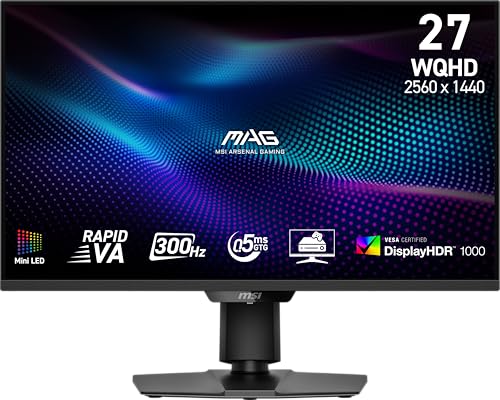
The mag 274qpf x30mv sits at the point where competitive gaming monitors stopped asking players to choose between speed and resolution. It is a 27-inch MSI gaming display with a 2560 x 1440 panel running at 300Hz, a quoted 0.5ms response figure, adaptive sync, HDMI and DisplayPort inputs, a height-adjustable stand and built-in speakers — a specification aimed squarely at the player whose games reward frame rate but whose eyes have outgrown 1080p. This review works through what those numbers mean in actual play, who this class of monitor serves, where its compromises live, and how its two closest MSI siblings — the MAG 274QPF X32 and the MAG 275QPF X30 — change the decision for buyers cross-shopping within the same family.
Model names in this family are a small alphabet puzzle, so let us decode the subject before judging it. The 274 designates the 27-inch class with the 4-series panel positioning, QPF marks the QHD resolution with the family’s fast panel technology, X30 denotes the 300Hz tier, and the MV suffix distinguishes this particular variant within MSI’s line. The siblings matter because they bracket it: the X32 steps up to 320Hz with FreeSync Premium and G-SYNC compatibility in its listing, while the 275QPF X30 is the near-twin from the adjacent series at the same 300Hz headline. Buyers who understand the naming can navigate the whole shelf without a salesperson, which is the first skill this review intends to leave behind.
Key takeaways for the Mag 274qpf X30mv
- A 27-inch QHD panel at 300Hz is the current sweet spot for competitive play on a strong graphics card: sharp enough for clarity, fast enough for esports.
- The exact verified listing for this model carries adaptive sync, HDMI and DisplayPort, VESA mounting, tilt and height adjustment, speakers and a 0.5ms response claim.
- Feeding 300Hz at 1440p requires serious GPU power in modern titles; the monitor cannot manufacture frames your system does not render.
- The X32 sibling buys a small refresh step and named sync certifications; the 275QPF X30 buys a near-identical headline from the neighbouring series — compare listings feature by feature.
- Ergonomics are complete for the class: height adjustment and VESA support mean the panel can sit correctly on any desk or arm.
In this guide
Quick picks: the subject and its two siblings
| Model | Size and resolution | Refresh | Sync as listed | Role |
|---|---|---|---|---|
| MAG 274QPF X30MV | 27-inch, 2560 x 1440 | 300Hz | AMD Adaptive Sync | The review subject |
| MAG 274QPF X32 | 27-inch, 2560 x 1440 | 320Hz | FreeSync Premium, G-SYNC Compatible | The step-up sibling |
| MAG 275QPF X30 | 27-inch, 2560 x 1440 | 300Hz | FreeSync Premium, G-SYNC Compatible | The adjacent-series twin |
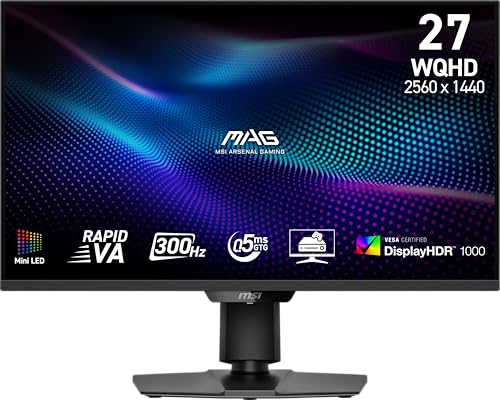
MSI MAG 274QPF X30MV — the 300Hz QHD proposition in full
Badge: Best for competitive players moving up from 1080p
- Panel: 27-inch, 2560 x 1440 (QHD)
- Refresh rate: 300Hz
- Response: 0.5ms as listed
- Sync: AMD Adaptive Sync
- Inputs: HDMI and DisplayPort
- Stand and mounting: tilt, height adjustable, VESA
- Audio: built-in speakers
Start with the pairing of resolution and speed, because it is the entire product. At 27 inches, 1440p delivers a pixel density that makes text crisp, maps legible and distant targets in a shooter resolvable rather than suggestive — the clarity players describe when they say they can finally see what they were aiming at. At 300Hz, the image renews fast enough that motion carries information instead of blur: a strafing opponent’s direction, a racing line’s next corner, the exact frame a cooldown completes. Neither figure is remarkable alone in 2026; together, at this size, they describe the configuration competitive players have been converging on since the hardware to drive it became attainable.
The practical conditions deserve equal billing. Your graphics card must render your games at or near the refresh ceiling for the panel to show its character, which in demanding titles means a genuinely strong GPU, sensible settings, or both. Esports titles — the shooters, arenas and racers this monitor is built for — are engineered to reach those rates on good hardware, and there the X30MV’s proposition is complete. In cinematic single-player games, expect to live at lower rates with adaptive sync smoothing the journey, which the panel handles as its second job rather than its purpose.
Strengths
- The resolution-and-refresh pairing competitive players actually want, at the size that suits both desk and viewing distance.
- Height adjustment and VESA mounting included, so correct posture does not require an immediate arm purchase.
- Adaptive sync keeps lower-frame-rate content smooth instead of tearing, widening the monitor’s useful life beyond esports.
Trade-offs
- Realising 300Hz at QHD demands a powerful graphics card; weaker systems will underuse the panel for years.
- Built-in speakers are for convenience and calls, not for judging a game’s audio mix.
- The listing names adaptive sync generically, while the siblings advertise specific sync programmes — certification-minded buyers should compare carefully.
Best for: competitive players on strong hardware who play at a desk and want one panel for ranked and everyday use. Not suited for: console-first players or cinematic 4K seekers, whose needs point at different panels entirely.

MSI MAG 274QPF X32 — the sibling that steps to 320Hz
Badge: Best for players who want the family’s fastest tier and named sync support
- Panel: 27-inch, 2560 x 1440 (QHD)
- Refresh rate: 320Hz
- Response: 0.5ms as listed
- Sync: AMD FreeSync Premium and NVIDIA G-SYNC Compatible, HDR Ready
- Inputs: HDMI and VGA port listed, VESA, tilt stand
Twenty hertz is a small number with a specific audience. The difference between 300Hz and 320Hz is not visible as a transformation; it registers, for the most practised players in the fastest titles, as a marginal tightening of an already extremely responsive image — the kind of edge that matters at the level where matches are decided by it and is invisible below that level. The X32’s more broadly relevant upgrade is its sync paperwork: FreeSync Premium and G-SYNC Compatible named in the listing give buyers on either GPU brand a clearer promise about variable refresh behaviour, and HDR readiness, modest as monitor HDR at this tier is, completes a fuller feature sheet.
Consider the X32 if your hardware already produces frame rates that would saturate the X30MV in your main titles, or if the named G-SYNC compatibility settles a question your graphics card raises. Consider the subject of this review if your rates live nearer 300 than 320, which describes the overwhelming majority of strong systems in real games rather than in menus.
Strengths
- The family’s highest refresh tier for players whose systems can genuinely feed it.
- Named FreeSync Premium and G-SYNC Compatible support across both GPU ecosystems.
- Same QHD clarity and 27-inch practicality as the review subject.
Trade-offs
- The refresh step is beyond the perception of most players in most titles.
- Its listing’s stand description is tilt-focused, so confirm height adjustment if your desk depends on it.
- Paying for headroom your GPU cannot reach is the classic monitor-buying error in a new costume.
Best for: elite competitive players on top-tier hardware. Not suited for: anyone whose frame rates would leave the extra refresh permanently unemployed.

MSI MAG 275QPF X30 — the adjacent series’ version of the same idea
Badge: Best for cross-shoppers comparing the two QPF series directly
- Panel: 27-inch, 2560 x 1440 (QHD)
- Refresh rate: 300Hz
- Response: 0.5ms as listed
- Sync: AMD FreeSync Premium and NVIDIA G-SYNC Compatible, HDR Ready
- Inputs: HDMI and VGA port listed, VESA, tilt stand
The 275QPF X30 exists because monitor families are ranges, not single products, and adjacent series often express the same core proposition with different feature seasoning. On paper its headline matches the review subject — 27-inch QHD at 300Hz with a 0.5ms claim — while its listing adds the named sync programmes and HDR readiness that the X30MV’s listing leaves generic. Which panel belongs on your desk therefore comes down to the details around the headline: stand adjustment, port selection, the sync certification your GPU prefers, and the current marketplace figures that this page leaves, by rule, to the listings themselves.
The lesson generalises beyond MSI: in mature monitor families, the panel’s core experience converges and the purchase is decided at the margins. Read the margins carefully, because they are where your five years with the product will actually be lived — in the height the stand reaches, the inputs your devices need, the sync your card speaks.
Strengths
- Matches the subject’s headline speed and resolution while naming both sync ecosystems.
- HDR readiness and the same VESA practicality broaden its desk compatibility.
- A genuine alternative when the subject’s listing or configuration does not suit your setup.
Trade-offs
- Series-to-series differences are subtle enough that careless buyers can order the wrong twin.
- Stand adjustment described as tilt in the listing; verify against your ergonomic needs.
- Two near-identical options can paralyse a decision that the headline numbers have already made.
Best for: buyers comparing within the family on sync certification and stand details. Not suited for: anyone expecting a different class of experience from the review subject — it is a twin, not an upgrade.
Buying guide: monitors at 300Hz, explained without the fog
Refresh rate is a ceiling, not a promise
The single most valuable sentence in monitor buying is that the panel displays what the system renders. A 300Hz monitor fed 90 frames per second shows a very smooth 90Hz experience under adaptive sync; it does not show 300 of anything. Before buying any panel in this class, inventory your real frame rates in your real titles at 1440p — not at your current 1080p, since the resolution step itself costs frames — and let that inventory arbitrate between this monitor, its faster sibling and the money saved toward a graphics card. The pairing of GPU and panel is the actual product; either half bought in isolation is a speculation.
Response time claims and what to do with them
The 0.5ms figure in these listings is a best-case measurement under the manufacturer’s chosen conditions, as all such figures are. Treat it as evidence that the panel belongs to the fast class rather than as a stopwatch result you will reproduce. What your eyes will actually judge is motion clarity in fast pans and the absence of smearing behind moving targets, and on those qualities this class of panel performs as advertised. Buyers choosing between near-identical siblings should let response claims cancel out — they are the same claim — and decide on sync, stand and inputs instead.
Sync ecosystems in plain language
Adaptive sync lets the panel refresh when the GPU finishes a frame rather than on a fixed clock, abolishing the tearing that variable frame rates otherwise produce. The brand names — FreeSync on the AMD side, G-SYNC on the NVIDIA side — are certifications and programmes layered over that idea. The X30MV’s listing speaks of adaptive sync generically; its siblings name FreeSync Premium and G-SYNC Compatible explicitly. If your card and your sanity both prefer a named certification, that difference is a legitimate reason to choose a sibling; the underlying experience at matched frame rates is closer than the marketing suggests.
Size, distance and the desk
Twenty-seven inches at typical desk distance fills the view without demanding head movement, and QHD at that size keeps text at native sharpness for the work hours between games. Confirm your desk’s depth lets the panel sit at a comfortable distance — roughly an arm’s length — and remember the VESA mount means an arm can reclaim the desk footprint the stand occupies. Players building a full battlestation around this class of panel may also want the settings discipline covered in our Marvel Rivals options guide and the input side handled by the Maya X esports mouse profile, because a fast panel fed by a slow setup is only half a purchase.
How to set up the X30MV for its best first week
Step 1: Enable the refresh rate you paid for
Operating systems do not always default a new monitor to its maximum rate. Open your display settings on day one and confirm the panel is actually running at 300Hz, then confirm the same inside your games, several of which keep their own refresh and frame-limit settings. A surprising share of high-refresh owners have played at 60Hz for months; do not join them.
Step 2: Connect with the right cable to the right port
Use the DisplayPort connection for a gaming PC where possible, with a cable rated for the bandwidth, and check the monitor’s on-screen menu for the overclock or high-refresh mode your model expects to be enabled explicitly. Consoles and secondary machines can share the HDMI input, with the understanding that each input’s achievable rate depends on the device feeding it.
Step 3: Set height and distance before colour
Raise the panel so your eyes meet its upper third, set the distance, and only then touch brightness and colour. Brightness should match the room rather than the showroom — a panel blazing in a dim room tires eyes and crushes perceived contrast — and most owners find the comfortable setting far below the maximum the box advertises.
Step 4: Test motion in your fastest title
Load the game that made you buy the monitor, enable an on-screen frame counter, and play for an hour at your real settings. Note where frame rates actually live against the panel’s ceiling, and adjust in-game quality until the rate and the clarity strike the balance your eyes prefer. That hour teaches more about your purchase than any review, including this one.
Mistakes buyers make in the high-refresh class
The governing mistake is buying the ceiling before the staircase: a 300Hz panel paired with a graphics card that renders the buyer’s games at a third of that rate, purchased on the theory that the monitor comes first. Monitors outlive graphics cards, so the sequence is not irrational — but it should be chosen knowingly, with the GPU upgrade genuinely planned. A second mistake is leaving the system at default refresh, covered above and still epidemic. A third is judging a gaming panel by its speakers or its HDR label, neither of which is the product being sold. And a fourth is ignoring the stand until the neck complains: this model’s height adjustment is a feature to use on the first day, not a line to read in the listing.
Frequently asked questions
Can I actually see the difference between 144Hz and 300Hz?
Most players can, in fast motion: pans stay readable, targets track more cleanly, and the input-to-image loop feels tighter. The improvement is real but diminishing — the step from 60Hz to 144Hz transforms play, while the step to 300Hz refines it — which is why this class suits committed competitive players more than casual ones.
What graphics card do I need for 1440p at high refresh?
Enough card to render your specific titles near your target rate at 1440p, which for esports titles is a strong modern GPU and for cinematic titles may not exist at any sane budget. Check benchmarks for your games at this resolution rather than trusting general tiers, and remember settings adjustments buy frames honestly.
Does the X30MV work with consoles?
It accepts HDMI sources and will display console output well, but consoles do not feed 300Hz, so a console-first buyer is paying for a ceiling they cannot use. Its natural home is in front of a gaming PC, with consoles as welcome guests.
X30MV or X32 — which should I choose?
Choose the X32 if your system sustains frame rates beyond 300 in your main titles or if its named G-SYNC Compatible certification answers your card’s requirements. Otherwise the X30MV delivers the same class of experience, and the difference is better spent on the GPU that feeds either panel.
Is 27 inches the right size for competitive play?
For most desks and most players, yes: large enough for QHD clarity to matter, small enough that the whole scene stays within the useful field of view without head movement. Players who sit unusually close sometimes prefer 24-to-25-inch panels; players who also work on the screen all day often prefer exactly this size.
Do I need a monitor arm with this model?
Not for posture — the included stand adjusts for height and tilt — but an arm via the VESA mount frees desk space and makes multi-monitor alignment easier. Buy the arm for space and flexibility, not as a rescue for ergonomics the stand already provides.
The final recommendation
The MAG 274QPF X30MV is the honest centre of its family: QHD clarity and 300Hz speed in the size competitive desks have settled on, with the stand and mounting practicality to live there for years. Buy it when your graphics card can feed it and your games reward what it shows. Take the X32 when your frame rates and your level of play genuinely reach past it, and take the 275QPF X30 when its sync paperwork or stand details fit your setup better. Whichever sibling you choose, set the refresh rate on day one, position the panel for your neck, and let the games — not the box — deliver the verdict. Around the panel, the rest of a serious setup is covered in the Lamzu Maya X review for the mouse hand and our macropads and numpads guide for the command layer.
Motion clarity, input lag and the feel of fast play
Specifications describe a monitor; feel convicts or acquits it. On a panel of this class, the first sensation competitive players report is informational: during a fast flick or a hard strafe, the world stays composed enough to read, so decisions can be made mid-motion rather than after it. That composure comes from the whole chain — frame rate rendered, refresh delivered, pixels transitioning quickly — and it is why the buying guide insisted on the GPU pairing. Input lag at these refresh rates shrinks to the point where the remaining delays live in the player and the network rather than the display, which is a psychologically significant threshold: the monitor leaves the list of things a loss can be blamed on, and for serious players that absolution alone justifies the class.
Everyday use inherits the benefits in quieter ways. Scrolling text stays legible further into the scroll, window dragging feels attached to the hand, and the desktop generally acquires the fluidity people associate with expensive phones. Owners who work on the same panel they play on often cite this — not any single match — as the reason they cannot return to ordinary refresh rates, in the same way that a good chair ruins other chairs.
Colour, brightness and the non-gaming hours
A fast panel still has to be a pleasant panel at nine in the morning. QHD resolution keeps documents sharp, the 27-inch canvas holds two working windows without contortion, and the colour behaviour of this class is tuned for games first — vivid, contrast-forward — while remaining perfectly serviceable for photo browsing and casual editing. Colour-critical professionals should calibrate and should still treat a dedicated wide-gamut display as their reference, but the hybrid worker-gamer this monitor courts will find nothing in its daytime manners to apologise for. Brightness headroom suits bright rooms; in dim rooms, turn it down and let the panel’s contrast do the work, a habit that also extends comfortable evening sessions.
The speakers deserve their calibrated sentence: they exist, they handle calls, system sounds and casual video perfectly adequately, and they are not a reason to buy or reject the monitor. Players who care about audio — which is to say, players who want footsteps — will use a headset or proper speakers, and the monitor’s job is simply not to stand in their way.
Multi-monitor and single-monitor futures
Many buyers of this panel are choosing the centre of a future two-screen desk, and the VESA mount plus the standard size make that future easy: a matching or complementary 27-inch panel later, both on arms, with the X30MV remaining the gaming surface and the second panel taking documents and streams. Others are choosing the opposite — one excellent screen instead of two mediocre ones — and for gaming that trade is usually correct, since a single fast panel serves play better than a pair of slow ones serve anything. Either way, the purchase ages well because the class is the settled centre of the market: cables, arms, desks and future GPUs will all continue to speak its language of DisplayPort bandwidth and QHD timings for years.
Panel care and longevity
Clean the screen with a dry or barely dampened microfibre cloth and nothing harsher; solvents and paper towels are how coatings die young. Keep brightness at the level the room needs rather than the maximum available, both for your eyes and for the panel’s long-term uniformity. If the monitor will sit unused for long stretches, let it sleep rather than displaying a static desktop. These are small disciplines, but a monitor is typically the longest-lived component in a gaming setup — outlasting two graphics cards and sometimes the desk itself — and the owners who treat it accordingly are the ones still praising a panel like this one half a decade after the unboxing photographs fade.
Who competes with this monitor, and how to think about the wider shelf
Every major gaming brand fields a 27-inch QHD high-refresh panel, and the honest differences between them live in the same margins this review found inside the MSI family: sync certifications, stand design, port counts, menu quality and the warranty’s fine print. Shoppers comparing across brands should build the comparison on those margins and on their own frame-rate inventory, because the headline trio — size, resolution, refresh — will match across the shelf almost exactly. Where the X30MV makes its case is coherence: the right headline, the practical stand, the mounting standard and a family around it that lets a buyer step up or sideways without leaving the ecosystem of menus and habits they have learned. Brand loyalty is a poor reason to buy a monitor; a coherent shelf is a decent one, and this family offers it.
Troubleshooting the first-week monitor complaints
The classic first-week complaint — “it doesn’t look any faster” — is almost always the refresh setting still sitting at a default, fixed in the display settings and the game’s own options as the setup section described. The second classic, flicker or black screens at high refresh, usually belongs to the cable: swap in a certified DisplayPort cable of sane length before blaming the panel. The third, washed-out colour on one input but not another, is typically a colour-range setting mismatch between the GPU’s output and the monitor’s expectation, corrected in the graphics control panel. Dead or stuck pixels follow the manufacturer’s policy rather than folklore; photograph the issue, read the policy in the listing’s warranty terms, and act inside the return window if your unit falls outside what you can accept. A monitor is a long purchase, and the first week is when its remedies are cheapest — spend an hour of that week verifying, as this review keeps advising for every category it covers.
The upgrade path this monitor creates
Buying into 1440p at 300Hz reorganises a setup’s future spending in a useful order. The next bottleneck most owners meet is the graphics card’s ability to feed the panel in newer titles, which makes the GPU the planned upgrade and the monitor the constant — the correct hierarchy, since panels age by standards while cards age by games. After that, the desk itself: an arm, a second panel, lighting that does not fight the screen. Players who buy this monitor as the centre of that sequence tend to keep it through all of it, which is the strongest available testimony for the class. The panel does not ask to be the most exciting component in the room. It asks to be the window everything else is seen through, at a speed that stops being a topic — and on the evidence of its specification and its family’s design, the X30MV is built to be exactly that window for a long time.
Game genres, judged one by one
Tactical and arena shooters are this monitor’s home ground, where target clarity at QHD and motion composure at 300Hz translate directly into information the player can act on. Battle royale titles benefit similarly at the ranges where their engagements actually happen, with the caveat that their larger maps tax GPUs harder, so the frame-rate inventory matters more there than in an arena. Racing games divide by intent: sim racers chasing immersion may ultimately prefer larger or curved canvases, while competitive lap-time hunters value exactly this panel’s speed and its ability to keep a braking marker legible at pace. Fighting games, governed by their own frame traditions, gain smoothness in presentation rather than advantage. Strategy and MOBA players — the audience of our League of Legends options guide — get a different dividend: a wide, sharp view of the map and interface at a refresh that makes camera pans feel liquid, which is comfort rather than edge, and worth having honestly labelled as such. Single-player adventure and role-playing titles use the panel’s second talent, adaptive sync at moderate rates, and look handsome doing it. The monitor does not specialise by genre so much as it refuses to be the weak link in any of them, which for a one-screen household is the correct ambition.
Desk lighting, glare and the room around the panel
A monitor’s measured quality assumes a room that cooperates. Position the panel so windows are to its side rather than behind it or behind you, because reflections on any glossy or semi-gloss surface tax contrast exactly where games need it. A small bias light behind the screen — a gentle glow on the wall — reduces the perceived contrast between a bright panel and a dark room and measurably eases long evening sessions; it is the cheapest image-quality upgrade available to any owner of this class. Overhead lighting that falls directly on the screen should be moved or shaded. None of this is exotic interior design; it is the difference between the panel you bought and the panel you actually see, and twenty minutes with a lamp will do more for tonight’s session than a month of menu calibration.
The verdict, expanded for the still-undecided
If the decision has narrowed to this monitor against its own siblings, the remaining work is a single honest measurement: run your main title at 1440p on your current system — downscaled or on a borrowed screen if necessary — and read the frame counter in the fights, not the menus. Rates that live in the high two hundreds crown the X30MV as the correctly sized ceiling. Rates that pin against any cap you set, with headroom visibly unused, make the X32’s extra twenty hertz a real, if narrow, purchase. Rates that live far below both ceilings do not disqualify the family; they reframe it as a monitor bought ahead of a planned GPU, which is legitimate when the plan is real and a rationalisation when it is not. And if the sync certification question is the one keeping you awake — a card from the ecosystem the subject’s listing does not name — the 275QPF X30 exists precisely to let you sleep. Four doors, one corridor: that is the shape of a mature product family, and it is why this review could afford to spend its length on your desk, your games and your habits rather than on pretending the siblings were strangers.
Buy the panel, set its rate, raise it to your eyes, light the wall behind it, and then forget it — the highest compliment a monitor can earn is to be forgotten in favour of the game, the work and the years of both that it will quietly carry.
What 1440p changes for the workday, honestly assessed
Gaming monitors are usually excused from office judgement, but a panel that occupies the centre of a desk will spend most of its powered hours displaying documents, browsers and calls. At 27 inches and QHD, text renders at a density that makes small fonts genuinely comfortable, and the canvas holds a document beside its research without the overlap shuffle of smaller screens. Refresh rate, the gaming headline, turns out to be a work feature in disguise: scrolling long documents and dragging windows acquire a steadiness that reduces the micro-fatigue of a day spent reading moving text. Colour accuracy is the one place the workday asks questions the game does not — this class is tuned for vivid game presentation, and while calibration brings it into honest territory for general use, professionals who bill for colour should keep a reference display for final judgements. For the hybrid majority, though, the X30MV’s daytime manners are not a compromise to endure between matches; they are a legitimate half of its value, and buyers replacing a tired office panel and a mediocre gaming panel with this one screen are making a tidier decision than the gaming marketing gives them credit for.
Sound strategy around a gaming desk
Since the built-in speakers are a convenience feature, the monitor purchase is the right moment to settle the desk’s audio properly. Competitive players live in headsets for directional information and voice chat, and the panel’s role is to stay out of the way — which it does, asking for no desk space and no extra cables. Players who also watch films or play cinematic games at the desk should budget for a modest set of powered speakers or a soundbar rather than asking the monitor to be something its listing never promised. The point is sequencing: buy the panel for its panel qualities, then give the room an audio answer sized to its actual habits, instead of letting an unexamined speaker line in a specification table make the decision by default.
Power, heat and the small print of ownership
High-refresh panels draw more power than office displays, and a monitor that is also a household’s all-day work screen should be set to sleep promptly when idle — a setting that pays for itself across years and keeps the panel’s hours honest. Ventilation around the back of the unit should stay unobstructed, particularly in enclosed desk hutches where heat accumulates. Keep the firmware question simple: if the manufacturer offers updates for your model, apply them with the same care as any device update, after reading what they change. And register the purchase or keep the invoice accessible, because a monitor’s warranty is the kind of document that is only ever searched for on a bad day, when searching is hardest.
For players upgrading from 1080p: what the first evening actually feels like
The resolution step announces itself before the refresh step does. Menus and maps gain a legibility that feels like a prescription change; text you had been decoding becomes text you simply read, and distant geometry in open-world shooters resolves into decisions instead of guesses. Then, in the first fast fight, the refresh arrives — not as a visible effect with edges, but as an absence: the smear and uncertainty that used to occupy fast motion are gone, and what remains is the game itself, arriving at the speed your hands always assumed it was. Most upgraders need a week to stop noticing and a single session on an old 60Hz screen, months later, to understand what happened to them. Budget that week without judgement; the panel is not underperforming during it, your perception is recalibrating, and the recalibration is the product working as intended.
Practical companions for that first evening: expect to revisit your in-game sensitivity and field-of-view habits, because a larger, clearer image changes how motion reads, and expect your frame-rate expectations to need renegotiating title by title at the higher resolution. Players who treat the upgrade as a system event — panel, settings, habits — settle in days. Players who treat it as a screen swap sometimes spend a month wondering why the revolution feels quiet, when the answer is that their settings were still tuned for the old window.
Closing assessment
Judged as a whole, the MAG 274QPF X30MV is a monitor with its priorities in the order its audience would choose: the competitive pairing of QHD and 300Hz first, the practical stand and mounting second, honest adaptive sync for everything the ceiling does not cover, and no money spent pretending to be a cinema or a hi-fi. Its siblings refine the formula at the edges — a little more speed and certification in one direction, a differently seasoned twin in the other — without disturbing the centre. If your system and your games belong to the world this panel was built for, it will serve as the calm, fast window at the centre of your desk for years, and the review you will write about it in your head will be the shortest one in this article: it stopped being the thing you thought about, and became the thing you saw through.
A note on buying monitors through marketplace listings
Monitor model names are long, similar and unforgiving of a careless click, and marketplace search results delight in presenting the entire family at once. Before paying, read the full model string in the listing title character by character against the one you decided on — X30MV, X32 and 275 X30 are three different products wearing nearly the same clothes — and then confirm the three figures that define the class: panel size, resolution and refresh rate, in the listing’s own specification area. On arrival, the monitor’s on-screen menu will state its model and its current mode; check both before the packaging leaves the house, and run the panel through one evening of your fastest game while the return route is still a formality rather than a negotiation. Monitors are kept for years and returned, when they must be, in days — the asymmetry argues for an unhurried first evening and a sceptical first click, in that order.
Keep the box if storage allows. Panels travel badly in improvised packaging, and the original carton is the difference between a warranty return that is an errand and one that is an expedition — a small, boring piece of foresight that owners of long-lived equipment learn to value exactly once, which is all it takes.
There is one more reader this review should serve before it closes: the parent, partner or friend buying this monitor for a player whose wishlist named it in the alphabet-soup spelling only monitor families use. To that buyer: the model string is the gift’s identity, so copy it exactly rather than approximating it from a search box; the difference between the strings is the difference between the present that lands and the present that gets exchanged. And take quiet satisfaction in the choice itself — a fast, sharp, properly adjustable panel is one of the few gaming gifts that improves every hour its recipient spends at the desk, work and play alike, for years after the occasion that prompted it. Few boxes under any tree can promise as much, and fewer still keep the promise at 300 frames per second.
Finally, for the player reading at the end of a long comparison evening, tired of refresh arithmetic and model strings: the decision you are making is smaller than the internet makes it feel. Within this family, every door opens onto the same fast, sharp room, and the differences are a few hertz, a certification and a stand. Choose the one whose margins fit your card and your desk, set it up with the care this review described, and go and play — the monitor’s whole purpose is to be forgotten in the playing, and every hour spent deliberating past this point is an hour it could have been doing exactly that.
Streaming, content creation and the second life of a fast panel
Creators who stream competitive games inherit a specific benefit from a panel like this: the game can run at full competitive speed on the X30MV while capture and chat live on a second screen, and the audience receives a feed whose smoothness began at the panel the player was actually reading. Editors cutting gameplay footage gain the QHD canvas’s room for timeline and preview together. None of this makes the monitor a creator product in disguise — its colour tuning remains game-first — but the modern desk rarely respects the boundary between playing and publishing, and a panel that serves the first master excellently and the second adequately is, for most creator-players, the correct allocation of one monitor’s budget. Buy the reference display later, when the channel’s income argues for it; buy the fast panel now, while the games are the reason the audience arrives.
And a last word about the room this monitor will grow old in. Setups evolve around a good panel the way gardens evolve around a tree: the peripherals change, the computer beneath the desk is replaced, chairs come and go, and the window stays, accumulating the small authority of the thing that was never the problem. Choose the window well — fast enough for your games, sharp enough for your work, adjustable enough for your body — and the rest of the desk can be negotiated over years, one honest upgrade at a time. That is the spirit in which the X30MV was designed, and the spirit in which it should be bought.
The review can close, fittingly, with the test its subject would choose for itself. Not a chart, not a slogan: one evening, your fastest game, your own system, the frame counter running and the room lit the way you like it. If the world on the other side of the glass moves the way your hands always believed it should, the alphabet soup on the box will never need translating again — it will simply be the name of the window you play through.
One practical postscript for households sharing the desk: create a second on-screen-display preset for the non-gaming hours — gentler brightness, warmer evening tone — and teach everyone the two-button journey between presets. A monitor shared between a competitor at midnight and a spreadsheet at nine in the morning serves both better when each inherits the panel in the state their eyes prefer, rather than in the state the last session left behind.
That small courtesy, extended to the next person at the desk, is a fair emblem for the whole purchase: a serious instrument, set up with care, considerate of everyone who will look through it — and then, night after night, gloriously easy to forget.
Buy it for the games, keep it for the years, and let the frame counter — not the catalogue — be the voice that tells you, evening after evening, that the window was worth it.
And when the next generation of panels arrives with its own larger numbers, measure it the way this review taught you to measure this one: against your games, your card, your desk and your eyes — the four judges whose verdicts have never once been overturned by a headline.
Those judges are patient, incorruptible and entirely yours. Trust them, and the right panel — very possibly this one — will choose itself.
Set the stand, set the rate, and play.
The desk will remember the decision kindly, the card will finally have a ceiling worth climbing toward, and the games will look the way their makers hoped someone, someday, would see them.
A final perspective: the monitor as the setup’s memory
There is a way of judging this purchase that only becomes available years later, and it is worth borrowing in advance. Components come and go — graphics cards are replaced, peripherals wear out, whole computers are retired — but the monitor tends to remain, carrying the setup’s memory of what its owner valued at the moment it was chosen. Owners who bought a panel for a headline they could not feed remember the lesson every time they sit down; owners who bought the panel their games, card and desk actually described remember nothing at all, because there was never anything to forgive. The X30MV, judged by that future standard, is the kind of purchase that disappears into a setup’s history: the right size, the right resolution, a ceiling matched to a real machine, a stand that fit a real body. If your frame-rate inventory says its ceiling is your ceiling, buy it with the calm of someone making a decision their future self will not need to revisit — and then go and give that future self something better to remember than a monitor: the matches, the work and the years that happened on the other side of its glass.
One small, final habit separates owners who stay delighted from owners who drift into doubt: revisit the setup once, a month after purchase — refresh rate confirmed, height re-checked against a month of posture, brightness re-matched to the season’s light — and then leave the menus alone for a year. A monitor tuned twice and trusted in between will always outperform a monitor tuned monthly and doubted daily, because the second owner’s attention is being spent on the panel instead of through it.