Disclosure: As an Amazon Associate, reviewstook.com earns from qualifying purchases. Links on this page are affiliate links; they cost you nothing extra. Prices and availability change often, so check the current Amazon listing before you buy.
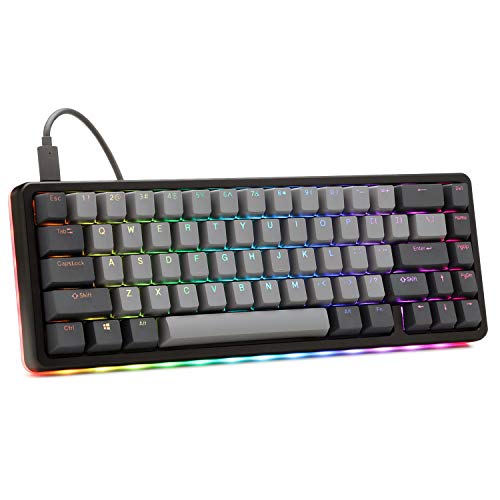
This ducky one 2 mini review starts with a naming honesty the product line itself makes necessary: the original One 2 Mini, the board that defined the 60% category for a generation of players, no longer has a current listing we could verify, so the Ducky you can actually buy today — and the one linked and reviewed as the main product here — is its successor, the One 2 Pro Mini, clearly labelled as the revision wherever it appears. That turns out to be a fitting structure for the whole review, because the One 2 Mini was never really a single product; it was an argument — that a keyboard could lose forty percent of its keys and lose nothing that mattered — and the Pro Mini is that argument’s current edition.
It is worth pausing on how completely that argument won. When the original Mini appeared, a keyboard without arrows read as a stunt; today every major gaming brand sells a 60% board, streamers’ desks are unrecognisable without them, and the question has inverted — full-size boards now justify themselves against the small ones. The Pro Mini therefore does not need to convince you the format is legitimate. It needs to convince you that its particular, typist-first interpretation of the format beats the gaming industry’s, and that is a subtler and more interesting contest, which the comparisons below take seriously.
The review therefore does two jobs. It assesses the Pro Mini as a purchasable board in its own right: its Cherry Silent Red switches in this listing, its RGB, its layer system and DIP switches, the stock stabiliser tuning that Ducky’s reputation rides on. And it frames that board against the two rivals that define its modern context — Razer’s Huntsman Mini, the optical gaming interpretation of 60%, and HyperX’s Alloy Origins 60, the value-and-aluminium interpretation — because a 60% board in this decade is bought against alternatives the original never faced. Readers loyal to the original will find its spirit assessed honestly, including where the revision has traded character for quiet.
All three boards were checked against their current listings, and variant discipline matters here more than usual: switch choice alone turns the Pro Mini from a silent linear board into something else entirely, so confirm the exact switch in the listing in front of you before ordering.
Key takeaways
Four properties decide a 60% purchase, and they are the same four whether the badge says Ducky, Razer or HyperX. They organise everything that follows.
- Stock switch seem and stabiliser tuning
- Next-layer layout for arrows and F-keys
- Keycap standard out of the box
- Onboard macro and DIP switch behaviour
In this guide
Rapid picks for Ducky One 2 Mini Review
The three interpretations of 60% in one view: the refined original lineage, the optical gaming board, and the solid value board. The detailed reviews explain what each interpretation costs and buys.
| Unit | Best for | Page |
|---|---|---|
| Ducky One 2 Pro Mini | Best for small desks | Check price on Amazon |
| Razer Huntsman Mini | Best upgrade move | Check price on Amazon |
| HyperX Alloy Origins 60 | Best for travellers | Confirm cost on Amazon |
How the lineup was chosen
The lineup was chosen to triangulate the modern 60% decision. The One 2 Pro Mini represents the category’s founding lineage updated — mechanical switches, deep onboard customisation, a typist’s priorities. The Huntsman Mini represents the gaming industry’s answer: optical switches for speed, software-driven features, a tournament player’s priorities. The Alloy Origins 60 represents the sensible middle: a solidly built board with good stock keycaps and switches at the friendliest standing of the three. A reader who knows which of those three philosophies sounds like their desk has effectively made the decision; the reviews exist to confirm or correct that instinct with specifics.
Evaluation criteria were set from the category’s real friction points. Stock switch sound and stabiliser tuning, because a 60% board’s big keys are a large share of its voice. The second-layer layout, because arrows and function keys live there and a bad map is a daily tax. Keycap quality out of the box, because at 60% the caps are most of what you see and touch. And onboard behaviour — macros, DIP switches, memory — because small boards lean on their firmware the way large boards lean on their extra keys. Every board was verified against its live listing with its switch variant recorded, since a switch change is effectively a different product in this category.
Detailed reviews

Ducky One 2 Pro Mini
Best for players and typists who want the classic 60% formula, refined and quieted
| Spot | Ducky One 2 Pro Mini |
|---|---|
| Family | Mechanical Keyboards |
| Page highlights | RGB lighting |
| Expense | Verify expense on Amazon |
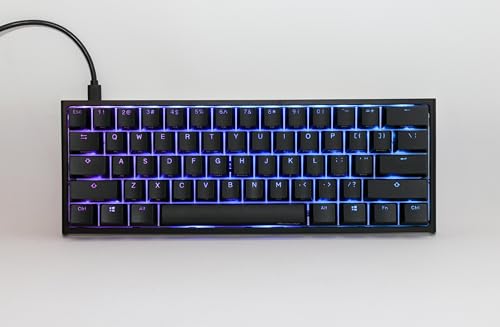
The Pro Mini’s inheritance is visible in what it refuses to change: a true 60% layout with no apology, a deep layer system, physical DIP switches for the settings owners actually flip, and a build that assumes the board will be kept. What the revision changes is the temperament. This listing’s Cherry Silent Red switches make the point plainly — the original Mini’s audience has grown up into shared flats, open offices and late-night sessions, and a silent linear switch is the board acknowledging its owners’ lives. Silent switches trade the crisp bottom-out of standard switches for a cushioned, muted landing, and the Pro Mini’s stock tuning leans into that quiet: the board’s sound is a low, soft report rather than a click-clack announcement.
The layer system remains the board’s intellectual core. Arrows live on a layer where Ducky’s long-refined map puts them under the right hand; function keys ride the number row; and the DIP switches handle the physical truths — swapping Caps Lock and Fn, adjusting the Windows key’s behaviour — without software, without an account, without a background process. In an era when keyboard features increasingly rent themselves through apps, the Pro Mini’s onboard stubbornness is a philosophy: the board you configure is the board you own, on any machine, forever. RGB lighting is present and per-key, tasteful at sensible brightness, and the board’s small footprint leaves the desk’s right half entirely to the mouse, which for its gaming audience is the entire point.
The honest costs of the formula are the category’s costs, faithfully kept. There are no dedicated arrows, and no firmware elegance fully repeals that for spreadsheet or code navigation — the layer is a good answer, not an invisible one. Silent switches, for all their domestic virtue, mute the feedback some typists type by, and players raised on the original Mini’s snappier switches may find the Pro’s landing soft. And the board is wired, in a category where wireless rivals multiply yearly. None of these are flaws in execution; they are the design’s chosen trade-offs, and the review’s verdict is that Ducky executes its choices with the consistency that built the name.
Strengths
- The classic 60% formula with a refined layer map and physical DIP switches
- Cherry Silent Red configuration suits shared and late-night spaces
- Onboard customisation that needs no running software or account
Trade-offs
- No dedicated arrows or function row; layer life is mandatory
- Silent switches cushion feedback that some typists rely on
- Wired-only while wireless rivals multiply
Best for: the 60% believer who wants the lineage’s refinement and a quieter board for adult living arrangements. Not suited for: arrow-heavy workers, wireless seekers, or anyone who needs their switches to talk back. Check price on Amazon
One setup recommendation specific to this board: spend your first configuration session on the DIP switches and the Fn layer, in that order, and then leave both alone for a fortnight. The Pro Mini rewards owners who commit to a layout long enough for it to become reflex, and punishes — with a week of fumbled arrows — owners who keep redesigning the map instead of learning it. The board’s depth is real, but depth is only useful once it has been memorised, and memorisation is a decision before it is a result.
There is a second, quieter ownership truth about the Pro Mini: its smallness makes it the board most likely to be carried, lent and photographed in an owner’s life, and it survives all three gracefully. The build takes travel without complaint, the onboard settings mean it behaves identically on a borrowed machine, and its looks hold their own in the desk photographs its owners inevitably take. None of that appears in a specification table, and all of it shows up in the second year of ownership, which is where this board has always made its case.
Razer Huntsman Mini
Best for competitive players who want optical speed and tournament features
| Label | Razer Huntsman Mini |
|---|---|
| Piece | Mechanical Keyboards |
| Headline extras from its entry | RGB lighting, optical switches |
| Price | Check cost on Amazon |
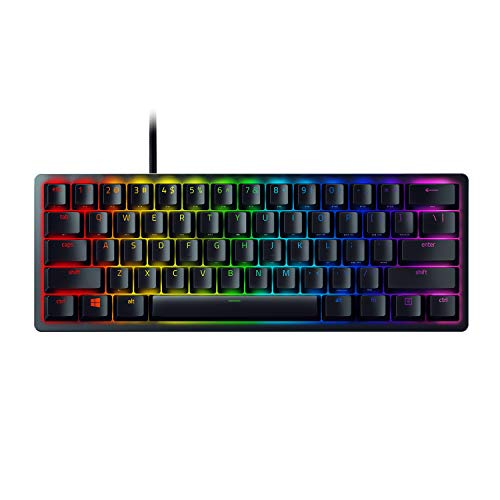
The Huntsman Mini is what happens when the 60% idea is rebuilt by a gaming company from the switch outward. Its linear optical switches actuate by light rather than by metal contact, which removes the debounce delay mechanical switches live with and gives the board its competitive pitch: inputs register at the speed of the mechanism’s physics, every time, with no wear-based inconsistency developing over years. This listing adds the modern tournament vocabulary — an aluminium top frame, doubleshot PBT keycaps, onboard memory for profiles, Chroma RGB, and Snap Tap, Razer’s feature for resolving opposing directional inputs in fast strafing games.
For a Dota or FPS player the package is coherent: the small footprint frees the mouse, the optical switches promise the inputs, the onboard memory carries your profiles to a tournament PC without software installs. The trade-offs are equally coherent. Optical switches have their own sound and feel — a lighter, sometimes hollower report than a good mechanical switch — and the Huntsman’s customisation lives in Razer’s software ecosystem rather than in the board’s own switches and layers, which suits players already inside that ecosystem and taxes those outside it. Its arrow layer is serviceable rather than beloved. Read it as the specialist: the best 60% here for a player whose games reward its specific technologies, and an over-featured answer for a typist who wanted a quiet, simple board.
Strengths
- Linear optical switches with fast, wear-free actuation
- Aluminium top frame, PBT keycaps and onboard profile memory
- Snap Tap and Chroma integration for players inside Razer’s ecosystem
Trade-offs
- Optical switch feel and sound divide typists; try before committing if you can
- Customisation leans on Razer’s software rather than onboard controls
- Gaming features price it above the value option here
Best for: the competitive player, especially in fast shooters, who values actuation technology over typing tradition. Not suited for: software minimalists, or typists shopping for feel first. Check price on Amazon
A note on Snap Tap and its kin, since features like it now headline gaming boards: they matter in the narrow band of games where simultaneous opposing inputs are a mechanic, and they are invisible everywhere else. Buy the Huntsman for its switches, frame and memory — the durable goods — and let the headline feature be a bonus your game happens to use, rather than the reason for the purchase. Features date quickly; switch feel is forever, or at least for the board’s whole life on your desk.
The Huntsman’s sound deserves one more honest sentence, because it decides households. Optical switches in a compact case produce a bright, brisk report that many players love as feedback and many partners experience as percussion. In a private gaming room it is a non-issue and arguably a pleasure; through a thin wall at midnight it is a negotiation. Razer sells quieter switch variants in the wider line, so a Huntsman admirer in a shared home should check which switch a given listing carries with the same care this review applied to the Ducky’s variants.

HyperX Alloy Origins 60
Best for buyers who want a solid, good-sounding 60% board without the premium argument
| Label | HyperX Alloy Origins 60 |
|---|---|
| Category | Mechanical Keyboards |
| Page highlights | RGB lighting |
| Page tag | Check price on Amazon |
The Alloy Origins 60 is the pragmatist’s entry in this comparison: HyperX’s own Red linear switches, doubleshot PBT keycaps as standard, RGB backlighting, and a compact body built with the solidity that made the Origins line’s reputation, all at the friendliest standing of the three boards here. Its proposition is completeness without theatre — the stock experience, keycaps included, is the finished experience, and the board asks for no mods, no switch swaps and no ecosystem commitments to be satisfying on day one.
Against the Ducky, it trades depth for ease: its customisation runs through HyperX’s NGENUITY software rather than through the Pro Mini’s DIP-and-layer onboard culture, which is simpler for most owners and less sovereign for the few who care. Against the Razer, it trades actuation technology for price and for a mechanical switch feel many typists prefer. Its layer map covers the arrows-and-functions duty competently. The board’s honest limitation is ambition: it does not try to be an heirloom or a tournament instrument, and owners who catch the customisation bug will outgrow it toward boards like the Ducky. As the first 60% in a player’s life, though, it is arguably the wisest purchase in this review — cheap enough to be an experiment, good enough for the experiment to be fair.
Strengths
- Complete stock package with doubleshot PBT keycaps included
- HyperX Red linear switches with a smooth, accessible feel
- The friendliest price of the three, with no ecosystem lock-in demanded
Trade-offs
- Software-based customisation rather than the Ducky’s onboard depth
- Less headroom for the modding journey if the hobby takes hold
- Compact body is solid but the design plays fewer heirloom notes than the Pro Mini
Best for: the first-time 60% buyer and the value-minded gamer. Not suited for: the onboard-customisation purist, or the buyer shopping for a decade-long object. Check price on Amazon
If you buy the HyperX as an experiment, run the experiment properly: give the 60% layout a full fortnight of your real work and games before judging, because the first four days of any 60% board are a tax every owner pays and they predict nothing about day fourteen. The board is good enough that a fair trial is a real trial — if the layout still fights you at two weeks, the verdict is about the format, not the product, and you will have learned it at the lowest tuition the category offers.
The HyperX also quietly wins the gift and second-desk categories, which are real categories in a board’s life. It is the one you can hand to a younger player, a partner or a spare room without a configuration lecture, because its software-mediated simplicity travels with a five-minute explanation. Boards like the Ducky are personal instruments that resist lending; the HyperX is a household tool that invites it. Depending on your life, that sociability is worth several specification points, and it is a large part of why the Origins line remains on desks long after its owners upgrade their main board.
Buying handbook: what genuinely determines Ducky One 2 Mini Review
Stock switch sound and stabiliser tuning
On a 60% board, sound is concentrated: the spacebar, enter and shift keys are a larger share of the whole instrument, and their stabilisers carry the board’s reputation in every recording and every roommate’s memory. Ducky’s standing in this category was built substantially on stabilisers that arrive tuned — a spacebar that lands with a single, damped note instead of a rattle — and the Pro Mini keeps that faith, its silent switches deepening the effect into the quietest stock sound of the three boards here. The Huntsman’s optical switches produce a lighter, clackier report that reads as speed in a gaming room and as noise in a shared flat. The HyperX sits between: a clean mechanical note, well-mannered, unremarkable in the best sense.
Judge sound in your own context, because the room is half the instrument. Record thirty seconds of ordinary typing on your phone, at your desk, with your microphone where it lives if you take calls. Play it back at the volume your colleagues or family will hear. That recording, not a studio demo, is the board you are buying — and it is also the fastest way to discover whether silent switches are a luxury or a necessity in your actual life. Owners in shared spaces should weight this section above every other in the guide.
Second-layer layout for arrows and F-keys
The layer is the 60% board’s second keyboard, and its quality is a design question: are the arrows where your fingers fall when the Fn key is held, in a diamond your right hand already knows from every game it has played? Are the function keys a simple shift of the number row, so F5 is “5, but held”? Ducky’s map, refined across the Mini’s generations, answers both questions the way muscle memory would vote, which is why the lineage’s owners adapt in days. When you evaluate any board in this category, spend your trial’s first hour only on navigation — documents, code, a spreadsheet — because that hour predicts your month better than any gaming session.
Customisable layers add a second decision: what will you move? The wisest first edit is almost always small — a Delete key where your hand hunts for it, a media cluster under the left hand — because each change costs relearning and pays only if the key is used hourly. Resist the maximalist remap in week one. The boards here will hold any layout you design; the constraint is your memory, and a layout you can operate at 2 a.m. under deadline beats a brilliant one you must look at.
Keycap quality out of the box
At 60%, keycaps are not trim; they are the visible majority of the product and the entire tactile surface. The quality markers are material and manufacture: PBT over ABS for texture that survives years without shining, doubleshot or dye-sublimated legends that cannot wear off, and a profile your fingers read as landmarks. All three boards here ship PBT doubleshot sets, which tells you the category has matured — the stock set is no longer a placeholder for your first upgrade. That changes the buying arithmetic: price differences between these boards are now about switches, firmware and build, not about a hidden keycap tax waiting after checkout.
Profile is the remaining personal variable. The sculpted sets here give each row a slightly different height and angle, which fingertips use as a map; uniform profiles look cleaner and feel flatter, and some players prefer them for gaming. If you are new to the category, start with the stock sculpted set and let a month of use form your opinion — keycap preference is one of the hobby’s most personal variables, and it cannot be borrowed from a review, including this one. It can only be noticed, in your own hands, over time.
Onboard macro and DIP switch behaviour
DIP switches are the Pro Mini’s manifesto in miniature: physical switches, under the board, that set behaviours owners genuinely change — the Fn and Caps Lock positions, the Windows key’s role — with no software between the owner and the machine. Macros extend the same philosophy into keystrokes: a recorded sequence, stored in the board, available on any computer it plugs into. For players and workers who move between machines, or who refuse background software on principle, this onboard sovereignty is the Ducky’s deepest difference from its rivals, whose features live in applications that must be installed, updated and trusted.
The honest counterweight is convenience. Software profiles are easier to build, visualise and back up than onboard ones, and the Razer and HyperX approaches will suit most owners most of the time. The DIP philosophy pays its dividend in specific lives: the tournament player on a borrowed PC, the Linux user the gaming software forgot, the professional whose work machine forbids installs. If none of those lives is yours, treat onboard depth as a tiebreaker rather than a headline — but know that owners who need it consider it non-negotiable, and they are not wrong about their own desks.
Ducky One 2 Mini Review in concrete habits
Situation: a competitive player freeing mouse area on a minor worktop
This is the scenario the entire category was invented for. On a small desk, a full-size board pushes the mouse into a narrow corridor where low-sensitivity aim goes to die; a 60% board hands that territory back, and the player’s flicks and camera sweeps gain the room they were always supposed to have. Between the three boards, the Huntsman’s optical switches make the purest competitive pitch, the Ducky counters with the layer map a MOBA player’s unit commands prefer, and the HyperX delivers ninety percent of the liberation at the friendliest price. The scenario’s real lesson is that the format is the feature: once the desk space is freed, the differences among good 60% boards are refinements, and the player’s rank responds to the space more than to the switch technology.
Situation: a minimalist configuration built around a one lead
The minimalist desk is an aesthetic with a functional core: one cable, one board, nothing else competing for the surface. The Pro Mini was practically designed as its portrait — small, self-sufficient, configurable without software windows cluttering the screen it serves. A wired board suits this desk more than minimalists sometimes admit, because the single cable is a design element when it is the only one, routed deliberately and left alone. The HyperX matches the look at a lower price; the Razer’s ecosystem ambitions pull against the minimalism. Whoever wins, the discipline that makes the scenario work is resisting the second device — the separate macro pad, the novelty board — because a minimalist setup is a promise you keep daily, not a photograph you take once.
The minimalist scenario also exposes a truth about cables that wireless marketing obscures: a single, well-routed cable is not visual clutter but visual structure, the line that ties the board to the machine in a way the eye reads as intentional. Minimalists who chase zero cables often end with charging cables appearing unpredictably instead — the clutter was not removed, only made intermittent. The wired Pro Mini, cable chosen and routed once, is the more honest minimalism, and its owners’ desks tend to stay photographed-ready for years rather than for an afternoon.
Scene: a at the outset 60 percent board for someone keeping a full-size spare
The hedged experiment is the wisest way into this category: the 60% board takes the desk, the old full-size board takes a shelf within reach, and the fortnight’s trial runs with a safety net. The pattern most owners report is instructive — the spare is reached for twice in week one, once in week two, and by week three it is furniture. The failures are equally patterned: the spare comes down for every spreadsheet, and the 60% never gets the repetitions it needs to become fluent. If you run this experiment, set the rule in advance — the spare may be used for one defined task only — and let the fortnight, not your daily frustration, deliver the verdict.
Choose the defined task by honesty: pick the work your hands insist is impossible on layers — most people name the spreadsheet or the code review — and permit the spare for that alone. Everything else, including the tasks that merely feel slower, stays on the small board, because “feels slower” is the sensation of learning and it resolves; “is structurally worse” is the spreadsheet case and it does not. At the fortnight’s end you will know which of your tasks were which, and that knowledge, more than the board itself, is what the experiment was buying.
Configuration and at the outset-seven mornings how-to
A 60% board’s first week is an adaptation project, and it goes better with a plan. These steps sequence it.
Stage 1 for Ducky One 2 Mini Review: display the configuration to the second user who shares your area
Early in the first week, let the other person in your space hear and try the board. The hearing matters most: type a paragraph at your normal force in your normal evening conditions and ask honestly whether it intrudes — silent switches earn their name in this test, and clickier configurations learn their curfew. The trying matters for households that share the desk, because a 60% board’s layers are a private language; a partner who cannot find the arrows on your keyboard will have opinions about the purchase that are cheaper to hear in week one than in month two.
Move 2 for Ducky One 2 Mini Review: write the return deadline on the box the date it arrives
Pen on cardboard, the day of delivery. A 60% board’s verdict cannot be rushed — the layout needs a fortnight — but return windows do not care about adaptation curves, and the written date forces the scheduling question early: count backwards from the deadline, and make sure your two-week trial fits inside it with days to spare. If the window is shorter than the honest trial, that is a reason to buy from a retailer whose window is not, and the date on the box is what makes the mismatch visible while it can still be solved.
Stage 3 for Ducky One 2 Mini Review: compare against the old gear one final time prior to selling it
Near the end of the trial, give the old board one full working session. The comparison usually settles the matter in an unexpected direction: the old board’s extra keys feel less essential than remembered, while its size feels suddenly enormous — the desk itself has been re-educated. Occasionally the opposite verdict arrives, and the arrows’ absence is simply a tax your work will not pay; that verdict, reached by comparison rather than by frustration, is one you can trust. Only after this session should the old board be sold or stored for good.
Move 4 for Ducky One 2 Mini Review: schedule a two-week review to catch annoyances that only repetition reveals
Calendar the review for day fourteen and keep a running note of frictions as they occur — the layer key your finger misses, the switch that sounds different, the macro you keep forgetting exists. Repetition is the only instrument that separates a layout’s true defects from the ordinary soreness of learning, and the scheduled review is where the note gets read whole. Most owners find the list shorter than their memory of the fortnight suggested, and what remains on it is a precise, fixable agenda rather than a general doubt.
Stage 5 for Ducky One 2 Mini Review: run one typical bout at default settings and write down what bothers you
Do this on day one, before the DIP switches are flipped or a single key is remapped: one ordinary session, entirely stock, with the notebook open. The baseline list disciplines the whole trial — every later change can be traced to a recorded irritation, and the day-fourteen review can check them off one by one. Owners who skip the baseline end up customising toward an imagined board; owners who keep it customise toward their own, and the difference shows in how rarely they redesign the map afterwards.
Common mistakes with Ducky One 2 Mini Review
Buying a 60 percent board for spreadsheet-heavy job
Spreadsheets are the 60% format’s natural predator: navigation is the work, arrows and Home and End and Page keys are the tools, and a layer turns every one of those tools into a two-handed chord. A player who games at night and budgets by day will pay the layer tax in the hours when patience is scarcest, and no switch quality compensates. The honest alternatives are a 65% board with dedicated arrows or a separate numpad-and-navigation arrangement for work hours. Buy the board for the life you actually type, not for the desk photograph you admire — the photograph’s board never has to finish a quarterly report.
Overlooking the learning cost of layered arrow keys
The cost is real, finite, and routinely underestimated by exactly the confident buyers who most need to budget for it. Expect three to five clumsy days, a week of conscious navigation, and a fortnight before the layer disappears from thought. Work that cannot tolerate the clumsy days — a deadline week, an on-call rotation — is a reason to schedule the purchase, not to cancel it. What does not work is pretending the cost is zero and then blaming the board on day three, which is the biography of most returned 60% keyboards. The board is not hard to learn; it is impossible to learn instantly, and those are very different products.
Comparing it solely with boards twice its age
The Pro Mini’s most misleading comparison is against its own ancestor. Judged against the original One 2 Mini, the revision wins on refinement and quiet and the review writes itself — but nobody cross-shops a new board against a discontinued one they cannot buy. The honest comparisons are the Huntsman and the Origins in this review: modern boards with modern answers to the same desk. Buyers who anchor on nostalgia overpay for lineage; buyers who anchor on the current field get the lineage’s benefits at their true market weight. Honour the original by comparing its successor fairly, against the living.
Head-to-head: separating the lineup
Pro Mini against Huntsman Mini is tradition against technology. The Ducky’s case rests on feel, sound, onboard sovereignty and a layer map refined by a decade of owners; the Razer’s rests on actuation physics, ecosystem features and tournament credibility. A typist who plays will feel the Ducky’s advantages hourly and the Razer’s rarely; a competitive shooter player will feel exactly the reverse. The deciding question is which hours dominate your desk — count them honestly, because both boards are excellent at their own answer and merely good at the other’s.
Pro Mini against Alloy Origins 60 is depth against completeness. The HyperX is the better first board and the better value; the Ducky is the better fifth-year board, its onboard depth and lineage compounding while the HyperX’s software-mediated simplicity stays exactly where it started. Buyers who know the hobby will take them choose the Ducky and skip a step; buyers still finding out choose the HyperX and lose nothing if the answer turns out to be “not for me”. That asymmetry — the cost of guessing wrong — is the real head-to-head result, and it favours starting with the HyperX more often than pride admits.
One further comparison belongs in the record because readers will make it anyway: all three boards against the 65% class above them. The moment a workload needs arrows hourly, the 60% argument collapses regardless of brand, and no winner of this head-to-head should be bought as a talisman against that arithmetic. The boards here compete for the desks where the arithmetic passes. A review that pretends otherwise would sell three excellent keyboards to three unhappy owners, which is the only outcome this page is determined to avoid.
Living with the pick: care and longevity
Small boards age visibly because there is less of them to hide wear: the spacebar’s shine, the WASD cluster’s polish, the cable’s bend at the port. A quarterly cap-off clean keeps the sound true, and rotating a spare spacebar — cheap, and often included in keycap sets — spreads the most visible wear. The cable deserves a strain-relief habit: route it with slack at the port, never taut, because a small board gets moved often and every move tugs the same joint. Boards that travel should travel in a case; a 60% board in a laptop bag without one arrives with its switches pre-pressed by luggage, and its stabilisers will tell the story for weeks.
Keep the configuration documented like the Planck owners do: photograph the DIP positions, export or note the layer map, record the macros. A small board’s personality lives in those settings more than in its hardware, and a factory reset — or a helpful friend — can erase in seconds what took you a month to design. With the map saved, the board is restorable forever; without it, you own a very nice amnesiac. Longevity in this category is mostly information management, and it is entirely within your control.
There is a resale footnote that rewards the careful owner: small Ducky boards hold their value unusually well, because the audience for them is permanent and the boards themselves are durable. A Pro Mini kept clean, with its box, cable and documented configuration intact, is a liquid asset in a way most peripherals never become. That is not a reason to buy one as an investment — it is a reason the cost of a wrong experiment in this category is lower than the sticker suggests, provided the experiment was run carefully and the evidence kept.
Final recommendation
Choose the One 2 Pro Mini if the 60% life is your considered destination — you have counted your arrow usage, your desk is yours, and you want the format’s founding lineage in its refined, quieter modern form, configured once and owned outright. Choose the Huntsman Mini if your hours are competitive and your games reward its actuation technology. Choose the Alloy Origins 60 if this is your first 60% and you want the experiment run fairly at the lowest tuition. All three verdicts assume the fortnight’s trial is honoured; a 60% board judged in three days is a coin flip wearing a receipt.
And if the trial ends with the full-size board back on the desk, count the experiment a success anyway: you will know your own typing the way few buyers ever do, and the 65% or 75% board you buy next will be chosen with evidence. The Mini’s deepest service to its category is that it makes every other keyboard decision easier, even for the people who return it.
Finally, a word for the original Mini’s owners, who are this page’s most sceptical readers. The Pro Mini does not ask you to retire a board you love; nothing in the revision makes the original worse than it was the day you bought it, and its switches and caps remain serviceable through the same ecosystem. Upgrade when your life changes — a shared flat, a quieter hour, a worn stabiliser too many — and not because a newer name exists. The lineage’s whole philosophy is ownership over novelty, and it applies to the decision to keep the old board exactly as much as to the decision to buy the new one.
Frequently asked prompts
What signifies most when choosing for ducky one 2 mini review?
Your arrow-key arithmetic: how many times an hour your real work reaches for navigation keys, and whether a layer can serve those reaches without taxing the tasks around them. Everything else — switches, sound, firmware — is refinement on top of that single fit. Players and light typists pass the arithmetic easily, which is why the category thrives; spreadsheet and code-navigation workers should run the numbers before the aesthetics are allowed to speak. Fit first, then feel, then features, in that order, and the choice among these three boards becomes straightforward.
How much should a beginner funds for ducky one 2 mini review?
A beginner should budget at the Alloy Origins 60’s level and treat the saving against the Ducky as tuition money held in reserve. The first 60% board’s job is diagnostic — it teaches your layout tolerance, your switch taste and your appetite for layers — and a fairly priced, complete board teaches all three without punishing a wrong answer. Upgrade later with knowledge, and the first board remains useful on a second machine or in a travel bag. Beginners who start at the premium end often end up owning an excellent board that answers questions they never asked.
Which error do shoppers of ducky one 2 mini review regret most?
Judging the board inside its first four days and returning it at the exact bottom of the learning curve. The regret has a recognisable shape: the board is replaced by a larger one, the larger one feels clumsy within a month, and the buyer realises the 60% was two weeks from feeling natural. The fortnight rule in this review exists because the pattern is so common — no verdict before day fourteen, and the old board kept within reach so the trial is honest rather than desperate.
How long until a new Ducky One 2 Mini layout feels normal?
Two weeks for the layout, a month for the longing to stop. Letters and gaming keys feel normal within days; navigation through layers takes the fortnight; and the occasional reach for an arrow key that is not there fades last, usually sometime in the second month, in a spreadsheet, with a sigh. Typists who use the board for everything adapt at the fast end of that range; dual-board users, splitting hours with a full-size at work, should expect the slow end, because every staggered hour is an hour of unlearning the layer.
When is the premium alternative in ducky one 2 mini review actually worth it?
When the premium buys onboard depth and build intent that your usage will actually exercise: DIP switches you will flip, layers you will design, a board you will keep through several switch sets. It is not worth it when the same money buys only a badge or a marginal specification. In this lineup the Pro Mini’s premium is the defensible kind for the committed 60% user, and the wasteful kind for the merely curious — which is why the review keeps returning the curious to the HyperX without a hint of condescension.
What should I verify at the outset if my ducky one 2 mini review purchase disappoints?
Verify the calendar and the DIP switches before the board. Most early disappointment is day-three syndrome, cured by the schedule rather than by a return; and a surprising share of the rest is a DIP switch in a position you did not choose — a swapped Fn making the whole layer map feel wrong. Check the switches against the manual, confirm the layer you are judging is the layer the board thinks it is using, and then, if the fortnight still convicts it, return it with a clear conscience and better knowledge.
Related guides
- All in One vs Mini Pc Guide
- Dota 2 Headset
- Dota 2 Mouse
- Dota 2 Options
- 2 4ghz vs Bluetooth Headset
- Adobe Lightroom vs Capture One
Companion reading for the small-board decision: the Dota desk guides that share this board’s ecosystem, and the wider keyboard and headset comparisons.
One more angle: following-layer layout for arrows and F-keys, revisited
Design your arrow layer around your strongest habit rather than around symmetry. If your right hand played years of games with a particular mental diamond, put the arrows exactly there even if the printed legends disagree — legends can be ignored, but a layer that contradicts your reflexes will be fumbled forever. Then mark the arrangement physically for the first week: a dot of removable tape on the four caps costs nothing and converts a memorisation problem into a glance. By the time the tape wears off, the map will have moved into your fingers, which is where it was always supposed to live.
One more angle: stock switch sound and stabiliser tuning, revisited
The spacebar test deserves repeating as a habit, not just a trial: once a season, type a paragraph listening only to the big keys. Stabiliser lubricant migrates and dries, dust works into the housings, and the board’s voice drifts so gradually that owners blame their own ears. A spacebar that has begun to tick is a five-minute appointment with lubricant, made early, instead of a slow souring on a board you otherwise love. Small boards live and die by their few big keys; keeping those keys honest is the whole maintenance philosophy in one paragraph.
One more angle: onboard macro and DIP switch behaviour, revisited
Build one macro that earns its existence before you build any for fun: the sequence you type most and enjoy least — your email sign-off, your test command, your address. A macro that fires twenty times a day justifies the entire onboard system and teaches your fingers the macro layer’s geography for free. Owners who begin with elaborate game macros often never use them under pressure; owners who begin with a daily drudgery build the reflex first and the repertoire second. The order matters more than the content, and it is the difference between a feature and a habit.
One more angle: keycap standard out of the box, revisited
Live with the stock keycaps for a full month before shopping for replacements, even if a beautiful set is already calling. The stock set is the board’s designed feel — its profile, its texture, its sound — and you cannot know what you want to change until that feel is your baseline. A month also reveals which caps your fingers actually polish, which legends you actually read, and whether your spacebar’s profile annoys you or has become home. Keycap purchases made from a baseline are upgrades; keycap purchases made from a photograph are decorations, and the hobby’s drawers are full of the difference.