Disclosure: As an Amazon Associate, reviewstook.com earns from qualifying purchases. Links on this page are affiliate links; they cost you nothing extra. Prices and availability change often, so check the current Amazon listing before you buy.
Choosing a dota 2 headset is less about raw sound quality than about communication under pressure. Dota is a game won in the thirty seconds before a fight: someone calls the smoke, someone else spots the ward, a third person is counting down Roshan respawn while the carry is still deciding whether to buy back. If your teammates hear a muffled version of that call, or you mishear theirs, the fight is lost before it starts. So this guide treats the microphone as the headline feature, comfort across long sessions as the second, and everything else — bass, branding, RGB — as decoration.
The three headsets below cover the realistic ways people play. One is wired and deliberately simple, the kind of headset you plug in and forget about for three games straight. One is a wireless all-rounder that can follow you from the PC to a console or a phone without a cable swap. The third is built for players who treat every match like a scrim, with a broadcast-style microphone and battery life measured in days rather than hours. None of them is the right answer for everyone, and the sections after the reviews explain how to tell which one matches your queue habits, your desk, and the people who have to listen to you.
A quick note on method before the picks: every product named here was checked against its current Amazon listing, and the links go to those listings so you can confirm the exact variant, connector set and bundle before spending anything. Headset lines are notorious for near-identical model names separated by one letter, and that letter usually decides whether you get the wireless dongle or not.
Key takeaways
Four things decide whether a headset earns its place in a Dota setup, and they are worth holding in mind while you read the reviews, because each pick below trades them off differently.
- Microphone clarity for constant team chatter
- Relief over three-game ranked sittings
- Positional audio that separates lane noise from jungle ambushes
- Mute and volume controls reachable mid-fight
In this guide
Rapid picks for Dota 2 Headset
Short on time? This table is the whole argument in miniature. The detailed reviews underneath explain the reasoning, and the buying walkthrough after them explains the criteria, but if you already know your priorities you can decide from here.
| Unit | Best for | Entry |
|---|---|---|
| HyperX Cloud III | Best for extended sittings | Confirm cost on Amazon |
| SteelSeries Arctis Nova 7 | Best for shared chambers | Verify cost on Amazon |
| Razer BlackShark V2 Pro | Best for tinkerers | Check cost on Amazon |
How the lineup was chosen
The shortlist started from what Dota actually demands rather than from what headset marketing emphasises. A shooter headset can get away with a mediocre microphone because callouts are short and positional audio does the heavy lifting. Dota inverts that: positional demands are modest — you need to hear a Blink Dagger pop or a teleport scroll in the next lane, not pinpoint footsteps through a wall — while voice traffic is nearly constant for forty minutes at a stretch. So the first filter was microphone quality as reported in each listing: capsule size, detachability, and whether the maker publishes anything meaningful about voice clarity at all.
The second filter was session length. A best-of-three ranked evening, or a five-stack scrim block, keeps a headset on your head for two to three hours with short breaks. That ruled in memory foam and ruled out anything whose listings and documentation suggested a vice-like clamp as the main fit mechanism. The third filter was practical: connection types had to suit a normal PC setup without extra purchases, so wired USB and 3.5mm options and proper 2.4 GHz wireless dongles both qualified, while Bluetooth-only designs did not, because Bluetooth latency and its habit of dropping to a low-quality hands-free profile the moment the microphone opens are real problems in a voice-heavy game.
Finally, each candidate needed a listing that could be verified in full — exact model, exact connectors, an official product image — so that what you read about here is what arrives in the box. Three headsets survived all four filters, and they happen to land in three distinct philosophies: wired reliability, wireless flexibility, and wireless endurance with a stronger microphone. That spread is deliberate: it means the choice between them can be made on your routine rather than on a spec-sheet tiebreak.
Detailed reviews

HyperX Cloud III
Best for players who want to plug in once and think about the game instead
| Label | HyperX Cloud III |
|---|---|
| Class | Gaming Headsets |
| Headline extras from its page | USB-C connection |
| Entry tag | Verify cost on Amazon |
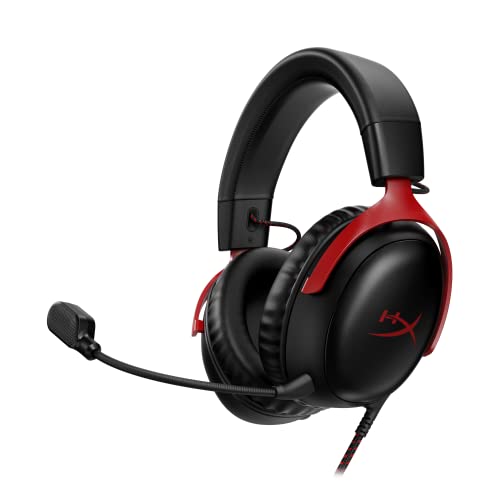
The Cloud III is the headset in this lineup that asks the least of you. It connects over USB-C, USB-A or a plain 3.5mm jack, which between them cover a gaming PC, a laptop, a controller and the ageing desktop in the spare room, and because it is wired there is no battery anxiety in game three of a series and no dongle to lose down the back of the desk. HyperX built its name on exactly this formula — a durable frame, memory foam cushions and a clear microphone — and the listing leads with a 10mm mic capsule, which is large by headset standards and part of why the Cloud line keeps its reputation for voice clarity in team chat.
For Dota specifically, the wired connection is a genuine feature rather than a compromise. Your callouts leave with no wireless compression and no risk of the headset switching audio profiles mid-match, which still happens to Bluetooth users when a game, Discord and Windows disagree about which device profile owns the microphone. The memory foam matters in a different way: it spreads the clamp over a wider area, so the pressure point that appears above the ears around minute ninety of a session is softened. Players who wear glasses will still want to check the seal with their own frames, but foam this forgiving is the right starting point.
Strengths
- Three connection options — USB-C, USB-A and 3.5mm — so it works with practically any machine you queue on
- Large 10mm microphone capsule aimed squarely at clear team voice
- Memory foam cushions and a frame built to survive being dropped on the desk after a lost teamfight
Trade-offs
- Wired only, so the cable will find your chair’s armrest and your keyboard cable at least once a session
- No wireless freedom for leaning back during the draft or grabbing a drink between games
- Fewer software extras than the wireless rivals here; what you hear is close to what the hardware gives you
Best for: the ranked regular who plays at one desk, values a dependable microphone over mobility, and would rather spend on a headset that lasts than on features used twice. Not suited for: players who swap between PC, console and phone in the same evening, or anyone whose desk layout makes a cable a genuine hazard. Check cost on Amazon
One practical tip if you choose it: route the cable before your first session, not during it. A cable clipped to the desk edge or run behind the monitor stays out of the way of your mouse hand, and the 3.5mm option is worth keeping in the drawer even if you use USB daily — it turns the Cloud III into the household spare headset for any device with a jack, which is a longer second life than most gaming peripherals get.
There is also a consistency argument for wired that rarely gets made. A wired headset sounds identical on day one and day four hundred, at full charge and at none, in a quiet room and in a flat full of wireless networks competing for airtime. Players who scrim seriously often end up back on a cable for exactly this reason: when a call is missed, they want the list of suspects to be short. The Cloud III will never introduce a variable into your setup, and for a game decided by communication discipline, boring reliability is a performance feature in its own right.
SteelSeries Arctis Nova 7
Best for players who split their time between PC, console and couch
| Unit | SteelSeries Arctis Nova 7 |
|---|---|
| Class | Gaming Headsets |
| What its listing leads with | wireless operation, Bluetooth connectivity, a 2.4 GHz wireless form |
| Expense | Confirm cost on Amazon |
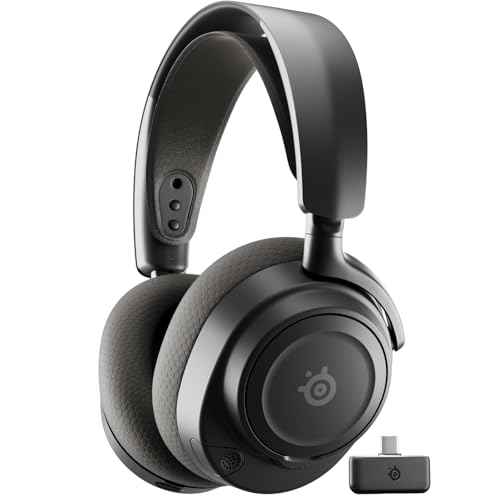
The Arctis Nova 7 (this is the Gen 2 listing) takes the opposite bet from the Cloud III: it assumes your gaming happens in more than one place. It mixes a 2.4 GHz wireless connection with Bluetooth, so the low-latency dongle can live in your PC while Bluetooth pairs to a phone or handheld, and the listing quotes more than fifty hours of play between charges — enough that charging becomes a weekly chore rather than a nightly one. SteelSeries also leans on its software here, with real-time app control over the sound while you play, which suits players who like to trim bass for voice clarity rather than accept a factory tune.
In a Dota context, the dual connection solves a specific modern problem: the five-stack that assembles on Discord mobile while someone is still finishing dinner. You can be in the call on your phone, then at your desk with the dongle, without re-pairing anything. Neodymium drivers give the Nova 7 a clean, detailed presentation that handles the game’s layered audio — last-hit ticks, ability sounds, the announcer, a teammate talking over all of it — without smearing into noise. The microphone is serviceable for ranked callouts, though in this trio it is the Cloud III and the BlackShark that put voice first; the Nova 7’s case rests on flexibility, battery and software instead.
Strengths
- 2.4 GHz and Bluetooth together, so PC and phone stay connected without re-pairing rituals
- Over fifty hours of quoted play time per charge, which changes charging from a routine into an occasional task
- App control over the sound in real time, useful for pulling voice frequencies forward during matches
Trade-offs
- The microphone, while clear enough for ranked, is not the strongest in this lineup for streaming or recording
- Software-dependent features reward Windows users most; console-only players get a thinner version of the package
- Wireless convenience costs more than the wired option here, and the premium buys mobility rather than better Dota performance
Best for: the player whose headset also does console nights, handheld sessions and phone calls, and who wants one device to cover all of it. Not suited for: a single-desk PC player who would be paying for connections they never use, or a streamer who needs the microphone to carry a broadcast. Check price on Amazon
Set the Nova 7 up in the right order when it arrives: dongle first, firmware and app second, Bluetooth pairing last. Most early complaints about this class of headset trace back to a PC fighting between the dongle and a Bluetooth connection made in the wrong order, and five calm minutes at setup saves the troubleshooting session later. Keep the charging cable at the desk even with the long battery life — topping up during a loading screen or a meal break means the low-battery warning never lands mid-game.
The app control deserves a word of caution alongside the praise. Software tuning is powerful precisely because it remembers nothing about your intentions: a curve shaped for a film’s dialogue will still be active when you queue, quietly reshaping your game audio until you notice voices sitting oddly. Make one profile for Dota, name it plainly, and treat every other experiment as temporary. Players who do this get the Nova 7’s flexibility without the slow drift into a sound they never chose on purpose.

Razer BlackShark V2 Pro
Best for competitive players who want the strongest microphone and the longest battery
| Item | Razer BlackShark V2 Pro |
|---|---|
| Class | Gaming Headsets |
| Entry highlights | wireless operation, Bluetooth connectivity, a detachable lead |
| Price | Check expense on Amazon |
The BlackShark V2 Pro is the esports entry in this trio, and its listing reads like a checklist of what tournament players ask for: a detachable microphone, 50mm drivers, noise-isolating earcups with memory foam, pro-tuned FPS profiles, and a quoted seventy hours of battery life. The detachable mic deserves the emphasis. When it is attached, this is the most broadcast-leaning voice in the lineup, the one you would pick if your Dota sessions double as streamed content or if your stack records VODs and actually listens back to the comms. When it is detached, the headset becomes a plain pair of wireless headphones for everything else.
Seventy hours of battery changes behaviour in a way smaller numbers do not. With the Nova 7 you charge weekly; with the BlackShark you can plausibly charge fortnightly even as a heavy player, and the mid-series low-battery panic simply leaves your life. The noise-isolating cups earn their keep in shared housing: they will not silence a television in the same room, but they take the edge off household noise enough that a Roshan call at low volume stays audible. The FPS-tuned profiles are, honestly, more relevant to shooters than to Dota — the transferable part is the clarity-first tuning philosophy, not the specific presets, and most Dota players will settle on a flatter setting with the microphone doing the important work.
Strengths
- Detachable microphone with the most broadcast-ready voice in this lineup
- Seventy hours of quoted battery life, the longest here by a wide margin
- Noise-isolating memory foam cups that help in shared or noisy homes
Trade-offs
- The premium pick of the three, priced for competitive features some Dota players will never touch
- Pro-tuned FPS profiles are shooter-oriented; expect to spend a few minutes finding your own setting for a MOBA
- A detached microphone is a microphone that can be left in another room when the queue pops
Best for: the serious stack player, the occasional streamer, and anyone in a noisy household who needs isolation plus a serious mic. Not suited for: a casual player whose needs the Cloud III covers for less, or anyone who knows a detachable mic will spend its life lost. Check price on Amazon
If you stream or record, spend ten minutes on microphone placement before judging the BlackShark’s voice. A detachable boom wants to sit at the corner of your mouth, a couple of centimetres away and slightly below the airstream of your speech; placed there it rejects most keyboard noise and breath pops without any software help. Placed directly in front of your mouth it will make every plosive sound like a drum, and no equaliser fully rescues that.
The isolation cuts both ways, and it is worth knowing before you buy. In a shared home, cups that keep the game in also keep the household out: a doorbell, a kettle, a partner asking a question from the doorway. Most BlackShark owners develop the one-ear-off habit during the draft and downtime, which the memory foam makes comfortable enough. It is a small adaptation, but if your evenings involve being half-available to the room around you, factor it in — the Cloud III’s lighter seal asks less negotiation with the people you live with.
Buying walkthrough: what actually settles Dota 2 Headset
Microphone clarity for constant team chatter
Dota voice chat is not occasional commentary; it is a continuous stream of short, information-dense calls — “BKB in ten,” “wards gone,” “they’re smoking” — often spoken quickly and quietly so as not to wake the house. A microphone earns its place by keeping those calls intelligible at low volume and at speed. Capsule size helps, placement helps more, and the practical test is simple: record yourself reading a shopping list at your normal match volume, then play it back through laptop speakers. If consonants survive that journey, your teammates will understand you. Of the three picks, the BlackShark’s detachable boom gives the most placement control, the Cloud III’s large capsule is the wired benchmark, and the Nova 7 is perfectly adequate for ranked while prioritising other things.
One more microphone variable hides in your software rather than your hardware: the noise suppression built into chat apps. Aggressive suppression cleans up a fan or a keyboard, but pushed too far it clips the first syllable of fast callouts — exactly the syllable that distinguishes “back” from “track” or “smoke” from “spoke”. Set suppression to the lowest level that hides your room, and re-check it after any app update, because defaults have a habit of returning uninvited. Your teammates will never know you did this. They will just understand you more often.
Relief over three-game ranked sessions
Comfort in a headset is mostly about where the weight goes and how the clamp distributes. Memory foam, which all three picks use in some form, conforms instead of pressing, and it is the single most reliable comfort signal in a listing. Beyond that, judge by your own head: a headset that feels weightless in a five-minute try-on can still grow a hot spot at the crown by game three. The honest evaluation window is a full session, which is why the setup steps later in this guide insist on judging after real play rather than at the unboxing. Glasses wearers should pay extra attention, because temple arms break the earcup seal and concentrate pressure; foam depth is your friend there.
Positional audio that separates lane noise from jungle ambushes
Dota’s audio design rewards clarity more than surround gimmicks. The sounds that change decisions are specific: a Blink Dagger’s pop, a teleport scroll arriving in the adjacent lane, the Roshan pit’s ambient shift, an invisibility rune being taken. These are midrange and high-frequency cues, and a headset that buries them under boosted bass is actively worse for the game however impressive it sounds in a music demo. Prefer a presentation that keeps effects crisp and voices forward. Virtual surround processing is optional seasoning; many experienced players turn it off because it smears exactly the directional hints — left lane versus right lane — that stereo imaging gives for free.
Volume balance between game and voice belongs in this conversation too. Dota lets you set them independently, and the ratio that works is more voice-forward than most players start with: game audio loud enough that a dagger pop registers peripherally, voice loud enough that a quiet callout never competes. Tune it in a bot match by having a friend — or a recorded voice note playing through your chat app — repeat calls while you last-hit. When you can catch every word without concentrating, the balance is right, and it will hold across all three headsets here because it lives in the game, not the gear.
Mute and volume controls reachable mid-fight
The control you need most in Dota is mute, and you need it without looking: a cough, a doorbell, a family member walking in mid-call. An earcup button or a flip-up boom you can hit by touch beats a software toggle buried in a menu every time. Volume is the second control, because Dota’s own audio mix changes between the draft, the laning stage and a five-on-five fight, and reaching for a cup dial is faster than alt-tabbing. When you test a new headset, practise both actions blind during a bot match. If you cannot mute within a second while your other hand is on the keyboard, that friction will find you at the worst possible moment.
Dota 2 Headset in actual routines
Situation: a five-stack scrim night where Discord chatter never stops
A scrim block is three games, a draft discussion between each, and a debrief after — roughly three hours of continuous wear with your voice in use the whole time. This is the Cloud III’s home turf if your scrims happen at one desk: no battery to manage across the block, a microphone your shot-caller can rely on, and foam that is still comfortable in the debrief. The BlackShark is the pick if the debrief gets recorded or if your household noise competes with the calls. The Nova 7 suits the stack whose members drift between rooms between games, because the headset comes with you and the call never drops.
One scrim-night detail separates stacks that improve from stacks that just play: record the comms. Even a single recorded game per block, reviewed for ten minutes, shows who talks over whom, which calls arrive too late to act on, and whether the problem is information or audibility. If the recording reveals mumbling and missed words, the headset is part of the fix. If it reveals three people calling different plays, no microphone in this guide will save you — and knowing that is worth the price of the exercise alone.
Scene: solo queue with voice chat as the only coordination tool
Solo queue voice is a different discipline: strangers, short calls, and a strong case for muting fast when a game turns sour. Here the deciding features are a microphone that makes you sound calm and clear — people follow calls from voices that sound composed — and a mute you can hit instantly. Any of the three picks serves, but the calculus changes: the Nova 7’s wireless freedom matters less, and the Cloud III’s simplicity matters more, because the session is unpredictable in length and temper. Set your push-to-talk or voice activation threshold in a quiet lobby, not mid-lane, and test it with a fan on if your room has one.
Solo queue also changes what “good value” means. Your teammates are strangers you will never meet again, so the audience for your audio quality is really your own consistency: a setup that behaves identically every night, with no pairing surprises and no battery lottery, keeps your own calls disciplined. This is the strongest argument for the wired pick in this specific routine — not nostalgia for cables, but the removal of every variable except the game itself. Save the flexible wireless gear for the parts of your life where flexibility is actually exercised.
Scene: streaming ranked games where the mic doubles as broadcast audio
When the same microphone serves your team and your audience, the BlackShark V2 Pro is the natural choice in this lineup: the detachable boom is the closest thing here to a broadcast setup, and its placement flexibility is what keeps a voice consistent across a long stream. Pair it with sensible gain — your stream software’s meter should peak in the yellow on your loudest callout, never in the red — and remember that your audience hears every keyboard clack the mic picks up, so the boom position below the mouth line earns its keep twice. The Cloud III is the budget-conscious streamer’s wired alternative; the Nova 7 is the pick only if your stream setup genuinely spans multiple devices.
Arrangement and at the outset-seven days how-to
Headsets are judged too early more often than any other peripheral. Follow this order across your first week and you will evaluate the thing you actually bought, not the novelty of it.
Step 1 for Dota 2 Headset: re-check comfort after a full session of use
Do not form your verdict at the mirror. Wear the headset through one complete session — a full game at minimum, ideally two — then note precisely where any pressure, heat or ache lives: crown, jaw, above the ears, behind the ears where glasses arms sit. Small adjustments to headband extension change most of these, and they can only be judged after real wear, because foam compresses and settles over the first hour in a way a five-minute fitting never reveals.
Step 2 for Dota 2 Headset: show the setup to the next person who shares your space
Play a voice message or a short call to someone in your household and ask one question: how do I sound? They will tell you things no specification sheet can — whether your voice is boomy, thin, distant, or accompanied by every keystroke. If you live with other people, also check the leakage: closed cups at match volume in a quiet room at night. It takes two minutes and prevents the particular misery of being asked to turn it down during every late game.
Step 3 for Dota 2 Headset: connect or fit the unit exactly as its manual describes before changing any setting
Resist the equaliser for one full day. Connect the headset the way the manufacturer intends — the correct port, the correct dongle, the firmware update applied if one is offered — and play at defaults. Factory tuning is the baseline every later adjustment is measured against, and if something sounds wrong at defaults you want to know now, while returns are painless, rather than after you have masked a fault with three layers of software processing.
Step 4 for Dota 2 Headset: test the model on your worst typical day
Every setup has a worst day: the hot afternoon with the fan on, the evening the household is loudest, the session where you are tired and your posture collapses. Deliberately use the headset through one of those. Fan noise tests the microphone’s discipline, household noise tests isolation, and fatigue tests whether the comfort holds when you stop sitting like a reviewer. A headset that passes its worst day will never surprise you; one that only passed a quiet Sunday morning might.
Step 5 for Dota 2 Headset: unbox slowly and keep every accessory until the setup survives a full seven days
Keep the box, the spare cable, the extra adapter and the paperwork together for a week. Headset returns and warranty claims are dramatically easier with the full bundle, and the accessory you throw away on day one — the USB-A adapter, the alternative cable — is reliably the one you need on day nine when a port dies or a second machine enters your life. After seven days of real use, store the box somewhere dry and forget about it.
Common mistakes with Dota 2 Headset
Buying for bass when MOBA audio cues sit in the midrange
The most common wrong purchase in this category is a headset chosen because a music demo sounded huge. Bass-forward tuning flatters explosions and trailers, then spends forty minutes of Dota burying the sounds that matter — dagger pops, teleport scrolls, a quiet voice call — under low-end weight. If a listing leads with bass language and says nothing about the microphone, it is telling you its priorities, and they are not this game’s. Judge a Dota headset by voice and cue clarity first; let music performance be the tiebreaker, not the headline.
Overlooking glasses relief in extended bouts
Glasses wearers lose twice with the wrong headset: the arms break the earcup seal, which leaks bass and lets room noise in, and the clamp presses the arms into the side of the head until a dull ache builds by game two. Deep memory foam is the mitigation, and all three picks here use it, but the fit still needs a personal check with your own frames during a full session. If you are between two models and wear glasses, let this decide it — it is the difference between a headset you forget and one you keep adjusting.
Leaving sidetone off and shouting all evening
Sidetone — hearing a little of your own voice in the cups — is the feature nobody mentions and everybody needs. Without it, a well-sealed headset makes you feel deaf to yourself, so you raise your voice to compensate, and by game three you are shouting at a stack that can hear you fine. Most gaming headsets and chat apps offer some form of mic monitoring; turn it on at a low level. Your teammates get a calmer shot-caller, your household gets a quieter evening, and your voice survives the scrim block.
The shouting habit has a second cost that only shows up in recordings: a raised voice distorts. Microphones and chat codecs are tuned around conversational levels, and a shout clips into harshness that is genuinely harder to parse than the same words spoken normally. So the player yelling “back, back, back” is, mechanically, the least intelligible person in the call at the exact moment clarity matters most. Sidetone breaks the cycle at its root by giving your ears the feedback your brain uses to set your volume — which is why broadcasters have used it for decades.
Head-to-head: separating the selection
Cloud III against BlackShark V2 Pro is the cleanest argument in this lineup, because both put the microphone first and disagree about everything else. The Cloud III is wired, cheaper to own, impossible to run flat, and its voice quality arrives with zero configuration. The BlackShark detaches its mic, isolates better, and runs for seventy hours between charges, but asks a premium for competitive features and leaves you responsible for charging and for the whereabouts of a removable boom. If your Dota happens at one desk, the Razer premium buys you freedom you will rarely use; if your sessions are long, loud or recorded, the HyperX cable becomes the constraint.
The Nova 7 sits outside that argument entirely. It is the pick when the headset’s job description includes a console, a handheld or a phone, and its app-driven tuning suits players who enjoy shaping their sound. Against either rival on a single PC it is not better at Dota; it is broader at life. Decide which question you are actually asking — best headset for my desk, or best headset for my week — and the three-way choice collapses into an obvious answer.
A tiebreaker worth applying if you remain split between the wired and wireless camps: count the devices you genuinely game on in a month. One machine means the cable costs you nothing and the battery buys you nothing. Two or more machines, in different rooms or form factors, reverses the arithmetic completely. It sounds too simple to be the deciding test, but in practice most headset regret is a mismatch between the device count in a player’s life and the connection philosophy they paid for — not a failure of sound quality in either direction.
Living with the decision: maintenance and longevity
A gaming headset’s lifespan is decided by small habits. Earpads absorb sweat and skin oil through every session; wipe them with a barely damp cloth weekly and let them dry fully, and the foam will keep its shape and seal for years instead of cracking by the second summer. The headband’s adjustment sliders and the cable’s strain relief are the mechanical weak points on wired models — extend the band by holding the cups rather than yanking the strap, and never wrap the cable tightly around the headset for storage, because that is how conductors fatigue and one channel quietly dies.
Wireless models add a battery to the maintenance list. Lithium cells age fastest when stored fully charged or fully empty for long stretches, so if the headset will sit unused for weeks, leave it around half charge. Keep the dongle in the same port permanently if you can; repeated insertion wears both the plug and the socket, and a dongle that lives in the PC is also a dongle that never gets lost. Finally, treat the microphone boom — fixed or detachable — as the fragile part it is: adjust it by its base, not by bending the middle, and its internal wiring will outlast the foam around your ears.
Budget a small amount of attention each season for the consumables. Replacement earpads, where the maker sells them, restore both comfort and the seal your audio balance assumed, and swapping them is a five-minute job that makes a two-year-old headset feel newly bought. Check the microphone foam cover at the same time; a perished windscreen quietly degrades your voice for months before you think to blame it. None of this is glamorous, but headsets rarely die dramatically — they fade, and a seasonal ten minutes reverses most of the fading.
Final recommendation
Start from your situation rather than from the products. One desk, wired tolerance, ranked most nights: the HyperX Cloud III is the sensible default and the microphone benchmark of this trio. Multiple devices, a console in the rotation, a dislike of cables that outweighs everything: the SteelSeries Arctis Nova 7 earns its premium in flexibility and battery. Long sessions in a noisy home, comms that get recorded, or streaming ambitions: the Razer BlackShark V2 Pro is the one built for exactly that, and its detachable microphone is the feature you will appreciate longest.
Whichever you choose, run the first-week steps in this guide before you commit emotionally. A headset is a three-hour-a-night companion, and the right one disappears — you stop noticing it somewhere in the second game and start hearing only the calls that win fights.
If you are upgrading from a headset that already works, keep the old one for a fortnight after the new one arrives. Back-to-back comparison across two evenings is the only honest way to confirm the upgrade is real — memory flatters new purchases — and the old headset then becomes a genuinely useful spare for a second machine, a visiting friend, or the inevitable week your main headset is awaiting a replacement cable. Selling the old one on day one saves a little money and removes your best reference point.
Frequently asked queries
What counts most when choosing for dota 2 headset?
The microphone, then comfort, then everything else. Dota is coordinated through voice for the entire match, so a headset that keeps short, quiet callouts intelligible does more for your win rate than any amount of bass or surround processing. Comfort follows closely because sessions are long, and a headset you keep adjusting is a distraction you carry into every fight. Sound presentation matters third — favour clarity in the midrange, where the game’s decision-changing cues live.
After those three, judge the practicalities: whether the connection type suits your machines, whether the controls can be worked blind, and whether the battery or cable fits your routine. Players who rank features in this order rarely regret a purchase, because the ranking follows the game’s actual demands rather than the order features appear in marketing. A headset bought for its fourth-most-important feature tends to disappoint on the first three every single night.
How much should a beginner spending for dota 2 headset?
A beginner should budget for the wired tier first. A dependable wired headset with a good microphone and memory foam covers everything Dota actually requires, and the money saved against wireless models is better kept for a mouse or pad upgrade later. Spend into wireless when you have a specific reason — multiple devices, a cable-hostile desk, a noisy household needing isolation — rather than as a default assumption that wireless means better.
Which error do customers of dota 2 headset regret most?
Choosing by music demos and brand loyalty instead of by microphone and fit. The regret usually arrives in week two: the headset that sounded enormous in a trailer turns out to muffle teammates and ache by game three. The fix is boring and reliable — record your own voice through the microphone before committing, and judge comfort across a full session rather than a five-minute fitting.
How long does it take to get used to a new dota 2 headset setup?
About a week of regular play. The first two sessions are spent noticing the new sound signature and finding your volume and sidetone levels; by the second week the headset should be disappearing from your attention entirely. If you are still consciously aware of pressure points or still misjudging how loud you are speaking after seven days, that is information, not impatience — adjust the fit or the settings once more, and if the problem persists, use the return window while it is open.
When is the premium option in dota 2 headset truly worth it?
When it buys something you will use every session: a detachable broadcast-grade microphone for a streamer, seventy-hour battery for someone who hates charging routines, or dual wireless connections for a genuine multi-device life. It is not worth it when the premium funds shooter-specific presets, lighting, or a brand badge. In this lineup the BlackShark’s premium is justified by its mic and battery for the right player, and wasted on a casual one-desk player the Cloud III serves completely.
What should I verify first if my dota 2 headset purchase disappoints?
Check the chain before blaming the headset: confirm the game and your chat app are using the headset’s microphone and not a webcam or laptop mic, confirm the correct output device is selected, and test at factory settings with any equaliser or surround processing switched off. A surprising share of disappointing headsets are good hardware being fed by the wrong device selection. If the sound is still wrong after that, record your voice and listen honestly — that recording tells you whether the problem is the microphone, the fit, or the settings.
Related guides
- 2 4ghz vs Bluetooth Headset
- Dota 2 Mousepad
- Dota 2 Mouse
- Dota 2 Options
- Ducky One 2 Mini Review
- Anne Pro 2 vs Rk61 vs Gk61 Budget 60 Percent Compared
The guides above cover the rest of the Dota desk — the mouse and pad decisions that pair with this one, and the wider headset questions this page could not hold.
One more angle: relief across three-game ranked bouts, revisited
Comfort has a time dimension that spec sheets ignore: foam behaves differently in hour three than in minute ten because it warms, compresses and holds that shape. This is why two headsets with identical cushion materials can diverge so sharply across a scrim block. When you evaluate, note not just whether pressure exists but where it migrates — a hot spot that starts at the crown and settles is normal adjustment; one that sharpens is a fit problem that no amount of wanting the headset to work will fix. Headband extension changes the geometry more than most players expect: one extra notch each side moves the cups down and back, which can move pressure off the jaw entirely.
One more angle: microphone clarity for constant team chatter, revisited
Your teammates judge your microphone in the worst conditions, not the best: while game audio is loud, while you are speaking quickly, while a fight is happening. Test yours the same way. Record a callout — a full sentence with numbers and place names, spoken at match pace over game sound — and listen for whether the numbers survive. “Fifteen seconds on BKB” mangled into “fifty seconds” loses fights. If your recording smears numbers, fix placement first, gain second, and only then consider whether the hardware itself is the limit.
One more angle: mute and volume controls reachable mid-fight, revisited
Build the mute into your muscle memory before you need it. In your first week, deliberately mute and unmute a dozen times per session — when you take a sip of water, when someone enters the room, when you cough — until the motion is as automatic as checking the minimap. Players who skip this practise discover their mute mid-crisis, looking down at the headset while their hero stands in a lane. The same applies to volume: know which direction the dial turns by touch, because the fight you need to hear over is not the moment to experiment.
One more angle: positional audio that separates lane noise from jungle ambushes, revisited
Train your ears on the cues that matter with a deliberate exercise: watch one of your own replays with your eyes on the minimap and your attention on the soundtrack, and count how many events you can identify by sound alone — teleports, rune pickups, a Roshan attempt beginning. Most players are surprised how much information they had been ignoring. A clearer headset does not add information to the game; it reveals information that was always being broadcast. That is the honest promise of upgrading audio for Dota, and it is enough.
One more angle: comfort across long ranked sittings, revisited
Heat is the comfort factor that arrives last and complains loudest. Closed cups trap warmth, and by the third game on a warm evening the choice is between turning the headset around one ear — destroying your audio picture — or enduring. Room temperature, a short break between games with the headset off, and breathable replacement pads where the maker offers them all help. If your sessions regularly run past two hours in a warm room, weigh this as heavily as clamp force; it decides whether the headset finishes the night on your head or on the desk.
One more angle: microphone etiquette for constant team chatter, revisited
The best microphone in this lineup cannot rescue poor comms habits, and the players stacks love queuing with share a few: calls are short, information comes before opinion, and the channel stays clear during fights for the one voice directing them. Keep your mic gain set so your normal speaking voice — not your excited voice — sits comfortably in the green, and let the excited voice clip a little rather than setting everything by your loudest moment. Good audio manners, like good audio hardware, are mostly invisible when they work. They just make the whole stack calmer and clearer across a long night.