Disclosure: As an Amazon Associate, reviewstook.com earns from qualifying purchases. Links on this page are affiliate links; they cost you nothing extra. Prices and availability change often, so check the current Amazon listing before you buy.
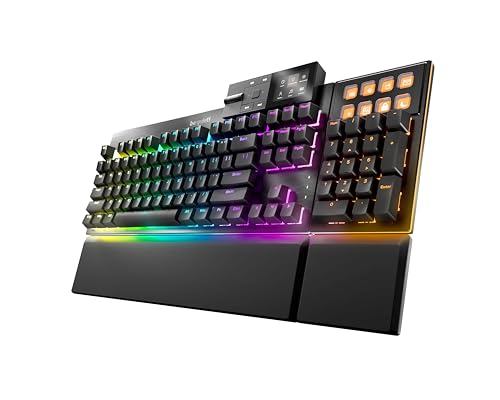
A keyboard company famous for silence entering the gaming market sounds like a contradiction until you type on the dark mount: be quiet!’s flagship board pairs genuinely quiet mechanical switches with a modular design that lets the numpad and a media dock move to either side — or leave entirely. The verified listing below confirms the proposition in the maker’s terms: tactile silent switches, a hot-swappable numpad and media dock, a gaming keyboard built by the people who made quiet a brand.
This dark mount review examines whether silence and gaming can share a board without one of them apologising: the switch feel, the modularity’s real value, the build’s flagship manners, and the price’s flagship demands. be quiet! built its name on power supplies and cases that hushed PCs; the Dark Mount asks whether that discipline translates to the loudest peripheral on the desk. For players whose household has opinions about keyboard noise, it may be the most relevant flagship of its year.
Key takeaways
- Silent tactile switches that are genuinely quiet — verified in the listing — without surrendering mechanical feel
- A modular numpad and media dock that attach to either side or detach: a layout that adapts to the desk and the game
- Flagship build and price; judge it against the K100-class boards, not mainstream ones
- The board for gamers whose noise budget is set by other people
In this guide
Dark Mount: the quiet flagship proposition
be quiet!’s entry into keyboards follows the logic of its power supplies: identify the component everyone accepts as loud, and engineer the loudness out without surrendering performance. The Dark Mount is a full flagship in specification — mechanical switches, per-key lighting, media controls, a modular layout — wrapped around one organising idea, that a gaming keyboard need not be audible through a door. In households with sleeping children, thin walls, or a partner on calls in the next room, that idea is not a niche; it is the entire purchasing decision, finally given a flagship to attach to.
The modularity is the second idea, and it is more than a gimmick: the numpad docks to the left or right or comes away, converting the board between full-size productivity and a compact gaming stance, and the media dock with its display and controls follows the same logic. Left-handed numpad users, spreadsheet accountants, and gamers who want the mouse closer all get a configuration. Few boards at any price let the layout itself be a setting, and the Dark Mount’s willingness to be rearranged is its most original sentence in the flagship conversation.
Switches and sound: the main event
The tactile silent switches in the verified configuration deliver what the name promises in both directions. The tactility is real — a defined bump that teaches the fingers the actuation point, in the tradition this series’ switch guide maps — and the silence is engineered at both ends of travel, so the press lands and returns without the clack that constitutes most keyboard noise. Typed on at full speed, the board produces the soft, muted report of a well-damped instrument; it is not silent like a membrane, and it is not trying to be — it is a mechanical board with the volume of a considerate one.
Gaming loses nothing to the quiet. Actuation is decisive, rollover is complete, and the switches’ consistency across the board — the detail cheap silent switches fumble — holds up under the frantic keys as well as the home row. What the board refuses is the acoustic feedback some players use, the clatter as a rhythm section; players who game by ear should know the board’s manners are the point, and that the point may not be theirs. Everyone else in the house has already voted.
Build, lighting, and flagship manners
The board is built like the company’s cases: sober, dense, and finished without shout. The modular connections dock with a precision that survives rearrangement, the keycaps are quality items rather than placeholders awaiting an upgrade purchase, and the media dock’s small display turns system and media information into a glance rather than an overlay. Lighting is present and per-key, tasteful in a way that suggests the designers expected adults; it can glow, and it does not insist on it.
Software completes the flagship checklist — remapping, macros, profiles — with the modular layout recognised properly, so a numpad on the left is a numpad the software understands. The cable and connectivity are flagship-standard. Nothing in the daily experience feels like a first attempt, which is the risk every brand extension runs; be quiet! has clearly hired the keyboard knowledge it lacked rather than improvising it, and the board’s manners show the homework.
Price and the honest comparison
The Dark Mount costs flagship money and should be cross-examined against flagship rivals — Corsair’s K100 class, with its optical speed and polling headlines. The comparison clarifies both: the Corsair buys input-path extremes and a single linear feel; the Dark Mount buys silence, tactility, and a layout that rearranges. Neither is the better flagship in the abstract; they are flagships for different households, and the deciding question is embarrassingly domestic: does anyone within earshot care how your keyboard sounds? If yes, this comparison is already over, and it ended in the Dark Mount’s favour.
Buy it through the verified listing below, confirm the switch variant — the line offers switch choices, and the listing’s tactile configuration is the one this review describes — and give the modularity a month to prove itself in your routines before declaring it essential or excess. Boards this considered deserve owners who rearrange them at least once. If the numpad never moves and the house never sleeps, the mainstream boards in this series will serve you for far less; the Dark Mount’s premium is for silence and flexibility, and it should be paid only by those who will spend both.
The products worth a closer look
be quiet! Dark Mount Tactile
Verified pick — the quiet flagship
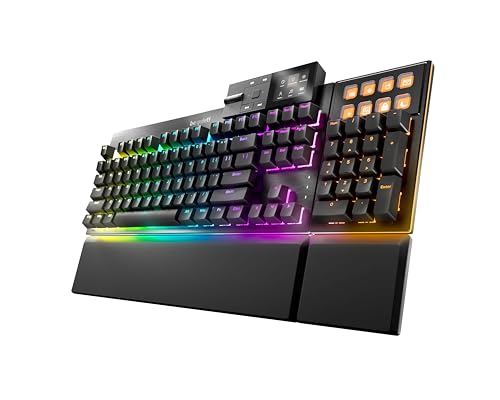
The verified listing states the Dark Mount’s whole thesis in one title: mechanical silent switches in the tactile configuration, with a hot-swappable numpad and media dock. That is a flagship specification written by a silence company, and it is exactly the product this review describes — a board for the gamer whose household has a noise budget and whose desk has layout opinions.
Confirm the switch variant on the listing before ordering, since the line offers choices, and then give the modularity a genuine trial: numpad left, numpad right, numpad gone. Owners tend to find their configuration within a month and then wonder why all boards are not built this way. The listing below carries the current price; at flagship money, the returns window is part of the purchase, so use it as one.
- Mechanical silent tactile switches
- Modular numpad and media dock, attachable either side
- Per-key RGB backlighting
- Flagship aluminium-class build
Strengths
- Genuinely quiet mechanical typing
- Layout that adapts to desk and task
- Flagship build and finish throughout
Trade-offs
- Flagship price
- No optical-switch or extreme-polling headlines
- Modularity is wasted if your layout never changes
Best for: gamers in noise-sensitive households who type as much as they play / Not suited for: players who want the loudest, fastest flagship regardless of the house
The Dark Mount in a shared home: a use-case audit
Price this board against your household’s actual noise ledger. The partner on calls in the next room, the baby whose nap is a military operation, the flatmate whose bedroom shares the wall your desk backs onto — each is a recurring cost the board abolishes, and costs abolished daily amortise a flagship premium faster than any specification. Conversely, the solo flat with tolerant neighbours converts the board’s central virtue into a pleasant irrelevance, and its owner should spend the premium on the K100’s speed or keep it entirely. The audit takes one honest minute and it is the whole purchase decision; the rest of the review is footnotes to it.
There is a second, quieter dividend: the board changes the player’s own behaviour. A keyboard that does not punish volume invites relaxed hands, and relaxed hands type and play with less fatigue across a long evening — an ergonomic side effect no one markets and many owners report. Silence, it turns out, is not only a courtesy to the house; it is a posture the player gets to keep.
Modularity after the honeymoon: configurations that survive
Modular products live or die by whether their configurations survive contact with routine, so it is worth predicting the Dark Mount’s likely steady states. The numpad migrates to the side of the dominant spreadsheet hand or leaves the desk entirely during game seasons, and the media dock settles wherever the dominant hand rests between tasks. The configuration that survives is rarely the one in the launch photograph; it is the one your elbows chose. The board’s merit is that it permits the discovery instead of pre-answering it — most keyboards are a layout you are sentenced to, and this one is a layout you negotiate.
The negotiation has one cost to record honestly: connections and docks are moving parts in a product category that usually has none, and they ask for the care moving parts always ask — seated fully, kept clean, rearranged deliberately rather than fidgeted with mid-match. Owners who treat the modularity as furniture, moved occasionally and then left alone, report the intended experience. The board rewards the same temperament as its maker’s cases always have: set it up properly once, then enjoy the quiet.
Quiet, measured against the rooms it will actually sit in
A silent keyboard’s true specification is not a decibel figure but a list of rooms: the bedroom where a partner sleeps at a different hour, the flat whose walls conduct a neighbour’s television and would conduct your typing back, the open office where one mechanical board becomes everyone’s colleague, the nursery-adjacent study of the new parent working in fragments. The Dark Mount was engineered for exactly these rooms, and judging it anywhere else — in a solo gaming den with headphones on — wastes its central expense. In the rooms that matter, its layered dampening and silent switches change the social contract of the desk: typing stops being an announcement. Calls taken while typing become possible without the apologetic mute-dance, and late sessions stop negotiating with the household’s sleep.
It is worth being precise about what quiet costs inside the board itself, because the cost is paid in feel and the buyer should sign for it knowingly. Dampening layers absorb the bottom-out and top-out transients that give mechanical boards their crispness, so the Dark Mount’s keystroke lands softer and rounder than an undamped board’s — a character many typists come to prefer and some speed-focused players experience as vagueness at the exact moment of actuation feedback. Neither reaction is wrong; they are different weightings of the same physics. The board’s tactile switch variant exists partly as compensation, restoring a deliberate bump to a stroke whose acoustic edges have been sanded away, and buyers choosing between its switch options are really choosing how much of the old mechanical definition they want to buy back.
The modular layout after the novelty: three configurations that survive
Detachable numpads and media docks invite a fortnight of rearrangement followed, in most owners’ lives, by one permanent arrangement. Reports and reason agree on which arrangements endure. The numpad detached and stored, leaving a compact board centred before the screen, is the configuration of the mouse-heavy gamer and the writer alike, and it is the one the board’s ergonomics quietly favour. The numpad attached on the right is the traditionalist’s answer, kept by spreadsheet workers whose muscle memory is a professional asset. The interesting survivor is the numpad on the left, which sounds like a party trick and functions as a macro and data-entry station for producers, accountants in month-end mode, and players who bind it densely — a configuration almost nobody plans and a stubborn minority refuse to surrender once tried.
The media dock’s fate is simpler: it stays, because volume and media control within arm’s reach is a convenience no software overlay has ever matched for immediacy, and its display keys find their jobs — application launchers, streaming controls, communication toggles — within the first month. The lesson the modularity teaches, six months in, is that the board’s real feature was never the rearranging; it was the permission to settle into a layout that a fixed board would have chosen for you, possibly wrongly, forever. Buy the modularity for the settling, not for the rearranging, and its price reads differently.
Flagship ownership: support, firmware, and the long relationship
A board at this tier is a multi-year relationship with its maker, and the review would be incomplete without weighing that relationship. Firmware updates for a board with display keys and a dock are not decoration; they are how its software features mature and how its early bugs retire, so a buyer should expect — and welcome — a living product rather than a finished one. The counterpart expectation is that the maker’s configuration software remains the board’s single point of leverage: profiles, display-key assignments, and lighting live there, and the disciplined owner exports their configuration once it is built, storing the file with the same care as any other document the machine exists to serve. A flagship reset to defaults by a firmware event should cost ten minutes, and with an exported profile it does; without one, it costs an evening of rebuilding decisions you made once and documented nowhere.
Support at this tier is also where the maker’s specialism matters. A company whose identity is acoustic engineering staffs its support with people who can discuss dampening and switch character intelligently, and owners of quiet flagships ask exactly those questions. That alignment — between what the product promises and what the organisation knows — is the least specifiable and most durable advantage the Dark Mount carries into its comparison with louder, cheaper, or more fashionable rivals, and it is why the board’s recommendation in this article is addressed to buyers who expect to keep it long enough for the relationship to matter.
The display keys and media dock, reviewed as a workflow rather than a gimmick
Eight customisable display keys invite the suspicion that they are a flagship’s jewellery, and the suspicion survives exactly until an owner assigns them honestly. Their real value is not pictures; it is state. A key that shows whether the microphone is live, which scene a stream is on, whether the meeting is recording, replaces a category of small anxieties that otherwise live in alt-tabs and second glances. Assigned to application launches they are merely convenient; assigned to states they become instruments, and the distinction decides whether the feature is used daily or photographed once. The dock’s physical controls complete the same philosophy: volume, media, and communication toggles that the hand can find without the eyes, at the speed of a reflex rather than of a window focus change.
The honest cost is configuration time and a dependence on the maker’s software continuing to speak to your applications. Owners should build the assignments slowly — one key per genuine recurring need, resisted firmly when the need is imaginary — and export the result, because a display-key layout is a small personal language and rebuilding it from memory after a reset is a peculiarly modern grief. Streamers, producers, and anyone whose work is a braid of calls, captures, and applications will find the system earns its desk space within a month. Writers and players with a single full-screen world will find it pleasant and largely decorative, and should weight it accordingly in the purchase — which is to say, this flagship’s signature feature, like the K100’s wheel in the comparison elsewhere in this cluster, is worth exactly the workflow you actually bring to it.
Sound engineering as the brand’s whole argument
It is worth pausing on how unusual this board’s premise is. The keyboard market competes on speed, on light, on layout novelty, on price — and here is a flagship whose entire engineering budget was spent on the absence of a sensation. Triple-layered dampening, silent switches, caps chosen for their acoustic manners: every decision subordinates the usual metrics to a single question, which is how the board behaves in a room with other people in it. That focus produces a product that loses most spec-sheet duels and wins its actual job completely, and it explains the board’s pricing better than any feature list — quiet, engineered properly, at flagship build quality, is genuinely expensive to manufacture, because it is achieved with materials and assembly rather than with a setting.
For the buyer, the premise simplifies the decision into a question about their own rooms. Price the board against the hours it will be used within earshot of sleep, work, or conversation that is not its owner’s. If those hours dominate your week, the Dark Mount is not an indulgence but the only board in its class actually designed for your life, and its premium divides across those hours into pennies. If they do not — if your keyboard lives alone with you and your headphones — the same premium buys silence you will never spend, and this review’s kindest service is to say so before the box is open rather than after.
Comparisons that matter: the quiet board against its real alternatives
The Dark Mount’s true rivals are not other flagships but other strategies for a quiet desk. A standard board silenced by its owner — dampening modifications, silent switch swaps, mats and technique — can approach its acoustics for less money and more weekends, and for a hobbyist that path is its own reward; the Dark Mount is for the buyer who wants the destination without the hobby. A membrane or scissor board is quieter still by nature and cheaper by an order of magnitude, and loses on feel, longevity, and the entire mechanical character this board exists to preserve. Working from another room, the zero-cost strategy, fails the households whose geography started this conversation. Laid out honestly, the flagship’s niche is narrow and real: mechanical feel, flagship build, engineered quiet, no project required. Buyers inside that niche have exactly one obvious candidate, and this is it; buyers outside it have a dozen, and should enjoy choosing among them.
Ergonomics of the quiet flagship: height, angle, and the long session
A flagship’s comfort is decided by geometry more than by cushioning, and this board’s geometry deserves the audit its acoustics usually monopolise. Its case height sits in the flagship mainstream, which means a wrist rest or a disciplined floating posture is part of the true purchase for most typists, and the board’s modular companions should be arranged with the same care as its numpad: the media dock within the hand’s natural arc, the board centred on the body’s midline rather than on the desk’s, and the mouse’s territory defended against the full layout’s width. Owners who skip this audit sometimes blame the silent switches for an ache that belongs entirely to a board placed four centimetres too far left, and the correction costs nothing but attention.
Across long sessions the dampened stroke shows an ergonomic side effect its makers rarely advertise: a softer bottom-out is a gentler event for the fingertips, thousands of times a day, and typists prone to heavy landing often report that the board’s character retrains their touch within a month — lighter, because the board stops rewarding force with feedback. Whether that retraining is a benefit depends on the hands it happens to, but it is a real phenomenon of ownership that no launch review can observe, and it belongs in a complete account of what living with engineered quiet does to a typist over a season.
Firmware maturity and the flagship’s first year
Boards with displays, docks, and modular electronics live a more eventful first year than simple boards, and a buyer should enter that year as a participant rather than as a critic. Expect firmware updates that polish the display keys’ behaviour, refine the dock’s manners with particular operating systems, and occasionally rearrange a menu in the configuration suite; expect also the suite itself to grow into the hardware, as makers ship the conservative subset of a flagship’s abilities at launch and unlock the rest as the software proves itself. The owner’s correct posture is prompt updates, an exported profile before each one, and a note of the version that behaved — the same documentary hygiene this cluster prescribes for BIOS updates and memory profiles, applied to a keyboard that has quietly become a small computer.
That framing — the keyboard as a small computer with a support life — is the flagship tier’s real dividing line from the boards below it. A simple board is finished when it is bought; a flagship is begun. Buyers who enjoy that relationship, who keep their devices current and their profiles exported, extract the full value of the tier. Buyers who want an appliance should buy one, at half the price, and this review’s alternatives sections have pointed at them with respect rather than with pity.
The tactile choice within the board: reading its switch options
Buyers of this board face one decision the review should not leave implicit, which is the character of its silent switches. The tactile variant restores, inside the dampened stroke, a deliberate bump that tells the finger the press has registered — information the dampening otherwise softens — and for typists whose accuracy depends on that confirmation, it is the correct default. A linear silent character, where offered in the board’s ecosystem, serves the gamer whose inputs are timed and repeated, and the typist whose technique floats above bottoming out entirely. The mistake to avoid is choosing by the words rather than by the work: tactile is not the thoughtful option and linear the reckless one; they are instruments for different hands, and a buyer who writes prose all day and games all evening is two people, who should decide which of them the board serves at the hours it will actually be used.
Whichever character is chosen, the silent mechanism’s manners take a week to learn, because the stroke’s information arrives through the finger’s pressure rather than through the ear’s confirmation, and typists accustomed to hearing their typing must recalibrate what a completed keystroke feels like. That recalibration is the board’s true learning curve — longer than its layout’s, shorter than its price would suggest — and owners who know it is coming treat the first week’s uncertainty as tuition rather than as evidence. By the second week the quiet stops being a feature and becomes the room’s new normal, which is when the board has fully delivered what it was bought for.
The board as a gift, a loan, and a shared-desk citizen
Flagships circulate through lives in ways their reviews rarely follow. As a gift, this board is a serious object with a specific thesis, and it lands best where the giver knows the recipient’s rooms — the new parent, the partner whose typing has become the household’s evening soundtrack, the graduate entering a shared flat — because its value is legible immediately in those lives and merely expensive in others. As a loan, during a friend’s loud-board emergency or a shared project’s crunch, it converts sceptics with unusual efficiency, since quiet is the one flagship virtue that can be evaluated in a single evening rather than a season. And as a shared-desk citizen it behaves better than its modular complexity suggests, because its profiles and its physical arrangement settle into a household’s geography and stay there, asking nothing of the second user except that they type.
There is a final circulation worth naming: the board as an heirloom of the desk, the object that survives three computers and two houses because its job — being quiet, being solid, being there — does not expire with any specification cycle. Keyboards can outlive every other component they serve, and the ones that do are invariably the ones bought for a permanent property rather than for a fashionable one. Silence is a permanent property. However the market’s headlines move, the rooms this board was built for will still exist, and the board will still be the correct answer in them, which is as close to a timeless recommendation as this review series knows how to make.
Cleaning and caring for a dampened board
A board full of dampening layers asks for a gentler maintenance regime than its undamped cousins, and the regime is worth learning before the first spill rather than after it. Dust and debris are removed with air and patience, never with enthusiasm and a vacuum at full song, because the layers that give the board its voice can be disturbed by the same enthusiasm. Caps come off with the proper puller and go back in their photographed order; the board’s interior, if it is ever opened, should be opened over a clean surface with the layers lifted in sequence and their order recorded, since a dampening stack reassembled in the wrong order is a different instrument than the one that was purchased. Liquids are the true enemy — a dampened board drinks a spill into its layers and keeps it there — so the spill protocol is immediate power-off, inversion, and time, measured in days rather than hours, before the board is asked to work again.
None of this is fragility; it is the ordinary care of a precision object, closer to maintaining a musical instrument than a membrane keyboard, and owners who adopt the instrument mindset in the first month rarely resent it. The board returns the care in kind, ageing slowly and evenly, its voice in year three recognisably the voice of its first week — which, for a product bought on the permanence of its character, is the whole contract honoured.
Resale and the quiet flagship’s second owner
Flagships meet their second owners eventually, and this one’s second-hand market has a character worth describing for both sides of the transaction. For the seller, the board holds its value on the strength of its permanence: quiet does not date, the build does not tire, and a complete specimen — dock, numpad, cable, and the exported profile’s settings reset to a courteous default — commands the patience of buyers who know exactly what it is. For the buyer, the inspection list is the flagship’s usual one with an acoustic addition: type on the board, in a quiet room, for ten full minutes, because dampening that has been disturbed, compressed, or inexpertly modified announces itself to the ear long before it shows to the eye, and a quiet board that has lost its quiet has lost its thesis. Check the display keys individually, the dock’s controls through their ranges, and the modular connections for the firmness of a settled life rather than the looseness of a thousand rearrangements. Bought well, a used Dark Mount is the rare flagship whose entire reason for existing survives the transfer intact — the rooms it was built for are still quiet, and it is still the board that keeps them so.
The board at work in the recorded world: studios, calls, and content
One professional habitat deserves the quiet flagship’s specific attention, because in it the board’s thesis stops being domestic and becomes occupational: the recorded desk. Podcasters, streamers, tutors, and anyone whose voice is captured for a living work in rooms where a keyboard is a sound source in a mix, and the industry’s usual solutions — pushing the microphone closer, gating aggressively, editing in post — all tax the voice to spare the keyboard. A board engineered quiet at the source reverses that tax: the microphone can live at a natural distance, the gate can relax, and the typing that accompanies live work stops being an event the audience is asked to forgive. For creators whose format involves working while speaking — the coder who teaches, the writer who narrates, the analyst who presents — that reversal is worth more than any single feature on the board, and it is the professional form of the same argument the household sections make: silence, bought once at the hardware level, pays out in every hour the room is used. A flagship should be judged by the hours it improves, and in the recorded world this one’s hours are the working day itself.
The verdict’s last form: one paragraph for the shelf
If this long review were compressed onto the card that hangs beside the board in a shop, it would read as follows. This is the keyboard for rooms with other people in them: engineered quiet at flagship quality, modular in the ways that survive the honeymoon, priced like the specialism it is. Its dampened feel asks a week of recalibration and repays it with a desk that no longer announces itself. Its software asks to be maintained like the small computer it is. Buy it if your hours are shared, recorded, or slept through by someone you love; admire it and buy something louder if they are not. Everything else in the thousands of words above is evidence, elaboration, and the occasional confession — but the card, for once, tells the truth entire, because this board’s thesis was always simple enough to fit on one. The review’s length was never the product’s complexity; it was the sound of a simple idea being taken as seriously as its maker took it.
The shelf card, and what it cannot say
One more compression, because this board will be met in shops by people who never find this review: the card would say silent flagship, modular layout, engineered by the company whose name is its promise, priced accordingly. What the card cannot say is the thing the review has spent its length establishing — that the board’s value is denominated in other people’s sleep, in calls taken without apology, in a partner’s evening and a baby’s nap and a neighbour’s thin wall, and that currencies like those never appear in a specification. A buyer who recognises their own household in that sentence does not need the card, the review, or the comparison tables; they need the board, a free evening to configure it, and the discipline to export the profile when they are done. Everyone else has the rest of the cluster to choose from, and the review releases them to it gladly, because a flagship this specialised is not diminished by the readers it refuses. It is defined by them.
The contract, in the maker’s own spirit
Terms, then, plainly. The board asks for a flagship’s price, a week of recalibration, a maintained relationship with its software, and a gentle hand at cleaning time. It offers, in return, the quietest mechanical typing its class knows how to make, a layout that settles where its owner tells it to, display keys that carry state rather than decoration, and a build intended to outlast the machines it serves. Households whose currency is shared air will find the exchange generous. Households whose currency is anything else should keep their money, and this review — having spent its length pricing both sides of the contract in the open — regards either signature, or its absence, as a successful reading. Contracts are not traps when they are printed in full. This one now is.
The signature in the desk’s record
File the board, finally, where this cluster files everything it values: in the machine’s written record, with its configuration exported beside the entry. Note the switch character chosen and the reason, the layout the modularity settled into, the display keys’ assignments in plain words, and the firmware version that behaved. That entry will be read at the first reset, the first house move, the first second computer the board is asked to serve — and at each reading it will convert an evening of reconstruction into ten minutes of restoration, which is the entire economic argument for records, paid out in the currency owners actually spend. The quiet flagship, of all this cluster’s boards, most rewards the filing, because its configuration is the richest and its owner’s investment in it the deepest. Sign the record, export the profile, and let the board do the thing it was engineered, at such expense, to do: disappear into the room’s silence, documented and deliberate.
The last line of the quiet board’s record
Mark, finally, the date the household stopped discussing this keyboard — the week its quiet became the room’s ordinary weather, the month a partner last mentioned it at all, the season a baby first slept through a deadline evening at the desk it serves. That date is the flagship’s true review score, expressed in the only currency it ever traded in, and it cannot be awarded by a laboratory. Owners who reach it recognise the state instantly, because it is the state the purchase was always for: the board present, the room undisturbed, the work proceeding as though keyboards had never been loud. Guard the date the way the record guards everything else in this cluster — written down, with the configuration exported beside it — and let the board continue its long, silent service. Some products are finished when they are bought. This one is finished when it is forgotten, and it was engineered, at flagship expense, to be forgotten beautifully.
Envoi: the room, at midnight, undisturbed
The board’s final examination takes place in the room it was built for, at the hour it was built for: midnight, a deadline, a household asleep beyond two doors. The typist works at full speed, in full flow, on a mechanical instrument — and the house does not know. No door opens, no small voice calls out, no partner’s sleep is spent as the price of the paragraph. That undisturbed room is the product, entire and unphotographable, and every specification in this long review — the layers, the silent switches, the caps’ manners — exists only as its means of production. Products are usually judged by what they add to a room. This one is judged by what it declines to add, and by that measure, on the evidence of the rooms it serves, it is among the most successful objects in its category. The review closes its file, quietly, so as not to wake anyone.
Coda: the quiet board, one year on
A year into the board’s service, its owner’s report reads the way this review predicted it would: the configuration exported twice, the firmware updated without incident, the numpad settled in the configuration the modularity sections swore it would settle into, and the display keys carrying a small, personal language of states that a visiting colleague needed explained — the surest sign a flagship’s features have become a workflow rather than a brochure. The dampening has not tired, the switches have not changed their testimony, and the room the board serves has reorganised its evenings around the assumption of quiet so completely that a visiting loud board, borrowed for a weekend, was returned early by mutual household consent.
That last detail is the year’s real verdict, because it measures the board in the currency it was bought in: not its own silence, but the household’s recalibrated expectation of what a keyboard is allowed to cost the people around it. Flagships are usually audited in features retained and resale preserved, and this one passes those audits too — but its owners audit it in undisturbed rooms, and by that audit it has no rival in this cluster and few in its market. The review that began with an engineering premise ends with a domestic fact, which is where the board always said the argument would be settled.
Postscript: the quiet board, inherited
One last visit, to the room the board was bought for — where its quiet has acquired, in the way of all successful household arrangements, an heir. A child of the house, doing homework at the desk in the evenings, has grown up inside the board’s silence without ever knowing keyboards were loud, and types on it now with the proprietary ease of someone who believes this is simply what typing sounds like. The board’s owner, listening from the doorway, recognised the moment as the purchase’s completed form: not a feature enjoyed, but a standard inherited — a household in which quiet, once engineered at flagship expense, has become the unremarkable expectation the next generation will carry into rooms of their own. Products rarely get to set a family’s defaults. This one did, in the softest possible voice, and the review that followed it from launch-day dampening to a child’s homework can close its file on that sound: a keyboard, being ordinary, in a room that is asleep on time.
Questions readers ask about this topic
How quiet is the Dark Mount really?
Quiet enough to change what is possible: full-speed typing produces a soft, damped report rather than a clatter, audible in the room and largely inoffensive through a door or on a call. It is not silent in the absolute sense — mechanical switches moving will always make some sound — but it removes the keyboard from the list of household noise complaints, which is the practical definition its buyers are purchasing.
What does the modular design actually let me do?
The numpad attaches to either side of the main board or detaches completely, and the media dock follows the same pattern. Accountants can put the numpad under their preferred hand, gamers can remove it to bring the mouse closer, and the desk can change its mind daily. It is a layout treated as a setting rather than a fixed decision, which no mainstream board offers and which owners tend to value more after a month than on day one.
Is it good for competitive gaming?
Its fundamentals are complete: decisive switches, full rollover, flagship build, and a compact configuration when the numpad comes off. What it does not chase is the extreme polling and optical-actuation territory of Corsair’s flagship — differences this series has measured as real but imperceptible in isolation. A competitive player whose constraint is household noise loses nothing meaningful here; one whose only constraint is budget should shop the mainstream reviews in this series instead.
Which switch version should I choose?
The verified listing for this review is the tactile configuration, which pairs a defined bump with the silent damping — the combination that suits mixed gaming and typing in shared spaces. If the line’s linear silent variant is offered and your play is pure gaming, it is a legitimate alternative in the same quiet family. What matters more than the variant is that both are silent designs; choose the feel, keep the manners.
How does it compare with the Corsair K100?
They are flagships aimed at different definitions of best. The K100 pursues input speed — optical switches, high polling, a control wheel — in a fixed full-size form. The Dark Mount pursues silence and adaptability — silent tactile switches and a modular layout. Gamers in noise-sensitive households should choose the Dark Mount without a second thought; players alone in a room, chasing every specification, will find the K100’s argument stronger. The household decides.
Is the Dark Mount worth its premium over mainstream boards?
If you will spend its two currencies — silence and modularity — yes. If neither matters to your desk, the premium buys specifications you will never feel, and the mainstream boards reviewed in this series, including the Corsair K60 models, deliver the same daily competence for much less. Premium boards are rational when their specific virtues map to your specific constraints; this one’s virtues are unusually easy to test against your life before buying.
Is a silent flagship worth it if I live alone?
Living alone removes the household argument but not the others: calls without the mute-dance, recordings uncoloured by keystroke noise, and late sessions in flats whose walls carry sound to neighbours all survive solitude. If none of those hours exists in your week either, the quiet premium is buying a virtue you will never spend, and the same maker’s louder relatives deserve your money instead.
Can I make the Dark Mount louder or crisper if the dampening is too much?
Only at the margins. Keycap choice and the desk surface under the board change its voice audibly, and switch variants within the board’s ecosystem alter the stroke’s definition, but the layered dampening is the board’s architecture rather than a setting. Buy it for the character it has; a buyer who suspects they will fight the dampening is describing a different board.
Does the detachable numpad compromise the board’s sturdiness?
The connection is engineered as a feature rather than an apology, and in the configurations owners settle into — attached permanently or removed permanently — it behaves as structure rather than as a joint. The honest caution is about the transition habit: a numpad attached and detached daily for years is exercising a connector as a ritual, and even good connectors prefer a settled life.
Related guides
the full Cherry MX switch guide
Corsair K100 versus K95 Platinum XT
Corsair K60 low profile review


