Disclosure: As an Amazon Associate, reviewstook.com earns from qualifying purchases. Links on this page are affiliate links; they cost you nothing extra. Prices and availability change often, so check the current Amazon listing before you buy.
A dota 2 mousepad choice sounds trivial until you understand what the game asks of a mouse: thousands of small, precise corrections on the minimap, camera-edge pans, and item-actives under time pressure, all on a surface that must glide predictably for years. This guide covers the pad properties that matter for Dota 2 specifically and the verified cloth pad that anchors most pro-style setups.
Dota 2 is a low-to-mid sensitivity game for most players, played on large cloth pads at moderate DPI, where stopping precision matters as much as glide speed. That profile points to specific pad characteristics — controlled friction, generous size, and a base that never creeps during a teamfight.
Key takeaways
- Controlled cloth friction suits Dota’s stop-and-click precision better than hard speed pads
- Size is a feature: large pads protect low-sensitivity players from running out of surface mid-fight
- A non-slip base is non-negotiable — pad creep during a fight is a lost fight
- Pad care is performance care; a clogged cloth pad changes glide measurably
Where to buy
Every linked pick in this guide is sold through Amazon, and each product section below carries a plain link to its listing so you can check price on Amazon and confirm the current configuration, colour, and bundle contents before ordering — those details change between listings under the same product name more often than readers expect, and for dota 2 mousepad the configuration is half the decision. If a pick is out of stock in your region, the prose-only alternatives named in this guide cover the same roles without a link, deliberately, because they could not be verified to the same standard.
In this guide
Quick picks at a glance
| Product | Best for |
|---|---|
| Logitech G640 Large Cloth Gaming Mouse Pad | The large controlled cloth pad for precision play |
How these picks were chosen
Each linked product below was checked against Amazon’s own catalog data for this site before the guide was written: the exact listing title, the configuration it describes, and an official product image all had to be present and consistent. Products that failed that check — wrong generation, ambiguous bundles, or listings whose titles did not match the product being discussed — were either dropped or demoted to prose-only mentions. That process matters for dota 2 mousepad because this is a category where near-identical names hide meaningfully different products, and a link to the wrong generation is worse than no link at all.
Start with the decision that matters most
Treat dota 2 mousepad as a system of small trade-offs that add up, because no single headline feature decides the experience. Consider how this plays out over months rather than minutes: Dota’s camera control mixes edge panning with minimap clicks, so the pad must be consistent from centre to edge. Long-term behaviour is where cheaper or simpler options quietly win or lose. None of this appears in a specification table, which is precisely why it belongs in a guide rather than a listing. Decisions about dota 2 mousepad get much easier once this point is settled, and much harder when it is left vague.
It helps to separate what dota 2 mousepad promises on paper from what changes in practice once it is part of your day. In practice, dust, heat, and time are the three opponents of every build, and maintenance rhythms answer all three. That sounds like a small point, yet it shapes comfort, reliability, or cost every single time you use the product or follow the advice. If you take one practical habit from this section, let it be checking this point before money changes hands. That is the lens to carry into the buying guidance below, rather than treating every criterion as equally important.
Reading the specifications like a sceptic
Start with the situation you actually face, not the spec sheet, when you think about dota 2 mousepad. The practical test is simple to describe and hard to fake: moderate friction helps the mouse stop exactly on a hero model rather than skating past it. If an option handles that well, it usually handles the rest of the routine well too. If you take one practical habit from this section, let it be checking this point before money changes hands. Decisions about dota 2 mousepad get much easier once this point is settled, and much harder when it is left vague.
The honest way to judge dota 2 mousepad is to picture a normal week of use rather than a single exciting first hour. The detail that matters here is that when a specification is stated as an ‘up to’, plan around the sustained figure, because sustained behaviour is daily life. Readers often skip past it because it is not glamorous, but it is exactly the sort of thing that separates a good outcome from an annoying one. If you take one practical habit from this section, let it be checking this point before money changes hands. The sections that follow keep returning to this idea from different angles, because it is the one most likely to change what you buy or do.
Matching the technology to your room, desk, or ears
Start with the situation you actually face, not the spec sheet, when you think about dota 2 mousepad. There is a second layer worth naming: cloth pads wear in over months, and the glide you buy is not the glide you keep without washing. Once you see it, several otherwise confusing differences between options start to make sense. None of this appears in a specification table, which is precisely why it belongs in a guide rather than a listing. That single clarification removes most of the noise from the decision, leaving a short list that genuinely fits.
Setup decisions that lock in the experience
When readers ask about dota 2 mousepad, the useful answer almost always depends on context they have not stated yet, so this section builds that context deliberately. Worth underlining: desk-sized pads change the equation by putting keyboard and mouse on one consistent surface. That one fact explains a surprising amount of the disagreement you will find in owner discussions and review comments. It also explains why opinions about dota 2 mousepad polarise: people are often reporting different situations as if they were the same one. That single clarification removes most of the noise from the decision, leaving a short list that genuinely fits.
Keeping the result good over time
Before any comparison makes sense, pin down what dota 2 mousepad has to do well in your own routine. This is also where expectations need adjusting, because stitched edges resist the fraying that otherwise starts exactly where the wrist rests. Going in with that understood prevents the most common disappointment with this category. Readers who internalise this point about dota 2 mousepad tend to make one purchase and keep it, rather than cycling through alternatives. That is the lens to carry into the buying guidance below, rather than treating every criterion as equally important.
The picks in detail

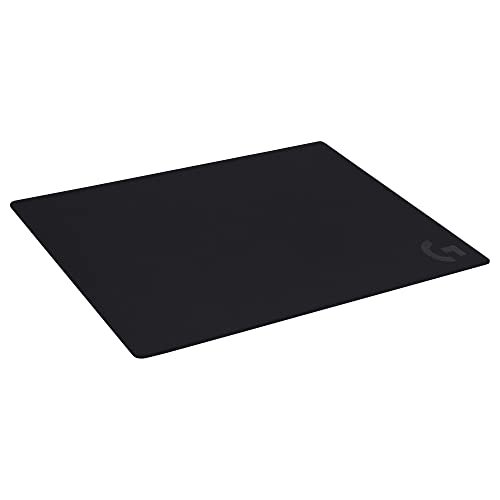
Logitech G640 Large Cloth Gaming Mouse Pad — The large controlled cloth pad for precision play
The large controlled cloth pad for precision play
This pick earns its place for a specific reason rather than by being adequate at everything.
According to its catalog listing, this is a large cloth gaming mouse pad with moderate surface friction and a non-slip rubber base per the manufacturer listing. For dota 2 mousepad, translate that into practical questions before you buy: does it fit the space, ears, desk, room, or system it has to live with; does its control scheme suit how you actually work or play; and does its support story — firmware, parts, warranty handling — look like something you can live with for years. Those answers, not the headline feature, decide whether this is the right pick for you.
Included in this guide because of its role in the dota 2 mousepad decision: the large controlled cloth pad for precision play. Its verified listing describes a large cloth gaming mouse pad with moderate surface friction and a non-slip rubber base per the manufacturer listing, and the sections around this pick explain where that specification set helps and where it does not.
Strengths
- Listing information is specific enough to judge fit before buying
- Controls and setup follow conventions users already know
- Clear, well-defined role in this category rather than a vague all-rounder promise
Trade-offs
- Readers with unusual setups should verify dimensions or compatibility twice
- Some convenience features depend on staying inside one brand’s ecosystem
- Its strengths are quiet ones, so it rarely wins a five-minute first-impression test
Best for: readers whose dota 2 mousepad decision turns on the large controlled cloth pad for precision play
Not suited for: readers who have already ruled out this style of product for reasons covered in the criteria sections above
How to judge dota 2 mousepad properly
Performance headroom
Judge Performance headroom by what it changes in daily use, not by how it reads in a feature list. For dota 2 mousepad specifically, the working detail is this: humidity changes cloth glide noticeably, which is why the same pad feels different in summer. Build your shortlist around whether an option handles that well, and treat everything else as secondary polish. Score each candidate on this before you look at anything else, and be suspicious of any option that is vague about it.
Compatibility and standards
Do not let a marketing label settle Compatibility and standards for you; the implementation matters more than the label. For dota 2 mousepad specifically, the working detail is this: DPI and in-game sensitivity should be set for the pad you own, not copied from a player with a different surface. Build your shortlist around whether an option handles that well, and treat everything else as secondary polish. Readers who get this right rarely return products; readers who guess are the ones writing frustrated comments later.
Thermals and noise
When two options look identical on paper, Thermals and noise is usually where the real difference hides. Here is the version that matters for dota 2 mousepad: a pad that is too small forces sensitivity compromises that masquerade as aim problems. It is not the most exciting line in any listing, but it is the one your future self will care about. Score each candidate on this before you look at anything else, and be suspicious of any option that is vague about it.
Power and efficiency
Do not let a marketing label settle Power and efficiency for you; the implementation matters more than the label. For dota 2 mousepad specifically, the working detail is this: the base’s grip on your specific desk material matters — glass and laminate desks behave differently. Build your shortlist around whether an option handles that well, and treat everything else as secondary polish. If a listing cannot tell you this clearly, that vagueness is itself useful information about the option.
Upgrade path
Of all the criteria in this guide, Upgrade path is the one readers most often misjudge in both directions. Applied to dota 2 mousepad, that means paying attention to a concrete point: replacement rhythm for a heavy player is measured in years, and a washable pad stretches it. Options that get this right feel effortless; options that miss it create friction you will notice daily. This criterion alone explains most of the price spread in the category, so it is worth understanding rather than skipping.
Physical fit and installation
Judge Physical fit and installation by what it changes in daily use, not by how it reads in a feature list. For dota 2 mousepad specifically, the working detail is this: noise is a property of the whole system, and the loudest component sets the floor for all the others. Build your shortlist around whether an option handles that well, and treat everything else as secondary polish. If a listing cannot tell you this clearly, that vagueness is itself useful information about the option.
Value over the product’s life
When two options look identical on paper, Value over the product’s life is usually where the real difference hides. Applied to dota 2 mousepad, that means paying attention to a concrete point: if an upgrade path exists, write the intended order down; plans fade faster than hardware ages. Options that get this right feel effortless; options that miss it create friction you will notice daily. This criterion alone explains most of the price spread in the category, so it is worth understanding rather than skipping.
Real situations, worked through
Take a concrete case: (‘a 400-DPI player who keeps running off the pad’, ‘size is the fix, and it is cheaper than retraining sensitivity’). The failure mode in this scenario is predictable: people optimise for the impressive part and neglect the mundane part, when in reality long-term ownership is shaped by headroom — in power, thermals, and capacity — more than by any peak specification. Getting the mundane part right is the whole game here. That scenario is common enough that it gets its own mention in the mistakes section below as well.
A scenario that comes up constantly with dota 2 mousepad: (‘a support player living on the minimap’, ‘edge-to-edge consistency is the property to shop for’). In this case the priority order flips compared with general advice, because standards evolve slowly and then suddenly, so checking the current revision before buying protects the whole system. That is why generic rankings mislead this particular reader so often. That scenario is common enough that it gets its own mention in the mistakes section below as well.
Picture (‘a player whose pad creeps during fights’, ‘base grip on their desk surface is the deciding specification’). What decides success here is not the headline feature but the fit between the option and the routine, and the routine has a fixed shape: measurements of your actual space, load, and usage beat every general recommendation, including this guide’s. Choose for that shape and the rest tends to fall into place. If that is your situation, the recommendation in this guide narrows to one or two options very quickly.
Now a specific situation rather than a general one: (‘a laptop player on a small desk’, ‘a large-but-thin pad that can roll for travel fits the constraint’). What decides success here is not the headline feature but the fit between the option and the routine, and the routine has a fixed shape: keeping exact model numbers and purchase records matters, because support and resale both depend on precise identification. Choose for that shape and the rest tends to fall into place. Notice how different the right answer looks once the situation is stated precisely — that is the point of working through scenarios at all.
A practical walkthrough
The sequence matters more than speed here, so resist the urge to skip ahead.
Step 1: Measure your mouse’s actual travel
Do not treat this as a formality. The point of the step is that play a match and note your used area; buy the pad for that, plus margin, and skipping the check is how small setup errors turn into weeks of vague dissatisfaction.
Step 2: Set sensitivity after the pad arrives
At this stage the goal is simple: surface friction changes effective control, so calibrate on the new pad. Do it slowly the first time, check the result before moving on, and write down anything that behaves unexpectedly so you can compare later.
Step 3: Fix the base before blaming aim
Do not treat this as a formality. The point of the step is that if the pad moves, no sensitivity setting will save the fight, and skipping the check is how small setup errors turn into weeks of vague dissatisfaction.
Step 4: Wash the pad on a schedule
Here the work is mostly observation: a gentle wash restores glide closer to new than any setting change. If what you observe does not match, stop and fix it now rather than layering the next step on top of a shaky base.
Step 5: Retire it when glide turns patchy
At this stage the goal is simple: uneven wear is a performance fault, not a cosmetic one. Do it slowly the first time, check the result before moving on, and write down anything that behaves unexpectedly so you can compare later.
The mistakes that cause most regrets
It is an understandable mistake, because the marketing points exactly the wrong way. Specifically: buying a speed pad for a game that rewards stopping precision. The fix costs nothing but attention, and it changes the outcome more than spending more usually does.
The most common mistake with dota 2 mousepad is also the most avoidable. In concrete terms, copying a professional’s sensitivity without copying their pad and DPI. Once you see the pattern, you will spot it in forum advice everywhere — and learn to discount that advice accordingly.
Nothing wastes money in this category quite like the following pattern. Specifically: ignoring base creep until it costs a teamfight. The fix costs nothing but attention, and it changes the outcome more than spending more usually does.
It is an understandable mistake, because the marketing points exactly the wrong way. Specifically: never washing a cloth pad and blaming the mouse sensor. The fix costs nothing but attention, and it changes the outcome more than spending more usually does.
Before any comparison makes sense, pin down what dota 2 mousepad has to do well in your own routine. There is a second layer worth naming: changing one variable at a time is the only reliable diagnostic method when a system misbehaves. Once you see it, several otherwise confusing differences between options start to make sense. It also explains why opinions about dota 2 mousepad polarise: people are often reporting different situations as if they were the same one. That single clarification removes most of the noise from the decision, leaving a short list that genuinely fits.
It helps to separate what dota 2 mousepad promises on paper from what changes in practice once it is part of your day. In practice, cable routing and service access decide how painful the next upgrade will be, long before it happens. That sounds like a small point, yet it shapes comfort, reliability, or cost every single time you use the product or follow the advice. None of this appears in a specification table, which is precisely why it belongs in a guide rather than a listing. Keep that in mind as the later sections narrow the choice down, because it filters out options that look strong in isolation.
Treat dota 2 mousepad as a system of small trade-offs that add up, because no single headline feature decides the experience. The practical test is simple to describe and hard to fake: a stable system you understand beats a freshly changed one you do not, especially before important work. If an option handles that well, it usually handles the rest of the routine well too. Readers who internalise this point about dota 2 mousepad tend to make one purchase and keep it, rather than cycling through alternatives. If that matches your situation, weight it heavily; if it does not, you can safely care about the next section more.
The honest way to judge dota 2 mousepad is to picture a normal week of use rather than a single exciting first hour. None of this is obvious from a product photo or a headline, which is why it is worth stating plainly: noise is a property of the whole system, and the loudest component sets the floor for all the others. That is not a footnote for dota 2 mousepad; it is the kind of detail that quietly decides whether owners recommend a product or quietly replace it. If that matches your situation, weight it heavily; if it does not, you can safely care about the next section more.
It helps to separate what dota 2 mousepad promises on paper from what changes in practice once it is part of your day. There is a second layer worth naming: if an upgrade path exists, write the intended order down; plans fade faster than hardware ages. Once you see it, several otherwise confusing differences between options start to make sense. Readers who internalise this point about dota 2 mousepad tend to make one purchase and keep it, rather than cycling through alternatives. None of this requires expert knowledge — it requires being honest about your own habits for about five minutes.
Most people meet dota 2 mousepad through one specific frustration, and that frustration should drive every later decision. There is a second layer worth naming: long-term ownership is shaped by headroom — in power, thermals, and capacity — more than by any peak specification. Once you see it, several otherwise confusing differences between options start to make sense. That is not a footnote for dota 2 mousepad; it is the kind of detail that quietly decides whether owners recommend a product or quietly replace it. Hold onto that thought; the FAQ at the end answers the follow-up questions it usually raises.
Living with it: care, costs, and the long term
A useful rule for dota 2 mousepad: the detail you notice every day matters more than the detail that impresses you once. The practical test is simple to describe and hard to fake: ownership costs stay predictable when you leave headroom in the power, thermal, and capacity budgets instead of running every component at its limit. If an option handles that well, it usually handles the rest of the routine well too. The effect compounds over time, so its importance grows the longer you own or live with the choice. Hold onto that thought; the FAQ at the end answers the follow-up questions it usually raises.
Start with the situation you actually face, not the spec sheet, when you think about dota 2 mousepad. In practice, standards in this area move slowly but decisively, so checking the current revision of a connector or rating before buying protects the whole build. That sounds like a small point, yet it shapes comfort, reliability, or cost every single time you use the product or follow the advice. None of this appears in a specification table, which is precisely why it belongs in a guide rather than a listing. The sections that follow keep returning to this idea from different angles, because it is the one most likely to change what you buy or do.
When readers ask about dota 2 mousepad, the useful answer almost always depends on context they have not stated yet, so this section builds that context deliberately. The detail that matters here is that a five-minute measurement of your actual case, desk, or board space prevents the most common compatibility failure in this category. Readers often skip past it because it is not glamorous, but it is exactly the sort of thing that separates a good outcome from an annoying one. It also explains why opinions about dota 2 mousepad polarise: people are often reporting different situations as if they were the same one. The sections that follow keep returning to this idea from different angles, because it is the one most likely to change what you buy or do.
The honest way to judge dota 2 mousepad is to picture a normal week of use rather than a single exciting first hour. There is a second layer worth naming: keeping the purchase records and the exact model numbers matters, because support and resale both depend on identifying the precise variant. Once you see it, several otherwise confusing differences between options start to make sense. If you take one practical habit from this section, let it be checking this point before money changes hands. None of this requires expert knowledge — it requires being honest about your own habits for about five minutes.
Start with the situation you actually face, not the spec sheet, when you think about dota 2 mousepad. In practice, dust and heat are the two slow enemies of every build; a cleaning rhythm and sane airflow do more for lifespan than any single premium part. That sounds like a small point, yet it shapes comfort, reliability, or cost every single time you use the product or follow the advice. None of this appears in a specification table, which is precisely why it belongs in a guide rather than a listing. Hold onto that thought; the FAQ at the end answers the follow-up questions it usually raises.
Before any comparison makes sense, pin down what dota 2 mousepad has to do well in your own routine. The detail that matters here is that when a specification is stated as ‘up to’, plan around the sustained figure rather than the peak, because sustained behaviour is what you will live with. Readers often skip past it because it is not glamorous, but it is exactly the sort of thing that separates a good outcome from an annoying one. None of this appears in a specification table, which is precisely why it belongs in a guide rather than a listing. The sections that follow keep returning to this idea from different angles, because it is the one most likely to change what you buy or do.
When readers ask about dota 2 mousepad, the useful answer almost always depends on context they have not stated yet, so this section builds that context deliberately. None of this is obvious from a product photo or a headline, which is why it is worth stating plainly: the used market in this category is active, which rewards buying recognised models whose variants are easy to identify later. That is not a footnote for dota 2 mousepad; it is the kind of detail that quietly decides whether owners recommend a product or quietly replace it. None of this requires expert knowledge — it requires being honest about your own habits for about five minutes.
Most people meet dota 2 mousepad through one specific frustration, and that frustration should drive every later decision. Worth underlining: firmware and driver updates occasionally change performance behaviour, so a stable system you understand beats a freshly updated one you do not. That one fact explains a surprising amount of the disagreement you will find in owner discussions and review comments. That is not a footnote for dota 2 mousepad; it is the kind of detail that quietly decides whether owners recommend a product or quietly replace it. The sections that follow keep returning to this idea from different angles, because it is the one most likely to change what you buy or do.
Most people meet dota 2 mousepad through one specific frustration, and that frustration should drive every later decision. None of this is obvious from a product photo or a headline, which is why it is worth stating plainly: cable management is not cosmetic here; it decides airflow, service access, and how painful the next upgrade becomes. If you take one practical habit from this section, let it be checking this point before money changes hands. Decisions about dota 2 mousepad get much easier once this point is settled, and much harder when it is left vague.
The honest way to judge dota 2 mousepad is to picture a normal week of use rather than a single exciting first hour. None of this is obvious from a product photo or a headline, which is why it is worth stating plainly: if a build will be upgraded in stages, write the intended order down now, because memory of a plan fades faster than the hardware does. Readers who internalise this point about dota 2 mousepad tend to make one purchase and keep it, rather than cycling through alternatives. That is the lens to carry into the buying guidance below, rather than treating every criterion as equally important.
Start with the situation you actually face, not the spec sheet, when you think about dota 2 mousepad. The practical test is simple to describe and hard to fake: noise is a system property, not a component property — the quietest part cannot rescue a loud neighbour in the same case. If an option handles that well, it usually handles the rest of the routine well too. That is not a footnote for dota 2 mousepad; it is the kind of detail that quietly decides whether owners recommend a product or quietly replace it. Hold onto that thought; the FAQ at the end answers the follow-up questions it usually raises.
The honest way to judge dota 2 mousepad is to picture a normal week of use rather than a single exciting first hour. The practical test is simple to describe and hard to fake: testing a change one variable at a time is the only reliable way to know what fixed, or broke, a build. If an option handles that well, it usually handles the rest of the routine well too. The effect compounds over time, so its importance grows the longer you own or live with the choice. The sections that follow keep returning to this idea from different angles, because it is the one most likely to change what you buy or do.
Beyond the headline specifications
Before any comparison makes sense, pin down what dota 2 mousepad has to do well in your own routine. The detail that matters here is that a build log — a simple note of parts, settings, and changes — repays its five minutes at every future troubleshooting session. Readers often skip past it because it is not glamorous, but it is exactly the sort of thing that separates a good outcome from an annoying one. None of this appears in a specification table, which is precisely why it belongs in a guide rather than a listing. Keep that in mind as the later sections narrow the choice down, because it filters out options that look strong in isolation.
Before any comparison makes sense, pin down what dota 2 mousepad has to do well in your own routine. Consider how this plays out over months rather than minutes: thermal behaviour in summer is the honest test of any cooling decision made in winter. Long-term behaviour is where cheaper or simpler options quietly win or lose. That is not a footnote for dota 2 mousepad; it is the kind of detail that quietly decides whether owners recommend a product or quietly replace it. Decisions about dota 2 mousepad get much easier once this point is settled, and much harder when it is left vague.
Treat dota 2 mousepad as a system of small trade-offs that add up, because no single headline feature decides the experience. In practice, the order of upgrades matters: relieving the true bottleneck first makes every later change feel larger. That sounds like a small point, yet it shapes comfort, reliability, or cost every single time you use the product or follow the advice. If you take one practical habit from this section, let it be checking this point before money changes hands. Keep that in mind as the later sections narrow the choice down, because it filters out options that look strong in isolation.
Start with the situation you actually face, not the spec sheet, when you think about dota 2 mousepad. In practice, cable spares and a small kit of screws and adapters end more build delays than any premium component. That sounds like a small point, yet it shapes comfort, reliability, or cost every single time you use the product or follow the advice. Readers who internalise this point about dota 2 mousepad tend to make one purchase and keep it, rather than cycling through alternatives. If that matches your situation, weight it heavily; if it does not, you can safely care about the next section more.
Before any comparison makes sense, pin down what dota 2 mousepad has to do well in your own routine. The detail that matters here is that when a system will be moved, serviced, or shipped, physical robustness becomes a performance specification. Readers often skip past it because it is not glamorous, but it is exactly the sort of thing that separates a good outcome from an annoying one. The effect compounds over time, so its importance grows the longer you own or live with the choice. If that matches your situation, weight it heavily; if it does not, you can safely care about the next section more.
Most people meet dota 2 mousepad through one specific frustration, and that frustration should drive every later decision. In practice, benchmarks measure a moment; your workload over a month is the dataset that should steer money. That sounds like a small point, yet it shapes comfort, reliability, or cost every single time you use the product or follow the advice. The effect compounds over time, so its importance grows the longer you own or live with the choice. Hold onto that thought; the FAQ at the end answers the follow-up questions it usually raises.
Before any comparison makes sense, pin down what dota 2 mousepad has to do well in your own routine. This is also where expectations need adjusting, because a quiet system at idle and a capable system at load are both achievable, but only when curves and components are chosen together. Going in with that understood prevents the most common disappointment with this category. If you take one practical habit from this section, let it be checking this point before money changes hands. The sections that follow keep returning to this idea from different angles, because it is the one most likely to change what you buy or do.
Treat dota 2 mousepad as a system of small trade-offs that add up, because no single headline feature decides the experience. Worth underlining: keeping one known-good spare of the cheapest critical parts turns potential downtime into an inconvenience. That one fact explains a surprising amount of the disagreement you will find in owner discussions and review comments. It also explains why opinions about dota 2 mousepad polarise: people are often reporting different situations as if they were the same one. None of this requires expert knowledge — it requires being honest about your own habits for about five minutes.
The honest way to judge dota 2 mousepad is to picture a normal week of use rather than a single exciting first hour. The practical test is simple to describe and hard to fake: documentation from the manufacturer, read once, prevents the majority of installation errors in this category. If an option handles that well, it usually handles the rest of the routine well too. That is not a footnote for dota 2 mousepad; it is the kind of detail that quietly decides whether owners recommend a product or quietly replace it. That single clarification removes most of the noise from the decision, leaving a short list that genuinely fits.
Most people meet dota 2 mousepad through one specific frustration, and that frustration should drive every later decision. In practice, if a part will outlive the rest of the build, its warranty and support deserve weight beyond its price. That sounds like a small point, yet it shapes comfort, reliability, or cost every single time you use the product or follow the advice. If you take one practical habit from this section, let it be checking this point before money changes hands. None of this requires expert knowledge — it requires being honest about your own habits for about five minutes.
When readers ask about dota 2 mousepad, the useful answer almost always depends on context they have not stated yet, so this section builds that context deliberately. There is a second layer worth naming: second-hand components are rational when the model is recognised, testable, and priced for its age. Once you see it, several otherwise confusing differences between options start to make sense. If you take one practical habit from this section, let it be checking this point before money changes hands. That is the lens to carry into the buying guidance below, rather than treating every criterion as equally important.
The honest way to judge dota 2 mousepad is to picture a normal week of use rather than a single exciting first hour. This is also where expectations need adjusting, because power, cooling, and acoustics form a triangle: improving one corner by ignoring the others moves the problem rather than solving it. Going in with that understood prevents the most common disappointment with this category. That is not a footnote for dota 2 mousepad; it is the kind of detail that quietly decides whether owners recommend a product or quietly replace it. None of this requires expert knowledge — it requires being honest about your own habits for about five minutes.
Most people meet dota 2 mousepad through one specific frustration, and that frustration should drive every later decision. Consider how this plays out over months rather than minutes: the best time to record your settings is the day they work, not the day they stop working. Long-term behaviour is where cheaper or simpler options quietly win or lose. Readers who internalise this point about dota 2 mousepad tend to make one purchase and keep it, rather than cycling through alternatives. Hold onto that thought; the FAQ at the end answers the follow-up questions it usually raises.
It helps to separate what dota 2 mousepad promises on paper from what changes in practice once it is part of your day. In practice, a build that serves for years is usually the one whose owner resisted one unnecessary change. That sounds like a small point, yet it shapes comfort, reliability, or cost every single time you use the product or follow the advice. If you take one practical habit from this section, let it be checking this point before money changes hands. None of this requires expert knowledge — it requires being honest about your own habits for about five minutes.
Most people meet dota 2 mousepad through one specific frustration, and that frustration should drive every later decision. In practice, measuring before and after a change, however roughly, converts opinion into knowledge. That sounds like a small point, yet it shapes comfort, reliability, or cost every single time you use the product or follow the advice. Readers who internalise this point about dota 2 mousepad tend to make one purchase and keep it, rather than cycling through alternatives. The sections that follow keep returning to this idea from different angles, because it is the one most likely to change what you buy or do.
Start with the situation you actually face, not the spec sheet, when you think about dota 2 mousepad. Consider how this plays out over months rather than minutes: compatibility lists exist because combinations fail in ways individual specifications never predict. Long-term behaviour is where cheaper or simpler options quietly win or lose. Readers who internalise this point about dota 2 mousepad tend to make one purchase and keep it, rather than cycling through alternatives. That single clarification removes most of the noise from the decision, leaving a short list that genuinely fits.
Frequently asked questions
What size mousepad is best for Dota 2?
Plan on it being a gradual difference rather than a dramatic one. Because large — enough that your full sensitivity range never reaches an edge in a fight, the improvement shows up as fewer small annoyances across a week, not as a single obvious moment — which is exactly why it is worth having.
Cloth or hard pad for Dota?
The short answer is that it depends on cloth, for most players: its controlled friction suits precise stops, and the longer answer is the rest of this guide in miniature. For most readers the practical position is: decide that one variable first, then apply the criteria sections in order, and the right option usually identifies itself without much drama.
Does the mousepad really affect play?
The short answer is that it depends on it changes glide and stopping, which changes every click; the effect is real and learnable, and the longer answer is the rest of this guide in miniature. For most readers the practical position is: decide that one variable first, then apply the criteria sections in order, and the right option usually identifies itself without much drama.
How often should I replace it?
For most people, yes — with one condition worth stating. The condition is that when washing no longer restores even glide. Meet it and the answer stays yes; ignore it and even the best-regarded option in the category will disappoint you in a predictable way.
What DPI do most Dota players use?
For most people, yes — with one condition worth stating. The condition is that moderate settings on large pads are the common pattern; comfort and control decide yours. Meet it and the answer stays yes; ignore it and even the best-regarded option in the category will disappoint you in a predictable way.
Are desk pads better than mouse-only pads?
Only in a specific sense. What is true is that they add consistency and comfort; the trade is desk space and cost. That is narrower than the marketing version of the claim, but it is the version you can actually rely on when deciding.
Final verdict: Dota 2 Mousepad
Buy a large, controlled cloth pad with a base that grips your desk, set your sensitivity on it, and wash it like equipment rather than furniture. The verified pick below is the classic large cloth pad that fits this game’s demands; everything else in this guide exists to help you confirm that its profile matches your sensitivity, desk, and play style before you commit.