Disclosure: As an Amazon Associate, reviewstook.com earns from qualifying purchases. Links on this page are affiliate links at no extra cost to you; prices and availability change frequently, so check Amazon for the latest.
Home Office PC vs Workstation PC: Which One Does Your Work Actually Need?
The home office pc vs workstation pc question sounds like a specification contest, but it is really a question about the kind of work you do and the cost of being wrong. Buy a workstation you do not need and you have overspent on certification, error-correcting memory, and graphics horsepower that will idle through a career of spreadsheets. Buy a home office PC for work that genuinely needs a workstation and you will pay in crashes, render times, and a machine replaced a year early. This comparison defines both categories plainly, scores them round by round, and ends with a decision framework keyed to real job types — with specific home office machines linked as the concrete side of the argument.
One disclosure about scope before the rounds begin: the workstation side of this comparison is discussed generically, because this article links only machines we have verified for the home office side. Workstation model names appear as category references, not recommendations. Readers who want the home office side’s full shortlist should continue to Home Office PC Reviews after this comparison settles which category they are shopping in.
In this guide
Quick Verdict
For the overwhelming majority of home workers — documents, browsers, calls, spreadsheets, cloud tools, light creative work — a well-chosen home office PC is not the compromise option; it is the correct tool, and a workstation would be money parked in capabilities that never get used. A workstation earns its premium in a specific set of professions: engineering CAD, 3D modelling and rendering, heavy video production, scientific computing, software development with large local builds or virtualisation fleets, and any work where application vendors certify hardware and support contracts matter. If your job title is not on that list, this comparison will mostly be about confirming that the home office PC wins — and about choosing a good one.
What “Workstation” Actually Means
A workstation is not simply a fast desktop. The category is defined by a bundle of professional traits: processors from Intel’s Xeon or AMD’s Ryzen Threadripper and PRO lines with more cores and more memory bandwidth; error-correcting (ECC) memory that silently fixes bit errors during long computations; professional graphics cards — NVIDIA RTX A-series or AMD Radeon PRO — with drivers certified for engineering and media applications; ISV certification, meaning software vendors have tested and support their applications on that exact hardware; larger power supplies and cases built for sustained full-load running; and vendor support contracts aimed at businesses, with faster response and longer parts availability.
A home office PC, by contrast, is a mainstream desktop — very often a business-class machine like a Dell OptiPlex or HP ProDesk — built around a standard Core or Ryzen processor, regular memory, integrated or consumer graphics, and specifications aimed at the office workload rather than the simulation workload. The distinction is not quality: business desktops are built to high standards. The distinction is purpose, certification, and the price that certification commands.
Comparison Table
| Dimension | Home office PC | Workstation PC |
|---|---|---|
| Typical processor | Intel Core i5/i7, AMD Ryzen 5/7 | Intel Xeon, AMD Threadripper / Ryzen PRO |
| Memory | 16–32GB standard DDR4/DDR5 | 32–128GB+, often ECC |
| Graphics | Integrated or consumer GPU | Certified professional GPU |
| Certification | None — general compatibility | ISV-certified for CAD/media applications |
| Designed load | Bursty office multitasking | Sustained full-load compute for hours |
| Upgrade path | Good in towers; standard parts | Excellent; built for expansion |
| Support | Retail or refurbisher warranty | Business support contracts |
| Price position | Mainstream; renewed market is exceptional value | Premium; renewed exists but costs more |
| Noise and size | Quiet, compact options plentiful | Larger, louder under load |
Round by Round
Round 1: Everyday office performance — home office PC wins
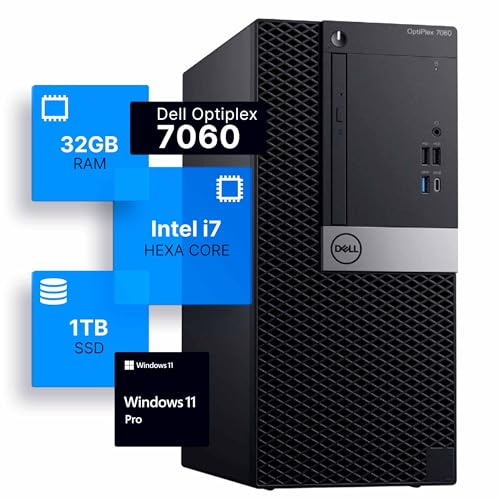
For the workload most people actually have, the workstation’s advantages never engage. A browser does not care about ECC memory. A spreadsheet does not need certified graphics drivers. A renewed tower like the Dell Optiplex 7060 — i7-8700, 32GB of memory, 1TB SSD — will run the standard office day indistinguishably from a workstation costing several times more, because the bottleneck in office work is memory quantity and storage speed, both of which the home office machine already has in full.

Check on Amazon — the renewed Optiplex 7060 Tower: i7-8700, 32GB, 1TB SSD.
Round 2: Heavy compute — workstation wins, decisively
When the work changes, the verdict flips. Rendering a scene, simulating a part, compiling a large codebase, training a model, or editing multi-stream high-resolution video are sustained, parallel, memory-hungry tasks. Workstation processors bring more cores and memory channels; professional GPUs bring certified drivers and large frame buffers; ECC memory quietly protects day-long computations from silent corruption. On this ground the home office PC is not a cheaper alternative — it is the wrong tool, and no specification massage changes that.
Round 3: Reliability and support — workstation wins on paper, home office wins on arithmetic
Workstations carry business support contracts and parts availability measured in years, which matters when downtime is billed by the hour. But the home office side has its own reliability argument: business desktops are fleet-proven hardware, renewed units are cheap enough that a spare machine is a realistic strategy, and standard parts make local repair fast. For a solo home worker, a modest spare beats a premium support contract. For a billable professional whose machine is the business, the contract wins.
Round 4: Graphics and displays — split decision
Both categories drive multiple office monitors easily; integrated graphics on the home office side handle two or three screens without help. The workstation’s professional graphics only matter when the application is a certified CAD, 3D, or media tool — or when display counts and resolutions go far beyond office norms. Gamers should note neither category is aimed at them: a gaming PC is a third answer, and this site’s gaming coverage starts from a different shortlist entirely.
Round 5: Cost of ownership — home office PC wins for most
The purchase price gap is only the beginning. Workstations cost more to buy, more to upgrade (ECC memory and professional GPUs carry premiums), and draw more power under load. Home office machines — especially renewed business desktops — invert every one of those figures. A current new option like HP’s Business Tower, with an i5, 16GB of memory, and a 512GB SSD, shows the mainstream shape of the category: complete, warrantied, and priced for households rather than departments. The cost analysis in Is A Home Office PC Worth It extends this round into a multi-year view.

Check on Amazon — HP’s Business Tower with i5, 16GB RAM and 512GB SSD.
Round 6: Longevity and upgrades — workstation wins narrowly
Workstations are built to be opened, expanded, and kept: more slots, bigger power supplies, longer vendor parts support. Home office towers share much of that DNA — the Optiplex and ProDesk towers in our reviews accept memory and storage upgrades happily — but slim and mini formats narrow the path, and consumer platforms age out of processor support sooner. A buyer planning a decade of incremental upgrades should weight this round heavily; a buyer planning a four-year replacement cycle can ignore it.
Round 7: Noise, size, and living with it — home office PC wins
Workstations are furniture-sized and, under the sustained loads they are built for, audible. Home office machines offer the full menu of discretion: slim desktops like Dell’s current Slim model with a Core Ultra processor and DDR5 memory, small form factor boxes, and minis that mount out of sight. In a home — especially a shared one — this round is not cosmetic. It decides whether the machine is welcome in the room.
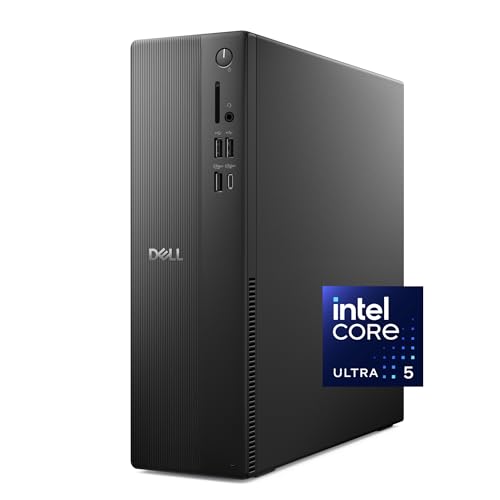
Check on Amazon — Dell’s Slim Desktop, built on the Core Ultra 5-225 with DDR5 memory.
Which Should You Buy? A Decision by Job Type
Administrator, coordinator, customer support, sales, writer, marketer, teacher: home office PC, confidently. Your tools are browsers, documents, and calls; spend the difference on memory, a second monitor, and a good chair. Bookkeeper or analyst: home office PC with 32GB of memory; large spreadsheets reward RAM, not certification. Software developer: it depends — web and app development with modest local builds suits a strong home office PC, while large native builds, many simultaneous virtual machines, or local model work push you to a workstation. Engineer, architect, 3D artist, video professional: workstation. Your applications are the certified ones, your loads are sustained, and your time is billable. Data scientist: workstation if the compute is local; home office PC if the heavy lifting happens on cloud instances and your desk is a terminal. The reviewstook.com cluster’s broader debate in Home Office PC Pros And Cons covers the edge cases where even these rules bend.
How to Split the Difference
Some buyers genuinely sit on the border, and for them the market offers a sensible middle path: buy the strongest home office tower — 32GB of memory, a terabyte of SSD, a supported processor — and keep the workstation budget in reserve. If a specific project later proves the machine is the bottleneck, that project usually also provides the revenue and the justification for the workstation. This sequencing avoids the most common error in this comparison, which is buying the workstation first for hypothetical work. The reverse error — professionals trying to save their way out of needing one — reveals itself faster and louder, in missed deadlines rather than quiet overspend, which is why our job-type list above is deliberately blunt.
Certification, Explained Properly: The Word That Sells Workstations
No term does more work in workstation marketing than “certified,” so it deserves a plain explanation. ISV stands for independent software vendor — the companies that make CAD packages, 3D suites, and professional video tools. Workstation manufacturers submit specific hardware configurations to these vendors, who test their applications on them and certify that the combination is supported. The practical meaning is twofold. First, the professional graphics drivers for certified cards are validated against those applications, which reduces the strange visual bugs and crashes that can appear when complex software meets consumer drivers. Second, and often more valuable, certification buys you a support path: when the application misbehaves on certified hardware, the vendor cannot reasonably blame your machine and close the ticket.
Now the honest calibration. Certification matters in proportion to the cost of a failure. A professional whose render farm deadline or client deliverable depends on a stable CAD session is buying insurance with a rational premium. A hobbyist modelling a bookshelf in a free CAD tool is buying the same insurance for a risk priced near zero. The home office PC’s lack of certification is therefore not a defect; it is the absence of a feature most buyers will never claim on. Decide which buyer you are by looking at your software list and your deadlines, not by the prestige of the word — and if your employer or client contract names certified hardware explicitly, the discussion is already over and the workstation has won by requirement rather than by merit.
Four Workers, Four Answers
The financial analyst
Her day is a large spreadsheet estate, a browser full of research, and calls. A vendor once tried to sell her team workstations on the strength of their processors; the machines’ extra cores would have idled while the actual bottleneck — memory for her largest models — stayed exactly where it was. Verdict: a home office tower with 32GB of memory, and the saving spent on a third monitor. The workstation loses because her workload is wide, not deep.
The mechanical engineer
He models assemblies in a professional CAD package, runs simulations that occupy his machine for hours, and bills clients for the results. His previous consumer desktop crashed mid-simulation twice in one quarter — once would have paid the workstation premium in lost time. Verdict: workstation, certified graphics, ECC memory, support contract. The home office PC loses because his workload is exactly the one the category was invented for.
The software developer
She builds web services, runs containers and two virtual machines locally, and pushes heavy jobs to cloud CI. Her home office PC with generous memory handles the local work; the cloud handles the peaks. A workstation would speed her largest local builds, which happen rarely enough that the arithmetic fails. Verdict: strong home office PC, with a standing rule — if local build times ever start billing her real hours weekly, revisit. The border is workload-dependent, and she monitors it like one.
The video editor
He cuts long-form content for clients, with colour work and exports that run unattended. Consumer hardware edited his footage adequately in his first year; as resolutions and timelines grew, export times and playback stutter began taxing every project. Verdict: workstation-class graphics and memory, bought when the work proved the need — the correct sequence. His case is the template for borderline buyers: start where the work is, upgrade when the work proves it, and let revenue make the argument.
The Third and Fourth Options Nobody Mentions
This comparison is usually framed as a duel, but two more paths deserve naming. The third is the gaming PC, which shares the home office machine’s consumer platform while adding a powerful consumer graphics card. For buyers whose after-hours life includes demanding games — or whose work involves game development, streaming, or GPU-accelerated tools that run happily on consumer drivers — a gaming PC can be the rational single machine, accepting that it brings neither workstation certification nor an office machine’s discretion in size and lighting. This site’s gaming coverage treats that category on its own terms; the point here is only that “not a workstation” does not mean “not powerful.”
The fourth path dissolves the hardware question entirely: the cloud workstation. Renting a powerful virtual machine by the hour and using a modest local desktop as its terminal suits bursty professional work — the monthly render, the quarterly simulation — and converts a capital purchase into an operating expense that scales to zero in quiet months. Its costs are subscription arithmetic and dependence on your connection; its benefit is that the local machine can be a humble, quiet home office PC without apology. Hybrid workers increasingly combine all of this: a good home office desktop for the daily ninety percent, cloud capacity for the peaks, and no workstation depreciating under the desk. When that combination fits your work, it beats both duelists.
When the Home Office PC Wins on the Workstation’s Own Turf
Three situations deserve explicit mention because they surprise people. First, single-threaded responsiveness: many professional applications still lean on one fast core for interactive work, and a modern mainstream processor can feel quicker in the hand than an older many-core workstation chip, even while losing every rendering race. Second, silence-critical recording and calls: a home office machine in a bedroom studio can be the professionally correct choice where a workstation’s cooling would intrude on the work itself. Third, redundancy economics: for the price of one workstation, a small team can sometimes field two home office machines, and the second machine is a support contract that never puts you on hold. None of this dethrones the workstation where certified, sustained compute is the job. It simply marks the boundary accurately — which is the entire purpose of a comparison, and the reason buyers should be suspicious of any version of this article, anywhere, that ends with one category winning everything.
Translating Workstation Language Into Buying Language
Workstation listings speak a dialect, and a comparison is more useful once it is translated. “ISV certified” means the software vendors for professional applications have tested this configuration and will support it — valuable if you run those applications professionally, inert otherwise. “ECC memory” means the RAM corrects its own single-bit errors — valuable for computations that run for hours and must not silently corrupt, invisible in office work. “Professional graphics” means a card whose drivers are validated for engineering and media applications rather than games — valuable for stability in those tools, not a synonym for faster. “Xeon” and “Threadripper” name processor families built for many cores, large memory capacity, and sustained load — valuable when your software scales across cores for hours at a time. “Workstation-class storage” usually means faster or endurance-rated drives — valuable under constant heavy writing, ordinary in office patterns. None of these translations diminishes the workstation; they locate its value precisely, in professional compute, which is where this article has placed it all along. A buyer who can translate the dialect cannot be upsold by it — nor talked out of a workstation they genuinely need by someone quoting office benchmarks.
One More Round: Security and Manageability
An eighth round belongs in a complete comparison, because some buyers inherit requirements from an employer or a client. Workstations and business desktops share most security hardware — TPM chips for encryption, Pro or enterprise Windows editions with BitLocker — and a renewed OptiPlex or ProDesk with Windows Professional is, for a solo worker handling client data, a genuinely well-secured machine. Where the workstation pulls ahead is fleet manageability: remote management features, standardised images, and vendor tooling that matter to IT departments administering hundreds of seats. A home buyer has no fleet, so this round scores as a workstation win that most readers should weight at zero — included here because a comparison that hides the other side’s points is an advertisement, and because the rare reader joining a managed corporate programme from home will find it is the round that decides everything.
The Decision, Written as a Flowchart in Words
Start here. Question one: does your income depend on professional CAD, 3D, video, simulation, or scientific software running locally for hours at a time? If yes, buy the workstation and let this article go — your category is settled and your remaining work is specification, not selection. If no, question two: do you run many ordinary applications at once, all day, at a fixed desk? If yes, buy the strongest home office tower your budget reaches — the renewed 32GB machines are the value centre — and spend any remainder on screens and seating. If no, question three: is your desk shared, small, or also a living space? If yes, let format decide — a slim desktop, a mini PC, or an all-in-one matched to a focused workload. If no to all three, your workload is light and your desk is free, which means the honest answer is the simplest machine that meets the floor specification, with the saving kept for the day your work changes. Every reader of this comparison lands somewhere in those four exits, and the exits are ordered so that the expensive answer must argue its way in through question one rather than being the default. That ordering — workstation by requirement, never by aspiration — is the single most valuable sentence in this article, and it survives every change the market will make to models and model numbers in the coming years.
What the Next Three Years Will Do to This Comparison
Comparisons age, and an honest one should say which of its verdicts are load-bearing and which are weather. The load-bearing verdict is structural: office work’s bottleneck is memory and storage responsiveness, professional compute’s bottleneck is sustained parallel processing and certified stability, and no plausible three-year development swaps those. The weather is everything else. Mainstream processors will keep absorbing cores and efficiency, narrowing the felt gap for interactive work while leaving the certification and ECC distinctions untouched, because those are market structures rather than technologies. Cloud workstations will keep improving and will claim more of the borderline territory this article assigned to sequencing — buy the strong home office machine first, escalate only on evidence. Operating system support windows will slide forward, quietly retiring today’s budget heroes; a buyer reading this comparison in a later year should re-check the support status of any older processor named here against the then-current list, a habit the Home Office PC Buying Guide teaches as a permanent skill rather than a one-time fact. The categories will survive the models. That is the sense in which this comparison intends to stay true: the names on the listings will change, the questions will not, and a reader who internalises the questions — workload, certification, support, total cost — owns the comparison outright, no update required.
The Home Office Side, Specified: What “Strong” Means in Numbers
Because this article links the home office side concretely, it owes readers the specification that “a strong home office PC” actually denotes, so the recommendation cannot drift into vagueness. Strong means: a processor inside the current Windows support list with at least six cores for a multitasking buyer; memory of 16GB as the floor and 32GB as the specification that ends the subject; storage that is solid-state throughout the system drive, at 512GB for cloud-centred workers and a terabyte for local archivists; display outputs counted against the buyer’s actual monitors; and a case whose format matches the room. Every machine linked in this comparison meets that definition, which is why they were chosen as the category’s representatives — the Optiplex 7060 tower as the renewed value expression of it, the HP Business Tower as its complete-and-current expression, the Dell Slim Desktop as its modern, warranty-first expression. A workstation buyer should demand the analogous precision from any workstation recommendation: which certification, for which application, at which version — because a workstation bought on adjectives is just an expensive desktop, and this comparison exists to keep both categories honest. Readers assembling the home office side from a fixed budget can see the definition applied tier by tier in Best Home Office PC Under $1200.
The Comparison From the Employer’s Side of the Desk
Most readers of this article are choosing for themselves, but a growing number are choosing under an employer’s policy, a stipend’s rules, or a client’s security requirements — and those constraints can reorder the rounds without changing a single fact in them. An employer’s IT function cares about manageability, encryption, and standardisation, and will often specify the business-desktop tier precisely because machines like the OptiPlex and ProDesk lines were designed to be imaged, encrypted, and supported at scale. A client with a compliance regime may go further and require workstation-class hardware with certified components for particular software, converting this article’s question one from a judgement into a term of engagement. The home buyer inside those constraints should optimise within them — the strongest compliant machine, the desk around it funded from whatever flexibility remains — rather than resenting them, because the constraints usually encode someone else’s expensive experience. And the solo reader with no policy overhead should register the freedom for what it is worth: the entire renewed value market, with its homework and its bargains, is open to precisely the buyers no IT department governs.
Two Machines, One Desk: The Answer Nobody Puts in Comparisons
Comparisons assume a single winner takes the desk, but experienced home workers increasingly arrive at a two-machine answer that deserves an honest paragraph. A capable home office desktop does the heavy, seated, multi-screen work; an inexpensive laptop or the desktop’s own remote access covers the sofa, the kitchen table, and the occasional trip. Priced against a single workstation, that pairing often wins on total capability for a household — the desktop out-serves the workstation at office work, the laptop out-serves it everywhere else, and the workstation’s premium buys certification neither machine needs. The pairing’s costs are real — two machines to maintain, files that must live in sync rather than in one place — and cloud storage has spent a decade sanding exactly those costs down. This article’s verdicts stand for buyers choosing one machine. But the reader who has been forcing a single purchase to be both anchor and traveller may find the honest answer is to stop asking one box to win two different comparisons.
The Comparison at the Extremes: When the Obvious Answer Is Wrong
Every comparison has edge cases where its own headline verdict inverts, and naming them is a condition of trusting the middle. The home office PC is the wrong answer even for pure office work in one specific situation: when the office work itself is a certified application’s light disguise — the “just documents” role that quietly includes opening clients’ CAD files, reviewing engineering models, or handling media projects whose tools expect professional drivers. Job descriptions hide workstations inside office language often enough that the software list, not the job title, should always be the evidence. The workstation is the wrong answer even for heavy work in the mirror-image case: when the heavy work is bursty and rare — the quarterly render, the annual simulation — and a cloud workstation can absorb it for a handful of hours a year, leaving a home office machine to win the other ninety-nine percent of days at a fraction of the capital. Between those extremes sits the comparison’s honest centre, where the rounds above were scored: office work to the home office PC, sustained certified compute to the workstation, and the buyer’s actual software list as the only referee either side is allowed to appeal to.
A Note on the Machines Chosen to Represent the Home Office Side
Comparisons are only as fair as their representatives, so the selection deserves a sentence of defence. The three linked machines span the home office category’s real range rather than its extremes: a renewed tower at the value centre, where most informed buyers in this category actually land; a current business tower bought new and complete, representing the no-homework path; and a current slim desktop representing the modern, warranty-first, space-respecting path. No straw men were harmed in this comparison — the home office side is represented by machines this site recommends in their own right, in their own reviews — and the workstation side is represented by its genuine professional definition rather than by an overpriced gaming machine wearing a blazer. Readers who suspect a comparison of rigging should always ask this question of it, and this article is content to be asked.
What Each Side Steals From the Other
The boundary this article polices is real, but it is not static, and watching the two categories borrow from each other explains where both are heading. Home office machines have spent a decade absorbing workstation virtues in diluted form: business desktops carry TPM security and Pro-edition management features that were once professional-tier, memory capacities that would have embarrassed a workstation not long ago are now the renewed market’s standard generosity, and even consumer platforms now offer error-tolerant storage configurations and remote access as ordinary features. Workstations, in return, have absorbed the home machine’s manners: smaller cases, quieter cooling profiles, and designs that no longer assume a machine room. The convergence is genuine but asymmetric — the home office side is absorbing the workstation’s conveniences while the workstation keeps its defining assets, certification and ECC and professional driver programmes, because those are ecosystems rather than components and cannot be absorbed by a spec bump. The practical consequence for today’s buyer is reassuring in both directions: the home office machine has never been closer to the workstation for ordinary work, and the workstation’s reason to exist has never been more precisely itself. Buy the category your software names, confident that neither choice is the consolation prize it might have been a decade ago.
The Maintenance and Failure Round
One more round, scored on the bad days rather than the good ones, because machines are also bought for how they fail. When a home office tower fails, it usually fails in pieces — a fan, a drive, a power supply — and business desktops are built so those pieces swap in minutes with standard parts available everywhere, including, in the renewed ecosystem, at prices that make repair the obvious choice over replacement. Downtime is measured in days at worst, hours at best, and the data usually survives untouched on its drive. When a workstation fails, the failure is rarer by design — better components, validated configurations, support contracts that exist precisely to compress this scenario — but the remedy runs through the vendor’s channel, with certified parts and professional pricing, and the solo buyer without a contract discovers that workstation support is a product that must be bought, not a courtesy that arrives free. For a one-person operation, the home office machine’s fix-it-yourself economics are a genuine competitive point; for a billable professional, the workstation’s contract is the correct purchase of certainty. Score the round a draw, weighted by which kind of bad day you can afford — and notice that this is the same fork, between diligence and certainty, that has decided every round of this comparison in different clothing.
The Resale and Replacement Round
Score one final practical round, because machines are eventually replaced and the exit is part of the purchase. Business desktops exit gracefully: standard parts, a deep second-hand market of exactly the buyers this article addresses, and data that wipes cleanly from a removable drive. A well-kept OptiPlex or ProDesk tower finds its next owner quickly — frequently as another household’s value-centre purchase, which is the renewed market’s circular charm. Workstations exit at higher absolute values but into a thinner market, and their professional components price the second-hand buyer into the same certification questions this article began with; a workstation whose certification story does not match the next buyer’s software is just heavy. Slim, mini, and all-in-one formats exit as complete units, valued for tidiness by the households that prize it. None of this should lead a purchase — nobody should buy a work tool as an investment — but as a tiebreaker between near-equal options, the machine with the easier second life is the machine whose total cost of ownership ends lower, and in this comparison that advantage sits, once again, with the humble business desktop at the centre of the home office category.
The Glossary Round: Six Terms, Settled in One Place
Comparisons breed jargon disputes, so this article closes its evidence by fixing its own vocabulary. A “home office PC” in these pages means a mainstream desktop specified for knowledge work — not a price tier and not an insult. A “workstation” means a machine from the professional category defined by certified components and support, whether or not it is fast. “Certified” means tested and supported by the named software’s vendor for the named configuration, nothing vaguer. “ECC” means memory that corrects its own errors, valuable in proportion to the length and cost of your computations. “Renewed” means a previously deployed machine tested, reconfigured, and resold with stated terms — a supply chain, not a condition grade. And “strong,” wherever this article applies it to the home office side, carries the numbered definition given earlier: supported processor, sixteen gigabytes at the floor and thirty-two at the ceiling of need, solid-state storage, counted display outputs, and a format that fits the room. Readers armed with those six definitions can dismantle most of the marketing written about both categories, including — especially — any future version of this comparison that tries to move the goalposts. Definitions are the comparison’s constitution; the rounds were just its case law.
The Comparison’s Bottom Line, Restated Without the Rounds
Everything above reduces to a paragraph a buyer can carry into any listing, anywhere, and use. Workstations exist for professional software run professionally — certified, sustained, billable — and for that work they are not a luxury but the tool itself. Home office PCs exist for everything else that happens at a desk, and at that work they are not the budget substitute but the correct instrument, especially in their renewed business form, where the market sells yesterday’s corporate standard at a household price. The expensive mistakes live at the boundary: the workstation bought for spreadsheets, the office machine asked to render for a living. Stay on your own side of that boundary — determined by your software list, never by your aspirations or your anxieties — and the comparison has done for you the only thing comparisons are for. It has made the expensive answer argue its way in, and given the honest answer permission to be enough.
How to Argue This Comparison With a Manager, a Client, or Yourself
Sometimes the verdict must survive a second audience — a manager approving a requisition, a client whose security review covers your equipment, or a household partner reading the same listings with different instincts — so here is the comparison’s case in the form each audience accepts. To a manager: the home office machine meets the workload’s measured requirements at a fraction of the workstation’s cost per seat, with business-class serviceability; the workstation is requested only where named applications require certification, and those applications are listed in the request. To a client: the equipment encrypts its storage, runs a supported operating system, and is specified in writing — the three facts a security review actually consumes. To the partner, or to yourself at midnight: the question is not which machine is better but which work is real, and the software list on the desk — not the catalogue, not the aspiration — has already answered it. Arguments built on the workload win these conversations because they are the only ones that stay won; arguments built on specifications invite a bigger specification in reply, and that auction has no natural end.
A Closing Note on Method
This comparison was scored round by round rather than averaged into a single number, because the rounds do not weigh equally for any real buyer — the certification round is everything to the engineer and nothing to the administrator, and a single blended score would lie to both of them in opposite directions. If you take one discipline from this page, take that: weight the rounds by your own software list and working pattern, and the winner for your desk will name itself. The categories are not rivals in a league table. They are answers to different questions, and the entire art of this purchase lies in noticing which question is yours.
Frequently Asked Questions
Is a workstation PC just a more powerful home office PC?
No. A workstation is a different category defined by professional processors, ECC memory options, certified graphics drivers, ISV application certification, and business support — not merely higher specifications. A fast home office PC and a workstation solve different problems.
Can a home office PC run CAD or video editing software?
It can run lighter versions of that work — hobby CAD, occasional short video edits — acceptably. Professional, sustained, billable work in those applications is what workstations and their certified drivers exist for; the gap shows up in stability and render times.
What is ECC memory and do I need it?
ECC memory detects and corrects single-bit errors that can silently corrupt long computations. If your work involves day-long renders, simulations, or financial modelling where silent corruption is costly, it matters. For office documents and browsing, it offers no practical benefit.
Is a renewed workstation a good middle path?
It can be: the same fleet-renewal market that makes business desktops such value also turns over workstations. Expect higher prices than renewed office desktops and check certification-relevant components — the professional GPU model above all — against your software’s requirements.
My employer offers a stipend. Should I spend it all on a workstation?
Spend it on the bottleneck you actually have. For most home workers that is a strong home office PC plus the desk around it — second monitor, chair, keyboard — rather than a workstation whose premium features will idle. The exception is certified-application work, where the workstation is the requirement, not the upgrade.
Can I upgrade a home office PC into a workstation later?
Partially. Memory, storage, and sometimes a graphics card can be added to a tower, but ECC support and ISV certification are platform properties that cannot be retrofitted. If certification is likely to become a requirement, buy the workstation platform from the start.
Which is quieter for a bedroom office?
The home office PC, by design and by menu of choices — slim, small form factor, and mini machines are built for shared living spaces. Workstations are engineered for sustained load first and room manners second.


