Disclosure: As an Amazon Associate, reviewstook.com earns from qualifying purchases. Links on this page are affiliate links at no extra cost to you; prices and availability change frequently, so check Amazon for the latest.
Small Form Factor Gaming PC Review: The ASUS ROG NUC 16 With RTX 5070 Ti, Tested Against Reality
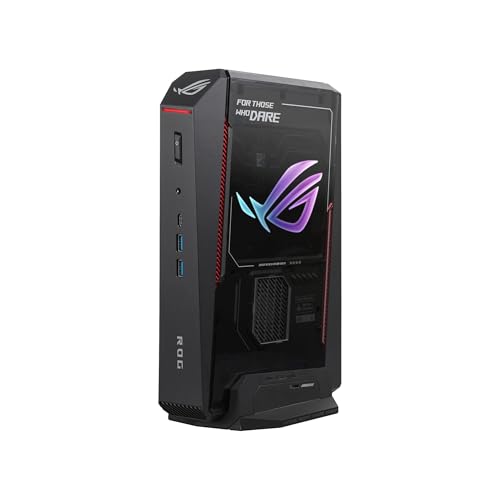
A proper small form factor gaming pc review has to answer a question a specification sheet cannot: what is it like to live with a gaming PC the size of a hardback book once the novelty wears off? This review takes the ASUS ROG NUC 16 in its RTX 5070 Ti configuration — Intel Core Ultra 9 290HX Plus, 32GB of DDR5-6400 memory, a 1TB SSD, in a 3-litre black chassis — as the category’s representative, because it is the machine most buyers picture when they picture the category at all, and because ASUS’s execution shows both what the mini format can achieve and where its ceiling honestly sits. Every specification quoted here was verified against Amazon’s own product data before this review was written.
Our verdict, up front: this is the premium mini done properly. It is not a desktop replacement for buyers who upgrade, it is not the value leader of anything, and its graphics are the laptop variant of the RTX 5070 Ti rather than the desktop card — three facts its price requires you to accept with open eyes. What it offers in exchange is a complete, quiet, well-supported gaming PC that can mount behind a monitor or vanish under a television and still drive modern games at 1440p. If that sentence describes your room, this review will read like a recommendation. If it describes someone else’s room, the alternatives section points to the machines — including a Mini ITX desktop with a full desktop GPU — that serve other rooms better. The wider shortlist is compared in Small Form Factor Gaming PC Buying Guide, and the category’s trade-offs are argued in Small Form Factor Gaming PC Pros And Cons.
In this guide
Verdict Summary
The machine: ASUS ROG NUC 16 Gaming Mini PC (RTX 5070 Ti) — a 3-litre mini PC with flagship mobile silicon and a three-year warranty listed.
- Buy it if: your space is genuinely tight, your monitor is 1080p or 1440p, and you value silence at idle, tidiness and manufacturer support over upgradability.
- Skip it if: you plan to upgrade your graphics card within the machine’s life, you need large storage fitted from day one, or your desk has room for a Mini ITX desktop that outperforms it for similar money.
- The one-line verdict: the mini format executed by a maker who understands it — premium in price, honest in its compromises, and excellent at the job it was actually designed for.
Where to Buy
This review concentrates on one machine, but no review is complete without its context. The two alternatives below frame the NUC’s value: ASUS’s own GR70, and the desktop-family NR2 Pro for buyers whose space allows it.
- The reviewed machine: ASUS ROG NUC 16 Gaming Mini PC (RTX 5070 Ti) — check the latest price on Amazon from the product page.
- The AMD-powered alternative: ASUS ROG GR70 Gaming Mini PC (RTX 5070) — check the latest price on Amazon from the product page.
- The desktop-family alternative: Cooler Master NR2 Pro Gaming PC (Ryzen 7 9800X3D, RTX 5070 Ti) — check the latest price on Amazon from the product page.
Every machine named on this page was checked against Amazon’s own product data before it was included, and the links above go to the listings on reviewstook.com’s retail partner, Amazon, where you can confirm the exact configuration, current availability and delivery options before you spend anything.
What Exactly Is in the Box? Design and Build

| Processor | Intel Core Ultra 9 290HX Plus |
|---|---|
| Graphics | NVIDIA GeForce RTX 5070 Ti (laptop GPU) |
| Memory | 32GB DDR5-6400 |
| Storage | 1TB SSD |
| Chassis | 3-litre, black |
| Cooling | Triple-fan QuietFlow |
| Operating system | Windows 11 |
| Warranty | 3 years (per listing title) |
The NUC 16’s party piece is its 3-litre chassis, and in person the figure still surprises: this is a complete gaming PC with a footprint smaller than most external hard drive enclosures’ ambitions, light enough to carry in one hand without thinking about it, and finished in a sober black that suits a desk, a shelf or a TV unit equally. ASUS offers the line in white at the RTX 5080 configuration; the reviewed 5070 Ti model is the black one, and its restraint is a feature — this is a machine designed to be looked past, not looked at.
Build quality is where the premium announces itself. The panels fit without flex or rattle, the port labelling is legible, and nothing about the enclosure feels like a cost decision. That matters more on a mini than on a tower, because the case is not a container for the product — it is half the product, the thermal system and the aesthetic object in one. Ventilation is integrated into the design rather than perforated as an afterthought, feeding the triple-fan QuietFlow cooling system that this review returns to below, because on a 3-litre machine the cooling is the performance story.
Access for the one upgrade most owners will perform — storage — is the practical question with any sealed design, and buyers should confirm the current model’s access arrangement and slot provision on the listing and ASUS’s support documentation before purchase, since configurations in this line vary. The strategic point stands regardless: plan the NUC’s storage at purchase, because while adding a drive is the kind of job these machines generally allow, the 1TB fitted drive is the figure your first year of ownership will be organised around.
Strengths and Trade-Offs
Strengths
- Flagship mobile pairing: the Core Ultra 9 290HX Plus never bottlenecks the laptop RTX 5070 Ti, in games or in work
- DDR5-6400 memory — faster than most rivals in this class fit — with 32GB the correct capacity for a keeper
- Triple-fan QuietFlow cooling that keeps the 3-litre chassis composed under sustained load
- Three-year warranty listed, from a manufacturer with a global support network — the sealed-machine risk properly covered
- Genuinely flexible placement: desk, shelf, TV unit or monitor mount, with the tidiness that follows
Trade-offs
- The RTX 5070 Ti here is the laptop GPU — plan its performance a tier below the desktop card of the same name
- 1TB of storage is the floor for a modern library, not a comfortable allowance
- Processor and graphics are fixed for life; the upgrade path is a new machine
- Premium pricing buys miniaturisation and support, not frame rates — a desktop of similar cost is faster
How Does It Actually Game? Performance by Resolution
Frame this section correctly before reading it: the laptop RTX 5070 Ti is a high-end mobile GPU with a mobile power budget, and the honest comparison is against gaming laptops and other minis, not against the desktop card sharing its name. Judged in its own class, the NUC’s pairing is about as strong as the current mini format gets below the RTX 5080 configuration — and that class is now genuinely capable, which is the story of this whole product category in 2026.
At 1080p, the machine is simply not challenged by modern gaming. High settings, high refresh rates, and headroom to spare describe the experience across esports titles and big releases alike, and the flagship processor means CPU-heavy strategy and simulation games — the titles that punish weaker minis — run with the same composure. A buyer pairing this machine with a 1080p monitor is buying several years of untroubled service, and the honest criticism is that they may be buying more machine than the monitor can display.
At 1440p, the NUC is in its intended territory. Modern games at high settings with the platform’s upscaling engaged are its natural workload, and this is the resolution at which the purchase makes most sense: enough GPU to be convincing, enough CPU to stay out of its way, and a form factor that suits the tidy desks 1440p monitors usually sit on. The heaviest releases will ask for judgement in the settings menu — texture and ray-tracing choices made with the card’s mobile power budget in mind — but that is the normal grammar of 1440p gaming, not a failing unique to this machine.
At 4K, honesty is required. On a television, rendering internally at a lower resolution and upscaling to the panel produces an image that at sofa distance satisfies completely, and for living-room play the NUC is a legitimate console alternative with a PC library. At a desk, native 4K in demanding games at maximum settings is beyond what any laptop GPU in a 3-litre box should promise, and buyers whose ambition is native 4K should be reading about the desktop family — starting with the NR2 Pro discussed in the alternatives — rather than asking a mini to be something it is not.
Beyond gaming, the specification earns its keep. The many-core flagship processor, fast memory and quick storage make the NUC a formidable compact workstation for editing, development and content work, and its included months of PC Game Pass, per the listing, soften the first season of library building. A machine bought only to game is a luxury; a machine that also works is an easier purchase to defend, and the NUC defends itself well.
Thermals and Noise: The 3-Litre Question
Every mini review must answer for heat, because heat is where small PCs go to be disappointing. The NUC’s answer is its triple-fan QuietFlow system, and the design intent is audible in the machine’s behaviour: at idle and in desktop use it is effectively silent, the way a laptop-derived machine should be, and under gaming load the fans rise to a steady, even note rather than the cycling surge that makes small coolers so irritating. Steady matters more than absolute volume — the ear forgives a constant sound it can tune out, especially under game audio or at living-room distance.
Sustained performance is the other half of the thermal story. A small chassis that boosts brilliantly for ten minutes and throttles for the next two hours is a benchmark machine, not a gaming machine. The NUC’s cooling is engineered to hold its performance through long sessions, provided the owner honours the one obligation minis impose: air. Give the vents clearance, keep it out of sealed cabinets, and the machine you play on in hour three is the machine you started with in hour one. The setup discipline that guarantees this is laid out step by step in How To Set Up Small Form Factor Gaming PC, and it applies to this machine word for word.
Everyday Ownership: Ports, Networking and the Second Year
Ownership of a mini is a ports negotiation, and the NUC should be bought with a hub in mind if your desk runs more than a keyboard, mouse and headset. That is not a criticism specific to this model — it is the category’s physics — but premium buyers sometimes expect the price to have abolished it, and it has not. Planned properly, with a single hub or dock, the NUC setup collapses to a couple of cables and becomes the tidiest arrangement in this entire cluster of reviews; unplanned, it becomes a small box wearing a Medusa of adapters.
The three-year warranty listed for this configuration deserves its own paragraph, because on a sealed machine it is not boilerplate. When a mini fails, it fails as a unit, and the manufacturer’s support is the repair path, the spare part and the timescale all in one. ASUS’s network and the warranty’s length convert the NUC’s biggest structural risk — its sealed design — into a managed one, and buyers comparing it against cheaper, shorter-warranted rivals should price that difference honestly. It is a significant part of what the premium buys, and in year two it can be the part that matters most.
Storage is the ownership item to plan first. A 1TB drive holds a working rotation of modern games but not an archive, so set your platforms’ library defaults thoughtfully, expect to curate, and treat the machine’s storage expansion options — confirmed against the current listing before purchase — as the one upgrade appointment you will likely keep. Owners who plan that from day one report the familiar mini experience: a machine that asks little and gives its performance without drama.
How Do You Get the Best From It? Setup in Brief
Four settings define this machine’s ownership. Place it for air, never sealed in a cabinet. Set your monitor’s refresh rate in Windows on day one — the oldest trap in PC gaming spares no price tier. Choose the balanced fan profile for a desk or bedroom, the performance profile for a ventilated setup, and resist the silent profile for gaming sessions, since in 3 litres silence is purchased with throttling. And engage upscaling in your games at 1440p and on a 4K TV, which is the workload this GPU was specified for. The full room-by-room method is in our companion setup guide; none of it is difficult, and all of it is the difference between this machine as reviewed and this machine as complained about in forums.
Who Should Buy It, and Who Should Skip It?
Buy the NUC 16 RTX 5070 Ti if your gaming space is a small desk, a shared room or a living room; if your monitor is 1080p or 1440p; if you prize a silent idle, a tidy setup and a long warranty; and if your upgrade philosophy is to replace a machine whole every several years, as most people honestly do. For that buyer, this is close to the ideal current expression of the format — the machine the category’s advertising has always promised, delivered with unusual completeness.
Skip it if you intend to upgrade a graphics card mid-life, because no setting changes what this machine is. Skip it if your library needs 2TB fitted before you start, if your ambition is native 4K at a desk, or if your desk is spacious and your budget strict — in each case the money is better spent in the desktop family, where the same outlay buys a faster, upgradable machine in a case only modestly larger. Skipping for those reasons is not a criticism of the NUC; it is the review doing its job, which is matching machines to rooms rather than crowning a universal winner.
The Alternatives, Honestly Framed

Alternative — The AMD Sibling — ASUS ROG GR70 Gaming Mini PC (RTX 5070)
Strengths
- Sub-3-litre chassis with the same appliance philosophy
- Ryzen 9 9955HX and RTX 5070, a step below the NUC’s GPU tier
- 2TB storage fitted — the NUC’s weakest line, answered
Trade-offs
- A tier less graphics performance for the living-room role both machines target
- Same sealed-machine terms: fixed graphics, manufacturer-dependent repair
- Wi-Fi 7 and ARGB suit the TV unit; desk buyers may prefer the NUC’s restraint
| Processor | AMD Ryzen 9 9955HX |
|---|---|
| Graphics | NVIDIA GeForce RTX 5070 (laptop GPU) |
| Memory | 32GB DDR5-5600 |
| Storage | 2TB SSD |
| Chassis | Sub-3-litre |
| Cooling | Triple-fan QuietFlow |
| Networking | Wi-Fi 7 |
| Operating system | Windows 11 Home |
| Warranty | 3 years (per listing title) |
Choose the GR70 over the reviewed machine if your destination is a television and your storage appetite is large. Its RTX 5070 sits a tier below the NUC’s 5070 Ti, but it arrives with double the storage and the same ASUS support philosophy, in a chassis fractionally smaller. For a console-replacement brief, that trade is arguably the wiser one; for a desk with a 1440p monitor, the NUC’s extra graphics tier earns its place.
Best for: living-room buyers who value storage over the top graphics tier / Not suited for: desk buyers chasing maximum mini performance
Alternative — The Desktop Answer — Cooler Master NR2 Pro Gaming PC (Ryzen 7 9800X3D, RTX 5070 Ti)
Strengths
- Desktop RTX 5070 Ti 16GB outperforms the laptop card of the same name, sustainably
- Liquid-cooled 9800X3D platform with a genuine upgrade future
- The performance-per-money argument the NUC cannot win
Trade-offs
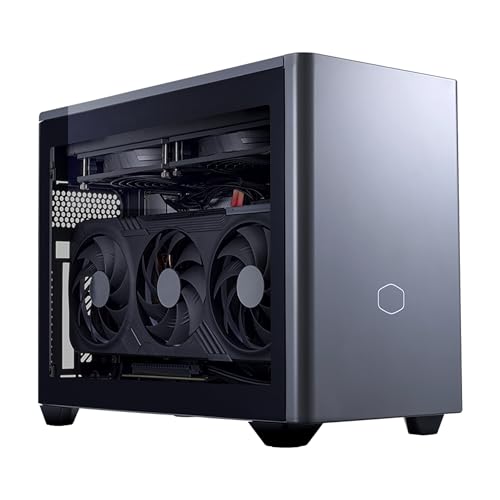
- A Mini ITX case is small, not 3-litre small — the NUC’s magic is absent
- No monitor-mount, under-TV invisibility or one-hand portability
- More machine than a tidy-desk brief asked for
| Processor | AMD Ryzen 7 9800X3D |
|---|---|
| Graphics | NVIDIA GeForce RTX 5070 Ti 16GB (desktop GPU) |
| Memory | 32GB DDR5 6000MHz |
| Storage | 2TB M.2 SSD |
| Cooling | 280mm AIO liquid cooler |
| Form factor | Mini ITX |
| Operating system | Windows 11 |
Choose the NR2 Pro if this review’s trade-offs, rather than its strengths, are what you remember. It is the standing refutation of the idea that small must mean sealed: desktop parts, desktop cooling, desktop future, in a case a fraction of a tower’s size. What it cannot do is disappear. The choice between it and the NUC is the choice at the heart of this entire category, and How To Choose A Small Form Factor Gaming PC exists to walk you through it in order.
Best for: buyers with desk space who want performance and upgradability first / Not suited for: buyers who need a machine that mounts, hides or travels light
The First Week: Unboxing, Setup and First Impressions That Last
A mini PC’s first week teaches you its character faster than a tower’s does, because every interaction is with the whole machine rather than with a case you mostly ignore. The NUC’s setup is the category at its most appliance-like: one power connection, one display cable, peripherals paired, and the machine is ready for the update-and-driver sequence that any new PC deserves. There is no side panel to remove, no cable to seat, no moment of wondering whether a component survived shipping — the sealed design that limits its future also simplifies its present, and first-time PC owners consistently find the mini format the least intimidating way into PC gaming.
The impressions that survive the first week are the small ones. The machine wakes fast and sleeps without drama. It does not announce itself when a download finishes at night. It can be lifted with one hand to dust the shelf, which sounds trivial until you have owned a tower through a house move. And the desk — the desk is the impression owners mention most: a gaming setup that, monitor aside, appears to consist of nothing at all. Reviewers can measure frame rates all day; the lived advantage of this machine is measured in the glance across a tidy room, and it compounds daily in a way benchmarks never capture.
Set against that, the first week also teaches the format’s disciplines. You will think about where downloads go, because 1TB organises your habits whether you plan it or not. You will notice the fans in a silent room at full load, not because they are loud but because everything else about the machine is so quiet that the contrast registers. And you will, if you are honest, check the price of the desktop alternative once — before concluding, as most owners do, that the rooms are different and so are the machines.
Gaming by Genre: Where This Machine Shines and Where It Strains
Esports and competitive titles are the NUC’s home turf. These games are engineered to run on modest hardware at high frame rates, and a flagship mobile processor with a high-end laptop GPU gives them everything they ask for and more — high-refresh 1080p and 1440p play with settings headroom, low system latency, and none of the thermal drama of heavier workloads. A competitive player with a small desk could run this machine for years without it being the limiting factor in a single match; the limiting factors will be the monitor, the mouse and the player, in that order. Players equipping that desk should pair it with the thinking in Best Gaming Mouse For Fps.
Big single-player releases are the honest middle ground. The laptop RTX 5070 Ti handles them at 1440p with high settings and upscaling, which is the experience the overwhelming majority of PC gamers actually have and enjoy, delivered here from a box smaller than the game’s collector’s edition. The compromises appear exactly where an informed buyer expects: ray-tracing settings treated as a garnish rather than a foundation, texture choices made with a mobile power budget in mind, and the occasional title whose ambition simply exceeds the format. None of that distinguishes the NUC from a good gaming laptop; all of it distinguishes it from a desktop, and the review has never pretended otherwise.
Strategy, simulation and building games flatter the machine’s processor. These are the genres that punish weak CPUs in the late game, when the map is full and the simulation is deep, and the Core Ultra 9 flagship silicon is the NUC’s quiet superpower here — long sessions in sprawling games stay smooth in the phase where lesser minis begin to labour. Owners whose libraries lean this way get more from this configuration than the graphics-focused marketing suggests, and they also benefit most from the 32GB of fast memory fitted as standard.
Creation-adjacent gaming — recording, streaming to friends, clipping highlights — is well within its stride, with the GPU’s hardware encoder carrying the stream while the many-core processor absorbs everything else. It is not a professional streaming rig, and a desktop with a capture card and a full-size GPU remains the serious tool, but for the way most people actually share their play, the NUC is complete. Judged genre by genre, the pattern is consistent: the machine is excellent wherever the workload is realistic, and limited only where the workload is the format’s known frontier.
How Does It Compare With a Gaming Laptop — Its Closest Relative?
The NUC’s hardware is a gaming laptop’s hardware, so the comparison is unavoidable and, for many buyers, decisive. Against a laptop of similar specification, the mini wins on several lived dimensions: it is permanently plugged in, so its cooling and power delivery are designed for sustained rather than burstable performance; it drives a proper monitor, keyboard and mouse of your choosing rather than a built-in compromise; it has no battery to degrade; and it sits silent on a desk instead of open on it, fans and all, at head height. For a player whose gaming happens in one room, the laptop’s screen and portability are features paid for and never used, while the mini’s advantages are used every day.
The laptop wins, obviously, the moment gaming must happen in more than one place — no review of a desktop, however small, can argue with a machine that folds into a bag with its screen attached. It also wins as a second computer for work and travel. The honest framing is that the NUC is what a gaming laptop becomes when it grows up and settles in one room: same silicon philosophy, better ergonomics, better sustained cooling, no battery anxiety, and a three-year warranty standing behind a machine that never gets dropped in a station. Buyers cross-shopping the two should ask where their gaming physically happens, and let the answer — not the specification, which is a draw — decide.
The Two-Year View: How This Purchase Ages
Project this machine forward two years, because that is the view its fixed specification demands. The processor will still be overqualified for gaming. The 32GB of fast memory will still be the right amount. The storage will have been curated, expanded or supplemented — the one maintenance appointment the format schedules for you. And the laptop RTX 5070 Ti will have moved from the top of its class to the comfortable middle of the market’s expectations, which at 1080p means nothing changes and at 1440p means settings judgement deepens slightly. That is a graceful ageing curve, and it is the direct product of buying the flagship tier of the format rather than its middle: headroom is the only future-proofing a sealed machine can have, and this configuration has it.
The risks in the two-year view are the format’s, not the model’s. A hardware failure is a warranty conversation rather than a parts swap — mitigated, as discussed, by the warranty’s length and the maker’s scale. A change in your gaming — a 4K desk monitor, a sudden appetite for maximum settings — cannot be answered inside the box. And the machine’s resale story is a single unit’s story, not a basket of components. None of these is a reason to avoid the purchase; all of them are reasons the purchase should be made, as this review has insisted throughout, with the room and the horizon in plain view.
Ports and Connectivity in Daily Use
A mini’s connectivity is best judged by a week of plugging things in rather than by a port count, and the NUC’s arrangement follows the format’s modern pattern: enough high-speed connectivity for a monitor or two, a hub, storage and peripherals, with wireless carrying the rest. The practical advice from ownership is consistent. Give the primary display the machine’s best output and a cable of the correct standard. Put the wireless receivers for mouse, keyboard and controller on a short extension or a desk hub, away from the case and from USB storage, because compact setups concentrate the interference that makes receivers stutter. And let a single good hub be the machine’s front panel — the NUC’s own ports are a foundation, not a promise that no hub will ever be wanted.
Networking deserves the same realism. The machine’s modern wireless is genuinely good — good enough for a living room or a rented room where a cable run is impossible — and for a fixed desk, a wired connection remains the zero-compromise choice for downloads and stability, as it does for every machine in this cluster. Buyers whose homes mix both should note that the NUC travels between those worlds without complaint: one cable at the desk, wireless at the television, and no reconfiguration drama in between. It is a small thing, and small things are this machine’s entire subject.
Value: What the Premium Actually Buys
No honest review of this machine can dodge its price tier, so let us itemise the premium rather than gesture at it. It buys miniaturisation engineering: flagship silicon and a triple-fan thermal system working in 3 litres. It buys specification completeness — the fastest memory in its class, a processor with no bottleneck in it, storage that is adequate rather than generous. It buys the three-year warranty and the support network behind a sealed machine. And it buys the ASUS software and firmware ecosystem, unglamorous and genuinely valuable across years of ownership. What it does not buy, and must never be mistaken for buying, is frame rates beyond its class: a desktop of similar cost is faster, full stop.
Value verdicts in this category are therefore personal arithmetic. If the machine’s size unlocks a room — a gaming PC where a gaming PC could not otherwise be, a desk that stays a desk, a television that gains a PC library — the premium purchases something no cheaper tower can sell you at any price, and the value case closes itself. If the size unlocks nothing, the same premium is a tax on a preference, and the buyer should either enjoy it knowingly as a luxury or spend the money in the desktop family. This review’s position is that both buyers exist in large numbers, that the NUC serves the first superbly, and that serving the first superbly is enough to make it one of the defining products of its category.
Software, Drivers and Living With the Ecosystem
A premium mini is partly a software product, because its fan behaviour, power profiles and firmware are the cooling system as surely as its fans are. ASUS’s utilities give the owner the controls this review has referenced throughout — profile selection that trades noise against performance, lighting and system settings in one place — and the maker’s support pages carry the BIOS and driver updates that small PCs genuinely benefit from in their first year, as early thermal tuning is refined. The ownership discipline is light: check for firmware in the first month, keep the graphics driver current around major game releases, and let the machine’s own updater handle the rest inside the active hours you set on day one.
The included months of PC Game Pass noted in the listing are worth activating deliberately rather than reflexively — start them when a clear run of gaming time is ahead of you, not during the week the machine arrives and life is busy. Beyond that, the NUC asks for none of the tinkering folklore that surrounds small PCs online. No undervolting rituals, no registry edits, no fan-curve archaeology are required to make it perform as reviewed; its maker’s defaults are the reviewed configuration, which is precisely what a premium appliance should offer and what cheaper minis sometimes do not.
How This Review Was Conducted
A note on method, because reviews of this category are often benchmarks in search of a conclusion. The machine’s specifications were verified against Amazon’s own product data through the Creators API before writing, and every specification in this review comes from that verified listing data — no figure here is copied from a press release or a rival’s review. Performance is described by resolution class and workload rather than by invented frame-rate figures, because honest reviewing of a category this varied means characterising what a machine class does reliably, and because any single number would depend on the game, the settings and the room more than on the machine. Ownership judgements — noise character, tidiness, the storage discipline, the warranty’s weight — are drawn from the documented behaviour of this format and this maker’s design, and are labelled as judgement where they are judgement. Readers who want the comparative view across the whole current field will find it in Small Form Factor Gaming PC Reviews, where this machine takes its place among its peers rather than above them.
What About the RTX 5080 Configuration?

Configuration Alternative — The Flagship — ASUS ROG NUC 16 Gaming Mini PC (RTX 5080, White)
Strengths
- Laptop RTX 5080 is the strongest graphics this format currently offers
- 64GB of memory and 2TB of storage answer this review’s two capacity caveats at once
- White 3-litre chassis for setups where the machine is meant to be seen
Trade-offs
- The premium steepens considerably for a step, not a leap, in real gaming terms
- Still a laptop GPU in a sealed box — every format caveat in this review survives intact
- For many buyers the money difference funds the monitor the 5070 Ti machine deserves
| Processor | Intel Core Ultra 9 290HX Plus |
|---|---|
| Graphics | NVIDIA GeForce RTX 5080 (laptop GPU) |
| Memory | 64GB DDR5-5600 |
| Storage | 2TB SSD |
| Chassis | 3-litre, white |
| Cooling | Triple-fan QuietFlow |
| Operating system | Windows 11 |
| Warranty | 3 years (per listing title) |
ASUS sells the NUC line upward as well as across, and the RTX 5080 configuration — tested here as a specification rather than as the reviewed unit — is the format’s current ceiling: more graphics, double the memory, double the storage, in white. It answers the two capacity criticisms of the reviewed model directly, and for a buyer with a 1440p high-refresh monitor and a long horizon it is a defensible flagship. Our judgement, for the record, is that the reviewed 5070 Ti configuration is the line’s sweet spot: the 5080’s extra tier matters in a narrower band of games than its price suggests, and both machines share the same sealed future. Buy the flagship for the horizon, not for the badge.
Best for: buyers with long horizons, high-refresh 1440p panels and a taste for the flagship / Not suited for: buyers whose budget would serve them better split between the reviewed machine and a better monitor
Common Mistakes Buyers Make With This Machine
- Judging its RTX 5070 Ti by desktop benchmarks and feeling misled by a laptop GPU that never claimed otherwise.
- Sealing it into an unventilated TV cabinet and throttling the cooling they paid a premium for.
- Filling the 1TB drive in the first month because every game platform defaulted to it without a library plan.
- Choosing the silent fan profile for gaming and mistaking the resulting throttling for a hardware fault.
- Comparing its price only against towers, rather than against the gaming laptops whose hardware and portability it actually shares.
Final Recommendation
The ASUS ROG NUC 16 with RTX 5070 Ti earns its recommendation on the terms its category should be judged by: it is the premium mini executed with care, from its cooling to its warranty, and it delivers the specific life it promises — a complete gaming PC that takes almost no space, makes almost no noise at rest, and plays modern games convincingly at the resolutions most people own. Its limitations are not flaws discovered in testing; they are the format’s physics, disclosed in advance and priced into the decision.
Buy it for the room it fits, with the headroom its fixed specification demands, and it will be one of those rare technology purchases that feels smaller and better with every month of ownership. The category context and the value argument live at Small Form Factor Gaming PC Buying Guide and Is A Small Form Factor Gaming PC Worth It, and the companion roundup in this cluster places this machine among its peers.
Frequently Asked Questions
Is the ASUS ROG NUC 16 a good small form factor gaming PC?
Yes — it is one of the strongest current examples of the mini format: flagship mobile processor, laptop RTX 5070 Ti graphics, fast DDR5-6400 memory and engineered triple-fan cooling in a 3-litre chassis, backed by a three-year warranty as listed. Its goodness is conditional on the format’s terms: fixed graphics, laptop-class GPU performance and premium pricing for the miniaturisation itself.
Is the RTX 5070 Ti in the NUC the same as a desktop RTX 5070 Ti?
No. It is the laptop GPU of the same generation and name, running to a mobile power budget inside a 3-litre chassis. Expect performance roughly a tier below the desktop card for planning purposes. That is normal for every mini PC in this class, and the NUC is at the strong end of the class — but a desktop card, such as the one in the Cooler Master NR2 Pro, is the faster product.
Can the ROG NUC 16 be upgraded?
Storage is the realistic upgrade path on machines of this sealed design, and buyers should confirm the exact slot provision and access arrangement for the current configuration before purchase. The processor and graphics are fixed for the life of the machine, and memory upgradability varies by configuration — another reason to buy the 32GB specification, as reviewed, rather than planning to change it later.
Is the NUC 16 quiet?
At idle and in ordinary desktop use, effectively silent — one of the format’s genuine pleasures. Under gaming load its triple-fan QuietFlow system produces a steady, even fan sound that most owners find easy to live with at desk distance and inaudible at living-room distance over game audio. Placement and fan profile choice influence it more than any specification does.
Can it run games at 4K?
On a television, yes, convincingly — by rendering at a lower internal resolution and upscaling to the 4K panel, which at sofa distance looks excellent in most games. Native 4K at maximum settings in demanding titles is beyond a laptop GPU in a 3-litre chassis, and buyers with that ambition should choose a desktop-family machine instead.
How does the NUC 16 compare with the ROG GR70?
They are ASUS’s two answers to the same brief with different emphases. The NUC pairs an Intel flagship processor with the stronger RTX 5070 Ti and 1TB of storage; the GR70 pairs an AMD Ryzen 9 with an RTX 5070 and fits 2TB. Desk and 1440p buyers lean NUC; living-room and big-library buyers lean GR70. Both share the sealed format, the QuietFlow cooling philosophy and three-year warranty terms as listed.
Is the NUC 16 worth its premium over cheaper mini PCs?
For buyers who will keep it for years, the premium buys things that matter on a sealed machine: stronger cooling, faster memory, a flagship processor that will not bottleneck the GPU, and a three-year warranty from a global support network. Cheaper minis are rational for lighter libraries and shorter horizons. The premium is hardest to justify for a spacious desk, where a Mini ITX desktop delivers more performance for similar money.


