Disclosure: As an Amazon Associate, reviewstook.com earns from qualifying purchases. Links on this page are affiliate links; they cost you nothing extra. Prices and availability change often, so check the current Amazon listing before you buy.
A wooting complete lineup guide has to begin with the fact that shapes everything else about this small Dutch maker: Wooting sells its keyboards only through its own store, so not one model in the lineup below can be linked to an Amazon listing, and any page that appears to sell you a Wooting on a marketplace is describing an unofficial resale rather than the brand’s channel. What this guide can do — and what it sets out to do thoroughly — is walk the entire family in order, from the original analog keyboards that started the story, through the Hall-effect generation that made the brand famous, to the current flagships, explaining who each model was built for and which of them still make sense to buy. Then, for readers who want the same rapid trigger ideas delivered through Amazon, it closes with four verified alternatives from other brands, each openly labelled as an alternative and matched to the role a Wooting model would have filled. By the end you should know the lineup the way an owner does, including the parts of the catalogue that no longer make sense to chase.
Key takeaways
- The lineup tells one story in three acts: optical-analog pioneers, the Hall-effect 60HE breakthrough, and a maturing range topped by the larger 80HE.
- Every current Wooting shares the same core promises — per-key adjustable actuation, rapid trigger, analog depth sensing, and browser-based configuration with onboard profiles.
- Older models remain interesting as history and as used bargains, but new buyers should start their shortlist with the current Hall-effect generation.
- No Wooting model has an official Amazon listing; the brand’s store is the only authorised channel, with everything that implies for shipping and support.
- The alternatives in this guide are matched to lineup roles: a tenkeyless esports board, a rapid-trigger Logitech, a comfort-leaning 75 percent deck, and a premium wireless custom board.
- Choosing inside the lineup is chiefly a layout decision, while choosing between the lineup and an alternative is chiefly a decision about analog depth, software taste, and buying channel.
In this guide
Wooting Complete Lineup Guide: the family in one view
| Model | Era and layout | Sensing | Status in plain terms |
|---|---|---|---|
| Wooting One | Original, tenkeyless | Optical analog switches | The pioneer; historical interest and used curiosity |
| Wooting Two | Original, full-size | Optical analog switches | The pioneer’s bigger sibling; same verdict |
| Wooting Two HE | Hall-effect generation, full-size | Lekker magnetic switches | The bridge model that carried analog into the magnetic era |
| Wooting 60HE | Hall-effect generation, 60 percent | Lekker magnetic switches | The breakthrough esports board and the brand’s emblem |
| Wooting 80HE | Current flagship direction, 80 percent | Lekker magnetic switches, refined | The fuller, more composed flagship for permanent desks |
That table is the map; the sections below walk the territory model by model, because the interesting questions — what each board feels like, what it was reacting against, and whether it deserves your money now — do not fit in cells. Readers in a hurry can jump straight to the alternatives, but the lineup’s logic only really lands when the early models are understood, since the current flagships are answers to limitations the pioneers exposed.
Act one: the analog pioneers, Wooting One and Wooting Two
Wooting’s first keyboards were built around a question the rest of the industry was not asking: why should a key be a switch at all, when it could be a measurement? The Wooting One, a tenkeyless board, and the full-size Wooting Two answered with optical analog switches that tracked how far each key travelled and reported that depth to the computer. The demonstrations of the era still read as startling — characters walking and then running as a key deepened, racing games steered and throttled from a keyboard — and they established the idea that a keyboard could speak the language of a gamepad’s analog controls. Just as importantly, the software that came with them treated players as collaborators, exposing the analog behaviour to configuration in a way that felt like an instrument being tuned rather than a peripheral being tolerated.
Judged as purchases today, the pioneers are history with a power cable. Their sensing approach was superseded within the brand’s own catalogue, their feature sets predate rapid trigger entirely, and their place is in the story and, occasionally, in the hands of a collector or a very patient bargain hunter who knows exactly what they are buying. Everyone else should read this act as context: the analog idea was never a gimmick bolted onto the later boards, but the founding conviction from which everything else in the lineup descends. When current Wooting owners talk about analog depth as the brand’s soul, these are the boards they are, knowingly or not, quoting.
Act two: the Two HE and the move to magnetic sensing
The Hall-effect generation began in earnest when Wooting moved its sensing from light to magnetism. Hall-effect sensing watches a magnet travel with the key and measures the field continuously, which delivers the same analog depth as the optical pioneers while adding the property that would redefine the category: because the board always knows each key’s exact position, it can reset a key the instant that key starts to rise, rather than waiting for a fixed reset point. That behaviour, rapid trigger, arrived in the full-size Two HE, a board that paired the new Lekker magnetic switches with the generous layout traditionalists wanted. The Two HE matters in the lineup as the bridge: it proved the magnetic platform, carried the analog flag into the new sensing era, and showed that the brand’s future would be built on position-aware keys rather than on the optical approach that started it.
For a modern buyer, the Two HE is the connoisseur’s footnote of the current era — significant, respected, and largely eclipsed in the catalogue’s centre of gravity by the smaller board that came next and turned a respected niche product into an esports phenomenon. If your heart is set on a full-size Wooting with the modern sensing, it remains the name to research through the maker’s own channels, including what the current store lists and supports. If your needs are the mainstream ones of this category, the story now moves, as the market did, to sixty percent.
Act three: the 60HE, the board that changed the category
The 60HE took the magnetic platform and aimed it with unusual discipline at one audience: competitive players who wanted the fastest, cleanest movement inputs a keyboard could produce and were willing to surrender every non-essential key to get them. The 60 percent layout freed the mouse’s territory, the Lekker switches delivered adjustable actuation and rapid trigger with a consistency players could feel within a session, and the browser-based software made the whole instrument configurable without installing anything. Professional adoption followed, then imitation by every major gaming brand, and the category of Hall-effect esports keyboards that now fills buying guides exists largely because this small board demonstrated the demand.
Its life inside the lineup has been evolutionary rather than static, with the platform offered in refreshed forms over time and the maker’s software steadily deepening what the hardware can do — per-key behaviours, analog curves, and movement assists refined in public with a vocal community. That evolution is part of the model’s meaning for a buyer today: you are not purchasing a frozen artefact but the current state of a living platform, from a maker whose entire reputation is staked on this one product family. The 60HE remains the purest expression of the brand, the board against which the alternatives in this guide are implicitly measured, and the correct default recommendation for a dedicated gaming desk that can live happily inside a 60 percent layout. Its sibling rivalry with the larger flagship is covered in depth at our companion walkthrough of the two famous models.
The current flagship direction: the 80HE
The 80HE is what happens when the breakthrough formula grows up. It keeps the sensing core and the software philosophy, then wraps them in an 80 percent layout with a function row and navigation keys restored, inside a more substantial, more carefully voiced case. The message to the market was clear: the players who adopted the 60HE for competition also live whole working lives at their desks, and a flagship that serves both lives honestly is worth building. In the lineup’s logic, the 80HE does not replace the 60HE so much as it completes the range, giving the brand an answer for the permanent workstation to set beside its answer for the tournament tray.
Choosing between the two current flagships is therefore the easiest decision in this entire guide, because it reduces to a tape measure and a diary. Measure your desk’s keyboard territory and your mouse’s roaming needs, then audit a honest week of your key usage. If the function row and navigation cluster are daily tools, the 80HE is your board; if they are strangers you meet monthly, the 60HE’s discipline will suit you better and its smaller footprint will thank you every time your mouse sweeps wide. Everything else — sensing, software character, the maker’s support — is shared inheritance rather than a deciding difference.
What every current Wooting shares
Step back from individual models and the lineup’s common DNA comes into focus, and it is worth listing because it defines what you are buying into whichever model you choose. First, position-aware keys: actuation set by software, per key, across the travel. Second, rapid trigger: resets governed by movement rather than fixed points, the competitive heart of the modern range. Third, analog depth: graduated output for the games and uses that can read it, the founding idea that still distinguishes the brand. Fourth, configuration that lives in a browser and stores itself on the board, so the keyboard carries its personality from machine to machine. Fifth, a direct relationship with a small maker: one store, one support channel, one community, and a software roadmap answerable to keyboard players alone.
That fifth trait is the one buyers most often underweight. A Wooting is not merely a product but a membership, with the benefits of a maker that listens unusually closely and the costs of a supply chain that moves at a small company’s pace. The alternatives below invert that trait — large companies, ordinary retail, ecosystems — while chasing the first four traits with varying degrees of success. Neither shape of ownership is a mistake; they are different goods, and this guide’s job is to make the difference legible rather than to pretend it away. The head-to-head that dramatises the contrast best is Wooting 60HE versus the SteelSeries Apex Pro.
There is a sixth shared trait that owners mention more than any specification: the sense that the board was designed by people who play the same games and type the same long days as its customers. It shows in small decisions — where the configuration lives, how profiles behave, which features arrived first when the platform grew — and it is the hardest trait for a large rival to imitate, because it is not a feature at all but a by-product of focus. When players describe the genuine lineup as feeling considered, that by-product is what they are naming, and it is a legitimate reason, all by itself, to accept the direct channel’s inconveniences.
The labelled alternatives, matched to lineup roles
What follows are four boards from other brands, each verified against Amazon’s catalogue for this guide and each assigned the role it would play if a Wooting model is unavailable, unsuitable, or simply not how you wish to buy. They are alternatives in the open, named as themselves throughout.

SteelSeries Apex Pro TKL Gen 3 — the alternative for the 80HE’s role
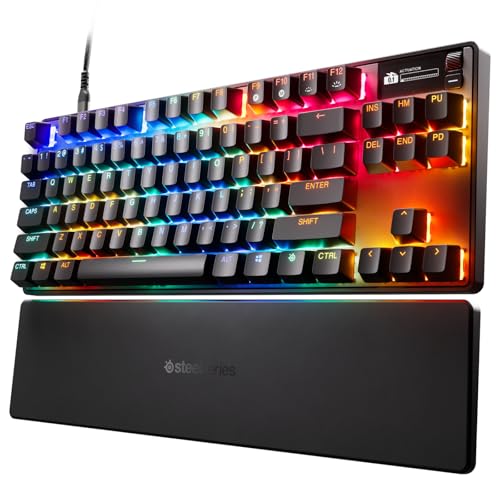
Badge: Best alternative for a fuller-layout flagship desk. If the 80HE’s restored keys and flagship bearing are what draw you, this tenkeyless SteelSeries is the retail answer in the same spirit: OmniPoint 3.0 magnetic switches whose actuation point is set key by key, with Rapid Tap and rapid trigger alongside a protection mode for heavy fingers, an OLED display for at-a-glance settings, and PBT keycaps in a board that feels engineered for a permanent workstation.
At a glance: Tenkeyless layout; adjustable magnetic switches; rapid trigger with protection mode; OLED display; RGB; USB-C wired connection.
Strengths
- The most complete mainstream expression of the fuller-layout rapid trigger idea.
- Per-key control plus the display makes profile management unusually tangible.
- Available through ordinary retail with the returns experience that implies.
Trade-offs
- No graduated analog output to rival the Wooting’s depth control.
- The desktop software ecosystem is a heavier commitment than a browser tab.
- Wired only, which will not suit every workstation’s tidiness goals.
Best for: buyers who wanted the 80HE’s shape of flagship but need Amazon’s channel. / Not suited for: analog-control devotees and cable-free desks.

Logitech G PRO X TKL Rapid — the alternative for the tournament role
Badge: Best alternative with a professional-circuit pedigree. Logitech’s entry in this category carries the PRO line’s tournament heritage into magnetic territory: analog switches with rapid trigger mode and adjustable actuation, in a tenkeyless board designed with competitive players and built to disappear into a pro setup. For buyers who trust Logitech’s esports lineage the way Wooting loyalists trust the specialist, this is the natural counterpart.
At a glance: Tenkeyless layout; magnetic analog switches; rapid trigger mode; adjustable actuation points; customisable RGB; wired connection built for competition desks.
Strengths
- PRO-series design discipline shows in a board with no wasted gestures.
- Rapid trigger and actuation tuning cover the competitive essentials completely.
- Logitech’s support and accessory reach are as mainstream as the category gets.
Trade-offs
- Its software home is Logitech’s suite, which suits existing owners better than newcomers.
- Analog depth play is not the board’s headline in the way it is Wooting’s identity.
- Tenkeyless only, so the layout conversation ends where it starts.
Best for: tournament-minded players loyal to Logitech’s competitive line. / Not suited for: buyers seeking a 60 percent deck or a full-size workstation board.

DrunkDeer A75 Pro — the alternative for the comfort role
Badge: Best alternative when the desk is also an office. Wooting’s lineup has no comfort-first model, and that gap is exactly where this DrunkDeer belongs in the guide. Its 75 percent layout keeps the function row, adds a rotary knob the hand quickly learns to love, and tunes its magnetic switches toward quietness, while still delivering genuine rapid trigger performance from a brand that specialises in this niche.
At a glance: 82-key board in a 75 percent layout; rotary knob; PBT keycaps; silent magnetic switches with rapid trigger and adjustable actuation; wired.
Strengths
- Daily-life ergonomics — knob, function row, hushed switches — without surrendering speed.
- Specialist-brand focus shows in the rapid trigger implementation’s manners.
- A friendlier presence for shared rooms and call-heavy schedules.
Trade-offs
- Documentation and software finish trail the giant brands’ polish.
- The footprint is wider than the esports decks in this guide.
- Colourway and styling will not blend into every setup quietly.
Best for: players whose keyboard must behave in meetings as well as in matches. / Not suited for: minimalists and players chasing the lightest tournament setup.

Keychron Q1 HE — the alternative for the enthusiast role
Badge: Best alternative for custom-keyboard tastes. Where Wooting’s lineup speaks to players, this Keychron speaks to keyboard people: a weighty, beautifully finished 75 percent board whose double-rail magnetic switches bring rapid trigger into the custom hobby’s world of hot-swapping and launcher-based configuration, with the decisive addition of real wireless through a fast gaming link and Bluetooth for everything else.
At a glance: 75 percent layout; hot-swappable double-rail magnetic switches; rapid trigger; wired mode plus Bluetooth 5.2 and 2.4 GHz wireless; works across Mac and Windows.
Strengths
- Wireless versatility none of the wired boards in this guide can match.
- Materials, acoustics, and typing feel sit a class above gaming-brand norms.
- Hot-swappable switches invite the hobbyist experimentation Wooting owners get from software, in hardware form.
Trade-offs
- Serious weight ends any conversation about portability.
- The enthusiast tier carries an enthusiast outlay.
- Esports-specific assists are present but not the board’s organising idea.
Best for: hobbyists who want one heirloom-grade board for work, play, and tinkering. / Not suited for: LAN travellers and buyers counting every gram and every note of the budget.
How do you choose inside the lineup?
Reduce the family to a sequence of eliminations. Eliminate the pioneers unless history or collecting is the point of the purchase; they are chapters, not contenders. Eliminate by layout next, since layout is the one attribute no software update can revise: sixty percent for the mouse-led gaming desk, eighty for the full working desk, full-size only if the number pad is a genuine tool in your week. What remains is usually a single current model, and the remaining decision is not which Wooting but whether Wooting — whether the analog depth, the browser software, and the direct relationship are worth more to you than retail convenience and the alternatives’ particular strengths. That last decision deserves a night’s sleep rather than a coin flip, because it is about the kind of ownership you enjoy.
Budget framing helps at the margins. The lineup lives in premium territory throughout, so the honest budget question is not how to save within it but whether the category itself fits your spending; readers for whom it does not should look at the value end of the wider field surveyed in Hall-effect keyboards across the market rather than at older Wooting stock of uncertain provenance. And readers splitting the difference — premium taste, mainstream channel — are precisely the audience the four alternatives above were matched for.
How should a new owner set up any board from this family?
The family’s shared DNA means one setup philosophy serves every model and, frankly, every alternative in this guide. Configure in stages across the first week rather than in one heroic session. Give movement keys the first rapid trigger privileges and a moderately shallow actuation, keep the rest of the deck calm, and play real sessions between changes so your hands can file each adjustment properly. Build the second profile — the composed typing configuration — early, because every board in this category is at its worst when a single aggressive profile is asked to serve both a ranked match and a long email. Experiment with analog depth deliberately, in a game that can actually read it, rather than leaving it enabled everywhere as a novelty. Finally, keep the maker’s software bookmarked and the firmware current; in a lineup whose personality lives in code, updates are part of the product you bought. The finer detail of that process, with per-game tuning, is laid out in setting up rapid trigger boards step by step.
What mistakes do lineup shoppers make?
Nostalgia is the first: buying a pioneer or an early model for the story and discovering that the story does not include rapid trigger or current software support. The second is layout denial, choosing the emblematic small board while living a function-row life. The third is channel improvisation — hunting marketplaces for a brand that does not sell there and paying unofficial-resale prices for an unofficial-resale experience. The fourth is treating the alternatives as consolation prizes; several of them beat the genuine lineup on specific axes like wireless and workstation comfort, and a buyer whose needs sit on those axes should choose them proudly rather than apologetically. The fifth is skipping the adjustment fortnight and reviewing the technology, in one’s own head, on the evidence of two disoriented evenings.
The software thread that runs through the whole family
If the switches are the lineup’s body, the configuration software is its nervous system, and it deserves a section of its own because it is the part of the Wooting proposition that rivals have found hardest to copy convincingly. The tool runs in a web browser, which sounds like a limitation until you have configured a keyboard on a borrowed laptop, a tournament PC, or a work machine where installing a gaming suite is out of the question. Profiles are stored on the board itself, so the personality you build at home is the personality that shows up anywhere the board is plugged in. The controls expose the platform’s full depth — actuation per key, rapid trigger behaviour, analog curves and the mapping of key depth to gamepad-style axes — arranged with a clarity that treats the player as the engineer of their own input.
Across the family’s life, that software has been the delivery vehicle for much of the value owners actually received after purchase: features that arrived as updates, refinements to trigger behaviour shaped by community feedback, and new behaviours for games the hardware predates. This is the context in which the alternatives’ software should be judged. SteelSeries and Logitech offer broad ecosystems with per-game automation, Keychron offers a hobbyist launcher of real quality, and DrunkDeer offers a functional tool from a small team. Each is respectable; none is quite the same proposition as a browser tab that turns any computer into your keyboard’s control room. Buyers who configure once and never return will barely notice the difference, and buyers who tinker monthly will notice nothing else.
Accessories, parts, and the ecosystem around the boards
A small maker’s lineup casts a smaller accessory shadow than a giant’s, and prospective owners should know its shape. The essentials travel with the boards — cables, keycap tools, the basics of setup — and the maker’s store carries the brand’s own extras and replacement parts, which matters more than it sounds like in a category where a lost proprietary piece can orphan a product. Keycaps are standard-fit, so the enormous third-party keycap market is fully open to Wooting owners, and the community’s modification culture supplies the foam, films, and switch experiments that turn a stock board into a personal one. What you will not find is the retail sprawl of a SteelSeries or a Logitech, where every accessory is a search away in a dozen shops; Wooting ownership asks you to return to one storefront and to a community marketplace for the rest.
There is a compensating virtue: parts and attention stay focused. When a company sells essentially one family of products, its spare parts, its support knowledge, and its software effort all point at the board on your desk. Owners of discontinued giant-brand flagships, abandoned by a suite update, will recognise the value of that focus immediately. Weigh it as part of the channel decision this guide keeps returning to, because accessories and support are where channel differences stop being abstract.
The lineup mapped to player archetypes
Abstract comparisons resolve faster against recognisable people. The ranked grinder, whose desk exists for one or two shooters and whose mouse needs a runway, is the 60HE’s native citizen, and every other model in the family is a compromise for them. The hybrid professional, who closes tickets by day and queues ranked by night at the same desk, is the 80HE’s reason for existing, function row and all. The collector and historian of the hobby, the player who keeps a shelf of significant boards, is the pioneers’ remaining audience, and the Two HE belongs in that collection as the bridge artefact. The tinkerer, who measures a keyboard by the depth of its configuration and the liveliness of its community, will find the current flagships’ software the richest playground in the family. And the pragmatist, who wants the competitive features with a retailer’s logistics and a household name on the box, is not a Wooting customer at all in this season — they are the alternatives’ audience, and this guide has matched them deliberately rather than reluctantly.
Notice what the archetypes share: none of them is defined by budget tier or by brand loyalty, and each maps to a model by the shape of a life rather than by a specification. That is the healthiest way to read any maker’s lineup, and it is particularly healthy with this one, where the models differ more in philosophy than in performance and where the wrong philosophy, bought at any price, satisfies nobody.
The used market, model by model
Because the direct channel’s stock moves in waves, a healthy used market surrounds this family, and it rewards informed buyers. The pioneers trade as curiosities; verify analog behaviour across the whole deck and buy them as the historical pieces they are. The Two HE trades as a niche flagship; verify the magnetic platform’s calibration and the software’s recognition of the board before anything else. The 60HE is the used market’s centre of gravity, and the checks that matter are revision, switch consistency from key to key, and a clean profile reset so the previous owner’s experiments do not become your first week. The 80HE, as the newer flagship, appears used less often and closer to its store value. Across all four, the contact-free sensing that defines the brand is the used buyer’s ally, since the wear failures that haunt second-hand mechanical boards are largely absent here — but ally is not guarantee, and the key-by-key test remains non-negotiable homework.
How this small lineup reshaped a large market
It is difficult to overstate how completely the category’s centre of gravity moved because of this family. Before the Hall-effect generation, gaming keyboards competed on switch brand, lighting, and macro features, and the idea that a keyboard’s firmware behaviour could be a competitive advantage belonged to a handful of enthusiasts. After the 60HE’s tournament adoption, every major maker fielded a magnetic or analog-optical flagship, rapid trigger entered the standard vocabulary of product pages, and software features that Wooting had treated as the product itself became industry table stakes. The alternatives reviewed in this guide are, in that sense, the lineup’s children: competent, sometimes excellent interpretations of an idea they did not originate, sold through channels the originator declined to use.
For the buyer, that history has a practical moral. The originator’s boards remain the reference for feel and software depth, while the followers compete on everything around the core idea — sizes, wireless, displays, ecosystems, availability. A market structured that way rewards buyers who decide which layer they care about most. Care about the core idea in its purest form and the genuine lineup, bought direct, is the answer. Care about the surrounding layers and the followers have spent heavily to earn you. Either way, you are shopping in a category that exists because a small team in the Netherlands insisted a key should know how far it has been pressed, and that is a satisfying thing to know about the object under your hands.
What owners actually do with analog depth
Since analog is the family’s founding claim, it deserves an honest census rather than a highlight reel. The most widespread genuine use is in driving and racing titles, where a graduated throttle or steering input from the keyboard transforms games that are miserable on binary keys. The second is in stealth and adventure games, where press depth becomes walk-versus-run without a modifier key, a small change that feels disproportionately elegant in play. The third is creative and experimental: players mapping depth zones to different actions on a single key, musicians and tinkerers feeding graduated input into software that was never designed for a keyboard, and accessibility-minded users building gentler input schemes for hands that need them. The census must also record the largest group honestly: competitive shooter players, the family’s most famous citizens, who use analog almost never and rapid trigger constantly. That split is not an embarrassment to the technology; it is a reminder that the lineup sells two revolutions in one box, and most owners came for the second while a devoted minority treasures the first.
What the lineup deliberately leaves out
A catalogue is defined as much by its refusals as by its products, and this one’s refusals are instructive. There is no wireless model in the family’s famous core, because the brand has consistently prioritised the wired input chain its competitive audience trusts, leaving wireless rapid trigger to rivals like the Keychron in this guide. There is no budget model, because a small maker’s economics and a sensing platform’s costs both resist one, leaving the value tier to the wider market. There are no membrane, low-profile, or ergonomic branches, no console-first editions, and no sprawling size ladder; the range is a column, not a pyramid. Buyers who need any of the refused things are not failed customers but redirected ones, and the healthiest outcome of this guide is that they recognise the redirection early and buy the alternative that actually fits, rather than forcing the famous name onto a desk it was never shaped for.
The family story, told as a timeline
Read in sequence, the models mark the moments when the keyboard market changed its mind about something. The pioneers mark the moment analog input stopped being a controller-only idea and became a keyboard question, asked by a startup with more conviction than capital. The Two HE marks the moment the sensing changed its physics, trading light for magnetism and quietly acquiring the property — continuous position knowledge — from which rapid trigger would be built. The 60HE marks the moment that property met competitive gaming and won, converting a respected niche instrument into the reference product of a new category and dragging every major brand into magnetic development behind it. The 80HE marks the moment the category grew up, when the breakthrough formula was asked to serve whole working lives rather than tournament weekends alone, and answered with keys, case, and composure.
A buyer does not need this timeline to choose well, but it explains the catalogue’s odd shape better than any specification can: why the famous model is the small one, why the flagship grew rather than shrank, why the software matters as much as the switches, and why a company with every incentive to sprawl has kept its range to a disciplined column of boards that each answer a distinct desk. Lineups are usually marketing; this one is closer to an argument, conducted in hardware, about what a keyboard is for.
Keeping a board from this family at its best
Ownership care for these keyboards is refreshingly short, because the sensing platform removes the classic failure modes. There are no contact leaves to oxidise into chatter, so the maintenance calendar is mostly housekeeping: keep the deck free of the dust and crumbs that any keyboard collects, treat the cable and its connector with ordinary respect, and let the software recalibrate the sensors when it suggests doing so, particularly after firmware updates or a change of switches on the models that allow swapping. Profiles deserve a small archive habit — export or note your tuned settings before major updates, because a configuration refined over months is a personal asset worth thirty seconds of insurance. Keycaps will wear their legends long before the switches beneath them tire, and replacing a cap set is the cheapest way to make a three-year-old board feel new again. Owners who follow that light routine routinely report the same experience: the board simply continues, season after season, which is precisely the ownership story a premium, single-purpose instrument should tell.
How to approach the maker’s store when you are ready
Buying from a small specialist’s store is a slightly different ritual from retail, and a short orientation prevents the common stumbles. Begin by confirming the exact model and layout language you need, since a direct order is a poorer place than a retail giant to discover you wanted the other size. Read the store’s own availability and shipping notes for your region as part of the decision, not as an afterthought, because delivery rhythm is the one dimension where the direct channel genuinely differs from Amazon and it should be chosen knowingly. Add any brand-specific accessories you foresee wanting in the same order, since a second small shipment later is the least efficient way to acquire a wrist rest. When the board arrives, do the software session first — firmware, calibration, and a modest starting profile — before the first serious match, so the platform’s living half is as current as its hardware half.
And keep the paperwork. Order confirmations and the store’s support channel are your warranty path, and they work best when you can quote them. None of this is onerous; thousands of owners navigate it happily, and many come to prefer a store where the people answering support are the people who designed the switches. It is simply a different shape of purchase, and this guide’s consistent position is that the shape should be chosen with open eyes rather than discovered with surprised ones.
A note on switch feel across the current models
Newcomers sometimes expect the models to feel as different as they look, and part of this guide’s job is to set that expectation correctly. The current flagships share a switch philosophy — a smooth, linear magnetic stroke tuned for both rapid repetition and graduated control — so the hand’s experience moving from the small board to the large one is continuity, not contrast. What changes the feel between them is everything around the switches: case mass and mounting, which shape the sound and the sense of solidity; deck size, which changes how your hands rest and reach; and the presence or absence of the extra keys, which changes the choreography of a working day. That is why this guide keeps steering the intrafamily choice toward layout and case rather than toward switch debates, and why owners who switch sizes within the family report a shorter adjustment than owners who switch brands, whose switch character genuinely changes under their fingers.
The same logic applies in reverse when judging the alternatives. A rival board can match the Wooting specification line for line and still feel like a different instrument, because switch tuning, case design, and software behaviour are interpretations rather than copies. There is no shortcut around that fact, for this family or any other: specifications choose the shortlist, and hands, given a fair fortnight, choose the winner.
Final recommendation
Inside the genuine lineup: the 60HE for the dedicated competitive desk, the 80HE for the flagship working desk, the Two HE as the full-size historical bridge for those who specifically want it, and the pioneers as history. Through Amazon: the Apex Pro TKL Gen 3 for the fuller-layout flagship role, the Logitech G PRO X TKL Rapid for the tournament role, the DrunkDeer A75 Pro for the comfort role, and the Keychron Q1 HE for the enthusiast role. Whichever column your name falls in, you are buying into the most interesting idea in modern keyboards — keys that know where they are — and the lineup that started it all remains the reference the rest of the field is measured against. Take the time to choose the model whose philosophy matches your desk’s daily reality, give whichever board you buy the patient first fortnight this guide describes, and the keyboard will repay you in the currency this whole category trades in: inputs that feel less like commands and more like intentions.
Frequently asked questions
How many keyboards are in the current Wooting lineup?
The story runs from the original analog One and Two, through the full-size Two HE that introduced the brand’s magnetic platform, to the 60HE and the 80HE that define the current range. Availability of specific models changes over time and is listed only by the maker’s own store, which is the authoritative place to check what can be ordered today. This guide covers the whole arc so that any model you encounter, new or used, has a context.
Why can I not buy any of these Wooting models on Amazon?
Because the company sells directly and has chosen not to distribute through Amazon; searches confirm there is no official listing for any model in the family. That is why every product link in this guide points to another brand’s board, each one labelled honestly as an alternative rather than dressed as a Wooting. If you want a genuine Wooting, the maker’s store is the route, and its shipping and support terms are part of the purchase to review before ordering.
What is the difference between the optical pioneers and the Hall-effect models?
The pioneers sensed key depth with light; the current generation senses it with magnets and Hall-effect sensors. Both approaches deliver analog depth, but the magnetic platform added rapid trigger, the feature that made the brand famous in competitive play, and it is the platform all current development builds on. In practical terms, the Hall-effect models are faster to reset, richer in software behaviour, and the only ones a new buyer should shortlist.
Which Wooting should a first-time buyer choose?
For most first-time buyers the answer is the 60HE if the desk is a gaming desk and the 80HE if the desk must also be a workplace, with the choice made by auditing a week of real key usage rather than by admiring photographs. First-time buyers who need Amazon’s channel instead should pick the alternative matched to the same role in this guide rather than forcing a marketplace search for a brand that is not sold there.
Do older Wooting models still receive software attention?
The maker’s browser-based configuration approach has historically kept older hardware usable longer than industry norms, but feature development naturally concentrates on the current magnetic platform. A used pioneer or early model should be bought for what it verifiably does today, tested key by key, rather than for updates it might receive. That caution aside, contact-free sensing ages well, and a verified used board can be a rational purchase for the informed.
Are the alternatives in this guide as fast as a real Wooting?
On the competitive essentials — adjustable actuation and rapid trigger — the leading alternatives are genuine peers, which is why this guide matches them to lineup roles without apology. Where the genuine article still stands apart is the completeness of its analog depth ecosystem and the lightness of its software. Buyers whose priorities live elsewhere, in wireless freedom, workstation comfort, or retail convenience, may honestly find an alternative that serves them better than the reference itself.
Is the lineup likely to gain a wireless or budget model soon?
The family’s history argues for patience rather than prediction: each new model has arrived when the maker believed the platform could do the new thing properly, not when the market’s fashion demanded it, and the refused categories listed earlier in this guide have stayed refused for years at a time. A buyer who needs wireless or a gentler price today should buy the alternative that already serves that need — this guide matched a wireless enthusiast board for exactly that reason — rather than postponing a purchase on the strength of a roadmap nobody has published. If the genuine lineup ever does expand into those territories, its existing owners will hear about it from the same direct channel that sells the current boards.
Can I use a Wooting board for ordinary office work?
Thousands of owners do exactly that, and the honest answer divides by model. The 80 percent flagship was designed with the working day in view and asks for no compromises beyond its price of admission. The 60 percent board asks for the layer habit, which some office workers adopt happily and others resent every time a spreadsheet demands a function key. Either way, build the calm typing profile this guide keeps recommending, and the same sensing that sharpens your matches will simply make the board feel precise and untiring across a long document.
What should I check first when a used Wooting arrives?
Run the maker’s software, confirm it recognises the exact model, update what it offers to update, and then test every key slowly through its full travel while watching the analog readout respond smoothly. Inconsistent keys, dead zones, or a board the software cannot identify are the three findings that should start a conversation with the seller immediately.
Related reading: the SteelSeries flagship duel in full · input speed from the mouse side of the desk · gaming keyboards of every size compared