Disclosure: As an Amazon Associate, reviewstook.com earns from qualifying purchases. Links on this page are affiliate links; they cost you nothing extra. Prices and availability change often, so check the current Amazon listing before you buy.
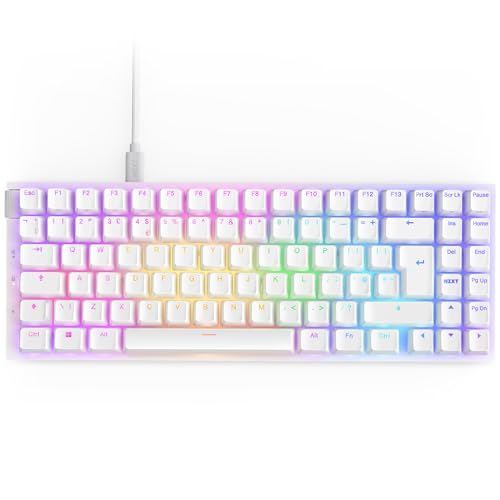
The nzxt function 2 minitkl is NZXT’s answer to a question competitive players kept asking mainstream keyboard brands: why should a fast board also have to feel ordinary? This tenkeyless keyboard pairs optical switches with an 8K polling rate, adjustable actuation points and rapid trigger behaviour, then wraps all of that in a clean, desk-friendly shell that looks at home beside a work laptop as easily as beside a gaming PC. It is not a hobbyist board with a gaming logo, and it is not a plain office keyboard with lights added. It sits deliberately between those worlds.
That in-between position is exactly why it deserves a careful look. Players who have tried 60 percent boards often miss their function row and arrow keys. Players who love full-size boards often resent how much mouse room the number pad steals. A tenkeyless layout answers both complaints, and NZXT’s second-generation Function design adds the optical speed features that used to belong only to specialist esports brands. This review works through what those features actually change in play, where the board’s limits show up, and how it compares with NZXT’s own Elite model and the original Function MiniTKL that came before it.
Key takeaways
- The Function 2 MiniTKL’s optical switches, adjustable actuation and rapid trigger are genuine performance features, most noticeable in movement-heavy shooters.
- The tenkeyless layout keeps a function row and navigation cluster while freeing real mouse space on the right side of the desk.
- Hot-swappable sockets mean a worn or unwanted switch can be replaced without soldering or replacing the whole board.
- The Function Elite MiniTKL is the step-up alternative in NZXT’s own range; the original Function MiniTKL is the simpler mechanical alternative.
- This is a wired board, so anyone who needs a cable-free desk should look elsewhere before falling for the spec sheet.
In this guide
Quick picks: the three NZXT boards in this review
- NZXT Function 2 MiniTKL — the subject of this review: optical switches, 8K polling, adjustable actuation, rapid trigger, hot-swap sockets, white UK layout on the verified listing.
- NZXT Function Elite MiniTKL — the premium sibling: NZXT’s flagship tenkeyless for players who want the most refined version of this design.
- NZXT Function MiniTKL (original) — the first-generation mechanical board: hot-swappable mechanical switches, aluminium top plate, low-profile keycaps, per-key RGB.
All three boards share NZXT’s restrained styling, and that shared DNA makes the comparison unusually clean. You are not choosing between three different philosophies; you are choosing how much speed technology and refinement you want inside the same basic idea. The sections below take each board on its own merits first, then put them side by side.
If you are building a whole desk around a new board, the mouse space this layout frees pairs naturally with a wide pad choosing a cloth gaming mouse pad, and the switch technology discussed here also appears across our wider keyboard coverage best 75 percent mechanical keyboards.
How were these picks chosen?
The subject board had to come first, verified exactly as listed, because search results for NZXT keyboards routinely mix generations, layouts and regional variants. The Function 2 MiniTKL listing used here is the 2024 optical model in white with a UK QWERTY layout, and that regional detail matters: a buyer in the United States who orders without reading carefully may receive a board whose legends and key arrangement differ from what their hands expect. Checking the exact listing title before writing a word is what separates a useful review from a confident guess.
The two alternatives were chosen from inside NZXT’s own catalogue for a deliberate reason. Cross-brand comparisons are easy to find; what buyers actually struggle with is the step-up decision. Is the Elite worth moving up for? Is the original, often discounted as stock clears, the smarter buy now that its successor exists? Answering those two questions honestly requires treating all three boards seriously rather than using the older models as straw men.
No hands-on testing is claimed anywhere in this review. The judgements here rest on the verified listing information, the documented behaviour of optical switch technology, and the accumulated conventions of tenkeyless board design. Where a claim depends on a specification, it is tied to that specification. Where a judgement is about feel, it is framed as what the design implies for different kinds of users, so you can map it onto your own hands and habits.

NZXT Function 2 MiniTKL: what does the optical speed actually buy you?
Badge: Review subject — the optical tenkeyless
- Layout: tenkeyless (MiniTKL), function row retained
- Switches: linear optical, hot-swappable
- Polling rate: 8K as listed
- Actuation: adjustable trigger points with rapid trigger behaviour
- Lighting: per-key RGB illumination
- Layout variant on verified listing: white, UK QWERTY
- Connection: wired
Start with the switches, because everything else about this board flows from them. A conventional mechanical switch registers a press when two metal contacts meet. An optical switch registers when the stem interrupts a beam of light. Removing the physical contact removes the debounce delay that mechanical boards must build in to avoid registering one press as several, and it removes the contact wear that eventually makes old switches chatter. In practice the difference is measured in milliseconds, and honesty requires saying so: no optical board will rescue a player whose aim, positioning or decision-making is the real problem. What it does is remove the keyboard from the list of things that might be slowing a good player down.
Adjustable actuation is the feature most buyers will feel first. Instead of accepting one fixed depth at which every key fires, you choose it. Set movement keys shallow and they respond to the lightest touch, which suits strafing and counter-strafing where the sequence of presses matters more than any single press. Set the same board’s less frantic keys deeper and accidental brushes while resting your fingers stop turning into stray inputs. That per-purpose thinking is the real upgrade here — not raw speed, but control over where speed begins.
Rapid trigger extends the same idea to the release. A traditional switch must travel back past a fixed reset point before it can fire again. Rapid trigger resets the key as soon as it starts moving upward, so a key can be re-pressed from whatever depth it currently sits at. In games built around quick directional changes, that produces movement that feels directly connected to your fingers rather than filtered through the switch’s travel. It is also the feature most likely to feel strange for the first evening: keys that re-fire eagerly punish sloppy finger lifts, and most players need a session or two before the board stops feeling twitchy and starts feeling precise.
The 8K polling rate completes the input chain. Polling is how often the keyboard reports its state to the PC, and a higher rate means a press waits less time, on average, before it is reported. The gains are small and they only survive if the rest of the chain — game engine, frame rate, monitor — keeps up, which is why this review treats 8K as a worthwhile specification rather than a transformation. Chasing it makes sense on a high-refresh setup; on a modest one, the adjustable actuation will do far more for you.
Away from the spec sheet, the MiniTKL layout is the everyday pleasure. You keep the function row for media shortcuts, screenshots and the F-key bindings many games still assume, and you keep a proper navigation cluster for documents and spreadsheets. What you surrender is only the number pad, and what you gain is the ability to bring your mouse hand several inches closer to your body’s centre line. Shoulders notice that difference across a long session even when players do not consciously register why the desk feels better. Players who sweep a mouse at low sensitivity gain the most, since the freed space is exactly where wide arcs used to collide with the keyboard’s edge best gaming mouse for FPS play.
The hot-swap sockets deserve more credit than marketing gives them. A switch that fails in year three is, on a soldered board, either a repair job or a replacement board. Here it is a thirty-second swap with a puller. The sockets also let you experiment: a slightly heavier switch under the space bar, a different feel on the movement cluster, the original switches kept in a drawer as spares. That serviceability extends the board’s useful life in a way that pure performance specifications never can.
RGB illumination on this class of board is best treated as a labelling system rather than a light show. Colour-coding key groups — movement in one shade, abilities in another, system shortcuts in a third — genuinely speeds up the glance-down moments in an unfamiliar game. The white chassis on the verified listing reflects that lighting more brightly than a black one, which looks striking on a pale desk setup and shows dust and crumbs with complete honesty. Choose the colourway for the room it will live in, not for the product photographs.
Strengths
- Optical switches remove contact debounce and contact wear from the input chain entirely.
- Adjustable actuation plus rapid trigger gives movement keys a responsiveness mechanical boards cannot match.
- Hot-swap sockets make the board repairable and customisable without tools beyond a switch puller.
Trade-offs
- Wired only, which will rule it out immediately for committed cable-free desks.
- Optical switch choice is narrower than the vast mechanical ecosystem if you later want exotic switches.
- The verified listing is a UK layout, so buyers elsewhere must check the variant carefully before ordering.
Best for: competitive players on high-refresh setups who want optical speed in a full-featured tenkeyless layout. / Not suited for: wireless devotees, number-pad-dependent spreadsheet work, or buyers who want a board to modify with boutique mechanical switches.

NZXT Function Elite MiniTKL: when is the flagship sibling worth it?
Badge: Premium alternative — NZXT’s flagship tenkeyless
- Layout: tenkeyless MiniTKL
- Position in range: flagship model above the Function 2
- Colourway on verified listing: white
- Intended buyer: players who keep a board for many years
Every product range has a model that exists to answer the buyer who asks for the best version rather than the best value, and in NZXT’s keyboard line that model is the Function Elite MiniTKL. It shares the MiniTKL footprint and the clean styling, but it is aimed at the player who treats a keyboard as a long-term fixture — the board that will survive several PCs — rather than as a peripheral to be rotated when the next specification appears.
The honest way to judge a flagship sibling is to ask what kind of dissatisfaction it removes. With step-up models the gains are rarely in headline numbers; they are in the accumulation of refinements — the way the board sounds on a desk, the way its controls fall under the hand, the sense that nothing about it was cost-engineered down to a price point. Buyers who are sensitive to those things feel the difference every day. Buyers who are not will look at the Elite, look at the Function 2, and correctly conclude that the cheaper board gives them the performance they actually came for.
There is also a timing argument for the Elite. Optical and magnetic switch technology is moving quickly, and a flagship bought today is the board least likely to feel obsolete when the next wave of features arrives, because flagships tend to receive the newest implementations first and hold their resale and hand-me-down value best. If this keyboard will eventually migrate to a second machine, a sibling’s setup or a child’s first gaming PC, that longevity has real worth beyond the first owner’s desk.
None of that makes the Elite the default recommendation. It makes it the right recommendation for a specific reader: the one who has already decided on NZXT’s design language, plays enough that per-session feel matters more than per-feature value, and keeps hardware long enough for build refinements to pay for themselves in daily satisfaction. Everyone else is better served by the subject board and a sensible mouse pad upgrade with the difference NZXT MMP400 mouse pad guide.
Strengths
- The most refined expression of NZXT’s tenkeyless design, aimed at long-term ownership.
- Shares the MiniTKL footprint, so all the layout and desk-space benefits carry over unchanged.
- Flagship positioning means it sits at the front of the queue for NZXT’s newest switch technology.
Trade-offs
- Premium positioning means the value calculation only works for buyers who keep boards for years.
- Players chasing pure input performance will find the Function 2 already covers the important ground.
- As a newer flagship, its listing range and colourway choice can be narrower at any given moment.
Best for: committed NZXT fans and long-haul owners who want the flagship version of this design. / Not suited for: value-first buyers, or anyone likely to replace their board when the next switch trend arrives.

The original NZXT Function MiniTKL: is the first generation still a smart buy?
Badge: Value alternative — the mechanical first generation
- Layout: tenkeyless MiniTKL, wired
- Switches: mechanical, hot-swappable
- Top plate: aluminium
- Keycaps: low profile as listed
- Lighting: per-key RGB
- Colourway on verified listing: white
The original Function MiniTKL is the board that established the formula: a wired tenkeyless with an aluminium top plate, hot-swappable mechanical switches and a restraint in its styling that most gaming boards of its era lacked. Judged against its successor it lacks the optical party tricks — no adjustable actuation, no rapid trigger, no headline polling figure. Judged on its own terms, it remains a well-made mechanical keyboard with the single most useful longevity feature a mechanical board can have, which is switches you can replace yourself.
That mechanical identity cuts both ways, and for some buyers it is a positive rather than a compromise. The mechanical switch ecosystem is enormous. If you already own switches you love, or you enjoy the hobbyist side of keyboards — trying a tactile switch on the alphas, a heavier linear on the space bar — the original board welcomes all of it, while the optical successor confines you to compatible optical switches. There are typists, too, who simply prefer the feel and sound palette that only the mechanical ecosystem offers, and for them the first generation is not the budget option. It is the right option.
Where the original concedes ground is competitive input. A player whose games reward rapid trigger movement will feel its absence, and no switch swap closes that gap because the limitation is the sensing method, not the switch feel. Buyers should therefore decide by genre: strategy, MMO, RPG and everyday play ask nothing the original cannot give, while movement shooters are where the successor earns its keep.
As earlier stock, the original also rewards patient shoppers. Its position in the range means its price tier moves more than the newer boards’ tiers do, and a buyer who watches the listing can sometimes land an aluminium-topped, hot-swappable tenkeyless for the kind of money usually attached to far lesser boards. That is a value argument, stated qualitatively as it should be: check the live listing, compare it with the successor on the day you buy, and let that day’s gap make the decision.
Strengths
- Full access to the huge mechanical switch ecosystem through hot-swap sockets.
- Aluminium top plate gives it a solidity many boards in its tier do not offer.
- The same clean MiniTKL layout and styling that made the range popular.
Trade-offs
- No adjustable actuation or rapid trigger, so competitive movement features are absent.
- Mechanical contacts wear and can eventually chatter in a way optical switches do not.
- As a superseded model, layout and colourway availability will only narrow over time.
Best for: mechanical-switch enthusiasts, hobbyist tinkerers, and value hunters who do not play movement shooters. / Not suited for: players who specifically want rapid trigger, or buyers who need a less common regional layout.
How do the three boards compare side by side?
The cleanest way to see the range is as a ladder of sensing technology standing on a shared foundation. All three boards give you the tenkeyless footprint, the function row, the navigation cluster, NZXT’s understated styling and per-key RGB. The ladder is about what happens between your finger touching a keycap and the game knowing about it. The original board senses that press mechanically. The Function 2 senses it optically and lets you tune where in the travel the press counts, then lets the key reset the moment it rebounds. The Elite takes the flagship position above that, for buyers who want NZXT’s most developed version of the idea.
Desk behaviour differs less than the spec sheets suggest. All three are wired, all three will anchor a tidy setup with sensible cable routing, and all three free the same mouse space. If your current frustration is a cramped right hand, any of them solves it. If your current frustration is movement that feels a half-step behind your intentions in a fast shooter, only the optical boards address it, and the Function 2 is where that technology starts in this range.
Longevity splits the range differently. The original’s mechanical sockets accept the widest variety of replacement switches, which makes it the easiest board to keep alive indefinitely on a budget. The optical boards remove contact wear from the equation, which makes them the boards least likely to need that maintenance in the first place. The Elite’s case for longevity is about overall build ambition. Three different philosophies of lasting a long time, all of them defensible — which is why the right choice depends on whether you are a tinkerer, a competitor, or a settler.
What should you check before buying a tenkeyless optical board?
Does your layout match your language?
Regional layouts are the most common source of disappointed unboxings in this category. The verified listing for the subject board is a UK QWERTY variant. Key legends, the shape of the Enter key and the position of certain symbols all follow the regional standard, and your operating system must be set to the same layout for the board to print what its legends promise. None of this is a defect; all of it is worth sixty seconds of attention on the listing before you order, especially if you touch-type symbols all day for work.
Will your games actually use rapid trigger?
Rapid trigger shines where movement is a sequence of opposed directional taps: counter-strafing in tactical shooters, quick peeks, rhythm-like movement in fast arena games. It does little for a strategy player issuing occasional commands or an MMO player holding a key down. Some competitive titles also restrict certain input behaviours, so check your main game’s current stance on advanced keyboard features before making them the centrepiece of a purchase. Buy the feature for the games you play weekly, not the games you might try someday.
Is the rest of your chain fast enough?
An 8K polling keyboard feeding a low-refresh monitor is a sports engine in a city car. The input chain is only as responsive as its slowest link, and for most setups that link is the display or the frame rate, not the keyboard. This does not argue against the board — it argues for sequencing your upgrades sensibly. If your monitor is due for replacement, the board will grow into it. If it is not, weight the adjustable actuation, which you will feel at any refresh rate, more heavily than the polling headline wireless gaming keyboards for FPS compared.
How much do you type?
Gaming-first boards earn mixed reviews as all-day typing tools, and the honest variables are switch feel and keycap profile rather than brand. Linear optical switches are smooth and fast, which many typists love and some find too eager, registering presses from resting fingers until actuation settings are tuned deeper. The saving grace here is that the tuning exists: raise the actuation point for work hours if the board supports profiles you can switch, or simply accept a day of adjustment. Writers and programmers who share one desk for everything should budget that adjustment day rather than expecting perfection from the first paragraph.
How do you set up the Function 2 MiniTKL for your games?
Setup begins before software: seat the board, route the cable so it cannot drag against the mouse pad’s edge, and angle the board the way your wrists naturally fall rather than square to the desk out of tidiness. Then work through the tuning in an order that isolates variables. First, play one familiar game at the default actuation for a full session, so you have a baseline your hands trust. Change nothing else that day.
Second, lower the actuation on just the movement cluster and play the same game. Notice the release as much as the press: cleaner stops are the signature that the setting suits you. Third, enable rapid trigger on those same keys and repeat the comparison. Changing one variable per session feels slow, but it is the only way to know which feature your hands actually like, rather than crediting whichever you enabled last.
Fourth, tune the keys you rest on. If your ring finger keeps brushing a neighbouring key into firing, deepen that key’s actuation rather than retraining your hand around the board. Fifth, build a separate, calmer profile for desktop work with deeper actuation across the board, and switch profiles deliberately as part of your sit-down routine. Finally, colour-code the key groups in the lighting so a glance down confirms which profile is live. Ten minutes of this discipline in the first week pays back across the board’s whole life, and the same tuning mindset applies if you later experiment with switch-pad mods the PE foam mod explained.
What mistakes do buyers make with boards like this?
The first mistake is buying the headline instead of the layout. A player who needs a number pad for work, discovers its absence on day two, and parks a separate pad awkwardly beside the board has gained nothing. Tenkeyless is a genuine ergonomic win for mouse-heavy players and a genuine loss for data entry; know which person you are. The second mistake is enabling every speed feature at maximum sensitivity immediately, concluding the board feels unstable, and returning a keyboard that one evening of staged tuning would have made precise.
The third mistake is ignoring the regional variant, covered above because it causes a disproportionate share of returns in this category. The fourth is neglecting the humble stuff: a board at this level deserves a pad that lets the mouse use the freed space, a wrist position that does not bend sharply upward, and a cable path that will not saw across the desk edge for three years. The fifth is assuming a successor makes its predecessor worthless — the original MiniTKL in this very range is the standing counterexample.
Final recommendation
For the competitive player this board was designed for, the Function 2 MiniTKL is the sweet spot of NZXT’s range: the optical sensing, adjustable actuation and rapid trigger are the features that change games, and they arrive here without stepping up to flagship money. Choose the Elite if you are buying a board to settle with for many years and value refinement over thrift. Choose the original if your heart belongs to the mechanical switch ecosystem or your games never ask for rapid trigger. All three are coherent answers; the subject board is simply the one pointed most directly at modern competitive play.
Frequently asked questions
Is the NZXT Function 2 MiniTKL wireless?
No. It is a wired board, which suits its performance brief: a cable carries the high polling rate without battery or interference considerations. If a cable-free desk matters more to you than the last increments of input speed, a wireless tenkeyless from our wider roundups will serve you better than this board will.
What does rapid trigger actually change in a game?
It changes the reset behaviour of a key. Instead of waiting for the key to rise past a fixed point before it can register again, the key resets as soon as it begins rising, so repeated and opposed presses chain together more directly. Movement built on quick directional taps feels the benefit most; holding keys down feels no different at all.
Can you change the switches on the Function 2 MiniTKL?
Yes, the board is hot-swappable, so switches can be pulled and replaced without soldering. The constraint is compatibility: as an optical board it works with switches designed for optical sensing, which is a smaller family than the mechanical ecosystem the original MiniTKL can draw from.
Is a tenkeyless board big enough for work as well as gaming?
For most people, yes. You keep the function row, arrow keys and navigation cluster, losing only the number pad. Writers, programmers and general office users rarely miss it. Heavy spreadsheet and data-entry work is the exception, and those users should either keep a full-size board for work or choose a layout that retains the pad.
Does the 8K polling rate need a powerful PC?
High polling rates ask slightly more of the system than standard rates, and their benefit only shows when frame rates and monitor refresh are high enough to present the extra input resolution. On a modest system the board still works perfectly well; you simply will not perceive the polling advantage until the rest of the setup catches up.
Which of the three NZXT boards is the best value?
Value depends on the day’s listings, which is why this review avoids fixed figures. The pattern is stable, though: the original tends to be the value pick when its tier drops as older stock, the Function 2 is the performance-per-feature pick, and the Elite is the pick when long-term refinement matters more than the gap. Check each live listing on the day you buy and apply that pattern to what you find.
Related reading: best 60 percent gaming keyboards and best gaming mouse pads.
How does the Function 2 MiniTKL feel across different game genres?
Tactical shooters are the showcase genre, and they are worth describing in mechanical detail because the benefit is specific rather than mystical. Holding an angle in a tactical shooter is a conversation between two keys: strafe out, stop dead, fire, strafe back. The stop matters as much as the start, because accuracy models in these games punish movement. With rapid trigger, the stop begins the instant your finger starts to lift, and the return strafe can begin from a shallower key position than a fixed reset point would allow. Strung together over a round, peeks feel less like issuing commands and more like leaning. No specification makes a player win those duels — crosshair placement and timing still decide them — but the board removes a small mechanical tax from every single repetition, and competitive players feel taxes that casual players never notice.
Arena shooters and movement-heavy hero shooters reward a different property: repetition speed. Bunny-hopping rhythms, rocket-jump sequences and ability keys woven between directional taps all ask keys to fire again shortly after firing before. Adjustable actuation set shallow turns the top of the key’s travel into a hair trigger, and players who live in these games often describe the sensation as the board keeping up with intentions they previously had to slow down. The risk is symmetrical — a shallow board also fires the key you brushed reaching for another — which is why per-key tuning, rather than a global shallow setting, is the grown-up way to configure it.
MOBA and RTS players occupy the middle ground. Their keyboards are command centres: dozens of bindings, control groups, camera keys, item actives. For them the MiniTKL’s retained function row and navigation cluster matter more than its sensing, because those keys carry bindings that a 60 percent board would bury under layers. Rapid trigger adds little to a genre of deliberate, spaced commands, but the board’s programmability and the ability to colour-code binding groups still earn their place. A MOBA player choosing within this range could honestly take the original mechanical board and lose almost nothing, which is exactly the kind of genre-dependent honesty a range review owes its readers.
Rhythm games and fighting-game-adjacent keyboard play are the surprise beneficiaries. Any genre scored on input timing respects a sensing method with no debounce delay, and players in these niches were early adopters of optical boards for precisely that reason. Meanwhile, simulation and strategy players — the flight-sim cockpit builders, the grand-strategy map painters — should read this whole review as a luxury rather than a need. Their sessions are long, their inputs deliberate, and their money usually works harder spent on the simulation hardware itself.
What is it like to live with day to day?
The daily-life questions are unglamorous and decisive. How loud is it in a shared room at midnight? Linear optical switches sit at the quieter end of the keyboard spectrum because there is no tactile mechanism or click leaf making its own noise; most of the sound is the keycap bottoming out and returning, which a desk mat softens further. A partner sleeping in the next room will hear a determined typist through any mechanical-family board, but this is among the more considerate choices in the category, especially with actuation tuned so keys need not be slammed to their full depth to register.
How does it handle the desk’s other life? Crumbs, coffee and cat hair are the real long-term enemies of any keyboard, and a hot-swappable board has a hidden advantage here: you can pull every switch and keycap, clean the plate properly, and rebuild it in an afternoon, turning what would be a replacement decision on a sealed board into routine maintenance. The white colourway shows the dust that black boards hide, which reads either as a chore or as an honest reminder, depending on temperament.
Software is the third daily reality. Boards in this class rely on a companion application for actuation settings, rapid trigger, lighting and profiles, and the buyer’s experience of the board is partly an experience of that application’s manners: whether it needs to run constantly, whether profiles live on the board or the PC, whether settings survive a move to a second machine. Before buying, decide how much of that you care about. Players who set actuation once and never touch it again are well served by almost any implementation. Players who maintain per-game profiles should confirm the board stores profiles onboard, so the tuning travels with the keyboard rather than with one Windows installation.
Finally, consider the cable without embarrassment. A wired board’s cable is a small daily negotiation — routing, slack, the occasional catch on a monitor stand — weighed against never charging, never pairing, never wondering whether a wireless hiccup just cost a round. Competitive desks have voted with their setups for years: where performance is the point, the cable stays. This board is unapologetically built for that vote.
Should owners of the original MiniTKL upgrade?
Upgrade questions deserve a decision tree rather than a verdict. If your original board’s switches are ageing and you play movement shooters weekly, the Function 2 replaces a maintenance task with a genuine capability jump, and the old board becomes a spare, a second-machine board, or a hand-me-down that is still better than most people’s primary keyboard. If your original is healthy and your games are strategy, MMO or story titles, the upgrade buys you specifications you will rarely exercise, and the honest advice is to keep your board and your money.
If you are choosing between repairing and replacing, price the repair first in effort rather than money: a set of replacement mechanical switches and an hour of swapping is all a tired original usually needs, thanks to those hot-swap sockets. The owners who should upgrade without agonising are the ones who have already felt the specific frustration the new board addresses — a reset that came late in a duel they otherwise played correctly. Technology purchases justified by a felt problem age well. Purchases justified by a spec sheet tend to be re-justified every product cycle.
Understanding the specifications without the marketing fog
Polling rate, actuation depth and response claims are thrown around so loosely in keyboard marketing that a short translation guide earns its space in any review of a board like this. Polling rate describes how frequently the keyboard sends its current state to the computer. At the long-standing standard rate, a key press can wait, in the worst case, a little over a millisecond for the next report. At 8K, that worst-case wait shrinks to a small fraction of it. Both numbers are dwarfed by the time a game frame takes to render, which is why this review keeps insisting the feature is a refinement rather than a revolution — and also why players on very high refresh monitors, where frame times shrink toward the same scale, are the ones positioned to notice it.
Actuation depth is simpler and more personal. It is the distance a key travels before the press counts. Shallow settings reward light, quick fingers and punish resting weight; deep settings forgive a heavy hand and give typists a sense of commitment to each letter. Neither is objectively better, which is precisely why adjustability matters: the correct depth is the one matched to your hand, your game and even the individual key’s job. A space bar used for jumping can live shallow while the key beside it, bound to something you must never trigger accidentally, lives deep.
Rapid trigger is the third term, and the one most often confused with simple sensitivity. It does not make a press register earlier on the way down — that is actuation. It changes what happens on the way up, letting the key reset and become ready again from any point in its travel once it starts rising. Think of a piano key that can be replayed without fully releasing it and you have the shape of the idea. In keyboards it converts directly into chained directional inputs with less dead travel between them.
The last specification worth demystifying is the switch lifespan claim that optical boards carry. Because nothing physical makes or breaks contact to register a press, the wear mechanism that eventually produces double-registering or dead keys in mechanical switches is largely absent. The moving parts still exist — stems still slide, springs still cycle — so no board is immortal, but the failure mode that ends most mechanical boards’ competitive lives is designed out. For a buyer weighing a board as a multi-year fixture, that engineering fact is worth more than any single performance number on the box.
A short history of why tenkeyless won
It is easy to forget that the tenkeyless layout was once the radical option. Full-size boards dominated desks for decades because the number pad was a working tool in an era of heavy data entry, and early gaming keyboards simply added macro keys and lighting to that inherited shape. The layout’s problem only became visible as mouse gaming matured: players lowered their sensitivity for aim precision, their mouse arcs widened, and the keyboard’s right edge became an obstacle their hand kept meeting mid-flick. Removing the number pad was the obvious surgery, and the esports scene adopted it years before the mainstream followed.
What tenkeyless kept is as important as what it cut. Unlike the smaller layouts that followed, it preserved the function row and the navigation cluster, so nothing a normal user reaches for daily went missing. That conservatism is why the layout, rather than the more dramatic 60 percent format, became the default recommendation for people who both work and play at the same desk. NZXT’s MiniTKL line is a direct descendant of that settlement, and the Function 2’s contribution to the lineage is not the layout at all — it is the sensing technology now living inside a shape whose ergonomics were settled years ago. When a mature layout meets new internals, the reviewer’s job is to keep those two judgements separate, and this board earns its praise on the second while standing on the shoulders of the first.
The practical consequence for buyers is reassuring: there is no layout learning curve to fear here. If you have ever used a laptop keyboard with a function row, your hands already know this board’s geography. The adjustment period belongs entirely to the switch tuning, and unlike a layout change, that adjustment can be dialled gradually, one key group at a time, until the board disappears under your hands — which is, in the end, what every good keyboard is supposed to do.
What about wrist comfort and desk ergonomics?
A keyboard review that talks only about milliseconds misses the organ the keyboard actually serves, which is a pair of hands expected to last decades. The MiniTKL footprint helps the right shoulder, as covered earlier, but the rest of the ergonomic picture is the buyer’s responsibility. Keep the board’s front edge low and your wrists floating or lightly supported rather than planted and bent upward; a sharp upward bend held for hours is the posture most associated with strain complaints among heavy keyboard users, and no switch technology compensates for it. If you use a wrist rest, it belongs under your palms during pauses, not as a shelf your wrists press into while typing, because that pressure sits exactly where you least want it.
Key height and keycap profile shape the fingers’ workload in subtler ways. Lower profiles shorten each press’s travel, which many players experience as speed and some typists experience as bottoming-out harshness, since there is less travel in which to decelerate the finger. The adjustable actuation on this board offers an unusual ergonomic lever here: setting actuation a little deeper than the competitive minimum encourages a fuller, softer press rather than a jab at the very top of travel. Players who notice fingertip soreness after long sessions often find that single change, plus a desk mat under the board, resolves it without surrendering meaningful speed.
Session habits matter more than any product choice. Competitive players are athletes of very small movements, and the standard athletic advice applies unchanged: warm the hands up with a few minutes of low-intensity play, take the breaks between matches standing rather than scrolling, and treat persistent tingling or numbness as a stop signal to take seriously rather than a settings problem to tune away. A keyboard can support good habits or bad ones. The best thing about a board with this much adjustability is that it can be configured to meet your hands where they are, instead of demanding your hands conform to it — provided you spend the first week doing that configuring deliberately, as the setup section above recommends.
Who is this board not for, honestly?
Every review owes its readers a clear account of the people who should walk away, and this board has several. Wireless loyalists should walk away first: if your desk philosophy is a clean surface with nothing tethered, a wired performance board will irritate you daily no matter how well it plays, and the market now offers wireless boards fast enough for all but the most demanding competitive use. Number-pad professionals should walk away second: accountants, data-entry specialists and anyone whose left hand lives on a pad while the right works a mouse will feel the MiniTKL’s missing cluster as a daily tax, not a liberation.
Hobbyist switch collectors form the third group. If half your pleasure in a keyboard is the endless mechanical switch market — the limited runs, the exotic materials, the frankenswitch experiments — an optical board’s smaller compatible family will feel like a walled garden, and the original MiniTKL in this same range is the board NZXT makes for you. Fourth come the one-and-done peripheral buyers who want to plug in a board and never open a settings application. The Function 2 rewards tuning so directly that buying it and skipping the software is like buying a bicycle and never adjusting the saddle: perfectly rideable, quietly missing the point.
None of these exclusions diminish the board. They define it. A product that knows it is a wired, tunable, optical tenkeyless for competitive players serves those players better than a product trying to be everything — and the readers who recognised themselves in the paragraphs above now know to spend their money elsewhere with confidence, which is the other half of what a review is for.
One last consideration belongs to households rather than individuals. A board this responsive makes an unusually good hand-me-down: its lack of contact wear means a second owner inherits performance close to the first day’s, and its standard layout means a younger player or a partner setting up their own desk needs no relearning. Ranges are usually judged on the day of purchase. The Function line, in all three versions covered here, is better judged across the years and desks it will quietly pass through — and on that longer accounting, the subject board’s combination of modern sensing and replaceable switches is the strongest of the three.
It is also worth saying plainly what this board signals about where keyboards are heading. Five years ago, adjustable actuation and rapid trigger belonged to a handful of specialist boards that looked like science projects; today they sit inside a clean, mainstream tenkeyless that could pass unnoticed in an office. That migration — exotic sensing into ordinary shapes — is the real story of the Function 2, and it means buyers no longer have to choose between a board that looks grown-up and a board that plays at the frontier. Whichever of the three NZXT models you choose, you are buying into that settlement, and the subject board is simply its most complete current expression for players.