Disclosure: As an Amazon Associate, reviewstook.com earns from qualifying purchases. Links on this page are affiliate links; they cost you nothing extra. Prices and availability change often, so check the current Amazon listing before you buy.
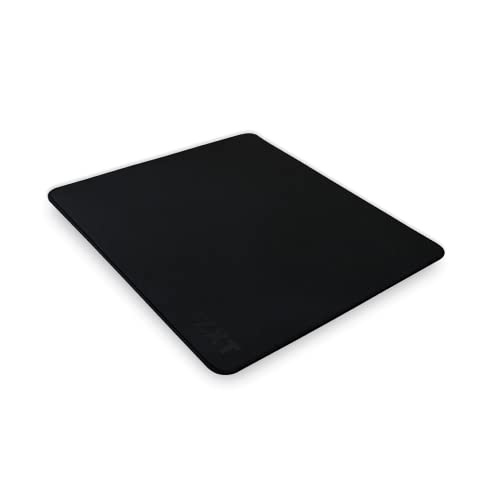
The nzxt mmp400 is a mouse pad that refuses to be interesting in the ways mouse pads usually try to be, and that is precisely its appeal. There is no lighting strip, no wireless charging coil, no graphic print competing with your desk. What NZXT sells here is a 410 by 350 millimetre sheet of low-friction cloth with a stain-resistant coating over a non-slip rubber base, in black, at the size most gaming desks actually need. This review takes that simplicity seriously, because a pad is the one peripheral that touches every single mouse movement you make, and its failures — bunching, fraying, inconsistent glide — tax your aim in ways players routinely misdiagnose as sensor or skill problems.
We also place the MMP400 against two of the category’s reference points: the SteelSeries QcK, the cloth pad against which all cloth pads are quietly measured, and the Logitech G840 XL, a desk-covering mat for players who want the pad to swallow the keyboard too. Between the three of them, most readers will find their answer, and the differences are more instructive than any single verdict: size philosophy, surface character and how each pad ages across a year of evenings.
Key takeaways
- The MMP400’s 410 by 350 mm footprint is the sweet spot for most players: wide enough for low-sensitivity swipes, small enough for real desks.
- Its stain-resistant coating is a practical feature for a surface that lives under coffee cups and snack bowls, not a marketing garnish.
- The SteelSeries QcK is the smaller, traditional alternative; the Logitech G840 XL is the full desk-mat alternative.
- Cloth pads are consumables: expect glide to evolve over months, and judge any pad across that arc, not just on day one.
- Pad choice should follow your sensitivity and swipe arc, measured in your main game, before brand or appearance.
In this guide
Quick picks: the three pads in this review
- NZXT Mouse Pad MMP400 — the subject: 410 by 350 mm, low-friction cloth surface, stain-resistant coating, non-slip rubber base, black.
- SteelSeries QcK Medium — the classic alternative: 320 by 270 mm, the long-running reference cloth pad, non-slip silicone rubber base.
- Logitech G840 XL — the desk-mat alternative: an extra-large cloth mat that runs under keyboard and mouse alike, moderate surface friction, stable rubber base.
A word on why a humble pad earns a long review at all. Players will debate sensors and switches for weeks, then play on whatever surface came free with something else, and wonder why their tracking feels inconsistent between the pad’s centre and its worn edges. The pad is half of the mouse’s tracking system — the half that wears out. Treating it as equipment rather than décor is the cheapest aim upgrade most players have left, and it pairs with the mouse itself as a system best gaming mouse pads compared.
How were these picks chosen?
The MMP400 is the subject because readers asked for it by name, and it was verified exactly as listed: the black 410 by 350 variant with the stain-resistant coating. The alternatives were chosen to bracket it rather than imitate it. The QcK represents the smaller, older school of pad sizing that many players grew up on and some still prefer. The G840 XL represents the opposite philosophy, in which the pad becomes the desk’s entire working surface. With the MMP400 between them, the comparison becomes a genuine decision about how you use your desk, which is the decision pad buyers are actually making whether they realise it or not.
As throughout this series, no laboratory claims are invented here. The discussion of glide, friction and durability rests on the listed construction — cloth surface, rubber base, coatings — and on how such constructions are known to behave across months of play. Where a judgement is about feel, it is framed in terms of playing styles, so you can locate your own habits in it.

NZXT MMP400: is the middle size the right size?
Badge: Review subject — the considered middle
- Dimensions: 410 mm by 350 mm as listed
- Surface: low-friction cloth, soft and smooth
- Coating: stain resistant
- Base: non-slip rubber
- Colour: black
Size first, because size is where this pad makes its argument. At 410 millimetres wide, the MMP400 gives a low-sensitivity player a genuine swipe arc — the full turn, the wide target switch — without the mouse running off an edge mid-motion. At 350 millimetres deep, it gives the wrist and forearm a consistent surface from the desk’s edge to the keyboard’s feet. Players arriving from a small bundled pad feel the difference in the first session, not as luxury but as the absence of a recurring interruption: the catch at the pad’s edge, the lift-and-recentre that used to be stitched into every long turn, quietly disappears from their play.
Yet it stops short of the desk-mat commitment. Your keyboard stays on the desk, your monitor stand keeps its footing, and the pad remains a replaceable component rather than a fitted carpet for the whole workspace. For renters, shared desks, and anyone whose setup shares space with work papers, a printer or a second machine, that restraint is a feature. The pad can be lifted, washed, rolled for a LAN or a house move, and replaced in a year without redecorating the desk around its absence.
The surface is the second argument. NZXT describes a soft, smooth, low-friction cloth, and the playing character that construction produces is the balanced middle of the cloth spectrum: fast enough that small corrections do not feel like dragging through felt, controlled enough that a flick can be stopped on a head-sized target without the mouse sailing past. Pure speed pads exist for players who want ice; pure control pads exist for players who want sand. Most players, in most games, live between those poles and are best served by exactly this kind of tuned middle — particularly players who cross genres, because a balanced surface does not need to be re-learned when the evening moves from a tactical shooter to a strategy game.
The stain-resistant coating sounds like a footnote until you picture the pad’s actual working environment. Mouse pads live under the hand that also holds the coffee, the energy drink and the midnight noodles. An ordinary cloth pad absorbs its owner’s habits and displays them, darkening in the palm’s path and stiffening where spills dried. A coating that resists staining keeps the surface’s glide more uniform for longer and keeps the pad presentable on a desk that is also a workplace. It does not make the pad immortal or self-cleaning — the care section below still applies — but it slows the most visible form of ageing.
The rubber base does its work invisibly, which is the point. During hard swipes a pad that creeps even a few millimetres rotates the player’s whole reference frame, and the resulting inconsistency gets blamed on everything except the pad. A base that grips the desk through an evening of play, on wood, laminate or glass-adjacent surfaces, is table stakes at this level, and the MMP400’s construction treats it as such. Combined with the pad’s own weight and footprint, the result is a surface that stays where the session started.
Strengths
- The 410 by 350 mm footprint matches how most players actually swipe, without taking over the desk.
- Balanced low-friction cloth serves mixed-genre players better than specialised speed or control surfaces.
- Stain-resistant coating slows the visible and tactile ageing that coffee-adjacent desks inflict.
Trade-offs
- Specialists who want an extreme surface — glass-fast or heavily textured control — will find the middle tuning unexciting.
- Black shows dust and lint honestly, so the pad asks for a regular wipe to look its best.
- Players who want the keyboard on the pad too need the XL desk-mat format instead.
Best for: most gaming desks, mixed-genre players, and anyone upgrading from a small bundled pad. / Not suited for: surface specialists chasing extremes, or desk-mat devotees who want one surface under everything.

SteelSeries QcK Medium: why does the classic endure?
Badge: Classic alternative — the reference cloth pad
- Dimensions: 320 mm by 270 mm as listed
- Surface: cloth, tuned for gaming sensors
- Base: non-slip silicone rubber
- Colour: black
The QcK has been the default cloth pad for so long that its name functions as a unit of measurement: players describe other pads as faster than a QcK, grippier than a QcK, bigger than a QcK. The Medium’s 320 by 270 millimetre footprint reflects the era that made it famous, when sensitivities ran higher and desks ran smaller, and for a substantial population of players that footprint is still exactly right. High-sensitivity players barely use a third of a large pad; the unused acreage gathers dust and pushes the keyboard further from the body’s centre. A compact pad on a compact desk, with the mouse living entirely in its tuned centre, is a coherent setup rather than a compromise.
The QcK’s surface character leans a touch more controlled than the MMP400’s balanced glide, which is one reason generations of tactical-shooter players adopted it: stopping power for flicks, a sense of the mouse being held rather than released. Its endurance in the market also means its behaviour across a lifespan is the best-documented of any pad here — it softens and slows gradually, predictably, and players who love it simply replace it on a rhythm. Against the NZXT it concedes size and the stain-resistant coating, and gains a lower commitment for small desks and a track record no newer pad can match.
Strengths
- The best-understood surface in the category, with a control-leaning character tactical players trust.
- Compact footprint suits small desks and high-sensitivity players who never use a large pad’s edges.
- A long market life means replacement is always easy and its ageing behaviour holds no surprises.
Trade-offs
- Low-sensitivity players will run out of pad on wide turns where the MMP400 still has room.
- No stain-resistant coating, so it shows a working desk’s history sooner.
- The smaller size leaves the wrist closer to the pad’s lower edge during long sessions.
Best for: high-sensitivity players, small desks, and traditionalists who know the QcK feel and want it again. / Not suited for: low-sensitivity arm aimers, or players tired of replacing a pad that shows spills.

Logitech G840 XL: who should let the pad swallow the desk?
Badge: Desk-mat alternative — the full-surface philosophy
- Format: extra-large cloth mat for mouse and keyboard
- Thickness: 0.12 in as listed, a low profile under the keyboard
- Surface: performance-tuned cloth, moderate friction
- Base: stable rubber
- Colour: black
The G840 XL answers a different question from the other two pads: not how large the mousing area should be, but whether the desk’s whole working zone should be one continuous surface. Run under the keyboard as well as the mouse, it softens the desk’s acoustics — keyboard clatter loses its hard echo — gives the wrists a uniform landing, and makes the mouse’s usable area effectively as wide as the desk allows. For a low-sensitivity player with a big desk, it is the end of edge anxiety altogether. Its moderate, consistent friction suits the long gliding strokes that format encourages, and at just 0.12 inches thin it sits under a keyboard without rocking it or raising it noticeably.
The costs of the philosophy are commitment and care. A desk mat is furniture: it must be measured against monitor stands, desk edges and the other objects that share the surface, and it collects the whole desk’s crumbs and spills rather than one corner’s. Washing it is a bathtub event rather than a sink event. Replacement, when its centre wears, replaces everything. Players who move setups often, share desks, or simply like changing components independently will feel the format’s weight. Players with a settled, personal, generously sized desk will feel only its calm.
Strengths
- Effectively unlimited mousing width, with one consistent surface under hands, wrists and keyboard.
- Softens desk acoustics and gives the whole setup a finished, unified feel.
- Thin profile keeps the keyboard stable and low while the rubber base holds the mat in place.
Trade-offs
- Demands a large, settled desk and complicates cleaning, moving and replacement.
- Collects the entire desk’s dust and spills, so it asks for more maintenance than a mouse-only pad.
- Moderate friction will feel slow to players who prefer a slick, speed-leaning surface.
Best for: settled big-desk setups, very low sensitivities, and players who value a unified work surface. / Not suited for: shared or small desks, frequent movers, or anyone who replaces components piecemeal.
How do the three pads compare in daily play?
Line the three philosophies up and the choice clarifies quickly. The QcK is a mousing surface, precisely sized for players whose hands stay in a compact zone. The MMP400 is a mousing surface sized for how far modern players actually travel. The G840 is a desk surface that happens to include mousing. In glide character they run from the QcK’s control lean, through the MMP400’s balanced middle, to the G840’s moderate, mat-like consistency. In maintenance they run from the easiest to replace, through the coating-protected middle, to the mat that asks for a bathtub and a free afternoon.
The most useful comparison test is your own swipe. Load your main game, find a quiet corner, and perform your widest regular turn at your real sensitivity while a friend — or a strip of painter’s tape — marks where the mouse starts and stops. That distance, plus a margin for the turns you make under pressure, is your minimum pad width. Measure it honestly and at least one of these three pads eliminates itself immediately. Pad buying becomes remarkably easy once it is driven by a measurement instead of a photograph cloth gaming mouse pads explained.
What should you check before choosing a cloth pad?
How fast a surface do you actually want?
Speed and control are a trade, not a ladder. A faster surface makes micro-corrections effortless and flicks harder to stop; a slower surface forgives the stop and taxes the correction. Tactical shooters, with their head-sized targets and stop-to-shoot mechanics, traditionally reward control. Tracking-heavy games with long, continuous aim reward glide. Mixed libraries reward the middle — which is the MMP400’s home ground and the reason balanced pads outsell the extremes they are less exciting than.
How thick, and what about the edges?
Thickness is wrist comfort and edge behaviour. A thicker pad cushions the wrist bone where it rests near the lower edge and gives the hand a softer landing, while a thinner pad keeps the mouse closer to the desk’s plane and feels more direct. Edges matter more than brochures admit: stitched edges resist the fraying that peels a pad’s surface up from its base at exactly the point where the wrist rubs, and they present a smoother boundary to the forearm. Whichever pad you choose, look at its edge treatment in the listing photographs; it predicts the pad’s second year better than any surface claim.
How will you clean it, really?
Be honest about your habits. A player who will hand-wash a pad monthly can enjoy any cloth surface at its best. A player who will not should weight coatings and dark, forgiving colours heavily, and should still learn the basic ritual: lukewarm water, a drop of mild soap, gentle hand agitation, rinse, press in a towel, dry flat away from radiators. Ten minutes, a few times a year, is the difference between a pad that ages gracefully and one that becomes a map of everything you ate at your desk best mouse pads with wrist support.
How do you set up and break in a new pad?
Unroll the pad and give it time to relax flat before judging anything; cloth pads ship rolled and carry a memory of the tube for the first hours, curling at the edges in a way that vanishes by the next day. If it resists, a night under a row of books along the stubborn edge persuades it without any heat or drama. Position it so your neutral mouse position sits slightly right of the pad’s centre — most players’ turns travel further in one direction than the other, and centring your rest position rather than the pad gives you margin where you actually spend it.
Break-in is real and worth expecting. A new cloth surface usually glides a little faster in its first days, then settles as the weave compacts under the mouse’s feet and your hand’s oils work into the fibres. Judge the pad at the end of week one, not the end of day one, and resist re-tuning your sensitivity during that week; chasing a moving surface with settings changes leaves you calibrated for a pad that no longer exists. Once settled, note your sensitivity somewhere. When the pad eventually ages — and the centre lane, where your mouse lives, will polish smooth months before the corners change — that note is how you will know whether a performance wobble is the surface or you.
Pairing matters too. Fresh mouse feet on a fresh pad is the smoothest combination in gaming; worn, scratched feet will make a new pad feel inconsistent and can even score its surface. If you are replacing a pad because glide went strange, inspect the feet before blaming the cloth — the fix may be a set of skates rather than a new surface mouse skates and replacement feet.
What mistakes do pad buyers keep making?
The first is buying by photograph: pads in listings are shot on empty desks at flattering angles, and the size that looks generous in a photograph swallows or starves a real desk with a monitor stand, a keyboard and a mug on it. Measure the desk, then measure your swipe, then shop. The second is assuming one pad serves every sensitivity: a player who drops their sensitivity for a new game has changed their pad requirement without changing their pad, and the edge collisions that follow feel like the game’s fault. The third is neglecting the surface for a year and then replacing the mouse, when the mouse was innocent.
The fourth mistake is chasing novelty — charging coils, lighting borders, printed artwork — before the fundamentals are right. A pad’s job is friction, size and stability, in that order, every minute of every session. Features that do not serve those three should be bought only after all three are satisfied, which is the MMP400’s whole design argument in one sentence. The fifth is throwing a pad in a hot wash or against a radiator to dry, cooking the rubber base into waves that no amount of book-pressing will undo. Lukewarm and patient beats hot and fast, for pads as for most things.
The life of a pad: how ageing actually works
A cloth pad does not wear out all at once; it becomes a different pad gradually, and understanding the stages helps you decide when replacement is maintenance rather than indulgence. In the first weeks the surface settles, as described. Across the following months, the central lane polishes: fibres flatten where the mouse travels most, glide quickens slightly and grows less uniform at the lane’s borders, and the wrist’s resting place compacts the padding beneath it. Dust and skin work into the weave and a wash restores most, but not all, of the original character. Eventually the base loses its absolute grip, the edges lift or fray, and the surface’s personality has drifted far enough from the one you calibrated to that consistency — the pad’s entire purpose — is compromised.
That arc, for a daily player, typically runs somewhere between several months and well over a year depending on hours, environment and care, and it is why experienced players speak of pads the way cyclists speak of tyres: as consumables whose replacement is scheduled maintenance for a system they depend on. Budget for the pad as a recurring cost, keep the old one as a travel or spare surface when you replace it, and the category becomes simple. The MMP400’s coating and construction aim squarely at stretching the good middle of that arc, which is the most any honest pad can promise.
Final recommendation
For most readers, the MMP400 is the pad to buy: the size matches modern sensitivities, the surface sits at the balanced point mixed libraries want, and the coating respects the reality of desks that host drinks. Choose the QcK Medium if your desk is small, your sensitivity is high and you already know its control-leaning feel suits you. Choose the G840 XL if your desk is large, settled and yours alone, and you want the whole working surface unified. Whichever you pick, measure your swipe first — the pad is the cheapest component in your setup and the one your hand consults most often NZXT Lift 2 Ergo shape guide.
Frequently asked questions
Is 410 by 350 mm big enough for low-sensitivity play?
For most low-sensitivity players, yes: the width covers a full competitive swipe arc with margin, which is exactly what the size was chosen for. Extremely low sensitivities — the kind that turn a character around across half a metre of travel — belong on XL mats like the G840, and the honest way to decide is to measure your own widest in-game turn before ordering.
How do you wash the MMP400?
Hand-wash it in lukewarm water with a small amount of mild soap, agitating gently rather than scrubbing, then rinse thoroughly, press the water out inside a towel, and dry it flat in moving air. Keep it away from radiators and direct heat, which can warp the rubber base. The stain-resistant coating makes most everyday marks release more easily than they would from untreated cloth.
Will a cloth pad work with any gaming mouse?
Yes. Cloth surfaces are the reference surface optical sensors are tuned around, and every mainstream gaming mouse tracks happily on them. What varies is feel, not compatibility: the same mouse will feel quicker on a low-friction weave and more controlled on a denser one, which is a preference to discover, not a problem to solve.
How often should a cloth pad be replaced?
When its glide has drifted enough that your consistency suffers and a wash no longer restores it — for a daily player, somewhere between several months and well over a year. Treat it as a consumable like mouse feet: scheduled maintenance for your aim, not a failure of the product.
Does the MMP400 suit work as well as gaming?
Comfortably. Its size gives a workday’s worth of cursor travel without lifting, its surface is quiet and neutral under the hand, and its plain black appearance sits unnoticed in a professional setup. Players who share one desk between a job and their games are precisely the audience its restraint was designed for.
Stitched edges or not — does it matter?
It matters for longevity more than for first impressions. Stitching resists the surface peeling away from the base at the wrist’s rubbing point, the most common way cloth pads physically fail. When comparing any pads, check the edge treatment in the listing details and photographs; it is a reliable predictor of which pad will still look respectable in its second year.
Related reading: best XL gaming mouse pads and best small mouse pads.
The physics of glide: static friction, kinetic friction and your aim
Every pad review uses the words speed and control, but the underlying physics has two distinct quantities, and separating them explains most of what players feel. Static friction is the force needed to start the mouse moving from rest. Kinetic friction is the force needed to keep it moving. A pad with high static friction feels planted and precise for the first millimetre of a correction but can feel sticky when you make constant tiny adjustments, as tracking-heavy play demands. A pad with low static friction starts moving at a whisper, which micro-adjusters love, but the same property can make a rested mouse feel like it is floating when you reach for a precise click.
The ideal for most players is a considered relationship between the two: static friction low enough that corrections begin cleanly, kinetic friction high enough that a moving mouse can be stopped with intention rather than hope. Cloth weaves achieve their character through fibre choice, weave density and surface coatings, and the balanced pads — the MMP400 among them — tune for that middle relationship rather than minimising either number. This is also why pad feel cannot be fully captured by a single speed score, and why two pads both marketed as fast can feel entirely different under the same mouse: one starts easily and stops easily, the other starts easily and must be caught.
Humidity is the hidden variable in the whole system. Cloth absorbs moisture from the air and from your hand, and a pad’s friction rises measurably on a humid summer evening compared with a dry winter one. Players in humid climates who chase absolute consistency sometimes move to coated or hybrid surfaces for exactly this reason, while players in temperate rooms will never notice the effect. If your pad feels like a different product in August than in January, you are not imagining it, and a coating that limits absorption — one of the MMP400’s stated features — is a rational response rather than a gimmick.
Hard pads, hybrids and glass: the roads not taken here
Cloth is the mainstream, but a complete review should acknowledge the alternatives a reader may be cross-shopping. Hard pads in plastic or aluminium offer very low, very consistent friction and shrug off spills entirely; their costs are noise — mouse feet sing audibly on hard surfaces — faster foot wear, and a cold, unyielding feel under the wrist that many players dislike across long sessions. Hybrid surfaces coat or infuse cloth to borrow some of that speed and moisture resistance while keeping a textile hand-feel, and they are the fastest-growing corner of the category for good reason.
Glass pads sit at the far end: nearly frictionless, effectively immortal surfaces whose glide some tracking specialists describe as the purest available, at the price of demanding impeccable mouse feet, a tolerance for their sound and temperature, and a real financial commitment. The point of this survey is not to recruit for any camp. It is to locate the MMP400 honestly: a mainstream cloth pad, deliberately in the centre of the category, for the majority of players whose needs are balance, size and durability rather than extremity in any direction. Extremes are for specialists who already know they are specialists.
Pads and posture: the wrist’s side of the story
A pad is also a piece of ergonomic equipment, whether it is marketed as one or not. Its thickness decides the height difference between the desk and the mouse’s feet, and therefore the angle at which your wrist meets the hand’s working position. Its lower edge is where your wrist or forearm makes contact for hours, which is why edge construction and padding compressibility matter to comfort as much as to durability. Players who rest the wrist bone directly on a pad’s stitched border will feel that border by the end of a long evening; positioning the pad so the wrist lands on its flat interior, or choosing a pad thick enough to cushion the contact, are the simple fixes.
The pad’s size interacts with posture too. A surface large enough for your full swipe arc keeps your shoulder in its comfortable middle range, rather than repeatedly reaching to the rotation’s edge for wide turns. That is a genuine, if modest, ergonomic argument for the MMP400’s dimensions over a compact pad for low-sensitivity players: the bigger surface is not about luxury, it is about keeping the whole arm’s movement inside the envelope where it stays relaxed. Players with existing wrist or shoulder complaints should treat persistent discomfort as a reason to seek proper advice rather than a reason to buy accessories — but they can still arrange their desk, pad included, with the care this section describes while they do.
What pro setups actually look like, and what to steal from them
Professional players’ desks are less exotic than broadcasts suggest, and their pad habits are the most stealable part. The recurring patterns: a pad large enough that the mouse never leaves it during play, a surface in the balanced-to-control cloth family rather than an extreme, a spare pad in the kit bag because surfaces are consumables, and a sensitivity that has stayed stable across pad changes because the player re-measures rather than guesses. Notice what is absent: nobody serious treats the pad as a permanent fixture or a fashion item, and nobody blames it theatrically — they replace it on schedule and get on with the game.
The amateur version of that professionalism costs almost nothing. Keep the pad clean, note your settings, replace the surface when its character drifts, and size it from your measured swipe. Do those four things on an MMP400, a QcK or a G840 alike and you have captured nearly all of what the professional approach buys. The remaining difference between their aim and yours, regrettably, is practice — but at least the pad will no longer be part of the problem.
Matching the pad to the mouse: feet, weight and sensor behaviour
A pad never performs alone, and three mouse characteristics change how any given surface feels. The first is foot material and area. Large, pure PTFE feet glide with the least friction and the least noise on cloth, and they spread the mouse’s weight so the surface wears evenly. Small or worn feet concentrate pressure, feel scratchier as their edges catch the weave, and carve the pad’s centre lane faster. The second is the mouse’s weight itself: a heavier mouse presses into a cloth pad’s padding and effectively gains control, because the surface pushes back; the same mouse on the same pad will feel faster if it is lightened or if the pad is thin and firm. Players sometimes change pads when what they actually changed was the mouse, and the new combination confuses them until this interaction is understood.
The third is lift-off behaviour. When you lift and recentre — hundreds of times an evening at low sensitivity — the sensor stops tracking at a small height above the surface, and the pad’s texture and colour influence how cleanly that happens. Uniform dark cloth, the MMP400’s presentation, is the most predictable partner for optical sensors during those transitions, which is one unglamorous reason so many performance pads are plain black. Printed artwork and dramatic colour gradients look better in photographs and behave worse at the margins. NZXT’s restraint, once again, turns out to be engineering rather than a lack of imagination.
Travel, LANs and second desks
One more practical virtue belongs to the mouse-only format this review’s subject represents. A pad of the MMP400’s class rolls or folds into a kit bag, turns a hotel desk or a friend’s kitchen table into a known surface, and gives a travelling player the one piece of home consistency that fits in a laptop sleeve. Competitive players have carried their own pads to events for decades for exactly this reason: the surface is half the aim equation, and it is the half you can bring with you. A desk mat, for all its home virtues, stays home. If your gaming life includes travel, a second machine, or a work desk you also play at, the portable pad is not the budget option in this comparison. It is the only format that follows you.
How to test a pad in its first week
Most pads are judged by mood, which is unfair to pads and players alike, so here is a fair test you can run with the MMP400 or either alternative during its return window. Day one is for flattening and positioning only. On day two, play your main game and perform three drills in a practice area: a series of wide turns stopped on fixed points, a series of small corrections between close targets, and a minute of continuous tracking on a moving target. Write one sentence about each. The wide turns judge size and stopping power, the corrections judge static friction, the tracking judges kinetic consistency. On day four, repeat the drills and compare sentences; the pad will have settled, and the comparison tells you its true character rather than its showroom character.
On day seven, add the desk test: use the pad for a full ordinary day of work as well as play, and notice the wrist, the edges and the base. Did it creep? Did the lower edge announce itself by evening? Did a coffee incident occur, and how did the surface handle it? A pad that passes the drills and the day has earned its place. A pad that fails should go back while the window is open, without the guilt players attach to returning a humble object — the humble object is the one your hand touches most, and it deserves the strictest audition of anything on the desk.
The environmental and value angle nobody mentions
A pad is one of the few gaming products where the sustainable choice and the performance choice coincide. Because pads are consumables, the waste-conscious approach is not to buy one exotic surface and nurse it forever; it is to buy a well-made mainstream pad, maintain it properly so its good period lasts, and replace it when its character drifts rather than when marketing suggests. A coating that resists staining, a base that keeps its grip and edges that resist fraying all extend that good period, which is why construction quality in this category is an environmental feature as much as a performance one. The cheapest pad replaced four times serves neither the player’s aim nor the planet as well as the sound pad replaced once.
Value, stated the way this series insists on stating it — qualitatively, without invented figures — follows the same logic. Judge a pad by cost per good month: how long its glide stays the glide you calibrated to, divided into what you paid. By that measure the category’s centre, where the MMP400 sits, is usually the strongest ground, because flagship exotics charge for extremes most players do not use and budget pads surrender their consistency early. Check the live listings on the day you buy, do that small piece of arithmetic with your own expected hours, and the right choice tends to announce itself.
It is fitting to end a mouse pad review with the observation that the best pad is the one you stop noticing. Nobody’s favourite gaming memory features a surface; the surface was simply there, the right size, the right friction, session after session, while the memorable things happened on the screen above it. That invisibility is the standard the MMP400 was built to meet, and it is a harder standard than it sounds — most pads announce themselves eventually, through an edge, a stain, a worn lane or a creep across the desk. A pad that postpones that announcement the longest, at a fair tier, sized for the way people actually play, has done the whole job. On the evidence of its construction and its dimensions, that is the job NZXT’s pad was designed to do, and it is why it, rather than either distinguished alternative, is this review’s default recommendation for the majority of desks.
A note on colour, light and the look of the thing
It may seem frivolous to discuss a plain black pad’s appearance in a performance review, but desks are lived-in places and objects earn their keep partly by how a room feels around them. The MMP400’s unprinted black surface is the visual equivalent of its engineering: it recedes. It does not fight the keyboard’s lighting for attention, does not date itself to a particular game’s artwork, and does not show the pale dusting of a week’s use the way a printed design shows the wear in its pattern. On a desk that doubles as a workplace — which, after the last several years, describes a large share of gaming desks — that discretion is worth real money to many buyers, and it is achieved here without surrendering anything in the tracking department, since uniform dark surfaces are what sensors prefer anyway.
The honest counterpoint is that black is not maintenance-free theatre. Dust and lint are pale, and on black they announce themselves, so the pad asks for the regular wipe this review has already prescribed. Players whose desks live under shedding pets will see the evidence sooner than players in pet-free rooms. None of that changes the recommendation; it simply completes the picture of a product whose design philosophy is to be a tool first and a backdrop always, in a category that often reverses those priorities and charges extra for the reversal.
Finally, a word for the player reading this with a worn pad under their hand right now, wondering whether a replacement is indulgence. Perform the simplest diagnostic in gaming: move your mouse slowly across the pad’s centre lane, then across a corner you rarely use, and feel for the difference. Then play one match paying attention only to whether your stops land where they used to. If the centre feels polished and quick where the corner feels fresh and grippy, your surface has become two pads stitched together by habit, and your aim has been quietly compensating for months. Replacing that — with the MMP400, with a fresh QcK, with whichever of these three fits your desk — is not indulgence. It is the restoration of the consistency every other part of your setup assumes.
And when the new pad arrives — whichever of the three it is — resist the temptation to declare the experiment finished at the unboxing. Give it the week of drills and ordinary days described in the testing section, write the sentences, and let the surface prove itself the way your hand actually uses it. Players who audition their pads this carefully rarely think about pads again for a year or more, which is exactly the relationship this unglamorous, essential category deserves.
One more decision: replacing like for like, or changing character?
When a pad wears out, its owner faces a quiet fork in the road that deserves a moment’s thought. Replacing like for like preserves calibration: your sensitivity, your stopping habits and your muscle memory all transfer to the fresh surface of the same character, and within a week it is as if the old pad never aged. Changing character — moving from a control-leaning cloth to a balanced one, or from a mouse pad to a desk mat — is a small training project, undertaken best at a season’s start rather than on the eve of a tournament or a ranked deadline, with a week allowed for the new friction to become the new normal.
Neither choice is the disciplined one in the abstract; the disciplined choice is the one matched to your calendar and your curiosity. Players settled in their game and their settings should replace like for like and spend their adaptation budget on the game itself. Players in a rebuilding phase — new main game, new sensitivity, new mouse — should change everything at once and calibrate the whole system fresh, pad included. What nobody should do is drift: replacing a worn control pad with a speed pad by accident, because it was the one on offer, and then spending a month wondering why their aim feels like it belongs to someone else.
That discipline — measure, choose deliberately, calibrate once, then forget the equipment and play — is the thread running through every section of this review, and it is worth more than the difference between any two pads named here. The MMP400 earns its recommendation by making that discipline easy: a standard size that fits the measurement most players arrive at, a surface character that needs no special pleading, and construction aimed at staying consistent long enough for a player to build a season on it.
What about RGB pads, charging pads and the feature frontier?
Because some readers will meet them in the same search results, the feature-laden pads deserve a fair paragraph. A lighting border is harmless decoration that some desks genuinely enjoy, and a charging coil answers a real problem for the wireless-mouse owner tired of cables — one less plug in the rotation, a mouse that tops itself up where it sleeps. Neither feature is foolish. Both, however, tax the fundamentals this review has prioritised: illuminated borders stiffen a pad’s edges, charging hardware adds thickness and a hard zone the mouse must avoid, and the whole product climbs tiers that buy a great deal of plain cloth. The mature order of operations is to secure size, surface and base first — the MMP400’s entire brief — and to add features only when the fundamentals are already satisfied and the feature solves a problem you actually have. A pad is a tool that happens to sit on a desk, not a desk that happens to be a pad.