Disclosure: As an Amazon Associate, reviewstook.com earns from qualifying purchases. Links on this page are affiliate links; they cost you nothing extra. Prices and availability change often, so check the current Amazon listing before you buy.
The rog swift oled pg32ucdm gen3 is a search phrase built from a reasonable assumption: that ASUS’s 32-inch 4K OLED flagship has marched through numbered generations, and that the newest one is the one to buy. The catalogue tells a subtler story, and this review tells it straight. No Amazon listing is titled “Gen 3”. What exists — verified through the Creators API for this page — is the original PG32UCDM, the monitor that effectively founded the 32-inch 4K 240Hz OLED class, and the PG32UCDMR, the current revised listing of that same line, carrying the line’s mature specification: QD-OLED, OLED Care Pro, USB-C with 90W power delivery, DisplayWidget Center support and the full 99% DCI-P3, true 10-bit colour pipeline. So consider this the review the phrase was looking for: the PG32UCDM line taken seriously across its original and revised forms, with the dual-mode PG32UCDP as the alternative, and a clear account of what “the latest version” does and does not change.
Why does this class matter enough to argue over revisions? Because the 32-inch 4K OLED is where two revolutions met. The first was resolution meeting size at a density — roughly 140 pixels per inch — that keeps text and interfaces crisp while filling a deep desk’s field of view. The second was OLED arriving at that size with a 240Hz refresh rate, ending the era in which a big, beautiful screen was automatically a slow one. The PG32UCDM was the standard-bearer of that meeting, and its revision is best understood not as a new generation but as the same idea with its rough edges filed: firmware matured, care routines refined, the package settled. Whether that maturity is worth choosing over a discounted original — or over the dual-mode sibling — is the practical question this page answers.
Key takeaways
- No listing is titled “Gen 3”: the current form of this line is the PG32UCDMR, a revised PG32UCDM-line model, and this review presents it exactly that way.
- Both the UCDMR and the original PG32UCDM are verified picks here — 32-inch 4K QD-OLED at 240Hz with 0.03ms-class response and true 10-bit colour.
- The revision’s value is maturity: the OLED Care Pro suite, DisplayWidget Center software control and a settled firmware generation, rather than a new panel.
- The PG32UCDP remains the alternative for players who want the dual-mode Full HD high-refresh option in the same size.
- Size decides before revision does: 32 inches rewards a deep desk and a viewing distance beyond arm’s length; closer seating belongs to the 27-inch class.
- As with every OLED desktop monitor, the care habits in the setup section are part of the purchase, whichever suffix you buy.
In this guide
What does “Gen 3” mean here — and what does it not mean?
It helps to separate three different things the phrase gets used for. First, panel generations: QD-OLED panels themselves have evolved through manufacturing generations, and forum shorthand often attaches the panel’s generation to the monitor built on it, even when the monitor’s own name never changes. Second, monitor revisions: manufacturers quietly revise a successful model — a letter appended, a firmware baseline raised, a stand or port detail adjusted — without renaming the product, because the name is the brand equity. Third, pure search-engine sediment: comparison sites and video titles coin a tidy label like “Gen 3” for the current version, the label ranks, and shoppers reasonably assume it is official. The PG32UCDM line lives in the overlap of all three, which is precisely why its listings confuse people.
The verified facts are these. The original PG32UCDM listing describes a 32-inch 4K 240Hz QD-OLED gaming monitor with a custom heatsink, graphene film in its thermal design, G-SYNC compatibility, USB-C with 90W power delivery, true 10-bit colour and 99% DCI-P3 coverage. The PG32UCDMR listing describes the same class of monitor — 32-inch, 4K, 240Hz, QD-OLED, 0.03ms, G-SYNC Compatible, USB-C 90W, true 10-bit, 99% DCI-P3 — and adds the marks of the line’s maturity: OLED Care Pro named in the listing, and DisplayWidget Center, ASUS’s current desktop control software. The R is a revision suffix, not a generation counter, and the honest way to shop the line is to compare those two verified listings feature by feature — which the pick sections below do — rather than to hunt for a “Gen 3” badge that no listing wears.
None of this makes the search phrase foolish. It makes it a good question with a clerical answer, and the clerical answer has a practical edge: because the revision and the original coexist in the catalogue, buyers who search loosely can order either one believing they have ordered the other. The listings are close enough in name to be confused at a glance and different enough in their care and software packages to matter over years of ownership. Read titles to the final letter — a rule this site repeats across the ROG range, from the 27-inch flagship reviewed at the PG27UCDM in full to the unverified white-variant names examined at the PG32UCWM, honestly assessed.
How were these picks verified?
Each linked monitor below was confirmed through the Creators API with an exact-matching title and an official product image, and the titles are recorded verbatim in this article’s sources. That process is what allows the framing above to be stated with confidence: the UCDMR’s listing exists and says what it says; the original UCDM’s listing exists alongside it; no third listing carries a generation number. Products that the API did not confirm — including any supposed “Gen 3” special edition a marketplace seller might invent — are not linked here, and the standing advice of this page is to apply the same scepticism everywhere: a revision you cannot verify is a story, not a SKU. The wider class context, including rival 32-inch OLEDs, is surveyed in the best gaming monitors.
The picks: original, revision and the dual-mode alternative

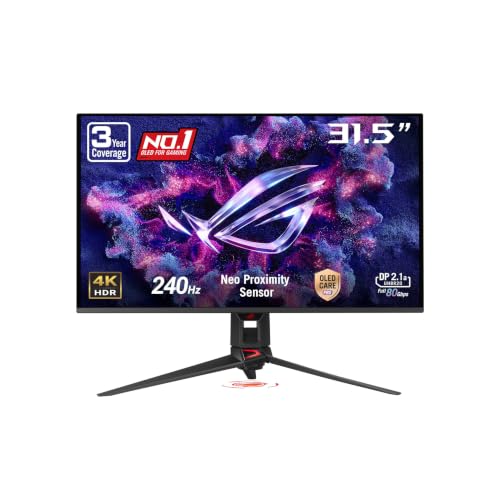
ASUS ROG PG32UCDMR — the current revision of the PG32UCDM line
Badge: The current version — buy this one first
- Panel: QD-OLED, 32-inch class
- Resolution and refresh: 4K (3840 × 2160) at 240Hz
- Response: 0.03ms class
- Colour: true 10-bit, 99% DCI-P3
- Sync: G-SYNC Compatible
- Care and control: OLED Care Pro, DisplayWidget Center
- USB-C: 90W power delivery
The UCDMR is what a flagship looks like after it has lived in the world for a while. The headline specification is the line’s founding one — the big QD-OLED canvas, the full 4K resolution, the 240Hz refresh that still embarrasses most large monitors, pixel response in the instant class — and around that headline, everything is about ownership. OLED Care Pro is the named, current suite of the panel-protection routines ASUS has been refining across this range: pixel-refresh management, screen-protection behaviours and the firmware discipline that keeps a desktop OLED’s image even across years of taskbars and HUDs. DisplayWidget Center moves the monitor’s controls into a proper desktop application, which sounds like a convenience and behaves like a feature — settings that are easy to reach get changed per content, as they should be, instead of fossilising in whatever mode the monitor shipped in.
In use, the experience the listing promises is the one this class is bought for. At 32 inches the 4K image trades the 27-inch model’s ultimate density for presence: games occupy your peripheral awareness, films feel like events rather than content, and a working desktop holds a timeline, a preview and a script in comfort. The QD-OLED contrast does its familiar work in the dark scenes, the 240Hz refresh keeps fast camera movement in shooters and racers clean rather than smeared, and the 90W USB-C means the same screen docks a laptop on weekdays without a second hub. If the phrase “gen3” brought you here looking for the newest, most settled version of this monitor, this listing is the answer the catalogue actually gives.
Strengths
- The mature package: current care suite and current control software on the line’s proven panel specification.
- Complete connectivity for a mixed desk — full-bandwidth PC input, console-ready HDMI, and USB-C docking at a genuinely useful wattage.
- The 32-inch 4K OLED experience at its most settled: density, contrast and 240Hz motion with the early-adopter wrinkles filed off.
Trade-offs
- It is a revision, not a reinvention — owners of the original UCDM gain refinement, not a new picture.
- The 32-inch size demands desk depth; at close range its density trails the 27-inch models and head movement replaces eye movement.
- Premium pricing logic applies: you pay for the current version’s polish even where the original’s panel performs identically.
Best for: buyers who want the current, cared-for version of the 32-inch 4K OLED flagship and plan to keep it for years. Not suited for: shallow desks, bargain hunters who can verify a genuine original listing for less, or competitive specialists who need the UCDP’s second mode.

ASUS ROG PG32UCDM — the original that founded the class
Badge: The original flagship — still the same great panel
- Panel: QD-OLED, 32-inch class, custom heatsink with graphene film
- Resolution and refresh: 4K at 240Hz
- Response: 0.03ms class
- Colour: true 10-bit, 99% DCI-P3
- Sync: G-SYNC Compatible
- USB-C: 90W power delivery
It is worth pausing on what the original PG32UCDM achieved, because the revision only makes sense against it. When this monitor arrived, the 32-inch 4K gaming category meant LCD panels with respectable resolution and unremarkable everything else. The UCDM replaced that settlement with an OLED panel that refreshed at 240Hz, responded essentially instantly, covered the DCI-P3 gamut to 99% with true 10-bit depth, and managed its own thermals with a custom heatsink using a graphene film — a serious piece of engineering aimed at the brightness stability and longevity questions that had dogged desktop OLED. It became, quickly, the reference against which the class was reviewed, and the reference has not moved: the image this monitor makes is the image the revision makes.
So why does the UCDMR exist, and when is the original the smarter buy? The revision exists because ownership software and care routines improve, and because a manufacturer selling a panel for years of desktop duty keeps refining the guardrails. The original is the smarter buy in exactly one scenario: when its verified listing is meaningfully cheaper at the moment you shop, and you are comfortable that its care package — heatsink, refresh routines, firmware of its generation — matches your habits. That is a real scenario, not a trap; panels this good do not become bad because a revision ships. What you must not do is buy the original by accident while believing you bought the revision, which is a listing-reading failure, not a product failure.
Strengths
- The founding specification is intact: same panel class, same resolution and refresh, same colour pipeline.
- Graphene-film heatsink design addressed OLED thermals seriously from the start.
- Frequently the value play of the line when its listing discounts against the revision.
Trade-offs
- Care and control software are of their generation — capable, but not the current suite the revision names.
- Coexisting listings invite ordering mistakes; the title must be read to the last letter.
- As the older listing, stock and seller quality vary more; buy only from a listing you have audited.
Best for: value-aware buyers who verify carefully and prioritise the panel over the polish. Not suited for: anyone who wants the current care suite and software, or who cannot be bothered to audit which listing is which — that reader should take the UCDMR and stop thinking about it.

ASUS ROG PG32UCDP — the dual-mode alternative
Badge: Best for players who split between 4K spectacle and esports speed
- Panel: OLED, 32-inch class, custom heatsink
- Modes: 4K at 240Hz; dual mode Full HD at 480Hz
- Response: 0.03ms class
- Colour: true 10-bit
- Sync: G-SYNC Compatible
- USB-C: 90W power delivery; AI gaming features
The UCDP shares the family’s size, resolution and OLED virtues, then adds the one trick the UCDM line does not perform: a dual mode that drops the resolution to Full HD and pushes refresh to 480Hz for competitive play. Judged as a whole-life monitor it is the UCDM’s equal in spectacle and its superior in one narrow, real discipline — the tournament shooter, where the extra frames are a tool rather than a luxury. Judged as a pure 4K purchase, its panel technology differs in family character from the QD-OLED models, and buyers who have their hearts set on QD-OLED colour behaviour should note that distinction rather than discovering it. The full comparison of this model against the 27-inch flagship lives in our PG27UCDM review; here it stands as the line’s legitimate fork in the road.
Strengths
- Two monitors in one chassis: cinematic 4K and a competitive mode almost nothing else at this size offers.
- Same flagship connectivity and power delivery as its siblings.
- The 32-inch canvas suits racing, flight and cinematic play at proper distance.
Trade-offs
- The second mode is wasted on players who never compete — an expensive trick to leave unused.
- Different OLED family character from the QD-OLED picks; colour purists should compare deliberately.
- Same desk-depth demands as the rest of the 32-inch class.
Best for: genuinely split players — 4K explorer by week, tournament competitor by weekend. Not suited for: single-discipline buyers, who should let the UCDM line’s QD-OLED panel make the decision instead.
UCDMR vs UCDM vs UCDP: the line on one table
| Criterion | PG32UCDMR | PG32UCDM | PG32UCDP |
|---|---|---|---|
| Role | Current revision | Original | Dual-mode sibling |
| Panel | QD-OLED | QD-OLED | OLED (dual-mode) |
| Native mode | 4K 240Hz | 4K 240Hz | 4K 240Hz |
| Second mode | — | — | Full HD 480Hz |
| Care package | OLED Care Pro | Heatsink + refresh routines | Heatsink-based suite |
| Control software | DisplayWidget Center | Earlier generation | AI gaming features |
| USB-C power | 90W | 90W | 90W |
Read the table as a story about where progress lives in a mature product line. The panel column barely moves — because the panel was right the first time — while the care and software rows carry the revision’s whole argument. That is the normal shape of a healthy flagship’s middle age, and it should calibrate expectations in both directions: the UCDMR is not a leap that orphans the original, and the original is not a secret bargain that makes the revision foolish. They are the same idea at two moments of polish, priced and stocked differently at any given moment, and the right choice is the one whose listing you have verified and whose care package matches your discipline.
How did the PG32UCDM line earn its reference status?
A short history sharpens the revision question. Before this line existed, the 32-inch gaming monitor market had a settled hierarchy: fast IPS panels for players, colour-serious LCDs for creators, and OLED confined to televisions and a first wave of smaller or ultrawide experiments. A buyer who wanted size, resolution, speed and contrast in one product was asking for four things the market sold separately. The original PG32UCDM’s arrival collapsed that hierarchy in a single product — QD-OLED at 32 inches, 4K at 240Hz, colour that satisfied creators and response that satisfied competitors — and the reviewing world’s response made it the class reference: the monitor other 32-inch OLEDs were measured against, often literally side by side.
Reference status changes what a revision means. When a product defines a class, its maker does not reinvent it annually; the incentive is to protect the definition while sanding the edges ownership reveals — care routines that learn from a year of real desktops, software that catches up with how owners actually adjust settings, the small port and firmware maturities that never headline a launch. That is the UCDMR’s honest biography. It also explains the line’s pricing behaviour: reference products hold their value because the class keeps being described in their vocabulary, and the original’s continued presence in the catalogue, discounted against its own revision, is the market agreeing with the history. Buyers choosing between them are not choosing between a success and a failure; they are choosing between the founding text and its corrected edition, and readers of both should expect the same story told with slightly cleaner sentences.
The wider lesson travels beyond this line. Monitor generations do not move like phone generations, where last year’s model is a compromise by design. Panels are long-cycle technology: a flagship’s panel, properly cared for, is a five-to-eight-year instrument, and the meaningful differences between adjacent model years concentrate in software, care and connectivity rather than in the image. Shoppers who internalise that stop chasing generation labels — the very habit this article’s title phrase represents — and start auditing the things that actually differ. It is a calmer way to buy expensive glass, and this line is the ideal place to learn it.
What should you check before buying any 32-inch 4K OLED?
Desk geometry before everything. Thirty-two inches at 4K wants roughly a metre of viewing distance to feel like an upgrade rather than an occupation. Measure your desk’s depth and your chair’s position honestly; if the number comes out closer to a 27-inch desk’s, the 27-inch class — covered at the 27-inch PG27UCDM — will serve you better, and no revision letter changes that geometry.
The care system and the warranty, read together. Heatsinks, refresh routines, named care suites and panel warranty terms form a single package: the manufacturer’s confidence, expressed twice. A model with elaborate care marketing and evasive panel terms is telling you which document to believe. In this line, the current revision’s OLED Care Pro branding and the original’s serious thermal hardware are both credible — which is why the choice between them can safely be made on price and software preference.
Ports against your real machines. The gaming PC needs the full-bandwidth path; the console needs HDMI of the current class; the laptop wants USB-C with power delivery strong enough to matter — 90W, as all three picks here provide, runs most work laptops outright. A monitor that docks the weekday machine and drives the weekend one is worth more than its specification admits, because it removes a hub, a cable swap and a daily annoyance.
Your GPU, present and planned. Four times the pixels of 1080p at up to 240 frames per second is a demand cinematic titles will meet partially and competitive titles will meet fully on strong hardware. Variable refresh makes the partial case graceful — OLED’s response keeps motion clean at any delivered rate — but the monitor is a multi-year anchor and should be bought with at least one GPU cycle in mind.
How do you set up a 32-inch QD-OLED for picture quality and panel life?
Feed it properly and verify the mode. Best port, certified cable, then a deliberate check in the GPU control panel that the desktop is running at native 4K and full refresh with variable refresh enabled — defaults lie by omission. In DisplayWidget Center or the on-screen menu, confirm the care features are on before you customise anything else; protection first, preferences second.
Tune per content. Game mode’s low-latency path for play; the accurate colour mode with HDR for film and cinematic titles; a moderated brightness for the working day, when the screen is a document surface rather than a cinema. At 32 inches, also set your operating system’s scaling so text lands at a size your eyes relax at — the density is there to make text crisp, not tiny.
Run the care routine like you mean it. Short screen-sleep interval, hidden taskbar, varied or dark desktop, window layouts that move around during long application sessions, and pixel-refresh cycles allowed to complete undisturbed. On a screen this size, one more habit matters: full-screen video and games are inherently kind to OLED because the whole panel works evenly, while a permanently docked chat window in the corner is the opposite — pop it out, move it, or accept it as the panel’s first ageing site.
Light the room for the panel you bought. OLED contrast is a dark-room art. A bias light behind the screen, curtains that close, and a lamp that does not reflect in the glossy surface will do more for perceived quality than any menu setting — and they make the moderate full-screen brightness of OLED a non-issue in the hours the monitor is actually enjoyed.
What mistakes do buyers of this line make?
Searching by nickname is the first: ordering whatever a “gen 3” query surfaces, without reading the delivered title, is how originals arrive in revisions’ clothing and vice versa. The second is comparing the revision and the original on panel numbers alone and concluding they are identical purchases — the care suite and software are part of the product, especially across a five-year ownership. The third is the size mistake in both directions: the 32-inch bought for a shallow desk because bigger felt safer, and the 27-inch bought for a deep desk because its density number was prettier. The fourth is starving the panel — a mid-range GPU, the wrong port, HDR half-enabled — and reviewing the monitor for the system’s sins. The fifth is treating a revision’s arrival as a verdict on the original: the UCDM did not get worse the day the UCDMR listed, and owners shopping its discount are buying the class’s founding image at a mature price, which is often the smartest money in the whole category.
Final recommendation
If the phrase that brought you here means “the newest version of the 32-inch ROG 4K OLED”, the catalogue’s answer is the PG32UCDMR: buy it for the settled care suite, the current software and the line’s proven panel, and buy it knowing exactly what it is. If its verified listing and the original PG32UCDM’s sit close in price, take the revision; if the original is substantially cheaper on a listing you have audited to the last letter, take the original with a clear conscience and put the difference toward the GPU that feeds it. Take the PG32UCDP only if the dual mode describes your actual weekends. And whichever suffix lands on your desk, set it up with the care section above — in this class, the owner is half the warranty. The wider field, for readers still cross-shopping brands, is mapped in our best gaming monitors roundup and the ultrawide branch in OLED ultrawide gaming monitors.
QD-OLED at 32 inches: the colour and text questions, answered plainly
Two technical questions follow this line into every comment thread, and a review that calls itself complete should answer both without flinching. The first is colour behaviour: QD-OLED’s quantum-dot conversion gives the panel its wide gamut and its particular strength — colour that stays saturated as brightness rises, where rival technologies wash toward white. In practice that means the line’s 99% DCI-P3 coverage is not a laboratory figure but a visible one, in the saturated skies of open-world games, in HDR highlights that hold their hue, and in creative work where the difference between a gamut claimed and a gamut delivered is the difference between a proof and a guess. For sRGB content — the web, the office suite, most broadcasts — the monitors’ accurate modes rein the gamut in properly, and owners should use them rather than marvelling at oversaturation and calling it quality.
The second question is text. QD-OLED’s subpixel arrangement differs from the stripe that operating systems were raised on, and at 32 inches the pixel density is lower than the 27-inch class — so the fringing that density hides at 27 inches has less cover here. The honest report is that at proper viewing distance, with current operating-system rendering and sensible scaling, the great majority of owners never notice it in real work; a minority, working all day in dense code or small-print documents, do notice it in the first week and then either adapt or conclude the panel is not their work tool. This review’s counsel is empirical: if your living is made of small text, see any QD-OLED of this size with your own applications before committing, because no review — this one included — can see through your eyes. Gamers, video editors and mixed users can proceed on the line’s reputation; text specialists should audition. That is not a weakness of the product. It is the correct division of labour between a review and a retina.
What does a week across both kinds of play look like on this line?
Ownership texture is the evidence specifications cannot give, so consider the line’s natural habitat: a deep desk, a strong PC, a console beside it, and an owner whose week is genuinely mixed. Weekday mornings belong to the laptop on USB-C — the 90W delivery running the machine, the 32-inch canvas holding documents at a scale that makes the small screen on the laptop itself feel like a rumour. The panel’s density at this distance is the quiet luxury: not the 27-inch class’s print-like sharpness, but a complete absence of the coarseness that used to announce a big screen’s compromise. Nobody photographs this. Everybody who works at it notices its absence when they travel.
Evenings divide by mood. The cinematic library — open worlds, racers, the slow horror game saved for Fridays — uses the panel the way its designers dreamed: HDR engaged, room dark, contrast doing the storytelling that brightness never could. The competitive sessions use the same screen differently, and here the line’s 240Hz earns its keep in the least dramatic way possible: nothing about the motion ever becomes the subject. A flick shot lands or misses on the player’s terms; the panel is never the alibi and never the hero, which at this level is the entire job. Owners of the dual-mode sibling get one further gear for tournament nights; owners of the UCDM line proper report, consistently, that 240Hz with OLED response already sits past the point where the display is the limiting factor in their play — the limit is the player, as it should be.
The weekend adds the third citizen: the console, on HDMI, playing the exclusives at the size they were graded for, and the family film after it. A 32-inch OLED at proper distance is a personal cinema that a living-room television owner would recognise as the same art at a different scale. Across all of it, the care system ticks away unremarked — refresh cycles in standby, sensible brightness by content, a screen that is never asked to hold one static image for a working day without relief. That is the line’s real review, repeated by its owners in different words: it disappears into every role, and the disappearance is what the flagship money bought.
Resale, longevity and the revision’s place in the line’s story
Flagship monitors live second lives, and this line’s structure makes its used market unusually legible. The original UCDM, as the founding model, will circulate for years with the strongest name recognition in the class; the UCDMR will circulate as the connoisseur’s version, its suffix a small education for every buyer who meets it. For sellers, the lesson is documentation: a panel’s care history — refresh cycles allowed, brightness habits, a smoke-free, sun-free room — is the used OLED market’s currency, and owners who can describe theirs sell into trust. For buyers of used panels in this line, the inspection liturgy is short and physical: a full-screen grey test for uniformity, solid colours at low brightness for retention ghosts, the care menu’s own counters where the firmware exposes them, and the original accessories and stand, whose absence discounts more than sellers expect.
Longevity, finally, is where the revision question resolves into something like peace. A line whose maker revises rather than replaces it is a line whose parts, firmware attention and community knowledge keep compounding — the monitor bought today joins an ecosystem that is still being written. Whether your suffix is the original’s or the revision’s, the panel on the desk is the same founding idea, and its expected service is measured in the same long units. Generations will be claimed by marketers for as long as monitors are sold; this line’s owners can afford to smile at the word, because they own the thing the word was reaching for.
Consoles, creators and the second machine: the line’s wider parish
A flagship monitor’s parish is wider than its gaming brief, and this line serves two congregations worth naming. The first is console players with desk setups: a current PlayStation or Xbox on this panel gets the full benefit of its HDMI pipeline — high refresh where the games support it, variable refresh smoothing the rest, and OLED contrast that flatters the cinematic exclusives these machines are bought for. At 32 inches and desk distance, the experience rivals a living-room television’s for a solo player, and the same screen then rotates back to PC duty without a cable being touched. The second congregation is creators who game: video editors whose timelines live at 4K, photographers whose catalogues demand honest colour, streamers whose single screen must be camera-worthy and play-worthy in the same hour. For them the line’s 10-bit pipeline, gamut and density are not gaming garnish but the working surface, and the 240Hz is the evening’s reward on the same glass.
Both congregations should note the line’s one structural ask: a single screen this good becomes the desk’s bottleneck of attention, and multi-monitor habits — the chat window, the reference document, the stream dashboard — need a plan, whether that is the panel’s own real estate used with discipline or a modest secondary screen in portrait beside it. Owners solve it both ways and report the same conclusion: the flagship earns the centre, and the centre, once earned, reorganises everything around it. That is the final sense in which the revision question shrinks to its proper size — UCDM or UCDMR, the parish is the same, and it is well served either way.
How to choose on the day: a decision procedure for the two listings
Because both listings are live and legitimate, the final choice deserves a procedure rather than a vibe. Step one: confirm identity. Open each listing and read its title to the final letter, confirming which is the original and which carries the R — then ignore every other page, tab and comparison that uses the names loosely. Step two: list what you are actually buying in each case. In both: the same panel class, resolution, refresh, colour pipeline and connectivity, including the 90W USB-C. In the revision additionally: the current care suite under its OLED Care Pro name and the current DisplayWidget Center software generation. Step three: price the difference on the day, from the listings themselves — not from memory, not from a third party’s chart — because this pair’s gap breathes with the market and last month’s answer is not this month’s.
Step four is the honest self-examination. If the gap is small, the revision is the rational default: the care and software are the parts of a monitor you interact with for years, and maturity is worth a modest premium on a five-year instrument. If the gap is large, ask whether your own care discipline is strong — the habits in this article’s setup section, genuinely practised — because a disciplined owner closes much of the revision’s practical lead, and the saving is better spent on the GPU, the arm or the room. If the gap is large and your discipline is doubtful, the procedure has still done its work: it has told you that what you are buying with the premium is not a picture but a partnership, and partnerships are legitimately priced. Step five: whichever you choose, buy it once, from the audited listing, and stop comparison-shopping your own decision — the line’s owners are unanimous that the second-guessing ends the first evening the panel lights up, and they are right.
The settings sheet: starting points for three kinds of owner
Reviews of this line often end at the purchase; owners begin at the menu, so here are starting configurations for the three readers this article has served, offered as baselines to tune rather than commandments to obey. The competitive player begins with the low-latency path: game mode engaged, variable refresh on at the driver and the panel, brightness set for the room’s evening state rather than its noon, and any image-processing extras — dynamic contrast, sharpening, motion interpolation of any flavour — switched off, because each is a small tax on the signal’s honesty or its speed. The creator begins from the opposite pole: the accurate colour mode as the default desktop personality, sRGB behaviour for web and office work, the wide-gamut mode reserved for the applications that can use it, brightness at the reference level their calibration habit assumes, and HDR left to the content that carries it rather than forced across the desktop. The mixed owner — this line’s typical buyer — runs both personalities as saved profiles and treats the switch between them as part of sitting down, the way a driver adjusts a mirror.
Three settings deserve individual mention because owners get them wrong in predictable ways. The pixel-refresh and panel-care options should be at their most protective defaults for the first months of ownership, while habits form; relaxing them is a decision for an owner who knows their own usage, not a default for one who does not. The proximity and sleep behaviours, on models and firmware that expose them, should be tuned to the owner’s real stillness — a reader who sits motionless over documents will curse an eager sensor, and a fidgeter will never trigger a lax one — and the first week is the time to calibrate that relationship. And the firmware itself should be brought current before any of the above, because care routines and compatibility are living software on a modern OLED, and a panel set up lovingly on day-one firmware is a panel missing a year of its maker’s learning. None of this is difficult. All of it is the difference between owning the line’s specification and owning its performance, which are the same product only on the box.
What rival flagships would have to prove, and how this line answers
A complete review should state the terms on which its subject could lose. Rival 32-inch 4K OLED flagships compete on four fronts where this line could, in principle, be beaten: warranty generosity on the panel itself, where makers differentiate in years and in the fine print’s courage; full-screen and highlight brightness, where each panel generation nudges the ceiling; port selection, where an extra high-bandwidth input or a different USB arrangement can fit a particular desk better; and price discipline, where a rival’s promotion can invert the value order for a month at a time. A shopper cross-shopping the class should score those four fronts explicitly, because they are where the real differences live — the panel fundamentals, as this article has argued throughout, are a shared inheritance across the class’s QD-OLED models.
Against that standard, the PG32UCDM line’s defence is the defence of the reference: it set the class’s terms, its care and thermal engineering were serious from the first edition, its revision shows a maker still investing rather than coasting, and its catalogue presence — original and revision side by side, both verified — gives the buyer an unusual freedom to choose their own point on the polish-versus-price curve within a single trusted line. Rivals will win individual desks on individual fronts, and this review’s framework is designed to identify those cases honestly. But the line that defines a class does not need to win every comparison to remain its centre; it needs to be the product the comparisons are about. By that measure, the monitor behind the “gen3” search phrase has no succession problem at all — only a naming one, and naming, as this article has shown, is a problem the buyer can solve in one careful reading of a title.
One line, three listings, no wrong answers
It is rare for a review to be able to say this honestly, so it is worth saying before the questions begin: within the verified listings of this line, there is no trap. The original is the founding flagship at a mature position; the revision is the same flagship with its ownership layer brought current; the dual-mode sibling is a genuinely different tool for a genuinely different player. Every failure mode this article has warned against lives outside the products — in misread titles, in generation folklore, in desks measured by hope rather than by tape. Get the listing right, get the size right, feed the panel properly and keep its care routines running, and the PG32UCDM line will do the rest for years. That is what a reference product is for.
Frequently asked questions
Is there really no PG32UCDM Gen 3?
There is no Amazon listing with that name, and no generation-numbered model in the manufacturer’s naming for this line as verified for this article. The phrase circulates because panel generations, quiet monitor revisions and tidy video titles all invite it. The current purchasable reality is two listings — the original PG32UCDM and its revision, the PG32UCDMR — and this review covers the line on that basis, because buying advice has to attach to products that can actually be ordered.
What does the R in PG32UCDMR stand for, practically?
Practically, it marks the revised listing of the PG32UCDM line: the same 32-inch 4K 240Hz QD-OLED proposition, carrying the current ownership package — OLED Care Pro named in the listing and DisplayWidget Center software control. ASUS does not sell it as a new generation, and neither does this review. Think of it as the line’s mature form: the purchase for buyers who want the present-day version of a proven monitor rather than its first edition.
Is the original PG32UCDM still worth buying?
Yes, in the specific circumstances its section describes: a verified listing, a meaningful saving against the revision, and a buyer whose care habits are good. The panel, resolution, refresh rate, colour pipeline and thermal hardware that made it the class reference are unchanged by the revision’s existence. What you forego is the current care branding and software generation — a real but modest difference, worth real but modest money. Let the actual price gap on the day decide, not the calendar.
PG32UCDM line or PG27UCDM — which size should I choose?
Choose by seating distance and desk depth, not by specification envy. Around arm’s length, the 27-inch model’s higher density is the sharper, more comfortable tool, and competitive players often prefer its scan distance. Beyond roughly a metre, the 32-inch line’s immersion takes over and its density remains more than sufficient for text and detail. Both deliver the same OLED contrast and 240Hz motion; the wrong size will bother you daily, while the right one disappears — which is the highest compliment a monitor can earn.
Does the UCDP’s 480Hz mode make it the better buy?
Only for the player who will use it weekly. The dual mode is a genuine capability — tournament-grade refresh in a 32-inch 4K chassis — but it serves one genre family, and its Full HD resolution is a step down in image density every time it engages. Buyers whose libraries are cinematic, creative or mixed get more from the QD-OLED panel character of the UCDM line across all their hours. Buy the mode you will live in, not the mode you can boast about.
How long should a monitor in this class last?
With the care system enabled and the habits in this guide followed, a flagship OLED of this generation is a multi-year anchor — the component around which GPUs, consoles and laptops rotate. Longevity is dominated by usage pattern rather than calendar: varied content, moderated brightness for static work, completed refresh cycles and a screen that sleeps when its owner does. The revision’s existence also signals a manufacturer still investing in the line’s support, which is its own quiet longevity argument.
Does the current PG32UCDM revision suit a desk that faces a window?
Better than early OLED owners might fear, provided expectations stay grounded in how glossy QD-OLED behaves. The panel coating preserves black depth and colour punch in ordinary room light, and the line’s healthy brightness headroom keeps highlights convincing through a bright afternoon. What no glossy flagship defeats is a window reflected directly behind your chair, which will mirror itself in darker scenes regardless of brand. Angle the screen slightly, shade the worst reflection, and this revision handles mixed daylight gaming and evening cinema from the same seat without complaint.
Should an original PG32UCDM owner move across to the revised listing?
Almost never for the panel alone, because the viewing experience that made the original a reference has not been reinvented by its successor. The revision refines firmware behaviour, connectivity polish and small ownership details rather than redrawing the picture, so an existing owner would mostly be buying familiarity twice. The sensible exceptions are practical ones: a second desk that needs its own flagship, a household member inheriting the original, or a warranty situation that makes replacement straightforward. Everyone else should keep enjoying the screen already in front of them and save the upgrade urge for a genuine generational leap in size, brightness or panel technology. Keep the receipt and firmware notes from whichever listing you choose, because that paperwork settles any future support conversation faster than forum recollection ever will.
Related reading: the 27-inch flagship reviewed · the unverified UCWM names explained · 1080p, 1440p and 4K gaming compared