Disclosure: As an Amazon Associate, reviewstook.com earns from qualifying purchases. Links on this page are affiliate links; they cost you nothing extra. Prices and availability change often, so check the current Amazon listing before you buy.
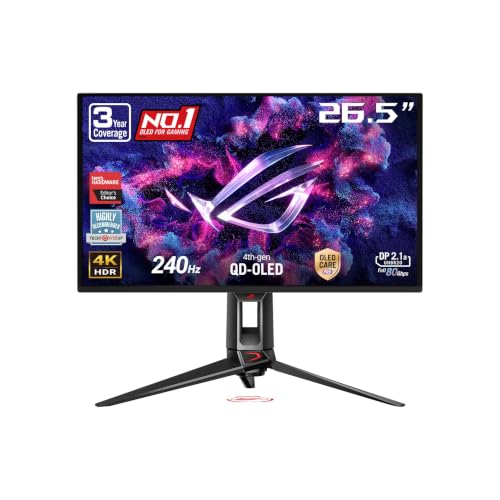
The rog swift oled pg27ucdm is the monitor that answers a question competitive players asked for years: can a 27-inch screen hold a full 4K image, refresh it at 240Hz, and do it on an OLED panel without the compromises that made earlier generations feel like prototypes? ASUS built this display around a QD-OLED panel with a custom heatsink, a proximity sensor that watches for you rather than the other way round, and DisplayPort 2.1 connectivity that finally lets a modern graphics card feed the panel everything it can show. This review works through the PG27UCDM as a complete purchase: what the panel does well, where its limits honestly sit, how it compares with the 32-inch alternative in the same family, and how to set it up so the expensive parts of the specification actually reach your eyes.
Context matters before the detail. The 27-inch 4K OLED class exists because two audiences collided. Competitive players wanted the motion clarity of very high refresh rates without dropping to the soft image of 1440p on a large screen, and creators wanted pixel density high enough that text, timelines and retouching work stay crisp at normal desk distance. A 27-inch 4K panel delivers roughly 166 pixels per inch, which is dense enough that individual pixels disappear in games and fine interface elements render cleanly in productivity software. Pair that density with OLED’s per-pixel light control and near-instant response, and you have the specification sheet the PG27UCDM is built on. The rest of this page is about whether the engineering around that panel — cooling, firmware, ports, ergonomics — is worthy of it.
Key takeaways
- The PG27UCDM pairs a 27-inch 4K QD-OLED panel with a 240Hz refresh rate and 0.03ms response, a combination aimed at players who refuse to choose between sharpness and speed.
- OLED Care Pro and the Neo Proximity Sensor are the headline ownership features: the sensor dims or blanks the screen when you step away, which is the most practical burn-in defence a desktop monitor can offer.
- DisplayPort 2.1 is the connection that matters — it carries the full 4K 240Hz signal without leaning on compression the way older ports must.
- The verified listing used here is the single subject listing for this monitor; a second listing of the same model exists, so confirm you are looking at the PG27UCDM itself before ordering.
- The 32-inch PG32UCDP is the honest alternative if you want a larger canvas and a dual-mode party trick; it is a different experience, not a better one.
- OLED ownership still asks for habits: varied content, sensible brightness, and letting the panel’s own refresh cycles run.
In this guide
What is the ROG Swift OLED PG27UCDM, exactly?
Strip the marketing away and the PG27UCDM is a 26.5-inch-class QD-OLED monitor — sold and described as a 27-inch model — running a native 3840 by 2160 resolution at up to 240Hz. QD-OLED matters as a panel technology choice: quantum-dot colour conversion over a blue OLED emitter gives the panel its wide colour gamut and strong colour volume at high brightness, while the self-emissive structure gives it the perfect black levels and per-pixel contrast that no backlit LCD can imitate. ASUS layers its own engineering on top: a custom heatsink behind the panel to move heat away from the organic layers, the OLED Care Pro suite of protective routines, and a Neo Proximity Sensor that detects whether a person is actually sitting in front of the screen.
The supporting specification reads like a checklist written by someone who uses a desk monitor for everything. G-SYNC compatibility keeps variable refresh smooth with NVIDIA cards, and the panel works with adaptive sync generally, so tearing and stutter are handled regardless of your GPU camp. True 10-bit colour depth means gradients in games, films and photo work render without the banding that 8-bit panels show in skies and shadows. The stand offers the ergonomic adjustments a monitor at this level should — height, tilt, swivel and pivot — because a panel this good deserves to be pointed at your eyes properly, and the connectivity centres on DisplayPort 2.1 and HDMI 2.1-class inputs plus USB-C, so consoles, PCs and a laptop can share the screen without a cable-swapping ritual.
Where does it sit in the ROG line? Above it, in size rather than quality, are the 32-inch models; beside it are the 1440p OLED models that trade resolution for even higher refresh rates. The PG27UCDM is the resolution-first flagship of the 27-inch OLED range, and that positioning shapes everything in this review: it is a monitor for people whose first question is image quality and whose second question is speed, and who are pleased to discover the answer to the second is 240Hz anyway. Readers comparing across the range may also find our coverage of the best gaming monitors useful for the wider field, and the 1440p sibling class is discussed in our guide to OLED ultrawide gaming monitors for those weighing a wider canvas instead.
How were the picks in this review chosen and verified?
Every linked product on this page was checked against Amazon’s own catalogue data through the Creators API before a link was placed, and the exact listing titles are recorded in this article’s sources file. That process produced an instructive wrinkle for this particular monitor: the PG27UCDM appears under two separate Amazon listings with near-identical specifications. Rather than link both and pretend they are different products, this review uses one subject listing — the ASUS ROG PG27UCDM listing whose title records the QD-OLED panel, OLED Care Pro, Neo Proximity Sensor, custom heatsink and DisplayPort 2.1 — and treats the second listing as what it is: the same monitor sold through a second listing page. If you comparison-shop, compare the two listings’ current terms by all means, but do not let a search results page convince you they are different models.
The alternative pick survived the same check. The PG32UCDP is a genuinely different monitor — a 32-inch 4K OLED with a dual-mode feature that drops to Full HD at very high refresh for competitive play — so it earns its place as the alternative for buyers whose desk and taste run larger. Products that could not be verified to that standard were left as prose mentions or left out entirely; no specification in the pick sections below comes from anywhere except the verified listing titles and universally established facts about the panel class. Prices are deliberately absent throughout: listings move, and the honest instruction is the one on every pick — check price on Amazon at the moment you are ready to buy.
The picks at a glance
Two monitors, two sizes, one panel philosophy. The PG27UCDM is the subject and the recommendation for most desks; the PG32UCDP is the larger alternative whose dual-mode feature gives competitive players a second personality to switch into. Everything else in this class — 1440p OLEDs chasing higher refresh, 4K LCDs chasing lower prices — is discussed in prose in the buying guide, because the verified shortlist for this page is deliberately these two ROG OLEDs.
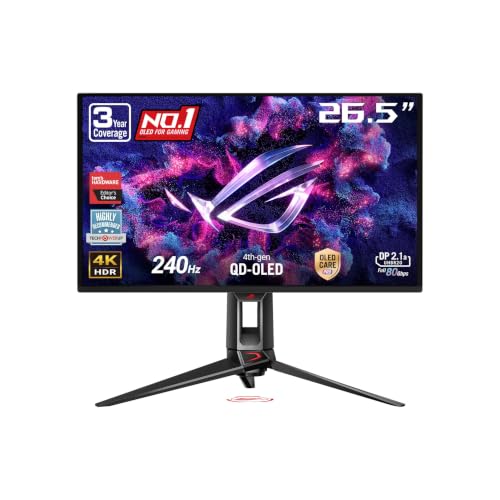
ASUS ROG PG27UCDM — the 4K 240Hz QD-OLED subject pick
Badge: Best for sharpness-first competitive play
- Panel: QD-OLED, 27-inch class (26.5-inch viewable)
- Resolution and refresh: 4K (3840 × 2160) at 240Hz
- Response: 0.03ms grey-to-grey class
- Colour: true 10-bit, wide DCI-P3-class gamut
- Sync: G-SYNC Compatible, adaptive sync
- Protection: OLED Care Pro, Neo Proximity Sensor, custom heatsink
- Key port: DisplayPort 2.1
Start with the image, because the image is the argument. At 27 inches, 4K stops being a specification and becomes a sensation: the pixel grid vanishes, edges in games look drawn rather than assembled, and fine detail — distant foliage, small text in a strategy interface, the weave of a racing suit — resolves in a way 1440p at this size simply cannot match. Then the OLED part asserts itself. Black is not dark grey here; it is the absence of light, pixel by pixel, so night scenes, space games and horror titles gain a depth that backlit panels physically cannot reproduce, and bright highlights sit against that black with a contrast ratio that is effectively infinite. The 240Hz refresh and the panel’s near-instant pixel response complete the triangle: motion stays as clean as the still image, with ghosting essentially removed from the equation.
The ownership engineering is what separates this generation from the OLED monitors of a few years ago. The custom heatsink pulls heat away from the panel, which supports both brightness stability and panel longevity. OLED Care Pro bundles the protective routines — pixel cleaning cycles, screen-move and logo-management behaviours — into the firmware where they belong. And the Neo Proximity Sensor is the feature you will appreciate most in a year: it notices when you leave the desk and dims or blanks the display, then wakes it when you return. Static desktop elements are the main long-term risk for any OLED used as a PC monitor, and a sensor that simply turns the picture off when nobody is looking at it attacks that risk at its root.
Connectivity is the third leg. DisplayPort 2.1 gives a current graphics card a full-bandwidth path to 4K 240Hz, so the panel can be fed without the compression compromises older DisplayPort versions need at this resolution and rate. HDMI inputs handle consoles at their best output, and USB-C makes the monitor a plausible single-cable hub for a laptop between gaming sessions. None of this is glamorous, and all of it is the difference between a specification sheet and a monitor that delivers its specification in daily use.
Strengths
- Pixel density that makes 4K meaningful: at 27 inches the image is seamless, and text work is as rewarding as gaming.
- OLED contrast and response together: perfect blacks plus 0.03ms-class pixel transitions plus 240Hz is the complete motion-and-image package.
- The protection stack is genuinely useful — heatsink, OLED Care Pro and a proximity sensor that guards the panel precisely when you are not there.
Trade-offs
- Full-screen brightness is OLED-typical rather than LCD-heroic; a sun-drenched room will still favour a bright LCD for daytime work.
- 4K at 240Hz demands a serious graphics card in demanding games; the monitor will outlast a mid-range GPU’s ability to feed it.
- It is a premium, single-purpose investment — buyers who mostly browse and write may be paying for headroom they rarely use.
Best for: players and creators who want one 27-inch screen that is simultaneously a high-refresh competitive display and a high-density work display. Not suited for: bright-room-only setups, owners of modest GPUs who play the newest releases at native settings, or anyone who wants a big cinematic canvas — that reader should look at the 32-inch alternative below.

ASUS ROG PG32UCDP — the 32-inch dual-mode alternative
Badge: Best for big-desk players who switch between 4K and esports modes
- Panel: OLED, 32-inch class
- Resolution and refresh: 4K at 240Hz, dual mode to Full HD at 480Hz
- Response: 0.03ms class
- Colour: true 10-bit
- Sync: G-SYNC Compatible
- Extras: custom heatsink, AI gaming features, USB-C with 90W power delivery
The PG32UCDP answers a different question: what if the desk is deep, the chair sits further back, and the same player who explores a 4K open world on Friday plays a tournament shooter on Saturday? At 32 inches, 4K spreads to a pixel density closer to 1440p at 27 inches — still sharp, but the emphasis shifts from density to immersion, and the screen fills more of your field of view. The dual-mode feature is the genuine differentiator: switch the panel to its Full HD 480Hz mode and it becomes an esports display with a refresh rate almost nothing else on a desk can match, then switch back to 4K 240Hz for everything else. Two monitors’ worth of personalities in one chassis is a real argument if your play is genuinely split that way.
Around that headline, the package mirrors the subject pick’s seriousness: a custom heatsink, true 10-bit colour, G-SYNC compatibility, and USB-C with enough power delivery to run a laptop from the monitor. ASUS’s AI gaming features — crosshair and shadow-enhancement aids — are present for those who use them. The honest framing is that the PG32UCDP is not the PG27UCDM but bigger; it is a different balance of density, immersion and mode-switching, and it asks for more desk depth to make sense. Sit too close to a 32-inch screen and you will move your head instead of your eyes; sit at the right distance and the 27-inch model starts to feel like the compromise.
Strengths
- Dual-mode flexibility is unique in this pair: 4K 240Hz for spectacle, Full HD at very high refresh for competition.
- The larger canvas suits cinematic games, flight and racing rigs, and split-screen productivity at a comfortable distance.
- USB-C power delivery at a useful wattage makes it a credible laptop dock as well as a gaming display.
Trade-offs
- Lower pixel density than the 27-inch subject pick, so fine text and ultimate sharpness take a small step back.
- Needs a deeper desk; on a shallow desk the size becomes a liability rather than a luxury.
- The 480Hz mode’s benefit is real but narrow — it matters to competitive players, and is invisible to almost everyone else.
Best for: players with deep desks who split time between cinematic 4K gaming and serious competitive play. Not suited for: shallow desks, sharpness absolutists, or buyers who would never touch the second mode.
PG27UCDM vs PG32UCDP: which size actually fits your desk?
| Criterion | PG27UCDM | PG32UCDP |
|---|---|---|
| Screen size | 27-inch class | 32-inch class |
| Native mode | 4K at 240Hz | 4K at 240Hz |
| Second mode | — | Full HD at 480Hz |
| Pixel density | Higher — sharpest text | Lower — more immersion |
| Panel care | OLED Care Pro + proximity sensor | Heatsink-based care suite |
| Ideal viewing distance | Arm’s length and a little beyond | Deeper desks, further seating |
| Best audience | Sharpness-first all-rounders | Mode-switching competitors |
The table hides the real deciding factor, which is distance. Measure from your eyes to where the screen will sit. At roughly 60 to 80 centimetres, the 27-inch model’s density advantage is fully visible and its size fills your central vision without demanding head movement; the 32-inch model at that distance feels theatrical in games and tiring in spreadsheets. Beyond 90 centimetres the balance flips: the smaller screen’s density is wasted on eyes too far away to resolve it, while the larger screen’s immersion comes into its own. Competitive players should also think about scan distance — the habit of reading a whole tactical scene at a glance — which is why so many tournament desks stay at 27 inches and below even when budget is no object.
The second deciding factor is the graphics card, present and planned. Both monitors ask a GPU to render four times the pixels of 1080p, two hundred and forty times a second, in the games where the refresh rate is the point. In practice, competitive titles with scalable engines reach those rates on strong current cards, while cinematic titles will use the panel’s variable refresh to deliver whatever rate the card can sustain — which still looks superb on OLED because the response time keeps motion clean at any rate. Buy the monitor as a multi-year anchor and let one GPU upgrade cycle pass beneath it; buy it expecting a mid-range card to max it in everything and you will misjudge a fine display.
What should you check before buying a 4K OLED monitor?
Panel technology and its care system. QD-OLED and WOLED are the two OLED families in gaming monitors; both give perfect blacks and instant response, differing mainly in colour behaviour at brightness and subpixel layout, which affects fine text rendering. Whichever family you choose, the care system matters as much as the panel: look for a heatsink or equivalent thermal design, an automated pixel-refresh routine, and — the PG27UCDM’s standout — a presence sensor or a disciplined auto-sleep habit on your side. OLED longevity is a partnership between the firmware and the owner.
Ports with real bandwidth. A 4K 240Hz signal is heavy. DisplayPort 2.1 carries it natively; older DisplayPort versions lean on display stream compression, which is visually lossless in practice for most viewers but adds a dependency. HDMI 2.1-class inputs matter for consoles and second PCs. Check the port list against your actual machines, including the laptop you might dock: USB-C with power delivery turns a gaming monitor into a weekday workstation hub, and its absence is felt every single morning.
Sync, response and the honesty of numbers. G-SYNC Compatible certification means NVIDIA has validated the variable-refresh behaviour; FreeSync-class support covers AMD. Response-time figures on OLED are genuinely in a different league from LCD — the 0.03ms class quoted here is a property of the technology, not a marketing overdrive mode — so motion clarity comparisons with LCD monitors should be made on that basis. What you should not do is choose between two OLEDs on response numbers; they are all effectively instant, and the differences that matter are size, resolution, care features and ports.
Ergonomics and your actual desk. Height adjustment is non-negotiable at this price, pivot matters to coders and document workers, and the stand’s footprint decides whether your keyboard and mouse pad still fit. If you use a monitor arm, confirm VESA compatibility and the panel’s weight. Finally, measure your room’s light: OLED’s glossy screen finishes reward controlled lighting with unmatched contrast and punish a window directly behind you with reflections. Neither is a defect; both are fit questions, and fit questions are the whole of monitor buying.
How do you set up the PG27UCDM for the best picture and the longest panel life?
Step one: connect it properly. Use the DisplayPort 2.1 input for your main PC with a certified cable of sensible length, and confirm in your GPU control panel that the desktop is actually running at 3840 by 2160 and 240Hz — more than one owner has run a flagship panel at a default lower rate for months. Enable variable refresh in the driver and in the monitor’s menu, and set the game’s own display mode to match.
Step two: choose picture settings per content, not once forever. For competitive play, prioritise the low-latency path: game mode on, any processing that adds delay off, brightness set for your room rather than maximum. For film and cinematic games, the accurate colour mode with HDR enabled lets the panel show its contrast properly. For desktop work, many owners run a modest brightness — easier on eyes over eight hours and kinder to the panel — and let the proximity sensor handle the rest.
Step three: build the OLED habits in the first week. Set your operating system’s screen sleep to a short interval as a backstop to the sensor. Auto-hide the taskbar, rotate wallpapers or use a plain dark desktop background, and vary your window layout if one application owns the screen all day. Let the monitor run its pixel-refresh cycle when it asks — interrupting it repeatedly to save two minutes is the falsest economy in OLED ownership. None of these habits is burdensome once set; all of them together are the difference between a panel that looks new in year three and one that carries a ghost of your spreadsheet grid.
Step four: calibrate your expectations of HDR. OLED HDR is about contrast, not raw full-screen brightness: a candle in a dark room, headlights in a night race, a spell effect in a black dungeon — these are the moments the panel renders beyond any LCD. Set HDR up per the game’s own calibration screens, resist the urge to raise overall brightness to compensate for a bright room, and instead control the room. Curtains are the cheapest monitor upgrade ever sold.
What mistakes do buyers make with premium OLED monitors?
The first is feeding the panel badly: the wrong port, an ancient cable, a desktop left at 60Hz, HDR enabled in one place and not another. The second is judging OLED by a bright showroom or a sunlit office at noon — the one environment that flatters its LCD rivals — rather than by the evening gaming and media sessions where it will actually live. The third is ignoring the GPU budget line: the monitor’s price is only part of the upgrade, and a card that cannot drive 4K at pace turns a flagship into a promise. The fourth is treating panel care as paranoia and disabling the very routines — pixel refresh, screen dimming, the proximity behaviour — that keep the image clean for years. And the fifth, specific to this model, is listing confusion: with two listings of the PG27UCDM in circulation, buyers have ordered from a page they did not read closely and then wondered why the box, terms or seller differed from what they expected. Read the listing title, confirm the model, then check price on Amazon and order once.
Final recommendation
The ROG Swift OLED PG27UCDM is the monitor for the buyer who has stopped accepting the old trade: sharp or fast, cinematic or competitive, work or play. Its 4K QD-OLED panel at 240Hz is the complete image — dense, contrasty, instant — and its ownership engineering, above all the proximity sensor and heatsink, shows a manufacturer designing for the monitor’s third year rather than its first week. Choose it if your desk distance is moderate, your GPU is strong or scheduled to become so, and your lighting is controllable. Choose the PG32UCDP instead if your desk is deep and your play genuinely splits between 4K spectacle and tournament modes. Either way, you are buying into the generation where OLED stopped being an experiment and became the reference. Readers still mapping the wider market can cross-check the field in our best gaming monitors roundup, and anyone torn between this and a 1440p speed-first panel should weigh the resolution argument in 1080p, 1440p and 4K gaming compared.
Frequently asked questions
Is 4K at 27 inches actually visible, or is it wasted resolution?
It is visible in exactly the places you spend your day: text edges, interface detail, distant objects in games, and the general sense that the image is printed rather than projected. At typical desk distances a 27-inch 4K panel sits beyond the threshold where most viewers can pick out individual pixels, which is the point — the grid disappears and only the image remains. Move much beyond a metre away and the advantage fades, which is why the size decision in this review is framed around seating distance.
Will the PG27UCDM burn in if I use it for work all day?
Burn-in on modern OLEDs is a cumulative-wear question, not an inevitability, and this model carries the strongest practical defences available: a heatsink to keep the panel cool, automated pixel-refresh routines, and a proximity sensor that blanks the screen when you are away — which is when static desktops do most of their damage. An owner who keeps brightness sensible for office work, varies content, hides the taskbar and lets refresh cycles run should expect years of clean service. An owner who disables every protection and parks one bright static window at maximum brightness for twelve hours a day is volunteering for uneven wear on any OLED.
Do I need DisplayPort 2.1, or will my existing cable and port do?
Your existing setup will light the panel, but DisplayPort 2.1 is the path that carries 4K 240Hz at full specification from a current graphics card. Older DisplayPort versions can reach the same headline mode using compression, which most viewers cannot distinguish in games, while HDMI 2.1-class inputs serve consoles and secondary machines well. The practical advice: use the best port your GPU offers, verify the running mode in the driver panel after setup, and replace suspect cables before blaming the monitor for a signal that will not lock at full rate.
How does the PG27UCDM handle consoles?
Very well, because console gaming is OLED’s home turf: perfect blacks, instant response and HDMI inputs that accept the consoles’ best output modes make films and games look as their colourists intended. The 27-inch size suits a desk-based console setup — a PS5 or Xbox beside the PC, sharing the screen — better than a living-room arrangement, where a larger display is the right tool. Variable refresh support smooths the frame-rate dips that open-world console titles still produce.
PG27UCDM or a 1440p 360Hz OLED — which is the smarter buy?
It depends on which currency you spend: pixels or frames. The 1440p high-refresh models serve players whose entire library is competitive shooters and whose eyes are trained on motion above all; the PG27UCDM serves everyone whose library is mixed, whose workday shares the screen, and who wants the image itself to be the upgrade. Given that strong GPUs push competitive titles to very high rates at 4K as well, the resolution-first panel is the more complete long-term anchor for most desks — and it never asks you to look at a soft desktop.
Why are there two Amazon listings for this monitor, and which should I use?
Marketplace catalogues accumulate duplicate listings for popular hardware; both pages describe the same PG27UCDM. This review links the listing whose verified title carries the full specification — QD-OLED, OLED Care Pro, Neo Proximity Sensor, custom heatsink, DisplayPort 2.1 — so that what you read here is exactly what the linked page sells. Whichever listing you ultimately buy from, read its title end to end, confirm the model name matches, and treat any page describing a different size or panel as a different product.
Can the PG27UCDM moonlight as a photo-editing monitor between gaming sessions?
Yes, and the crossover is more convincing than on most gaming flagships because the qualities gamers prize here overlap heavily with what editing demands. The QD-OLED panel covers a wide colour volume with strong saturation at both low and high brightness, skin tones stay natural rather than drifting waxy, and per-pixel contrast means shadow detail in a photograph is shown honestly instead of being lifted by a backlight. Switch to the dedicated sRGB mode for web work so colours are not oversaturated, let the panel warm up briefly before judging a critical edit, and keep brightness matched to your room rather than pinned at maximum. Print proofing still belongs on a calibrated reference display in a controlled space, yet for portfolio work, client previews and social delivery this screen earns its place on the desk twice over.
What does the PG27UCDM feel like when a demanding game cannot hold its top frame rate?
It feels unusually calm, largely because OLED pixel response stays near-instant across the whole refresh range rather than degrading as rates fall. Variable refresh keeps the panel locked to the graphics card, so a dip into the seventies or eighties reads as a gentle softening of motion instead of tearing, stutter or the smeared trails that slower LCD transitions leave behind scenery. Dark scenes benefit most: a torchlit corridor in a role-playing title holds its blacks while the camera pans, where an LCD would halo around every bright edge. The practical lesson is liberating for owners of mid-range cards. You can raise resolution and settings for beauty, accept a fluctuating rate, and trust this display to present that compromise gracefully rather than punishing you for it every time the action thickens. That steadiness also makes older favourites worth revisiting, since scenes you remember as murky on an LCD often reveal staging, costume and weather detail that was always present in the source.
Related reading: the best OLED ultrawide gaming monitors · the 32-inch PG32UCDM line explained · the PG27UCWM, honestly assessed
How does QD-OLED change what you actually see, game by game?
Panel technology talk stays abstract until it meets a library, so consider the genres one at a time. In a night-set open-world game — a rain-slick city, a forest under moonlight — the PG27UCDM’s per-pixel light control turns darkness into a place rather than a grey wash. Streetlights bloom against true black, wet surfaces reflect with genuine contrast, and shadow detail survives because the panel is not fighting a backlight’s minimum brightness. Players coming from IPS panels describe the same moment repeatedly: the first cave, the first night drive, the first space station corridor where the black of space is finally black.
Competitive shooters tell the opposite story and arrive at the same verdict. Here the image is bright, fast and information-dense, and the panel’s contribution is the absence of smear: a fast flick across a map stays legible mid-motion, targets separate cleanly from backgrounds at the exact moment of the turn, and the 240Hz refresh keeps the stream of frames dense enough that tracking feels connected to the hand. The 4K resolution earns its keep in a way players do not expect — at distance, a partially hidden opponent is rendered with more pixels, and more pixels on a small target is genuinely more information, not just prettier information.
Strategy and simulation titles are the quiet winners. These are games of text, icons and fine lines — build queues, minimaps, resource counters, unit outlines — displayed for hours at a time. On a 1440p 27-inch panel that interface is perfectly serviceable; on this panel it is crisp to the point of luxury, and the long-session comfort of a sharp image is a real, if unglamorous, quality-of-life upgrade. The caution from the panel-care section applies with double force here, because these are also the games that park static interface elements in the same pixels for entire evenings: vary your layout where the game allows, and let the sensor do its work when you take a break.
Film and streamed video complete the picture. The panel’s contrast makes HDR grading legible — you see the difference between a scene mastered dark and a scene merely dim — and the 10-bit pipeline keeps skies, smoke and underwater gradients free of the banding that betrays lesser displays. A 27-inch screen is a personal cinema rather than a shared one, and judged as that, with headphones on and the lights low, it is superb.
What about the working day — text, code and creative tools?
A gaming flagship that embarrasses itself from nine to five would be a poor anchor for a desk, so the productivity case deserves the same rigour. Text rendering on QD-OLED is the one place where honest nuance is required: the panel’s subpixel arrangement differs from the RGB stripe that operating systems historically assume, and on older or badly configured systems that can show as slight colour fringing on the finest text edges. In practice, at 4K density on a 27-inch screen, with current operating-system rendering and sensible scaling, most users have to lean in and hunt for the effect; the density that makes games sharp makes text edges fine enough that the artefact shrinks below casual notice. If your entire day is dense code at small sizes, this is the one characteristic to weigh deliberately — ideally by seeing any QD-OLED in person — rather than a reason to dismiss the class unread.
Everything else about the working day is straightforwardly strong. The resolution gives you the canvas of a much larger monitor without the width: two documents side by side at full readability, a timeline and a preview together in an editor, a spreadsheet that shows its columns without horizontal scrolling. Colour coverage in the DCI-P3 class and true 10-bit depth make the panel credible for photo and video work, with the standing OLED caveat that absolute full-screen brightness is moderate — irrelevant for colour-critical work, which is done at controlled brightness anyway. The stand’s height and pivot adjustments support the portrait second-document habit, and USB-C connectivity means the weekday laptop and the evening gaming PC can share the panel with a fraction of the cable drama a two-monitor setup involves.
Eye comfort over long sessions is governed less by panel type than by setup: brightness matched to the room rather than maximised, a viewing distance that keeps the whole screen in comfortable gaze, and breaks that the proximity sensor quietly enforces by blanking the screen when you walk away. Owners who set those three things report the panel as an easy all-day display; owners who run maximum brightness in a dark room get tired eyes and then blame the technology. The monitor gives you the tools — adjustment range, a sensor, sane default modes — and the setup section of this review exists because using them is the difference.
Build, stand and on-screen controls: the unglamorous essentials
The PG27UCDM’s physical design follows the ROG Swift pattern: a dark, angular chassis, a stand with a compact footprint for its class, and cable management that acknowledges a desk has a front as well as a back. The panel itself is strikingly thin, as OLED panels are, with the electronics and that custom heatsink housed in a central bulge — a shape that also explains why wall-mounting and monitor arms flatter this generation of displays so much. Build quality is flagship-appropriate: no creak, no wobble beyond the physics of a tall stand, and adjustment movements that stay where you leave them.
The on-screen display is navigated with a joystick-style control, still the least-bad input method the monitor industry has produced, and ASUS’s DisplayWidget software lets Windows users change the important settings — brightness, mode, input — from the desktop instead. That software path matters more than it sounds: a monitor whose settings are pleasant to reach gets its settings used, which means game mode actually gets enabled for games and the accurate mode actually gets chosen for photo work, rather than one compromise mode serving everything by default. Firmware updates arrive through the same route, and keeping firmware current on a modern OLED is part of ownership — panel-care routines and compatibility fixes genuinely improve over a model’s life.
Small details worth knowing before you buy: the proximity sensor’s behaviour is configurable, so tune its distance and timeout to your habits in the first week rather than accepting defaults that blank the screen while you are reading a long document in stillness. The USB hub’s usefulness depends on which upstream connection you give it, so plan the cable run — PC by DisplayPort plus USB for the hub, laptop by USB-C — as part of the installation, not as an afterthought. And the box’s cable selection should be inventoried before a weekend setup session, because the one cable a flagship sometimes omits is always the one your particular GPU arrangement needs.
Where does the PG27UCDM sit against 1440p OLEDs and 4K LCDs?
Against the 1440p 360Hz OLED class, the argument is resolution now versus refresh beyond 240Hz. Both are QD-OLED or WOLED panels with identical response character; the 1440p models are cheaper to buy and far cheaper to feed, and for a pure competitive specialist they remain a rational summit. The PG27UCDM’s counter is that it concedes nothing the specialist can feel in most titles — 240Hz with instant response is already deep into diminishing returns for all but the very top of the ladder — while winning every other hour of the day outright: desktop, video, strategy, creation, and the cinematic library. It is the better monitor for a whole life at a desk; the 1440p models are the better tool for a single discipline.
Against 4K LCD gaming monitors — the fast IPS and Mini-LED models — the trade inverts. LCDs offer higher full-screen brightness, no panel-care conversation at all, and often lower prices; Mini-LED narrows the contrast gap with local dimming zones. What no LCD offers is per-pixel light control: the zone count is always finite, halos always lurk around bright objects on dark backgrounds, and response times, however tuned, remain multiples of OLED’s. If your room is bright, your content is varied-bright, and you want to set a monitor up and never think about it again, a good Mini-LED is a defensible champion. If your sessions are evening, cinematic and competitive in rotation, the OLED’s contrast and motion are the qualities you will notice every single day, and the LCD’s brightness advantage is the one you will notice almost never.
That is the honest map of the territory, and it is why this review’s recommendation is conditional rather than absolute. The PG27UCDM is not the best monitor for every desk; it is the best expression of a particular idea — that a 27-inch screen should resolve everything, respond instantly, and look after itself while doing it — and for the desk that idea describes, nothing in the verified shortlist comes closer.
What does a mixed week on this monitor actually look like?
Specifications compress a monitor into numbers; ownership stretches it across a week, and the PG27UCDM’s character shows most clearly in the transitions. Monday begins with the laptop on USB-C: email, documents, a spreadsheet with more columns than any screen should hold, all rendered at a density that makes the small desk feel like a trading floor in miniature. The proximity sensor earns its keep by lunchtime — three trips to the kitchen, three blanked screens, zero thought expended. Nobody writes home about a sensor, and yet across a year those blanked hours are precisely the panel-life insurance the care literature keeps recommending, delivered without a single habit to maintain.
Wednesday evening is the competitive session. The gaming PC wakes the DisplayPort input, the driver confirms the full-resolution high-refresh mode, and two hours of ranked play pass with the particular clarity this class of panel is bought for: no smear on the flick, no tearing thanks to variable refresh, no sense that the display is a filter between intention and result. What surprises owners most is not the speed — they bought the speed — but the information: at 4K, the far end of a map is simply more legible, and callouts get easier because shapes resolve earlier.
Friday is the cinematic test: a film with a serious HDR grade, lights down, the accurate picture mode engaged. This is where the purchase justifies itself to anyone still keeping score, because the contrast on offer — a lantern carried through a dark forest, a city skyline where every lit window sits in true black — is the single largest image-quality jump most owners have made since their first high-refresh panel. The weekend adds a strategy campaign, hours of dense interface that stay crisp and, with the care settings left alone to work, leave no anxiety behind them. A monitor that disappears into every one of those roles, asking only for a short sleep setting and an occasional refresh cycle, is what flagship money is supposed to buy.
What else belongs in the budget?
The monitor’s price is the headline, not the total. A certified DisplayPort 2.1 cable of the right length, if your GPU’s box and the monitor’s box between them do not provide one, is a small but non-negotiable line item — signal integrity at this bandwidth is not the place to discover a bargain cable’s limits. A monitor arm is optional but transformative for desk depth and posture, and this panel’s slim profile flatters arms particularly well; confirm the VESA pattern and weight rating before ordering one. Bias lighting — a simple LED strip behind the panel — reduces perceived eye strain in dark-room sessions and makes the OLED’s blacks feel even deeper by giving your eyes a reference; it is the cheapest genuine upgrade in this entire review.
The larger budget question is the graphics card, addressed earlier but worth restating as arithmetic: this monitor displays roughly four times the pixels of a 1080p screen, and it can do so two hundred and forty times per second. Competitive engines scale gracefully and will reward a strong current card with exactly that experience; the newest cinematic releases will not reach the panel’s ceiling at native resolution on any card you can buy, and will instead deliver superb variable-refresh gaming at whatever rate they can sustain — which, on this panel’s response characteristics, still looks better than the same frames on an LCD. Buy the monitor as the fixed point of the desk for the next several years, let the rest of the system revolve around it, and the purchase reads as infrastructure rather than indulgence.
Who should buy the PG27UCDM now, and who should wait?
Buy now if your current screen is the oldest component in your setup — a 1080p or ageing 1440p panel in front of a capable PC — because the upgrade will be felt in every application, not just the ones with frame counters. Buy now if your play is genuinely mixed, your desk distance is in the moderate band this size serves, and your room light is controllable; the monitor’s few caveats simply do not apply to that desk. Buy now, equally, if you create: the density, colour depth and contrast are working tools, not gaming garnish.
Wait if a GPU upgrade is not realistically in your next year and your library is the newest releases at native settings — the panel will still serve you, but its ceiling will taunt you. Wait if your desk faces a wall of glass you cannot shade, and your use is overwhelmingly daytime; a bright Mini-LED will make you happier for less. And wait if what you actually crave is size — the wrap of a 32-inch or ultrawide canvas — because no amount of pixel density substitutes for the field of view you are imagining. Knowing which of those readers you are is the entire purchase decision; the monitor itself has already made its case.