Disclosure: As an Amazon Associate, reviewstook.com earns from qualifying purchases. Links on this page are affiliate links; they cost you nothing extra. Prices and availability change often, so check the current Amazon listing before you buy.
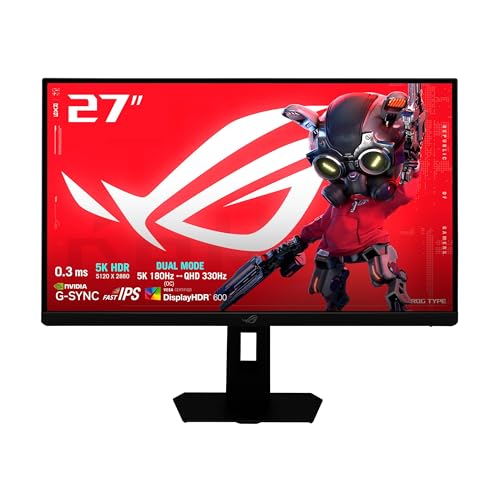
The rog strix 5k xg27jcg is a 27-inch gaming monitor built around a proposition the category has circled for years: that resolution and refresh rate are not a trade you should have to make permanently, because a dual-mode panel can be a 5K display when the work is detail and a high-refresh QHD display when the work is speed. In its headline mode the XG27JCG runs 5120 by 2880 at 180Hz; switch modes and it presents QHD at up to 330Hz for competitive play. Around that centrepiece sit the modern ROG Strix furnishings — HDR with DisplayHDR 600 certification per the listing, ELMB Sync for motion clarity, G-SYNC compatibility, a wide DCI-P3 colour gamut, and USB-C. This guide examines who that proposition actually serves, because a 5K gaming monitor is a serious purchase aimed at a specific reader: the one whose desk hosts both a game library and a body of visual work, and who is tired of choosing which one the monitor is for.
The short answer: if you edit photos or video, work with fine detail all day, or simply read text for a living and game at night, the XG27JCG’s 5K mode is not a luxury but a working tool, and its dual-mode escape to 330Hz QHD means the gaming side of the desk surrenders nothing that matters. If your desk is games alone, the honest recommendation points elsewhere in this guide — toward the 4K OLED alternative whose contrast serves games better, or toward a dedicated high-refresh QHD panel at a kinder tier. A monitor is the component you look at for a decade; this guide’s job is to make sure the one you buy is the one your eyes would have chosen.
Key takeaways
- The XG27JCG is a 27-inch 5K (5120 by 2880) gaming monitor running 180Hz in its native mode, per the listing.
- Dual mode trades resolution for speed on demand: QHD at up to 330Hz for competitive play.
- At 27 inches, 5K delivers exceptional pixel density — text and fine detail render with print-like clarity.
- DisplayHDR 600, ELMB Sync, G-SYNC compatibility, and 97 percent DCI-P3 coverage round out a creator-and-gamer brief, per the listing.
- Driving 5K at high refresh in modern games demands a serious graphics card; the dual mode is the pressure valve.
- The PG27UCDM alternative answers with 4K QD-OLED contrast; choose by whether your desk works, plays, or both.
Why does 5K at 27 inches matter, and to whom?
Pixel density is the whole story, so let us do the arithmetic plainly. A 27-inch panel at 5K packs its 14.7 million pixels tightly enough that individual pixels disappear at normal viewing distances — the condition display makers call retina-class, where the eye stops seeing a grid and starts seeing continuous tone. Text is the first beneficiary: letterforms render with the smoothness of print, and anyone who reads or writes for hours feels the difference in their eyes by evening. Photography and video work are the second: a 5K canvas shows a 4K timeline’s image at full size with room for the interface around it, and stills can be judged at genuine one-to-one detail without zooming. Interface scaling is the third, quieter gift: a 5K panel scaled to a comfortable workspace gives you the screen estate of a large QHD desktop with the rendering sharpness of a much denser one, which is why 5K has been the professional desktop’s connoisseur choice for a decade.
Gaming at 5K is the proposition’s newer half. The same density that flatters text gives game worlds a solidity and fine detail — distant foliage, fabric, architecture — that lower resolutions smear, and at 180Hz the panel refreshes fast enough that the detail arrives without the sluggishness high-resolution gaming once implied. The cost is honest and will recur throughout this guide: rendering nearly fifteen million pixels at high frame rates is the heaviest mainstream workload a graphics card can be given, and the monitor’s dual mode exists precisely because that cost is sometimes not worth paying. A buyer should therefore think of the XG27JCG not as a 5K monitor with a gaming feature, but as two monitors sharing a stand, and judge each of them on its own merits.
How the picks in this guide were chosen
The subject is the ASUS ROG XG27JCG in its verified listing. The XG27JCEG is included as the sibling 5K variant, a close relative with its own dual-mode arrangement and feature mix per its listing, for buyers comparing within the family. The alternative from outside the family is the ASUS ROG PG27UCDM, a 27-inch 4K 240Hz QD-OLED monitor, chosen because it is the strongest competing answer to the same desk: fewer pixels, perfect blacks, and OLED response. Every linked product was confirmed against catalogue data and appears under its exact listing name, and the comparisons below are drawn between the verified configurations rather than between brochures.
In this guide
Quick picks at a glance
| Monitor | Panel and size | Headline modes | Choose it if |
|---|---|---|---|
| ROG Strix XG27JCG | 27-inch 5K | 5K at 180Hz; QHD at 330Hz dual mode | Your desk does detailed work and serious gaming |
| ROG Strix XG27JCEG | 27-inch 5K | 5K and QHD dual modes per the listing | You want the sibling 5K formula with its own feature mix |
| ROG PG27UCDM | 27-inch 4K QD-OLED | 4K at 240Hz | Gaming contrast and OLED response outrank raw pixel count |

ASUS ROG XG27JCG — the subject: two monitors in one stand
Badge: The dual-purpose flagship. In 5K mode the JCG is a creator’s instrument that happens to refresh at 180Hz: text like print, images at full detail, a wide DCI-P3 gamut for colour work, and HDR certified at the DisplayHDR 600 level per the listing. In dual mode it is a competitive panel, QHD at up to 330Hz with ELMB Sync addressing motion clarity and a 0.3ms response figure in the listing’s specifications. USB-C connectivity makes it a plausible single-cable heart for a laptop-and-desktop desk. The design is ROG Strix’s mature gaming dialect — assertive stand, thin bezels — over a panel whose specification reads like two products argued and both won. For the hybrid desk, there is nothing else quite shaped like it.
- Panel: 27-inch 5K, 5120 by 2880
- Refresh: 180Hz at 5K; dual-mode QHD at 330Hz, per the listing
- HDR: DisplayHDR 600, per the listing
- Colour: 97 percent DCI-P3, per the listing
- Features: ELMB Sync, G-SYNC compatibility, FreeSync Premium, USB-C, per the listing
- Response: 0.3ms class per the listing
Strengths
- Print-class pixel density that transforms text, photo, and video work, with a workspace estate to match.
- Dual mode abolishes the resolution-versus-refresh dilemma instead of asking you to pre-commit to one side.
- A complete modern feature set — HDR, motion clarity, adaptive sync, USB-C — with no obvious rationing.
Trade-offs
- 5K gaming at high frame rates demands a top-tier graphics card; lesser cards will live in the dual mode or at reduced settings.
- An LCD panel’s contrast cannot match the OLED alternative’s perfect blacks, whatever the HDR badge.
- Flagship pricing for a proposition whose full value only the work-and-play desk collects.
Best for: Creator-gamers, developers and writers who game, and anyone whose monitor must be two monitors. / Not suited for: Games-only desks on mid-tier graphics cards, or buyers who prize OLED contrast above resolution.

ASUS ROG XG27JCEG — the sibling 5K variant
Badge: The other 5K recipe. The JCEG shares the family’s 27-inch 5K HDR proposition with its own arrangement of the dual-mode idea and its own feature mix — its listing describes a dual mode pairing 5K with a QHD high-refresh mode, Extreme Low Motion Blur Sync, USB-C, G-SYNC compatibility, and a tripod socket that creators who mount cameras or lights above the desk will notice. It is included so the family’s internal choice is visible rather than assumed: two 5K Strix monitors can differ in refresh arrangement and creator furnishings while sharing a panel class, and the right one is decided by which mode split and which extras match your desk’s actual week. Read both listings’ full titles side by side before choosing between the siblings; the differences live exactly there.
- Panel: 27-inch 5K HDR Fast IPS, per the listing
- Modes: Dual mode pairing 5K with QHD high refresh, per the listing
- Features: ELMB Sync, USB-C, G-SYNC compatibility, tripod socket, Aura Sync, per the listing
Strengths
- The same 5K density argument, in the sibling’s own mode and feature arrangement.
- Creator-minded furnishings, including the tripod socket for desk production setups.
- Fast IPS panel character with the family’s motion-clarity toolkit.
Trade-offs
- Its mode split differs from the JCG’s, so the competitive ceiling is a listing-detail question, not an assumption.
- Sibling similarity invites ordering errors; the full title check matters more here than anywhere.
- Shares the family caveat: 5K’s gaming cost is paid by your graphics card, not the monitor.
Best for: Creator-leaning buyers whose mode and feature priorities match this sibling’s arrangement. / Not suited for: Buyers who have not compared the two siblings’ titles line by line.
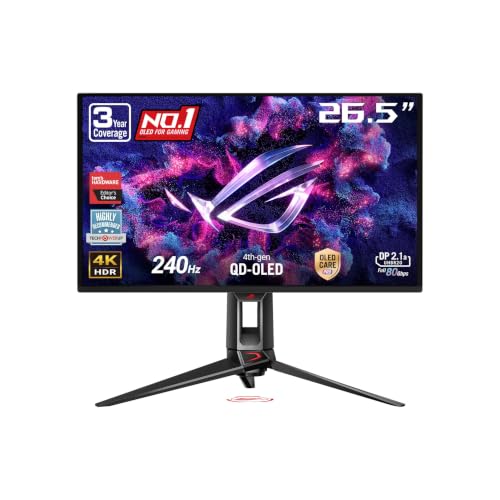
ASUS ROG PG27UCDM — the 4K OLED alternative
Badge: The contrast answer. The PG27UCDM gives up the 5K panel’s pixel count and answers with QD-OLED: 4K at 240Hz, perfect per-pixel blacks, near-instant response, and the OLED Care Pro suite and custom heatsink that address the technology’s longevity questions, per its listing. For a games-first desk it is arguably the more spectacular instrument — night scenes, horror, and cinematic titles gain a depth no LCD backlight can counterfeit. For a work desk it surrenders the 5K estate and density that this guide’s subject exists to provide, and asks its owner to respect OLED’s static-image manners. Neither monitor is the other’s superior; they are the two honest answers to a 27-inch flagship budget, separated by whether your eyes spend their days in documents or their nights in the dark.
- Panel: 27-inch 4K QD-OLED, per the listing
- Refresh: 240Hz, per the listing
- Features: OLED Care Pro, custom heatsink, DisplayPort 2.1, G-SYNC compatibility, true 10-bit, per the listing
Strengths
- Perfect blacks and per-pixel contrast that transform dark game scenes and films.
- 240Hz with OLED response is a competitive specification of the first rank.
- A mature care suite and heatsink address burn-in anxiety with engineering rather than reassurance.
Trade-offs
- 4K at 27 inches is sharp, but it is not 5K: text and workspace estate step down a class.
- OLED ownership includes static-image discipline — taskbars, static interfaces, all-day documents.
- Full-screen brightness behaviour differs from LCD, which bright-room workers should audition.
Best for: Games-first desks, dark-room players, and contrast devotees. / Not suited for: Text-and-timeline workers who would spend the flagship budget on density instead.
What graphics card does 5K gaming actually need?
The honest answer scales with your games and your standards, but the shape of it is stable. Rendering 5K means pushing roughly 1.8 times the pixels of 4K, which was already the demanding standard; flagship-class cards are the comfortable inhabitants of native 5K at high settings, using modern upscaling to hold frame rates in the panel’s 180Hz neighbourhood in lighter titles and accepting lower rates in the heaviest. The generation of upscaling and frame-generation features in current cards exists substantially for panels like this one, and owners should plan to use them without apology — the density is high enough that a well-upscaled image retains the 5K character that justified the purchase. When a title refuses to cooperate, the dual mode is the designed pressure valve: drop to QHD, gain an enormous frame-rate margin and a 330Hz ceiling, and lose nothing a competitive session would have used. A mid-tier card does not make this monitor pointless — the work side still sings, and dual mode still games beautifully — but a buyer whose card and library are both modest should ask whether the 5K premium is being bought for a workload they actually run.
How do you set the XG27JCG up for work and for play?
For work, the decisions are scaling and colour. Choose an operating-system scaling that gives you the workspace estate you bought — the setting that renders text at a comfortable size while keeping the panel’s full estate — rather than a one-to-one mode that turns the interface into a postage stamp or an over-scaled mode that wastes the density. If colour work matters, use the monitor’s colour modes deliberately: the wide-gamut native mode for HDR and games, an sRGB-clamped mode for web and general work where oversaturation lies, and a calibration pass if your income depends on the accuracy. For play, connect by the highest-bandwidth cable the listing’s ports support, confirm the refresh rate your system actually selected — operating systems love to default a new panel to a modest rate — enable adaptive sync, and set the dual mode per game rather than globally: native 5K for the beautiful and the slow, QHD high-refresh for the competitive and the frantic. The monitor remembers being two products; your job is only to introduce each game to the right one.
What should you check before buying a 5K or flagship gaming monitor?
Audit your desk’s week before your wishlist: the ratio of documents to games is the single best predictor of satisfaction in this entire guide. Audit your graphics card with equal honesty, using the pixel arithmetic above rather than hope. Check your cables and ports, because 5K at high refresh needs the modern standards at both ends and an old cable in the chain quietly caps the whole purchase. Consider your room’s light — HDR and dark-room performance argue for curtains, bright offices argue for brightness headroom — and your console habits, since the listing’s PS5 and Xbox support matters to the desk that hosts them. Finally, measure your viewing distance: 27-inch 5K rewards the normal desk distance it was designed for, and a buyer seated unusually far may find a larger 4K panel spends the same money more visibly.
What are the common mistakes buyers make at this tier?
Buying 5K for a games-only desk on a mid-tier card is the flagship error, and it manufactures the disappointment that fills forum threads: the panel is superb, the workload never arrives, and the dual mode becomes the whole product at a 5K price. The second mistake is the mirror — a creator buying the OLED alternative for its gaming glory and then spending two thousand hours a year reading text at 4K density with OLED’s static-image manners to observe. The third is neglecting the unglamorous chain: the cable, the port, the refresh rate left at a default, the scaling left at an accident. The fourth is judging HDR by its badge number alone rather than by the panel technology underneath it, a confusion this guide’s OLED comparison exists to prevent. And the fifth is buying for the desk you plan to have — the future card, the future studio — rather than the one in the room, a mistake monitors punish for a decade because they outlast every plan around them.
How does a monitor like this age?
Monitors age more slowly than anything else on a gaming desk, which is the economic soul of this purchase. The XG27JCG’s panel class, refresh, and connectivity are specified generously enough that the next two graphics cards you own will still be feeding it rather than replacing it, and its dual nature hedges the future in both directions: if games grow heavier, the QHD mode’s ceiling waits; if your work grows more visual, the 5K estate is already there. LCD technology spares its owner the static-image disciplines OLED asks, which suits a panel that will display documents all day for years. The realistic wear points are the stand’s mechanics and the backlight’s slow, graceful dimming across a very long life — the profile of a component bought once per era. That is the correct frame for its price: not a peripheral, but the desk’s longest-serving instrument, chosen with the decade in mind.
Final recommendation
The ROG Strix XG27JCG is the monitor for the desk that works as hard as it plays: 5K density for the documents, timelines, and photographs of the day, and a dual-mode escape to 330Hz QHD for the nights that demand speed. Buy it if that description is your actual week, with a graphics card that honours the panel or a library that flatters the dual mode. Choose the XG27JCEG sibling if its particular mode split and creator furnishings match your desk better, after the line-by-line title comparison this guide prescribes. And choose the PG27UCDM, without regret, if your flagship hours are spent in dark game worlds rather than bright documents — contrast is a legitimate monarch, and it rules the other kingdom.
XG27JCG, XG27JCEG, or PG27UCDM — criterion by criterion
Sharpness and workspace. The two 5K siblings share the density crown: text, timelines, and photographs rendered at a fineness 4K cannot reach at this size, with the estate to hold a full-resolution image and its tools simultaneously. The OLED’s 4K is sharp by any ordinary standard and a class below by this comparison’s. Verdict: the 5K pair, for any desk that reads.
Contrast and dark scenes. The OLED wins outright and permanently — per-pixel blacks are a different physics, not a better tuning. The LCD pair counter with brightness and lit-room composure. Verdict: PG27UCDM for the dark, the siblings for the bright.
Competitive ceiling. The JCG’s dual-mode 330Hz is the highest refresh figure in this comparison, with the OLED’s 240Hz and native response close behind in practical feel and ahead in pixel response. The JCEG’s split sits per its listing. Verdict: JCG on the refresh sheet, OLED on response, both beyond most players’ ability to spend.
Colour work. Wide DCI-P3 coverage on the subject panel, true 10-bit on the OLED, creator furnishings on the JCEG — all three are serious instruments, separated by workflow: stills and interface density favour 5K, video finishing in dark rooms flatters OLED, and desk production with mounted gear notices the JCEG’s socket. Verdict: workflow decides, as it should at this tier.
Ownership burden. The LCD pair ask nothing but a good cable and a correct setting. The OLED asks its static-image manners — a light discipline, honestly described in its own review in this series — in exchange for its contrast. Verdict: LCD for the set-and-forget decade, OLED for the owner happy to keep its small liturgy.
Three desks, three monitors
The developer who games: code all day in an editor whose text now renders like print, three panes and a terminal arranged across an estate that never feels rented, then the same panel at 5K for the evening’s beautiful game and at QHD 330Hz for the competitive one. That desk is the XG27JCG’s design brief made flesh, and no other monitor in this comparison serves both halves of it. The photographer who games: a 5K canvas for the catalogue, full-resolution judgement without zooming, colour the clients can trust — the JCG or its sibling, decided by the mode split and the tripod socket, with the OLED never seriously in the conversation because the work happens in bright rooms at high detail. The cinematic gamer: a dark room, a library of night scenes and horror, films between matches — the PG27UCDM’s kingdom, where the 5K pair’s extra pixels are spent on content that cannot show them and their brightness is a quality the room does not want. Three desks, three correct monitors, and a comparison that has done its job if your desk recognised itself in exactly one of them.
Ergonomics and the desk around a 27-inch flagship
A monitor this size rewards the same audit the split keyboard in this series demanded. The panel’s centre belongs at or slightly below eye level, at a distance where the 5K density resolves into continuous tone — roughly an arm’s length for most desks — because sitting too close wastes the density on a field your eyes must travel, and too far shrinks the estate you bought. The stand’s adjustments should be used rather than admired: height set so the top of the screen sits near eye level, tilt matched to your chair’s recline, and the whole arrangement revisited when the chair changes, because monitors inherit every postural sin their furniture commits. Bright-room workers should angle the panel against window glare rather than cranking brightness into a fight with the sun, and dual-monitor households should note that a 5K flagship beside an ordinary panel makes the ordinary panel look broken — a known and expensive optical illusion that has sold many second monitors. Buy the desk’s geometry with the same care as the panel, and the flagship’s decade of service will be comfortable as well as sharp.
Troubleshooting a new flagship panel
It is running at 60Hz. The classic: check the cable standard first, the port second, and the operating system’s display settings third, in that order, because the chain’s weakest link sets the mode and it is almost never the panel. Text looks fuzzy in one application. Scaling is the suspect — an older application rendering at a low resolution and being enlarged by the system; look for its high-density awareness settings before blaming the monitor whose sharpness every other window confirms. Colours look oversaturated in general use. You are in the wide-gamut native mode viewing sRGB content; switch to the clamped mode for everyday work and keep the native mode for HDR and colour-aware applications. The dual mode will not offer its highest refresh. Cable and port again, then the game’s own display settings, which sometimes cap independently of the desktop. HDR looks washed out on the desktop. Desktop HDR and game HDR are different experiences; most owners keep HDR for the content mastered in it and run the desktop in the standard mode whose text and contrast were tuned for it.
Who should skip the XG27JCG?
Skip it if your desk is games alone and your room is dark — the OLED alternative spends the same tier on the contrast your library will actually show you, nightly. Skip it if your graphics card is mid-tier and your upgrade plans are vague, because a flagship panel fed by hope teaches resentment at 180Hz. Skip it if you sit far from a large desk or want a screen that fills a wall’s worth of vision; density is a near-field virtue, and a larger 4K panel serves the far seat better. Skip it if your work is spreadsheets and calls rather than detail — the estate is real but the premium buys fineness you will never look at closely. And skip it if the phrase dual mode sounds like a chore rather than a pleasure, because the monitor’s whole design assumes an owner who enjoys introducing each game to its right mode. The JCG’s buyer is the hybrid professional-player whose week is genuinely double, and for that buyer — this guide cannot say it plainer — nothing else in the comparison is actually a substitute.
The single-cable desk: USB-C and the laptop question
The USB-C connection deserves its own paragraph because it quietly changes what this monitor is for a large class of desks. A laptop that drives the 5K panel over one cable — picture, and in the modern manner the desk’s peripherals gathered behind the monitor — turns the flagship into the office: arrive, plug, and the full estate with print-class text is simply there, at the refresh and density a laptop’s own screen cannot approach. For the hybrid worker whose evenings game on a desktop at the same desk, the monitor becomes the shared instrument both machines were waiting for, and its dual mode then serves two computers’ worth of purposes. Buyers in that position should verify their laptop’s output standard supports the panel’s full mode, because the cable-chain honesty of this guide applies to laptops with particular force — but where it works, it is the most civilised arrangement a modern desk offers, and a genuine part of this monitor’s value that its gaming badges never mention.
Your first week with a 5K dual-mode panel
Day one is verification, not admiration: correct cable, correct port, the refresh rate confirmed in settings, scaling chosen deliberately, and one familiar document read at the new density so your eyes can file the difference. Day two belongs to colour — the modes auditioned against photographs you know, the everyday mode set to the clamped and honest one, HDR reserved for its content. Midweek, introduce the games one at a time, each to its mode: the beautiful one at native 5K with upscaling tuned until the frame rate and the image agree, the competitive one in dual mode at its ceiling, and notes kept, because you will not remember which title preferred what by next month. By the weekend, revisit the ergonomics — height, tilt, distance — with a week’s evidence in your neck rather than a first impression in your eyes. Owners who run this week own the monitor they bought. Owners who skip it sometimes spend a decade at a default refresh rate under a scaling accident, praising a panel they have never actually met.
The decade economics of a flagship monitor
Cost-per-year is the only honest arithmetic at this tier, and it flatters the considered purchase. A monitor outlasts two or three graphics cards, a console generation, and the desk it was bought for; spread across that service, the difference between the right flagship and the almost-right one is pennies a week, while the difference in daily experience is the whole display. That arithmetic cuts against false economy, not against honesty: the games-only buyer who purchases the OLED is practising the same economics correctly, because the right monitor is the one whose strengths your week spends. What the arithmetic condemns is the mismatched flagship — the 5K panel on a card that cannot feed it, the OLED under a document workload — whose cost-per-year stays identical while its value quietly halves. Buy the match, keep it a decade, and the flagship tier is not extravagance. It is the cheapest way to own a great display, amortised by the only currency that matters here, which is mornings.
Frequently asked questions
Is 5K worth it over 4K at 27 inches?
For text, image work, and workspace estate, yes — the density difference is visible in every paragraph and every timeline, and it compounds across thousands of working hours. For games alone, the case weakens: 4K at 27 inches is already very sharp, the rendering cost of 5K is steep, and an OLED 4K panel offers contrast the LCD cannot. The worth-it question is therefore a desk question, not a panel question, and this guide’s audit — your week’s ratio of documents to games — answers it more reliably than any specification.
What is dual mode actually for?
It lets one panel serve two incompatible optima. Native 5K at 180Hz is the mode for detail: beautiful games, creative work, and anything where pixels are the product. The QHD mode at up to 330Hz is the mode for speed: competitive titles where frame rate and response outrank resolution, and where the lower pixel count also relieves the graphics card enormously. Switching per game, rather than choosing a monitor per philosophy, is the entire point — the dilemma is not solved by compromise but by refusing to have it permanently.
Can consoles use this monitor well?
The listing names PS5 and Xbox support, and modern consoles output up to 4K-class signals that a 5K panel scales — the experience is sharp and the refresh features within the consoles’ own limits apply. Console-first buyers should still weigh the purchase honestly: a console cannot feed the panel’s 5K native mode or its highest refresh ceilings, so much of the flagship specification waits for a PC that may never join the desk. As one display in a PC-and-console household it is excellent; as a console-only display it is over-specified in the pleasant, expensive way.
How does its HDR compare with the OLED alternative’s?
By different physics. The XG27JCG’s DisplayHDR 600 certification describes an LCD with meaningful peak brightness and local contrast improvement — HDR that performs in lit rooms and bright scenes. The OLED’s per-pixel light control gives it perfect blacks and effectively unbounded contrast in dark scenes, at lower full-screen brightness. Films and games with mixed bright content flatter the LCD’s strengths; dark, cinematic content crowns the OLED. Neither badge settles it; your room and your library do.
Do you need new cables for 5K at 180Hz?
Very likely, if your drawer holds older ones. High-resolution, high-refresh signals need current-standard DisplayPort or HDMI cables and ports at both ends, and a legacy cable in the chain will cap the mode the system offers you — often silently, at a lower refresh that owners then blame on the panel. Budget for a certified modern cable as part of the purchase, connect, and then verify in your system settings that the panel is actually running the mode you bought. That verification minute is the cheapest performance in this guide.
Is the XG27JCEG different enough to matter?
It can be, at the margins where monitors are actually chosen. The siblings share the 27-inch 5K proposition but arrange their dual modes and feature mixes differently per their listings — refresh splits, creator furnishings like the tripod socket, and sync details live in the titles. A buyer whose week matches one arrangement rather than the other will feel the difference daily. Read both full titles side by side, score them against your desk’s actual ratio of work to play, and let that arithmetic, not the near-identical names, make the call.
Games at 5K, genre by genre
Strategy and simulation titles may be 5K’s secret gaming constituency: dense interfaces, small text, map detail, and long sessions at a desk distance where density is pure profit, with frame-rate demands modest enough that the native mode is comfortable on strong but not exotic hardware. Role-playing and open-world games are the showcase — vistas and textures rendered at a fineness that makes the world feel built rather than textured — provided the card can hold the frame rate or the upscaling is allowed to help, which at this density it does gracefully. Racing games split by temperament: the beautiful ones at native resolution, the competitive ones in dual mode where the ceiling lives. Shooters are the dual mode’s home crowd, and the honest 5K native experience there belongs to flagship cards and reduced settings. Flight and space simulation, with their cockpit detail and starfield depth, reward the density enormously and forgive its frame rates, since their pace is contemplative. Across the library the pattern is the guide’s thesis in miniature: the panel is two monitors, and a library, like a week, usually contains both kinds of evening.
What should you verify at checkout?
Read the listing title in full and confirm it names the XG27JCG — the 5K model with the 180Hz native and 330Hz dual-mode arrangement reviewed here — because its sibling the XG27JCEG wears a near-identical name with a different mode split, and the two are the easiest ordering error in this entire series. Confirm your graphics card’s outputs support the panel’s full modes, and add a certified modern cable to the order if your drawer cannot prove one. Then run the desk audit one final time: documents-to-games ratio, viewing distance, room light. If the audit still points at 5K, order with confidence and keep the packaging until the first week’s verification ritual is complete. Flagship monitors reward diligence at exactly two moments — checkout and setup — and punish its absence for a decade; this guide has now spent several thousand words making both moments easy, and the rest is your eyes’ pleasure.
Reading on 5K: the benefit nobody photographs
Product pages photograph games, because games are beautiful, but the 5K panel’s largest daily dividend is paid in the least photogenic currency in computing: text. Consider what a working day actually contains — documents, code, email, specifications, contracts, chapters — rendered for hours at the exact distance this panel was designed for. At 5K density the letterforms stop being approximations built from visible pixels and become shapes, and the eye’s micro-corrections, the tiny refocusing effort a coarse grid demands thousands of times a day, quietly retire. Owners describe the effect imprecisely — less tired, somehow — because its mechanism is an absence, and absences are hard to review. This guide will state it as plainly as it can: if your income is earned by reading a screen, the reading is the feature, and the gaming is the bonus, whatever the badges on the box suggest. That inversion is why the hybrid desk keeps appearing in these pages as the monitor’s true constituency, and why a buyer who reads for a living should audition this panel with a document before a game — the document is the demo that matters, and it takes ninety seconds to run.
Scaling, operating systems, and the estate question
A 5K panel asks its operating system one question — how much workspace shall we pretend this is? — and the answer shapes your whole day. Scaled to look like a QHD desktop, the panel gives you that familiar estate rendered at full density: the professional’s usual choice, and the one this guide recommends as the starting point. Scaled more spaciously, the estate grows toward the panel’s native vastness, with interface elements shrinking in proportion; writers of code and keepers of many windows often settle one step in that direction after a week of experiment. Run unscaled, the panel is a dare — everything tiny, everything present — that a small minority of eagle-eyed users genuinely prefer. The practical advice is to treat scaling as a setting with a settling period rather than a first impression: live with each candidate for two working days, because the estate you need is revealed by your window habits, not by the settings page’s preview. Whichever you choose, the density underneath never changes, which is the 5K bargain in one sentence — the estate is negotiable, the sharpness is not.
The flagship in a household: consoles, partners, and second machines
A desk’s flagship rarely serves one person, and the JCG’s household manners deserve their sentence. A partner’s laptop plugged into the USB-C for an afternoon inherits the full estate and the print-class text, which has a way of recalibrating the household’s monitor expectations permanently — budget accordingly. A console under the desk gets a sharp, responsive screen whose ceiling it cannot reach but whose floor it enjoys, and the household’s film nights inherit an HDR panel that performs in a lit living-room-adjacent space better than a dark-room specialist would. Children doing homework at the desk get the reading benefit this guide keeps praising, at the age when reading stamina is being built. None of these uses justifies the flagship alone, and all of them together explain why a monitor, alone among gaming purchases, tends to become the household’s shared instrument rather than one person’s peripheral. Buy it for your week’s ratio, certainly. But know that you are also, quietly, buying the screen a household will gather around for a decade, and that the gathering is part of the return.
Which returns the guide to its opening claim, now with the evidence assembled. The XG27JCG is two monitors in one stand, and the desk that needs both is more common than the market’s categories admit — it is every desk where the day’s work is visual and the evening’s play is serious. If yours is that desk, the choice is not really between this monitor and its alternatives. It is between this monitor and the two-monitor compromise it replaces, and on that comparison the flagship is, improbably, the economical option.
One more honest note, for the buyer upgrading from a beloved 1440p panel and wondering whether the leap will feel as large as the arithmetic promises. In games, the leap is real but incremental — sharper, more solid, not a new sense. In text and image work, the leap is the largest single upgrade a desk can receive, larger than any processor or card delivers to those tasks, because it changes the medium the work is read in. Set your expectations by that division and the monitor will meet them precisely: a revolution at nine in the morning, a refinement at nine at night, and — in dual mode, when the night turns competitive — a ceiling your old panel could not have imagined at any hour. That is the complete product, and it is enough.
And a closing reassurance for the reader who has done the audit, run the arithmetic, and still feels the flagship hesitation that expensive, decade-long purchases properly inspire. Monitors are the safest flagship category in the whole setup: they do not depend on a platform’s fortunes, they are not revised into obsolescence by next season’s launch, and their virtues are visible in the first ninety seconds and the thousandth hour alike. If the audit says your desk is the hybrid one, the hesitation is not information — it is just the price tag clearing its throat. Buy the panel your week described, verify it in the first week with the ritual this guide gave you, and then enjoy the rarest experience in gaming hardware: a purchase that stops being a topic. The best monitors disappear. This one disappears into text at nine and into worlds at nine, and a decade from now it will still be disappearing, which is the whole review in a sentence.
One last pairing note, because flagships are rarely bought alone: the desk that chooses this monitor usually discovers, within a season, that its keyboard and its network were specified for a smaller life. That is not upselling; it is the natural gravity of a centrepiece. Let the upgrades arrive in the order the desk feels them — the panel first, since you look at it for a decade; the input devices next, since you touch them all day; the network last, since it is felt only when it fails — and let each be bought by the same audit that chose this monitor: the honest map of a week’s real hours. A desk assembled by audits rather than by launches ages into something rarer than a battlestation. It ages into a workplace that plays, or a playground that works, and either way it is yours in a sense no catalogue can sell.
There is a temptation to end a flagship monitor guide with a spectacle — a favourite scene, a benchmark, a number — and this guide will instead end with a Tuesday. Picture the panel on an ordinary Tuesday: a document in the morning rendered like print, a spreadsheet at noon with room to breathe, a timeline in the afternoon judged at full detail, and then, without a cable changed or a setting regretted, the evening’s game at the resolution it deserves or the speed it demands. No other single component in a setup touches that many hours of a life. Bought by audit and set up by ritual, the XG27JCG touches them all well, and a decade of Tuesdays is the review’s final, sufficient verdict.
A final audit you can run in one evening
If the decision still feels abstract after several thousand words, there is a one-evening experiment that settles it with your own eyes, using whatever screen you already own. Spend the first hour working — documents, code, photographs, the real material of your day — and notice, honestly, where your current panel taxes you: the zooming, the squinting at fine detail, the windows shuffled for want of estate. Spend the second hour gaming, one beautiful title and one fast one, and notice where the tax changes sides: the frame rate you settle for, the detail you turn down. That pair of hours is your desk’s ratio measured rather than imagined, and it predicts your satisfaction with every monitor in this guide better than any specification either of us can quote. If the first hour’s taxes dominate, buy density and never apologise for it. If the second hour’s dominate, buy speed or contrast from the sibling guide. And if the hours tie — as they do in more households than the market’s categories admit — then the dual-mode panel in front of you was designed by people who had your exact evening, and you may order it with the calm of a reader whose homework is finally, completely done.
Keep the monitor’s own menu tour for a quiet moment in the first week — colour modes, sync behaviour, the dual-mode switch’s exact location — rather than discovering it mid-deadline or mid-match. Flagships reward owners who read their instruments once, properly, and then never think about them again; ten unhurried minutes in the menus is the entire tuition, and it pays out across the decade every time your hand goes, unerringly, to the right control in the dark.
Related reading
the ROG Strix OLED XG27ACDNG examined 1080p versus 1440p versus 4K for gaming 1080p 240Hz versus 1440p 144Hz the 4K gaming PC buying guide how to choose a 4K gaming PC the ROG Rapture GT6 mesh system