Disclosure: As an Amazon Associate, reviewstook.com earns from qualifying purchases. Links on this page are affiliate links; they cost you nothing extra. Prices and availability change often, so check the current Amazon listing before you buy.
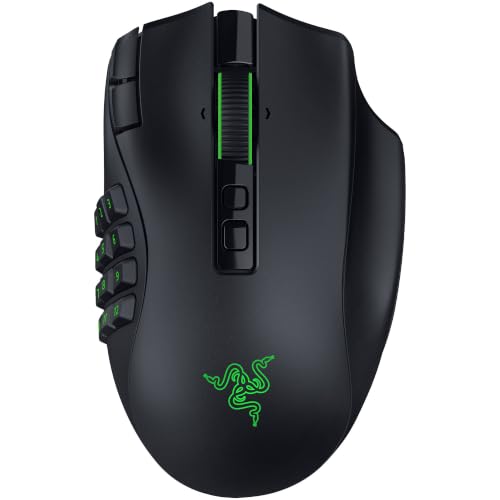
The naga v3 pro exists for a kind of player the ultralight era forgot: the MMO and MOBA gamer whose left hand is busy enough that the right hand needs to become a second keyboard. Razer’s Naga formula — a mouse with a swappable side plate carrying a grid of programmable thumb buttons — reaches its current flagship form in the V3 Pro, whose verified listing promises 23 programmable buttons across three interchangeable plates, a tilt-capable HyperScroll wheel, multi-mode connectivity, and battery endurance measured in hundreds of hours. This review examines what that arsenal means in real games, who genuinely needs a button grid under their thumb, how the V3 Pro compares with its V2 Pro predecessor, and how to set the mouse up so its abundance becomes an advantage rather than an accident generator.
Honesty first: this is a specialist’s mouse. Its weight, its price tier, and its entire reason for existing are pointed at players who bind abilities, items, macros, and communication to their mouse hand. A player whose games ask for two buttons and a wheel will find the Naga’s grid not merely unnecessary but in the way, and this review will tell that reader so, early and plainly. For the MMO raider, the MOBA veteran, the strategy player, and the productivity user who discovers that a thumb grid is also a shortcut engine, the conversation is very different — and it is their conversation this review is having.
Key takeaways
- The listing confirms the formula: three swappable side plates, 23 programmable buttons in the fullest configuration, HyperScroll tilt wheel, multi-mode connectivity, and battery positioning up to 280 hours depending on mode.
- The plates are the product: a 12-button grid for MMO play, a mid-count plate for MOBA and general gaming, and a simple two-button plate for shooters or clean everyday use.
- Programmability only pays when it is set up deliberately — a binding plan, a learning week, and per-game profiles turn hardware into muscle memory.
- The V2 Pro remains a rational alternative: a similar plate system and a 19+1 button count with even longer battery positioning in its listing, at a predecessor’s tier.
- Ergonomics are right-handed and substantial; this is a palm-and-claw mouse for medium and larger hands, not a fingertip featherweight.
In this guide
Quick verdict and the picks
- The subject: Razer Naga V3 Pro — the current flagship of the swappable-plate MMO mouse line. Check price on Amazon
- The predecessor alternative: Razer Naga V2 Pro — the previous generation’s take on the same idea. Check price on Amazon
How these were chosen: both listings were verified through this site’s Creators API with exact titles and official images. The pairing is deliberate — in a niche this specific, the realistic alternative to the current Naga is usually the previous Naga, and comparing generations tells a buyer more than comparing against a mouse built for a different religion.
Naga V3 Pro in context: the mouse that refused the ultralight sermon
For a decade, gaming mouse design marched toward less: fewer grams, fewer buttons, shells pared to the essential. The Naga line marched the other way, on evidence. MMO and MOBA games present their players with dozens of abilities on cooldowns, and every ability left on the keyboard is an ability competing with movement keys for the left hand’s attention. Moving a dozen of them to the right thumb — a digit that otherwise does one job, gripping — redistributes the workload across both hands and frees the movement fingers to move. That is the entire thesis, and two decades of Naga loyalty say the thesis is sound for the games it addresses. The V3 Pro’s contribution is refinement of everything around the thesis: the plate system made genuinely swappable for different games, the wheel given a tilt and multiple scroll personalities, the connectivity made mode-rich, and the battery stretched so the mouse’s weight buys endurance rather than apology.
The plate system deserves its central billing, because it converts one mouse into a small wardrobe. The 12-button grid is the raid configuration, a telephone keypad for the thumb that MMO players map to their action bars. The mid plate suits MOBAs and general gaming, where a handful of thumb actions — items, push-to-talk, a ping, a melee — is the realistic load. The two-button plate is the confession that sometimes the Naga owner plays a shooter, or works, and wants a clean side with nothing to mis-press. Swapping is a seconds-long, tool-free act, which matters: a feature that takes minutes gets used once, while a feature that takes seconds gets used per game, which is the whole idea.

Razer Naga V3 Pro
Badge: The current flagship — a keyboard that happens to be a mouse
- Side system: three swappable plates, per the listing
- Programmable buttons in the listing: 23 in full configuration
- Wheel in the listing: HyperScroll with tilt
- Connectivity in the listing: multi-mode
- Battery positioning in the listing: up to 280 hours depending on mode
- Orientation: right-handed ergonomic shape
Living with the V3 Pro is a tale of two weeks. The first week is tuition: the thumb must learn a geography it has never needed, miss-presses happen at the worst moments, and every owner privately wonders whether the keyboard was fine after all. The second week is the conversion: the grid’s landmarks — the corners, the centre ridge, the row your thumb rests on — become proprioceptive, abilities start firing from the mouse hand without a glance or a thought, and the left hand’s new freedom registers as a calmness in fights that used to feel frantic. Reviews that judge this mouse in an afternoon miss its nature entirely; it is an instrument, and instruments are judged at the month.
Strengths
- The three-plate system genuinely serves three game wardrobes with one mouse.
- Button abundance with real programmability — per-game profiles turn the grid into muscle memory.
- Battery endurance and multi-mode connectivity suit both desk and travel play.
Trade-offs
- Substantial weight and size exclude fingertip players and small hands from the congregation.
- The learning curve is real: expect a week of tuition before the grid pays.
- Its tier buys specialisation — shooter-only players will never use what they paid for.
Best for: MMO, MOBA, and strategy players with medium-to-large right hands who will invest the learning week. / Not suited for: ultralight shooter purists, small hands, or anyone whose games need two side buttons and no more.

Razer Naga V2 Pro
Badge: The predecessor — same religion, earlier sermon
- Side system: three swappable plates, per the listing
- Programmable buttons in the listing: 19+1
- Sensor in the listing: Focus Pro 30K optical
- Wheel in the listing: HyperScroll Pro
- Battery positioning in the listing: up to 300 hours depending on mode
- Finish in the verified listing: black
The V2 Pro is not a compromise pick; it is the previous flagship of the same line, with the plate system, the wheel pedigree, and battery positioning that in its listing actually exceeds its successor’s headline figure. The honest differences are generational — the V3’s refinements in button count, wheel, and the small ergonomics of a newer design — rather than philosophical. A buyer who finds the V2 at a predecessor’s tier is not buying a lesser idea, only an earlier edition of it, and in a category where the idea is the product, that can be the shrewdest purchase on this page.
Strengths
- The full plate-system concept with a generous programmable count.
- Battery positioning that remains a headline feature in its own right.
- Predecessor pricing logic often makes it the value route into the line.
Trade-offs
- Fewer programmable buttons than the V3’s fullest configuration.
- An earlier generation’s wheel and refinements.
- Availability of a superseded model can vary by seller and season.
Best for: MMO players who want the Naga system at the predecessor’s tier, and V2 owners’ households adding a second. / Not suited for: buyers who want the current flagship’s full button count and newest wheel.
Two generations compared
| Model | Programmable buttons (listing) | Battery positioning (listing) | Pick it when… |
|---|---|---|---|
| Naga V3 Pro | 23 across three plates | Up to 280 hours by mode | You want the current flagship, full count, newest wheel |
| Naga V2 Pro | 19+1 across three plates | Up to 300 hours by mode | The predecessor’s tier tempts and the idea matters more than the edition |
The table’s lesson is that generations in this line refine rather than reinvent. If your hand and your games fit the concept, either mouse delivers it; the budget and the button count arbitrate. What neither delivers is a reason to buy the concept itself — that reason lives in your action bars, and the next section helps you count it.
Buying guide: counting your own buttons before buying Razer’s
The honest pre-purchase exercise takes one gaming session and a notebook. Play your main game and tally every input your left hand makes that is not movement: abilities, items, consumables, target markers, communication. Then mark which of them happen under pressure, mid-fight, when the left hand can least afford the journey. If the pressured tally is under four, a conventional mouse with two good side buttons serves you completely and the Naga is jewellery. If it runs to eight or beyond — the natural state of an MMO hotbar — the grid is not jewellery but load-bearing equipment, and the only remaining questions are fit and generation. Fit is physical: the Naga shape rewards palm and relaxed-claw holds in medium and larger right hands, and punishes small hands and fingertip styles with a size and weight they cannot forget. Try the shape in person if your hand is anywhere near the boundary; in this category, fit is not a preference but a gate.
Beyond games, audition the mouse as a work tool before dismissing the idea. Video editors map the grid to tools and timeline commands; spreadsheet athletes bind navigation and formatting; streamers run scenes and mutes from the thumb. The productivity case is real enough that some owners buy the mouse for the desk and game on it as a bonus. If your workday has its own pressured tally, count it too — the mouse does not care which application taught your thumb its geography.
Finally, budget the learning week as part of the price. The Naga’s cost is partly tuition: sessions where you are worse before you are better. Players in a competitive season should time the purchase for a quiet week; players between games have found the perfect moment without knowing it. Either way, go in expecting the arc — frustration, landmarks, fluency — and the mouse will feel like an investment. Expect magic on day one and it will feel like a scam, which would be a shame, because by day fourteen it usually feels like a superpower.
How to set up a Naga so the grid becomes memory
Step 1: Start with the plate that matches your main game
Fit the 12-button plate for an MMO, the mid plate for a MOBA or mixed library, and resist the urge to begin with the fullest grid if your game does not need it. Abundance you cannot yet navigate is just a larger place to get lost.
Step 2: Bind by geography, not by list
Map your game’s most pressured abilities to the grid’s landmarks first — corners and centre — and the calmer utilities to the interior. Your thumb finds landmarks in the dark; a binding plan that respects that anatomy learns itself in days.
Step 3: Mirror your action bar’s logic
Arrange the grid to echo the on-screen bar it replaces — same order, same grouping — so the visual memory you already own transfers to the thumb instead of competing with it. One mental map, two expressions.
Step 4: Practise in low-stakes content for a week
Run the dungeons, dailies, and casual matches where a miss-press costs nothing, and let the landmarks set. Promote the grid to your ranked or raid content only when your thumb stops asking your eyes for help.
Step 5: Save per-game profiles and stop editing them
Once a layout works, freeze it. The grid’s value is that it disappears into habit, and every well-meaning rebinding restarts the tuition. New abilities join at the edges; the landmarks stay sacred.
Common mistakes Naga buyers make
The first is binding everything on day one — all twelve buttons, three games, no hierarchy — and drowning the thumb in undifferentiated geography. The second is gripping the mouse like an ultralight, all fingertips and tension, against a shape designed to be rested in; the Naga rewards a settled palm and punishes a hover. The third is judging the mouse inside the first weekend, during tuition, and returning an instrument for behaving like one. The fourth is neglecting the mid and two-button plates, leaving the raid grid fitted for a shooter evening and blaming the mouse for mis-presses the plate choice invited. The fifth is buying it for a library that never needed it — the pressured-tally test exists to prevent exactly that purchase, and it takes one session.
Final recommendation
For its intended player — the MMO, MOBA, or strategy gamer whose left hand is overworked and whose right thumb is underemployed — the Naga V3 Pro is the current, complete expression of a proven idea, and the one to buy. The V2 Pro is the same idea a generation earlier and the shrewd alternative when its tier tempts. For everyone else, the honest recommendation is a different mouse entirely, lighter and simpler, several of which live elsewhere in this cluster’s pages. Specialisation this confident deserves a confident answer: count your pressured buttons, measure your hand, and let those two facts decide.
Frequently asked questions
How long does the thumb grid take to learn?
Most players report landmarks within days and fluency within about two weeks of regular play, provided the layout is bound by geography and then left alone. Low-stakes content during the first week is the difference between tuition and torment.
Can the Naga work for shooters at all?
With the two-button plate fitted, it behaves as a substantial right-handed gaming mouse, and owners do use it across their libraries. Players whose main game is a competitive shooter, though, will generally prefer a lighter, purpose-built mouse — the Naga’s talents lie elsewhere.
Is the V2 Pro still worth buying?
Yes, when its tier is attractive: the plate system, programmability, and battery endurance that define the line are all present, with a slightly smaller button count and an earlier wheel. It is a previous flagship, not a budget imitation.
Which grip and hand size suit the Naga shape?
Palm and relaxed-claw grips in medium to larger right hands. The shape is unapologetically substantial; small hands and fingertip players should look at lighter mice, several of which are covered in our mouse-grips explainer’s orbit.
Does the button grid help outside games?
Genuinely. Editing suites, design tools, streaming software, and any application with a shortcut culture can map the grid, and many owners find the productivity case alone justifies the mouse. The thumb does not care whether the ability it fires is a spell or a timeline ripple-delete.
What is the difference between the plates in daily use?
Density and intent. The 12-button plate maximises simultaneous options for hotbar games; the mid plate balances options against mis-press safety for faster, simpler games; the two-button plate restores a clean, conventional side for shooters and office hours. Swapping takes seconds, so the right answer can change with your evening.
Related guides
mouse grips and hand fit explained
Logitech versus Razer, the brand question
the Lamzu Maya X at the ultralight opposite pole
the Mercury X Pro, another gaming mouse philosophy
the best Razer headsets for the same desk
grip tape for a more secure hold
The wheel deserves its own paragraph
In the shadow of the grid, the HyperScroll tilt wheel is easy to overlook, and it should not be. A wheel that tilts adds two more inputs — left and right nudges — that experienced owners bind to leaning, tab-switching, or weapon cycling, quietly extending the mouse’s vocabulary without touching the thumb’s geography. The scroll itself offers personalities: a tactile, stepped roll for weapon wheels and inventory lists, where each notch should mean one item, and a free-spinning glide for documents and web pages that would otherwise demand a hundred flicks. On a mouse bought for input abundance, the wheel is the second front of the same war — every function moved to the mouse hand is a function the keyboard hand no longer interrupts movement to perform. Judge it during your first week with the same seriousness as the plates; owners who do tend to end up with two or three wheel bindings they would defend in an argument.
Weight, honestly discussed
The Naga is heavy by the standards of its moment, and this review will not pretend otherwise — it will instead ask the useful question, which is what the weight is doing. It houses the plate mechanism, the button grid, the battery behind those endurance figures, and a shape sized for a resting hand. In MMO and MOBA play, where mouse movement is purposeful rather than frenetic and the hand spends much of its time parked, that mass reads as stability rather than burden. In high-speed, low-sensitivity shooter play, where the mouse is lifted and thrown constantly, the same mass is a tax on every motion. Weight is therefore not a flaw or a virtue here but a genre signature, and the reader who understands their own movement style already knows their verdict. What can be said for everyone is that the weight is honest: nothing in this mouse is pretending to be an ultralight, and its owners are not asking it to be.
Profiles, software, and the discipline of a finished setup
Programmable hardware lives or dies by its software habits, and the Naga rewards a particular discipline. Build profiles per game, name them plainly, and let the mouse or the software switch them automatically where that is offered, because a grid bound for a raid that greets you in a shooter is worse than no grid at all. Keep a written record — a simple note in the game’s folder or a screenshot of each layout — because profiles are eventually lost to a reinstall, a new PC, or a software update, and rebuilding a fluent layout from memory is a special kind of grief. Resist the seasonal urge to optimise a working layout; the grid’s compounding value is that it becomes boring, and boring, in input devices, is the sound of mastery. The owners who get the most from this mouse are not the ones with the cleverest bindings. They are the ones whose bindings stopped changing a year ago.
For the left-handed, the small-handed, and the curious: an honest redirect
A review earns trust at its exits as much as its entrances, so here are this mouse’s, clearly marked. The Naga shape is right-handed; left-handed players are not served by this line and should not contort themselves to join it — symmetrical and left-handed alternatives exist, and our grip explainer discusses the left-handed player’s real options with the respect they deserve. Small hands will find the shell’s reach a stretch and its grid a geography lesson their thumb did not enrol in; the category’s smaller mice will serve them better in every game, including MMOs. And the merely curious — players whose pressured tally came out at three — should satisfy the curiosity cheaply: borrow one, or map two extra functions to an existing mouse’s wheel tilt and side buttons, and see whether your thumb enjoys the work before buying it a twelve-button office. The Naga will still be there when the tally says so, and it will mean more for having been chosen by evidence rather than by envy of someone else’s raid footage.
Durability and the life of a complicated mouse
More mechanisms mean more things that can age, and a prospective owner is entitled to ask how a mouse this complicated lives across years. The plates are the reassuring part: a worn or damaged side plate is a replaceable component rather than a mouse-ending event, and the contact system behind the swapping is designed for the daily changes the concept invites. The grid buttons themselves live a gentler life than main clicks — the thumb presses with less force than the index finger’s clicking — and the wheel’s dual personality is a known, mature mechanism in Razer’s line rather than an experiment. The owner’s part of the bargain is housekeeping: keep the plate contacts clean when swapping, store the unused plates somewhere they will not gather grit in a drawer, and treat the charging routine with the same bored consistency as any wireless flagship. Complicated tools reward owners who keep them simply, and this one’s complications are, by the standards of mechanical keyboards and flight sticks, honestly modest.
What a raid night actually feels like at week six
Abstract claims about muscle memory deserve a concrete scene, so here is the one owners describe. It is a progression fight, the kind where the mechanics stack: the movement keys are busy with positioning, the encounter demands an interrupt now, a defensive cooldown in two seconds, a potion in five, and a target marker for the group throughout. On a keyboard-only setup, that sequence is a left-hand pilgrimage across the board, and something — usually the movement — stutters. At week six with the grid, the sequence is a thumb’s quiet itinerary: corner, landmark, centre, corner, each press found without looking, while the left hand never leaves the movement cluster and the character never stops moving. Nothing about the scene is faster in the stopwatch sense; it is calmer, which in progression content is the same thing as better, because calm players make fewer second-order mistakes. That calm is the product Razer is actually selling, and the buttons are merely how it is delivered.
The Naga among its real rivals: other philosophies of many buttons
The Naga’s rivals divide by philosophy rather than by specification. Some competitors fix the grid permanently — more buttons, no swapping — betting that a player commits to one layout for all games. Others distribute buttons around the shell — extra index-finger keys, sniper buttons, wheels with more notches — betting that a few well-placed additions beat a dozen clustered ones. The Naga’s bet is different: that the right number of thumb buttons changes with the game, and that a plate costing seconds to swap is worth more than a fixed compromise worn all year. Which bet wins depends on the library’s variety. The single-game devotee is well served by a fixed grid tuned to that game. The varied library — raid on Friday, MOBA on Sunday, shooter when friends call — is the Naga’s home fixture, because it is the only design at the table that changes its mind as often as its owner does.
Battery life as a design argument
The endurance figures in these listings — hundreds of hours, varying by connection mode — deserve translation, because they change how the mouse is lived with. At that scale, charging stops being a schedule and becomes an occasional errand: the mouse leaves its cable in a drawer, the low-battery warning is a monthly event rather than a weekly anxiety, and the wireless freedom the category promises is actually delivered instead of leased by the day. The mode-dependence matters and is honest physics: the fastest wireless modes spend more power than Bluetooth, so the same mouse is a marathoner at the desk and merely excellent on the road, or the reverse, according to how its owner configures it. Players should choose the mode by the game, not by habit — full performance for the raid, frugality for the laptop bag — and enjoy the fact that the choice exists. A specialist mouse that also removes a chore has understood something about its owners: their attention is the scarcest resource in the setup, and every feature in this design, from the plates to the battery, is ultimately a bid for it.
The second Naga in the house: households, alts, and hand-me-downs
Specialist mice develop household ecologies that generalist ones do not. A Naga retired by an upgrade rarely leaves the family: it migrates to a partner discovering MMOs, to a teenager whose first raid guild is forming, to the second desk where the streaming or work machine lives and appreciates the grid for its own reasons. Its programmability makes the hand-me-down unusually graceful, because the new owner builds their own profiles over the hardware rather than inheriting the previous player’s habits along with the mouse. Even the plates participate in the ecology — the twelve-button plate the veteran lives on may be the beginner’s third-month reward, fitted when their action bar outgrows the mid plate. Few peripherals support a learning curve across two owners; the Naga’s wardrobe design quietly does, which belongs in any honest accounting of its price. Bought once and used by one player for years, it is a premium mouse. Bought once and fluent in two households’ games, it begins to look like furniture — the kind a family keeps.
Macros, fairness, and the etiquette of automation
A mouse that can bind anything invites a question of sportsmanship, and a responsible review should walk into it. Binding single abilities and items to thumb buttons is the design’s intent and every game’s expectation. Recording sequences — one press that performs a timed chain — is where communities and rulebooks start to differ: some games welcome quality-of-life macros, others prohibit automation that plays the game for you, and tournaments draw their own lines. The Naga’s software gives its owner the rope; the owner’s responsibility is to read their game’s terms and their community’s norms before tying anything elaborate. The practical guidance is conservative: bind presses, not performances; let your hands still play the game, merely from a better geography. Owners who observe that line get the Naga’s entire benefit with none of its controversies, and they can look their raid group in the eye while doing it — which, in the long run, is worth more than any rotation a macro ever executed.
A buyer’s rehearsal: the evening to spend before ordering
Here is a rehearsal that costs nothing and predicts nearly everything. Tonight, in your main game, play with one deliberate constraint: every time you reach for an ability beyond your comfortable keys, say the grid position it would occupy — “corner,” “centre,” “low row” — out loud or in your head. You are rehearsing the thumb’s future geography and, more importantly, counting with your body rather than a notebook. If the evening produces a steady stream of those moments, the Naga has a job waiting for it in your setup. If it produces three, the mouse is a solution shopping for a problem, and your money belongs in the parts of your setup that ache daily. Follow the rehearsal with the hand check: rest your right hand on your current mouse in your natural hold and notice whether your palm settles or your fingers hover. Settlers are the Naga’s people. Hoverers should read our grip explainer and shop the light end of the market with a clear conscience. Two small honesties, one evening, and the most specialised mouse in this cluster will have been bought — or declined — for exactly the right reasons.
Travel, LANs, and the mouse that packs its wardrobe
The plate system has a travel dividend nobody advertises. A player heading to a friend’s desk, a LAN, or a tournament takes one mouse that reconfigures for whatever the weekend brings, rather than a stable of single-purpose devices. The wireless endurance supports the same freedom — a long weekend is a rounding error against hundreds of hours — and the wired mode stands by for venues whose rules or interference prefer a cable. Pack the plates in the mouse’s case rather than loose in a bag; grit in a plate’s contacts is the one travel injury this design can suffer, and it is entirely preventable by the thirty seconds of tidiness the durability section recommended. There is a small ceremony owners describe at these events: the plate swap at the start of a session, done openly, while other players are still untangling the second mouse they brought. It is the wardrobe idea, vindicated in public.
What the Naga teaches the rest of the mouse market
Step back and the Naga’s longevity is itself a review. In an industry that spent a decade deleting features in the name of grams, this line kept its grid, its weight, and its convictions — and kept its customers, because it understood that “the best mouse” is a phrase without meaning until a game and a hand complete it. The ultralight movement and the Naga are not actually opponents; they are answers to different questions that happen to share a desk. The healthiest way to read this entire category — and the way this cluster’s mouse coverage tries to read it — is as a wardrobe of philosophies: the featherweight for the flick, the grid for the hotbar, the trackball for the wrist, each correct in its parish. The Naga V3 Pro is the fullest current expression of its parish, and parishes this well served do not need converts. They need accurate maps for the travellers passing through, which is what this review has tried to draw: the tally, the hand check, the learning week, the plates. With that map in hand, the reader’s decision — in either direction — is the review’s success.
A glossary for the button-rich
Four terms cover the Naga’s dialect. A plate is the interchangeable side panel that carries the thumb buttons — the wardrobe piece that defines this line. A profile is the saved mapping of every button for one game or application, the unit in which fluency is stored. A macro, in the cautious sense this review recommends, is a single recorded action or shortcut assigned to one press — as distinct from a sequence that plays the game, which is where etiquette and rules begin. And onboard memory is the mouse’s ability to carry profiles within itself, so the layout you built at home greets you on a foreign PC without its software. A buyer fluent in those four terms can read any many-button mouse’s specification sheet at sight — including the rivals this review declined to crown — and fluency, as ever, is the real product on offer.
The verdict, restated for the reader who scrolled to the end
Everything in this review compresses to three sentences. If your games stack pressured abilities and your hand is a medium-or-larger right hand that rests rather than hovers, the Naga V3 Pro is the most complete tool made for your problem, and its learning week is tuition you will be glad you paid. If the same description fits at a gentler budget, the V2 Pro delivers the identical idea a generation earlier. And if your tally of pressured buttons came out small, close this page with our respect and buy the light, simple mouse your games actually asked for — the Naga’s grid will be here, patient and unhurried, if your library ever changes its mind.
One more scene: the healer’s grid
Ask Naga owners which role converted them and healers answer disproportionately, for a reason worth understanding. Healing in group content is a targeting discipline layered over an ability discipline: the eyes live on the group’s health, the cursor lives on the next patient, and the abilities must fire without either hand going on pilgrimage. A thumb grid suits that triangle beautifully — the mouse hand that aims the cursor also delivers the spell, while the keyboard hand keeps the character alive and moving. The same logic extends to any role where the cursor and the ability must coincide: ground-targeted effects, placed objects, rapid markers. It is the deepest version of the Naga thesis — not merely more buttons, but buttons at the point of aim — and it explains the line’s otherwise puzzling intensity of loyalty among support players, the least glamorous and most load-bearing people in any raid. If that is your chair, the rehearsal in this review will not take an evening to convince you. It will take one pull.
And the tank’s, and the shot-caller’s
The pattern repeats across the raid’s other chairs. The tank’s grid carries the defensive rotation and the taunts, pressed in the rhythm of incoming damage while the movement hand holds the boss exactly where the room needs it. The shot-caller’s grid is a communication console — markers, pings, the push-to-talk that must never require a hand to leave its post mid-sentence. Even the humble gathering-and-crafting session benefits in its quiet way, a dozen quality-of-life bindings that turn an hour of chores into a single-handed amble while the other hand holds a drink. None of these uses appears on the box. All of them appear, within a month, in the owner’s description of what the mouse is for — which is why this review has treated the Naga less as a product with features than as a surface for intentions. Count yours, honestly, and you have your verdict; the mouse will supply the rest.
Keeping the grid clean, charged, and honest across a long ownership
The maintenance of a Naga is mostly the maintenance of habits. Wipe the grid’s buttons as you would any mouse’s — the thumb’s real estate collects the same skin oils as the shell, and a button that feels vague is often a button that needs a cloth rather than a replacement. Charge on a rhythm tied to something else in your life — the weekly desk tidy, the raid reset — so the battery’s generous size never becomes an excuse for the one forgotten charge before the big night. Back up the profiles when you back up anything else, and export them before any software migration. And once a season, re-run the rehearsal from this review: play your current main game and count the pressured inputs again, because libraries change, roles change, and the plate that was right in spring may be the wrong wardrobe by winter. The mouse can change with you in seconds. The owner’s job is merely to notice, a few times a year, that it should.
Do those small things and the Naga repays them the way specialised tools always repay care: by disappearing. Somewhere around the second month, owners stop describing it as the mouse with all the buttons and start describing it, simply, as their mouse — the grid as unremarkable as the wheel, the plates as ordinary as a change of shoes. That disappearance is the review’s final evidence. A product this elaborate has no business becoming invisible, and yet, in the right hand, in the right games, that is precisely what it does.
Why we keep the predecessor in the review
Some readers wonder why a review of a current flagship spends this much of its length on the model it replaced, so the reasoning deserves daylight. In most categories the predecessor is a footnote; in this one it is a genuine fork, because the Naga’s value lives in a system — plates, profiles, thumb geography — that both generations share, and because a player’s fluency, once built, transfers between them without tuition. A household can therefore rationally run both: the V3 on the main desk, the V2 where the second player sits, one vocabulary across two chairs. Manufacturers rarely design for that continuity on purpose, but the Naga line has it by the nature of its idea, and a review that hid the predecessor to flatter the flagship would be hiding one of the line’s real strengths. Buy the generation your budget and button count prefer; the grid, the plates, and this review’s advice apply to both with equal conviction.
Continuity has one more beneficiary: the second-hand buyer, who can enter this line through a used V2 with the same tests and the same learning arc this review describes, then graduate within the family when the time comes. Few gaming peripherals offer a ladder with rungs this clear. The Naga, for all its buttons, turns out to be a simple product to grow up with — which may be the most surprising sentence in this entire review, and the truest one we can offer the reader still counting their pressured inputs.
The first raid, retold as a promise
Every Naga owner has the same two stories, and this review can end by telling them in advance so you recognise them when they arrive. The first is the humbling one: the opening night, the grid a foreign country, the abilities firing a half-second late or not at all, the private suspicion that the keyboard was wiser. The second comes a fortnight later and is quieter: a pull that should have been chaos resolving into order, a sequence your hands perform while your mind is already on the next mechanic, and the realisation — usually mid-fight, always with some surprise — that you have not looked at the mouse, or thought about it, in an hour. Between those two stories lies nothing but the learning week this review has described from six directions. Cross it, and the most specialised mouse in this cluster becomes, in the only sense that matters, the simplest one you own.
Until that second story arrives, trust the first one’s ordinariness. Every fluent Naga thumb in every raid group on earth began exactly where yours will: miscounting a grid in the dark, and pressing on anyway.
Postscript: what to tell the friend who mocks the grid
Owners of many-button mice develop a patience for the friend who calls the grid absurd, because they remember being that friend. The honest reply is not a defence but an invitation: watch one fight from behind the chair, and count how often the left hand leaves the movement keys. The grid explains itself in about ninety seconds of that viewing, the way most good tools do — not by argument, but by the visible absence of a struggle the viewer had assumed was part of the game. If, after the viewing, the friend still prefers their struggle, they are a player of a different parish and the matter is closed with goodwill on both sides. The Naga asks for nothing more than that fair hearing, in this review and in the world.
Give it that hearing, count your own tally one more time, and then — whichever way the count falls — buy with the confidence of a player who measured the problem before purchasing the answer.
That confidence, in the end, is the only accessory this mouse truly requires — and unlike the plates, it cannot be swapped in. It has to be built, one honest count at a time, which is what the last several thousand words were for.
Build it well, and whichever mouse you choose will feel less like a purchase and more like a promotion — for the hand that aims, the thumb that finally works, and the player both of them belong to.
See you at the second story — the quiet pull, the calm hands, the grid forgotten beneath a thumb that knows its way home.
It will get there faster than you fear.
Apartments, shared desks, and the click-volume conversation
One domestic consideration rarely reaches mouse reviews and deserves its paragraph here: a many-button mouse in a shared living space gets used at hours when the household sleeps, and its clicks, wheel, and general presence become part of the home’s soundscape. The Naga is not a silent mouse — it was built for feedback, and its buttons announce themselves with the confidence of their design. Night-shift gamers in thin-walled homes should factor that honesty into the purchase, the way they would a mechanical keyboard’s, and consider whether their late sessions happen behind a closed door. It is a small point beside plates and profiles, but reviews exist to surface the small points before they become the large ones, and more than one specialist mouse has been exiled to a drawer by a household vote its specification sheet never anticipated. Buy the mouse your games need, by all means — and let the home it will click in have its quiet say as well.
And if the household votes yes — as households usually do, once they have watched the calm it buys — then the last word belongs to the raid group waiting on the other side of the learning week. They have a chair for you, a role for your thumb, and no idea how you ever played without it.
Take the chair.
Your thumb has been waiting for its promotion longer than you know — every strafe it steadied, every grip it held, was an apprenticeship for the grid.
Promote it.
The abilities are already bound in your head. Now they have somewhere to live.
Give them the address.
Twelve little rooms, each with a job to do.
Move in.
The rent is one learning week.