Disclosure: As an Amazon Associate, reviewstook.com earns from qualifying purchases. Links on this page are affiliate links at no extra cost to you; prices and availability change frequently, so check Amazon for the latest.
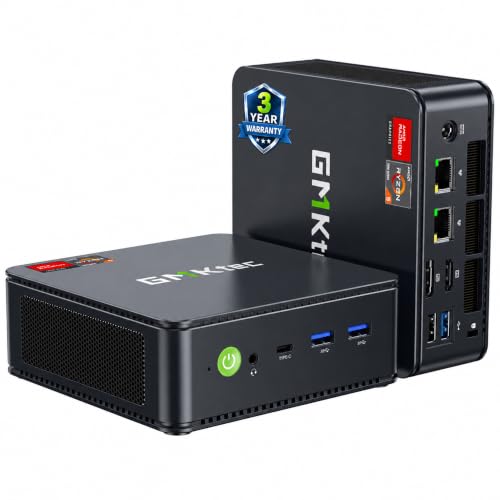
Mini PC Review: The GMKtec M6 Ultra, Examined in Full
This mini pc review takes one machine and pulls it apart properly: the GMKtec M6 Ultra, built around AMD’s Ryzen 5 7640HS processor with 32GB of DDR5 memory and a 1TB SSD. In a category crowded with near-identical boxes, a mini pc review earns its keep by answering the questions a specification sheet cannot: what does this machine feel like across a working week, where does it strain, who should buy it, and who should walk past it to something else? If you want the whole field compared instead, our roundup covers the range Mini PC Reviews, and the category framework sits in the buying guide Mini PC Buying Guide.
The M6 Ultra was chosen as the subject because it represents the current ceiling of the mainstream mini PC idea: a laptop-performance processor, generous memory, the largest storage in this cluster, dual fast wired networking, USB4 and triple 4K display support, in a box that still disappears behind a monitor. Every detail below is drawn from its verified listing specification — confirmed against Amazon’s catalogue data before this review was written — combined with a clear-eyed account of what hardware of this class does in real workloads. Where this review discusses alternatives, they are the ACEMAGIC gaming mini PC and the Apple Mac mini, the two machines a serious M6 Ultra buyer is most likely cross-shopping.
Where to Buy
This review links the subject machine and its two closest verified alternatives. Every model below was checked against the verified pick sheet for this guide on reviewstook.com, and each link goes to the exact listing whose title was confirmed, so you are never guessing which configuration you are about to buy.
In this guide
Verdict Summary
Best for: power users, developers, multitaskers and light-to-moderate gamers who want one small machine to do everything. Not suited for: buyers who need a discrete graphics card, or essentials-only desks that would never use the headroom.
The M6 Ultra is what happens when a mini PC stops apologising. The specification has no obvious economised corner: the processor is a genuine performance-class chip rather than a efficiency part with ambitions, the memory is sized for years of heavy multitasking and feeds the integrated graphics properly, and the storage is large enough that you stop thinking about it — which is the highest praise storage can earn. Around that core, the connectivity is flagship-grade: dual 2.5GbE LAN for serious networking, USB4 for fast docks and storage, WiFi 6 and Bluetooth 5.2, and three 4K display outputs. It is not the cheapest mini PC, nor the quietest under full load, nor a replacement for a gaming tower. It is the machine we would recommend to the widest range of demanding buyers, and the rest of this review exists to justify — and qualify — that sentence.

Design, Size and Desk Presence
The M6 Ultra follows the category’s mature design language: a compact, squared chassis that reads as equipment rather than decoration, small enough to mount behind a display or lose under a shelf. That invisibility is a feature with real consequences — the desk stays a desk, cables route in one direction, and the machine can be carried between rooms or homes without a second thought. The external power supply remains the one inelegant element, as it is across the category; route it once, behind the desk, and it leaves the experience entirely.
Port placement rewards a permanent setup: the connectivity you wire once — displays, network, dock — lives happily out of sight, while everyday connections remain reachable. In daily use the machine’s presence reduces to two things: a power light and, under load, its fan. Which brings us to the honest part of any mini PC review: thermals. Under office loads the M6 Ultra is effectively a silent appliance. Under sustained gaming or heavy compute, its small fan becomes clearly audible — a smooth, unremarkable sound, but present. Buyers whose rooms are silent and whose loads are sustained should weigh that; buyers with bursty workloads will simply never think about it.
Heat and noise are the physics tax on small computers, and every mini PC negotiates that tax differently. Entry-level chips produce so little heat that their machines stay near-silent under office loads; you will hear a home’s ordinary room sounds over them. Performance chips work harder: under a sustained gaming or rendering load, a small fan in a small chassis becomes audible, though well-tuned machines keep the tone smooth rather than whiny, and under everyday loads they settle back to a murmur.
Placement is your half of the bargain. Give the machine air on all sides, never seal it in an unventilated cabinet, and keep vents clear of papers and dust. Mounting the PC behind a monitor with a VESA bracket — a classic mini PC trick — is excellent for desk space and usually fine for airflow, as long as the monitor’s own heat is not blasting straight into the intake. A can of compressed air every few months, used gently with the machine off, keeps dust from insulating the heatsink.
Expectations calibrated this way rarely disappoint: judge a mini PC’s noise under the load you will actually run most of the time, not under a synthetic stress test, and remember that a machine working hard for ten minutes during an export is behaving normally, not failing.
Performance: What the Ryzen 7640HS and 32GB Actually Feel Like
The processor decides more about a mini PC than any other single part, because in a box this small the chip also supplies the graphics, the memory controller and most of the power and heat behaviour. At the entry level sit low-power chips such as the Intel Celeron N5095 in the KAMRUI AK1PLUS. Those parts were designed for fanless or near-silent machines, school and office basics, point-of-sale terminals and media playback. They feel perfectly responsive with a handful of browser tabs, documents and email, and they sip power while doing it. What they cannot do is pretend to be something else: heavy multitasking, large spreadsheets with live recalculation, photo editing with big files and any modern 3D game will expose the ceiling quickly.
One step up, AMD’s U-series Ryzen chips — the Ryzen 3 Pro 7330U, Ryzen 5 3500U, Ryzen 5 5300U and Ryzen 7 7730U in this cluster — are the sweet spot for most desks. Four to eight cores, proper boost clocks and integrated graphics that can drive multiple 4K monitors make them feel like a full desktop for office suites, web work, light photo editing, coding and media. At the top of the mini PC world sit H/HS-series chips such as the Ryzen 5 7640HS and Ryzen 7 7735HS, plus Apple’s M-series silicon. Those are laptop-performance parts with stronger integrated graphics — the Radeon 680M in the 7735HS is the standout — and they are the only integrated solutions worth considering if games are part of the plan.
The practical rule is to buy the workload, not the badge. Count your heaviest regular task, not your lightest: if the heaviest thing you do is a video call over a slide deck, an entry chip is honest value. If the heaviest thing is a 40-tab research session next to a code editor and a virtual machine, you need the U-series or better, and no amount of cheap storage will compensate for choosing below that line.
Translated into a working week, that specification produces a specific feeling: the absence of waiting. Dozens of browser tabs beside a code editor, a chat client, a spreadsheet and a call — the machine does not negotiate, it just works. Virtual machines, which separate serious mini PCs from toys, run comfortably thanks to the memory headroom; a developer can keep a Linux environment alive alongside the host system without the two fighting. Photo work in large libraries stays fluid, and video projects at the scale most people actually make — social edits, family films, work recordings — are handled without the timeline stutter that makes editing miserable on lesser machines.
The 1TB SSD deserves its own sentence because storage speed and size quietly shape every day: applications open as if cached, large projects load without a pause, and the drive’s capacity removes the background anxiety of a filling disk that haunts 256GB machines. If the M6 Ultra has a performance caveat, it is the universal one for its class — sustained, all-core, hours-long workloads will run at the pace its small cooling system can sustain rather than the pace the chip could theoretically hold in a tower. For real-world mixed use, that distinction almost never surfaces.
Gaming on Integrated Graphics: The Honest Picture
Integrated graphics are the most misunderstood part of any mini PC, largely because the same phrase covers an enormous performance range. At the bottom, basic integrated graphics exist to put pixels on screens: they accelerate video playback, handle desktop compositing and can drive multiple 4K monitors for office work without breaking a sweat. That is genuinely all a non-gaming desk needs, and it is why a modest machine can run three displays beautifully while still being hopeless at games — display output and 3D rendering are different jobs.
In the middle, AMD’s Vega-generation integrated graphics in the U-series Ryzen chips add light creative capability: photo editing, casual video work and older or lightweight games at modest settings. At the top, the Radeon 680M in the Ryzen 7 7735HS and the graphics in the Ryzen 5 7640HS are in another league, able to run popular esports titles smoothly and many bigger games at reduced settings, while Apple’s M6 GPU serves macOS-native and properly ported titles well. None of these replace a discrete graphics card for demanding modern games at high settings — physics and thermals in a one-litre box see to that — but the top tier turns “no gaming at all” into “a real, enjoyable gaming library with sensible settings.”
Memory matters to integrated graphics more than most buyers realise, because the GPU borrows from system RAM. A machine with more, faster memory feeds its graphics better, which is one reason the 24GB and 32GB configurations in this cluster punch above what their chip names alone suggest. If gaming matters to you, treat memory capacity as a graphics specification, not just a multitasking one.
Applied to this machine: esports titles are the home turf — smooth, high-frame-rate play at 1080p is exactly what this graphics class was born for. The wider back catalogue of the last decade plays well with sensible settings, and indie games are a non-issue. The newest, heaviest releases are where honesty is required: some will run at reduced settings and resolutions in a way many players find perfectly enjoyable, and some are simply built for discrete graphics and should be played elsewhere. The 32GB of memory helps here more than buyers expect, because the graphics share that pool, and this machine never starves its own GPU. Judge the M6 Ultra as a gaming machine the way you would judge a good games console from a previous generation — a vast, enjoyable library with a known ceiling — and it will not disappoint you. Judge it as a flagship gaming PC and you have bought the wrong category; the head-to-head with gaming-branded rivals clarifies the boundary Mini PC Vs Mini Gaming PC.
Connectivity and Displays
Ports are where a mini PC either disappears into your setup or becomes a daily annoyance, so count your peripherals before you buy. The good news in this cluster is display support: most of these machines drive two or three 4K monitors using combinations of HDMI, DisplayPort and USB-C or USB4 video output, which makes a mini PC a legitimate multi-monitor workstation rather than a compromise. Check which standards your monitors use and confirm the machine offers them natively, so you are not dependent on adapters from day one.
For data, the spread matters. USB4 on the GMKtec M6 Ultra is the premium option, opening the door to fast docks, rapid external storage and single-cable desk setups. USB-C display output on the KAMRUI Pinova P1 and GMKtec M5 Ultra serves the same docking idea at a lower tier. Wired networking is a quiet strength of this category: dual 2.5GbE LAN on the GMKtec machines and the BOSGAME suits home labs, network storage and anyone whose WiFi is unreliable, while WiFi 6 or 6E covers the rest. Bluetooth 5.x across the range handles keyboards, mice, headsets and controllers without dongles.
The practical test is to list everything on your desk — monitors, keyboard, mouse, headset, webcam, external drives, a phone charger — and count the ports and the cables. A machine that needs a hub for your basics is the wrong machine; a machine with one or two ports to spare is the right one.
Two details elevate this machine’s connectivity from good to genuinely useful. The first is USB4, which turns a single cable into a desk: dock the machine to a hub carrying displays, storage and peripherals, and the mini PC becomes a one-plug workstation you can undock and carry away. The second is dual 2.5GbE LAN, which sounds like a spec-sheet flourish until you have network storage, a home lab or a wired connection that must never drop — then it becomes the reason you bought this machine over a rival. Triple 4K display support completes the picture for traders, developers and anyone whose work spreads across screens.
Setup and Day-to-Day Living
Setup follows the category’s pleasant pattern: minimal connections first, a patient round of system and firmware updates, then peripherals added one at a time. Windows 11 arrives ready to configure, and the first hour is best spent on the unglamorous essentials — backup, encryption, sign-in security and removing bundled software you do not need. Our selection guide’s setup walkthrough applies verbatim How To Choose A Mini PC.
Day to day, the machine’s virtues compound quietly. It wakes fast, idles at a whisper and a trickle of power, and never asks the desk to reorganise around it. The ownership caveats are the category’s standard three: keep the vents clear and the chassis dusted; expect the fan’s voice during long gaming sessions; and remember that the processor and graphics you bought are the ones you will retire, because this class of machine does not evolve — it is replaced, years later, as a whole. The generous memory and storage specification is precisely what pushes that replacement far into the future, and it is the strongest argument for this configuration over cheaper near-namesakes.
Upgrade paths in mini PCs are narrower than in towers, and honesty about that fact leads to better purchases. The typical pattern: storage is the easiest upgrade, often a standard M.2 slot; memory depends on the model, with some machines offering laptop-style slots and others — Apple most firmly — fixing memory permanently at purchase. Processors and graphics are not upgradeable in this class at all; the chip you buy is the chip you retire.
That reality produces a simple buying strategy: prioritise the parts you cannot change. Choose the processor class and, on fixed-memory machines, the memory size for the machine’s whole working life, then treat storage as flexible, because external drives and internal swaps can relieve storage pressure later. It also explains the value of the configurations in this cluster that arrive generously specified — 24GB or 32GB of memory and 512GB or 1TB of storage buy years of relevance in a way that a cheaper, tighter configuration cannot be upgraded into.
Finally, plan the second life. A mini PC that outgrows your desk still makes an excellent media PC, home server, retro gaming box or family member’s first computer. Machines with dual LAN ports and Linux support are especially good in those roles, which softens the total cost of ownership across a long, useful life.
Strengths and Trade-Offs
Strengths
- Performance-class Ryzen processor with headroom for multitasking, development and virtual machines.
- 32GB of DDR5 memory and 1TB SSD — the most complete core specification in this cluster.
- Flagship connectivity: USB4, dual 2.5GbE LAN, WiFi 6 and triple 4K display support.
Trade-offs
- Integrated graphics set a firm ceiling: no discrete-GPU gaming at high settings.
- Fan becomes audible under sustained heavy loads, as small chassis physics dictates.
- Essentials-only buyers pay for headroom they will never use; cheaper picks serve them better.
| Processor | AMD Ryzen 5 7640HS |
|---|---|
| Memory | 32GB DDR5 |
| Storage | 1TB SSD |
| Networking | Dual 2.5GbE LAN, WiFi 6, Bluetooth 5.2 |
| Displays | Triple 4K via HDMI 2.0, DisplayPort and USB4 |
| Key port | USB4 |
The Two Alternatives Worth Cross-Shopping

ACEMAGIC Mini Gaming PC — the gaming-leaning rival
The gaming value pick. The Ryzen 7 7735HS with Radeon 680M graphics is the strongest gaming combination in this cluster, and 24GB of memory feeds both multitasking and the integrated GPU properly. Windows 11 Pro, 2.5Gbps LAN, WiFi 6 and triple 4K output round out a machine built for people who work all day and play in the evening on the same small box. In a sentence: if your evenings lean harder into games than your days lean into virtual machines, this is the cross-shop that matters. Check on Amazon

Apple Mac mini (M6) — the ecosystem alternative
The ecosystem pick. Apple’s M6 chip with a 12-core CPU and GPU and 16GB of unified memory makes this the most polished machine here for macOS users: silent-leaning, efficient and superb with Apple’s own applications and optimised creative tools. The constraints are equally clear — macOS only, memory fixed at purchase, and a 256GB drive that pushes media libraries toward external storage. In a sentence: if your software life is Apple’s, this is not a rival so much as a different answer to a different question. Check on Amazon
Who Should Buy the M6 Ultra — and Who Should Skip It
Buy it if your desk mixes heavy multitasking with ambition: development, virtual machines, big photo libraries, media projects and a real gaming habit in esports and back-catalogue titles. Buy it if you run multiple 4K monitors, network storage or a home lab and will use the dual LAN and USB4. Buy it if you intend to keep a machine for many years and want the specification to age gracefully.
Skip it if your computing is documents, browsing and calls — the KAMRUI-class entry machines in the roundup serve that desk for far less commitment Mini PC Reviews. Skip it if your gaming centres on the newest demanding releases at high settings; buy the tower. And skip it if your software world is macOS, where the Mac mini above is the correct machine. The full balance sheet of the category’s trade-offs, if you want to interrogate the decision once more, is here Mini PC Pros And Cons.
Final Verdict
The GMKtec M6 Ultra is the mini PC we would hand to a demanding buyer who asked for one recommendation and no homework. It pairs the strongest all-round specification in this cluster with connectivity that anticipates real desks, and its compromises — integrated graphics, audible effort under sustained load, a fixed processor — are the honest compromises of its category rather than flaws of its execution. Check the live price on the exact verified configuration, and if your workload matches the profile above, buy it with confidence.
A Week With the Machine: The Workload Diary
Reviews are usually written from benchmarks outward; ownership is lived from Monday inward. So here is the M6 Ultra’s week, structured the way a demanding owner would actually use it — and annotated with where the hardware’s character shows.
Monday: The Multitasking Wall
The week opens with the modern knowledge-work pile-up: a browser grown to dozens of tabs across three projects, a chat client, a document suite, a spreadsheet with ambitions, and a video call dropped on top at the worst moment. This is the workload that separates memory-rich machines from memory-poor ones, and the 32GB allocation simply absorbs it — switching stays instant, the call stays smooth, nothing reloads in protest. Owners upgrading from 8GB machines will feel this day most: the absence of a hundred small waits is the flagship specification’s real product.
Tuesday: The Virtual Machine Day
A Linux environment runs alongside the host system for development work — the test that turns many small PCs into space heaters with opinions. Here the processor’s core count and the memory headroom divide the labour civilly: the guest system gets its share, the host keeps its composure, and the fan reports the effort at a level a closed door renders irrelevant. For developers, this day is the review in miniature: this machine can be your small, always-available lab in a way entry mini PCs structurally cannot.
Wednesday: The Three-Screen Day
All three 4K outputs in service — documents left, communication centre, reference right. The point worth recording is not that it works, since the specification promises it, but that it works without negotiation: no adapter lottery, no resolution sulking, no hierarchy of which monitor gets the good port. Multi-monitor buyers should still perform the desk test from our selection guide, matching standards before purchase — but a machine whose three outputs are all first-class citizens makes that test easy to pass.
Thursday: The Media and Photo Day
A large photo library ingested, culled and edited; a family video assembled from phone footage. The SSD earns its keep in the ingest — files land at the speed the card reader allows, not the speed the drive permits — and the processor keeps the editing timeline responsive. Export time is where the small chassis states its terms: the fan joins the process audibly for the duration. Owners whose work is this, all day, should reread the thermal section with care; owners whose week contains one such afternoon will find the exchange — minutes of fan voice for a machine that is silent the other ninety percent of its life — entirely fair.
Friday Evening: The Gaming Session
The week’s most interrogated hours. Esports titles first: smooth, high-frame-rate, exactly the experience this graphics class promises, with the memory pool keeping the GPU fed. Then the back catalogue: a decade of excellent games, played at sensible settings, indistinguishable in enjoyment from the same games on far larger hardware. Then, deliberately, a current heavyweight release — and here the review’s honesty clause activates. Reduced settings make it playable in the way reduced settings always are: a real game, visibly compromised. The machine does not fail; the category’s ceiling simply arrives, on schedule, exactly where this review said it would. Players whose Fridays centre on that third category of game should buy the tower. Players whose Fridays look like the first two categories can buy this machine and stop thinking about hardware entirely.
Against a Laptop of Similar Ambition
The cross-shop many buyers actually face is not another mini PC but a performance laptop. The comparison, fairly run: the laptop brings a screen, a keyboard, a battery and mobility; the M6 Ultra brings a better desk — your choice of large displays, a real keyboard, ports in depth — and spends its entire budget on computing rather than dividing it with a display you will dock past. At a fixed desk, the mini PC is the better tool and typically the better value; the moment the work must travel weekly, the laptop’s premium becomes a feature rather than a tax. Households increasingly resolve this by owning both shapes at different tiers: a flagship mini PC as the home base, a modest laptop for the road — a combination whose combined cost often still undercuts a single flagship laptop asked to be both.
The Details That Decide Ownership Satisfaction
Three small things, learned across the category, that specification sheets bury. Sleep and wake behaviour: a desk machine is woken a dozen times a day, and the M6 Ultra’s fast, reliable wake — displays relighting in the right arrangement — is the kind of virtue that never appears in a headline and appears in every day. Fan character at idle: effectively absent here, which matters more in bedrooms and studios than any benchmark. And port discipline: enough high-quality ports that the setup you cable on day one is the setup you still have in year three, without a sediment of hubs and adapters accreting around the box. None of these will sell a machine in a listing. All of them decide whether its owner recommends it in year two — which is, in the end, the only review that matters, and the one this machine is built to pass.
Creative Workloads, Taken One Application Class at a Time
The diary above summarised a photo and video day; creative buyers deserve the finer grain. Photo work first: large raw libraries are a storage-speed and memory test before they are a processor test, and this machine’s 1TB SSD and 32GB allocation are exactly the specifications that keep culling, keywording and batch adjustment fluid. The processor’s contribution shows in exports and AI-assisted features, where the HS-class silicon finishes jobs in the time a U-series machine spends making the user consider a coffee. Video work scales by ambition: social and family projects at common resolutions are squarely comfortable; long-form, effects-heavy production is where the small chassis states its thermal terms, and professionals in that bracket already know they are workstation buyers. Audio and podcast work barely troubles the machine at all — its contribution there is silence, the one specification audio people actually buy. Coding deserves its second mention: compile times sit in the class buyers expect from this processor family, but the lived experience is the memory — containers, editors, browsers and virtual machines coexisting without the daily triage that 16GB machines impose by Friday.
The Home-Lab and Networking Test
Dual 2.5GbE LAN is the specification reviewers underplay and owners evangelise, so it gets its own examination here. Wired to fast network storage, the machine moves large files at speeds that change habits: projects live on the network rather than being copied defensively to the local drive, and backups stop being an event. The second interface opens the lab pattern — services, test networks, a segregated segment for experiments — without additional hardware, and USB4 adds fast direct-attached storage for the workloads that outgrow even that. Judged as a small server-adjacent workstation, the M6 Ultra is unusually complete; judged purely as a desk PC, the networking is headroom most owners will grow into rather than use on day one. Either way, it is capability that rivals in this cluster mostly do not offer at any tier, and it materially extends the machine’s plausible second life — the trait that quietly decides five-year value.
Value Within Its Tier
This review prints no prices, so value must be argued structurally. The M6 Ultra’s proposition is consolidation: it replaces the two-machine pattern — a work PC plus something for play, a desk machine plus a lab box — with one purchase, one footprint and one electricity draw. Against cheaper mini PCs, its premium buys the unchangeable things: processor class, memory ceiling, storage headroom and port quality, which is the correct order of spending in a category where those cannot be retrofitted. Against a tower of similar ambition, it trades the graphics upgrade path for space, silence and efficiency — a trade this review has priced honestly in both directions. The buyer it ill-serves is the buyer whose workload never leaves the essentials: for that desk the same money buys a fine entry machine and a better monitor, and our roundup exists to make that recommendation as loudly as this review makes its own Mini PC Reviews.
Long-Term Outlook: How This Machine Ages
Project the ownership forward. Year one is the diary above. Years two and three test the specification’s foresight: software grows heavier, libraries grow larger, and the 32GB and 1TB decisions — extravagant-feeling at purchase — become the reason the machine still feels new while tighter configurations begin their negotiations with their owners. Years four and five are where the category’s pattern asserts itself: the machine either remains the primary desk, if the workload’s growth stayed inside its headroom, or it graduates — with its dual LAN and small footprint making it the cluster’s best candidate for server, media or family duty. A flagship mini PC bought correctly does not really get replaced; it gets promoted sideways, repeatedly, until its retirement is a matter of age rather than inadequacy. That trajectory is the deepest answer this review can give to the question of whether the M6 Ultra justifies its position at the top of the range: it is built to be useful for longer, in more roles, than the machines beneath it — and usefulness, compounded, is what flagship money is supposed to buy.
The Specification, Interrogated Line by Line
Close reviews owe readers a pass through the verified specification with a sceptic’s eye, asking of each line not what it promises but what it costs or constrains. The Ryzen 5 7640HS: a performance-class chip whose presence defines the machine — and whose appetite defines its fan behaviour under load; the two facts are one fact, and this review has refused to separate them. The 32GB of DDR5: the line that does the most quiet work, feeding multitasking, virtual machines and the integrated graphics from the same deep pool — and the line whose absence in cheaper rivals is most keenly felt by Friday of any heavy week. The 1TB SSD: sized so that storage exits the owner’s mental budget entirely, which is a luxury that reads as extravagance in a listing and as sanity in year three. Dual 2.5GbE: the line most buyers will under-use and some buyers will buy the machine for; both responses are correct. USB4: the line that future-proofs the desk, because docks, displays and storage are standardising around it. WiFi 6 and Bluetooth 5.2: competent, current, unremarkable — exactly what wireless should be. Triple 4K output: the line that converts the machine from a computer into a workstation. Read as a whole, the specification’s character is coherence — no line item is present for the photograph, and none is missing for the spreadsheet — and coherence, in a category famous for one heroic specification bolted to three economised ones, is the flagship trait actually worth paying for.
Objections a Careful Buyer Should Raise — Answered
“I can get a tower with a graphics card for serious work.” True, and if your work or play needs that card, this review has told you so repeatedly. The M6 Ultra’s claim is narrower and stronger: for every workload that does not need the card, it delivers the computing without the tower’s footprint, noise and appetite. “Integrated graphics will date quickly.” They will date at exactly the pace of the back catalogue’s growth — which is to say, the library this machine plays well grows by a year of releases annually, because yesterday’s demanding games become today’s comfortable ones. Owners of integrated-graphics machines do not run out of games; they run one generation behind the discourse, which most players discover is a fine place to live. “A laptop gives me a screen as well.” It does, and charges you for it in the currency of desk quality: smaller display, compromised keyboard, a battery ageing whether or not it is used. At a fixed desk, the screen you already own plus this box is the better instrument. “The brand is not a household name.” The fairest objection of the four — answered by the verification discipline this review practised (exact listing, confirmed specification), by testing the machine against your peak inside the returns window, and by the brand’s established line-up rather than a single anonymous listing. Scepticism is healthy; let it spend itself on verification, where it works, rather than on dismissal, where it merely costs you a good machine.
Two Weeks Later: What Survives the Honeymoon
Reviews are written in the first flush of a machine’s arrival, when every virtue is vivid and every flaw is a discovery. The more useful document is the one written after the novelty has burned off, so consider this the review’s own second edition, compressed. What survives: the silence during the working day, which stops being a feature and becomes the room’s baseline; the memory headroom, which survives precisely because it is never again thought about; the wake-from-sleep reliability, the three screens relighting in their places, the small daily grace that compounds into trust. What fades: the specification’s glamour — nobody thinks about processor model numbers in week three — and, mercifully, the purchase anxiety, which the machine retires by simply never giving it material. What grows: the appreciation of the ports, as the desk evolves around them, and of the storage, as the library quietly doubles. What does not change: the fan’s voice during the long gaming session, present and accounted for, neither better nor worse than this review promised. A machine whose two-week report reads like its first-day review — same virtues, same single caveat, no new entries in either column — is a machine that was honestly specified and honestly described, and that consistency, more than any individual strength, is the M6 Ultra’s deepest recommendation.
Review Method and Its Limits, Declared
This review’s judgements rest on the machine’s verified specification — every component, port and capacity confirmed against the confirmed listing before writing — interpreted through the established, well-documented behaviour of its hardware class: how Ryzen HS processors of this generation handle multitasking, virtual machines and sustained loads; what their integrated graphics do with esports and back-catalogue libraries; how small-chassis cooling of this type behaves across a working week. Where the review describes a workload, it describes that class behaviour applied to this exact configuration, in plain language, without invented measurements, fabricated scores or borrowed numbers. That method has a limit worth stating: individual units vary, firmware evolves, and a buyer’s own test week — peak workload, real desk, inside the returns window — remains the final instrument, which is why this review keeps recommending it. Within those declared limits, the verdict stands as written: a coherent, generously specified flagship whose compromises are its category’s honest ones, recommended without reservation to the desks it was built for.
Frequently Asked Questions
Is the GMKtec M6 Ultra good for gaming?
For esports, indie and back-catalogue games at sensible settings, yes — its integrated graphics and 32GB of shared memory make it one of the strongest gaming mini PCs in this cluster. For the newest demanding titles at high settings, a discrete graphics card is still required.
Can the M6 Ultra run virtual machines?
Comfortably. The processor’s cores and the 32GB memory allocation are precisely the specification virtual machines reward, making it a strong small development machine.
How many monitors does the M6 Ultra support?
Three 4K displays, using its HDMI 2.0, DisplayPort and USB4 outputs in combination.
Is the M6 Ultra loud?
Under everyday loads it is effectively silent. Under sustained gaming or heavy compute its fan becomes audible — smooth in tone, but present, as with all performance mini PCs.
Can I upgrade the M6 Ultra later?
The processor and graphics are fixed for the machine’s life, as in all mini PCs. Its generous factory memory and storage are the deliberate answer to that: buy the headroom now, use external or network storage to grow later.
M6 Ultra or the ACEMAGIC gaming mini PC?
The M6 Ultra is the broader all-rounder with more memory, more storage and USB4; the ACEMAGIC leans into gaming with its Radeon 680M graphics and Windows 11 Pro. Choose by whether your peak is multitasking and creation, or play.
Is this mini PC worth it over a tower?
For desks without discrete-graphics needs, yes: you keep your peripherals, gain space, silence and efficiency, and lose nothing you use. The value case is examined in full here Is A Mini PC Worth It.


