Disclosure: As an Amazon Associate, reviewstook.com earns from qualifying purchases. Links on this page are affiliate links; they cost you nothing extra. Prices and availability change often, so check the current Amazon listing before you buy.
The mercury k1 is the keyboard GravaStar built for people who looked at its Mercury mice and its sculptural desktop speakers and asked when the keyboard would get the same treatment. The answer is a 75 percent wireless mechanical board with a gasket mount, hot-swappable linear switches and a case design that refuses to look like office equipment. Where most 75 percent keyboards compete on switch specs and stabiliser tuning, the K1 competes on presence first and mechanics second — and the interesting question for a buyer is whether the mechanics are good enough that the styling stops being a compromise and starts being a bonus.
That question matters because the K1 sits in a crowded price band. Gasket-mounted 75 percent boards with tri-mode wireless are everywhere now, many of them cheaper, some of them quieter, a few of them better built in the conventional sense. What none of them offer is GravaStar’s particular industrial design language: angular, almost mecha-inspired lines, a frame that looks cast rather than extruded, and lighting treated as part of the sculpture rather than an afterthought. This review works through the typing feel, the wireless behaviour, the software, the sound, and the everyday annoyances, then places the board beside its own cheaper sibling, the Mercury K1 Lite, so you can judge whether the full K1 earns its premium or whether the Lite is the smarter GravaStar to buy.
Key takeaways
- The K1 is a 75 percent gasket-mounted board with hot-swappable linear switches, tri-mode connectivity and RGB backlighting, sold on design as much as on typing feel.
- Its stock sound profile is the creamy, soft-bottom-out character the listing promises, helped by the gasket mount and factory lubrication.
- Wireless runs three ways — 2.4 GHz, Bluetooth 5.0 and wired USB-C — so one board can cover a gaming PC, a laptop and a tablet without cable swaps.
- The Mercury K1 Lite keeps the same layout, mount and switch style at a lower tier, making it the value pick inside GravaStar’s own range.
- Buyers who want a metal case, a knob or deep custom firmware should compare hobbyist boards before committing, because the K1 prioritises looks and out-of-box feel over modding depth.
In this guide
Mercury K1 at a glance: who this board is actually for
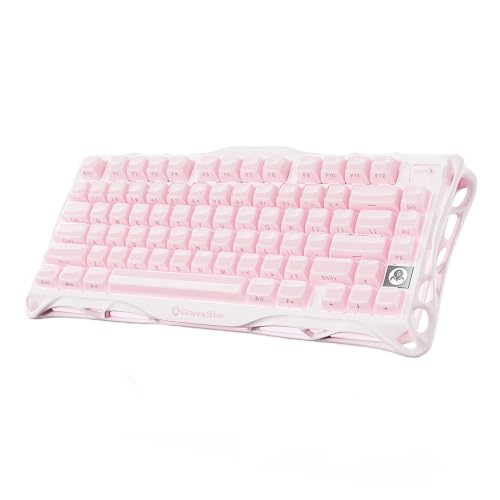
The K1 makes most sense on a desk that is also a display. GravaStar’s audience builds battlestations with a visual theme — white and pink builds, mecha-inspired setups, shelves of figures behind the monitor — and a plain black rectangle of a keyboard breaks that theme no matter how well it types. The Sakura Pink colourway of the verified listing leans into that world deliberately. Under the styling, though, the fundamentals are mainstream in a good way: a 75 percent layout keeps the function row and arrow keys, drops the number pad, and leaves room for a mouse to travel, which is exactly the footprint most gaming desks want.
It is equally important to say who should walk past it. If your keyboard lives in a drawer between work sessions, the design premium buys you nothing. If you remap layers daily, program macros per application and flash firmware for fun, the K1’s software will feel shallow next to QMK or VIA boards. And if you type for a living and judge a board purely on key feel per pound spent, several plainer gasket boards deliver a similar sound for less. The K1’s proposition is narrower and, for the right desk, stronger: a board that types pleasantly, connects to everything, and looks like an object you chose rather than a peripheral you tolerated.
How the picks in this review were verified
Two GravaStar boards are linked in this article, and both were confirmed against Amazon catalogue data before a word of the review sections was written. The main subject is the Mercury K1 in Sakura Pink, a 75 percent wireless mechanical keyboard whose listing confirms the gasket mount, hot-swappable linear switches, RGB backlighting and the three connection modes. The second board is the Mercury K1 Lite in Crystal Rose, included because it is the comparison most K1 shoppers actually make: same brand, same layout family, lower tier. No other keyboard is linked, because no other board was verified for this article; rival boards from other brands are discussed in prose only, in general terms, so that every buy button on this page points at a product whose listing was actually checked.
That discipline shapes the comparison sections too. When this review says a hobbyist aluminium board feels more substantial, that is a category observation, not a linked recommendation. When it says the K1 Lite is the better buy for a second desk, that judgement rests on the verified listing: the Lite keeps the gasket mount, the hot-swappable linear switches and the same tri-mode wireless, which is most of what makes the K1 pleasant, in a lighter and cheaper package.

GravaStar Mercury K1 review: the full-size experience in a 75 percent frame
Badge: The design-led pick
Unboxing the K1 sets the tone. The board arrives with its shape doing the talking: the case has the angular, layered look GravaStar uses across the Mercury line, and in Sakura Pink it reads as a deliberate piece of desk décor rather than a peripheral. Pick it up and the weight is reassuring without being desk-bound — this is a board you can carry to a laptop across the room, but it does not slide around under enthusiastic typing either. The keycaps are sculpted with a profile that suits the board’s slightly playful character, and the legends are clean enough for a backlit board, which is not always true of design-first keyboards.
Mini spec box — GravaStar Mercury K1
- Layout: 75 percent, function row and arrow keys, no number pad
- Mount: gasket mount
- Switches: linear, hot-swappable
- Connectivity: 2.4 GHz wireless, Bluetooth 5.0, USB-C wired
- Backlighting: RGB
- Colourway of verified listing: Sakura Pink
- Compatibility: Windows and Mac, per the listing
The typing feel is where the K1 either justifies itself or collapses into novelty, and it mostly justifies itself. The gasket mount gives each keystroke a soft, cushioned landing instead of the hard plate clack of a tray-mount board, and the factory linear switches travel smoothly with a sound that matches the creamy description in the listing — a rounded, muted thock rather than a sharp click or a hollow rattle. Spacebar and the other stabilised keys are the usual test on boards like this, and the K1’s stabilisers are tuned well enough out of the box that the spacebar does not tick or rattle distractingly against the alphas. A hobbyist would still open it up; a normal buyer will simply type on it happily.
For gaming, the relevant facts are the linear switches and the 2.4 GHz connection. Linear switches actuate without a tactile bump, which suits rapid repeated presses and smooth movement keys, and the low-latency wireless dongle is the mode to use for anything competitive; Bluetooth is for the laptop and tablet, wired is for charging while you play or for a desk that never moves. Polling and latency figures are the kind of numbers that look decisive on a spec sheet and matter far less than a stable connection and a board that does not flex under your palms — on both of those everyday measures the K1 behaves.
Strengths
- Genuinely distinctive design that suits themed and pink or white battlestations where plain boards look wrong.
- Gasket mount and factory linear switches produce the soft, creamy sound profile the listing promises, with no immediate need to mod.
- Tri-mode connectivity covers a gaming PC, a work laptop and a tablet from one board, with sensible mode choices for each.
Trade-offs
- You pay for the sculpture: plainer 75 percent gasket boards with similar typing feel cost less.
- Software and remapping depth trail QMK and VIA hobbyist boards, so heavy macro users will feel the ceiling.
- The bold styling is a commitment — it anchors a desk theme rather than blending into any setup.
Best for: a themed gaming desk that wants a wireless 75 percent board which looks as considered as it types. Not suited for: firmware tinkerers, or buyers who want the lowest possible price for gasket-mounted typing feel alone.

GravaStar Mercury K1 Lite review: the same idea, softened
Badge: The value sibling
The K1 Lite exists because GravaStar knows the full K1’s price makes some shoppers hesitate, and its strategy is to keep the experience and trim the extravagance. The verified listing confirms the essentials survive the trim: the same 75 percent layout, the same gasket mount, hot-swappable linear switches with the same creamy sound brief, RGB backlighting and the same trio of 2.4 GHz, USB-C and Bluetooth 5.0 connections. The Crystal Rose colourway keeps the board firmly in the same visual family, so a Lite on a pink-themed desk does not look like the budget understudy.
Mini spec box — GravaStar Mercury K1 Lite
- Layout: 75 percent
- Mount: gasket mount
- Switches: linear, hot-swappable
- Connectivity: 2.4 GHz wireless, Bluetooth 5.0, USB-C wired
- Backlighting: RGB
- Colourway of verified listing: Crystal Rose
In daily use the Lite’s appeal is that the compromises are the kind you notice in a review comparison rather than at your desk at midnight. The typing sound stays in the same soft family, the layout is identical so your muscle memory transfers, and the wireless behaviour covers the same three-device shuffle. What you give up is the full K1’s more elaborate casework and the sense of owning the flagship object. For a main desk where the keyboard is a centrepiece, that difference is the whole point of the K1. For a second setup, a partner’s desk, a dorm room or a first mechanical board for a younger player, the Lite delivers the GravaStar experience where it counts and saves the difference for games or a mouse upgrade.
Strengths
- Keeps the gasket mount, linear hot-swappable switches and tri-mode wireless that define the K1 experience.
- Crystal Rose styling keeps themed desks coherent without paying the flagship premium.
- Identical layout means it pairs naturally with a full K1 as a second board, with no relearning.
Trade-offs
- Case design and materials are simpler than the flagship’s, which design-led buyers will notice side by side.
- It inherits the same software ceiling as the K1, so remapping depth is not the reason to buy either board.
- As the newer, cheaper model it can tempt buyers who would actually have been happier saving for the full K1’s looks.
Best for: a second desk, a first GravaStar, or a themed setup on a tighter budget. Not suited for: buyers whose main joy is the flagship case design itself — they should buy the K1 once and be done.
Mercury K1 vs K1 Lite: a side-by-side way to decide
Because both boards share a layout, a mount and a switch style, the decision between them is unusually honest: it is about finish, presence and budget, not about capability. The K1 is the object — the board photographed in setup posts, the one whose case design justifies a themed desk. The Lite is the experience — the same keystrokes and connections in a simpler shell. A useful test is to ask where the board will sit in two years. A main battlestation that you keep upgrading around a theme rewards the flagship. A board that will migrate between rooms, travel to a campus or share a family desk rewards the Lite, because its lower price makes you less precious about it.
There is also a household answer: the two boards together. Several GravaStar fans run the full K1 at the main desk and a Lite at a second machine, and the shared layout and sound profile make that pairing feel intentional rather than redundant. Whichever way you land, avoid the common mistake of buying the Lite while secretly wanting the K1’s case; the saving evaporates the first time you price the upgrade you actually wanted.
Buying guide: what to check before any 75 percent wireless board
Layout literacy comes first. A 75 percent board keeps the function row and arrows but compresses the navigation cluster, so keys like Delete and Home may sit in a column or behind a function layer depending on the model. If you screenshot, navigate spreadsheets or use editing shortcuts constantly, spend ten minutes with the layout diagram of any board you are considering — including the K1 — and act out your ten most common shortcuts in the air. The boards that frustrate people are rarely bad boards; they are good boards whose compressed layout fights a specific habit.
Second, separate the three wireless modes in your mind. The 2.4 GHz dongle is the gaming connection: lowest latency, one device. Bluetooth is the convenience connection: several paired devices, fine for typing and casual play, not the choice for ranked matches. Wired USB-C is the fallback that also charges. A board like the K1 that offers all three is not padding its spec sheet; each mode has a real job. Third, decide how much you care about sound. Gasket mounting, foam layers and factory-lubed linear switches are what produce the soft, creamy profile buyers chase in videos; if you prefer a sharper, clackier board, the same money buys a very different experience elsewhere.
Finally, treat hot-swappability as insurance rather than a hobby invitation. On the K1 it means a failed switch is a two-minute swap instead of a return, and a future preference for a different linear switch is an option rather than a new keyboard. That practical value applies even if you never open a switch puller for fun.
How to set up the Mercury K1 across three devices
Start wired. Connect the K1 by USB-C, let it charge fully, and update or configure anything the companion software offers while the connection is foolproof. Then pair the 2.4 GHz dongle with your main gaming PC and test it in the game where dropped inputs would annoy you most; a dongle plugged into a front port or a short extension, away from USB 3 hubs and metal enclosures, behaves noticeably better than one buried behind a case. Only once the gaming connection is proven should you pair Bluetooth to your laptop and tablet, naming each pairing clearly so the mode switch on the board becomes a habit rather than a guessing game.
Next, tune the lighting last, not first. RGB is the K1’s party trick, but brightness left at maximum shortens wireless battery life and can wash out legends in a bright room. Set the effect you actually like at a moderate level, then live with the board for a week before revisiting it. Finish by typing a familiar paragraph and playing one familiar game, and note anything that feels off — a stabiliser sound, a shortcut that moved — while the fixes are still small. Readers comparing sensing technologies may also enjoy rapid trigger and Hall effect boards explained, and anyone furnishing the rest of the desk can browse macropads and standalone numpads for compact layouts.
Common mistakes K1 buyers make
The first mistake is buying on the photograph alone and discovering the layout, not the look, is what you live with. The second is judging the sound from a phone recording: compression and desk material change everything, and the same board sounds different on wood, glass and a desk mat. The third is leaving the board on Bluetooth for competitive play and blaming the switches for latency that belongs to the connection. The fourth is ignoring the Lite: shoppers anchored on the flagship sometimes never check whether the sibling covers their needs, which is exactly the comparison this review built in.
A subtler mistake is treating a design-led board as fragile décor. The K1 is a working keyboard with hot-swappable switches and three radios; it wants to be used, travelled with and typed on hard. Owners who baby it miss the point, and owners who assume design-led means toy-like misjudge it in the opposite direction. Judge it as you would any board — by a week of real typing — and let the styling be the tiebreaker it was designed to be.
Final recommendation
Buy the Mercury K1 if your desk has a theme, your games want linear switches and low-latency wireless, and you value a board that arrives sounding soft and finished rather than asking for a weekend of modification. Buy the K1 Lite if that description fits but the flagship’s casework does not fit the budget, or if the board is destined for a second setup. Look elsewhere only if deep firmware customisation or a metal hobbyist case matters more to you than either board’s looks — and if that is you, the split-keyboard story in the Mistel X VIII split board reviewed and the aluminium alternative in the Luminkey75 by Createkeebs are worth your evening. GravaStar’s own mouse line is covered in the Mercury X Pro gaming mouse, which shares this board’s design language.
Design in daily life: living with a sculpture you type on
A themed keyboard earns its keep in small moments rather than in photographs. The K1’s case catches light differently across the day, which sounds like a trivial observation until you realise it is the entire reason the board exists: it keeps a desk feeling chosen. Owners of plain boards stop seeing their keyboard within a week. K1 owners keep noticing theirs, and that ongoing pleasure is a legitimate product feature in the same way that a watch’s case finishing is — provided, always, that the underlying instrument works. The practical side of the design is less poetic. Light colourways show dust and crumbs more honestly than black boards do, so the K1 rewards a weekly brush-down and punishes anyone who eats toast over it. The angular case also has more edges to catch when you slide the board aside, a small ergonomic tax on the sculpture.
Desk pairing matters more with this board than with most. On a white or pastel setup with a matching mouse and a pale desk mat, the Sakura Pink K1 looks like the centrepiece of a deliberate composition. On a dark, walnut-and-black work desk it looks like a guest. Neither is a defect, but the mismatch is worth picturing before you buy, because the board will not fade into the background to spare your feelings. If your setup is still evolving, the Lite in Crystal Rose makes the same colour commitment at a lower cost of being wrong.
Sound, switches and the tuning you can do later
The K1’s stock sound deserves a paragraph of physics. A keyboard’s voice comes from the switch, the keycap, the plate, the case volume and the desk beneath it, in roughly that order. GravaStar tuned the first four toward a soft, rounded result: linear switches without a click mechanism, a gasket mount isolating the plate from the case, and internal damping doing the quiet work. Your desk is the fifth ingredient and the only one GravaStar cannot control, which is why the same board sounds deeper on a thick mat and brighter on bare glass. If your K1 sounds thinner than the videos promised, change the surface before you change the switches.
Because the switches are hot-swappable, the tuning path stays open. An owner who falls for a heavier linear switch can refit the whole board in an evening; a owner who only dislikes the spacebar’s tone can start with stabiliser tuning, the highest-return intervention on almost any board. Work in that order — surface, stabilisers, then switches — and stop at the first stage that satisfies you. The K1 was bought to be finished, and most owners will find stage one is enough, but the option to go further is part of what separates it from sealed, soldered boards at similar prices.
Wireless behaviour and battery habits
Tri-mode wireless sounds simple and behaves simply once you assign each radio its job, as the setup section advised. The habits that separate happy owners from frustrated ones are small: charge on a schedule rather than at the warning light, because a board that dies mid-match teaches you the schedule the hard way; keep the dongle on a short extension if your PC lives under a metal desk, since receivers dislike being shielded; and turn the lighting down before blaming the battery, because full-brightness RGB is the single largest power draw on any backlit wireless board. Bluetooth pairings deserve names and order — first slot for the machine you use most — so switching becomes muscle memory.
Latency deserves one calm paragraph. On the 2.4 GHz connection the K1 behaves like a wired board for every practical purpose a non-professional player can measure, and the difference between it and a cable is smaller than the difference between a good and a bad night’s sleep. Bluetooth adds a delay that typists never notice and fighting-game players always do, which is why the modes have jobs. Wired mode remains the referee: if anything ever feels wrong, plug in, and whatever persists is the board while whatever vanishes was the radio.
The K1 at work: meetings, documents and shared desks
Gaming boards at work live or die on manners. The K1’s soft sound profile is genuinely office-appropriate — a gasket-mounted linear board is among the quietest mechanical options — and the RGB can be dimmed or stilled for a video call without the board looking broken. The 75 percent layout handles documents and email gracefully; the compromises appear in spreadsheet season and in applications with number-pad shortcuts, both fixable with a standalone numpad. Mac compatibility from the listing means a mixed household — Windows gaming rig, Mac laptop — can share one board across the mode switch, which quietly makes the K1 one of the more practical design boards you can buy.
Shared desks raise the hygiene point again: a light colourway shows the week honestly. A washable desk mat under the board, a brush in the drawer and a no-snacks rule you actually keep will hold the Sakura Pink finish at its best. Owners who know they will not do any of that should choose their colourway with their habits, not their aspirations, in mind.
Longevity: what wears, what lasts, what you can replace
The K1’s replaceable switches are its longevity story. Switches are the moving parts; everything else on a keyboard is effectively solid state. A soldered board with a dead switch is a repair job, while the K1 turns it into a two-minute swap, and the same sockets let the board’s feel evolve with your taste instead of expiring with it. Keycaps are the second wear item — legends and shine develop over years, not months — and standard mounting means replacements are a choice rather than a hunt. The battery is the third item and the least replaceable, which is another argument for kind charging habits: a battery cycled gently between partial charges will outlast one run flat weekly.
GravaStar’s design language cuts both ways for longevity. A distinctive board dates itself visually faster than a plain one, in the same way a bold watch does; owners who rotate setups for fun will enjoy that, while owners who buy once a decade may prefer anonymity. Decide which kind of owner you are honestly. The K1 rewards the first kind completely and asks the second kind only for self-knowledge.
How the K1 compares with the wider 75 percent field
Against hobbyist aluminium boards, the K1 trades case material and firmware depth for finish, wireless completeness and immediacy. Against mainstream gaming brands’ 75 percent offerings, it trades software ecosystems and esports features for design and stock sound. Against budget gasket boards, it trades price for coherence — the sense that one team designed the object end to end. None of these trades is a defeat; they are the normal shape of a differentiated product. The K1 fails only for buyers who wanted one of the other trades and bought this one anyway, which is why this review keeps returning to the same advice: know which pleasure you are purchasing.
One comparison deserves special care because shoppers confuse it constantly: the K1 is not a Hall effect board. Its switches are conventional mechanical linears in hot-swap sockets. If adjustable actuation and rapid trigger are your reasons for shopping, the MelGeek review linked earlier covers that technology, and the K1 should be judged as what it is — a mechanical board with excellent manners and a memorable face — rather than marked down for lacking a sensing system it never claimed.
A week with the K1: how the board settles in
Day one with any keyboard is about novelty, and the K1’s first day is dominated by looking at it. The honest test begins around day three, when the photographs are taken and the board has to earn its desk space by typing. This is where the gasket mount quietly wins its argument: long writing sessions on the K1 feel softer at the fingertips than on a rigid board, a difference that registers not as luxury but as the absence of a small fatigue you had stopped noticing. By day five the mode switch has become a reflex — dongle for the PC in the evening, Bluetooth for the laptop in the morning — and the board has stopped being a purchase and started being furniture, which is precisely the transition a design-led product must survive.
The weekend test is gaming variety. A linear board that feels right in a shooter should also behave in a strategy title, a racing game with keyboard steering and a chat-heavy multiplayer session where the board alternates between commands and conversation. The K1’s consistency across those roles is its understated strength: nothing about it is specialised enough to be wrong anywhere. Specialist boards beat it in their speciality — analog boards in movement shooters, full-size boards in spreadsheet-heavy strategy games — but as the single board on a varied desk it gives away very little.
Pairing the K1: mouse, mat and monitor light
Because the K1 anchors a theme, its neighbours matter. A mouse in a matching colour family completes the composition, and GravaStar’s own Mercury mice share the design language deliberately — the X Pro reviewed elsewhere in this cluster is the obvious partner for a full GravaStar desk. A desk mat in a muted tone lets the board’s colourway carry the visual weight without competition; a loud mat plus a loud board is the most common way themed desks tip into clutter. Monitor lighting deserves a thought too: a screen light bar keeps the board’s backlighting as accent rather than illumination, and in a dark room the K1’s RGB at moderate brightness is genuinely pleasant rather than distracting, provided the effect is a slow one. Fast rainbow cycles are a showroom setting; a static or breathing effect in your theme colour is the grown-up configuration.
Cable management is the final pairing. A tri-mode board’s gift is a desk with no keyboard cable at all, and it is worth claiming that gift fully: route the charging cable to a drawer or a rear port so it appears only on charge nights, keep the dongle extension discreet, and the K1’s sculpture sits on a clean surface the way its product photography intends. Owners who leave a charging cable permanently draped across the mat have bought a wireless board and kept a wired desk.
Three buyer scenarios, answered directly
Scenario one: a player building a first themed battlestation around a white-and-pink case. The K1 is the easiest recommendation in this review — it is the rare board that completes such a build instead of apologising to it, and its typing and wireless fundamentals are strong enough that the choice needs no defending. Scenario two: a hybrid worker with a gaming PC and a Mac laptop sharing one desk. The K1 still fits, on tri-mode and Mac compatibility, but the Lite deserves a hearing, because a board that travels between rooms earns scratches and the cheaper sibling absorbs them with less regret. Scenario three: a competitive player whose budget covers exactly one premium peripheral this year. Spend it on the mouse or the monitor instead; the K1 is a pleasure board, and pleasure should be bought after performance is settled. That ordering — performance first, then the objects that make the desk yours — is the most useful sentence in this review for a young setup.
What we would change about the K1
A fair review names the next version. The K1’s successor should keep the case design untouched — it is the product — and spend its budget on depth: richer remapping software, a knob variant for the media-heavy crowd, and a charging dock that turns the board’s sculpture into a display piece overnight. A slightly quieter spacebar tune from the factory would answer the most common owner tweak before it is needed. None of these wishes undermines the current board; they describe a product line with somewhere to go, which is more than most design-led peripherals manage after one generation.
Understanding the 75 percent layout before you commit
Every compact keyboard is a negotiation, and the 75 percent layout is the negotiation most people win. You keep the function row, which games and applications still use constantly, and you keep dedicated arrow keys, which every human uses constantly. What you surrender is the number pad and the spacious navigation cluster of a full-size board; what you receive is desk space, a shorter reach to the mouse and a keyboard that can sit centred in front of you rather than offset to the left. The K1’s version of this layout is the mainstream one, which matters for a first compact board: your habits from other 75 percent boards transfer, and guests at your desk are not lost.
The learning curve is real but short. Most typists need a few days to stop reaching for a number pad that is not there, and a week to find the compressed navigation keys without looking. The curve steepens only for people whose work lives in the surrendered keys — data entry, some CAD and drafting workflows, certain simulation games with dozens of bound commands. Those users should not talk themselves into compactness for fashion’s sake; a full-size or 96 percent board serves them better, and no styling justifies fighting your own tools daily. Everyone else discovers that the surrendered keys were mostly habit, and habit is cheaper than desk space.
Linear switches: why the K1 chose them and when to swap
The K1 ships with linear switches because its two audiences — gamers and sound-focused typists — both lean linear. Gamers want a press that travels straight down without a bump interrupting rapid repeats. Sound-focused buyers want the smooth, deep voice that linears produce in a damped, gasket-mounted case. Tactile fans are the audience left out, and the hot-swap sockets are GravaStar’s answer to them: a tactile set can be fitted in an evening without soldering, turning the K1 into a different-feeling board while keeping everything else you bought it for. That is the correct way to think about switch choice on a hot-swappable board — a preference you can revise, not a marriage.
If you do swap, change one variable at a time and live with it for a few days. A heavier linear spring changes fatigue across a long session in ways a ten-minute test hides; a different switch family changes the sound against the same case and caps in ways recordings cannot predict. Keep the original switches bagged and labelled, because the most common outcome of a first swap is discovering that the factory tune was better than you remembered — a discovery that costs nothing if the originals are still on the shelf.
Value, judged fairly
The K1 will always look expensive beside a specification table, because its most expensive ingredient — the design — does not appear in one. Judge it instead against the total cost of the desk it joins. A themed build already spends money on appearance in the case, the lighting, the mat and the figures; a keyboard that completes that spending is not an extravagance within the build’s own logic, it is the piece the rest of the spending was pointing at. Judged against a purely functional desk, the same board is a luxury, and the Lite exists precisely for buyers who reach that conclusion. Both judgements are correct, which is why GravaStar sells both boards.
Resale and hand-me-down value quietly favour distinctive boards, too. A well-kept K1 in a popular colourway remains recognisable and desirable to the next themed builder in a way that anonymous boards do not, and within a household the Lite-to-K1 ladder gives a younger player a board to grow toward. None of this belongs in a specification table either, but value was never only a specification table.
Care, cleaning and keeping the finish honest
A light-coloured design board asks for a small, regular care routine and repays it by looking new for years. Weekly, brush the board with a soft brush held at an angle, then tip it and tap the underside gently to evict what the brush loosened. Monthly, pull the keycaps with a wire puller — never fingernails against the stems — wash them in lukewarm water with a drop of mild soap, and let them dry completely before refitting; a cap refitted damp is a switch problem waiting to happen. The case itself wants only a microfibre cloth, slightly damp if needed, and no solvents: sculpted finishes and household chemicals are strangers for a reason.
Spills are the emergency every desk eventually faces. The drill is speed, not panic: unplug or switch the board off, turn it face-down onto a towel, and leave it there while gravity does the work. Do not type on it to test it, do not apply heat, and give it a full day before reconnecting. A board with hot-swap sockets has one advantage in recovery — switches can be pulled and inspected individually — but patience remains the main tool. Owners who rehearse this drill mentally once tend to execute it calmly when the coffee actually falls.
The verdict after the deep dive
Everything above reduces to a single sentence: the Mercury K1 is a competent, soft-sounding, fully wireless 75 percent keyboard wearing an unforgettable case, sold at a price that the case explains. Buyers who value the case will find the competence more than sufficient, and buyers who do not value the case have the Lite, the hobbyist field and the mainstream brands waiting. Reviews that pretend design is either everything or nothing both miss this board. It is a good keyboard that is also an object, and for the desks it was drawn for, that combination is the entire point.
One last consideration: the board as a gift
A surprising share of design-led keyboards are bought for someone else, and the K1 is an unusually safe gift within its niche. It needs no assembly, no switch knowledge and no software commitment to delight on first use; it works with Windows and Mac machines alike; and its colourways make the gift feel chosen rather than generic. The risks are the usual ones for any layout-specific present: confirm the recipient does not live in a number pad, and confirm their desk theme runs toward the colourway you are eyeing rather than away from it. If either answer is uncertain, the Lite lowers the stakes of being wrong while keeping the gesture intact. Include the receipt, keep the packaging for a month, and the gift is as close to risk-free as a themed peripheral gets.
For buyers purchasing for themselves, the same logic applies in mirror form. The K1 is the board you choose when choosing is part of the pleasure. If reading this far has felt like work rather than anticipation, that is information too — buy the Lite, or a plainer board, and spend the difference where your anticipation actually lives. The best keyboard purchase is the one whose reasoning you still agree with a year later, and this review has tried to give you the material to make that agreement an informed one, whichever GravaStar — if either — ends up on your desk.
Where the K1 sits in GravaStar’s Mercury family
The Mercury name spans GravaStar’s gaming line — mice, keyboards and audio sharing one design vocabulary of angular shells and sculptural detail. Owning one piece makes the others tempting for a reason beyond marketing: the pieces genuinely look designed together, and a desk built from one family’s vocabulary reads as composed rather than collected. The K1 is the family’s anchor piece simply because a keyboard is the largest object on most desks. Buyers building gradually should start here, add the mouse when the old one wears out, and let the set assemble itself over time rather than in one expensive weekend.
One practical footnote for Mercury completists: colourways drift in and out of availability across the family, so a buyer set on an exact match between board and mouse should purchase the rarer piece first and let the commoner piece follow. Chasing a discontinued colourway afterwards is the most expensive way to build a matched desk, and it is entirely avoidable with a week’s patience at the start.
That patience has a mirror image worth stating as the review closes: if you have read this far and the K1’s case has been quietly winning you over in every photograph, trust the accumulation. Desire that survives three thousand words of honest caveats about layouts, software ceilings and switch philosophy is not impulse — it is a decision that has done its homework. Buy the board, set it up by the method above, and let the desk enjoy it.
Frequently asked questions
Is the Mercury K1 good for competitive gaming, or is it mainly a style board?
It is both, with a clear division of labour. The linear hot-swappable switches and the 2.4 GHz wireless mode are the competitive parts: linear travel suits rapid repeated inputs, and the dongle connection is the low-latency path you should use for ranked play. The styling is what you see between matches. What the K1 does not offer is the analog sensing and rapid trigger of dedicated esports boards, so a player whose game is built around counter-strafing technique should compare those tools as well before deciding that any conventional mechanical board, however pretty, is the right instrument.
What is the real difference between the K1 and the K1 Lite?
Experience versus object. Both verified listings confirm the same 75 percent layout, gasket mount, hot-swappable linear switches, RGB backlighting and tri-mode wireless, so the typing and connecting experience is closely shared. The full K1 spends its premium on the more elaborate flagship case design — the Sakura Pink listing is the centrepiece version — while the Lite in Crystal Rose simplifies the shell. If the keyboard is the visual anchor of your desk, the K1 is the one you mean. If it is a tool that happens to look good, the Lite covers you.
Can the K1 connect to a Mac as well as a Windows PC?
Yes — the verified listing states Windows and Mac compatibility, and the tri-mode design makes the K1 a natural shared board: 2.4 GHz or wired for the gaming PC, Bluetooth for a Mac laptop, with the mode switch moving between them. As with any compact layout on macOS, check that the compressed navigation keys map to the shortcuts you use, and expect to spend a few minutes in system settings arranging modifier behaviour to taste. The board itself imposes no barrier; the adjustment is the usual compact-layout learning curve.
Does hot-swappable mean I have to build or modify the K1 myself?
No. Hot-swappable simply means the switches sit in sockets rather than being soldered, so a switch can be pulled and replaced with a small tool and no soldering iron. Out of the box the K1 is a finished keyboard you can type on immediately. The sockets matter later: if one switch fails, you replace that switch instead of the board, and if your taste changes you can try a different linear switch across the whole board. Think of it as repairability you may never use, priced into a board that asks nothing of you on day one.
How should I choose between the K1 and a hobbyist aluminium 75 percent board?
Decide which pleasure you are buying. A hobbyist aluminium board offers case weight, modding depth and firmware freedom, and asks for assembly decisions, patience and usually more money. The K1 offers a finished object with a strong visual identity, soft stock sound and every wireless mode, and asks only that you like how it looks. Neither answer is more serious than the other. The mistake is buying one while wanting the other’s pleasures — the K1 owner who dreams of flashing firmware and the hobbyist who secretly wants a pink sculpture both end up shopping again within a year.
Is a 75 percent layout enough if I use spreadsheets every day?
For occasional spreadsheet work, yes; for a job built on data entry, you will miss the number pad within a week. The honest fixes are a standalone numpad — the guide at choosing a macropad or standalone numpad covers that pairing in depth — or a larger board for work hours. Many K1 owners keep the compact board for gaming and add a numpad only when the work demands it, which preserves the mouse space that made a 75 percent board attractive in the first place.