Disclosure: As an Amazon Associate, reviewstook.com earns from qualifying purchases. Links on this page are affiliate links; they cost you nothing extra. Prices and availability change often, so check the current Amazon listing before you buy.
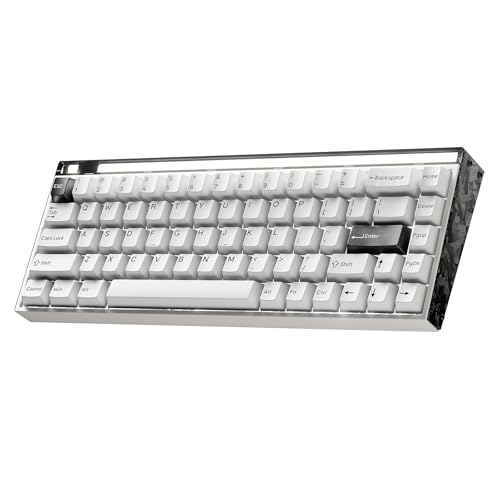
This melgeek made68 ultra v2 review starts with a naming clarification that protects your money. The Made68 line is MelGeek’s 65 percent Hall effect gaming keyboard family, and the model readers search for as the Ultra V2 is sold today through a listing titled “MADE68 Ultra+” — the current version of the Made68 Ultra line. No listing titled “Ultra V2” was returned when this review was researched, so the links below go to the Ultra+ exactly as it is named by its own listing, and this article will call it the Ultra+ whenever the purchasable product is meant. What follows is therefore a review of the current Made68 Ultra — its magnetic switches, rapid trigger behaviour, adjustable actuation, SOCD handling, aluminium case and RGB lightbox — together with the Pro+ sibling, and a clear account of what the version naming does and does not change for a buyer.
Why does a 65 percent wired keyboard with magnetic switches command this much attention? Because competitive keyboarding has quietly changed its physics. Mechanical switches register at a fixed point; Hall effect switches report their position continuously, which lets the keyboard decide — per key, in software — where a press begins, where it ends, and whether a key that has barely risen may fire again. For first-person shooters built on counter-strafing and rapid, repeated inputs, that controllability is not a novelty. It is the current frontier, and the Made68 family is one of the boards that brought it out of the flagship price tier and into the aluminium-bodied mainstream.
Key takeaways for this Melgeek Made68 Ultra V2 Review
- The purchasable current model is listed as the MADE68 Ultra+; treat any page promising a verbatim “Ultra V2” listing with suspicion and verify the title before paying.
- Hall effect switches with rapid trigger and adjustable actuation are the product: movement keys that reset the instant they rise, tuned per key to your own fingers.
- SOCD handling — the board’s logic for simultaneous opposite-direction inputs — matters in modern shooters and is implemented in the Made68 line’s feature set.
- The Ultra+ is wired, 65 percent and aluminium-cased: a deliberate, desk-anchored esports instrument rather than a travel board.
- The Pro+ sibling trades the Ultra’s positioning for aluminium sides and a rhythm-and-FPS brief; compare them on case construction and price tier rather than on switch technology, which they share.
In this guide
Quick picks: the current Ultra line and its sibling
| Model as listed | Layout | Switch technology | Case | Role |
|---|---|---|---|---|
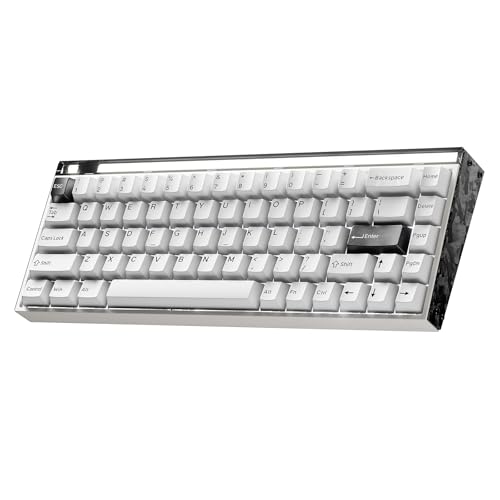
| MelGeek MADE68 Ultra+ | 65 percent, wired | Hall effect magnetic, rapid trigger | Aluminium case, RGB lightbox | The review subject — current Ultra |
| MelGeek MADE68 Pro+ | 65 percent, wired | Hall effect magnetic, rapid trigger | Aluminium sides | The sibling alternative |
MelGeek MADE68 Ultra+ — the current Ultra, reviewed on its merits
Badge: Best for competitive FPS players who play wired at a fixed desk
- Layout: 65 percent, wired connection
- Switches: Hall effect magnetic, hot-swap within the magnetic ecosystem
- Features: rapid trigger, adjustable actuation, SOCD support
- Case: aluminium, with RGB lightbox
- Audience as listed: FPS gamers
Begin with the sensation rapid trigger creates, because no specification conveys it. In a shooter, movement is a conversation of opposed keys — left, right, left — and a mechanical board makes each direction wait for the previous key to travel back past a fixed reset point. A rapid-trigger board ends the press the moment the key begins to rise, by the distance you set, so the counter-strafe starts when your finger decides rather than when the switch’s hardware finishes its journey. The result, once tuned, is movement that feels less like typing commands and more like leaning: the character answers the intention at the intention’s speed. Players describe the first evening as the keyboard feeling “loose” or “eager”; by the third evening, going back to a mechanical board for the same game feels like playing with a delay they had never noticed paying.
Adjustable actuation is the second half of the system and the more personal one. Movement keys can be set to fire on a whisper of travel for immediacy, while the keys your fingers rest on heavily — the ones that punish accidental presses — can be set deeper, so a tired hand does not crouch when it meant to wait. Per-key tuning turns the keyboard into a fitted instrument, and the fitting is a genuine process: expect an evening of experiments, small adjustments across a week, and then a configuration you will not touch for a season. The board’s software carries that configuration, and the discipline this site’s settings guides preach — change one variable, test in real matches, write it down — applies to actuation points exactly as it does to mouse sensitivity.
SOCD deserves its plain-language moment. When both strafe keys are held, games historically resolved the conflict in ways players could not control; modern competitive keyboards let the board itself arbitrate — last input wins, first input wins, neutral, or the priority schemes that recent titles have debated and in some cases restricted. The Made68 line’s inclusion of SOCD handling places it inside that contemporary conversation, and players in titles with explicit rules about input automation should check their game’s current stance, because the legality of specific resolution modes is set by developers and tournament organisers, not by keyboard makers. Used within the rules, it is one more way the board removes friction between intention and movement.
The physical object supports the technology’s ambitions. An aluminium case keeps a 65 percent board planted during the violent keywork of a firefight — small boards live or die by whether they stay where the hands put them — and the lightbox gives the RGB a designed, architectural quality rather than a spilled one. The wired connection is a philosophy as much as a specification: zero wireless variables, zero battery management, the full polling conversation between board and PC at all times. For a desk-anchored competitive setup, that is not a limitation wearing an excuse; it is the correct engineering answer, and the cable’s management becomes part of the battlestation’s craft.
Strengths
- Rapid trigger and per-key actuation deliver the movement responsiveness competitive FPS play currently rewards.
- Aluminium construction keeps the compact board stable and gives it a permanence plastic rivals lack.
- SOCD support and hot-swap magnetic switches keep the board inside the modern competitive conversation and open to tuning.
Trade-offs
- Wired only: players who move between desks or play from a couch should look at tri-mode boards instead.
- The 65 percent layout exiles the function row and arrows to layers, which productivity users feel hourly.
- Magnetic switch swapping is confined to compatible switches, a smaller playground than the mechanical market’s.
Best for: FPS-focused players at a fixed desk who will invest an evening in tuning actuation. Not suited for: wireless devotees, spreadsheet-heavy typists, or anyone who wants a keyboard to be finished the moment it is unboxed.

MelGeek MADE68 Pro+ — the sibling with aluminium sides
Badge: Best for players weighing the family’s tiers on construction and cost
- Layout: 65 percent, wired connection
- Switches: Hall effect magnetic, hot-swap
- Features: rapid trigger, adjustable actuation, SOCD support, RGB lightbox
- Case: aluminium sides
- Audience as listed: FPS and rhythm gamers
The Pro+ shares the family’s essential technology — magnetic switches, rapid trigger, adjustable actuation, SOCD — and differentiates itself in construction and positioning, with aluminium sides rather than the Ultra+’s full aluminium case, and a brief that names rhythm gamers alongside FPS players. That second audience is a clue to the tier’s tuning philosophy: rhythm games are actuation-consistency tests, thousands of presses judged against a timeline, and a board that serves them must be predictable above all. Buyers choosing between the siblings should therefore decide like engineers rather than collectors: how much does the full-metal case’s mass and feel matter to your desk, and does the tier difference buy anything your games will actually use? For many players the Pro+ is the rational Made68; for players who keep equipment for years and value the case as the component that never becomes obsolete, the Ultra+’s construction argues for itself.
Strengths
- The family’s core competitive technology at the sibling tier, without surrendering rapid trigger or SOCD.
- Aluminium-sided construction still outclasses the plastic field for stability and longevity.
- An honest alternative when the Ultra+’s listing or tier does not fit the budget’s shape.
Trade-offs
- Less metal in the hand than the Ultra+, which case-sensitive buyers will register daily.
- Shares the family limitations: wired life, 65 percent layers, magnetic-only switch swaps.
- Two similar siblings invite decision fatigue; the technology is the same, so decide on the case and move on.
Best for: competitive players who want the Made68 technology with a construction compromise priced in. Not suited for: buyers for whom the full aluminium case is the entire attraction of the line.
Buying guide: magnetic keyboards without the mythology
What Hall effect actually changes, and what it does not
A magnetic switch measures position; a mechanical switch reports a crossing. Everything in this category — rapid trigger, adjustable actuation, dynamic keystroke behaviours — is software built on that single measurement difference. It does not make a keyboard faster in the sense of input lag theatre, and it does not improve typing for prose, where the fixed point of a good mechanical switch is a feature generations of typists have calibrated their fingers to. Its kingdom is repeated, opposed, time-critical inputs: strafing, jiggle-peeking, rhythm patterns, fighting-game motions. Buy it for that kingdom and it will feel like the future; buy it as a general upgrade and it will feel like an expensive keyboard with an opinionated software suite.
The 65 percent question
Losing the function row, the navigation cluster and the number pad buys mouse room — the desk space a low-sensitivity player’s hand actually travels — and that trade is the layout’s entire argument. Players whose mouse hand has room already, or whose work runs on function keys and spreadsheets, should hear the argument and decline it, or pair the board with a standalone pad as our macropads and standalone numpads guide describes. The Made68’s layer system makes the missing keys reachable; reachable is not the same as present, and honesty about your hourly habits should arbitrate.
Wired in a wireless age
The cable is this family’s most debated specification, so let the use case decide it in one step. Fixed desk, competitive priority, zero tolerance for battery admin: wired is correct, full stop. Multiple machines, a couch setup, a desk that must clear for other work: the Made68 line is simply not your board, and the market’s tri-mode magnetic rivals — or a low-profile wireless like the one in the Logitech G915 TKL review — deserve the money instead. Neither answer is a verdict on the product; both are verdicts on the fit, which is the only verdict a review can honestly help you reach.
Checking the listing like a version detective
Because this family’s names mutate between generations and regions, the purchase ritual matters: read the full listing title, confirm it names the exact model you decided on — Ultra+ for the current Ultra, Pro+ for its sibling — and be wary of marketplace pages that promise generational names the manufacturer’s own store does not use. The confusion this article opened with is not a pedant’s hobby; it is the difference between the board you researched and a different board in a similar box, and five minutes with the title is the entire cost of avoiding it.
How to tune the Made68 in its first week
Step 1: Start from a sane actuation baseline
Set a moderate actuation across the board and rapid trigger at a conservative sensitivity, then play your main title for a full session before touching anything. A baseline you have felt is the only honest reference for the adjustments that follow; tuning from the box’s defaults in the menu, untested, produces a configuration that describes your hopes rather than your fingers.
Step 2: Tune movement keys as a group
Work on the strafe pair and their neighbours together, raising rapid-trigger sensitivity in small steps until counter-strafing feels immediate without introducing accidental direction flips when your fingers merely rest. Test in live matches, not in an empty server, because adrenaline changes how heavily hands sit on keys.
Step 3: Protect the keys you rest on
Deepen the actuation on any key that fires accidentally under a resting finger — ultimates, grenades, the keys with consequences — even at the cost of a slower deliberate press. A competitive keyboard’s tuning is as much about the inputs that must not happen as the ones that must.
Step 4: Write the configuration down and freeze it
Record actuation points, rapid-trigger values and SOCD mode in your settings document — the habit this site’s guides repeat, from our Marvel Rivals options guide onward — then leave the board alone for a fortnight of play. Magnetic keyboards invite endless tuning because everything is adjustable; the discipline is to let muscle memory form around a stable configuration and to revisit only on evidence, not on curiosity.
Mistakes magnetic-keyboard buyers make
Expecting the technology to transfer to every game and every task is the founding error; its benefits are specific and its kingdom is movement. The second is tuning everything on day one to extreme values copied from a professional’s profile, then blaming the board for the chaos of a configuration no hand could inhabit. Third is ignoring the rules question — assuming every input feature is welcome in every title and tournament, when developers publish their own lines that players are responsible for knowing. Fourth is buying a 65 percent wired board for a life that is neither 65 percent nor wired, because the technology’s reputation drowned out the layout’s reality. And fifth is the naming error this review opened with: ordering a lookalike listing and discovering the version difference after the box arrives.
Frequently asked questions
Is the MADE68 Ultra+ the same product as the Ultra V2 I searched for?
The Ultra+ is the current version of the Made68 Ultra line and the listing under which it is sold today; no separate listing titled “Ultra V2” was returned in this review’s research. Treat the Ultra+ as the purchasable current model, verify the exact title on the listing before ordering, and be sceptical of any seller using the V2 name for a differently specified board.
Does rapid trigger really change FPS movement?
Yes, in the specific mechanics of opposed movement keys: direction changes begin when the released key starts rising rather than after it crosses a fixed reset point, which tightens counter-strafing and repeated inputs. The size of the benefit depends on the title’s movement model and your own technique, and it is best verified with the staged tuning in this guide rather than believed from marketing.
Is SOCD allowed in competitive play?
It depends on the game and the event, and the rules change. Some titles and tournaments restrict specific input-resolution behaviours. Check your game’s current competitive rules before relying on any SOCD mode in ranked or organised play; the keyboard offering a feature does not make the feature legal everywhere.
Can I use the Made68 for typing and work?
You can, and the switches feel precise, but the board’s design centre is competitive play: the 65 percent layout layers your arrows and function keys, the actuation tuning is a gaming instrument, and the cable anchors it to one desk. Writers and analysts who game after hours should weigh how many of their working hours the layout will tax.
Ultra+ or Pro+ — which should I buy?
Decide on the case and the budget: the Ultra+ brings the full aluminium construction; the Pro+ brings the same core technology with aluminium sides at its tier. If your games are the same on both — and they are — let construction preference and the current listings settle it, and spend the energy you saved on the actuation tuning that actually changes play.
Are the switches replaceable?
The line is hot-swappable within the magnetic switch ecosystem, which allows replacing or mixing compatible magnetic switches. It does not accept ordinary mechanical switches, so buyers with a drawer of mechanical favourites should not count on using them here.
The final recommendation
The current Made68 Ultra — sold as the Ultra+ — is one of the clearest expressions of where competitive keyboards have arrived: magnetic measurement, software-defined actuation, movement that answers intention at intention’s speed, all in a metal 65 percent case that stays where a firefight puts it. Buy it as the Ultra+, by its real name, if your desk is fixed, your games are movement-critical, and you will spend the tuning evening its technology deserves. Take the Pro+ if the same technology in a lighter case construction fits your budget’s shape. And if your life is wireless or your layout is a spreadsheet, let this family’s excellence pass with respect — the right keyboard is the one whose compromises are the ones your days never notice. Companion pieces for the rest of the setup live in the Luminkey75 by Createkeebs profile for the custom-board alternative and the Machenike K500F-B81 audit-method review for the value end of mechanical buying.
Sound, feel and the typing character of magnetic switches
A Hall effect board has a sound of its own, shaped less by switch contacts than by case, plate and keycaps — and the Ultra+’s aluminium case gives its keystrokes a dense, short report that players describe as solid rather than sharp. Bottoming out is the dominant sound event on any gaming board, since competitive fingers do not type gently, and the metal case keeps that event from ringing. Typists coming from tactile mechanical switches will notice the linear smoothness first: no bump to confirm the press, which is precisely why the actuation point is adjustable — the software bump you set replaces the physical one you gave up, and players who miss tactile certainty often settle it by setting a slightly deeper actuation on their letter keys while keeping movement keys hair-triggered. That hybrid personality, impossible on a mechanical board, is one of the quiet arguments for the technology even outside pure movement play.
The lightbox and the aesthetics of a serious desk
RGB on competitive equipment survives because it is useful in the dark and because players like their desks to look like theirs. The Made68’s lightbox approach — a designed glow element rather than a light spill — suits the board’s architectural character, and per-key lighting can carry information when configured with intent: movement keys one colour, abilities another, the ultimate impossible to miss. Configured without intent it is decoration, which is also a legitimate use; a desk is a place a person lives, and the board’s metal-and-light presence is part of what its owners are buying. The honest note is battery-free: being wired, the Ultra+ can burn as bright as it likes without a power budget, one more small dividend of the cable its critics question.
Durability and the tournament bag
Magnetic switches remove the contact-wear mechanism that ages mechanical boards, and the aluminium case removes the flex and creak that age plastic ones, so the Made68’s realistic failure points migrate to the cable, the keycaps and the owner’s own accidents. Travelling players should give it a hard case and treat the cable’s connector as the component to protect, since a wired board’s career most often ends at a strained plug. At home, the board asks for the ordinary keyboard courtesies — no drinks in striking distance, a brush-down now and then — and repays them with the long, stable service that metal and magnets, properly combined, are unusually positioned to give.
Who else should consider this family: rhythm, fighting and speedrun players
The Pro+’s listing names rhythm gamers, and the logic generalises. Any discipline built on dense, timed, repeated inputs — rhythm charts, fighting-game motion inputs and plinking, speedrun movement tech — taxes exactly the properties magnetic boards sell: consistent actuation, immediate reset, per-key tuning. Players in those worlds should evaluate the Made68 pair with their own drills rather than with FPS folklore, because the right actuation map for a rhythm title looks nothing like a strafe setup. The board does not care which discipline tunes it; it reports position faithfully and lets the software — and the player’s evening of experiments — decide what the positions mean.
The version question, fully explained for future readers
Because the naming will confuse the next buyer too, here is the whole story in one place. MelGeek’s Made68 family has been sold through successive versions and regional listings, and the names attached to them — Ultra, Ultra+, and the “Ultra V2” phrasing that circulates in reviews and search queries — do not map onto three neatly separate products a buyer can simply choose between. At the time of this review, the purchasable current Ultra through the marketplace data available here is the Ultra+, full stop. A responsible buyer therefore does three things: searches by the listing title that actually exists, reads that title’s specification rather than a review’s nickname, and treats any third-party page using a different name as commentary about the line rather than as a product page. This article has followed its own rule throughout — the subject is reviewed as the current Made68 Ultra, linked as the Ultra+, and never once dressed in a listing name it does not wear. If a future version genuinely supersedes it, the same rule will serve you then: buy the title that exists, from the maker that makes it, and let the internet’s nicknames catch up in their own time.
Software: the second product inside the box
Every magnetic keyboard is two products — the hardware and the configuration software that defines what the hardware means — and the second product deserves review attention equal to the first. Judge it by four tests during your first week. Does it save profiles where you need them, and do they survive the software being closed? Does it expose actuation and rapid trigger per key without burying them under marketing screens? Does it update firmware gracefully, with a recovery story if an update is interrupted? And does it leave the board fully functional on a machine where the software has never been installed, which is the tournament and travel test? A board whose answers satisfy those four will be a pleasure to own for years; a board whose software fights you will make even perfect hardware feel unfinished, because on a magnetic keyboard the software is not an accessory to the feel — it is half of the feel itself.
The competitive context: where the Made68 sits in the magnetic field
MelGeek did not invent the magnetic gaming keyboard, and the Made68’s achievement is positional rather than patentable: flagship-class switch behaviour and metal construction at the tier where most serious players actually shop, from a maker whose reputation was built in the custom-keyboard community rather than in peripheral marketing. The rivals it faces divide into the esports brands’ magnetic flagships — polished, expensive, ecosystem-deep — and the enthusiast upstarts iterating in public. Against the first group the Made68 argues value and case; against the second it argues finish and focus. For the buyer, the practical consequence is that the technology itself is no longer the risk in this purchase. Rapid trigger works, the sensors are honest, and the decision has moved to the civilised questions of case, layout, software manners and the name on the listing — which is why this review could spend its length on exactly those, and why the naming clarification at its head is not a footnote but the most commercially important paragraph in it.
An evening with the board: what tuning actually feels like
Picture the first session honestly. The board arrives heavier than its footprint suggests — metal always surprises — and the first matches on stock settings feel merely good, because the technology’s gifts are locked behind configuration. Then the tuning begins: strafe keys a touch shallower, rapid trigger a step keener, one experiment per match, the notebook open beside the pad. Somewhere in the second hour there is a counter-strafe that lands cleaner than any you have hit on the old board, and the technology stops being a review topic and becomes a fact of your movement. That evening is the product. Buyers unwilling to spend it should buy a mechanical board and spend the evening playing instead, with no shame in the choice — but buyers who spend it rarely describe the Made68, afterward, as a keyboard. They describe it as the moment their movement started telling the truth.
Ownership over years: caps, cables and configuration drift
A board bought for its software definition acquires a new ownership duty: configuration stewardship. Your actuation map is an asset that lives in profiles and, ideally, in your written record; firmware updates and new PCs are its natural predators, so export and document before either event, the way this site’s guides treat game settings. Keycaps will polish where your fingers live — a cosmetic diary of use that replacement sets can erase in minutes, thanks to the standard mounts — and the cable should be inspected at its connector each season, because it is the one component whose failure is both likely and sudden. None of this is burdensome; it is the ordinary care of a precision instrument, and the Made68’s metal-and-magnet construction means the care is protecting an object built to be worth protecting, rather than postponing the replacement of a disposable one.
The honest bottom line, restated without the name confusion
Everything this review believes can be said in four sentences. The Made68 Ultra line, in its current Ultra+ form, is a genuinely competitive magnetic keyboard whose rapid trigger and actuation tuning change FPS movement in ways a week of play makes unmistakable. Its compromises — the cable, the 65 percent layers, the tuning evening it demands — are the honest prices of its specialism, and players whose lives do not fit them should admire it and buy something else. Its sibling offers the same technology in a lighter case for buyers who price the difference that way. And its name, in the marketplace, is Ultra+: buy that title, verify that title, and the board that arrives will be the board this article reviewed — which is all any review, in the end, is trying to arrange.
For mechanical loyalists: a fair hearing before you dismiss it
Many readers of this review own a mechanical board they love, and the magnetic pitch can sound like an accusation that their instrument is obsolete. It is not. A fine mechanical keyboard remains the better tool for typing, for most strategy and single-player gaming, and for anyone whose pleasure in a board is the sound and feel of its switches as an end in themselves. The Made68’s claim is narrower and, within its borders, strong: in movement-critical competitive play, software-defined actuation does something no mechanical switch, however exquisite, can do, because the information it acts on — continuous position — is information a mechanical switch never gathers. Loyalists should therefore read this review as a map of a neighbouring country rather than a verdict on their own. Some will visit for their FPS hours and keep the mechanical board for everything else, a two-board desk that this cluster’s other guides — on pads, on value boards, on customs — have been quietly normalising all along. The desk is big enough for both philosophies; the error is only ever in letting one of them pretend the other does not exist.
One more scene, for the buyer hovering over the order button with the naming doubt still warm. You have read the listing title twice; it says Ultra+, the current Ultra, the board this review spent its length on. The version anxiety dissolves into what it always was — a reminder that in fast-moving enthusiast hardware, the title on the box is a snapshot, while the technology inside is the substance. Buy the substance, verify the snapshot, tune the board for an evening, and then let the argument about names be settled the way its owners settle it: in movement, at speed, in the games the whole apparatus exists to serve.
The desk around the board: completing a magnetic setup
A rapid-trigger keyboard reaches its full meaning inside a setup tuned to the same standard, and the remaining links are worth one paragraph each of honesty. The mouse should be a low-inertia instrument whose sensitivity was set by measurement rather than folklore — the thinking in the Maya X mouse profile applies gram for gram. The display should refresh fast enough to show the movement the board is now producing, which is the entire subject of the MAG 274QPF X30MV monitor review. And the games themselves should be configured with the same evidence-first discipline, because a board tuned in an evening can be betrayed by a settings menu tuned never. None of these companions is obligatory, and the Made68 improves a modest setup immediately; but players who bought it for the last few percent of movement fidelity should know where the remaining percent lives. It lives, as it always has, in the chain — and the chain is only ever as honest as its least-examined link.
Gifts, upgrades and the player who already owns a good board
Two common buying situations deserve direct answers before this review ends. The gift buyer — purchasing for a competitive player whose wishlist named this family in uncertain spelling — should buy the Ultra+ by its exact listing title, include the receipt without embarrassment, and understand that a keyboard this personal is a gift whose return window is part of the present; the recipient’s tuning evening will confirm or correct the version far better than a giver’s guesswork. The upgrader — owning a competent mechanical board and wondering whether magnetic is a step or a sidestep — should borrow the framework from this cluster’s laptop writing: identify the constraint the current tool imposes, in this case movement latency at the switch, and upgrade only if that constraint is genuinely taxing your game. If your current board’s limits are its sound, its size or its style, the Made68 answers none of them and the money belongs elsewhere. If its limit is the half-beat between your finger’s decision and your character’s obedience, then this family’s whole existence is addressed to you, and the Ultra+ — by that name, verified twice — is where the conversation starts.
The review can close on the image it has been building toward: a small metal board, cable run neatly to the tower, its lightbox breathing at the edge of a dark desk, holding inside its software a map of its owner’s fingers that took one evening to draw and will serve for years of evenings after. That is the Made68 Ultra as it is actually sold and actually lived with — Ultra+ on the box, unmistakable under the hand. Buy it by the right name, tune it by the right method, and the distinction this article began with will never trouble you again, because you will be too busy moving at the speed of your own intentions to read the box.
Postscript: what this board says about where keyboards are going
Step back from the Made68 and it becomes a signpost. The keyboard — computing’s oldest peripheral, unchanged in principle for decades — has become a software-defined instrument whose feel is a file, whose behaviour is a policy, and whose hardware is increasingly a sensor waiting for instructions. That transition will not stop at gaming: the same measurement that enables rapid trigger enables keyboards that adapt to tired hands, to injuries, to children and to the elderly, once the industry decides those users are worth the engineering the FPS market funded first. Buying a board like this one is therefore also, in a small way, buying into that trajectory — and the naming muddle this review began with is part of the transition’s growing pains, versions multiplying faster than the language to describe them. Navigate it the way this article taught: by titles that exist, evidence you gathered, and configurations you wrote down. The future of the keyboard is adjustable; the buyer’s discipline, fortunately, does not have to change at all.
Tune it once, tune it honestly, and then forget the menus exist. The board will remember everything for you — that, in a single sentence, is what the magnets are for.
A final check-list for the Made68 buyer
- Confirm the listing title names the exact model — MADE68 Ultra+ for the current Ultra, MADE68 Pro+ for the sibling — and distrust any page that promises a verbatim “Ultra V2” product.
- Confirm your desk is a wired desk and your layout life can live at 65 percent, or arrange the standalone pad that makes it livable.
- Check your main titles’ current rules on input features before building a style around SOCD behaviour.
- Budget the tuning evening as part of the purchase, and prepare the notebook page where the configuration will be written down.
- Keep the box and the invoice through the first fortnight, while actuation experiments are still verdicts rather than habits.
- Plan the cable’s route across the desk before the board arrives, because a wired instrument deserves a wired desk that was designed, not improvised.
Complete that list and the purchase has no surprises left in it — only the good kind of discovery, the one waiting in your movement the first time a counter-strafe lands exactly when your finger said it should. That moment is the review’s whole argument, and it cannot be read. It can only be tuned for, bought honestly, and then felt.
And if, after all of this, you choose a different board entirely — a wireless all-rounder, a custom mechanical, a value board bought by audit — this review will count itself successful anyway, because its real subject was never only MelGeek’s. It was the discipline of buying a fast-moving, confusingly named, software-defined instrument without being fooled by any of those three properties. Carry that discipline to whichever listing you land on, and the keyboard that arrives will be the keyboard you meant to buy. In this market, that is rarer — and more valuable — than any single product’s rapid trigger.
One more angle: the Made68 as a second keyboard
There is a purchasing pattern this family suits unusually well that deserves naming before the review closes: the dedicated game board. Many players keep a full-size mechanical keyboard for the working day — arrows, function row, the numpad their spreadsheets love — and bring out a compact magnetic board for the competitive evening, the way a tennis player keeps match shoes. The Made68 pair, wired and desk-anchored, are natural citizens of that pattern: no pairing to renegotiate, no battery to check, a configuration that waits untouched between sessions because nothing else in the household borrows it. Judged as a household’s only keyboard, the family’s compromises are real; judged as the evening instrument in a two-board life, most of those compromises evaporate, and what remains is the technology in its purest use. If that is your pattern, the choice between Ultra+ and Pro+ simplifies further — buy the case you enjoy touching, because the board’s whole life will be lived in your hands at their most competitive.
The two-board life has one more quiet virtue worth recording: it makes each keyboard’s verdict honest. A board judged only on game nights is never blamed for a spreadsheet, and a board judged only on workdays is never blamed for a lost duel. The Made68, reviewed and bought inside that clarity, tends to be loved with an unusual lack of qualification — not because it does everything, but because it was only ever asked to do the thing it is brilliant at, in the hours when brilliance is the whole assignment.
So: Ultra+ by name, magnetic by nature, tuned by you, judged by your movement. That is the whole of it — the rest is practice, and practice, unlike this review, cannot be delegated.
Envoi: the keyboard that waits for instructions
Most peripherals arrive finished; this one arrives ready. There is a difference, and it is the difference between the mechanical era and the magnetic one. A finished keyboard asks to be accepted; a ready one asks to be taught — your actuation depths, your trigger distances, your arbitration rules, your games’ laws — and then it holds the lesson with a fidelity no fixed hardware can match. The Made68 Ultra, in the Ultra+ form in which it is honestly sold today, is the ready kind, and everything in this long review has been an attempt to prepare its next teacher: to name it correctly, to price its compromises honestly, to warn about its rules, and to hand over the tuning method that turns its readiness into responsiveness. The board is waiting on the desk, cable coiled, magnets patient. The next move, appropriately, is yours.
Teach it well, write down what you taught it, and play the season on a keyboard that finally keeps up with the speed at which you change your mind.
The magnets will do the remembering. Your fingers, freed from an old fixed point they had obeyed for years without ever being consulted, will do the rest.
Really the last word: on buying the current version of anything
The Made68’s naming tangle is a small, harmless instance of a condition that afflicts all fast-moving hardware: the product evolves continuously while language, reviews and search indexes evolve in lurches, and the buyer stands in the gap between them. The defence taught throughout this article — buy the title that exists, from the maker’s own channels of truth, verified against the delivered box — generalises to graphics cards, to phones, to the laptops elsewhere in this cluster whose listings sprout invented chip names like weeds. Whoever learns it on a keyboard will use it profitably for a decade of purchases. And that, more than any actuation figure, is the return this review most hopes its readers collect: not merely a fast board, honestly named, but a habit of verification that makes every future board — magnetic or otherwise — arrive as exactly what it claimed to be.
Verify the name, tune the board, trust the record, and play. The Made68 Ultra+ — the current Ultra, by its true title — will meet you at the speed of your intentions from the first tuned evening onward.
That meeting — intention and machine arriving together, neither waiting on the other — is the whole promise of the magnetic era, and this board, honestly bought and patiently tuned, keeps it.
Order it by its real name, and the rest is practice.
Practice, in this discipline, is not the price of the instrument. It is the instrument, still being built — by you, at your desk, one honest adjustment at a time.
Begin the building tonight, with the baseline, the notebook and one honest match.
The board will keep every promise its magnets make. See that the name on your order keeps its promise too, and nothing about this purchase will ever need revisiting.
Good hunting, and may your counter-strafes land the way your fingers always intended them to.
That is the review, the warning and the invitation, all in their proper order.
Now play.
A parting thought on readiness, from the other side of the tuning evening
Players who have lived with a tuned magnetic board for a season describe a side effect nobody advertises: they become harder to sell keyboards to. Once your movement keys fire where your fingers decided, once a counter-strafe has the immediacy of a thought, the fixed-point world feels like playing through an interpreter — competent, familiar, and permanently half a beat behind the conversation. That is not snobbery; it is calibration, the same recalibration every technology in this cluster’s guides eventually performs on its owners, from high-refresh panels to 47-gram mice. It is also a warning worth handing over honestly with the recommendation: buy the Made68 Ultra+ — by that name, verified — only if you are content to have your standards moved, because a season from now the keyboard you came from will feel like a place you used to live. Most players who make the move consider that the best money they ever spent on a desk. The ones who do not were warned, here, in writing, by a review that wanted their purchase to be a decision rather than a surprise.
Consider that warning the review’s final act of respect: a product strong enough to change its owner’s standards owes the owner a clear account of the change before the money moves. You have the account now — the name to buy, the compromises to accept, the evening to schedule, the standards that will move. What remains is only the decision, and decisions made with this much daylight on them tend to age the way the board itself does: without creaks, without regrets, and at exactly the speed intended.
Make it with daylight on it, then, and play in the dark it was built for.


