Disclosure: As an Amazon Associate, reviewstook.com earns from qualifying purchases. Links on this page are affiliate links; they cost you nothing extra. Prices and availability change often, so check the current Amazon listing before you buy.
The logitech m570 vs m575 contest is a rare sequel story in peripherals: the M570 defined the affordable thumb trackball for a decade, and the Ergo M575 is Logitech’s own answer to it, keeping the beloved shape while rebuilding the connection, the sensor behaviour, and the materials for a Bluetooth world. This head-to-head walks the two mice criterion by criterion, explains where the newer model genuinely improves the original and where the original’s simplicity still argues for itself, and ends with a decision guide for the three buyers who actually face this choice: the M570 owner wondering about an upgrade, the new trackball convert, and the office buyer equipping a desk.
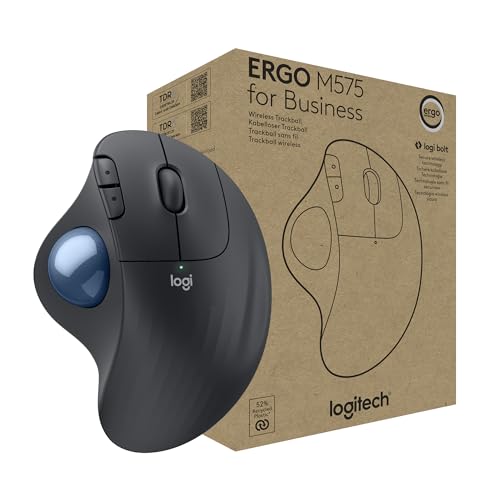
One clarification belongs at the front, because the M575 family has grown since launch. Logitech also sells a refreshed variant called the M575S, a later revision of the M575 line; the mouse compared here is the M575 itself, represented in current listings by the Ergo M575 for Business edition with its Logi Bolt receiver. Where the refresh matters to a buying decision it is flagged as its own model rather than quietly substituted, because a comparison is only useful if the products on each side of it are exactly the ones you think they are.
Key takeaways
- The M575 wins on connection flexibility, with Bluetooth alongside its receiver, where the M570 is receiver-only.
- The shape is a family resemblance, not a reinvention: M570 hands feel at home on the M575 within minutes.
- The M570’s remaining case is simplicity and any price gap in its favour; it has no Bluetooth and an older receiver standard.
- New buyers should default to the M575; satisfied M570 owners can upgrade on their own schedule.
In this guide
Quick verdict
Buy the M575 if you are purchasing today, because it is the same idea with a modern connection stack, a recycled-plastic build, and broader device compatibility, and those advantages compound across years of daily use. Keep or buy the M570 only if its tier undercuts the M575 meaningfully in your market, your machines all accept its USB receiver happily, and you value a device with essentially nothing left to configure. The longer verdicts below exist for readers whose desks have complications, multiple machines, receiver shortages, or strong feelings about scroll feel, that the quick verdict cannot see.
Comparison table
- Shape: M570 sculpted right-hand shell; M575 sculpted right-hand shell in the same lineage, refined contours
- Control: thumb-operated ball on both
- Connection: M570 via USB Unifying receiver; M575 via Bluetooth and Logi Bolt receiver on the Business listing
- Platforms: M570 listed for Mac and Windows with its receiver; M575 listed for Windows, Mac, Chrome, and Linux
- Build note: M575 line emphasises recycled materials in its construction
- Positioning: M570 the long-serving original; M575 the current-generation successor

Logitech M570: the original, on its own merits
Badge: The veteran original
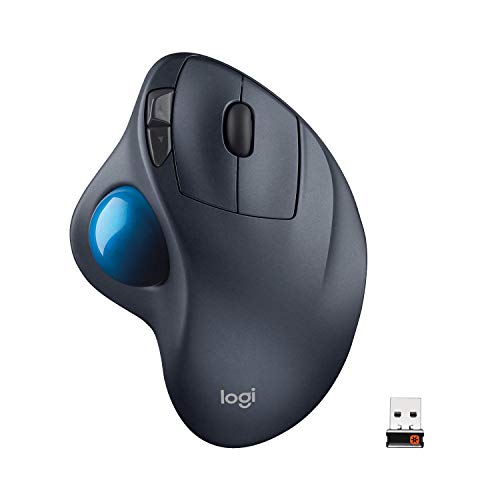
- Design: sculpted right-hand shape with thumb ball as listed
- Connection: USB Unifying receiver as listed
- Colour: dark gray as listed
- Compatibility: Apple Mac and Microsoft systems as listed
- Character: simple, proven, single-purpose
The M570’s achievement is longevity earned honestly. Its sculpted shell taught a generation of office workers that a mouse could stay still while the thumb did the travelling, and its shape remains the reference against which every affordable thumb ball is sketched. In daily use it is a device of few surprises: plug in the Unifying receiver, and the ball answers with the slightly grainy, mechanical honesty of a design that has been in continuous production long enough for its quirks to become features in its owners’ muscle memory.
Its limitations are the limitations of its era. There is no Bluetooth, so a modern laptop with few ports, or a tablet, or a machine whose receiver slot is already promised elsewhere, exposes the design’s age immediately. The Unifying receiver standard it depends on has been succeeded in Logitech’s own line by Logi Bolt, which matters to buyers building a fresh desk around current Logitech gear. None of this makes the M570 bad; it makes it a period piece that still works, and the distinction matters because its owners’ loyalty is to a tool that has never once surprised them.
Strengths
- A decade-proven shape that trackball hands already know
- Dead-simple setup through a single receiver
- Often the lower tier of the two in market pricing
Trade-offs
- No Bluetooth for port-poor modern machines
- Older Unifying receiver standard rather than Logi Bolt
- Fewer platform credentials than its successor lists
Best for: loyalists replacing a worn M570 like for like, and simple single-desk setups. / Not suited for: multi-device desks and Bluetooth-first laptops.

Logitech Ergo M575: the successor, examined
Badge: The current-generation pick
- Design: ergonomic sculpted shell with easy thumb control as listed
- Connection: Bluetooth plus Logi Bolt receiver on this Business listing as listed
- Finish: graphite as listed
- Compatibility: Windows, Mac, Chrome, and Linux as listed
- Certification: globally certified Business edition as listed
The M575 respects its ancestor, which is the highest compliment a sequel can earn. The shell keeps the M570’s essential posture, the hand resting on a sculpted slope while the thumb rides the ball, and refines the details owners asked about: a shape that fills the palm a touch more completely, a ball that tracks with the smoothness of a newer sensor generation, and a build that incorporates recycled plastics without feeling like an apology. An M570 owner can sit down at an M575 and be fluent before their coffee cools, and that continuity is a deliberate design decision worth more than novelty.
The connection stack is where the generations truly separate. Bluetooth frees the M575 from port arithmetic entirely, pairing directly with modern laptops, tablets, and compact desktops, while the Logi Bolt receiver on this Business listing gives managed desks a secure, standardised dongle that plays well in offices full of wireless neighbours. Two machines can be served by one mouse across the two channels, the classic work-laptop and home-PC pairing, and the M575 becomes the first mouse in this family that a modern desk does not have to make an exception for.
Strengths
- Bluetooth plus Logi Bolt covers modern and managed desks alike
- Familiar shape with refined fit and smoother tracking
- Broad platform list including Chrome and Linux
Trade-offs
- Costs more than the veteran it replaces in most markets
- Business listing’s framing may confuse home buyers at first glance
- Purists may still prefer the M570’s exact original contours
Best for: new trackball buyers and multi-device desks. / Not suited for: buyers replacing an M570 on the tightest possible budget.
Criterion by criterion
Shape and comfort. A draw with an asterisk. The M575’s refined shell suits a slightly wider range of hands, while the M570’s exact contours are home to its veterans. Both keep the wrist still and the shoulder quiet, which is the ergonomic heart of the thumb-ball idea: the desk does the supporting, the thumb does the moving, and the forearm stops commuting across the mousepad. Verdict: M575 for new hands, M570 for its own veterans, and no wrong answer for anyone else.
Connection and compatibility. The M575 wins outright. Bluetooth plus Logi Bolt against a single older-standard receiver is not a close contest in a decade when laptops shed ports annually. The M570’s Unifying receiver remains perfectly serviceable on a traditional desktop, and owners of Unifying ecosystems can consolidate several devices onto one dongle, a genuine if narrowing advantage. For any desk bought or refreshed recently, the successor’s stack is the one that will still make sense after the next laptop change. Verdict: M575, decisively.
Tracking and daily feel. The M575’s newer sensor generation tracks the ball’s rotation with a smoothness that shows in slow, precise work, seating a cursor into a spreadsheet cell or nudging a photo crop by a hair. The M570 answers with a familiar, slightly rawer feel that its owners read as directness. Neither mouse is a gaming instrument and neither pretends to be; both are precision office tools whose contest is about refinement, and refinement, here, belongs to the newer model by a nose rather than by a mile. Verdict: M575, narrowly.
Value and longevity. The M570 usually asks less money today, and the M575 will almost certainly be supported, stocked, and receiver-compatible for longer into the future. Value is the ratio between those two facts and your horizon: a two-year stopgap favours the veteran’s price, while a five-year desk favours the successor’s currency. Add the M575’s broader platform list, which future-proofs it against a household’s next machine being a Chromebook or a Linux box, and the long game tilts further. Verdict: M570 for the short horizon, M575 for the long one.
Buying guide: who should buy which
The M570 owner with a working mouse should feel no urgency whatsoever. Your device is supported by your habits, your receiver owns a port you have already budgeted, and the upgrade, while real, is a quality-of-life improvement rather than a rescue. Upgrade when the ball’s bearings wear, when a new laptop arrives without the port your receiver wants, or when a second machine joins the desk and Bluetooth stops being a luxury. The M575 will be waiting, and its shape will greet your hand like a relative it has met before.
The new trackball convert should buy the M575 without detouring through its ancestor. There is no initiation rite that requires learning on the original, and the successor’s connection flexibility removes the most common friction a newcomer meets, which is not the ball at all but the pairing. Budget the first week for adaptation, because a thumb ball asks the thumb to learn a skill the wrist used to own, and judge the device at day seven rather than hour one, when the new motor pattern has had time to become a habit instead of a performance.
The office or household buyer equipping several desks should standardise on the M575, and specifically on a listing whose receiver standard matches the rest of the fleet’s Logitech gear. Standardisation is an invisible kindness to whoever supports the desks, because one receiver family, one pairing procedure, and one spare-parts drawer serve everyone. The Business edition’s certification language, which can look like overkill to a home buyer, is precisely the vocabulary IT departments buy on purpose, and home buyers benefit from the same build without needing the vocabulary explained.
How to adapt to a thumb trackball in one week
Day one will feel like writing with the wrong hand, and that is the correct sensation. Begin with the sensitivity lower than instinct suggests, because the thumb overshoots before it calibrates, and spend the first sessions on ordinary work rather than on precision tasks that will punish the learning curve. Use the ball for everything, including the casual browsing where reverting to the old mouse is most tempting, because fluency is built by volume, and the old mouse in the drawer is the tuition this new skill charges everyone who learns it.
By the middle of the week, add the deliberate exercises: selecting single words in a document, landing in small cells, dragging a window by its title bar across the screen without dropping it. Clean the ball at week’s end, popping it out and clearing the three small bearing points of the lint they will already have collected, because a trackball’s smoothness is a maintenance relationship rather than a factory state. Owners who learn the cleaning ritual early keep the glide they fell for; owners who never learn it conclude, wrongly, that the device itself has deteriorated.
Common mistakes when choosing between these two
The first mistake is buying the M570 for a laptop that has no suitable port without budgeting for the adapter or hub the receiver will need, converting a saving into a tangle. The second is assuming the M575S refresh and the M575 are interchangeable when ordering; they are siblings, not twins, and the listing’s exact name deserves a careful read so the mouse that arrives is the mouse the comparison was about. The third is judging either device in a shop by rolling the ball for ten seconds, a test that measures nothing except the novelty of the sensation in an unadapted thumb.
A fourth mistake is forgetting the desk itself. A thumb ball rewards a stable, slightly lower hand position and a chair whose armrest meets the elbow honestly; perched on a cluttered, high desk, either mouse will feel like the problem when the furniture is. The fifth is expecting gaming performance from an office instrument and then reviewing the whole category harshly for failing a test it never entered. Buy these mice for the work they were sculpted for, and they are among the most satisfying tools a desk can hold.
Final recommendation
The logitech m570 vs m575 decision is the happiest kind a reviewer can offer, because the newer mouse wins without making the older one look foolish. Buy the M575 for its connections, its refinement, and its future; honour the M570 as the design that proved the idea, and buy it still when price and simplicity argue in its favour on a traditional desk. What neither side of this comparison permits is a bad outcome, only a better-fitted one, and the fitting questions are the ones this article has tried to put in your hands: ports, machines, horizon, and the patience to let a thumb learn its new trade.
Frequently asked questions
Can an M570 owner adapt to the M575 quickly?
Almost immediately, because the sequel was designed as a continuation rather than a correction. The posture, the ball position, and the button geography will all feel like home, and the adaptation that remains is the pleasant kind: discovering that the new mouse pairs with the tablet and the spare laptop the old one could not reach. Most veterans report the switch in terms of connections gained rather than habits changed, which is exactly the upgrade path a decade-old design deserves to offer its loyalists.
Is the M575S the same as the M575?
No. The M575S is a later refreshed variant within the M575 family, while the M575 compared here is the model represented by the Ergo M575 for Business listing. They share the lineage and the broad shape, but a buyer reading comparisons should match the exact model name on the listing to the model in the comparison, particularly when a household or office is standardising a fleet and needs every unit to behave identically across desks, receivers, and support calls.
Which mouse is better for a laptop with few ports?
The M575, and it is not close. Its Bluetooth connection asks for no port at all, which on a modern thin laptop can be the difference between a mouse that simply works and a mouse that starts an argument about adapters and hubs. The M570’s receiver-only design belongs to the era of generous port selections; it remains excellent on a desktop with ports to spare, but the successor was plainly designed by people who had counted the sockets on a current laptop and drawn the correct conclusion.
Do thumb trackballs help with wrist and shoulder comfort?
They change the movement pattern rather than magically removing strain: the mouse stays planted, the thumb rolls the ball, and the shoulder and forearm stop travelling, which many desk workers find more sustainable across long days. Comfort is personal and no mouse is a medical device, so treat the category as a promising experiment, give it the honest adaptation week, and keep your previous mouse until the experiment concludes. If discomfort persists with any pointing device, that is a question for a professional rather than for a product page.
How long do these mice last?
Years, with the ball’s cleanliness as the main variable under your control. The design has few moving parts beyond the ball and its bearings, the switches are rated for long office service, and the M570’s production history is itself the evidence for the family’s durability. Battery changes or recharges, depending on the model, and a monthly ball cleaning are the whole maintenance liturgy. A trackball bought today should expect to outlive the laptop it was bought beside, which is a rare sentence in modern peripherals.
Can I use either mouse for gaming?
Casual and turn-based games, certainly; fast competitive play, honestly not. A thumb ball trades the arm-driven precision of a gaming mouse for stillness and comfort, and that trade is the product’s entire philosophy. Players who split their desk between work and games often keep a trackball for the working day and a gaming mouse for the evening, a two-device arrangement that sounds indulgent until you price it against the years each tool will serve in the role it was actually sculpted for.
The ergonomics underneath the comparison
Both mice rest on the same ergonomic wager: that moving a cursor should not require moving an arm. A conventional mouse turns pointing into travel, thousands of small journeys across a pad every day, each one engaging the shoulder and forearm. A thumb ball converts those journeys into a roll of the thumb while the hand rests, and the desk, not the joint, bears the device’s weight. For workers whose discomfort lives in the shoulder’s commute rather than in the wrist’s posture, that conversion is the entire argument, and it explains why trackball owners defend the category with a loyalty that specification sheets cannot manufacture.
The wager has a cost side, and honesty requires naming it. The thumb inherits the workload the arm surrendered, and a thumb unaccustomed to hours of rolling will tire in the first week exactly as a new runner’s calves tire. The adaptation curve in the how-to section exists because that fatigue is tuition rather than verdict, fading as the joint strengthens and the motion economises. Workers with existing thumb joint complaints should approach the category cautiously and consult their own experience, because a device that relocates effort relocates it onto somebody, and the somebody here is a joint that not every hand can spare.
Posture around the mouse matters as much as the mouse. The sculpted shells of both models assume the hand arrives from a chair at a sensible height, with the elbow supported and the device close enough that the shoulder stays quiet. Perched at the far edge of a deep desk, reached for across a keyboard tray’s clutter, either mouse will be blamed for a furniture problem. Set the desk first, as the mistakes section advised, and the ergonomics both mice promise become physically possible; skip the furniture, and no pointing device yet designed can keep the promise on the box.
Ball feel, bearings, and the maintenance ritual in depth
A thumb ball’s glide lives or dies at three small bearing points inside the socket, and the difference between a mouse that feels silky and one that feels gritty is usually a week of accumulated lint rather than any factory property. The ritual is pleasingly mechanical: the ball pops out with a push from beneath, the bearings wipe clean with a fingertip or a dry cloth, and the ball, washed with mild soap if it has grown dull, returns to its socket with its original manners restored. Two minutes, monthly, is the entire contract, and owners who sign it keep the device they fell for.
The two generations differ subtly in this department. The M575’s socket and ball finish give it a smoother new-device glide, and its tracking reads that glide more faithfully, while the M570’s feel is the honest mechanical texture its veterans know. Neither escapes the lint law, because the law is physics rather than engineering generation. What the newer mouse buys is a slightly longer honeymoon between cleanings and a sensor that forgives a slightly dirty ball more gracefully, small mercies that compound across the years of mornings when the mouse must simply work before the first meeting begins.
Replacement balls and parts form the tail of the maintenance story. The category’s popularity means balls, and the community knowledge around them, circulate for both models, and a scratched or lost ball is an errand rather than a funeral. That serviceability is part of why these designs persist while sealed, battery-glued contemporaries rotate through drawers: a device you can clean, feed, and occasionally re-ball is a device with a future tense, and office equipment with a future tense is rarer than it should be in this decade of disposable peripherals.
Two desks, two winners: scenarios
Imagine a home office built in 2019 and untouched since: a desktop tower with ports to spare, a Unifying keyboard already paired, and an M570-shaped hole in the owner’s habits. For this desk the veteran remains a rational purchase or a rational keeper, because every one of the successor’s advantages addresses a problem this desk does not have. Reviews that declare the older model obsolete are reviewing a calendar rather than a desk, and the correct unit of analysis in this entire comparison has always been the desk, with its ports, its machines, and its owner’s history, rather than the launch year printed on the box.
Now imagine the desk of 2026: a thin laptop that travels, a tablet that moonlights as a second screen, a work machine issued by an employer with opinions about receivers, and a single mouse expected to serve all three tempers. This desk does not merely prefer the M575; it cannot honestly use the M570 without accessories and apologies. The generational gap in this comparison is really a gap between those two desks, and most buyers can settle the whole question by deciding which photograph resembles their own furniture. The mice are almost innocent; the desks are what changed.
Software, buttons, and the small print of daily use
Both mice expose their extra buttons and pointer speed to Logitech’s software, and both are at their best when that software is treated as a setup tool rather than a hobby. Assign the secondary buttons to the two commands your working day actually repeats, back and forward in a browser being the factory wisdom most owners keep, and set the pointer speed once, during the adaptation week, rather than chasing it daily. A trackball’s speed setting interacts with the thumb’s learning, so a moving target slows the very fluency the week is meant to build; stability is a feature, and the settings page is where stability is either kept or frittered.
The generational difference reappears here in miniature. The M575’s modern receiver and Bluetooth identity integrate with current Logitech software and fleet tools in a way the M570’s older standard increasingly sits beside rather than inside. For a home user the difference is a shrug; for anyone whose desk is managed, inventoried, or shared, it is the difference between a device the system can see and a device it merely tolerates. Small print decides enterprise purchases, and this comparison would be incomplete if it pretended the small print were beneath a home reader’s notice, because home desks have quietly become managed desks too.
What about left-handed users and shared desks?
Both mice in this comparison are sculpted for the right hand, and that sentence deserves to stand alone rather than hide in a list, because it excludes a real population from this entire contest. Left-handed trackball seekers should look to ambidextrous finger-ball designs, several of which appear in the companion review in this cluster, where the ball sits under the fingers and the shell plays no favourites. Shared household desks face the same geometry from the other side: a right-handed sculpted mouse in a mixed-handed household is a small daily negotiation, and an ambidextrous design may serve the household better than either contestant here.
That admission strengthens rather than weakens the comparison’s verdicts, because a review that knows its products’ borders can be trusted inside them. Within the right-handed, thumb-ball world, the M570 and M575 are the reference pair, the original and its heir, and the choice between them is the ports-and-horizon question this article has circled from several directions. Outside that world, other shapes wait, and the internal links below point towards the wider trackball conversation for readers whose hands have just informed them that this particular contest was never theirs to settle.
The upgrade question, priced honestly
For the M570 owner, the upgrade decision is a small exercise in opportunity cost. The money an M575 costs is also a monitor arm, a better chair cushion, a year of a software subscription, or a genuinely good keyboard, and a working M570 makes all of those the real competition. The upgrade wins that contest when a concrete trigger exists: a laptop without the port, a second machine to serve, a ball socket worn beyond cleaning’s diplomacy, or a household standardisation that retires odd receivers. Without a trigger, the veteran’s continued service is not inertia; it is a tool doing its job, and tools doing their jobs deserve to be left alone by reviewers and owners alike.
When the trigger does arrive, the upgrade’s pleasures are specific enough to name in advance. The first pairing that needs no dongle will feel like a small magic trick. The first week of the smoother ball will quietly recalibrate what the hand expects. And the first time the mouse follows you to a new machine, a borrowed desk, or a tablet on a train table without a receiver negotiation, the generational argument will close itself in your mind more completely than any comparison article, this one included, could close it on the page. Sequels justify themselves in use, and this one’s justification is unusually easy to schedule.
A brief history of the thumb ball, and why it refuses to die
Trackballs predate the mouse’s dominance, and the thumb-operated variant carved its niche by a simple insight: the thumb is a strong, dextrous digit with nothing else to do on a conventional mouse, while the arm it replaces is a large, fatigue-prone system pressed into fine work. Logitech’s early thumb balls proved the concept for enthusiasts, and the M570’s arrival at an accessible tier turned a curiosity into office infrastructure. Millions of desks adopted it not because it was fashionable, it never was, but because it solved the specific geometry of small desks, long days, and shoulders that had begun to file complaints.
The category survived the touchscreen era, the laptop trackpad’s improvement, and several declarations of its death, because its value proposition is anatomical rather than technological. As long as desks are shallow, sofas double as workstations, and presenters roam stages with a clicker hand and a pointing problem, a device that points from a standstill keeps its constituency. The M575’s existence is the manufacturer’s own testimony: Logitech does not refresh dead categories, and the refresh’s care, new receiver standard, new materials story, same beloved shape, reads as a company renewing a lease it expects to profit from for another decade.
Understanding that history reframes the comparison’s stakes. This is not a contest between a product and its replacement in a fast category, where last year’s model is landfill with a logo. It is a contest between two editions of a durable idea, separated by a decade of desk evolution, and the buyer’s task is to locate their own desk on that decade’s timeline. Everything else in this article, the ports, the platforms, the receivers, is evidence for that single act of location, and readers who perform it honestly will find the verdict sections almost redundant, which is what good comparisons are secretly for.
Precision work: spreadsheets, timelines, and tiny targets
Office precision is a different sport from gaming precision, and these mice should be judged at their own sport. The test tasks are unglamorous: landing in a twelve-pixel spreadsheet cell without overshoot, trimming a video clip to the frame where a door closes, dragging a design element by three pixels and no more, selecting one word inside a dense paragraph. A thumb ball approaches these tasks with an advantage nobody advertises, which is stillness: the device cannot be knocked, nudged, or drifted by a cable, so the cursor’s position between actions is exactly where you left it, a property editors and analysts quietly build workflows upon.
Between the two contestants, the M575’s smoother tracking shows most in the slowest of these tasks, where the ball moves by fractions of a rotation and a lesser sensor stutters between readings. The M570 remains entirely competent, and its veterans will reasonably ask whether the difference survives contact with a real deadline; in blind terms it is a refinement, not a revelation. But refinement is what sequels are for, and a worker who performs ten thousand micro-adjustments a year is precisely the worker for whom a small smoothness dividend, compounded daily, becomes the largest number in this entire comparison.
Speed settings mediate all of this, and the adaptation week’s advice to fix them early deserves its evidence. A thumb ball at high sensitivity crosses a large screen in one roll and trembles at cell level; at low sensitivity it is a scalpel that needs three rolls to cross the monitor. Many veterans settle in the lower-middle, accepting the extra roll as the price of calm precision, and use a second monitor’s worth of patience rather than a settings change when a task demands travel. Whichever mouse you choose, that settlement, once reached, should be written down and defended against casual experimentation.
Battery life and the domestic economy of small cells
Trackballs are among the most frugal wireless devices ever sold, because a stationary mouse with a ball spends its life nearly asleep compared with a gaming mouse polling its heart out. Both contestants measure their battery expectations in seasons rather than weeks, and the practical difference between them matters less than the shared virtue: a pointing device that asks for attention twice a year is a device that integrates into a life instead of interrupting it. Keep a spare cell in the desk drawer and the entire topic of power effectively leaves your relationship with either mouse.
That frugality has a subtle ergonomic consequence worth naming. Devices that rarely need charging rarely get moved to a charging spot, so the trackball’s position on the desk, tuned once for your shoulder and chair, stays tuned. Conventional wireless mice migrate to cables and docks and return to slightly different positions; a thumb ball simply stays, month after month, in the exact coordinates your body memorised. Consistency of position is an underrated comfort feature, and it belongs to this category as surely as the ball itself, shared equally by the veteran and its heir.
Travel and the sofa: where a stationary mouse travels best
A thumb ball is the traveller’s pointing device in disguise. It works on a train tray, on a hotel bed’s coverlet, on the arm of an airport chair, and on the presenter’s own leg during a talk, because it brings its own surface with it and asks the world for nothing but a place to rest. The M575 extends that talent with Bluetooth, pairing to the tablet or the thin laptop without a receiver to lose in a seat pocket, while the M570’s receiver, small as it is, remains one more object for travel to misplace. Road workers weighing this comparison should count that difference at its true value, which is high.
At home the same talent serves the sofa and the media PC, where a conventional mouse goes hunting for a surface and a trackball simply sits on the cushion beside you, steering a streaming interface or a photo library from a posture of complete collapse. Households that discover this use rarely give it up, and it is a legitimate second career for an M570 retired from desk duty by an M575’s arrival: the veteran migrates to the living room, where its receiver finds the media machine’s spare port and its ball begins a decade of evening work. Few peripherals offer their replacements so graceful a retirement plan.
What owners argue about, and what the arguments teach
Communities around these two mice argue about three things, and each argument is a buying lesson in costume. The first is ball colour and finish, which sounds like vanity until you learn that a ball’s surface is its tracking medium, and that owners swap and polish balls the way cyclists fuss over tyres; the lesson is that this category invites a small, pleasurable maintenance culture rather than sealed-box disposability. The second argument is receiver religion, Unifying loyalists against Bolt adopters, and its lesson is the ecosystem one this review has already drawn: your next mouse should speak the language your other devices already speak.
The third argument is the most instructive, because it is about whether the M575 changed enough. Veterans who find it too similar are paying the design a compliment they did not intend: a sequel to a beloved tool is supposed to preserve the beloved parts, and the M575’s changes live exactly where the decade changed, in connections, materials, and platform reach, rather than in the shape that nobody asked to have fixed. Buyers should read the sameness as the product’s thesis. The M570 was right about hands; the M575 is right about desks, and a comparison that ends there has ended at the truth.
A decision worksheet you can finish in five minutes
Write down your machines and their available ports, honestly, including the hub you keep meaning to buy but have not. Write down how many devices the new mouse must serve and whether any of them forbids receivers. Write down your horizon, the years you expect this purchase to remain on the desk, and whether your other wireless gear already speaks Unifying or Bolt. Three short lists, five minutes, and the comparison resolves itself for most readers: receivers forbidden or machines multiplying points one way, a single traditional desktop and a tight budget points the other, and the shape, mercifully, argues for neither because it blesses both.
Keep the worksheet with the receipt. If the mouse disappoints, the worksheet tells you which assumption failed, which is the difference between a return and a lesson. If it delights, the worksheet becomes the template for the household’s next peripheral decision, because the method, locate the desk before judging the device, generalises to keyboards, docks, and monitors without alteration. Comparisons end; methods persist, and a reader who leaves with a method has been served better than a reader who leaves with only a verdict, however correct the verdict happens to be.
Closing reflection: tools that stay
There is a category of tool that a worker stops seeing, because it has merged with the work itself, and both of these mice belong to it for their owners. Nobody photographs their trackball for social media; nobody unboxes its successor with an audience. The devices simply sit, season after season, translating intention into cursor with a fidelity their owners trust enough to forget. A comparison between two such tools cannot be settled by spectacle, only by fit, by ports, by horizon, by the small print of a particular life at a particular desk, which is why this article kept returning the decision to the reader’s own furniture.
So choose with the worksheet, adapt with the week, clean the ball monthly, and then forget the whole question for years, which is the highest state a pointing device can achieve. Whether the mouse that earns that forgetting is the veteran or its heir matters less than that one of them does, and the reader who has followed the argument this far already knows which of the two their desk has been describing all along. The ball, as both generations agree, is now in your thumb’s court.
One more scenario: the shared family computer
The family computer in the kitchen or the study is a desk neither contestant was explicitly designed for, and it tests both in instructive ways. Multiple users with different hand sizes meet the sculpted shell with different verdicts, the receiver stays permanently installed because nobody can be trusted to return a dongle, and the ball accumulates the household’s collective lint at a rate that makes the monthly cleaning a fortnightly one. For this desk the M570’s simplicity is a genuine argument, one device, one receiver, nothing to pair, while the M575’s Bluetooth invites well-meaning relatives to pair it away to a tablet and leave the family machine mouseless.
Households solve this the way offices do, by deciding whether the desk is a single-purpose station or a node in a personal ecosystem. The station favours the veteran; the node favours the heir. It is the same fork the whole comparison has described, wearing a family’s clothes instead of an office’s, and recognising the fork in your own hallway is worth more than memorising either mouse’s specification list, because specifications describe the mice while the fork describes you.
And the verdict for the reader still torn
If the worksheet ended in a tie, let the tie be broken by the future rather than the past. Machines will not grow more ports, households will not own fewer devices, and receivers will not become easier to keep track of; every trend that touches this comparison leans towards the successor’s strengths. The M570’s advantages, price and simplicity, are real today and erode slowly; the M575’s advantages compound. A torn buyer is therefore best served by the M575, while a certain buyer, certain about a traditional desk and a tight budget, can take the veteran with this review’s blessing and a clear conscience.
Postscript on buying either mouse well
Whichever side of the comparison you land on, buy it like an adult buying a tool: from a listing whose model name you have read twice, with the receipt kept, the packaging retained through the adaptation week, and the old mouse held in reserve until the new one’s fluency is proven rather than promised. If the adaptation fails, and for a minority of thumbs it honestly does, the return is a successful experiment rather than a failed purchase, because you will have learned which pointing philosophy your hand speaks. Most readers, the statistics of the category suggest, will instead find the box still in the cupboard months later, kept against a resale that the mouse’s daily usefulness keeps postponing indefinitely.
A final distinction: replacing versus upgrading
Language matters at the till. Replacing an M570 with another M570 is maintenance, the continuation of a known good; replacing it with an M575 is an upgrade, a small bet on the desk’s future direction. Maintenance should be bought quickly and without ceremony when the old tool fails, while an upgrade deserves the worksheet and the week’s patience this article prescribed. Confusing the two produces the two classic errors: agonising for a month over a maintenance purchase while the work suffers, and impulse-buying an upgrade whose connections your desk cannot use. Name the errand correctly, and the correct mouse, in this unusually honest contest, names itself immediately afterwards.
Keep the worksheet, the receipt, and the spare battery together in the desk drawer, and the comparison is truly closed: a decision made from evidence, a device maintained by ritual, and a hand that, a month from now, will have forgotten there was ever a question about which digit should drive the cursor across the screen.
Why this comparison will still matter in five years
Most peripheral comparisons expire with the next launch cycle, but this one describes a fork that will outlive both contestants: the desk that standardises on receivers and the desk that pairs by Bluetooth are diverging futures, and every pointing device bought from now on will be chosen inside one of them. The M570 is the receiver era’s most successful citizen; the M575 is the same citizen naturalised into the pairing era, papers in order, shape unchanged. Reading their contest as a referendum on eras rather than on mice is what gives the verdict its shelf life, and it is why the worksheet asked about your machines and your horizon before it asked anything about the mice themselves.
Five years from now, whichever mouse sits on your desk will have been cleaned a hundred times, fed a handful of batteries, and asked to pair, or plug, its way through at least one computer change. The mouse that survives that biography gracefully is the one whose connection philosophy matched the direction your machines were already travelling. That is the whole secret this long comparison has been protecting, and it was never really about a ball.
And if both mice end up in the same household, one at the desk and one at the sofa, that is not indecision; it is the comparison’s happiest possible outcome, two generations of one good idea each serving the room it fits, and a family that will never again have to argue about where the mouse surface is supposed to come from.
One last practical courtesy: whichever mouse you retire or replace, pass the cleaning ritual on with it if it changes hands, because a trackball given without its two-minute secret is a gift with its best feature hidden, and the next owner’s first week deserves the same smooth start yours had.
Related guides
the M575 examined as a standalone review
Logitech against Razer across mice, keyboards, and headsets
the G915 TKL for the keyboard side of the desk
keyboard and mouse combinations for an office desk