Disclosure: As an Amazon Associate, reviewstook.com earns from qualifying purchases. Links on this page are affiliate links; they cost you nothing extra. Prices and availability change often, so check the current Amazon listing before you buy.
Knowing how to choose a graphics card for noise matters because the graphics card is, in almost every gaming PC, the loudest component under load. Its fans spin faster than any case fan, its cooler sits closest to the side panel in many layouts, and it produces a second, sneakier sound that fans get blamed for: coil whine, the high-pitched electrical buzz that rises and falls with frame rate. Choosing for quiet is therefore a two-front problem, and this guide treats both fronts honestly.
The encouraging truth is that noise is largely decided before you buy. Cooler size, fan design, power draw, and the manufacturer’s fan-curve choices set a card’s acoustic character far more than any setting you can apply afterwards, although undervolting and frame-rate caps can rescue a mediocre choice. The five verified cards below span the realistic strategies: a flagship built with a famous fan maker, slim triple-fan designs that trade size for finesse, and smaller cards whose modest power draw keeps them naturally calm.
One warning before the picks: decibel figures from different reviewers are not comparable, because test distance, room noise, and workload all differ. Use reviews to rank cards within one reviewer’s roundup, never to compare a number from one site against a number from another. What transfers reliably between systems is the reasoning in this guide: bigger coolers at lower fan speeds move the same air more quietly, and lower power draw means less heat asking to be moved in the first place.
Key takeaways
- Cooler size and fan quality set a card’s noise floor; software tweaks only polish what hardware decided
- Lower power draw is the quietest feature a card can have, because less heat needs less airflow
- A zero-RPM idle mode silences desktop work but says nothing about gaming noise
- Coil whine is a separate problem from fan noise and no cooler, however large, can fix it
- Compare noise only within a single reviewer’s tests; decibel numbers do not travel between websites
In this guide
Five cards that represent the real strategies for a quieter GPU
There is no single quiet card, only quiet approaches. The first pick buys silence with sheer cooler mass and premium fans. The middle two use slim triple-fan coolers to stay calm inside smaller cases. The last two rely on efficient chips that simply do not generate much heat. Which approach suits you depends on your case, your performance target, and how close the PC sits to your ears.
- ASUS GeForce RTX 5080 Noctua OC Edition — The flagship answer: Noctua fans on an RTX 5080 cooler
- MSI RTX 4070 Super Gaming X Slim — Triple-fan composure in a slimmer body
- MSI GeForce RTX 4070 Gaming X Slim 12G — The original 4070 in the same slim, three-fan formula
- ASUS ROG Strix GeForce RTX 4060 OC Edition — An oversized cooler on a modest chip: quiet by overkill
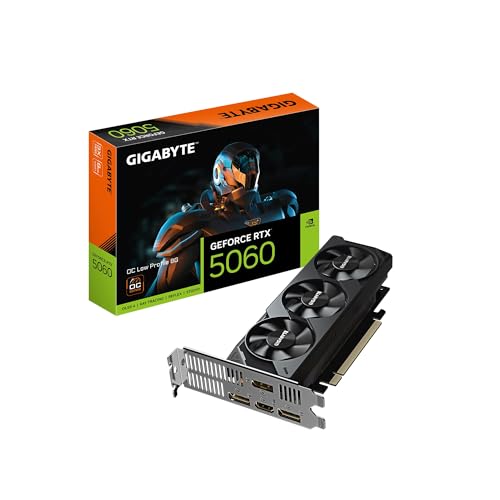
- ASUS Prime GeForce RTX 5060 OC Edition — Current-generation efficiency with a dual BIOS
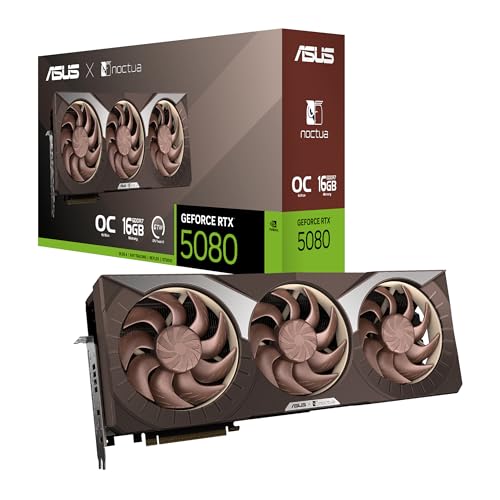
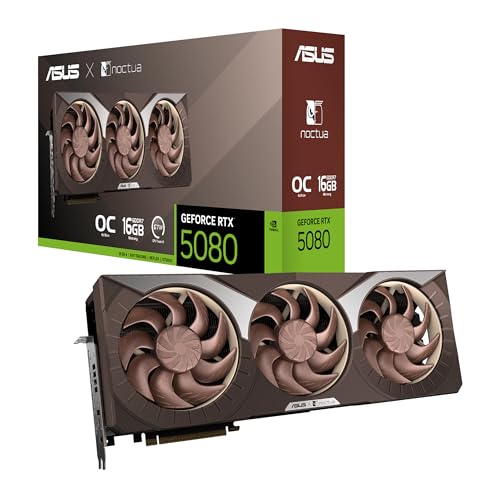
ASUS GeForce RTX 5080 Noctua OC Edition
The flagship answer: Noctua fans on an RTX 5080 cooler
- GPU: GeForce RTX 5080, Blackwell architecture
- Memory: 16GB GDDR7
- Fans: Noctua units fitted by ASUS at the factory
- Outputs: two HDMI 2.1b and three DisplayPort 2.1b
ASUS’s Noctua editions exist because a segment of buyers asked, reasonably, why a graphics card costing flagship money should sound like a hairdryer when the best case fans in the industry exist. The collaboration fits Noctua’s large, slow-turning fans to an oversized heatsink, and the acoustic result is a card that can hold high performance at fan speeds other 5080 models reach only while sounding strained. If your PC lives in a living room or a shared study, this is the reference point for what money can buy in quiet performance.
The costs are physical and financial rather than acoustic. The cooler is enormous in every dimension, so the case-fit discipline from measuring length, height, and slot width applies with full force, and the card commands a premium over standard 5080 models. Buyers should also understand what the Noctua treatment cannot do: it silences the fans, not the inductors. A sample with audible coil whine will still whine, which is an argument for buying from a retailer with a painless returns process.
Strengths
- Factory-fitted Noctua fans are the quietest cooling in its class
- Huge heatsink lets those fans turn slowly under load
- Full flagship performance with no acoustic apology
Trade-offs
- Very large cooler demands careful case-fit checking
- Premium pricing over ordinary RTX 5080 models
- No fan design can address coil whine if a sample suffers from it
Best for: high-end builds in shared rooms where gaming noise genuinely bothers other people / Not suited for: compact cases, or buyers who game exclusively through closed headphones

MSI RTX 4070 Super Gaming X Slim
Triple-fan composure in a slimmer body
- GPU: GeForce RTX 4070 Super
- Memory: 12GB GDDR6X on a 192-bit bus
- Extreme clock: 2655 MHz
- Cooling: slim triple-fan Gaming X design
The Gaming X Slim line answers a specific modern problem: cases have grown glass panels and shrunk air gaps, so MSI thinned the cooler while keeping three fans and a substantial fin stack. Three fans sharing the work can each turn more slowly than two fans carrying the same load, and slower fans are the fundamental recipe for less noise. For a 4070 Super, a card with serious 1440p capability, that recipe in a slim profile is a genuinely useful combination.
Judge this card as a balance rather than a champion. It will not match the Noctua flagship’s hush, and a full-thickness Gaming X or a larger rival cooler will run a little calmer in an airy case. Its virtue is delivering most of that composure in builds where the thicker cards compromise airflow or simply do not fit. Pair it with a frame-rate cap matched to your monitor and its fans may rarely need their upper range at all.
Strengths
- Three fans share the cooling load at lower individual speeds
- Slim profile suits cases that reject full-thickness coolers
- 4070 Super performance covers 1440p gaming comfortably
Trade-offs
- Thinner fin stack than full-size Gaming X models
- Upper fan range is audible when the card is pushed hard
- 12GB memory is adequate now but not generous for the long term
Best for: compact-to-midsize builds wanting 1440p performance without a loud cooler / Not suited for: silence absolutists with room for an oversized cooler instead

MSI GeForce RTX 4070 Gaming X Slim 12G
The original 4070 in the same slim, three-fan formula
- GPU: GeForce RTX 4070
- Memory: 12GB GDDR6X, 192-bit
- Extreme clock: 2625 MHz
- Fans: TORX Fan 4.0 triple-fan cooler
Everything said about the Super above applies here with the volume turned down one notch further, because the plain RTX 4070 draws less power than its Super sibling and therefore asks less of its cooler. In noise terms that efficiency is a feature in its own right: the Ada generation’s mid-range chips are frugal enough that a competent triple-fan cooler can keep them composed at speeds that stay below the threshold where fan noise becomes the room’s background.
The sensible reason to choose this card over the Super is value at the right moment in the market, or a build whose performance target is 1080p high-refresh or moderate 1440p rather than maximum settings. Acoustically the two MSI cards are siblings; the decision is about frame rates and price, not sound. Whichever you pick, enable the manufacturer’s quiet BIOS if the card offers a dual-BIOS switch, since that single toggle often trades a degree or two of temperature for a clearly calmer fan curve.
Strengths
- Lower power draw than the Super makes the cooler’s job easier
- TORX Fan 4.0 design is a proven, quiet-running arrangement
- Efficient chip suits small cases with limited exhaust
Trade-offs
- A clear performance step below the 4070 Super
- Same slim-cooler limits under sustained maximum load
- Dual-BIOS quiet modes vary; check the specific card’s features
Best for: efficiency-first builders who value calm over the last increment of frame rate / Not suited for: buyers targeting maximum 1440p or entry 4K settings

ASUS ROG Strix GeForce RTX 4060 OC Edition
An oversized cooler on a modest chip: quiet by overkill
- GPU: GeForce RTX 4060
- Memory: 8GB GDDR6
- Cooling: ROG Strix triple-fan-class cooler with 0dB mode
- Features: DLSS 3, Aura Sync lighting
The Strix treatment of a mid-range chip is an old quiet-PC trick: take a GPU that produces modest heat and bolt on a cooler designed for far worse. The result is a card whose fans can loaf along at low speed through most gaming, or stop entirely in lighter loads thanks to the 0dB mode. For a bedroom PC or a machine that doubles as a media centre, that overkill buys a calmness that smaller 4060 models with compact coolers cannot quite match.
The trade is size and price. This is a large card wrapped around a mid-range GPU, so it demands a case with real clearance and it costs more than leaner 4060 variants while delivering the same chip’s performance. Buyers paying the Strix premium are purchasing acoustics, build, and lighting, and should be sure that is what they value. If the PC sits in another room or under a desk behind a door, a compact 4060 and a longer cable would serve just as well for less.
Strengths
- Oversized cooler keeps fan speeds low on a cool-running chip
- 0dB mode silences light gaming and desktop work entirely
- Premium build suits showcase cases
Trade-offs
- Large physical size for a mid-range card
- Premium price buys acoustics, not extra frames
- 8GB memory remains the 4060 ceiling for texture-heavy titles
Best for: quiet-focused 1080p builds in cases with room for the cooler / Not suited for: small-form-factor cases or strict value-per-frame shoppers

ASUS Prime GeForce RTX 5060 OC Edition
Current-generation efficiency with a dual BIOS
- GPU: GeForce RTX 5060
- Memory: 8GB GDDR7
- Thickness: 2.5-slot design
- Features: Dual BIOS, Axial-tech fans, DLSS 4 generation support
The Prime line is ASUS’s understated range, and for noise-focused buyers the headline feature here is the dual BIOS. A hardware switch between performance and quiet fan profiles lets you choose the card’s acoustic personality without software, and the quiet profile on an efficient current-generation chip is a persuasive everyday combination. The 2.5-slot cooler has enough fin area to make that quiet profile credible rather than a recipe for throttling.
As a 5060 this is a 1080p-first card with modern upscaling to stretch it, and its noise story follows from that modesty: there is simply less heat to remove than the 4070-class cards above produce. In a small case the 2.5-slot thickness needs the usual respect, since a cooler starved of intake air gets loud whatever its BIOS says. Give it breathing room and a sensible frame-rate target and it will reward you with unobtrusive operation.
Strengths
- Dual BIOS offers a true hardware quiet mode
- Efficient new-generation chip produces modest heat
- 2.5-slot cooler has the fin area to run fans slowly
Trade-offs
- Thickness excludes the tightest small-form-factor layouts
- 1080p-first performance despite the modern feature list
- Quiet BIOS trades a little temperature for its calm
Best for: mainstream builders who want a set-and-forget quiet profile / Not suited for: 1440p high-settings gaming or ultra-compact cases
Comparing the five approaches to a quieter card
| Card | Quiet strategy | Performance class | Watch out for |
|---|---|---|---|
| ASUS RTX 5080 Noctua | Premium fans, huge heatsink | Flagship | Size and price |
| MSI 4070 Super X Slim | Three fans, slim cooler | Upper mid-range | Thinner fin stack |
| MSI 4070 X Slim | Efficiency plus three fans | Mid-range | Step below Super |
| ASUS Strix RTX 4060 | Oversized cooler, modest chip | Mainstream | Large for its class |
| ASUS Prime RTX 5060 | Dual BIOS quiet profile | Mainstream | 2.5-slot thickness |
Notice that every strategy on this table is a different way of reaching the same physical goal: moving a given amount of heat with slower-moving air. You can enlarge the heatsink, improve the fans, spread the work across three fans, or reduce the heat at the source by choosing a more efficient chip. When you shop beyond this list, classify each candidate by which of those levers it pulls, and be suspicious of any card that pulls none of them yet claims to be quiet.
Where graphics card noise actually comes from
Fan noise has two components that listeners often merge. The first is the broadband whoosh of air moving through fins and grilles, which rises smoothly with fan speed. The second is tonal: the whine of fan motors and the resonance of a particular speed against the case’s panels, which is why a card can sound worse at one specific speed than at a slightly higher one. Good cooler designs attack both, with blade shapes that smooth the airflow and fan curves that avoid dwelling on resonant speeds.
Coil whine is a different animal entirely. It is the sound of inductors in the power-delivery circuitry vibrating under load, and it tracks workload rather than temperature: menus running at thousands of frames per second are its favourite stage, which is why a game can be silent in play and piercing on its loading screens. No heatsink touches it. Your defences are a frame-rate cap, which removes the extreme workloads that excite it, and a retailer whose returns policy treats intrusive whine as the defect many buyers reasonably consider it.
A third, overlooked source is the case itself. A graphics card’s fans excite the panel they face, thin side panels drum, and a card mounted millimetres from a perforated panel projects its noise straight out of the holes. When you evaluate a card for noise you are really evaluating a card-and-case pairing, which is why the same card can be praised as silent in one build and cursed in another. Keep that pairing in mind through every section that follows.
The physics that makes big coolers quiet
Heat removal is a product of surface area and airflow. Double the fin area and you can move the same heat with roughly half the air velocity, and because fan noise climbs steeply with speed, halving fan speed buys far more than a halving of loudness. This single relationship explains the entire quiet-card market: the Noctua flagship’s bulk, the Strix 4060’s deliberate overkill, and the slim MSI cards’ three-fan compromise are all attempts to buy surface area or share airflow so that rotational speed can fall.
Power draw sets the size of the problem those coolers must solve. A card drawing flagship power under load must shed flagship heat, and no cooler design repeals that arithmetic; it can only handle the heat gracefully. This is why the most effective quiet-PC decision is often choosing one performance tier lower than your maximum ambition, or capping frame rates at what your monitor can display, so the card you own rarely visits the loudest part of its operating range.
Fan curves, zero-RPM modes, and dual BIOS switches
A zero-RPM mode stops the fans below a temperature threshold, which transforms desktop work, video playback, and light indie gaming into silent activities. It tells you nothing about noise at full load, and marketing that blurs that distinction should be read carefully. When comparing cards, ask two separate questions: does it fall silent at idle, and how does it behave at the sustained load of the games you actually play? The picks above were chosen to answer the second question well, with idle silence as a welcome extra.
Dual BIOS switches, like the one on the ASUS Prime card, store two fan-curve personalities in hardware. The quiet profile typically allows slightly higher temperatures in exchange for lower fan speeds across the whole curve, and because it lives on the card it survives driver reinstalls and operating-system changes. Software fan curves through the manufacturer’s utility or third-party tools offer finer control, including the trick of skipping a resonant speed band entirely, but they depend on the software running correctly in the background.
Undervolting deserves mention as the enthusiast’s lever: reducing the voltage supplied to the GPU at a given clock speed cuts power draw and therefore heat, often with little or no performance loss. It is free, reversible, and on efficient chips can be the difference between a card that occasionally becomes audible and one that never does. It is also optional garnish. A card that needs undervolting to be tolerable was the wrong purchase; a card that is already calm becomes quieter still.
Matching the card to your room and your habits
Distance is the cheapest silencer. A PC under a desk two metres away can be roughly twice as loud on paper as one on the desk beside your monitor and trouble you less, because sound falls off with distance and furniture absorbs what a desktop reflects. Before paying a premium for the quietest card in a class, consider whether a longer display cable and a floor position would solve the problem for the price of the cable. Many supposedly noisy builds are simply builds with the case in the worst possible place.
Your own habits set the requirement just as firmly. A player who games through closed-back headphones in an empty flat needs none of this guide’s premium options. A player whose partner sleeps in the next room, who records voiceovers at the same desk, or who shares a living room with a television audience needs all of them. Microphone users should be especially careful: microphones are less forgiving than ears, and a card that sounds acceptable to you can be plainly audible on a recording or a call.
How to read noise reviews without fooling yourself
Trust a reviewer’s ranking inside one test, and distrust absolute numbers across tests. A useful noise review states the test distance, controls the room’s background level, fixes the workload, and reports the card’s temperature alongside its noise, because a card can always be made quieter by letting it run hotter. When a review shows one card both cooler and quieter than another under the same load, that is real engineering speaking. When it shows quieter at the cost of much higher temperatures, you are looking at a fan curve, not a miracle.
Also check whether the review separates fan noise from coil whine and whether it tests at uncapped frame rates, where whine is provoked. A card can win every fan-noise comparison and still be the wrong choice for a player whose favourite game’s menus run uncapped. The most useful reviews describe the character of the sound, not only its level, because a smooth whoosh at a given volume bothers most listeners far less than a tonal buzz at the same measured level.
Blower cards, open-air coolers, and why one of them left the mainstream
Older builders remember blower cards, which sealed the GPU inside a shroud and expelled its heat through the rear bracket with a single centrifugal fan. Blowers were loud in a particular way, a focused hiss that rose sharply with load, yet they had one virtue: the heat left the case entirely. Open-air coolers with two or three axial fans replaced them because they are dramatically quieter at the card, but they pay for that quiet by dumping the GPU’s heat into the case interior, where the case fans must then remove it. A quiet card inside a case that cannot exhaust is a system that gets louder together.
This trade explains several otherwise puzzling experiences. A builder upgrades from a blower to a modern open-air card, the card itself is calmer, yet the whole machine seems no quieter because the case fans now spin harder to clear the heat the blower used to eject. When you choose a card for noise, budget the case’s exhaust capacity as part of the purchase. If your case has a single slow exhaust fan, adding one competent exhaust often does more for total system quiet than stepping up a tier of graphics cooler.
Blowers survive in workstations and some compact professional cards where exhausting heat directly matters more than acoustics, and in multi-GPU setups where open-air cards would cook each other. For a single gaming card in a normal case, the open-air designs in this guide are the right default, and the blower’s hiss is a sound most buyers are well rid of.
Liquid-cooled graphics cards and hybrid coolers
A minority of high-end cards mount a liquid loop, either as an all-in-one with its own radiator and fan or as a water block for a custom loop. Liquid moves the heat to a large radiator where big, slow fans can handle it, and at the card itself there is almost nothing to hear. For a flagship GPU in a living-room machine, a hybrid card can be the quietest solution of all, provided the radiator gets a case position with honest airflow and the pump, which has its own faint voice, is a good sample.
The qualifications are real. Radiator fans still make noise, merely in a different place and at a lower pitch. Pumps can buzz or gurgle in ways that some listeners find more annoying than fan whoosh. The radiator consumes case mounting space that interacts with the fit questions covered in the companion case-size guide, and a leak, while rare, is a category of risk air cooling never presents. Liquid is a legitimate quiet strategy for the top tier, not a universal answer, and it rewards buyers who enjoy the tinkering it occasionally requires.
Noise over time: dust, bearings, and ageing fans
Every card in this guide is quietest on the day it is installed. Dust mats the fin stack and forces fans to spin faster for the same cooling, fan bearings wear and add a rattle or tick that no curve can tune out, and thermal paste dries over years until temperatures creep upward and take fan speeds with them. A card bought with acoustic headroom, a cooler larger than its chip strictly needs, ages gracefully because it can absorb that creep. A card bought at the edge of its cooler has nowhere to go but louder.
Maintenance is the countermeasure, and it is undramatic: keep intake filters clean, blow dust from the fin stack with the fans held still a few times a year, and keep the case’s surroundings clear so exhaust heat does not recirculate. If a fan develops a bearing tick within the warranty period, treat it as the warranty issue it is rather than living with it. The quietest long-term builds are not the ones with exotic hardware; they are the ones whose owners spend ten minutes a season keeping ordinary hardware clean.
Headphones, speakers, and microphones change the target
It is worth being precise about who the listener is. Open-back headphones leak sound in both directions, so a player wearing them hears the PC nearly as clearly as if they wore nothing; for that player, card noise matters almost as much as it does for a speaker user. Closed-back headphones and good in-ear monitors seal the PC out so effectively that mid-tier coolers become perfectly acceptable, and the money saved can buy the headphones that made the saving possible.
Microphones impose the strictest standard of all because they do not get bored or adapt. A card that a player stops noticing after ten minutes remains plainly present on a stream, a recording, or a work call, and noise-suppression software can only do so much before it starts eating the voice it is protecting. Anyone who records at the gaming desk should weight the quiet picks in this guide more heavily than raw performance, place the microphone close and the PC far, and test a recording before assuming the setup works.
Television gaming in a shared room is the third distinct case: the listeners did not choose the game, cannot wear the headphones, and are comparing the PC’s noise against a film’s quiet dialogue scenes. That audience is the Noctua flagship’s natural market, and it is also the audience most grateful for a frame-rate cap and a PC positioned behind furniture rather than beside the screen.
A buying sequence for the noise-conscious builder
Pull the threads together into an order of operations. First, fix your performance target honestly, because every tier you climb adds heat that must be removed audibly. Second, within that tier, shortlist cards by cooler strategy: oversized heatsink, premium fans, triple-fan slim design, or a dual-BIOS quiet profile. Third, check the physical fit of the survivors in your case, since the largest coolers are exactly the ones that collide with compact chassis. Fourth, read one reviewer’s load-noise ranking that includes your shortlist, and treat it as the tiebreak rather than the starting point.
After purchase, the sequence continues: set the quiet profile, cap frame rates to the display, tune the curve around any resonant band, and verify with a recording or a late-night session. Buyers who follow the whole sequence rarely think about GPU noise again, which is the actual goal. Quiet is not a product you buy once; it is the result of a card, a case, and a set of settings chosen to agree with each other.
What reviewers mean by a good acoustic character
Two cards can measure within a decibel of each other and leave opposite impressions, because listeners judge character as much as level. A smooth broadband whoosh reads to the ear as weather, easy to ignore, while a tonal component, a whine, a hum, a periodic clicking from a fan bearing, draws attention no matter how quiet it is. Reviewers who describe a card as having a pleasant or an annoying character are reporting this distinction, and it is one of the few places where a written description can be more useful than a meter reading.
You can apply the same judgement at home without instruments. During a gaming session, mute the game for thirty seconds and listen deliberately: is the sound a featureless rush of air, or can you pick out a tone, a buzz, or a rhythm? Featureless air noise responds to distance and modest fan reductions. Tonal noise responds to avoiding the specific fan speed that produces it, which is why the fan-curve step in the setup section matters, and bearing clicks respond to nothing but a warranty claim or a replacement fan.
Room acoustics and the desk itself
The room is the final component in the chain. Hard surfaces, a desk against a bare wall, a case sitting on a hollow desktop that acts as a sounding board: all of these amplify and colour what the card produces. The same build moved to a carpeted floor beside a fabric sofa can seem like a different, calmer machine. Before spending on a quieter card, try the free experiments: move the case off the desk, stand it on something solid and damped, and give its exhaust somewhere to go that is not a wall a hand’s breadth away.
Desk resonance deserves its own sentence because it is so often misdiagnosed as fan noise. A case with its feet on a thin desktop transmits vibration into the panel, and the panel sings at a low frequency that seems to come from everywhere. Rubber feet, a dense mat under the case, or simply relocating the machine to the floor removes a sound that no graphics card purchase could have fixed, and it is worth ruling out before concluding that a card is at fault.
When quiet costs performance, and when it does not
Buyers sometimes fear that choosing for noise means choosing against speed, and at the extremes that is true: the very fastest card in a generation will always produce more heat than a mid-range card, and silencing it costs real money. Within a tier, though, the acoustic differences between partner models of the same GPU routinely dwarf their performance differences, which are usually a percent or two of clock speed. Choosing the quiet partner model of your chosen GPU is close to a free decision, and it is the decision this guide most wants to normalise.
The same logic applies to settings. Capping frame rates at the display’s refresh rate costs nothing the player can see, because the discarded frames were never displayed. Running a quiet BIOS profile costs a few degrees of temperature headroom, not frame rates, on any card whose cooler was sized with margin. The genuinely expensive quiet is the last few decibels at flagship power in a small case; everywhere else, quiet is mostly a matter of choosing deliberately rather than paying heavily.
How to set up a new card for the quietest result
The card you bought has an acoustic range, and these steps place your build at the calm end of it during the first evening, before habits form around the defaults.
Install the card with maximum intake clearance
Mount the card so its fans face the most open space your case offers, keep cable bundles out of the fan face, and if the case gives a choice of slots, prefer the one that leaves the largest air gap in front of the cooler. A card starved at the intake will spin its fans hard no matter how good its cooler is, and no later software tweak fully compensates for a bad physical start.
Select the quiet BIOS or profile before gaming
If the card has a physical BIOS switch, set it to the quiet position while the machine is off, following the maker’s labelling. If it relies on software, install the manufacturer’s utility once, select the quiet or silent profile, and confirm the setting persists across a reboot. Doing this first means your ears calibrate to the card at its calmest, and any later change is a deliberate trade rather than an accident.
Cap frame rates to your monitor’s refresh rate
Set a global frame-rate limit in the driver control panel a frame or two below your display’s maximum refresh, or use each game’s own limiter. Frames your monitor cannot show are pure waste heat and the loudest, whiniest workload a card ever faces, especially in menus. This single setting does more for real-world quiet than any other adjustment in this list.
Shape the fan curve around the resonant band
Play a demanding game for ten minutes, then adjust the fan curve so the card’s fans settle either below or above any speed where a tonal whine or panel resonance appears. Most cards have one unhappy band; a curve that passes through it quickly and never rests there removes the most annoying sound the build makes, even if the overall fan speed ends up fractionally higher.
Give the case exhaust a clear path
Confirm the case’s exhaust fans actually move the graphics card’s heat out of the box: a card that recirculates its own exhaust inside a sealed case will ramp its fans regardless of its cooler. Check that the rear and top exhausts spin up under load, that dust filters are clean, and that the case’s surroundings let warm air escape rather than pooling behind a desk against a wall.
Test with your real evening conditions
Judge the result at the time and in the room where you actually play, with the television off and the house at its normal quiet. Sounds that vanish beneath daytime household noise announce themselves at midnight. If the card still intrudes, the remaining levers are distance, a frame-rate cap a little lower, or the returns window — in that order of cost.
Noise mistakes buyers make before and after purchase
Judging quiet by the idle desktop
Almost every modern card is silent at idle thanks to fan-stop modes, so a quiet desktop proves nothing. The purchase decision must rest on behaviour under sustained gaming load, which is exactly the condition showroom demos and first impressions rarely reproduce. Read load-noise comparisons, not unboxing impressions.
Comparing decibel numbers between different reviewers
A figure measured at thirty centimetres in a treated room and a figure measured at a metre in an office describe different worlds. Cross-site number shopping manufactures false winners. Rank cards only inside one reviewer’s consistent test, then sanity-check the ranking against a second reviewer’s relative ordering.
Blaming the fans for coil whine
Swapping fan profiles will never cure an electrical buzz that follows frame rate, and buyers waste weeks tuning curves against the wrong problem. Identify the sound first: if it changes pitch with on-screen action and screams in uncapped menus, it is whine, and the remedies are a frame-rate cap or a different sample of the card.
Sealing a powerful card in a silent case with no airflow
Cases marketed for silence often restrict intake to keep sound in, which forces the graphics card’s fans to work harder and can make the system louder than an airy case would. Quiet cases and quiet cards must be chosen together, with honest attention to how the card’s heat leaves the box.
Paying for flagship silence to game through headphones
The Noctua flagship is a wonderful product aimed at a listener who can hear it. If your gaming happens through closed headphones in a room of your own, its premium buys you nothing you will perceive, and the same money spent on the display or the headphones themselves will be felt every session.
Final recommendation
If money and case space are genuinely no object, the ASUS RTX 5080 Noctua edition is the quiet-performance summit among these picks, and the card to measure others against. For most builders the MSI Gaming X Slim cards are the sweet spot, delivering three-fan composure at 4070 and 4070 Super performance without demanding a cavernous case. The Strix 4060 serves buyers who want an mainstream chip wrapped in an flagship cooler, and the Prime 5060’s dual BIOS makes quiet a hardware setting rather than a software project.
Whichever card you choose, finish the job with the setup steps above. A frame-rate cap, a sensible fan curve, and clear intake space routinely deliver more perceived quiet than one model tier of cooler. Choose the card for its hardware character, then set it up like you meant it.
One last calibration: set your expectations by tier, not by advertising. A mainstream card from this list, set up well, can genuinely disappear beneath a game’s audio. A flagship can be made civilised and, in the Noctua’s case, impressively calm, but it will always have more heat to shed and therefore a voice when a scene demands everything it has. Buyers who accept that arithmetic choose well and stay satisfied; buyers who expect flagship power with library silence from a mid-priced cooler are the ones writing angry reviews in the second month.
Frequently asked questions
Are bigger graphics cards always quieter?
Bigger coolers have the potential to be quieter because their fin area lets fans turn slowly, but potential is not destiny. A large card with an aggressive factory fan curve can be louder than a smaller card tuned conservatively, and a large card crammed against a case panel loses its advantage entirely. Treat cooler size as the strongest single clue, then confirm with the card’s fan-curve behaviour: dual BIOS quiet modes, fan-stop thresholds, and reviewer measurements under load. Size plus tuning is the combination that actually delivers quiet.
What is coil whine and can I avoid it when buying?
Coil whine is the audible vibration of power-delivery inductors under changing electrical load, heard as a buzz or squeal that tracks frame rate. It varies between individual samples of the same model, which is why one owner reports silence and another reports a nuisance from identical cards. You cannot screen for it on a specification sheet. Your practical protections are capping frame rates, which removes the extreme workloads that provoke the loudest whine, and buying from a retailer whose returns process you trust if your sample turns out to be a singer.
Does a zero-RPM or 0dB mode mean a card is quiet for gaming?
No. That mode only governs behaviour below a temperature threshold, which covers desktop work, browsing, video, and sometimes very light games. The moment a demanding title pushes temperatures past the threshold, the fans start and the card’s true gaming character is decided by its cooler and curve under load. Value fan-stop as a genuine quality-of-life feature for the hours you are not gaming, but never let it substitute for load-noise evidence when the gaming hours are what you are buying for.
Is undervolting worth doing for noise?
For many cards, yes: lowering the voltage at a given clock speed reduces power draw, and less power means less heat for the fans to clear, so the whole curve can sit lower. The gains are largest on power-hungry cards and smallest on already-efficient ones like the 4060 and 5060 picks above. Undervolting is reversible and software-based, so it carries little risk beyond an unstable setting that a reset fixes. Think of it as the final polish on a good choice rather than a rescue for a bad one.
How much does the case contribute to GPU noise?
A great deal, in both directions. An airy case lets the card’s cooler work at low speed but offers sound a straight path out through its vents; a damped case muffles sound but can starve the cooler and force higher speeds. Panel distance matters too, since a cooler fan sitting close to a perforated panel projects noise directly outward. This is why card and case should be chosen as a pair, and why moving a build from a desk to the floor sometimes outperforms any component swap.
Should I choose a lower performance tier just for quiet?
Only after exhausting the cheaper levers. A frame-rate cap matched to your monitor, a quiet BIOS profile, and decent case airflow let most upper-tier cards run calmly through the games their owners actually play, because few sessions hold a card at its absolute maximum for hours. Dropping a tier gives up performance in every scene to solve a noise problem that may only occur in a few. The exception is the small, sealed case, where heat has nowhere to go; there, the efficient tier is not a compromise but the correct engineering choice.
Can I make my current loud card quieter without replacing it?
Usually, yes, at least partly. Clean the fin stack and the case’s intake filters first, because dust forces higher fan speeds for the same cooling. Then cap frame rates to your monitor’s refresh rate, which removes the loudest and least useful workload the card ever faces. After that, try a custom fan curve that keeps speeds modest until temperatures genuinely demand more, and consider a mild undervolt, which lowers the heat the fans must clear. If the card’s cooler is simply undersized for its chip, these steps will civilise it rather than silence it, but civilised is often enough once the PC also moves off the desk and onto the floor.
Do more fans on a card always mean less noise?
Not automatically, but the tendency is real when the fans are well designed. Three fans sharing a cooling load can each rotate more slowly than two fans doing the same work, and slower rotation is where quiet lives. The benefit disappears if the three fans are small, thin, or driven by an aggressive curve, and a slim triple-fan cooler has less fin area than a thick dual-fan one, which claws some of the advantage back. Judge by the whole cooler, its fin stack, its fans, and its curve, rather than by fan count alone; the MSI slim cards in this guide work because the three fans sit on a competent heatsink, not merely because there are three of them.
Does the orientation of the PC case change how loud the card seems?
It can, in two ways. First, whichever side of the case carries the graphics card’s intake also radiates the card’s noise, so a case turned with its vented GPU panel facing a wall or facing away from the listeners will seem calmer than the same case facing the room. Second, vertical GPU mounts place the fans directly behind a side panel, which can either muffle them behind solid glass at the cost of higher speeds, or project them through perforations at lower speeds. When you rearrange a setup, treat orientation as an acoustic decision and test the machine in its real position before judging a card harshly, because a surprising share of supposedly loud cards are simply cards aimed at their owners.
How long should a quiet card stay quiet?
With basic care, years. The cooler itself does not wear out on any schedule that matters; what changes is the environment around it. Dust accumulation is the main creep, and it is fully reversible with the cleaning rhythm described earlier in this guide. Fan bearings are the one component with a genuine lifespan, and quality fans from the makers represented in this list are rated for very long service, which is part of what a premium cooler buys. If a card grows noticeably louder in its first year without a dust explanation, that is a warranty conversation, not a fact of life to accept.