Disclosure: As an Amazon Associate, reviewstook.com earns from qualifying purchases. Links on this page are affiliate links; they cost you nothing extra. Prices and availability change often, so check the current Amazon listing before you buy.
Learning how to choose a graphics card for case size starts with a tape measure, not a benchmark chart. A card can be the fastest option in its price tier and still be useless to you if its cooler hangs over the drive cage, its power connector has no room to bend, or its fans sit flush against a solid side panel and starve. Small cases punish guesswork in a way mid-towers never do, because every millimetre you misjudge shows up later as a blocked intake, a kinked cable, or a return label.
The good news is that fit is one of the few parts of a PC build you can settle completely before spending anything. Manufacturers publish card length, height, and slot width; case makers publish GPU clearance; and the gap between those two sets of numbers tells you almost everything. This guide explains how to read both sides of that equation, which dimensions actually matter in which order, and where builders most often fool themselves with a measurement that looked right on paper.
Below you will find six verified cards that illustrate the fit spectrum, from true low-profile models built for slim office-style cases to a 2.5-slot dual-fan card that only just belongs in compact towers. They are examples to learn from as much as candidates to buy: once you understand why each one fits where it fits, you can judge any card a retailer puts in front of you, including models that did not exist when this page was written.
Key takeaways
- Measure the case first and shop second; GPU clearance is a hard physical limit, not a preference
- Length, height, and slot width all matter, and a card can pass two checks while failing the third
- Low-profile cards solve height problems in slim cases but still need their full length and a free slot
- Leave breathing room beyond the listed clearance for power-cable bend radius and front-panel wiring
- A two-slot card in a case with exactly two slots of room leaves the fans no air; slot position matters as much as slot count
In this guide
Six cards that show the fit spectrum, from slim to snug
Each card below was chosen because it teaches a different fit lesson. The first four are low-profile designs, the short, half-height cards built for slim desktops and small home-theatre cases. The last two are conventional dual-fan cards in 2-slot and 2.5-slot thicknesses, included so you can see exactly where the boundary sits between a card that drops into a compact tower and one that turns installation into a wrestling match.
- GIGABYTE GeForce RTX 5060 OC Low Profile 8G — Most performance you can fit in a half-height slot
- MSI Gaming RTX 3050 LP 6G OC — The easy drop-in for older slim systems
- Gigabyte GeForce RTX 3050 OC Low Profile 6G — Four display outputs in a half-height card
- Gigabyte GeForce RTX 5050 OC Low Profile 8G — New-generation features, slim-case manners
- ASUS Dual GeForce RTX 4060 V2 OC Edition — The honest two-slot benchmark for compact towers
- ASUS Dual GeForce RTX 4060 OC Edition — Same chip, thicker cooler: the 2.5-slot lesson

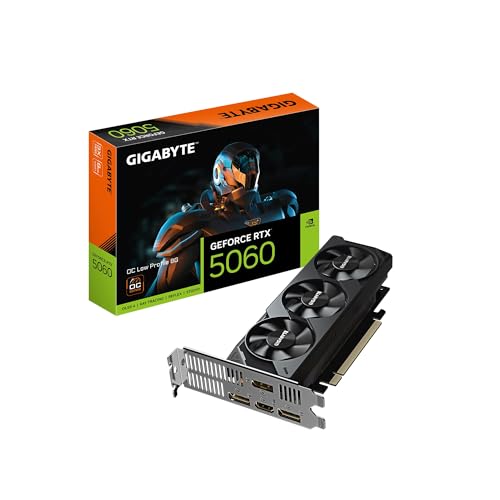
GIGABYTE GeForce RTX 5060 OC Low Profile 8G
Most performance you can fit in a half-height slot
- Form factor: low profile, half-height bracket class
- Memory: 8GB GDDR7 on a 128-bit bus
- Interface: PCIe 5.0
- Outputs: DisplayPort and HDMI, up to four displays
This is the card that redraws what a slim case can do. Low-profile cards used to mean giving up modern gaming entirely, yet here is a current-generation RTX 5060 with GDDR7 memory squeezed into the half-height format that fits the slim desktops sold by the millions for offices. If your case is a narrow tower that takes low-profile brackets only, this class of card is not a compromise pick; it is close to the ceiling of what the chassis can accept.
Fit still needs checking in two directions. Half-height solves the vertical problem, but the card occupies its full length inside the case and its cooler needs the neighbouring slot region clear for air. In a slim case with the power supply mounted directly above the expansion area, confirm the shroud will not foul the supply’s casing, and route the front-panel USB header cable before you seat the card, because afterwards your fingers will not reach it.
Strengths
- Current-generation GPU in a genuinely slim format
- GDDR7 memory rather than a cut-down older design
- Four-display support suits multi-monitor office desks
Trade-offs
- Compact cooler has less thermal headroom than full-size 5060 cards
- Low-profile bracket limits which cases benefit; full-height buyers gain nothing
- Performance per slot is high, but so is demand on case airflow
Best for: owners of slim prebuilt desktops who want real 1080p gaming without changing cases / Not suited for: builders in roomy mid-towers, who get better cooling from a standard card

MSI Gaming RTX 3050 LP 6G OC
The easy drop-in for older slim systems
- Form factor: low profile
- Memory: 6GB GDDR6 on a 96-bit bus
- Boost clock: 1492 MHz
- Outputs: HDMI and DisplayPort
Where the Gigabyte 5060 pushes the low-profile format forward, this MSI card is the conservative answer for a machine that is already several years old. The RTX 3050 generation asks little of a power supply by modern standards, and in slim systems the original supply is usually the component you cannot easily replace. A card that respects an ageing 300-watt-class supply while still delivering hardware ray tracing and DLSS upscaling earns its place on a shortlist for revived family PCs.
Because it is built on the Ampere architecture, manage expectations about frame generation features found on newer cards; what you get is honest 1080p performance in esports titles and older AAA games at sensible settings. From a fit perspective it is forgiving: the low-profile bracket suits slim cases, the cooler is modest, and the card is a realistic test of whether your case’s expansion area is as obstructed as you feared before you commit to anything faster.
Strengths
- Gentle power demands suit older prebuilt supplies
- Low-profile format fits the slim cases other cards cannot enter
- DLSS support stretches its useful life in supported games
Trade-offs
- 6GB of memory limits texture settings in newer releases
- Ampere generation lacks the newest frame-generation features
- 96-bit memory bus caps bandwidth at higher resolutions
Best for: reviving an older slim desktop for esports and back-catalogue gaming / Not suited for: anyone targeting high settings at 1440p in current AAA titles

Gigabyte GeForce RTX 3050 OC Low Profile 6G
Four display outputs in a half-height card
- Form factor: low profile
- Memory: 6GB GDDR6, 96-bit
- Core clock: 1477 MHz
- Outputs: two DisplayPort 1.4 and two HDMI 2.1
Display outputs are the hidden fit problem nobody measures. This Gigabyte variant carries two DisplayPort and two HDMI connectors on a half-height bracket, which makes it unusually capable for a trading desk, a reception display wall, or a home office running three monitors from a slim PC. When a case restricts you to one card, the ports on that card become the whole system’s display ceiling, so counting connectors matters as much as counting millimetres.
As a gaming card it sits in the same sensible territory as the MSI above: capable at 1080p with adjusted settings, happiest in lighter titles, and constrained by its 6GB frame buffer in the newest releases. The reason to pick this specific version over near-identical rivals is the output mix and Gigabyte’s compact cooler, which keeps the card’s footprint honest in cases where the expansion bay sits close to the front panel and its tangle of cables.
Strengths
- Four outputs is generous for a low-profile card
- HDMI 2.1 support suits modern TVs and high-refresh monitors
- Compact cooler respects tight expansion bays
Trade-offs
- Gaming headroom is modest in demanding new titles
- 6GB memory will age faster than 8GB alternatives
- Low-profile cooling runs warmer than full-height equivalents
Best for: multi-monitor productivity from a slim case, with light gaming after hours / Not suited for: a dedicated gaming rig where a taller case allows a stronger card

Gigabyte GeForce RTX 5050 OC Low Profile 8G
New-generation features, slim-case manners
- Form factor: low profile
- Memory: 8GB GDDR6, 128-bit
- Core clock: 2587 MHz
- Features: DLSS 4, PCIe 5.0, two DisplayPort and two HDMI
The RTX 5050 low-profile entry is the middle path between the two 3050 cards and the 5060 at the top of this list. You gain the newer architecture, DLSS 4 support, and a full 8GB of memory, while keeping the half-height format that slim cases demand. For a living-room PC that must hide inside a media unit, that combination of current features and physical discretion is exactly the point of the exercise.
Its 128-bit memory bus and GDDR6 rather than GDDR7 mark it as a step below the 5060, and in a roomy case that gap would argue for spending up. Inside a slim chassis the comparison reverses: the relevant rival is not a full-size card but the previous low-profile generation, and against that field the 5050’s extra memory and newer upscaling are decisive. Check that your case’s airflow reaches the card, because low-profile coolers recycle warm air quickly in sealed media furniture.
Strengths
- 8GB memory gives it a longer useful life than 6GB cards
- DLSS 4 support in a half-height design
- Four display outputs match the Gigabyte 3050 above
Trade-offs
- GDDR6 and a 128-bit bus trail the low-profile 5060
- Still a 1080p-first card despite the new generation badge
- Slim coolers depend heavily on case ventilation
Best for: media-centre and slim gaming builds that need current features in a small footprint / Not suited for: 1440p high-refresh gaming, which wants a bigger card and a bigger case

ASUS Dual GeForce RTX 4060 V2 OC Edition
The honest two-slot benchmark for compact towers
- Thickness: true 2-slot design
- Memory: 8GB GDDR6
- Cooling: dual Axial-tech fans, 0dB idle mode
- Outputs: HDMI 2.1a and DisplayPort 1.4a
Once your case accepts full-height cards, this ASUS Dual becomes the reference point for compact builds. Its defining virtue is honesty about thickness: a true two-slot design means the cooler occupies the space of two expansion slots and no more, which in a mini-ITX case with the card mounted directly above the power-supply shroud is the difference between fans that breathe and fans that choke. Many cards advertised as dual-slot quietly bulge past the line; this one respects it.
The 4060 chip itself is an efficient 1080p and entry 1440p performer with DLSS 3 frame generation, and its modest power draw means compact cases with limited exhaust capacity can still keep it composed. The 0dB mode stops the fans entirely at idle, which matters in a small case sitting on a desk near your ears. Measure its length against your case clearance as you would any card, but its restrained height and thickness make it the easiest full-size card here to house.
Strengths
- True 2-slot thickness preserves airflow in tight cases
- Low power draw suits small cases and modest supplies
- Fans stop at idle for a silent desktop
Trade-offs
- 8GB memory is the ceiling for texture-heavy games
- Short cooler has less thermal mass than triple-fan designs
- Two fans move less air than larger 4060 variants under sustained load
Best for: mini-ITX and compact tower builds that need guaranteed slot clearance / Not suited for: glass-panel showcase builds chasing the lowest possible temperatures

ASUS Dual GeForce RTX 4060 OC Edition
Same chip, thicker cooler: the 2.5-slot lesson
- Thickness: 2.5-slot design
- Memory: 8GB GDDR6
- Cooling: dual Axial-tech fans, 0dB idle mode
- Outputs: HDMI 2.1a and DisplayPort 1.4a
Place this card beside the V2 above and you have the single most instructive comparison in compact building. The GPU, memory, and features are effectively the same, but the cooler grows from 2 slots to 2.5, and that half slot changes which cases can accept it without penalty. In a mid-tower the thicker cooler is a free upgrade in quietness and thermal headroom. In a sandwich-style small-form-factor case it can block the adjacent slot, press against a shroud, or leave the fans millimetres from a panel.
Neither card is the better product in the abstract; each is better inside a specific box. That is the entire discipline this guide is teaching. When you read a specification, translate slot width into a picture of your own motherboard and case: where is the slot below the graphics slot, what lives there, and how much air gap remains between the cooler face and whatever sits opposite it? Answer those three questions and the choice between these two ASUS cards makes itself.
Strengths
- Thicker cooler runs quieter and cooler where space allows
- Same efficient 4060 chip and DLSS 3 feature set
- Sturdy backplate and dual-fan design suit horizontal mounting
Trade-offs
- 2.5-slot thickness excludes the tightest ITX layouts
- Half a slot of extra width can block a needed expansion slot
- No performance gain over the 2-slot version to offset the bulk
Best for: compact ATX and micro-ATX cases with a genuinely empty slot below / Not suited for: sandwich ITX cases or any build using the neighbouring slot
The six cards side by side on the dimensions that decide fit
| Card | Format | Memory | Fit lesson |
|---|---|---|---|
| Gigabyte RTX 5060 LP | Low profile | 8GB GDDR7 | Half-height can still be fast |
| MSI RTX 3050 LP | Low profile | 6GB GDDR6 | Gentle power for older slim PCs |
| Gigabyte RTX 3050 LP | Low profile | 6GB GDDR6 | Four outputs on a short bracket |
| Gigabyte RTX 5050 LP | Low profile | 8GB GDDR6 | New features, slim manners |
| ASUS Dual 4060 V2 | 2-slot full height | 8GB GDDR6 | True two-slot honesty |
| ASUS Dual 4060 OC | 2.5-slot full height | 8GB GDDR6 | Half a slot changes everything |
Read the table by format first and performance second, because that is the order your case imposes. If the chassis takes low-profile brackets only, the bottom two rows are fiction for you no matter how attractive they look, and your real contest is among the first four. If the case takes full-height cards but offers only two slots of clearance above the shroud, the V2 is your ceiling. Fit decisions are eliminations before they are selections.
Notice also what the table does not show: length. Two cards in the same format row can differ by several centimetres, and length is the dimension that collides with front fans, radiators, and drive cages. Always pull the exact millimetre figures for the specific model you are buying from the manufacturer’s product page, because partner cards sharing a GPU name routinely differ in every external dimension.
How case clearance figures are actually measured
Case manufacturers quote maximum GPU length as the distance from the expansion-slot brackets at the rear to the first obstruction at the front, usually a fan, radiator, or drive cage. That number assumes the obstruction is in its standard position. Move a front fan to the other side of its mount, fit a thicker radiator, or leave a drive cage installed that the spec sheet assumed removed, and the real clearance shrinks below the printed figure. Treat the published number as a best case and keep a margin.
Card makers measure length from the bracket face to the end of the cooler shroud, which can differ from the circuit board’s length by a wide margin. Decorative shroud extensions are pure liability in a small case: they add no cooling, yet they consume the clearance you needed for a front intake fan. When two versions of the same GPU differ in length, the difference is almost always cooler and shroud, not electronics, so choosing the shorter partner model costs you nothing in raw chip performance.
Height is quoted less consistently, which is why it catches people out. A standard full-height card rises modestly above the bracket line, but many gaming models extend well past it, and the power connector often sits on that top edge. In a narrow case the connector and its cable need their own vertical allowance above the card. A card that technically fits by height can still be uninstallable because the side panel will not close over the bent power cable without pressing on it.
Length, height, and thickness: the order to check them
Check bracket format first, because it is binary. A slim case designed for low-profile cards cannot accept a full-height card at any length, and no adapter changes the physical bracket opening in the rear panel. If your case is a slim desktop, filter every listing by low-profile before you read another word of its specification, and confirm whether a low-profile bracket is included in the box or must be swapped onto the card.
Check length second, against your measured clearance rather than the case’s marketing figure. Open the case, measure from the inside face of the rear bracket to the nearest obstruction with the front fans and any radiator installed exactly as they will stay, and write the number down. Then demand at least a centimetre of spare room beyond the card’s stated length, because cables, fan frames, and your own fingers all need to pass through that gap during installation.
- Bracket format: low profile or full height, decided by the rear panel openings
- Length: card shroud versus measured front clearance, with a centimetre to spare
- Thickness: slot width versus the space and slots actually below the card
- Height: card top edge plus power-connector bend versus side-panel distance
Thickness comes third and is the dimension builders most often round down in their heads. A 2.5-slot card in a case whose graphics slot leaves only two slots before the power-supply shroud will physically install, yet its fans will sit almost against the shroud and run loud and hot. Count usable space, not just whether the retaining screws line up. Height comes last because it is the easiest to verify visually, but remember the power cable’s bend radius is part of the card’s effective height.
Airflow is a fit dimension too
A card that fits mechanically can still fail thermally, and in small cases the two failures are cousins. Graphics coolers draw air from the space directly in front of their fans and exhaust it inside the chassis or out the rear bracket depending on design. If the fan face sits a few millimetres from a solid shroud or glass panel, the card recirculates its own exhaust and temperatures climb until clocks fall. As a working rule, a cooler needs a clear gap roughly equal to a finger’s width in front of its fans to breathe as its maker intended.
Case layout decides whether that gap exists. In traditional tower layouts the graphics card hangs with its fans facing down toward the power-supply shroud, so shroud vents and perforations matter. In sandwich-style small-form-factor cases the card faces a side panel, and a ventilated panel versus a solid one can be the whole thermal story. When you choose a case and card together, you are really choosing an air path; the tape-measure dimensions only tell you whether the parts can occupy the same box, not whether they can live there.
Cable routing quietly steals air space in compact builds. A bundle of front-panel leads pressed against the end of the card blocks the path between the front intake and the cooler, and a power cable draped across the fan face is worse. Route cables along the case edges before the card goes in, use the shortest sensible power lead, and resist stuffing spare modular cables into the void in front of the graphics card, however convenient that void looks during the build.
Power connectors, risers, and other silent blockers
Modern mid-range and high-end cards draw power through connectors that have their own spatial demands. The compact 12V-2×6 connector used on recent NVIDIA cards must not be bent sharply close to the plug, which means a case needs vertical or horizontal room for a gentle cable curve exactly where small cases have the least to give. Older 8-pin connectors are bulkier but more forgiving of bend direction. Either way, measure to the connector’s location on the specific card, not to the card’s edge in general.
Riser cables in small-form-factor cases add a second fit puzzle. The riser folds the card parallel to the motherboard, so the dimension that matters becomes the gap between the motherboard tray and the side panel, and the card’s thickness is spent against that gap instead. Riser length and fold radius also limit how far the card can sit from the spine of the case. If you are building in a riser case, consult the case maker’s tested card list; those lists exist because three-dimensional fit defeats simple length figures.
Do not forget the humble display cable. In a media PC pushed back into a cabinet, a stiff DisplayPort connector plus its cable bend can need several centimetres behind the case, and a card whose ports sit recessed behind a thick bracket can make some plugs awkward to seat fully. None of this appears on a specification sheet, yet all of it decides whether the finished machine fits the furniture it was bought for.
Slim prebuilt desktops: the special case that rules this guide
Most people who need a low-profile card did not choose their case at all. They inherited a slim office desktop from a workplace clear-out, bought a compact family PC on sale, or are upgrading a machine whose motherboard and power supply are proprietary. Those systems impose three constraints at once: the short bracket opening, a power supply that may lack a PCIe power connector entirely, and an interior laid out for a low-power office card rather than a gaming cooler. That is why the low-profile picks above lead this article instead of appearing as an afterthought.
Work through a slim prebuilt in a fixed order. First confirm the bracket height by measuring the rear opening. Then open the case and read the power supply’s label for its total wattage and whether any spare PCIe power lead exists; several of the low-profile cards in this class draw all their power from the slot, which is precisely why they suit these machines. Finally check the slot’s surroundings, because slim cases often place a drive bracket or a proprietary front-panel board exactly where a two-slot cooler wants to be.
Thermals deserve a paragraph of their own in these systems. A slim desktop typically has one small exhaust fan and a perforated side, and its original graphics load may have been nothing more demanding than a spreadsheet. Adding a gaming card multiplies the heat inside that sealed volume. Keep the side perforations unobstructed, avoid pushing the case flush against a wall on its vented side, and prefer the card whose cooler exhausts toward the rear bracket when a choice exists. A slightly slower card that stays cool will out-game a faster card that throttles in a hot slim case.
Reading a specification sheet without being misled by it
Retail listings compress a card’s size into a single line, and that line is where misunderstandings breed. Length figures sometimes describe the circuit board and sometimes the cooler, and the two can differ by centimetres on cards with extended shrouds. When a listing and the manufacturer’s own page disagree, believe the manufacturer’s page for the exact model number, and if the manufacturer gives a range or a ‘maximum’ figure, plan against the maximum. Your case does not care which number the retailer preferred.
Slot counts suffer the same looseness. A card described as dual-slot may have a shroud that bulges a few millimetres into a third slot’s airspace, which is harmless in a tower and decisive in a sandwich case. Photographs help here: look at the card photographed from the end, compare the cooler’s width with the bracket’s width, and you can see whether the shroud stays inside the bracket’s two rows or swells past them. Reviewers who photograph cards beside rulers are doing compact builders a genuine service.
Finally, remember that dimensions interact. A card can be short enough, thin enough, and low enough in isolation, yet still fail because installing it requires swinging the rear of the card through an arc that a drive cage occupies. Long cards enter cases at an angle. If your length margin is thin, the installation path, not the final resting position, may be the true limit, and that is another argument for the cardboard rehearsal described in the measuring steps above.
What to do when the card you want almost fits
Almost fitting is the most common outcome in compact building, and it has an honest menu of remedies. The first is choosing a different partner model of the same GPU: board partners build compact variants of popular chips precisely because demand exists, and the performance difference between a full-size and a compact cooler on a mid-range chip is usually a few percent of sustained clock, not a different class of product. The ASUS pair in this guide exists to make that trade visible.
The second remedy is changing the case’s interior rather than its contents: removing an unused drive cage, moving a radiator from the front to the top mount, or swapping a thick front fan for a slim one can each return a centimetre or more. Price those changes honestly, including the cooling you give up. The third remedy, modifying the card’s shroud or the case’s metalwork, belongs to experienced builders who accept the warranty consequences; for everyone else it converts a shopping problem into a repair bill.
And sometimes the right answer is a different case. If the machine’s purpose has changed from office work to serious gaming, a modest mid-tower with honest clearances can cost less than the premium compact cards and adapters needed to keep a slim chassis in service. Keep the slim machine for the duties it suits, move the gaming parts to a case that welcomes them, and both systems end up better at their jobs.
How card size interacts with the rest of the build
A graphics card does not occupy its corner of the case alone. Its length decides whether a front radiator can keep its fans, its thickness decides whether the slot below can hold a capture card or a fast network adapter, and its height decides whether a top-mounted power cable or a side-panel fan survives the installation. Builders planning a streaming PC feel the thickness question most sharply, because the capture card and the graphics card compete for the same two slots, and a cooler that sprawls into a third slot quietly deletes the streaming feature from the build.
Motherboard layout adds another interaction. On many micro-ATX boards the primary graphics slot sits one row above a chipset heatsink or an M.2 cover, and a very thick backplate can sit close enough to complicate both cooling and later drive swaps. None of these collisions appears in a clearance figure, which is why experienced builders photograph their intended layout or sketch it to scale before ordering. Ten minutes with a ruler and a pencil routinely saves a week of returns.
Weight belongs in the same conversation. Large coolers are heavy, and in a tower case a long, heavy card sags at its unsupported corner unless a bracket, a stand, or the power cable’s routing holds it level. Sag is mostly cosmetic, but in a compact case a sagging card can press its shroud against the component below. If you choose one of the bigger cards your case can technically accept, budget a moment during the build to check its level and support it if the corner droops.
A shortlist method you can reuse for any future card
Strip this guide down to a repeatable method and it fits on an index card. Write down four numbers from your own case: bracket format, measured front clearance, usable slots with air space, and height to the panel including cable bend. Then open the manufacturer’s page for any card that interests you and write its four matching numbers beside yours. Eliminate on any mismatch, however small, and only then compare the survivors on performance, features, and price. The method takes minutes and it scales from a slim office conversion to a showcase tower.
Keep the card with your case’s measurements after the build. Cases outlive graphics cards, and the next upgrade begins from those same four numbers; having them recorded, together with a note of what you removed or moved to make the current card fit, turns the next purchase into a five-minute check instead of a fresh investigation. Builders who keep that note also make better sellers of their old cards, because they can state plainly which cases the card will and will not enter.
Worked examples: three cases, three different answers
Consider a slim office desktop with short rear brackets, a proprietary supply without a spare power lead, and 210 millimetres of measured length. Every full-height card is eliminated before the conversation starts, and among the low-profile survivors the choice turns on power and purpose: the RTX 3050 cards if the supply is truly minimal and the games are light, the Gigabyte RTX 5050 if the budget allows the newer feature set, and the RTX 5060 low profile only after confirming the supply and the slot area can support the strongest card the format offers.
Now consider a mini-ITX gaming case with full-height brackets, 290 millimetres of length, and exactly two slots of room above a solid shroud. Length eliminates nothing in the mid-range, but thickness eliminates almost everything with a showpiece cooler. The ASUS Dual RTX 4060 V2 survives because its two-slot honesty is the whole requirement, and the build’s success is decided less by the card than by remembering that its fans need the shroud’s perforations left uncovered by cable bundles.
Finally, picture a micro-ATX tower with three free slots, generous length, and a user who records gameplay through a capture card destined for the slot below the graphics card. Here the 2.5-slot ASUS card fails socially rather than physically: it fits the case and evicts the capture card. The two-slot V2 wins again, not because it is faster, but because the build is a system, and the right card is the one that leaves the rest of the system possible. That sentence, applied patiently, is most of what choosing for case size means.
How to measure your case before you order anything
Twenty minutes with the case open will save you a return. Work through these steps in order and write every figure down; memory is how builds go wrong.
Open the case and find the graphics slot line
Remove the side panel and locate the PCIe x16 slot you will use, then look along its line toward the front of the case. Everything on that line is a potential obstruction: front fans, a radiator, drive cages, cable bundles, even the back of a front-mounted reservoir. Note which of those items you are genuinely willing to move or remove, because clearance gained by removing a drive cage you actually need is not clearance at all.
Measure length along the slot, not the case diagonal
Place a tape or ruler against the inside face of the rear expansion brackets and measure straight forward along the slot line to the nearest obstruction, keeping front fans and radiators in their final positions. Record the figure in millimetres. If the nearest obstruction is a cable bundle, reroute it now and measure again; cables are the one obstruction you can usually negotiate with.
Count the slots and the space beneath them
Look at how many expansion slots sit below the graphics slot before the case floor, a shroud, or another component closes the space. A card listed as 2.5-slot needs those two and a half slots of physical room plus breathing space for its fans. If a Wi-Fi card, capture card, or sound card occupies the slot below, its height joins the calculation, and a thick graphics cooler may simply evict it.
Check height from slot to side panel
Measure from the motherboard surface up to where the side panel will sit, then compare that figure against the card’s height plus the allowance its power connector needs. Cards that rise well above the bracket line are the usual offenders. If the connector sits on the top edge, picture the cable plugged in and bending toward the power supply, and be honest about whether the panel would press on that bend.
Confirm the bracket format and what is in the box
Decide definitively whether your case takes low-profile or full-height brackets by looking at the rear panel openings rather than trusting the product name. Then check the card listing for which brackets are included; many low-profile cards ship with the full-height bracket fitted and the short one in the box, which is a five-minute swap, while a card with no short bracket included cannot be adapted at all.
Do a cardboard rehearsal if the numbers are close
When your margin is under a centimetre, cut a piece of cardboard to the card’s exact length, height, and approximate thickness and offer it into the case. Cardboard reveals collisions that arithmetic hides: the corner that clips a fan frame, the shroud line that fouls a front-panel header, the angle at which the card must tilt to enter the case at all. It is the cheapest possible way to discover a problem while the card is still a line on an order page.
Fit mistakes that send cards back to the retailer
Trusting the case maker’s maximum GPU length
That figure assumes a configuration you may not have: no front radiator, drive cages removed, fans in their thinnest position. Builders who order a card within a millimetre of the printed maximum discover the assumption the hard way. Measure your own case in its final configuration and keep a genuine margin.
Forgetting the power cable needs room to exist
The card fits, the panel almost closes, and the only casualty is a power connector being bent far harder than its maker allows. Connector strain is both a fit failure and a reliability risk. Include the plugged-in cable, bent at a gentle radius, in your mental model of the card’s size.
Rounding a 2.5-slot card down to two slots
Half a slot is roughly a centimetre of cooler, and it goes somewhere: into the neighbouring slot, against the shroud, or into the fans’ air supply. If your layout has exactly two slots of room, buy a card that honestly occupies two slots, like the ASUS V2 reviewed above, rather than hoping the thicker card will somehow compress.
Ignoring the second slot’s bracket and ports
Thick cards often place display outputs across two bracket rows, and some compact cases have a divider or a reduced opening at the second row. A card can clear every internal dimension and still fail at the rear panel. Check that the case’s bracket area is fully open across as many rows as the card’s bracket occupies.
Buying the card first and the case second
Enthusiasm reverses the safe order constantly, and the result is a builder trying to justify a case around an unreturnable card. If both are still unpurchased, choose the case for the room and life you have, then let its measured clearance set the card shortlist. The cards in this guide show that every case class, even slim low-profile, has credible options when you shop in that order.
Final recommendation
Start with the Gigabyte RTX 5060 Low Profile if your case is a slim desktop and you want the strongest card the format currently offers, or the Gigabyte RTX 5050 Low Profile if you would rather keep the same shape with a gentler step in performance. Owners of older slim systems on original power supplies should look at the two RTX 3050 low-profile cards and pick between them on display outputs. In a compact tower with full-height brackets, the ASUS Dual RTX 4060 V2 is the safe two-slot answer, and its 2.5-slot sibling earns its extra width only when your case genuinely has the room to feed it air.
Whatever you choose, let the tape measure speak last. Write down bracket format, measured length, usable slots, and height including the power cable, and eliminate any card that fails one of the four. The survivors are all good purchases; the eliminated ones were never purchases at all, just returns waiting to happen.
Frequently asked questions
How much clearance should I leave beyond a graphics card’s listed length?
Aim for at least ten millimetres between the end of the card and the nearest obstruction, and more if a front radiator or thick fan sits ahead of it. That space is not wasted: installation requires tilting and sliding the card into its slot, cables must pass or turn in the same region, and intake air needs a path that is not sealed by the card’s shroud. If your measured margin is only two or three millimetres, treat the pairing as a risk and either choose a shorter partner model of the same GPU or rehearse the fit with a cardboard template cut to the card’s exact dimensions before ordering.
What does low profile actually mean for a graphics card?
Low profile describes the bracket and card height: the card is roughly half the height of a standard card and uses a short bracket so it can fit slim desktop cases whose rear panels have reduced-height expansion openings. It says nothing by itself about length or thickness, so a low-profile card still needs its full length checked against case clearance and a free slot’s worth of thickness. Many low-profile cards ship with both brackets in the box, letting the same card serve a slim case now and a standard case later, which makes them flexible hand-me-down components.
Is a 2.5-slot card a problem if my case has three free slots?
Usually not, provided the three slots are genuinely free and the space in front of the fans is open. The problems begin when the slot below is occupied, when the card hangs directly over a solid power-supply shroud with no perforation, or when a riser arrangement presses the cooler against a side panel. Count the room in front of the fan face as part of the fit, not just the bracket rows at the rear. If all three slots are empty and the shroud is vented, a 2.5-slot cooler is often the quieter, cooler-running choice.
Can I fit a long card by removing the front fan or drive cage?
Sometimes, and case makers design for exactly that trade: many mid-towers quote one GPU length with the drive cage fitted and a longer one without it. Removing a front fan is a poorer bargain, because the intake you sacrifice is the air the longer, hotter card most needs. Before relying on either removal, confirm the cage is not holding a drive you use and that remaining intakes can still feed the card. Then re-measure in the new configuration rather than trusting the alternative figure in the manual.
Do vertical GPU mounts change which cards fit?
Yes, substantially. A vertical mount turns the card to face the side panel, so thickness becomes distance from the glass and the card’s height becomes the dimension spent along the case’s length. Cards that fit easily in the horizontal position can end up with their fans a few millimetres from a glass panel in a vertical mount, which strangles intake air. Check the mount’s rated thickness, the gap it leaves to the panel, and whether the riser cable provided suits your motherboard’s PCIe generation before assuming a card transfers between orientations.
How do I find the exact dimensions of a specific card model?
Go to the manufacturer’s product page for that exact model number rather than a retailer’s summary, and look for the dimensions line in the specifications, usually given as length by height by width in millimetres or as a slot count. Partner brands build several cards around one GPU with different coolers, so the GPU’s name alone tells you nothing about size. If a maker lists only a slot figure for thickness, treat one slot as roughly twenty millimetres and remember that shrouds frequently bulge slightly beyond the nominal figure at the fan face.
Does a bigger cooler always mean a quieter card in a small case?
Not once the case enters the equation. A large cooler has more fin area and can spin its fans slowly in open air, but inside a compact chassis that same cooler may sit so close to a panel or shroud that its fans work against restricted intake, and restriction raises noise faster than fin area lowers it. This is why the two-slot ASUS card can be the calmer choice in an ITX build while its thicker sibling wins in a tower. Judge cooler size against the space your specific case leaves in front of the fans, and treat any pairing with only a few millimetres of intake gap as a noise risk regardless of the cooler’s reputation.