Disclosure: As an Amazon Associate, reviewstook.com earns from qualifying purchases. Links on this page are affiliate links at no extra cost to you; prices and availability change frequently, so check Amazon for the latest.
High End Gaming PC Buying Guide: How to Spend Big Without Wasting Money
A high end gaming PC is the easiest purchase in gaming to overpay for and the hardest to return. Once you move past the mainstream tier, every configuration sheet starts to look impressive: flagship graphics cards, sixteen-core processors, liquid cooling loops, and storage figures that would have seemed absurd five years ago. Yet two machines with nearly identical headline specs can deliver noticeably different frame rates, noise levels, and upgrade paths, and the gap between them is rarely explained on the box. This high end gaming PC buying guide exists to close that gap. It walks through what actually separates a genuinely high end gaming PC from a mid-range tower wearing premium badges, which specifications deserve your money first, and which six prebuilt systems currently earn a recommendation for 4K gaming, high-refresh 1440p play, streaming, and content creation.
The short version is simple. At this level, the graphics card decides your resolution ceiling, the processor decides your frame-rate floor in competitive and simulation titles, and the power supply and cooling decide whether the machine still performs the same way in year three as it does in week one. Everything else — case lighting, bundled peripherals, decorative displays — is garnish. Buy the silicon first, the support hardware second, and the garnish only if the first two are already right.
Key Takeaways
- GPU first: An RTX 5070 Ti is the sensible entry point to this tier; the RTX 5080 is the 4K sweet spot; the RTX 5090 is a no-compromise flagship whose premium only makes sense for 4K high-refresh gaming, heavy streaming, or GPU-accelerated creative work.
- CPU second: AMD’s X3D processors, led by the Ryzen 7 9800X3D, are the gaming-first choice thanks to their stacked cache. Intel’s Core Ultra and Core i9 chips fight back in mixed gaming-and-productivity workloads.
- 32GB of DDR5 is the floor at this level, and 2TB of NVMe storage is the practical minimum once modern game installs routinely exceed 100GB.
- Power and cooling are not optional extras: look for an 850W or larger 80+ Gold ATX 3.x supply and a 360mm liquid cooler on any machine carrying a flagship-class GPU.
- Prebuilt premiums vary wildly. Boutique and big-brand systems charge for warranty depth, support, and fit-and-finish; value-focused builders put more of the budget into the parts list. Neither approach is wrong — but you should know which one you are paying for.
Where to Buy
The six systems in this guide are sold through Amazon, where configuration options, stock levels, and delivery windows shift constantly. Use the links below to check the current configuration and price on Amazon before you commit, and confirm the exact GPU, CPU, memory, and storage on the listing page itself, because builders sometimes sell several variants under one product page. Product details and availability for these picks were verified through reviewstook.com research channels against the manufacturers’ current listings.
- Best Overall — Skytech Gaming PC Desktop, Ryzen 7 9800X3D, RTX 5070 Ti, 32GB RAM, 2TB SSD (Prism 5 Series) — Check on Amazon
- Best Premium Brand — Alienware Aurora Gaming Desktop, RTX 5080, Intel Core Ultra 9 285, 32GB DDR5, 1TB SSD (ACT1250) — Check on Amazon
- Best for 4K Gaming — Skytech Gaming PC Desktop, Ryzen 7 9850X3D, RTX 5080, 32GB RAM, 2TB SSD (King 95 Series) — Check on Amazon
- Best RTX 5080 Alternative — STORMCRAFT Phantom RTX 5080 Gaming PC, Ryzen 7 9800X3D, 32GB DDR5, 2TB SSD — Check on Amazon
- Best No-Compromise Flagship — Skytech Gaming Legacy 4 Gaming PC, Ryzen 9 9950X3D, RTX 5090, 64GB DDR5 RAM, 4TB Gen4 NVMe SSD — Check on Amazon
- Best for Gaming and Creating — Corsair Vengeance i5100 Gaming PC, Intel Core i9-14900KF, NVIDIA GeForce RTX 5080, 32GB DDR5, 2TB M.2 SSD — Check on Amazon
How These Picks Were Chosen
Every system in this guide was checked against the current Amazon listing data for its product line, and only configurations whose processor, graphics card, memory, and storage could be confirmed were eligible. That verification step matters more at the high end than anywhere else, because a single swapped component — a slower SSD generation, a lower-wattage power supply, a graphics card variant with less memory — can quietly erase the performance you thought you were buying. Listings that could not be pinned to a definite specification were left out, however attractive their presentation looked.
Beyond verification, four filters shaped the final six. First, the graphics card had to belong to the current generation’s upper half: RTX 5070 Ti, RTX 5080, or RTX 5090 class hardware, because anything below that line is a strong mainstream machine rather than a high end one. Second, the processor had to be a genuine gaming flagship or near-flagship — AMD’s X3D family or Intel’s top Core Ultra and Core i9 parts. Third, the supporting hardware had to match the silicon: DDR5 memory, NVMe storage, a power supply with real headroom, and cooling sized for sustained loads. Fourth, each pick had to fill a distinct role, so the guide covers different budgets and use cases instead of listing six near-identical towers.
What was excluded is equally telling. Several well-known systems pair a flagship GPU with only 16GB of memory, which is a false economy at this tier when a handful of modern titles already press against that ceiling with background apps running. Others ship a single terabyte of storage in a chassis clearly meant to be a long-term 4K machine. A few compact or novelty designs sacrifice airflow for looks. None of those compromises is fatal in a cheaper PC; in a high end gaming PC you are paying specifically to avoid them. If you want the condensed version of this guide’s logic before reading on, our companion piece on How To Choose A High End Gaming PC walks through the same decision in checklist form.
The Six Picks in Detail

Best Overall — Skytech Gaming PC Desktop, Ryzen 7 9800X3D, RTX 5070 Ti
Strengths
- The Ryzen 7 9800X3D is the standout gaming processor of its generation, and its stacked-cache design keeps frame rates high and frame pacing smooth in CPU-sensitive titles.
- The RTX 5070 Ti pairs naturally with it, delivering strong 1440p high-refresh performance and credible entry-level 4K with upscaling enabled.
- The supporting kit is properly specified: 32GB of DDR5-6000, a 2TB Gen4 NVMe SSD, an 850W Gold ATX 3 power supply, and a 360mm liquid cooler.
Trade-offs
- It stops one GPU tier below the RTX 5080 machines, so native 4K at maximum settings in the most demanding releases will ask for upscaling help.
- Wi-Fi 6 rather than Wi-Fi 7 slightly dates the connectivity spec next to newer rivals.
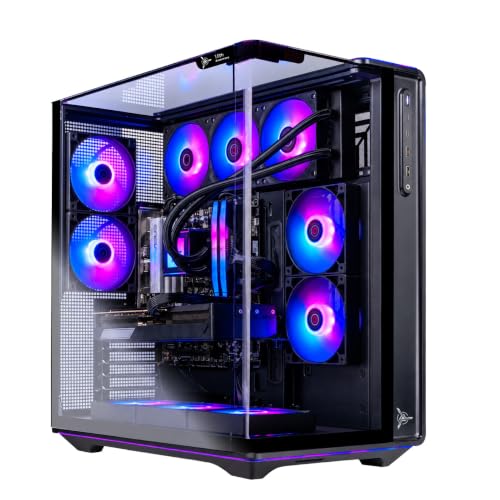
- The Prism 5 case prioritizes its panoramic glass look; measure your desk depth before assuming it fits a tight setup.
| Processor | AMD Ryzen 7 9800X3D |
|---|---|
| Graphics | NVIDIA GeForce RTX 5070 Ti |
| Memory | 32GB DDR5 6000 |
| Storage | 2TB Gen4 NVMe SSD |
| Power supply | 850W Gold ATX 3 |
| Cooling | 360 ARGB AIO liquid cooler |
| Operating system | Windows 11 |
This is the configuration we would hand to most buyers entering the high end tier, because it spends money exactly where gaming performance lives. The 9800X3D’s cache advantage shows up most clearly in esports titles, strategy games, and simulation workloads where the processor — not the graphics card — sets the ceiling, and it shows up as consistency: fewer stutters, tighter frame times, and headroom that survives a Discord call, a browser full of tabs, and a recording app running alongside the game.
The RTX 5070 Ti is the honest workhorse of this guide. At 1440p it drives high-refresh monitors properly in modern releases, and at 4K it remains convincing with DLSS upscaling and frame generation doing their share of the work. Buyers whose entire library is competitive shooters at 1440p will never feel this machine straining; buyers chasing native 4K ultra settings in the heaviest single-player titles should step up to the 5080 picks below instead.
Best for: buyers who want one machine that does everything well at 1440p and credibly at 4K. / Not suited for: native-4K purists who refuse upscaling on principle.

Best Premium Brand — Alienware Aurora Gaming Desktop, RTX 5080, Intel Core Ultra 9 285
Strengths
- The RTX 5080 is the genuine 4K card in this lineup, with the memory bandwidth and AI feature set to sustain high settings at that resolution.
- Intel’s Core Ultra 9 285 brings strong multi-core performance, making this the pick that shrugs off video rendering and heavy multitasking alongside gaming.
- Dell’s support network, warranty handling, and resale recognition are the best in this guide, and the Aurora’s compact, tidy chassis suits visible desk setups.
Trade-offs
- Storage is the weak line on the spec sheet: 1TB fills quickly on a machine bought for 4K game libraries.
- The proprietary-leaning Aurora design language has historically made some internal upgrades less straightforward than standard ATX towers.
- You pay a brand premium over similarly specified builder PCs, and that premium buys support and polish rather than extra frames.
| Processor | Intel Core Ultra 9 285 |
|---|---|
| Graphics | NVIDIA GeForce RTX 5080 |
| Memory | 32GB DDR5 |
| Storage | 1TB SSD |
| Networking | 2.5Gb Ethernet, Wi-Fi 7 |
| Operating system | Windows 11 Home |
| Included | Wired keyboard |
Alienware sells certainty as much as hardware. For a buyer who wants a high end gaming PC that arrives from a household name, with a single phone number to call when anything misbehaves and a warranty process refined over decades, the Aurora is the rational premium choice. The Core Ultra 9 285 and RTX 5080 pairing is also the most balanced in this guide for people whose PC doubles as a workstation: the Intel chip’s core count earns its keep in editing timelines and compile jobs in a way a gaming-specialist processor does not.
The honest limitation is the terabyte of storage. Treat a second NVMe drive as a planned early addition rather than an optional extra, and budget the five minutes it takes to install one. With that single caveat addressed, the Aurora is a complete, quiet, living-room-presentable 4K machine.
Best for: buyers who value brand support and a clean, compact 4K system. / Not suited for: tinkerers who plan frequent internal upgrades, or anyone unwilling to add storage.


Best for 4K Gaming — Skytech Gaming PC Desktop, Ryzen 7 9850X3D, RTX 5080
Strengths
- Pairs the RTX 5080 with AMD’s refreshed 9850X3D, so neither the GPU nor the CPU becomes the bottleneck at 4K or at 1440p high-refresh.
- Full-size supporting spec: 32GB DDR5-6000, 2TB NVMe storage, 850W Gold ATX 3 power, and a 360mm AIO.
- The King 95 chassis is a showcase-style case with the airflow path that flagship parts actually need.
Trade-offs
- Wi-Fi 5 is an odd, dated spec on an otherwise forward-looking build; wired Ethernet or a USB adapter upgrade is the realistic answer.
- It duplicates the 5080 role of the Alienware and STORMCRAFT picks, so the choice between them comes down to processor preference and price on the day.
- Showcase glass cases demand dust discipline; filters need regular attention to keep the cooling honest.
| Processor | AMD Ryzen 7 9850X3D |
|---|---|
| Graphics | NVIDIA GeForce RTX 5080 |
| Memory | 32GB DDR5 6000 |
| Storage | 2TB NVMe SSD |
| Power supply | 850W Gold ATX 3 |
| Cooling | 360 ARGB AIO liquid cooler |
| Operating system | Windows 11 |
If your monitor is a 4K panel — or a 1440p panel refreshing at 240Hz or beyond — this is the configuration aimed squarely at you. The 5080 does the heavy lifting at 4K, and the 9850X3D ensures that when you drop back to competitive settings, the processor is never the reason a frame arrives late. It is the most single-mindedly gaming-focused 5080 build in this guide.
Streamers should also look closely here: the combination of a high-cache gaming CPU and an RTX 50-series encoder means gameplay and broadcast encoding coexist without the compromises older machines forced. Just run the network connection over Ethernet, which you should be doing on any streaming rig regardless of what the Wi-Fi spec says.
Best for: 4K monitor owners and high-refresh competitors who want an AMD-based flagship pairing. / Not suited for: buyers who rely on Wi-Fi as their only connection and do not want workarounds.

Best RTX 5080 Alternative — STORMCRAFT Phantom RTX 5080 Gaming PC, Ryzen 7 9800X3D
Strengths
- Matches the flagship pairing most buyers actually want — 9800X3D plus RTX 5080 — on a B850 platform with DDR5-6000 memory.
- 2TB of SSD storage and an 850W power supply mean no immediate upgrade errands after purchase.
- Bundles an RGB keyboard and mouse, so the box is genuinely playable the day it arrives.
Trade-offs
- STORMCRAFT is a smaller brand than Alienware or MSI; support experiences are thinner on the ground and worth researching before purchase.
- Bundled peripherals are starter-grade and most enthusiasts will replace them — see our guides to the wider setup once the tower itself is sorted.
- The 360mm AIO and RGB presentation target a showcase aesthetic that will not suit every room.
| Processor | AMD Ryzen 7 9800X3D (up to 5.2GHz) |
|---|---|
| Graphics | NVIDIA GeForce RTX 5080 |
| Memory | 32GB DDR5 6000MHz |
| Storage | 2TB SSD |
| Motherboard | B850 chipset |
| Power supply | 850W |
| Cooling | 360mm AIO liquid cooler |
The Phantom exists for buyers who did the reading, concluded that 9800X3D plus 5080 is the combination they want, and would rather not pay a big-brand premium to get it. On paper it gives up nothing to the pricier 5080 systems in this guide: same processor class, same graphics tier, same memory and storage figures, and a modern B850 board underneath. The money saved against the premium names can fund the monitor upgrade that a 5080 honestly deserves.
The trade is intangible rather than technical. With a smaller builder you are trading warranty-department depth for parts-list value, so buy through a channel with a painless returns window and stress-test the machine hard in its first two weeks — which, frankly, is good practice with any prebuilt in this guide.
Best for: spec-literate buyers who want the flagship AMD/NVIDIA pairing without the brand tax. / Not suited for: buyers who want a large manufacturer’s support apparatus behind the purchase.

Best No-Compromise Flagship — Skytech Gaming Legacy 4, Ryzen 9 9950X3D, RTX 5090
Strengths
- The RTX 5090 is the fastest consumer graphics card of its generation, and the 9950X3D pairs flagship gaming cache with sixteen cores for serious productivity.
- Nothing in the spec is rationed: 64GB of DDR5-6000, 4TB of Gen4 NVMe storage, an X870 motherboard, and a 1200W Gold ATX 3 power supply.
- Wi-Fi 7 and a 360mm AIO round out a build that asks for no upgrades on any front.
Trade-offs
- This is the most expensive machine in the guide by a wide margin, and its advantage over the 5080 systems concentrates at 4K and in GPU-heavy creative work.
- A 5090-class card and 1200W supply mean real heat and real power draw; your room and your circuit should both be ready.
- At 1080p or casual 1440p, most of what you paid for simply never gets used.
| Processor | AMD Ryzen 9 9950X3D |
|---|---|
| Graphics | NVIDIA GeForce RTX 5090 |
| Memory | 64GB DDR5 6000 |
| Storage | 4TB Gen4 NVMe M.2 SSD |
| Motherboard | X870 |
| Power supply | 1200W Gold ATX 3 |
| Cooling | 360 ARGB AIO liquid cooler |
| Operating system | Windows 11 |
Every guide needs one machine that answers the question “what if money were secondary?” — and the Legacy 4 is that machine here. It is built for the buyer with a 4K high-refresh or ultrawide monitor, a streaming schedule, a video-editing habit, or a local AI workload, who wants the strongest consumer hardware of the generation in one warranty-backed box. The 9950X3D is the telling choice: unlike a pure gaming chip, it keeps all sixteen cores for rendering and compiling while its cache die handles games, so the machine never asks you to pick a personality.
Buy it with clear eyes. The honest case against it lives in our analysis of Is A High End Gaming PC Worth It, and it is a case about diminishing returns, not about quality. If your display and workload can use what the 5090 offers, nothing else in this guide substitutes.
Best for: 4K high-refresh gamers, streamers, and creators who want the generation’s ceiling in one box. / Not suited for: 1080p players or anyone whose budget would be stretched thin by it.
Best for Gaming and Creating — Corsair Vengeance i5100, Intel Core i9-14900KF, RTX 5080
Strengths
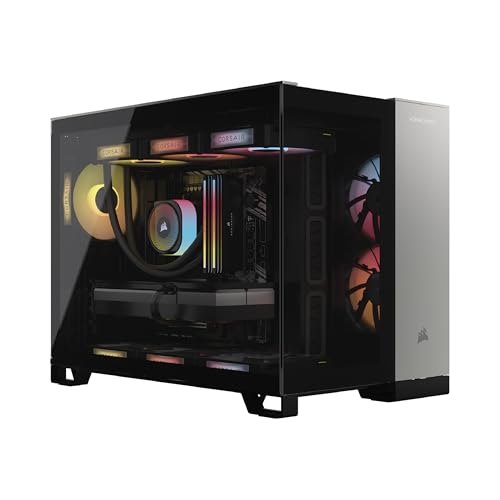
- Corsair builds from its own respected component ecosystem — Dominator Titanium RGB DDR5 memory and in-house liquid cooling — so the parts list reads like a good DIY build.
- The Core i9-14900KF’s core count makes this the strongest editing and rendering machine in the guide alongside the Alienware.
- Standard, upgrade-friendly construction from a company that also sells the parts you would upgrade with.
Trade-offs
- The 14900KF is a previous-generation flagship; it remains extremely capable, but the newest platforms are the X3D and Core Ultra machines elsewhere in this guide.
- In pure gaming, the X3D-based picks will generally edge it, particularly in cache-sensitive titles.
- Corsair’s premium component choices price it like the brand build it is.
| Processor | Intel Core i9-14900KF (liquid cooled) |
|---|---|
| Graphics | NVIDIA GeForce RTX 5080 |
| Memory | 32GB Dominator Titanium RGB DDR5 |
| Storage | 2TB M.2 SSD |
| Operating system | Windows 11 |
| Finish | Black |
The Vengeance i5100 is the connoisseur’s prebuilt: a machine whose appeal is that every supporting component is one a knowledgeable builder might have chosen themselves. For the hybrid user — games at night, Premiere or Blender by day — the i9’s productivity muscle matters more than the last few gaming frames an X3D chip would add, and the RTX 5080 keeps the 4K gaming side of the bargain completely.
It is also the pick we would steer toward a buyer who already knows they will upgrade. Corsair’s standard-layout approach and its own upgrade catalogue make memory, storage, and cooling changes painless years down the line.
Best for: creator-gamers who want premium components and an upgrade-friendly Intel build. / Not suited for: pure gamers chasing the absolute highest frame rates in cache-sensitive titles.
Comparison Table
| Pick | CPU | GPU | RAM | Storage | PSU |
|---|---|---|---|---|---|
| Skytech Prism 5 (Best Overall) | Ryzen 7 9800X3D | RTX 5070 Ti | 32GB DDR5 | 2TB | 850W Gold |
| Alienware Aurora ACT1250 | Core Ultra 9 285 | RTX 5080 | 32GB DDR5 | 1TB | — |
| Skytech King 95 | Ryzen 7 9850X3D | RTX 5080 | 32GB DDR5 | 2TB | 850W Gold |
| STORMCRAFT Phantom | Ryzen 7 9800X3D | RTX 5080 | 32GB DDR5 | 2TB | 850W |
| Skytech Legacy 4 | Ryzen 9 9950X3D | RTX 5090 | 64GB DDR5 | 4TB | 1200W Gold |
| Corsair Vengeance i5100 | Core i9-14900KF | RTX 5080 | 32GB DDR5 | 2TB | — |
Read the table by columns, not rows. The GPU column sets your resolution ceiling, the CPU column sets your frame-pacing floor and your productivity speed, and the storage column is where two otherwise flagship machines — the Alienware most visibly — quietly economize. If two rows look identical on the specs that matter to you, let warranty, case preference, and the day’s pricing break the tie; our head-to-head notes in High End Gaming PC Reviews dig into how these systems differ beyond the spec sheet.
How to Choose a High End Gaming PC: The Specs That Actually Matter
Start with the monitor, not the machine
The single most useful question in this entire guide is: what display will this PC feed? A 1080p 144Hz monitor cannot use an RTX 5080’s talents; a 4K 240Hz OLED will expose an RTX 5070 Ti’s limits. Match the machine to the panel. For 1440p high-refresh gaming, the 5070 Ti tier is the rational summit. For 4K at high settings, start at the 5080. For 4K with high refresh, ultrawide resolutions, or heavy ray tracing, the 5090 exists precisely for you. Buyers still choosing a monitor should budget for it as part of the same decision — a flagship PC on a bargain panel is the most common high end mistake of all, and it is why we weigh the full picture in High End Gaming PC Pros And Cons rather than the tower alone.
What does the graphics card tier actually buy you?
Each step up NVIDIA’s stack buys three things: more raw rendering power, more memory bandwidth for high resolutions and textures, and more headroom before upscaling has to work hard. The 5070 Ti is a superb 1440p card and a competent 4K card with DLSS. The 5080 makes 4K the default rather than the stretch goal and holds higher settings without leaning on frame generation. The 5090 removes the question entirely for this generation — and adds serious capability for GPU rendering, AI work, and multi-monitor or VR setups. What a higher tier does not buy is a better experience at resolutions below its design point; frames beyond your monitor’s refresh rate are frames you paid for and never saw.
Why does everyone recommend X3D processors for gaming?
AMD’s X3D chips stack extra cache memory directly on the processor, and games — which constantly fetch unpredictable data — benefit disproportionately. The practical results are higher minimum frame rates and smoother frame pacing, the qualities you feel as “this just runs well,” especially in esports titles, MMOs, strategy games, and flight or racing simulators. Intel’s flagship parts answer with higher core counts and stronger all-round productivity. Neither is a wrong answer; they are answers to different questions. If the machine is 90 percent gaming, X3D. If it splits time with rendering, compiling, or editing, Intel’s top chips and AMD’s own 9950X3D close the gap from both directions.
Memory and storage: the quiet specs
Thirty-two gigabytes of DDR5 is the correct amount for this tier: enough for any current game plus streaming and background loads, in the two-stick configuration that leaves upgrade slots free. Speed matters modestly — DDR5-6000 is the recognized sweet spot on AMD platforms, which is why so many picks in this guide specify exactly that. For storage, 2TB of NVMe is the realistic floor. A single modern blockbuster can consume well over 100GB, system files and launchers take their share, and a drive kept nearly full slows down and wears faster. The Alienware’s 1TB is the one figure in this guide we would change, and changing it later is cheap and easy — but plan for it.
Power supply and cooling: insurance you cannot retrofit cheaply
A quality 850W Gold ATX 3.x supply is the baseline for 5080-class builds and a 1200W unit is appropriate for the 5090, not because the systems draw that continuously, but because transient spikes and future upgrades punish undersized units. Cooling deserves the same respect: every pick here uses a 360mm liquid cooler on the processor because flagship chips under sustained gaming-plus-streaming loads will throttle — quietly cutting the performance you paid for — on inadequate cooling. When a listing hides its power supply wattage or cooler entirely, treat that silence as information.
Setting Up Your High End Gaming PC: The First Evening
Unbox on a table, not the floor, and photograph the interior before removing any protective foam or GPU support packaging — transit protection inside the case is common on prebuilts and must come out before first power-on. Connect the monitor to the graphics card’s ports, not the motherboard’s; plugging into the wrong port is the classic first-night error and silently routes you to integrated graphics. Our full walkthrough, How To Set Up High End Gaming PC, covers the sequence in detail, but the essentials are: update Windows fully, install the latest NVIDIA driver cleanly, enable your monitor’s full refresh rate in Windows display settings (new machines default to 60Hz more often than you would believe), turn on XMP/EXPO memory profiles if the builder has not, and verify in Task Manager that all memory and the correct GPU are recognized.
Then stress the machine while the return window is wide open. Run your most demanding game for an hour, watch temperatures with the builder’s monitoring tool, and listen for fan behavior that suggests a mounting or airflow problem. Check that every fan spins, every RGB zone lights, and every front-panel port works. Problems found in week one are warranty conversations; the same problems found in month four are projects.
Problem: the PC feels no faster than your old one in your favorite game. → Fix: check, in order, that the display cable is in the GPU, that Windows is set to the monitor’s native resolution and full refresh rate, that the game itself is not capped by an in-game frame limiter or VSync setting carried over from your old settings profile, and that the correct graphics driver is installed rather than the generic Windows one.
Problem: fans ramp loudly under load and temperatures climb. → Fix: confirm the case’s protective film and internal transit foam are removed, that the tower has clearance on its intake and exhaust sides, and that the AIO pump is running (audible as a faint hum, visible in monitoring software). Persistent overheating on a new prebuilt is a warranty call, not a DIY repair.
Common Mistakes
- Buying the GPU tier above your monitor. A 5090 feeding a 1080p display is the most expensive way to see no difference.
- Accepting 16GB of RAM or 1TB of storage at this tier because the headline GPU looked right. The supporting spec is where high end value quietly leaks away.
- Ignoring the power supply. An unnamed, under-wattage PSU behind a flagship GPU is a risk no discount justifies.
- Paying for the brand when you wanted the parts, or the parts when you needed the brand. Decide which you value before comparing prices.
- Skipping the first-week stress test. The return window is the cheapest diagnostic tool you own.
- Forgetting the rest of the desk. A high end PC deserves a mouse and surface that keep up — our readers often pair these towers with picks from Best Gaming Mouse For Fps and a proper pad once the tower is chosen.
Final Recommendation
For most buyers, the Skytech Prism 5 configuration — 9800X3D with an RTX 5070 Ti — is the high end gaming PC to buy: it concentrates spending on the two components that determine how games feel, surrounds them with a correct supporting spec, and leaves budget headroom for the monitor those components deserve. Step to the Skytech King 95 or STORMCRAFT Phantom if 4K is your home resolution; choose the Alienware Aurora if Dell’s support and polish matter more to you than storage capacity; take the Corsair Vengeance i5100 if your PC earns its keep in creative applications too. And if your display, workload, and budget all genuinely point at the ceiling, the Skytech Legacy 4 is the one machine here that never asks you to compromise. Whichever you choose, cross-check it against the balanced view in High End Gaming PC Pros And Cons and the hands-on impressions gathered in High End Gaming PC Review before the order goes in.
Frequently Asked Questions
What makes a gaming PC “high end” rather than mid-range?
The graphics tier and the absence of rationing. A high end gaming PC pairs an upper-stack GPU — currently RTX 5070 Ti class and above — with a flagship gaming processor, 32GB of memory, fast NVMe storage, and power and cooling sized with headroom. Mid-range machines hit some of those marks; high end machines hit all of them at once.
Is an RTX 5080 enough for 4K gaming?
Yes, for the great majority of current titles at high settings, with DLSS available when a particular game demands it. The RTX 5090’s extra capability shows at 4K with maximum ray tracing, on high-refresh 4K panels, and in GPU-accelerated creative work — meaningful niches, but niches.
Should I choose an AMD X3D or an Intel processor?
Choose X3D if gaming dominates your usage; its cache advantage delivers smoother frame pacing in the titles that stress CPUs hardest. Choose Intel’s flagship Core Ultra or Core i9 parts if the machine splits its life with rendering, editing, or compiling, where core counts repay you daily.
How much RAM and storage should a high end gaming PC have?
32GB of DDR5 and 2TB of NVMe storage are the sensible floor. Sixteen gigabytes is a mainstream spec wearing premium clothes at this price level, and a single terabyte disappears within a handful of modern game installs.
Is a prebuilt high end PC worse value than building my own?
Not automatically. Prebuilts trade some parts-per-dollar efficiency for assembly, a single warranty covering the whole system, and your own time. At the high end — where a single installation mistake can threaten very expensive components — many buyers rationally pay for that. The gap also narrows whenever component retail prices spike.
How long will a high end gaming PC stay relevant?
Realistically four to six years at strong settings, with the graphics card aging fastest and the processor, memory platform, and storage aging slowest. The upgrade-friendly picks in this guide — standard layouts, spare memory slots, PSU headroom — are the ones most likely to accept a mid-life GPU swap gracefully.
Do I need liquid cooling in a high end gaming PC?
For the processor in a flagship build, a 360mm AIO is the practical standard: it keeps sustained clocks high and noise low under combined gaming and streaming loads. Air cooling can work on efficient chips, but at this tier the liquid coolers fitted to every pick here exist for a reason.
What About Building Your Own Instead?
Every high end buying guide owes its readers this comparison, because the DIY route is the prebuilt’s permanent rival. Building the equivalent of the Prism 5 or Phantom yourself buys three things: component-level control down to the motherboard’s VRM design, the satisfaction and knowledge that come from assembly, and — in calm component markets — a modest saving. It costs three things in return: your time across research, assembly, and troubleshooting; the fragmented warranty reality in which a dead machine is your diagnosis to make and your RMA to file, part by part; and the risk, small but real, that one installation mistake meets one very expensive component. At the high end the calculus tilts further toward prebuilts than at any other tier, simply because the parts at risk are the priciest in the industry and the builder’s single-system warranty is worth the most exactly where a single failure costs the most. Our standing position: build if you enjoy building — that joy is a genuine product feature no prebuilt ships with — and buy if what you enjoy is the gaming the machine exists for. Neither answer needs defending, but pretending the two are the same purchase helps no one.
Warranty, Support, and Returns: The Ownership Layer
The specification sheet ends at delivery; ownership does not. Before choosing between near-equal machines in this guide, weigh the layer underneath. Warranty term length varies meaningfully across these brands, and the difference between a one-year and a multi-year whole-system warranty is, in expected-value terms, a real component — price it like one. Support quality varies too: the big brands operate the deepest benches, while smaller builders often answer with the people who built your machine, which owners report as either the best or the slowest experience depending on the week. Returns are the third leg: buy through a channel whose return window you have actually read, and run the acceptance routine from our setup guide inside it. A useful discipline is to decide, before ordering, what would make you return the machine — wrong configuration delivered, a fan or pump fault, temperatures that will not settle — so that week-one findings trigger a decision rather than a debate. The best high end purchase is the one whose failure modes you have already planned for; the machines above earn their places partly because their makers make that planning easy.
A Note on Timing and Pricing
High end pricing moves with component markets, seasonal sales events, and the graphics-card release calendar, sometimes by amounts that reorder this guide’s value rankings overnight. The correct response is not to chase the calendar — there is always a sale or a launch six weeks away — but to buy the tier your monitor needs when you need it, from a listing whose full specification you have verified, and to let the check-price links above show you today’s number rather than trusting any figure quoted in an article, including ours. Generational transitions deserve one exception: when a new GPU generation is genuinely imminent, the outgoing flagships often become the segment’s best value for a brief window, and the verified-spec discipline in this guide is how you catch that window without catching a quietly downgraded configuration instead.
In this guide
Quick Picks at a Glance
- Best Overall — Skytech Prism 5 (9800X3D, RTX 5070 Ti): the balanced flagship; buy this if you want one answer instead of a decision tree.
- Best Premium Brand — Alienware Aurora (Core Ultra 9 285, RTX 5080): the support-led 4K machine; add a second drive and it wants for nothing.
- Best for 4K Gaming — Skytech King 95 (9850X3D, RTX 5080): the AMD-paired 4K specialist for high-refresh panels and streamers.
- Best RTX 5080 Alternative — STORMCRAFT Phantom (9800X3D, RTX 5080): the flagship pairing without the flagship brand premium.
- Best No-Compromise Flagship — Skytech Legacy 4 (9950X3D, RTX 5090): the ceiling of the generation, for displays and workloads that can spend it.
- Best for Gaming and Creating — Corsair Vengeance i5100 (i9-14900KF, RTX 5080): premium components and Intel productivity muscle in an upgrade-friendly build.
What the Money Buys at Each Tier of the High End
It helps to see the tier as three landings on one staircase. The first landing, built around the RTX 5070 Ti, buys the complete high end experience at 1440p — settings freedom, frame-pacing quality, ray tracing in play — and a credible, upscaling-assisted version of that experience at 4K. Most buyers should stop on this landing, because everything above it purchases narrower and narrower improvements at steeper and steeper rates. The second landing, the RTX 5080 machines, buys 4K as a default rather than a negotiation: higher native settings, more memory bandwidth for the textures 4K loads carry, and headroom that keeps frame generation an enhancement instead of a requirement. It is the correct landing for the growing population of 4K monitor owners, and the four 5080 systems in this guide differ mainly in processor philosophy and brand wrapper rather than in gaming outcome. The third landing, the RTX 5090, buys the removal of the question itself for this hardware generation, plus a second profession’s worth of GPU compute for rendering, AI, and multi-display or VR work. It is a rational purchase for a specific, identifiable minority — and an expensive ornament for everyone else. The discipline this guide keeps returning to is simply knowing which landing your monitor stands on, because the staircase charges by the step and refunds nothing for altitude you cannot use.
Budgeting Beyond the Tower: The Ecosystem Line
One final discipline separates satisfied flagship owners from quietly disappointed ones, and it belongs in a buying guide even though no manufacturer will print it: the tower is roughly the first two-thirds of a complete high end purchase. The monitor that justifies the machine, a mouse and keyboard that do not bottleneck it, a headset or speakers worthy of it, a surge protector with real capacity, and the desk space to hold a full tower with ventilation clearance — together these form the ecosystem line, and they are not accessories to the decision but part of it. The practical rule is to sketch the whole desk’s cost before choosing which of the six machines above to buy, and to let that total, not the tower’s price alone, arbitrate between the 5070 Ti landing and the 5080 landing when the choice is close. A buyer who funds the ecosystem fully and lands one GPU tier lower will, month after month, have the better experience of the two — a truth the picks in this guide were chosen to respect, since every one of them leaves a coherent ecosystem affordable around it at its own tier. Buy the machine, by all means. Just buy the whole machine, including the parts that do not come in its box.


