Disclosure: As an Amazon Associate, reviewstook.com earns from qualifying purchases. Links to Amazon on this page are affiliate links; they cost you nothing extra.
GPS lets a watch record where you went, how far and how fast. Not all GPS watches work the same way. This guide explains the types and what to check before you buy.
This guide is based on product listings and general knowledge rather than our own testing. Features vary by model and year, so confirm the details on the product page. Smartwatch health readings are estimates and are not medical advice.
By the Reviewstook Editorial Team. Last updated: November 1, 2026.
Built-In GPS vs Connected GPS
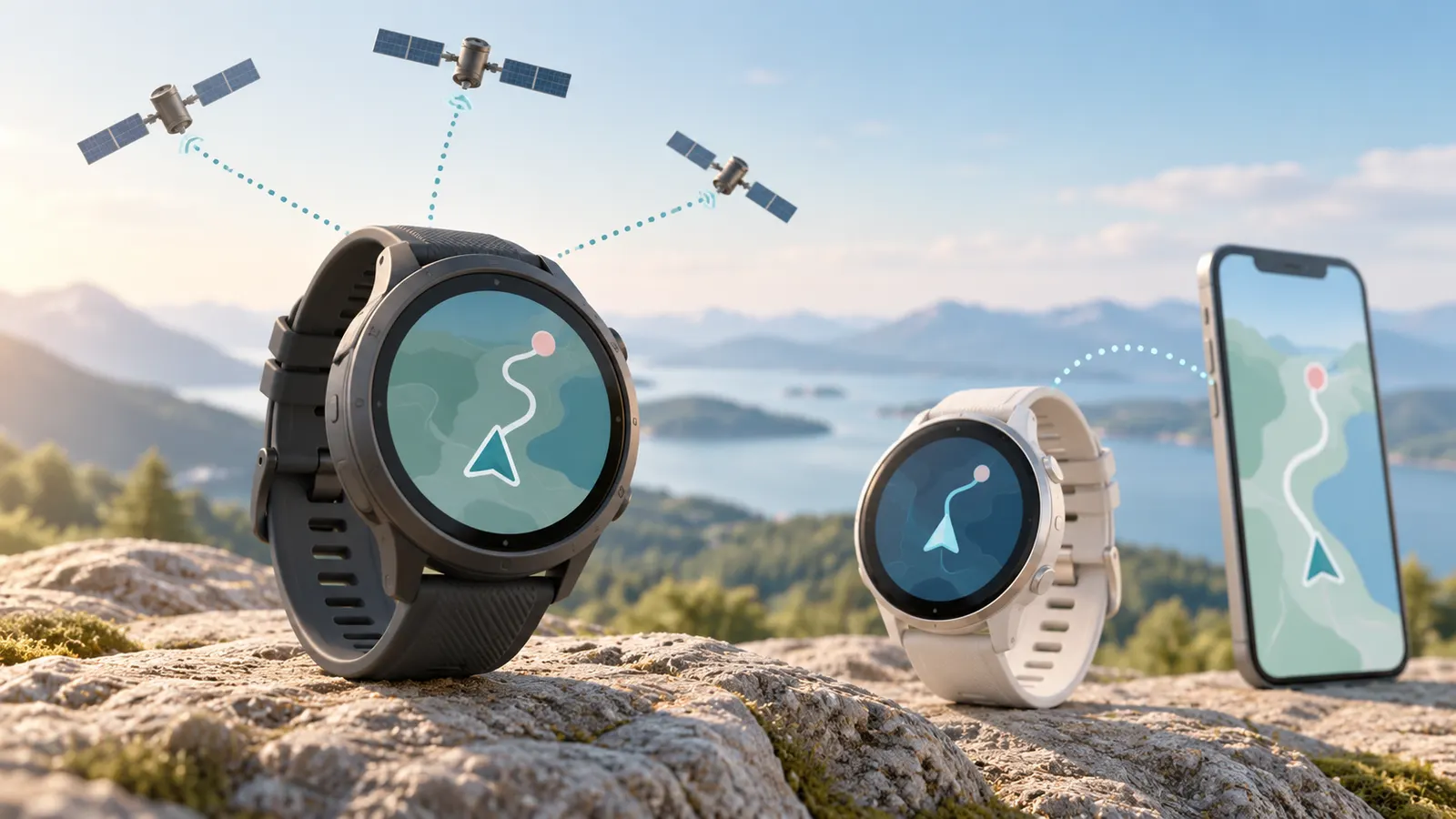
A watch with built-in GPS has its own receiver, so it can record a run without your phone. A watch with connected GPS borrows your phone’s location, so you must carry the phone. Built-in GPS costs more and uses more battery, but suits running, cycling and hiking.
In this guide
What Else Can It Do
- Pace, distance and route tracking.
- Maps or breadcrumb navigation on some models.
- Compass and altitude readings on outdoor watches.
- Post-workout summaries in an app.
Accuracy and Signal
GPS accuracy depends on open sky, the watch and satellite support. Tall buildings, dense trees and tunnels can cause drift. Multi-band GPS support can help in difficult areas on some watches, but check reviews for real-world results.
Battery Impact
GPS is one of the biggest drains on a smartwatch battery. Makers often list separate battery claims for GPS mode. Check that number if you do long workouts. See our battery life guide.
Who Needs It
Runners, cyclists, hikers and anyone who wants to leave the phone at home benefit most. If you mostly use a watch for notifications and steps, connected GPS is enough.
How to Get a Good GPS Lock
- Wait for the watch to find satellites before you start.
- Start outside in an open area.
- Keep the firmware updated.
- Avoid covering the watch with a sleeve.
Features That Often Come With GPS
- Route recording and sharing.
- Pace alerts and lap splits.
- Back-to-start navigation on some models.
- Elevation and compass on outdoor watches.
Comparing GPS Watches
Compare battery life in GPS mode, screen readability in sunlight, case size and the app. Our GPS smartwatch list and running list show options with GPS listed.
Satellite Systems and Multi-Band Support
When a watch lists GPS, it often means support for several satellite networks, not just one. The original American system is called GPS, and other regions operate their own systems with similar functions. Many watches can use more than one at a time, which gives more satellites in view and can help in places where the sky is partly blocked. Check the product page for a list of supported systems and for whether you can choose which ones the watch uses.
Multi-band, sometimes called dual-frequency, receivers listen on more than one radio frequency from the same satellite. Combining frequencies can reduce errors caused by signals bouncing off buildings or being delayed by the atmosphere. In cities with tall buildings, under dense tree cover or in canyons, that can mean a cleaner track. The benefit varies by watch and conditions, and it often comes with higher battery use, so many watches let you choose a mode.
Think about whether you need this. If you run on open roads or trails with good sky view, single-band receivers can do an adequate job for most people. If you often train in city centers, forest or mountains, a multi-band option may be worth considering. Check independent reviews that compare tracks on the same route, since marketing language does not guarantee a better result. Also consider the settings. A high-accuracy mode may use more power, while a battery-saving mode may record points less often and smooth out the track. Choose the mode according to the activity and the length of your outing.
Activity Profiles, Data Fields and Training Features
GPS is the base for many training features, so check what the watch does with the location data. Activity profiles tailor the display and the recording to a sport, such as running, cycling, hiking, swimming or trail running. Each profile can show different data fields, such as pace, distance, elevation, heart rate and lap time. Look for the ability to customize screens, so you can see the numbers you care about during a workout, and check how easily you can read them while moving.
Alerts help structure sessions. You may be able to set pace targets, heart rate zones, distance or time alerts, and interval workouts. Some watches allow you to follow a structured plan from an app, with guidance on your wrist. Navigation features range from a simple breadcrumb trail that lets you retrace your steps to routes you load in advance with turn prompts. Check the maker’s page for how routes are created and transferred, and whether you need a phone or computer.
Think about recovery and summary metrics. Many watches estimate training load, recovery time or fitness level from workout data. These are estimates and not medical advice, and their accuracy depends on good data and consistent use. Do not obsess over a single number. Look at trends over weeks. Also check whether data can be exported to other apps you use, or shared with a coach. If you swim, check whether the watch handles pool and open-water tracking and how the open-water GPS accuracy is described.
Fit, Comfort and Sensor Placement
A watch you do not like wearing will not be used, so comfort matters. Consider case size and weight, especially for sleeping, running and small wrists. Large cases hold bigger batteries and screens but can feel bulky. Check the thickness, which affects whether it fits under a sleeve. Straps matter as well: silicone and fabric straps are popular for sports, but material sensitivity varies, and some people prefer breathable bands. Check whether straps can be replaced with standard fittings, which gives you options if one wears out.
Fit affects the accuracy of wrist heart rate sensors. The watch should be snug but not tight, sitting just above the wrist bone. During hard workouts, tighten it slightly, then loosen it afterward. Sweat, tattoos, hair and skin tone can all influence optical sensor readings. If heart rate accuracy is vital, consider a chest strap, which many watches support, and check the maker’s page for compatibility.
Look at the screen too. Brightness and contrast in sunlight are important for outdoor use, and the type of display affects battery life. Touch screens can be hard to use with sweat or gloves, so check whether physical buttons are available. Water resistance ratings matter if you swim or shower with the watch, and the manufacturer’s guidance explains what activities the rating covers. Keep the sensors and strap clean to avoid skin irritation. Clean the back of the watch after sweaty sessions, dry it and rotate wearing positions if your skin gets sore.
Privacy, Data and Safety Features
A GPS watch records where you go, so it is worth thinking about who can see that data. Many apps let you share routes and activities with friends or publicly, and default settings vary. Check the privacy settings before your first upload. You can usually hide start and end points near your home, make activities private or limit visibility to approved followers. Publicly sharing a regular route can reveal where you live or when you are away, so take care.
Review what the app collects and how it stores your data, and read the privacy policy if you have concerns. Use a strong password and two-step verification. If you stop using the watch, remove it from your account and reset it. Check whether you can export or delete your data.
Some watches offer safety features that use GPS, such as sharing live location with contacts, detecting falls or sending alerts in emergencies. These depend on connectivity, since many require a connected phone or a cellular plan, so read the details before relying on them. They are aids and not guarantees. When hiking in remote areas, carry a map, a charged power source and tell someone your plan. Check that location sharing works before you leave. Also consider whether you want your watch to give you turn-by-turn directions in areas where mistakes could be dangerous, and treat the watch as one tool among several.
Care, Updates and When to Replace
Looking after a GPS watch is straightforward. Rinse it with fresh water after swimming in chlorine or salt water, and dry it before charging. Keep charging contacts clean, since sweat and dirt can cause poor connections. Use the charger the maker supplies or approves, and avoid charging in hot places. Check the strap for wear and replace it when it cracks or loses elasticity.
Install firmware and app updates, which can improve GPS performance, fix bugs and add features. Before a major event, avoid updating at the last minute in case something changes. Restart the watch if it behaves oddly, and check the manual for a reset procedure. Sync regularly so that satellite data stays current, since many watches use a stored forecast to find satellites faster. If your watch struggles to find a signal, it may need to be outdoors with a clear view for a few minutes to refresh that data.
Know the signs that it is time to replace the watch. Battery life that falls well below what you remember, even after updates and a reset, suggests battery wear. Buttons that stick, a cracked screen, water getting under the glass, persistent GPS errors and failing sensors are other signs. Software support also matters. When the maker stops supporting your model, some apps and features may stop working. When shopping for a replacement, list what you liked and missed in the old one, and prioritize battery life in GPS mode, fit and the features you really use.
Quick Comparison of GPS Setups by Activity
Where you use a watch determines how much satellite capability you need. The table below links common activities to the features that matter most, so you can set your expectations before comparing models.
| Activity | What matters most | Nice to have |
|---|---|---|
| Walking and casual jogging | Reliable lock in open areas | Simple pace and distance screens |
| City running among tall buildings | Strong signal handling and quick recovery | Support for several satellite systems |
| Trail running and hiking | Track display, route following and battery endurance | Offline maps and breadcrumb return |
| Cycling | Speed and distance accuracy, mount compatibility | Sensor pairing for power or cadence |
| Swimming | Water resistance and pool or open water modes | Stroke detection |
Seeing the activities side by side makes one thing clear. A runner who stays in a quiet neighborhood and a hiker who spends hours under tree cover are asking very different things of the same chip.
A Pre-Purchase Checklist for GPS Watches
Marketing pages emphasize the headline feature and gloss over the details that decide whether you will enjoy daily use. Walk through these points before you commit.
- Decide whether you want to leave the phone at home. If so, confirm that the watch has its own receiver and enough storage for your music or maps.
- Read the battery information for the GPS mode you will really use, not just the everyday smartwatch mode.
- Check the case size and strap options against your wrist.
- Look at how data syncs and where it ends up, including any subscription requirements the maker mentions.
- Confirm that your favorite apps and platforms can import the activity files.
- Read the care guidance for water exposure, charging and cleaning.
Making Sense of Specification Jargon
Spec sheets mix general terms with brand names for the same idea. A short glossary helps you translate.
- GNSS: the general term for satellite navigation, covering several global systems.
- Lock or fix: the moment the watch has found enough satellites to calculate your position.
- Cold fix and warm fix: how long the first lock takes depending on whether the watch recently knew its position.
- Sampling rate: how often the watch records a point, which affects how smooth a track appears.
- Breadcrumb: a simple line showing where you have been so you can retrace your path.
- Assisted GPS: using a connected phone or network data to speed up the first fix.
Setup Habits That Improve Day-to-Day Results
A few small routines make a noticeable difference without any extra equipment. Update the watch software when the maker releases an update, because navigation and sensor improvements are often included. Sync the watch with its companion app regularly so that satellite data stays current. Wear the watch snugly but comfortably, a finger width above the wrist bone, so the sensors sit flat against the skin.
Before an outing, give the watch a moment in an open area so it can find the satellites. Standing under a roof or next to a tall wall can slow this down. Set the data screens you care about, such as pace, heart rate and elapsed time, before you begin, so you are not scrolling through menus while moving.
Choosing Between a Dedicated Sports Watch and a General Smartwatch
A general smartwatch is built around notifications, apps and payments, with GPS as one feature among many. A dedicated sports watch usually reverses the priorities, placing training screens and long endurance at the front while keeping smart features simpler. Neither approach is better in the abstract. If you check messages all day and exercise a few times a week, a general model may feel more natural. If you train for events or head into remote areas, a sports focused design often fits better.
Think about how you will wear it too. Bulky designs can be uncomfortable overnight or at a desk, while slim designs may carry fewer sensors. Try to picture a typical week and decide which compromise you can live with.
When to Rely on the Maker and When to Plan Ahead
For anything involving safety in remote areas, do not treat a watch as your only navigation tool. Carry a paper map, tell someone your route, and follow guidance from park authorities or local rescue services. Use the maker’s instructions for details on water resistance, charging and any emergency features, since capabilities and limits differ from one model to another.
Typical Situations Where a Watch Seems to Misbehave
When a track looks odd, the watch is not always at fault. Context explains many strange results, and a few simple adjustments can help.
Distance looks short or long
Cutting corners, tall buildings and tree cover can all smooth or distort a recorded path. Compare against a known route, such as a marked track, and consider that the measured distance may differ slightly from the official one.
The watch loses signal mid-activity
Brief gaps often occur in tunnels, dense forest and narrow streets. Most watches fill the gap with a straight line, so the track may appear jagged for a short stretch.
The pace readout jumps around
Instant pace can bounce because it reacts to every small change. Use average or lap pace for a steadier picture.
The first fix takes a long time
If the watch has been switched off for a long period or you have traveled far, it may need extra time to find the satellites. Remain in an open area, avoid covering the watch with your sleeve, and give it a few minutes.
If a problem keeps recurring after a software update and switching the watch off and on again, contact the maker’s support using the guidance in the manual.
Ready to Buy? Start Here
If this guide helped you decide what to look for, these products are a place to start.

As an Amazon Associate we earn from qualifying purchases. Prices and availability are shown on Amazon.
GPS in the Places You Actually Train
City streets and the canyon effect
Downtown routes are the hardest test a watch GPS faces. Tall buildings reflect satellite signals, so the watch receives both the direct signal and bounced copies arriving late, and its calculated position can wander across the street or cut corners through buildings that your feet never entered. The visible symptoms are familiar: pace that leaps around at traffic lights, a map trace that zigzags, and a total distance that flatters or short-changes you depending on the day. Multi-band reception, where offered, genuinely helps here because it gives the watch more signal paths to judge between, but no wrist device fully defeats physics. Practical habits matter as much: start your workout in the open rather than between towers, accept that instant pace in a city centre is an estimate and judge the run by lap or average pace, and compare your performance on the same route across weeks rather than treating any single trace as truth.
Trails, forests and mountains
Under tree canopy the problem reverses: signals are weakened rather than reflected, and the watch may hold a fix while quietly losing precision on switchbacks and in gullies. Dense, wet foliage is harder than bare winter branches, and deep valleys can shadow whole constellations for stretches. For hiking and trail running, the features around GPS matter as much as the receiver: breadcrumb navigation back to the start, route following with off-course alerts, and an altimeter that does not depend solely on satellite height all turn a slightly imperfect track into a genuinely useful tool. Battery planning also changes outdoors, because a receiver working hard in poor signal uses more power; a watch that cruises through a city week can be humbled by a long mountain day, so know your watch’s GPS-mode endurance and carry margin on any route where the track is also your way home.
Tracks, treadmills and the places GPS cannot help
On a running track, GPS traces often look worse than the run felt, because tight, repeated curves expose every small position error and the watch may cut or widen each bend. Many watches offer a track mode that snaps to standard lane geometry; if yours does and you train on a track regularly, it is worth the thirty seconds to select it. Indoors and on treadmills, GPS steps aside entirely and the watch estimates distance from arm movement calibrated by your outdoor runs, which is why treadmill distances improve after several outdoor sessions and drift when your stride changes with fatigue or incline. Treat indoor numbers as training-load estimates rather than measurements, and if precise indoor distance matters, a foot pod or the treadmill’s own console figure will serve you better than arguing with the watch.
Getting a Better Track Without Buying a New Watch
Most disappointing tracks are fixable with habits rather than hardware. Give the watch a still moment in the open to acquire satellites before you start moving; starting a run from a doorway or car park and immediately turning into a shaded street is the classic recipe for a wandering first kilometre. Wear the watch snug and on top of the wrist so its antenna faces the sky rather than your body, and keep the firmware current, because makers quietly improve satellite handling and release updated satellite-position data that speeds up fixes. If your watch supports downloading that satellite assistance data through the app, sync before big sessions rather than after. Record at the highest sampling rate you can afford in battery terms for technical trails and interval sessions, and accept the trade honestly: smoother, more faithful tracks cost charge, so everyday easy runs can use a smarter, lighter mode while key sessions get the full treatment.
When the track is wrong in the same place every time
A repeat error at the same corner, tunnel or bridge is information, not malfunction: something at that spot — a glass tower, a metal structure, a covered arcade — is defeating the signal predictably. Note it, and either judge your splits around it or choose the parallel street for measured efforts. Tunnels and underpasses will always produce a straight-line guess between entry and exit; good watches resume cleanly afterwards, and the total distance error is usually smaller than the alarming map suggests. What should concern you is new randomness in places that used to record cleanly, especially paired with slow fixes; that pattern suggests stale assistance data, a software issue or, rarely, hardware trouble, and it is worth a sync, an update and a restart before you conclude the watch is dying.
Navigation Features: Useful Tool or Expensive Decoration?
GPS tells a watch where it is; navigation features decide whether that knowledge helps you while you are moving. The ladder of usefulness runs from a simple back-to-start arrow, through breadcrumb trails and preloaded routes with turn prompts, up to full maps on the wrist. Each step up costs money, battery and often case size, so the honest question is how you actually move outdoors. Road runners on familiar loops gain little beyond back-to-start insurance. Trail runners, hikers, bikepackers and travellers exploring new cities gain a great deal, because a route on the wrist means the phone stays packed away and wrong turns get corrected in metres rather than kilometres. If you do buy into route features, practise with them on a familiar walk first: load a route, follow it, deliberately wander off it, and watch how the watch alerts and recovers you. Navigation you have rehearsed is a safety feature; navigation you first open in rain on a ridge is a distraction.
Maps, storage and the phone-free question
Full mapping watches store map data on the device, which is why they tend to be larger, pricier and hungrier than breadcrumb-only models. The storage question extends to music and podcasts for phone-free runs, and the two decisions belong together: a watch bought for independent outdoor use should be judged as a system — receiver quality, maps, storage, battery in GPS mode and screen readability in sunlight — rather than by any single headline. Test the screen outdoors before committing if you can, because a map you cannot read in glare is a specification, not a feature. And remember that phone-free does not mean help-free: safety features such as incident detection and live tracking depend on a connection, so the runner who leaves the phone behind should know exactly which safety nets remain active and which were left at home with the handset.
GPS and Your Privacy: The Track Is a Diary
A year of GPS workouts is a precise diary of where you live, when you leave, which routes you run and when your home is empty. That deserves a minute of deliberate settings rather than default acceptance. Review who can see your activities in the companion app and set new activities to private by default if the platform allows it; public-by-default is a common setting and a common regret. Use any privacy-zone feature around your home and workplace so shared maps crop the revealing first and last stretch. Be thoughtful about live tracking links, which are wonderful for race day and unnecessary for a Tuesday run, and about connecting the account to social platforms you do not actively manage. None of this requires giving up the benefits of GPS training; it requires treating location history with the same care you would give any other diary, because that is what it is.
Accuracy claims and how to test a watch yourself
If you want to judge a watch’s GPS honestly, run a simple test rather than reading arguments. Choose a route you can measure independently — a marked trail, a certified course, or a path you can measure carefully on a mapping tool — and run it several times in similar conditions. Compare total distance consistency first, because a watch that repeats within a small margin on the same route is behaving well even if its absolute figure differs slightly from your measurement; consistency is what training comparisons need. Then look at where the trace deviates: corners, tree cover and tall buildings will explain most of it. A watch that is consistent on your routes, quick to fix, and honest in its pacing display is a good GPS watch for your life, whatever the forums say about a rival’s performance on a test course on another continent.
Choosing GPS Features by Sport: A Practical Breakdown
Road running and marathon training
For road runners, the hierarchy is pacing honesty, battery across your longest training run with generous margin, and comfort at mile twenty when everything slightly annoys you. Instant pace from GPS alone jumps around, so prefer watches that blend satellite data with motion sensing for a steadier displayed pace, and learn to run by lap pace and effort for intervals rather than chasing a flickering number. Marathoners should test the watch on their actual peak long run before race day, with race-day settings — alerts, screens, music — already configured, because a battery surprise at kilometre thirty is a preparation failure, not bad luck. Multi-band reception earns its keep in big-city marathons with tower-lined starts, while small-town and suburban training rarely stresses a modern receiver. Above all, choose the watch whose buttons and screens you can operate with cold, tired hands, since that is the state in which you will ask the most of it.
Cycling, swimming and triathlon
Cyclists ask more of GPS than runners do: higher speeds smooth some errors but expose others, and the watch competes with dedicated bike computers that offer bigger screens and longer endurance. A watch still earns its place for riders who also run and swim, and for recording commutes and gravel adventures without another device to charge. Mount or wrist position affects the fix less than keeping the receiver unobstructed; a watch buried under a winter cuff will underperform one worn over it. Open-water swimmers should understand that GPS only samples when the wrist breaks the surface, so tracks are stitched from intermittent fixes and distances are estimates with wider error bars than running; stroke-aware models handle this better, but no watch makes open-water distance a laboratory figure. Triathletes combine all of these demands and should prioritise a true multisport mode with one-button transitions, because the best GPS in the world is wasted if changing sports mid-race costs you a minute of fiddling in transition.
Hiking, skiing and slow movement
Slow movement is quietly hard for GPS, because the distance between successive positions shrinks toward the size of the signal error, and naive recording can invent distance while you stand at a viewpoint. Better watches filter this intelligently; you can help by pausing recording at long stops rather than letting the watch accumulate phantom metres at the café. For hiking, elevation quality often matters more than horizontal precision, so a barometric altimeter that you calibrate at known trailhead heights will serve you better than satellite height alone. Skiers add speed, cold and gloves: look for big, glove-friendly controls, a screen that stays readable in flat light, and battery figures quoted for cold conditions if the maker provides them, because lithium batteries and hard-working receivers both fade faster in the cold. In every slow sport, the winning features are the unglamorous ones — endurance, legibility and a reliable way back — rather than the receiver specification that dominates running reviews.
When Connected GPS Is Genuinely Enough
It is easy to leave a guide like this believing built-in GPS is mandatory, so it is worth stating the opposite case plainly. If your phone is always with you — and for walkers, gym users, commuters and many casual runners it is — connected GPS borrows a receiver that is often larger and better supplied with assistance data than a watch’s own. The watch stays cheaper, smaller and longer-lasting, and the recorded tracks can be perfectly respectable. The arrangement fails in specific, nameable situations: you want to run phone-free, your phone battery is precious on long days out, you need wrist-based navigation, or your sport separates you from the phone by water, distance or rules. If none of those describes your week, connected GPS is not a compromise to apologise for; it is the rational design. Spend the savings on the strap, the case size and the screen you will enjoy every day, because those are the parts of the watch you will actually notice once the run is over.
GPS Questions From Real Training Weeks
Why is my first kilometre always the least accurate?
Because the watch begins that kilometre with the least information: a fresh satellite fix still refining itself, a body just starting to move, and often the worst signal environment of the run, since most of us start from doorways, driveways and streets lined with houses and trees. The watch’s estimate of your position sharpens over the first minutes as more signals accumulate and the filtering settles, which is why the trace often straightens noticeably after the opening stretch. You can shrink the effect with the habits described in this guide — sync beforehand, stand in the open for the fix, start the activity a breath before you move — but you cannot delete it entirely, and the mature response is interpretive: judge a session by its whole, compare like routes with like, and never let a wandering first kilometre talk you out of a run the remaining nine recorded beautifully.
My friend’s watch records a different distance on the same run. Who is right?
Probably both, within the tolerance of the technology. Two watches sample at different rates, filter differently, make different decisions at every corner and handle every signal shadow with different judgement, so two honest devices on two different wrists will rarely agree to the metre over a long route. The differences that matter are consistency and bias: a watch that repeats its own figure closely on the same route week after week is a good training instrument even if its absolute number differs slightly from a measured course, while a watch that wanders randomly run to run is the problem. If you need an absolute answer for a specific route, measure the route itself by a trusted method and compare each watch against that, on a clear day, more than once. For training purposes, pick one watch, learn its character on your routes, and let consistency do the work that false precision cannot.
Does GPS drain more battery in some places than others?
Yes, and the mechanism is effort: in open country with a clear sky the receiver finds its satellites easily and settles into efficient tracking, while in cities, forests, gorges and mountains it works continuously against reflections, obstructions and weak signals, and works harder still when you ask for the most frequent sampling and multi-band reception. The practical consequence is that a watch’s GPS endurance figure is a fair-weather average, and your longest, wildest days — exactly the days you can least afford a dead watch — will draw the battery down faster than the same hours on a suburban loop. Plan expedition and race batteries with that discount applied, start those days completely full, and decide in advance which recording luxuries you will trade away if the reserve runs low; a watch that finishes the day in a lighter tracking mode has served you better than one that recorded gloriously for six hours and died before the descent.
Should I record every activity with GPS, even short ones?
Record the activities where location is information: runs, rides, hikes, swims and walks you want mapped, measured or navigated. For the rest — the gym session, the yoga class, the short stroll where the route is irrelevant — GPS adds drain and delay without adding knowledge, and many watches offer indoor or non-GPS profiles for exactly this reason. There is also a privacy dimension worth the habit: a complete GPS diary of every short trip from your front door is more revealing than most owners intend to keep, and recording selectively keeps the diary closer to the training log you meant to build. The exception is calibration: watches that estimate indoor and treadmill distance from your outdoor stride need regular GPS sessions to stay honest, so keep enough outdoor recording in your week to feed the estimate, and let the rest of your training be recorded in peace.
The last word on choosing your GPS setup
Every section of this guide returns to the same simple test: match the receiver to the running, riding and wandering you actually do, in the places you actually do it, with the phone habits you actually have. Built-in GPS earns its price the moment your training regularly separates you from your phone or asks the watch to navigate; connected GPS earns its economy every day your phone is already in your pocket and the track is a record rather than a lifeline. Between those poles sits a range of watches whose differences are real but second-order — satellite systems, sampling modes, mapping depth — and they should be allowed to decide only after the first-order question is answered honestly. Get that answer right and the watch will feel accurate in the way that matters: consistent on your routes, dependable on your long days, and quietly absent from your worries while you are out there doing the thing it was bought to record.
A quick pre-run GPS ritual
Thirty seconds before you set off will do more for your tracks than any setting buried in a menu. Sync the watch with its app while you lace your shoes, so satellite data is fresh. Step outside into the most open sky you have — a garden, a pavement away from the building line — and start the activity while you finish your warm-up, letting the fix settle before the first turn. Check the strap is snug and the watch sits on top of the wrist where its antenna can see the sky. Then run, and let the watch do the job you prepared it for. Rituals like this are how experienced runners produce those suspiciously clean traces that beginners attribute to expensive hardware; the hardware helps, but the habit is the larger half of the difference, and it costs nothing but half a minute of patience at the door.
Frequently Asked Questions
Do all smartwatches have GPS?
No. Some rely on the phone’s GPS.
Is built-in GPS accurate?
It is usually good in open areas but can drift near buildings or trees.
Does GPS work without a phone?
Built-in GPS does, but viewing details may need the app later.
Does GPS drain the battery?
Yes, noticeably.
Why is my GPS track wrong?
Poor satellite signal, buildings, trees or a slow start can cause drift.
Do I need dual-band GPS?
It can help in cities and forests, but check reviews for your use.
Can a watch use more than one satellite system?
Many can, combining several regional and global networks to see more satellites at once. Check the product page for the list and for any setting that lets you choose.
Can I use a GPS watch for hiking navigation?
Many models offer breadcrumb trails or loaded routes. Check how routes are created and transferred, and carry a map and extra power for remote trips.
Why does my watch take long to find satellites?
It may not have been used for a while, or you may be indoors or among tall buildings. Wait outdoors with a clear sky view, keep the watch updated and sync it regularly.
Should I wear the watch tight?
Snug is best, just above the wrist bone. A looser fit during rest is more comfortable, and a chest strap can help if wrist heart rate is unreliable during hard efforts.
How can I protect my privacy when sharing runs?
Use the app's privacy settings to hide start and end points near home, limit who can see activities and review your defaults before the first upload.
How do I know the battery is getting old?
If GPS-mode battery life drops well below what it was, even after updates and a reset, the battery may be wearing out. Contact the maker about service options.
Is an expensive watch more accurate?
Not always. Accuracy depends on the receiver, antenna design, conditions and settings. Compare independent reviews for your type of route.
Bottom Line
Choose built-in GPS if you want to leave your phone at home for workouts. Otherwise connected GPS may be enough and gives better battery life.
Related Reading
- Best Smartwatches with GPS
- Best Smartwatches for Running
- Smartwatch Battery Life: What to Expect and How to Extend It
- Smartwatch Water Resistance: IP Ratings and ATM Explained
- All Smartwatch guides


