A smart air quality monitor is a small device that reports readings from its onboard sensors to a display or an app. We have not used these products ourselves, so this guide relies on general knowledge and the maker’s descriptions rather than personal experience. The goal is to help you understand which features and construction details matter, not to make claims about any health result.
Begin by deciding what you want to see. Some monitors focus on fine particles, others add humidity, temperature or carbon dioxide readings. The table below lists the main factors, and the specs table that follows lets you compare devices against your own list, whether you want a simple wall display, a desk unit or something that feeds a wider smart home setup.
It also helps to think about how you will read the data. Some people like a glance at a wall display each morning, while others prefer a weekly look at charts in an app. Neither approach is wrong, but each calls for different hardware, so decide first and then narrow the list.
As an Amazon Associate we earn from qualifying purchases. Links on this site are affiliate links, and they do not change the information we give.
In this guide
Quick Picks
| Pick | Product | Best For |
|---|---|---|
| 1 | Airthings View Plus | Best Overall |
| 2 | Airthings Wave Plus (2930) | Best for Radon |
| 3 | Amazon Smart Air Quality Monitor | Best for Alexa Homes |
| 4 | Qingping Air Monitor Lite | Best for Apple HomeKit |
| 5 | SwitchBot Meter Pro CO2 | Best CO2 Display |
Our Picks

1. Airthings View Plus — Best Overall
View Plus is the most complete monitor here, with sensors for radon, PM2.5 particles, carbon dioxide, VOCs, humidity, temperature and air pressure in one unit. Its E Ink display is customizable, so the readings you care about stay visible at a glance, and built-in Wi-Fi sends history and alerts to the Airthings app and web dashboard without a separate hub. It runs for up to about two years on batteries or over USB, which makes placement flexible, and it links with Alexa, Google Assistant and IFTTT so other devices can react when levels change. Because it covers particles and radon as well as CO2, it is the one to choose if you want a single display that watches everything the guide lists. Check the app for long-term trends, which matter more for radon than any single reading.

2. Airthings Wave Plus (2930) — Best for Radon
Wave Plus is the pick when radon is the main concern. Alongside the radon sensor it tracks CO2, TVOC, humidity, temperature and air pressure, but it has no screen: a wave of the hand lights a glow ring — green, yellow or red — and full graphs live in the Airthings app over Bluetooth, with an optional Airthings Hub adding remote access and smart-home links. Two AA batteries last around 16 months, so it can sit undisturbed in a bedroom or basement, which suits radon measurement, where long-term averages matter more than spot readings. It samples at intervals of a few minutes and rewards patience, since the maker suggests leaving it in place while readings settle. Choose it over the View Plus if you do not need a particle sensor or a built-in display.
View Airthings Wave Plus (2930) on Amazon

3. Amazon Smart Air Quality Monitor — Best for Alexa Homes
Amazon’s monitor is built for Alexa households. It measures PM2.5, VOCs, carbon monoxide, humidity and temperature — note there is no CO2 sensor — and shows a simple color LED on the unit itself, with detailed charts and alerts in the Alexa app. Its strength is automation: Alexa routines can switch on a compatible air purifier, fan or dehumidifier when a reading crosses a level you set, and you can ask an Echo for the current status. It needs an Echo device or the Alexa app to unlock the full features, and it is mains powered, so placement follows your outlets. Pick it if your home already runs on Alexa and you want readings to trigger actions rather than just sit on a screen.

4. Qingping Air Monitor Lite — Best for Apple HomeKit
The Air Monitor Lite packs five readings — CO2, PM2.5, PM10, temperature and humidity — into one of the smallest bodies here, with a clear OLED screen and a 2.4 GHz Wi-Fi link. It works with Apple HomeKit as well as the Qingping+ app, so Apple households can see air data alongside their other Home accessories and use readings in automations. Per the maker’s listing, the CO2 range runs 400–9,999 ppm and particles 0–500 µg/m³. Power comes over USB-C, with a built-in rechargeable battery of roughly seven hours for short moves between rooms; most owners will leave it plugged in. It is a neat desk or bedside choice for Apple users, though there is no VOC or radon sensor on this model.
View Qingping Air Monitor Lite on Amazon
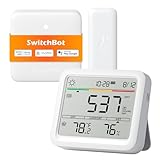
5. SwitchBot Meter Pro CO2 — Best CO2 Display
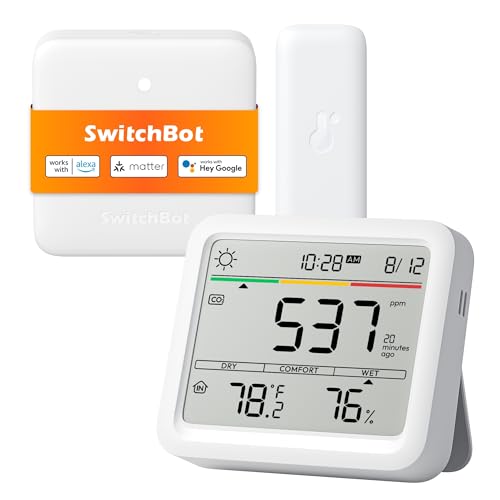
SwitchBot’s Meter Pro CO2 focuses on the reading many monitors treat as secondary: an NDIR sensor tracks CO2 from 400 to 9,000 ppm alongside temperature and humidity, and the large LCD shows all three plus time and comfort indicators from across the room. The app stores up to two years of data over Bluetooth, and CO2 alerts can warn you when a room needs ventilating. On its own it is a local Bluetooth device; add a SwitchBot Hub and it joins Alexa, Google Home and Matter, so a high CO2 reading can trigger a fan or air purifier in an automation. Battery life runs to about a year. Choose it if CO2-driven ventilation is your main goal and you like SwitchBot’s wider gadget ecosystem.
What to Look For
| Factor | Why it matters | What to check |
|---|---|---|
| Sensor types | Different sensors measure different things. | Which readings the maker lists, such as particles, humidity or carbon dioxide |
| Display | A built-in screen lets you read values at a glance. | Screen type, brightness control and night mode |
| App and history | Logs help you notice patterns over days. | Chart options, export and alert settings |
| Connectivity | Your home network decides how reliable updates feel. | Wi-Fi band support and any hub requirement |
| Power | Cable or battery affects where it can sit. | Plug type, battery size and charging method |
| Smart home links | Integration lets other devices react to readings. | Supported assistants and automation platforms |
| Build and size | Vents and housing affect placement. | Dimensions, airflow openings and mounting options |
Setup and Care Tips
- Place the monitor away from direct sunlight, vents and kitchen steam.
- Give the device a short warm-up period before reading the first values.
- Name each unit by room in the app to keep readings organized.
- Gently clean the air openings with a dry brush as the maker suggests.
- Keep firmware up to date through the companion app.
Mistakes to Avoid
- Placing the unit in a corner or behind furniture where air barely moves.
- Treating one reading as a final answer instead of watching trends.
- Assuming every monitor includes the sensors you care about.
- Skipping the network check before buying a Wi-Fi only device.
- Expecting a monitor alone to change conditions in the room.
The Pollutants These Monitors Measure
Each sensor in a monitor looks at a different problem, and no single reading describes “air quality” on its own. Knowing what each number means keeps you from fixating on the wrong one.
Fine particles (PM2.5)
PM2.5 refers to particles smaller than 2.5 micrometers, such as smoke, cooking fumes and fine dust. They can travel deep into the lungs. Monitors estimate them with a small laser and a fan that draws air through a chamber, counting how much light is scattered. The World Health Organization suggests a 24-hour average guideline of 15 micrograms per cubic meter, and a yearly average of 5. Spikes during cooking or when a candle burns are common and usually short.
Carbon dioxide (CO2)
CO2 is not a pollutant at indoor levels in the toxic sense, but it is an excellent proxy for ventilation. Outdoor air sits at around 420 parts per million. In a closed bedroom or a small meeting room, levels can climb above 1,000 ppm, where many people report stuffiness and sleepiness. The number tells you how much of the room’s air has been breathed already.
Volatile organic compounds (VOCs)
VOCs come from paint, cleaning products, new furniture, air fresheners and cooking. Most consumer monitors report a relative index instead of a precise concentration, because the sensor responds to a mix of gases. It is good at showing that something changed, such as the air after you sprayed a cleaner, but poor at identifying which chemical is present.
Radon
Radon is a radioactive gas that seeps from soil into basements and ground-floor rooms. It cannot be seen or smelled. In the United States, the EPA recommends action when long-term levels reach 4 picocuries per liter. Radon readings need days to settle into a useful average, and a monitor that measures it is a longer-term tool, not a quick check.
Temperature and humidity
Nearly every monitor includes these. Indoor relative humidity between about 30 and 50 percent is generally comfortable and discourages both dust mites and mold. High humidity in a basement or bathroom is a sign that ventilation or dehumidification may be needed.
How Accurate Are Consumer Air Monitors?
Consumer sensors are useful for trends and comparisons, but they are not laboratory instruments, and understanding their limits prevents both false comfort and false alarm.
- CO2 sensors differ in type. Sensors based on non-dispersive infrared (NDIR) technology measure CO2 directly and tend to be reliable. Cheaper devices may report an “equivalent CO2” estimated from VOC readings, which is not the same thing and can swing wildly.
- Laser particle counters see size ranges, not chemistry. They are generally good at detecting that particle levels are rising, but their absolute numbers can be off, especially in very humid air, where droplets register as particles.
- VOC sensors drift. Metal-oxide sensors respond to many gases and change with age. Most devices correct for this automatically after a baseline period.
- Radon takes time. Short-term readings fluctuate. Rely on the multi-day or long-term average.
- Calibration varies. Some units self-calibrate by assuming the lowest CO2 reading in a week is fresh air. If the space is never ventilated, the baseline can be wrong.
An important safety note: these devices are not substitutes for smoke detectors or carbon monoxide alarms. Carbon monoxide, which is lethal, is a different gas measured by dedicated alarms. Keep those installed and tested separately, regardless of which air monitor you buy.
Matching a Monitor to Your Home
| Situation | What matters most |
|---|---|
| Bedroom and sleep quality | CO2 trend, quiet or dimmable display, humidity |
| Home office | CO2 readout visible from the desk, VOCs |
| Basement or ground-floor home | Radon measurement, humidity |
| Gas stove or wood fire | PM2.5 and VOCs, ability to log spikes |
| Allergies or asthma in the household | PM2.5, humidity, app history to spot patterns |
| Smart home users | Compatibility with Alexa, HomeKit or your hub |
Smart home integration deserves a closer look. The Amazon device ties naturally to Alexa routines, which can switch on a fan or purifier when a reading crosses a threshold. A monitor with HomeKit support, such as the Qingping option in this guide, serves Apple households. If you do not use a smart home platform, a simple display that you can read at a glance may be more useful than any integration. Many people open an app a few times and then ignore it, so a visible screen sustains the habit.
Consider portability too. A battery-powered unit can move between the bedroom, kitchen and office to discover which space has the problem. Once you find it, you can leave it there permanently or choose a second unit.
Turning Readings Into Action
A monitor is only valuable if it changes something. These responses cover most of what the numbers suggest.
- High CO2 (above roughly 1,000 ppm): open a window, run a bathroom or kitchen exhaust fan, or crack a door. If the room is regularly high, check whether the ventilation system is working.
- PM2.5 spikes while cooking: use the range hood, ideally one that vents outside, and open a window. A portable HEPA purifier can clear what remains.
- Persistent PM2.5 with no obvious source: check the outdoor air quality, particularly during wildfire season, and keep windows closed on bad days.
- VOC rises after cleaning or painting: ventilate and consider switching to lower-emission products.
- High humidity: use a dehumidifier or exhaust fan; low humidity in winter may call for a humidifier.
- Radon above the action level: do a long-term test and contact a certified mitigation contractor. Do not try to solve it with a purifier.
Look at patterns rather than single readings. A graph that shows CO2 climbing every night from 10 p.m. to 6 a.m. tells you far more than a reading at noon. Check the app history after a week to find the pattern that matters.
Budget Versus Premium: What You Are Paying For
The range of prices among monitors reflects the number of sensors, the display and the software. Budget devices generally focus on one or two readings, such as CO2 with temperature and humidity, and often have an on-device display. Mid-range models add PM2.5 and VOC. The top tier adds radon, a polished app, data export and longer-term history.
More sensors are not automatically better. If your main worry is stuffy air in a home office, a straightforward NDIR CO2 monitor does that job well and costs less. If you live in an area with known radon, a unit that measures it may be worth the money. If your concern is wildfire smoke, you need a good particle sensor above all.
Buy for the problem you have. Resist spending for features you will not check, and prefer products from companies that explain their sensor types openly.
Connectivity, Data and Privacy
A smart monitor sends readings to an app, and often to a company server. That is convenient for history and alerts, but it raises a few practical questions worth answering before you buy.
- Does it work without an account? Some models show readings on the device itself and need the app only for history. Others become much less useful without cloud access.
- Wi-Fi band. Many smart devices connect only to 2.4 GHz networks. If your router merges bands or uses a guest network, setup can be fiddly.
- Bluetooth versus Wi-Fi. Bluetooth models sync only when your phone is nearby, which means gaps in the history. Wi-Fi models log continuously.
- Data export. If you want to share a graph with a landlord, an HVAC technician or a doctor, check that the app can export a file or screenshot.
- Long-term support. Cloud-connected products stop working when a company discontinues the service. Brands with a record of maintaining apps are a safer choice.
Battery life is another detail. Radon and CO2 sensors draw more power than a simple thermometer, so a battery-powered unit may need replacements or recharging more often than you expect. A plug-in unit avoids the problem, but then the outlet decides where it sits.
Questions to Ask Before You Order
- Which exact gases does it measure, and is the CO2 reading measured directly or estimated?
- Is there a display on the device, or only an app?
- Is it powered by a cable, batteries or both?
- Does it work with the voice assistant or smart home hub you already use?
- How does the app handle history, alerts and exports?
- What is the return window, in case the readings seem implausible when compared with a second device?
One simple validation technique is to carry a new monitor outside for fifteen minutes and then bring it back in. A working CO2 sensor should drop toward outdoor levels around 420 ppm in fresh air, and a particle sensor should read low in clean conditions. If a device never gets near those values, it may be faulty or poorly calibrated.
From Numbers to Meaning: Reading Your Own Home’s Patterns
A monitor’s real value appears after the novelty of live numbers fades, when patterns start to tell the story of the house. Keep a simple log for the first fortnight, noting what was happening when readings rose: cooking, cleaning, a shower, guests arriving, a window opened, the heating starting. Within days you will see your home’s signature, the daily peaks that are harmless and brief, and the slower rises that deserve action. That signature, learned once, turns every future alert from a puzzle into a recognisable event, and it stops the two failure modes of ownership, panic at normal cooking peaks and indifference to a genuine problem.
Compare rooms rather than worshipping single readings. A monitor moved methodically, a few days in the bedroom, a few in the nursery or study, a week near the kitchen, builds a map of the home that one fixed position never can. Many owners discover the problem is local, a hobby corner, a damp bathroom, a bedroom that never gets aired, and local problems have local, affordable solutions. If you later buy a second monitor, this survey tells you exactly where it should live permanently, which is a better use of money than guessing on day one.
Seasons rewrite the patterns. Heating season dries air and changes ventilation habits, summer brings pollen and open windows, and a house that behaved well in spring may need different habits in January. Revisit your log briefly when the season turns, and let the monitor arbitrate arguments about whether the new routine is working. Households that treat the monitor as a long-term instrument, consulted at changes rather than stared at daily, are the ones still using it in year three.
Cooking, Cleaning and the Everyday Chemistry of a Home
The kitchen is most homes’ largest source of airborne particles and gases, and a monitor makes the invisible visible in a way that changes habits without any lectures. Frying, grilling and gas hobs each leave their signature, and the practical lessons repeat across households: use the extractor every time, vent it outside where the installation allows, put lids on pans, and open a window for the minutes after cooking, not just during. A monitor placed thoughtfully, not so close that every pan overwhelms it, but near enough to register the room, lets you verify that your extractor routine actually clears the air, and how long clearing takes in your kitchen’s real geometry.
Cleaning products are the second everyday source, and their effect surprises people. Sprays in particular launch fine particles and volatile compounds that linger far longer than the smell suggests, especially in small bathrooms. The monitor’s lesson is procedural: spray onto the cloth rather than into the air, ventilate the room during and after cleaning, and give bedrooms a settling period after a deep clean before children sleep in them. None of this requires new products; it requires timing and airflow, which cost nothing.
Candles, incense and wood burners belong in the same honest conversation. They are pleasures with a measurable cost in particles, and a monitor lets a household decide its own compromise with open eyes: perhaps the burner stays, but the room is ventilated afterwards and the bedroom door stays closed while it burns. That kind of informed trade-off, rather than either ignorance or alarm, is exactly what a home monitor is for.
Bedrooms, Nurseries and the Night Shift
Night is when a monitor earns a special place, because bedrooms concentrate hours of breathing in a closed space. Carbon dioxide builds steadily in a sealed bedroom, and many owners are startled by their first night’s curve. The remedies are undramatic: a door left ajar, a window cracked where climate and security allow, or mechanical ventilation where the home has it, and the monitor’s role is to show which remedy actually works in your room rather than in theory. Sleep quality is personal and multi-causal, so treat the monitor as one input among several, and be sceptical of anyone, including a manufacturer, who promises that one number will transform your nights.
Nurseries and children’s rooms deserve a calm, specific approach. The useful questions are practical: is the room ventilated between the day’s activities and sleep, do cleaning and decorating products get time to clear before the room is used, and does dust from soft furnishings and carpets respond to your cleaning routine? A monitor can help answer each, provided it is placed out of reach, with cables managed as carefully as for any nursery device, and provided its lights and sounds do not themselves disturb sleep; check for a night mode or be ready to position it where its glow is not in a child’s eyeline.
Guest rooms and spare rooms have their own pattern: long closure, a musty stillness, then a visitor arriving to sleep in it. A monitor left there for a week before guests come tells you whether the room needs airing, whether damp is creeping in, and whether the quick clean you planned is enough. It is a small, hospitable use of the technology, and typical of the way these devices quietly serve a household once the headline measurements have been explored.
When Readings Stay High: A Sensible Investigation Order
A reading that will not come down is information, and it deserves a method rather than a worry. First, verify the monitor: move it to a room you trust, or take it outside briefly where your model allows, and confirm it responds as expected, because a sensor fouled by dust, hairspray or kitchen grease can cry wolf for weeks. Clean the inlets gently as the maker directs, check the device’s age and any calibration or auto-baseline features, and only then investigate the house with confidence in the messenger.
Second, isolate by elimination. Close doors and watch which side of the door the problem lives on; turn off candidate sources one at a time, the burner, the new furniture, the hobby equipment, the recently decorated room; and ventilate hard for an hour to establish whether the level can fall at all. A level that falls with ventilation and returns when a specific source runs has told you its story. A level that never falls, in any room, with any routine, points back at the monitor or at something structural, such as damp, that deserves professional eyes rather than more home experiments.
Third, know the boundary of the device’s competence. A consumer monitor is a guide to patterns and relative change, not a safety instrument, and it is not a substitute for the dedicated alarms every home needs for smoke and carbon monoxide, which are separate devices with separate jobs. If anyone in the home has symptoms that worry you, headaches, breathing difficulty, a smell of gas, act on the symptom through the proper channels immediately and let the monitor be what it is: a helpful witness, never the authority in an emergency.
Placement Experiments Worth an Afternoon
Where a monitor sits changes what it knows, and a few deliberate experiments teach you your unit’s character. Place it at breathing height in the room’s lived zone, away from windows, doors, kitchens’ direct plume and any purifier’s outflow, and leave it for several days to establish a baseline. Then spend a weekend moving it: near the floor and higher up, beside the bed and across the room, and note how the patterns shift. You are not hunting for the position with the lowest numbers, which would be a game, but for the position that represents the air people actually breathe in that room.
Beware the flattering positions. A monitor beside an open window reports the street’s air, a monitor on top of a purifier reports the purifier’s output, and a monitor in a draught reports the hallway. Equally, beware the alarming positions: directly above a hob, beside a litter tray or next to a workshop bench, where the device samples a plume rather than a room. Honest placement is a small act of integrity toward your own data, and it is what separates owners who learn from their monitors from owners who merely own one.
If your home has mechanical ventilation or a purifier, run the pairing experiment: a day with the system off, a day with it on, the monitor unmoved, and compare the curves rather than the peaks. That comparison, in your rooms with your habits, is the only honest review of your ventilation equipment you will ever get, and it will guide settings, filter changes and running schedules better than any general advice, including this guide’s.
Data, Apps and Living With a Connected Monitor
The app is half the product, so judge it as carefully as the sensor. Look for clear history views that show days and weeks rather than only the current number, export options if you ever want to share data with a landlord, builder or clinician, and alerts you can tune, because an app that alarms at every cooking peak will be muted within a month and a muted app is a failed product. Check what happens without an internet connection, since a monitor that goes blank during an outage is withholding your own home’s data from you at exactly the wrong moment.
Privacy deserves a plain look. A connected monitor learns when your home is occupied, when you cook, when you sleep, and that pattern is worth protecting with the ordinary disciplines: a strong account password, two-step verification where offered, and a thought before linking the device to other platforms. Read what the maker says about data retention and sharing, and prefer the maker whose answer is short and clear. None of this should frighten anyone away from a connected monitor, but it should be a conscious choice rather than a default nobody examined.
Household sharing needs a small agreement too. If several people can see the data and receive alerts, decide who acts on them, or every alert becomes nobody’s job. A simple rule, such as the person nearest the kitchen handles cooking peaks and persistent overnight alerts get mentioned at breakfast, keeps the system a tool rather than a source of low-level nagging. Technology that assigns no responsibility produces notifications; technology with an owner produces outcomes.
Maintaining Accuracy Across the Years
Sensors age, and honest ownership includes expecting it. Particle sensors foul slowly with the very dust they measure, gas sensors drift, and fans that draw air through the device tire and clog. Follow the maker’s cleaning guidance on schedule, keep the inlets free of the dust that accumulates in real homes, and note the date you started using the device so its age is a fact rather than a feeling. If readings begin to disagree with your senses and with the home’s known patterns, suspect the instrument before you suspect the house.
Some designs auto-calibrate against assumed fresh air, which works only if the device genuinely meets fresh air regularly; a monitor sealed forever in a stuffy room can calibrate itself into cheerful inaccuracy. If your model works this way, give it the outdoor or open-window period its method requires, as the manual directs. Others offer manual calibration or replaceable sensor modules, and the availability of those parts in a few years’ time is a fair question to ask before buying, because it separates a durable instrument from a disposable gadget.
Plan the monitor’s place in the household’s long term. Batteries in portable units fade, displays dim, and apps evolve or, occasionally, are abandoned by their makers. A monitor whose core display works without the app will age gracefully whatever happens to the software. When replacement eventually comes, the old unit still serves as a comparison instrument for a settling-in period, and its years of patterns in your log remain the baseline against which the new device, and the improving house, can be judged.
Buying for a Problem, Not for a Dashboard
The strongest reason to buy one of these monitors is a named question: the nursery that smells stale by morning, the home office where afternoons feel heavy, the new renovation whose fumes you want to watch fade, the asthma management plan you are building with proper medical guidance alongside. A monitor bought to answer a question gets placed well, watched with purpose and acted on. A monitor bought for the pleasure of a dashboard gets watched for a fortnight and then becomes furniture with a glow.
So write your question down before you shop, and let it choose the sensors that matter, the rooms the device must suit and the features you can ignore. It will also tell you when you are done: when the question is answered and the habit it taught has stuck, the monitor has paid for itself even if you never look at it daily again. Keep it running quietly for the seasonal checks and the occasional investigation, and it becomes what the best household instruments are, unglamorous, trusted and there when needed.
Renters, Landlords and Conversations About Air
A monitor gives renters something they rarely have in a conversation about damp, ventilation or a faulty extractor: evidence with dates. If you raise a problem with a landlord, a calm export of several weeks of readings, alongside photographs and a note of your own habits, turns an impression into a discussion. Keep expectations fair in both directions; a monitor shows patterns, not causes, and a good landlord conversation uses it to agree an inspection rather than to win an argument. Most housing problems are solved faster by shared facts than by suspicion, and this little device manufactures shared facts.
Landlords and hosts can use monitors constructively too, checking that a property airs properly between tenancies, that a new ventilation system performs as promised, and that a reported problem has actually been fixed. A monitor left in a property for a settling period after work is completed protects both sides: the tenant gains confidence and the landlord gains a record. Where a monitor is present during a tenancy, be transparent about it, place it in shared living spaces rather than private ones, and agree who sees the data, because a device introduced honestly is a service and a device discovered later is a grievance.
Short-stay hosts walk the same line. A monitor that helps you prove a home is well ventilated and freshly prepared is a genuine amenity, provided guests are told it is there and it never sits in a bedroom or bathroom without the clearest of reasons and notices. Trust is the currency of hosting, and air quality done openly can add to it, while air monitoring done secretly spends it all at once.
Workshops, Hobbies and the Rooms Standards Forget
Some of the most valuable monitoring happens outside living rooms. A garage workshop where wood is cut, resin is poured or vehicles run produces air that deserves respect, and a monitor there can arbitrate when extraction is enough and when a respirator and an open door are the honest answer. Hobby rooms concentrate their own chemistry: printers, paints, adhesives and soldering all leave signatures a monitor can teach you to read, and the lesson is usually about ventilation timing, running the fan longer after the work ends, rather than about abandoning the hobby.
Home gyms and utility rooms benefit quietly. A gym in a spare room or garage raises humidity and carbon dioxide in a small space quickly, and a monitor explains the heaviness of a hard session’s air in a way that leads to a window routine or a fan. Utility rooms with dryers, boilers and cleaning stores are the home’s engine spaces, and a monitor there can be the first to notice the stuffiness that suggests a vent is blocked or a door seal has failed. These unglamorous placements often deliver the device’s most practical value, precisely because nobody was watching those rooms at all.
If you move a single monitor between such rooms, keep notes with dates, because a reading without a room and a date attached is trivia, while the same reading logged becomes the beginning of a household maintenance record. Over a year, that record shows you your home as a system, breathing differently by season, by room and by habit, and understanding your home as a system is the deepest benefit this category of device has to offer.
Keep that record, revisit it when the house changes, a new baby, a new burner, a renovation, an elderly parent moving in, and let each change restart the same calm cycle of measure, adjust and verify. Homes are not static, and the monitor’s gift is not a number but a habit of noticing, one that quietly protects everyone who breathes under your roof for as long as you keep it.
Choose the monitor that fits that habit, place it honestly, and trust the patterns it shows you over any single day’s surprise.
That patience, applied room by room and season by season, is what turns a gadget into an instrument your household genuinely relies on.
Start with one room and one question, and begin today.
FAQ
Do I need an app?
Not always. A device with a clear built-in screen can be useful on its own, but an app adds history, alerts and access when you are away from home.
Where is the best place to put it?
Choose a spot at roughly the height where you spend time, with open space around the vents. Follow the maker’s placement notes and avoid spots close to cooking or heating sources.
How accurate are smart air quality monitors?
They are good at showing trends and comparing rooms, but they are not laboratory instruments. CO2 sensors using NDIR technology are usually the most reliable, while VOC readings are relative indexes. Particle counts can be off in humid air. Treat the numbers as guidance, not precise measurements.
What CO2 level is too high indoors?
Outdoor air is about 420 ppm. Indoors, readings below roughly 800 ppm suggest good ventilation, and levels above 1,000 ppm often mean the room is stuffy and needs fresh air. Sustained readings above 2,000 ppm point to poor ventilation worth fixing, especially in bedrooms and classrooms.
Can an air quality monitor detect carbon monoxide or smoke?
Most do not. Carbon monoxide needs a dedicated CO alarm, and smoke needs a smoke detector. A PM2.5 sensor may notice heavy smoke, but it is not a certified safety device. Keep both alarms installed and tested in addition to any air monitor.
Do I need a radon monitor?
Radon matters most in basements and ground-floor rooms in areas with higher soil radon. A short-term test kit or a long-term monitor can tell you where you stand. If your average reaches the EPA action level of 4 pCi/L, contact a certified mitigation professional.
How often should I clean or replace an air quality monitor?
Wipe the housing and vents with a dry cloth every month or two, and keep the particle sensor inlet free of dust. Most consumer sensors are not user-replaceable, so follow the maker’s guidance. Expect gradual drift over several years and consider replacing the unit if readings look consistently odd.
The Short Version
A smart air quality monitor is easiest to live with when its sensors, display and app match what you want to track. List your needs, compare the specs and pick the unit that fits your space and your network.
Related Guides
- How to Choose the Best Pm25 Air Quality Monitors (2026 Guide)
- 8 Best Smart Outlets That Work with Alexa (2026)
- 6 Best Wi-Fi Smart Bulbs for Alexa and Google (2026)
- How to Choose the Best Smart Dimmer Switches: A Buyer's Guide
- How to Choose the Best Smart Humidifiers: Buyer's Guide (2026)