Disclosure: As an Amazon Associate, reviewstook.com earns from qualifying purchases. Links to Amazon on this page are affiliate links; they cost you nothing extra.
AMD Ryzen laptops offer strong multi-core performance and integrated graphics at good prices.
This guide is built from Amazon product listings, not our own testing, so confirm specs, configuration and current price on each product page. Laptop configurations change often.
Check each listing on Amazon for the current price before you buy.
Last updated: October 31, 2026.
In this guide
Quick Picks
| Product | Type | Best for |
|---|---|---|
| Dell 15.6-inch Laptop (Ryzen 5 7520U) | Everyday Windows laptop | Ryzen 5 in a Dell |
| Acer Aspire Go 15 (Ryzen 7 7730U) | 15.6-inch everyday laptop | Ryzen 7 with 16GB RAM and 1TB |
| MSI Venture A16 AI (Ryzen 9-270) | 16-inch touchscreen laptop | 32GB DDR5 and 2TB SSD |
| ASUS Zenbook 14 OLED (Ryzen AI 9 465) | 14-inch OLED laptop | 2K touch OLED with stylus |
| Acer Swift Go 16 AI Business | 16-inch Ryzen AI laptop | 100% sRGB touchscreen |
| Acer Swift Go 16 AI (Ryzen AI 9 465) | 16-inch Ryzen AI laptop | 120Hz touchscreen, 32GB RAM |
Our Picks

Top pickBest for ryzen 5 in a Dell
1. Dell 15.6-inch Laptop (Ryzen 5 7520U)
A Dell 15.6-inch laptop with AMD Ryzen 5 7520U and Windows 11 Home, per the listing. Check price on Amazon.
Listing details: 15.6-inch display, 512 GB storage, 1080p resolution, Windows 11 Home (from the Amazon product details; confirm on the page).
Good for: Ryzen 5 in a Dell. Watch out: check RAM and storage on the page.
Best for ryzen 7 with 16GB RAM and 1TB
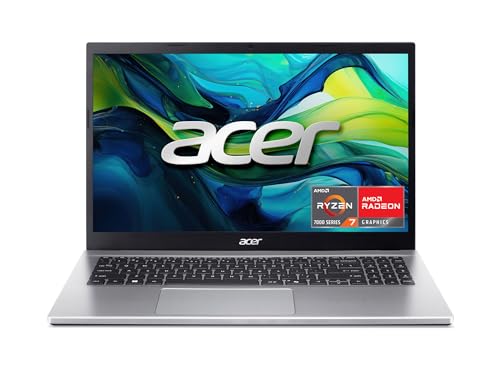
2. Acer Aspire Go 15 (Ryzen 7 7730U)
An Acer Aspire Go 15 with a 15.6-inch FHD display, AMD Ryzen 7 7730U, 16GB RAM and 1TB storage, per the listing. Check price on Amazon.
Listing details: 15.6-inch display, 1 TB storage, 1080p resolution, Windows 11 Home (from the Amazon product details; confirm on the page).
Good for: Ryzen 7 with 16GB RAM and 1TB. Watch out: plain design.

Best for 32GB DDR5 and 2TB SSD
3. MSI Venture A16 AI (Ryzen 9-270)
An MSI Venture A16 AI laptop with Ryzen 9-270, a 16-inch FHD touchscreen, 32GB DDR5 and a 2TB NVMe SSD, per the listing. Check price on Amazon.
Listing details: 16-inch display, 2 TB storage, 1080p resolution, Windows 11 Home (from the Amazon product details; confirm on the page).
Good for: 32GB DDR5 and 2TB SSD. Watch out: lesser-known in laptops.

Best for 2K touch OLED with stylus
4. ASUS Zenbook 14 OLED (Ryzen AI 9 465)
An ASUS Zenbook 14 OLED with a 2K touchscreen, AMD Ryzen AI 9 465, stylus and Thunderbolt, per the listing. Check price on Amazon.
Listing details: 14-inch display, 512 GB storage, 1200p resolution, Windows 11 Home (from the Amazon product details; confirm on the page).
Good for: 2K touch OLED with stylus. Watch out: check RAM and storage on the page.


Best for 100% sRGB touchscreen
5. Acer Swift Go 16 AI Business
An Acer Swift Go 16 AI business laptop with a 16-inch WUXGA 120Hz touchscreen at 100% sRGB and AMD 10-core Ryzen AI 9 465, per the listing. Check price on Amazon.
Listing details: 16-inch display, 1 TB storage, 1920×1200 resolution, Windows 11 (from the Amazon product details; confirm on the page).
Good for: 100% sRGB touchscreen. Watch out: similar to the other Swift Go listing.

Best for 120Hz touchscreen, 32GB RAM
6. Acer Swift Go 16 AI (Ryzen AI 9 465)
An Acer Swift Go 16 AI Copilot+ PC with a 16-inch WUXGA 120Hz touchscreen, AMD Ryzen AI 9 465 and 32GB RAM, per the listing. Check price on Amazon.
Listing details: 16-inch display, 1 TB storage, 1920×1200 resolution, Windows 11 Home (from the Amazon product details; confirm on the page).
Good for: 120Hz touchscreen, 32GB RAM. Watch out: check storage on the page.
Best Picks by Category
These labels come from the Amazon listings. They are a data summary, not hands-on test results.
- Highest listed rating (limited feedback): Acer Aspire Go 15 (Ryzen 7 7730U) — check price on Amazon. This is not an independent product-quality award.
- Most reviewed: Dell 15.6-inch Laptop (Ryzen 5 7520U) — check price on Amazon.
- Budget option: Dell 15.6-inch Laptop (Ryzen 5 7520U) — check price on Amazon.
- Premium option: Acer Swift Go 16 AI (Ryzen AI 9 465) — check price on Amazon.
Price, Rating and Review Comparison
This table lists the picks by price tier.
| Product | Price | Rating | Ratings | Price tier |
|---|---|---|---|---|
| Dell 15.6-inch Laptop (Ryzen 5 7520U) | Check price on Amazon | n/a | n/a | Budget |
| Acer Aspire Go 15 (Ryzen 7 7730U) | Check price on Amazon | n/a | n/a | Budget |
| MSI Venture A16 AI (Ryzen 9-270) | Check price on Amazon | n/a | n/a | Mid-range |
| ASUS Zenbook 14 OLED (Ryzen AI 9 465) | Check price on Amazon | n/a | n/a | Mid-range |
| Acer Swift Go 16 AI Business | Check price on Amazon | n/a | n/a | Mid-range |
| Acer Swift Go 16 AI (Ryzen AI 9 465) | Check price on Amazon | n/a | n/a | Mid-range |
What the Listings Say
Below are the concrete details each seller states on the Amazon listing, followed by how much customer feedback backs up the rating. Check the live listing for the latest specs before you buy.
Dell 15.6-inch Laptop (Ryzen 5 7520U)
The listing states: Your Dell 15 intelligently adjusts its power and thermals to keep it running smoothly.; Dell Service: 1 Year Onsite Service provides support when and where you need it..
Acer Aspire Go 15 (Ryzen 7 7730U)
The listing gives few concrete specifications.
MSI Venture A16 AI (Ryzen 9-270)
The listing states: Simplistic Design: Enjoy the latest generation of Windows 11 Home for your everyday needs.; *MSI recommends Windows 11 Pro for business use.; FHD Display: The 16″ 16:9 60Hz display delivers abundant color gamut, more vivid colors and details for gaming..
ASUS Zenbook 14 OLED (Ryzen AI 9 465)
The listing states: [AI Laptop]: Speed up AI inferencing on the ASUS Zenbook 14 OLED Laptop and enhance your AI workflows, up to 50 trillions operations per second performance.; [Processor]: Powered by the AMD Ryzen AI 9 465 processor.; 10 cores, 20 threads, 10 MB L2 cache, 24 MB L3 cache, up to 5 GHz frequency.; [Ample Storage]: 16GB 7500 MHz DDR5 RAM.. Amazon did not show a rating count for this listing.
Acer Swift Go 16 AI Business
The listing gives few concrete specifications. Amazon did not show a rating count for this listing.
Acer Swift Go 16 AI (Ryzen AI 9 465)
The listing states: Powered by the AMD Ryzen AI 9 465 processor, it helps you unlock your full potential.. Amazon did not show a rating count for this listing.
How to Choose
Ryzen tier
Ryzen AI 9 is high-end; Ryzen 5 is entry.
RAM
Many have 16GB; some have 32GB.
Display
OLED and 120Hz appear on higher models.
Are Ryzen laptops a good choice for everyday use?
Yes, Ryzen laptops are a sound choice for everyday work, study and entertainment, and they are especially attractive when you want strong multi-core performance and capable built-in graphics without a gaming-laptop price. AMD Ryzen is a processor family, so the exact model number inside a laptop matters more than the brand name alone.
The picks in this guide show the range. At the entry end, the Dell 15.6-inch Laptop (Ryzen 5 7520U) is an everyday Windows laptop. In the middle, the Acer Aspire Go 15 (Ryzen 7 7730U) pairs a higher-tier chip with more memory and storage. At the top, the ASUS Zenbook 14 OLED and the two Acer Swift Go 16 AI listings use Ryzen AI 9 465 processors, and the MSI Venture A16 AI uses a Ryzen 9-270.
What a Ryzen laptop is good at:
- Multitasking: Many cores help when you keep many browser tabs, documents and apps open.
- Light creative work: Photo editing and basic video work are realistic on higher-tier models, depending on RAM and storage.
- Casual gaming: Integrated graphics can handle lighter games, though demanding titles need a dedicated graphics chip.
- Portability: Many designs balance performance with reasonable battery life, but check the listing, since battery claims vary.
A processor is only one part of the experience. Screen quality, memory, storage, keyboard, speakers and build all affect how a laptop feels, so use the CPU tier as a starting point and then read the rest of the listing.
Ryzen 5 vs Ryzen 7 vs Ryzen 9: which tier do you need?
Ryzen 5 is enough for browsing, office work and streaming, Ryzen 7 adds comfortable headroom for heavier multitasking, and Ryzen 9 or Ryzen AI 9 targets buyers who want top performance and newer AI features. Higher tiers generally cost more and may use more power, so match the tier to your workload.
Think of the tiers this way:
- Ryzen 5 class: Suited to students, home users and office tasks. The Dell 15.6-inch Laptop (Ryzen 5 7520U) sits here.
- Ryzen 7 class: A step up for people who run many apps at once or do some light creative work. The Acer Aspire Go 15 (Ryzen 7 7730U) is the example.
- Ryzen 9 and Ryzen AI 9 class: For heavier workloads and for buyers who want the newest AI-oriented features. The MSI Venture A16 AI, the ASUS Zenbook 14 OLED and both Acer Swift Go 16 AI listings sit here.
Keep in mind that model numbers carry meaning beyond the tier. A suffix or generation can change power limits and features, so two laptops with the same tier name may behave differently. The listing’s own spec list and the manufacturer’s page are the best sources for details.
Do not pay for a tier you will not use. A well-configured mid-tier laptop with enough memory and fast storage often feels better in daily use than a top-tier chip paired with minimal RAM.
How much RAM and storage do you need in a Ryzen laptop?
For most people, 16GB of RAM and a fast SSD is a comfortable target, while 32GB suits heavy multitasking and creative work. Storage size matters too, because a full drive slows a computer and forces you to delete files.
Memory guidelines by use:
- Light use: Email, web and documents can run on less memory, but you may feel it when many tabs are open.
- General use and study: Sixteen gigabytes is a practical middle ground.
- Heavy multitasking and creative work: Thirty-two gigabytes gives breathing room, as in the MSI Venture A16 AI and the Acer Swift Go 16 AI (Ryzen AI 9 465) listings.
Storage guidelines:
- A smaller SSD is fine if you use cloud storage or an external drive.
- A one-terabyte drive, as on the Acer Aspire Go 15, suits people who keep lots of files, photos and games locally.
- A larger drive, such as the one in the MSI listing, helps with big media libraries.
Two things to verify on the listing. First, check whether the RAM is soldered or upgradeable, because many thin laptops cannot be upgraded later. Second, confirm the exact configuration, since the same product name can appear with different memory and storage. Several picks in this guide carry a note to check RAM and storage on the page for exactly this reason.
OLED vs IPS: is a touchscreen or OLED display worth it on a Ryzen laptop?
An OLED display gives deeper blacks and richer color, while a standard IPS panel is usually brighter in office light and easier on cost; a touchscreen adds convenience if you like to tap, draw or use a stylus. Whether either is worth it depends on how you will use the laptop.
The ASUS Zenbook 14 OLED is the only OLED pick in this guide, and its listing mentions a 2K touchscreen and a stylus. That combination suits note-taking, sketching and media viewing. The two Acer Swift Go 16 AI listings describe a 120Hz touchscreen, which makes scrolling and motion look smoother. The MSI Venture A16 AI listing describes a 60Hz display.
Points to weigh:
- Glossy touchscreens: Can reflect light in bright rooms.
- OLED care: Brightness and static images may matter over time, so read the maker’s guidance.
- Refresh rate: Higher rates feel smoother but can use more battery.
- Color coverage: If you edit photos, look for a listing that states color coverage, as one Acer listing does with its sRGB claim.
- Screen size: A 14-inch laptop is more portable, while a 16-inch laptop gives more workspace.
If you mainly type documents and browse, a standard display on a lower-priced model is perfectly adequate. Pay for OLED or a high refresh rate only if you will notice them every day.
Which Ryzen laptop should you buy?
Match the laptop to your budget and main task: the Dell for basic needs, the Acer Aspire Go 15 for a balanced upgrade, and the higher-tier models for screens, AI features or heavy multitasking. Here is how the named picks line up.
- If you want the budget-friendly Ryzen laptop here: choose the Dell 15.6-inch Laptop (Ryzen 5 7520U), whose listing also mentions onsite service. Check RAM and storage on the page.
- If you want more memory and storage without going premium: go for the Acer Aspire Go 15 (Ryzen 7 7730U), but note it has very little customer feedback, so lean on the listing.
- If you want large memory and storage in a 16-inch touchscreen: consider the MSI Venture A16 AI (Ryzen 9-270), keeping in mind it is a less familiar name in laptops and has little feedback.
- If screen quality and a stylus matter most: choose the ASUS Zenbook 14 OLED (Ryzen AI 9 465).
- If you want a 16-inch 120Hz touchscreen with business positioning: look at the Acer Swift Go 16 AI Business.
- If you want a 16-inch Copilot+ style laptop with 32GB RAM: choose the Acer Swift Go 16 AI (Ryzen AI 9 465).
The two Swift Go listings look similar, so compare the stated RAM, storage and software edition before you decide.
What to check before you buy a Ryzen laptop
Confirm the exact configuration and the practical details on the listing, because laptops with the same name often ship with different memory, storage or software.
- Exact processor model: Match the full name, not just the tier.
- RAM and storage: Check the stated amounts and whether RAM can be upgraded.
- Display details: Look at size, resolution, panel type, refresh rate and touch support.
- Ports: Make sure you have the USB, HDMI and charging options you need. The Zenbook listing mentions Thunderbolt.
- Battery and charger: Confirm the charger type and whether it charges over USB-C.
- Operating system edition: Home and Pro differ; the MSI listing notes a business recommendation.
- Weight and size: Important if you carry it every day.
- Warranty and support: Read the seller’s terms and any service coverage.
- Returns: Check the return window in case the screen or keyboard does not suit you.
It is also smart to check how many people have rated a laptop. Several picks here have very few ratings, which means the average tells you little.
Finally, think about how long you want the laptop to last. If you plan to keep it for several years, favor extra memory and storage now, since those are the specs that age first. Also decide whether you need a laptop that doubles as a tablet-style device, because touch and stylus support are not present on every model, and the listing will say which features come with each configuration.
Is it worth paying more, and who should skip a Ryzen laptop?
Paying more is worth it when you will use the extra memory, screen quality or processing power, and not worth it if your tasks are mostly web and documents. A mid-priced laptop with enough RAM often serves everyday users better than a premium model.
Honest downsides to consider:
- Integrated graphics are fine for light games but limited for demanding 3D work.
- Thin laptops may have non-upgradeable memory and fewer ports.
- Touchscreens and OLED panels can be glossy and add to cost.
- Premium listings with little feedback carry more uncertainty than well-reviewed ones.
Another fair question is whether the newest AI-branded models are necessary. Many everyday tasks do not depend on AI hardware, so treat those features as a bonus unless you already use software that takes advantage of them. If you are unsure, a well-equipped mid-range laptop is usually the lower-risk choice.
You might skip this guide if you need a dedicated gaming graphics card, specific software that only runs well on another platform, or a rugged machine for harsh environments. In those cases, look at the related laptop guides listed below.
Compare the picks above, check the current listing for RAM, storage and what is included, then choose the laptop that fits your work and your budget tier.
A Closer Look at Each Ryzen Laptop in Daily Life
Processor tiers explain the ladder, but they do not explain ownership. What follows looks at each pick the way an owner experiences it: the bag it travels in, the desk it lands on, the work it is actually given, and the point at which its strengths stop mattering and its compromises start. Match yourself to the machine whose compromises you will never notice.
Dell 15.6-inch Laptop (Ryzen 5 7520U): the honest everyday machine
A Ryzen 5 machine in a mainstream Dell chassis is the definition of the sensible purchase: enough performance for the documents, browsing, streaming, classes, and light creative work that fill a normal week, in a full-size format that is easy to live with at a desk. It suits students, home users, and office workers whose software is mainstream and whose budget discipline matters. There is a particular dignity in a machine that simply does everything ordinary well.
Its limits are equally ordinary. Demanding games, heavy video work, and serious multitasking will find its ceiling, and buyers with those ambitions should climb the ladder rather than hope. It is also a desk-leaning size, so daily long-distance carrying deserves an honest thought about weight. Choose it when your workload is mainstream and your money has other jobs to do. Skip it when you already know your hobbies or your course will push past everyday computing within the year.
Acer Aspire Go 15 (Ryzen 7 7730U): the mainstream step up
The move to a Ryzen 7 tier in an accessible Aspire chassis is the classic value upgrade: more multitasking confidence, more patience with busy workloads, and a machine that stays comfortable as your software habits grow. It suits the buyer who keeps many applications open at once, works with larger documents and media, or simply wants the mainstream machine that will not feel tired in its third year.
The caution is configuration discipline. A stronger processor cannot compensate for a configuration that skimps where your workload actually lives, so check memory and storage fields in the listing with the same care as the processor name. This class also remains a generalist: it will handle light gaming and creative work gracefully without being the specialist tool for either. Choose it for growing mainstream workloads. Skip it if your needs are either truly light, where the Dell above suffices, or truly heavy, where the AI-class machines below belong.
MSI Venture A16 AI (Ryzen 9-270): the big-screen performance pick
A Ryzen 9 class processor in a sixteen-inch MSI chassis is aimed at the buyer who wants serious headroom in a mainstream brand’s larger format: demanding multitasking, heavier creative workloads, and the confidence that the processor will not be the reason a task waits. The larger screen supports that ambition, giving split-screen work and media the room they need, and the whole package suits a home-office anchor machine that travels occasionally rather than constantly.
Headroom has a price in size, in adapter bulk, and usually in how much of the budget the processor consumes. A buyer whose work never leaves mainstream territory will carry that size without ever collecting the performance it bought. Check the full configuration and the display details rather than letting the processor badge close the sale. Choose it when your workload is genuinely heavy and your desk is its home. Skip it when portability is a daily fact of your life.
ASUS Zenbook 14 OLED (Ryzen AI 9 465): the premium portable
The Zenbook combination is the connoisseur’s pick in this list: a current Ryzen AI class processor in a refined fourteen-inch chassis with an OLED display. It suits the buyer who wants one machine to be excellent at everything portable: sharp and rich visuals for media and creative work, strong performance for demanding days, and a design that feels like a reward rather than a tool. For writers, photographers, and professionals who live on their screens, display quality is not decoration; it is the job.
Premium portability asks premium money, and it asks the buyer to be at ease with a machine whose value is in refinement rather than in upgrade room or sheer size. OLED also invites the usual sensible habits around static screen elements for those who keep identical layouts open all day. Choose it when you want the best portable experience in the list and will use its screen and performance daily. Skip it when value per specification is your governing metric, because that is not the game this machine plays.
Acer Swift Go 16 AI Business: the work-first sixteen-inch
The business framing matters here. A Swift Go in a business configuration aims at the professional buyer: a large working screen, modern Ryzen AI performance, and a package intended to be deployed, carried between meetings, and trusted with a working day. It suits consultants, analysts, and home-office professionals whose screen is filled with documents, data, and calls, and who want the larger format without entering gaming-laptop territory.
Its compromises are the professional ones: it prioritises balance over spectacle, so buyers chasing the richest display or the heaviest graphics performance should look at the Zenbook above or beyond this list’s intent. As always with business listings, confirm the exact configuration, because business channels offer many variants under similar names. Choose it for a large-screen working life. Skip it for dedicated gaming or colour-critical creative work as the main mission.
Acer Swift Go 16 AI (Ryzen AI 9 465): the high-headroom sixteen-inch
Sharing a family name with the pick above and a processor class with the Zenbook, this configuration is the large-screen, high-headroom combination: demanding multitasking and heavier workloads on a panel that gives them room. It suits the power user whose desk work sprawls: many applications, large files, media work, and calls, all at once, all day. In that life, headroom is not a luxury; it is what keeps the machine invisible so the work can be visible.
Two similar Swift Go listings in one guide carry a lesson: read listings field by field and buy the exact configuration you compared, not the family name you remember. Size and weight also deserve the usual honesty for anyone carrying the machine daily. Choose this configuration when your sixteen-inch workload is heavy and growing. Skip it when the business configuration above already covers your week, because unused headroom is the most expensive feature in any laptop.
Choosing Your Ryzen Tier by Workload, Not by Envy
The tier ladder tempts buyers to climb it for reassurance, but the honest method is to describe your busiest realistic day and buy for that day with modest headroom. A day of documents, browsing, and calls sits happily low on the ladder. A day of many simultaneous applications and large files belongs in the middle. A day of heavy creative or analytical work earns the top. Notice that screen, memory, and storage ride along with that decision: a mid-tier processor with a comfortable configuration serves most owners better than a top-tier processor in a cramped one, and every pick above should be read as a whole configuration rather than as a badge.
Ownership Habits That Keep a Ryzen Laptop Feeling Fast
Keep storage comfortably unfilled, because a nearly full drive makes any processor feel older than it is. Keep the operating system and the manufacturer’s drivers current, and learn the power modes so the machine can be quiet and cool for light work and fully committed for heavy work. Manage startup applications once, properly, rather than tolerating a slow boot for years. And when the machine eventually feels slower, diagnose before replacing: storage pressure, background software, and heat from dust explain most midlife slowdowns, and all three are cheaper to fix than a new laptop is to buy.
Display choices deserve one more pass, because Ryzen laptops in this list span ordinary panels and a premium OLED. Judge a screen in your real lighting, with your real work open. A spreadsheet worker needs brightness and room; a photo hobbyist needs colour behaviour; a film lover needs contrast. The processor gets the attention in a Ryzen guide, but the screen is what you will actually look at for thousands of hours, so let it carry real weight in the decision.
For students, one practical filter cuts through the whole list: carry the full kit in your mind. Laptop, charger, and bag, across a campus, up stairs, onto crowded transport. A sixteen-inch high-headroom machine that stays in halls of residence is a fine choice; the same machine carried all day is a different purchase. Match the size to the carrying reality first, then choose the tier inside that size, and the shortlist usually resolves itself.
Warranty and support are part of a mainstream laptop purchase, especially for buyers who cannot be without a machine during term time or a busy work season. Check what cover the listing includes, how service is reached, and keep the invoice and serial details somewhere safe from the first day. These unglamorous details never appear in a benchmark, and they are the details owners mention when a purchase goes wrong.
Whichever pick you choose, give it a fair first week: install your real software, do your real work, carry it your real route, and watch a film on it in your real room. Ryzen machines across this list are capable; the question is only fit. A week of honest use answers fit completely, and it answers it while your options are still open.
Ryzen Ownership Across a Machine’s Whole Life
A processor choice echoes for years, so this section follows these machines past the honeymoon. In the first year, every pick in this list feels responsive, because modern Ryzen platforms are capable across the range. The differences that matter emerge in the patterns of a life: the student whose coursework grows from documents to data and media, the professional whose single application becomes six simultaneous ones, the household machine that accumulates users and tasks. Buying with a modest view of that growth, rather than of today’s lightest day, is what separates a machine that ages gracefully from one that is replaced in frustration.
Battery manners and the rhythm of a day
Daily battery experience is shaped as much by habits and settings as by the processor badge. Learn the power modes early and use them deliberately: quiet, efficient settings for lectures, libraries, and calls, full commitment for the heavy tasks at a desk. Keep the screen brightness honest, because the display is usually the largest single draw in light work. Owners who build these small habits find that machines across this list last their day comfortably, while owners who leave every setting at maximum conclude, unfairly, that their laptop has poor endurance.
Heat and noise in shared spaces
Mainstream Ryzen machines are generally polite companions, but any laptop working hard will make itself heard. In shared bedrooms, quiet offices, and evening living rooms, that behaviour matters. favour machines and settings that let light work stay near silent, keep vents clear on soft surfaces by using a stand or a book-free hard surface for heavy sessions, and remember that a machine asked to do heavy work on a bed will complain in the only language it has. Comfort, in a laptop you live with, is a specification too.
Comparing the Picks as Complete Purchases
Read the list as three questions. First, size: does your life want the room of a sixteen-inch screen or the carry of a fourteen? Second, tier: does your busiest day need the headroom at the top of the ladder, or does the middle serve it with money left for the accessories that complete a setup? Third, character: is this a value machine, a business machine, or a premium portable, and which character will you still appreciate in year three? The Dell and the Aspire Go answer the value question at two levels. The MSI and the high-configuration Swift Go answer the headroom question on big screens. The Zenbook answers the premium portable question, and the business Swift Go answers the professional one. Every pick is the right answer to one of those questions and the wrong answer to the others, which is exactly how a useful list should behave.
The accessory budget is part of the comparison
A laptop bought to the last coin of a budget, with nothing left for a bag that fits, a mouse, or a stand, is a worse purchase than a slightly humbler machine properly equipped. When two picks are close, choose the one that leaves the setup complete. Owners feel accessories every day; they feel a small processor difference only on their busiest afternoons. That arithmetic, unfashionable as it is, produces more satisfied owners than any benchmark table.
A Short Guide to Not Overbuying
The Ryzen ladder invites climbing, so here is the counterweight. Every tier above your busiest day buys heat, cost, and sometimes size that your life never converts into experience. The signs that you are about to overbuy are recognisable: you are justifying a processor by a task you do once a year, you are shrinking memory or storage to afford a badge, or you are choosing a size your bag will resent in order to house power your desk does not need. When those signs appear, step down one tier and spend the difference on the configuration and the accessories. Satisfaction in laptops comes from the absence of friction, and friction lives in cramped storage, heavy bags, and missing accessories far more often than it lives in a processor tier.
The opposite error exists too, and it is buying for your lightest day. A machine chosen for browsing and documents, then asked to carry a growing course, a creative hobby, or a busier job, becomes friction of another kind. The target is the honest middle this guide keeps naming: your busiest realistic day, with modest headroom, in the size your life can carry, from the pick whose character, value, business, or premium, matches how you will feel about it in year three. Hit that target and the Ryzen question answers itself, because the right tier is simply the one your own week describes.
The Second-Year Service That Keeps It Feeling New
Somewhere in the second year, most laptops benefit from one deliberate afternoon of care, and Ryzen machines are no exception. Clear the vents and, if the design and your confidence allow, the internal dust. Review the storage and remove what no longer earns its place. Audit the startup list and the background applications that accumulated while you were not looking. Update everything, then run the machine through your busiest realistic day and compare it honestly with your memory of its first months. Most midlife slowness dissolves under that afternoon, because most of it was never the processor ageing; it was the environment thickening around a still-capable machine. Schedule the afternoon before you conclude that a replacement is needed, and you will frequently discover that the laptop you already own, properly cleared and configured, is the upgrade you were about to buy.
One Machine, Several People
Many Ryzen laptops in this list will serve more than one person across their lives: partners sharing a home machine, a parent handing a still-capable laptop to a student, a small business passing a machine to a new starter. Choose and set up with that generosity in mind. Separate accounts from the first day, a configuration with storage room for more than one life, and a reset routine you understand before you need it all make the handover clean. A machine bought well enough to be handed on is a machine that was bought correctly, and the picks above, matched honestly to their first owner’s week, are exactly the kind that earn a second career.
Frequently Asked Questions
Ryzen or Intel?
Both are good; compare per model.
Cheapest?
Dell 15.6 Ryzen 5.
Best?
Acer Swift Go 16 AI for power.
Is Ryzen better than Intel for laptops?
Neither is better in every case, because performance depends on the specific model and how the laptop is built. Ryzen is often praised for multi-core performance and integrated graphics. Compare the exact processors, battery claims and price tier of the laptops you are considering.
Is 16GB of RAM enough for a Ryzen laptop?
For most everyday use, yes. Sixteen gigabytes handles browsing, office work and light creative tasks. Choose 32GB if you multitask heavily or work with large files.
What does Ryzen AI mean in a laptop?
It refers to Ryzen processors that include hardware aimed at AI tasks. Features depend on the software you use and the laptop maker. Check the listing to see which AI features it actually mentions.
Can Ryzen laptops run games?
Yes, lighter games run on integrated graphics and many popular titles are playable at modest settings. Demanding games usually need a dedicated graphics chip. Check the listing for graphics details.
Should I choose a 14-inch or 16-inch laptop?
A 14-inch laptop is easier to carry, while a 16-inch laptop gives more screen room for multitasking. Think about whether you travel with it daily. Weight and bag size matter as much as screen size.
Is an OLED laptop screen worth the extra cost?
It is worth it if you watch a lot of video, edit images or simply enjoy richer contrast. For office work, a standard display may be enough. Check brightness and glare details on the listing.
Can I upgrade the RAM or storage later?
Sometimes, but many thin laptops have soldered memory that cannot be upgraded. Storage is more often replaceable. Check the manufacturer's specs before you buy.
What should I check on the listing before buying a laptop online?
Check the exact processor, RAM, storage, screen details, ports, warranty and return terms. Make sure the configuration matches what you expect, since versions of the same name can differ. Look at how many people have rated the product, too.
Bottom Line
For budget, the Acer Aspire Go 15. For a premium screen, the ASUS Zenbook 14 OLED. For power, the Acer Swift Go 16 AI.
More Laptop Guides
- Best Laptops
- Best Copilot+ Laptops
- Best Lenovo ThinkPad Laptops
- Best Rugged Laptops
- Best Laptops with Stylus
- Best Laptops for Video Editing
- Best Laptops for Photo Editing
- Best Laptops for Programming
- Best Laptops Under a Modest Budget
- Best Laptops Under a Mid Budget
- What Is a Copilot+ PC
- All laptop guides
Related Guides
- 6 Best Laptops: Acer, Surface, Lenovo, Dell, ASUS (2026)
- 6 Best Gaming Laptops: HP Victus, MSI, ASUS TUF, Lenovo LOQ (2026)
- 6 Best OLED Laptops: ASUS, Lenovo ThinkPad and Slim 7i (2026)
- 6 Best Touchscreen Laptops: Surface, Acer, Dell, Lenovo (2026)
- 5 Best 2-in-1 Laptops: Convertible Windows and Chromebooks (2026)


