Disclosure: As an Amazon Associate, reviewstook.com earns from qualifying purchases. Links to Amazon on this page are affiliate links; they cost you nothing extra.
ThinkPads are known for keyboards, durability and business features. The line spans everyday T-series to premium X1 and workstation P-series.
This guide is built from Amazon product listings, not our own testing, so confirm specs, configuration and current price on each product page. Laptop configurations change often.
Check price on Amazon on each product page for the current listing.
Last updated: October 31, 2026.
In this guide
Quick Picks
| Product | Type | Best for |
|---|---|---|
| Lenovo ThinkPad T14 Gen 6 (Core Ultra 5 236V) | 14-inch business laptop | Intel version of the T14 |
| Lenovo ThinkPad T14 Gen 6 (Ryzen AI 7 PRO 350) | 14-inch business laptop | AMD version of the T14 |
| Lenovo ThinkPad T16 Gen 4 AI | 16-inch business laptop | 32GB LPDDR5X and 1TB |
| Lenovo ThinkPad X9 15 Aura Edition | 15-inch OLED laptop | 2.8K OLED 120Hz, 32GB RAM |
| Lenovo ThinkPad X1 Carbon Gen 14 | OLED business ultrabook | Premium ThinkPad |
| Lenovo ThinkPad P14s Gen 6 | 14.5-inch mobile workstation | Core Ultra 7 255H, 16GB RAM |
Our Picks

Top pickBest for intel version of the T14
1. Lenovo ThinkPad T14 Gen 6 (Core Ultra 5 236V)
A Lenovo ThinkPad T14 Gen 6 14-inch with Intel Core Ultra 5 236V, 16GB RAM, 256GB storage and Windows 11 Pro, per the listing. Check price on Amazon for the current listing.
Good for: Intel version of the T14. Watch out: 256GB storage.

Best for aMD version of the T14
2. Lenovo ThinkPad T14 Gen 6 (Ryzen AI 7 PRO 350)
A Lenovo ThinkPad T14 Gen 6 14-inch with AMD Ryzen AI 7 PRO 350, 16GB RAM, 512GB storage and Windows 11 Pro, per the listing. Check price on Amazon for the current listing.
Good for: AMD version of the T14. Watch out: high price.
Best for 32GB LPDDR5X and 1TB
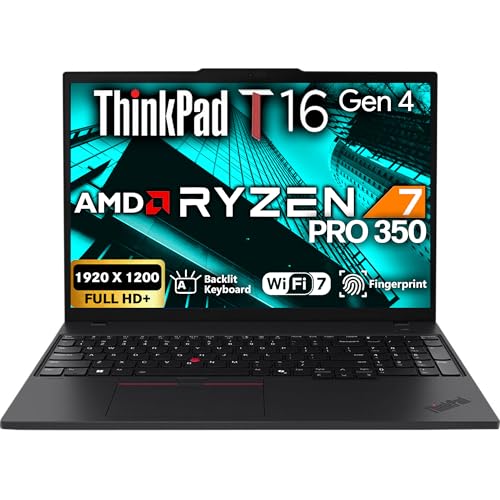
3. Lenovo ThinkPad T16 Gen 4 AI
A Lenovo ThinkPad T16 Gen 4 AI business laptop with a 16-inch FHD+ display, Intel Ultra 7 258V, 32GB LPDDR5X and 1TB SSD, per the listing. Check price on Amazon for the current listing.
Listing details: 16-inch display, 1 TB storage, 1920 x 1200 resolution, Windows 11 Pro (from the Amazon product details; confirm on the page).
Good for: 32GB LPDDR5X and 1TB. Watch out: high price.
Best for 2.8K OLED 120Hz, 32GB RAM
4. Lenovo ThinkPad X9 15 Aura Edition
A Lenovo ThinkPad X9 15 Aura Edition with Core Ultra 7, a 2.8K OLED 120Hz display and 32GB RAM, per the listing. Check price on Amazon for the current listing.
Listing details: 15.3-inch display, 1 TB storage, 3K resolution, Windows 11 Pro (from the Amazon product details; confirm on the page).
Good for: 2.8K OLED 120Hz, 32GB RAM. Watch out: premium price.
Best for premium ThinkPad
5. Lenovo ThinkPad X1 Carbon Gen 14
A 2026 Lenovo ThinkPad X1 Carbon Gen 14 with Core Ultra 5 335 and a non-touch OLED display, per the listing. Check price on Amazon for the current listing.
Listing details: 14-inch display, 512 GB storage, Windows 11 Pro (from the Amazon product details; confirm on the page).
Good for: Premium ThinkPad. Watch out: premium price.

Best for core Ultra 7 255H, 16GB RAM
6. Lenovo ThinkPad P14s Gen 6
A Lenovo ThinkPad P14s Gen 6 14.5-inch with Intel Core Ultra 7 255H, 16GB RAM, 512GB storage and Windows 11 Pro, per the listing. Check price on Amazon for the current listing.
Good for: Core Ultra 7 255H, 16GB RAM. Watch out: high price.
Best Picks by Category
These labels are a data summary, not hands-on test results.
- Highest listed rating (limited feedback): Lenovo ThinkPad X1 Carbon Gen 14. This is not an independent product-quality award.
- Most reviewed: Lenovo ThinkPad X9 15 Aura Edition.
- Budget option: Lenovo ThinkPad T14 Gen 6 (Core Ultra 5 236V).
- Premium option: Lenovo ThinkPad T16 Gen 4 AI.
Price, Rating and Review Comparison
This table lists the picks with their price tier. Check price on Amazon for the current listing of each pick.
| Product | Price | Rating | Ratings | Price tier |
|---|---|---|---|---|
| Lenovo ThinkPad T14 Gen 6 (Core Ultra 5 236V) | Check price on Amazon | n/a | n/a | Budget |
| Lenovo ThinkPad T14 Gen 6 (Ryzen AI 7 PRO 350) | Check price on Amazon | n/a | n/a | Mid-range |
| Lenovo ThinkPad X9 15 Aura Edition | Check price on Amazon | n/a | n/a | Mid-range |
| Lenovo ThinkPad X1 Carbon Gen 14 | Check price on Amazon | n/a | n/a | Mid-range |
| Lenovo ThinkPad P14s Gen 6 | Check price on Amazon | n/a | n/a | Mid-range |
| Lenovo ThinkPad T16 Gen 4 AI | Check price on Amazon | n/a | n/a | Mid-range |
What the Listings Say
Below are the concrete details each seller states on the Amazon listing, followed by how much customer feedback backs up the rating. Check the live listing for the latest specs before you buy.
Lenovo ThinkPad T14 Gen 6 (Core Ultra 5 236V)
The listing gives few concrete specifications. Amazon did not show a rating count for this listing.
Lenovo ThinkPad T14 Gen 6 (Ryzen AI 7 PRO 350)
The listing gives few concrete specifications. Amazon did not show a rating count for this listing.
Lenovo ThinkPad T16 Gen 4 AI
The listing states: This Lenovo ThinkPad laptop comes with 32GB LPDDR5X Sodered RAM for responsive processing and a 1TB NVMe SSD for fast boot times and reliable storage.; Whether for business, school, or entertainment, this 16-inch laptop is optimized for clarity, multitasking, and productivity.; This Windows 11 Pro laptop is designed for business, education, and professional use, featuring enhanced security and productivity tools.; The ThinkPad T16 Gen 4 features a backlit keyboard for comfortable typing in various lighting conditions..
Lenovo ThinkPad X9 15 Aura Edition
The listing states: Add up to 5 years of Lenovo Premier Onsite Support Plus when you register your computer with Lenovo..
Lenovo ThinkPad X1 Carbon Gen 14
The listing states: Add up to 5 years of Lenovo Premier Onsite Support Plus when you register your computer with Lenovo.; Tackle heavy workloads with 32GB of high-speed LPDDR5X memory, ensuring fluid, lag-free multitasking.; Paired with a fast 512GB SSD, you get rapid boot times and plenty of space for all your essential projects.; This X1 Carbon boasts WiFi 7, the fastest WiFi available with significant leaps in speed, capacity, and responsiveness over earlier versions..
Lenovo ThinkPad P14s Gen 6
The listing gives few concrete specifications. Amazon did not show a rating count for this listing.
How to Choose
T, X1 or P
T is mainstream, X1 is premium, P is workstation.
AMD or Intel
The T14 comes in both.
RAM and storage
Check, as prices vary by configuration.
Decoding the ThinkPad Lineup and Its Names
Lenovo sells several ThinkPad families, and the letters tell you what the laptop is designed to do. Once you understand the naming, a long list of configurations becomes much easier to sort.
- T series: The mainstream business line. The T14 and T16 in this guide are aimed at office and hybrid work, with a balance of price, ports and serviceability.
- X1 and X9: Thin, light premium models. The X1 Carbon has long been the flagship ultrabook, and the X9 15 Aura Edition is a larger-screen premium version with an OLED panel.
- P series: Mobile workstations, such as the P14s Gen 6. These are built for demanding software like CAD, rendering and data work, and they lean toward stronger processors and, in some configurations, professional graphics.
- L and E series: Lower-cost lines that appear in other guides. They keep the look but trim materials and some features.
The generation number matters too. Gen 6 on the T14 and Gen 4 on the T16 mean the models come from different design cycles, so the sizes, ports and processors differ. A model number alone does not tell you the processor, memory or storage, because Lenovo sells the same chassis with several configurations. Always read the processor, RAM and drive size on the listing itself.
What Sets a ThinkPad Apart From Other Business Laptops
A ThinkPad is not just a laptop with a black chassis. Several features are part of the formula, and they matter if you type a lot or travel with the machine.
- Keyboard: The keyboards have a long reputation for good key travel and a stable feel. The red TrackPoint nub in the center lets you move the pointer without lifting your fingers from the home row, and many users come to prefer it. If you dislike it, you can ignore it and use the touchpad.
- Ports: Business models usually offer a solid selection, which can include USB-C or Thunderbolt, USB-A and HDMI, depending on the model. Thinner models trim the list, so check it against your monitors and accessories.
- Security: Fingerprint readers, infrared cameras for face sign-in, a camera privacy shutter and hardware security chips are common on business models. IT teams value them for managed fleets.
- Durability: Lenovo often cites military-standard style testing for ThinkPads. Treat that as a sign of build attention, not a guarantee against drops or spills, and read the maker’s own description for what was tested.
- Serviceability: Some models allow easier access to the battery and drive than ultra-thin competitors. Others, including the thinner premium lines, use soldered parts. The listing for the T16 Gen 4 AI mentions soldered LPDDR5X memory, which means the RAM cannot be upgraded later.
Processors, AI Features and Battery Life
The processors in these listings belong to the newest families from Intel and AMD, with Core Ultra chips on the Intel side and Ryzen AI PRO chips on the AMD side. Both sides add a neural processing unit, or NPU, designed to run AI tasks such as background blur, transcription and some Windows features efficiently.
It is worth keeping the claims in perspective. For everyday office work, web browsing, video calls and spreadsheets, most modern chips in the range are more than fast enough. The differences show up in battery life, thermals and heavy sustained jobs. Intel’s V-series chips, such as the Core Ultra 5 236V and Ultra 7 258V, are designed with efficiency in mind and keep memory on the package. The Ryzen AI 7 PRO 350 targets similar efficiency while offering more multithreaded performance in some tasks. The H-series chip in the P14s Gen 6 is built for sustained power, which usually trades some battery life for speed.
Battery life depends on screen type, brightness, workload and battery capacity. Treat maker estimates as ceilings, and remember that OLED panels can draw more power on bright content than low-power LCDs.
Choosing the Right Display
The screen is the part you stare at all day, so it is worth a closer look than the processor.
- FHD+ (1920 x 1200): The T16 Gen 4 listing shows this resolution. It is sharp enough for documents and spreadsheets, and it tends to be gentler on battery life.
- OLED: The X9 15 and X1 Carbon listings feature OLED. These panels offer deep blacks and strong contrast, which helps with photos, video and presentations. They can be glossier, which shows reflections in bright rooms.
- Refresh rate: A 120Hz panel, as listed on the X9 15, makes scrolling and cursor movement smoother, but costs some battery.
- Touch: The X1 Carbon listing specifies a non-touch panel. Touch adds convenience for some people and glare for others, so decide whether you will use it.
- Size: A 14-inch laptop is easier to carry, while a 16-inch screen is more comfortable for spreadsheets and split windows.
Configuration, Storage and Warranty Details
Configuration is where many ThinkPad purchases go wrong. The first T14 here lists 256GB of storage, which is workable for cloud-based work but tight for local files, and the listing flags it as the watch-out. The AMD version doubles it to 512GB. Check whether the drive can be replaced by a standard M.2 SSD, since that gives you a path to more space later.
For memory, 16GB is a reasonable floor for modern multitasking with browser tabs, video calls and office apps. 32GB makes sense for developers, data work, virtual machines or long-term ownership, particularly on a model with soldered memory.
Warranty is another point. The X9 15 and X1 Carbon listings mention an option to add extended onsite support when you register the computer with Lenovo. Read what is included, who the seller is and whether the machine is new, since configurations on marketplaces vary. Keep your purchase records for support.
Matching a Model to Your Work
- Office and hybrid work: The T14 Gen 6 in either processor option is the straightforward choice, with a decent keyboard and a manageable size.
- Heavy spreadsheets and multitasking: The T16 Gen 4 gives a larger screen and 32GB of memory.
- Frequent travel: The X1 Carbon is the thin-and-light option, with lower weight and an OLED panel.
- Creative review and presentations: The X9 15 pairs a large OLED screen with 32GB of RAM.
- Engineering and technical software: The P14s Gen 6 is for workloads that need sustained processing power.
Docking, Connectivity and Everyday Hardware Checks
A laptop that costs this much usually sits at a desk part of the day, so think about how it will connect to the rest of your setup.
- Docking: Many ThinkPads work with USB-C or Thunderbolt docks that carry power, displays and peripherals over one cable. Confirm the port types on your model and whether the dock you want is compatible, since older docks may use different connectors.
- Charging: Most current models charge over USB-C. Check the wattage of the supplied adapter and whether a travel charger can top up the laptop when you are away from your desk.
- Wireless: Look for Wi-Fi 6E or Wi-Fi 7 and Bluetooth on the listing if you want faster, less crowded connections. Some models also offer an optional cellular modem, which is useful for people who work on the road but usually adds cost.
- Webcam and audio: For people on video calls most of the day, a 1080p camera with a privacy shutter, a decent microphone array and speakers matter more than a small speed gain in the processor.
- Weight and charger: If you carry the machine daily, check the laptop weight and the weight of the power brick together. A light laptop with a heavy charger is not as portable as it appears.
Spending ten minutes with the manufacturer’s product specification page, often called the PSREF sheet for ThinkPads, answers most of these questions for the exact model and saves returns.
Common Buying Mistakes
- Choosing by series name without reading the exact processor, RAM and drive in the listing.
- Buying minimum storage and assuming it can always be expanded.
- Paying workstation prices when office software would run well on a T-series laptop.
- Skipping a check of the port list against monitors, docks and accessories.
- Overlooking seller identity, return terms and warranty registration on expensive laptops.
A Closer Look at Each ThinkPad in Working Life
ThinkPad buyers are rarely buying a laptop; they are buying a working relationship that may last through several jobs, degrees, or businesses. This section examines each pick the way it will actually be lived with: the keyboard under real deadlines, the bag it travels in, the dock it lands on, and the kind of owner who will still be pleased with it years from now.
Lenovo ThinkPad T14 Gen 6 (Core Ultra 5 236V): the balanced Intel workhorse
The T14 is the centre of the ThinkPad universe for a reason: it is the size, weight, and capability balance that suits the widest range of working lives. In this Intel configuration it suits the professional whose software world is mainstream corporate tooling, whose day mixes documents, data, calls, and travel between desks, and who wants the machine to be unremarkable in the best sense: always ready, never in the way. It is the pick a thoughtful IT department would choose for a thoughtful employee, which is high praise in this category.
Its compromises are the compromises of balance. It is not the lightest machine here, not the most powerful, and not the most beautiful, and buyers for whom one of those qualities is paramount should look at the X1 Carbon, the P14s, or the X9 respectively. It also rewards configuration care: memory and storage choices in a T14 are long-term decisions, so buy the configuration your future workload needs. Choose it as the default professional answer. Skip it only when a specific priority, weight, graphics, or screen, clearly outranks balance in your life.
Lenovo ThinkPad T14 Gen 6 (Ryzen AI 7 PRO 350): the AMD alternative in the same suit
Two T14 configurations in one list make a useful point: the chassis and the processor are separate decisions. This AMD-based configuration suits the buyer who prefers the Ryzen platform’s character, whose workload benefits from its balance of performance and efficiency, or whose organisation standardises on AMD. In daily life it will feel like a T14 first and a processor statement second, which is exactly right: the keyboard, the build, and the working manners are the experience, and the chip quietly does its job underneath.
The practical advice is to compare the two T14 listings as complete configurations rather than as tribes. Memory, storage, display, and included cover can differ between listings, and those differences will touch your life more often than the badge under the keyboard. Also confirm any specific software or dock compatibility your workplace depends on, since fleet tools occasionally care about platform details. Choose it when the AMD configuration, read in full, is the better-specified or better-valued T14 for you. Skip the tribal debate entirely; it has never improved a working day.
Lenovo ThinkPad T16 Gen 4 AI: the large-screen professional
The T16 exists for the worker whose screen is a desk: spreadsheets with real width, documents side by side, data and dashboards that punish a small panel. In this class, the larger display and the roomier chassis make long desk days kinder, and the full-size working experience suits analysts, finance staff, engineers reviewing drawings, and anyone whose laptop rarely leaves a small set of desks but must perform when it arrives.
Size is the honest cost. A sixteen-inch professional machine is a deliberate carry, and a buyer whose life is trains, planes, and walking between sites should test that carry honestly before committing. The T16 also invites a number pad conversation: workers who live in data entry often value it deeply, while others never touch it. Choose the T16 when screen room is a working tool rather than a luxury. Skip it when your laptop’s natural habitat is a shoulder bag in motion.
Lenovo ThinkPad X9 15 Aura Edition: the design-forward departure
The X9 line is ThinkPad thinking applied to a more design-conscious, larger-format machine, and it suits the professional who wants the brand’s working credibility in a sleeker, more modern package. It is the pick for the consultant, founder, or client-facing professional whose laptop is visible in rooms where impressions matter, and who still expects ThinkPad seriousness underneath the polish. The larger screen supports presentation and document work gracefully.
A departure from tradition always asks traditionalists a question, and here it is about habits: keyboard feel, port selection, and the details long-time ThinkPad owners have memorised may differ from the classic formula, so devoted T-series owners should approach it as a new machine to evaluate rather than as a familiar one to assume. Configuration checking matters as much here as anywhere in the list. Choose the X9 when presence and polish join performance on your priority list. Skip it when the classic T-series formula is itself the thing you are buying.
Lenovo ThinkPad X1 Carbon Gen 14: the executive traveller
The X1 Carbon is the ThinkPad for people whose office is wherever they open it: famously light for its class, built to travel, and aimed at executives and frequent flyers for whom every gram and every minute of setup is a real cost. It suits the buyer whose work is documents, communication, analysis, and presentation at the highest tempo, carried through airports and client sites without a second thought. In that life, lightness is not a luxury feature; it is the feature everything else serves.
Its compromises follow from its mission. The pursuit of lightness shapes its configuration choices, its port story, and its price position, and buyers who need heavy sustained workloads, extensive local connections, or the lowest cost per specification should look at the T or P lines instead. It is also the pick most likely to be bought as a long-term companion, so configuration generosity at purchase is wise. Choose it when travel defines your working life. Skip it when your laptop lives on one desk, where its virtues go uncollected.
Lenovo ThinkPad P14s Gen 6: the compact workstation
The P14s is the specialist in the room: a mobile workstation in a fourteen-inch body, aimed at engineers, designers, analysts, and technical professionals whose software expects workstation-class intent, including certified configurations for professional applications in many deployments. It suits the buyer whose work involves CAD, technical computing, development, or heavy analysis, and who needs that capability to travel in a normal bag rather than in a bulky workstation chassis.
Specialisation cuts both ways. A mainstream office worker gains little from the P line’s mission and pays for capability that will sit idle, while a professional whose software is genuinely demanding should confirm the exact configuration, especially the graphics and memory, against their applications’ requirements rather than trusting the family name. Choose the P14s when your software list is technical and non-negotiable. Skip it when your heaviest daily task is a large spreadsheet, where the T14 serves you better for less commitment.
Reading a ThinkPad Listing Like a Fleet Manager
Professional listings reward professional reading. Confirm the exact processor, memory, storage, and display in the listing fields, because ThinkPad families contain multitudes and resellers describe them unevenly. Confirm what cover is included and what the warranty journey looks like from your location, since a business machine’s value includes the service story behind it. Confirm the port selection against your actual desk: your dock, your monitors, your presentation rooms. And confirm keyboard layout if you buy across regions, because a misdescribed layout is a daily irritation that no specification can compensate for. Fleet managers check these things because they buy machines by the hundred; an individual buyer keeping a machine for years should borrow their discipline for an afternoon.
Setting Up a ThinkPad for a Long Working Life
Start with the unglamorous essentials: full system updates, the manufacturer’s driver and firmware tools, and a backup routine you test rather than assume. Set battery care options if your machine lives on a dock, since a battery held thoughtfully ages more gracefully than one ignored. Learn the keyboard shortcuts and the trackpoint or touchpad behaviour until they disappear from conscious thought, because a ThinkPad’s famous input experience only pays once it is habit. Organise your dock, cables, and travel charger in the first week, while motivation is high. Machines that are set up deliberately in week one tend to be maintained deliberately in year three, and that, more than any specification, is why ThinkPads earn their reputation for longevity.
Who Should Not Buy a ThinkPad at All
Honesty completes the guide. A buyer whose priorities are gaming performance, the richest entertainment display, or the lowest possible cost for casual home use will find better answers elsewhere, because the ThinkPad premium buys working qualities, serviceability, input, and support, that those lives do not need. A buyer who changes laptops frequently for fashion will also underuse what a ThinkPad is for. The brand rewards commitment: buy it for a working life you recognise, configure it generously, maintain it simply, and it will repay you in the only currency that matters here, which is years of days where the laptop was never the problem.
Docks deserve their own paragraph in any ThinkPad discussion, because so many of these machines live a double life: mobile by day, desktop by dock at home or in the office. Confirm that your chosen model and your intended dock agree about monitors, power delivery, and peripherals before ordering either. A single-cable desk that works every morning without negotiation is one of the great quiet pleasures of professional computing, and it is achieved by checking compatibility once, on paper, rather than by troubleshooting it repeatedly in person.
Security features are another area where ThinkPad buyers should read actively rather than assume. Modern business machines offer combinations of biometric sign-in, privacy-minded display options, and management features that matter greatly to some organisations and not at all to individual buyers. Know which of these your work requires, confirm their presence in the exact configuration you are ordering, and set them up in the first week. Security configured late tends to be security configured never.
For buyers choosing between the two T14 configurations as individuals rather than as fleets, the deciding factors are usually mundane and therefore reliable: which listing offers the better complete configuration, which platform your existing accessories and software already favour, and which you can buy from a seller whose returns and support you trust. Either machine will serve a professional life well. The freedom to decide on practical grounds, rather than on brand loyalty to a chip maker, is one of the pleasures of a mature product line.
Finally, think about the end of the relationship at the beginning. A well-kept ThinkPad with a complete configuration, its charger, and its documentation retains usefulness and value long after trendier machines fade, whether it passes to a colleague, a student in the family, or a second life as a home server or travel spare. Buying a machine with that second life in mind is not sentimentality. It is the economics of quality, and it is the reason this product family inspires unusual loyalty among people who are not usually loyal to objects.
The ThinkPad Keyboard and Input, Taken Seriously
Outsiders smile at ThinkPad owners’ devotion to keyboards, right up until they spend a month writing on one. Input is the part of a laptop you touch for every task, and its quality compounds across thousands of hours in a way no benchmark captures. When you evaluate any pick in this list, type something real on it if you possibly can: a long email, a page of notes, the kind of document your work is made of. Judge the layout as well as the feel, including the keys you use without looking and the shortcuts your hands already know. A keyboard that disappears under your fingers is a productivity feature, and a keyboard that keeps reminding you of itself is a tax on every working day for years.
The same seriousness applies to the pointing experience and to the small physical details around it: the steadiness of the hinge when you type on a train tray, the way the machine opens, the confidence of the latchless close, the feel of the chassis edges during a long carry. None of these appear in a specification table, and all of them appear in your opinion of the machine by the end of the first month. ThinkPads built their reputation in exactly this territory, so it is the territory where you should test them hardest.
ThinkPads in Different Working Lives
The consultant between clients
This life is airports, client networks, borrowed desks, and presentations in rooms you have never seen. It rewards the X1 Carbon’s lightness or the T14’s balance, a configuration generous enough to hold several clients’ worlds at once, and a port and dock story that survives strange rooms. It also rewards discretion: a machine that looks professional everywhere and draws attention nowhere. For this buyer, reliability of the everyday, battery, keyboard, build, connectivity, outweighs any single performance peak, because the work is the travel as much as the tasks.
The analyst at one great desk
This life is screen room, data, and long sessions in one place, travelling rarely and working deeply. It rewards the T16’s panel or a T14 on a proper dock with external monitors, memory and storage chosen generously at purchase, and a keyboard that can carry a day of heavy use without fatigue. Weight barely matters here; configuration and comfort matter entirely. This buyer should spend on the desk ecosystem with the same seriousness as on the machine, because the two together are the actual workplace.
The technical professional
Development, engineering, and analytical work reward the P14s’s intent or a generously configured T-series machine, and they reward checking the exact software list against the exact configuration with unusual care. Virtual machines, large datasets, CAD, and heavy toolchains all have specific appetites, and a professional buyer should feed them deliberately rather than discover them. This is also the life most likely to benefit from the longest available cover, because the machine is not a convenience; it is the workshop.
The student who wants one machine for the whole degree
A degree is a four-act play: lectures and notes, group projects, heavier specialised software in later years, and a first job at the end of it. A T14 configured generously is the classic answer precisely because it survives all four acts without needing replacement at the difficult moment. The student buyer should weight durability, keyboard, and serviceability over thinness, keep the machine backed up from the first term, and treat the purchase as infrastructure. Few objects bought at eighteen are still earning their keep at twenty-two; a well-chosen ThinkPad is designed to be one of them.
Resale, Hand-Me-Downs, and the Long Tail of Value
ThinkPads have an unusually healthy second life, and a thoughtful first owner benefits from it twice: once in a machine that stays useful longer in their own hands, and again in the value, financial or familial, that remains when it moves on. Complete configurations, original chargers, and a clean, well-kept chassis are what the second life rewards. Buying with that long tail in mind nudges every decision in the right direction: generous configuration, honest care, documentation kept. It is the opposite of disposable computing, and for many owners it is the deepest reason the brand keeps their loyalty across decades of machines.
The Quiet Economics of a Long-Life Laptop
Run the arithmetic of ownership honestly and the ThinkPad proposition sharpens. A machine bought well, configured generously, maintained simply, and kept for many years divides its cost across an enormous number of working days, and the daily figure becomes remarkably small for the reliability it buys. A cheaper machine replaced early, with its migration days, its setup days, and its failure days counted honestly, often costs more per working day while delivering a worse experience on most of them. This is not an argument for buying the most expensive pick in the list. It is an argument for buying the right pick once, at the right configuration, and then extracting the full life the design offers. The T14 bought correctly is cheaper than the wrong laptop bought twice, and the X1 Carbon kept for a long career is cheaper than a succession of fragile travellers.
There is a human version of the same arithmetic. Every migration between machines costs attention: accounts, files, habits, accessories, and the small grief of a keyboard your hands had memorised. Professionals who change machines rarely speak fondly of the process. A ThinkPad’s real economy is that it asks for that toll as rarely as any machine can, and repays the patience with continuity. Choose it, set it up once with care, keep it backed up and clean, and let the years accumulate. That accumulation, unglamorous and immensely valuable, is what this entire guide has been pointing at: not a laptop purchase, but the quiet removal of laptops from your list of problems.
One last check before you order
Read the listing once more, slowly, as if you were the seller’s most careful customer. Model, generation, processor, memory, storage, display, included cover, and the seller’s returns terms. Confirm the machine in the listing is the machine in your notes. Then order it, set it up deliberately, and get to work. The best ThinkPad decision is a finished one.
ThinkPad Ownership in Remote and Hybrid Work
The modern ThinkPad rarely lives in one office, and hybrid life writes its own specification. At home it needs a dock or at least a disciplined desk: one charger that stays, cables that are already where the machine lands, and a screen arrangement your eyes can work at all day. On the road it needs the opposite discipline: the lightest kit that still covers the day, a charger that travels, and battery habits that assume the socket you planned on will be taken. In the office it needs to behave on networks and in rooms it did not choose. The picks in this list divide that life by emphasis: the X1 Carbon was drawn for the road days, the T16 for the home-desk days, the T14 for the honest mixture most people actually live, and the P14s for the worker whose software travels as heavily as they do. Name your mixture before you choose, in rough proportions across a month, and the shortlist will usually name itself, because hybrid work is not one life but three, and the right ThinkPad is the one whose strengths match the proportions of yours.
One more hybrid habit is worth adopting from the first week: make the machine’s state portable. Files that sync, a backup that runs without being remembered, and a sign-in that works from any room mean the laptop can be closed at one desk and opened at another without a ceremony of copying and checking. ThinkPads reward that discipline with their usual invisibility. Set it up once, and the machine stops being a place your work lives and becomes a window your work is seen through, which is the highest compliment a professional tool can earn.
A Word for First-Time ThinkPad Buyers
If this is your first ThinkPad, expect a short period of adjustment and a long period of loyalty, in that order. The keyboard layout, the input habits, and the plain-spoken design language can feel unfamiliar for a week, especially arriving from a consumer machine built around spectacle. Give it that week of real work before judging, because the qualities this family is loved for, the typing, the steadiness, the sense that the machine is entirely on your side, reveal themselves across days of deadlines met rather than across minutes of unboxing. Most first-time buyers who complete that week understand the reputation. Many of them become the people who explain it, patiently, to the next first-time buyer, which is how a tool becomes a tradition without ever raising its voice.
Keep the box and the paperwork until the machine has passed its first month, and keep digital copies of the invoice and configuration permanently. It is a two-minute habit that protects returns, warranty claims, insurance records, and eventual resale, and it is the sort of unglamorous discipline that professional buyers never skip and individual buyers always wish they had not.
Frequently Asked Questions
Which ThinkPad is best?
See Quick Picks.
Cheapest?
T14 Gen 6 (Intel).
Premium?
X1 Carbon.
What is the difference between a ThinkPad T14 and an X1 Carbon?
The T14 is a mainstream business laptop that balances price, ports and serviceability. The X1 Carbon is a thinner, lighter premium model, often with OLED display options and a higher price. If you travel a lot, the X1 is easier to carry; for a desk-based job, a T14 usually costs less.
Is 16GB of RAM enough for a ThinkPad in 2026?
For office apps, browsers and video calls, 16GB is usually enough. Choose 32GB if you run virtual machines, work with large data files or want the laptop to last many years. Check whether the memory is soldered, as it cannot be upgraded later on those models.
Do ThinkPads have good battery life?
It depends on the model and configuration. Efficient chips and standard displays help, while OLED, 120Hz screens and high-power processors reduce runtime. Maker estimates are best-case figures, so use them only to compare models and expect shorter life with heavy workloads or bright screens.
Is a ThinkPad with an AMD Ryzen AI chip better than Intel Core Ultra?
Neither wins everywhere. Both families offer efficient chips with NPUs, and either handles office work easily. AMD often leads in some multithreaded tasks, while Intel’s efficiency-focused chips target battery life. Compare the exact models, memory and cooling in the listing, and check software compatibility with your employer if it applies.
Can I upgrade the storage on a ThinkPad later?
Often yes, but it depends on the model. Many ThinkPads use a replaceable M.2 SSD, while some thinner premium models limit access or use soldered parts. Check the maker’s specifications or manual for your exact model before assuming you can swap the drive, and consider buying more storage up front.
Bottom Line
For value, the T14 Gen 6. For a big screen, the T16 Gen 4. For premium, the X1 Carbon or X9 15.
More Laptop Guides
- Best Laptops
- Best Copilot+ Laptops
- Best Ryzen Laptops
- Best Rugged Laptops
- Best Laptops with Stylus
- Best Laptops for Video Editing
- Best Laptops for Photo Editing
- Best Laptops for Programming
- Best Laptops Under a Modest Budget
- Best Laptops Under a Mid Budget
- What Is a Copilot+ PC
- All laptop guides
Related Guides
- 6 Best Laptops: Acer, Surface, Lenovo, Dell, ASUS (2026)
- 6 Best Gaming Laptops: HP Victus, MSI, ASUS TUF, Lenovo LOQ (2026)
- 6 Best OLED Laptops: ASUS, Lenovo ThinkPad and Slim 7i (2026)
- 6 Best Touchscreen Laptops: Surface, Acer, Dell, Lenovo (2026)
- 5 Best 2-in-1 Laptops: Convertible Windows and Chromebooks (2026)


