Disclosure: As an Amazon Associate, reviewstook.com earns from qualifying purchases. Links to Amazon on this page are affiliate links; they cost you nothing extra.
Copilot+ PCs include a strong NPU for on-device AI features. Many use Arm-based Snapdragon X chips, which can affect some older apps.
This guide is built from Amazon product listings, not our own testing, so confirm specs, configuration and current price on each product page. Laptop configurations change often.
Check the current price on each product page before you buy, as laptop prices change often.
Last updated: October 31, 2026.
In this guide
Quick Picks
| Product | Type | Best for |
|---|---|---|
| Acer Aspire 14 AI Touch (Core Ultra 5 226V) | Copilot+ PC with touchscreen | Touch plus NPU at a lower price |
| Acer Aspire Lite 14 AI (Snapdragon X) | Copilot+ PC | Low-cost Snapdragon X |
| Acer Aspire 14 AI (Core Ultra 7 256V) | Copilot+ PC, 14-inch | Light everyday Copilot+ laptop |
| Acer Swift 14 AI (Qualcomm Oryon) | 14.5-inch Copilot+ touchscreen laptop | WQXGA 120Hz touch |
| Microsoft Surface Laptop (2025), 13-inch | Copilot+ touchscreen laptop | Compact Windows ultraportable |
| ASUS Vivobook S16 (Snapdragon X2 Elite) | 16-inch OLED Copilot+ PC | OLED screen on Arm |
Our Picks

Top pickBest for touch plus NPU at a lower price
1. Acer Aspire 14 AI Touch (Core Ultra 5 226V)
An Acer Aspire 14 AI Copilot+ PC with a 14-inch WUXGA touch display, Intel Core Ultra 5 226V and an NPU of up to 40 TOPS, per the listing. Check the price on Amazon.
Listing details: 14-inch display, 1 TB storage, 1920×1200 resolution, Windows 11 Home (from the Amazon product details; confirm on the page).
Good for: Touch plus NPU at a lower price. Watch out: check RAM and storage on the page.
Best for low-cost Snapdragon X
2. Acer Aspire Lite 14 AI (Snapdragon X)
An Acer Aspire Lite 14 AI Copilot+ PC with a Snapdragon X X1-26-100 processor and a 14-inch WUXGA display, per the listing. Check the price on Amazon.
Listing details: 14-inch display, 512 GB storage, 1920×1200 resolution, Windows 11 Home (from the Amazon product details; confirm on the page).
Good for: Low-cost Snapdragon X. Watch out: Arm-based; check app compatibility.
Best for light everyday Copilot+ laptop
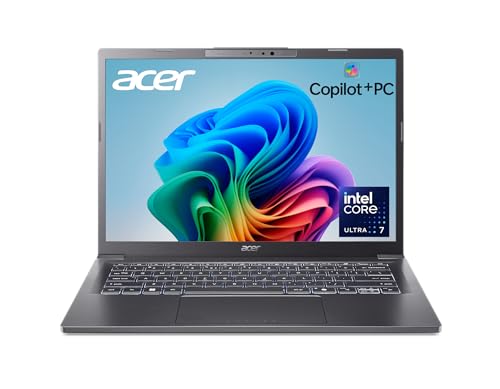
3. Acer Aspire 14 AI (Core Ultra 7 256V)
An Acer Aspire 14 AI Copilot+ PC with a 14-inch WUXGA display, Intel Core Ultra 7 256V and an NPU, per the listing. Check the price on Amazon.
Listing details: 14-inch display, 1 TB storage, 1920 x 1200 resolution, Windows 11 Home (from the Amazon product details; confirm on the page).
Good for: Light everyday Copilot+ laptop. Watch out: check RAM and storage on the page.
Best for wQXGA 120Hz touch
4. Acer Swift 14 AI (Qualcomm Oryon)
An Acer Swift 14 AI Copilot+ PC with a 14.5-inch WQXGA 120Hz touchscreen and a Qualcomm Oryon processor, per the listing. Check the price on Amazon.
Good for: WQXGA 120Hz touch. Watch out: Arm-based; check app compatibility.
Best for compact Windows ultraportable
5. Microsoft Surface Laptop (2025), 13-inch
A Microsoft Surface Laptop (2025) Copilot+ PC with a 13-inch touchscreen, Snapdragon X Plus (8 core) and 16GB RAM, per the listing. Check the price on Amazon.
Listing details: 13-inch display, 512 GB storage, 1920 x 1280 resolution, Windows 11 Home (from the Amazon product details; confirm on the page).
Good for: Compact Windows ultraportable. Watch out: Arm-based; check app compatibility.

Best for oLED screen on Arm
6. ASUS Vivobook S16 (Snapdragon X2 Elite)
An ASUS Vivobook S16 (2026) Copilot+ PC with a 16-inch 16:10 WUXGA OLED display and a Snapdragon X2 Elite processor, per the listing. Check the price on Amazon.
Listing details: 16-inch display, 1 TB storage, 1920×1200 resolution, Windows 11 Home (from the Amazon product details; confirm on the page).
Good for: OLED screen on Arm. Watch out: Arm-based; check app compatibility.
Best Picks by Category
These labels come from the details shown on each Amazon listing. They are a data summary, not hands-on test results.
- Highest listed rating (limited feedback): ASUS Vivobook S16 (Snapdragon X2 Elite). This is not an independent product-quality award.
- Most reviewed: Microsoft Surface Laptop (2025), 13-inch — the most widely reviewed pick in this guide.
- Budget option: Acer Aspire 14 AI Touch (Core Ultra 5 226V) — the budget-tier pick in this guide; check the price on Amazon.
- Premium option: ASUS Vivobook S16 (Snapdragon X2 Elite) — the premium-tier pick in this guide; check the price on Amazon.
Price, Rating and Review Comparison
This table lists the picks with their price tier. Check the live listing for the current price.
| Product | Price | Rating | Ratings | Price tier |
|---|---|---|---|---|
| Acer Aspire 14 AI Touch (Core Ultra 5 226V) | Check price on Amazon | — | — | Budget |
| Acer Aspire 14 AI (Core Ultra 7 256V) | Check price on Amazon | — | — | Budget |
| Acer Aspire Lite 14 AI (Snapdragon X) | Check price on Amazon | — | — | Budget |
| Microsoft Surface Laptop (2025), 13-inch | Check price on Amazon | — | — | Mid-range |
| Acer Swift 14 AI (Qualcomm Oryon) | Check price on Amazon | n/a | n/a | Mid-range |
| ASUS Vivobook S16 (Snapdragon X2 Elite) | Check price on Amazon | — | — | Mid-range |
What the Listings Say
Below are the concrete details each seller states on the Amazon listing. Check the live listing for the latest specs before you buy.
Acer Aspire 14 AI Touch (Core Ultra 5 226V)
The listing states: This combo delivers speed and responsiveness to handle any task with ease -along with all-day battery life of up to 22 hours* and smooth multitasking performance.; Indulge Your Eyes: Immerse yourself in a world of vibrant detail with a breathtaking 14″ WUXGA 1920 x 1200 ultra-high resolution touch display..
Acer Aspire Lite 14 AI (Snapdragon X)
The listing states: Step Up to Next-Level Performance: Redefine your laptop experience with the Acer Aspire Lite 14 AI.; Immersive Visuals: Immerse yourself in a world of vibrant detail with a breathtaking 14″ WUXGA 1920 x 1200 ultra-high-resolution display.; Versatile: Acer Aspire Lite 14 AI features a durable, thin and lightweight aluminum chassis in an ultra-modern design.; A 180 lie-flat hinge delivers versatile convenience, making work, study, or creative projects easy wherever you go..
Acer Aspire 14 AI (Core Ultra 7 256V)
The listing states: This combo delivers the speed and responsiveness to handle any task with ease -along with all-day battery life of up to 22 hours and smooth multitasking performance.; Indulge Your Eyes – Immerse yourself in a world of vibrant detail with a breathtaking 14″ WUXGA 1920 x 1200 ultra high-resolution display..
Acer Swift 14 AI (Qualcomm Oryon)
The listing gives few concrete specifications. Amazon did not show a rating count for this listing.
Microsoft Surface Laptop (2025), 13-inch
The listing states: [Introducing Surface Laptop 13 ] Combines powerful performance with a razor-thin, lightweight design that s easy to carry and beautiful to use built for life on the go.; [Stay Unplugged All Day] Up to 23 hours of battery life[1] means you can work, stream, and create wherever the day takes you without reaching for a charger.; [Brilliant 13 Touchscreen Display] The PixelSense display delivers vibrant color and crisp detail in a sleek design perfect for work, entertainment, or both..
ASUS Vivobook S16 (Snapdragon X2 Elite)
The listing states: With 1 TB of storage and 16 GB of memory, multitasking feels effortless, giving you a calm, confident edge wherever your day takes you.; Brilliance at Every Angle Enjoy stunning visuals on the 16 16:10 WUXGA OLED display, delivering deep contrast, vivid detail, and smooth, immersive viewing.; Stay Powered, Stay Productive Enjoy up to 31 hours of uninterrupted use with the 70Wh battery and leave battery worries behind.; Fast charge gives you 60% in 49 minutes, keeping your day flowing with effortless ease..
How to Choose
NPU
Copilot+ PCs need a high-TOPS NPU. See our explainer.
Arm or x86
Snapdragon laptops are Arm; Intel and AMD are x86. Check app compatibility.
Battery
Efficient chips often last longer.
Snapdragon X or Intel Core Ultra: which Copilot+ laptop chip suits you?
Choose a Snapdragon X Copilot+ laptop if long battery life and a thin design matter most, and an Intel Core Ultra model if you rely on older Windows software. Both families can meet the NPU requirement, so the real difference is how each handles your everyday apps.
Snapdragon X chips use the Arm instruction set. Windows runs most current apps on them, and an emulation layer handles many older x86 programs. Native Arm versions of common apps tend to run best, while emulated ones can be slower or occasionally fail to launch.
Intel Core Ultra chips are x86, the same family most Windows software was written for. That makes them the lower-risk path for niche utilities, older printer or scanner tools, and some hardware drivers.
- Arm strengths: efficient power use, which often supports longer time away from the charger, and thin, quiet designs.
- Arm trade-offs: some older tools, anti-cheat systems in games and specialist drivers may not work. Check each one before you commit.
- x86 strengths: broad compatibility with legacy software and peripherals.
- x86 trade-offs: battery life and heat depend on the exact chip and laptop, so read the listing carefully.
In this guide the Acer Aspire 14 AI Touch and the Acer Aspire 14 AI use Intel, while the Acer Aspire Lite 14 AI, Acer Swift 14 AI, Surface Laptop 13-inch and ASUS Vivobook S16 use Qualcomm silicon. Make a list of the programs you cannot live without, then confirm each one runs on the architecture you are leaning toward.
How much RAM and storage should a Copilot+ laptop have?
For a laptop you plan to keep for several years, aim for at least 16 GB of memory and enough storage that you are not squeezed after installing your apps. Memory is usually fixed to the board in thin laptops, so you cannot add more later.
The AI features run on the NPU, but Windows, your browser tabs and your other programs still draw on RAM. A machine that feels fine on day one can feel cramped once you add a few years of updates and open work apps.
The listings for these laptops differ in what they state. Some name the memory clearly, such as the Surface Laptop and the ASUS Vivobook S16, while the Acer Aspire pages leave you to confirm RAM and storage on the page. That is why this guide keeps repeating the same advice: read the configuration line before buying, because the same model name can ship with different memory and drive sizes.
For storage, think about what you keep locally.
- Mostly cloud and web work: a smaller drive can be enough, if you accept managing space.
- Photos, video clips and downloaded projects: choose the larger drive listed, since fixing a full drive later is annoying.
- Several large apps: leave room for updates, which can take noticeable space on their own.
If the listing does not state RAM or storage, treat that as an open question and check the product details or ask the seller before you order.
How do you pick the right screen size for a Copilot+ laptop?
Pick the smallest screen you can comfortably work on, since size drives weight, bag fit and battery life. A 13-inch model suits travel, a 14-inch model balances portability and space, and a 16-inch model suits people who mostly work at a desk.
The picks here cover those three groups. The Surface Laptop is the compact 13-inch option, the Acer Aspire models and Aspire Lite are 14-inch, the Acer Swift 14 AI has a slightly larger panel, and the ASUS Vivobook S16 is a 16-inch OLED.
Beyond size, look at these screen details on the listing:
- Touch: useful for tablet-style use and quick scrolling, but not essential for everyone. Several picks here include it.
- Resolution and aspect ratio: taller 16:10 style panels show more of a page or spreadsheet than wide ones.
- Refresh rate: a higher rate makes scrolling feel smoother. The Swift 14 AI is listed with a 120Hz panel.
- OLED vs standard LCD: OLED offers deep contrast and vivid color, which suits media and photo work. A standard panel is usually fine for documents and email.
Also think about glare. Glossy touch panels can reflect windows and lights, so if you work near a bright window, look for how other buyers describe the screen in daylight.
How do you check app compatibility before buying an Arm laptop?
List the apps you use every week, then check whether each has a native Arm version or is known to run through emulation. This takes a few minutes and avoids the most common return reason for Snapdragon laptops.
Start with the essentials: your browser, office suite, video call app, password manager and any security software. Most major programs now offer Arm builds, but that is something to confirm on the maker’s own site, not assume.
Then check the edge cases.
- Printers, scanners and USB gadgets: older ones may rely on drivers built for x86 only.
- Games: some titles and their anti-cheat tools do not support Arm. Look at the game’s support page.
- Work software: VPN clients, accounting tools or in-house apps may need testing. Ask your IT team if the laptop is for work.
- Developer tools: many are available natively, but a few plugins may not be.
If one critical program does not work, the cheaper fix is to choose an Intel-based pick such as the Acer Aspire 14 AI Touch or the Acer Aspire 14 AI. Keep the return window in mind and use the laptop with your real apps early, so a problem shows up while returning is still easy.
Which Copilot+ laptop should you buy?
The right pick depends on your budget tier, screen preference and software needs. Match yourself to one of the profiles below, then confirm the details on the listing.
- You want a touchscreen and Copilot+ features among the entry options in this guide: go for the Acer Aspire 14 AI Touch (Core Ultra 5 226V). It is Intel-based, so legacy software is less of a worry. Check RAM and storage on the page.
- You want a low-cost Snapdragon X machine: choose the Acer Aspire Lite 14 AI. It has very little customer feedback, so confirm the details yourself.
- You want a light, everyday Intel laptop: pick the Acer Aspire 14 AI (Core Ultra 7 256V), which has more customer feedback behind it.
- You want a sharp, fast touch display: look at the Acer Swift 14 AI (Qualcomm Oryon). The listing gives few specifics, so read the product details closely.
- You want a compact, premium Windows ultraportable: choose the Microsoft Surface Laptop (2025), 13-inch. It has the most customer feedback of the group.
- You want OLED and a big screen: go for the ASUS Vivobook S16 (Snapdragon X2 Elite). Few people had rated it when this guide was written.
If you are unsure between Arm and Intel, lean toward Intel when compatibility matters and toward Snapdragon when battery life matters.
What to check before you buy a Copilot+ laptop
Before you click buy, confirm the configuration, the chip family and the return terms on the listing. A short checklist catches most mistakes.
- Exact configuration: RAM, storage size and processor name. Similar model names can hide different setups.
- Copilot+ status: confirm the listing says Copilot+ PC and names an NPU, if the AI features matter to you.
- Architecture: Arm or x86, and whether your key apps support it.
- Screen: size, resolution, touch or non-touch, and panel type.
- Ports: check for the USB, display and headphone connections you use daily. Thin laptops can have few ports.
- Charger and what is included: confirm the power adapter is in the box and what type of charging it uses.
- Windows edition: the listings here mention Windows 11 Home. If you need business features, check before you buy.
- Warranty and returns: read the seller’s return window and the maker’s warranty terms on the listing.
- Customer feedback: check how many people rated the laptop, not just the average.
Also note that laptop listings change often, so the version on offer when you visit may differ from what this guide describes. Treat the live page as the source of truth.
Is a Copilot+ laptop worth it, and who should skip one?
A Copilot+ laptop is worth it if you want efficient hardware and the on-device AI features, but it is not required for ordinary work. As the FAQ notes, the AI features are optional.
Here are the honest trade-offs:
- Is it worth paying more? Higher tiers usually buy a better screen, a more premium build or a larger display. If you only browse and write documents, a budget model can cover the basics.
- Downsides of Arm: compatibility gaps with a few older programs and peripherals.
- Downsides of the cheaper picks: some listings leave memory and storage unclear, and some have little customer feedback.
- Limited feedback: a couple of picks have few ratings, so their averages tell you less than those of the more widely rated models.
You may want to skip a Copilot+ laptop if you depend on specialist software that is x86 only, if you need many ports, if you need heavy GPU performance for demanding games or 3D work, or if your current laptop already does everything you need.
Compare the picks above, check the current listing for the configuration and what is included, then choose the laptop that fits the apps you use and the screen you want.
A Closer Look at Each Copilot+ Laptop in Daily Life
The chip debate dominates Copilot+ coverage, but ownership is decided by quieter things: how the machine behaves on a train, in a meeting, on a video call with a poor connection, and during the ordinary office work that fills most of its hours. This section looks at each pick through that daily lens, so the chip choice lands inside a complete picture rather than floating above it.
Acer Aspire 14 AI Touch (Core Ultra 5 226V): the balanced Intel starting point
This is the pick for the buyer who wants the Copilot+ experience without changing computing ecosystems. An Intel-based machine keeps the familiar world of x86 software, printers, and accessories exactly as it has always been, while still bringing the neural processing hardware that defines the category. The touchscreen adds a genuinely useful way to interact with documents, presentations, and creative apps at a desk or on a sofa, and the fourteen-inch class is the size most people find easiest to carry daily.
It suits a mainstream user whose software list includes older or specialised programs, because compatibility questions simply do not arise. Its limitation is that it is a balanced machine rather than a specialist: buyers chasing the absolute longest unplugged days or the most compact chassis should compare it carefully against the Snapdragon-based picks below. Choose it when you want Copilot+ features with zero compatibility homework. Skip it when battery endurance away from a socket is your single highest priority.
Acer Aspire Lite 14 AI (Snapdragon X): the endurance-first value route
The Lite framing tells you the design intent: an accessible route into the Snapdragon world, where the rewards are long battery life, cool and quiet running, and a machine that wakes and works with a phone-like eagerness. For students, writers, and mobile workers whose day is documents, browsing, calls, and media, that combination is not a compromise at all; it is the point. A laptop that can be carried without its charger changes how you plan a day.
The homework is compatibility. Most mainstream software now runs well on Arm-based Windows, but the honest buyer checks the specific list: any specialised work tools, older peripherals and their drivers, and any games beyond light titles. If your list is mainstream, the check takes minutes and the endurance rewards last for years. If your list includes something obscure and essential, that single item decides the purchase. Choose this pick for light, long, quiet days. Skip it if one essential legacy program cannot come with you.
Acer Aspire 14 AI (Core Ultra 7 256V): the step-up Intel configuration
Stepping up within the same family is a decision about headroom. A stronger processor tier and a more generous configuration suit the buyer who keeps more applications open at once, works with larger files, dabbles in photo or video work, or simply intends to keep the machine longer and wants it to feel fresh deeper into its life. In daily terms, that headroom shows up as patience: fewer pauses, smoother multitasking, and less need to manage the machine’s workload for it.
It is the wrong spend for a buyer whose work is genuinely light, because headroom you never touch is money that could have gone to a better screen, more storage, or a lighter bag. It is also worth checking the exact configuration in the listing rather than assuming the family name guarantees it. Choose this configuration when your workload is growing or your ownership horizon is long. Skip it when your current machine’s limits have never actually annoyed you.
Acer Swift 14 AI (Qualcomm Oryon): the premium Snapdragon traveller
The Swift name signals the traveller’s version of the idea: a more refined, portable chassis built around the Snapdragon platform’s strengths. This pick suits the professional whose laptop is a constant companion and whose work lives in modern, mainstream applications: documents, cloud tools, calls, and media, with long unplugged stretches as a normal expectation rather than a special occasion. Quiet, cool running matters in meetings and shared spaces, and this class of machine treats silence as a feature.
Its limits are the platform’s limits, stated plainly. The same compatibility check applies, with extra attention to any hardware accessories you depend on, such as specialised docks, capture devices, or older printers at client sites. Gaming expectations should stay modest and casual. Choose the Swift when portability, refinement, and endurance define your working life. Skip it when your toolkit includes essential equipment that has not made the move to Arm.
Microsoft Surface Laptop (2025), 13-inch: the compact reference design
A Surface machine is Microsoft’s own statement of what this class of Windows laptop should feel like, and the compact thirteen-inch form makes it the most carry-friendly pick in this list. It suits the buyer who values a clean design, a machine that disappears into a small bag, and an ownership experience with a single company standing behind hardware and software together. For writers, consultants, and students moving between rooms all day, that compactness is a daily pleasure rather than a specification.
The trade-offs of compactness are ports, screen room, and configuration flexibility, and buyers who live on external monitors or who need generous local storage should check the exact configuration with care. It also sits in a premium position in the list, so its value case rests on design and portability rather than on raw specification per amount spent. Choose it when the smallest, most polished package is the priority. Skip it when screen space, ports, or storage headroom matter more than footprint.
ASUS Vivobook S16 (Snapdragon X2 Elite): the big-screen Snapdragon option
A sixteen-inch Snapdragon machine answers the buyer who wants the platform’s endurance and quietness without giving up a large, comfortable workspace. The bigger panel suits split-screen work, spreadsheets, media, and anyone whose eyes prefer room to squinting, and the Vivobook line aims that package at mainstream buyers rather than at a luxury tier. It is the pick for a home-and-office worker whose laptop travels between rooms and buildings rather than across a campus all day.
Size is its own cost: a sixteen-inch machine needs a bigger bag, more desk, and a little more commitment to carry. The Arm compatibility check applies here exactly as it does to the other Snapdragon picks. Choose it when a large screen and long, quiet days are your combination. Skip it when daily carrying over distance makes every extra bit of size and weight a genuine burden.
Deciding Between the Two Platforms Without the Hype
Strip the marketing away and the decision is refreshingly practical. Make a list of the applications and accessories your life genuinely depends on. If everything on it is mainstream and modern, both platforms are open to you, and the choice becomes about endurance, noise, price positioning, and the specific machines above. If the list contains specialised, older, or hardware-dependent items, the Intel-based picks remove the question entirely, and that certainty is worth real money to a working buyer. Neither answer is a verdict on the technology; both are verdicts on your list.
Then decide what a great day with the laptop looks like. If it is a long day away from sockets with light, modern work, the Snapdragon picks were designed for that day. If it is a heavy day of mixed software, peripherals, and multitasking at a desk, the Intel picks were designed for that one. Copilot+ features themselves, the local AI capabilities that define the category, are available across both platforms in this list, so let lifestyle and compatibility lead, and let the badge follow.
Ownership Habits for a Copilot+ Machine
Keep the operating system and drivers current, because this is a young platform category and refinements arrive steadily, especially around app compatibility and AI features. Learn which of your regular tasks can use the local neural hardware, such as background effects on calls, live captions, and image work in supported apps, because those small conveniences accumulate into the category’s real value. Manage storage with the same discipline as any modern thin laptop, confirm your backup routine works from the first week, and test every essential accessory you own while the return window is still open. That first-week compatibility audit, done calmly, is the difference between a confident purchase and a lingering doubt.
A word on buying the configuration rather than the headline. Within any of these model families, memory and storage tiers change the ownership experience more than small processor differences do. A machine you intend to keep for many years deserves the comfortable configuration bought once, because sealed thin laptops rarely forgive a optimistic configuration later. Check the exact listing fields for the configuration you are actually ordering, and be suspicious of any listing where those fields are vague.
For buyers moving from an older Intel or AMD laptop, the migration itself deserves a plan. Move your files, confirm your cloud accounts and password manager are working, reinstall the applications you truly use rather than everything you had, and keep the old machine intact until the new one has survived a full normal week. That overlap week is also when compatibility surprises reveal themselves, while every option, including returning or exchanging, is still comfortably open to you.
Accessories shape the Copilot+ experience more than most buyers expect. A compact high-capacity charger you actually carry, a sleeve that fits the exact size, and a small hub matched to your real peripherals turn a thin laptop into a complete travelling office. Buy those after the laptop, not before, and buy them against a list written from your actual working week. The category rewards travellers; equipping it properly is how you collect that reward.
Finally, judge the AI features by your own tasks after a month, not by the launch presentation. The features that survive into your routine, such as cleaner calls, easier captions, or faster image touches, are the ones that justified the category for you. The rest are harmless extras. A Copilot+ laptop is first a laptop, and the picks above were chosen to be good ones; the AI layer is a bonus that grows more useful as your software learns to use it.
The AI Features, Judged by Ordinary Days
Launch presentations sell Copilot+ on spectacle, but ownership judges it on Tuesdays. The features that matter are the ones that quietly improve ordinary days: cleaner video calls where your voice and face stay clear in a poor room, captions that make a fast meeting or a foreign-language video followable, quick image touches that save a trip through heavy software, and a machine that handles these tasks locally, quickly, and without heating up or draining the battery. When you test a machine in its first week, test those ordinary things deliberately. Run a call in your worst-lit room. Caption a meeting. Edit a photo the way you actually edit photos. The category earns its name in those moments or it does not, and your own tasks are the only honest benchmark.
Local processing and why it feels different
There is a practical pleasure in features that work on the machine itself: they respond quickly, they behave the same on a train as at a desk, and they keep working when a connection is poor or absent. Travellers and commuters feel this difference most, and it is one of the reasons the endurance-focused picks in this list pair so naturally with the category. A Copilot+ laptop that spends its life at a desk on fast Wi-Fi collects less of this advantage, which is worth admitting when you weigh how much the category itself, rather than the individual laptop, matters to you.
Choosing the Screen and Size Inside the Category
Because the chip debate dominates, buyers under-think the panel, then live with the consequences daily. Decide the size by the carrying reality first: a machine carried all day earns a compact form, while a machine that moves between two desks can trade that for screen room. Then judge the panel by your content: documents and data reward brightness and clarity in bright rooms, media and creative hobbies reward colour and contrast, and touch earns its place only if your habits, presenting, annotating, reading on the sofa, actually use it. The picks above span those combinations deliberately, so let your week, not the launch keynote, assign the weights.
A two-platform shortlist method
If both platforms remain open after your compatibility check, shortlist one machine from each and compare them as complete objects: weight with charger, screen in your lighting if you can see them in person, keyboard feel, and the exact configuration offered. Then choose by the day you described earlier: the long unplugged day favours one, the heavy mixed-software day favours the other. Deciding between two concrete machines is always easier and always wiser than deciding between two philosophies, and it prevents the common outcome of buying a platform argument instead of a laptop.
When a Copilot+ Laptop Is Not the Answer
Completeness requires the negative case. If your work depends on specialised desktop software with no interest in this platform generation, if your gaming ambitions are serious rather than casual, or if your budget is stretched thin enough that the category’s premium would force compromises in screen, memory, or storage, then a conventional laptop chosen well will serve you better than a Copilot+ machine chosen apologetically. The category is a direction, not a duty. Its genuine gifts, endurance, quiet local intelligence, and modern efficiency, are worth their place in the picks above, but they do not outrank the fundamentals of a laptop that fits your software, your bag, and your budget. Buy the fundamentals first, always, and let the neural hardware be the bonus it honestly is at this stage of its story.
For everyone whose list is mainstream and whose days are mobile, though, the picks in this guide represent a real shift in what a Windows laptop feels like: awake instantly, quiet by default, and patient with its battery. That shift is easy to underestimate on a specification page and hard to give up once lived with, which is why so much of this guide has been about days and habits rather than about chips. Choose the machine whose ordinary day matches yours, and the category will justify itself quietly, one unremarkable, well-handled Tuesday at a time.
A Final Word on Confidence
New platform categories make buyers anxious out of proportion to the real risk, because the unfamiliar feels dangerous even when the checklist says otherwise. The antidote is the process this guide has repeated: list your software, test your accessories, use the return window as a laboratory, and decide from evidence gathered in your own rooms. A buyer who has done those things does not need to hope the machine will fit; they know it does. That confidence, more than any single feature, is what a good purchase feels like, and it is available on either platform in this list to any buyer willing to spend one careful week earning it.
Frequently Asked Questions
Do I need a Copilot+ PC?
No; the AI features are optional.
Cheapest?
Acer Aspire 14 AI Touch.
Arm compatible?
Most apps work; check niche tools.
What is a Copilot+ PC?
A Copilot+ PC is a Windows laptop with a powerful built-in NPU that runs certain AI features on the device itself. The maker's listing should state that it is Copilot+ and name the processor. Check the product page for the exact feature support.
Is a Snapdragon X laptop good for everyday work?
Yes, for most everyday tasks such as browsing, email, documents and video calls. Many common apps run natively on Arm and others run through emulation. Check any specialist tools before buying.
Can you play games on a Copilot+ laptop?
You can play some games, but support varies by chip and title. Arm laptops may not run every game, especially those with anti-cheat software. Check the game's own support page first.
Does a Copilot+ laptop need an internet connection?
Not for everything. Some AI features run on the NPU on the device, while others use online services. Read the feature description on the maker's site to see which is which.
Is 16 GB of RAM enough for a Copilot+ laptop?
For most people, yes, it is a sensible starting point for browsing, office work and multitasking. Heavier creative work may benefit from more. Because memory is often soldered in thin laptops, choose the amount you need at purchase.
Is a touchscreen worth it on a laptop?
It is worth it if you scroll, annotate or use tablet-style modes often. If you mostly type at a desk, you may not use it much. Touch panels can also be glossier, which can add glare.
Should I buy an Intel or Snapdragon Copilot+ laptop?
Pick Intel if you rely on older or specialist Windows software, and Snapdragon if long battery life and thin design matter more. Both can offer Copilot+ features. Check your key apps before deciding.
How do I know if the listing is the same laptop I want?
Compare the processor name, memory, storage and screen details on the listing with your shortlist. Similar model names can ship with different setups. If the page is unclear, ask the seller before you order.
Bottom Line
For value, the Acer Aspire 14 AI Touch. For OLED, the ASUS Vivobook S16. For a compact premium pick, the Surface Laptop 13.
More Laptop Guides
- Best Laptops
- Best Ryzen Laptops
- Best Lenovo ThinkPad Laptops
- Best Rugged Laptops
- Best Laptops with Stylus
- Best Laptops for Video Editing
- Best Laptops for Photo Editing
- Best Laptops for Programming
- Best Laptops Under a Modest Budget
- Best Laptops Under a Mid Budget
- What Is a Copilot+ PC
- All laptop guides
Related Guides
- What Is a Copilot+ PC? NPU, TOPS and Who Needs One (2026)
- 6 Best Laptops: Acer, Surface, Lenovo, Dell, ASUS (2026)
- 6 Best Gaming Laptops: HP Victus, MSI, ASUS TUF, Lenovo LOQ (2026)
- 6 Best OLED Laptops: ASUS, Lenovo ThinkPad and Slim 7i (2026)
- 6 Best Touchscreen Laptops: Surface, Acer, Dell, Lenovo (2026)


