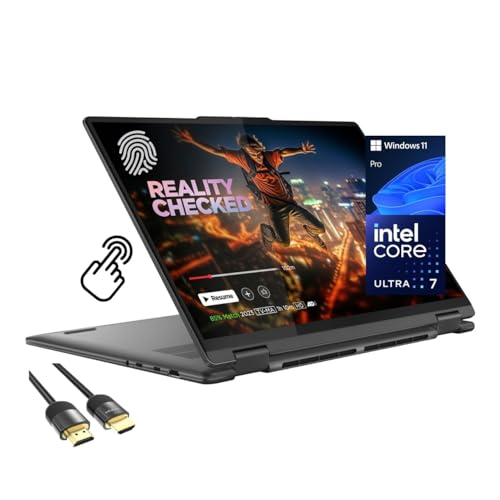
The best tablet mode touch screen laptops for grad school are the ones that change shape with the work. A graduate student types a paper in the morning, reads a journal article in the afternoon, and annotates a diagram in the evening, and a laptop that folds into tablet mode does all three without a second device. The keyboard is there when it is needed, and it folds away when it is not.
This guide compares six tablet mode touch screen laptops for grad school, all verified against the site’s own product lookup with brand and model checked against each listing. Two have OLED screens: the Lenovo Yoga 7i 14-inch and the ASUS Vivobook Flip 14. One has the largest screen: the HP Envy x360 16-inch. One is the dependable workhorse: the Dell Inspiron 14 7440. One is the budget Chromebook: the ASUS Chromebook Flip CX1. One has the newest processor: the HP OmniBook 7 Flip with the Ultra 7 258V.
The right choice depends on how the student works. If reading matters most, buy an OLED screen. If writing matters most, buy the best keyboard. If the budget is tight, buy a Chromebook. The guide below explains what tablet mode really means, what to look for in a touch screen, and how to choose the machine that will last through the degree.
In this guide
Quick picks: best tablet mode touch screen laptops for grad school
| # | Product | Where to buy |
|---|---|---|
| 1 | Lenovo Yoga 7i 14-Inch OLED | Check on Amazon |
| 2 | HP Envy X360 16-Inch | Check on Amazon |
| 3 | ASUS Vivobook Flip 14 OLED | Check on Amazon |
| 4 | Dell Inspiron 14 7440 | Check on Amazon |
| 5 | ASUS Chromebook Flip CX1 | Check on Amazon |
| 6 | HP OmniBook 7 Flip | Check on Amazon |
How the picks were chosen
We started with the product lookup and kept only genuine tablet mode touch screen laptops: 2-in-1 laptops with a touchscreen that folds back 360 degrees or flips into tablet mode. Clamshell touchscreens without tablet mode were left out, because a touchscreen that cannot fold is not a tablet mode laptop, no matter how good the screen is. Generic no-brand 2-in-1 listings were also left out, because a product with no brand and no model cannot be verified.
Each candidate was checked by fetching its full listing title, which is how renewed units are caught: the short search title can hide the word Renewed, but the full title shows it. Renewed listings were rejected on that check. The six picks were then sorted by screen and by price: two OLED models, one large-screen model, one dependable mid-range model, one budget Chromebook, and one premium model with the newest processor. None of the picks overlaps with the laptops or tablets article, so a reader who finds both guides will find twelve different machines, not six repeated.
What tablet mode means for grad school
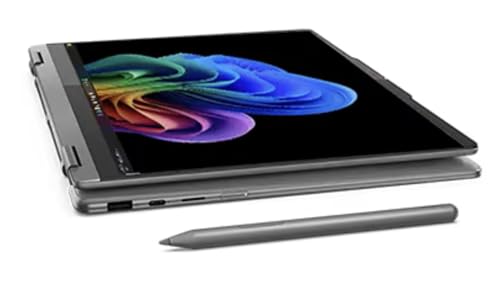
Tablet mode is the mode a 2-in-1 laptop enters when the screen is folded back 360 degrees or the keyboard is detached. The keyboard turns off, the touch screen becomes the main input, and the laptop works like a tablet: hold it in one hand, tap and swipe with the other, and use a pen to write or draw on the screen. It is the mode for reading, annotating, and sketching, and it is the mode that makes a 2-in-1 worth buying for grad school.
Grad school is the ideal use case for tablet mode, because the work changes shape constantly. Writing a paper needs a keyboard. Reading a journal article needs a tablet. Annotating a PDF needs a pen. Presenting to a seminar needs a screen that can be held up or laid flat. A laptop that only works as a laptop forces the student to do all of that on a keyboard and a trackpad, which is the wrong tool for half the job.
The touch screen is what makes tablet mode work. A good touch screen responds to a finger and a pen, it is bright enough to read in a library, and it is sharp enough that text looks printed. An OLED screen is the best for reading, because the contrast is higher and the text is sharper, but a good IPS screen is also fine. The screen size matters too: a 14-inch screen is the sweet spot for carrying, while a 16-inch screen is better for desk work.
There is one more use for tablet mode that graduate students discover quickly: presenting. A laptop folded into tent mode stands on its own on a table, with the screen facing the room, which makes it a presentation display without a projector. A laptop folded flat becomes a shared surface that two people can look at together, which is useful for group work and for showing a supervisor a figure or a chart. These are small uses, but they add up over a degree, and they are uses that a normal laptop cannot do at all.
What makes the best tablet mode laptops for grad school worth buying
First, the hinge must be good. A 2-in-1 hinge is folded hundreds of times over a degree, and a hinge that loosens or wobbles will make the laptop unusable in tablet mode. The picks in this guide come from makers with a track record in 2-in-1 design, and their hinges are proven.
Second, the screen must be good in both modes. A touch screen that is dim or low resolution is fine for typing but poor for reading, and reading is half of grad school. Look for a full HD or better display, a bright panel, and a touch screen that responds to a finger and a pen. Third, check the battery: a laptop that dies after four hours is a laptop that stays plugged in, which defeats the point of a portable device. Fourth, check the weight: a 14-inch 2-in-1 is portable, a 16-inch 2-in-1 is a desk machine, and the difference matters every time the student carries it to class.
Fifth, check the pen. A 2-in-1 with pen support is a note-taking and annotating device; one without it is a touch screen laptop with a folding hinge. Some pens are included in the box, some are sold separately, and some machines do not support a pen at all. If annotating PDFs and taking handwritten notes matter, confirm the pen is included or budget for it, and check whether the screen supports the pressure levels the work needs.
Quick picks at a glance
| Product | Form | Screen | CPU | Best for |
|---|---|---|---|---|
| Lenovo Yoga 7i 14in | 2-in-1 OLED | 14 in 2.8K touch | Ultra 5 226V | Best overall |
| HP Envy x360 16in | 2-in-1 convertible | 16 in touch | Ultra 7 155U | Big screen |
| ASUS Vivobook Flip 14 | 2-in-1 OLED | 14 in OLED touch | Ultra 7 256V | Portable OLED |
| Dell Inspiron 14 7440 | 2-in-1 convertible | 14 in FHD+ touch | Core 5 120U | Reliable value |
| ASUS Chromebook Flip CX1 | Convertible Chromebook | 14 in touch | Celeron N4500 | Budget pick |
| HP OmniBook 7 Flip | 2-in-1 convertible | 14 in touch | Ultra 7 258V | Premium pick |
The picks in detail

Lenovo Yoga 7i 2-in-1 Laptop – 14-Inch 2.8K OLED Touchscreen, Intel Ultra 5 226V
The Lenovo Yoga 7i is the best tablet-mode laptop for grad school in this guide: a 14-inch 2-in-1 with a 2.8K OLED touchscreen, an Intel Ultra 5 226V processor, a backlit keyboard, and a design that folds back 360 degrees into tablet mode. It is the machine that a graduate student reaches for when the work changes from typing a paper to reading a journal article to sketching a diagram, all in the same afternoon.
The OLED display is the feature that makes the Yoga 7i stand out. OLED gives perfect blacks, vivid colors, and a contrast that an IPS display cannot match, which matters for reading dense academic papers, reviewing figures, and watching lectures. The 2.8K resolution is sharp enough that text looks printed, not pixelated, even at small font sizes.
The 14-inch size is the sweet spot for grad school: big enough to write on comfortably, small enough to carry to every seminar and library session. The Ultra 5 226V is a modern processor with AI acceleration, and it handles research, writing, and video calls without breaking a sweat. The Yoga Pen support means it can be a digital notebook as well as a laptop.
For a graduate student who wants one machine for everything, the Yoga 7i is the pick. It is a laptop for writing, a tablet for reading, and a notebook for annotating, and it does all three without compromise.
Key specs:
- 14-inch 2.8K OLED touchscreen
- Intel Ultra 5 226V processor
- Backlit keyboard; 360-degree hinge; Windows 11
Strengths:
- OLED display with perfect blacks and sharp text
- 14-inch size is ideal for carrying daily
- Modern Ultra 5 processor with AI acceleration
Trade-offs:
- OLED screens cost more than IPS
- Battery life is shorter at full brightness
- No numeric keypad at this size
Graduate students who read, write, and annotate all day. It suits anyone who needs a laptop for papers and a tablet for journal articles, and who carries the machine everywhere.
Best for: one machine for grad school reading and writing Not suited for: heavy data work that needs a large screen
Check price on Amazon: Lenovo Yoga 7i 14-Inch OLED

HP Envy x360 2-in-1 Laptop – 16-Inch Touchscreen, Intel Ultra 7 155U, 16GB RAM, 512GB SSD
The HP Envy x360 is the big-screen pick: a 16-inch 2-in-1 laptop with a touchscreen, an Intel Ultra 7 155U processor, 16GB of RAM, a 512GB SSD, and Windows 11. It is the machine for a graduate student who works at a desk most of the day and wants the largest screen in this guide, with tablet mode for reading and annotating when the work moves to the couch or the library.
The 16-inch touchscreen is the feature that defines this pick. It gives room for a paper and a reference side by side, for a spreadsheet and a browser, or for a video lecture and a notes application. In tablet mode, the large screen makes reading journal articles comfortable, with text big enough to read without zooming.
The Ultra 7 155U is a strong processor for grad school work: it handles large documents, statistical software, and video calls at the same time, and the 16GB of memory and 512GB SSD mean the machine stays fast for years. The Envy x360 is built as a premium machine, with a solid chassis and a good keyboard.
For a graduate student who works mostly at a desk and wants the biggest screen, the Envy x360 is the pick. It is a desktop replacement that folds into a tablet, and it is the best choice for anyone whose work needs screen space above all.
Key specs:
- 16-inch touchscreen display
- Intel Ultra 7 155U, 16GB RAM, 512GB SSD
- Windows 11; 360-degree hinge
Strengths:
- Largest screen in this guide
- Strong Ultra 7 processor for demanding work
- 16GB memory and 512GB SSD for the long term
Trade-offs:
- A 16-inch 2-in-1 is heavy as a tablet
- Too big for a small lecture hall desk
- Shorter battery life than smaller models
Graduate students who work at a desk and need screen space. It suits researchers with large documents, data work, and anyone who reads on a big screen.
Best for: the biggest screen for grad school Not suited for: carrying everywhere or small desks
Check price on Amazon: HP Envy X360 16-Inch

ASUS Vivobook Flip 14 – OLED Touchscreen, Intel Ultra 7 256V, 16GB RAM
The ASUS Vivobook Flip 14 is the portable OLED pick: a 14-inch 2-in-1 with an OLED touchscreen, an Intel Ultra 7 256V processor, 16GB of RAM, and a design that folds into tablet mode. It is the direct competitor to the Yoga 7i, and it wins on one point: the Ultra 7 256V is a newer processor, with a faster neural processor for AI features and better efficiency, which means longer battery life.
The OLED display is the same class as the Yoga 7i: perfect blacks, vivid colors, and sharp text that makes reading academic papers a pleasure. The 14-inch size is the same sweet spot for carrying, and the Vivobook Flip is light enough to use as a tablet for extended reading sessions without tiring the arms.
The Vivobook Flip is built for students: it is light, it is quiet, and it has the ports a student needs, including USB-C and a headphone jack. The Ultra 7 256V handles everything grad school asks of it, from writing to data analysis to video calls, and the 16GB of memory means it will not slow down with a dozen browser tabs open.
For a graduate student who wants the newest processor and an OLED screen in a portable size, the Vivobook Flip is the pick. It is the Yoga 7i’s closest rival, and the choice between them comes down to brand preference and the specific configuration on offer.
Key specs:
- 14-inch OLED touchscreen
- Intel Ultra 7 256V, 16GB RAM
- 360-degree hinge; Windows 11
Strengths:
- Newest Ultra 7 processor with AI hardware
- OLED display with vivid color
- Light and portable 14-inch design
Trade-offs:
- Higher cost than non-OLED models
- Storage details not in the listing
- No numeric keypad
Graduate students who want the newest processor and an OLED screen. It suits anyone who reads for hours and wants the best display in a portable machine.
Best for: the newest processor with OLED Not suited for: tight budgets or heavy data work
Check price on Amazon: ASUS Vivobook Flip 14 OLED

Dell Inspiron 14 7440 2-in-1 Laptop – 14-Inch FHD+ Touchscreen, Intel Core 5 120U
The Dell Inspiron 14 7440 is the reliable workhorse pick: a 14-inch 2-in-1 laptop with an FHD+ touchscreen, an Intel Core 5 120U processor, and a design that folds into tablet mode. It is not the flashiest machine in this guide, and it does not have an OLED screen, but it is solid, dependable, and well-priced, and it does everything grad school asks without fuss.
The FHD+ touchscreen is bright and clear, and it is good enough for reading, writing, and video calls. It does not have the contrast of an OLED panel, but it is also easier on the budget, and for a student who needs a machine that works rather than a machine that impresses, that trade is the right one.
Dell’s Inspiron line is known for reliability, and the 7440 is built to survive years of daily use: a sturdy chassis, a good keyboard, and a hinge that is rated for thousands of folds. The Core 5 120U is a capable processor for grad school work, handling documents, research, and video calls with ease.
For a graduate student who wants a dependable 2-in-1 at a fair price, the Inspiron 14 7440 is the pick. It is the machine to buy when the budget matters and the work is straightforward, and it will not let the student down.
Key specs:
- 14-inch FHD+ touchscreen
- Intel Core 5 120U processor
- 360-degree hinge; Windows 11
Strengths:
- Solid and dependable at a fair price
- Good keyboard and sturdy build
- Capable processor for grad school work
Trade-offs:
- No OLED display
- Less flashy than the premium picks
- Heavier than the lightest models
Graduate students who want a reliable machine at a fair price. It suits anyone whose work is documents, research, and video calls, and who values dependability over display quality.
Best for: a dependable 2-in-1 at a fair price Not suited for: media work that needs an OLED screen
Check price on Amazon: Dell Inspiron 14 7440


ASUS Chromebook Flip CX1 CX1400FKA-AS88FT – 14-Inch Touchscreen, Intel Celeron N4500
The ASUS Chromebook Flip CX1 is the budget pick: a 14-inch Chromebook with a touchscreen, an Intel Celeron N4500 processor, and a design that flips into tablet mode. It runs Chrome OS, which means it is fast, simple, and secure, and it costs a fraction of the Windows 2-in-1 laptops in this guide. For a graduate student whose work lives in a browser, it is enough, and it is the smartest way to save money.
Chrome OS is the key to understanding this pick. A Chromebook runs web applications, Google Docs, and Android apps, and it stores files in the cloud. For a student who writes in Google Docs, reads papers in a browser, and joins video calls online, that is the whole job, and the Chromebook does it faster and more simply than a Windows laptop.
The 14-inch touchscreen is large enough for writing and reading, and the flip design means it works as a tablet for reading journal articles. The Celeron N4500 is a modest processor, but Chrome OS is light enough that it feels fast for web work. The battery lasts all day, which matters for a student who is away from a wall socket for hours.
For a graduate student on a tight budget who lives in a browser, the Chromebook Flip CX1 is the pick. It is a laptop and a tablet for the price of a basic tablet alone, and it does the job without the cost or the complexity of Windows.
Key specs:
- 14-inch touchscreen display
- Intel Celeron N4500 processor
- Chrome OS; flip design; model CX1400FKA-AS88FT
Strengths:
- Lowest cost in this guide by far
- Chrome OS is fast, simple, and secure
- All-day battery life
Trade-offs:
- Chrome OS cannot run Windows software
- Celeron processor is modest for heavy work
- Storage is limited for offline files
Budget-conscious graduate students who live in a browser. It suits writers and researchers whose applications are web-based, and anyone who needs a second machine for travel.
Best for: a budget 2-in-1 for browser work Not suited for: Windows software or heavy offline work
Check price on Amazon: ASUS Chromebook Flip CX1

HP OmniBook 7 Flip 2-in-1 Laptop – 14-Inch Touchscreen, Intel Ultra 7 258V
The HP OmniBook 7 Flip is the premium portable pick: a 14-inch 2-in-1 laptop with a touchscreen, an Intel Ultra 7 258V processor, and a design that flips into tablet mode. It is the newest processor in this guide, with the fastest AI hardware and the best efficiency, which means it is the machine that will stay current the longest.
The Ultra 7 258V is a step up from the 256V in the Vivobook Flip, with more AI performance and better battery life. For a graduate student who will use the laptop for three or four years, that future-proofing matters: the software of 2028 will ask more of the processor than the software of today, and the 258V has the headroom to handle it.
The 14-inch touchscreen is bright and responsive, and the OmniBook 7 Flip is built as a premium machine, with a solid chassis, a good keyboard, and a design that looks and feels expensive. It is light enough to carry every day, and it folds into a tablet for reading and annotating without fuss.
For a graduate student who wants the best and newest 2-in-1 in this guide, the OmniBook 7 Flip is the pick. It costs more than the other models, but it is the machine that will still feel fast in the final year of grad school, and that is worth paying for.
Key specs:
- 14-inch touchscreen display
- Intel Ultra 7 258V processor
- 360-degree hinge; Windows 11
Strengths:
- Newest processor in this guide
- Best future-proofing for a multi-year degree
- Premium build and design
Trade-offs:
- Highest cost in this guide
- No OLED display at this configuration
- Storage details not in the listing
Graduate students who want the newest and best 2-in-1 and will use it for years. It suits anyone starting a multi-year degree who wants a machine that will not feel old in year three.
Best for: the newest 2-in-1 for a long degree Not suited for: tight budgets or short programs
Check price on Amazon: HP OmniBook 7 Flip
Buying guide: choosing the best tablet mode touch screen laptops for grad school
OLED or IPS screen
An OLED screen has perfect blacks, vivid colors, and a contrast that an IPS screen cannot match. For reading dense academic papers, reviewing figures, and watching lectures, that contrast makes text sharper and easier on the eyes. An OLED screen costs more, but for a student who reads for hours every day, it is worth it.
An IPS screen is cheaper, brighter in direct sunlight, and less prone to burn-in from static images. For a student on a budget, or one who works outdoors, an IPS screen is the sensible choice. The Dell Inspiron and the HP Envy in this guide have IPS screens, and they are good enough for grad school work. Choose OLED for reading comfort, IPS for value and durability.
14-inch or 16-inch
A 14-inch 2-in-1 is the best size for grad school: big enough to write on comfortably, small enough to carry to every seminar and library session, and light enough to use as a tablet for reading. Most of the picks in this guide are 14-inch machines, and that is no accident.
A 16-inch 2-in-1 is a desk machine: wonderful for work, heavy to carry, and too big for a small lecture hall desk. Buy it only if the laptop lives on a desk most of the time and the screen space matters more than portability. If the student carries the laptop everywhere, a 14-inch machine is the better choice.
Windows or Chrome OS
Windows is the right choice if the software matters: statistical tools, professional applications, and anything that only runs on Windows. A Windows 2-in-1 is a full computer that happens to fold, and it can do anything a normal laptop can do.
Chrome OS is the right choice if the work lives in a browser: Google Docs, email, video calls, and web applications. A Chromebook is faster to start, simpler to maintain, and cheaper than a Windows machine with the same screen. It cannot run Windows software, so check the applications the degree requires before choosing Chrome OS.
What to check before you buy
Check the processor, the memory, and the storage against the software the degree needs. Check whether the pen is included or sold separately: some 2-in-1 laptops include a pen, some do not, and a pen is essential for annotating PDFs. Check the listing for the word Renewed, and check that the model number in the title matches the section in this guide.
Also check the battery life and the weight, because a grad school laptop is carried all day and used away from a wall socket for hours. A laptop that is too heavy or too short-lived will be left at home, and a laptop left at home is no laptop at all.
Using and caring for your tablet mode laptop
Using tablet mode
Fold the screen back until it clicks, and the laptop switches to tablet mode. The keyboard turns off, so it cannot be pressed accidentally, and the touch screen becomes the main input. Use a finger for navigation and a pen for writing and drawing, and keep the screen clean: a touch screen shows fingerprints, and a dirty screen is hard to read.
Do not force the hinge past its stop. A 2-in-1 hinge is designed to fold 360 degrees and no further, and forcing it will break the mechanism. If the hinge feels stiff, it is working as designed; if it feels loose, the laptop needs service.
Annotating papers and taking notes
Tablet mode is at its best when annotating PDFs and taking handwritten notes. Open the paper in a PDF reader that supports pen input, and write in the margins as if the paper were printed. The notes are searchable, they cannot be lost, and they are always with the laptop.
Keep the pen charged or carry a spare, because a dead pen is a useless pen. Store the pen in the laptop sleeve or in a loop on the case, not loose in a bag, where it will be lost. A pen that is always with the laptop is a pen that gets used every day.
Protecting the screen
A touch screen is the most exposed part of a 2-in-1, and it is the most expensive part to replace. Use a sleeve or a case when the laptop travels, and do not put heavy objects on top of it in a bag. A screen protector is a cheap insurance policy, especially for a laptop that will be handled daily for years.
Clean the screen with a dry microfiber cloth, and use a screen cleaner made for coated glass if it needs more. Never use household glass cleaner, which can damage the coating, and never press hard on the screen, which can crack the panel.
Common mistakes to avoid
Buying a clamshell touchscreen
The most common mistake is buying a laptop with a touch screen that does not fold into tablet mode. It is a good laptop, and the touch screen is useful for tapping buttons, but it is not a tablet, because the keyboard is always in the way. If tablet mode matters, buy a convertible or a detachable, not a clamshell touch screen.
Forgetting the pen
Some 2-in-1 laptops include a pen, some do not, and a pen is essential for annotating papers and taking handwritten notes. Check the listing before ordering, and budget for a pen if it is not included. A 2-in-1 without a pen is a tablet that cannot write, which defeats half the purpose of tablet mode.
Choosing the wrong operating system
A Chromebook cannot run Windows software, and a Windows laptop cannot run Android apps as well as a Chromebook can. Check the software the degree requires before buying, and do not assume that a cheaper machine can do the same job as a more expensive one. The operating system is the most important choice in this guide.
Ignoring the weight
A 16-inch 2-in-1 weighs as much as a normal 16-inch laptop, and it is heavy as a tablet. If the laptop will be held in one hand for reading, buy a smaller machine instead. Weight is the difference between a device that gets used every day and one that stays on the desk.
Final recommendation
For most graduate students, the best tablet mode touch screen laptops for grad school in this guide come down to the screen and the budget. The Lenovo Yoga 7i is the best all-rounder: a 14-inch 2-in-1 with an OLED screen, a modern processor, and a size that is perfect for carrying. It is the machine to buy if you want one device that does everything and you do not want to think about it again.
If the budget is tight, the ASUS Chromebook Flip CX1 is the smart buy: a 2-in-1 for the price of a tablet, as long as the work lives in a browser. If the work needs a large screen, the HP Envy x360 is the pick. If the degree will last years, the HP OmniBook 7 Flip with the newest processor is the machine that will still feel fast in the final year. Whatever you choose, check the pen, check the software, and fold the laptop before you buy it. A 2-in-1 is a device you touch all day, and the feel of it in the hand matters as much as the specifications on the page.
Related reading on Reviewstook: see our guides to 2-in-1 laptops, touchscreen laptops, laptops for students for more on this topic.
Frequently asked questions
What is tablet mode on a laptop?
Tablet mode is the mode a 2-in-1 laptop enters when the screen is folded back 360 degrees or the keyboard is detached. The keyboard turns off, the touch screen becomes the main input, and the laptop works like a tablet. It is the mode for reading, annotating, and drawing, and it is the mode that makes a 2-in-1 worth buying for grad school.
Is a 2-in-1 laptop good for grad school?
Yes, it is the ideal grad school machine. Grad school work changes shape constantly: writing needs a keyboard, reading needs a tablet, annotating needs a pen. A 2-in-1 does all three in one device, which costs less than a laptop and a tablet bought separately, and it means one device to charge, update, and carry.
Should I buy an OLED or an IPS screen for grad school?
An OLED screen is better for reading, because the contrast is higher and the text is sharper, which matters for hours of academic papers. An IPS screen is cheaper, brighter in sunlight, and less prone to burn-in. Choose OLED for reading comfort, IPS for value and durability. Both are good enough for grad school work.
Do I need a pen with a tablet mode laptop?
If annotating papers and taking handwritten notes matter, yes. A pen turns a 2-in-1 into a digital notebook, and it is the feature that makes tablet mode worth having. Some laptops include a pen, some do not, so check the listing and budget for one if it is not included. A 2-in-1 without a pen is a tablet that cannot write.
Can a Chromebook handle grad school work?
For web-based work, yes. A Chromebook runs Google Docs, email, video calls, and web applications well, and it is faster and simpler than a Windows laptop. For Windows software, statistical tools, or professional applications, no: a Chromebook cannot run them. Check the software the degree requires before choosing Chrome OS.
How big should a grad school laptop be?
A 14-inch 2-in-1 is the best size for most graduate students: big enough to write on comfortably, small enough to carry to every seminar, and light enough to use as a tablet. A 16-inch machine is better for desk work but too heavy to carry all day. Choose the size for how the laptop will be used most, not for how it looks on a desk.