Where to buy
Check the latest price, availability and delivery on Amazon. Orders are placed on Amazon. We may earn a commission from qualifying purchases.
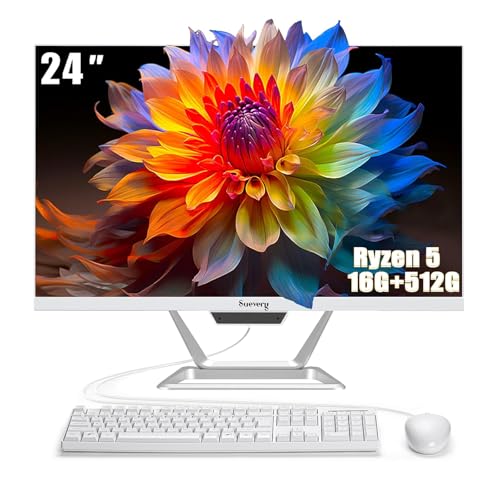
- Strongest rendering headroom in this set: suevery All-in-One PC 24, Ryzen 5, 16GB RAM, 512GB SSD — Check on Amazon
- Lenovo IdeaCentre AIO 3 24, Ryzen 5 5500U, 16GB RAM, 512GB SSD — Check on Amazon
- HP ProOne 600 G4 All-in-One, Core i5-8500T, 8GB RAM, 256GB SSD (Renewed) — Check on Amazon
- Dell OptiPlex 5260 All-in-One, Core i5-8400, 8GB RAM, 256GB SSD (Renewed) — Check on Amazon
See 2 more Amazon options
- HP 22-inch FHD All-in-One, Intel N100, 8GB RAM, 128GB SSD — Check on Amazon
- Lenovo IdeaCentre AIO 3i 22, Core i3-1115G4 Touch, 8GB RAM, 256GB SSD — Check on Amazon
Read the full guide ↓
Disclosure: As an Amazon Associate, reviewstook.com earns from qualifying purchases. Links to Amazon on this page are affiliate links; they cost you nothing extra. Listing details such as price and availability change often, so check the current Amazon listing before you buy.
You typed “1440p gaming” into a search for an all-in-one under $500, so this guide owes you the truth before it owes you a recommendation: no all-in-one at this price renders games natively at 1440p, and none of the six machines below even ships with a 1440p screen. Every pick here uses integrated graphics — the small graphics block built into the processor, not a separate graphics card — and every built-in display in this guide is a 1080p panel. If a listing, a headline or a search snippet suggests otherwise, it is marketing, and the reviews below will show you exactly where each machine’s real ceiling sits instead.
So what does “1440p gaming” honestly mean at $500 in this form factor? It means one of two things. Either the game renders internally at 720p to 1080p — the resolution the integrated graphics can actually draw — and is shown on the machine’s own 1080p screen, which is how all six picks work out of the box. Or, on the one pick whose listing documents a video output for a second screen, the all-in-one drives an external 1440p monitor: your desktop, browser and documents genuinely live at 2560×1440, while games still render at 1080p or below and are scaled up to fill the panel. That is a real and usable setup — a sharper desk with light games on it — but it is not native 1440p gaming, and no amount of settings-tweaking turns it into that. Readers who want games genuinely rendered at 1440p need a discrete graphics card, which means a tower or a mini gaming PC, and this guide links to those routes rather than pretending an all-in-one can follow you there.
Within those honest limits, the six machines still separate clearly. Two new machines pair a Ryzen 5 with 16GB of memory — and memory matters doubly here, because integrated graphics borrow their video memory from system RAM, so 16GB is both multitasking headroom and graphics headroom. Two renewed business machines bring six-core desktop-class processors in the budget tier, one of them with the DisplayPort that unlocks the external-1440p-monitor route. And two big-brand entry machines trade rendering power for a factory warranty or a touchscreen. Our starting points: the suevery 24 for the strongest new rendering specification in this set, the Lenovo IdeaCentre AIO 3 when it appears at or under the ceiling, and the renewed Dell OptiPlex 5260 if a 1440p monitor already sits on your desk. Below: a plain-English explainer of render versus display resolution, the quick picks, six detailed reviews graded on what each machine actually renders and outputs, a comparison table, a buying checklist, the mistakes this search term invites, and the questions buyers ask.
Render Resolution vs Display Resolution: The Two Numbers This Search Mixes Up
Every confusion in this category dissolves once you separate two numbers that listings love to blur. The render resolution is the number of pixels the graphics hardware actually draws each frame — it is set inside the game, and it is what decides how hard the hardware works. The display resolution is the number of physical pixels in the screen showing you the result. When the two differ, a scaler stretches the rendered image to fit the panel: a game rendered at 720p on a 1080p screen is drawn at 720p and enlarged, which is why it looks softer than a game rendered at the panel’s own resolution.
Apply that to this guide. All six built-in panels are 1920×1080. The integrated graphics in these machines can draw light, older and esports-style games at or near 1080p, and must drop the internal render to 720p–900p territory in heavier titles to stay smooth — figures we state as resolution classes rather than per-game frame rates, because integrated graphics performance varies too much by title and settings for a single number to be honest. Now add a 1440p monitor to the picture: the display resolution becomes 2560×1440, but the render resolution does not move. The same 720p–1080p image is simply stretched across more pixels. Text and desktop windows get visibly sharper, because the operating system really does draw those at the panel’s full resolution; games get bigger, not sharper.
Upscaling technology lives in exactly this gap, so it deserves a precise sentence or two. Modern upscalers render the game low and reconstruct a higher-resolution image: a “Quality” mode aimed at a 1440p output, for example, renders internally at roughly 1707×960 and rebuilds the 2560×1440 frame from it. AMD’s FSR is built into individual games and works on the integrated graphics in this guide, AMD and Intel alike, wherever a game includes it — it is a genuine help for smoothness at a given display resolution. NVIDIA’s DLSS, by contrast, requires an NVIDIA RTX graphics card. There is no NVIDIA hardware anywhere in this guide — there is none in any all-in-one at this price — so DLSS is simply not part of any purchase below, whatever a listing’s keyword stuffing implies. The honest summary: upscaling helps these machines hold their own 1080p screens; it does not promote them into 1440p gaming machines.
In this guide
Quick Picks
Short on time, or comparing several options at once? Each row below names a buyer type and the product that suits it, with a link to the listing.
| Buyer type | Pick | Why it stands out | Link |
|---|---|---|---|
| Best rendering headroom, new | suevery All-in-One PC 24, Ryzen 5, 16GB / 512GB | 16GB shared-memory pool behind the strongest new spec in this set | Check on Amazon |
| Best documented game-rendering combo | Lenovo IdeaCentre AIO 3 24, Ryzen 5 5500U | Six-core Ryzen with Radeon integrated graphics and 16GB RAM | Check on Amazon |
| Cheapest way in | HP ProOne 600 G4, i5-8500T (Renewed) | Six-core business machine in the budget tier — check price on Amazon | Check on Amazon |
| Best for an external 1440p monitor | Dell OptiPlex 5260, i5-8400 (Renewed) | Documented DisplayPort — the only confirmed second-screen route here | Check on Amazon |
| Brand-new with warranty, light duties | HP 22-inch All-in-One, Intel N100 | New HP at the ceiling — but read the storage warning | Check on Amazon |
| Touchscreen for casual play | Lenovo IdeaCentre AIO 3i 22, i3-1115G4 | FHD touch panel and a DVD drive in a 21.5-inch body | Check on Amazon |
How These Picks Were Chosen
The budget was applied to the whole computer — screen, processor, memory, storage and Windows licence together — because that is the entire point of an all-in-one, and every product below is a real Amazon listing in this budget tier in the United States. Prices move, so check the live price on Amazon before you buy rather than relying on any figure quoted elsewhere. Two of the six are renewed business machines, because at this budget they are a third of the realistic market, and leaving them out would misrepresent what $500 does.
Because this guide answers a 1440p-gaming search, each pick was graded on three separate questions, and the reviews keep the answers separate. First, render: what can the integrated graphics actually draw — which processor and graphics block does the listing document, and how much system memory is there for that graphics block to borrow? Second, display: what panel does the machine ship with — size, resolution, touch or not? Third, output: does the listing document a video output that could feed an external 1440p monitor? On that third question we worked only from what the base research documents: one pick’s listing names DisplayPort, one names an HDMI port without the research pinning down its direction, and for the rest no video output is documented at all — so no output capability is claimed for them, and the reviews say so rather than guessing from product photos.
We did not use these products ourselves. We read the maker listings and specification pages and compared processor class, core counts, memory size, internal storage — internal, a distinction this category abuses, since listings exist that reach a headline storage number by adding an external drive to the box — display claims, documented ports, included peripherals and operating system. Listings that pad storage arithmetic were not excluded, but the arithmetic is called out wherever it happens. We also applied a completeness filter (an all-in-one should arrive as a working desk: webcam, Wi-Fi, keyboard and mouse present or honestly absent) and an exit filter (these machines are barely upgradeable, so the fixed configuration has to be one you can live with for the machine’s whole life — or, for the renewed business models, one a technician can open and service).
The 6 Best All-in-One PCs for 1440p Gaming Under $500
suevery All-in-One PC 24 — Ryzen 5, 16GB RAM, 512GB SSD
Who it suits: Home buyers who want the most game-rendering headroom a new all-in-one offers under this budget — light and older games played on the built-in screen — and who are comfortable with a smaller Amazon brand rather than a household name.
Graded on this guide’s three questions, this machine leads the new picks on the first one. Behind its 23.8-inch Full HD screen sits an AMD Ryzen 5 processor — the listing records it at up to 3.7GHz, and does not fully pin the exact sub-model, so neither do we — with integrated Radeon graphics, 16GB of DDR4 memory and a 512GB SSD, plus a keyboard and mouse in the box. The 16GB is the specification that matters most for gaming here: integrated graphics hold their frame buffer and textures in system memory, so this machine’s graphics block borrows from a pool twice the size of the 8GB picks’, while Windows and the game still have room to breathe. In practice it renders the light end of a game library — older titles, casual games, esports-style games at modest settings — at or near its panel’s 1080p, dropping the internal render resolution in heavier titles like everything else in this guide.
On display and output, the story is simpler and shorter. The display is the built-in 1080p panel: sharp for text and video, and the ceiling for everything the machine shows. Our base research documents no video output for this listing, so no external-monitor capability is claimed — if you already own a 1440p monitor, treat this pick as a one-screen machine unless the live listing shows you an output we could not verify, and check there before ordering. On price, finally, check the live price on Amazon before you order: this is a budget-tier new 24-inch machine with 16GB of RAM, and smaller-brand prices move more than big-brand ones. Two cautions from the base research carry over unchanged: the listing markets this machine with gaming language its integrated graphics do not cash out — buy it as the strong everyday-and-light-gaming machine it is — and a smaller brand means a thinner support network, so read the seller’s warranty and return terms on the listing and keep the box through the second week.
- 16GB of memory gives the integrated graphics the largest shared pool in this guide — a real rendering advantage.
- Ryzen 5 pace behind a 23.8-inch Full HD screen, 512GB SSD, keyboard and mouse included.
- Budget-tier new pick with this specification — check the live price on Amazon before you order.
Honest limitation: Integrated graphics only despite the listing’s gaming language, no documented video output for an external 1440p monitor, and small-brand support rather than a national service network.
Choose it if your games will live on the built-in screen and you want the strongest new rendering specification in this set. Skip it if feeding an external 1440p monitor is the plan — that is the renewed Dell below — or if a big-brand warranty matters more than the spec sheet.

Lenovo IdeaCentre AIO 3 24 — Ryzen 5 5500U, 16GB RAM, 512GB SSD
Who it suits: Buyers who want the best-documented game-rendering combination in this set — a known processor with known integrated graphics and 16GB of memory — from a major brand with a real support network.
Where the suevery’s processor is partly anonymous, this pick’s is fully specified, and it is the strongest rendering silicon in the guide. The Ryzen 5 5500U is a six-core, twelve-thread chip (2.1GHz base, up to 4.0GHz boost, per Lenovo’s specifications) with integrated Radeon graphics — a laptop-class processor, which is standard practice in all-in-ones and no criticism. Paired with 16GB of DDR4 memory, it is the configuration most likely to hold a smooth render in the light and older games this category can play: six real threads for the game, a comparatively capable integrated graphics block, and enough shared memory that neither is starving the other. It remains, to be unambiguous, an integrated-graphics machine rendering at or below its panel’s resolution — 1080p on a good day in a light title, lower internal resolutions in heavier ones, with in-game FSR helping where a title includes it. There is no DLSS here, because there is no NVIDIA hardware here.
The rest of the package matches the base guide’s findings: a 23.8-inch Full HD display, a 512GB SSD, Windows 11, and a built-in DVD RW drive — a feature that sounds antique until a school, a tax archive or a family’s disc collection makes it the most useful slot on the machine. On the output question, our research documents no video output for this model, so like the suevery it is graded as a one-screen machine: its 1080p panel is both its display and its ceiling. The buying discipline is about price and configuration. This is an older model in Lenovo’s line, frequently sold on Amazon by third-party sellers whose prices wander above and below this guide’s ceiling, so check the live price on Amazon: at or under $500, showing the 16GB/512GB F0G1008MUS configuration — this family was sold in several — it is arguably the best-balanced new all-in-one here. Above the ceiling, or showing a lesser configuration, walk past it toward the suevery or the step up to the $700 tier.
- Six-core Ryzen 5 5500U with Radeon integrated graphics — the strongest documented rendering combination in this guide.
- 16GB RAM and a 512GB SSD, so the graphics block shares a generous memory pool.
- Lenovo support network, 23.8-inch Full HD screen and a rare built-in DVD RW drive.
Honest limitation: An older model sold through third-party sellers, so live price and exact configuration vary — and its panel is 1080p with no documented external-output route to a 1440p screen.
Choose it if you catch the correct configuration at or under $500 and want big-brand backing with the best light-gaming render in the set. Skip it if the live listing sits well above the ceiling or shows a lesser configuration — the badge is not worth a premium.
HP ProOne 600 G4 All-in-One — Core i5-8500T, 8GB RAM, 256GB SSD (Renewed)
Who it suits: Budget-first buyers — home offices, small businesses, schools, reception desks — who want genuine business hardware and Windows 11 Pro in the budget tier, and who accept that “renewed” means a previous life in an office.
On rendering, split this machine in two, because its halves belong to different tiers. The processor half is strong: the Core i5-8500T is a six-core chip (2.1GHz base, up to 3.5GHz turbo) from Intel’s 8th generation, and six real cores still out-work the brand-new entry processors elsewhere in this guide for everyday multitasking and for feeding a game engine. The graphics half is the modest one: Intel UHD Graphics 630 is an older integrated block, a step behind the Ryzen picks’ Radeon graphics for games, suited to older titles, casual games and esports-style games at low internal render resolutions on its 21.5-inch Full HD screen. The 8GB of memory is shared with that graphics block, which is the tightest arrangement among the six-core picks. None of this is a criticism for a budget-tier renewed machine — check the live price on Amazon — but it fixes this machine’s role: the cheapest complete desk in the guide, with light gaming as a bonus, not a headline.
Display and output are correspondingly plain. The panel is 21.5-inch Full HD — smaller than the 23.8-inch screens above — and our research documents no video output for this listing, so it is graded as a one-screen machine with no verified route to an external 1440p monitor. The renewed terms from the base research apply in full: a professionally inspected, tested and cleaned ex-fleet machine running Windows 11 Pro, shipping with keyboard and mouse, with accessories that may be compatible replacements rather than original HP parts, and Wi-Fi and Bluetooth provided in some listings by USB adapters rather than internal cards — confirm which arrangement the specific offer in front of you includes. The warranty is the refurbisher’s or Amazon Renewed’s, not a factory one. The compensating virtue is serviceability: business all-in-ones of this generation were built to be opened, and memory and storage sit behind panels a technician can service, making this one of the more upgradeable picks in a category of sealed boxes. Buy from a listing with a clear return window and photograph the machine’s condition when it arrives.
- Six-core i5-8500T and Windows 11 Pro — business substance no new machine in this budget tier matches.
- Budget-tier renewed pick — check the live price on Amazon — with keyboard and mouse in the box.
- Serviceable business design: memory and storage are technician-replaceable.
Honest limitation: UHD 630 integrated graphics and 8GB of shared memory cap game rendering at the light end, the screen is the smaller 21.5-inch size, and it is a renewed machine with a refurbisher warranty.
Choose it if the lowest price for a complete, capable desk is the priority and light gaming is a sometime thing. Skip it if rendering headroom or a documented external-monitor output is the point of the purchase — spend the difference on the picks above or below.

Dell OptiPlex 5260 All-in-One — Core i5-8400, 8GB RAM, 256GB SSD (Renewed)
Who it suits: The renewed-business buyer who owns, or plans to buy, a 1440p monitor — this is the one pick whose listing documents the output that can feed it — and who values Dell’s fleet hardware and a USB-C port.
Start with the output, because it is this machine’s reason to lead a 1440p-gaming guide. The renewed listing documents Wi-Fi, Bluetooth, a USB-C port and DisplayPort alongside the keyboard and mouse. That DisplayPort is the only verified second-screen connection in this set, and it changes what the machine can honestly offer: connect a 1440p monitor and your desktop, browser, documents and video genuinely run at 2560×1440, drawn at full resolution by the operating system, while games render internally at 1080p or below on the Intel UHD Graphics 630 and are scaled up to fill the larger panel. That is the truthful version of “1440p” available under $500 in an all-in-one — a 1440p desk with 1080p-class gaming on it — and for a mixed work-and-play desk it is a legitimately attractive shape. What it is not is native 1440p rendering, and no setting changes that.
The underlying computer mirrors its HP rival: a Core i5-8400 — six cores, up to 4.0GHz; the listing title’s stray “quad-core” wording is an error, and the detailed specification is the six-core part — with 8GB of DDR4 memory, a 256GB SSD, a 21.5-inch Full HD built-in display and Windows 11 Pro, in Dell’s serviceable fleet chassis. On its own screen it renders the same light class of games as the ProOne, through the same UHD 630 graphics sharing the same 8GB. The renewed cautions are also the same shape, and they matter: the machine is professionally inspected, tested and cleaned, but it is sold by a third-party refurbisher, and condition grade, warranty and even whether the Wi-Fi is internal or a USB dongle vary between listings of this identical model — two offers with the same title can be meaningfully different purchases. Check the live price on Amazon for it on the day for exactly that reason; renewed examples of this model sit in this budget tier, and the better-graded unit with the clearer warranty is the one to take on the day. Between this and the ProOne, this Dell’s documented DisplayPort is the deciding edge whenever a second, larger screen is part of the plan.
- Documented DisplayPort — the only verified route in this guide to a true 1440p desktop on an external monitor.
- Six-core i5-8400 with Windows 11 Pro in Dell’s serviceable fleet chassis, USB-C included.
- The documented listing includes keyboard, mouse, Wi-Fi and Bluetooth.
Honest limitation: Games still render at 1080p or below through UHD 630 graphics — the 1440p is display resolution, not render resolution — and as a renewed, seller-dependent listing, grade and warranty vary by offer.
Choose it if a 1440p monitor is already on your desk or firmly in the plan, and you want the sharp desktop with light gaming scaled onto it. Skip it if you cannot verify the specific seller’s condition grade and returns terms, or if native 1440p rendering is what you actually want — no all-in-one here offers it.

HP 22-inch FHD All-in-One — Intel N100, 8GB RAM, 128GB SSD
Who it suits: Buyers who want a brand-new, big-brand machine with a manufacturer’s warranty for light duties — a kitchen counter, a homework desk, a reception point, a relative’s first computer — and whose gaming is the casual, browser-and-classics kind.
Rendering is where this pick’s honesty matters most, because it is the weakest renderer in the guide and no review should dress that up. The Intel N100 is a four-core, four-thread efficiency processor (up to 3.4GHz turbo) with Intel integrated graphics, paired with 8GB of memory that the graphics block also borrows from. That combination runs streaming video, documents, video calls and genuinely light games — casual titles, older games at low internal resolutions — and it is not a machine for a modern game library at any resolution, 1440p least of all. Its virtues are elsewhere: a 21.5-inch Full HD display in a compact white body, a built-in webcam, Wi-Fi 6, Ethernet, a wired keyboard and mouse in the box, Windows 11 Home, and a factory warranty. Check the live price on Amazon before you order — this listing sits in this guide’s budget tier, sold through an Amazon storefront.
The output question needs care, because it is easy to get wrong from a spec sheet. The listing documents an HDMI port; our base research does not pin down whether that port is an output that can drive a monitor or an input for showing another device on this screen, and all-in-ones ship with both kinds. So the honest grading is: an HDMI port is present, its direction is unverified in our research, and if feeding an external 1440p monitor matters to you, confirm the port’s direction on the live listing before ordering — do not buy on the assumption. The storage warning is firmer, and it is the most important paragraph in this review. This configuration’s internal drive is 128GB, which Windows, its updates and a modest app collection will steadily erode — and this corner of the market is where storage arithmetic gets creative: reporting on this very HP model family has documented Amazon bundles advertising “384GB” built from a 128GB internal drive plus 256GB in an external docking accessory. With this machine, keep reading any listing until the internal drive’s size appears by itself, separated from bundle accessories. If your life lives in the cloud and the browser, this is a clean new answer; if you keep a local game or media library, the 512GB picks above are worth more than the new-machine smell.
- Factory-fresh HP: manufacturer warranty, Wi-Fi 6, a built-in webcam and the peripherals in the box.
- New HP in this budget tier — check the live price on Amazon before you order.
- A compact 21.5-inch footprint made for counters, small desks and shared family rooms.
Honest limitation: The N100 and 8GB of memory make it the weakest renderer here, its HDMI port’s direction is unverified in our research, and the 128GB internal drive is this guide’s smallest — beware bundle listings that pad the storage figure with external drives.
Choose it if new-with-warranty matters most, the workload is genuinely light, and gaming means casual titles on the built-in screen. Skip it if you store games or media locally, multitask heavily, or are counting on an external monitor — 128GB, an N100 and an unconfirmed port will frustrate you in turn.

Lenovo IdeaCentre AIO 3i 22 — Core i3-1115G4 Touch, 8GB RAM, 256GB SSD
Who it suits: Families and shared-space buyers who specifically want a touchscreen — children doing schoolwork and playing touch-friendly casual games, a kitchen or hallway information point, anyone who reaches for the screen by instinct.
Touch is this machine’s reason to exist, and it interacts with gaming in one specific, honest way: the casual, tap-driven end of the game world — puzzle games, board and card games, children’s titles, media apps — is genuinely nicer on a 21.5-inch Full HD touch panel than with a mouse hunted across a kitchen counter. Beyond that end, the rendering story is the most modest of the six. The Core i3-1115G4 is a dual-core, four-thread chip (up to 4.1GHz) with strong single-core pace for everyday apps and Intel integrated graphics sharing 8GB of memory; two cores are the fewest in this guide, and they cap the machine at light games rendered at low-to-panel resolutions, with heavy multitasking equally out of scope. Like its larger Lenovo sibling it includes a built-in DVD RW drive, runs Windows 11, and sits behind the same 1080p ceiling — touch changes how you drive the screen, not how many pixels the graphics can draw.
On outputs, our research documents none for this model, so it is graded as a one-screen machine: no verified path to an external 1440p monitor. Pricing is the other discipline this pick demands. This is an older model sold by third-party sellers whose prices vary, so check the live price on Amazon — buy it when a listing shows it at or under $500, and walk past it when sellers ask a nostalgia premium. Touch is worth having at the right price and not worth overpaying for: if the live listing is over the ceiling, the non-touch Lenovo AIO 3 above is the stronger computer in every rendering respect, and a touchscreen does not close the gap against two extra cores’ worth of processor, double the memory and double the storage.
- Full HD touchscreen — the only touch display in this guide, and a real difference for casual and family use.
- Everyday apps move at proper Core i3-1115G4 pace, and a DVD RW drive serves disc households.
- Lenovo’s big-brand build quality in a compact 21.5-inch body meant for shared spaces.
Honest limitation: A dual-core processor is the weakest rendering base here, storage is a modest 256GB, and third-party pricing varies — buy only at or under the ceiling.
Choose it if touch is a genuine requirement, your games are the casual kind, and the live price respects the budget. Skip it if you would be paying a premium for the touchscreen while giving up the cores, memory and storage you would use every day.

Comparison Table
| Product | Display | Processor / RAM / Storage | 1440p reality | Link |
|---|---|---|---|---|
| suevery All-in-One PC 24 | 23.8″ FHD | Ryzen 5 / 16GB / 512GB SSD | Renders light games at up to 1080p on its own screen; no documented video output | Check on Amazon |
| Lenovo IdeaCentre AIO 3 24 | 23.8″ FHD | Ryzen 5 5500U / 16GB / 512GB SSD | Strongest documented render in the set, still capped by its 1080p panel | Check on Amazon |
| HP ProOne 600 G4 (Renewed) | 21.5″ FHD | i5-8500T 6-core / 8GB / 256GB SSD | Light rendering via UHD 630; one-screen machine, no documented output | Check on Amazon |
| Dell OptiPlex 5260 (Renewed) | 21.5″ FHD | i5-8400 6-core / 8GB / 256GB SSD | Documented DisplayPort: true 1440p desktop externally, games scaled from ≤1080p | Check on Amazon |
| HP 22-inch All-in-One | 21.5″ FHD | Intel N100 / 8GB / 128GB SSD | Casual rendering only; HDMI port present, direction unverified in our research | Check on Amazon |
| Lenovo IdeaCentre AIO 3i 22 | 21.5″ FHD Touch | i3-1115G4 / 8GB / 256GB SSD | Touch-driven casual play at 1080p; no documented video output | Check on Amazon |
How to Choose an All-in-One for 1440p Gaming Under $500
- Separate the three numbers before anything else: render, display, output. Render is what the graphics hardware draws, display is the panel in front of you, output is whether a documented port can feed a bigger screen. Every disappointment in this category comes from letting one number impersonate another — a 1440p monitor connected to integrated graphics is a display upgrade, not a rendering upgrade.
- Accept the panel reality: everything here is 1080p. All six built-in screens are Full HD, which is genuinely sharp for text, documents and video at 21.5–23.8 inches. No pick in this guide shows you a 1440p image from its own screen, and any listing language implying a higher-resolution panel at this price should be read as an error until the specification proves otherwise.
- If a 1440p monitor is in the plan, the documented output is the whole decision. One pick here — the renewed Dell — has a listing that documents DisplayPort. One other documents an HDMI port whose direction our research could not verify. For the rest, no output is documented at all. Check the live listing’s port list yourself before ordering any machine you intend to plug into an external screen, and treat an unlisted output as an absent one.
- Treat 16GB of memory as the gaming line, not a luxury. Integrated graphics borrow system memory for their frame buffer and textures. On an 8GB machine, Windows, the game and the graphics block divide 8GB between them; on a 16GB machine the same division stops being a fight. For any gaming at all on integrated graphics, the 16GB picks are the ones that age gracefully.
- Rank processors by class, and graphics by honesty. In this field: the six-core Ryzen 5 5500U carries the strongest documented integrated graphics; the white-box Ryzen 5 configuration sits alongside it on everyday work; the renewed six-core Core i5 chips have strong processors behind an older, weaker UHD 630 graphics block; the dual-core i3 is a light-use chip with good manners; the N100 is an efficiency chip for genuinely light duties. A newer year on the box does not beat two extra cores — or a better graphics block.
- Judge storage by one figure: the internal drive, stated alone. Hunt the listing until you find the size of the drive inside the machine, with no accessories added in. Listings in this band add external drives and dock drives into headline totals. 128GB internal is tight, 256GB is workable, 512GB is comfortable — regardless of what accessories share the box — and a game library is exactly the kind of thing that exposes the difference.
- Decide new versus renewed deliberately — it is the real fork in this market. New buys a factory warranty and current ports, paid for with an entry processor. Renewed business buys a six-core processor, Windows 11 Pro and, in the Dell’s case, the documented DisplayPort, paid for with age and a refurbisher’s warranty. Neither is the budget version of the other; they are different products.
- Give the word “gaming” no weight unless a discrete GPU is named. Every pick here uses integrated graphics, which runs older, casual and esports-style games at modest settings — and not modern AAA titles, at 1440p or any other resolution. If a listing says “gaming” and the specification names no graphics card, there is no gaming hardware in the box.
- Plan for zero upgrades, except where stated. Processors and graphics are fixed for life in every pick here, and most consumer all-in-ones make even memory awkward to reach. The exception is the renewed business pair, whose memory and storage a technician can service. Buy the configuration your future self needs, because it is the configuration your future self gets.
- Keep the packaging until the second week. Run every port — especially any video output you are counting on — plus the webcam, the speakers and a full Windows update cycle in the first days. An all-in-one is a single unit: a fault anywhere is a return of everything, so find faults while returns are painless.
If You Actually Want Games Rendered at 1440p
Some readers will reach this section and recognise themselves: the all-in-one shape is attractive, but the games come first and 1440p is a requirement, not a search habit. For you, the honest answer is that this category cannot follow — native 1440p rendering needs a discrete graphics card with the power and memory to draw 2560×1440 every frame, and no all-in-one under $500 contains one. The routes that do exist at this budget are one shelf over. A tower built or bought for the purpose can carry an entry discrete card and drive a 1440p monitor with a mixture of native rendering in lighter titles and Quality-mode upscaling in heavier ones — see Best 1440p Gaming PC Under $500 and, at the strictest budget, Best 1440p Gaming PC Under $400. A mini gaming PC trades the all-in-one’s built-in screen for the same discrete-graphics route in a small box beside a monitor you choose — see Best Mini Gaming PC Under $500 and the wider field in Best Gaming PC Under $500.
Readers who are staying with the all-in-one shape — because the desk, the user or the room demands it — should simply calibrate what the shape gives them at neighbouring budgets and angles: the same form factor a step up in Best All In One PC Under $700, the same 1440p question asked at other ceilings in Best All In One PC For 1440p Gaming Under $400 and Best All In One PC For 1440p Gaming Under $700, and this exact budget examined for first-time buyers in Best All In One PC For Beginners Under $500. None of those routes changes the rendering ceiling; all of them price it honestly, which is the most this search term can ask of any guide.
Common Buying Mistakes
- Reading “1440p” in a search result or listing headline as a panel specification. Every built-in screen in this guide is 1080p; the search term describes an ambition, not a feature on offer.
- Buying a 1440p monitor and expecting games to render at 1440p. The monitor raises the display resolution; the integrated graphics still draw at 1080p or below, and the image is scaled — bigger, not sharper.
- Assuming a documented HDMI port must be an output. All-in-ones ship with HDMI inputs as well as outputs; if the direction is not stated, verify it on the live listing before counting on an external screen.
- Believing a headline storage total that includes external or dock drives. Only the internal drive is the computer’s storage; the rest is an accessory trailing a cable.
- Paying a “gaming” premium for integrated graphics. If no discrete GPU is named in the specification, there is no gaming hardware in the box — at any resolution.
- Forgetting that integrated graphics eat system memory. An 8GB machine running a game is really a machine dividing 8GB three ways; the saving over a 16GB pick is repaid in stutter.
- Expecting DLSS on a machine with no NVIDIA hardware. DLSS requires an RTX card; FSR, where a game includes it, is the upscaler available to this entire guide.
- Paying over the ceiling for the third-party-sold Lenovos. Both are buy-at-or-under-$500 picks; above it, their own guide-mates are better computers for the money.
- Dismissing renewed business machines out of hand — or buying one without checking the seller’s grade, warranty and return window. Either reflex costs money.
- Assuming an all-in-one can be upgraded into a gaming machine later. It cannot — there is no graphics-card slot waiting inside. Buy the end-state configuration now, or buy a different form factor.
Final Recommendation
- Strongest new rendering specification: suevery All-in-One PC 24.
- Best documented game-rendering combo, big brand: Lenovo IdeaCentre AIO 3 24, when listed at or under $500 in the right configuration.
- Owners of a 1440p monitor: Dell OptiPlex 5260 (Renewed), for its documented DisplayPort.
- Hard-budget desks: HP ProOne 600 G4 (Renewed).
- Brand-new, light-duty, warranty-first: HP 22-inch All-in-One, with its storage limit understood.
- Touchscreen for family and casual play: Lenovo IdeaCentre AIO 3i 22, bought only at or under the ceiling.
Our top two for this search are the suevery 24 — the strongest new rendering specification our research found under $500, its Ryzen 5 and 16GB of shared memory giving its integrated graphics the most room to work on its own 1080p screen — and the renewed Dell OptiPlex 5260, the only pick that can put a genuine 1440p desktop in front of you through its documented DisplayPort, with games scaled up honestly beneath it. Between them they cover the two truthful shapes of this search: the best rendering an all-in-one does on its own screen, and the best use an all-in-one can make of a 1440p screen you already own. The Lenovo IdeaCentre AIO 3 splits the difference for big-brand buyers who catch it at or under the ceiling; the ProOne is the budget answer; HP’s 22-inch machine is the new-with-warranty answer for light duties; the touch Lenovo is the family answer. Whichever you choose, read the internal storage figure on the live listing, confirm the configuration, the seller and any video output you are relying on, and check the live price before you order.
Frequently Asked Questions
Can any all-in-one under $500 actually game at 1440p?
Not natively. Native 1440p gaming means the graphics hardware draws 2560×1440 every frame, and that requires a discrete graphics card — which no all-in-one at this price contains. Every machine here uses integrated graphics and renders games at 1080p or below. What is achievable is a 1440p display experience: one pick documents a DisplayPort that can drive a 1440p monitor for a genuinely 1440p desktop, with games scaled up to fill it.
What does “1440p gaming” on these machines honestly look like?
On the built-in screens: light, older and esports-style games rendered at or near the panels’ 1080p in the stronger picks, and at lower internal resolutions — 720p to 900p classes — in heavier titles or weaker picks, then scaled to the screen. On an external 1440p monitor via the Dell’s DisplayPort: a sharp 1440p desktop and video, with that same 1080p-or-lower game image stretched across the larger panel. Perfectly playable for the right library; visibly softer than native rendering, because it is not native rendering.
Will a 1440p monitor make games look better on one of these PCs?
It will make the desktop look better and games look bigger. Text, windows and video are drawn by the operating system at the monitor’s full 2560×1440 and are noticeably sharper. Games are drawn by the integrated graphics at their own lower resolution and scaled, so they gain size, not detail — and on a larger, sharper panel, upscaling softness can actually be easier to see. Buy the monitor for the desk, not as a gaming upgrade for the machine.
Does FSR or DLSS change the answer?
FSR helps within the answer; DLSS is not in it. AMD’s FSR is built into individual games and works on the integrated graphics throughout this guide, AMD and Intel alike, reconstructing a higher-resolution image from a lower render — a Quality mode targeting a 1440p output, for instance, renders internally at roughly 1707×960. That is a real smoothness tool at a given display. DLSS requires an NVIDIA RTX graphics card, and no machine here — no all-in-one at this price — has one, so any listing implying DLSS support is telling you about its keywords, not its hardware.
Why does RAM matter so much for gaming on these machines?
Because integrated graphics have no memory of their own. A discrete card carries dedicated video memory; an integrated block borrows from system RAM, so on an 8GB machine the operating system, the game and the graphics share 8GB, and something gives — usually smoothness. The 16GB picks are not merely nicer multitaskers; their graphics blocks work from a pool twice the size, which is the closest thing to a graphics upgrade this category offers.
Which pick should I choose if I already own a 1440p monitor?
The renewed Dell OptiPlex 5260, because its listing documents the DisplayPort that can feed your monitor — verify the specific seller’s condition grade, warranty and Wi-Fi arrangement before ordering, as renewed offers of this model vary. One other pick documents an HDMI port whose direction our research could not confirm; check that live listing carefully if you are considering it for the same job, and treat every other pick as a one-screen machine.
Can I add a graphics card to an all-in-one later?
No. There is no expansion slot for one inside any pick here, and processors and graphics are fixed for the machine’s life. The renewed business models allow a technician to service memory and storage, which is the full extent of upgrading in this category. If a graphics card is in your future, it needs to be in a different form factor’s present — a tower or mini gaming PC — not in an all-in-one’s.
Is a renewed business all-in-one a safe buy?
It is a calculated one. Expect a machine that has been professionally inspected, tested and cleaned, warranted by the refurbisher or Amazon Renewed instead of the factory, possibly with compatible rather than original accessories in the box. The hardware underneath — six-core processors, serviceable chassis, Windows 11 Pro — is genuinely strong. Buy from a listing with a stated condition grade and a clear return window, test every port in the first week, and the calculation usually pays.
Where does the extra storage in some bundle listings actually live?
Because bundle sellers fold external drives, docking-station drives and flash drives into the headline figure. For this HP model family, a documented bundle reached its advertised 384GB by adding a 256GB accessory drive to a 128GB internal one. The internal drive — the only storage Windows, your apps and your games actually live on — is the number to find and compare.


